Context Engineering
Augment Context Engine: MCP Integration, Local vs Remote Indexing, and Token Economics

Sage Holloway
21 min read
Go back to blog
SHARE

The third grep pass still had not found the webhook handler. You knew the file existed. The agent did not. Meanwhile the token meter kept climbing on paths that were never going to matter.
Augment's Context Engine is a semantic codebase indexer exposed to AI coding agents through the Model Context Protocol (MCP). It pre-computes repository structure, dependencies, and git history (Context Lineage) so agents retrieve targeted file slices instead of expensive grep loops. Connect in Local mode via the Auggie CLI stdio watcher or Remote mode via hosted GitHub App indexing. MCP queries bill at the provider's public API token rate plus a 40% Augment service fee.
Last verified: 22 August 2026 (NotebookLM sources; no live CLI run on this pack).
Before I wired MCP retrieval into my stack, every large-repo session followed the same arc. Open files. Run glob. Run grep. Re-read half the tree. Repeat until the context window complained. After indexing, the same question often resolved in one query_codebase call. The model did not get smarter. The retrieval layer stopped making it do archaeology.
If you have ever watched an agent burn twenty tool turns hunting a symbol you could point to in thirty seconds, you already know why the augment context engine exists as a product category, not just a marketing phrase.
This page owns Augment Context Engine depth: what the indexer is, how Local and Remote MCP modes differ, how Context Lineage folds commit history into retrieval, and how token billing actually scales. For the practitioner checklist on curating agent context broadly, see context engineering best practices. For Anthropic's just-in-time exploration patterns and compaction tactics, see Anthropic context management. Those siblings cover different primaries. Here we stay on the Augment context engine feature and augment context engine mcp integration.
On this page
What Augment's Context Engine is (and what it is not)
Pre-computed semantic indexing vs just-in-time grep exploration
Token economics, cache reads, and MCP billing
Connect Context Engine MCP: Local vs Remote server modes
Context Lineage: how commit history enters retrieval
Platooning Claude Code and Auggie in one workflow
Troubleshooting file-ignore rules and large-repo indexing blind spots
FAQ
What Augment's Context Engine is (and what it is not)
Picture a city map drawn before you arrive, not a scavenger hunt where you ask strangers for directions at every corner. Streets, one-way signs, and which buildings connect to which utilities are already inked. When you need the billing office, you walk a straight line instead of opening every door on the block.
That map is useless if it describes last year's zoning. It is priceless if someone updates it every time a new wing opens.
Only after you feel that difference does the product name land cleanly. Augment's Context Engine is a semantic codebase indexer: a system that continuously maps repository structure, file dependencies, and recent git history so AI coding agents can pull precise slices through MCP instead of brute-force search.
Official docs describe it as deep semantic understanding for any agent that speaks Model Context Protocol. The Context Engine product page publishes benchmark figures and curation math. This guide treats those sources as ground truth for setup, billing, and integration paths.
Pre-computed semantic indexing beats brute-force grep for large repos.
Context engineering vs a codebase context engine
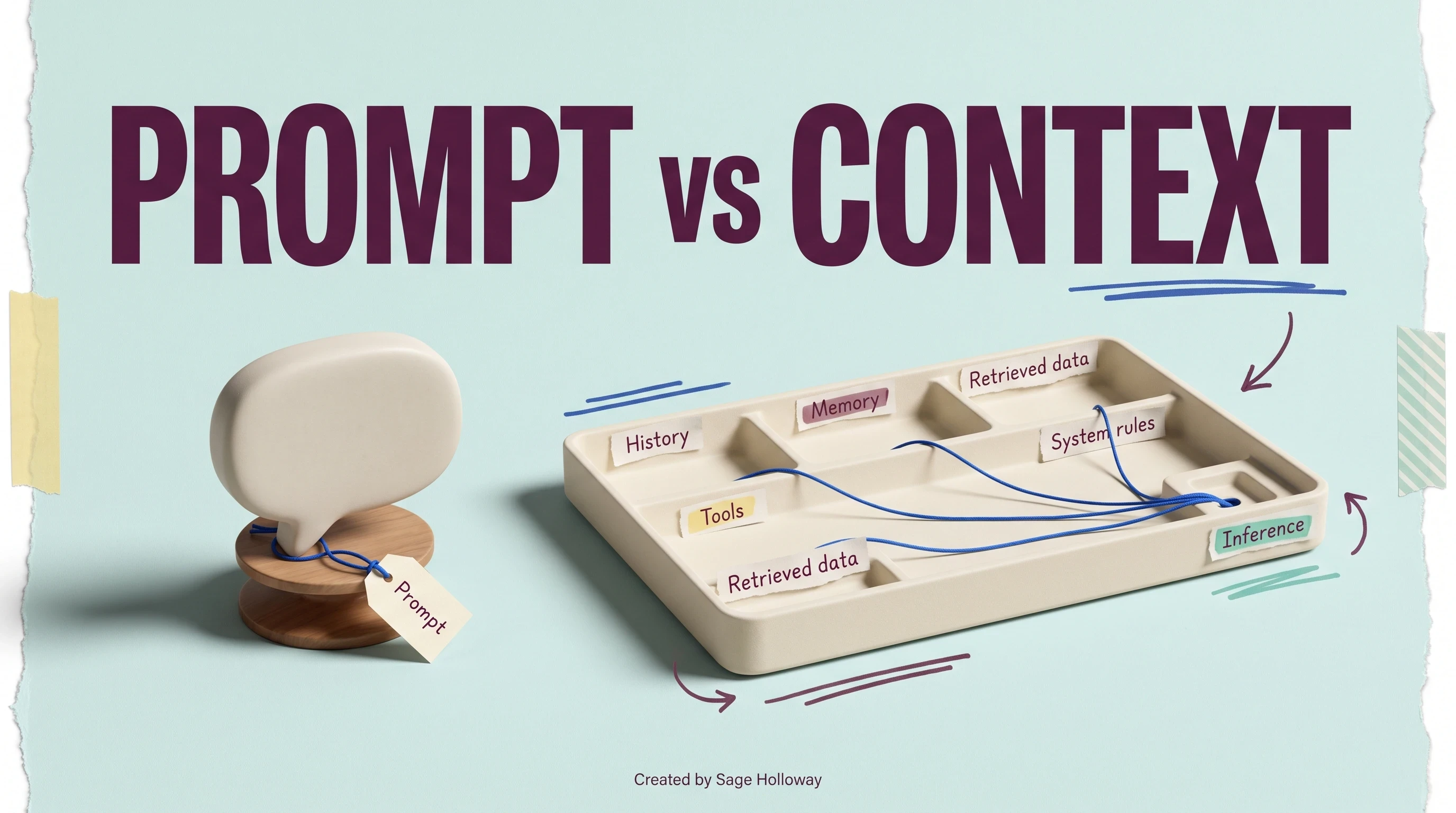
Context engineering is the practice of curating what enters an agent's window: prompts, tool outputs, memory, and history arranged so the model can act reliably. A context engine, in Augment's sense, is the infrastructure that pre-computes and serves that curated material from a live codebase.
You can engineer context by hand in every session. A context engine automates the map so engineering scales across repos and teammates. If you want the full practitioner layer stack, that job lives on context engineering best practices, not here.
Cosmos vs Context Engine MCP
Augment's Cosmos platform is the broader team orchestration layer for coordinated multi-agent workflows. The Context Engine MCP utility is the localized retrieval API underneath it: one tool surface (query_codebase) that any MCP client can call.
Do not conflate the orchestration suite with the indexer. This article covers the MCP retrieval layer and Auggie CLI wiring, not Cosmos deployment playbooks.
Codebase indexer vs enterprise data-layer context engines
Materialize and similar vendors use "context engine" language for operational data agents: live CRM rows, billing events, and SQL materialized views feeding business workflows. That is a different SERP job from a codebase indexer.
Augment maps source files and git history. Materialize maps customer and order objects in motion. If you need the enterprise data-layer angle, see the planned guide on Materialize context engines for operational agents. Here we stay on code retrieval only.
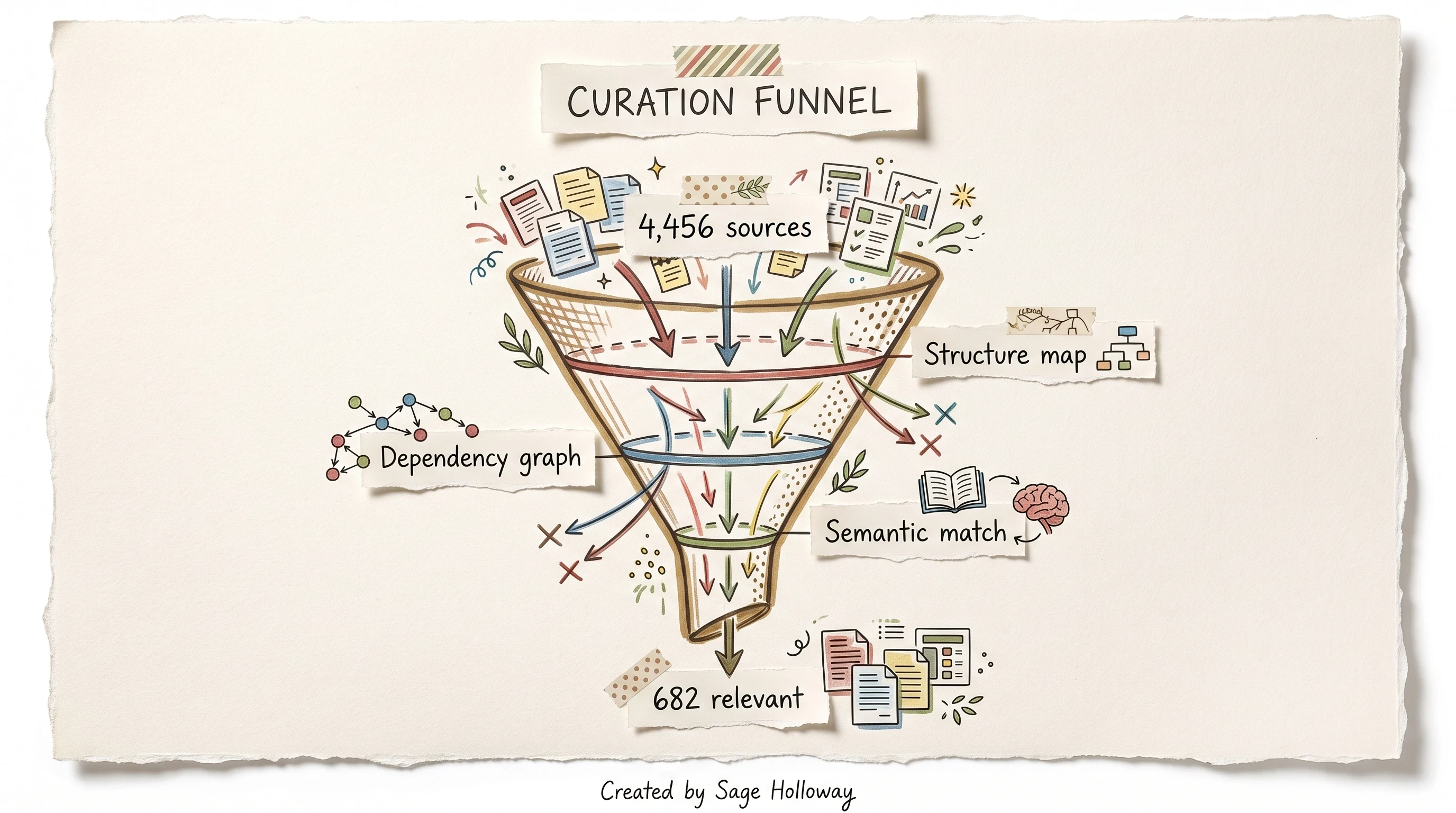
Intelligent curation shrinks noisy repos before agents see them. Product-page figures cite 4,456 sources filtered to 682 relevant retrieval chunks through structure mapping, dependency graphs, and semantic matching.
https://www.youtube.com/shorts/e40v5XxPWfw
That Codacy podcast clip features Vinay Perneti on customer demand for Context-as-API: programmatic ingestion of custom context sources beyond a local checkout. It frames where the product is heading without replacing the MCP setup steps below.
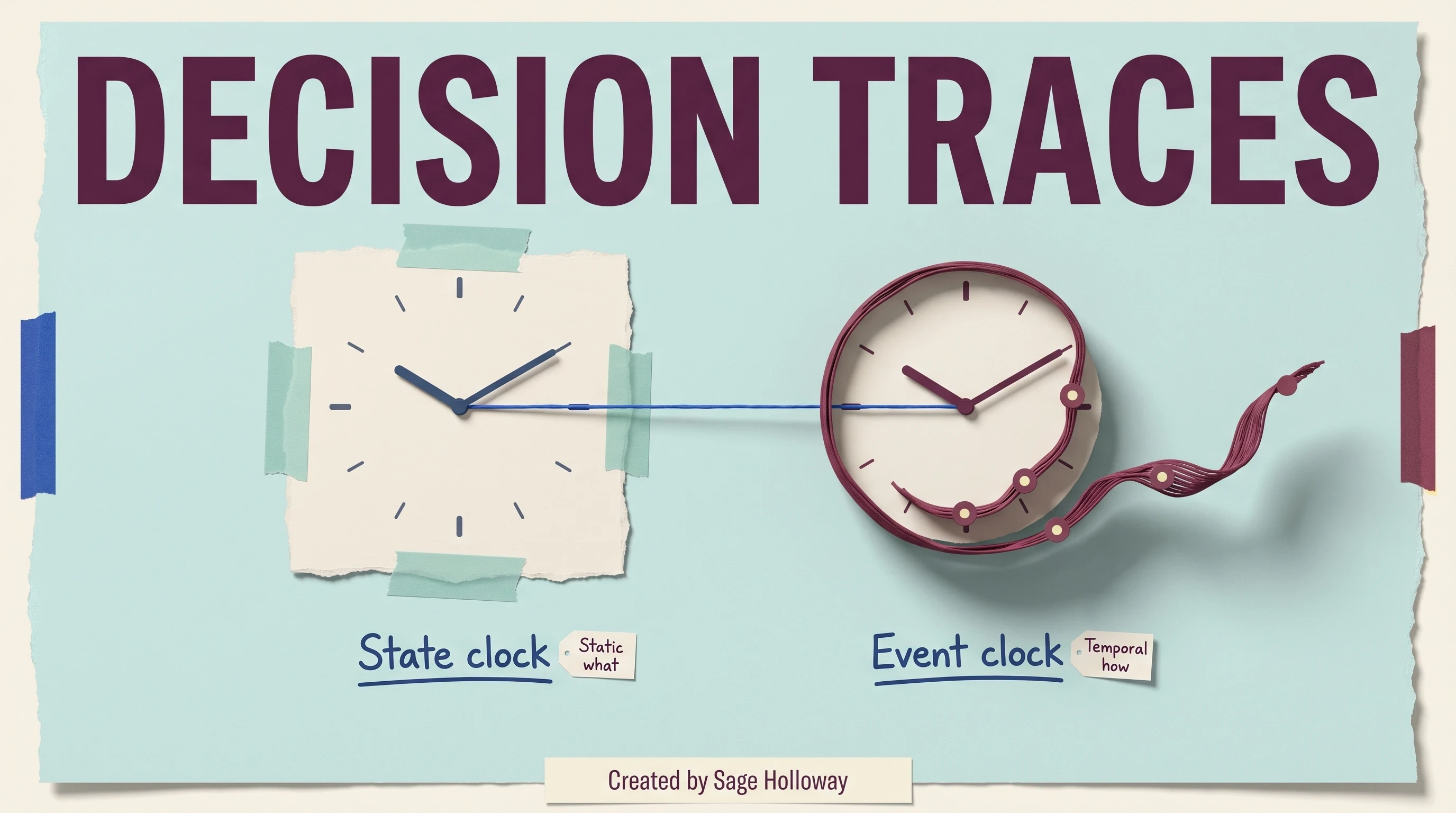
Before Context Lineage shipped, retrieval leaned on workspace files alone. Lineage adds commit harvest and Gemini 2.0 Flash summarization so historical "why" questions do not require replaying raw diffs into the prompt.
Pre-computed semantic indexing vs just-in-time grep exploration
Anthropic's agent guidance champions just-in-time (JIT) exploration: load CLAUDE.md up front, then let the agent loop on glob and grep until it finds the right neighborhood. That progressive disclosure works. It is also slow and token-hungry on monorepos where every wrong turn ships thousands of lines into context.
Augment's bet is the opposite shape: pre-computed semantic indexing. Structure, dependencies, and lineage summaries are built continuously. The agent asks query_codebase and receives targeted slices instead of conducting a filesystem survey in public.
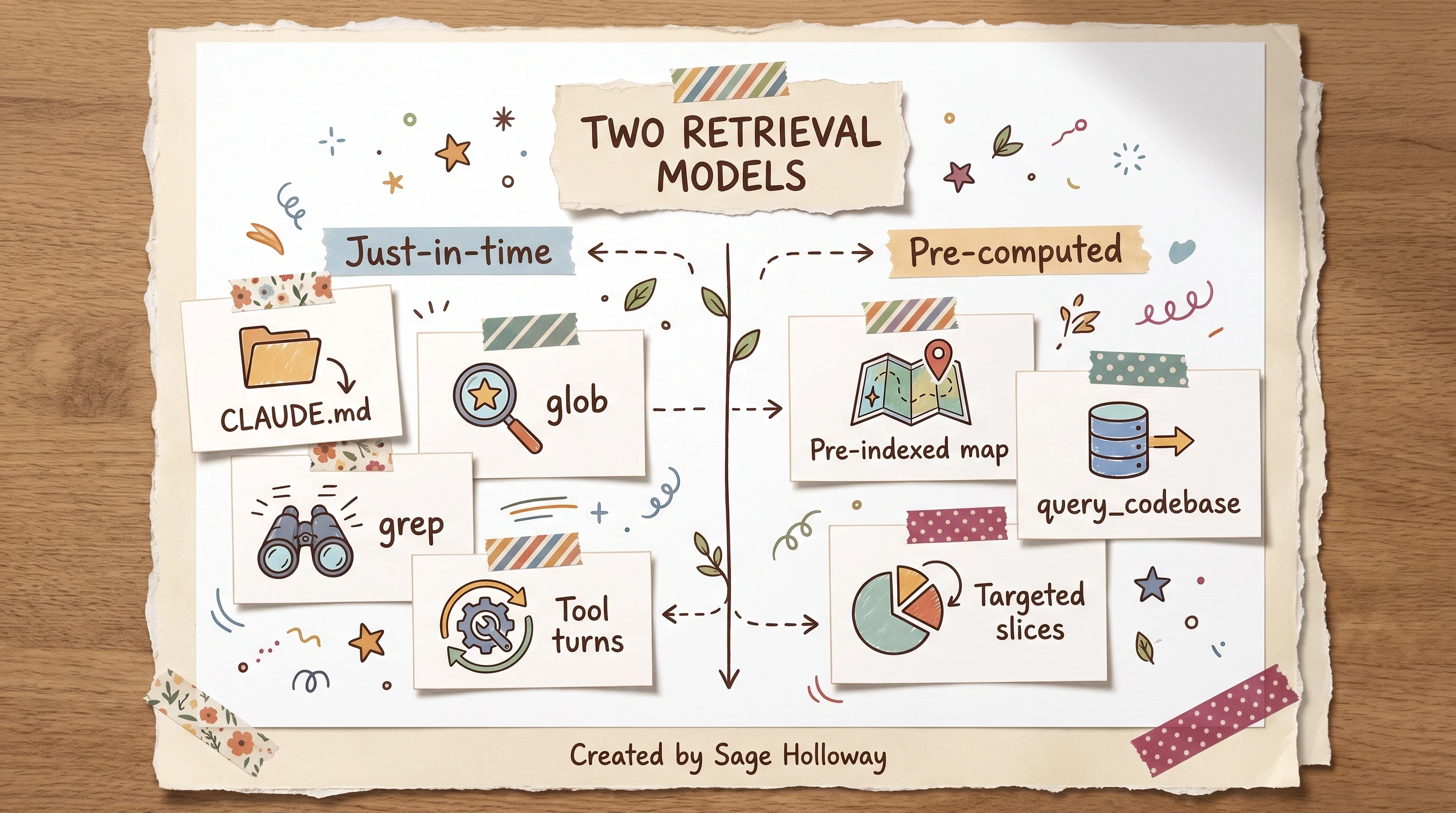
JIT exploration costs turns. Pre-computed indexing front-loads structure.
Claude Code also compacts long sessions by rewriting history: core architecture notes stay, redundant tool dumps go. That conversational compaction (Anthropic's long-horizon pattern) solves a different problem than repository indexing. Compaction trims what already entered the window. Indexing prevents irrelevant files from entering in the first place.
You are not choosing better models here. You are choosing control over convenience: pay indexing and query fees up front to avoid paying grep loops on every task.
Anthropic JIT exploration pattern
The JIT loop looks like this in practice:
Inject project rules and
CLAUDE.mdcontext immediately.Agent calls
globfor candidate paths.Agent calls
grepfor symbols and strings.Repeat until confidence or until the token budget screams.
Each iteration is intellectually honest. Each iteration also multiplies provider tokens and tool latency. On large trees, the loop becomes the task.
SWE-Bench token and pass-rate comparison
Augment publishes SWE-Bench Pro figures with Claude Opus 4.7 as the benchmark model context. Augment Context Engine consumed about 1.65 billion total tokens versus 2.35 billion for Claude Code's native retrieval pattern, with a comparable solve rate on the published product page.
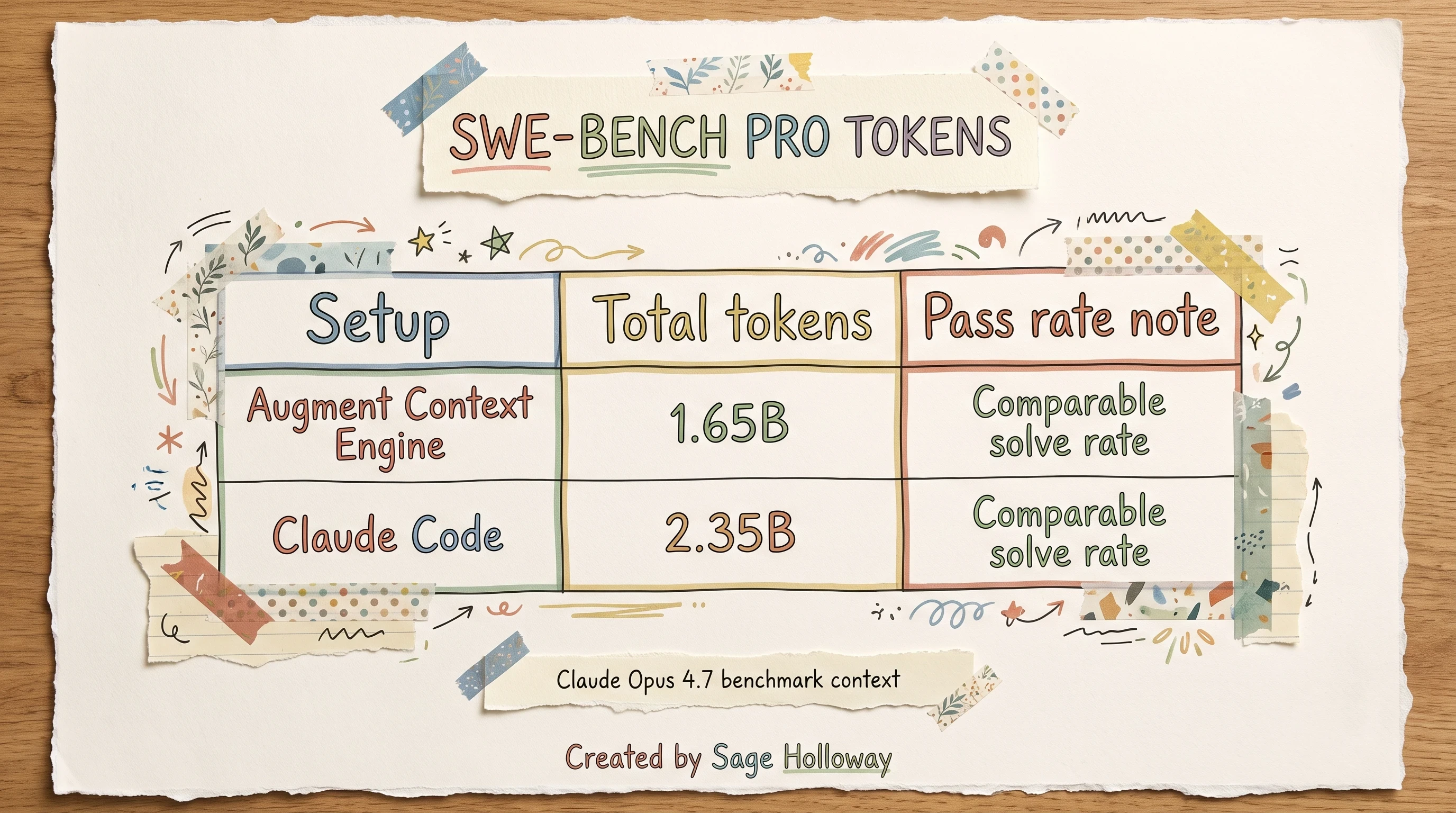
Augment used about 30 percent fewer tokens at a similar solve rate. Pass-rate wording follows Augment's "comparable solve rate" label; no extra percentage appears in official figures.
That delta is not magic. It is selection. The engine sends file slices the task touches instead of replaying broad search results every turn. Fewer exploratory branches mean fewer cache writes and fewer dead-end reads.
For Anthropic's own framing of JIT search and compaction, read Effective context engineering for AI agents. For Augment's retrieval-first counterpoint, read Augment's Context Engine is now available for any AI coding agent.
Token economics, cache reads, and MCP billing
Usage-based billing replaced older flat-message stories in community threads. Trust the current docs model, not expired promo copy.
Context Engine MCP queries bill as provider public API list price plus a 40% Augment service fee on the tokens those queries consume. Under active development, Augment estimates a typical band of $0.03 to $0.06 per query, depending on retrieval size. Every query also runs under a default 240 second timeout unless you override timeout_sec.
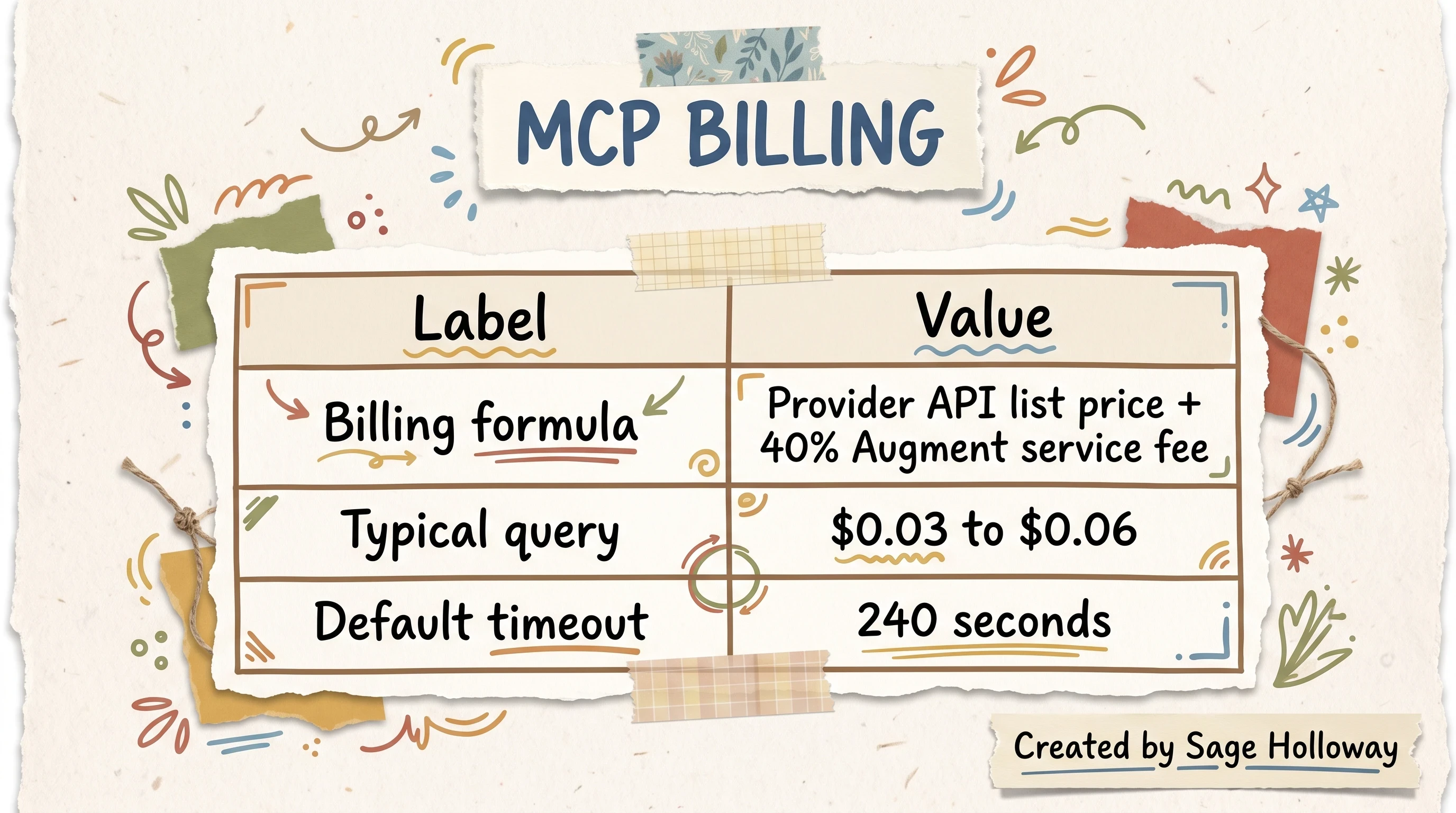
Queries bill at provider list price plus a 40 percent Augment fee. Typical query band and timeout come from official MCP docs.
Older Codacy-era interviews mention subscription friction that pushed some developers toward DIY vector stacks. That history explains forum energy. It does not override the ledger formula above.
Provider price plus 40% service fee
Think in three layers when you estimate a sprint:
Provider tokens at public list price for the model you select in
query_codebase.Augment service fee at 40% on top of that provider subtotal.
Session shape: wide architectural questions pull more chunks than narrow symbol lookups.
There is no hidden flat rate in current MCP docs. If your finance team models agent spend, give them the formula, not a guess from a 2025 blog comment.
Session audit and query-shaping tactics
Official docs tell you average query cost. They do not teach frugal query craft. That gap is where teams bleed budget.
Start with session audits. Export or skim MCP logs after a heavy day (paths below in troubleshooting). Count how many query_codebase calls fired, how many timed out at 240 seconds, and whether repeated questions differed only by wording.
Then narrow queries on purpose:
Ask for a subsystem, not "explain the entire repo."
Set
workspace_rootwhen monorepos contain unrelated trees.Pass
rules_pathwhen you already maintain scoped guidance files.Prefer JSON
output_formatonly when downstream automation needs structure; text answers are often shorter.
Leverage cache behavior implicitly: repeated retrieval against stable index segments benefits from provider caching on the model side. The SWE-Bench token gap (1.65B vs 2.35B) is partly selection and partly fewer wasteful re-reads of the same broad files.
If you want a community-built bypass stack (Qdrant, SQLite, DuckDB), that is a different job entirely. See how to build a local context engine with Qdrant and MCP instead of pretending DIY equals official support.
Connect Context Engine MCP: Local vs Remote server modes
Augment context engine mcp integration runs through the community adapter auggie-context-mcp, which wraps the Auggie CLI as an MCP server. Clients never talk to the indexer directly. The chain is: AI agent, then auggie-context-mcp, then Auggie CLI, then the semantic index.
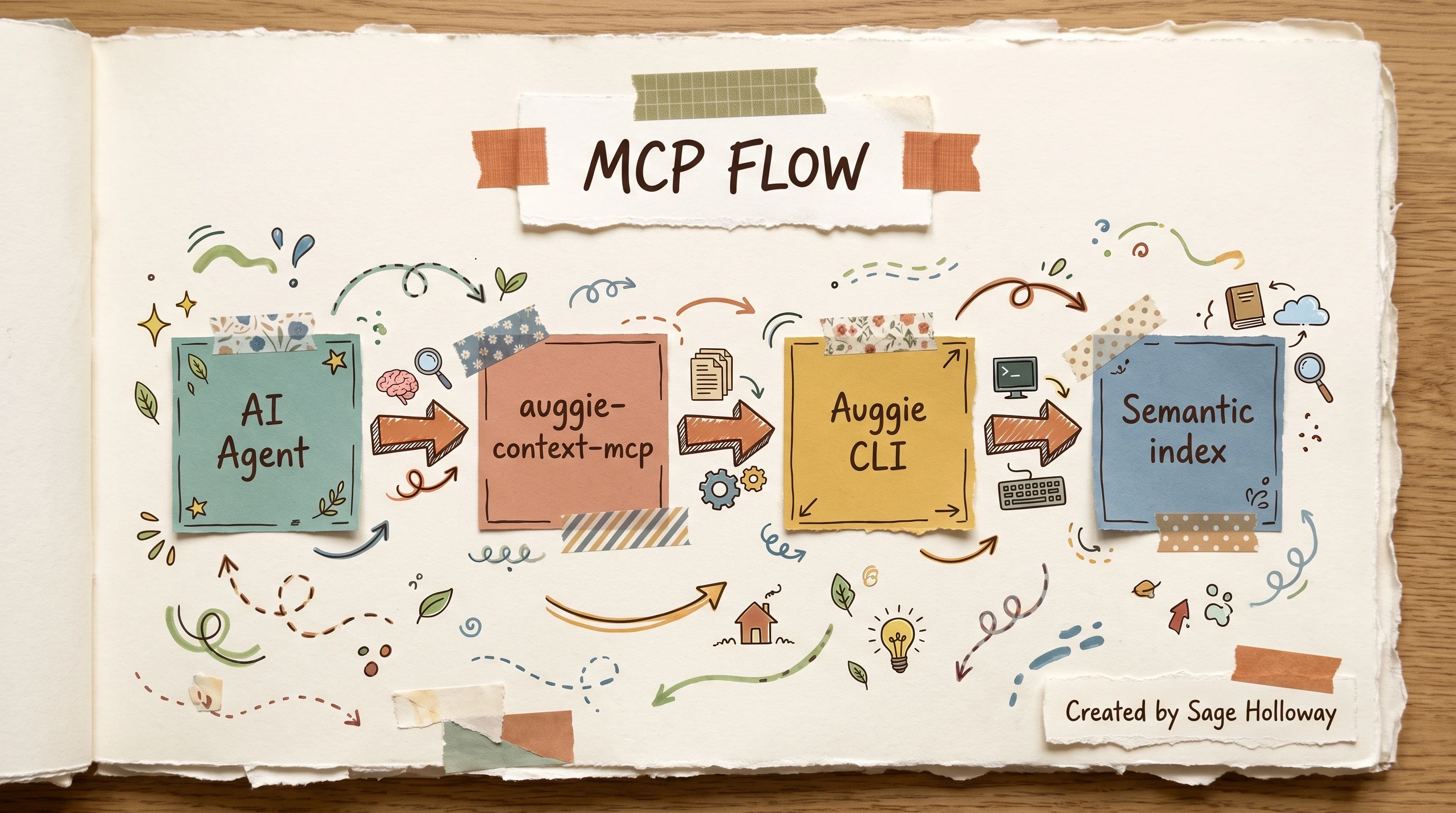
MCP clients never talk to the indexer directly. The adapter wraps the CLI.
Authenticate before any client setup:
auggie login opens a browser authorization flow. auggie token print returns the JSON access payload for headless setups. auggie --version confirms the CLI is on your PATH.
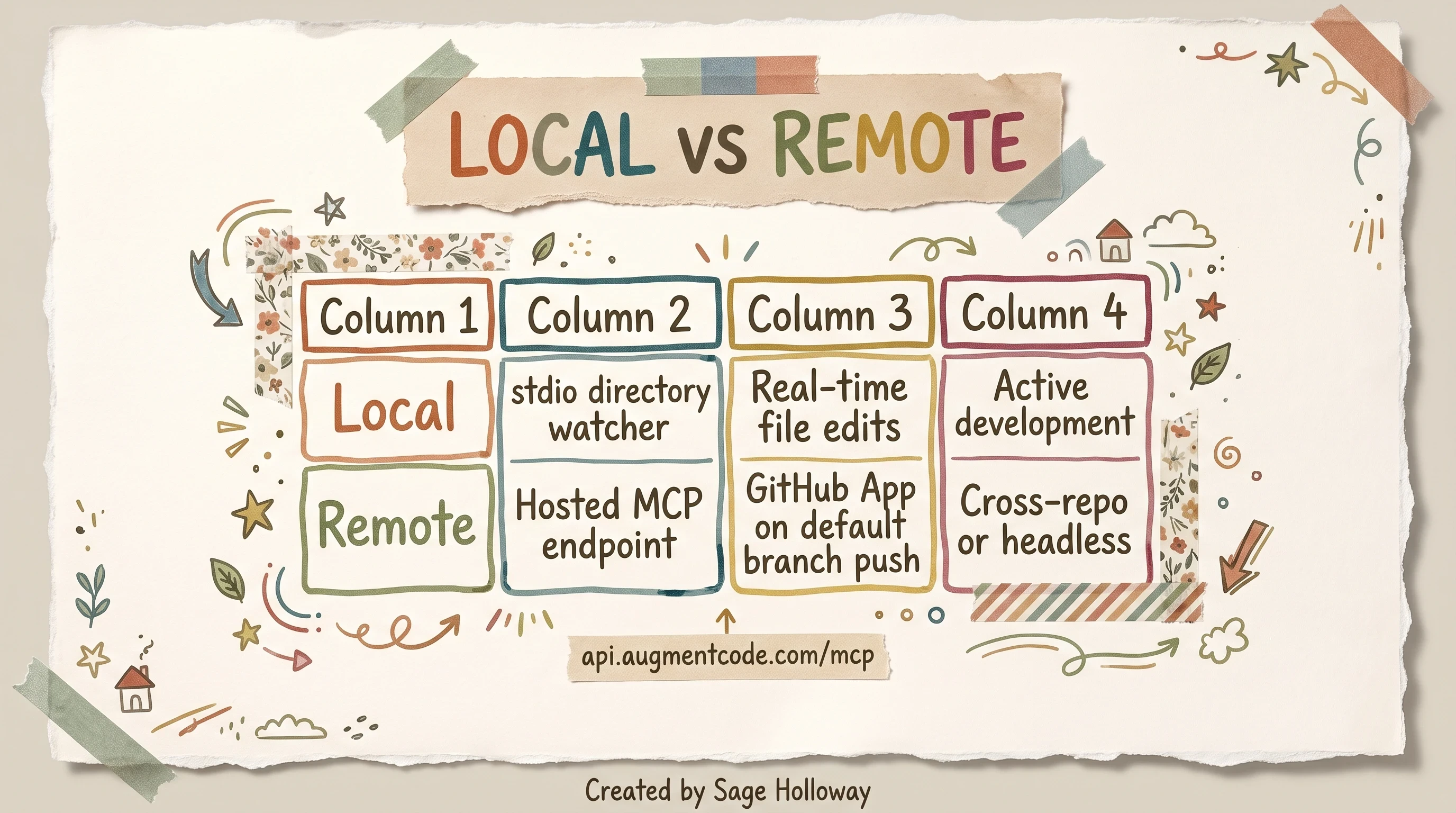
Pick Local for active dev trees. Remote for hosted branch indexing.
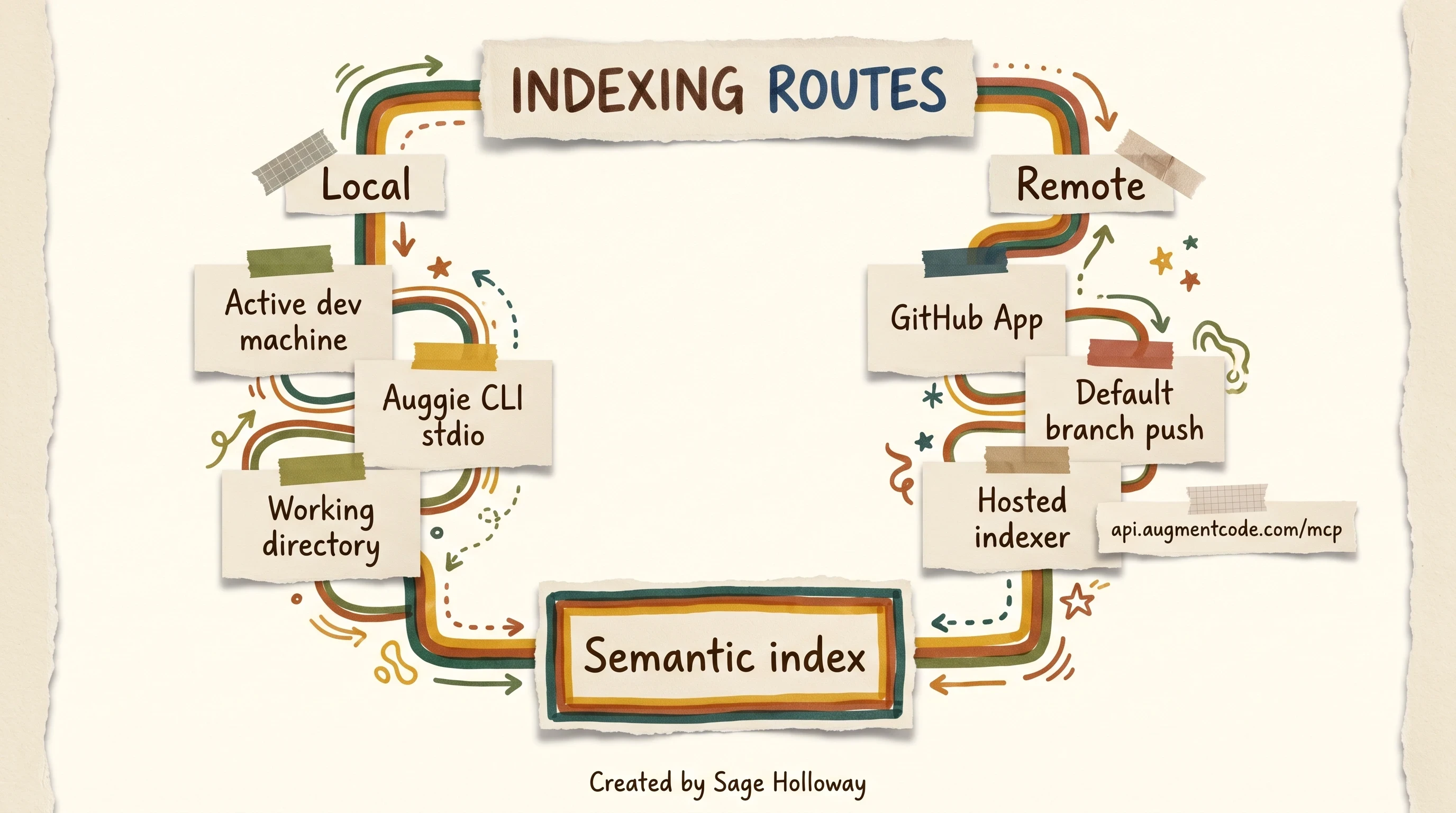
Local watches your working tree. Remote syncs default branch pushes.
Local stdio directory watcher
Local mode runs the Auggie CLI as a stdio-based MCP server tied to your working directory. File edits index in near real time. No manual "reindex" button for every save. This is the default recommendation for active feature development on a checkout you control.
Point your MCP client at the npx adapter:
That block appears in both Claude Desktop and Cursor configs below.
Remote hosted GitHub App indexing
Remote mode connects to Augment's hosted MCP endpoint at https://api.augmentcode.com/mcp. A GitHub App watches selected repositories and reindexes default branch pushes via webhook. Use Remote when you query across repos, run headless automation, or lack a full local tree on the machine firing MCP calls.
Remote suits CI review bots and cross-service questions. Local suits the laptop where you edit files hourly.
Claude Desktop configuration
Edit Claude Desktop's MCP server file:
macOS:
~/Library/Application Support/Claude/claude_desktop_config.jsonWindows:
%APPDATA%\Claude\claude_desktop_config.json
Add the auggie-context server block from the JSON above. Restart Claude Desktop. The read-only query_codebase tool should appear in the client tool list.
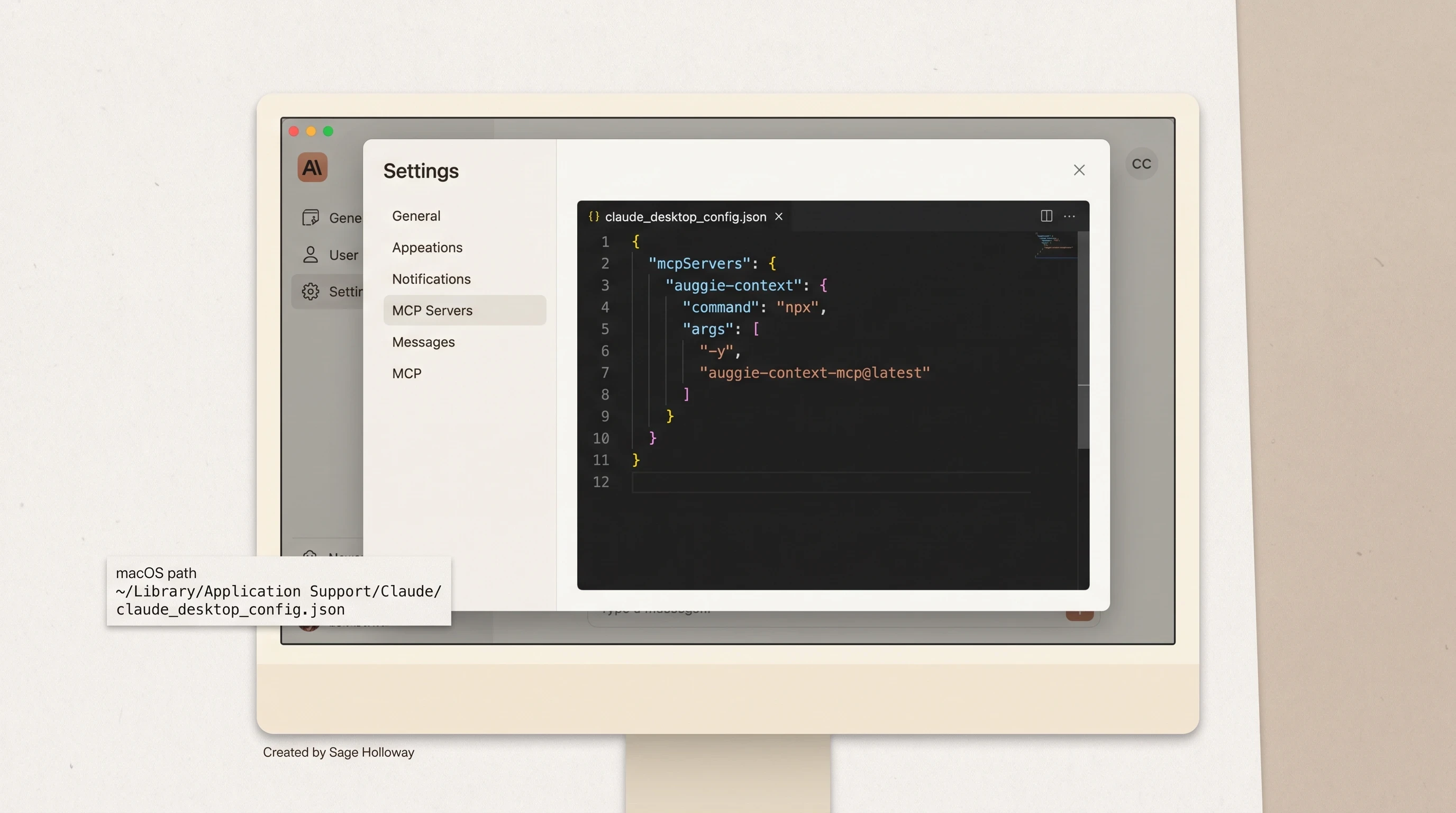
Add the auggie-context block, restart Claude Desktop, then query_codebase appears.
Full file skeleton for copy-paste:
Official walkthrough: Context Engine MCP docs.
Cursor MCP configuration
Cursor reads MCP servers from .cursor/mcp.json at global or project scope. Use the same mcpServers.auggie-context block. Restart the editor after saving.
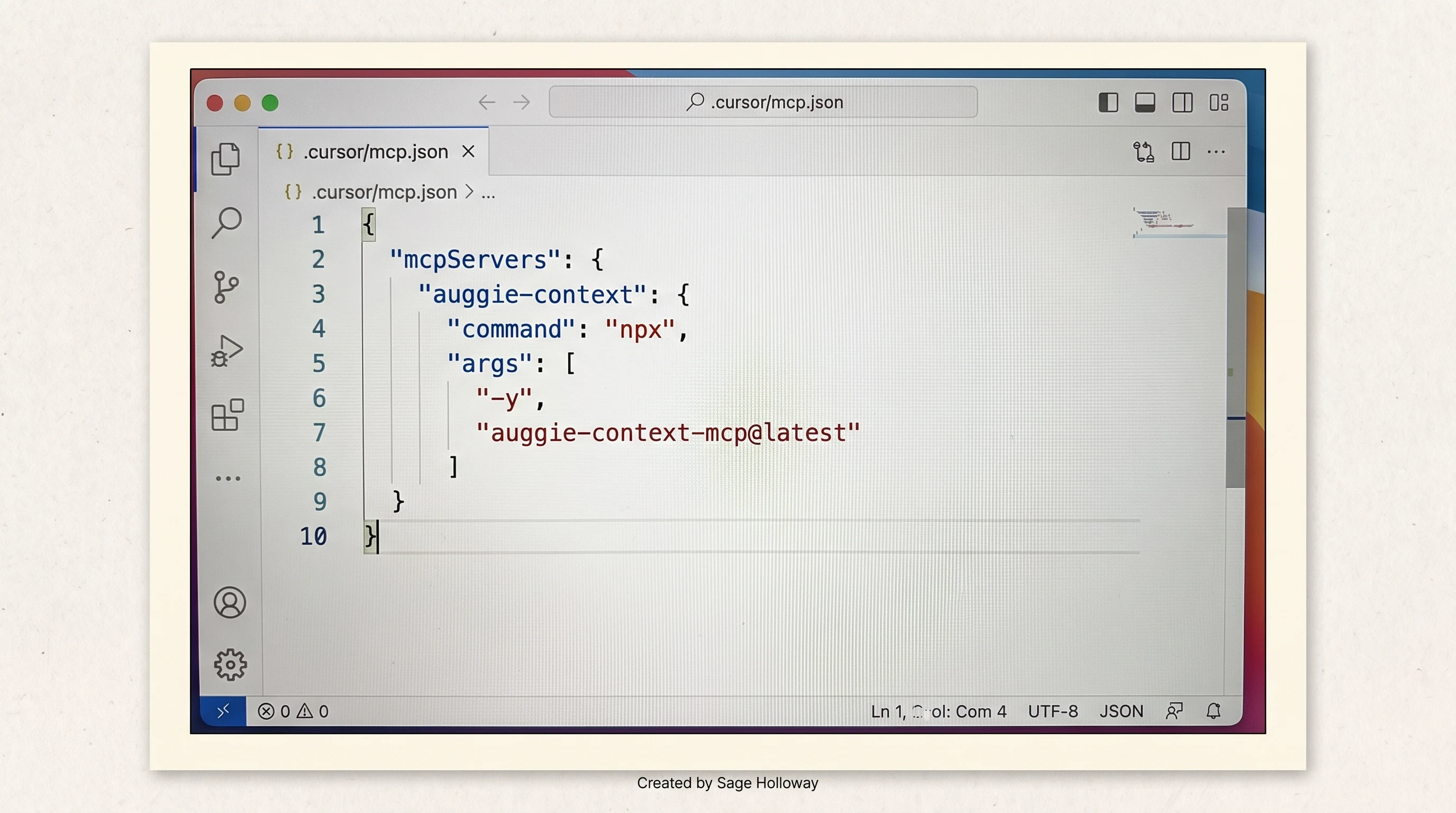
Global or project .cursor/mcp.json wires Cursor to the Auggie CLI subprocess.
Community reference with identical JSON: aj47/auggie-context-mcp on GitHub.
Headless authentication
Shared runners and CI jobs cannot click through browser login on every step. Export the session token JSON via AUGMENT_SESSION_AUTH:
The MCP adapter reads AUGMENT_SESSION_AUTH and skips interactive login. Treat that variable like a secret; rotate if it leaks.
query_codebase parameter schema
The MCP tool accepts a required natural-language query plus optional tuning fields:
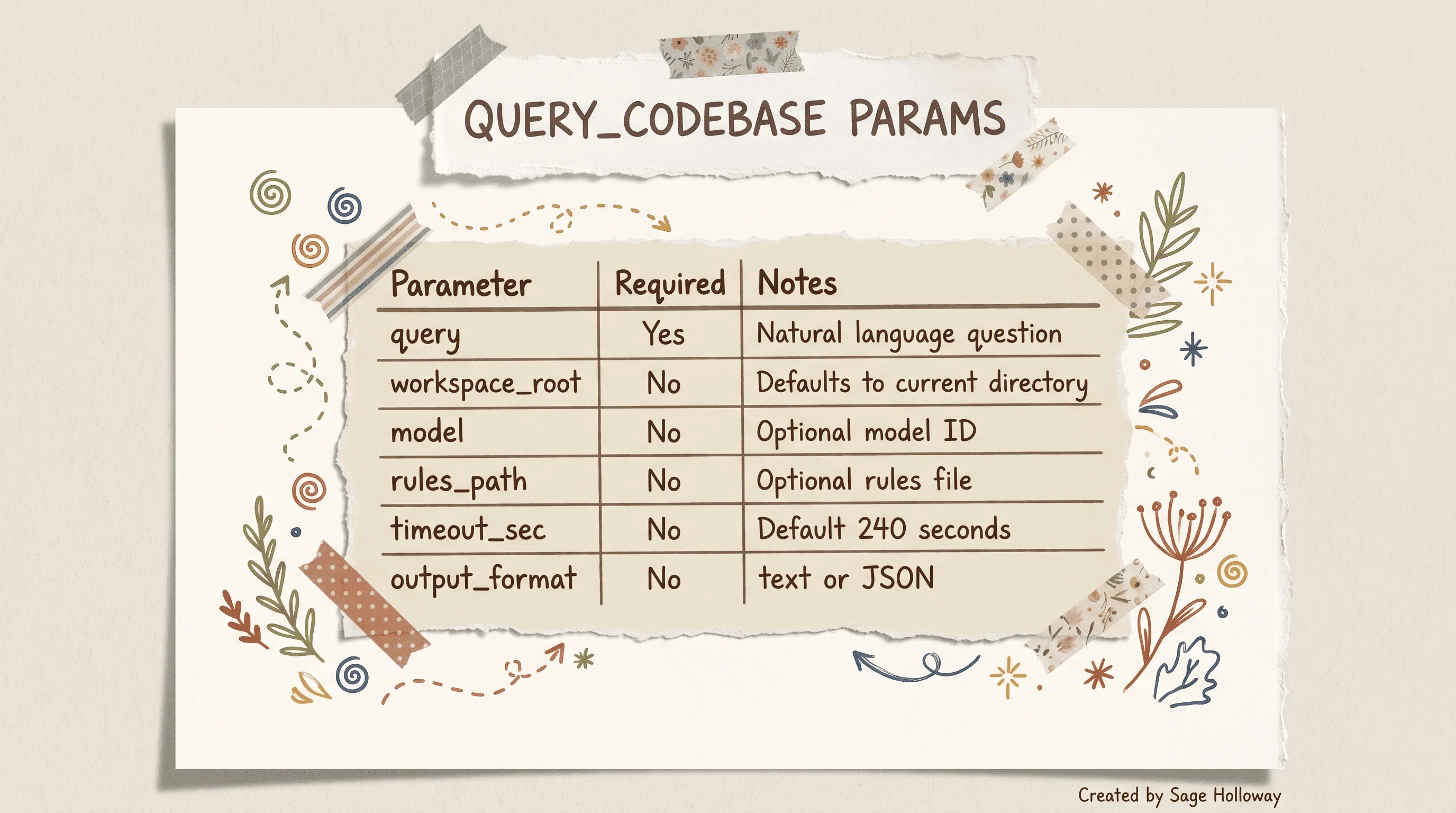
Required query string plus optional workspace, model, rules, timeout, and output format.
Example call shape in prose: ask "where is external blob storage configured?" with default timeout_sec 240 unless your monorepo needs a higher ceiling.
HowTo quickstart (Local MCP on Claude Desktop)
Install and verify the Auggie CLI (
auggie --version).Run
auggie loginto authorize.Paste the
auggie-contextblock intoclaude_desktop_config.json.Restart Claude Desktop.
Invoke
query_codebasewith a narrow question and check MCP logs if results look empty.
https://www.youtube.com/watch?v=uERaZg0y6UI
That Augment Code walkthrough runs a side-by-side terminal race: MCP-enabled query_codebase finishes a storage-related file query in about fifty seconds while manual glob and grep passes take over two minutes on the same task. It is live proof for the retrieval-first design, not a substitute for your own repo test.
Context Lineage: how commit history enters retrieval
Files tell you what the code says today. Commits tell you why it looks that way. Context Lineage indexes git history alongside workspace files so agents stop re-litigating settled decisions.
Augment's Context Lineage announcement describes the feature as closing the historical gap: tribal knowledge that lived only in senior engineers' heads becomes retrievable chunks at roughly the token cost of a small file.
Summarization and embedding pipeline
The pipeline has four beats:
Commit harvest inside the IDE captures diffs as you work.
Gemini 2.0 Flash summarizes each diff into goals, touched paths, and keywords.
Chunk and embed stores summaries beside standard file embeddings.
On-demand retrieval serves lineage slices when
query_codebasequestions reference history.
Raw diffs would bloat every query. Summarization is the compression layer that keeps lineage affordable.
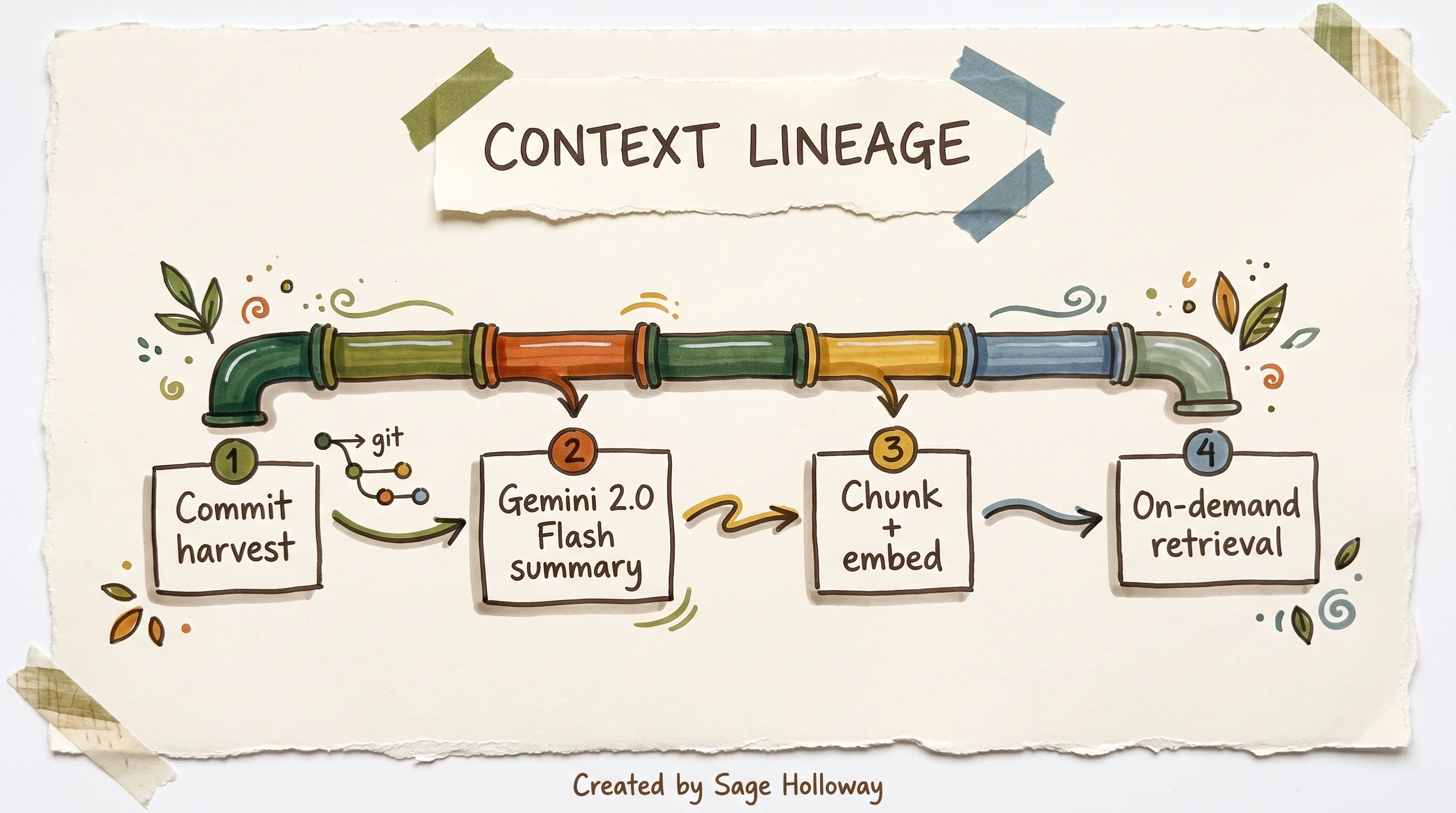
Context Lineage compresses diffs before they enter the index.
For the official under-the-hood walkthrough, open the video linked from Announcing Context Lineage. Pair it with the pipeline diagram when you onboard teammates who think "indexed repo" stops at HEAD files.
Commit messages that improve retrieval
Lineage quality rises or falls on commit hygiene. Vague messages ("fix stuff") compress into vague summaries. Useful messages include intent, subsystem, and constraint:
Bad:
update handlerBetter:
stripe webhook: reject duplicate invoice ids before ledger write
You already write commits for humans. Context Lineage makes those humans future agents too.
Platooning Claude Code and Auggie in one workflow
No single agent wins every task shape. Claude Code excels at iterative editing loops. Auggie excels at indexed retrieval across huge trees. Platooning means running both in one workflow instead of forcing one tool to impersonate the other.
HyperDev's integration writeup (Robert Matsuoka) popularized the platoon mental model: use Claude Code where conversational editing shines, route heavy "where in this repo?" questions to Context Engine MCP. Skip the broken Molisha Shah URL cited in that article's comments; the platoon pattern stands without it.
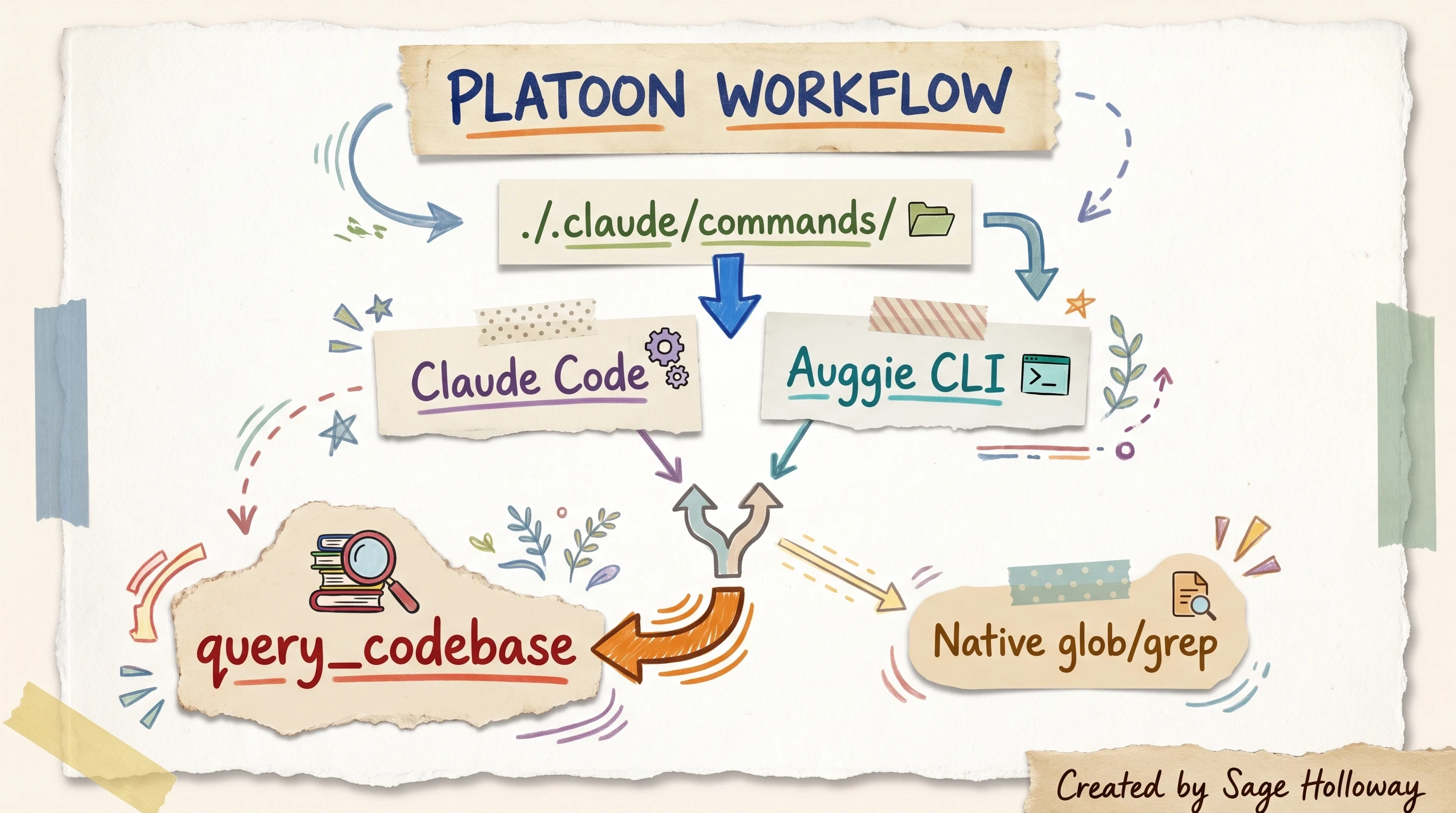
Platooning shares slash commands but routes heavy retrieval to the index.
Shared Claude command schemas
Auggie autodetects custom commands in ./.claude/commands/. Define a slash workflow once; both Claude Code and the Auggie CLI can see the same command files. That shared schema is the glue that makes platooning feel like one team, not two siloed terminals.
Keep command names explicit about retrieval vs edit:
/find-auth-flow: preferquery_codebase/implement-fix: stay in Claude Code edit tools
Routing queries between tools
Use Context Engine when:
The question spans modules you cannot name yet.
You need historical rationale from Context Lineage.
Glob and grep already failed once this session.
Stay on native Claude Code tools when:
You are editing a file already open with a known path.
The change is local and the context window already holds the relevant slice.
Conservative token play: run retrieval once, paste the returned slice into Claude Code, then edit without firing repeated MCP queries on the same hypothesis. HyperDev's "Conservative Token Play" section makes the same economic point: platooning saves money only if you stop paying twice for the same map.
For Augment's automated PR review product (a different workflow from Context Engine retrieval), see Augment code review at scale.
Troubleshooting file-ignore rules and large-repo indexing blind spots
Official quickstarts tell you how to connect. They say less about what happens when folders silently vanish from results. That blind spot is where this section lives.
Silent skips and indexer failures
Community threads on r/AugmentCodeAI report competitive indexers (Roo, Kilo) silently ignoring folders on large repositories. Treat that claim as medium-confidence forum signal, not Augment docs gospel. The symptom pattern is real even if the root cause varies: you query, you get confident partial answers, and entire subtrees never appear.
When results look incomplete, compare against git ls-files for the paths you expect. If disk paths exist but retrieval never surfaces them, suspect indexing scope or ignore behavior before you blame the model.
Augment's answer is semantic mapping across structure, dependencies, and lineage rather than naive folder walks. Still run the checklist below before opening a support ticket.
MCP debug logs and timeout limits
Claude Desktop MCP failures log to platform-specific paths:
macOS:
~/Library/Logs/Claude/mcp*.logWindows:
%APPDATA%\Claude\logs\mcp*.log
Tail those logs when query_codebase hangs or returns empty payloads. Timeout failures often correlate with the default 240 second ceiling on massive monorepos.
Raise timeout_sec in tool parameters when queries legitimately need deeper graph walks. Do not raise it globally "just in case"; long timeouts mask runaway questions.
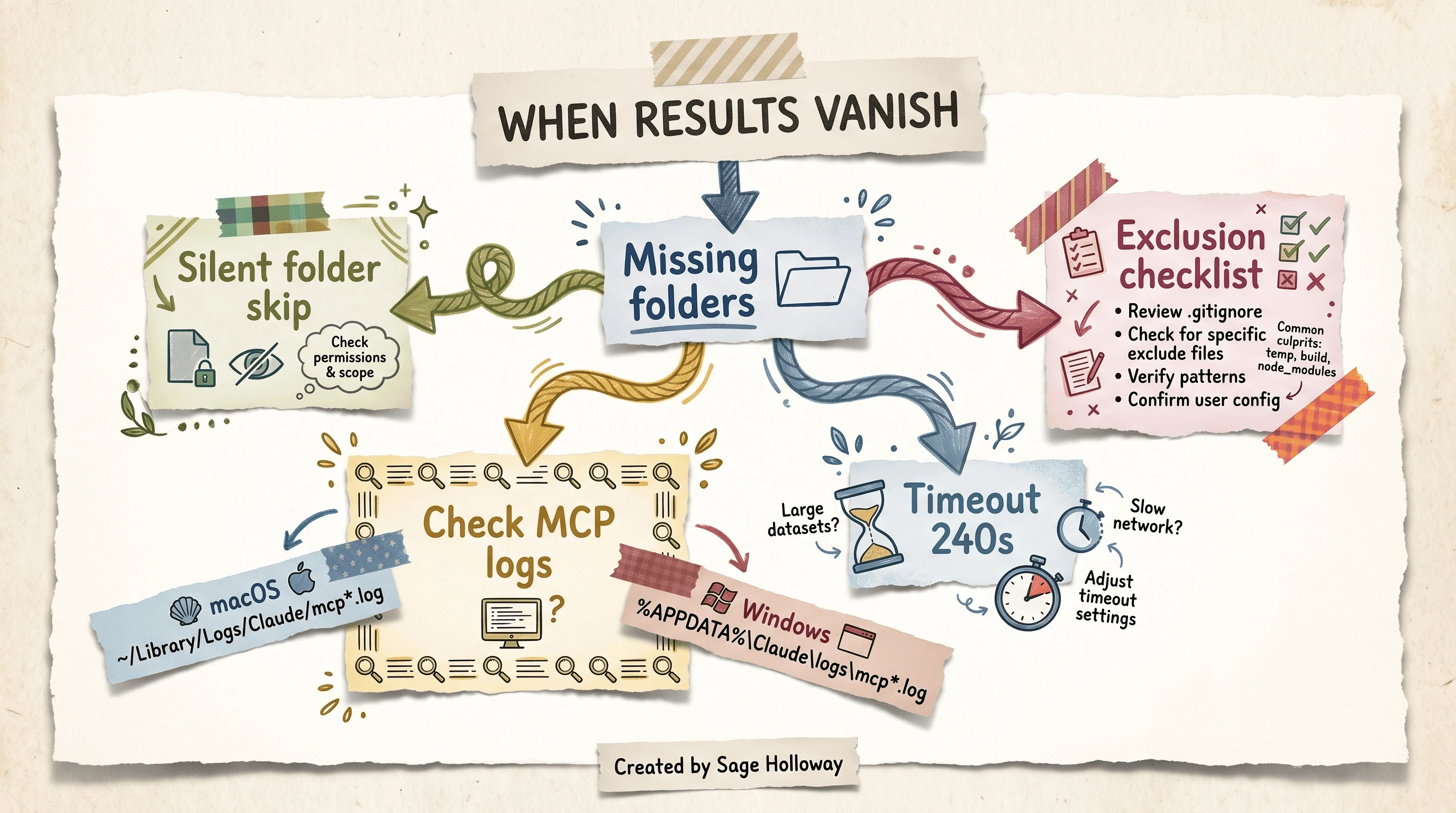
When folders vanish from results, check logs and timeouts before blaming the model.
Exclusion checklist
Official docs do not publish a full .augmentignore recipe at the time of this pack. Do not invent ignore flags here. Instead, work the practical checklist grounded in forum pain points and MCP limits:
Confirm Local vs Remote mode matches where you edit (Local for laptop trees, Remote for default-branch snapshots).
Verify the GitHub App covers the repository if you expect Remote lineage on pushed commits.
Check MCP logs for auth errors after token rotation (
auggie loginagain or refreshAUGMENT_SESSION_AUTH).Split monorepo questions with
workspace_rootinstead of querying the entire tree.Increase
timeout_seconly after logs show timeout strings, not preemptively.Compare against known file paths manually when silent skips are suspected.
Document which subtrees are out of scope until Augment publishes explicit ignore syntax.
Where official guidance is silent, mark the gap honestly and track release notes.
FAQ
What is the difference between running Augment's Context Engine in Local vs. Remote server mode?
Local mode runs the Auggie CLI as a stdio MCP server on your machine, indexing the working directory in near real time as you edit files. Remote mode connects to https://api.augmentcode.com/mcp and relies on a GitHub App to reindex default branch pushes on selected repositories. Choose Local for day-to-day feature work on a checkout; choose Remote for cross-repo queries, headless environments, or machines without the full tree.
How does the pricing for Augment's Context Engine work?
MCP queries bill under a usage-based token model: provider public API list price plus a 40% Augment service fee on the tokens consumed. Typical active-development queries average roughly $0.03 to $0.06 depending on retrieval size. That model replaced older flat-message subscriptions discussed in legacy community posts.
What is "Context Lineage" and how does it index commit history?
Context Lineage scans git history alongside workspace files so agents can answer "why" questions without ingesting raw diffs. Diffs pass through Gemini 2.0 Flash summarization to extract goals, touched files, and keywords, then chunk and embed like standard sources. Retrieval cost stays closer to a small file than to a full patch series.
How do you configure the Context Engine MCP with Claude Desktop?
Edit claude_desktop_config.json at ~/Library/Application Support/Claude/ on macOS or %APPDATA%\Claude\ on Windows. Add an auggie-context entry under mcpServers with "command": "npx" and "args": ["-y", "auggie-context-mcp@latest"]. Restart Claude Desktop; query_codebase should appear as a read-only tool.
How do you configure the Context Engine MCP with Cursor?
Create or edit .cursor/mcp.json globally or in your project root with the same mcpServers.auggie-context npx block. Restart Cursor so the client spawns the Auggie CLI subprocess for lookups.
What is the difference between "Context Engineering" and a "Context Engine"?
Context engineering is the practice of curating prompts, tools, and history so agents behave reliably. A context engine is infrastructure that pre-computes and serves structured context from live sources such as a codebase. Engineering describes the craft; the engine is the system that delivers the material.
How does Augment Code's Context Engine compare to Anthropic's context retrieval strategies on SWE-bench?
On SWE-Bench Pro with Claude Opus 4.7, Augment reports about 1.65B total tokens versus 2.35B for Claude Code's native exploration pattern, with a comparable solve rate on published product figures. Augment's retrieval-first design sends narrower file slices; Claude Code's JIT glob and grep loop explores more broadly at higher token cost.
Does the context engine support custom environment variable authentication?
Yes. Set AUGMENT_SESSION_AUTH to the JSON token payload from auggie token print after auggie login. Headless CI and shared runners use this path instead of interactive browser auth.
What parameters does the query_codebase tool accept?
Required: query (natural language string). Optional: workspace_root (defaults to current directory), model, rules_path, timeout_sec (default 240 seconds), and output_format (text or JSON). Tune timeout and workspace root on large monorepos before blaming model quality.
Self-hosted alternatives (Qdrant, SQLite, DuckDB stacks) are documented as community prototypes, not official Augment paths. Start at local context engine with Qdrant and MCP if that is your job.
Pick one mode before you paste JSON. If you live in a daily checkout, start Local: auggie login, drop the npx block into Claude Desktop or Cursor, restart once, and ask one narrow query_codebase question about a subsystem you already know. Note the wall-clock time and check your provider dashboard after a handful of queries so the 40% fee math stops being abstract.
If your team lives on default-branch automation across multiple repos, wire Remote to https://api.augmentcode.com/mcp, confirm the GitHub App covers the repositories you care about, and repeat the same single question from a headless client with AUGMENT_SESSION_AUTH.
Either path, log one session in MCP logs the first week. You will see quickly whether you are paying for precision or paying twice because prompts stay too broad.
The indexer wars are not finished. JIT exploration will keep improving. Pre-computed maps will keep getting cheaper. What already holds today is simpler: agents that retrieve instead of grep loops finish the same task with fewer tokens when the map is good. Whether your repo needs Local watchers, Remote webhooks, or both is an architecture call only you can make for your tree shape.
Until then...
Sage
PS. I once pointed an agent at a monorepo without indexing and timed how long it took to "find the obvious file." Four minutes. The file was twelve directories deep with a misleading name. I still have the stopwatch screenshot somewhere embarrassing.
Author
Practical guides, tool teardowns & AI engineering workflows.
Related Articles