AI Agents
Can Grok Bot Make Me Money? It Stops at a Review List

Sage Holloway
24 min read
Go back to blog
SHARE


Grok Bot can do paid work. It stops at a review list. It is not a silent directory machine.
The thread said the pile would keep stacking after you slept. Morning showed work that still needed a human stamp. You had already closed the lid. The pile had not mailed itself. That is the gap between the promise and the desk.
The can grok bot make me money question showed up as a review card when I came back. Recipients filled in. Body drafted. Two buttons: Send email, Discard. Nothing had gone out. The laptop had been shut for hours.
That is the money question in the actual UI. Not a dashboard of silent sites. A draft that waits.
Grok Bot can do paid work for a small business: named teammates on one persistent cloud computer that draft outbound, run an inbox, or build a site, then stop at Auto Review. It is not a $217 directory machine. Official docs do not ship Mogul, Telegram P&L, or live Reddit scraping. Access is a paid Cursor plan or SuperGrok at $30 a month, not $0 extra. Send, publish, and purchase stay behind Ask first.
A Bot is one persistent named teammate with a job, a conversation, and context that compounds. Grok Bot is the desktop, iOS, and Android app those Bots live in, at x.ai/bot. It is not grok.com chat, and it is not a model. What the metal is sits on how Grok Bot works. One line here: closing the laptop does not stop a background turn. The rest of that architecture stays on that URL.
People search can grok bot make me money, grok bot make money, grok bot to make money, and make money with grok bot as if those were different jobs. They are the same job. Use grok bot to make money means hand over work the product already names, then sit on send. It does not mean a factory template called Mogul. The "almost no downside" line from the viral hook is not a product fact. The caveats below contradict it.
Last verified: 10 October 2026 (official docs and R3 research; no live CLI verify)
Table of contents
The Mogul $217 directory playbook is not Grok Bot
Hire vs use: paid work lands in the tool, not the chat
Five named products, not one money machine
Official jobs for small business that stop at a review list
Approval is Auto Review, not Grok Build Plan Mode
One shared cloud computer: laptop closed is true, a silent money farm is not
Access is a paid plan, not $0 outside the subscription
FAQ
The primary search still surfaces creator money takes before vendor docs. Greg Isenberg's video is that take. Watch it as the autocomplete question. Do not treat it as official income, as $217, or as a Mogul template.
https://www.youtube.com/watch?v=qQluNEfSVHk
The Mogul $217 directory playbook is not Grok Bot
The hook people paste is a directory-site money playbook:
Name a Bot Mogul.
Give it one job: find a boring niche people search every day.
Scan X and Reddit complaints live.
Build a small directory locally, then publish one useful page every night.
Reach out for affiliate deals through your email, under your name.
Telegram sends the P&L. Outside the subscription the setup costs $0.
Month three: $217. Some people already run 3 sites. While you think, someone else's bot publishes 30 more pages.
Official Grok Bot docs do not ship that playbook.
I looked for Mogul as a template. I looked for Telegram as a report channel. I looked for a Reddit plugin and a measured $217. None of those strings appear in use-cases, the launch post, or the more-plans jobs.
The nested "stop chasing startups" line that circulates with this hook has no locatable Musk permalink in the sources used here. Do not treat it as a Grok Bot citation. Drop the 27 million views with it.
The correction is more useful if it is precise. Some pieces of the hook rhyme with real chrome. They are not the same product.

Named Bot: yes. Telegram P&L, live Reddit scan, local directory CMS, $217, and $0 extra: not in official docs.
You can name a Bot. First Bot is named Grok Bot or New Bot. Later creates start as New Bot until you rename them. "Mogul" is a name you type. It is not a shipped template.
One primary job is official. Public X search works without connecting an X account. Reddit is not a named Marketplace plugin. "Complaints live" is not a product mode.
The Bot workspace is cloud /workspace, not a CMS on your laptop. grok.com Build Mode publishes to grok.me or a domain you own. That is a different product. The official Bot cousin is Website builder: builds the site, can purchase a domain, deploys a live URL. Purchase and publish sit behind Ask first.
A nightly page is possible as a routine you ask for. It is not a shipped directory factory.
Gmail can draft and send as the connected mailbox. Official teaching is still draft, then Send email or Discard. Sales Outbound returns a review list. Do not send.
Telegram is not an official Bot or Automations report channel. Automations report via email, app notification, both, or neither. The Bot reports in the conversation. $0 extra, $217, 3 silent sites, and 30 pages a month are not measured in official docs.

New, then Create new Bot. First Bot is named Grok Bot or New Bot. Mogul is a name you type, not a shipped template.
The create path itself is the beginner tutorial. This URL owns the correction, not the install clicks. Put the standing rule in Description while you are there: Never send external messages without approval. That line is from Bot docs, not from the hook.
If you were waiting for the missing "full playbook below," it is not coming. The source that sold the hook never returned to it. Closest official cousins: Website builder and Sales Outbound, both gated by approval. That is how you use grok bot to make money without inventing a CMS the product does not ship.
VelvetShark ran 67 real jobs and talked about what worked and what broke. Auto Review still sits in the loop. That is a closer picture of paid work than a P&L screenshot.
https://www.youtube.com/watch?v=zA1vAZr9u20
Hire vs use: paid work lands in the tool, not the chat
You have eaten at the kind of place where the kitchen runs without you hovering over the stove. You order. The line cooks plate. The dish comes to the pass.
Someone with a stamp looks at it before it leaves for the dining room. You did not hire a novelist to describe recipes into a notebook all night. You hired a kitchen that produces food, then waits.
That is the hire-versus-use split when you use grok bot to make money, and when you evaluate grok bot for business as a workplace instead of a chat tab.
For a few years, using AI mostly meant sitting in front of a box. You type. It answers. You copy something. You give it the next instruction. Grok Bot is trying to kill that loop.
The launch post calls the product a team of always-on agents: they have a computer, they work inside tools and apps, they keep working 24/7, and they come back when something needs your approval.
Help me do this is still a chat. Do this is a job. The output is no longer a paragraph you paste. The output is completed work sitting in the CRM, the mailbox, or the site, parked at a review list.

A model is intelligence. An agent gets tools. A Bot is a named teammate with a place to live.
A model gives you intelligence. An agent gives that intelligence tools. A Bot gives the agent somewhere to live. That somewhere is one persistent cloud computer per user, with a browser, a filesystem, and a terminal.
Each Bot gets a screen on that computer. Screens are work surfaces. They are not a second lock. Depth of isolation stays on how Grok Bot works.
The human moves from operator to approver. You still choose the job. You still stamp send, publish, and purchase. You stop doing the copy-paste between five tabs for the boring middle.
xAI's own launch copy is not a paraphrase. "Teams created Bots to handle sales outbound, marketing campaigns, office operations, bug fixes, and more." Roman, Product, is quoted on the difference between 90% done and 100% done: most AI gets you almost there; Grok Bot can finish the swing because the work lands in the actual tool.
That is the closest official line to "hours returned." Hours returned is not an xAI metric. Author illustrations (70% thinking and 100% orchestration, 46 actions down to 4, 10 minutes here and 25 minutes there and 300 leads) are examples, not benchmarks. Do not paste them onto a dashboard.
Software used to expose features. You learned the interface and operated the machine. Agents invert that. You do not need every CRM field memorized if the Bot understands the process those fields represent.
SaaS taught companies to pay monthly for access to tools. The agent pitch is paying for completed operations. That digital-labor thesis is an argument, not a heading, and not a price list. Software does not need to replace a job overnight. It needs to remove enough repetitive pieces of one.
That is how automation usually enters a grok bot for business workflow: one boring lane at a time, not a silent farm.
The official Grok channel film is the category picture: teammates, cloud computer, work in the actual tool. This is Grok Bot. It is not grok.com chat.
https://www.youtube.com/watch?v=F1_0Lkp16Rc
Five named products, not one money machine
I tried treating the stacked names as one money machine. Automations lived on grok.com. Plan Mode lived in a terminal. The Bot app had Auto Review. I had fused five products because a thread stacked them in one sentence.
Grok Bot is not the connecting layer under everything xAI shipped. Automations, Build Mode, and Grok Build exist without Grok Bot. Grok Bot has its own skills and routines. Those are not grok.com Automations.
Grok 4.6 is a model. Cursor picks the serving model. There is no in-app picker.
Grok Bot vs Automations vs Build Mode vs Grok Build vs Grok 4.6
Five named things. Four products plus one model.

Grok Bot is the teammate app at x.ai/bot. Automations, Build Mode, Grok Build, and Grok 4.6 are other products or a model.
Grok Bot is the teammate app. Desktop plus iOS plus Android. Product URL x.ai/bot. Docs under docs.x.ai/grok-bot. Official one-liner: AI teammates you can give real work to. A Bot is one named teammate. GrokBot is not the product string.
Automations is a grok.com and Grok-app feature. Describe a job once. Grok runs it on a schedule or when an email arrives, then reports back. Path grok.com/automations.
Schedule: once, daily, weekdays, weekly, monthly, or yearly. Email trigger: incoming mail matching sender, recipient, or subject. Each run is a fresh conversation. Report via email, app notification, both, or neither.
Contemporaneous press dated this to July 16, 2026. The official Automations page fetched for this article does not print that calendar day. Say late July, or "July 16" as contemporaneous, not as a printed xAI badge.
Grok Bot's matching primitive is a routine: when to run, on a schedule or, where supported, after an event (Slack message, GitHub notification). Skills-routines docs even sit at a URL that contains the word automations. The UI words are still skill and routine. Do not teach grok.com Automations as a Grok Bot settings panel.
Julian Goldie's video is grok.com Automations in motion: describe a job once, schedule or email-arrives, report back. Caption it that way.
https://www.youtube.com/watch?v=Gz8zlQD3lF4
Build Mode is a grok.com mode switcher labeled Build. Later news calls it Grok Build on web and mobile. A conversation can produce a working preview and publish to a live link on grok.me or a domain you own. Access on the published app: just you, anyone with the link, or the whole internet.
That is how a chat publishes a site. It is not Grok Bot's cloud /workspace pretending to be a local directory CMS. Do not become a grok.com tutorial here.
Grok Build is SpaceXAI's coding agent. Binary grok. Interactive TUI, headless, ACP. Docs under docs.x.ai/build. Terminal execution, Git, MCP, hooks, skills, subagents, background tasks, sandbox. xAI open-sourced the harness; the public repo xai-org/grok-build was created 14 July 2026. Plan Mode lives here. This URL is not a CLI tutorial.
Grok 4.6 is a model. Model card dated 12 August 2026, one calendar day after the company-cited Bot launch on 11 August. Official focus: long-running agents and tasks that span many steps. It shipped in Cursor and Grok Build, plus the API. Do not write that a Bot "runs Grok 4.6" as a user-selectable control. Settings has no model picker.
If you came here from grok bot for business and expected one stack, keep the five names separate. Confusing them is how a directory playbook gets glued onto a teammate app.
Official jobs for small business that stop at a review list
Grok bot for small business is not a niche SKU. It is which paid work you hand over on the same computer every other eligible user gets. Best grok bot use cases and use cases for grok bot are the official job names, not SCOUT / FETCH / PARSE / LOGIC / SHIP / BILL, and not Mogul.
The use-cases page and the more-plans post name the starters. Official job names only: Sales Outbound, Talent Scout, Paid Media, Expense Manager, Product Performance, Bug Reproduction, Account Health, Chief of Staff, Inbox manager, Website builder. Best use cases for grok bot, grok bot use cases, and use cases of grok bot all land here as which-work-to-hand-over. How-it-works keeps the mechanism. This page keeps the stop condition.
Every starter is built to return a review list. Do not send. Do not enroll anyone. Website builder can purchase a domain and deploy. That is a purchase. Ask first.

Official starters: Sales Outbound, Inbox manager, Website builder. Same computer, different Description. Return a review list. Do not send.
Launch copy for grok bot business work is the internal-team list: sales outbound, marketing campaigns, office operations, bug fixing. More-plans adds Inbox manager and Website builder in public language. First Bots during a trial belong on does Grok Bot have a free trial. This URL owns which paid work to hand over once you are on a seat.
The boring 24/7 list from the hire essay maps onto those names without becoming a metric:
Checking an inbox every 15 minutes: Inbox manager
Re-running research when data changes: Product Performance or Account Health
Watching bugs: Bug Reproduction
Preparing daily reports: Chief of Staff
Updating internal records: Expense Manager or Account Health
Researching every incoming lead: Sales Outbound
Running recurring operational checks: a routine on whichever Bot owns that lane
None of these tasks is impressive. Together they eat a week. That is why boring agents beat spectacular demos, as an argument, not as a scoreboard.
Sales Outbound
Grok bot for sales is Sales Outbound. Official shape: research the lead, draft outreach, update the CRM, leave send for approval. More-plans: a sales prospector that leaves every send for you to approve in your inbox or navigator.
The hire-essay instruction is compatible once you label it as teaching, not as a hidden mode. Research every new qualified lead. Check the website and company information. Determine which product angle is relevant.
Prepare personalized outreach. Update the CRM. Watch the inbox. When a prospect replies, prepare the response and ask before sending anything important.
Normal chat outbound is export, paste, draft, copy into Gmail, check replies yourself, return to the box. The Bot version is completed work in the tool, parked at Auto Review. That is use grok bot to make money without pretending send is unsupervised.
Put the never-do in Description. Never send external messages without approval. Then run the job to a review list. Do not skip the list because the copy looks good.
Personal vs business
Grok bot use cases personal and grok bot for business share one computer. They do not share a Description.
Personal: Inbox manager, daily reports, Expense Manager on your own receipts, a Website builder for a side project you will still approve before it goes live. Business: Sales Outbound, Talent Scout, Paid Media, Account Health, Bug Reproduction, Chief of Staff sitting on top of specialists.
Same Marketplace plugins. Same Agent Computer. Same Ask first on send, publish, and purchase. The split is the job you typed, not a second VM. Do not use a "personal" Bot as a vault against a "business" Bot. Isolation is per user.
Hand over a skill, then a routine, when the job repeats. Nate Herk's week-of-lessons film is that motion: save a skill, Agent Computer sign-in, plugins, a routine. That is how work repeats. It is not a directory CMS.
https://www.youtube.com/watch?v=TMPUUyQC5aM
Approval is Auto Review, not Grok Build Plan Mode
People imagine autonomous agents as systems that never need humans. The useful model is the opposite. Humans remain in the loop. The number of places they intervene is supposed to collapse.
Author illustration, labelled: instead of 40 tiny decisions, you might make three important ones (campaign, purchase, code change). Do not paint 40 or 3 as chrome. Official stop language is a review list, Allow once / Always allow / Deny, and Send email / Discard.

Hire the workflow: assign a named Bot, inspect the computer, approve the consequential action. Humans stay in the loop.
Assign a named Bot. Inspect Agent Computer. Approve the consequential action. That loop is the product. A cinematic clip that titles a run as if no human is in it is a mockup, not a control. Official approvals docs keep the human.
But here is the thing. An approval controls the proposed action. It does not reverse work already completed. If the Bot already edited the sheet, the stamp does not rewind the sheet. Park the irreversible line before the run, not after.
Giving AI a computer is far more powerful than giving it a chat box. It is also far more consequential when the AI gets something wrong.
The stop condition is unglamorous: it is the only honest answer to the money question.
Allow once, Always allow, Deny
Auto Review is the independent review model that parks sensitive actions. Settings → General → Auto-review. Ask first wins over Allow automatically. Example from docs: ask first before sending any external email.
The card title is Review an action. Buttons: Allow once, Always allow, Deny. Allow once lets the Bot continue with that action. Always allow can save a matching rule. Deny blocks it. Same on iPhone.
Unattended approval from a routine, a trigger, or another Bot expires after about 10 minutes. The action does not run.

Park send, publish, and purchase. Ask first wins over Allow automatically. Unattended approvals expire after about 10 minutes.
Standing boundaries live in Description. Prefer explicit stop-lines for: sending messages or invitations; publishing content; purchases and financial transfers; deleting or overwriting data; changing permissions; production changes; accepting legal terms. That list is the money list. Use grok bot to make money without moving those lines to Always allow on day one.
Gmail send-under-your-name is real. The Gmail plugin can search, read, draft, send, and apply labels on one connected mailbox. Official teaching on the draft card: review the recipients and body, then Send email or Send message, or Discard. Affiliate outreach that mails itself while you sleep is not the documented default.
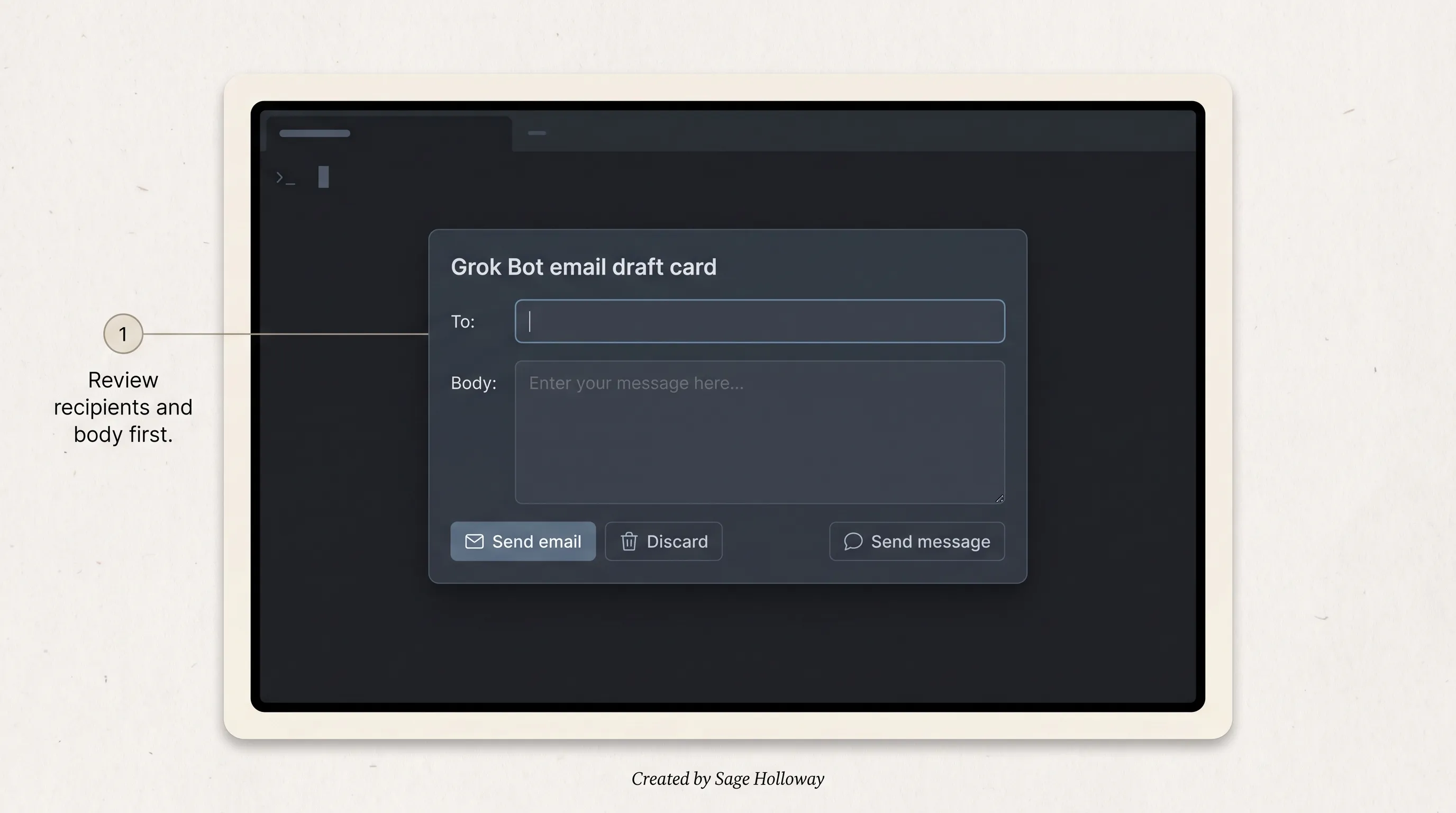
Gmail can send as the connected mailbox. Official teaching: review the recipients and body, then Send email or Discard.
Passwords, 2FA, CAPTCHA, and payment: Take over the computer. Do not paste secrets into chat.
Matt Palmer's getting-started film is create a Bot, then chat or a routine or an event, then Allow once / Always allow / Deny. Pair it with the card, not with Plan Mode.
https://www.youtube.com/watch?v=jwogmXNt7o4
Plan Mode is Grok Build /plan
Plan Mode is a Grok Build TUI control. It is not a Grok Bot screen. Docs: Plan Mode. Enter /plan or cycle with Shift+Tab.
While it is active, only the session plan file plan.md may be edited. Other edit tools are rejected, including under auto or always-approve. Reads, bash, and MCP still follow permission mode. Caveat printed in those docs: plan mode gates edit tools, not the shell; bash can still write via redirection. Subagents are not edit-gated by the parent.
Review shortcuts: a approve and start building, s request changes, c comment on a line, q quit plan. Status shows plan, then plan approval. Auto and always-approve do not skip that review.

Plan Mode is /plan in Grok Build. Grok Bot's matching primitive is Auto Review, not this TUI.
If you needed a code-change gate, that is Grok Build. If you needed a send / publish / purchase gate, that is Grok Bot Auto Review. ErrorFixer's terminal walkthrough is /plan, edits blocked until approve, Shift+Tab, subagents. Caption it as the stacked-product contrast.
https://www.youtube.com/watch?v=CNJoEqKpI7I
One shared cloud computer: laptop closed is true, a silent money farm is not
Official names: persistent cloud computer, Grok Bot's Computer, Agent Computer. Marketing still says "their own computer." Docs are canonical: "Your Bots share one computer." The computer is assigned to your user account, not an individual Bot.
Laptop closed is true for cloud work. Overview: work runs on the cloud computer. Closing the app, your laptop, or your phone does not stop a background turn or a routine. The hook used that sentence as proof of a money machine. The sentence is true. The proof is false.
One computer per user, not per Bot. Browser cookies, signed-in sessions, files, and command-line credentials are shared. Each Bot gets a screen. Screens are separate work surfaces, not separate security boundaries. Do not use separate Bots as a security boundary. Isolation between users is Firecracker: a micro virtual machine with hardware-level separation. Isolation between Bots on one account is not that.

One cloud computer per user, not per Bot. Screens are work surfaces. Closing the laptop does not stop a routine. Separate Bots are not a security boundary.
A 20-second clip that paints GROK BOT FLEET, BOTS 4/6, thousands of actions, and a no-human header is a cinematic mockup. Reconstruct it only as blast radius. Shared logins are the real model. The header is the opposite of Auto Review. There is no official fleet UI. Closest official "dashboard" that does exist is Grok Build's grok dashboard, which is coding sessions, not a Bot fleet.
Grok bot for small business on a shared computer means grok bot for sales, Inbox manager, and Website builder can all see the mailbox you authorized. That is the feature. It is also the risk. Disconnect Gmail if a Bot should not use that mailbox. Never paste a password into chat. Open Agent Computer from a conversation. Computer card Action needed. Buttons Take over, I'm done. Type the secret on the cloud-computer browser, then return control.
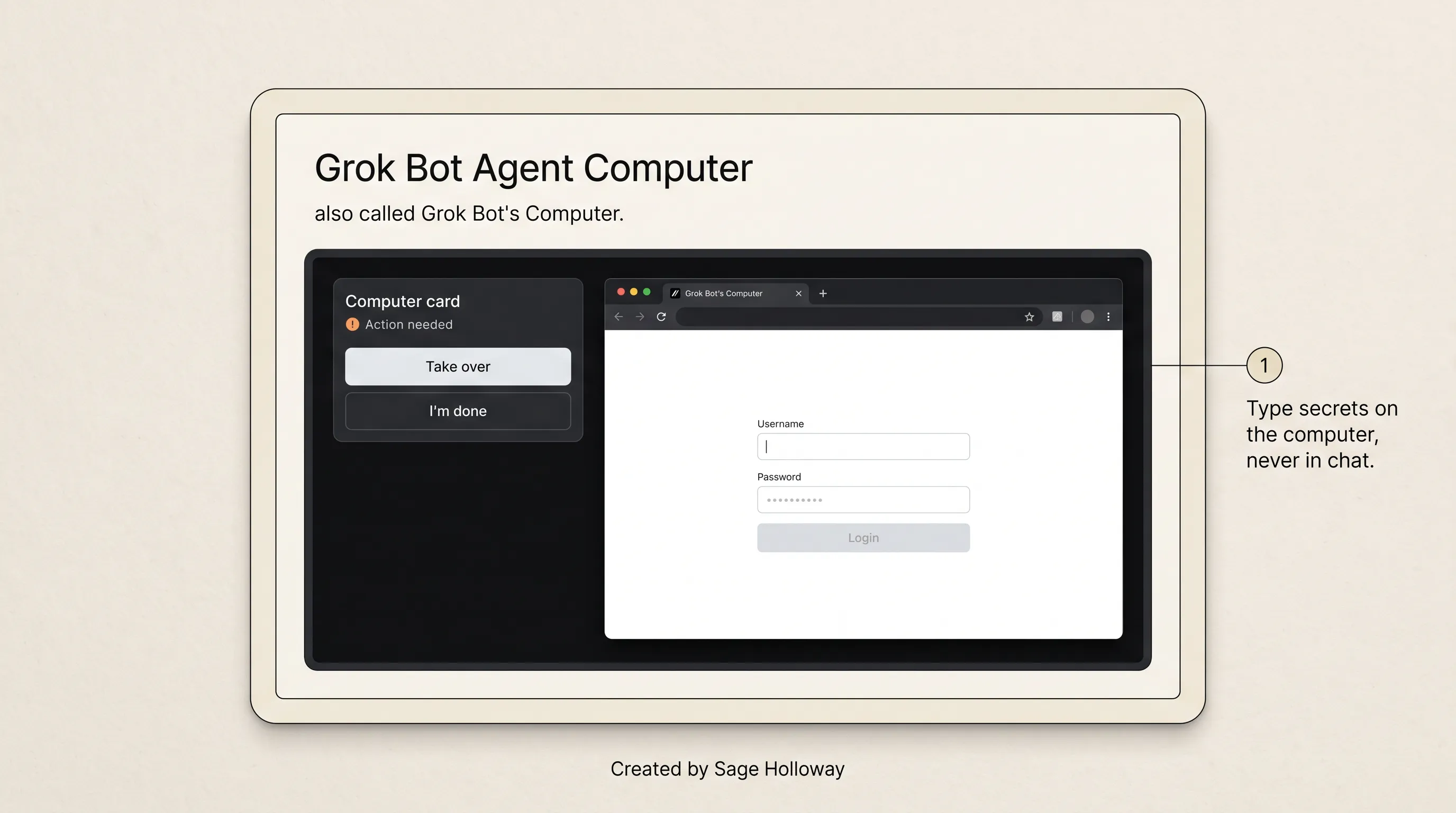
Open Agent Computer from a conversation. Take over at a login wall. Never paste a password into chat.
Use grok bot to make money on that computer the same way you would hire a contractor with one office key. The office stays open after you go home. The contractor still cannot mail the invoice without your stamp, unless you trained Always allow onto send. Do not do that on week one.
Slowness, caps, and "not working" belong on Grok Bot limits. This page stays on the commercial question.
Access is a paid plan, not $0 outside the subscription
"$0 outside the subscription" is not an official claim. The subscription is the access.
Grok Bot needs a paid Cursor plan, a linked SuperGrok / Plus / Heavy or X Premium+ grant, a Grok Business seat, or Enterprise enablement. SuperGrok Lite is not included. There is no separate Bot SKU. Cursor Help: "Do I need a separate Grok Bot subscription? No." A Cursor plan and a SuperGrok link do not stack.

Access is a paid Cursor plan or SuperGrok at $30 a month. SuperGrok Lite is not included. There is no separate Bot SKU.
x.ai/pricing, fetched 10 October 2026: SuperGrok $30 a month, and that page lists Grok Bot access. SuperGrok Plus $100 a month. Lite / Heavy / Enterprise appear in comparison matrices without printed dollar amounts in that fetch. Do not invent $10 or $300.
Paid Cursor Pro / Pro+ / Ultra and Cursor Teams: included. Sign in with Cursor. Usage is its own weekly pool, separate from Grok chat and Cursor coding usage on launch and more-plans copy. Usage resets weekly. When included runs out, on-demand billed through Cursor if enabled. Official pages used here do not print a weekly included-usage dollar. Treat that figure as unknown.
Launch day, 11 August 2026, Grok Bot was in beta for named SuperGrok and Cursor tiers, with Enterprise on a waitlist. That is what "higher-tier users" meant. As of 10 October 2026, x.ai/bot says generally available for Enterprise, as well as for teams and businesses on Cursor and Grok plans. Docs describe paid-plan inclusion. Keep beta as history, not as the current access label.
Trial credit and the 7-day window live on does Grok Bot have a free trial. One line: the trial is a usage credit plus a calendar window, and it never becomes a paid Bot plan. This URL is not a pricing chapter.
Grok bot for business and grok bot for small business pay the same access rows. The difference is the job you assign, not a cheaper SKU.
FAQ
How can I use Grok Bot to make money?
Hand over an official job that already exists: Sales Outbound, Inbox manager, or Website builder. Put Ask first on send, publish, and purchase. Run it to a review list. Do not follow the Mogul directory playbook. Official docs do not ship Telegram P&L, live Reddit scraping, or a measured $217. Access is a paid Cursor plan or SuperGrok at $30 a month.
How to use Grok Bot to make money?
Create a named Bot (first name is Grok Bot or New Bot), give it one primary job in Description, connect only the Marketplace plugins that job needs, and stop at Auto Review. Save a skill when the work repeats, then a routine. Install clicks live on the beginner tutorial. This page is which work to hand over.
Does Grok Bot send email under my name?
The Gmail plugin can send as the connected mailbox. Official teaching: review recipients and body, then Send email or Discard. Ask first before sending any external email. Unattended affiliate send is not the documented default.
Is the Mogul $217 directory playbook a Grok Bot feature?
No. You can name a Bot whatever you want. Mogul is not a template. Telegram P&L, a local directory CMS, live Reddit complaint scanning, $0 extra, month-three $217, 3 silent sites, and 30 pages a month are not in official Bot docs.
What work should I hand over first?
Start with read-and-prepare. Official starters that stop at a review list: Sales Outbound, Inbox manager, reports. Then a skill, then a routine. Docs want the smallest useful roster. Do not start with Always allow on send.
Can Grok Bot publish a live website from a chat?
grok.com Build Mode can publish a conversation to grok.me or a domain you own. That is grok.com, mode switcher Build. Grok Bot's Website builder is a separate example job on the cloud computer: builds the site, can purchase a domain, deploys. Publish and purchase stay behind Ask first.
What can Grok Bot sign into?
Marketplace plugins. Help names Gmail, Notion, Slack, Google Calendar, Drive, Docs, Sheets, Slides. Bots can search public X without connecting. Reddit is not a named plugin. Sites without a plugin use Agent Computer: Take over at the login wall, type the secret there, I'm done. Installed plugins are account-wide. grok.com has a wider connector catalog; do not paste that catalog on as Bot chrome.
Who can use Grok Bot for small-business work?
Anyone on an eligible plan: paid Cursor Pro / Pro+ / Ultra, Cursor Teams, linked SuperGrok / Plus / Heavy or X Premium+, a Grok Business seat, or Enterprise enablement. SuperGrok Lite is not included. There is no separate small-business SKU. Launch-day beta is historical. Current product page is Enterprise GA plus paid-plan inclusion.
Is Grok Bot the same as grok.com Automations or Grok Build?
No. Grok Bot is the teammate app at x.ai/bot. Automations are scheduled or email-arrives jobs on grok.com and the Grok app. Grok Build is the grok CLI / TUI. Build Mode publishes to grok.me from grok.com. Grok 4.6 is a model Cursor picks. Bot skills and routines are not grok.com Automations. Plan Mode is Grok Build /plan, not Bot Auto Review.
The kitchen will still plate after you go home. The pass will still be a pass. Official docs still do not print an income figure, and Auto Review still will not rewind a sheet the Bot already changed. I would rather you finish one Sales Outbound review list this week than collect three named directory sites the product does not ship.
Tonight, pick Sales Outbound or Inbox manager. Put Ask first on send. Run it until a review list appears. Press Send email or Discard on purpose. Do not follow the directory playbook. Do not treat separate Bots as a vault; that architecture is how Grok Bot works.
Tomorrow, open Description and confirm the never-do line is still there. If you want the next commercial piece in your inbox, that is what the newsletter is for.
Whether this becomes how small teams buy operations, or stays a teammate app with a very good stamp, is not settled. Watch the stop condition. The farm story will keep circulating either way.
Go build something.
Sage
PS. I looked for Telegram as an official Grok Bot report channel. Automations report by email, app notification, both, or neither. The Bot reports in the conversation. The messenger app never showed up.
Related Reading
How Grok Bot works: named Bots, one computer per user, skills versus routines. This URL stays on which paid work to hand over.
Grok Bot tutorial for beginners: install, Sign In with Cursor, Marketplace, first skill. Not this commercial question.
Does Grok Bot have a free trial: usage credit, 7-day window, Cancel Trial. One-line pointer from Access.
Grok Bot limits: usage, slowness, and "not working." Not this page.
Overview (docs): shared computer, laptop closed, paid-plan inclusion.
Use cases (docs): official jobs and the review-list stop condition.
Approvals, security, and privacy (docs): Auto Review, Ask first, Allow once / Always allow / Deny.
Introducing Grok Bot: launch definition and internal-team jobs.
Pricing: SuperGrok $30/month lists Grok Bot access.
Author
Practical guides, tool teardowns & AI engineering workflows.


