AI Agents
What Is Grok Bot and How Does It Work (Not a Chatbot)

Sage Holloway
26 min read
Go back to blog
SHARE


Grok Bot is not a chatbot. Work runs on one persistent cloud computer per user.
You hired a teammate who keeps typing after the lid snaps shut. Then you hired two more. Each one has a name, a job, a little screen that looks like a room of its own. You sleep. In the morning the CRM has moved, and so has a login you thought belonged to only one of them.
People search what is Grok Bot and how does it work because the chat product and this app share a name. The short version is this.
Grok Bot is a desktop and mobile teammate app, not grok.com chat. You create named Bots with jobs. Work runs on one persistent cloud computer per Cursor user; closing the laptop does not stop a turn or routine. That user's Bots share files, browser sessions, and logins.
Screens are not security boundaries. Skills describe how. Routines tell one Bot when to run. Cursor picks the serving model. There is no in-app picker.
The lid was already closed. The phone was face down. Somewhere a browser session on that cloud computer was still clicking through a tool you would have left open on your own desk. That is the part people feel before they can name the product.
Most people will still open Grok Bot like a chat box. One Bot. A vague request. Every account they own, connected "in case." Then they wait for magic. Official docs call the fuzzy job name General Helper, and they warn that it gives the Bot less guidance.
The faster path looks quieter: a short name, one job, a small tool surface, and Ask first on anything you cannot undo.
Access, as of 4 October 2026, is a paid Cursor plan or a linked SuperGrok, SuperGrok Plus, or SuperGrok Heavy subscription. SuperGrok is xAI's paid Grok plan; linking it is one way to unlock the teammate app if you are not already on a paid Cursor seat. Usage is its own pool, separate from Grok chat and from Cursor, and it resets weekly. Official pages do not publish a weekly included-dollar figure. Do not copy one from a commentary video.
Last verified: 4 October 2026 (official docs and R3 research; no live CLI verify)
Table of contents
Grok Bot is the teammate app, not grok.com chat
A Bot returns a completed job, not a paragraph
One computer per user: screens are not a security boundary
Give the Bot a job before a task, then the smallest tool surface
Hand off the session in Agent Computer, never the password
Skill is how. Routine is when. Verification is independent
Coordinate with a group chat, not a graph UI
Earn autonomy with one reliable job, then expand
Nine failure modes mapped to official controls
FAQ
The official Grok channel film is the cleanest picture of the category: a persistent cloud computer, work landing in real tools, a workflow you can teach by watching, Bots directing each other. Watch it as orientation, not as a setup tutorial. The 10-step install path lives on the Grok Bot tutorial.
https://www.youtube.com/watch?v=F1_0Lkp16Rc
Grok Bot is the teammate app, not grok.com chat
Grok Bot is the product. A Bot is one persistent, named AI teammate with a job, its own conversation, and working context that compounds over time. The app runs on macOS, Windows, Linux, iOS, and Android. You sign in with a Cursor account. Work runs on a computer in Cursor's cloud.
The product URL is x.ai/bot. Docs live under docs.x.ai/grok-bot. grok.com is a different window. So is the Codex plugin inside Cursor; if you wanted that editor surface, use the Codex plugin in Cursor guide and come back. Grok Bot with Cursor means the teammate app signs in through Cursor. It does not mean Grok Bot is a Cursor panel.
Official product: the app, not grok.com chat
Launch day was 11 August 2026. The news post still says beta for named SuperGrok and Cursor tiers, with Enterprise on a waitlist. Current overview and teams pages, fetched 4 October 2026, describe inclusion on every paid individual Cursor plan and on Cursor Teams, or a SuperGrok link. Enterprise is enabled from the Cursor dashboard. Docs no longer headline "early beta" as the access rule. Keep the launch post as history, not as the current gate.

Included with paid Cursor plans and Cursor Teams, or a SuperGrok link. Enterprise is enabled from the Cursor dashboard.
Platforms as of that research date: macOS on Apple silicon and Intel; Windows on x64 and Arm64; Linux on x64 and Arm64 as .deb, .rpm, or AppImage; iPhone on iOS 18+; iPad on iPadOS 18+; Android 9+.
If you have ever typed "what is grok bot vs grok" into a search bar, this is the split. Grok is consumer chat and SuperGrok plans. Grok Bot is the teammate app. They share a company and sometimes a billing relationship. They do not share a window.
What the 4.6 card actually reports
An X essay dated 6 September 2026 still quoted Elon as if Grok 4.6 would land "later this week." Grok 4.6 shipped on 12 August 2026, the day after Bot early beta. By the source date, the sentence was already stale. I am not going to pretend the dual rollout is still pending.
SpaceXAI is not a scrape typo. The model card says SpaceXAI is a doing-business-as name of XAI LLC, and that xAI and SpaceXAI may be used interchangeably. Use either. Do not "correct" it back to a brand you prefer.
Grok 4.6 is a model. Official line: it builds on Grok 4.5 with a focus on long-running agents and more ambitious interactive and visual work. It got a longer supplemental training run than 4.5. Grok 4.5 regenerated SFT trajectories (supervised fine-tuning examples of multi-step agent work) across reasoning efforts, agent harnesses, and domains. Agentic RL (reinforcement learning on tool-using tasks) covered knowledge work, general coding, kernel optimization, web development, and CAD.
Supplemental training also used anonymized Cursor workflow data. API name is grok-4.6. Context window on the model-detail page is 500k tokens. Knowledge cutoff there is 1 February 2026.

Grok 4.6 High scores from x.ai/news/grok-4-6. Several are not the table best. Cursor picks the serving model. There is no in-app picker.
The 4.6 launch table publishes numbers the essay did not. Grok 4.6 High: AA Intelligence Index 61; GDPVal-AA v2 1753; CursorBench v3.2 69.9%; DeepSWE v1.1 65.9%; FrontierCode v1.1 (Extended) 61.3%; APEX-Agents 57.5%; Terminal-Bench v3.0 26%; APEX-SWE 56.4%; AA-Briefcase 1577; Harvey LAB (Vals) 15.8%.
Several of those are not the table best. DeepSWE trails. Terminal-Bench sits at 26%. CursorBench 69.9% is not first in that row. Do not write "stronger across the board."
A benchmark does not decide which account a Bot may open, which send button it may press, or when it must stop. Cursor manages Grok Bot's serving model. Settings has no model picker. As of 4 October 2026, the live API page at /developers/grok-4-6 documents Grok 4.7. Whether the teammate app is serving 4.6 or a later model is not a user-facing control. Do not write "the Bot runs Grok 4.6" as if you selected it.
Authors love to call this a harness, a loop, and a graph. Those are troubleshooting words, not menu labels. Official surfaces are Bot, persistent cloud computer, skill, routine, group chat, and Auto Review. If a Settings pane does not use the word, neither should your mental model of the chrome.
A Bot returns a completed job, not a paragraph
A chatbot returns an answer. A Bot is supposed to return a completed job: the changed CRM, the prepared draft, the reproduced bug, the organized folder, the updated spreadsheet, the review queue sitting where a human would have left it. The useful picture is a teammate that owns a result.
What can it actually do on that computer? Official surface: a browser with persistent shared sessions; a filesystem with a shared /workspace; a terminal; plugins and connectors (including MCP, Model Context Protocol, an open standard for connecting models to tools) where an API exists; computer use when one does not. Overview line: they use connectors where available and computer use for everything else. Sites can still block automation, expire a session, throw a CAPTCHA, or demand a human. The Bot should hand those steps over, not bypass them.
Official example jobs on the use-cases page are specialists, not mascots: Sales Outbound, Talent Scout, Paid Media, Expense Manager, Product Performance, Bug Reproduction, Account Health, Chief of Staff. Those are starter shapes. They are not a catalog you must hire on day one.
Do not treat Pixel, PM Pete, Research Bot, Build Bot, or Review Bot as shipped personas. Pixel is a workshop character. PM Pete is Kevin Niparko's personal Bot in the official PM guide. Research, Build, and Review were boxes on someone else's cover diagram. Closest official analog is a group kickoff that @s prompt names such as @Researcher, @Writer, @Reviewer. Prompt names are not product chrome.
If you want the 10-step "how do I use it" path, that is the tutorial. This page stays on the mechanism: a named teammate, a shared computer, a job that can finish in a tool.
One computer per user: screens are not a security boundary
Picture an open-plan office someone "fixed" with folding paper screens. Each desk looks private: a monitor, a keyboard, a stack of notes with a name on it. From the hallway you would swear you were looking at three rooms. Then someone walks to the shared filing cabinet, pulls a folder, and sits back down. The coffee machine and the keycard to the server closet are shared. Those screens were never walls.
Each named Bot gets a screen. The Cursor user gets one computer. Files, browser sessions, and app logins live on that computer, not behind the paper.
Official names: persistent cloud computer, Grok Bot's Computer, and Agent Computer for the in-app view. Architecture: one dedicated Firecracker microVM per user. A Firecracker microVM is a lightweight virtual machine that isolates one user's cloud computer from every other user's. It is not "computer use." Computer use is the act of driving the browser and desktop tools on that VM.
This is the correction the workshop hook invites. "Agents get their own environments" is true as screens and false as VMs. Docs: the computer is assigned per user, not per Bot. Do not use separate Bots as a security boundary. All of that user's Bots share one computer. Bots isolate personalities and workspaces, not compute.

Screens are work surfaces. Logins and files on that computer are available to every Bot on the account.
Closing the app, the laptop, or the phone does not stop a background turn or a routine. That is in the FAQ in those words. Between users, isolation is strict: one user cannot reach another user's computer. Inside one user, treat a login or a file as available to every Bot on that account.
Computers run in the United States today. Cursor US-only residency does not apply to Grok Bot by default. Idle computers hibernate, and hibernate is not deletion. Durable disk keeps files and browser sessions across sessions. Image updates preserve files. A member reset keeps synced data; recent unsynced work can be lost.
Optional extra: Execution on Local Computer on the member's Mac or Windows. Default is Ask every time. Local execution is a separate gate, not the cloud VM by another name.
I treated a second Bot as a vault for a week. The Marketplace connector I had installed for the first one was already on the account. The polite sentence in Edit Profile did not unscrew that pipe.
A second Bot is a second desk, not a second lock.
But here is the thing. The shared computer is why a job can finish while you are asleep. It is also why a role description is not a security control.
Memory is per Bot: preferences, role context, summaries of prior work. Conversations stay separate. Shared files, browser sessions, group messages, and direct handoffs move context between Bots. If two jobs need genuinely different trust levels, separate the Cursor users, the accounts, or the credentials. Do not confuse a polite instruction with a lock.
That is how Grok Bot works at the metal. Everything above the metal is a job description, a tool surface, and a stop button.
Give the Bot a job before a task, then the smallest tool surface
Give the Bot a job before you give it a task. The role description is durable infrastructure. The next message is only the current assignment. Mix those two and the Bot relearns its own job every morning.
Docs example is the right shape: short name, one primary job, a description of how it should work. Piper. Label: Product performance. Description: never change production settings. Keyboard shortcut New is Cmd/Ctrl+N.
Anti-pattern job name is General Helper. It sounds friendly. It is a permission to wander.
Connect the systems the role actually needs. Do not connect the entire company because the Bot might need it later. Connect once, authorize per role. More access is a larger failure surface, not automatically a better teammate. Store continuity in /workspace and in files, not as a thirty-message thread summary the next Bot has to reconstruct.
Role description vs current assignment

Role text lives in Edit Profile. The next message is only the current assignment.
Put standing boundaries in the description: never send external messages without approval; never change production settings; never purchase. Put the day's work in the thread: draft follow-ups for these twelve accounts. Docs split those on purpose. A Bot has no identity or credentials of its own. The description is guidance. The computer is the blast radius.
Marketplace connectors are account-wide
Marketplace lives in the sidebar, not under Settings. Add, then authenticate in the browser. After that, @ attaches a connector in a message and / attaches a saved skill. Installed connectors are account-wide. Their availability is not isolated to one Bot. Signing in for one Bot makes the browser session available to other Bots on that user.

Installed connectors are account-wide. They are not isolated to one Bot.
Teams and Enterprise inherit Cursor MCP policy. Admins can require or restrict plugins. Connector tokens stay on Cursor's backend. Bots invoke tools without receiving OAuth tokens, and tokens are never stored on the computer. Blocking a plugin does not block that service's website. If the Bot can still open the site in the browser, you have not built the wall you thought you built.
Do not conflate grok.com Business connector admin with Grok Bot Marketplace plugins. Different product surface. Grok Bot plugins are not a Settings section.
Nate Herk's week-of-lessons walkthrough is useful here because it shows the same surfaces in motion: create a routine, schedule versus Slack or Git or Teams events, Agent Computer sign-in, Teach a task, plugins. Use it as a tour. Then come back and keep the role small.
https://www.youtube.com/watch?v=TMPUUyQC5aM
Hand off the session in Agent Computer, never the password
On software with no clean API, the Bot can drive until it hits an authentication wall. Then you take the screen. You authenticate inside that session. The Bot continues from the same state after you return control. Official names: take control and return control.
There is no Park button.
Takeover reasons in docs: password or passkey, 2FA, CAPTCHA, payment or identity check, a site that requires a human. Avoid pasting passwords or one-time codes into chat. Supported connections can show a secure secret request: masked, not added to the conversation, not shown to the model. The Bot can also show a form in chat for login or checkout fields and fill the page. Hardware security keys live under Settings, then General, then Security Key: default on macOS and Windows, not yet Linux, and each use asks approval.

Open Agent Computer, enter secrets yourself, then return control. Do not paste passwords or one-time codes into chat.
The Bot receives an authenticated session, not a credential written into a thread. Chats are coordination surfaces. They are not secret stores.
Allow once, Always allow, Deny
When an action needs approval, the conversation shows the proposed operation. Controls: Allow once, Always allow (can save a matching rule), Deny. Same pattern on iPhone. Draft cards for email or Slack: review, then Send email or Send message, or Discard.

An approval controls the proposed action. It does not reverse work already completed.
Prefer a boundary for sending messages or invitations; publishing; purchases and financial transfers; deleting or overwriting data; changing permissions; production changes; accepting legal terms. Put that list in the Bot description and as narrow Ask first rules. An approval does not rewind the morning. If the Bot already wrote the file, Deny does not unwrite it.
Draft cards do not undo completed work
Auto Review is an independent review model on tool calls and computer actions. Path: Settings, then General, then Auto-review. Ask first always stops matching actions. Allow automatically proceeds only if review finds no other reason to stop. Ask first wins.

Ask first always stops matching actions. Allow automatically proceeds only if review finds no other reason to stop.
Personal Auto-review rules live on the current desktop and sync to that computer. Another desktop needs its own. Enterprise can enforce team rules. Official security language is the constraint I want on the table: these controls reduce, but do not eliminate, risk from malicious content. Prompt injection is still a live problem. Auto Review is a review layer, not a guarantee.
If everything waits for approval, the Bot becomes a slower interface for work you still manage by hand. If nothing waits, it can represent you, spend, delete, or change production before you see the plan. The approvals docs want preparation automated and execution gated: draft, reconcile, recommend, then show current value, proposed value, and expected impact.
Skill is how. Routine is when. Verification is independent
A skill describes how to perform a task: steps, decision rules, expected output, safety boundaries. Skills are shared across Bots; a Bot may still need the connector or the login. A routine assigns a workflow to one Bot and tells it when to run, on a schedule or, where supported, after an event.
The X essay folded watch, save, and schedule into the word routine. Official split is stricter. Teach a task produces a draft skill. A routine is the clock or the trigger around a workflow you already trust.
"Keep trying until it works" is not a loop. It is an unlimited budget attached to an undefined result. Verification has to be independent of the first plausible output.
For code: tests and a clean diff. For visual work: a screenshot and a checklist. For research: source coverage and claim-to-evidence mapping. For operations: counts before and after. The run should move because evidence changed.
Teach a task produces a draft skill
Teach a task records visible computer interaction for up to ten minutes. It does not record microphone audio. Result: a draft skill. Gradual rollout. If the control is missing on your build, write the skill from instructions.
Composer attachments cap at six files. Documents, images, and audio: 25 MB. Video: 200 MB.

Teaching records visible computer interaction for up to ten minutes. It does not record microphone audio.

A skill describes how to perform a task. A routine assigns a workflow to one Bot and tells it when to run.
Best first workflow to teach is still author advice, and it matches the docs' caution: repeated at least weekly, spread across two or more tools, stable enough to demonstrate, easy to verify from a visible result, reversible until the final step. Run it with the Bot watching. Correct the edge cases. Save the skill after the result is right. Add a routine only then. Do not automate an unclear process faster.
Schedule vs event, and the 50 / 20 caps
A schedule makes the Bot punctual. An event makes it responsive. Both should point at a tested workflow, not invent a fresh one every time they fire. Event examples in docs: Slack message, GitHub notification. Cursor account integrations for events are separate from Slack or GitHub plugins.
A Bot can own up to 50 routines. The app keeps the 20 most recent run records per routine. Deleting a routine has no undo. After a long period away, Grok Bot may ask whether to keep routines running and pause them if there is no response. A test run performs real work. Background routines run with the laptop closed.

A Bot can own 50 routines. The app keeps 20 run records. Group chat is 2 to 6 Bots.
Account cap on number of Bots is insufficient in the fetched bots page. Do not use a "50 Bots" figure from a search snippet. Weekly included-usage dollars are unpublished (plans-and-billing 404). Rate-limit pain and "not working" belong on Grok Bot limits.
Official loop checklists, not the source's missing five
The essay announced five parts of a production loop and then left the list empty. Official docs do not publish that five. They publish checklists you can actually use.
Useful skill states: when to use it; required inputs and access; sequence of work; how to validate; what to return; what requires approval. Create-routine confirms: owning Bot; schedule and time zone; input source; expected result; approval boundary; what happens when a source is missing.

Use the official checklists. Do not invent the source's missing five loop parts.
Design-routines-for-trust, from the same skills and routines page: automate preparation before execution; draft or reconcile or recommend first; require approval for sending, purchasing, deleting, publishing, or production; a no-data and stale-data policy; idempotent retries; report partial completion; re-test after site, connector, or format changes. That is the official retry primitive. There is no numbered "bound retries" control in Settings.
Nate Herk's concepts walkthrough is the right watch after this split: skills versus routines, interval schedules, event and webhook triggers, a Bot running a skill in the browser.
https://www.youtube.com/watch?v=NyfYxpXiw_0
Coordinate with a group chat, not a graph UI
One Bot is a workflow you can test. Several Bots at once make routing more important than prompting. Official product support is first-class: create separate Bots for distinct goals, tools, style, approval boundary, or schedule. A Bot can send an asynchronous message to another Bot. The receiving Bot wakes, handles the request, and can reply later.
Group chat: New chat, select two to six Bots. Kickoff should be an objective with owners, not a pre-written task list. @ a Bot when you need a named owner. @everyone sparingly. Bot-to-group handoff messages are currently text-only. If you still copy every artifact, assign every step, and tell each specialist when to begin, you have a collection of chat windows.
Do not create five Bots that are all "smart assistants." Create five ownership boundaries, or fewer. Specialization reduces context pollution. It also makes failure attributable.
Parallelize only independent work. Join where the next decision needs the complete set. The goal is minimum unnecessary waiting, not maximum parallelism.
A Bot that can message another Bot is connected. Coordination still needs ownership and a handoff packet: the artifact carries the detail, the handoff carries the state, the thread carries the discussion. Launch post: people inside SpaceXAI often run multiple Bots in parallel, with one to manage the others. A chief of staff sits on top. Chief of Staff is also an official example job: a source-linked digest of what changed and what needs attention.
Reconstruct the cover flow with official names only
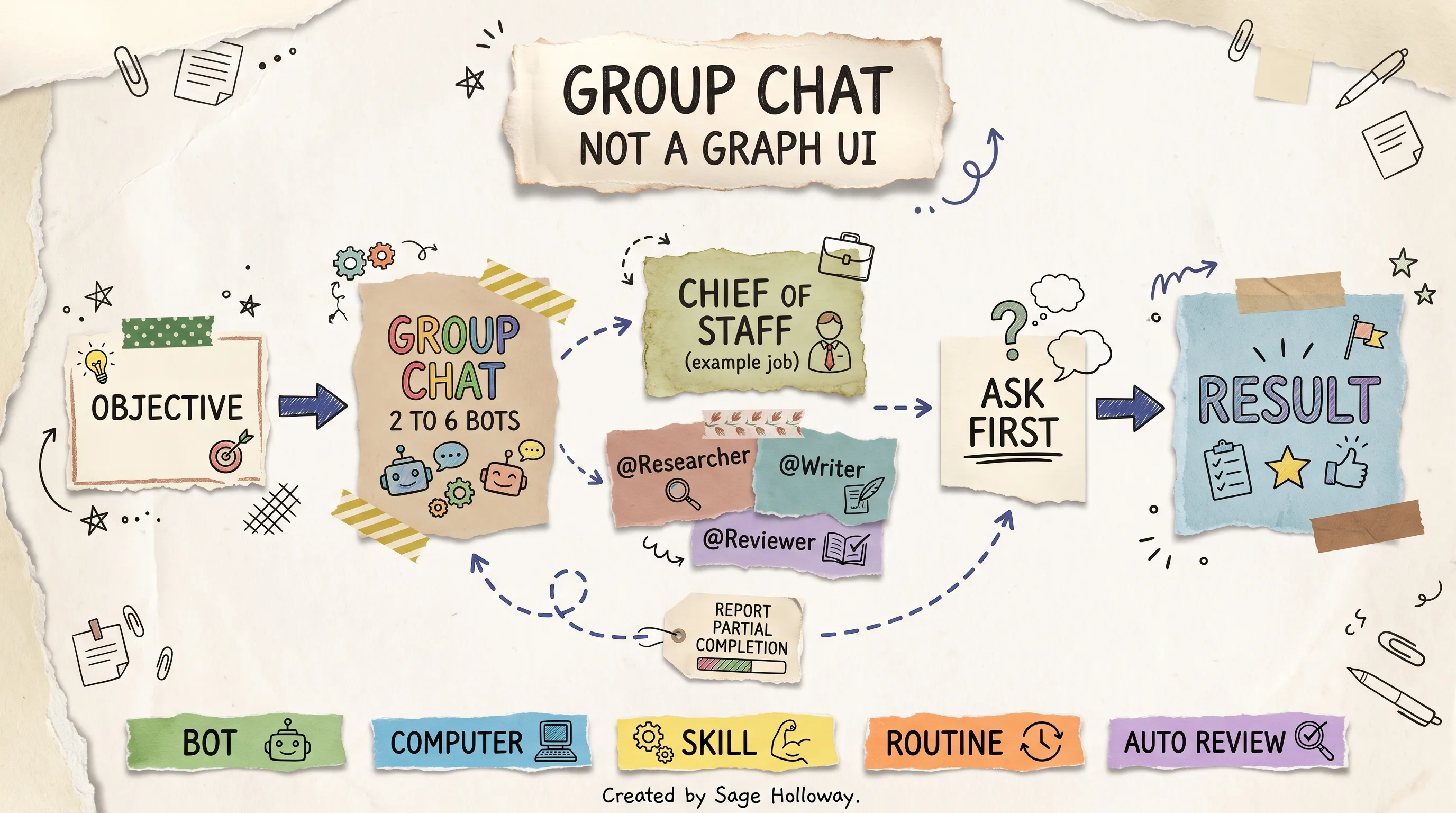
Kickoff is an objective. Group chat is 2 to 6 Bots. Chief of Staff is an official example job. Pixel is workshop-only.
Docs example group: Website Launch with a launch coordinator, a content editor, an analytics reviewer. Chat example uses @Researcher, @Writer, @Reviewer as prompt names. Niparko's personal roster in the official PM guide includes Chief of Staff, Eng mgr (Emily), several Eng Bots, Data analyst (Ashley), PM Pete, Recruiter. Those are his Bots. They are not defaults in Create new Bot.
The Cursor workshop recording is the other Keep video for this section. It shows specialist Bots, Pixel handing mockups to PM Pete, and a group chat with Pete and Emily. Watch it as a working style. Do not hire Pixel. Do not look for a PM Pete template. I am not stamping tweet-hook chapter times onto that recording; those timestamps were never an official chapter list.
https://www.youtube.com/watch?v=x5OawRpQxII
Account Bot cap remains unpublished in the fetched docs. Easy to create more agents does not mean more agents improve the system. If you are choosing first hires, or deciding when to skip the product, that job sits on first Grok Bots. This URL stays on how the group actually runs.
Earn autonomy with one reliable job, then expand
Do not create ten Bots on day one. Build one reliable job, then expand around evidence. Official first-task shape from get-started: outcome, sources, constraints, deliverable, review point. That is the "define done" stand-in. Docs never published the essay's named ladder levels, overnight checklist, or three weekly-audit questions. I am not going to invent them.
Turn an example into a durable Bot, from use-cases, in seven moves: put job, sources, output, and boundaries in the description; run one real safe task; correct until the result is reviewable; save as a skill; test on a second input; create a routine only when retries and failure cases are defined; keep consequential actions behind approval. Autonomy is a runtime privilege. When a routine degrades, pull it back.
Production patterns worth copying, as body not as new product modes:
Overnight research desk. Scout only in approved lanes. A checker rejects unsupported claims. Something merges duplicates. A brief writes the executive summary. You get one compact review queue in the morning, not five chat windows.
Bug reproduction, then debug. The first Bot owns reproduction: exact steps, logs, screenshots, environment. Only then does a debugging Bot receive the case. Otherwise the builder repairs an imagined failure.
Content with a public gate. Every reversible step finishes. Nothing public leaves without approval. You review one package.
Split specialists only when a bottleneck appears. Split research from writing when shared context is noisy. Split checking from building when self-review is weak. Split operations from analysis when permissions diverge.
Always-on automation rots: sites change, credentials expire, routines drift. Ask each Bot for a weekly receipt, then spot-check one artifact yourself. The Bot can summarize its history. It should not be the only judge of that history.
The goal is to remove work without accumulating invisible failure. If you want the click-path, use the tutorial. If you want which job to hire first, use first Grok Bots.
Nine failure modes mapped to official controls
Diagnostic labels below (state, routing, permission, loop, graph) are troubleshooting language. They are not Settings titles.
One generalist owns everything. Memory fills. The thread becomes un-auditable. Permissions go wide. Control: bounded role in Edit Profile; official example jobs; do not name it General Helper.
Tasks with no definition of done. The Bot stops at something plausible. Control: first-task shape (outcome, sources, constraints, deliverable, review point).
Every Bot receives the full transcript. Context grows faster than useful state. Control: compact handoff; files in
/workspace; group kickoff as an objective.
Shared computer mistaken for isolation. Different names look like a credential boundary. Control: one Firecracker microVM per user; do not use separate Bots as a security boundary; separate Cursor users when trust levels diverge.
The loop has no hard stop. It retries a bad path with slightly different wording. Cost rises. Information does not. Control: official skill states plus idempotent retries; pause-after-absence; 50-routine and 20-record caps as hygiene, not as a budget UI.
The checker is the builder in the same context. Confidence becomes evidence. Control: a second Bot or an independent rubric; Auto Review is a review model, not your only checker.
Everything waits for approval. The Bot is a slower you. Control: automate preparation; gate sending, publishing, purchases, deletion, production.
Nothing waits for approval. The system can represent you, spend, delete, or change production before you see the plan. Control: description boundaries, Ask first, draft Send or Discard cards. Approval does not undo completed work.
Routines are never deleted. The portfolio grows until you cannot remember why each one exists. Control: delete unused routines knowing there is no undo; the useful set is the one you would miss.
What makes Grok Bot different from grok.com is not a personality. It is this stack: named Bots, one computer, Marketplace blast radius, skill versus routine, group size 2 to 6, Ask first. Ignore the stack and you have a chatbot with a longer leash.
FAQ
What is Grok Bot vs Grok?
Grok Bot is the desktop and mobile teammate app with named Bots and a persistent cloud computer. Grok is consumer chat on grok.com, plus SuperGrok plans you can link for Bot access. Grok 4.6 is a model Cursor may serve; there is no in-app picker. See the overview and the FAQ.
Is Grok Bot just Cursor?
No. Grok Bot is a SpaceXAI / xAI product you sign into with a Cursor account. Computers run in Cursor's cloud. Cursor Teams and Enterprise admins enable or restrict access from the Cursor dashboard. Grok Bot is not a Cursor editor panel, and it is not grok.com.
How does Grok Bot usage work?
Grok Bot usage is a separate pool from Grok chat and from Cursor. It resets weekly. Eligible accounts can add on-demand usage billed from model and token cost. If both Cursor and SuperGrok exist, Grok Bot uses whichever has more usage.
Teams spend shows at cursor.com/dashboard/usage. Invoices combine Cursor and Grok Bot. There is no Grok Bot-specific spend cap yet. Weekly included dollars are not published on the fetched Plans page.
What model does Grok Bot run on?
Cursor manages model selection. There is no model picker in the app. Grok 4.6 launched 12 August 2026 with published High scores and API name grok-4.6. By 4 October 2026 the live API docs at /developers/grok-4-6 describe Grok 4.7. Do not treat "runs Grok 4.6" as a setting you chose.
Can Grok Bot run when my laptop is closed?
Yes. Bot work runs on the cloud computer. Closing the app, laptop, or phone does not stop a background turn or routine. Optional Execution on Local Computer is separate and defaults to Ask every time.
Do multiple Bots share logins?
Yes, on one user computer. Files, browser sessions, and app logins are available to every Bot on that account. Screens are work surfaces, not security boundaries. Do not use separate Bots as a security boundary. Different trust levels need different Cursor users or credentials.
How do I stop Grok Bot sending or publishing?
Put standing boundaries in the Bot description. Add narrow Ask first rules for sending, publishing, deleting, purchasing, or changing production. Use Allow once, Always allow, or Deny on the proposed operation. Review draft cards, then Send or Discard. An approval does not reverse work already completed.
Can Grok Bot watch me work and save a routine?
Teach a task (or written instructions) saves a draft skill: how to perform the task. A routine is when one Bot runs that workflow, on a schedule or after an event. Teaching records visible computer interaction for up to ten minutes and does not record microphone audio.
Should I start with many specialist Bots?
No. Docs want the smallest useful roster. Add a Bot when the job is a stable specialist role. Official example jobs are specialists, not one General Helper. Group chat is 2 to 6 Bots.
Build one reliable job, then expand around evidence. First-hire choices live on first Grok Bots.
The computer will keep running whether the isolation story in your head is true. Auto Review will keep reducing prompt-injection risk without eliminating it. Cursor will keep picking the model. Weekly included dollars will stay unpublished until a Plans page actually ships. I would rather you design for those constraints than wait for a vault that is not on the settings page.
Tonight, create one Bot with a real job. Leave sending and publishing on Ask first. Do not install every connector "in case." Watch one run in Agent Computer.
Tomorrow, count which other named Bots on the account can reach that login. That count is the architecture. The rest is naming.
If you want the next mechanism piece in your inbox, that is what the newsletter is for.
Until then...
Sage
PS. Open Agent Computer on a Bot you already trust. Count how many other named Bots on the same account could use that session. If the number is bigger than one, you already built a team. You have not built a vault.
Related Reading
Grok Bot tutorial: 10-step how-to, download, and first run. This URL stays on mechanism.
Grok Bot limits: usage, slowness, and "not working." Not this page.
First Grok Bots: which jobs to hire, when to trial, when to skip.
How to use the Codex plugin in Cursor: a different Cursor-adjacent product. Grok Bot is the teammate app, not that panel.
Author
Practical guides, tool teardowns & AI engineering workflows.


