AI Coding Tools
Codex Plan Mode: From Better Plans to Safer Execution

Sage Holloway
20 min read
Go back to blog
SHARE

You asked for a small change. Twenty files later you are reading a rewrite of a rewrite, and you cannot remember which sentence you actually agreed to. The agent is busy. You are auditing. That is not a partnership. That is after-the-fact damage control, billed in tokens and trust.
Direct answer: Codex Plan Mode separates design decisions from implementation so Codex can inspect a repository, clarify requirements, and propose a sequence before editing files. Enter it with /plan or cycle modes with Shift+Tab, then review the plan before execution. Plan Mode is not a security boundary, so pair it with appropriate permissions when writes must be technically blocked. For durable work, save the plan in a versioned Markdown file.
Before: a fuzzy prompt, a flurry of edits, and a pull request you did not quite authorize. After: a scanned repo, a short interview, a written sequence, and a yes that happens on purpose. Codex Plan Mode is that pause. Plan mode Codex searches land here for the same job. The mode is a collaboration habit. It is not a lock on the disk.
If you still need the binary and a first session, start with Codex CLI install. This page stays on planning.
Last verified: 2 September 2026 (research sources; no live CLI verify)
Table of contents
What Plan Mode changes in the plan-to-execute workflow
Enter and leave Plan Mode in the CLI and editor
Turn an ambiguous request into an executable plan
Persist complex work with PLANS.md and checkpoints
Plan Mode is not Read-only: choose the right security boundary
Control plan drift and non-deterministic rewrites
Review plan changes with diffs instead of rereading the whole plan
Advanced handoff: model choice and last-minute execution directives
FAQ
Put the workflow into practice

Codex Plan Mode creates a reviewable bridge between intent and implementation.
What Plan Mode changes in the plan-to-execute workflow
You would not let a contractor start knocking through a wall based on a hallway chat. You would want an itemized estimate: which rooms, which materials, what "done" means, and what is explicitly out of scope. You would mark it up. You would sign. Then the demolition starts.
If the quote lives only in the conversation, you have nothing to hold up when the invoice arrives.
That is the job a plan Codex session is supposed to do. Codex Plan Mode is a collaboration mode that keeps design work in front of file edits. Codex inspects the tree, asks what "done" looks like, and writes a sequence you can refuse. Execution is a later lane. The official Codex CLI docs treat that loop as a terminal workflow. The pause is the product.
Some power users call the mode a token tax. They plan in ordinary chat and ship. They are not always wrong. They are describing a different job.

Planning gathers evidence and constraints before approval opens the execution lane.
https://www.youtube.com/watch?v=dS6X2F8c4R0
That walkthrough is useful because it treats Plan Mode as one piece of an agent workflow next to project rules and permissions, not as a magic switch.
When planning earns its cost
Use Plan Mode when the request is ambiguous, the change spans several files, or a wrong edit is expensive to unwind. Official best-practice guidance is blunt: plan first for difficult tasks. GitHub discussion around Plan / Spec Mode keeps returning to the same trade-off: a thorough pass costs tokens, a cursory pass costs rework.
Good candidates:
A refactor that will touch more than one module.
A feature whose acceptance criteria are still a story.
Infrastructure, permissions, billing, or monitoring work, where a missed constraint is not a typo.
A repository you do not yet understand well enough to name the files.
If you cannot say which files should change, you are not ready to execute. You are ready to inspect.
When direct execution is enough
Skip the ceremony for a five-minute isolated fix. A typo, a one-file test, a known lint. Community threads arguing "you don't need Plan Mode" are describing this lane. A full spec for a one-line change is how you burn a rolling window on theater.
A useful test: if you could write the commit message before the session starts, you probably do not need a planning interview. If you would need a design review from a colleague, you do.
Where approval becomes execution
The handoff is the yellow gate in the diagram, not a feeling. Codex proposes. You review. Then you allow implementation.
Leaving Plan Mode without a decision is how people get a half-agreed spec and a full diff. The session should make the swap explicit: this is the plan we are executing, these are the files, this is out of scope.
If you want a broader product split (interactive steering versus delegated tickets), that comparison lives on Claude Code vs OpenAI Codex. This page stays on the plan-to-execute gate inside Codex.
Enter and leave Plan Mode in the CLI and editor
Codex CLI plan mode is native. You do not enable a feature flag. You do not hunt for a hidden /collab path. Sources date the built-in planning capability to Codex CLI around v0.93.0, with matching behavior in desktop and editor environments. Codex planning mode in those surfaces is the same collaboration idea with different chrome.
If the binary is missing, go back to install. If the editor path is what you actually wanted, the IDE spoke is how to use Codex in VS Code. Cursor has its own plugin job at how to use the Codex plugin in Cursor.
Start with /plan [description]
Type the slash command, then a short task. The description is the first constraint. Vague in, vague out.
Examples of a description that can actually be planned:
The brackets in docs mean "put your task here." They are not literal characters you leave in the prompt.

Enter Plan Mode in the CLI with /plan [description]; Shift+Tab cycles collaboration modes. Teaching reconstruction, not a pixel-identical screenshot.
Cycle collaboration modes with Shift+Tab
Shift+Tab cycles collaboration modes in the terminal. Keep pressing until the session shows Plan mode. This is the keyboard path when you are already mid-chat and do not want to retype a slash command.
https://www.youtube.com/watch?v=IjMv0J1WCr8
That short clip is a terminal-first demo of the entry, not a substitute for reading the plan Codex produces.
Leave the mode the same way you entered it: cycle until you are back in ordinary agent chat, or approve implementation once the spec is good enough. Do not assume exiting the mode undoes uncommitted file writes. It does not.
Use the editor's Plan mode selector
In the editor, sources describe a + control in the chat UI. Open it and choose Plan mode. The status bar should update. UI labels move between builds, so treat this as a teaching reconstruction, not a promise that your current build looks identical.

In the editor, open the + control and choose Plan mode.
https://www.youtube.com/watch?v=fZeiR-yKFY8
Watch that clip if you cannot find the selector from a screenshot. Then come back. The click is the easy part.
Remove obsolete /collab and feature-flag instructions
Older tutorials still tell you to set collaboration_modes = true in config.toml, or to enter planning through /collab. Those instructions are obsolete. Delete them from team runbooks. Do not debug a missing flag that current builds no longer require.
Current entry:
/plan [description]to enter Plan Mode with a task.Shift+Tabto cycle modes, including Plan mode.
Obsolete, do not run as setup:
/collabcollaboration_modes = true

Use /plan [description] or Shift+Tab. Do not follow obsolete /collab or collaboration_modes = true instructions.
If a 2025 gist and the current CLI reference disagree, keep the current docs.
This will not work if you are following a cached blog that still treats Plan Mode as a hidden beta.
Turn an ambiguous request into an executable plan
"Make auth better" is not a plan. It is a wish. Codex Plan Mode earns its keep when you force that wish through inspection, questions, constraints, and a review you can refuse.
Treat the following as a HowTo, not a vibe.
Let Codex inspect the repository
Start the session in the repo. Let Codex read layout, tests, and existing patterns before it invents a file tree. Official CLI guidance is built around inspect-then-edit. Skip this and you get a plan for a codebase that exists only in the model's head.
Ask it to name the files it thinks it will touch. If it cannot name them, it is not done inspecting.
Use an adaptive requirements interview
An adaptive interview is Codex asking clarifying questions before it locks a sequence: which users, which environments, which tests, what must not change. Maintainer discussion of Plan / Spec Mode treats interview-style versus freeform as an explicit design choice. Tutorials call a similar move a reverse interview: you make Codex interrogate you.
Answer in constraints, not slogans.
Weak: "keep it clean." Strong: "do not change the public TypeScript types in src/retry.ts. Add tests in retry.test.ts only."
If Codex does not ask anything and jumps to a ten-step epic, interrupt. Send it back to questions. A silent planner is guessing.
Lock constraints and success criteria
Write the non-goals into the plan. Success criteria should be checkable: tests that must pass, files that must not change, a rollback that a human could run.
Useful fields to demand in the draft:
Goal in one sentence.
In-scope files.
Out-of-scope files.
Tests or checks that prove done.
Risks (migrations, auth, billing, data).
If the plan has no out-of-scope line, it will expand the moment execution starts.
Review the plan before execution
Read it like a design review, not like a changelog you already trust. Look for invented files, skipped tests, and "also while we are here" steps. Then approve, or send a scoped correction.
Do not rubber-stamp because the prose sounds confident. Confidence is cheap. A file list is not.
Numbered loop you can reuse:
Enter Plan Mode with
/plan [description]orShift+Tab.Let Codex inspect the repository and name candidate files.
Answer the interview until constraints are explicit.
Require success criteria and non-goals in the draft.
Review the plan. Refuse anything that still sounds like "make it better."
Only then allow implementation.
If you also wire external tools during this loop, that is a different job: Codex MCP.
Persist complex work with PLANS.md and checkpoints
Chat is a whiteboard. Whiteboards get erased. Multi-hour work needs a document that survives a compacted session, a crashed terminal, and a teammate who was not in the room.
OpenAI's cookbook on using PLANS.md for multi-hour problem solving (also mirrored in the OpenAI Cookbook repo) treats an ExecPlan as a self-contained living specification: purpose, progress, surprises, decisions. The recipe is older than current model names. The skeleton is still the useful part.
Choose an ephemeral or persisted plan
Ephemeral plans live in the chat. They are fine for a short, single-session change you will execute immediately.
Persisted plans live in a Markdown file in the repo. Use them when:
The work will take more than one sitting.
Someone else may execute the steps.
You expect to revise the spec without rewriting it from memory.
Community threads often save to myplan.md or PLANS.md. The filename matters less than the fact that Git can see it. Pick one convention for the team and stop arguing about poetry.
Structure a self-contained ExecPlan
A good ExecPlan can be handed to another agent or a junior teammate without the original chat. The cookbook skeleton is enough:
Progress is checkboxes, not vibes. Surprises exist because inspection is incomplete until you touch the code. The decision log is how you stop re-litigating a choice every session.

A persisted ExecPlan keeps purpose, progress, discoveries, and decisions reviewable.
Separate AGENTS.md instructions from PLANS.md work
AGENTS.md is a persistent project instruction file: layout, lint and test commands, house conventions. Codex loads it as default context. An ExecPlan is a task specification for one body of work.
If you dump the current epic into AGENTS.md, every future session inherits last month's migration. If you dump team conventions into PLANS.md, the spec cannot travel without the folklore.
Keep AGENTS.md stable. Keep PLANS.md (or myplan.md) living and scoped. When the work ships, archive or delete the plan so it does not become a second, rotting README.
Checkpoint plan revisions with Git
Save the accepted plan. Commit it. Treat later edits as diffs against that commit, not as a new essay in chat.
A tiny "design commit" is enough:
You are not pretending the plan is production code. You are giving yourself a baseline the model cannot silently replace. Forum advice to "use git to keep track of what is modified" is doing this job. It is a workflow, not a Codex feature toggle.
Plan Mode is not Read-only: choose the right security boundary
Here is the thing. People treat /plan as a seatbelt. It is a conversation style. It does not physically block writes.
I tried planning in a dirty working tree and assumed the mode would keep Codex from touching files. It did not work the way I expected. The session still had whatever permission profile was already on. Planning behavior and sandbox enforcement are different knobs. Confusing them is how exploration becomes an accidental commit.
A permission profile is the runtime policy that says what Codex may read, write, or run. /permissions is the slash command that selects or exposes those choices. Official pages on agent approvals and security and sandboxing are the depth for this. The dedicated spoke is Codex permissions.
Compare collaboration mode, approval policy, and sandbox mode
Three layers, easily mashed together:
Collaboration mode (Plan Mode): how Codex thinks. Inspect, clarify, plan. Not a write lock.
Approval policy: when Codex must stop and ask before an action. Interruptions, not architecture.
Sandbox mode: what the process can actually do on disk and network. Technical boundary.
You can plan while writes are allowed. You can execute while writes are blocked (and then wonder why nothing landed). Set both on purpose.

Plan Mode shapes the workflow. Permissions and sandbox settings enforce what Codex can do.
Accessible version of that matrix:
Plan Mode controls planning behavior. It is not a security boundary. Use it to inspect, clarify, and plan.
Read-only is a sandbox permission. It blocks writes. Use it for safe exploration.
Full Access is broad action permission. Writes are allowed. Use it for trusted work only.
codex-yolois a third-party utility with auto-approval risk. It is not Plan Mode.
Pair planning with Read-only when writes must be blocked
If the repository is sensitive, or you do not trust the prompt yet, pair Plan Mode with an explicit Read-only profile. Sources describe selecting that profile through /permissions. Planning can still proceed. File modification should not.
Do not skip this because the prompt sounds cautious. Cautious prompts are not syscalls.
Understand Full Access and auto-approval risk
Codex full access is not planning safety. Full Access means Codex is allowed broader action, including writes. It should never be described as a Plan Mode guarantee. Issue threads also document regressions where Full Access sessions still nag for per-action approval. Treat those as bugs, not as a reason to disable every guard.
codex yolo as a search phrase is a trap. Native Plan Mode is not "yolo." Two different things share the noise:
Community talk of auto-approval flags that skip confirmation prompts.
The third-party
codex-yoloproject: a tmux harness for parallel agents with automated, headless permission bypasses.
Neither is a synonym for Plan Mode. Do not install a bypass utility because you wanted a better spec. Do not copy unverified --yolo workarounds from issue comments into a production runbook. If you need headless automation, design the permission profile on purpose, and keep the permissions guide as the long form.
Control plan drift and non-deterministic rewrites
Ask Codex to "just tweak step 3" and watch the entire document come back in a new voice, with a new order, and three new files you never requested. Community threads on adjusting Codex plan mode name this plan non-determinism: minor refinement requests trigger a full rewrite in chat.
That is the model doing what models do. It is not a personal insult. It is also not a feature you can turn off with a hidden key we can cite from current official docs.
Freeze an agreed baseline
Once you accept a plan, freeze it outside the chat. File plus Git commit. Say out loud (or in the prompt) that the file is the source of truth. Future edits should patch that file.
If the only copy is in the transcript, you have already lost the baseline.
Ask for scoped plan edits
Prompt like a code review, not like a muse.
Weak: "make the plan better." Strong: "In PLANS.md, change only the test step. Do not rewrite Purpose. Do not add files."
If Codex rewrites anyway, reject the chat version and edit the Markdown yourself. You are allowed to type. The model is a collaborator, not a landlord.
Track revisions outside the transient chat
Chat compaction, /fork, and new sessions will not reliably preserve the essay you liked at 2pm. Markdown in Git will.
This is a sourced workflow, not a product guarantee that Codex will diff its own plans inline. Sources do not show a native, trustworthy in-product plan diff. Build the review where Git already works.
Review plan changes with diffs instead of rereading the whole plan
This is the gap most tutorials skip. A 200-line spec. A three-line diff. You should be reading the second.
Native inline plan diffing is absent or insufficient in the sources. Do not wait for a screenshot of a fake Codex diff UI. Use a file-based loop.
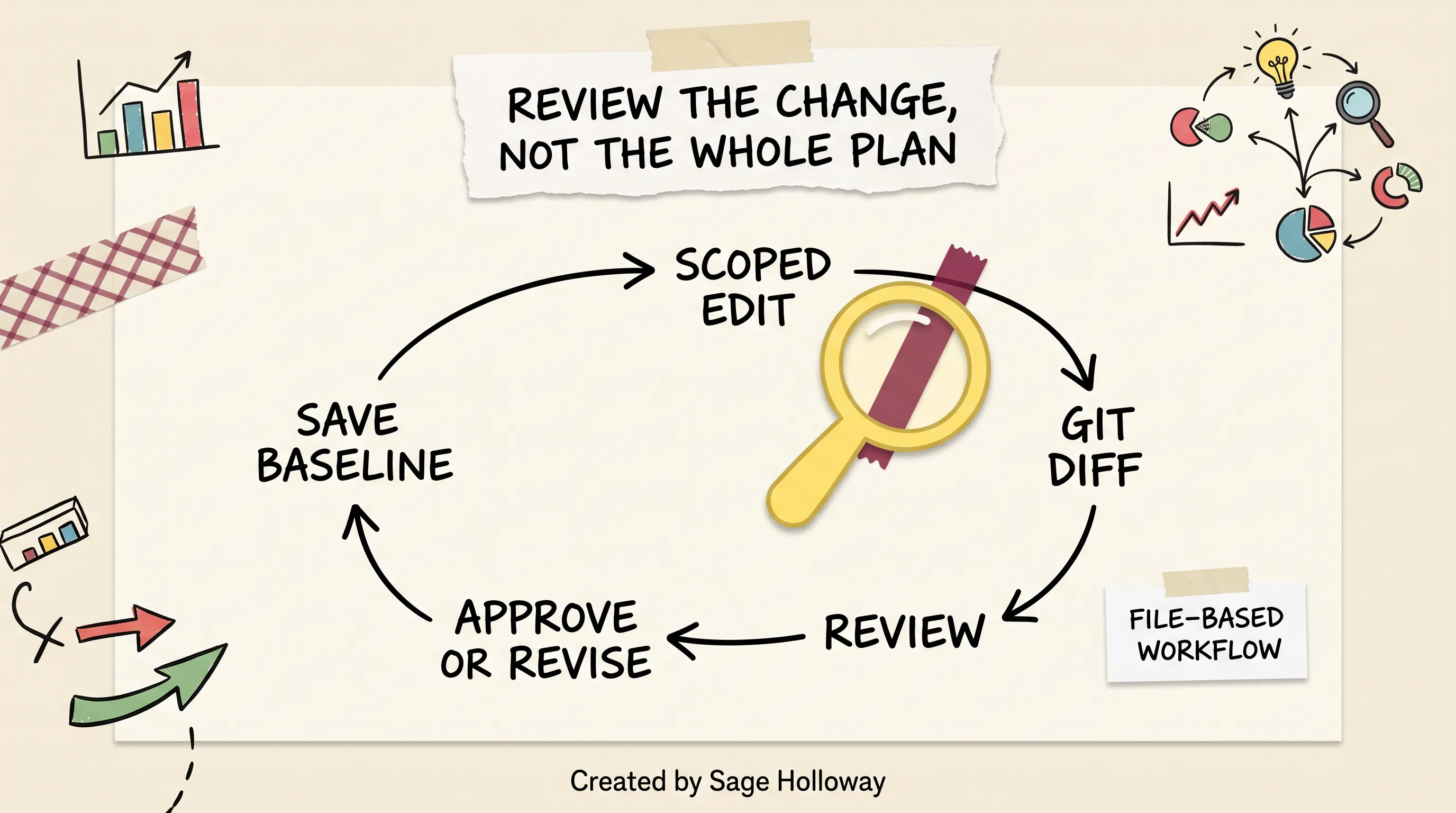
Save the accepted plan, request a scoped edit, inspect the Git diff, then approve or revise. This is a file-based workflow, not a native Codex screen.
Save the accepted plan as a versioned file
After the first review, write the plan to PLANS.md or myplan.md and commit it. That commit is the baseline. Everything after is a patch.
If you skip the commit, git diff has nothing honest to show.
Inspect only the changed requirements and steps
Request the scoped edit. Then:
Read added and removed lines. Ignore the rest. If the diff rewrites Purpose because you asked for a test command, you do not have a scoped edit. You have another full-plan regeneration wearing a smaller prompt.
Look specifically for:
New files in scope.
Dropped tests.
Softened non-goals.
New "also" steps.
Those are the sentences that turn a small yes into a large accident.
Resolve review feedback before implementation
Do not execute from the chat if the file and the chat disagree. Make the file win. Then approve implementation.
If a teammate reviewed in Slack, paste the decision into the Decision Log and commit that too. "Design commits" in community writeups are this: capture out-of-band feedback in the spec so execution does not depend on a thread nobody archived.
A plan you cannot diff is a conversation you already forgot.
That is the whole review method. Boring on purpose. The implementation is allowed to be interesting after the spec stops moving.
Post-implementation review is a different spoke: Codex code review. Do not mash plan review and PR review into one blurry habit.
Advanced handoff: model choice and last-minute execution directives
Two frictions show up after the spec is good: which model spends the tokens, and how you attach last-second rules when the editor's Approve button is a binary click.
Match model effort to planning and execution
Sources discuss using a higher-effort, more expensive reasoning profile for planning, then a cheaper, faster profile for execution. The idea is simple. Planning is where ambiguity is expensive. Execution is where repetition is expensive.
Do this in the session with the documented model picker (/model in CLI references), not with undocumented config keys. Community posts mention model_reasoning and model_execution as automation. Those keys are not something this article can publish as copy-ready configuration without current official evidence. If a blog dumps a config.toml block with those names, treat it as unverified.
For capability and limit depth, use GPT-5.5 developer limits. For usage windows and dashboards, that is Codex usage. Do not mix those jobs into this page.
Add constraints before approving implementation
Right before execution, restate the hard boundaries in chat: files, tests, "stop if X." Do it while you still have a text box.
Examples that belong in that last message:
"Implement only
src/retry.tsandretry.test.ts.""Run the existing unit tests. Do not add a migration."
"If the public types must change, stop and return to the plan."
This is cheaper than a second planning pass after the agent has already rewritten half the package.
Work around the editor's limited confirmation UI
A February 2026 community feature request documents the VS Code limitation: Approve or Deny, with no box for last-minute directives at the click. Sources describe a workaround: dismiss the prompt, then type the constraints in chat with an implementation instruction such as "implement it."
That workaround is for the editor confirmation UI. The CLI already has a chat box. Use it.
Do not invent extra approval buttons in screenshots. The limitation is the point.
FAQ
Does Codex have a plan mode?
Yes. Codex CLI (sources date native planning to around v0.93.0) and the desktop/editor environments include Plan Mode. You enter it with /plan [description] or by cycling collaboration modes with Shift+Tab. People who search "does Codex have plan mode" without the article are asking the same question: the feature is native, and you do not enable the old collaboration_modes flag.
What is plan mode in Codex?
Plan Mode is a collaboration workspace for gathering requirements, constraints, and success criteria before Codex edits files. It inspects the repository, asks clarifying questions, and drafts a sequence. It is a planning behavior, not a sandbox that blocks writes by itself.
When should I use Plan Mode instead of normal chat?
Use it for complex or ambiguous multi-file work, unstable specs, and anything where a wrong edit is expensive. For isolated five-minute fixes, ordinary chat is enough. If you can write the commit message before you start, skip the planning interview.
Is Plan Mode the same as a Read-only permission profile?
No. Plan Mode controls how Codex approaches the task (investigate before writing). Read-only is a sandbox permission that blocks writes. Pair them when exploration must be technically non-destructive. Select profiles with /permissions.
How do I stop Codex from rewriting an entire plan?
Save the agreed plan to a local Markdown file (PLANS.md or myplan.md), ask for scoped edits to that file, and use Git to review the diff. Minor chat requests can otherwise regenerate the whole spec. This is a workflow, not a documented native "lock plan" toggle.
Can I use different models for planning and execution?
Sources discuss planning with a higher-effort model and executing with a cheaper, faster one, switching in the session via the model picker. Do not paste undocumented model_reasoning / model_execution keys as if they were current official config. Check live docs before automating the swap.
What is the difference between PLANS.md and AGENTS.md?
AGENTS.md holds persistent project instructions (conventions, test commands, layout). PLANS.md (an ExecPlan) is a living, self-contained specification for one body of work: purpose, progress, surprises, and a decision log. Do not store the current epic in AGENTS.md.
How do I toggle Plan Mode in the terminal and VS Code?
In the CLI, type /plan [description] or press Shift+Tab until Plan mode is active. In the editor, open the + control in chat and choose Plan mode. Ignore old /collab and collaboration_modes = true instructions.
Can I add execution directives when I approve a plan?
In VS Code, the confirmation UI is documented as Approve or Deny, with no extra message box. Dismiss the prompt and type your constraints in chat with the implementation instruction. In the CLI, put those constraints in the chat before you allow execution.
Put the workflow into practice
Pick a change you would not mind throwing away: a docs-only fix, a dead code path, a test you already know how to write.
Enter Plan Mode. Let Codex inspect. Answer two clarifying questions. Save the plan to a file and commit it. Ask for one scoped edit, then read git diff. Decide whether execution deserves a yes.
If the diff rewrites the whole page, you learned the lesson without burning production. If the diff is three lines, you are ready to use the same loop on the task that actually scares you.
The pause will keep getting cheaper as models get faster. The need for a signed estimate will not. Whether Codex grows a real inline plan diff is still open. Until that exists, the file is the review.
Until then...
— Sage 🍓
PS. Next time a plan comes back "slightly revised," print the Git diff and highlight only the lines you asked to change. If your highlighter never touches the page, the revision was theater. If it paints half the document, you did not get a tweak. You got a new contract. Decide whether you would sign it.
Related Reading
Codex CLI Install Guide: macOS, Linux, Windows, and WSL install routes, login, and first-run fixes.
How to Use the Codex Plugin in Cursor: Official extension, project folder, and blank-panel recovery.
Codex MCP: Local stdio and remote HTTP servers,
/mcpchecks, and auth failures.Codex CLI Install Guide: The Medium edition of the scoped npm, Homebrew, and first-session path.
How to Use the Codex Plugin in Cursor: Official extension, project folder, and blank-panel recovery.
Author
Practical guides, tool teardowns & AI engineering workflows.
Related Articles

AI Coding Tools
Best GitHub Copilot Alternatives in 2026: Choose by Coding Surface, Not a Top-10 List

AI Coding Tools
GitHub Copilot Agent Mode in VS Code: How It Works, How It Differs From Ask and Edit, and How to Control It

AI Coding Tools
How to Cancel GitHub Copilot: The Irreversibility Trap, the Missing Button Fix, and Every Cancellation Path