AI Agents
Does Grok Bot Have a Free Trial (Credit Dies First)

Sage Holloway
22 min read
Go back to blog
SHARE


The Grok Bot free trial is a usage credit plus a 7-day window. One large run can exhaust the credit.
You blocked a week on the calendar and treated it like a full pass. You ran the ambitious job first because the clock said you had time. By Tuesday the pass had nothing left on it, and the calendar still showed five days. The week and the spend were never the same object. Most writeups fuse them anyway.
Yes. Grok Bot has a free trial: a usage credit plus a 7-day window, not a week that unlocks every feature. One large run can exhaust the credit. The trial never becomes a paid Bot plan. Cancel Trial on the plan screen. After that, access is included with paid Cursor plans, or SuperGrok at $30 a month. SuperGrok Lite is not included.
I watched someone plan seven quiet evenings of "trying every feature." They started with the biggest job they had. The credit was gone before the calendar moved. That is the grok bot trial people actually get, not the grok bot one week trial the X post sold.
A Bot is a durable named AI teammate with a job, its own conversation, and working context that develops over time. Grok Bot is the desktop and mobile app those Bots live in. It is not grok.com chat, and it is not a model you pick from a menu. Depth of what-it-is sits on how Grok Bot works. One line here, because isolation changes how you trial: every Bot on your account shares one cloud computer per user. Separate Bots are not a security boundary.
Company legal name is SpaceXAI LLC. Docs and Help live under the xAI hostname. Do not treat a third-party "1-hour course" hook as a SpaceXAI class. Official film is below.
Last verified: 10 October 2026 (official Help, docs, and R3 research; no live CLI verify)
Table of contents
The Grok Bot free trial is a usage credit plus a 7-day window
Cursor paid, SuperGrok $30, and the iOS intro are different doors
When to skip, and whether the trial is worth starting
Connect Marketplace, then create one weekly Bot
First jobs this week: author five vs official cousins
Description and Auto Review, not a rules field
FAQ
The official Grok channel film is the cleanest picture of the category: named teammates, a cloud computer, work in real tools. Watch it as product identity. It does not replace Help on the grok bot free trial.
https://www.youtube.com/watch?v=F1_0Lkp16Rc

You are trying named Bots on one computer per user, not a week of unlocked features and not a Lead Bot org chart.
The Grok Bot free trial is a usage credit plus a 7-day window
The gym sold you a complimentary week. You blocked seven mornings. Monday you stayed for a long class and a second session after lunch. Tuesday the desk scanned your card and said the complimentary visits were already used.
The paper still showed a checkout date five days out. They billed the week as a window. They metered the visits as a count.
That is the Grok Bot free trial.
Cursor Help on plans is blunt: "The Grok Bot free trial is a usage credit rather than a set number of days, though a 7-day window also applies." A usage credit is a finite pool drawn down by agent steps and tokens, not by how many chat bubbles you sent. Help FAQs add the line people skip: "The trial is a usage credit, and one big task can use all of it. Used credit is not restored."
The grok bot 7 day trial phrasing in search is the window. It is not a promise that every feature stays unlocked until day seven. The source post said "a one-week free trial that unlocks every feature." That sentence is false as product fact.
There is no charge to cancel. The trial never becomes a paid Bot plan. Cancel Trial lives on the plan screen for free-plan accounts. If you are already on a paid Cursor plan or a Teams seat, the trial ends on its own. You do not need a second "cancel so it does not convert" ritual on that path.
Used credit is not restored.
Is there a grok bot free trial code? Official Help and docs fetched on 10 October 2026 do not publish one. Do not invent a code, a coupon field, or an "Activate Trial" welcome label that Help does not show. Third-party blogs that print "One Week Trial" plus a card-required checkbox are not a citation.
Does Help say you must drop a card to start the usage-credit trial? The pages fetched do not. Help mentions a card when you enable on-demand usage ("If Grok Bot asks for a card, finish that on the web"). On-demand is extra spend after included usage. Treating that sentence as a start-trial requirement is a stretch the sources do not make. I am leaving it as insufficient.
The iOS App Store intro offer is a different trial. It can convert into a paid Apple subscription unless you cancel in Apple ID, then Subscriptions. Android has no in-app trial. If you started from TestFlight or the App Store, check which door you actually walked through before you assume Cancel Trial on the desktop plan screen covers Apple.

Five doors. Only the first is the Grok Bot free trial. It never becomes a paid Bot plan.
A first-time login video can show a session labelled a trial. Useful as a picture of opening the app. It is not Help copy for a welcome control named "pick the trial."
https://www.youtube.com/watch?v=rJZXMI9EsHs

Cancel Trial lives on the plan screen. There is no charge to cancel. The trial never becomes a paid Bot plan.
If grok bot is it free is the question under this heading, the honest split is: grok bot is free to try inside that credit and window. Grok Bot is not an ongoing free product on the pages fetched. The ongoing free-tier job is a different URL. This page owns the trial, the cancel control, and the 7-day window.
Get one weekly job running before the window ends and you will know whether paid access is worth it. Help does not print a weekly included-usage dollar on the live pages used here. I will not invent one.
Cursor paid, SuperGrok $30, and the iOS intro are different doors
So which door are you on?
The grok bot free path people want is usually one of five, and only the first is the trial we just named. The others are paid inclusion, a Grok-side plan that lists Bot access, an Apple intro, or a myth. Mixing them is how you cancel the wrong subscription.
Download is a one-liner, not this article's job. Get the app from x.ai/bot or cursor.com/download/bot. It runs on macOS (Apple silicon and Intel), Windows (x64 and Arm64), Linux (.deb / .rpm / AppImage), iPhone on iOS 18+, iPad on iPadOS 18+, and Android 9+. The 10-step install lives on the Grok Bot tutorial when that URL ships. This page stays on access.
Sign In with Cursor
Grok Bot uses your Cursor account. There is no separate Grok Bot login.
Get started says: choose Sign in on the welcome screen. If you are already in the app, use Sign In with Cursor from Settings. That is the cursor grok bot trial door in real chrome. The source said "download, sign in, pick the trial." Help does not document a welcome label named "pick the trial."

Sign in with a Cursor account. If you are already in the app, Sign In with Cursor from Settings.
Sign in with Grok is a different path. Help reserves it for a self-serve Grok Business seat. Do not use that button because a blog said "sign in with Grok." Link SuperGrok later if that is the grant. Do not paint SuperGrok's $30 on this welcome screen. It is not there.
Included plans vs SuperGrok vs SuperGrok Lite
Paid access, as of 10 October 2026, is included with Cursor Pro, Cursor Pro+, Cursor Ultra, and Cursor Teams. Cursor Enterprise is enabled from the Cursor dashboard. You can also grant usage by linking SuperGrok, SuperGrok Plus, SuperGrok Heavy, or X Premium+.
x.ai/pricing lists SuperGrok at $30 a month with a Grok Bot access bullet. SuperGrok Plus is $100 a month. SuperGrok Lite does not include Grok Bot. Plans do not stack.
Grok Bot usage is metered on the Cursor account. There is no standalone "Grok Bot subscription" dollar for the Cursor path. Help: "Do I need a separate Grok Bot subscription? No."
Two numbers, no commentary: SuperGrok $30. SuperGrok Plus $100. Lite: not included.
The iOS intro is still the other trial. It converts unless you cancel in Apple ID. Desktop Cancel Trial does not cancel Apple. If you are asking how to grok bot cancel trial and you started on iPhone, read FAQ 2 twice.
Cursor's field workshop is the cleanest walkthrough of download at x.ai/bot, desktop plus iOS, and access via Cursor or SuperGrok. Watch it for the doors. Do not treat workshop timestamps as this article's install skeleton.
https://www.youtube.com/watch?v=rkigdXf-52I
When to skip, and whether the trial is worth starting
Grok Bot is not for everyone. Decide that before you spend the credit, not after you have named five Bots.
Skip it if your work is mostly one-off. A Bot earns a seat on tasks you run every week, not tasks you do once. If the day is not full of recurring work with a clear output, the architecture does not have a job to finish. A chatbot draft in Claude or ChatGPT can still be the right tool for that pile. Their sticker prices are not a Grok Bot price. Do not write $20 as what Grok Bot costs.
Skip it if you need a pinned model. Settings has no model picker. Cursor routes each task to the backend model most likely to succeed. That can be a first-party xAI model or a third-party model on the sub-processor list, and the choice can differ from one request to the next. Users cannot be routed to or away from a particular model.
The team's Cursor model allowlist does not govern Grok Bot (member Help). Security docs add that an Enterprise allowlist exists, enforcement is not guaranteed, and onboarding can acknowledge that Grok Bot may not follow it. If compliance needs a named vendor on every call, this product will not give you that from a settings screen.
Skip it if you need a published reliability scoreboard for Grok Bot as a product. Launch posts do not ship one. Roman, Product, is quoted in the launch post: "There is a huge difference between 90% done and 100% done." That is a vendor line about work landing in the actual tool. It is not an independent Grok Bot benchmark. I will not paste Grok 4.6 model-card scores into this article as Bot scores.
You are not testing a week of Grok Bot. You are testing whether one weekly job can finish before the credit and the calendar both run out.
Start if the work is recurring, the done-state is obvious, and you can sit on send, publish, and pay. The right person, in the source's useful sentence, has real recurring work, not enough hours, and a task a Bot can recognize as finished. If that is you, the trial can tell you what you need. Get the job running before the 7-day window ends.
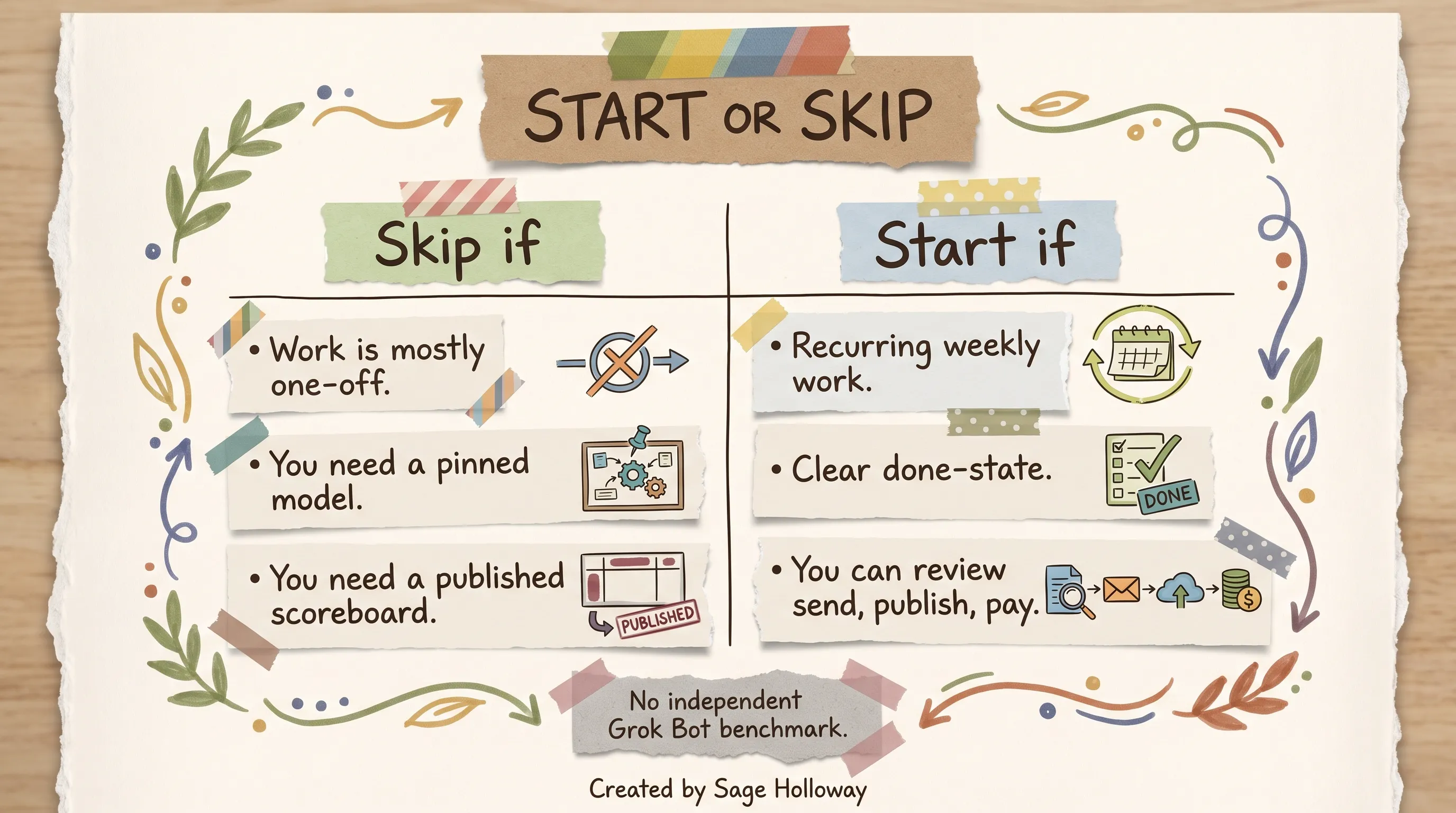
Skip one-off work, a pinned model, or a published scoreboard. Start if the job is weekly and has a clear done-state.
But here is the thing. The access label people still copy from September posts is "you must be willing to be a beta user." Launch day, 11 August 2026, Grok Bot was in beta for named SuperGrok and Cursor tiers. As of 10 October 2026, x.ai/bot says it is generally available for Enterprise, and for teams and businesses on Cursor and Grok plans. Docs describe paid-plan inclusion. Roughness remains: the serving mix can change, some plugins fail (Help still flags Zoom as broken), Teach a task can roll out gradually. That is not a beta gate on paid Cursor or SuperGrok.
Is grok bot worth it as a search? Worth it if the weekly job exists and you will review irreversible actions. Not worth it if you wanted a free month, a student discount, a credit reset, or a model picker. Those jobs are other URLs. Cost-complaint depth belongs on a pricing page, not as a second trial H2.
The honest constraint the product will not remove for you: the credit can die on one large run, there is no picker, and the trial never converts into a paid Bot plan. That last point is good news if you were afraid of a surprise Bot subscription. It is bad news if you thought "trying it" enrolled you in something you could keep.
Connect Marketplace, then create one weekly Bot
The first thing worth doing is connecting the tools the job needs. A Bot that cannot reach Gmail cannot draft from Gmail. A five-minute first task can still be a document summary with no connector. Connect before a tool-using job. Do not connect every row "in case."
Installed plugins are account-wide. Every Bot on the account can use them. That is the blast radius. Details of shared sessions live on how Grok Bot works.
Marketplace is Add then Authorize, not Settings one-click
Plugins are not a Settings section. Open Marketplace from the sidebar (Help also says Plugins). Browse, Add, then Authorize or Authenticate in the browser.
Help names Gmail, Notion, Slack, Google Calendar, and Google Drive. Docs and Sheets and Slides show up as other Google plugins. "And others" is true; the public catalog is not a closed five-row list. I am not going to invent AWS Agents, Browserbase, Composio, or Context7 onto this sidebar. Those names are not on the official catalog pages fetched for this cluster.
Prefer a connector when one exists. Use the browser on the shared computer for services without a connector, or for visual workflows a connector does not expose. A site can still block automation, expire a session, or demand a human step.

Plugins are Marketplace in the sidebar. Add, then Authorize. Not a Settings one-click panel.
The source said "one-click plugins in the settings." That path is wrong. If you only remember one correction from this H2, remember Add, then Authorize.
New Bot: Name, Label, Description
Create path from docs on Bots and onboarding:
New in the sidebar, or
Cmd/Ctrl+N.In New chat, choose Create new Bot, or type a name and create it.
The first Bot on a fresh account is named Grok Bot. Later creates open a Bot named New Bot.
Edit Profile / Bot settings: Name, Label (optional), Description, Avatar.
Start with one concrete task.
"Holds that job indefinitely" is directionally true. A Bot is durable. You can still hide, duplicate, or delete it. Hiding does not pause routines.
Content Creator is an author demo of name-as-role. It is not a shipped template on use-cases. Official warning on a bad name: "General Helper gives the Bot less guidance." Official good job shapes: Talent Scout, Expense Manager, Bug Reproduction.
Pick one task you do every week. Something repetitive. Something with a clear output. Build that Bot first. Not the most ambitious one. The most obviously useful one.

New, then Create new Bot. First Bot is named Grok Bot or New Bot. Content Creator is not a template.
A first task with no connector, from get started:
Matt Palmer's getting-started walkthrough covers Create a Bot, Plugins, and Auto Review allow or deny in one sitting. Use it after you know Marketplace is not Settings.
https://www.youtube.com/watch?v=jwogmXNt7o4
This is not the 10-step beginner tutorial. How to create a grok bot during the trial is Name, Label, Description, one weekly job, then Ask first on send. The rest of install stays on the Grok Bot tutorial.
First jobs this week: author five vs official cousins
Searchers type grok bot examples and land on five day-one names from an X post: LinkedIn prospecting, meeting brief, newsletter curator, review monitor, first draft. Those are author starter jobs. They are not product templates. The post promised copy-ready prompts with brackets. The brackets never appeared. I am not going to invent them.
Official example jobs on use-cases and the product page: Sales Outbound, Talent Scout, Paid Media, Expense Manager, Product Performance, Bug Reproduction, Account Health, Chief of Staff. Official teaching: own a repeatable outcome, start with read-and-prepare, review the result, then add approved actions.
Map the author's five to cousins, then stop where official copy stops.
LinkedIn prospecting's cousin is Sales Outbound. Official: draft email and LinkedIn outreach in the style examples attached, skip anyone already in an active sequence, return a review list, do not send or enroll anyone. The source's "drafts the first message" matches that stop condition. "Your inbox gets the reply" as an unattended send does not.
Meeting brief has no exact template. Closest official job is Chief of Staff, which owns a source-linked digest of what changed and what needs attention, with "Do not send messages or change meetings." Meeting stand-in, on the more-plans list, joins meetings and sends a summary. Neither is "a one-page brief before you get on the call" as a shipped name.
Newsletter curator has no official cousin. Do not invent one. If you want that job, you are writing a custom Description, not selecting a product row.
Review monitor sits near Account Health (customer watch list) or Product Performance (product evidence). Account Health: do not contact customers or edit the CRM.
First draft is not a named job. Files-and-results asks for "A draft message that has not been sent." Draft, then a human sends.

Author names are not templates. Official cousins draft and stop. Do not send.
Do not treat "the writing part takes 20 minutes, not three hours" as a measured Grok Bot result. That contrast is author illustration. Drop it as product fact.
Lead bot is author vocabulary. There is no shipped role with that name. Launch copy talks about a chief of staff sitting on top of specialists. Official Chief of Staff on use-cases is a digest, not an org-chart manager.
Coordination is a group chat of two to six Bots, plus Bot-to-Bot messages, plus a coordinator you name if you want one. "You sent one message. Three bots worked" is an illustration of that pattern, not a UI label. Group-chat depth lives on how Grok Bot works. One paragraph here, then the Cursor product video, then that mechanism piece.
Cover art that says "Write a report about AI trends in 2025" is a diagram metaphor from a 2026 post. It is not a product template.
https://www.youtube.com/watch?v=x5OawRpQxII
Demo names in that workshop are workshop characters. They are not this article's roster.
Description and Auto Review, not a rules field
A Bot with your logins on a computer that keeps running after the lid closes can act while you sleep. The source's useful operating advice is about reversibility: drafting and summarizing can finish; sending, paying, and publishing should wait. That advice is not a shipped mode named "reversibility." There is no control titled rules field. There is no blocked list.
Standing boundaries go in Description. Enforcement is Auto Review.
Standing boundaries in Description
Bots docs give the line you can paste:
Get-started also wants a production line in the first Description ("Never change production settings") if that is your world. Put rules that should remain true in Description. Then add narrow Ask first rules for sending, publishing, deleting, purchasing, or changing production systems.
Nate Herk's concept walkthrough is the cleanest third-party explanation of Name, Label, and Description. Standing boundaries go in Description. Not in a field the product does not ship.
https://www.youtube.com/watch?v=NyfYxpXiw_0
Ask first, Allow once, Always allow, Deny
Auto Review lives under Settings, then General, then Auto-review. Ask first rules always stop matching actions. Allow automatically lets matching actions proceed unless a reviewer stops them. If both match, Ask first wins.
When an action needs you, the card says Review an action. Controls: Allow once, Always allow, Deny. Sidebar state: Needs attention. Approvals from work that started without you (a routine, a trigger, a message from another Bot) expire after about 10 minutes, marked Expired. Redirect is a new message in chat, including "Stop now." Stop does not undo completed work.
Email and Slack can show an editable draft, then Send email or Send message, or Discard. Gmail's plugin can send when authorized. Official teaching still parks send behind approval until you Always-allow that class of action.

The card says Review an action. There is no rules field and no blocked list.
Login walls are a different card. When the Bot reaches a sign-in page, the Computer card is marked Action needed. Choose Take over. You now control the Bot's computer. Type the password, passkey, 2FA, or CAPTCHA on that computer, not into chat.
Choose I'm done. Choose Skip if you do not want to sign in now. The session persists on the shared computer. Other Bots on the account can use it. Onboarding: "The Bot does not see the password you enter."
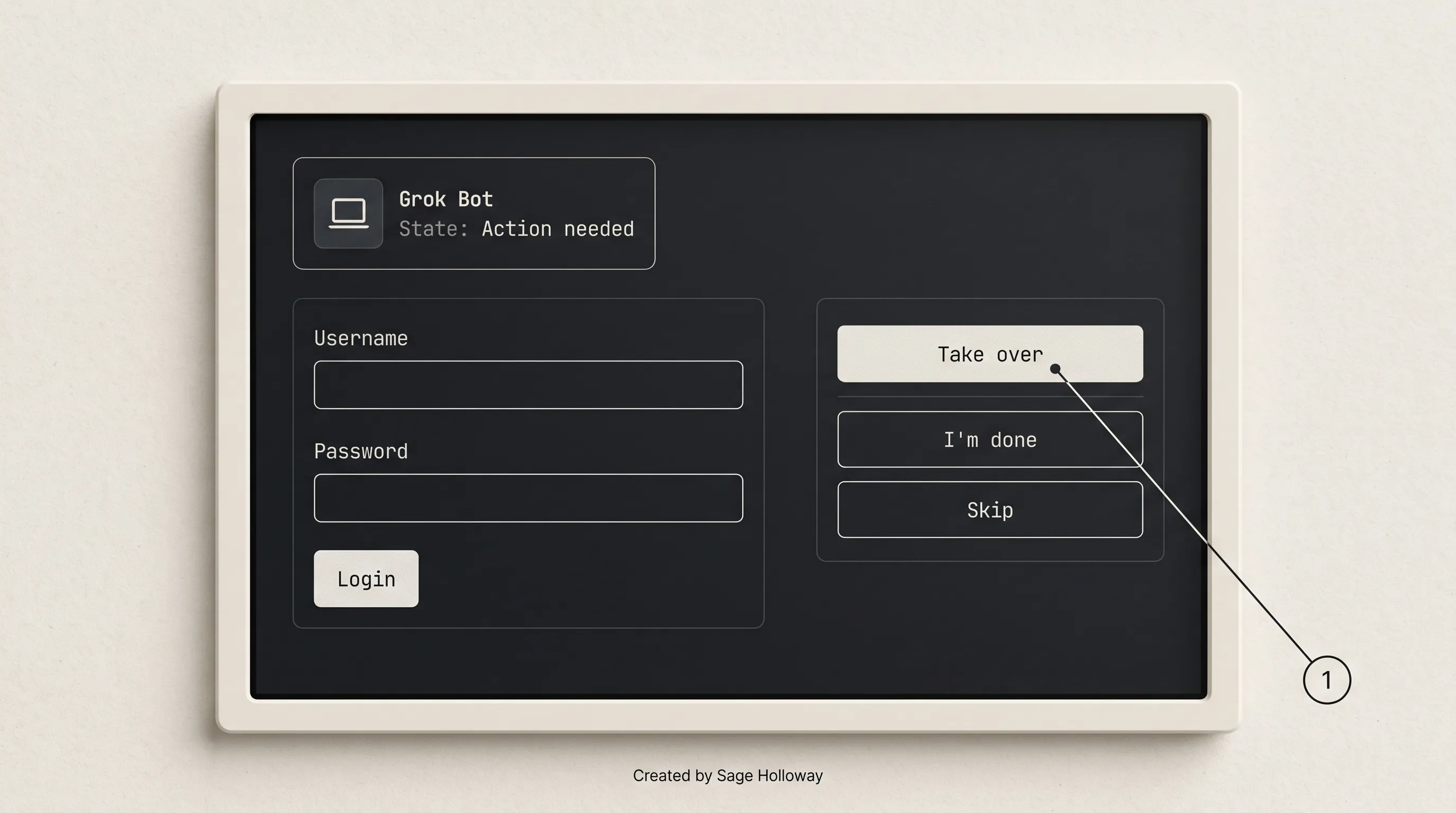
When a login appears, Take over, type on the Bot computer, then I'm done. Never paste a password into chat.
I tried the "paste the password into chat so it can continue" move on a different agent stack last year. It felt faster. It also put a secret in a transcript. Grok Bot Help is explicit: avoid pasting passwords or one-time codes into chat. Take over exists so you do not have to.
This section is the sleep-safe line for the trial week. Takeover isolation depth stays on how Grok Bot works. If grok bot is it worth it depends on whether you will click Deny, this is the control that makes the answer yes.
FAQ
How long is the grok bot free trial?
Official: a usage credit rather than a set number of days, plus a 7-day window. Credit is drawn down by agent steps and tokens. One large run can use all of it. Used credit is not restored. The window is why people search grok bot 7 day trial and how long is grok bot trial. It is not a week that unlocks every feature. See plans Help and FAQs.
How to cancel grok bot free trial?
On a free-plan account, use Cancel Trial on the plan screen. There is no charge to cancel. The Grok Bot trial never becomes a paid Bot plan. On a paid Cursor plan or Teams seat, the trial ends on its own. If you started through the iOS App Store intro offer, cancel in Apple ID, then Subscriptions. That path can convert unless you cancel there. grok bot cancel trial and grokbot cancel trial are the same job. Do not follow a grok.com chat cancel video for this control.
How to use grok bot for free?
Use the usage-credit trial inside the 7-day window. Sign in with a Cursor account. Connect one Marketplace plugin if the job needs it, or start with a document summary that needs no connector. Create one weekly Bot. Put Ask first on send, publish, and pay. How to try grok bot for free is that path. It is not an ongoing free tier. The free-tier SERP is a different URL.
Is grok bot free?
Not as an ongoing product on the pages fetched. Grok Bot is free to try as a usage credit plus a 7-day window. After that, access is included with paid Cursor plans, or you link SuperGrok / Plus / Heavy / X Premium+, or you take a Grok Business seat. SuperGrok Lite is not included. Is grok bot free to use as a daily habit? Only if a paid door already covers you. Is grok bot free to try? Yes, inside the credit and the window.
Is grok bot worth it reddit?
Treat Reddit as a lead, not a citation. Launch posts do not publish an independent Grok Bot reliability scoreboard. Vendor quotes exist (Roman's 90% versus 100% line is one). If a thread is arguing beta-only access, that label is historical as of 10 October 2026: paid-plan inclusion plus Enterprise GA. Worth it on Reddit-shaped threads still collapses to the same test: recurring work, clear done-state, willingness to review send and pay.
Is grok bot expensive?
This URL only points. SuperGrok lists Grok Bot access at $30 a month; SuperGrok Plus is $100; Lite excludes Bot. Cursor Pro / Pro+ / Ultra / Teams include access, with weekly usage tiers that differ. Help does not publish a weekly included-usage dollar on the live pages used here. $20 Claude or ChatGPT is not a Grok Bot price. Cost-complaint depth is a future pricing URL.
Is grok bot paid?
Yes, after the trial credit, unless you already hold an included Cursor plan or a linked grant. There is no separate Grok Bot subscription dollar on the Cursor path. SuperGrok $30 is the public Grok-side number that lists Bot access. The trial never becomes a paid Bot plan. Paid means plan inclusion or a linked SuperGrok / Plus / Heavy / X Premium+ / Grok Business door.
How to create a grok bot?
New, then Create new Bot (or type the name). First Bot is named Grok Bot; later creates are New Bot. Fill Name, Label, Description, Avatar. Put a standing boundary in Description. How to make a grok bot during the trial is one weekly job, not a five-Bot org chart. Marketplace Add then Authorize if the job needs a tool. This is not the 10-step install.
Is grok bot worth it?
Yes if you have recurring weekly work with a clear done-state and you will review send, publish, and pay. No if the work is one-off, you need a pinned model, or you need a published Grok Bot scoreboard. The trial is the test, not a week of unlimited features. Run one job before the credit and the 7-day window both run out.
The credit will still be a credit next month. The window will still be seven days. Apple will still convert an intro offer if you forget Apple ID. Cursor will still pick the model. I would rather you spend the trial on one weekly job with Ask first than wait for a full-feature week Help does not ship.
Tonight, connect one Marketplace plugin you actually use, or skip the plugin and summarize a document. Create one Bot. Paste the Description line. Put Ask first on send, publish, and pay. Run it before the 7-day window ends.
Tomorrow, open the plan screen and find Cancel Trial, even if you intend to keep going. Knowing where it lives is part of the test. If the job did not finish, that is data. If the credit died on a vanity run, that is also data.
The gift card and the calendar are still two objects. Keep them that way.
If you want the next try-it piece in your inbox, that is what the newsletter is for.
Until then...
Sage
PS. I once bought a museum pass that printed seven days on the front. The first afternoon I used the audio guide on every floor. The back of the ticket had a visit cap I had not read. Day two I still had dates left and no entries left. I still flip tickets over.
Related Reading
How Grok Bot works: named Bots, one computer per user, Ask first. This URL stays on trial, cancel, and worth-it.
Grok Bot tutorial: download, OS matrix, 10-step first run. Not this page.
Grok Bot limits: usage, slowness, and "not working." Credit-reset jobs belong there, not here.
Grok Bot make money: hire-versus-use and selling Bots. Not the trial window.
Grok Bot plans (Help): usage credit, 7-day window, Cancel Trial, plan inclusion.
Grok Bot use-cases: official starter jobs and stop conditions.
Author
Practical guides, tool teardowns & AI engineering workflows.


