Context Engineering
LangChain Context Engineering: Messages, Middleware, and the Token Window

Sage Holloway
20 min read
Go back to blog
SHARE

The research subagent returned four thousand tokens of raw search JSON. The main thread only needed the conclusion. By turn nineteen, the model was answering questions about last week's sprint instead of today's bug.
LangChain context engineering is the dynamic management of an agent's token-space: system prompts, tools, messages, and retrieved documents across multi-turn trajectories. Unlike static prompt engineering, it uses runtime middleware such as @dynamic_prompt and @wrap_model_call, custom state schemas subclassing DeepAgentState, and proactive compaction heuristics to maintain model focus, prevent checkpoint bloat, and preserve prompt-caching benefits on stable prefixes.
Last verified: 22 August 2026 (NotebookLM sources; no live CLI run on this pack).
Turn twelve felt fine. Turn twenty-two felt haunted. Same model. Same API key. The only thing that changed was what you kept feeding it.
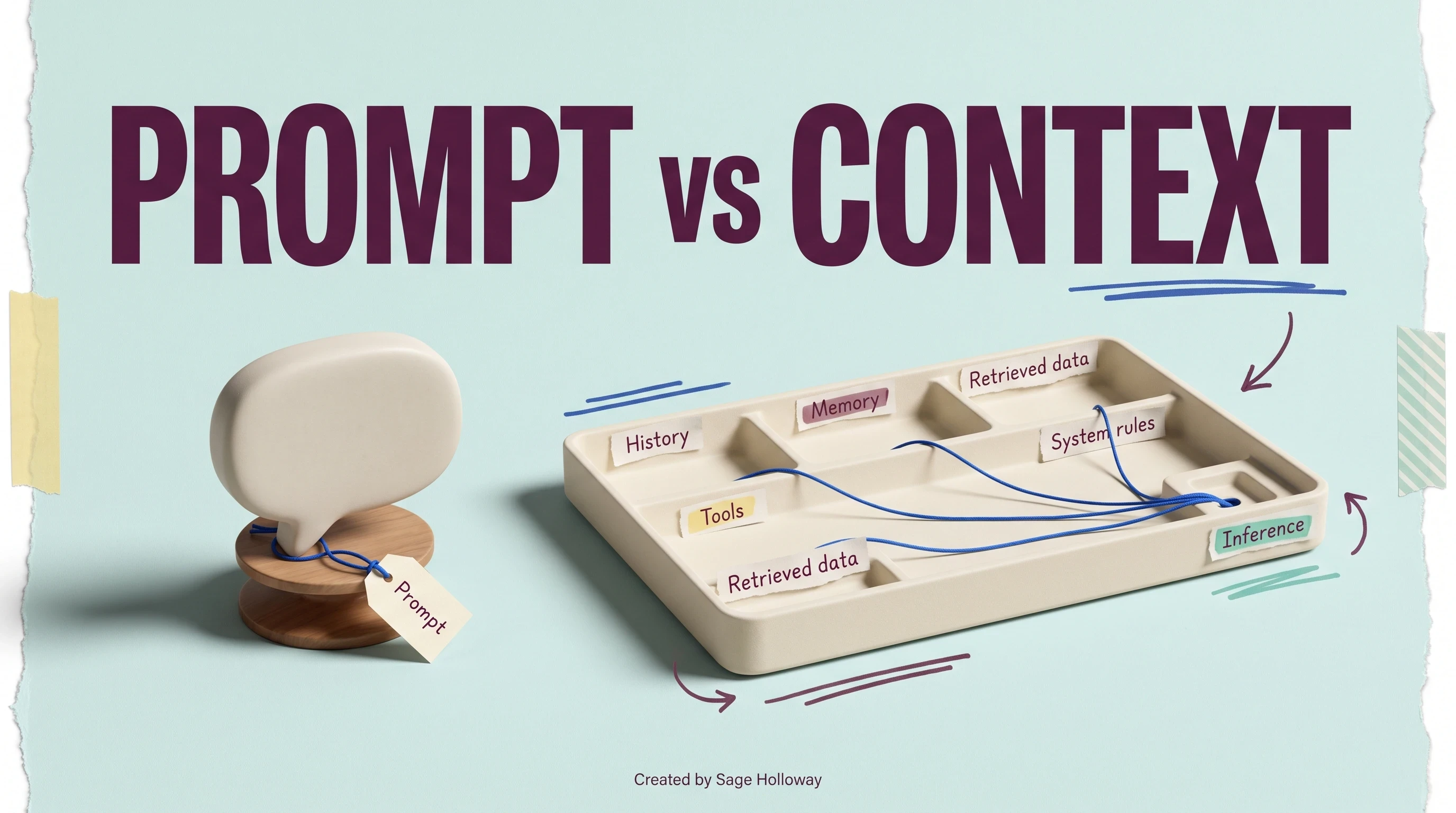
That is the job this page owns: langchain context engineering as a production pipeline, not a prettier system prompt. You will learn where context lives in LangGraph, how Deep Agents compress at exact thresholds, how contextual retrieval cuts failed lookups, and how Manus-style KV-cache discipline saves real money. For the practitioner checklist on healthy agent design, see context engineering best practices. For the definitional split between prompt craft and runtime curation, see prompt engineering vs context engineering. Those siblings cover different primaries. Here we stay on LangChain APIs, middleware, and the token window.
On this page
Why LangChain context engineering beats dumping everything into one prompt
The write, select, compress, and isolate lifecycle in LangGraph
Framework implementation: state schemas, middleware, and memory backends
LangChain contextual retrieval pipelines
Long-horizon tasks: filesystem recitation and structured note-taking
Context isolation with subagents and execution sandboxes
KV-cache stability and logits masking (LangChain patterns + Manus lessons)
Fault tolerance: compression thresholds and ContextOverflowError recovery
FAQ
LangChain context engineering treats the token window as a finite attention budget, not a dump-everything prompt.
Why LangChain context engineering beats dumping everything into one prompt
Picture a workstation with one monitor and one notepad. Every new email, log file, and half-finished ticket gets pasted onto the notepad in arrival order. Nothing gets filed. Nothing gets deleted. By lunch the operator cannot see the cursor blinking.
The monitor is the model's context window. The notepad is what you serialized into it. Performance does not collapse because the CPU got dumber. It collapses because the RAM got full of the wrong stuff.
That is context engineering langchain in one sentence once you name the real subject: curating what enters the window each turn, not polishing a static instruction block. Agents fail in production when the wrong context hits the model, not when the base model lacks capability. LangChain's own agent docs frame the loop that way: the model call inside the agent loop returns a bad action because instructions, tools, or history were misaligned at runtime.
Context as a finite attention budget
Andrej Karpathy's OS analogy still holds: the LLM is the CPU, the context window is RAM, and everything else is disk. You cannot treat RAM like infinite swap. Middleware is how you page data in and out deliberately.
If you want the original framing in video form, Karpathy's walkthrough is here: Intro to LLMs (OS/RAM analogy). Use it as mental scaffolding, not as a substitute for the code below.
Why agents fail when the wrong context hits the model
Four named failure modes show up in practitioner writeups and LangChain engineering posts. They are worth memorizing because each one suggests a different fix.
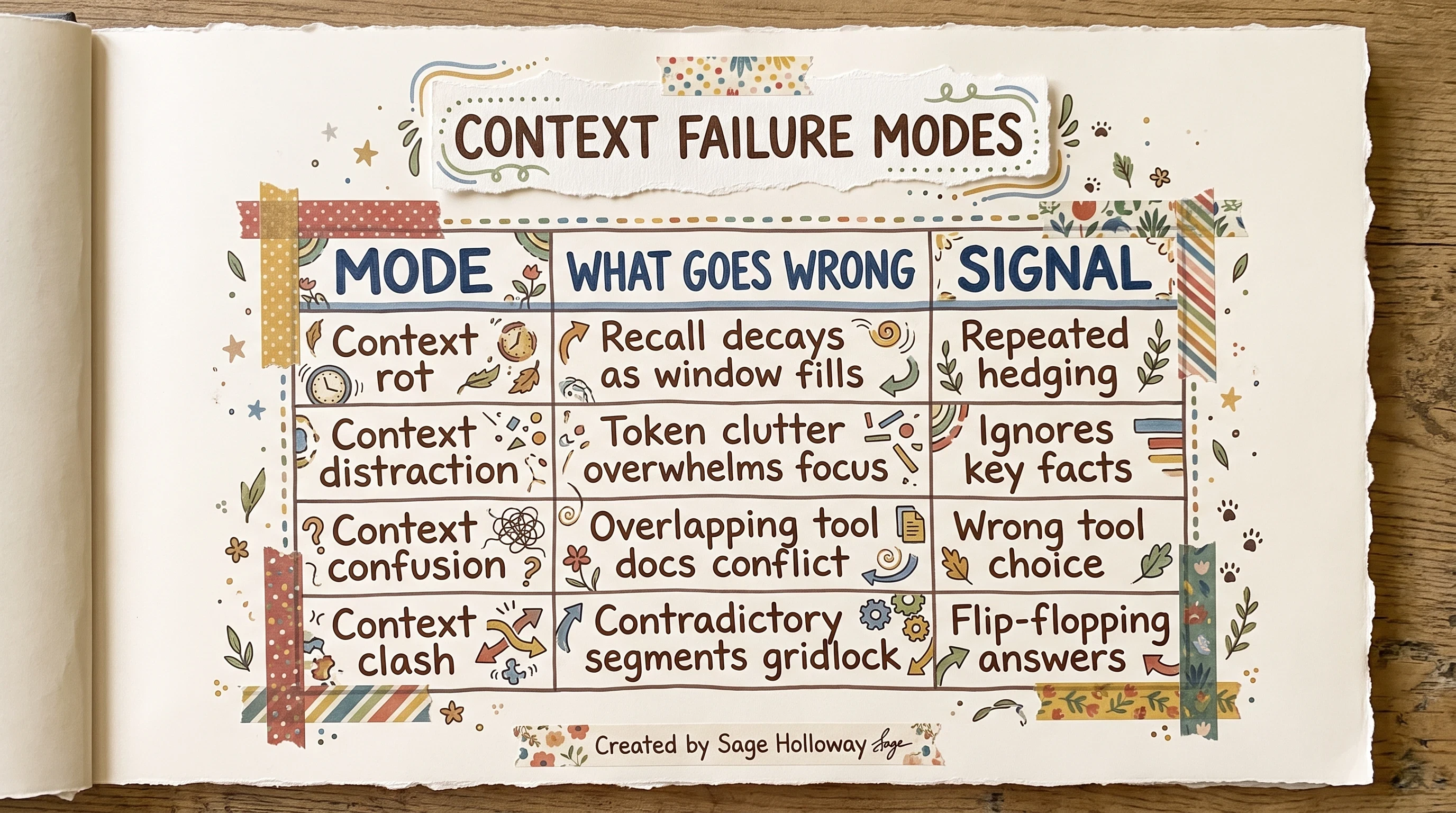
Wrong context beats weak models. Four named failure modes.
Context rot is recall decay as the window fills. The model hedges, repeats, or forgets constraints from early turns.
Context distraction is token clutter: raw JSON logs, stack traces, or giant tool payloads that drown signal.
Context confusion is overlapping tool descriptions or redundant instructions that pull the model toward the wrong action.
Context clash is contradictory segments in the same prompt: two policies, two schemas, two "source of truth" blocks.
Context poisoning (when corrupted memory infects future loops) is a sibling failure mode we treat on context poisoning, not as a ranked keyword on this URL.
Failure modes table (rot, distraction, confusion, clash)
The table above is the quick diagnostic. When you see rot, compress or offload. When you see distraction, isolate heavy tool output. When you see confusion, select fewer tools per turn. When you see clash, write clearer procedural files and stop duplicating policy blocks.
LangChain maps remediation to four operations: write, select, compress, isolate. The preview diagram shows how they cycle.
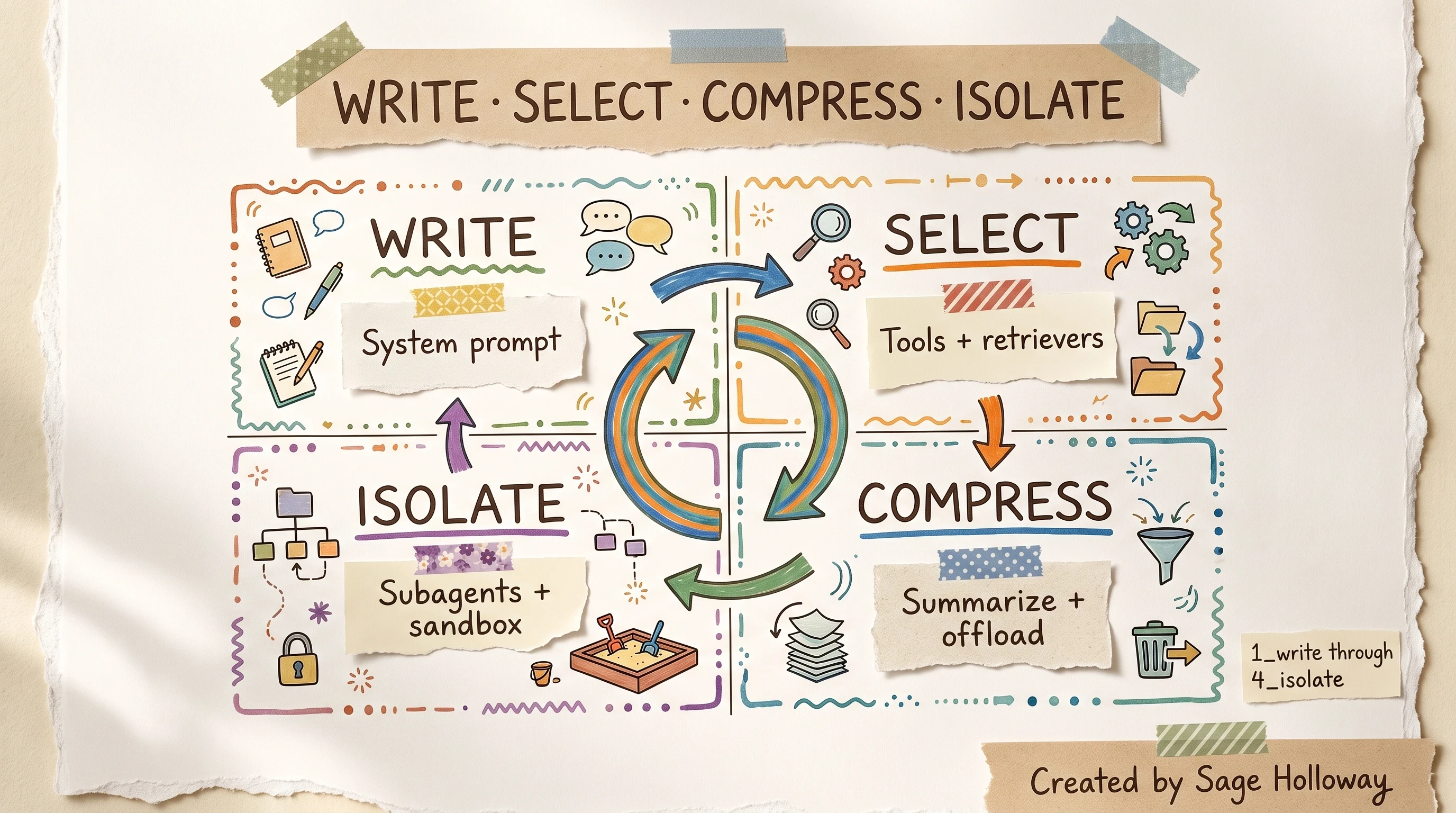
The LangChain CE lifecycle: write, select, compress, isolate.
For the official taxonomy in motion, watch LangChain's companion video: Context engineering: write, select, compress, isolate. It pairs with the repo notebooks 1_write through 4_isolate in langchain-ai/context_engineering.
But here is the thing. Conceptual posts stop at the taxonomy. Production agents need the middleware hooks, exact compression percentages, and retrieval pipelines that execute those four verbs in code. That is where the rest of this guide goes.
The write, select, compress, and isolate lifecycle in LangGraph
Context engineering langchain in LangGraph is not a single setting. It is a lifecycle you run every turn.
Write context
Writing context means defining what enters the prompt before the model runs: system instructions, procedural files, skills directories, and memory routes. Deep Agents treat these as first-class inputs. Examples include project-level AGENTS.md, user preference files, and skill manifests like SKILL.md in the Deep Agents package.
Procedural files such as AGENTS.md and CLAUDE.md are list-level patterns many teams already maintain. They belong in the write layer, not as ad hoc paste-ins on every turn.
Select context
Selecting context is the turn-by-turn filter: which tools, retrievers, response formats, and model profiles are visible for this call. Standard docs show RAG-on-tool-descriptions as a selection strategy. Production teams also weigh KV-cache cost when tools change every turn (more on that in the KV-cache section).
Compress context
Compressing context means summarization, offloading large tool results to filesystem paths, and automatic compaction when the window crosses configured thresholds. Deep Agents trigger summarization at 85% of max_input_tokens by default, keeping 10% of tokens as a recent buffer.
Isolate context
Isolating context quarantines heavy work: subagents, sandboxes, and delegated research threads that return summaries instead of raw logs. The supervisor keeps a clean window; specialists eat the token cost.
LangSmith tracing fits here as observability, not as a product tour. You need a way to see token usage per node and verify that compression did not destroy task-critical facts. LangChain's engineering blog recommends LangSmith for agent tracing and evaluation when you change context strategy.
Framework implementation: state schemas, middleware, and memory backends
This is the implementation H2 for context engineering langchain: state, middleware, and memory backends wired together.
Official references:
DeepAgentState reducers and linear memory growth
Custom state in Deep Agents must subclass DeepAgentState (requires deepagents>=0.6.6). The base class preserves the built-in DeltaChannel message reducer. Without that reducer pattern, checkpoints can grow linearly or worse as every tool turn duplicates prior message history in storage.
That storage curve is the quiet cost nobody quotes in demo videos. You are not choosing a prettier schema. You are choosing whether your LangGraph checkpoints explode after a fifty-turn support thread.
@dynamic_prompt vs @wrap_model_call
Two middleware hooks solve different lifetimes. Confusing them is the most common implementation bug I see in agent repos.
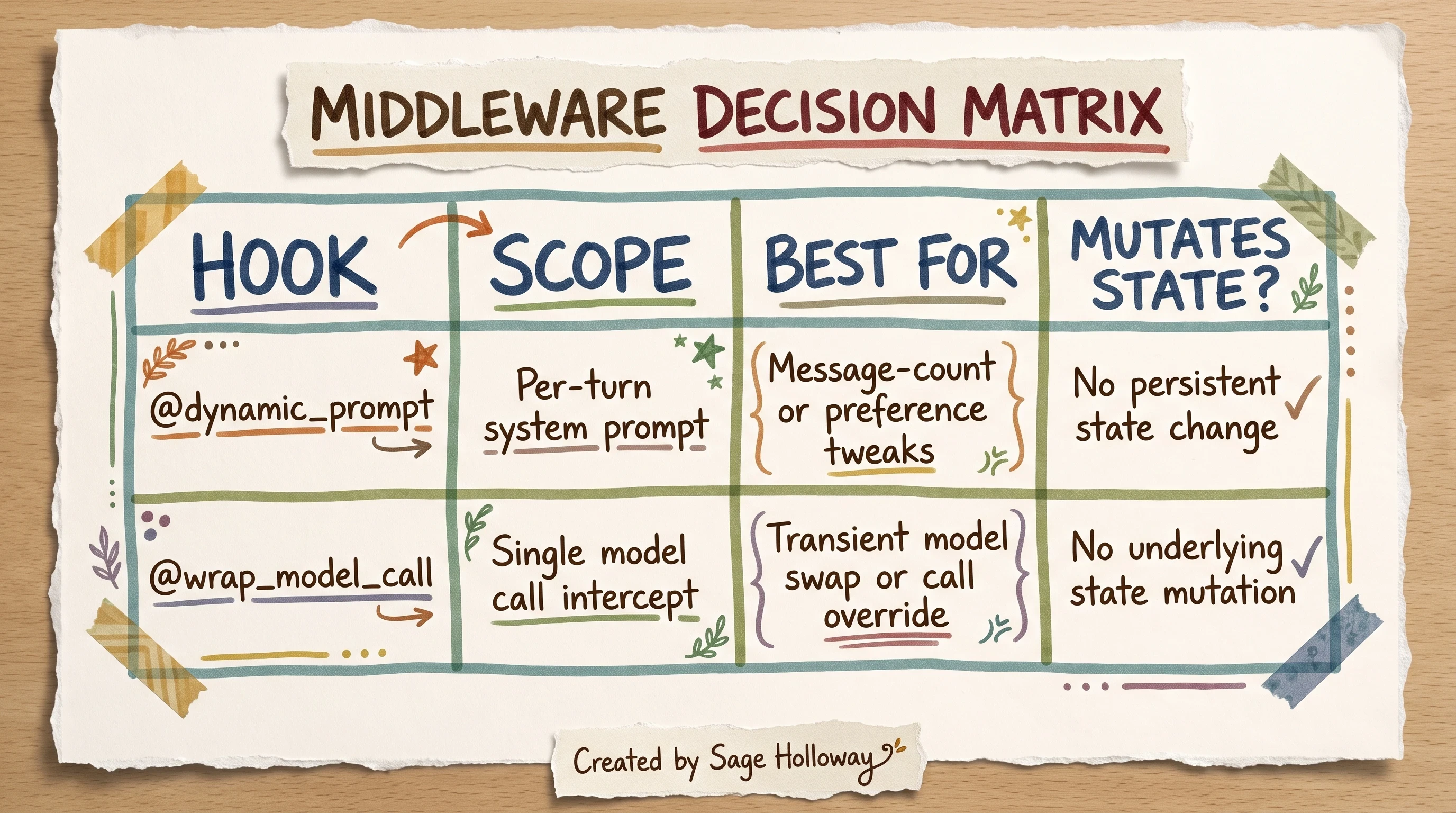
Pick the hook that matches how long the change should live.
@dynamic_prompt adjusts the system prompt per turn based on state (message count, preferences, session flags). It does not permanently mutate saved conversation state.
@wrap_model_call intercepts a single model invocation. Use it for transient model swaps: route a heavy turn to a larger-context model without rewriting the thread in storage.
When you change providers inside @wrap_model_call, the langchain python integrations hub is the right place to compare model profiles and context limits. Do not hardcode a swap without checking the target model's max_input_tokens.
CompositeBackend and cross-thread memory
LangGraph Store is the low-level durable layer. LangMem adds higher-level memory orchestration on top. For Deep Agents, CompositeBackend routes paths like /memories/ to a StoreBackend backed by InMemoryStore or your production store.
create_deep_agent vs create_agent
Keep imports separate. create_deep_agent targets long-running Deep Agents with filesystem offloading, subagent delegation, and built-in compression. create_agent is the classic LangChain agent with middleware hooks for shorter loops. Mixing their setup blocks is how you end up with silent import errors in production notebooks.
Reference repo setup (single H3, not page spine)
Clone the reference repo once, then work inside your app:
Python 3.9+ and uv match the current quickstart. The optional Deno sandbox examples in notebook 4_isolate are legacy paths; treat them as sidebar experiments, not default LangChain 1.x installs.
LangChain contextual retrieval pipelines
Langchain contextual retrieval is this URL's retrieval H2: Anthropic's contextual chunking implemented with LangChain retriever blocks, not a rehash of generic 2-step RAG.
Start from Retrieval - Docs by LangChain for pipeline vocabulary, then layer contextual preprocessing on top.
The chunk context conundrum
Standard RAG splits documents into chunks that lose surrounding context. A chunk that says "Revenue grew 3%" is useless if the company name and quarter live two paragraphs away. That is the context conundrum traditional chunking creates.
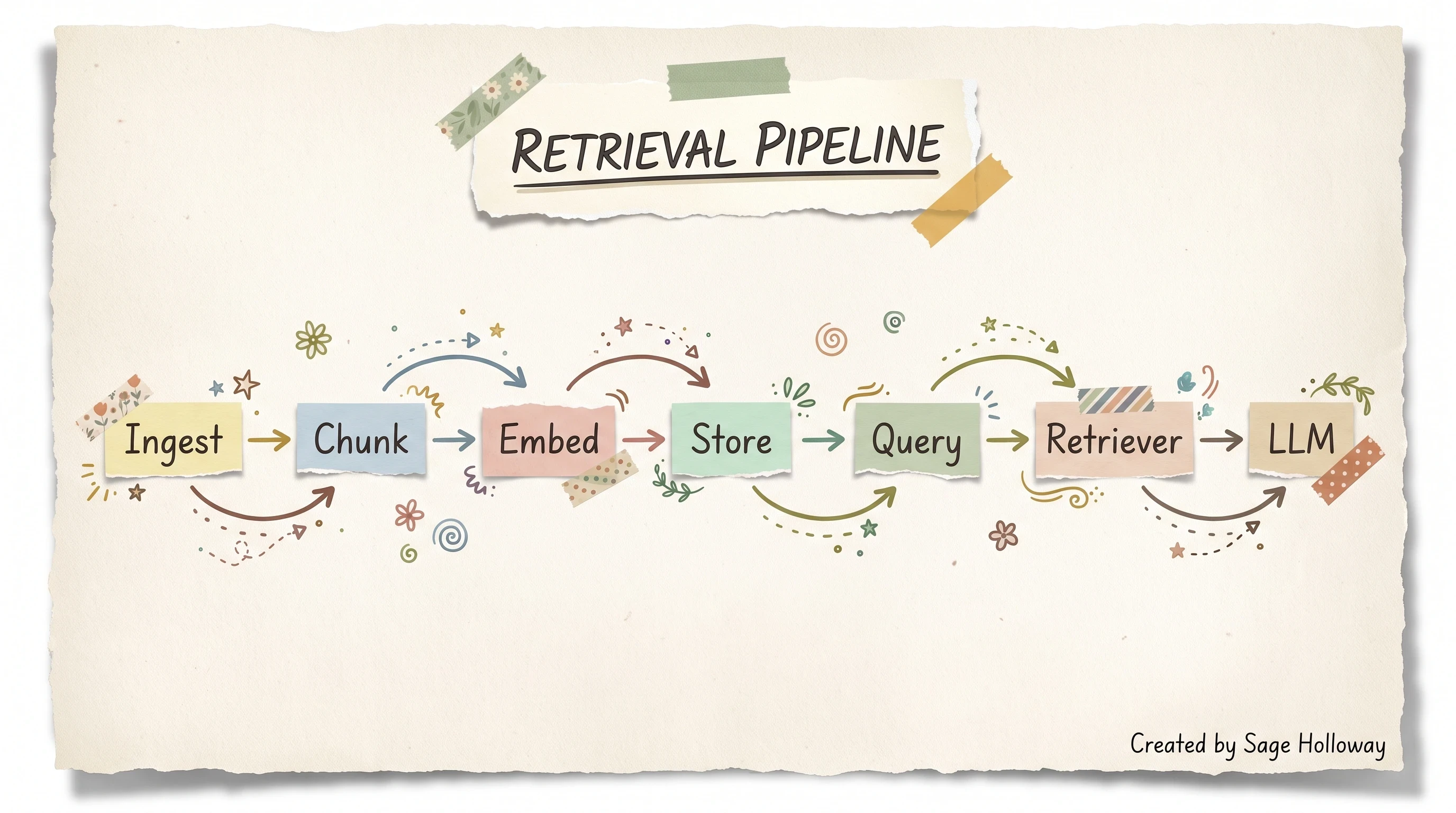
Static retrieval pipeline before contextual preprocessing fixes the chunk conundrum.
Compare architectures before you pick one:
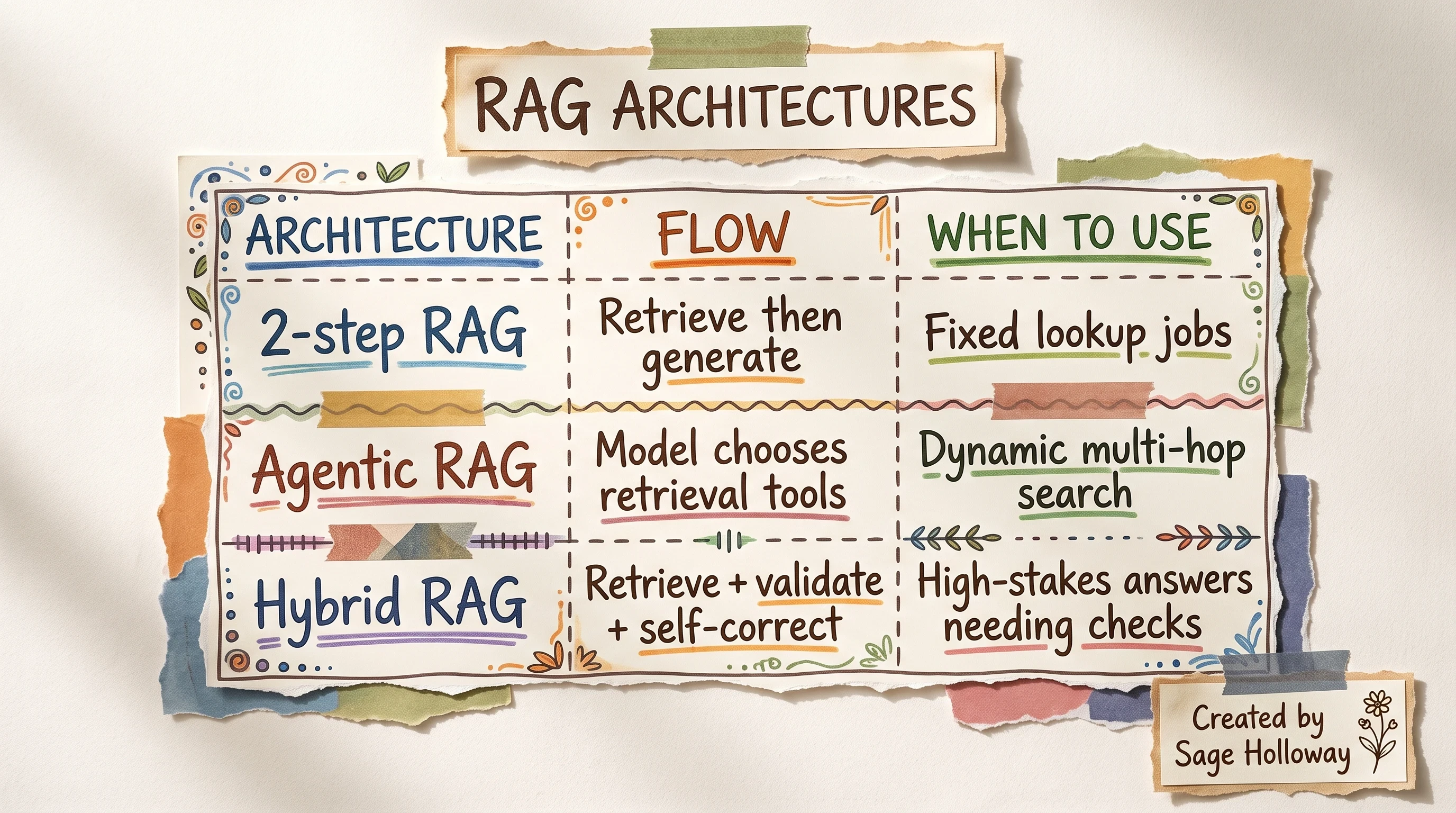
Pick the RAG shape that matches agent autonomy and correction needs.
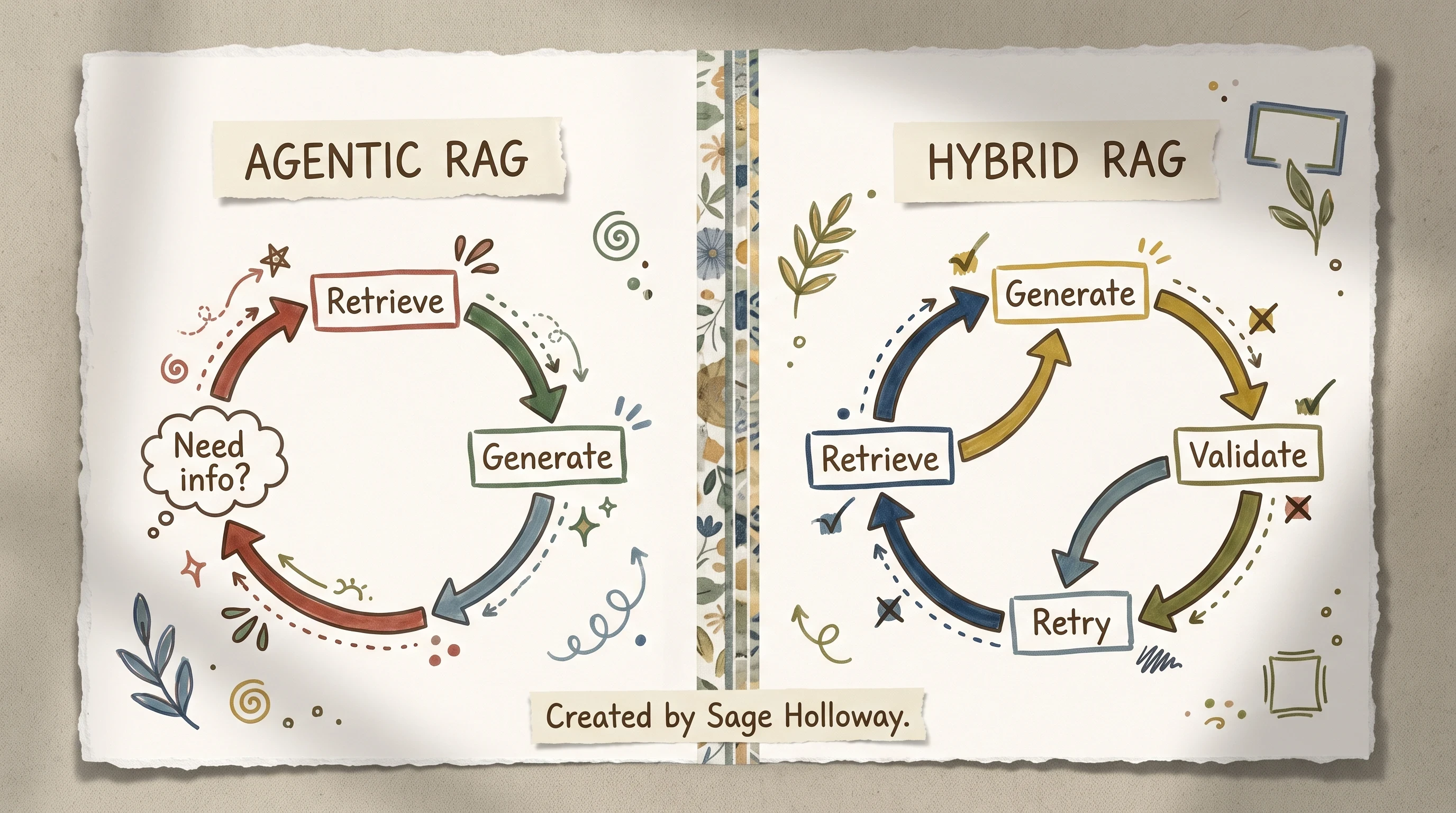
Agentic RAG lets the model choose retrieval; hybrid adds validation passes.
Contextual embeddings preprocessing
Contextual embeddings prepend a chunk-specific summary before indexing. Anthropic's benchmark workflow uses Claude Haiku to generate concise context for each chunk. Budget roughly $1.02 per million document tokens for that preprocessing pass (one-time at index time, not per query).
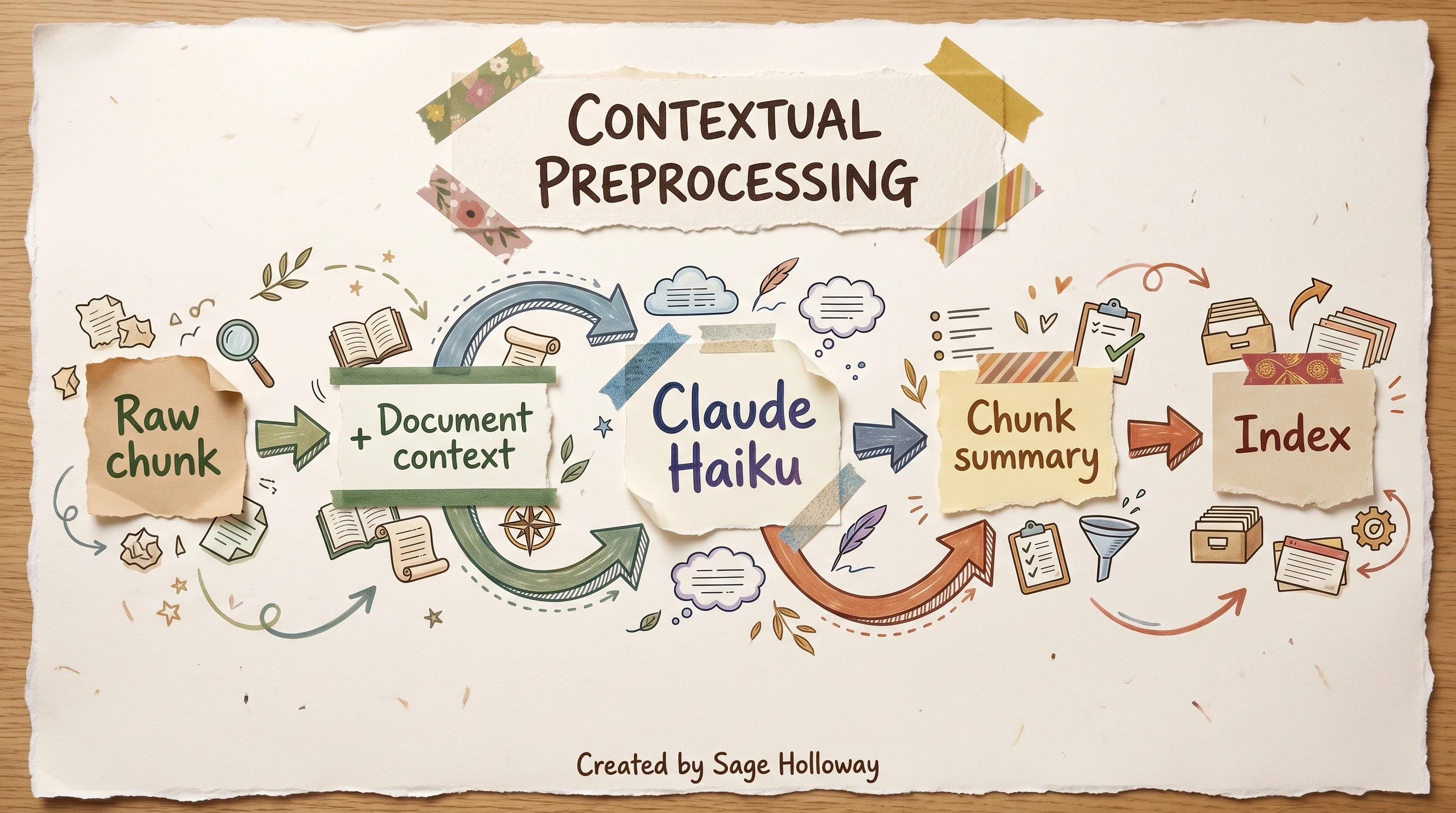
Contextual embeddings prepend chunk-specific summaries before vector indexing.
Contextual BM25 and hybrid fusion
Semantic embeddings miss exact identifiers: error codes, SKUs, internal ticket IDs. Contextual BM25 adds lexical matching on the same contextualized chunks. Fuse semantic and lexical ranks (reciprocal rank fusion is the common pattern) before you send candidates to the model.
Reranker stage and performance ladder
Anthropic's published ladder on contextual retrieval benchmarks:
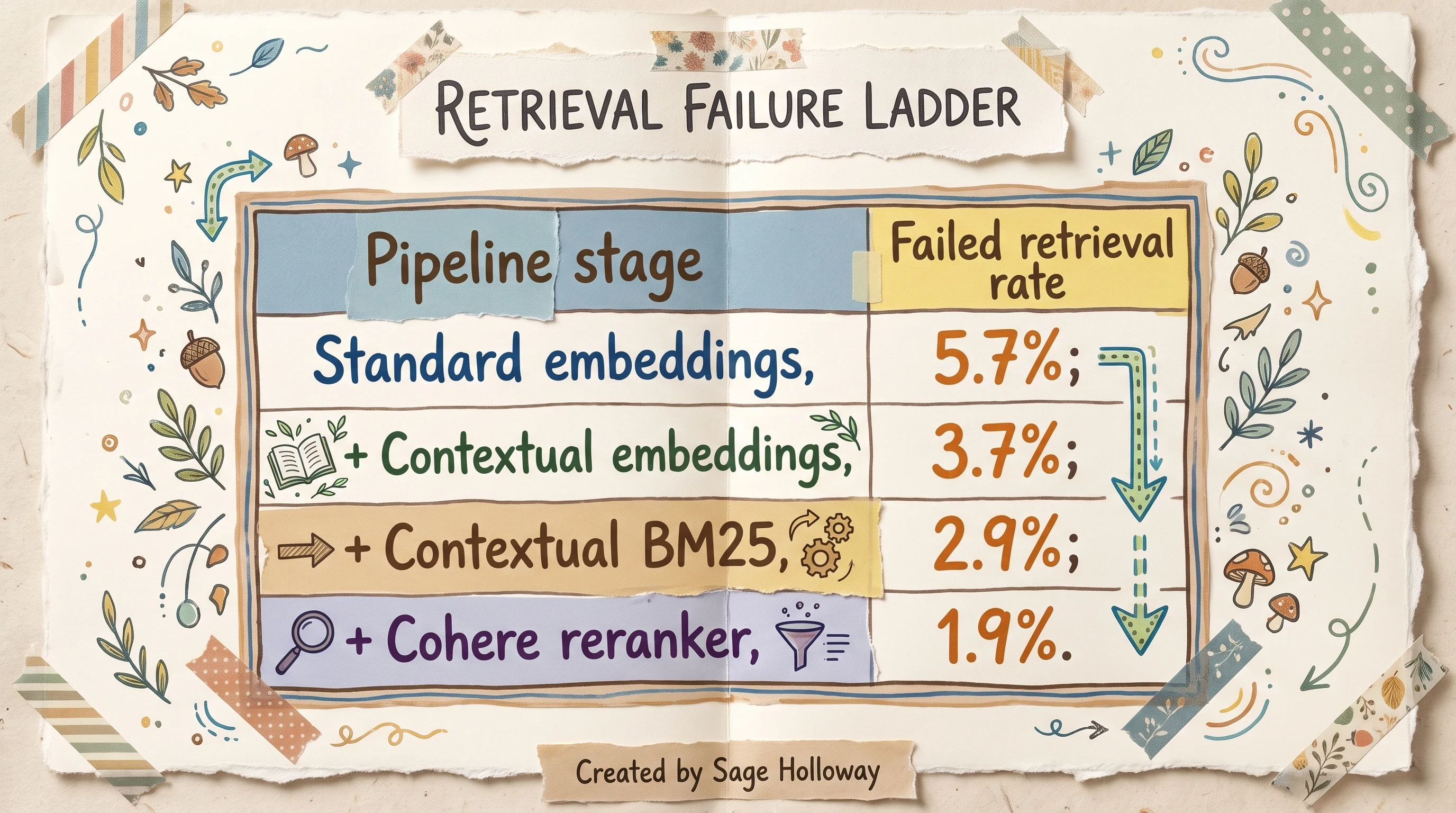
Each retrieval stage cuts failed lookups; reranking reaches 1.9 percent.
Pipeline shape from the same research: retrieve 150 candidate chunks, rerank down to top 20 for generation. Contextual embeddings alone cut failures about 49%; adding reranking reaches about 67% total reduction versus baseline embeddings.
For Anthropic-native indexing math and SDK details, see anthropic contextual retrieval implementation on the C05 spoke. This page owns the LangChain API shape.
Hands-on video for the embeddings + BM25 stack: Contextual Retrieval walkthrough.
Minimal LangChain-shaped pipeline (adapt stores and models to your stack):
For production economics and failure-rate benchmarks, read Contextual Retrieval in AI Systems alongside the LangChain retrieval docs.
Long-horizon tasks: filesystem recitation and structured note-taking
Agents that average 50+ tool calls drift. Goals blur. Middle turns get lost. That is lost-in-the-middle attention degradation, not a mystery bug.
Structured note-taking and recitation
Attention manipulation through recitation is the fix Anthropic and Manus both document: keep a todo.md or NOTES.md on disk, rewrite it as the task evolves, and inject the latest version near the end of the context window so objectives stay in the model's recent attention band.
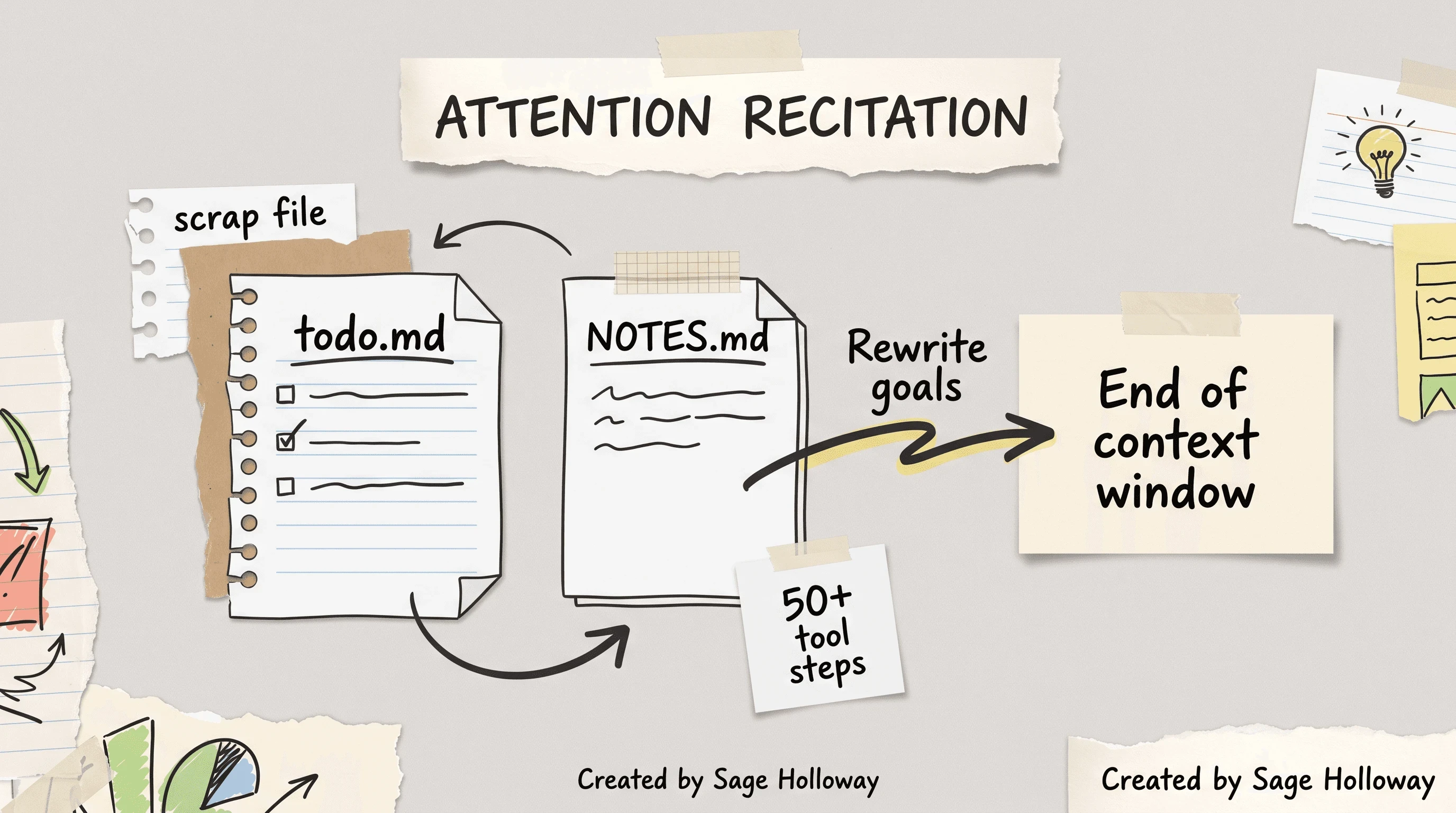
Structured note-taking fights lost-in-the-middle drift over long tool runs.
The filesystem is the durable context layer. The prompt is the working set. Treat them as two tiers, not one blob.
Lost-in-the-middle and goal drift
When raw tool output piles up, middle messages become invisible. Summaries help, but summaries without goal recitation still wander. Pair compression with explicit goal files.
Failed turns vs clean retries
Sources disagree here, and both sides are worth stating.
One camp trims failed turns and retries from a clean state. That reduces noise fast.
Manus argues the opposite for recovery loops: keep failed turns in context so the model updates beliefs instead of repeating the same mistake. Stack traces and bad tool results are evidence, not shameful clutter, when you want belief updates.
Pick based on failure mode. Repetitive tool schema errors? Keep the failure visible. Toxic huge stderr dumps? Offload to disk and summarize.
Breaking repetitive few-shot loops
Models mimic recent action-observation pairs. Uniform formatting creates brittle loops. Introduce controlled variation: alternate phrasing, minor serialization noise, or different summary templates between turns. Manus calls this avoiding "few-shotting" yourself into a rut.
Claude Code's 95% auto-compact default is a CLI client behavior, not LangChain's programmatic default. For IDE-specific compaction mechanics, see the planned claude code deep dive spoke. Deep Agents use the 85% trigger documented below.
Context isolation with subagents and execution sandboxes
Isolation is how the supervisor stays readable while specialists do messy work.
Subagent specs and summary contracts
Subagents should return distilled results, not raw tool dumps. LangChain's Deep Agents docs specify summaries under 500 words.
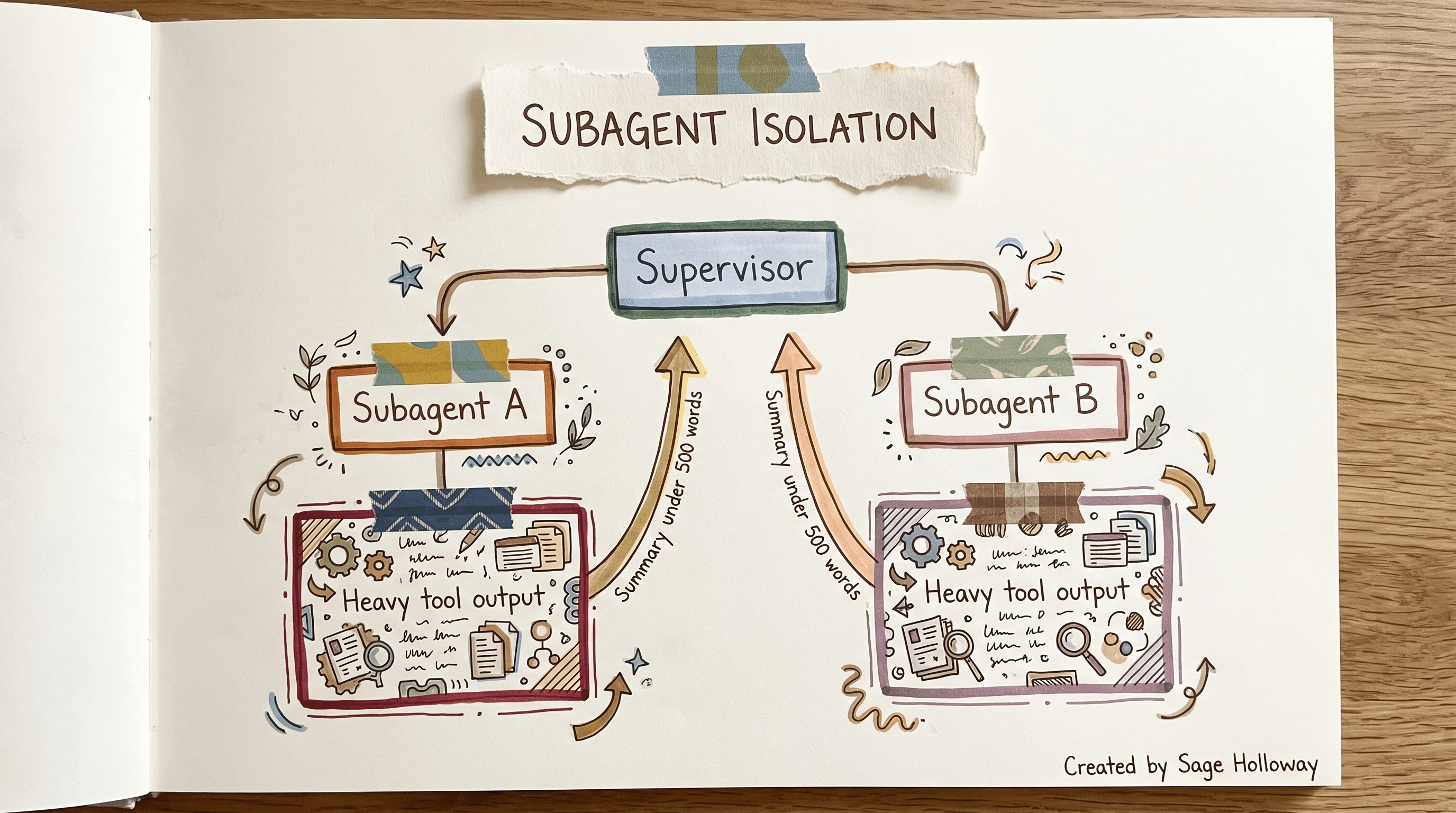
Subagents quarantine heavy tool output; the supervisor keeps a clean window.
Supervisor delegation
Supervisor patterns delegate planning to a parent graph node and execution to child agents with separate contexts. For full supervisor and swarm layouts, link out to langgraph multi-agent systems rather than turning this page into a multi-agent catalog.
Optional walkthrough video: LangGraph multi-agent supervisor patterns.
Sandbox isolation sidebar
Sandboxes (Pyodide, E2B, or local execution environments) keep untrusted code output and large variables out of the primary token window. The agent sees results, not every intermediate assignment.
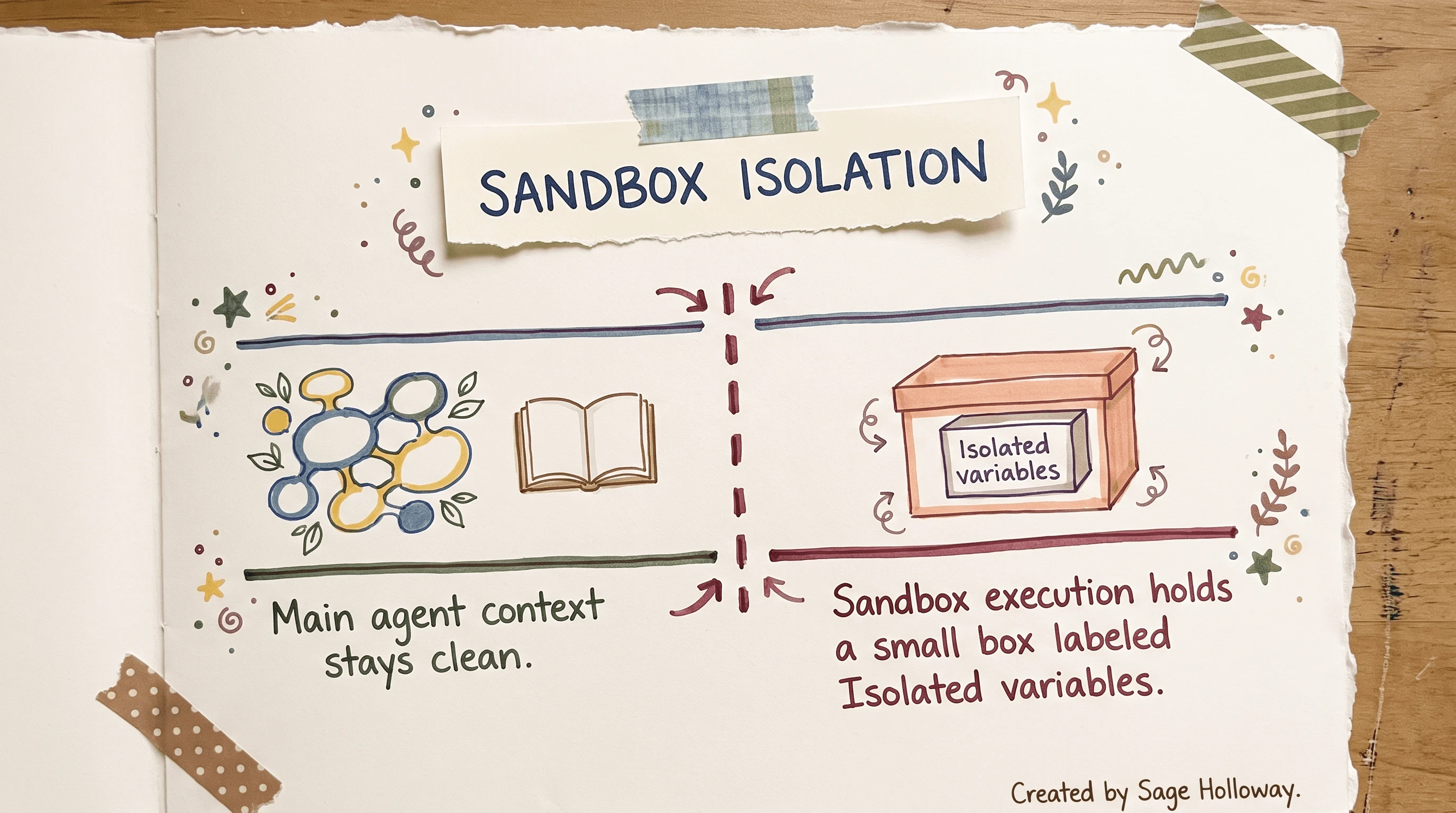
Sandboxes keep untrusted code output out of the primary token window.
Legacy Deno sandbox notebooks in the reference repo are optional. Default LangChain 1.x installs should not depend on them.
KV-cache stability and logits masking (LangChain patterns + Manus lessons)
Context engineering for ai agents with langchain and manus converges on one uncomfortable fact: dynamic context saves tokens in demos and burns money in production if you ignore the KV-cache.
Read Context Engineering for AI Agents: Lessons from Building Manus for the prefix-stability rules; implement the LangChain side in middleware at the model call boundary.
Manus's writeup and Anthropic's caching docs agree on prefix stability. Tool definitions and system prompts sit at the front of serialized context. Change them mid-session and you invalidate cached prefixes.
Stable prefixes and append-only context
Rules from production case studies:
Keep your prompt prefix stable. Avoid timestamps or live counters at the top of system prompts.
Make context append-only. Avoid rewriting prior tool observations when possible.
Serialize messages deterministically so cache keys match across turns.
Prompt caching economics
Cached input tokens can cost roughly 10x less than uncached input tokens on models that support prompt caching (exact pricing varies by provider and tier). The design goal is not minimal tokens at any cost. It is stable prefixes plus append-only history so cache hits survive long threads.
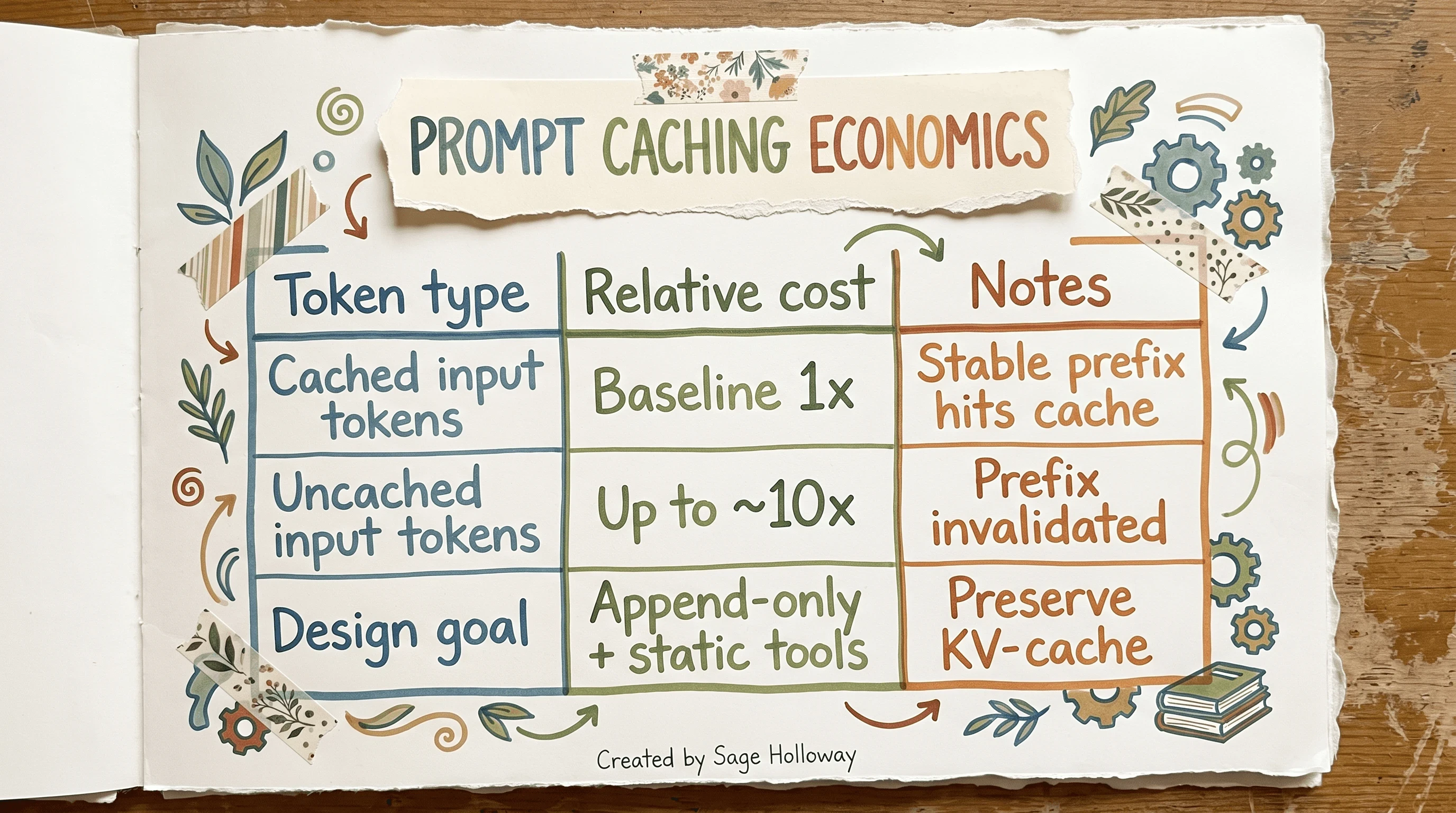
Stable prefixes can cut input token cost by roughly ten times.
Dynamic tools vs cache invalidation
Standard docs sometimes recommend dynamic tool selection (RAG over tool descriptions, dropping unused tools each turn). Manus warns that adding or removing tools invalidates the prefix cache and can confuse the model when prior turns referenced removed tools.
Logits masking pattern
Production alternative: keep a static tool list for cache stability, then mask logits during decoding to restrict which tools are selectable on a given turn. Manus describes masking token logits so the model cannot emit disallowed actions without mutating tool definitions. Hermes-format prefills are the documented pattern name in their engineering post.
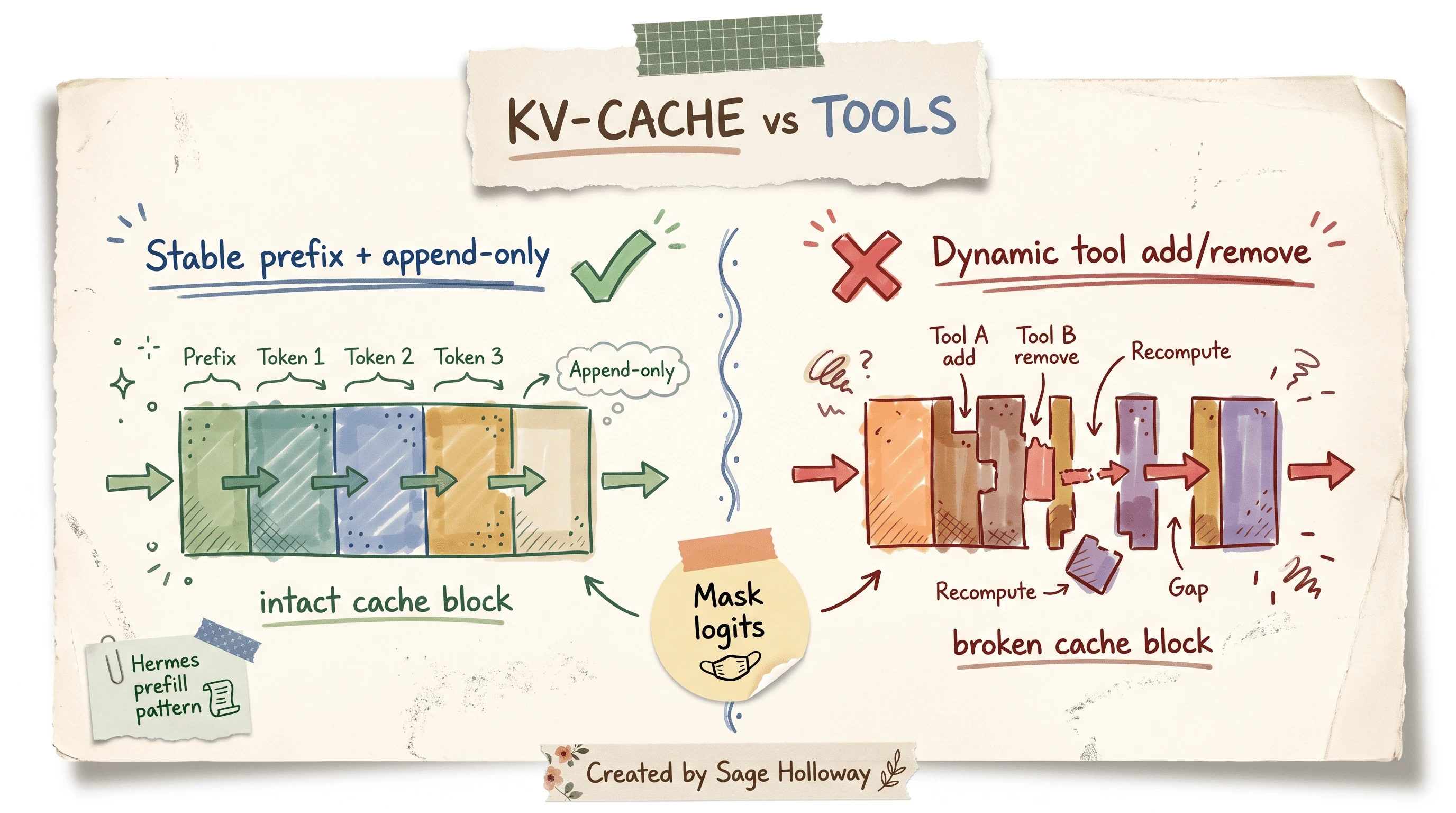
Mask logits instead of mutating tool definitions to preserve the cache prefix.
You do not need a Manus course to apply this. Implement masking in LangChain middleware at the model call boundary, measure cache hit rate, and compare bills with dynamic tool churn. Courses can motivate; your repo needs the hook.
Fault tolerance: compression thresholds and ContextOverflowError recovery
This is the gap section almost nobody documents end-to-end: exact thresholds, fallback heuristics, and programmatic recovery when the window still overflows.
85% trigger and 10% recent buffer
Deep Agents start automatic summarization when active context crosses 85% of the model's max_input_tokens. During compression, the middleware keeps roughly 10% of tokens as a recent sliding buffer so the latest turns stay verbatim-readable.
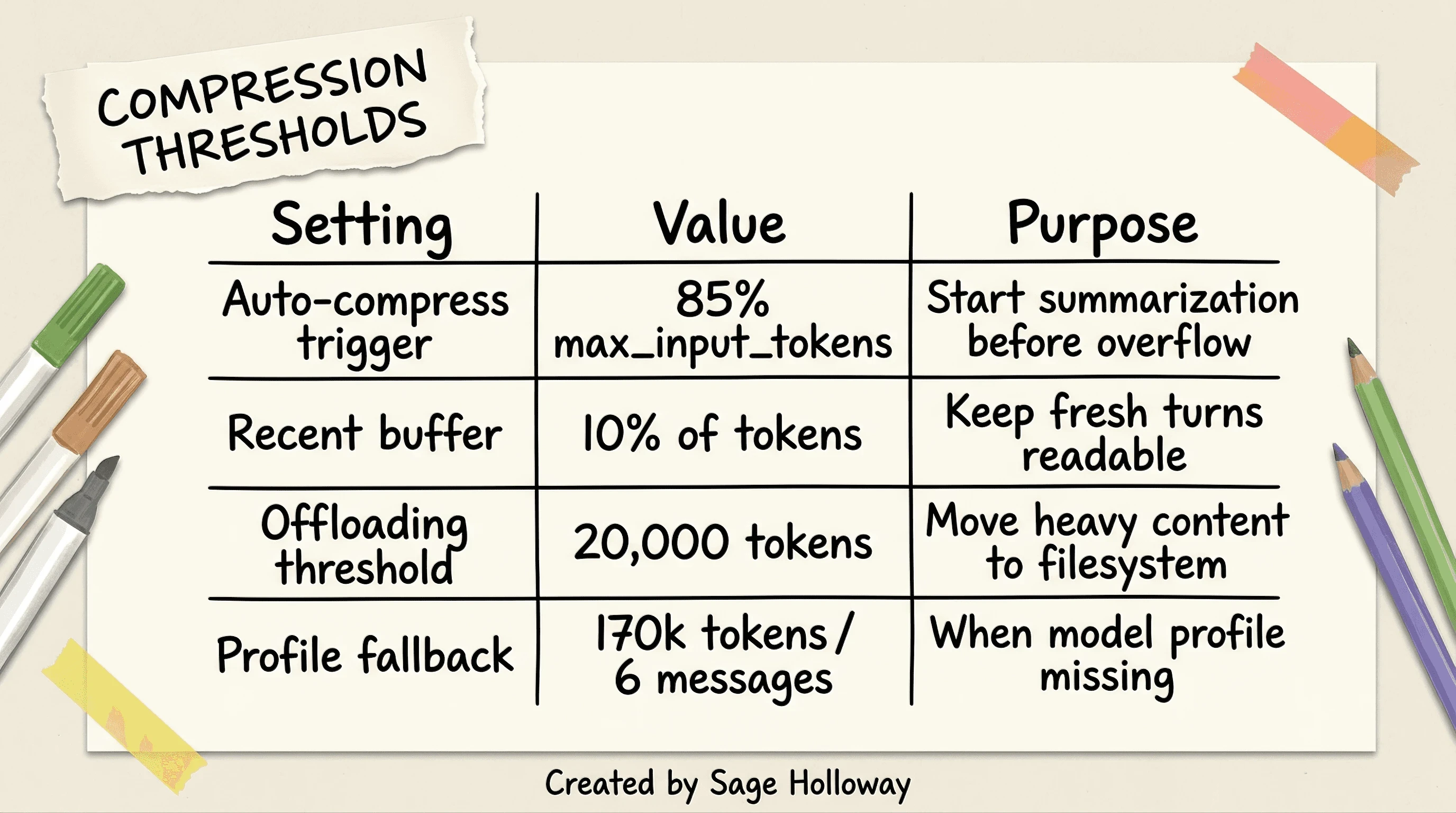
Automatic compression fires at 85 percent of max input tokens.
Offloading at 20k tokens and fallback heuristics
Content offloading in Deep Agents defaults around a 20,000-token threshold: large tool results move to filesystem paths while summaries stay in active memory. If the runtime lacks a model profile, fallback heuristics use roughly 170,000 tokens or 6 messages as triggers (whichever logic the middleware applies first in your installed version).
Always verify against your installed deepagents version in Deep Agents context engineering docs.
This will not work if you treat 85% compression as fire-and-forget. Summaries can drop numeric constraints, file paths, or tool credentials. Keep recitation files (todo.md) and verify traces after every compaction change. Middleware cannot infer which facts were mission-critical; your evaluation set must.
On-demand compaction middleware
Automatic compression is not the only lever. create_summarization_tool_middleware exposes on-demand compaction tools so the agent can compress between milestones. Pair with a compact_conversation-style tool if your graph exposes one in middleware.
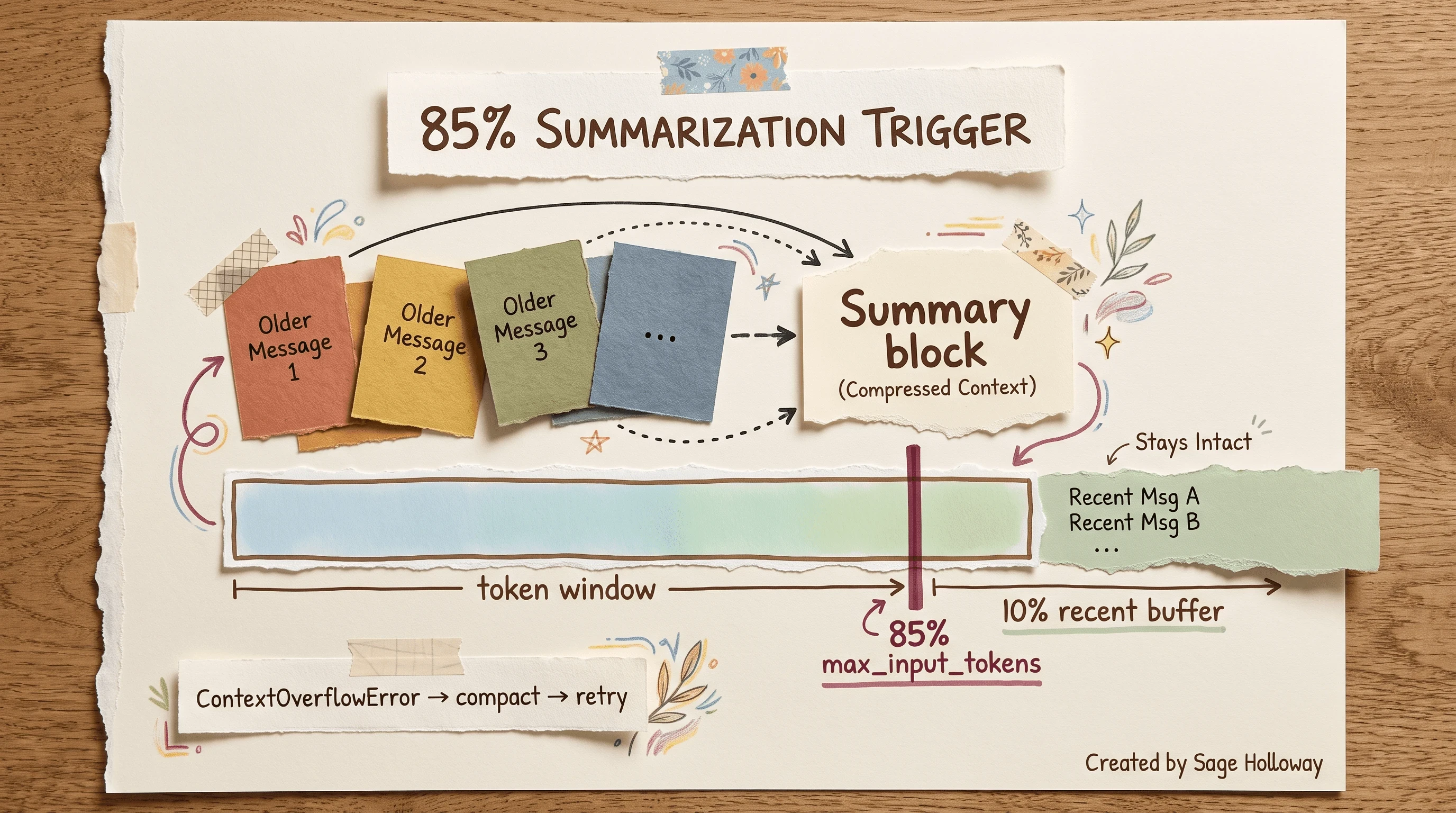
At 85 percent capacity, older messages compress into a structured summary.
ContextOverflowError catch-and-retry procedure
When automatic compression still loses the race, Deep Agents can raise ContextOverflowError. Treat that as a signal to compact and retry, not as a fatal session end.
HowTo: recover from ContextOverflowError
Catch
ContextOverflowErroraround the agent invoke or stream call.Trigger compaction: call summarization middleware or the on-demand compact tool against current state.
Verify the recent buffer still contains the last user goal (check
todo.mdor final user message).Retry the model call with compressed history.
If retry fails twice, offload largest tool results to filesystem paths and retry once more.
Log token counts before and after compaction in LangSmith (or your tracer) to confirm the shrink.
Claude Code's 95% compact trigger remains CLI-only. Do not assume it applies to create_agent or create_deep_agent defaults.
FAQ
What is LangChain context engineering?
LangChain context engineering is the practice of dynamically curating everything that enters an agent's model call each turn: system prompts, messages, tools, retrievers, and memory-backed files. It uses LangGraph state, Deep Agent schemas, and middleware such as @dynamic_prompt and @wrap_model_call instead of relying on one static prompt. See the agents context engineering docs for the canonical overview.
Messages vs retrievers vs memory: where does context live?
Messages are the short-term conversational thread in graph state. Retrievers supply external knowledge at query time (RAG pipelines, contextual retrieval). Memory spans session files, /memories/ store routes, and long-term preferences written through CompositeBackend. Healthy agents treat all three as separate layers with different compression and isolation rules.
How do I pass conversation history without blowing the window?
Append recent turns verbatim, summarize older turns at the 85% threshold, offload bulky tool output at 20,000 tokens, and recite goals from todo.md near the end of the window. Use @wrap_model_call to route individual heavy turns to a larger-context model without permanently bloating stored state.
LangChain contextual retrieval vs Anthropic's contextual retrieval?
Anthropic defined contextual retrieval (contextual embeddings + contextual BM25 + reranking) and published benchmark methodology. LangChain contextual retrieval is the same pipeline shape built with LangChain retriever and indexer blocks. This URL owns LangChain API wiring; Anthropic context management owns Anthropic-native depth.
Do I need LangGraph for CE?
LangChain context engineering in production assumes a graph runtime for checkpoints, middleware hooks, and store-backed memory. You can hack context in a plain messages array for prototypes, but you lose reducers, compaction middleware, and durable /memories/ routes. LangGraph (via LangChain agents or Deep Agents) is the supported path in current docs.
Manus + LangChain courses vs doing it in your own app?
Courses are useful for motivation and vocabulary. Production work still happens in your repo: static tool lists, logits masking middleware, filesystem recitation, and configured compression thresholds. Manus insights translate into LangChain hooks; you do not need a course certificate to implement masking or 85% compaction.
How do I debug what actually got into the prompt?
Trace each model call. LangSmith shows assembled prompts and token counts per step. Inspect which tools were bound, which retriever chunks landed, and whether compaction ran. Compare traces before and after you change middleware. FAQ answers here cite tracing vocabulary only; we are not ranking LangSmith product navigation queries.
LangChain CE vs rolling your own messages array?
A raw messages array works for demos. You still need summarization triggers, offload paths, store routes, subagent isolation, and overflow recovery for long jobs. LangChain CE packages those as middleware and Deep Agent defaults so you do not reimplement reducers and compaction heuristics on every project.
Clone langchain-ai/context_engineering, implement one @dynamic_prompt hook and one @wrap_model_call swap, add a research subagent with a 500-word summary contract, wire a contextual retrieval block with BM25 fusion, configure 85% auto-compression, and reproduce one ContextOverflowError recovery path. Trace the run in LangSmith or your debugger and confirm token counts drop after compaction.
If you are still sorting prompt craft from runtime curation, start with prompt engineering vs context engineering. For healthy layer design across tools and memory, use context engineering best practices. For Anthropic retrieval math, use Anthropic context management. For corrupted memory loops, see context poisoning.
Whether teams standardize on Deep Agents or classic create_agent middleware everywhere, the constraint stays the same: the window is finite, and the pipeline that fills it is the product. Watch cache hit rates the way you watch error rates.
Until then...
Sage
PS. I once logged a week of agent runs and found the cost spike traced to a single dynamic tool filter that ran every turn. Removing the filter and adding logits masking dropped uncached input tokens faster than any prompt rewrite did.
Author
Practical guides, tool teardowns & AI engineering workflows.
Related Articles