AI Agents
OpenAI AgentKit vs n8n: Architecture, Limits, and the Hybrid Model

Sage Holloway
28 min read
Go back to blog
SHARE
You can wire a conversational agent to a clean React frontend in fifteen minutes and feel like the future arrived early. Then your user asks to verify an invoice, update a customer record, and trigger a webhook retry, and the entire system collapses into an unobservable loop. The conversational interface was never the hard part. The reliable transactional plumbing underneath it is where software actually lives.
For building user-facing conversational chat interfaces with native React embeds, OpenAI AgentKit (via ChatKit) is the fastest pathway despite its severe OpenAI model lock-in and rigid sequential routing limitations. For complex enterprise-grade logic, self-hosted data privacy compliance, and multi-model flexibility, n8n remains the industry-standard visual workflow manager, although developers must handle custom JavaScript formatting to resolve raw proxy object structures.
Last verified: 28 August 2026
That is the direct answer. But if you are choosing an orchestration layer for production systems, evaluating openai agent kit vs n8n on surface-level marketing claims will lead directly to costly refactors.
The developer community spent early 2025 debating whether visual automation platforms were dead. By 2026, the operational reality became clear: conversational intelligence and transactional execution solve fundamentally different engineering problems.
Pairing conversational frontend reasoning with deterministic backend transaction plumbing creates a resilient automation architecture.
This guide breaks down the core architectures, hidden developer friction, and execution limits of both platforms. We will examine why AgentKit struggles with dynamic multi-agent routing, why n8n requires custom code nodes to sanitize proxy payloads, how they perform on a concrete build, and how to combine them into a production-grade hybrid architecture.
What this guide covers
Quick verdict: decision matrix and architectural selection criteria
Core architectural paradigms: deterministic execution vs autonomous delegation
OpenAI AgentKit deep dive: ChatKit components, Rube MCP, and the sequential bottleneck
n8n deep dive: Fair-code licensing, node types, and JavaScript proxy overhead
Side-by-side build walkthrough: Hacker News digest automation across both tools
The "Brain vs. Nervous System" hybrid architecture: webhook bridging and error queues
Pricing, unit economics, and token consumption vs workflow execution limits
Alternative agent platforms: evaluating Inkeep and Sim.ai when neither fits
Nine data-backed developer FAQs covering logging, licensing, and model freedom
Quick verdict: Which platform should you choose?
When comparing openai agent builder vs n8n, start by identifying where your application's primary complexity sits. Does your system live or die by conversational polish, or does it depend on reliable state transitions across third-party APIs?
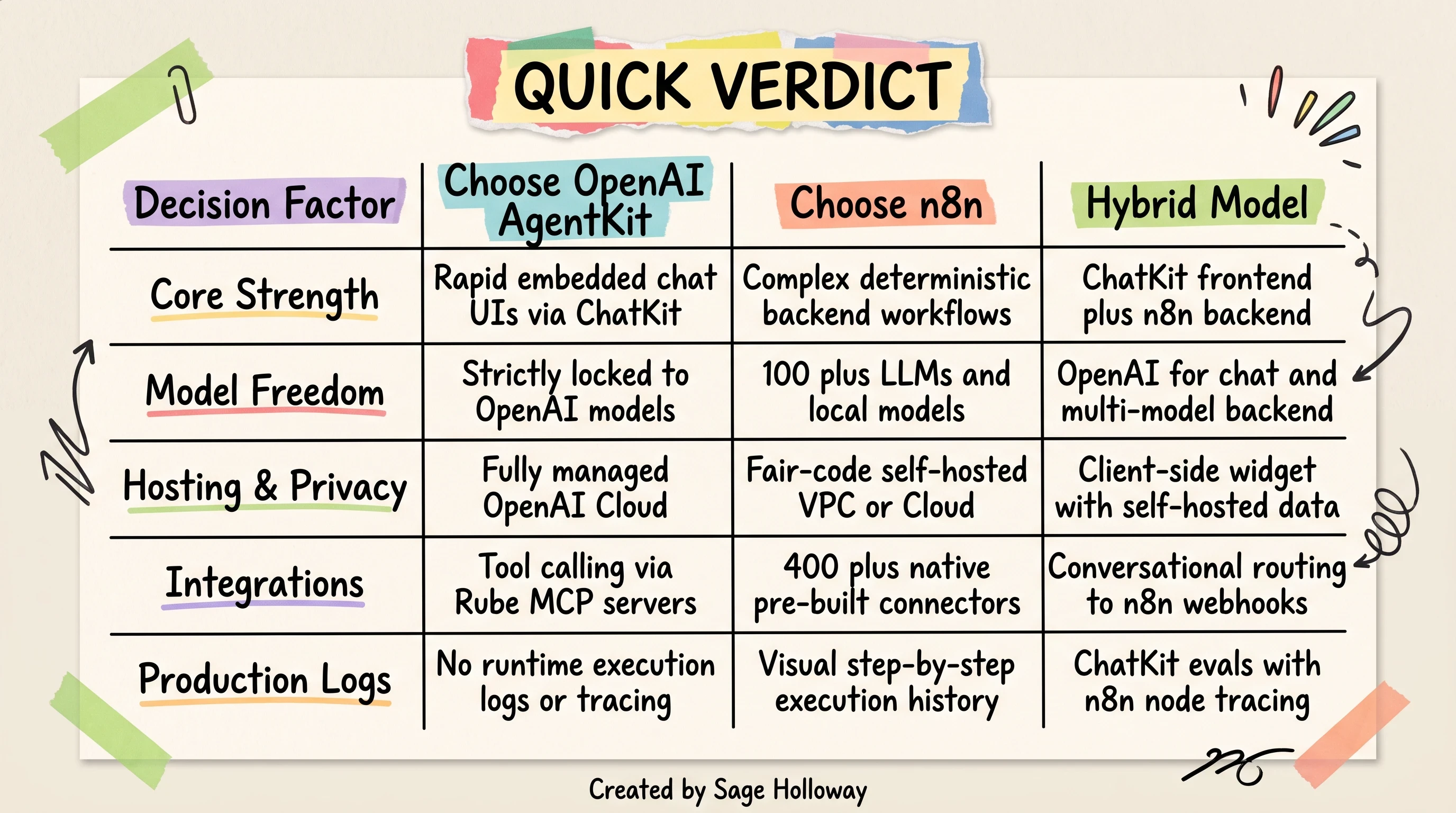
Choose AgentKit for rapid chat UI, n8n for deterministic plumbing, or combine both in a hybrid architecture.
Here is a 60-second structural overview contrasting n8n self-hosted multi-model flexibility with OpenAI AgentKit conversational frontends:
https://www.youtube.com/shorts/-6yUeJ3rkvg
When to choose OpenAI AgentKit
OpenAI AgentKit is the right tool when your primary deliverable is an interactive conversational interface that embeds directly inside a web or mobile application.
Rapid chat interface deployment: If you need to drop an embeddable chat widget into a React codebase in an afternoon, ChatKit provides pre-built UI components that connect directly to your agent backend with minimal boilerplate.
Strict OpenAI model alignment: If your engineering stack is already standardized on GPT-4o, OpenAI custom assistants, and native OpenAI prompt evaluation frameworks (Evals), AgentKit offers zero-latency alignment with OpenAI platform features.
Lightweight agentic tool calling: When an agent only needs to look up unstructured knowledge, call one or two external functions via Model Context Protocol (MCP), and formulate a conversational response, AgentKit keeps your canvas clean.
However, AgentKit will fight you the moment you require multi-model fallback routines, complex database branch logic, or strict compliance guarantees that forbid sending proprietary customer data to external cloud APIs.
When to choose n8n
n8n is the definitive choice when your automation represents critical business logic that must execute predictably every time an event occurs.
Deterministic backend workflows: When an automated process involves querying SQL databases, calculating tax rates, creating CRM records, and sending transactional notifications, n8n executes those steps in an explicit, auditable sequence.
Model-agnostic routing: If you want to use Claude 3.5 Sonnet for code extraction, Gemini 1.5 Pro for massive document analysis, and a local DeepSeek or Llama 3 model running on Ollama for sensitive internal data, n8n orchestrates across all of them without platform lock-in.
Self-hosted data sovereignty: For healthcare, financial, or European enterprise deployments requiring strict GDPR and HIPAA compliance, n8n can be deployed entirely inside your private Virtual Private Cloud (VPC) or local Docker cluster.
Granular production observability: When a pipeline fails at 3:00 AM, n8n lets you inspect the exact JSON input and output state of every single node in the execution history.
If you are trying to categorize your project before choosing a tool, read our complete breakdown on workflows vs ai agents vs multi agent systems to classify your automation requirements.
Core architecture and capabilities compared
To understand why these platforms behave so differently, we have to look past their visual interfaces. An n8n vs openai agent builder comparison reveals two distinct engineering philosophies.
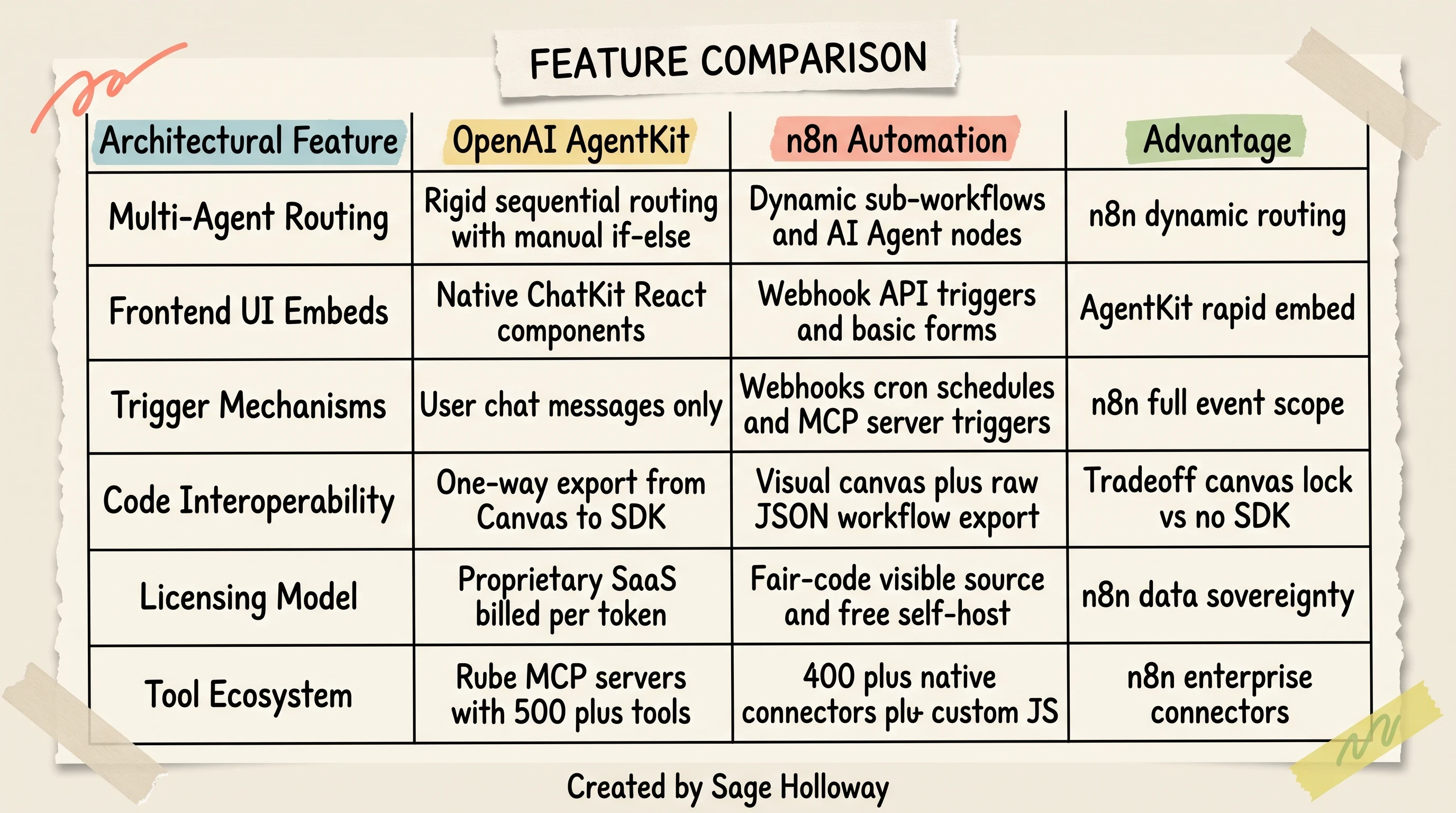
n8n dominates backend triggers and model freedom; AgentKit accelerates client-side chat widgets.
n8n was engineered from the ground up as a deterministic node-based workflow engine. OpenAI AgentKit was designed as an intent-driven agent orchestration framework built around large language model reasoning.
Deterministic node execution vs autonomous LLM delegation
In a deterministic architecture like n8n, the developer defines the exact pathway data must travel.
Every node represents a discreet, isolated operation: fetch a record from Stripe, check if the customer status is active via an If condition, format the payload using JavaScript, and write to PostgreSQL. The machine follows those instructions literally. If a step fails, execution halts at that exact coordinate, generating an actionable error log.
In contrast, OpenAI AgentKit relies on autonomous delegation. You provide the agent with a goal, system instructions, and a collection of attached tools or subagents.
When a user submits a prompt, the underlying language model evaluates the context and dynamically decides which tool to call, what arguments to pass, and whether to iterate through additional reasoning loops.
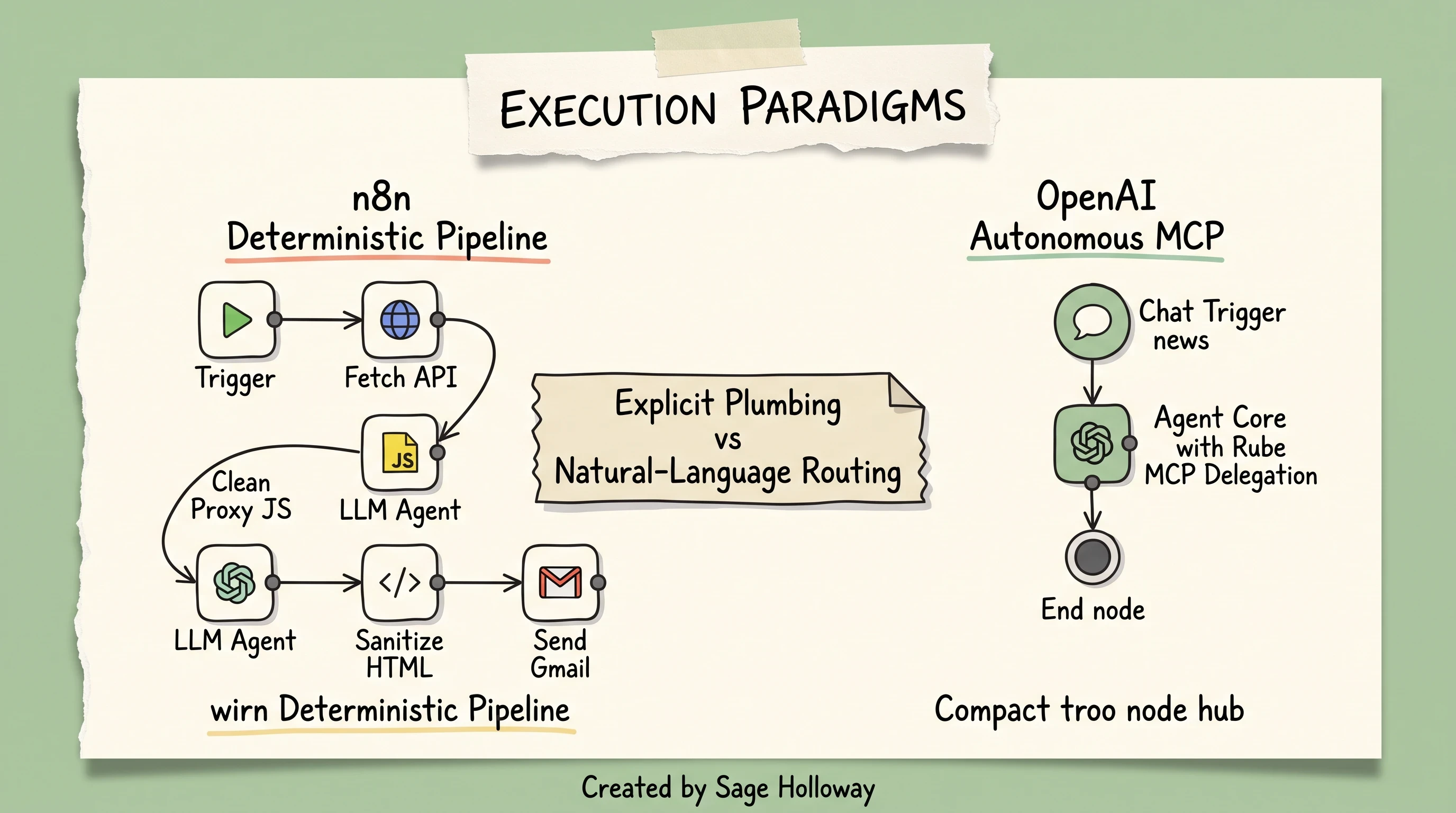
Explicit visual node wiring provides predictable data flow; autonomous MCP delegation eliminates pipeline friction.
This creates a fundamental tradeoff. Autonomous delegation makes prototyping conversational interfaces remarkably fast because you do not have to map out every possible conversational branch.
But for backend business systems, autonomy without strict guardrails introduces non-deterministic risk. A model might hallucinate an argument, call an API out of sequence, or exhaust its token window in an unexpected recursive loop.
Model-agnostic orchestration vs OpenAI vendor lock-in
Vendor lock-in is not just a commercial consideration; it is an architectural vulnerability.
OpenAI AgentKit strictly enforces the use of OpenAI models across all reasoning, tool routing, and evaluation steps. You cannot route a prompt to Anthropic Claude 3.5 Sonnet, Google Gemini, or a fine-tuned open-weights model running on your own infrastructure. If OpenAI experiences an API outage or deprecates a model checkpoint, your entire agent fleet is impacted.
n8n is completely model-agnostic. Inside a single n8n workflow canvas, you can connect:
Proprietary cloud LLMs: OpenAI (GPT-4o, o1, o3), Anthropic Claude, Google Gemini, Mistral AI, Cohere.
Open-source and local engines: Local models hosted on Ollama, vLLM, LM Studio, or Hugging Face Text Generation Inference.
Custom fine-tuned endpoints: Any model exposed through an OpenAI-compatible REST API.
This flexibility allows developers to optimize for unit economics and latency. You can use a lightweight local model for routine text classification, reserve GPT-4o for complex JSON extraction, and route sensitive personally identifiable information (PII) exclusively to local nodes that never transmit data over the public internet.
Triggering mechanisms across both platforms
How an automation starts determines where it can live inside your infrastructure stack.
OpenAI AgentKit is fundamentally conversational. Its execution cycle is tied almost exclusively to user-initiated chat messages arriving through ChatKit components or direct client API calls. It does not natively provide event-driven cron schedulers, arbitrary webhook listeners, or background server monitors out of the box.
n8n offers an exhaustive spectrum of triggering mechanisms, including:
Incoming webhooks: Listen for arbitrary POST, GET, or PUT payloads from any third-party service (Stripe, GitHub, Shopify, custom microservices).
Time-based schedules (Cron): Execute workflows at fixed intervals (every five minutes, daily at midnight, custom cron syntax).
Event-driven polling: Monitor email inboxes, Airtable updates, Notion page edits, or Google Drive file uploads.
MCP server triggers: Using the
mcp server trigger n8npattern, n8n can act as a live Model Context Protocol server, exposing its workflows as callable tools to external AI coding assistants and agents.Manual and sub-workflow execution: Triggered programmatically from parent workflows or directly by an operator inside the management canvas.
If an automation must wake up automatically when an external event occurs in your business, n8n provides the native scaffolding to catch and process that event.
OpenAI AgentKit deep dive: Strengths and architectural bottlenecks
To evaluate OpenAI's platform objectively, we must separate the visual tools from the underlying developer framework.
OpenAI's suite consists of three distinct layers:
Agent Builder: The visual drag-and-drop canvas hosted inside the OpenAI developer platform where builders configure prompts, attach tools, and wire visual nodes.
ChatKit: The React and web component library designed for embedding interactive conversational widgets directly into web applications.
AgentKit (Agent SDK): The underlying programmatic framework, distributed in TypeScript and Python, that powers agent runtime execution, state management, and tool binding, as documented in the official OpenAI platform documentation.
ChatKit and rapid embedded interfaces
The standout strength of the AgentKit ecosystem is ChatKit. Building a polished, responsive conversational user interface in React from scratch requires significant engineering effort: managing streaming markdown tokens, auto-scrolling containers, handling error toasts, rendering structured tool outputs, and styling message bubbles.
With chatkit for embedded interfaces, developers can initialize a full-featured conversational interface directly in their frontend codebase with minimal setup. You supply the agent endpoint URL and public API key, and the component renders a production-ready chat experience that handles streaming responses, multi-turn state, and UI themes automatically.
For development teams building customer-facing support copilots, onboarding assistants, or embedded product guides, ChatKit cuts frontend development time from weeks to hours.
Expanding tool access via Rube MCP
Out of the box, OpenAI Agent Builder only includes a small handful of native connectors. To connect an agent to external enterprise databases, GitHub repositories, or productivity tools, OpenAI relies on the Model Context Protocol (MCP).
By integrating rube mcp tools, developers can bridge their Agent Builder canvas to external registries that provide access to over 500 third-party developer tools and services.
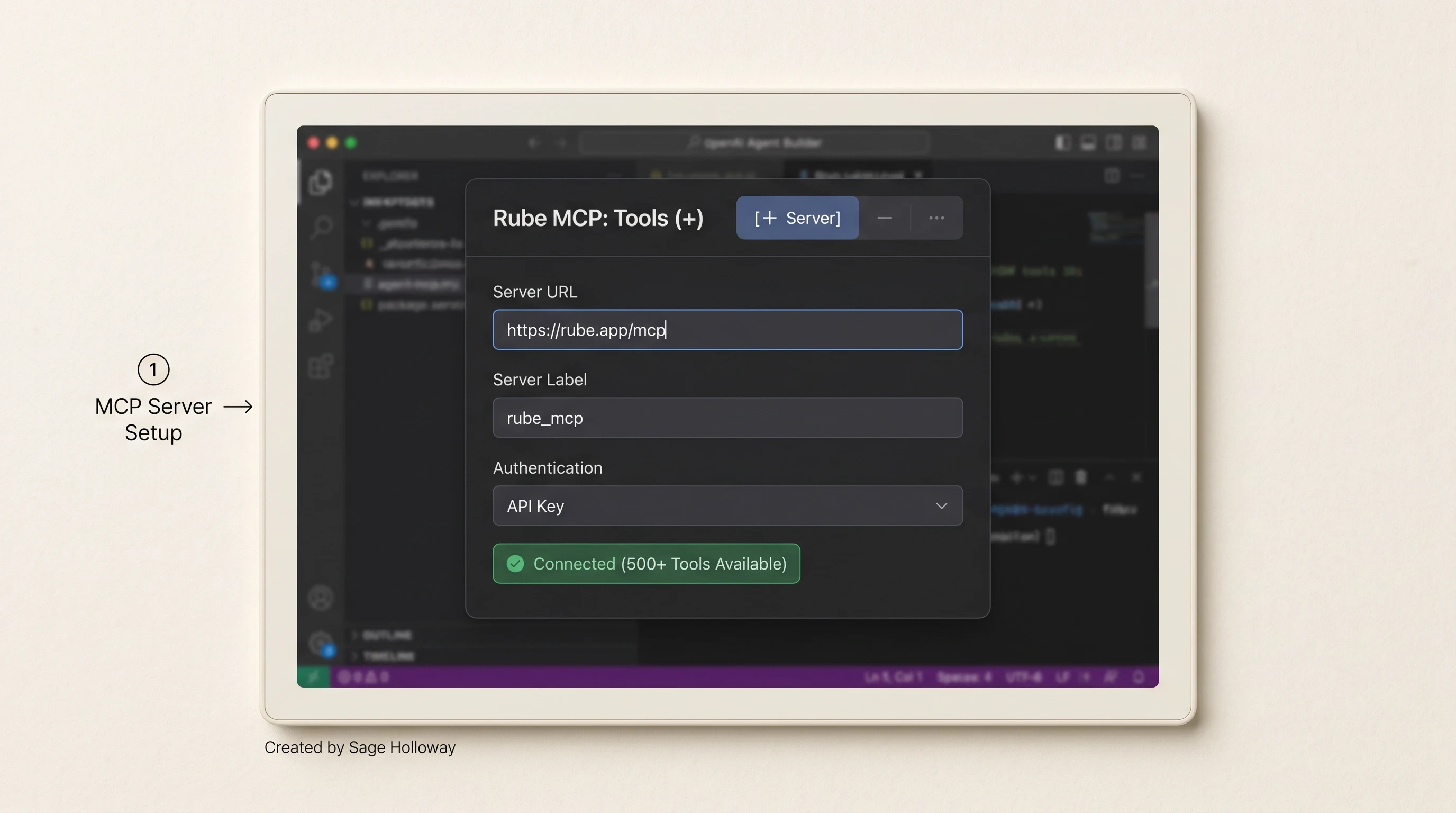
Connect 500+ external tools in Agent Builder by binding Rube MCP with endpoint URL and security token.
To connect an external MCP registry in the OpenAI Agent Builder:
In the left navigation pane of Agent Builder, click Rube MCP: Tools (+).
Select the [+ Server] configuration tab.
Enter the server endpoint URL:
https://rube.app/mcp.Set the server label identifier:
rube_mcp.Enter your authentication security key (Bearer Token) generated from the Rube MCP console.
Once connected, your agent gains the ability to discover and invoke external tools dynamically during its conversational reasoning loop.
The sequential routing bottleneck and manual if/else logic
While AgentKit simplifies single-agent interactions, it introduces a severe architectural bottleneck when building complex multi-agent systems.
In production, multi-agent workflows require dynamic intent routing: a primary triage agent evaluates an incoming query and seamlessly delegates execution to specialized subagents (such as a billing specialist, a technical support engineer, or a database query agent).
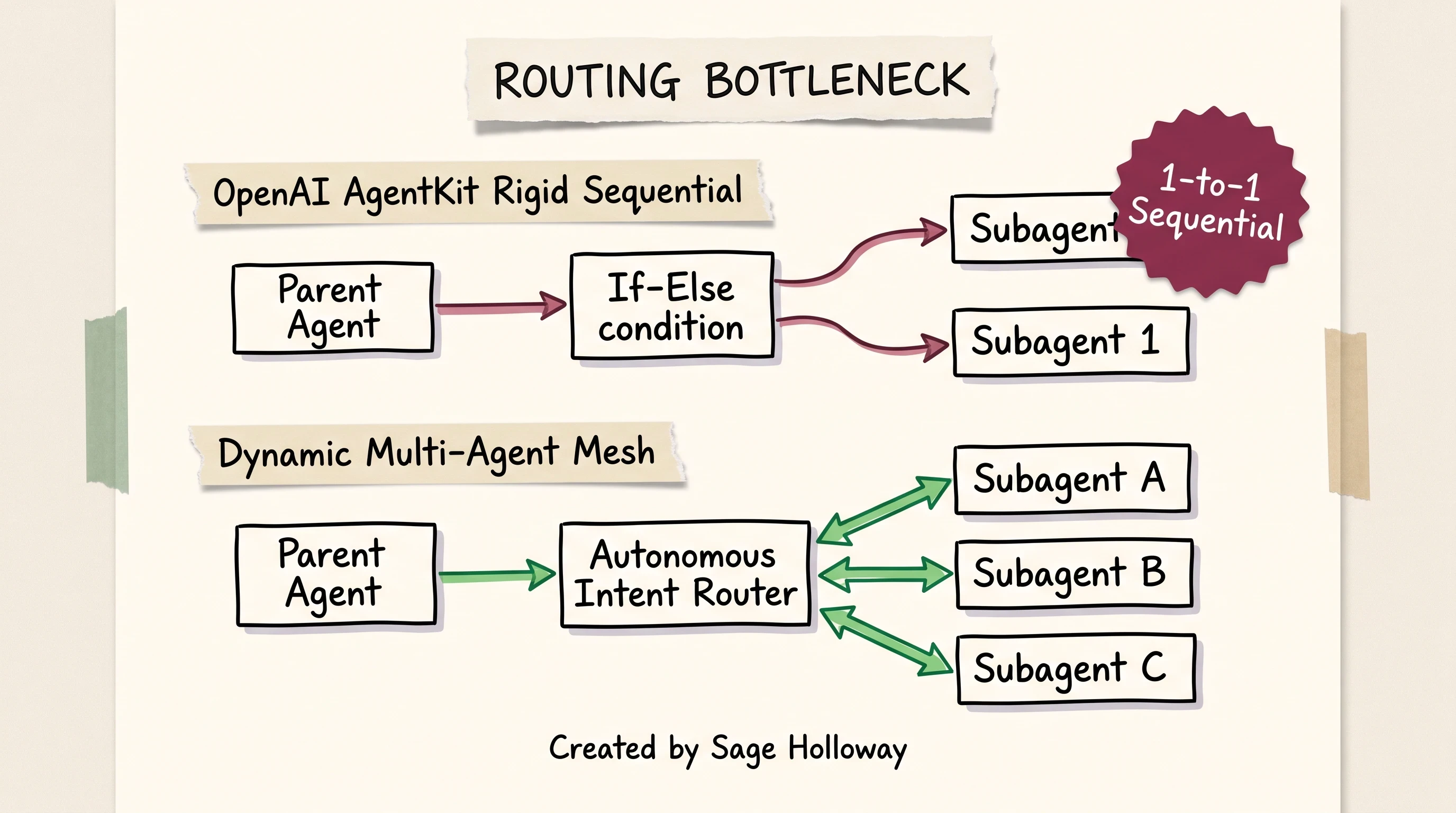
AgentKit agents connect to one subagent at a time, forcing developers into manual conditional branching.
In OpenAI AgentKit, agents can only connect directly with one subagent at a time. The platform does not support native, autonomous multi-directional routing across an agent mesh.
To route queries across multiple subagents, developers are forced to manually construct rigid if/else conditional logic nodes inside the canvas.
This constraint creates significant friction:
Erosion of agentic reasoning: Forcing the system through hardcoded conditional trees removes the model's ability to coordinate complex, multi-step agent handoffs dynamically.
Canvas sprawl: As you add specialized subagents, your visual canvas becomes cluttered with defensive conditional logic.
UI mode rigidity: AgentKit struggles to autonomously determine whether it should return plain streaming text or render a rich client-side widget, requiring developers to hardcode frontend state triggers.
SDK-to-canvas export: The one-way street limitation
Another major developer experience friction point in the OpenAI ecosystem is the lack of bidirectional code-to-UI interoperability.
When designing an automation in Agent Builder, you can click an export button to generate clean TypeScript or Python code that utilizes the underlying AgentKit SDK. This is useful for moving from a visual prototype to a code repository.
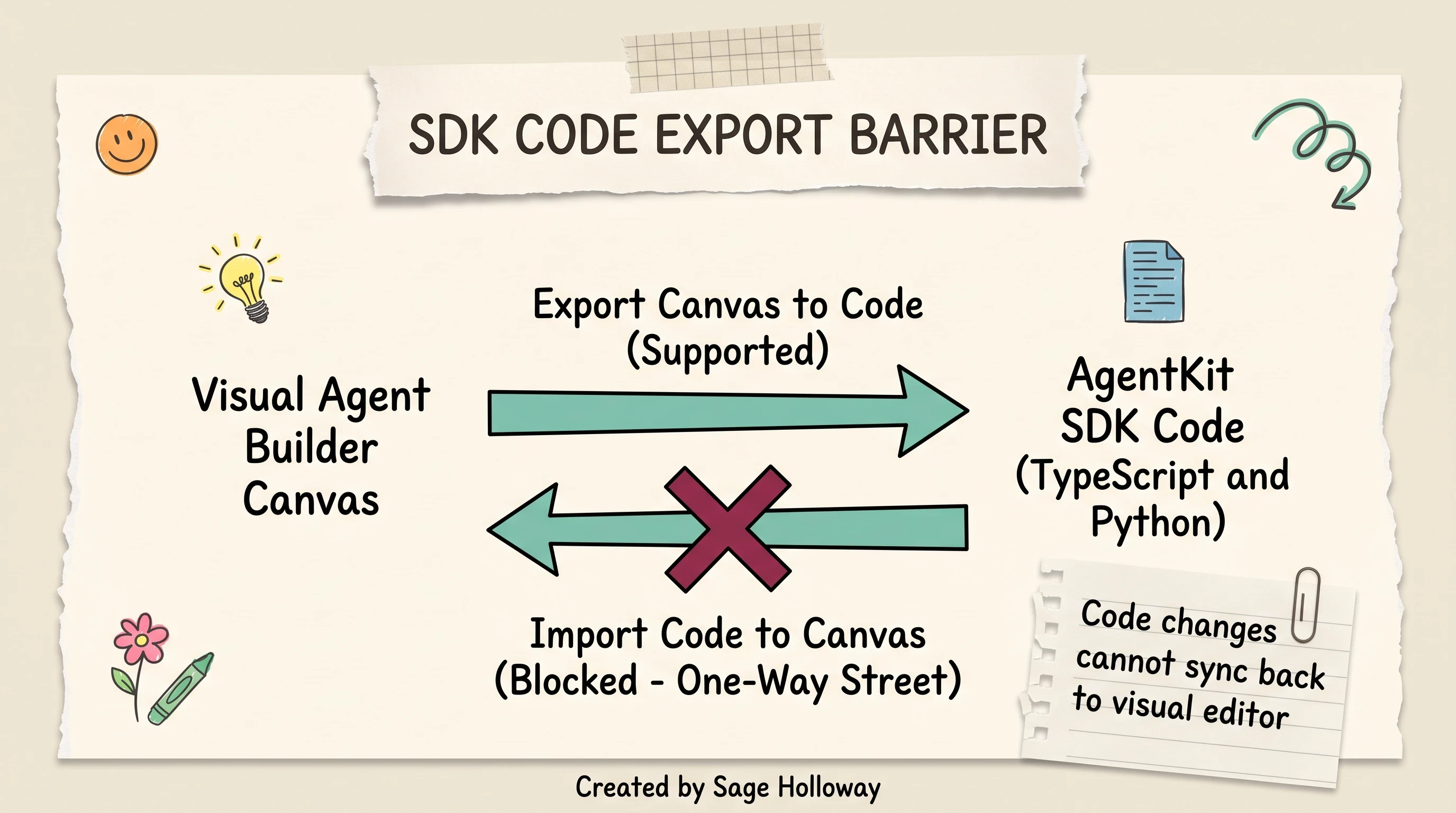
Exporting a visual canvas to SDK code is a one-way transition; code edits cannot re-import to the visual editor.
However, this export is strictly a one-way street. Once you modify the exported TypeScript or Python code in your local IDE, you cannot re-import that code back into the visual Agent Builder canvas.
The moment your software engineers touch the codebase to add custom middleware, environment variables, or private API wrappers, your visual canvas is permanently decoupled from production. Non-technical product managers can no longer tweak prompts or adjust tool parameters inside the visual UI without breaking the deployment pipeline.
n8n deep dive: Strengths, fair-code licensing, and hidden code overhead
While n8n solves the orchestration and multi-model routing challenges that plague AgentKit, it comes with its own set of production realities that developers must prepare for.
Self-hosting privacy and the fair-code licensing reality
A widespread misconception in developer forums is that n8n is "open source."
n8n is distributed under a Sustainable Use License (Fair-Code), as detailed in the official n8n documentation.
Under this license:
Source code is fully visible: You can inspect, modify, and audit every line of code in the repository.
Free self-hosting for internal use: Organizations can deploy n8n on their own internal infrastructure (via Docker, Kubernetes, or bare metal) completely free of charge for internal business operations.
Commercial restrictions apply: You cannot take n8n's source code, wrap it into a competing commercial workflow product, and charge third parties for access without an enterprise commercial agreement.
For enterprise IT security teams, self-hosting n8n provides absolute data sovereignty. Workflows run inside your firewall, database credentials never leave your VPC, and execution payloads remain entirely under your governance. If you are deploying an isolated local environment, follow our complete guide to the n8n self-hosted AI starter kit.
If your legal team strictly mandates an OSI-approved license like Apache 2.0, look at our comparative review of best dify alternatives to evaluate permissive open-source options.
n8n AI Agent node vs native OpenAI node
Inside the n8n editor canvas, developers often face confusion when deciding between the standard OpenAI node and the dedicated AI Agent node.
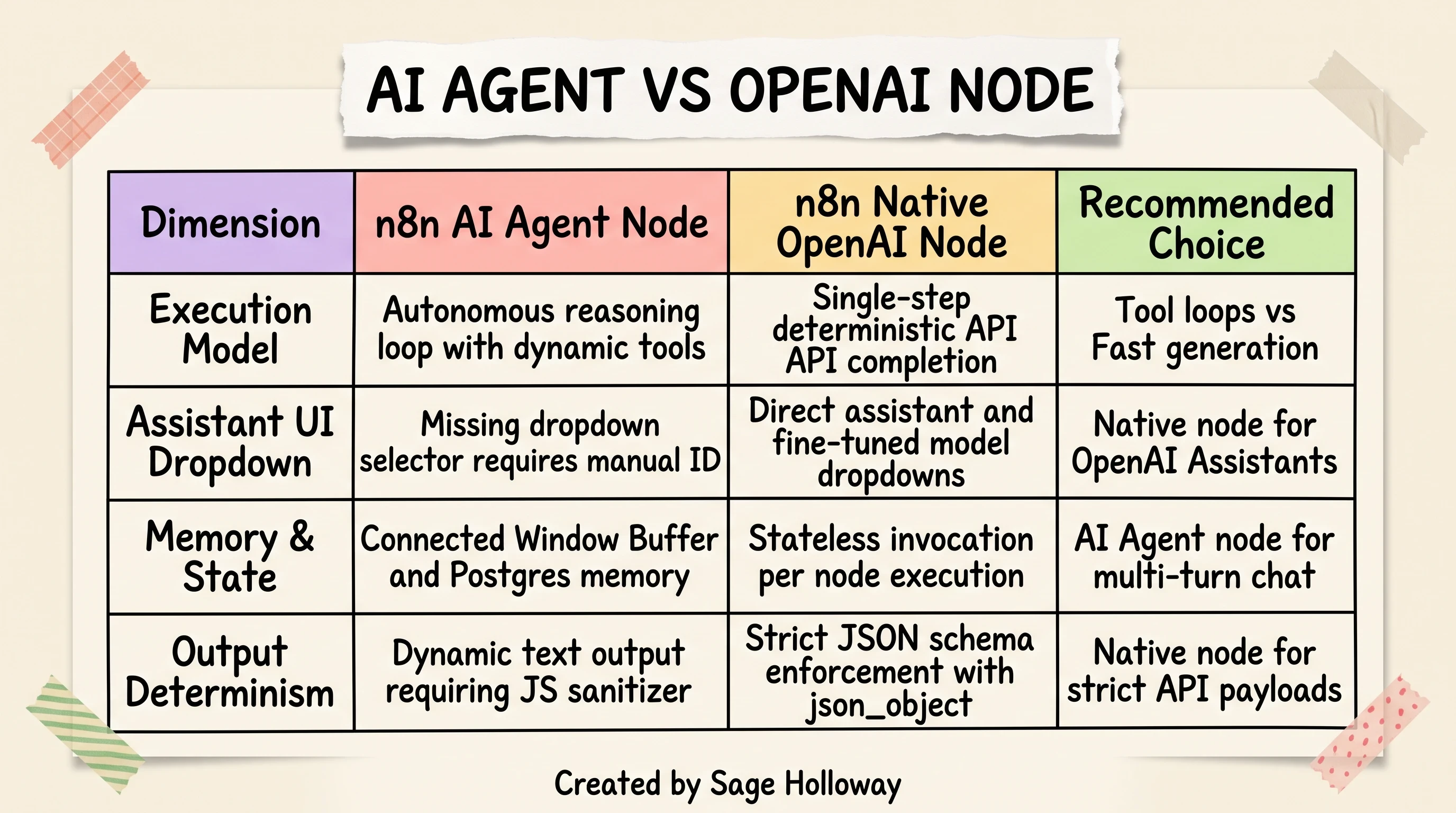
Use the AI Agent node for multi-turn tool calling; use the native OpenAI node for strict JSON schema completions.
Understanding the difference between n8n ai agent node vs openai node is crucial for stable pipeline design (see our dedicated n8n AI Agent guide for sub-node architecture patterns):
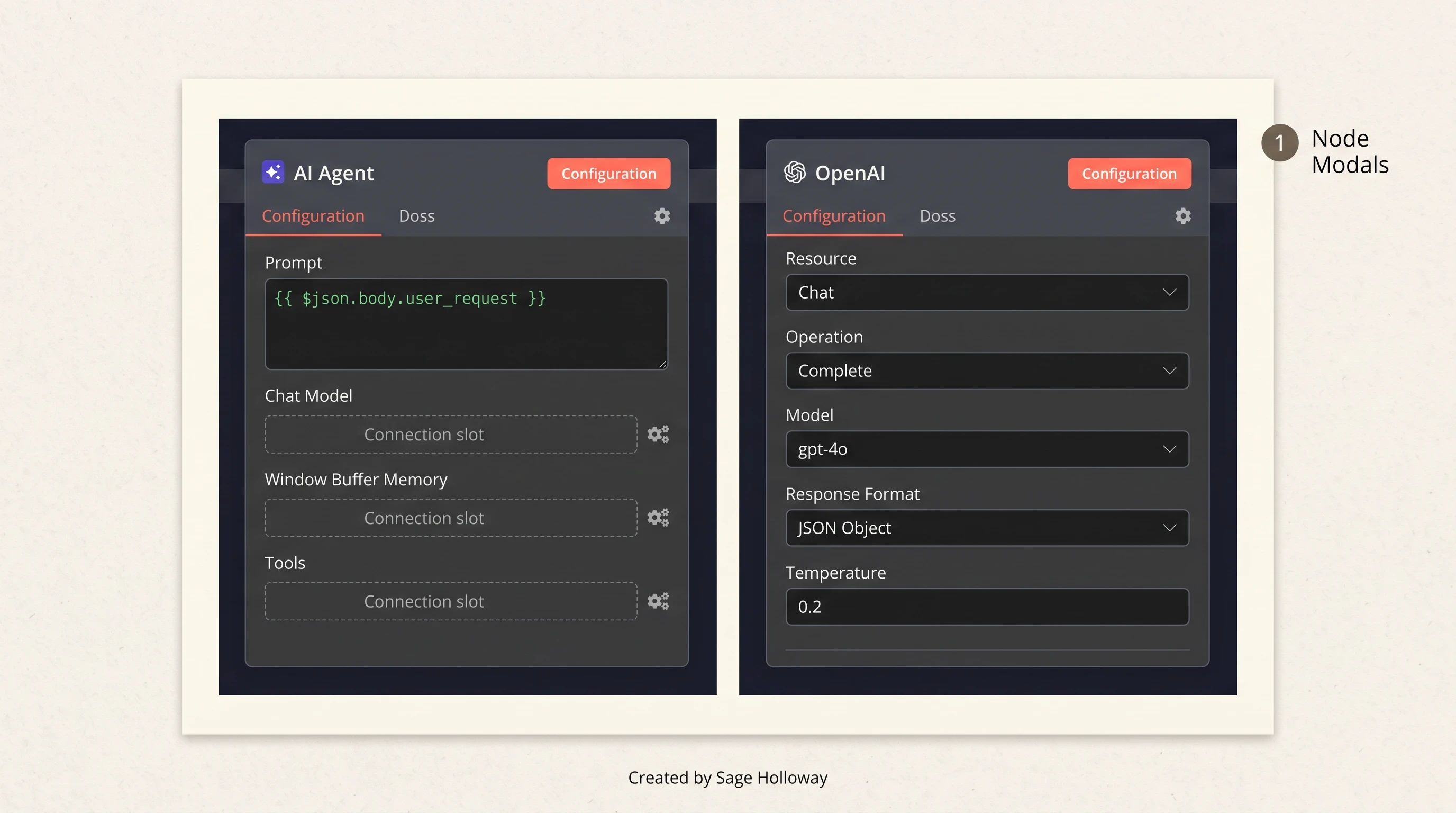
The AI Agent node orchestrates dynamic tools and memory; the native OpenAI node enforces strict structured JSON schemas.
The Native OpenAI Node: This node executes a single, deterministic API call to the OpenAI endpoint. It is ideal for tasks requiring strict structured JSON outputs, custom fine-tuned model checkpoints, or standard text completions. In the native node modal, you set Resource to
Chat, Operation toComplete, Model togpt-4o, and Response Format toJSON Object. It executes fast, consumes minimal memory, and returns a predictable schema.The AI Agent Node: This node operates as an autonomous LangChain-powered reasoning agent. It features sub-node connection slots where you attach a Chat Model, Memory (such as Window Buffer or Postgres Memory), and external Tools. The AI Agent node can evaluate user input, decide which connected tools to invoke across multiple turns, maintain conversational context, and formulate a synthesized response.
Production caveat: The n8n AI Agent node currently lacks a direct dropdown selector for custom OpenAI pre-configured Assistants. If your workflow relies on an existing OpenAI Assistant ID, you must manually inject the Assistant ID into the configuration parameters.
The hidden JavaScript proxy overhead in data cleaning
n8n is frequently marketed as a no-code visual workflow builder. But in real-world production setups, developers quickly discover a hidden coding requirement: handling JavaScript Proxy objects.
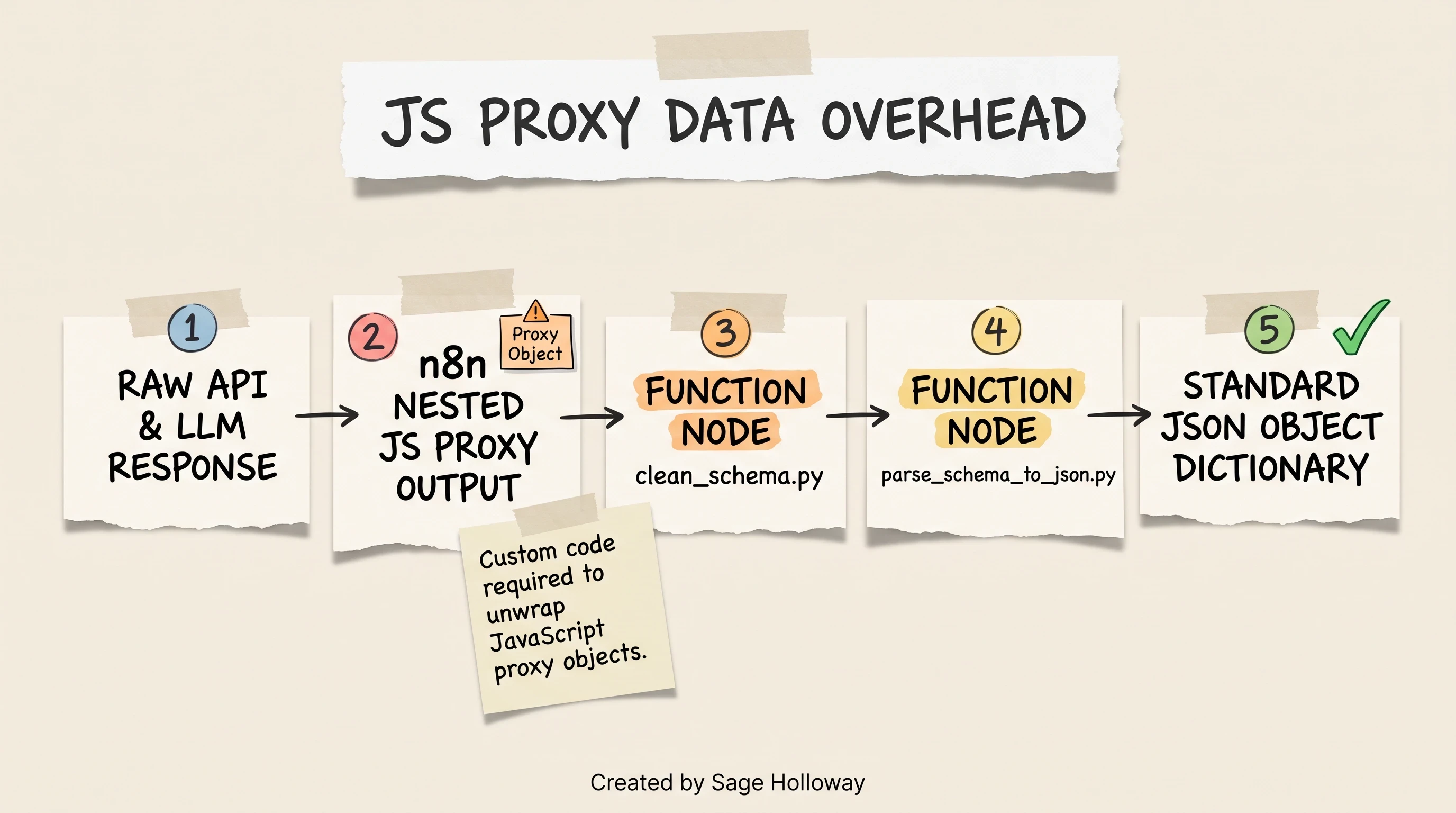
Nested API payloads in n8n yield JavaScript proxy objects that require custom code nodes to sanitize into standard JSON.
When n8n processes complex nested API responses or dynamic outputs from language models, its internal execution runtime wraps the payload in JavaScript Proxy objects.
If downstream nodes expect standard JSON key-value dictionaries, passing raw proxy objects directly can cause silent execution failures, formatting errors, or broken expression bindings.
To resolve this, engineers must insert custom Code / Function nodes into their pipelines to unwrap proxies and sanitize schemas before passing data forward. This introduces real code maintenance overhead into what was intended to be a visual-only canvas.
Side-by-side build walkthrough: Hacker News digest automation
To observe the practical developer friction of both platforms in action, we constructed the exact same end-to-end automation across both tools: a daily Hacker News newsletter digest aggregator.
The automation's objective:
Fetch the top 10 trending articles from Hacker News.
Extract the title, author, URL, and score points for each story.
Pass the data to an LLM to generate a styled, clean HTML email digest.
Deliver the final newsletter to a subscriber list via Gmail OAuth.
The n8n 7-node deterministic pipeline
In n8n, achieving this workflow requires a 7-node deterministic sequence where every data transformation step is explicitly handled.
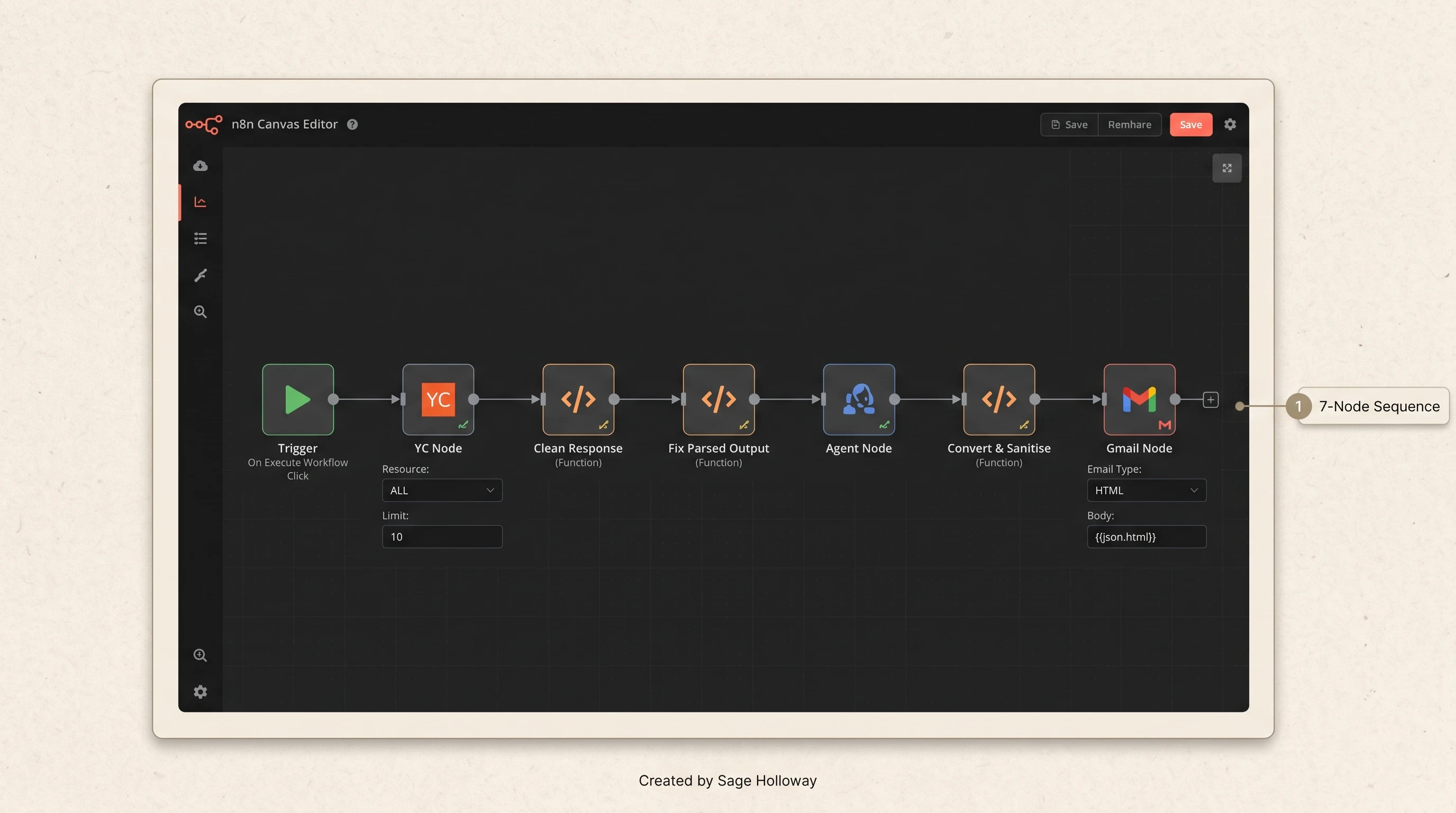
n8n uses a 7-node deterministic pipeline with custom function nodes to extract, clean, format, and email Hacker News stories.
Here is the exact step-by-step node configuration:
Trigger Node: Configured to fire on manual click (
On Execute Workflow Click) or on a recurring daily cron schedule.YC / Hacker News Node: Configured with
Resource: ALL,Operation: Get Many, andLimit: 10to retrieve the top 10 raw story payloads.Clean Response (Code Node): Executes custom JavaScript (
clean_schema.pylogic) to extract specific keys:title,url,author,points,comments, andcreated_at.Fix Parsed Output (Code Node): Converts the intermediate JS proxy object into a clean JSON dictionary (
parse_schema_to_json.pylogic) so n8n's engine can pass standard properties to downstream nodes.Agent Node: An LLM node taking the parsed JSON array and system prompt instructions (
prompt.md) to write a responsive HTML newsletter template.Convert & Sanitise (Code Node): Executes regex sanitization (
clean_json_response.pylogic) to strip unescaped newline breaks (\n) and markdown wrappers from the LLM output.Gmail Node: Configured with
Credential: Gmail OAuth,Resource: Message,Operation: Send,Email Type: HTML, and maps the body parameter directly to{{ $json.html }}.
The OpenAI Agent Builder 3-node MCP pipeline
In OpenAI Agent Builder, the same functional output is achieved using a 3-node intent-driven architecture backed by Model Context Protocol tools.
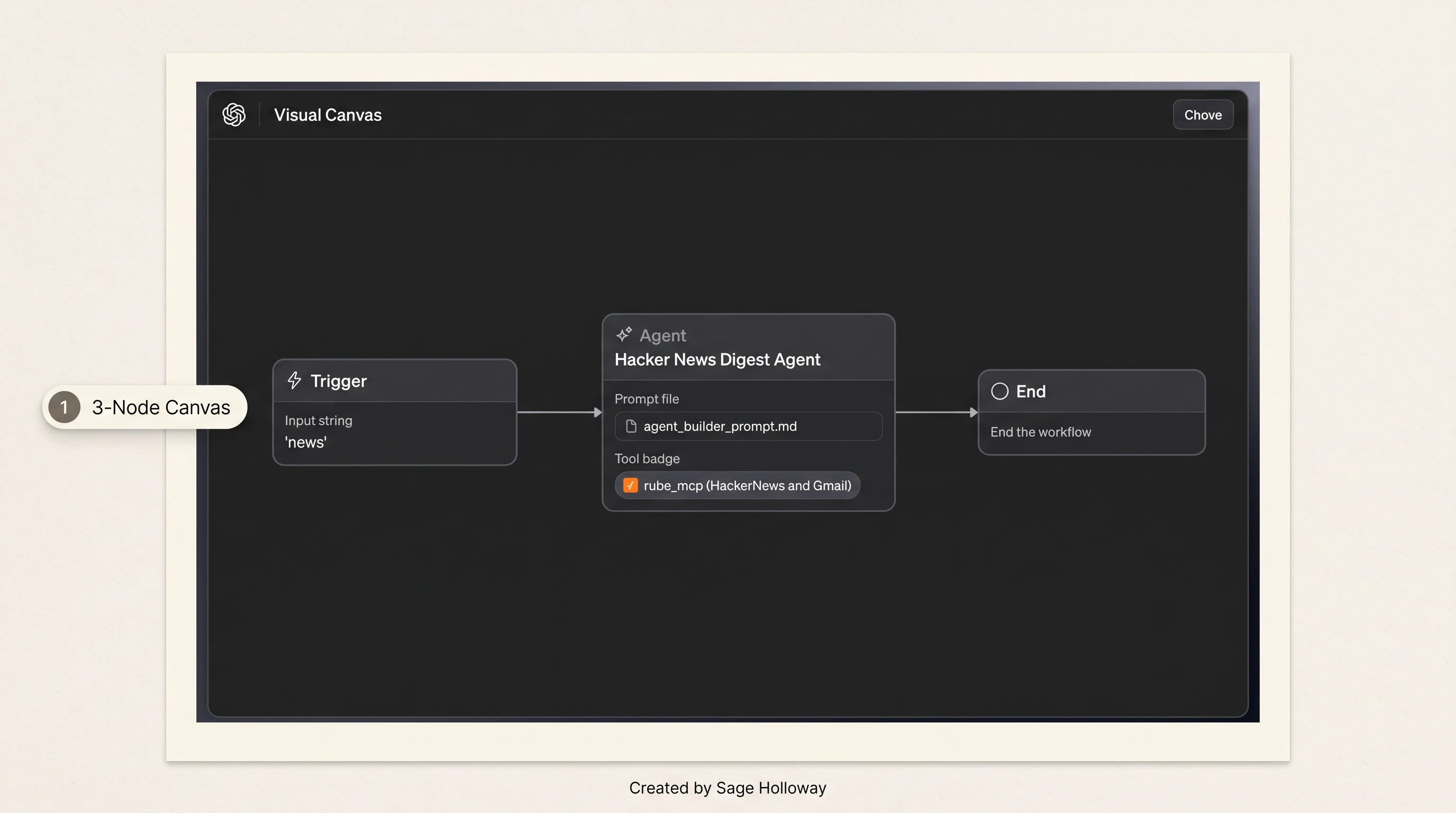
OpenAI Agent Builder consolidates the pipeline into a 3-node canvas using natural language and Rube MCP tool delegation.
Here is the configuration:
Trigger Node: Configured with an incoming chat trigger matching the text string
"news".Agent Node: Configured with system instructions (
agent_builder_prompt.md) instructing the agent to query Hacker News for the top 10 articles, format a modern HTML email layout, and call Gmail to send the message. The node is bound to therube_mcpserver connection, granting it access to both Hacker News and Gmail tool schemas.End Node: Configured to cleanly terminate the execution lifecycle once the email tool call confirms dispatch.
Developer friction, data transformation, and maintenance
Watch this complete side-by-side workflow construction walkthrough to see the exact development overhead across both tools in real time:
https://www.youtube.com/watch?v=MLNZp0Nd5c0&vl=en
Comparing these two implementations highlights the fundamental tension between explicit plumbing and conversational delegation:
Initial build velocity: OpenAI Agent Builder wins decisively on speed. Connecting 3 nodes and writing a prompt takes five minutes. n8n requires configuring 7 nodes, authenticating separate credentials, and debugging proxy payloads.
Data sanitization scripts: In n8n, handling raw proxy structures requires writing custom JavaScript. Below are the actual sanitization functions required in nodes 3, 4, and 6:
Long-term maintainability: If Hacker News changes an API key name or Gmail rate-limits an HTML body, n8n fails predictably at that exact node, displaying the failed payload in execution logs. In Agent Builder, a tool schema mismatch often manifests as a silent agent failure where the model apologizes in chat rather than alerting your monitoring stack.
The "Brain vs. Nervous System" hybrid architecture
When senior engineers analyze the strengths of both platforms, they stop asking which tool is "better." They recognize that the most resilient system is a hybrid architecture where each platform does what it was engineered to do.
Think of OpenAI AgentKit as the Brain (handling conversational intelligence, natural language comprehension, and client-side chat widgets) and n8n as the Nervous System (handling deterministic execution, asynchronous job queues, database state, and API retries).
Architectural boundary: Conversational reasoning vs transaction plumbing
In a production hybrid model, you enforce a strict boundary:
The Brain (AgentKit / ChatKit): Sits in front of the user. It receives conversational input, manages streaming UI tokens, checks prompt evaluation guardrails (Evals) for content safety, and classifies intent. When the user requests an action (such as booking an appointment, processing a refund, or querying an internal database), AgentKit does not execute the transaction directly. It formats a structured JSON payload and dispatches a webhook to n8n.
The Nervous System (n8n): Receives the structured webhook. It coordinates database locks, runs validation logic, authenticates with enterprise ERPs or CRMs, handles multi-model fallback routines, and manages error retries.
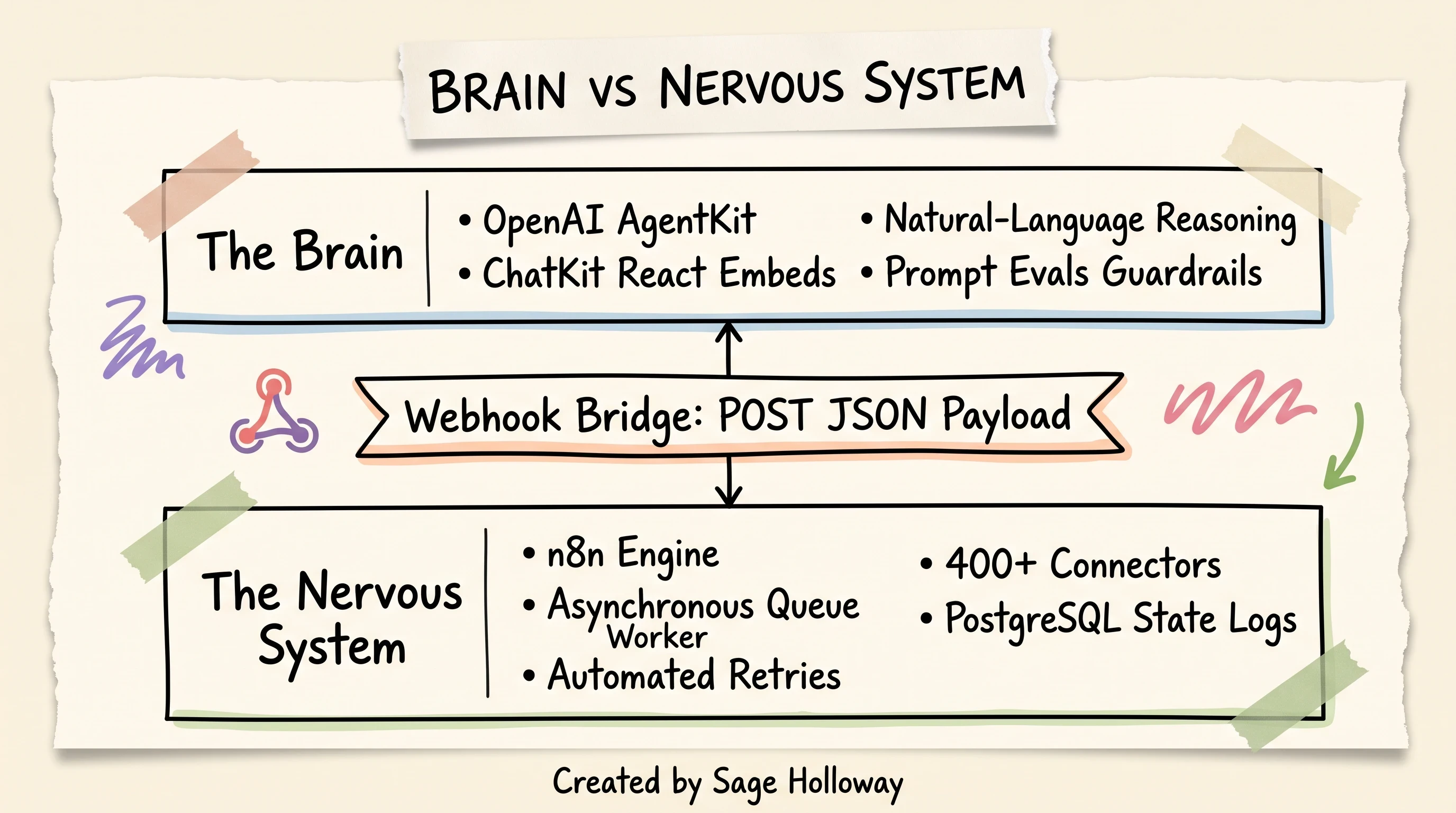
Assign conversational UI and prompt evals to AgentKit; route transactional queues, retries, and database syncs to n8n.
Step-by-step webhook bridging: Routing AgentKit to n8n
Bridging these two platforms requires setting up a standard asynchronous webhook conduit.
On the n8n side:
Create a Webhook Trigger Node listening for
POSTrequests at/webhook/v1/execute-action.Set Authentication to
Header Authand match the bearer secret.Connect downstream nodes to process the parameters, update databases, and return an immediate confirmation payload back to the client.
Handling asynchronous queues, retries, and rate limits
When deploying conversational agents in enterprise environments, user traffic spikes can easily overwhelm downstream API rate limits.
If an AgentKit agent makes direct calls to a rate-limited CRM API during a traffic surge, requests will fail with HTTP 429 Too Many Requests errors, breaking the user's chat session.
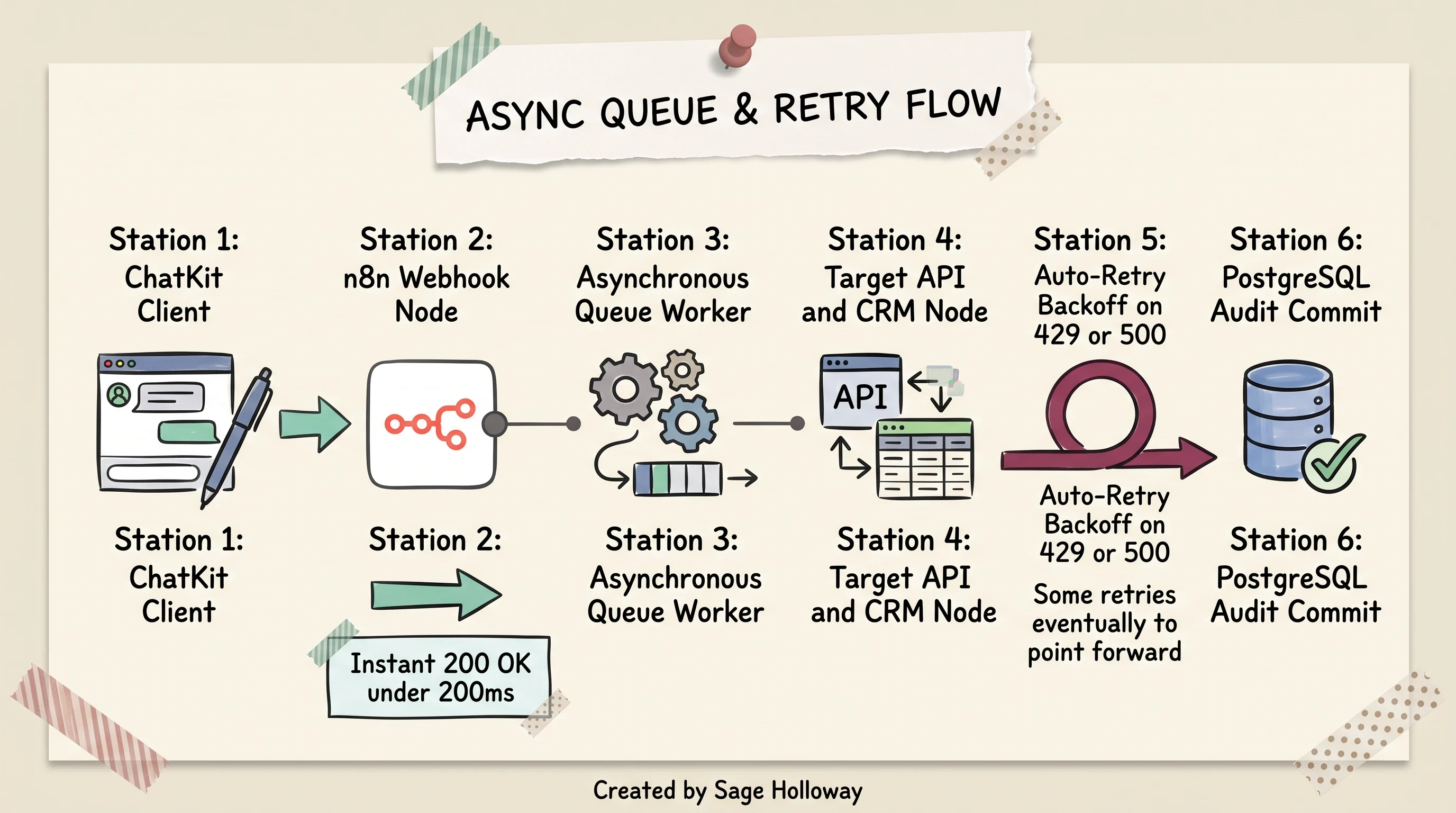
Decouple chat response latency from heavy backend operations using asynchronous webhook queues and automated retries.
By routing transactions through n8n:
Immediate Acknowledgment: n8n returns an immediate
200 OKacknowledgment to ChatKit, allowing the frontend to display a natural "Processing your request..." indicator without blocking the UI thread.Asynchronous Queueing: Incoming tasks are queued and processed according to downstream rate limits.
Automated Exponential Backoff: If a third-party API returns a 429 or 500 error, n8n automatically retries the operation with exponential backoff without losing the transaction state.
Pricing, unit economics, and cloud vs token costs
Evaluating openai agentkit vs n8n pricing requires comparing two completely different billing paradigms: execution-based workflow fees versus token-based consumption rates.
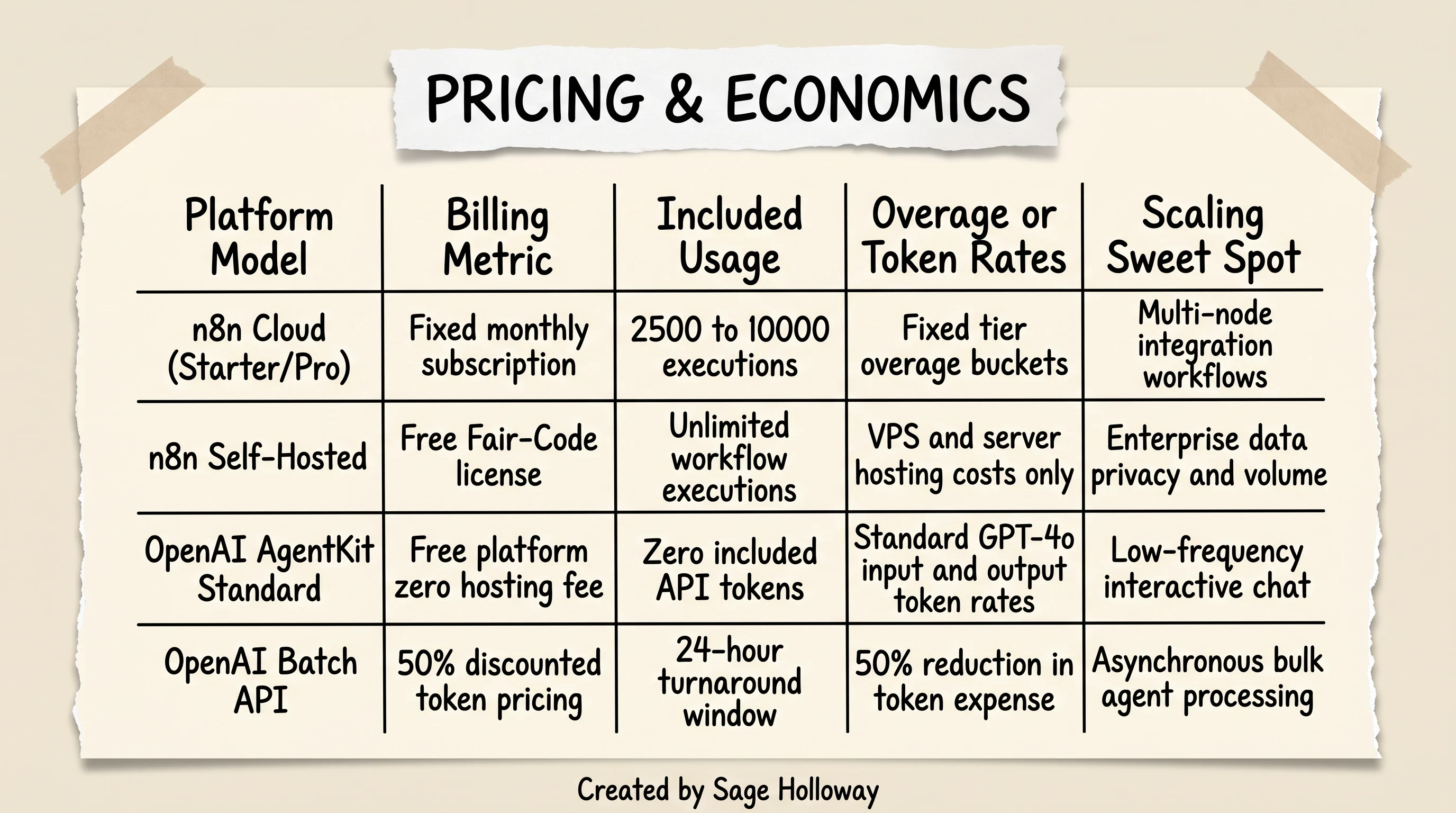
n8n costs remain constant per execution volume; OpenAI API costs scale directly with context window length and token rates.
n8n execution-based tiers vs self-hosted infrastructure
n8n offers two primary hosting paths:
n8n Cloud: Plans are billed on a fixed monthly subscription based on workflow execution volume, regardless of how many individual nodes or steps run within a single workflow. For example, a Starter plan at approximately 20 euro per month includes 2,500 workflow executions, while a Pro plan at roughly 50 euro per month supports 10,000 executions. If a single execution runs 40 complex data transformations, database writes, and email dispatches, it still counts as exactly one execution.
Self-Hosted Community (Fair-Code): Completely free of license fees for internal organizational use. Your primary costs are your underlying compute infrastructure (such as an AWS EC2 instance, Hetzner cloud server, or DigitalOcean droplet running at 10 to 40 dollars per month) and the operational time required for maintenance and backups.
OpenAI API token rates and scaling thresholds
OpenAI AgentKit has no separate platform subscription fee, but its operational costs scale directly with the number of tokens processed across the OpenAI API.
Standard Real-Time API: Standard pricing for GPT-4o sits around $2.50 per million input tokens and $10.00 per million output tokens.
Batch API: For asynchronous, non-real-time jobs, OpenAI offers a 50% discount ($1.25 per million input tokens and $5.00 per million output tokens) with a 24-hour turnaround window.
The Context Window Compounding Effect: In multi-turn conversational chat and autonomous agent loops, context accumulates rapidly. As an agent passes conversation history and extensive tool definitions back and forth over a 15-turn session, token consumption compounds exponentially.
A high-volume consumer application running 50,000 multi-turn chat sessions per month can easily generate several thousand dollars in OpenAI API bills, whereas the backend orchestration for those sessions inside self-hosted n8n costs virtually nothing in incremental licensing.
Alternative agent platforms: When neither fits
If your engineering team requires an architecture that combines the conversational UI polish of AgentKit with the model freedom and open-source licensing of n8n, several modern alternatives have emerged.
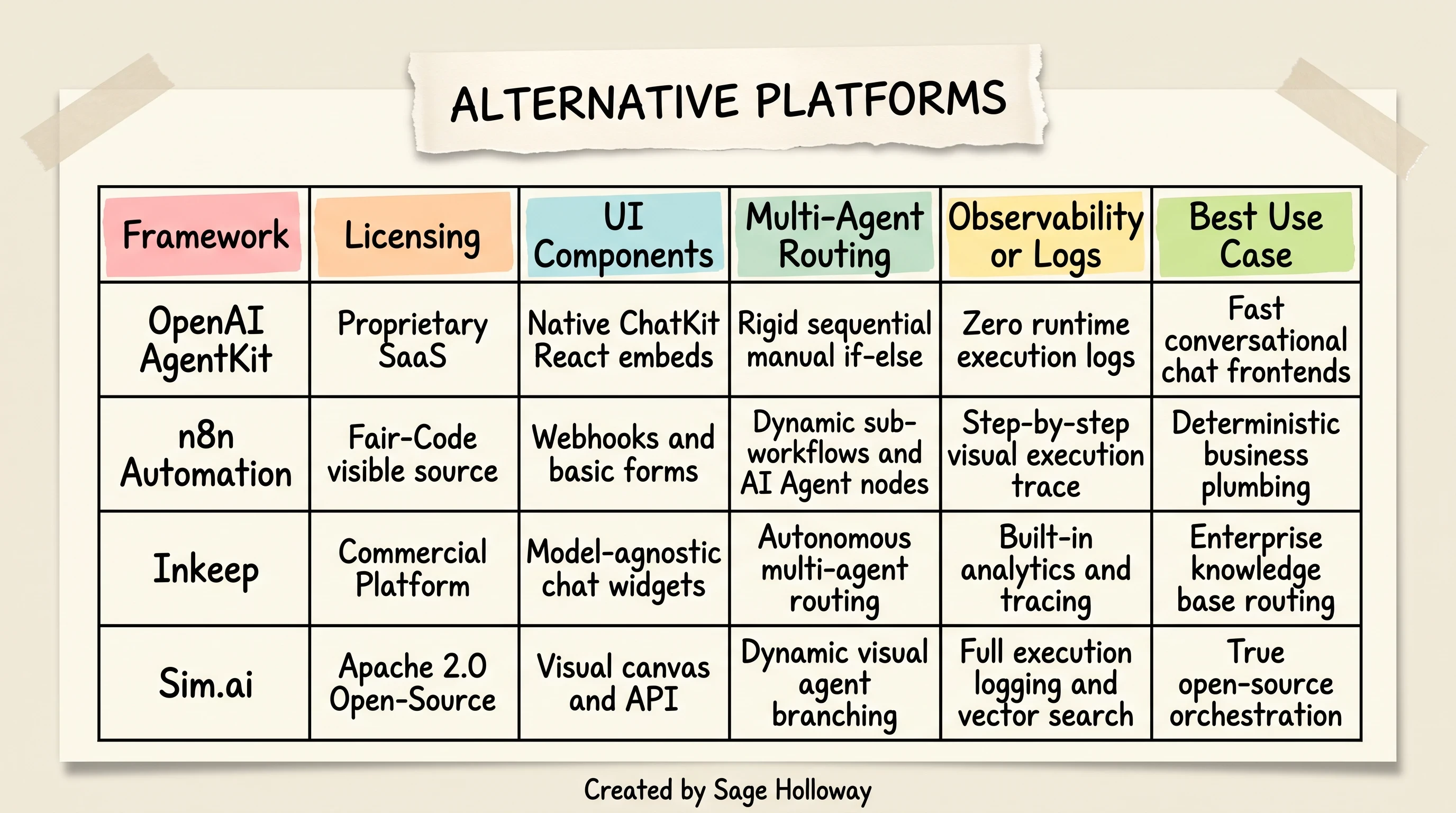
Inkeep delivers autonomous multi-agent routing with UI polish; Sim.ai provides Apache 2.0 open-source orchestration.
If you are auditing the broader ecosystem, explore our comprehensive directory of the best ai agent platforms 2026 for an exhaustive evaluation across commercial and open-source tools.
Inkeep for agentic routing with UI polish
inkeep ai agents positions as a specialized hybrid platform engineered specifically to resolve AgentKit's architectural limitations.
Unlike AgentKit's rigid sequential routing, Inkeep features a true autonomous multi-agent mesh where agents can dynamically route tasks, hand off conversational context, and decide whether to render custom UI widgets or plain text.
Crucially, Inkeep is model-agnostic, allowing teams to deploy polished, enterprise-ready chat components powered by Anthropic, OpenAI, or private models.
Sim.ai for Apache 2.0 open-source orchestration
For development teams that require an uncompromised, OSI-compliant open-source foundation, sim ai agent workflow builder delivers an Apache 2.0 licensed visual agent platform.
Sim includes native vector search knowledge bases, built-in Model Context Protocol (MCP) integrations, real-time team collaboration, and granular step-by-step execution logging. It bridges the gap between low-code visual building and enterprise-grade observability without the commercial licensing restrictions of fair-code models.
Frequently asked questions
Can OpenAI AgentKit run AI models from providers other than OpenAI?
No. OpenAI AgentKit strictly enforces the use of OpenAI models across all reasoning, tool calling, and evaluation steps. You cannot route prompts to Anthropic Claude, Google Gemini, Mistral, or open-weights models running locally. If your architecture requires multi-model flexibility or local model deployment, n8n is the superior option.
Is n8n fully open source?
No. n8n is distributed under a Sustainable Use License, commonly referred to as a fair-code license. While its complete source code is publicly accessible on GitHub and completely free to self-host for internal business use, it contains commercial restrictions that prevent third parties from offering it as a hosted managed service. It is not licensed under OSI-approved open-source standards like Apache 2.0 or MIT.
Does OpenAI AgentKit provide execution logs for debugging agents in production?
No. OpenAI AgentKit currently lacks detailed execution logging, visual node-level tracing, and runtime observability monitors for production debugging. The platform primarily surfaces basic chat transcripts, making it difficult for engineers to diagnose silent agent loop failures or inspect intermediate tool payloads. In contrast, n8n provides comprehensive visual execution histories with full input/output state inspection on every run.
Which is better to use inside n8n: the "OpenAI" node or the "AI Agent" node?
If your workflow requires strict structured JSON outputs, custom fine-tuned model checkpoints, or deterministic single-step completions, use the native OpenAI node. If your application requires an autonomous multi-turn reasoning agent that dynamically chooses which connected tools to invoke and maintains conversational memory, use the AI Agent node.
Will OpenAI Agent Builder or AgentKit replace or kill n8n?
No. OpenAI Agent Builder and n8n solve fundamentally different engineering problems. Agent Builder focuses on rapid conversational chat interfaces inside OpenAI's closed ecosystem, while n8n is an enterprise-grade backend workflow orchestration engine designed to securely coordinate complex business logic, webhooks, databases, and hundreds of third-party APIs across any model provider.
Can n8n workflows be built programmatically without the visual builder?
n8n does not provide a dedicated programmatic developer SDK in TypeScript or Python to construct workflows entirely in code. Workflows must be constructed inside the visual canvas editor. However, you can export and import entire workflow configurations as raw JSON files, enabling version control and programmatic deployment via the n8n REST API.
How do workflow triggering capabilities compare between AgentKit and n8n?
OpenAI AgentKit relies almost exclusively on user-initiated conversational chat messages arriving through ChatKit widgets or API calls. n8n supports a vast spectrum of enterprise triggers, including incoming HTTP webhooks, automated cron schedules, email inbox monitors, database change streams, and native MCP server triggers.
Can OpenAI Agent Builder connect to more third-party services than it supports out of the box?
Yes. While the Agent Builder canvas only includes a small collection of native out-of-the-box connectors, developers can connect external Model Context Protocol (MCP) servers like Rube MCP (https://rube.app/mcp). Authenticating an MCP server grants your agent instant access to over 500 external developer tools, databases, and communication channels.
Is exporting an OpenAI Agent Builder canvas to SDK code bidirectional?
No. Exporting a visual canvas from OpenAI Agent Builder to TypeScript or Python SDK code is strictly a one-way street. Once you export the workflow and modify the code in your IDE, you cannot re-import those code changes back into the visual canvas editor.
Put this into practice: audit your agent architecture
Take a critical look at the AI workflows running in your development stack this week.
If you are using n8n to build interactive, streaming customer chat widgets from scratch, pause and evaluate how much engineering time you are spending reinventing frontend state, auto-scrolling containers, and markdown token renderers. Spinning up a ChatKit frontend will save you days of repetitive UI plumbing.
Conversely, if you are attempting to force an OpenAI Agent Builder canvas to handle customer invoice reconciliation, multi-table SQL transactions, and asynchronous webhook retries through complex manual if/else nodes, you are building on the wrong foundation.
Extract that business plumbing. Move your database connections, webhook listeners, and multi-model fallback routines into a self-hosted or cloud n8n instance. Wire your ChatKit frontend to dispatch structured JSON payloads to an n8n webhook trigger, and let your backend handle transactions deterministically.
The AI tooling landscape will continue to release new visual canvases and autonomous SDKs every quarter. But the systems that remain stable in production will always be the ones that honor the fundamental separation between conversational reasoning and transactional execution.
Until then...
Sage
PS. If you want a quick diagnostic on your n8n workflows, open your most complex canvas and count how many Code nodes exist solely to parse JavaScript proxy objects. If that number is higher than three, write a reusable sub-workflow module for data sanitization. Your future self debugging a midnight payload failure will thank you.
Author
Practical guides, tool teardowns & AI engineering workflows.


