App Builders
7 Best Bolt.new Alternatives in 2026 (Tested for Code Quality, Hosting, and Real Costs)

Sage Holloway
30 min read
Go back to blog
SHARE

You describe a complete full-stack web application in two sentences and watch an interactive dashboard materialize inside your browser in forty seconds. It feels like software engineering has been permanently solved until the seventh prompt, when a minor styling tweak triggers an unrecoverable compiler error, wipes out your authentication routing, and burns twelve million tokens in a recursive loop. The speed is seductive. The architectural ceiling is where the bill comes due.
The best Bolt.new alternatives in 2026 depend on your development workflow: Lovable.dev leads browser-based builders with polished design-first scaffolding and native two-way GitHub sync; Cursor and Windsurf are the premier local IDEs for developers requiring full codebase control and token-efficient inline diffs; Replit Agent excels at persistent cloud VM hosting and automated backend setup; while Bubble and Softr provide visual, no-code stability without runtime compilation errors.
Last verified: 28 August 2026
That is the direct answer. The practical reality is that while instant browser playgrounds are revolutionary for greenfield MVPs, building software that survives contact with real users requires understanding where client-side sandboxes end and production infrastructure begins.
Evaluating Bolt.new alternatives: navigating the trade-offs between instant browser prototypes, persistent cloud backends, and local codebase ownership.
Before diving into individual platforms, let us establish what this technical guide covers:
The runtime limitations of in-browser WebContainers and why projects hit compiler walls
The 2026 landscape taxonomy across browser builders, local IDEs, cloud VMs, and visual tools
A 6-point technical evaluation matrix mapping builder personas to optimal environments
In-depth technical teardowns of the top 7 alternatives (features, limits, and real costs)
The token-burning debug loop: diagnosing full-file rewrites and implementing targeted diffs
Free and open-source self-hosting: configuring
bolt.diyand Dyad on your local machineProduction handoff workflows: escaping export purgatory with Git worktrees and CI/CD pipelines
Nine comprehensive FAQs addressing hosting, pricing, mobile support, and developer workflows
Why Builders Outgrow Bolt.new: The Architectural Limits of WebContainers
Imagine setting up a folding display table in the middle of a bustling open-air weekend market. Customers walk by, glance at your sample wares, and you can rearrange the entire storefront in forty-five seconds using nothing more than a roll of banner tape and some cardboard risers. The foot traffic is immediate, the overhead is zero, and you can test whether anyone actually wants your product before the afternoon sun begins to set.
But the moment you try to store three thousand inventory boxes, wire an industrial commercial freezer, or leave the goods overnight without packing everything into your vehicle trunk, the limitations of an open-air pop-up stall become painfully obvious.
That folding table is an in-browser WebContainer. Recognizing when your application needs a permanent warehouse is the primary reason developers search for a bolt.new alternative. Whether you search for a bolt.new alternative or a spacing variant like bolt new alternative, the core tension is identical: browser sandboxes offer unmatched initial speed, but they hit hard execution boundaries as soon as an application requires production stability.
Ephemeral Sandboxes vs. Persistent Servers
To understand why projects break down, you must understand how Bolt executes code. Bolt runs on top of WebContainers, a browser-based runtime technology created by StackBlitz. A WebContainer uses WebAssembly (WASM), a low-level binary code format running inside modern browsers, to execute a client-side Node.js environment directly on your machine's CPU.
When you ask Bolt to build an application, it does not provision a remote Linux server in an AWS datacenter. It compiles JavaScript, installs npm packages, and runs a local development server inside your active browser tab.
This architecture delivers near-zero cold starts and instant live reloading. But it introduces three severe structural constraints:
Non-Persistent Execution: Because the development server lives in browser memory, closing the browser tab terminates the running Node.js process. It cannot run background cron jobs, persistent worker queues, or long-running websocket listeners.
Client-Bound Compute Limits: Memory allocation is governed by your browser's IndexedDB and JavaScript heap limits. Heavy package trees, large media assets, or relational database operations will freeze or crash the tab. Bolt's Free tier enforces a strict 300,000 daily token limit and 1,000,000 monthly tokens cap.
Upload Thresholds: Bolt's Free tier enforces a strict 10MB file upload limit. If your application relies on local CSV datasets, custom fonts, or high-resolution media, the in-browser file system rejects the payload.
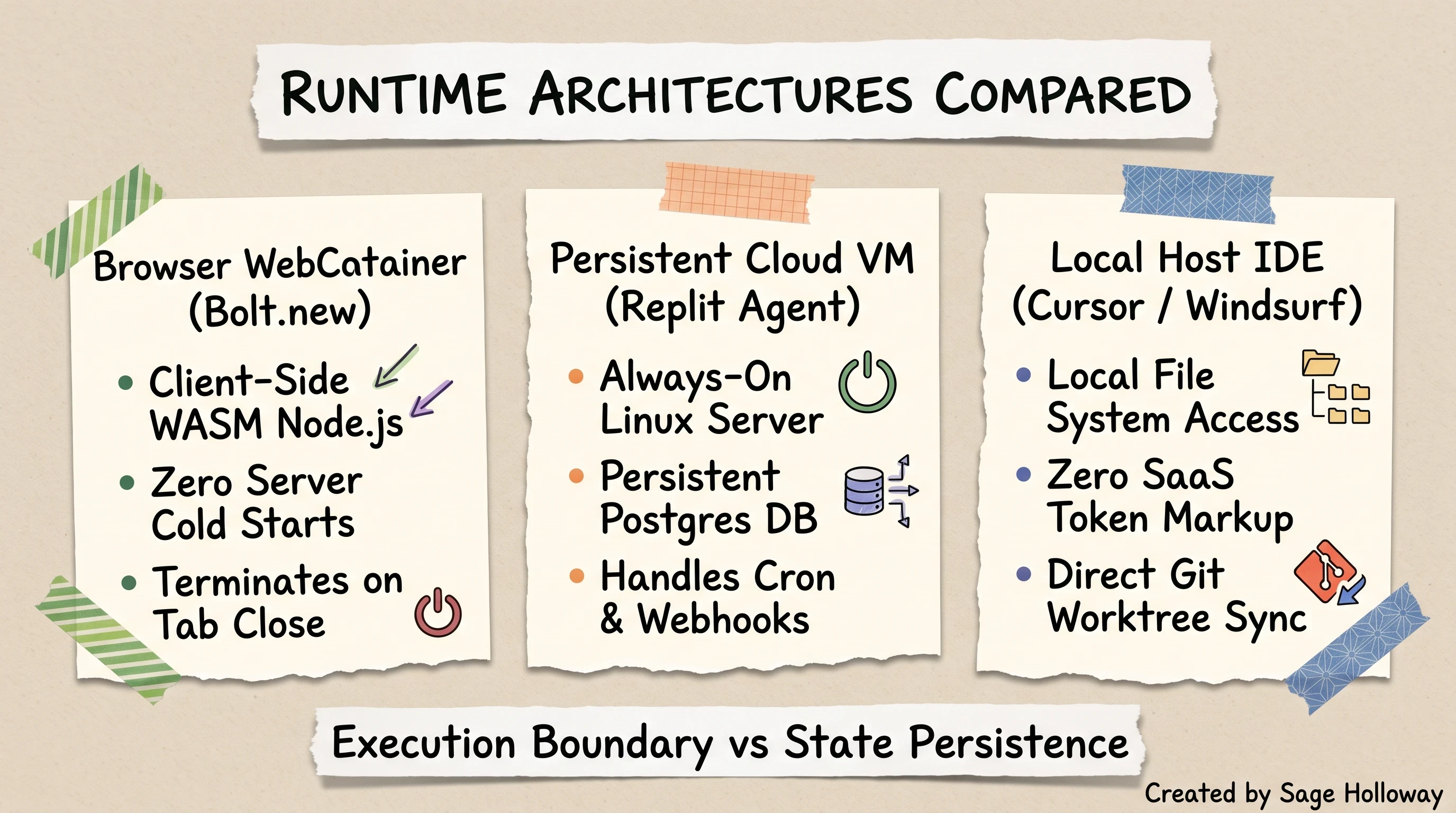
WebContainers execute client-side in the browser tab and terminate on close, whereas cloud VMs provide persistent backends and local IDEs offer total disk control.
Context Window Degradation and Compilation Walls
The second wall builders hit is cognitive: the AI model's context window, which represents the total amount of conversational history and code the model can process in a single interaction.
During the first three prompts of a new project, the codebase is small (fewer than 500 lines of code). The AI holds the entire architecture in memory, generating clean, coherent modifications.
By prompt ten, the project has grown to twenty files and three thousand lines. When you ask the model to fix a button alignment, it can no longer fit the entire codebase into its immediate attention span. It begins making assumptions about variable names, duplicating helper functions, and hallucinating outdated package imports.
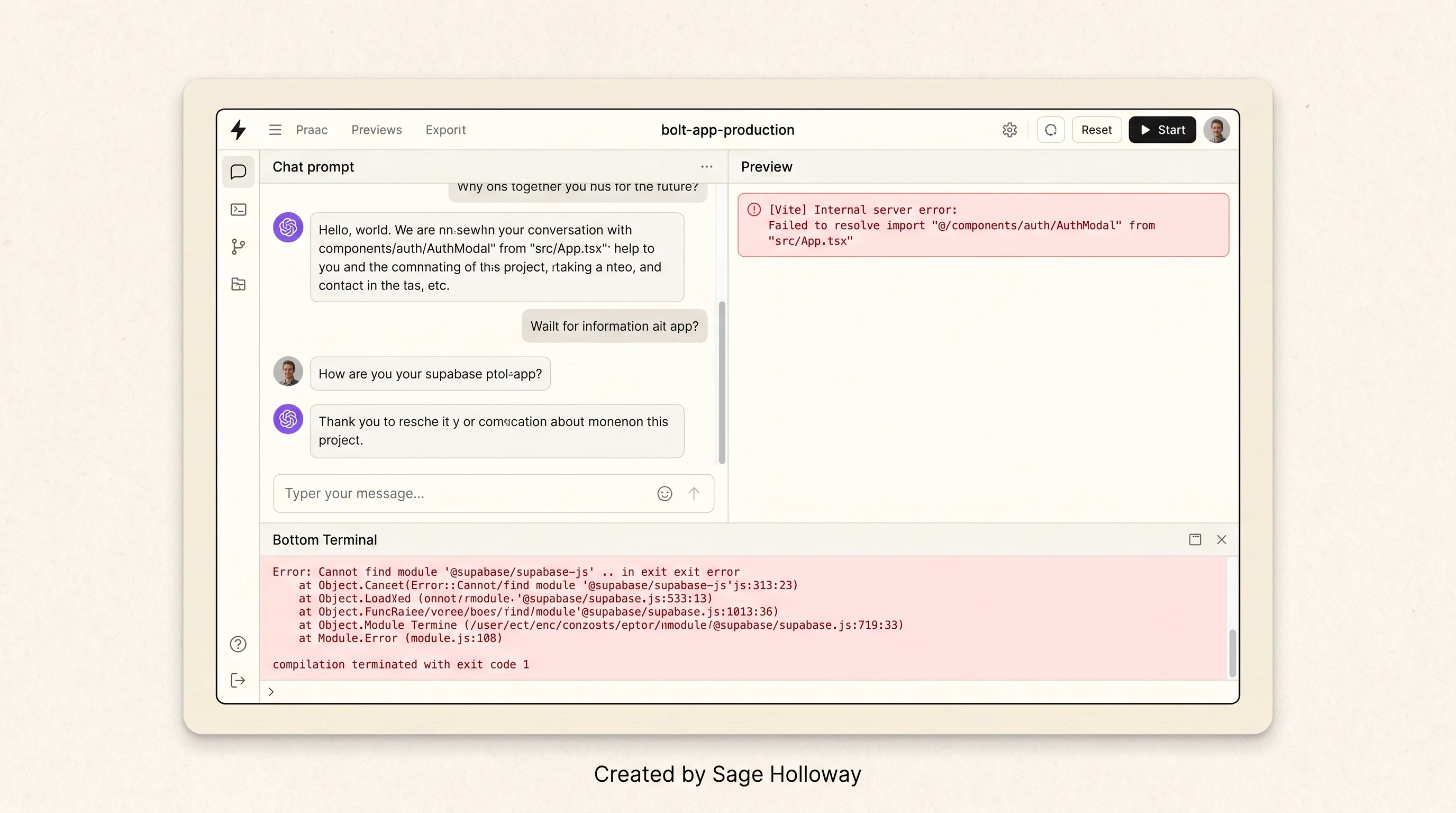
When applications scale beyond simple components, in-browser compilation errors and context window drift can block non-technical builders.
This manifests as the dreaded red compilation error in the preview window. The browser terminal throws a Vite bundling error, such as Failed to resolve import "@/components/auth/AuthModal" from "src/App.tsx".
Because non-technical builders cannot manually debug TypeScript stack traces, they paste the error back into the prompt chat. The model attempts a blind fix, rewrites the entire file, introduces two new syntax errors, and triggers an infinite debugging loop that consumes your monthly token quota in forty-five minutes.
Furthermore, empirical testing across developer forums reveals that specific frameworks suffer disproportionately in WebContainers. While React, Next.js, and Vite run reliably, Vue and Nuxt projects frequently encounter unresolved module resolution errors during client-side bundling.
The 2026 AI App Builder Landscape: Full-Stack vs. Local IDE vs. No-Code
The market for AI-assisted development tools has matured rapidly throughout 2026. What began as a chaotic collection of experimental chat interfaces has crystallized into four distinct architectural paradigms, each catering to different skill levels and project requirements.
The Four Competing Development Paradigms
Understanding this taxonomy prevents you from choosing the wrong tool for your specific engineering goals:
Browser-Based AI Code Generators (Prompt-to-App): Platforms like Bolt.new, Lovable.dev, and v0.dev operate entirely in the cloud. You provide natural-language prompts, and the platform generates front-end components, handles basic database wiring, and renders an instant live preview. Bolt also incorporates Pica NLP connectors to facilitate natural language connectivity to over 170 SaaS APIs. They prioritize speed and rapid validation above all else.
Local AI-Powered IDEs (Developer-First): Desktop environments like Cursor, Windsurf, and Claude Code fork or integrate directly with VS Code. They operate on your local physical file system, granting access to local compilers, custom Docker containers, and complete Git version control. They prioritize architectural control, privacy, and token efficiency.
Persistent Cloud Virtual Machines (Full-Stack Cloud): Environments like Replit Agent and Base44 provision real, always-on Linux cloud containers. They execute long-running backend processes, host persistent PostgreSQL databases, and manage automated deployments without requiring local software installation.
Visual No-Code Platforms (Enterprise & Internal Ops): Mature platforms like Bubble, Softr, and Glide provide visual drag-and-drop interfaces on top of managed cloud infrastructure. Rather than generating raw code that must be compiled and maintained, they use pre-tested visual logic modules and integrated databases, completely eliminating syntax errors.
To see how the leading AI coding environments compare across developer workflows and feature sets, watch Riley Brown's comparative breakdown:
https://www.youtube.com/watch?v=HSnJrXWETfM
Riley Brown comparing Cursor, Windsurf, Lovable, v0, Bolt, and Replit across developer workflows.
Freshness Check: The 2026 Sunset of GitHub Spark
When evaluating websites like bolt.new, beware of outdated directories and comparison articles written in early 2026. A prominent example is GitHub Spark, an experimental micro-app sandbox frequently cited in older listicles.
GitHub officially stopped accepting new signups for Spark on August 4, 2026, and shut down the platform entirely on August 31, 2026. Any guide listing GitHub Spark as an active solution is outdated.
The following landscape matrix summarizes the current state of the market, including runtime mechanisms, primary tools, state persistence models, and active platform status.
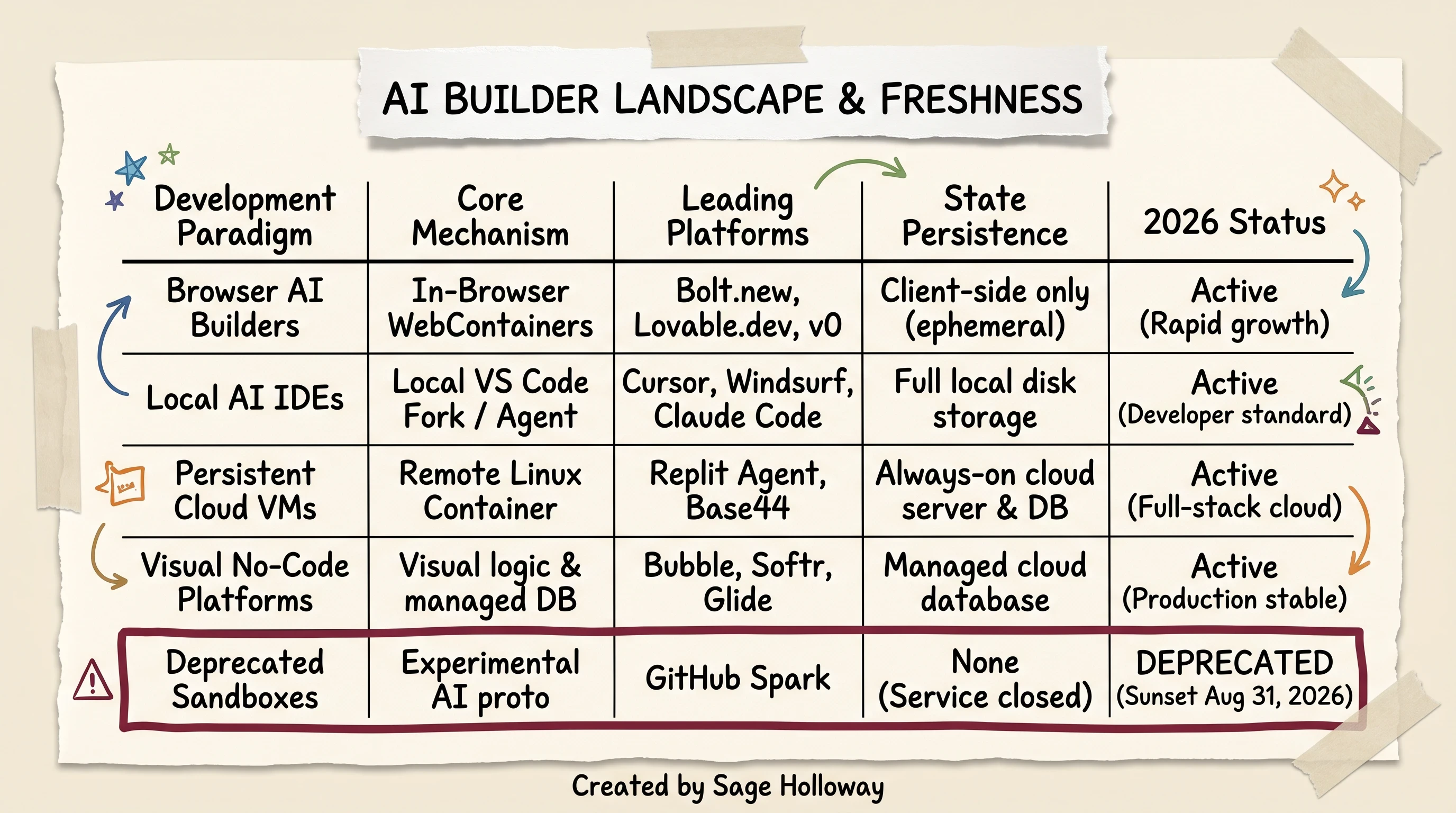
The 2026 AI builder landscape spans four distinct paradigms, while outdated tools like GitHub Spark have officially shut down.
In the broader ai code generation platform market share cursor replit bolt.new v0 landscape, developer loyalty has bifurcated: non-technical solo founders gravitate toward Lovable and Base44 for visual polish, while experienced software engineers have overwhelmingly adopted Cursor, Windsurf, and local terminal agents for daily production work.
The Builder Persona Decision Matrix: Which Tool Fits Your Stack?
No single AI coding tool excels across every dimension of software engineering. When exploring bolt alternatives across different project archetypes, the platform that allows a non-technical marketer to ship an internal dashboard in thirty minutes will frustrate a senior backend engineer attempting to configure multi-tenant database migrations.
The 6-Point Technical Evaluation Criteria
To evaluate these tools objectively, we tested each platform across six developer benchmarks:
Scaffolding Speed: How quickly does the platform generate a working, interactive boilerplate from a single natural-language prompt?
UI & Design Polish: Does the generated interface look like a professional, bespoke design system, or does it output generic, unstyled Tailwind components with awkward spacing?
Backend Depth & Server Persistence: Can the platform host long-running background workers, automated cron schedules, and persistent relational databases, or is it restricted to client-side mockups?
Iteration Efficiency (Token Preservation): When fixing a bug, does the tool apply precise, line-by-line diffs, or does it rewrite entire 800-line files, draining your budget and introducing regressions?
Git Portability & Code Ownership: Can you continuously sync your work with a private GitHub repository via two-way branching, or are you trapped downloading static ZIP files?
Non-Coder Accessibility: Can someone with zero command-line or TypeScript experience build and launch a functioning application without hitting an unrecoverable debugging wall?
To see a direct prompt shootout testing Lovable against Bolt on an identical project (an AI Agent ROI calculator) alongside Windsurf local agent capabilities, watch Conor Martin's hands-on breakdown:
https://www.youtube.com/watch?v=7iTtwPLCzDk
Conor Martin testing identical prompts on Lovable.dev and Bolt.new to compare Supabase setup against Netlify deployment.
The comparative matrix below illustrates how the leading platforms perform across these six criteria:
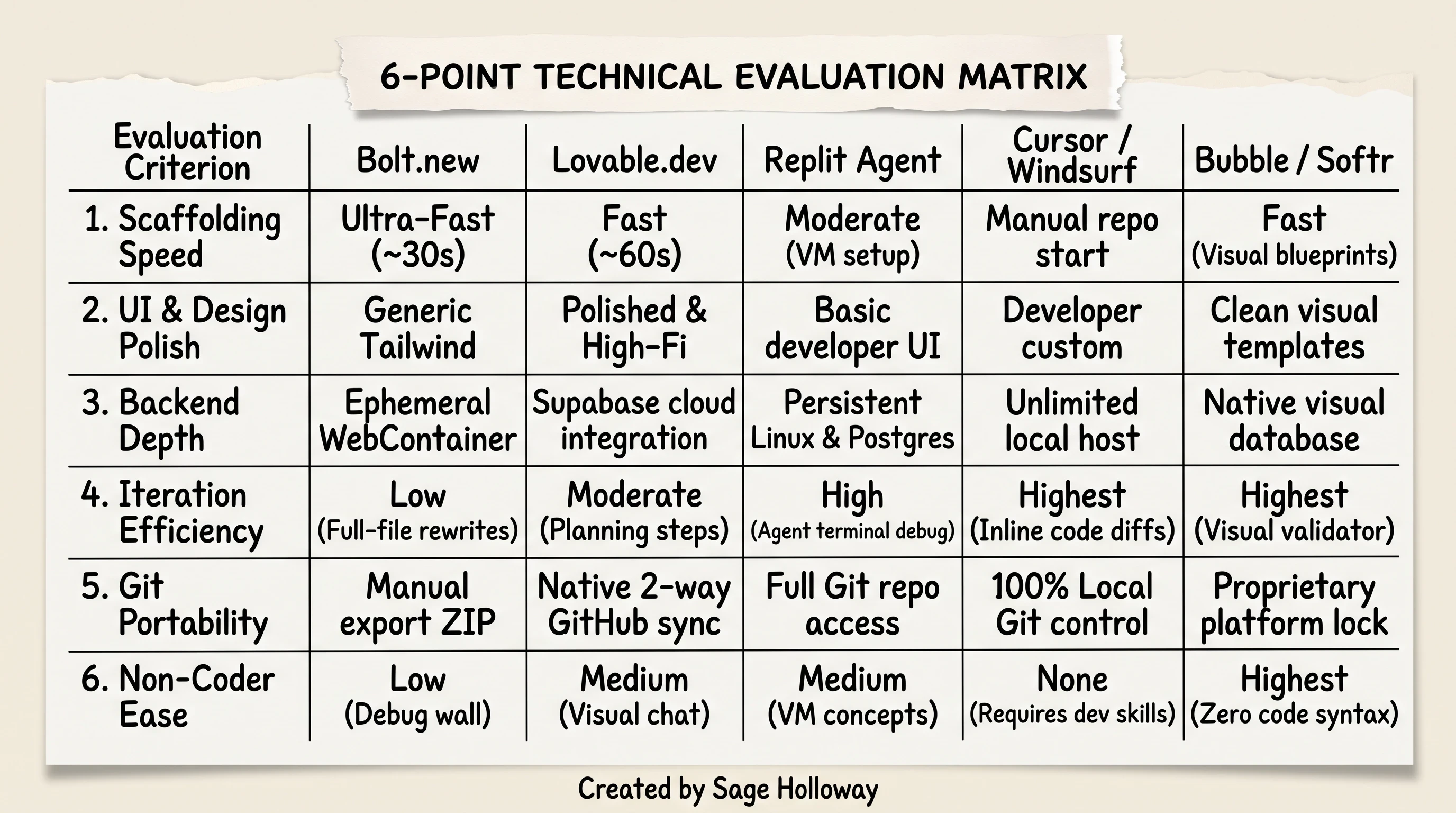
Comparing top alternatives across scaffolding speed, UI polish, backend depth, token iteration efficiency, Git portability, and non-coder accessibility.
Matching Your Project to the Right Environment
To determine which environment matches your immediate project, follow this four-branch decision flowchart:
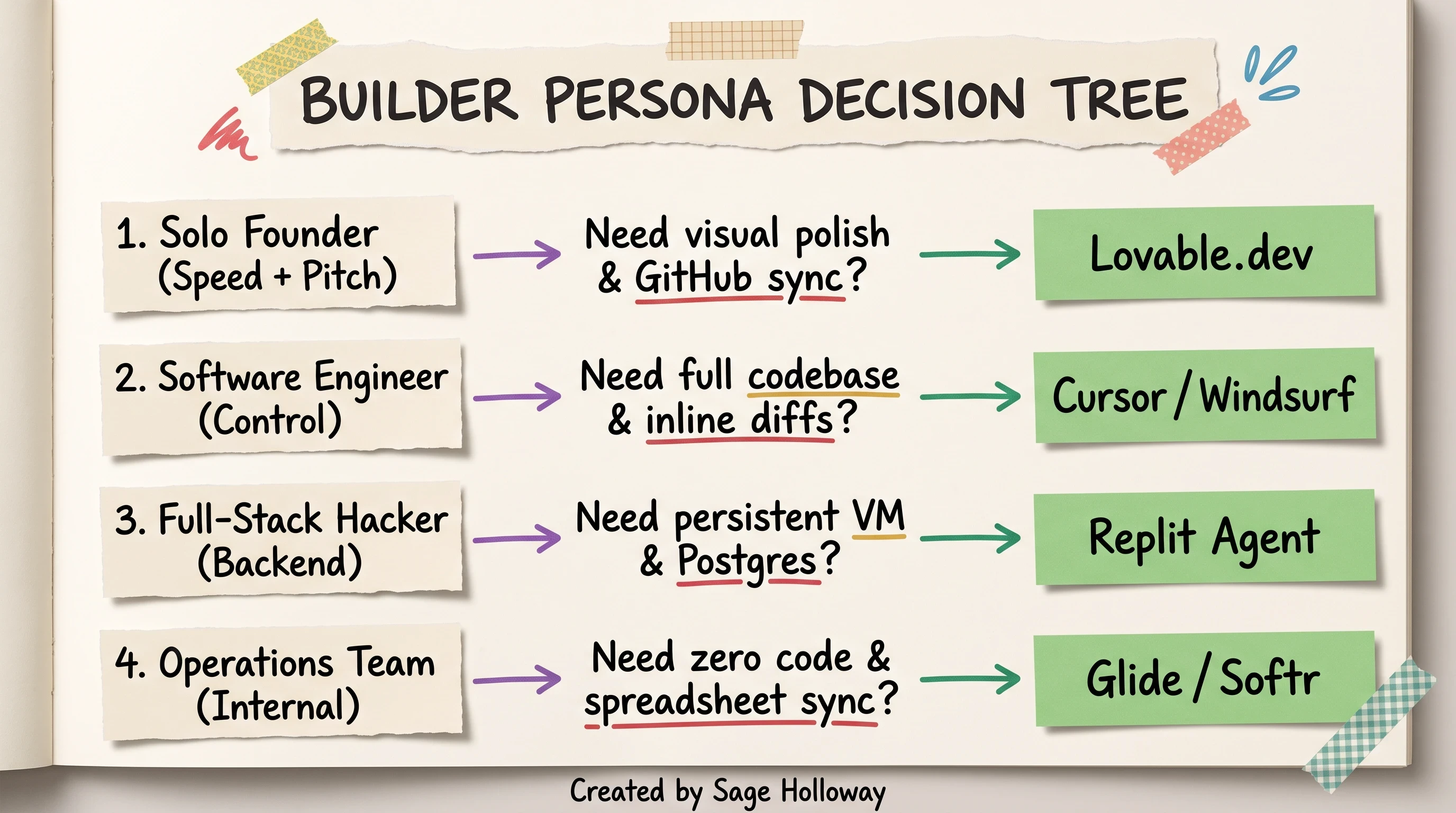
Selecting your stack: match your technical skills, database persistence needs, and deployment targets to the ideal builder environment.
The Solo Founder / Product Marketer: If you need to build a high-fidelity visual prototype, pitch deck demo, or customer-facing MVP with authentication and Stripe payments in under two hours, choose Lovable.dev. Its aesthetic components and native Supabase integration require minimal debugging.
The Professional Software Engineer: If you are building a commercial SaaS product with complex business logic, third-party API integrations, and strict security requirements, choose Cursor or Windsurf. You retain 100% codebase ownership, eliminate token markup, and debug using local developer tools.
The Full-Stack Cloud Hacker: If you want an autonomous AI agent to provision a remote Linux server, write backend Python or Node.js logic, configure a live PostgreSQL database, and keep the application running 24/7 in the cloud, choose Replit Agent.
The Operations Team / Internal Tool Builder: If your application is an internal CRM, inventory tracker, or client portal powered by Airtable or Google Sheets data, avoid code generators entirely and choose Softr, Glide, or Bubble.
The 7 Best Bolt.new Alternatives in 2026 (In-Depth Technical Breakdown)
When evaluating websites like bolt.new, you must look past landing page marketing claims and examine real-world developer friction. Below is an exhaustive breakdown of the seven leading alternatives in 2026, detailing their core mechanisms, strengths, trade-offs, and pricing structures.
To see how rapidly a browser-based environment can bootstrap a functional Next.js application, review Moritz Kremb's two-prompt deployment walkthrough:
https://x.com/moritzkremb/status/1848305941646561678
Moritz Kremb demonstrating two-prompt scaffolding and Netlify deployment of a Next.js app in Bolt.new.
1. Lovable.dev: Best for Design-First Prototyping and Native GitHub Sync
Lovable.dev has emerged as Bolt's fiercest browser-based competitor. While Bolt focuses on raw full-stack flexibility via WebContainers, Lovable prioritizes aesthetic design quality, visual component scaffolding, and clean Git integration.
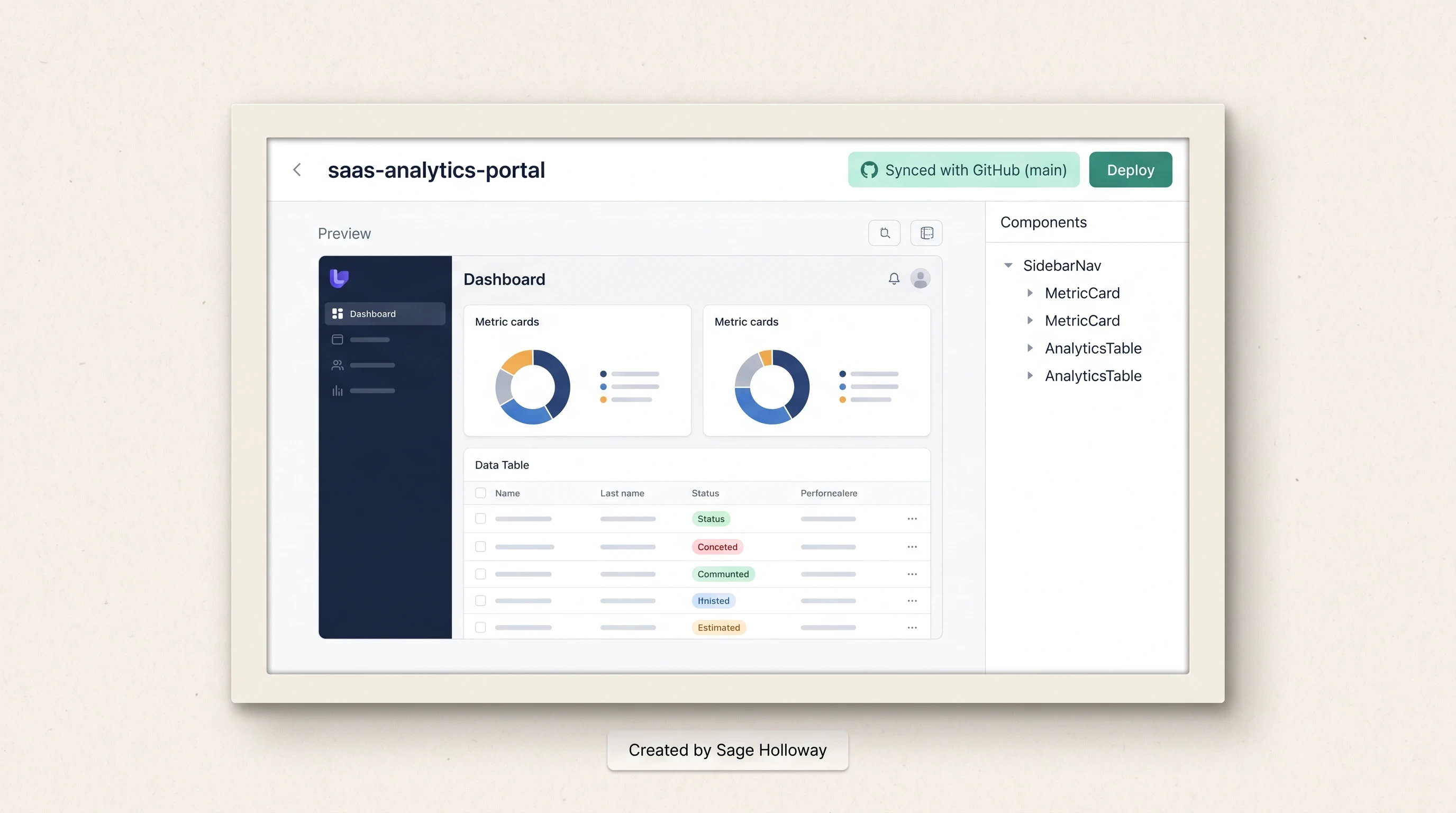
Lovable emphasizes design-first prototyping with pre-styled UI components, mock charts, and continuous two-way GitHub repository sync.
Key Architectural Strengths
Aesthetic UI Generation: Lovable avoids the generic, unstyled look common in early code generation drafts. When prompted for an analytics dashboard, it automatically generates styled charts (Recharts), balanced color palettes, realistic mock datasets, and micro-interactions.
Continuous Two-Way GitHub Sync: Unlike platforms that force you to export static ZIP files, Lovable establishes a direct, continuous two-way sync with your GitHub repository. Edits made in Lovable push clean commits to your branch, and code edited locally in VS Code automatically reflects in Lovable's visual canvas.
Lovable Cloud (Supabase Backend): Contrary to claims in outdated competitor blogs, Lovable provides native backend database integration through Lovable Cloud, which orchestrates a managed Supabase instance for relational PostgreSQL storage, row-level security (RLS), and user authentication out of the box.
Limitations & Costs
Lovable's Free tier is restrictive, providing only 5 message credits per day capped at 30 per month. The Starter plan costs $20 per month and provides a monthly pool of message credits.
For an exhaustive head-to-head evaluation of how these two browser builders handle identical prompt suites, read our dedicated comparison: Lovable vs Bolt.new (2026 Comparison).
2. Cursor and Windsurf: Best for Local Code Ownership and Token Efficiency
If you have basic familiarity with software development, Cursor (a specialized fork of VS Code) and Windsurf (by Codeium) represent the gold standard for AI-assisted engineering.
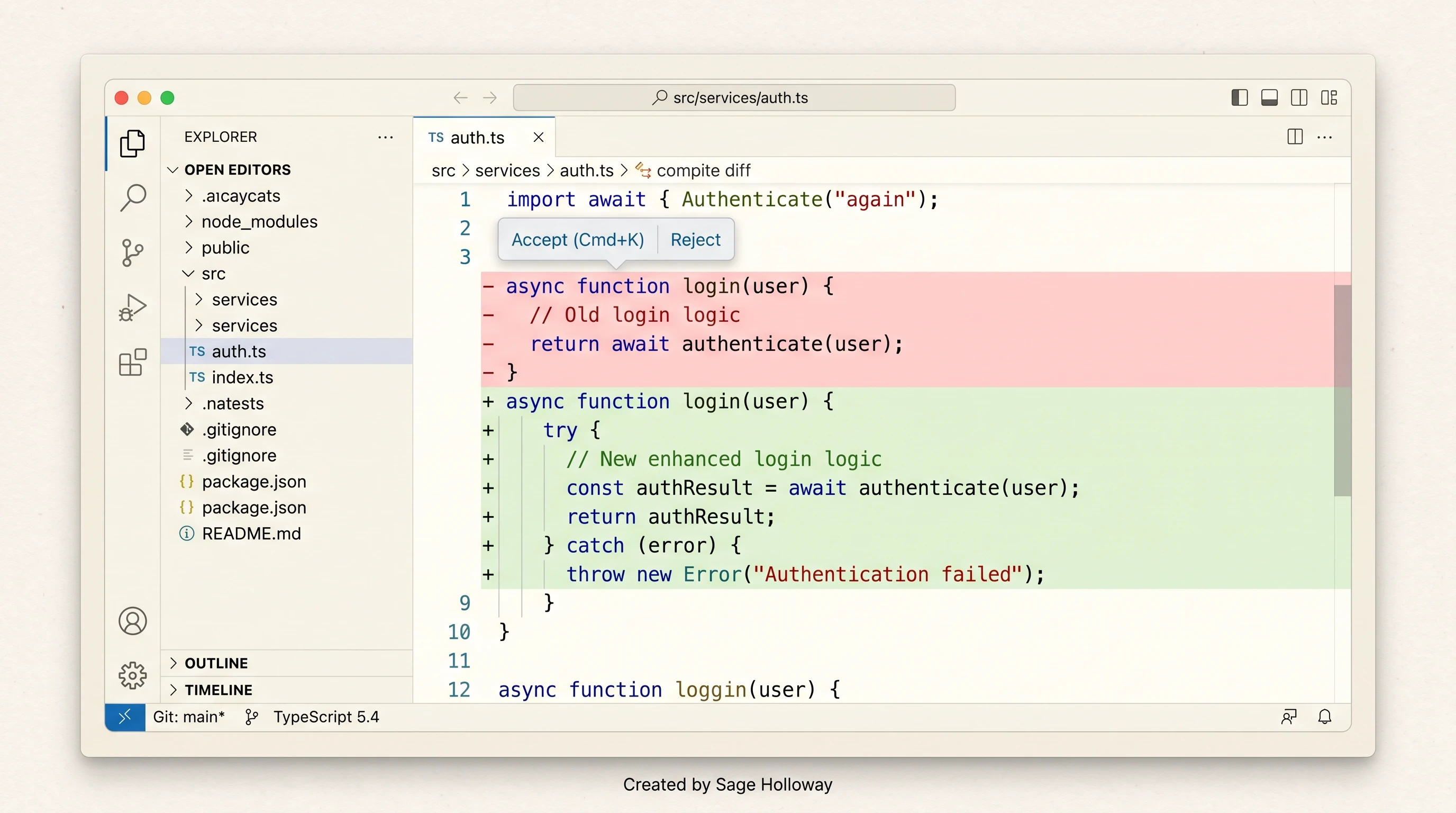
Cursor applies targeted inline code diffs directly within your local file tree, preventing accidental full-file rewrites and context drift.
Key Architectural Strengths
Targeted Inline Diffs: The defining flaw of browser chat builders is that they rewrite whole files to fix single-line bugs. Cursor uses inline diff engines: when modifying a function, it alters only the relevant 8 lines in place, showing you green additions and red deletions. This preserves architectural context and cuts token usage by over 90%.
Local Toolchain Execution: Your code runs on your native operating system. You have unrestricted access to local terminals, Docker containers, custom Python virtual environments, and system debuggers.
Bring Your Own API Keys (Zero Markup): In addition to its standard $20/month Pro tier (which includes 500 fast requests on premium models), Cursor allows you to plug in your personal Anthropic or OpenAI API keys, paying raw model wholesale prices directly.
Limitations & Workarounds
Cursor requires you to understand how to initialize a repository, install dependencies via npm or pip, and resolve merge conflicts.
Additionally, developers pairing in real time should note a known compatibility bug: Microsoft's Live Share extension can experience connection drops in recent Cursor builds. The established developer workaround is downgrading the Live Share extension to version v1.0.5905 or v1.0.5936 and setting "extensions.autoUpdate": false in your settings.json.
For a deep dive into migrating from browser sandboxes to desktop IDEs, read our full breakdown: Cursor vs Bolt.new: Which is Better for Complex Apps?.
3. Replit Agent: Best for Autonomous Cloud VM Backend Development
When a project requires real, always-on backend infrastructure rather than browser-bound WebContainers, Replit Agent is the premier hosted solution.
In hands-on bolt.new vs replit agent comparison reviews, the core differentiator is infrastructure persistence. While Bolt executes Node.js in the user's browser tab, Replit provisions an independent Linux virtual machine in the cloud.
Key Architectural Strengths
Autonomous Multi-Step Setup: Replit Agent operates as an autonomous worker. When given a prompt like "Build an automated inventory tracker that scrapes supplier prices every morning and stores them in PostgreSQL," the agent plans the project, installs system packages via Linux package managers, writes backend scripts, configures database tables, and executes the code.
Persistent Backend Services: Because the code runs inside a dedicated cloud container, background workers, cron jobs, and webhooks continue running uninterrupted when you close your browser.
Integrated Database & Secrets Management: Replit includes built-in PostgreSQL provisioning and secure environment variable management that feeds directly into the AI agent's context.
Limitations & Costs
Replit's Core subscription costs $25 per month, with autonomous agent runs drawing from an additional pool of compute units.
Builders must also be aware of licensing terms: publishing applications on Replit's lower or free tiers enforces an open-source MIT license, eliminating privacy for proprietary commercial software. Upgrading to paid tiers is required for private repositories and custom domains.
4. v0.dev: Best for Frontend UI Components and Design System Scaffolding
Created by Vercel, v0.dev focuses on generating pristine, production-ready frontend components built on React, Next.js, Tailwind CSS, and shadcn/ui.
Key Architectural Strengths
Clean Component Scaffolding: Rather than trying to be an all-in-one full-stack engine, v0 specializes in building modular, perfectly structured React components. The code it produces is exceptionally clean, adheres strictly to modern TypeScript best practices, and integrates seamlessly into existing Next.js codebases.
2026 Desktop-Style Upgrade: In February 2026, Vercel rolled out a major update to v0, introducing full VS Code-style multi-file editing, direct Git repository branching, and a three-tier model selector (Mini, Pro, and Max) allowing builders to balance generation speed against complex architectural reasoning.
Vercel Ecosystem Synergy: Deploying a v0 project to a live staging or production URL takes one click through Vercel's global edge network.
Limitations & Costs
v0 provides 200 free generation credits per month, with paid plans starting at $20 per month for higher credit pools. While it can connect to backend APIs, building complex relational database logic requires more manual configuration than Lovable or Replit.
5. Base44: Best for Fast MVP Web Applications (Wix Ecosystem)
Base44 is an AI-powered web application builder designed to help non-technical entrepreneurs turn natural-language prompts into functional web apps with built-in user authentication, forms, and database collections.
Key Architectural Strengths
Rapid Greenfield Generation: Similar to Bolt, Base44 scaffolds complete multi-page applications in seconds, including navigation headers, user onboarding flows, and database CRUD (Create, Read, Update, Delete) interfaces.
Wix Cloud Infrastructure: Following its acquisition by Wix in April 2025, Base44 leverages Wix's reliable managed cloud hosting, automated SSL certificates, and enterprise-grade security compliance.
Limitations & Costs
Base44 locks custom domain connectivity behind its Builder plan, which costs $40 per month. While convenient for rapid business validation, developer flexibility is constrained compared to open Git workflows.
6. Bubble: Best for Scalable No-Code Database and Visual Logic
Bubble takes a fundamentally different approach to software creation. Instead of prompting an LLM to generate raw JavaScript code that must be compiled and debugged, Bubble provides a visual development environment with a robust, integrated database and visual logic builder.
Key Architectural Strengths
Zero Runtime Compilation Errors: Because Bubble executes visual logic rather than compiling raw text, you never encounter missing npm modules, broken Vite bundlers, or syntax crashes.
Complex Relational Data & Privacy Rules: Bubble features an enterprise-grade database engine supporting complex relational schemas, multi-tenant privacy rules, and visual database triggers.
Integrated AI Page Generation: Bubble's native AI generator creates fully responsive page layouts and database workflows directly within the visual editor, allowing you to tweak elements visually rather than battling prompt loops.
Limitations & Costs
Bubble has a steep learning curve compared to prompt-and-play browser tools. Its Starter plan begins at $32 per month (billed monthly), and applications are hosted within Bubble's proprietary cloud ecosystem rather than exported as standalone JavaScript files.
7. Softr and Glide: Best for Spreadsheet-Driven Internal Business Portals
For internal operations teams, customer support portals, and field inventory apps, generating a custom React codebase is often unnecessary overhead. Softr and Glide turn existing business data (stored in Airtable, Google Sheets, or PostgreSQL) into secure, responsive web and mobile applications in minutes.
Key Architectural Strengths
Direct Spreadsheet & SQL Integration: Connect your existing Airtable base or Google Sheet, and the platform automatically generates styled lists, Kanban boards, charts, and user edit forms.
Granular Role-Based Permissions: Manage exactly which employee or client can view or edit specific data rows without writing authentication logic or database queries.
Progressive Web Apps (Glide): Glide automatically compiles your application as a Progressive Web App (PWA) that installs on iOS and Android devices with native mobile layouts.
Limitations & Costs
Glide's free tier supports 1 app, up to 10 personal users, and a limit of 25,000 data rows, with paid Maker plans starting at $60 per month. Softr offers a generous free tier with paid plans starting at $49 per month.
The pricing and quota breakdown across all seven platforms is summarized below:
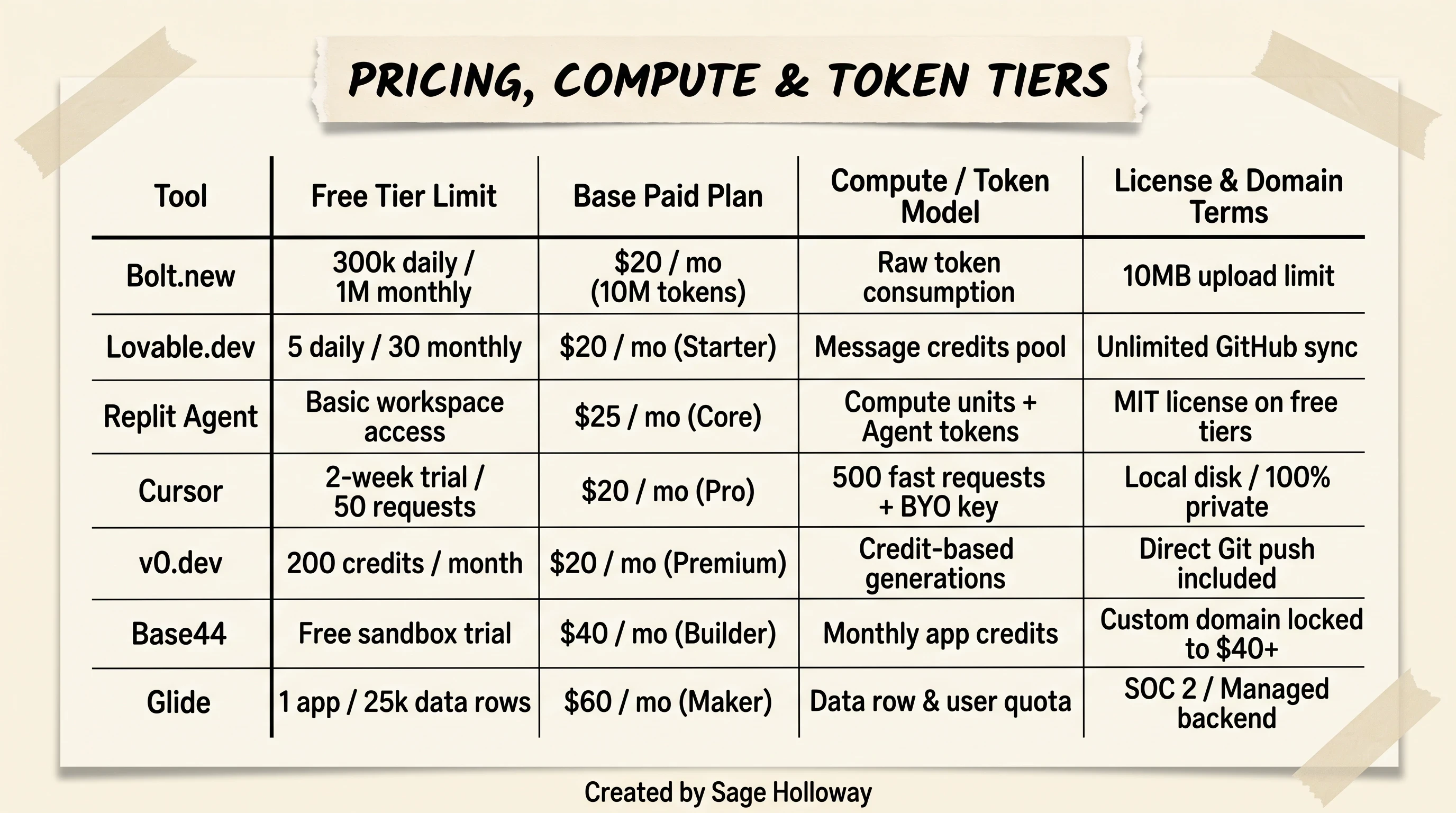
Evaluating real monthly costs: free tier limits, subscription pricing, token allocations, and hosting restrictions across leading AI builders. For strategies on unlocking annual discounts and token grants, see our Bolt.new promo code guide.
The Token-Burning Debug Loop: Why Vibe Coding Gets Expensive (and How to Fix It)
Here is the complication nobody mentions when demonstrating AI code generators: debugging is where SaaS budgets go to die.
When you create a brand-new project, the AI writes a clean 200-line React component. It uses roughly 3,000 tokens, costing less than a penny. But as your application grows, the financial dynamics invert violently.
The real cost of AI development was never the subscription price on the pricing page. It is the silent compounding tax of debugging in a closed loop with an agent that has forgotten its own architecture.
While Bolt v2 introduced autonomous debugging in late 2025 to mitigate error loops, full-file rewrites remain the underlying driver of token exhaustion across browser builders.
The Root Cause: Full-File Rewrites vs. Incremental Diffs
Consider what happens when you hit a minor styling bug in an 800-line file inside Bolt.new:
You submit a prompt: "Change the submit button color to emerald green."
The AI reads the entire 800-line file into its context window.
Instead of editing the single CSS class on line 742, Bolt's default execution mode rewrites all 800 lines from scratch.
In rewriting the entire file, the model hallucinates a missing closing bracket on line 112.
The preview crashes with a red compiler error.
You paste the error into chat. The AI apologizes, attempts to fix the bracket, and rewrites all 800 lines again, this time dropping your Supabase database import on line 14.
This failure pattern is documented in developer issue trackers (including GitHub issue #4808), where users have reported burning over 20 million tokens (equivalent to an entire $50 Pro subscription) attempting to resolve a single authentication bug.
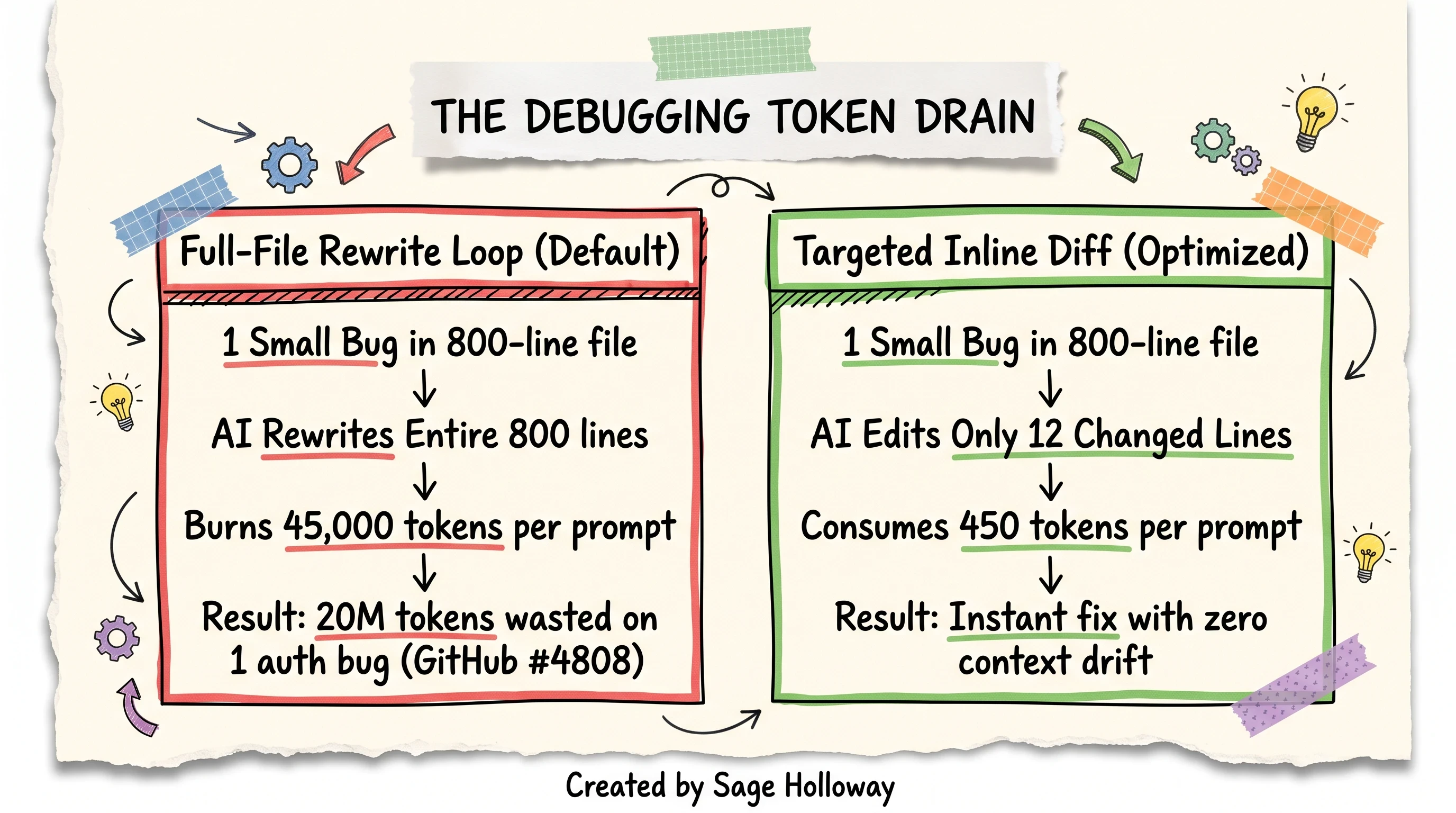
Full-file rewrites consume 50,000+ tokens per bug fix in repetitive loops, whereas targeted inline diffs use fewer than 1,000 tokens.
Three Rules to Halt Token Burn and Reduce Monthly Invoices
To prevent your monthly token quota from evaporating, apply these three architectural rules:
Rule 1: Enable Experimental Diffs in Settings
Inside Bolt's workspace settings modal, manually toggle Enable Experimental Diffs to [ON]. This forces the engine to compute structural code diffs rather than streaming full-file replacements, slashing token consumption by up to 80% during bug fixes.
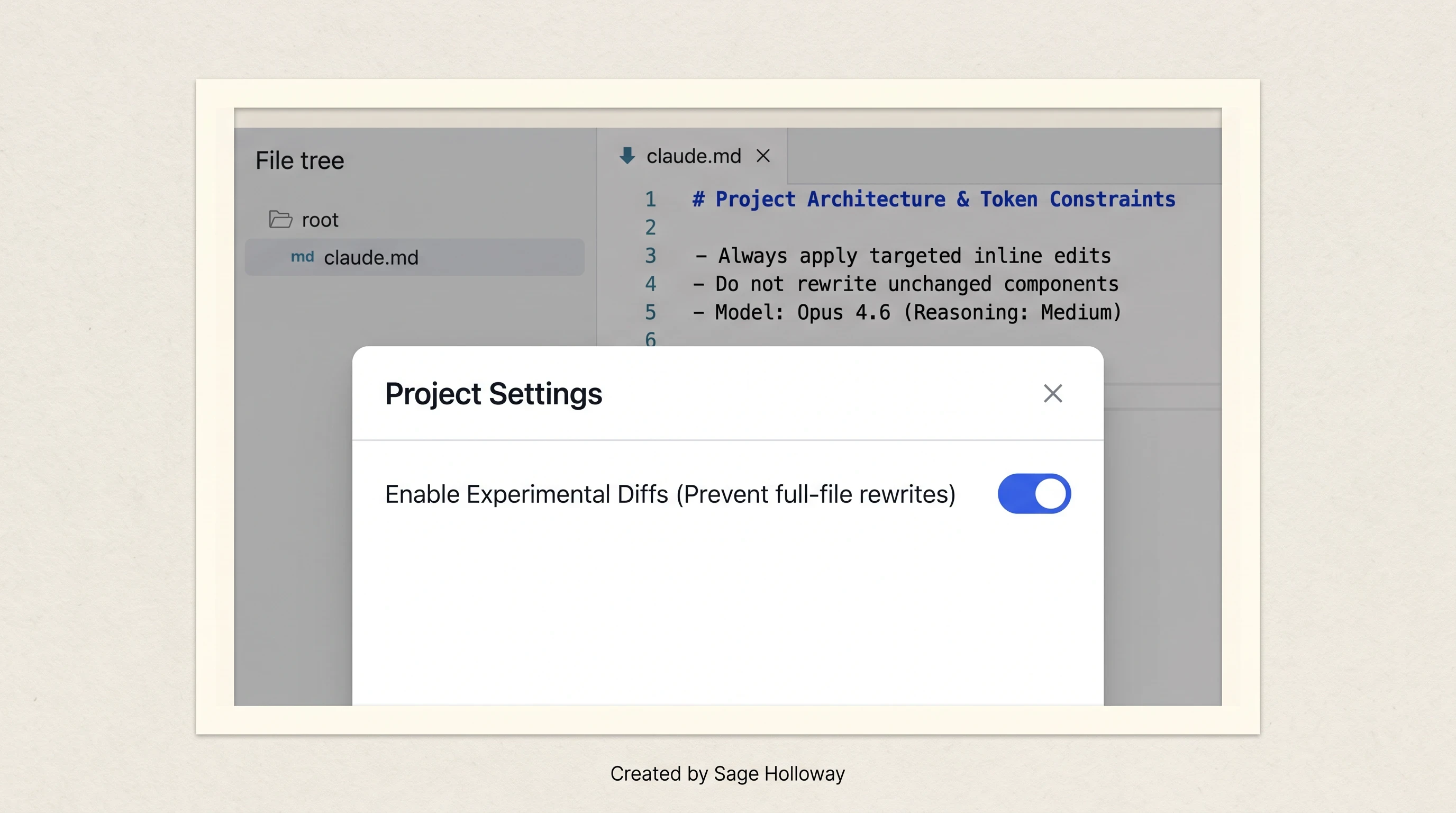
Enabling experimental diffs in Bolt settings and maintaining a claude.md architecture file prevents costly full-file rewrite cycles.
Rule 2: Anchor Architecture in a claude.md File
In 2026, Bolt introduced support for advanced models like Opus 4.6 with adjustable reasoning depth alongside workspace context files. By adding a clean claude.md file to the root of your project directory, you lock your core architecture in place:
Rule 3: Enforce Component Modularity (The 300-Line Limit)
Never allow any single component file to exceed 300 lines of code. When a file approaches this threshold, instruct the agent to extract sub-components (such as headers, metric cards, or modal forms) into separate files inside a src/components/ subdirectory. If a bug occurs in a modal, the AI only processes a 60-line component, keeping token costs negligible.
Free and Open-Source Alternatives: Running bolt.diy and Dyad Locally
If you want the speed of prompt-driven web development but refuse to pay SaaS subscriptions or deal with artificial token caps, the open-source community has built powerful, self-hosted bolt alternatives.
Self-Hosting bolt.diy with Personal API Keys
The most direct free alternative to Bolt.new is bolt.diy, an open-source project hosted by StackBlitz Labs (for a complete step-by-step installation walkthrough, see our dedicated bolt.diy guide).
While the standard repository (github.com/stackblitz/bolt.new) contains the core web application, bolt.diy is engineered specifically for deep local customization and multi-LLM orchestration.
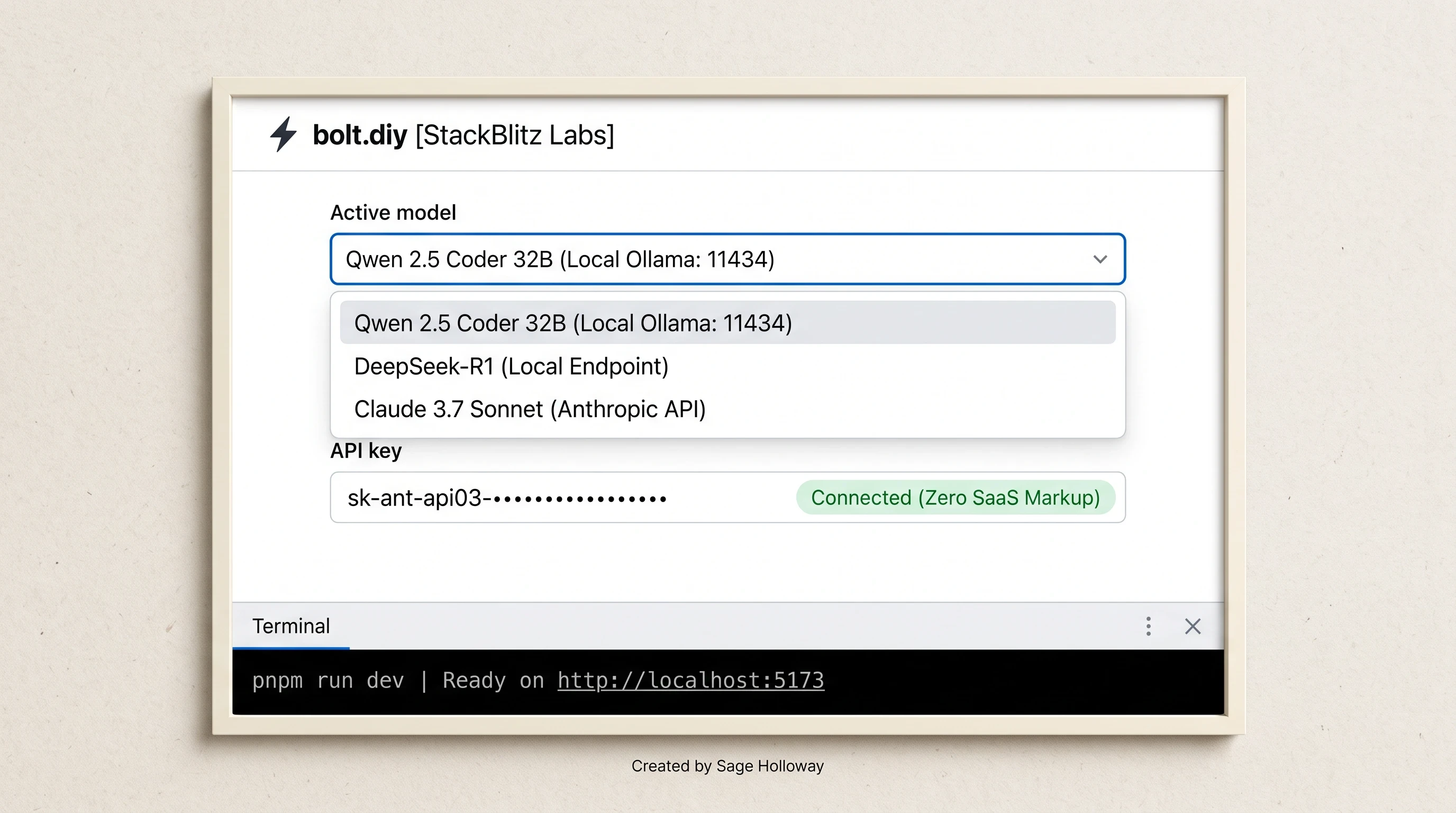
Running bolt.diy locally lets developers select open-weight models like Qwen2.5-Coder or DeepSeek-R1 and bring their own API keys without SaaS markup.
Key Advantages of bolt.diy
Multi-Model Selector: You can switch between Anthropic's Claude 3.7 Sonnet, OpenAI's GPT-4o, Google's Gemini 2.5 Flash, or open-weight models like DeepSeek-R1.
Local Ollama Integration: Connect
bolt.diyto a locally running instance of Ollama on your machine. You can run specialized open-source coding models likeQwen2.5-Coder-32Bcompletely offline with zero API costs and total data privacy.Uncapped Execution: There are no daily 300k token limits or monthly generation caps. You pay only the wholesale API costs from your chosen model provider.
Local Installation Commands
To run bolt.diy on your local computer, open your physical terminal and execute the following commands:
Once running, open http://localhost:5173 in your browser. Enter your personal Anthropic or OpenAI API key in the settings panel to begin building applications with zero platform markup.
Local Desktop Independence with Dyad
For builders seeking a desktop-native application that eliminates browser tab memory limitations entirely, Dyad (github.com/dyad-sh/dyad) is a premier open-source choice.
Dyad packages the entire AI generation pipeline into a standalone desktop application. It writes code directly to your local file system, runs local development servers natively, and integrates with local Git repositories without transmitting telemetry to third-party cloud servers.
To install Dyad via terminal on macOS or Linux:
Production Handoff: Escaping 'Export Purgatory' to Real Git Workflows
The most dangerous trap in vibe coding is export purgatory: the state where you have built an impressive prototype inside a browser sandbox, but you cannot safely add new features, integrate Stripe webhooks, or collaborate with another engineer without breaking the application.
Community tutorials frequently document how developers hit an integration wall when attempting to transition browser prototypes into local desktop workflows. To see how experienced developers navigate switching between browser sandboxes and local IDEs, review Vinod Sharma's walkthrough:
https://www.youtube.com/watch?v=7pbIgOH0bmk
Vinod Sharma detailing practical developer workflows to seamlessly switch between Cursor and Bolt.
The Limitations of Static Code Exports
Clicking Export > Download ZIP inside a browser builder gives you a static snapshot of your files. But treating a ZIP download as your production workflow introduces severe friction:
You lose commit history and branch context.
Merging upstream bug fixes requires manual copy-pasting.
Running automated test suites (Jest, Playwright) or linting pipelines inside a browser tab is impossible.
Implementing Two-Way Sync and Git Worktree Branching
To graduate a prototype into a production-grade application, follow this three-stage handoff pipeline:
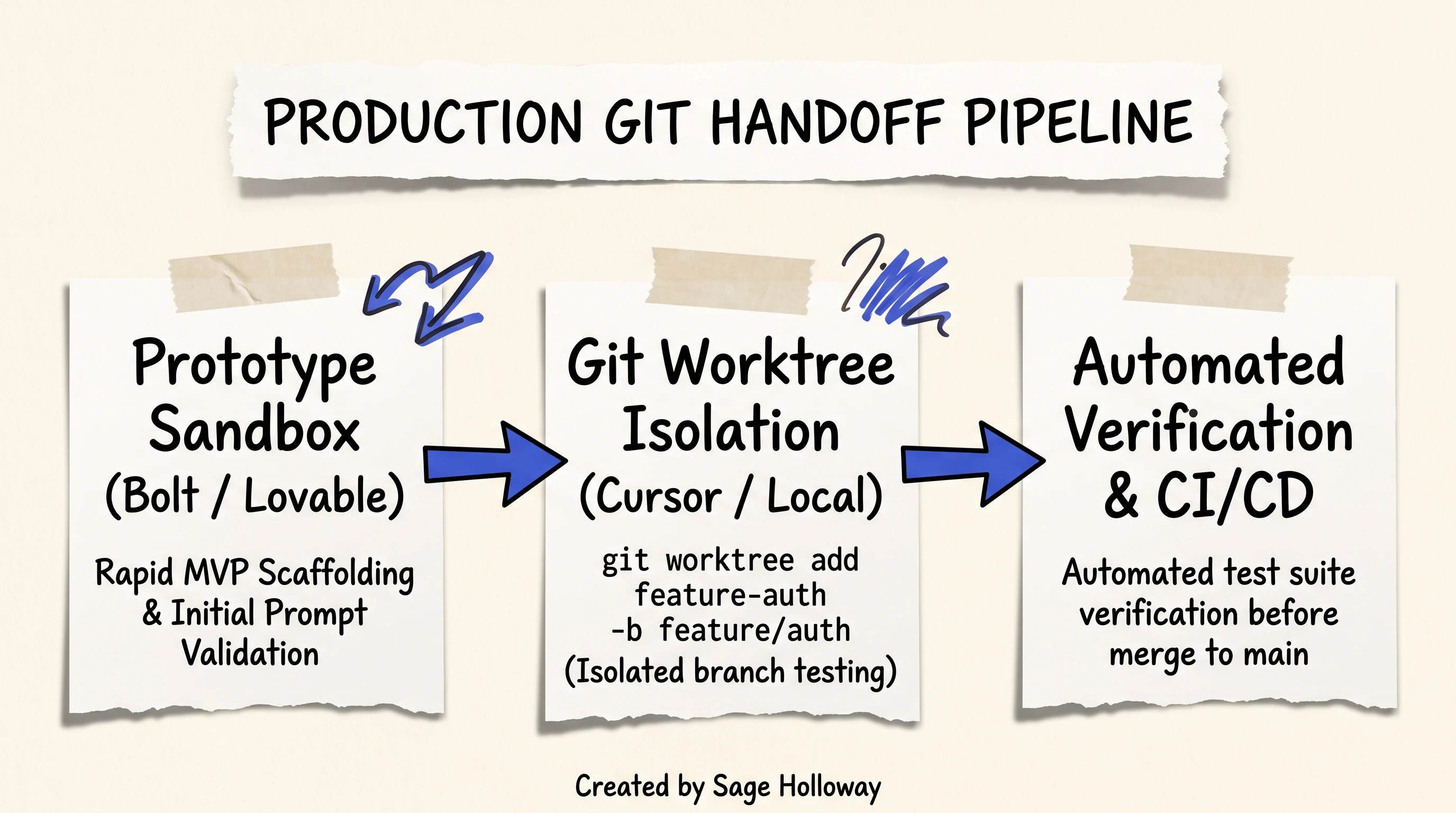
Escaping export purgatory: transition prototype code into isolated Git worktree branches for automated testing before merging to production.
Step 1: Connect Continuous Git Sync
Push your initial prototype directly to a private GitHub repository using the platform's native GitHub connector (available in Bolt and Lovable).
Step 2: Clone Locally and Configure Git Worktrees
When using AI agents like Cursor or Claude Code to build complex features locally, do not let the AI edit your active working branch directly. Use Git worktrees to isolate the AI's generation tasks in separate directories:
By isolating AI coding tasks in independent worktrees, an unexpected compiler crash or bad rewrite never corrupts your main production branch.
Frequently Asked Questions About Bolt.new Alternatives
What is the best Bolt.new alternative for solo founders?
For solo founders and product marketers who need to launch a visually polished MVP with minimal technical friction, Lovable.dev is the best alternative. Lovable automatically generates high-fidelity UI components, realistic mock analytics charts, and styled design systems from initial prompts. Furthermore, its native Supabase backend integration (Lovable Cloud) handles relational databases, user authentication, and session security without requiring manual terminal configuration or complex SQL setup.
Is Bolt.new suitable for hosting and scaling production-grade applications?
No. Bolt.new is engineered primarily for rapid prototyping and front-end experimentation. Its underlying WebContainer architecture executes client-side Node.js inside the user's active browser tab, meaning long-running background processes, server cron jobs, and persistent database connections terminate when the browser tab is closed. For production-grade applications requiring persistent compute, high traffic scalability, and dedicated database hosting, builders should transition their code to platforms like Replit Agent, Cursor with Supabase/Northflank, or visual platforms like Bubble. For deeper architectural context on WebContainers, see our Bolt vibe coding guide.
Can I export a Bolt.new project to GitHub for further development?
Yes. Bolt.new allows you to export your code at any point. You can either click Push to GitHub in the top navigation bar to create a remote Git repository automatically, or click Export > Download ZIP to download a compressed archive of your project files. Once downloaded, you can extract the files, open the folder in a local IDE like Cursor or VS Code, run npm install, and continue local development with full terminal control.
Are there any free or open-source alternatives to Bolt, Lovable, or Cursor?
Yes. The most robust free and open-source alternative is bolt.diy (github.com/stackblitz-labs/bolt.diy), a community-driven fork maintained by StackBlitz Labs. Running bolt.diy locally allows you to plug in your own Anthropic, OpenAI, or Google API keys to pay wholesale token prices, or connect to local Ollama instances to run open-weight models like Qwen2.5-Coder and DeepSeek-R1 completely offline with zero subscription fees. Another desktop-native privacy-first open-source alternative is Dyad (github.com/dyad-sh/dyad).
Is there a low-code alternative to Bolt.new for internal business tools?
Yes. If you are building internal company portals, inventory management systems, or customer support CRMs that read and write data from Airtable, Google Sheets, or PostgreSQL databases, Softr, Glide, and Bubble are superior alternatives. These platforms eliminate code generation errors entirely by using pre-tested visual UI modules, robust role-based access permissions, and direct database connectors that bypass runtime compilation issues.
Is Lovable.dev similar to Bolt.new?
Yes, Lovable.dev and Bolt.new share a similar prompt-to-app browser workflow, but they differ in focus. Bolt.new uses WebContainers to execute full-stack Node.js environments inside the browser, offering broader raw package support. Lovable.dev focuses heavily on UI design quality, generating more refined, modern visual components and offering seamless continuous two-way GitHub synchronization that keeps your visual canvas and local repository in constant alignment.
Does Bolt.new support native iOS and Android mobile app development?
Bolt.new can scaffold cross-platform web applications using responsive design frameworks like Tailwind CSS, and it can generate React Native / Expo boilerplate code. However, because WebContainers run in web browsers, you cannot compile native Swift or Kotlin mobile binaries directly inside Bolt. To build and deploy native mobile apps, you must export the generated React Native codebase to your local machine and compile it using Android Studio or Xcode, or choose a mobile-optimized platform like Glide.
What makes Glide a better Bolt.new alternative for business apps?
Glide is purpose-built for business data workflows. While Bolt generates raw React code that requires manual maintenance, database schema migrations, and hosting setup, Glide connects directly to existing business spreadsheets and SQL databases. It features automatic Progressive Web App (PWA) generation, granular user role permissions, and SOC 2 security compliance, allowing operations teams to deploy secure internal tools in hours without managing JavaScript dependencies.
What is the main difference between Bolt.new and Cursor?
The main difference lies in the execution environment and target user. Bolt.new is an in-browser, prompt-first sandbox where an AI generates and compiles code inside WebContainers without requiring local software installation. Cursor is a professional desktop code editor (a fork of VS Code) that runs directly on your local computer's operating system. Cursor operates on your physical files, applies targeted inline code diffs rather than full-file rewrites, gives you complete access to your terminal and Git toolchain, and is designed for developers who want full architectural control over their codebase.
Which Alternative Should You Pick Today? (Next Steps and Experimentation)
The transition from browser-based vibe coding to stable software development is not about abandoning AI tools. It is about matching the right runtime architecture to the current lifecycle stage of your project.
To choose your next environment, run this simple test:
If you are starting a new idea from scratch today: Open Lovable.dev or v0.dev. Spend forty-five minutes prototyping the core user journey, validating component aesthetics, and connecting initial Supabase authentication tables.
The moment your prototype exceeds ten components: Connect your project to GitHub. Pull the repository to your local machine, open it inside Cursor or Windsurf, and configure a root
claude.mdarchitecture file.If you need zero-cost local experimentation: Clone
bolt.diyon your desktop, launch Ollama withQwen2.5-Coder, and build without worrying about daily token caps or monthly SaaS invoices.If your project is an operational business tool: Skip the JavaScript compiler entirely and deploy on Softr or Glide.
The tools will continue to converge throughout 2026, with browser sandboxes gaining smarter diff engines and desktop IDEs gaining tighter cloud integrations. But the builders who consistently ship software that lasts will always be the ones who respect the boundary between an instant prototype and a durable architecture.
Until then...
Sage
PS. Next time an AI code generator gets stuck on a compiler bug and attempts to rewrite the same 800-line file for the third time, do not type another prompt into the chat box. Open the file, find the missing bracket yourself, save it, and type /clear. You will save fifteen million tokens and forty minutes of your afternoon.
Author
Practical guides, tool teardowns & AI engineering workflows.