App Builders
Bolt Vibe Coding: Full-Stack App Building, Context Control, and Troubleshooting

Sage Holloway
31 min read
Go back to blog
SHARE

You describe an entire application in three sentences and watch an interface assemble itself in forty seconds. It feels like magic until the fifth revision, when a single button change wipes out your database schema and the tab locks in an infinite save loop. The speed is intoxicating. The lack of structure is what bankrupts your token budget.
Bolt vibe coding turns natural-language prompts into running full-stack web applications inside browser-based WebContainers powered by client-side Node.js. While Bolt V2 introduces native databases, authentication, and hosting via Bolt Cloud, managing large projects requires active context control. Builders should reset memory using the /clear command, split components exceeding 500 to 700 lines, use File Locking to prevent regression loops, and offload binary assets to external CDNs.
Last verified: 28 August 2026
That is the direct answer. The practical reality is that building a prototype in ninety seconds is easy, but keeping that codebase stable over fifteen iterative prompts requires an engineering discipline most tutorials skip.
Bolt vibe coding translates natural-language requirements directly into running full-stack applications inside browser WebContainers.
This guide walks through the complete operational mechanics of building, maintaining, and deploying web applications with Bolt. It will not pretend that prompt-driven development eliminates the laws of software architecture, and it will not hide the browser memory walls you hit when a project scales.
What this guide covers
How the WebContainer engine executes Node.js directly inside your browser tab
The architectural shift from Bolt V1 frontends to Bolt V2 full-stack cloud backends
Token economics: comparing the Free tier quota against Pro plan rollover mechanics
Greenfield app prototyping: prompt sequencing, interface layout, and design tokens
Context engineering: the 500-to-700-line file threshold,
/clear, and File LockingTroubleshooting WebContainer crashes: resolving the "Failed to save project" bug
Third-party script integration: building dynamic React wrappers for Calendly widgets
The post-generation deployment pipeline: GitHub sync, port 3000 scripts, and Northflank hosting
Nine practical Bolt vibe coding FAQs
WebContainer engine: how StackBlitz powers in-browser vibe coding
Imagine renting a fully equipped commercial kitchen for an afternoon. You do not construct a building, pour concrete, or arrange commercial gas lines before cracking the first egg. The burners are hot, the prep tables are clean, and every pan is within reach the moment you step through the door. If you spill oil across the counter, you wipe it clean in thirty seconds without calling the landlord or rebuilding the room.
That is the exact mechanism underneath browser-based vibe coding. The browser tab is the prep kitchen.
Instead of provisioning remote virtual machines across an external cloud datacenter, StackBlitz engineered an environment that boots a complete operating system layer inside your existing web browser. That technology is called a WebContainer, and understanding how it functions is the difference between building stable software and staring at a frozen browser tab.
Client-side Node.js runtime vs cloud server streaming
Traditional online code playgrounds and cloud IDEs rely on remote server sandboxes. When you edit a file in a legacy sandbox, your keystrokes travel across the internet to a remote virtual machine (VM). That remote server executes the code, compiles the assets, and streams an interactive video or iframe response back to your screen.
That architecture creates three distinct failure points: network latency on every save, high server hosting costs, and cold start delays that force you to wait five to fifteen seconds whenever a container boots.
bolt by stackblitz bypasses that remote loop entirely. A WebContainer is a WebAssembly-based micro operating system that runs a Node.js runtime client-side inside the browser tab. WebAssembly (often shortened to WASM) is a low-level binary code format that executes in modern web browsers at near-native speed.
When you prompt stackblitz bolt to install an npm package like Tailwind CSS or Lucide Icons, the package manager downloads the tarball directly into browser memory and executes the installation script using WASM. File compilation, bundling via Vite, and local HTTP server execution happen entirely on your machine's CPU.
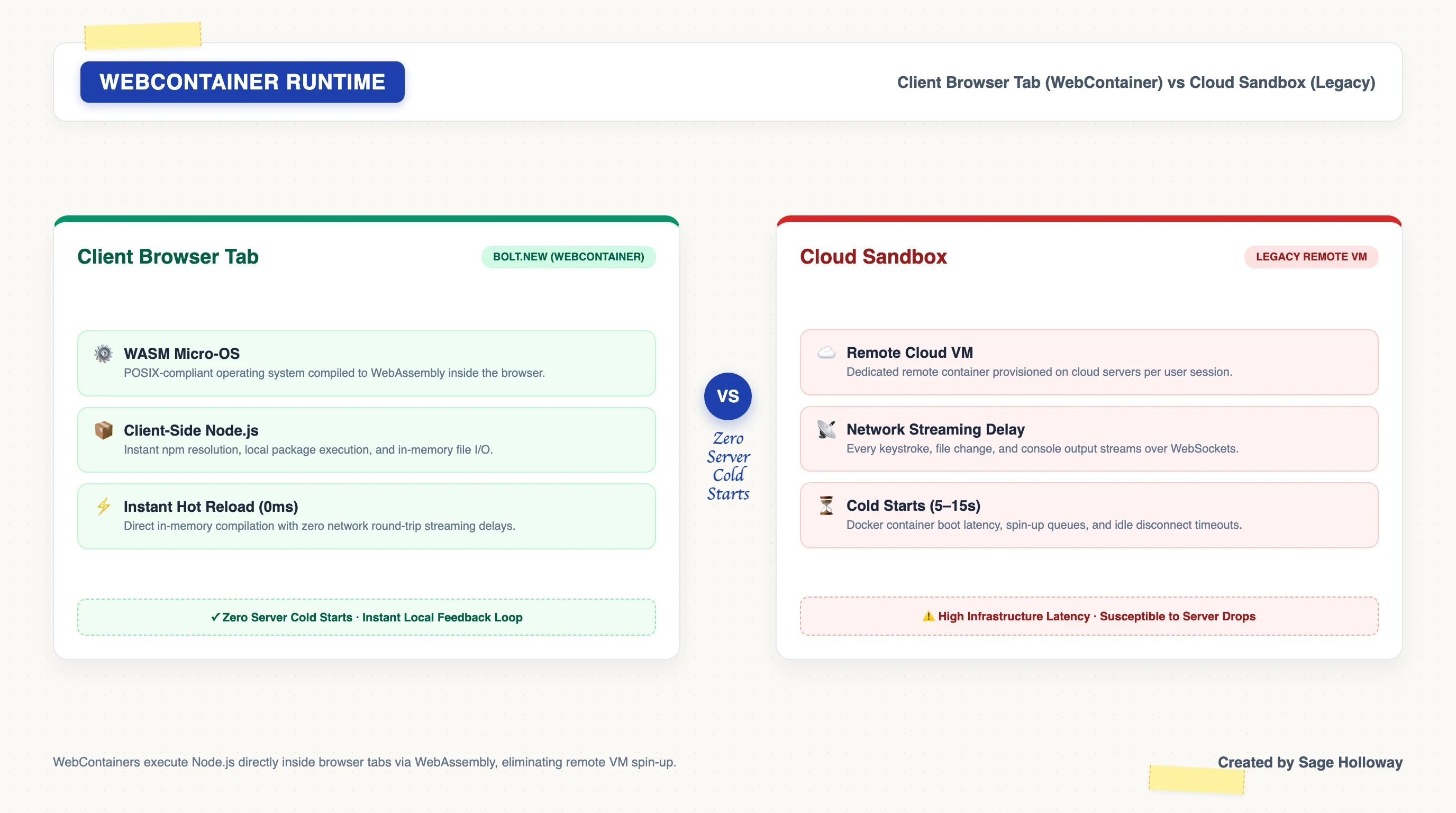
WebContainers execute Node.js directly inside the browser tab via WebAssembly, eliminating remote VM cold starts and execution latency.
Because execution occurs locally, hot module reloading takes zero milliseconds. The preview pane updates as fast as the model streams code into the virtual file system.
WebAssembly micro-OS architecture and zero-latency preview
The core innovation of the WebContainer runtime is its virtualized POSIX-like environment. POSIX stands for Portable Operating System Interface, which is the standard family of rules that Unix and Linux operating systems use to handle processes, file systems, and terminal pipes.
StackBlitz implemented a complete virtual file tree, process lifecycle manager, and TCP network emulation layer in JavaScript and WebAssembly. When Bolt spins up a Vite development server, it binds to a virtual local port, typically http://localhost:5173. The preview pane connects to that in-memory socket without sending packets across your physical Wi-Fi network.
This architecture delivers tremendous portability. When you download a project archive from Bolt, you are not receiving a proprietary configuration file. You receive a standard, production-ready Node.js repository containing package.json, Vite configuration files, and standard TypeScript components, as detailed in the official Bolt project management documentation.
To launch a downloaded project on your local machine, open your physical terminal, navigate into the extracted directory, and run the standard local initiation sequence:
The application boots immediately on your local machine because the code generated inside the browser WebContainer adheres to identical Node.js standards.
What Bolt development is (and what it is not: PHP Bolt CMS disambiguation)
Before diving deeper into development workflows, we must establish a clear boundary around what bolt development actually means. Search engines frequently conflate several completely unrelated platforms that share the "Bolt" trademark.
Bolt.new (StackBlitz): The browser-based, AI-powered full-stack web application builder running inside WebContainers. This is the subject of this guide.
Bolt CMS: An open-source, PHP-based Content Management System built on Symfony and Twig templates. It has zero connection to StackBlitz or client-side Node.js AI generation.
BOLTGROUP: An industrial design and physical product manufacturing consultancy based in North Carolina. They design physical injection-molded plastics, not React codebases.
BoltAI: A native macOS desktop chat application that allows power users to connect their personal OpenAI or Anthropic API keys for desktop tasks.
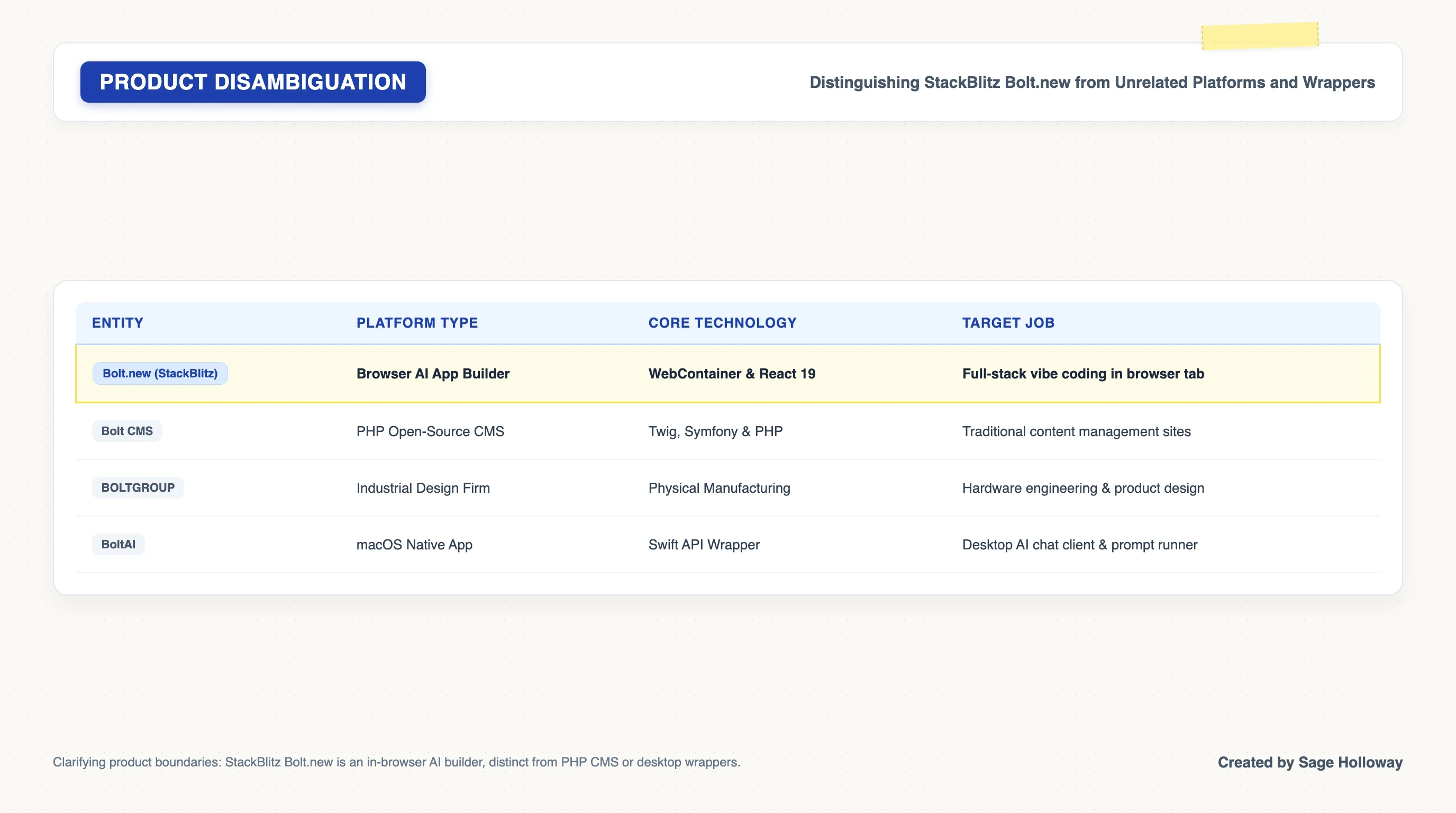
Clarifying product boundaries: StackBlitz Bolt.new is an in-browser AI web builder, distinct from PHP CMS platforms or desktop wrappers.
If your project requires editing PHP templates or compiling Symfony bundles, you are working with Bolt CMS, not StackBlitz Bolt. For the remainder of this guide, every reference to Bolt refers strictly to the StackBlitz AI web development platform.
Bolt V2 and Bolt Cloud: full-stack evolution and platform limits
The landscape of AI app generation moves fast, and most third-party reviews published before mid-2026 are already hopelessly outdated. The most common misconception is that Bolt is strictly a frontend tool capable only of generating static HTML, CSS, and basic React components.
While that was an accurate description of Bolt V1, the release of bolt.new v2 fundamentally transformed the platform's architectural ceiling.
Bolt V1 vs Bolt V2: native databases, auth, and hosting with Bolt Cloud
In Bolt V1, developers had to manually wire external API endpoints, configure third-party database credentials, and copy environment keys into local storage if they wanted persistent state. If a user refreshed the browser preview, all session data vanished.
Bolt V2 introduced Bolt Cloud, an integrated backend infrastructure layer that provisions serverless databases, session authentication, persistent file storage, and edge functions directly from the chat interface.
When you prompt Bolt V2 to "build a SaaS platform with user login and team workspaces," the agent does not merely scaffold mock forms. It configures real authentication tables, provisions a relational database schema, writes backend route handlers, and binds them to the frontend interface.
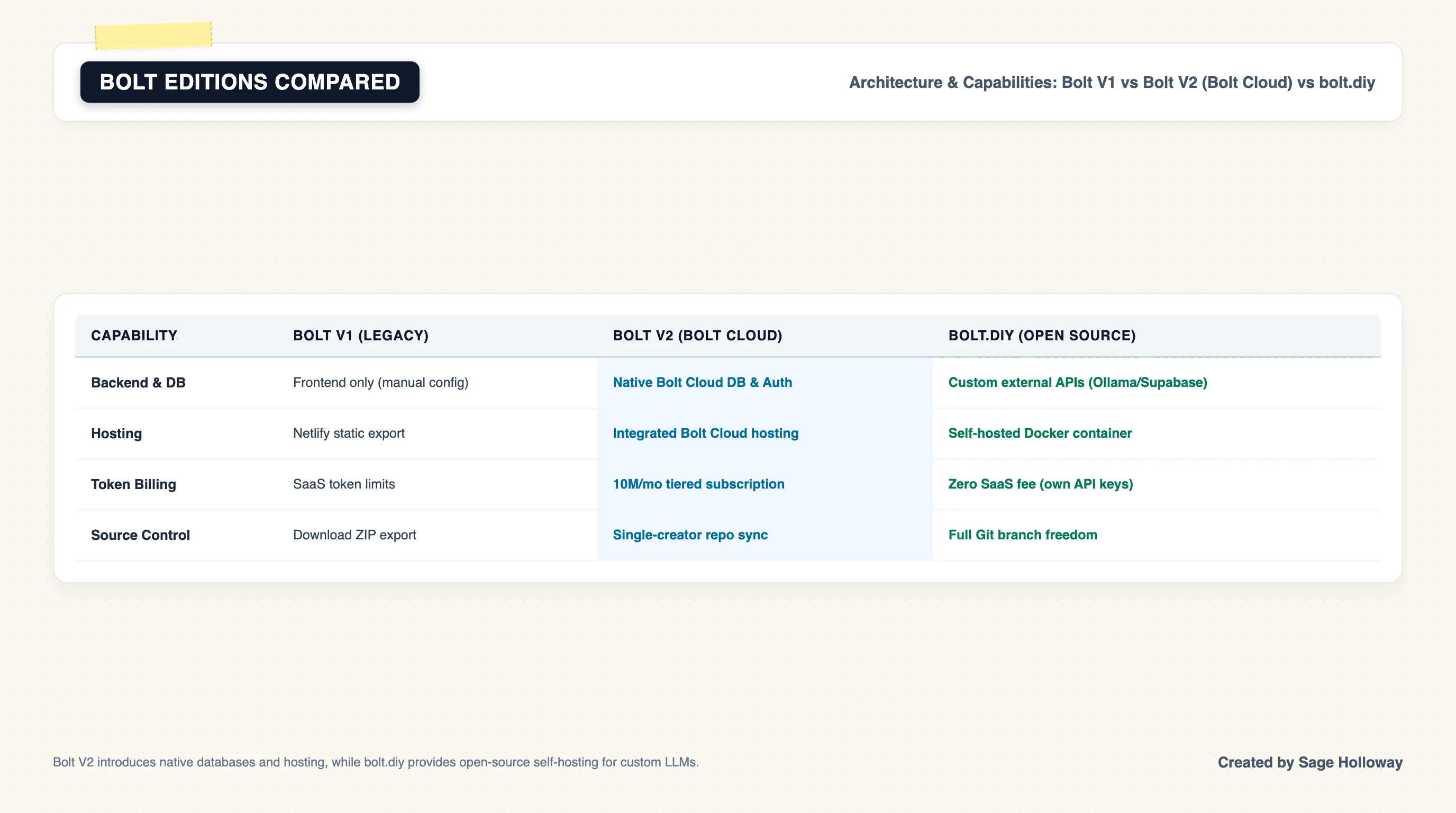
Bolt V2 introduces Bolt Cloud for native databases and authentication, while bolt.diy provides open-source self-hosting for custom LLM endpoints.
For builders who want to avoid vendor subscriptions entirely, the community maintains bolt.diy, an open-source self-hosted fork. With bolt.diy, you supply your own LLM API keys (such as Anthropic, OpenAI, or local models running via Ollama) and host the environment locally using Docker. For an exhaustive breakdown of alternative browser builders, see our comparison guide on Bolt.new vs Lovable vs v0. If you plan to self-host custom models, consult our dedicated tutorial on how to install and configure bolt.diy locally.
Objective review: speed-of-thought vs fragility at scale
Any honest bolt new review must address the sharp contrast between initial developer euphoria and the practical friction of scaling a project.
On forums like r/nocode and r/vibecoding, you find a recurring narrative: a creator builds a gorgeous, functional dashboard in twenty minutes, feels invincible, and then spends the next four hours battling recursive syntax errors, memory leaks, and broken layouts.
The speed-of-thought velocity is real. If you need to validate a product concept, pitch an investor, or build a working internal utility, nothing matches the speed of watching an agent write full-stack code in real time.
The bottleneck was never how fast the model writes code. It is how fast the human loses track of what was written.
When an application grows past a few hundred lines of code, the AI model begins to suffer from context window degradation. If you ask it to tweak a button color in a monolithic component, it might inadvertently re-emit the entire file, stripping out your authentication checks or breaking an unrelated state hook. The fragility is not caused by the WebContainer; it is caused by unmanaged context.
Collaboration boundaries: single-creator edit permissions and GitHub repo constraints
Another crucial boundary in the current bolt.new reviews landscape is team collaboration. Bolt was designed primarily as a single-creator ideation and prototyping environment.
Currently, project permissions operate asymmetrically:
Project Creator: Full read, write, execution, and terminal privileges.
Shared Team Members: View-only permissions on shared project URLs.
If two developers attempt to edit the same Bolt workspace simultaneously, changes will conflict and overwrite. Furthermore, while Bolt allows you to push generated code to a brand-new GitHub repository, you cannot easily link an existing, multi-branch production repository back into the managed Bolt Cloud interface. It is an origin engine, not a long-term multi-tenant code review platform.
Understanding Bolt token dynamics and pricing tiers
Tokens represent the computational fuel of vibe coding. Every requirement you type, every file the AI reads into memory, every code diff it outputs, and every automated error fix it attempts consumes tokens from your billing balance.
Misunderstanding how tokens are calculated is the fastest way to burn through a monthly subscription in a single afternoon.
Free tier (1M tokens, 300k daily cap) vs Pro ($25/month, 10M tokens)
The platform operates on a tiered subscription model structured around monthly token allowances:
Free Tier (
free bolt.new): Provides 1,000,000 tokens per month with a strict daily rate limit of 300,000 tokens. This tier is suited for exploring basic frontends, learning prompt mechanics, and building small personal utilities.Pro Tier: Costs $25 per month (or $18 per month when billed annually at $216 per year). It provides 10,000,000 tokens per month, removes daily rate limits, grants access to advanced LLM models, and enables custom domains without platform watermarks.
Teams Tier: Custom enterprise pricing providing pooled organization token quotas, shared workspaces, and custom design token integration.
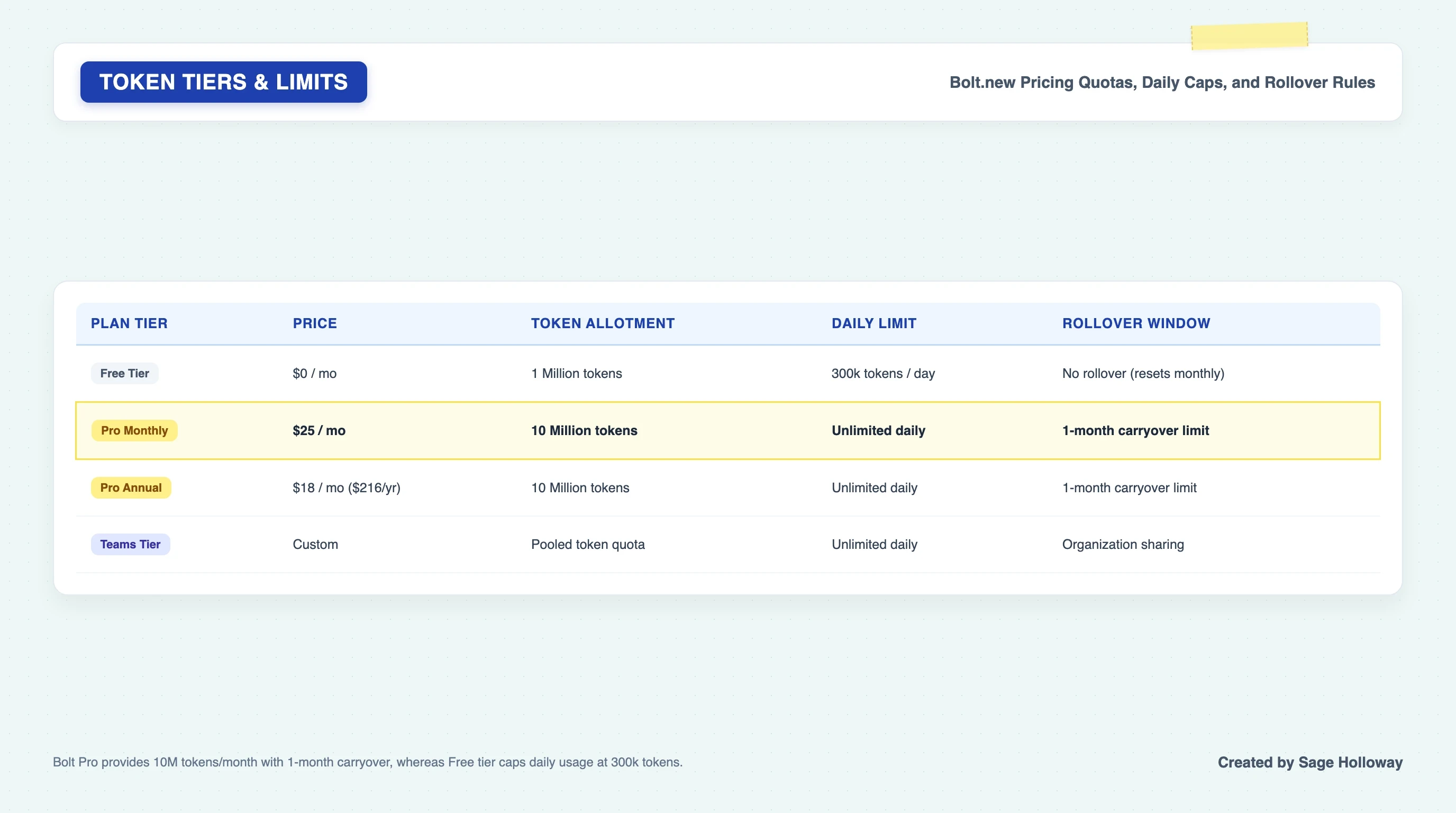
Bolt Pro provides 10M tokens per month with a 1-month carryover window, whereas Free tier caps daily usage at 300k tokens.
If you are evaluating subscription discounts or educational access, see our complete guide to Bolt.new promo codes, discounts, and pricing.
The token rollover rule (1-month carryover limit)
A key benefit of the paid Pro subscription is token rollover. If you subscribe to the Pro tier and use only 4,000,000 of your 10,000,000 tokens in Month 1, the remaining 6,000,000 tokens do not immediately disappear.
Unused tokens roll over for exactly one additional billing cycle. In Month 2, your available balance will be 16,000,000 tokens. However, those rolled-over tokens expire at the end of Month 2 if they remain unused; they do not compound indefinitely into a permanent reserve.
How vibe coding prompts burn tokens: diffs, full-file rewrites, and debug cycles
Why do vibe coding sessions consume tokens so much faster than standard AI chat sessions?
In a standard chat conversation, the model outputs a few paragraphs of text. In Bolt, every interaction involves reading multiple source files, calculating structural dependencies, and generating complete code files.
Consider a component named Dashboard.tsx that contains 800 lines of code (roughly 6,000 tokens). If you prompt Bolt:
"Change the background color of the header card from gray to slate-900."
If the model does not utilize an Abstract Syntax Tree (AST) targeted diff, it must read the entire 6,000-token file into its context window, process your instruction, and output the entire 6,000-token file again with the single class name modified. That one-line cosmetic change just consumed 12,000 tokens.
If the generated code introduces a syntax error, Bolt's automated error-recovery agent intercepts the console error and automatically runs a second prompt to fix it. That adds another 12,000 tokens. In under thirty seconds, a minor styling tweak cost 24,000 tokens.
Understanding this math is why context control and file management are not optional luxuries; they are fundamental operational skills.
Greenfield app prototyping: prompt-to-app workflow and interface layout
Starting a new project from a blank canvas is known as greenfield development. The prompt-to-app workflow in Bolt allows you to move from a concept to an interactive, full-stack application in three structured stages.
The prompt-to-app loop: turning text requirements into React/Vite codebases
The secret to reliable greenfield generation with tools like bolt ai app builder, bolt ai builder, and bolt ai website builder is phased prompt choreography. Never ask the model to build an entire SaaS platform in a single initial prompt.
Follow this three-phase sequencing:
Phase 1: Architecture and Data Modeling
Prompt the agent to outline the database schema, entity relationships, TypeScript interfaces, and routing architecture without writing complex UI components.
Phase 2: Core Component Scaffolding
Instruct the agent to build the primary layout, navigation shell, and mock data tables using static state.
Phase 3: Interactive Logic and Edge Cases
Iterate on specific features: form validation, backend database mutations, authentication checks, and responsive mobile styling.
Navigating the Bolt interface: Code View, Preview tab, and terminal panels
The Bolt workspace layout divides the screen into four essential quadrants designed for immediate feedback:
Left Panel (Chat and History): The conversational interface where you issue natural-language prompts, review proposed changes, and monitor automated debugging steps.
Center Panel (Code Editor and File Tree): A full Monaco-based code editor showing your project's directory structure (
src/,public/,package.json). Here you can manually inspect, edit, lock, or delete individual files.Right Panel (Interactive Preview Tab): The live rendering window powered by WebContainers. It includes a responsive device switcher allowing you to toggle between Desktop, Tablet, and Mobile viewport dimensions.
Bottom Panel (Integrated Terminal): A real-time terminal console displaying compilation logs, package installation progress, Vite server status, and runtime JavaScript errors.
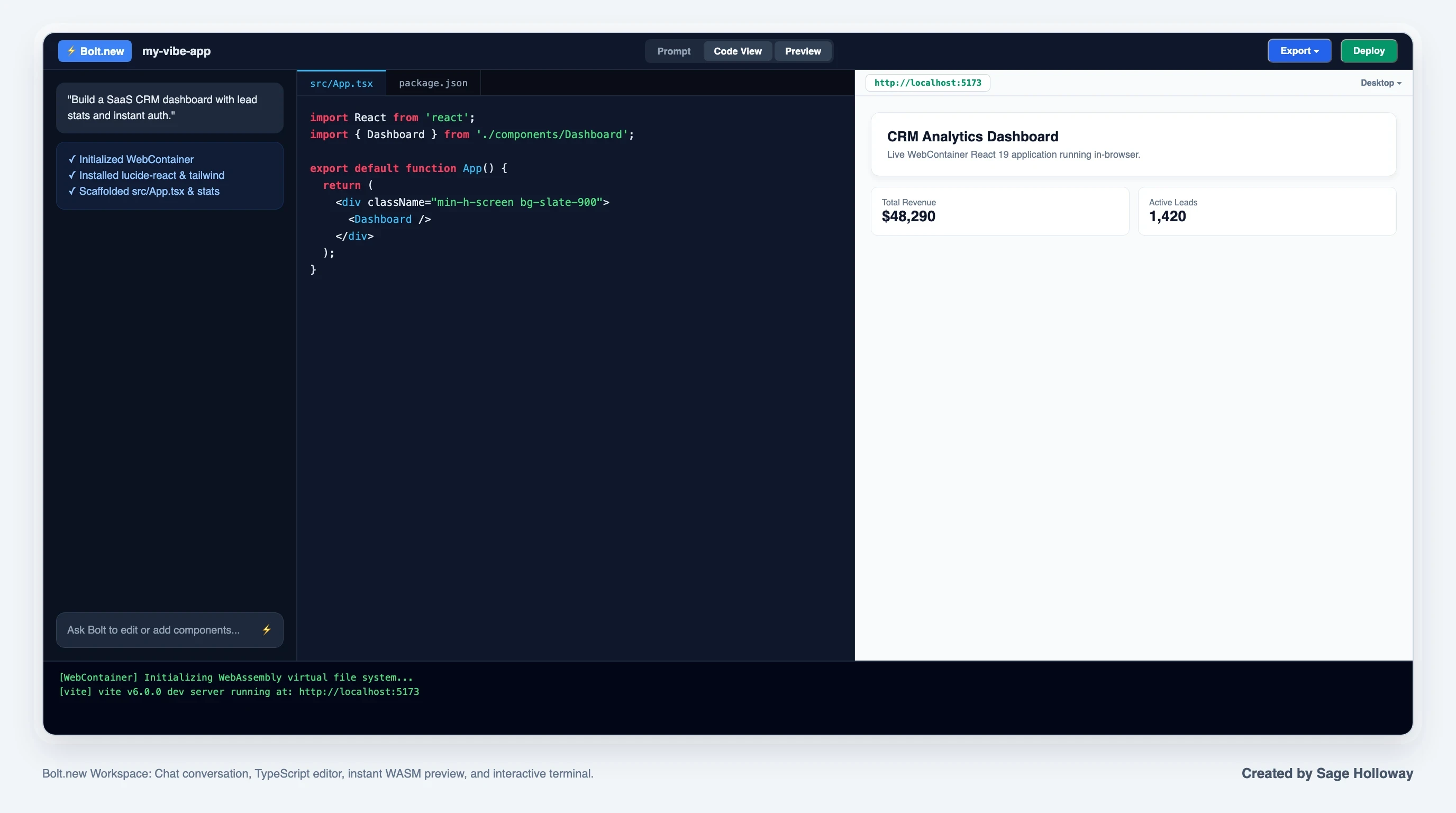
The Bolt.new workspace integrates a natural-language prompt box, a live code editor, an instant WebContainer preview pane, and an interactive terminal.
When managing multiple prototypes in your dashboard, duplicating an existing bolt project creates an isolated clone while wiping the active chat history buffer, giving you a fresh token slate while preserving your working code structure.
Building landing pages and prototypes: design tokens, Tailwind, and component systems
When using Bolt as an instant bolt ai website builder to scaffold a bolt landing page or test a functional bolt prototype, establishing consistent visual guardrails prevents the AI from generating chaotic, unstyled layouts. Managing your bolt design system early keeps the user interface cohesive.
Bolt natively utilizes Tailwind CSS and supports modern design systems like shadcn/ui. In your initial prompt, establish clear design tokens:
Establishing these design rules early ensures that subsequent feature prompts inherit consistent padding, border radius, and typography styles across every generated page.
For a complete walkthrough of rapid prototyping from prompt to interactive React components, review the following video demonstration:
https://www.youtube.com/watch?v=eNmhDDGkEZ0
This video walkthrough demonstrates the complete prompt-to-app scaffolding lifecycle, showing how natural-language requirements convert into styled, interactive components inside the browser.
Context engineering and token optimization: escaping the 700-line loop
As your project grows from a simple landing page into a multi-page application, you will inevitably hit the primary failure mode of vibe coding: context window saturation.
When an AI model's context window fills up with historical chat transcripts, stale error logs, and massive source files, its reasoning fidelity drops sharply. It begins hallucinating nonexistent variables, overwriting working functions, and falling into recursive debugging loops where every fix breaks two other components.
Escaping this loop requires active context engineering.
The 500-to-700-line refactoring threshold: preventing context saturation
Official StackBlitz troubleshooting documentation and community testing establish a clear rule of thumb: no single component file should ever exceed 500 to 700 lines of code.
When a file crosses 700 lines, the probability of an unintended regression during an AI edit increases dramatically. The model simply cannot maintain precise attention across the entire file structure while reasoning about your new request.
Whenever a file approaches this threshold, pause feature development and issue an explicit refactoring prompt:
"Inspect
src/components/Dashboard.tsx. It is exceeding 600 lines. Refactor this file by extracting the analytics chart intoAnalyticsChart.tsx, the user table intoUserTable.tsx, and the summary cards intoSummaryCards.tsx. Keep state management in the parent component and verify that all imports resolve cleanly."
Modularizing your codebase into discrete files under 200 lines ensures that future prompts only need to load and modify small, isolated files.
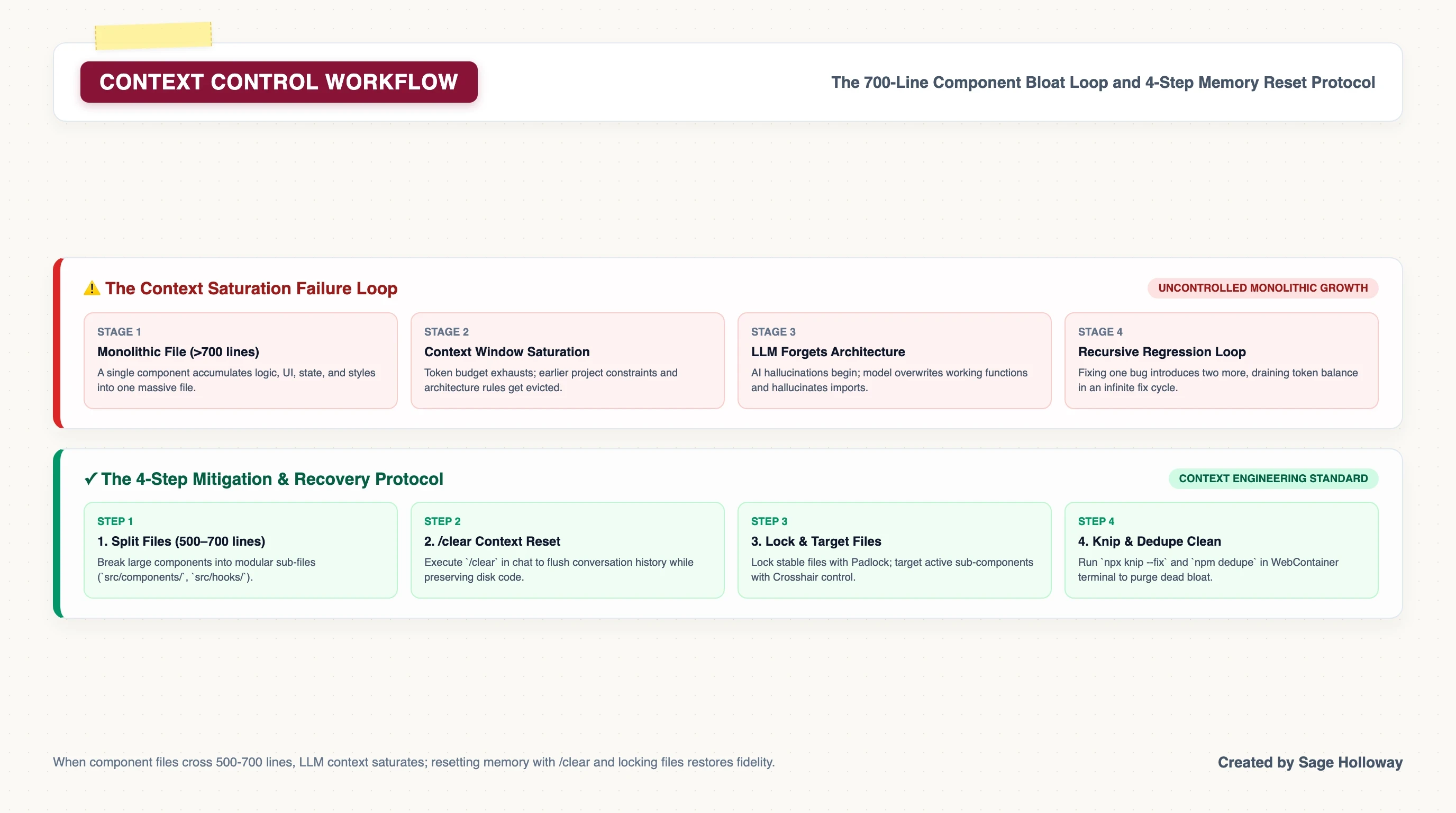
When single component files cross 500 to 700 lines, LLM context saturates; resetting memory with /clear and locking stable files restores generation fidelity.
Active memory management: using the /clear command between tasks
Every message you send in the chat box remains inside the LLM's active working memory. If you spent twenty prompts debugging a complex CSS grid layout, those twenty turns of trial-and-error debris follow the model into your next task, diluting its attention.
You can instantly flush this conversational baggage without losing any of your project's code.
Type /clear directly into the chat prompt box and press Enter.
The /clear command purges the active conversational history buffer, resetting the LLM's attention span to zero while leaving your file tree, database tables, and WebContainer server completely intact. Always run /clear whenever you complete a major milestone and transition to a new feature.
File Locking and Targeted Prompting: shielding stable code from regression
Bolt provides two granular UI controls in the Code View sidebar that every builder must master: File Locking and Targeted Prompting.
File Locking (Padlock Icon): Clicking the padlock icon beside any file in the file explorer locks that file from AI modifications. Even if the AI attempts to rewrite your core authentication provider or database configuration, the system rejects changes to locked files.
Targeted Prompting (Crosshair Icon): Clicking the crosshair icon beside a file focuses the AI's attention specifically on that file for the next prompt. This prevents the model from scanning your entire repository and spending tokens reading irrelevant components.
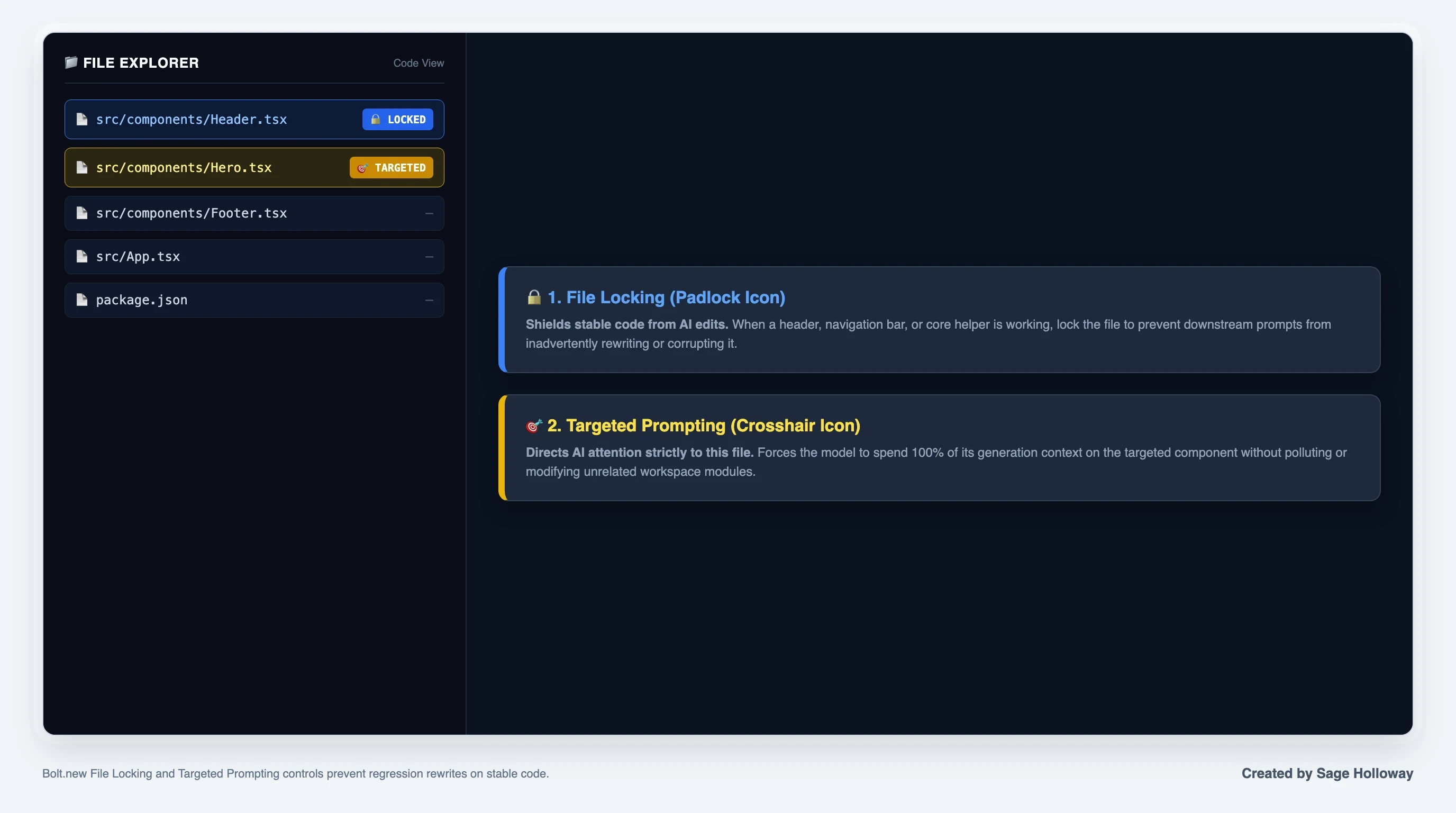
Locking stable components prevents accidental regression rewrites, while the Target control directs AI attention to a specific file.
By locking your core infrastructure files (App.tsx, database.ts, auth.ts) and targeting only the component you are actively refining, you eliminate regression bugs and reduce token burn by up to 70 percent.
Terminal cleanup commands: running npx knip, npm dedupe, and npx depcheck
Over hours of rapid prototyping, an AI agent will frequently install redundant npm packages, create temporary test files, and leave orphaned imports scattered across your codebase. This technical debt bloats your project archive and slows down WebContainer compilation.
You can clean your repository directly from the Code View terminal panel without spending a single token.
Open the integrated terminal at the bottom of the editor and execute these three maintenance commands:
Running these commands periodically keeps your virtual file system lean, prevents out-of-memory browser crashes, and ensures clean production builds.
Troubleshooting WebContainer errors: fixing "Failed to save project"
Because WebContainers run inside browser memory rather than a dedicated cloud server, they are subject to browser storage quotas, memory limitations, and sandbox security restrictions.
Understanding how to diagnose and recover from runtime failures prevents data loss and project abandonment.
Root causes of the save error: binary uploads >5MB and browser memory saturation
By far the most common critical failure reported by developers is the dreaded error: bolt.new failed to save your project
This error occurs when the WebContainer runtime attempts to persist the current project state into the browser's IndexedDB storage and fails. When this happens, the editor frequently enters an infinite loop, displaying repeated error toasts and triggering continuous ZIP download prompts.
The root causes break down into three categories:
Heavy Binary File Uploads: Uploading uncompressed images (especially PNG or JPEG files larger than 5MB), audio clips, or video files directly into the project folder. IndexedDB is optimized for text source files, not heavy binary blobs.
Browser Heap Memory Exhaustion: Keeping multiple StackBlitz or Bolt tabs open simultaneously, exhausting your browser's allocated memory buffer.
Corrupt Diff State: An interrupted code streaming generation leaving a corrupted diff cache in browser memory.
Step-by-step recovery procedure: manual ZIP export and cache resets
If your project triggers the "Failed to save project" error, do not panic and do not immediately refresh the tab without backing up your work.
Follow this verified 4-step recovery procedure:
Step 1: Execute an Immediate Manual ZIP Backup
Click your project title in the top-left navigation bar, select Export, and click Download ZIP. This exports the current in-memory file system directly to your physical hard drive.
Step 2: Remove Heavy Binary Assets
Switch to Code View, navigate to the public/ directory, and permanently delete any large image files or media assets that were uploaded during the session.
Step 3: Close Competing Browser Tabs
Close all other active StackBlitz, Figma, and heavy web application tabs to free up system RAM.
Step 4: Hard Refresh and Re-import
Perform a hard browser refresh (Cmd+Shift+R on Mac or Ctrl+F5 on Windows). If the project fails to restore from the dashboard, launch a clean Bolt window, click Import Project, and upload the ZIP archive you exported in Step 1.
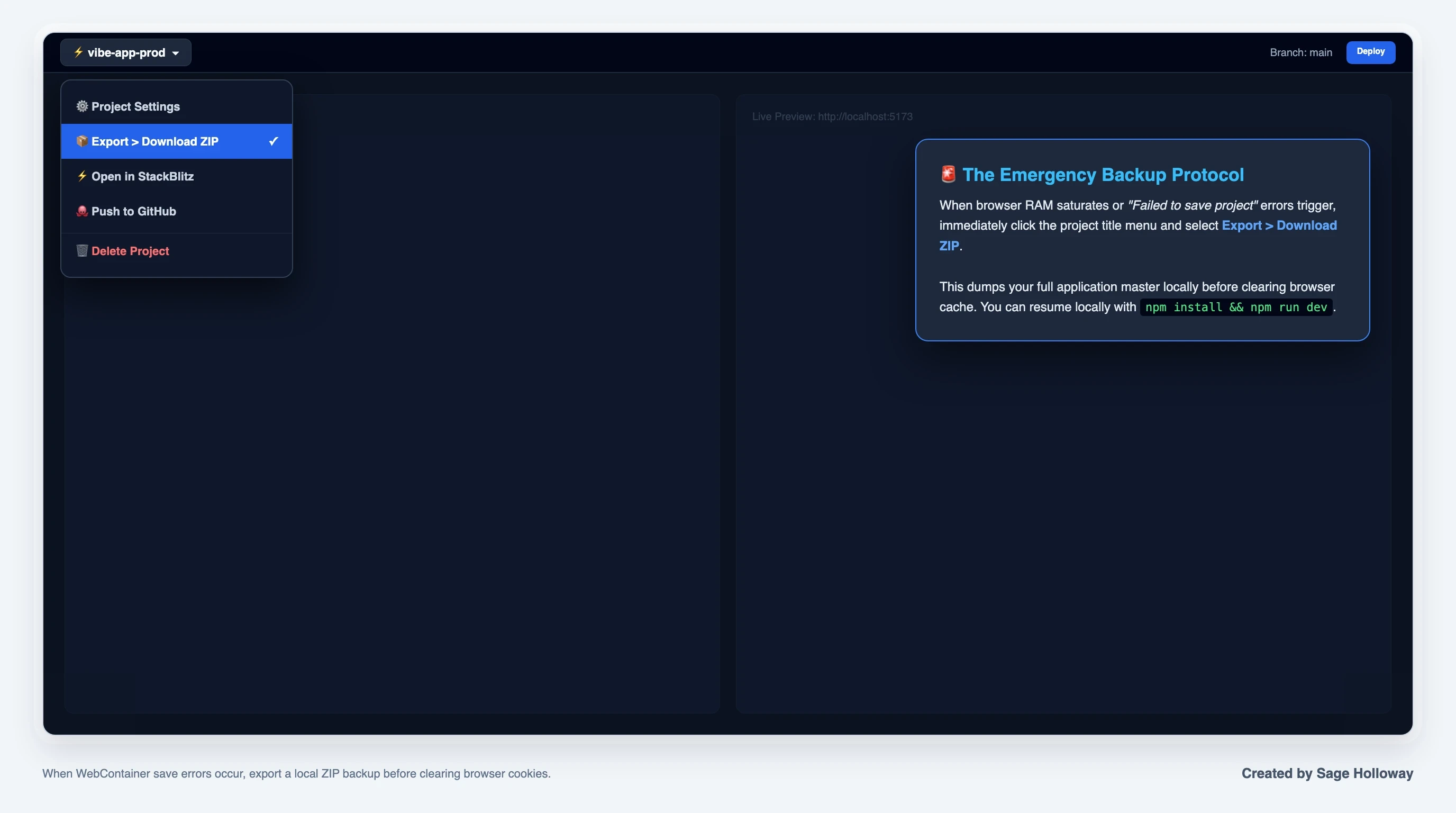
When browser memory saturates or save errors trigger, immediately export a local ZIP backup before resetting browser cache.
Asset optimization: bypassing WebContainer limits with external CDNs (Bunny CDN)
The permanent solution to preventing save errors is simple: never store static production media inside the WebContainer file system.
Instead of uploading product screenshots, hero illustrations, or user avatars into public/images/, host your media on an external Content Delivery Network (CDN) such as Bunny CDN, Cloudflare R2, or AWS S3.
When prompting Bolt to use an image, provide the direct, public CDN URL:
"In
src/components/Hero.tsx, set the hero image source tohttps://cdn.example.com/assets/hero-illustration.webpwith an aspect ratio of 16:9 and responsive srcset attributes."
This approach keeps your WebContainer file system under a few megabytes, guarantees instant project saves, and significantly improves page loading performance for your end users.
Terminal dependency recovery: resolving package mismatches and out-of-memory crashes
When client-side component crashes produce a blank white screen in the preview tab, the issue is almost always a conflicting npm dependency or a syntax crash that broke the Vite development server.
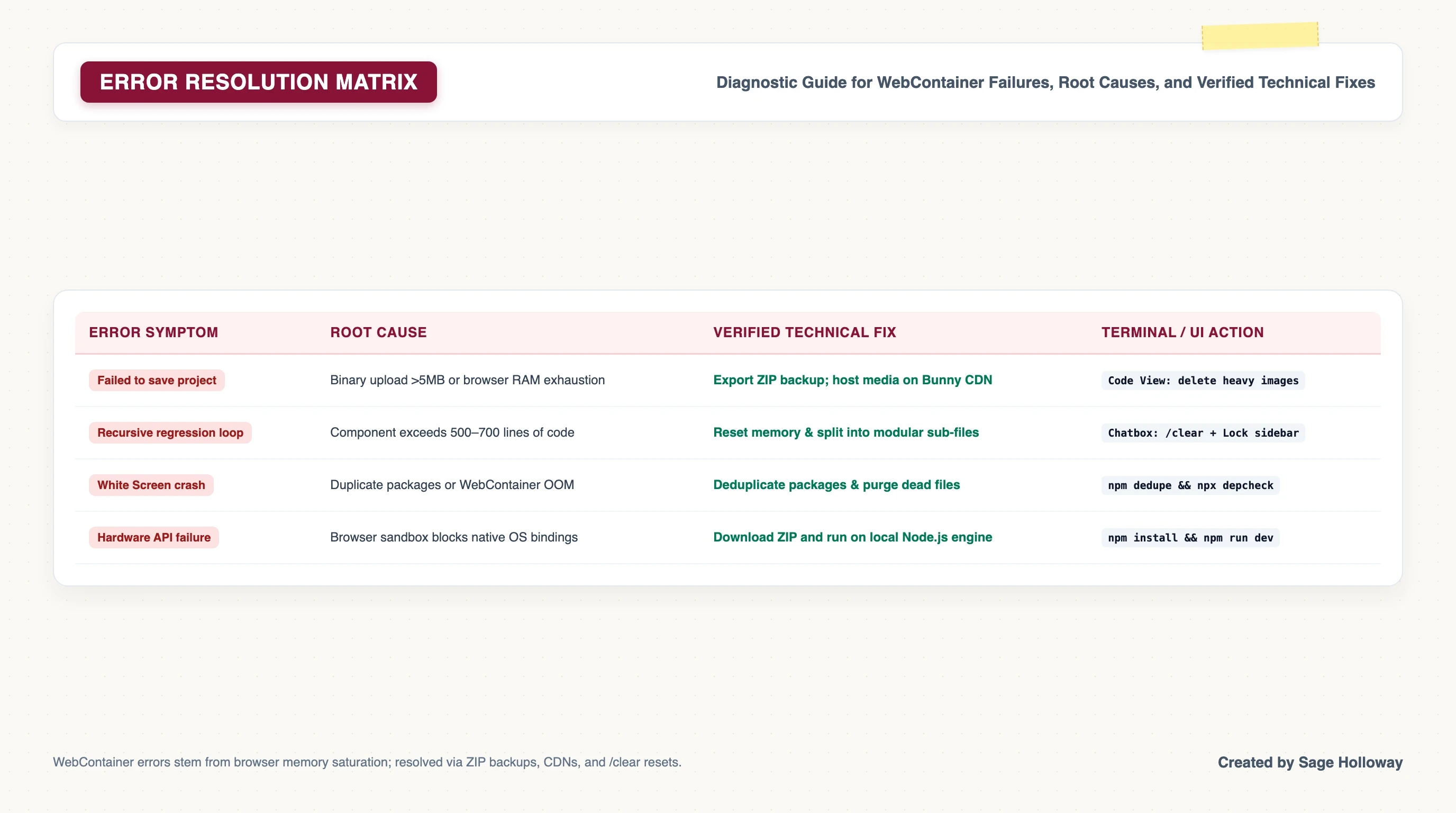
Standard WebContainer errors stem from browser memory saturation and binary uploads; resolved via ZIP backups, CDNs, and terminal cleanups.
To resolve runtime crashes:
Open the bottom terminal tab.
If the terminal displays
Process terminated with out-of-memory, restart the development server by running:
If packages conflict, execute
npm dedupefollowed bynpx depcheck.If an error persists, open your browser's Developer Tools (
F12), copy the exact red error stack trace from the Console tab, paste it into the Bolt chatbox, and instruct the agent:
"Fix this runtime error without altering any other components: [paste console log]"
For persistent platform incidents, check the official Bolt troubleshooting documentation, view the StackBlitz status page, or consult the active developer community on the StackBlitz Discord.
Component integrations and third-party embeds: Calendly and CMS architectures
A frequent complaint among builders creating booking sites, marketing funnels, and SaaS landing pages is: cant get calendly embed to work with bolt.new
When you paste standard embed code from third-party services like Calendly, Google Tag Manager, or Typeform into a Bolt-generated React application, the widget frequently renders as a blank white box or throws silent JavaScript errors.
Why standard script tags fail in React single-page application lifecycles
In a traditional static HTML website, you paste an inline <script> tag into the HTML body, and the browser executes the script sequentially as the page parses.
Bolt builds React Single-Page Applications (SPAs) powered by Vite. In a React SPA, the HTML document loads once, and components mount, unmount, and update dynamically in memory via the virtual DOM.
When you inject a plain <script src="https://assets.calendly.com/..."></script> tag inside a React component's JSX output:
The script tag may be stripped or blocked by React's DOM reconciliation engine.
The external JavaScript library fails to execute because the target container
<div>has not yet mounted to the physical DOM.The global
window.Calendlyobject is undefined when the component initializes.
Implementing dynamic script injection with React useEffect for Calendly embeds
To reliably embed third-party widgets inside a Bolt React application, you must dynamically inject the external script using a React useEffect hook and initialize the widget once the script has finished loading.
Here is the production-ready React component wrapper for Calendly embeds:
To use this component in your application, import it and pass your scheduling URL:
For an exhaustive technical breakdown of custom styling, webhook event listeners, and post-booking redirect handlers, see our dedicated deep-dive on how to embed Calendly in Bolt.new React applications.
Managing widget container sizing and single-instance constraints
When integrating external iframe widgets, keep two structural constraints in mind:
Single Auto-Resize Instance: Calendly's auto-resize script can dynamically adjust container height for only one embed per page. If you place two inline scheduling widgets on the same route, the script will resize both based on whichever iframe loaded last.
Explicit Minimum Heights: Always assign a minimum height (such as
min-height: 700px) to the wrapper container. Failing to set an explicit height will cause layout shifting while the external iframe assets load.
The post-generation deployment gap: from WebContainer to production
Building a prototype inside your browser is satisfying, but a prototype inside a browser tab generates zero revenue and serves zero users.
The "post-generation gap" describes the friction builders encounter when attempting to move a vibe-coded codebase from a browser WebContainer into a live, scalable production environment with custom domain routing, automated SSL/TLS certificates, and persistent server monitoring.
Bridging the post-generation gap: what happens after code generation
While Bolt offers an instant Netlify deployment button for static previews, production-grade applications requiring backend APIs, environment secret isolation, and database connections should be hosted on dedicated cloud container platforms like Northflank, Render, or Fly.io.
Bridging this gap requires four deliberate steps: preparing your build configuration, syncing to version control, connecting the cloud buildpack, and configuring domain DNS.
Preparing package.json: injecting production start scripts on port 3000
By default, Vite projects configure npm run dev for local development and npm run build to compile static assets into the dist/ directory. However, many cloud hosting buildpacks expect a standard npm run start script that boots a lightweight production web server listening on port 3000.
Ask Bolt to add a production start script to your package.json:
This ensures that when a cloud hosting platform compiles your application, it can immediately execute npm run start and serve your compiled assets on the standard port.
Git sync and cloud hosting: pushing to GitHub and deploying to Northflank/Netlify
Once your start script is configured, connect your repository to version control and deployment infrastructure:
In the Bolt header, click Push to GitHub and authorize your account to create a clean repository.
Log into your Northflank or Netlify dashboard and create a new project.
Select your newly created GitHub repository. Northflank will automatically detect the Node.js buildpack, install dependencies, execute
npm run build, and launch the web service.Enable automated continuous deployment so that future commits to your main Git branch automatically trigger fresh production builds.
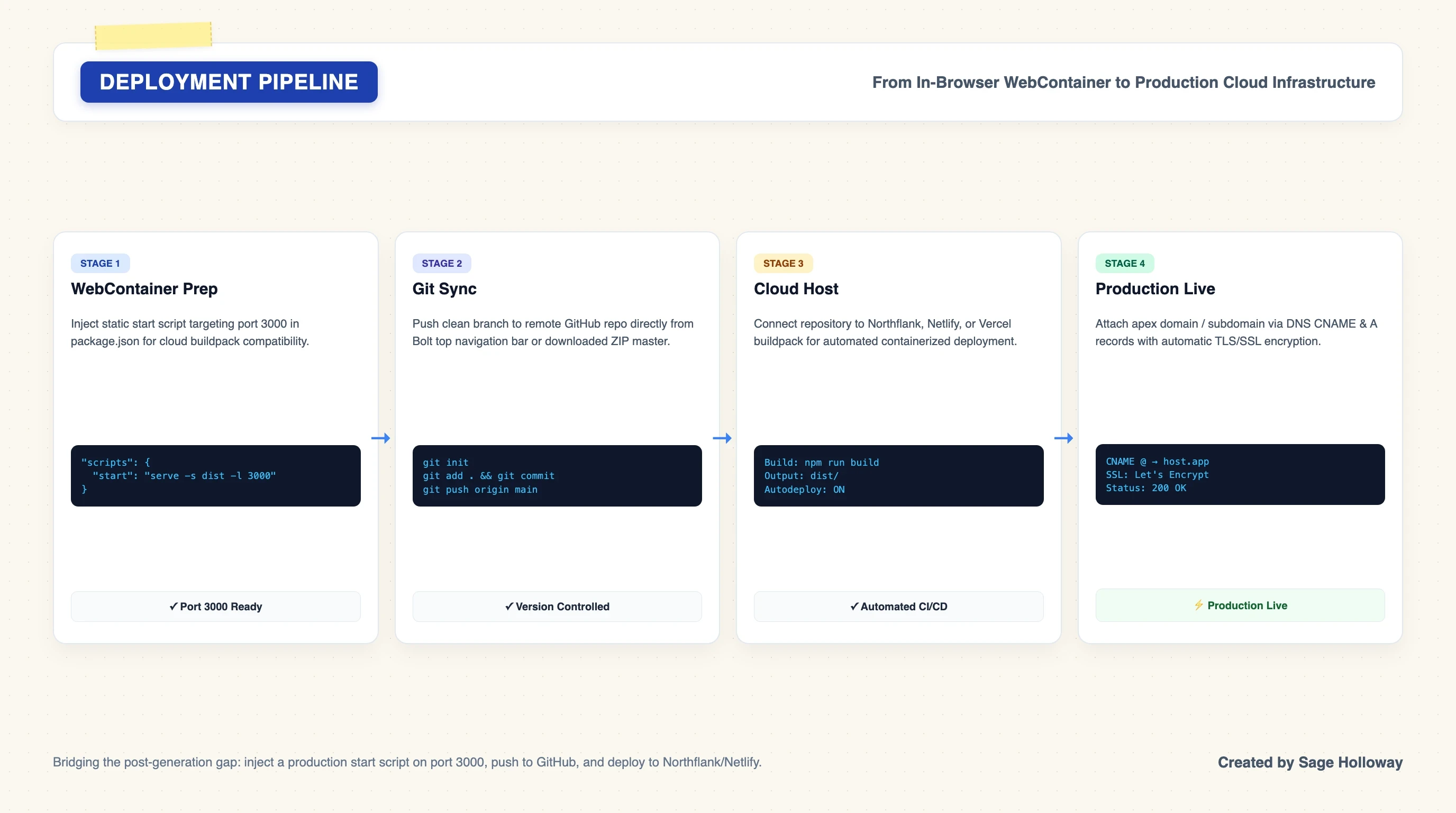
Bridging the post-generation gap: inject a production start script on port 3000, push to GitHub, and link to Northflank or Netlify with custom DNS.
Production checklist: custom domain DNS, TLS certificates, and environment variable secrets
Before announcing your application to users, complete this pre-flight production checklist:
Environment Variables: Move all sensitive API credentials (such as Stripe secret keys or database connection strings) from local files into your cloud host's secure Environment Variables dashboard.
DNS Records: In your domain registrar (e.g. Cloudflare, Namecheap), add a CNAME record pointing your subdomain (
app.yourdomain.com) to your host's assigned ingress domain, or an A record for root domains.Automated TLS: Verify that your hosting provider has provisioned an active Let's Encrypt TLS certificate for HTTPS encryption.
Error Tracking: Install a lightweight error-monitoring service like Sentry to capture client-side runtime errors in production.
Frequently asked questions
How to code a WordPress blog section with Bolt.new?
To add a WordPress blog section to a Bolt.new application, configure your React frontend to fetch posts from a decoupled WordPress site via the WordPress REST API (/wp-json/wp/v2/posts). Bolt generates React and TypeScript code running in client-side WebContainers and cannot execute PHP themes directly. By fetching JSON data from an external WordPress URL, your Bolt frontend can display dynamic blog posts, author bios, and featured images while leaving content management to WordPress. For full implementation details, read our complete guide on connecting headless WordPress to Bolt.new.
Can code data be downloaded from Bolt?
Yes. You can export and download your entire project codebase from Bolt as a standard ZIP file at any time. Click your project title in the top-left corner of the editor, select Export, and click Download ZIP. To run the exported project locally on your machine, extract the ZIP file, ensure you have Node.js installed, open your physical terminal, navigate into the directory, and run npm install && npm run dev.
Can Bolt.new build a WordPress site?
Bolt.new cannot build traditional PHP-based WordPress themes or native WordPress plugins because its WebContainer runtime is built exclusively for client-side JavaScript, TypeScript, and Node.js environments. However, Bolt can build modern, high-performance headless frontends using React, Next.js, and Tailwind CSS that consume content from a WordPress backend through the WordPress REST API or GraphQL endpoints.
Why does Bolt.new throw the "Failed to save project" error and how do I fix it?
The "Failed to save project" error is triggered when a project's size exceeds the browser's IndexedDB storage quota or when a user uploads large local binary files, particularly PNG or JPEG images exceeding 5MB. To fix this error, immediately download a manual ZIP backup via the top-left Export menu, switch to Code View to delete heavy media assets from the public/ directory, close competing browser tabs, and hard-refresh the page. To prevent recurrence, host all static images on an external CDN like Bunny CDN.
How does Bolt V2 and Bolt Cloud handle databases and authentication?
Bolt V2 introduces Bolt Cloud, an integrated backend ecosystem that natively provisions serverless relational databases (SQLite/Postgres), user authentication, session security, and edge functions directly from natural-language prompts. Unlike Bolt V1, which was restricted to frontend mockups, Bolt V2 generates persistent database schemas and authentication routes automatically, while complex multi-tenant architectures can still connect to external services like Supabase or Strapi.
What is the difference between Bolt Free (1M tokens) and Bolt Pro ($25/mo)?
The Free tier provides 1,000,000 tokens per month with a strict daily cap of 300,000 tokens and is restricted to standard models. The Pro tier costs $25 per month (or $18 per month billed annually), provides 10,000,000 tokens per month with no daily rate limits, unlocks token rollover where unused tokens carry over for one billing cycle, grants access to advanced LLM models, and enables custom domains without platform branding.
How do I prevent Bolt from forgetting code or falling into recursive loops?
To prevent context saturation and regression loops, keep individual component files under the 500 to 700 line threshold by modularizing code into smaller sub-components. Periodically flush the conversational memory buffer by entering the /clear command in the chatbox between major tasks. Additionally, use the Code View sidebar to Lock stable files with the padlock icon and Target specific files with the crosshair icon to shield your core architecture from unintended AI rewrites.
How do you deploy a vibe-coded Bolt.new app to production on Northflank or Netlify?
To deploy a Bolt application to production, first prompt the agent to inject a production start script into your package.json that serves your compiled dist/ directory on port 3000. Next, click the Push to GitHub button in the header to create a remote repository. Finally, connect your GitHub repository to a cloud hosting platform like Northflank or Netlify, which will automatically detect the Node.js buildpack, compile the assets, provision SSL/TLS certificates, and assign a custom domain.
Can I embed Calendly widgets or external third-party scripts into a Bolt app?
Yes, but standard inline HTML <script> tags will fail inside Bolt's client-side React lifecycle. To embed Calendly or similar third-party widgets, create a custom React wrapper component that dynamically injects the external script (widget.js) inside a useEffect hook, initializes the widget via window.Calendly.initInlineWidget, and cleans up the DOM container upon unmounting.
Put this into practice on your next build
Pick one project in your Bolt dashboard that has started to feel sluggish or fragile. Do not rebuild the stack from scratch. Open Code View and check your component file lengths.
If any file exceeds 500 lines, instruct the agent to split it into three modular sub-components. Once the files are created and the preview compiles cleanly, type /clear into the prompt box to discard your historical chat debris.
Next, click the padlock icon beside your core layout and database configuration files to lock them against future edits. Open the terminal panel at the bottom of the editor and execute npx knip --production --fix --allow-remove-files to purge dead imports and orphaned packages. Finally, click your project title in the top-left bar and download a fresh ZIP backup to your local hard drive.
The browser-based development loop will continue to evolve, and future iterations will likely offer larger memory bounds and tighter cloud primitives. But the builders who ship reliable applications will always be the ones who treat context as a scarce budget, isolate stable architecture, and understand the runtime engine underneath the prompt box.
Until then...
Sage
PS. Next time you start a new Bolt project, write your entire data schema into a plain text file before typing a single UI instruction into the prompt box. Lock that schema file immediately. You will save roughly half your monthly token budget in the first afternoon.
Author
Practical guides, tool teardowns & AI engineering workflows.
Related Articles