AI Agents
How to Build and Deploy ChatGPT Workspace Agents: The Complete 2026 Guide

Sage Holloway
25 min read
Go back to blog
SHARE

Most engineering teams treat generative AI like a conversational search box. You type a question, wait four seconds, and copy the answer into a ticket or an email draft. When you step into autonomous workspace infrastructure, that entire manual loop disappears. You stop prompting a model to draft work; you deploy persistent digital workers that run scheduled operational workflows across your business stack while your team is offline.
ChatGPT Workspace Agents are persistent, cloud-hosted autonomous workflows that execute multi-step business tasks across integrated tools like Gmail, Slack, and Linear. Built for team collaboration, they run on recurring calendar schedules even without an open chat session. To deploy one, enable workspace features in the Admin Panel, configure connectors and skills via Agent Builder or the Python Agents SDK, and implement human-in-the-loop Slack escalation channels for low-confidence decisions.
Last verified: 28 August 2026 (NotebookLM sources synthesis; no live CLI run on this pack).
Key Architecture Summary at a Glance
Persistent Cloud Execution: Unlike single-turn chatbots or ad-hoc browser agents, Workspace Agents run in multi-tenant cloud containers on scheduled calendar triggers without requiring an open browser window.
Dual Implementation Stack: Build visual workflows in ChatGPT Agent Builder for administrative teams, or author custom decision-and-action loops using the Python Agents SDK with structured JSON schemas.
Open Standard Portability: Local development and model-agnostic tooling are supported through the open-source Model Context Protocol (MCP), enabling local testing before cloud deployment.
Shared Context Engineering: Native workspace memory remains isolated per-user and per-agent; enterprise production requires an external vector synchronization layer to share organizational knowledge across multi-agent fleets.
Usage-Based Economics: The transition following May 6, 2026, replaces the free research preview with a consumption-based credit model ($30/user/month Business seat plus $5.00 per 1,000 credit overage).
What Are ChatGPT Workspace Agents? Architecture, Capabilities, and the Paradigm Shift
Think of an air traffic control and ground dispatch depot operating across a busy municipal freight hub. Every cargo carrier, fueling tanker, and maintenance crew operates under a strict schedule tracked on a central magnetic wall board. The dispatchers do not sit beside the runway waving signal batons for eight hours straight. They configure routing guidelines, set automated radar triggers, and let mechanical switches divert cargo containers into designated rail bays as the night trains roll in. When an unlabelled crate arrives or a storm trips a sensor, the system flags the anomalous manifest to an on-duty supervisor while the rest of the depot keeps moving.
That automated freight dispatch depot is the exact technical reality behind ChatGPT Workspace Agents.
When you configure chatgpt workspace agents (detailed in the OpenAI Workspace Agents Documentation), you are not launching another transient chat session. You are creating a persistent software worker inside OpenAI's cloud environment. The platform attaches authenticated software connectors, registers reusable operational skills, and mounts a persistent state storage layer.
From Ephemeral Chat Sessions to Persistent Autonomous Workflows
The operational difference between a standard conversational chatbot and an autonomous workspace agent is structural. In a standard chat session, interaction is synchronous and ephemeral. You provide a prompt, the model predicts tokens, prints a text response, and halts. When you close the browser tab, the execution context dies. If you built a Custom GPT, that GPT still requires a human operator sitting at a keyboard to initiate every single turn.
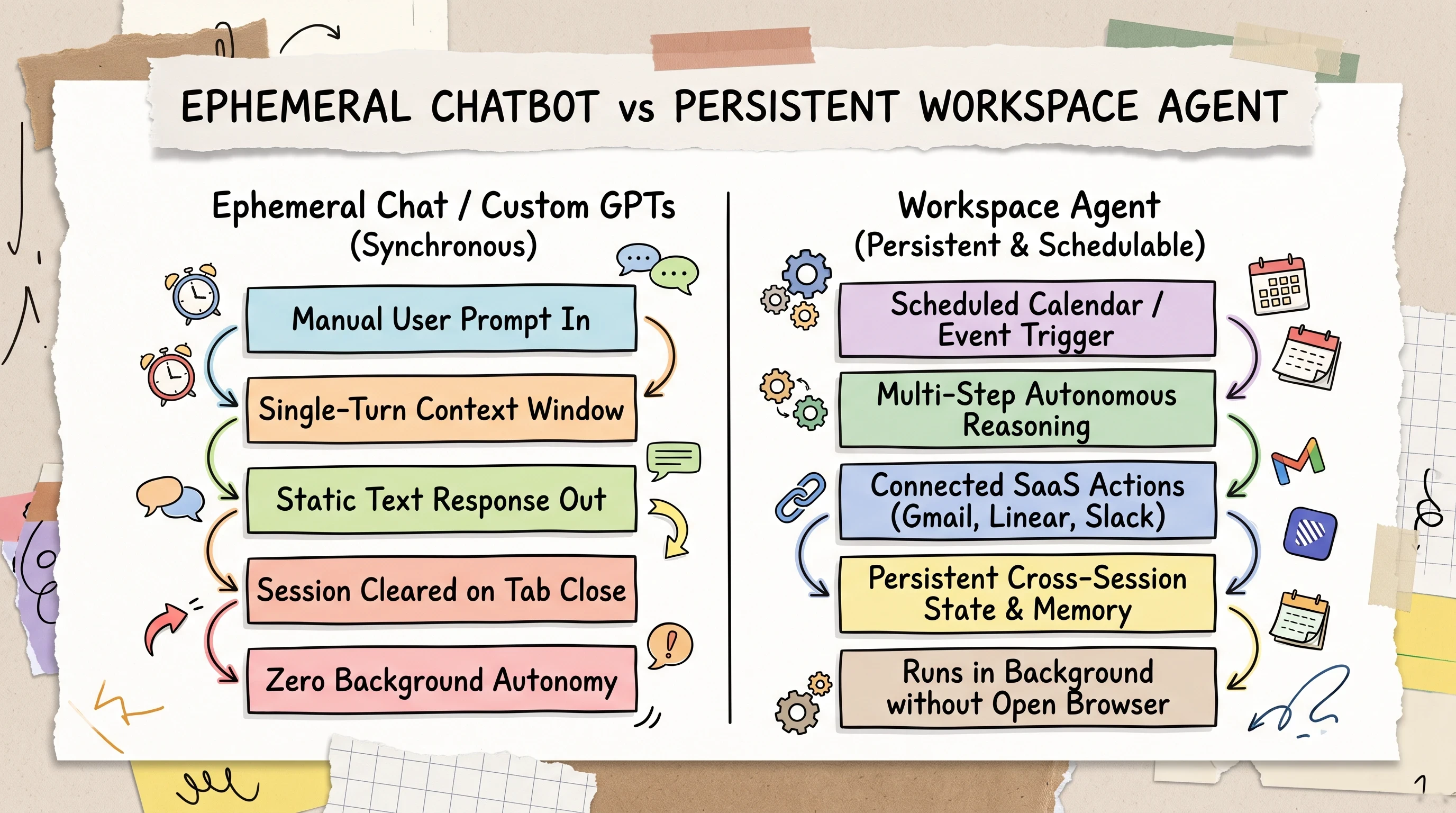
Unlike ephemeral chat turns, Workspace Agents maintain persistent state, connect to SaaS apps, and execute on background calendar schedules.
Workspace agents alter this lifecycle by introducing three foundational capabilities:
Background Autonomous Execution: The agent executes tasks on a recurring calendar schedule (such as daily at 09:00 UTC) without requiring an active browser tab or live user session.
Deterministic Tool Invocation: The model interfaces directly with third-party software-as-a-service (SaaS) APIs, reading unstructured inbound communications and issuing authenticated write mutations.
Cross-Session Memory: Intermediate data, entity mappings, and operational notes persist across subsequent scheduled executions, creating cumulative context over time.
For an in-depth look at single-user, ad-hoc virtual browser automation, compare this cloud approach with our ChatGPT Agent Mode hands-on guide.
Core Components: Tools, SaaS Connectors, Reusable Skills, and Memory
Every workspace agent relies on four core infrastructure components:
SaaS Connectors: Managed OAuth integrations connecting the agent directly to enterprise software systems, including Gmail, Google Calendar, Google Drive, Microsoft SharePoint, Slack, Salesforce, Notion, and Atlassian Jira.
Reusable Skills: Modular instruction packages and prompt templates that define specific operational procedures, such as classifying bug reports, drafting executive summaries, or reconciling monthly invoices.
Tools and Code Execution: Sandboxed Python execution environments and document parsers that allow the agent to clean raw tabular data, compute numerical metrics, and extract text from complex PDF attachments.
Persistent Storage and State: Dedicated file storage trees and memory indices where the agent stores reference documentation, process templates, and historical logs.
To see how the team navigation and memory interface operate during live execution, review this interface walkthrough from practitioner demonstrations:
https://www.youtube.com/watch?v=HaaKUFAOi84 The ChatGPT Workspace Agents interface provides a dedicated sidebar for team agents, connected file repositories, and cross-session memory.
ChatGPT Workspace Agents vs. Claude Cowork: The Cloud vs. Desktop VM Battle
As autonomous workplace automation gained mainstream developer adoption, a persistent naming confusion emerged across search engines and technical forums. Thousands of operators began searching for chatgpt cowork and openai cowork, looking for OpenAI's direct answer to Anthropic's workstation software.
To evaluate these tools accurately, you must separate the product branding from the underlying compute architecture.
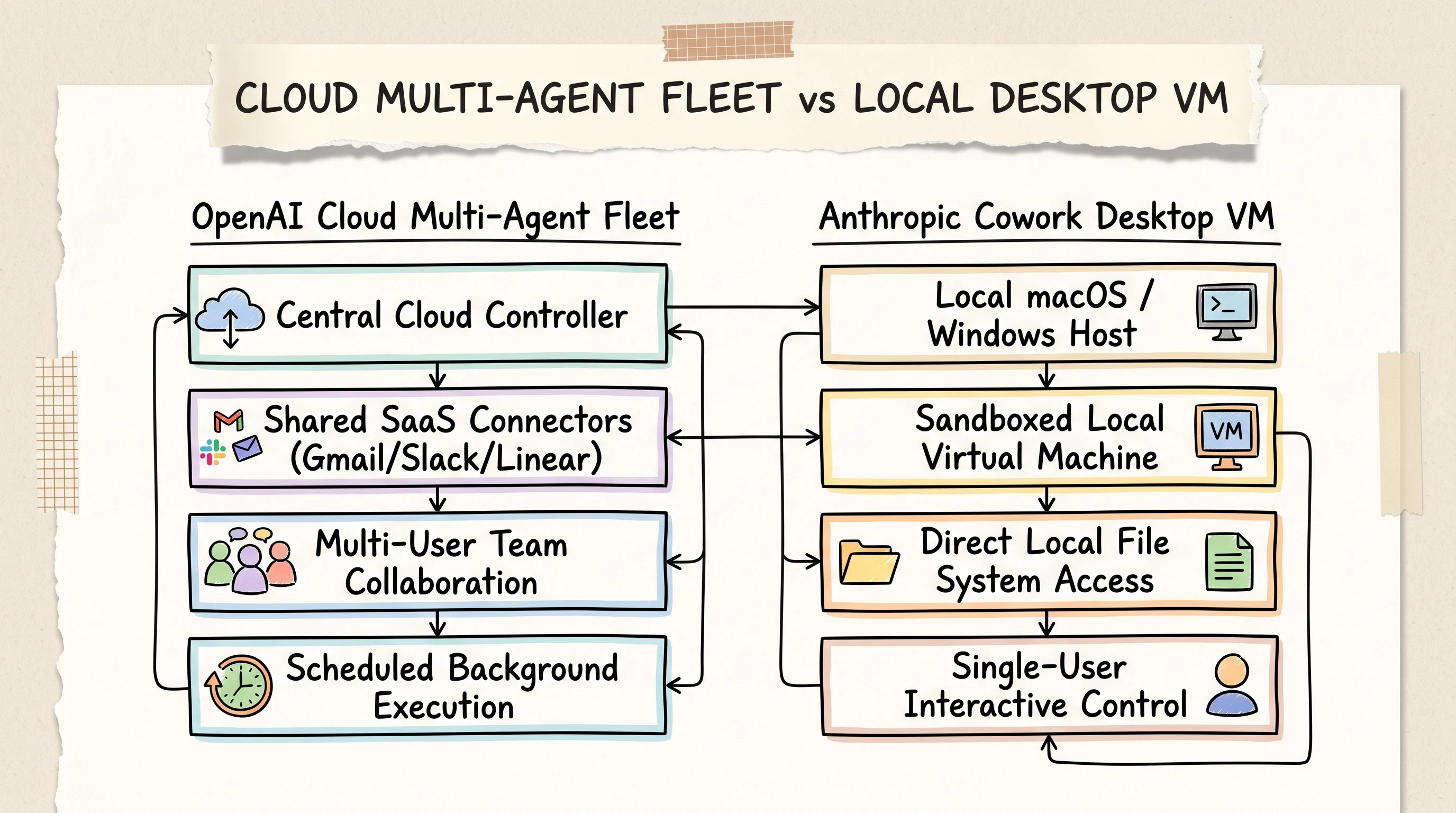
Disambiguating architectures: OpenAI Workspace Agents execute in multi-tenant cloud containers, while Claude Cowork runs inside an isolated local desktop virtual machine.
Addressing the "ChatGPT Cowork" Confusion: Cloud Collaboration vs. Local VM
There is no standalone OpenAI product named "ChatGPT Cowork" or "OpenAI Cowork." Cowork is Anthropic's desktop application (priced between $20 and $200 per user per month), which provisions an isolated local virtual machine directly on a user's macOS or Windows desktop to interact with local files, compilers, and desktop software.
When users search for openai cowork, OpenAI's equivalent platform is ChatGPT Workspace Agents for team business automations, alongside OpenAI Frontier for centralized enterprise fleet orchestration.
The structural contrast between these two philosophies is distinct:
Anthropic Claude Cowork: A single-user desktop environment. It shines when a developer or analyst needs an AI assistant to organize local desktop folders, run terminal commands against local git repositories, and manipulate desktop spreadsheets in real time.
ChatGPT Workspace Agents: A multi-tenant cloud collaboration platform. It is engineered for team-wide business processes where automations run in the cloud, interface with centralized SaaS platforms via OAuth, and execute on scheduled cron triggers without depending on anyone's laptop remaining awake.
If your team is evaluating desktop virtualization over cloud workflows, read our dedicated Claude Cowork architecture guide. If you are contrasting cloud VM reasoning against parallel scraping agents, explore our Manus AI vs. ChatGPT comparison.
Feature and Architecture Matrix: OpenAI Workspace Agents vs. Anthropic Cowork
The following comparative matrix details the architectural differences, pricing structures, and tool integrations across OpenAI Workspace Agents, Anthropic Claude Cowork, and OpenAI Frontier.
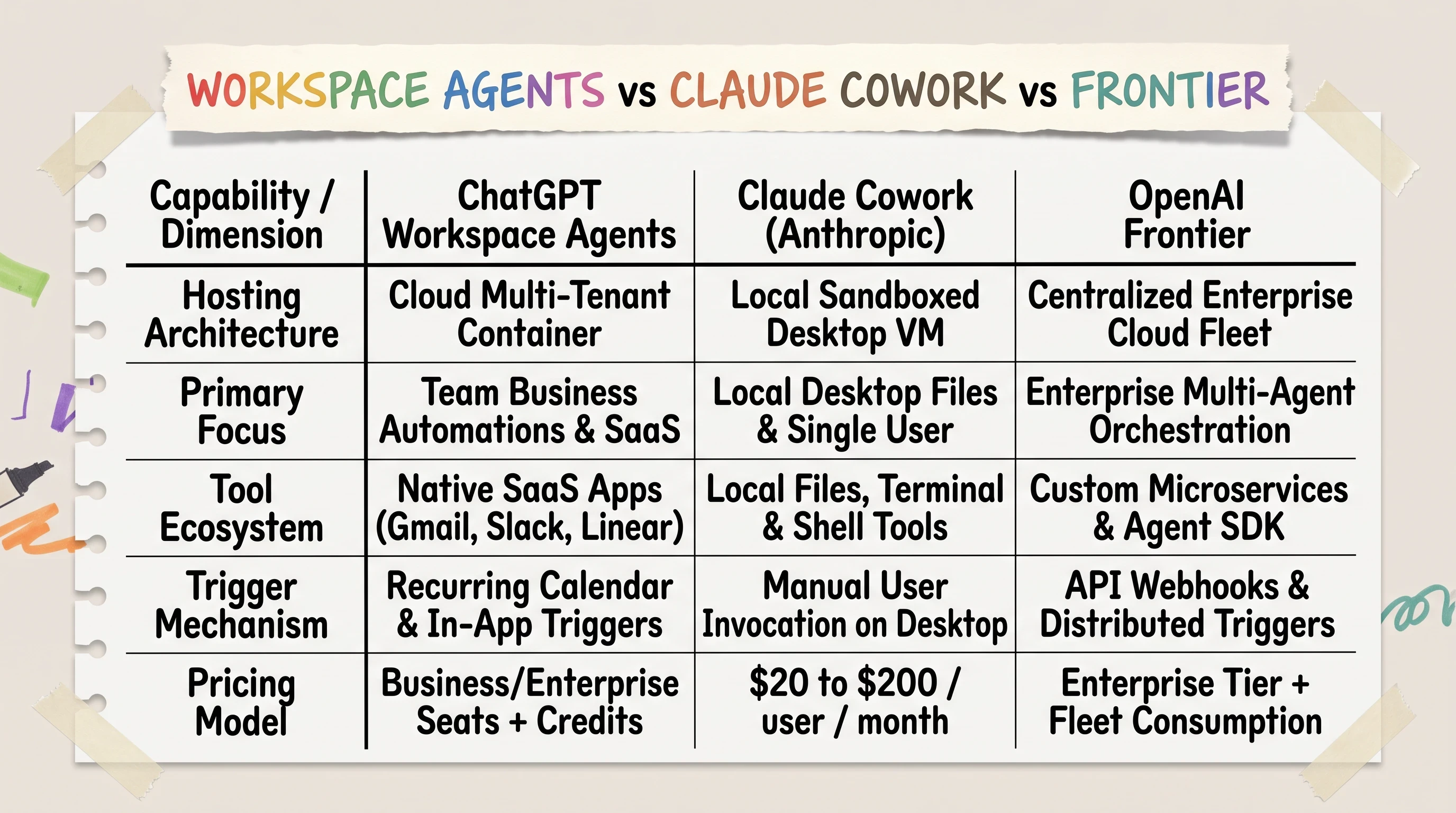
Comprehensive comparison matrix contrasting cloud-hosted ChatGPT Workspace Agents with Anthropic Claude Cowork desktop VM and OpenAI Frontier fleet management.
Implementation Path 1: The No-Code Agent Builder and Admin Enablement
For operations leaders, product managers, and workspace administrators, OpenAI provides a visual authoring environment built directly into the ChatGPT web interface. This path requires zero custom software development while delivering robust enterprise governance.
Enabling Workspace Agents in the ChatGPT Admin Panel
By default, workspace agents and agentic execution modes are disabled across ChatGPT Business and Enterprise accounts. A workspace owner or IT administrator must explicitly activate these capabilities and establish access boundaries before members can create automations.
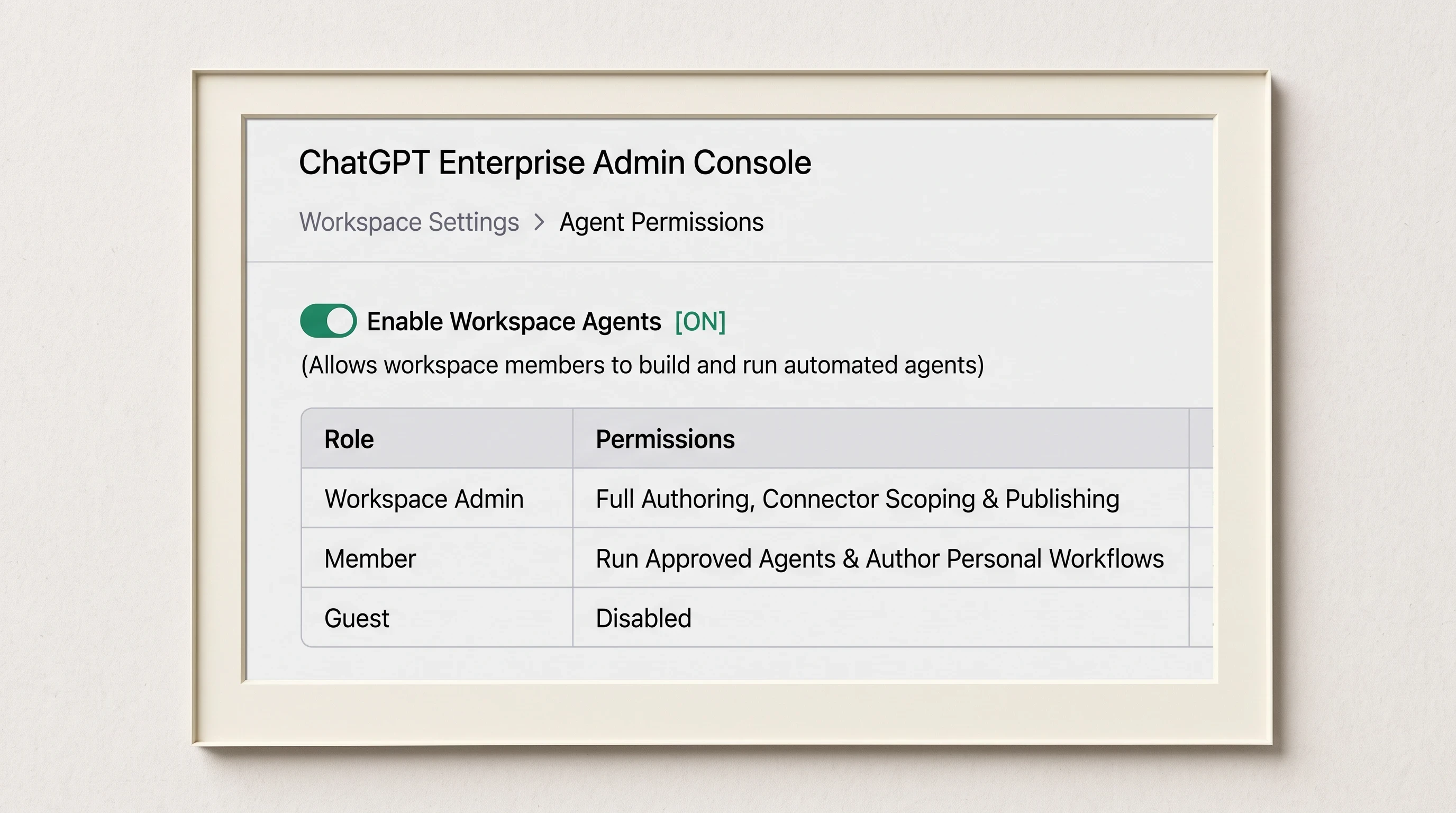
Enterprise admins must explicitly enable Workspace Agents and configure role-based access rules for building, running, and sharing automations.
To enable the workspace agent environment:
Log into your ChatGPT Enterprise or Business workspace using an administrator account.
Navigate to Admin Settings in the lower-left navigation bar and select Workspace Settings > Agent Permissions.
Toggle the master control switch: Enable Workspace Agents [ON].
Configure the Role-Based Access Control (RBAC) policies:
Workspace Admins: Full permissions to author custom agents, scope SaaS connectors, approve service accounts, and publish agents to the internal company directory.
Members: Permissions to execute directory-approved workspace agents and build private personal automations without publishing rights.
Guests and External Contractors: Strictly restricted from running or authoring workspace agents to prevent unauthorized data access.
Designing Multi-Step Automations with Visual Agent Builder
Once enabled, team members can access Agent Builder, a visual workflow canvas that translates natural language operational instructions into structured multi-step execution graphs.
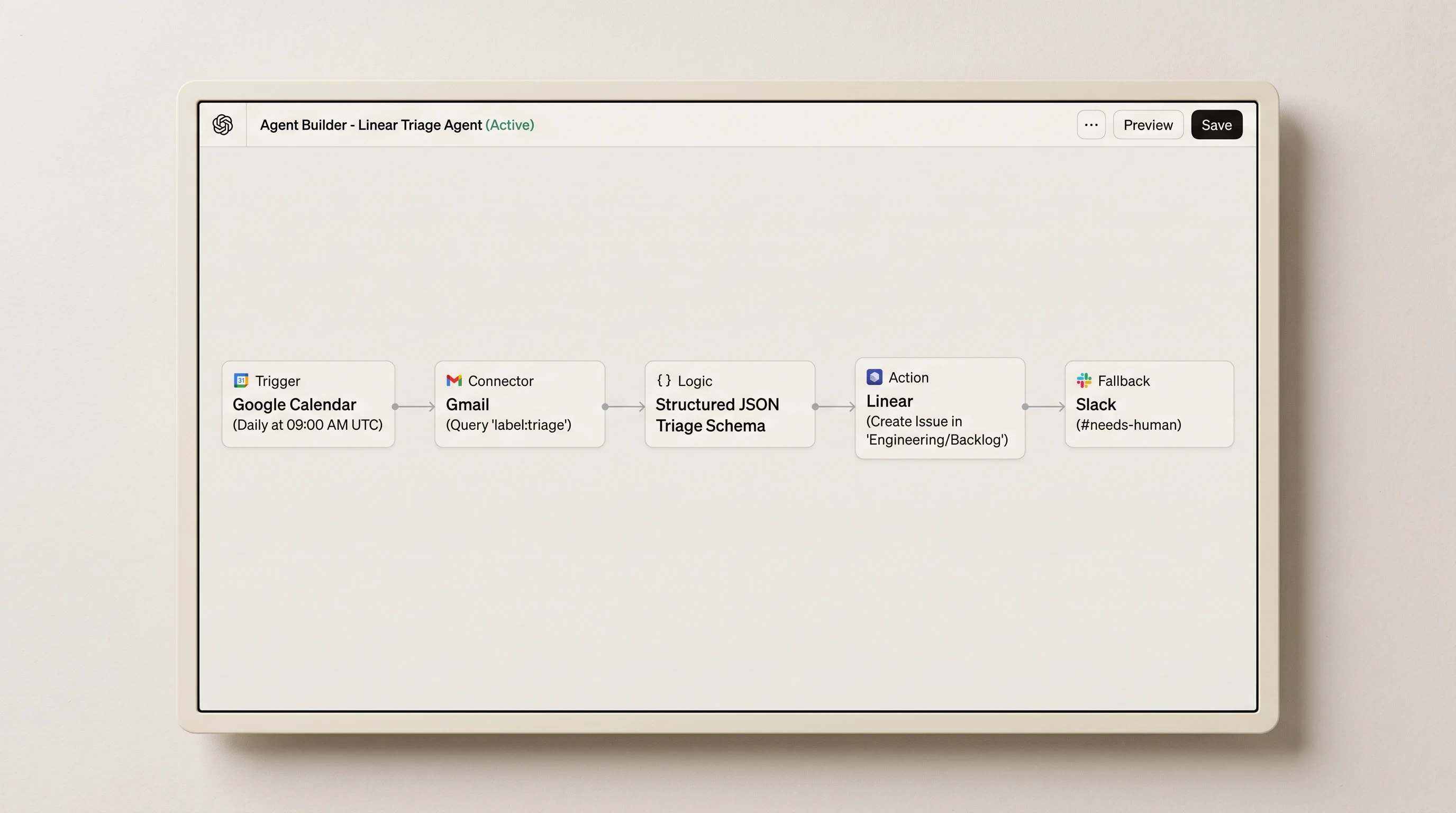
The visual Agent Builder allows teams to connect SaaS apps, establish scheduled calendar triggers, and define automated execution flows without writing code.
Follow these steps to construct an automated linear triage agent:
Click Explore Agents in the left sidebar and select Create a Workspace Agent.
Define the agent's operational mandate in the configuration pane:
Connect your third-party SaaS tools under the Connectors tab. Authenticate the agent with your corporate Google Workspace and Linear accounts.
Set the operational instructions and JSON output schema within the Instructions field:
Attaching Background Calendar Schedules
To convert a visual agent into an autonomous worker, you must bind it to a recurring schedule:
In the Agent Builder navigation header, click Triggers & Schedules.
Select Add Calendar Trigger.
Define the recurrence pattern: choose Daily, set the execution time to 09:00 AM UTC, and specify the active business days (Monday through Friday).
Save and publish the agent to your Organization Directory.
Once published with an active calendar trigger, OpenAI's cloud scheduler instantiates the agent automatically at the specified time, authenticates against connected SaaS connectors, processes pending queue items, and writes execution logs to the administrative audit console.
Implementation Path 2: Code-First Custom Build with the Python Agents SDK
While the visual Agent Builder serves non-technical teams, production software engineering workflows require deterministic logic, custom exception handling, rate-limit throttling, and automated regression testing.
The code-first architecture separates reasoning (the Large Language Model) from deterministic execution (REST and GraphQL API handlers).
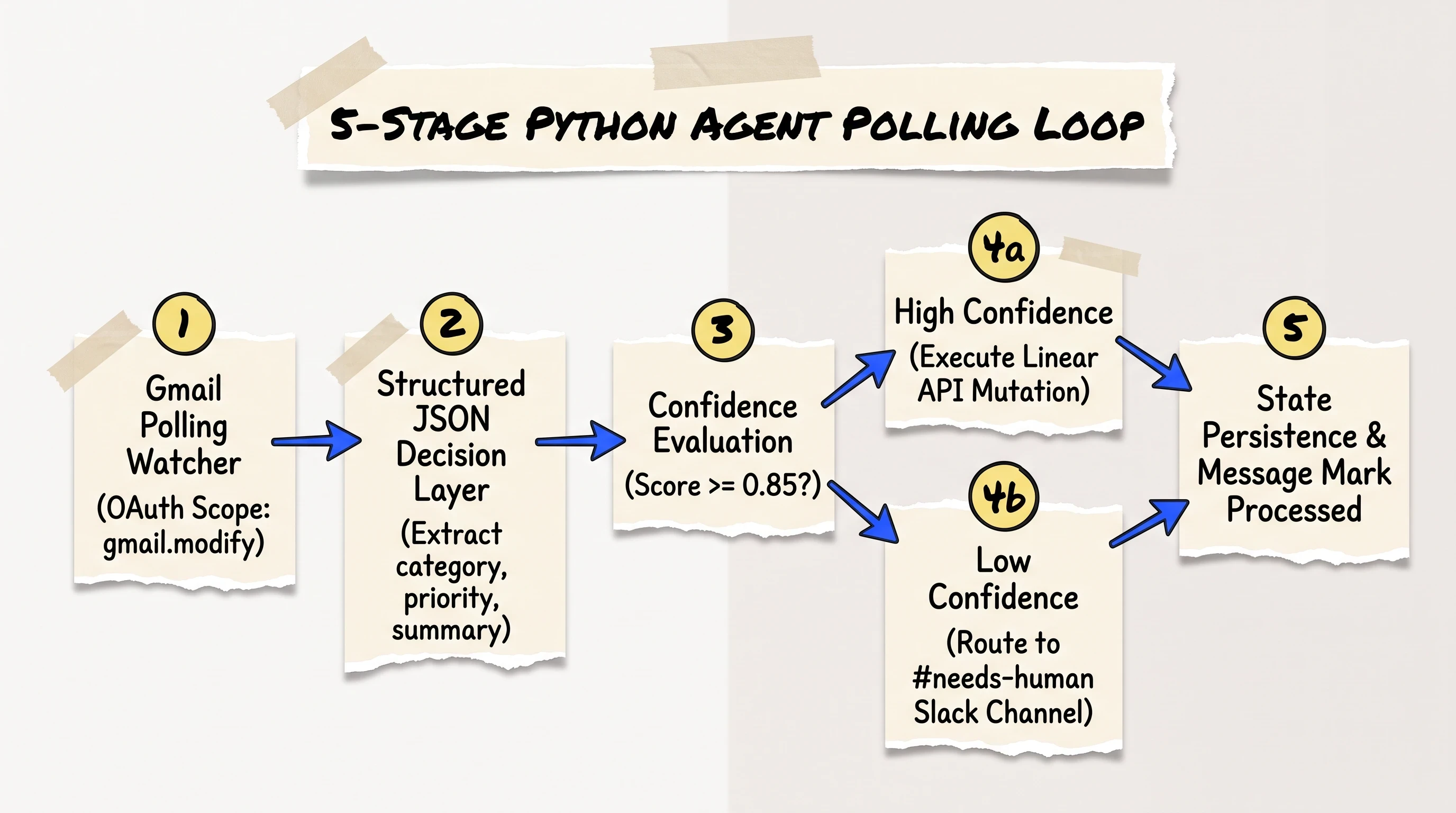
Production Python agent loop: polling Gmail via OAuth modify scopes, classifying intent via structured JSON, executing Linear mutations, and escalating low-confidence cases to Slack.
Initializing the Gmail Modify Polling Watcher
The first stage of the custom agent lifecycle involves monitoring inbound communications. To ensure the script only processes new messages and marks them as completed, authenticate using the specific gmail.modify OAuth scope rather than full mailbox access.
Here is the complete Python script for initializing the Gmail polling watcher and defining the structured decision layer:
Structured JSON Decision Layer Prompting
To ensure the downstream Python script never fails due to conversational text formatting or missing keys, configure the OpenAI client to enforce strict JSON schema compliance.
Wiring Linear and Slack Action Handlers with Dry-Run Staging
Once the model produces a validated structured decision object, the Python agent executes the corresponding API mutation.
To prevent catastrophic accidental writes during initial deployment, implement a dry_run=True staging flag that prints the proposed network payload without modifying external databases.
To schedule this Python script on a cloud Linux host (such as an AWS EC2 instance or Google Cloud Compute VM), configure a standard system cron job:
Implementation Path 3: Model-Agnostic Local Sandboxing via OpenWork and MCP
One significant limitation of native cloud workspace agents is platform lock-in. When you build exclusively inside proprietary cloud builders, your connectors, logic, and state cannot be ported to other foundational model providers like Anthropic Claude Code, Google Gemini, or open-source local LLMs.
To build an agile, model-agnostic workspace agent stack, engineers are adopting open-standard frameworks built on the Model Context Protocol (MCP).
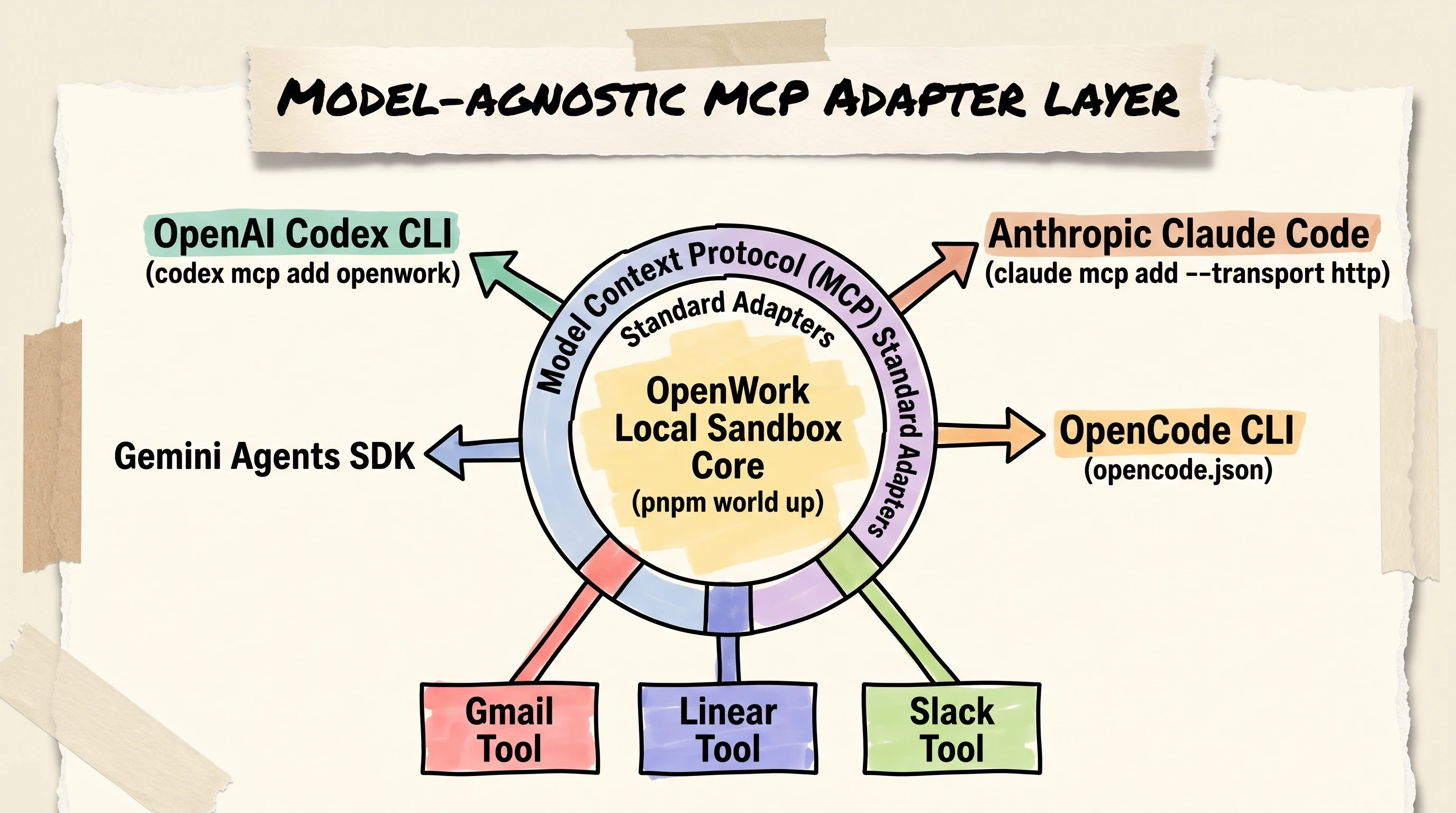
The Model Context Protocol (MCP) decouples tools from models, enabling one shared set of local SaaS connectors to serve Codex, Claude Code, and OpenCode.
Running an Isolated Local Dev Environment with Headless OpenWork
OpenWork (an open-source project created by the different-ai community) provides a localized desktop runtime that acts as a local alternative to Claude Cowork and proprietary cloud sandboxes. It allows you to run headless agent processes on your local machine with direct access to local tools and files.
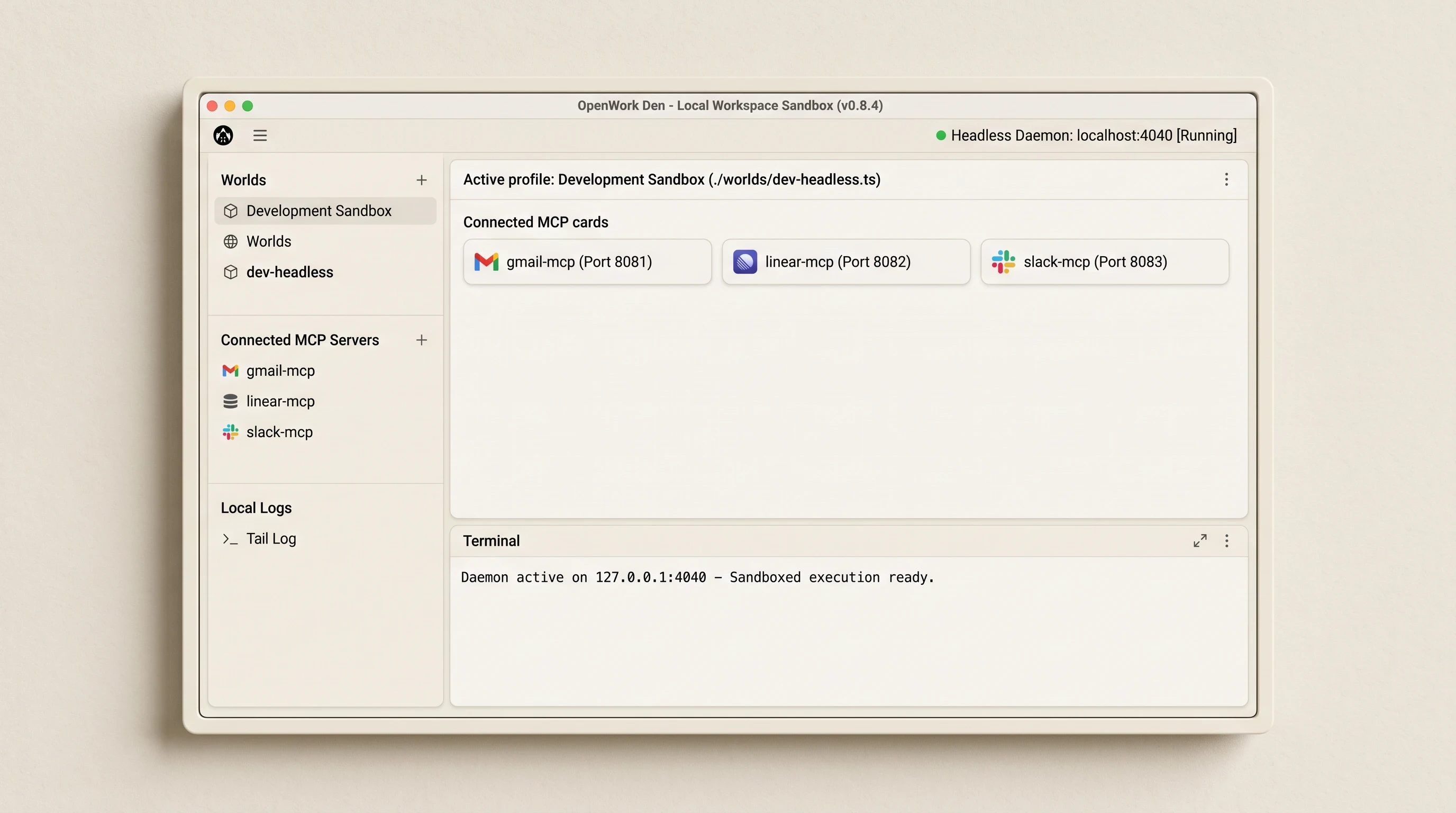
OpenWork provides a local, headless development sandbox for building and debugging agent workflows before deploying to production cloud environments.
To initialize a local headless developer sandbox:
Clone the open-source repository and install project dependencies using
pnpm:
Launch the isolated headless environment daemon:
The headless daemon initializes a local RPC server on
http://127.0.0.1:4040, exposing your configured file trees and local tools via MCP.Complete the security handshake by signing into OpenWork Den (the hosted management console) and pasting your one-time session token into the terminal prompt.
Attaching Remote MCP Servers to Codex, Claude Code, and OpenCode
Because MCP functions as an open standard, any compatible AI client can connect to your local OpenWork environment and execute tasks using the exact same underlying tools.
Here is how to register the local workspace endpoint across different developer CLI clients:
To register the same server in OpenAI Codex CLI:
To register the server in Anthropic Claude Code:
This model-agnostic configuration allows you to prototype tools locally, test prompt schemas against multiple LLMs simultaneously, and avoid vendor lock-in before committing workflows to production cloud infrastructure.
Architecting a Shared Context Layer: Overcoming Memory Silos Across Multi-Agent Teams
Most engineering teams spend three weeks arguing over which foundation model writes the cleanest SQL. They spend three hours thinking about how their agents will share state when the first batch job finishes.
This oversight surfaces immediately once an organization deploys more than two agents.
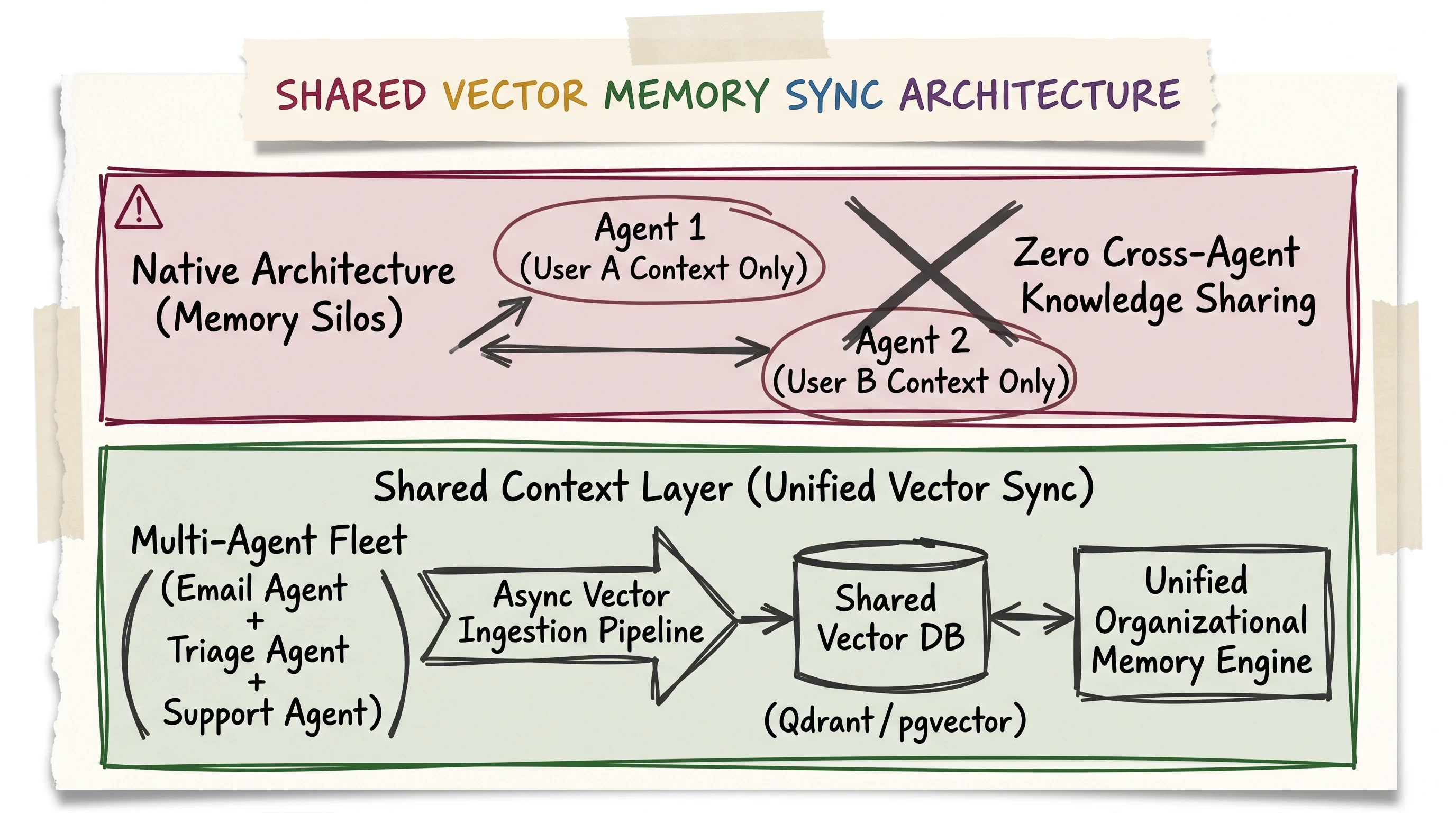
Overcoming the per-user memory blindspot: an external vector sync layer aggregates organizational learnings across multi-agent fleets into a shared knowledge base.
The Per-User Memory Blindspot in Native Workspace Agents
When you build agents inside native cloud environments like ChatGPT Workspace, the platform isolates memory indices strictly by individual user accounts and individual agent IDs.
In practice, this creates severe organizational friction:
The Context Silo: If the Customer Support Agent interacts with a key enterprise client and learns that they recently migrated from AWS to Azure, that crucial context remains trapped inside the support agent's private session thread.
The Blind Handshake: When the Sales Renewal Agent or the Technical Triage Agent runs scheduled routines for the same account tomorrow, they operate with zero visibility into yesterday's support interaction.
Redundant API Calls: Each separate agent independently queries upstream SaaS APIs to reconstruct basic customer profile parameters, burning redundant tokens and inflating latency.
Engineering an External Shared Vector Store and Context Synchronization Pipeline
To build a true enterprise multi-agent fleet, you must decouple organizational memory from individual LLM session windows. You do this by engineering an external asynchronous vector synchronization pipeline.
The pipeline operates through four synchronized steps:
State Extraction Interceptor: At the conclusion of every agent run, a post-execution hook extracts atomic entity records (Client ID, Technology Stack, Reported Friction, Action Taken) into structured JSON.
Asynchronous Ingestion: The structured record is passed to an asynchronous worker queue (such as Celery or AWS SQS) to prevent blocking the primary agent execution loop.
Vector Embeddings: The worker generates dense vector embeddings using
text-embedding-3-smallortext-embedding-3-large.Centralized Vector Store Storage: The embeddings are upserted into an enterprise vector database, such as
pgvectorin PostgreSQL, Qdrant, or Pinecone, partitioned by tenant ID and business domain.Context Injection on Invocation: When any agent in the fleet is instantiated, its initialization prompt queries the vector store for the top-3 most relevant cross-agent records for that specific customer or ticket identifier.
By inserting this external synchronization layer, your entire agent fleet shares a single, cumulative organizational intelligence layer that survives individual session purges.
Enterprise Governance, RBAC, and Connector Permission Scoping
Deploying autonomous software agents with direct API access to corporate communication channels and databases introduces significant security risks. A single misconfigured OAuth scope or prompt injection vulnerability can lead to data exfiltration, accidental mass email dispatches, or database corruption.
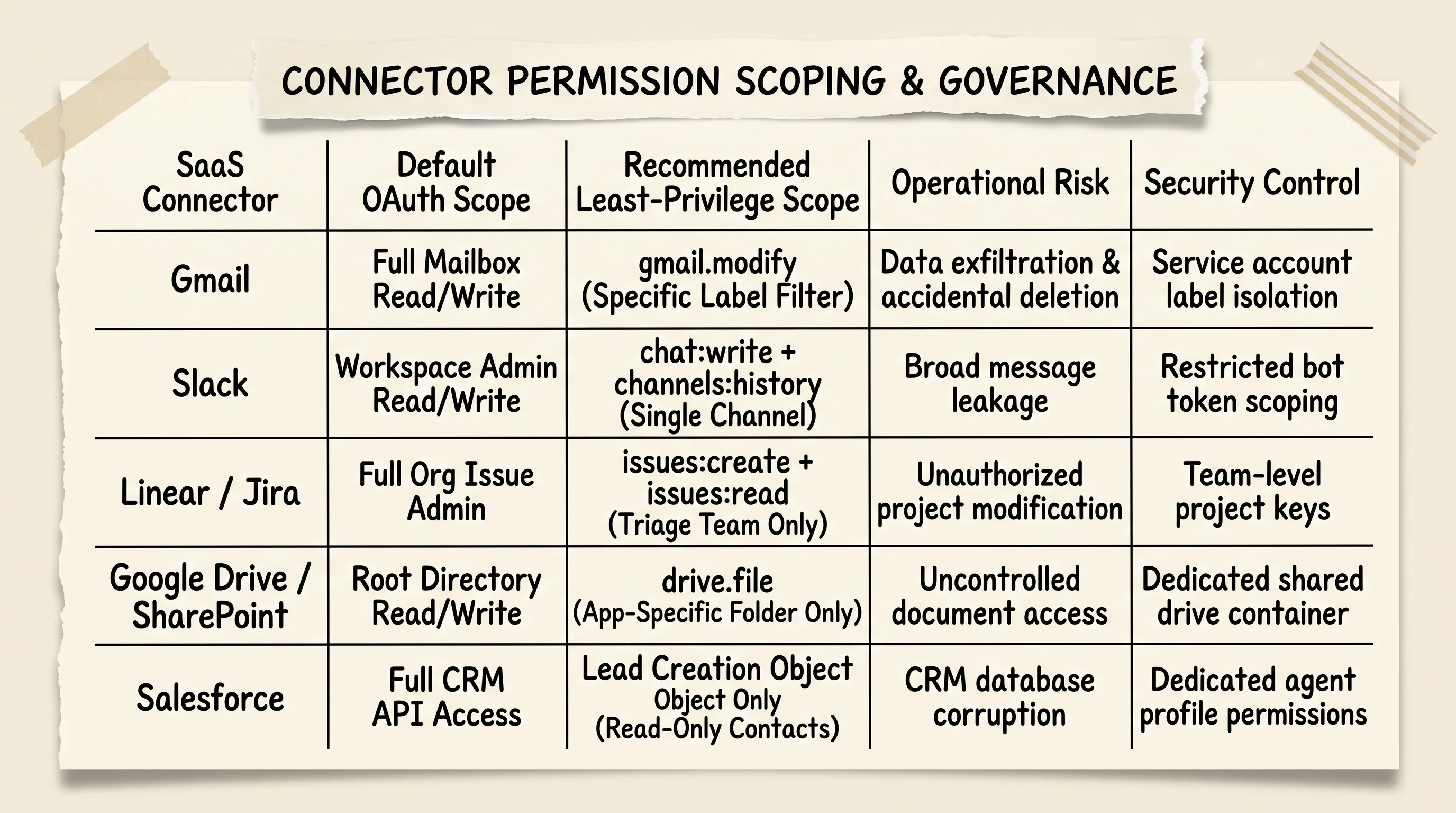
Enforcing least-privilege connector permissions: configure read-only service accounts and restricted OAuth scopes across Gmail, Slack, and Linear integrations.
Enforcing Least-Privilege Scoping on Third-Party SaaS Connectors
The most common operational vulnerability in workspace agent deployments is granting blanket administrative OAuth scopes. Third-party SaaS connectors often request full mailbox read/write access or broad organizational administration permissions by default.
To protect enterprise systems, enforce strict least-privilege scoping:
Gmail and Email Connectors: Never grant
https://mail.google.com/(full access). Restrict permissions strictly tohttps://www.googleapis.com/auth/gmail.modifyor configure dedicated Google Workspace service accounts restricted to specific label filters (such aslabel:triage).Slack Connectors: Avoid global bot administration tokens. Scope the bot token strictly to
chat:writeandchannels:history, and restrict the bot's workspace footprint to dedicated operational channels like#triage-feedand#needs-human.Issue Trackers (Linear / Jira): Use dedicated service account API keys rather than individual developer personal access tokens. Restrict issue creation permissions to specific triage project keys to prevent accidental modifications to active production sprints.
Cloud Storage (Google Drive / SharePoint): Scope connector access to
drive.file(access only to files created or opened by the agent) rather than root directory drive access.
SOC 2 Type II Compliance, Audit Logging, and Zero Data Retention Rules
For enterprise legal and compliance teams, OpenAI provides specific contractual data governance controls across Business and Enterprise tiers:
Zero Model Training Default: Business and Enterprise agreements state that customer workspace inputs, attached files, and tool invocation outputs are never used to train foundation models.
SOC 2 Type II Certification: OpenAI maintains active SOC 2 Type II compliance, verifying cloud security controls, encryption in transit (TLS 1.3), and encryption at rest (AES-256).
Administrative Audit Trails: All workspace agent executions, connector authentications, configuration modifications, and user prompt submissions are recorded in immutable administrative audit logs for compliance reviews.
Data Processing Agreements (DPAs): Regulated organizations can execute formal DPAs including Standard Contractual Clauses (SCCs) to satisfy General Data Protection Regulation (GDPR) and California Consumer Privacy Act (CCPA) requirements.
2026 Pricing Realities: Navigating the Post-May 6 Credit-Based Billing Model
During late 2025 and early 2026, early access to workspace agents operated under a promotional "research preview" where executions were largely unmetered on eligible enterprise tiers.
However, following May 6, 2026, OpenAI transitioned the platform to an active usage-based credit consumption billing model.
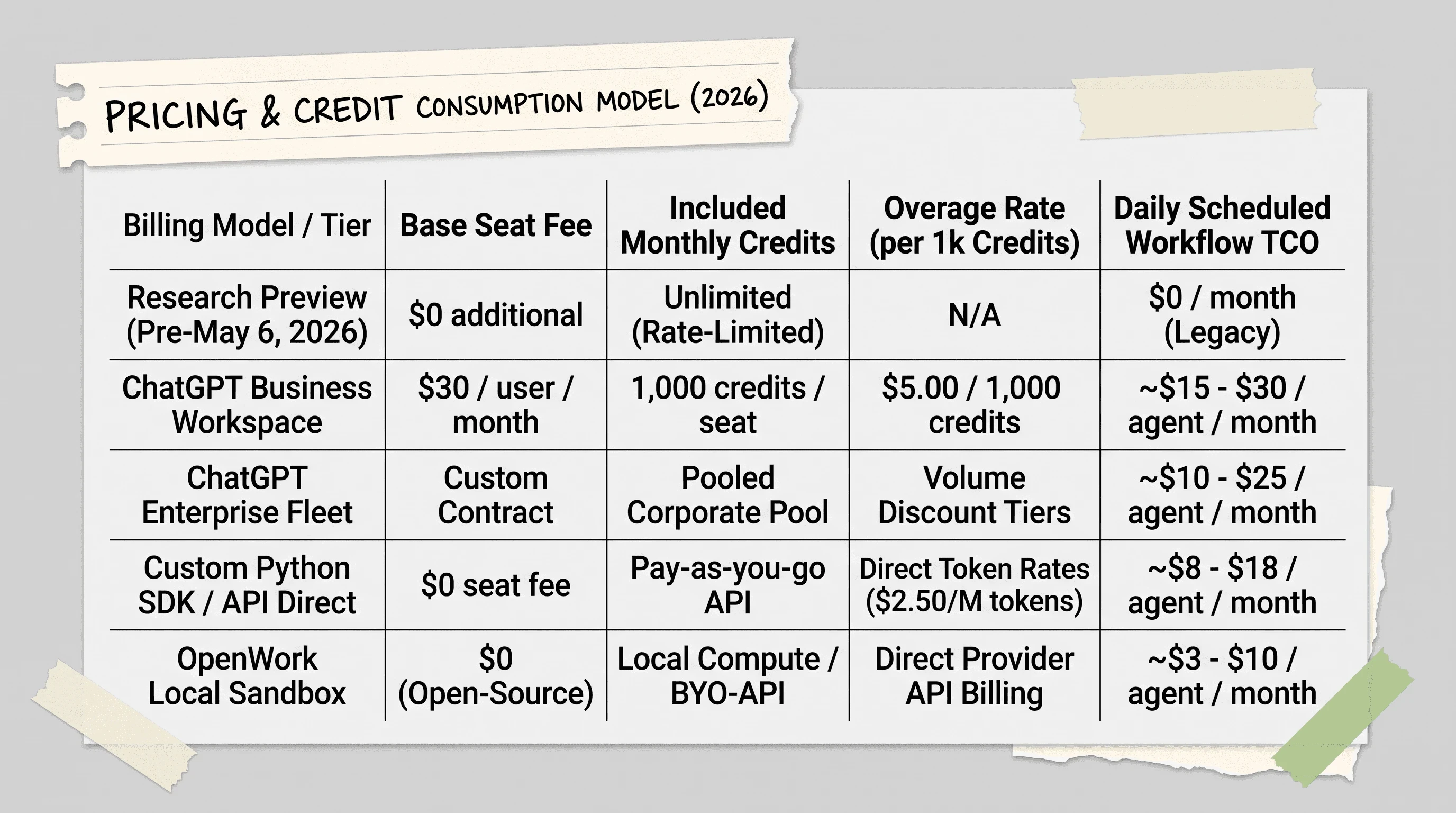
The post-May 6, 2026 billing transition replaces free preview access with usage-based credit consumption for scheduled background agent runs.
The Shift from Research Preview to Usage-Based Credits
Understanding the post-May 6 economic model is essential for managing monthly SaaS budgets:
Base Seat Licensing: ChatGPT Business workspaces require an active base subscription of $30.00 per user per month (billed annually).
Monthly Included Credits: Each paid Business seat includes an allocation of 1,000 workspace credits per month, pooled across the organization.
Credit Overage Rates: When background agent runs consume the pooled credit quota, additional usage is billed at $5.00 per 1,000 credits.
Enterprise Custom Pooling: Enterprise contract tiers negotiate custom pooled credit volumes with tiered volume discounts for high-frequency multi-agent fleets.
Estimating Token Burn and Cost Forecasting for Scheduled Agent Runs
The primary driver of credit consumption is execution frequency. Scheduled calendar agents that poll upstream APIs continuously can rapidly exhaust monthly credit pools.
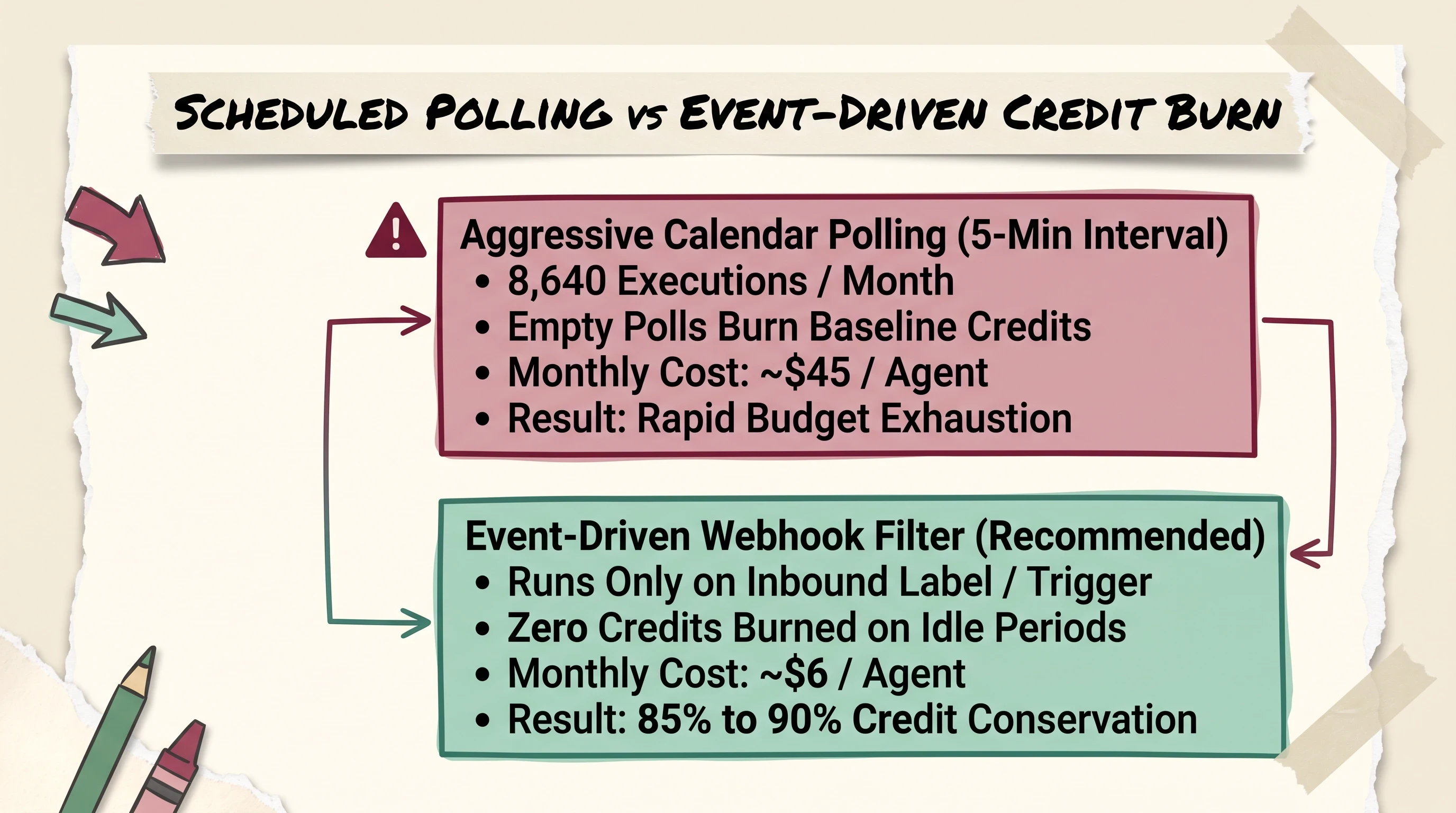
Budgeting scheduled agent runs: event-driven webhooks consume significantly fewer monthly credits than aggressive 5-minute calendar polling loops.
Consider the cost breakdown between aggressive calendar polling and event-driven webhook filtering:
Aggressive Calendar Polling (5-Minute Interval):
Schedule: Every 5 minutes = 12 runs/hour = 288 runs/day = 8,640 executions per month.
Even if 8,000 of those runs find zero new emails, each run spins up the cloud container, loads the system prompt, and consumes baseline tokens.
Estimated Monthly Cost: ~$45.00 per agent per month.
Event-Driven Webhook Filtering (Recommended):
Architecture: An external lightweight webhook worker listens for inbound Gmail or Slack push notifications and triggers the agent only when unprocessed items exist.
Schedule: Average 20 active triage events/day = 600 executions per month.
Estimated Monthly Cost: ~$6.00 per agent per month (an 85% to 90% credit conservation).
Observability, Failure Modes, and Production Limits
Deploying autonomous agents into production business processes reveals edge cases and failure modes that never appear in simple demo videos.
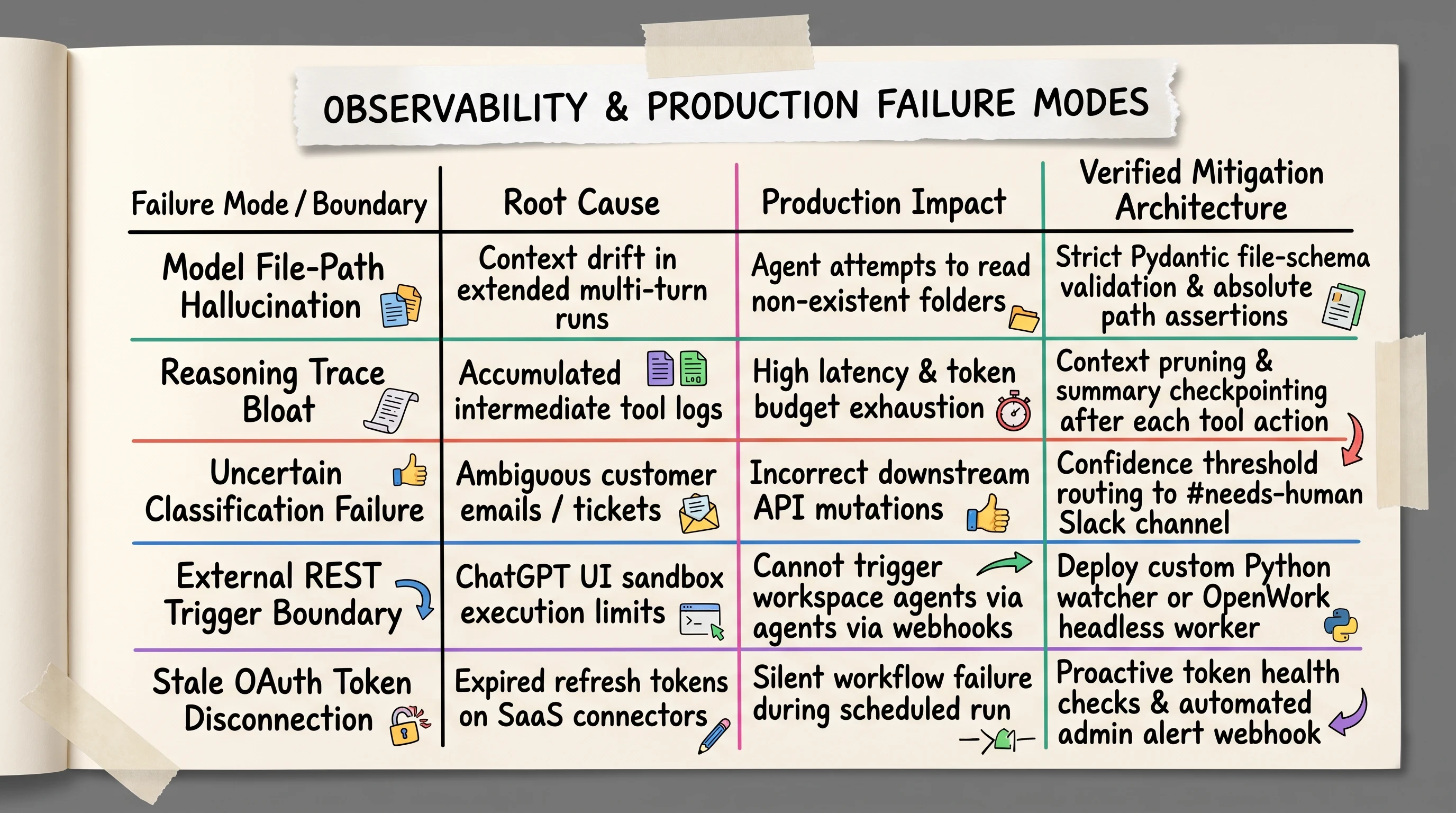
Operational resilience matrix addressing common workspace agent pitfalls including file path hallucinations, trace bloat, and API trigger boundaries.
Mitigating Model Path Hallucinations and Reasoning Trace Bloat
In extended multi-session workflows where an agent reads large document repositories or executes complex code scripts, developers on community forums frequently report two critical failure modes:
Model File-Path Hallucination: During multi-step tasks, language models can suffer from context drift, attempting to access file directories, folder paths, or API endpoints that do not exist. To prevent script crashes, enforce strict runtime schema validation (such as Pydantic path checks) and assert absolute file paths before executing file system commands.
Reasoning Trace Bloat: As an agent iterates through intermediate tool calls, raw tool logs and stack traces accumulate inside the prompt context window. This bloat degrades model attention, increases latency, and inflates token costs. Production pipelines must implement intermediate context pruning, summarizing prior tool outputs before passing state to the next execution step.
Building Human-in-the-Loop Slack Fallbacks for Low-Confidence Classifications
No classification model achieves 100% accuracy on unstructured real-world communications. When an agent encounters ambiguous customer tickets, angry churn risks, or complex legal inquiries, attempting an automated write action is dangerous.
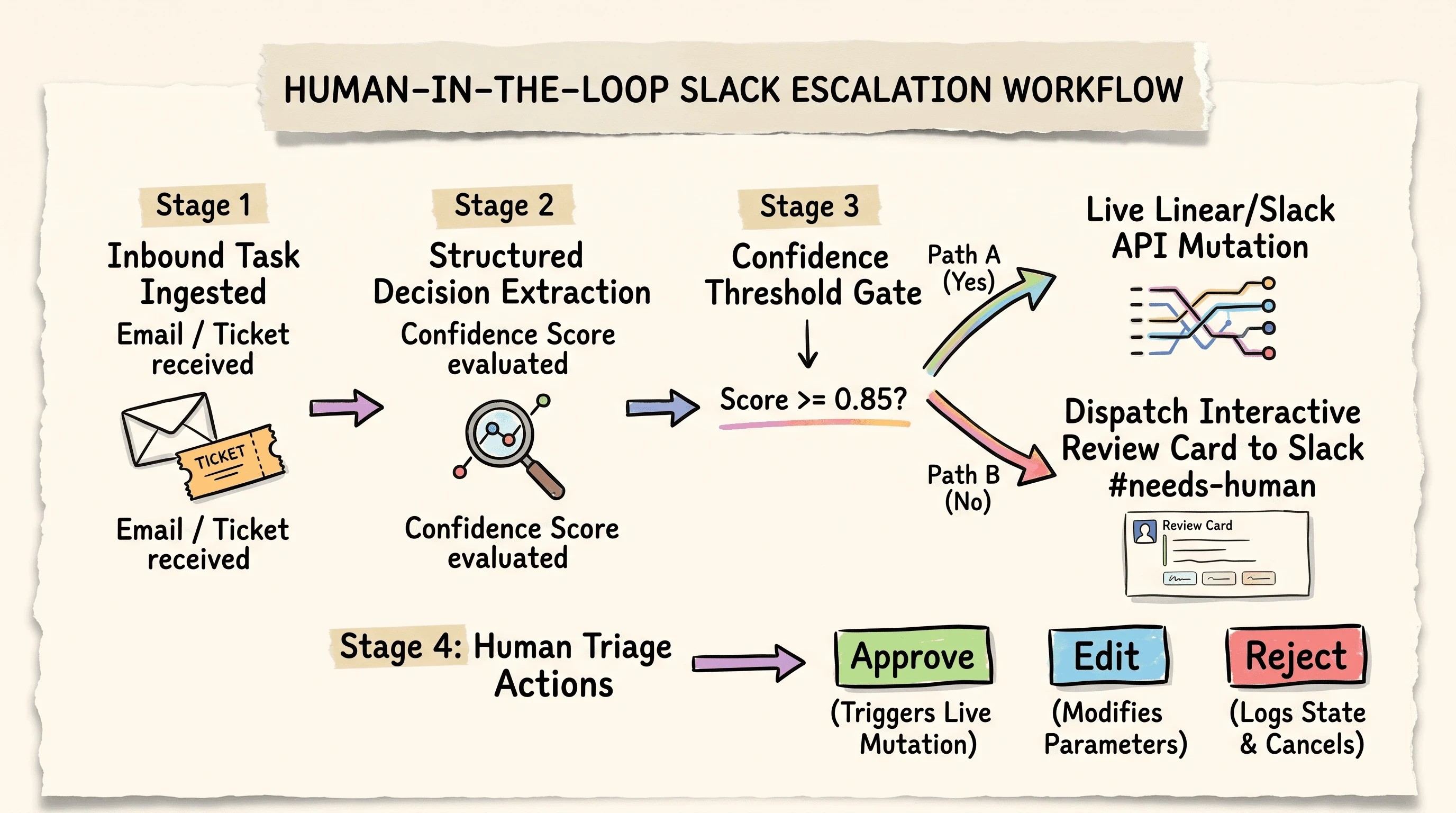
When confidence scores fall below threshold, the agent halts write actions and posts interactive review cards to a dedicated Slack channel.
The human-in-the-loop escalation architecture establishes a deterministic safety boundary:
By routing any task with a confidence score below 0.85 directly to #needs-human, your team eliminates false-positive API mutations while retaining automated throughput on clear-cut cases.
The External API Trigger Boundary: UI Restrictions vs. Custom Workers
A critical architectural constraint documented by developers on Hacker News centers on external programmatic invocation.
While OpenAI documentation references ChatKit and Agents SDK integration, native ChatGPT Workspace Agents running inside the ChatGPT web platform cannot be triggered directly via external inbound REST webhooks. They must be initiated through the ChatGPT web UI, the Slack integration, or scheduled calendar triggers.
To bypass this UI boundary, engineering teams build custom Python polling workers (as detailed in Implementation Path 2) or deploy open-source headless daemons like OpenWork.
Frequently Asked Questions About ChatGPT Workspace Agents
What is a ChatGPT workspace agent?
A ChatGPT workspace agent is a persistent, cloud-hosted autonomous workflow built into ChatGPT Business and Enterprise environments. Unlike conversational chatbots that answer one-off questions in an ephemeral browser tab, workspace agents connect directly to third-party software tools like Gmail, Slack, and Linear, maintaining state across sessions and executing multi-step business tasks on scheduled calendar triggers without requiring human intervention for every step.
What is the difference between Claude Cowork and ChatGPT Workspace Agents?
The primary difference lies in compute architecture and collaboration scope. Anthropic Claude Cowork is a local desktop application that provisions an isolated virtual machine directly on a single user's Mac or Windows computer, focusing on local file manipulation, desktop software automation, and single-operator tasks. ChatGPT Workspace Agents run in multi-tenant cloud containers, focusing on team-wide business processes, cloud SaaS integrations, and scheduled background automations that execute even when all team members are offline.
How much do ChatGPT Workspace Agents cost?
Following the transition after May 6, 2026, workspace agents operate on a usage-based credit consumption model. ChatGPT Business plans require a base subscription of $30.00 per user per month, which includes an allocation of 1,000 workspace credits per seat. Additional credit consumption for high-frequency scheduled runs is billed at an overage rate of $5.00 per 1,000 credits. Enterprise accounts feature custom volume pools and negotiated rate tiers.
Can workspace agents run autonomously without a human triggering them?
Yes. Once configured in the Agent Builder or via the Agents SDK, workspace agents can be attached to recurring calendar schedules (for example, daily at 09:00 UTC). When a scheduled trigger fires, OpenAI's cloud scheduler launches the agent container, authenticates with connected SaaS connectors, processes pending queue items, and stores execution records without requiring an active browser session or manual user prompt.
Is business data from workspace agent sessions used for model training?
No. On ChatGPT Business and Enterprise subscription tiers, OpenAI enforces a default zero-training privacy policy. Customer prompts, attached documents, connector credentials, and agent execution logs are not used to train or fine-tune OpenAI foundational models. Organizations can also execute formal Data Processing Agreements (DPAs) with Standard Contractual Clauses to satisfy SOC 2, GDPR, and enterprise compliance requirements.
Can you embed ChatGPT workspace agents into custom APIs or backend code?
Native workspace agents configured within the ChatGPT web interface must run inside the ChatGPT UI, the official Slack app, or on scheduled calendar triggers; they do not expose direct external REST webhook endpoints for third-party systems. However, engineering teams can build equivalent custom agent workflows using the OpenAI Agents SDK, ChatKit, or open-source MCP adapters like OpenWork to embed agentic execution directly into custom backend applications.
How do you handle tasks or emails that the workspace agent cannot confidently classify?
Production architectures implement a confidence threshold gate. During the structured JSON decision step, the model outputs a confidence score between 0.00 and 1.00. If the score falls below a predefined threshold (such as 0.85) or if the classification category is marked as ambiguous, the agent halts write actions and routes an interactive summary card to a dedicated #needs-human Slack channel for manual review.
Do ChatGPT workspace agents share a unified context layer across an organization?
No. By default, built-in workspace agent memory is siloed per-user and per-agent. To enable multi-agent fleets to share organizational knowledge across departments (for example, ensuring a sales agent knows about recent customer support tickets), engineering teams must architect an external vector synchronization layer using databases like pgvector or Qdrant to ingest, embed, and retrieve cross-agent context.
Do you need to know how to code to build a ChatGPT workspace agent?
No. Non-technical administrators and operations teams can build, test, and deploy functional workspace agents using the visual Agent Builder interface inside the ChatGPT web console. However, building custom error-handling loops, model-agnostic MCP adapters, dry-run staging flags, and external shared vector stores requires software development using the Python Agents SDK.
Closing: Deploying Your First Production Workspace Agent
The transition from prompt-and-response chatbots to persistent workspace agents represents a fundamental evolution in software operations. Moving from conversational assistance to automated digital execution does not happen by accident; it requires deliberate architectural discipline.
Actionable Next-Step Implementation Checklist
Audit Administrator Permissions: Verify that your ChatGPT Enterprise or Business workspace owner has enabled agent permissions and configured appropriate RBAC boundaries in the Admin Console.
Select Your Implementation Route: Choose between the visual Agent Builder for rapid no-code automations or the Python Agents SDK for custom programmatic workflows.
Enforce Least-Privilege Scopes: Audit third-party OAuth permissions across Gmail, Slack, and Linear connectors, replacing broad administrative tokens with restricted service account keys.
Deploy with Dry-Run Staging: Test all new automations using
dry_run=Trueto inspect structured JSON classifications before permitting live database write mutations.Establish Escalation Fallbacks: Configure an automated routing fallback to a
#needs-humanSlack channel for all low-confidence classifications.Optimize Execution Triggers: Migrate high-frequency calendar polling loops toward event-driven webhook filters to conserve monthly workspace credits.
The gap between organizations experimenting with prompt engineering and teams deploying autonomous workspace fleets is widening rapidly. The infrastructure is ready. The rest is execution.
Until then...
Sage
PS. During an early internal test of an automated calendar triage agent, an engineer configured a background script to scan team out-of-office autoresponders and summarize upcoming availability. When one developer configured an automated reply stating they were "hiking through the Alaskan wilderness without electricity or cellular reception," the agent methodically created seven high-priority Linear tickets requesting emergency satellite equipment provisioning.
Author
Practical guides, tool teardowns & AI engineering workflows.
Related Articles


