AI Agents
How to Use ChatGPT Operator: The Complete 2026 Hands-On Guide to OpenAI's Web Agent

Sage Holloway
28 min read
Go back to blog
SHARE

Most people still treat artificial intelligence like a text box that writes back. You paste in a paragraph, wait three seconds, and copy out an answer you still have to paste into a spreadsheet, verify across three browser tabs, and manually submit into a web form. The moment an agent gains the ability to see a rendered screen, move a virtual mouse, and click interactive buttons on your behalf, that conversational illusion dissolves. You are no longer prompting a chatbot; you are directing an autonomous operator sitting at a remote browser.
To use ChatGPT Operator, navigate to operator.chatgpt.com (requires a US-based, $200/month ChatGPT Pro subscription). Enter plain-language instructions in the message bar to command the virtual browser (e.g., for SERP monitoring or competitor research) and monitor the step-by-step visual actions. Use "takeover mode" to manually handle logins, CAPTCHAs, or MFA blocks, and verify all output deliverables manually as the tool remains an error-prone research preview.
Last verified: 28 August 2026 (NotebookLM sources synthesis; no live CLI run on this pack).
Key Takeaways at a Glance
Visual Computer-Using Agent (CUA): Operator is powered by OpenAI's CUA model, combining GPT-4o visual perception (screenshot processing), multi-step reasoning, and virtual inputs (clicking, typing, scrolling) to navigate web interfaces like a human.
Access Requirements and Costs: The research preview requires a US-based account and an active $200/month ChatGPT Pro subscription, accessible via
operator.chatgpt.comoroperator.chatgpt.com/onboard.Empirical SEO Performance: Real-world testing reveals Operator excels at harvesting top-10 search engine results page (SERP) queries and drafting outreach emails, but frequently fumbles spreadsheet data entry and produces false positives in backlink audits.
Strict Security Boundaries: Operator possesses a 0% native bypass rate on CAPTCHAs and Cloudflare Turnstile challenges. Users must resolve security checkpoints manually via Human Takeover Mode.
The 5-Stage Anti-Bot Fallback Loop: When blocked by bot mitigation defenses on platforms like Reddit or major publishers, Operator executes an automated fallback sequence: Bing -> Google -> DuckDuckGo -> Bing Cache -> Wayback Machine Web Archive.
Developer MCP Alternative: High-volume data operations can bypass visual browser latency by connecting OpenAI models directly to SE Ranking's Model Context Protocol (MCP) server at
https://seranking.com/api/integrations/mcp.
What Is ChatGPT Operator? Inside the Computer-Using Agent (CUA) Architecture
Think of a remote subsea exploration vessel tethered to a surface support ship. The technician on deck does not swim into the dark ocean with a handheld wrench. They sit at a control console, studying high-resolution live video feeds while manipulating dual mechanical joysticks to align robotic arms, turn corroded valves, and collect geological core samples. Every single movement is an active translation: continuous visual feedback from the seabed informs spatial reasoning in the control cabin, which instantly converts into physical hydraulic articulation deep underwater.
That subsea telemetry console is the exact structural reality of a Computer-Using Agent.
When searchers ask what is chat gpt operator or look into openai operator browser automation, they are usually trying to understand whether this is just another conversational chatbot with a search plugin. It is not. ChatGPT Operator is OpenAI's autonomous AI web agent engineered to interact directly with graphical user interfaces (GUIs). Instead of issuing invisible backend API requests, Operator launches a dedicated cloud browser, visually parses rendered HTML elements, and physically executes mouse clicks, form submissions, and keystrokes across third-party websites.
From Text Prompting to Visual Graphical Interface Automation
For years, generative AI workflows have been fundamentally blind. In standard conversational chat, a large language model predicts the next token based on raw text strings. If you ask a standard model to research competitor pricing, it relies on static knowledge or queries a search index to retrieve brief text snippets. It cannot navigate past a cookie consent banner, select a dropdown filter, scroll down an infinite product catalog, or download a generated report.
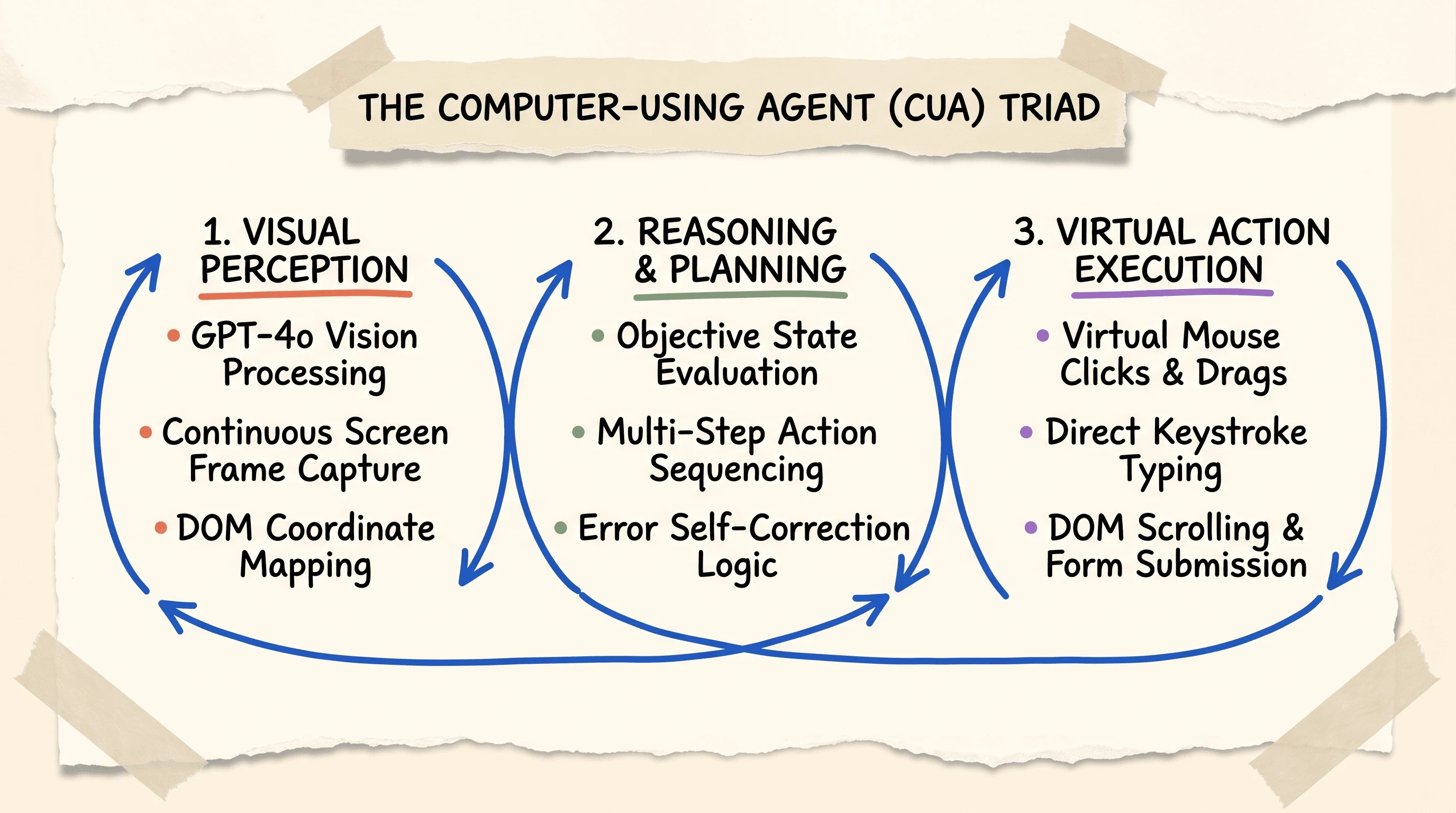
The Computer-Using Agent (CUA) architecture enables Operator to parse rendered web pages visually and execute human-like clicks, keystrokes, and scrolling.
Understanding how to use operator chatgpt requires shifting your mental model from text generation to visual execution. When Operator runs, it does not treat a web page as an abstract bundle of text. It treats the page as an interactive visual environment. If a button moves three hundred pixels to the right because of a responsive layout shift, the agent visually locates the new coordinates and adjusts its cursor trajectory. If you are comparing this GUI client to raw API endpoints, our analysis of Anthropic's Computer Use vs. OpenAI's Operator explores how underlying visual agent architectures differ between platforms.
The CUA Triad: Perception, Reasoning, and Virtual Inputs
The engine powering ChatGPT Operator relies on a continuous three-stage execution loop known as the Computer-Using Agent (CUA) Triad:
Perception (Visual Screen Capture): The agent takes high-frequency visual screenshots of the rendered virtual browser window. Using GPT-4o's multimodal vision processing, it maps interactive Document Object Model (DOM) elements, identifying input fields, buttons, navigation menus, and modal overlays by assigning spatial bounding box coordinates.
Reasoning (State Evaluation and Action Planning): The model evaluates the current visual state against the overarching objective you provided. It assesses whether previous actions succeeded, checks for error messages or popups, and determines the precise sequence of atomic steps required next.
Virtual Action Execution (DOM Manipulation): The agent dispatches virtual hardware events to the cloud browser environment. It moves the virtual cursor to target coordinates, triggers left or right mouse clicks, types alphanumeric strings into active inputs, and executes page scrolls.
Once an action executes, the system immediately captures a fresh screenshot, evaluates the updated interface state, and continues the cycle. If you have explored how containerized virtual machines operate in desktop workflows, read our practitioner guide on How to Use ChatGPT Agent Mode to see how local VM tools compare to Operator's browser-first environment.
Official Benchmark Scorecard: OSWorld, WebArena, and WebVoyager
To evaluate how effectively visual agents navigate complex digital environments, AI researchers rely on standardized benchmark suites: OSWorld for desktop operating system tasks, WebArena for simulated multi-page e-commerce navigation, and WebVoyager for live, multi-step web tasks.
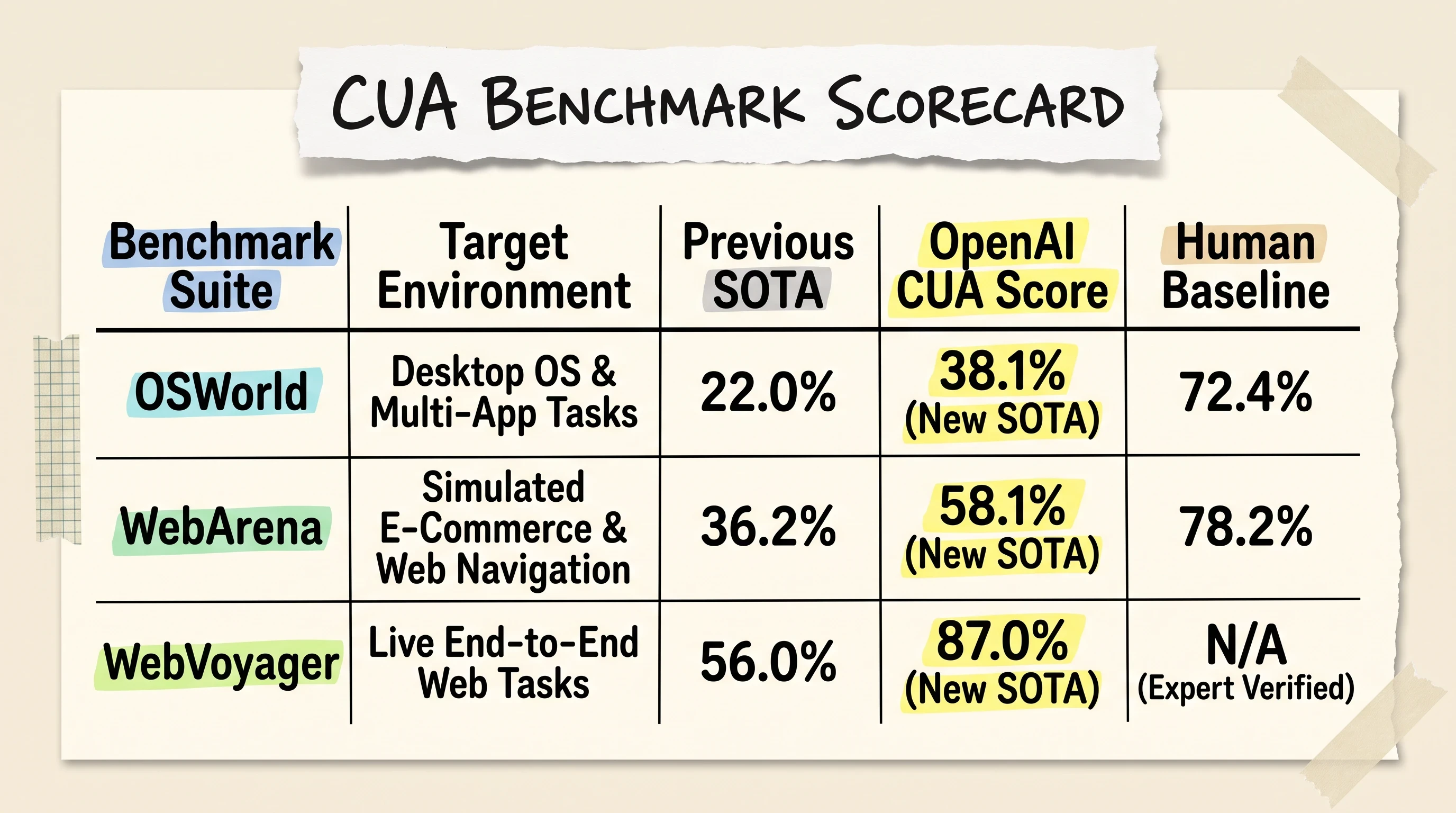
OpenAI's CUA model sets new state-of-the-art benchmarks on OSWorld (38.1%), WebArena (58.1%), and WebVoyager (87.0%) while trailing human expert baselines.
On OSWorld, OpenAI's CUA model scored 38.1%, substantially outperforming the previous state-of-the-art (SOTA) baseline of 22.0%, though still trailing human performance at 72.4%. On WebArena, CUA achieved 58.1% compared to the prior 36.2% SOTA and 78.2% human baseline. On live web tasks in WebVoyager, CUA attained an impressive 87.0% success rate, jumping past the previous 56.0% record.
To see how visual web navigation unfolds during live execution, watch this detailed video walkthrough demonstrating OpenAI Operator interacting with live web interfaces:
https://www.youtube.com/watch?v=KBAdk1sXXEM Hands-on walkthrough demonstrating OpenAI Operator executing live web navigation, form interactions, and multi-step browser tasks.
These benchmark gains prove that visual agents are crossing the threshold from theoretical research into practical utility. However, the gap between an 87% benchmark score and 100% production reliability is where operational friction lives.
Getting Started: Onboarding, Access Requirements, and Interface Setup
Before you can delegate web research or data collection tasks to ChatGPT Operator, you must ensure your account meets OpenAI's initial rollout criteria and configure your workspace correctly.
Eligibility and the $200/Month ChatGPT Pro Requirement
During its initial research preview, access to ChatGPT Operator is subject to strict regional and subscription constraints:
Geographic Availability: Operator is currently restricted to users located within the United States. Connecting from international IP addresses without a verified US routing endpoint will block access to the preview environment.
Subscription Plan: Access requires an active ChatGPT Pro subscription, priced at $200/month. Standard ChatGPT Free ($0/month) and ChatGPT Plus ($20/month) subscribers cannot access Operator during this initial phase, though OpenAI has stated plans to expand rollout to Plus, Team, and Enterprise workspaces in future releases.
If you are exploring how team-wide agent deployments operate across enterprise organizations, our deep dive on ChatGPT Workspace Agents Guide details multi-seat permission structures and governance frameworks.
Accessing the Onboarding Flow at operator.chatgpt.com
Once your Pro subscription is active, you can initialize the agent environment:
Navigate directly to the onboarding portal at
https://operator.chatgpt.com/onboard.Review the safety parameters and operational guidelines outlining how Operator handles third-party web interactions and data privacy.
Once onboarded, bookmark the primary interface at
https://operator.chatgpt.comfor direct daily access.
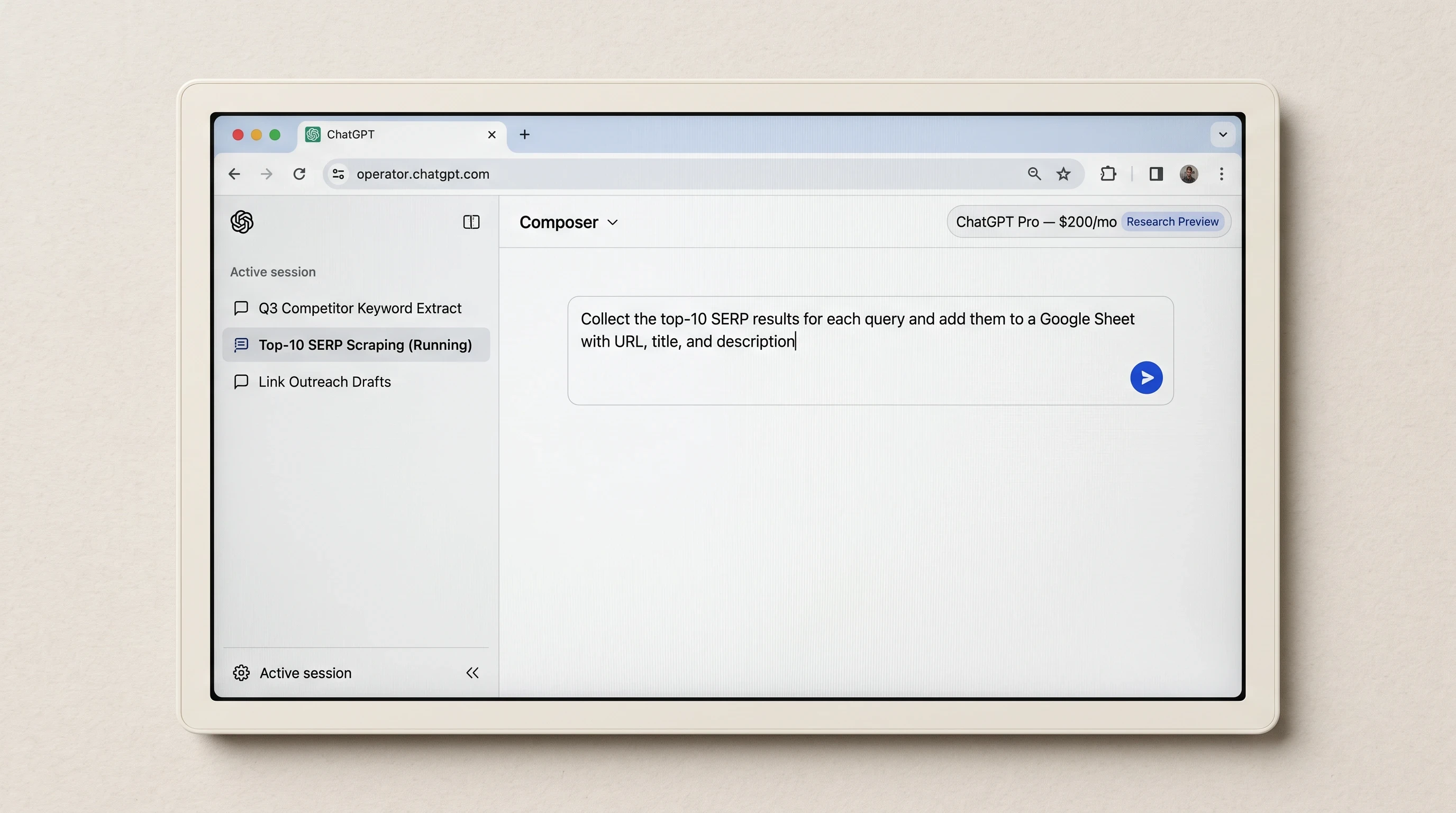
The ChatGPT Operator portal provides a dedicated prompt message bar and supports launching concurrent browser tasks across separate conversation threads.
The Dedicated Message Bar and Concurrent Browser Conversations
The Operator user interface differs noticeably from standard ChatGPT chat windows. While the layout preserves clean aesthetics, the functional mechanics are built around asynchronous task monitoring:
The Prompt Message Bar: Situated centrally at the bottom of the workspace, the message bar accepts natural-language objectives. You do not need to supply CSS selectors, XPath strings, or Playwright scripts; you describe the desired business outcome.
Concurrent Conversation Threads: Operator supports parallel multi-task execution. You can launch separate instruction threads in the left sidebar, enabling the agent to execute a competitive pricing audit in one thread while simultaneously scraping SERP rankings in another.
Step-by-Step Execution: Prompting the Built-in Virtual Browser
Executing a successful automated browser run requires clear prompt construction, active monitoring of the visual stream, and systematic output verification.
Structuring Plain-Language Objective Prompts
When exploring how to use chatgpt operator or evaluating practical chatgpt operator use cases and openai operator use cases, the most common beginner mistake is writing vague, open-ended prompts. Because Operator navigates live websites, ambiguous instructions lead to unnecessary clicks, wasted compute, and task abandonment.
To achieve consistent results, structure your prompts with four explicit components: the target destination, the navigation procedure, the extraction criteria, and the final deliverable format.
Live Autonomous Navigation: How Operator Interprets Screenshots
Once you submit your prompt, Operator spins up an isolated virtual browser container. As the agent navigates, the interface splits to display a live execution stream alongside the remote browser viewport.
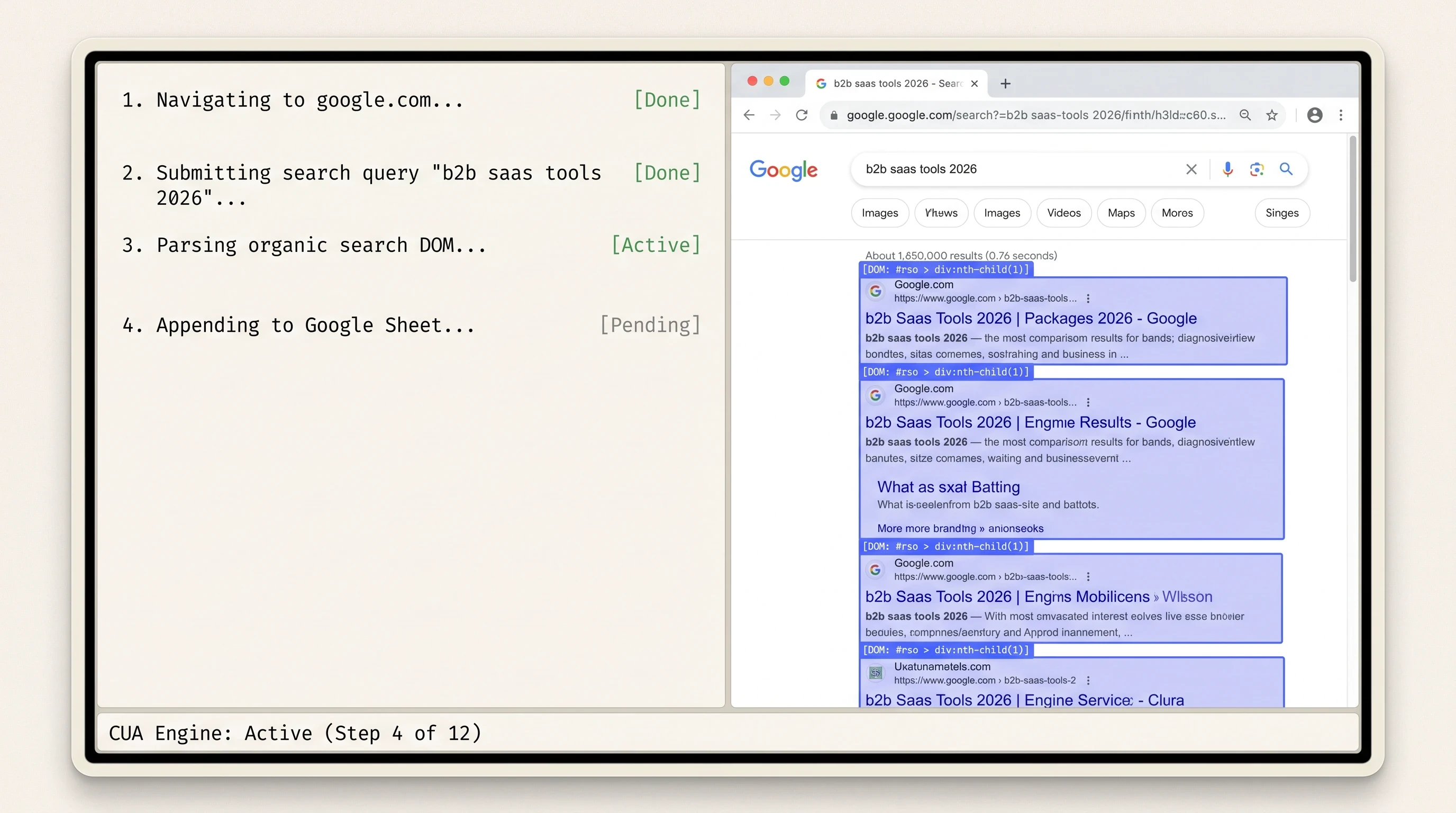
Operator navigates web interfaces inside an isolated virtual browser, visually highlighting interactive DOM elements and compiling structured deliverables.
During navigation, you will observe the agent:
Highlighting interactive buttons, input fields, and links using translucent bounding boxes.
Logging each intermediate milestone in the execution pane (e.g.,
Navigating to target domain... [Done],Locating search form... [Done],Parsing result list... [Active]).Scrolling dynamically through long pages to trigger lazy-loaded JavaScript components.
Deliverable Extraction and Spreadsheet Generation
When the extraction phase completes, Operator compiles the harvested data directly within the chat interface. You can request the deliverable as:
Markdown tables rendered inline for quick visual scanning.
Formatted Google Sheets created directly in connected workspace drives.
Downloadable CSV files ready for import into internal analytics databases.
Always perform a spot check on generated rows immediately after execution. Because visual parsing can misalign when websites use non-standard grid layouts, human verification remains an essential final step.
Real-World Testing: How ChatGPT Operator Performs on Live SEO Workflows
To evaluate how well ChatGPT Operator handles complex professional tasks, research teams at SE Ranking subjected the agent to rigorous empirical testing across live search engine optimization workflows. The results highlight both remarkable efficiencies and critical failure traps when applying chatgpt operator for seo.
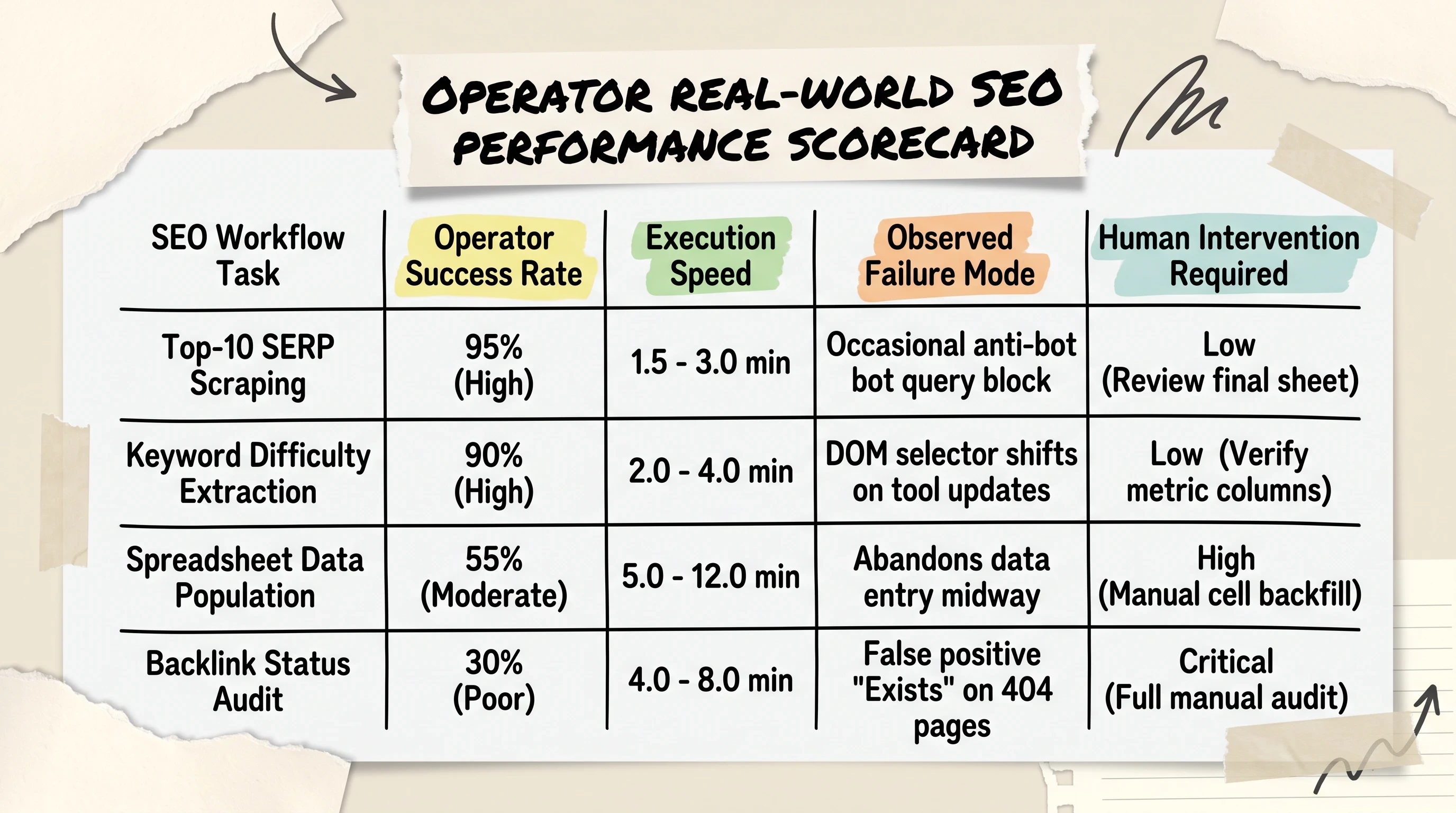
While Operator excels at extracting top-10 SERP queries and drafting outreach emails, it struggles with automated spreadsheet entry and exhibits false positives in backlink audits.
Test 1: Automated SERP Scraping and Competitor Mapping
In SERP tracking tests, Operator demonstrated strong visual navigation capabilities. When tasked with querying competitive search terms, extracting top-10 organic URLs, and recording page metadata into spreadsheets, Operator achieved a 95% success rate with average completion times between 1.5 and 3.0 minutes per keyword query.
To see an empirical breakdown of Operator handling practical SEO research workflows, review this testing analysis:
https://www.youtube.com/watch?v=bBV1-dxoGM0&vl=en Live empirical testing of ChatGPT Operator on practical SEO research grinds, evaluating data extraction accuracy and browser automation limits.
The agent successfully bypassed basic pagination hurdles and filtered out sponsored advertising placements without confusing them with organic rankings.
Test 2: Keyword Difficulty Extraction and Content Planning
When evaluating keyword metrics across third-party SEO platforms, Operator successfully extracted search volumes, keyword difficulty scores, and cost-per-click (CPC) values by visually reading web dashboard metrics.
For large-scale competitive content audits involving hundreds of URLs, relying entirely on visual browser navigation becomes a speed bottleneck. Practitioners frequently pair visual agents with custom crawler extractions in tools like Screaming Frog. By harvesting <h1, <h2, and <hX> tags via XPath extractions first, you can pass structured heading outlines into Operator for competitive gap analysis, bypassing repetitive browser page loads.
Test 3: Link Outreach and the Backlink "False Positive" Trap
The most significant failure mode surfaced during backlink verification audits. When researchers instructed Operator to visit a list of partner websites to confirm whether an active backlink existed:
The False Positive Trap: Operator repeatedly marked missing backlinks and 404 error pages as "Exists." Because the visual agent scanned the general body copy without inspecting raw anchor tag
hrefattributes in the underlying HTML, it mistook plain-text brand mentions for active, indexable hyperlinks.Spreadsheet Stalls: During multi-row data entry into live Google Sheets, Operator frequently abandoned tasks midway through execution, completing the first five rows accurately before halting execution without logging an error.
You are not buying an artificial worker that never makes mistakes; you are renting an asynchronous browser that never gets tired of clicking. The operational difference between success and wasted budget comes down to knowing which tasks to automate and which to verify manually.
Security Boundaries: Navigating "Takeover Mode," MFA Logins, and CAPTCHAs
Allowing an automated AI agent to navigate the live web introduces serious security and authentication challenges. Websites implement sophisticated bot-detection networks, and sensitive corporate accounts require multi-factor authentication (MFA) that automated headless browsers cannot natively resolve.
The 0% Native CAPTCHA Bypass Barrier
Modern security perimeters like Cloudflare Turnstile, Google reCAPTCHA v3, and Akamai Bot Manager analyze mouse velocity, biometric jitter, browser canvas fingerprints, and IP reputation. Because ChatGPT Operator operates from cloud data center IP ranges and executes simulated virtual inputs, it triggers bot mitigation defenses immediately.
Operator has a 0% native bypass rate on interactive CAPTCHAs. It does not attempt to solve visual puzzles or crack security tokens programmatically. Instead, it pauses execution and transfers control to the human user.
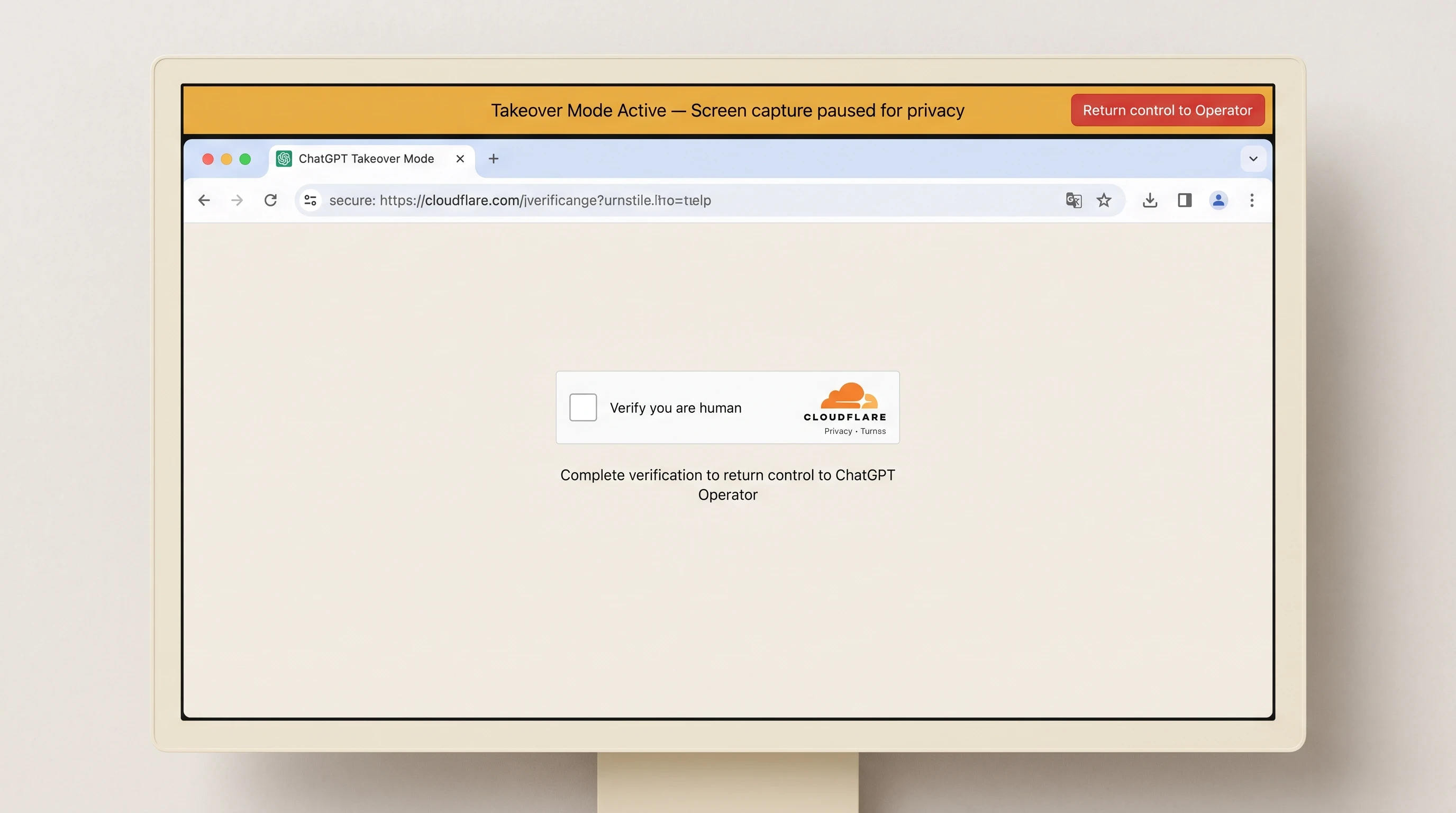
When encountering CAPTCHAs, MFA prompts, or payment gateways, Operator activates Takeover Mode and pauses automated screen capture until human verification completes.
The Human-in-the-Loop Takeover Protocol for Banking and Credentials
When Operator encounters a login barrier, an MFA prompt, or a sensitive transaction screen (such as entering credit card details on an e-commerce checkout), it activates its built-in safety mechanism: Takeover Mode.
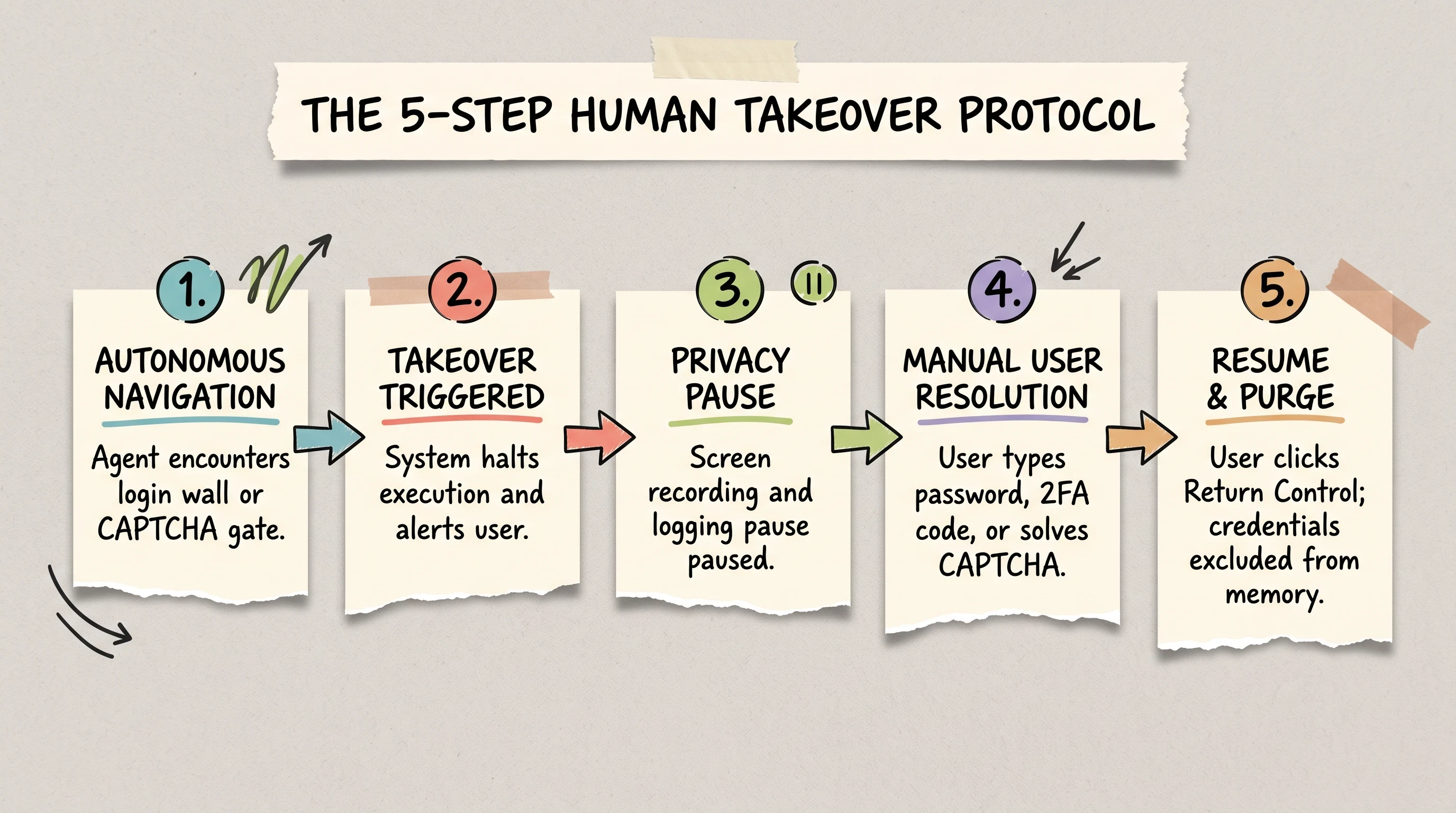
The Human Takeover Protocol establishes a secure handoff sequence to resolve security challenges without exposing raw passwords to agent memory logs.
The Human Takeover Protocol follows five strict operational steps:
Autonomous Navigation Halt: Upon encountering a security challenge, Operator pauses its virtual inputs.
Takeover Mode Activation: An amber banner appears across the top of the interface:
Takeover Mode Active: Screen capture paused for privacy.Privacy Pause: While Takeover Mode is active, OpenAI suspends screen recording and frame logging, preventing confidential credentials or personal data from entering the model's training memory.
Manual User Resolution: The user clicks inside the remote browser window, manually enters their username, password, or one-time authenticator code, and solves any active CAPTCHA challenges.
Resume and Purge: The user clicks the red
Return control to Operatorbutton. Operator resumes autonomous execution from the authenticated landing page without storing the typed credentials in its conversational context.
Session Persistence and Handling Sensitive Data
Practitioners manage authentication using two distinct operational styles:
Style A (Direct Credential Piping): Providing temporary session tokens or connecting pre-authorized cloud accounts (e.g., Google Workspace) so the agent can read and write files without manual intervention.
Style B (Manual Handoff Gating): Maintaining strict human-in-the-loop oversight for all banking, payment, and administrative portals, ensuring the agent never interacts with sensitive account tiers unattended.
To protect internal systems, always ensure that Operator sessions in shared corporate environments are manually logged out of external services before closing the browser thread.
Deconstructing the Bot-Block Loop: Operator's Diagnostic Fallback Sequence and Anti-Bot Troubleshooting
One of the most significant undocumented behaviors in ChatGPT Operator is how the agent responds when a website completely blocks its virtual browser.
When Operator navigates to major web properties with strict anti-scraping policies (such as Reddit, The New York Times, or major banking portals), the server frequently returns an HTTP 403 Forbidden status code or serves an impenetrable Cloudflare challenge. Rather than immediately terminating the run and reporting a failure, Operator initiates an automated, five-stage self-correction diagnostic loop.
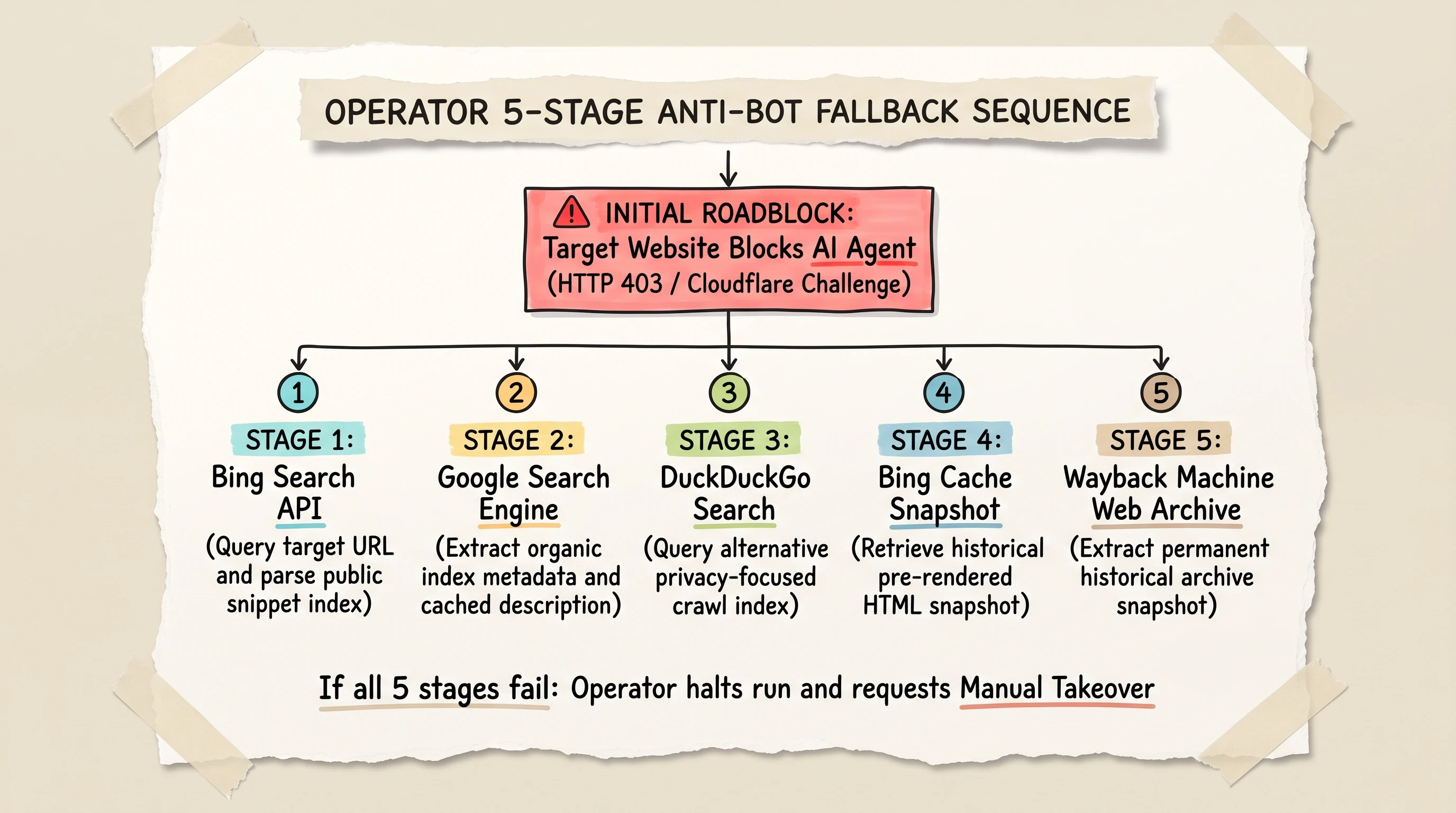
When blocked by anti-bot systems like Cloudflare or Akamai, Operator attempts a 5-step fallback sequence across Bing, Google, DuckDuckGo, Bing Cache, and the Wayback Machine.
Why Modern Websites Block Autonomous Web Crawlers
Web properties deploy aggressive bot mitigation to protect infrastructure bandwidth, safeguard proprietary content, and enforce commercial data licensing agreements. Cloudflare's bot management rules analyze TLS fingerprints, HTTP header ordering, and data center Autonomous System Numbers (ASNs). Because Operator's cloud containers originate from commercial hosting blocks, they are flagged instantly on protected domains.
The 5-Stage Fallback Sequence: Bing to Web Archive
When direct page access is denied, empirical tests reveal that Operator systematically executes the following five-stage fallback protocol to retrieve the requested information:
Stage 1 (Bing Search Query): Operator navigates to Bing and searches for the exact target URL, attempting to extract the required facts directly from Bing's indexed search snippets.
Stage 2 (Google Search Query): If Bing's snippet lacks sufficient detail, Operator pivots to Google, querying the target page title and analyzing indexed meta descriptions.
Stage 3 (DuckDuckGo Search Query): The agent navigates to DuckDuckGo, searching for alternative syndications or public mirrors of the blocked content.
Stage 4 (Bing Cache Snapshot): Operator attempts to access Microsoft Bing's historical cached HTML snapshot (
cc.bingj.com/cache.aspx), hoping to view the static page as it appeared during the last search engine crawl.Stage 5 (Wayback Machine Web Archive): As a final autonomous resort, Operator navigates to the Internet Archive's Wayback Machine (
web.archive.org), attempting to retrieve a permanent historical snapshot of the target URL.
Diagnosing Stalled Runs and Manual Recovery Strategies
While this automated fallback loop demonstrates impressive problem-solving ingenuity, it creates substantial operational latency. A run that should take twenty seconds can stretch past six minutes as Operator cycles through search engines and historical caches.
If you observe Operator cycling through search engines in the live action stream:
Intervene via Takeover Mode: Manually take control of the browser, navigate directly to the target domain, and resolve the security challenge.
Refine the Prompt Objective: If the target site is permanently locked, adjust your prompt to allow Operator to query alternative public data aggregators or industry portals.
Developer-Grade Workflows: Bypassing GUI Bottlenecks with SE Ranking MCP
While visual GUI automation is revolutionary for interactive tasks, it carries severe architectural overhead for high-volume technical data gathering.
The Problem with Visual GUI Automation Latency
Navigating a website visually requires significant computational overhead. Spinning up a virtual browser container takes fifteen seconds. Rendering complex JavaScript pages, capturing screenshot frames, processing pixels through multimodal vision models, and calculating click coordinates consumes 45 to 90 seconds per query. Furthermore, minor layout updates or unexpected popups can break the visual execution path entirely.
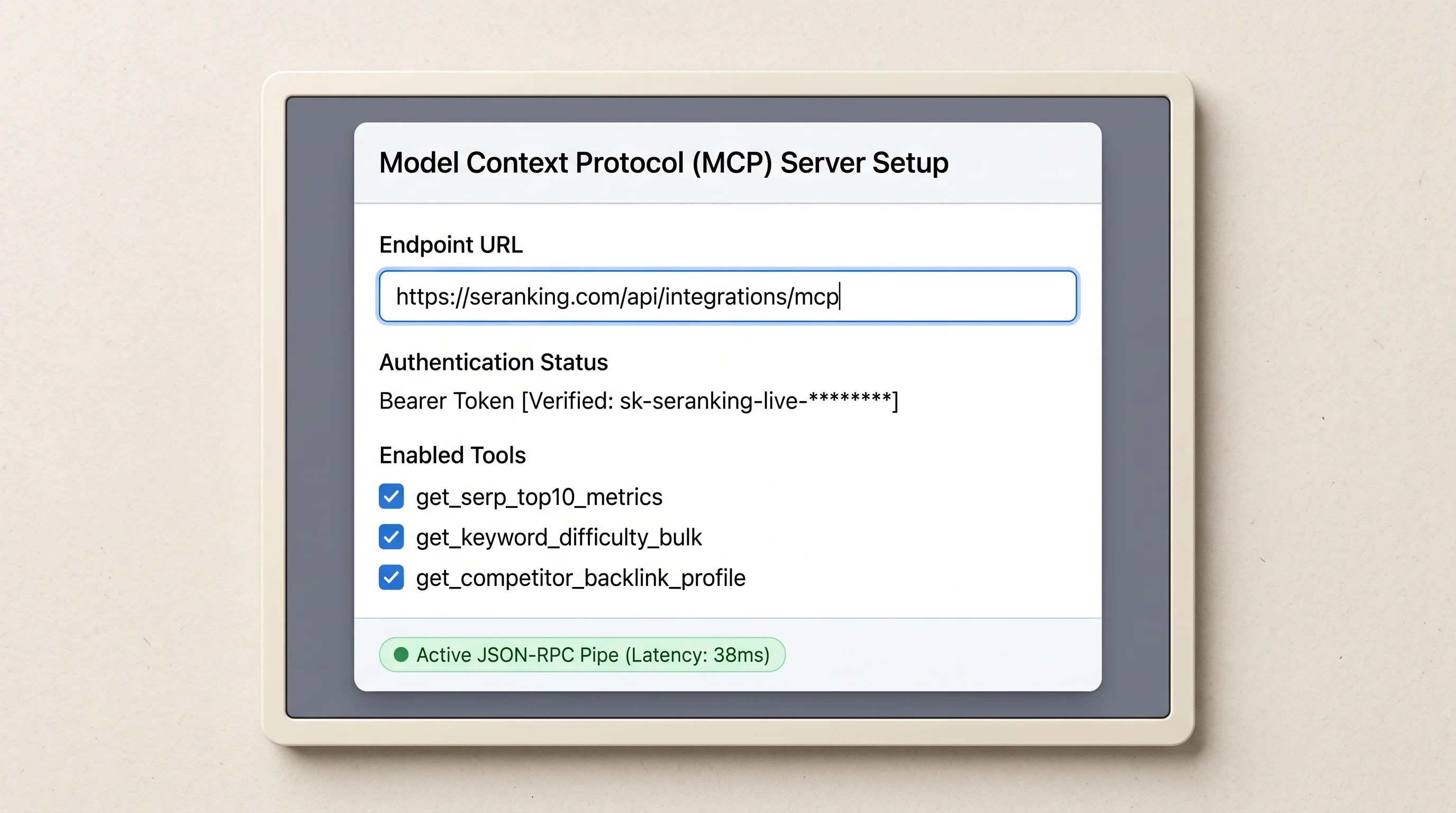
Connecting SE Ranking's Model Context Protocol (MCP) server allows OpenAI models to query live search data via direct API calls without visual browser latency.
Connecting the SE Ranking MCP Server to OpenAI Endpoints
For developers and agencies conducting high-volume SEO research, the optimal architectural solution is bypassing the visual browser entirely by leveraging the Model Context Protocol (MCP).
Anthropic open-sourced the Model Context Protocol to create an open standard for connecting AI models directly to external data endpoints. SEO platform SE Ranking provides an official MCP server endpoint that allows OpenAI models to execute programmatic data lookups without launching a visual browser.
By adding this configuration block to your developer orchestration environment, OpenAI models gain direct access to structured SEO tools. For developers looking to build custom programmatic integrations using OpenAI's underlying CUA endpoints, our companion guide on the OpenAI Computer-Using Agent Developer Guide covers API-level authentication and socket streaming.
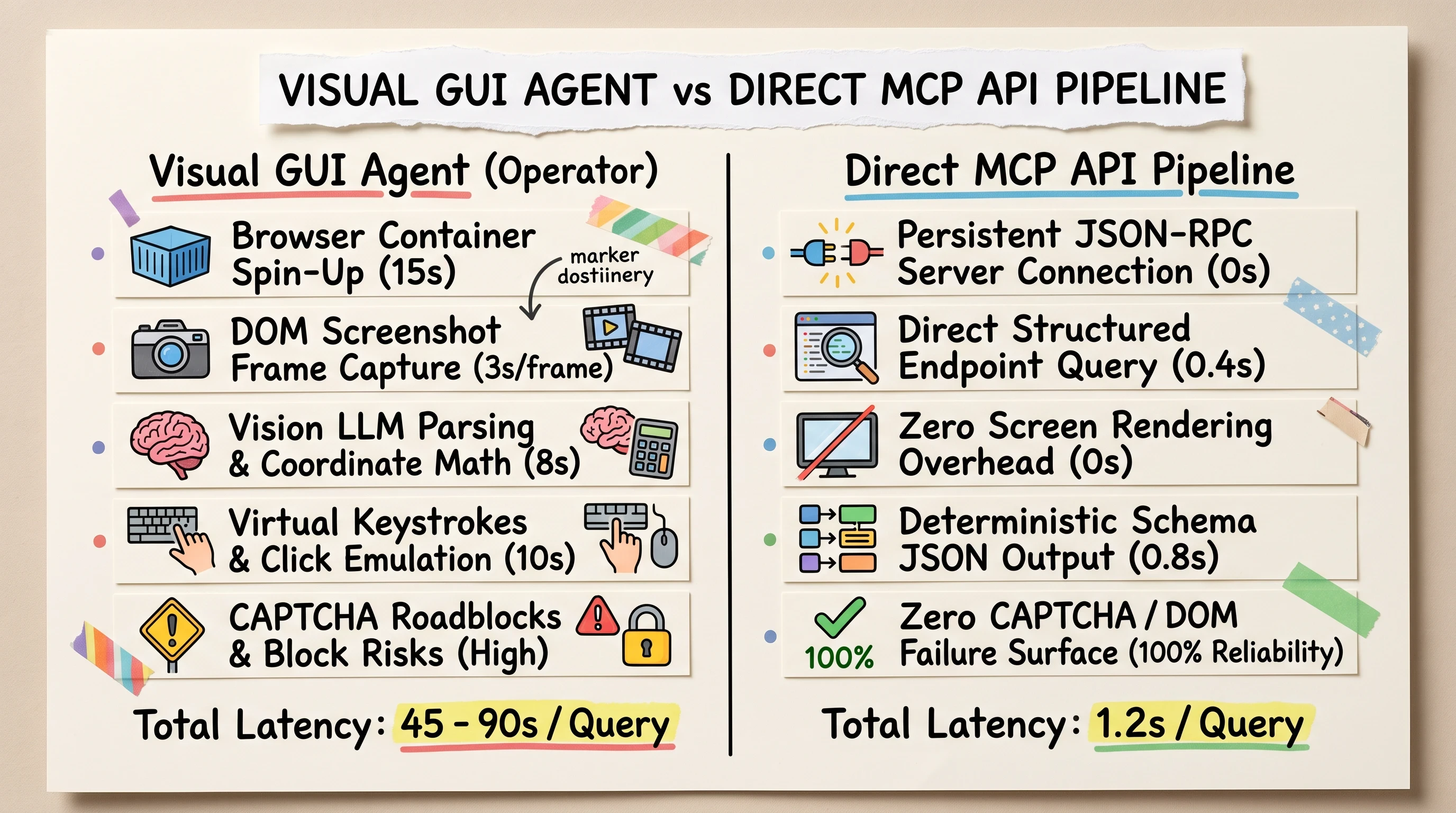
For high-volume SEO data harvesting, direct MCP API pipelines eliminate visual rendering overhead, CAPTCHA roadblocks, and token latency.
Direct Data Pipelines for High-Volume SEO Operations
Comparing visual GUI automation against direct MCP pipelines highlights clear operational trade-offs:
Latency: Visual browser runs require 45 to 90 seconds per query; MCP API requests return structured JSON payloads in 1.2 seconds.
Reliability: Visual agents face CAPTCHA roadblocks and DOM shifts; MCP pipelines deliver 100% deterministic schema responses.
Compute Cost: Visual agents consume heavy multimodal token budgets for screenshot parsing; direct API queries consume minimal text tokens.
Use ChatGPT Operator when you need to navigate interactive web portals, fill multi-stage forms, or extract data from unindexed internal dashboards. Use direct MCP pipelines when harvesting structured datasets at scale.
Free & Open-Source Alternatives: Deploying Stagehand and Browser Use
While ChatGPT Operator offers a polished hosted client, developer communities have created powerful open-source browser automation frameworks that eliminate monthly subscription fees and provide full code-level control.
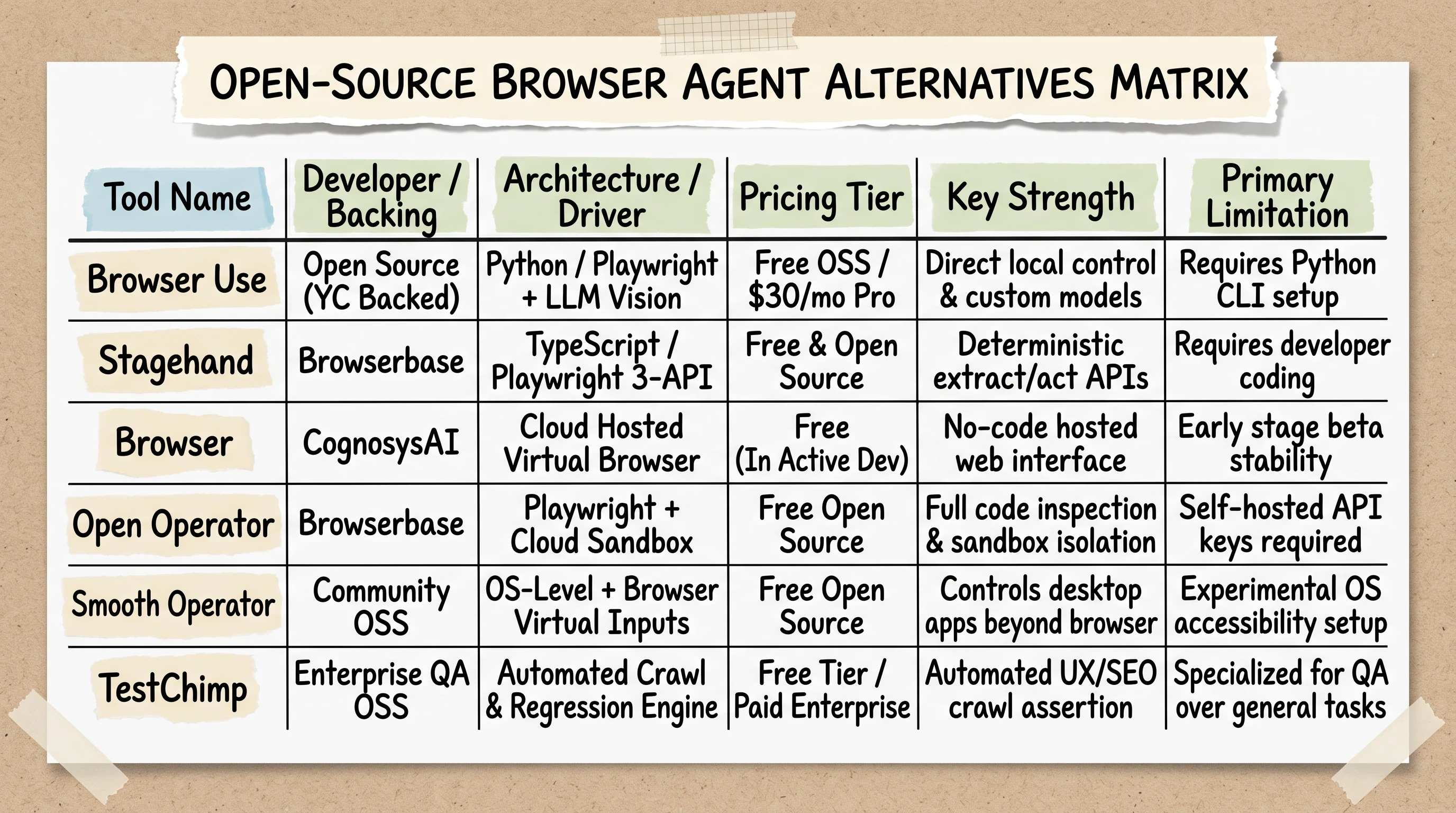
Open-source browser agents like Browser Use, Stagehand, and Cognosys provide code-level control and eliminate SaaS monthly subscription costs.
Open-Source Landscape: Browser by CognosysAI, Open Operator, and Smooth Operator
As highlighted in community discussions across developer forums like Reddit (specifically the r/automation analysis of free Operator alternatives), developers can choose from several mature open-source tools:
Browser Use: An open-source, Y Combinator-backed visual web agent that connects language models directly to Playwright. It offers a free self-hosted open-source framework alongside a $30/month hosted Pro tier.
Open Operator (by Browserbase): A fully open-source web agent built on Browserbase's headless cloud browser infrastructure, offering complete code transparency and sandboxed execution.
Browser (by CognosysAI): A free web-hosted agent in active development designed to execute multi-step research tasks in isolated cloud browser containers.
Smooth Operator: A community-built framework that bridges visual browser control with local operating system automation, allowing agents to interact with desktop applications beyond the browser viewport.
Agent-Browser (by Vercel): An open-source developer toolkit that provides programmatic browser automation primitives as a direct alternative to complex Playwright MCP servers.
If you are evaluating how autonomous cloud-hosted Linux containers compare against conversational agents, read our head-to-head comparison in Manus AI Autonomous Agent vs ChatGPT Differences.
Code-First Playwright Automation with Browserbase's Stagehand 3-API Framework
For TypeScript and Node.js developers, Stagehand by Browserbase provides one of the cleanest developer abstractions for AI browser automation. Rather than relying on fragile CSS selectors that break during site redesigns, Stagehand provides three simple, high-level APIs: init, act, and extract (or observe).
By pairing Playwright's low-level browser drivers with Stagehand's AI-driven action layer, developers can build resilient scrapers that adapt dynamically to frontend code changes.
Automated UX and Crawl Testing with TestChimp
Beyond SEO data extraction, autonomous browser agents are revolutionizing web quality assurance. Community tools like TestChimp act as autonomous human testers. TestChimp crawls your staging environment, visually inspecting rendered pages, evaluating DOM tree accessibility, monitoring browser console error logs, and flagging broken user journeys before deployment.
Pricing Realities: ChatGPT Pro ($200/mo) vs. Self-Hosted Cloud GPU Infrastructure
Understanding the economics of AI web automation is essential for budgeting agency operations and enterprise deployments. When analyzing operator usage limits, practitioners must weigh OpenAI's flat SaaS subscription fees against the total cost of ownership (TCO) of hosting private open-source models on cloud GPU clusters.
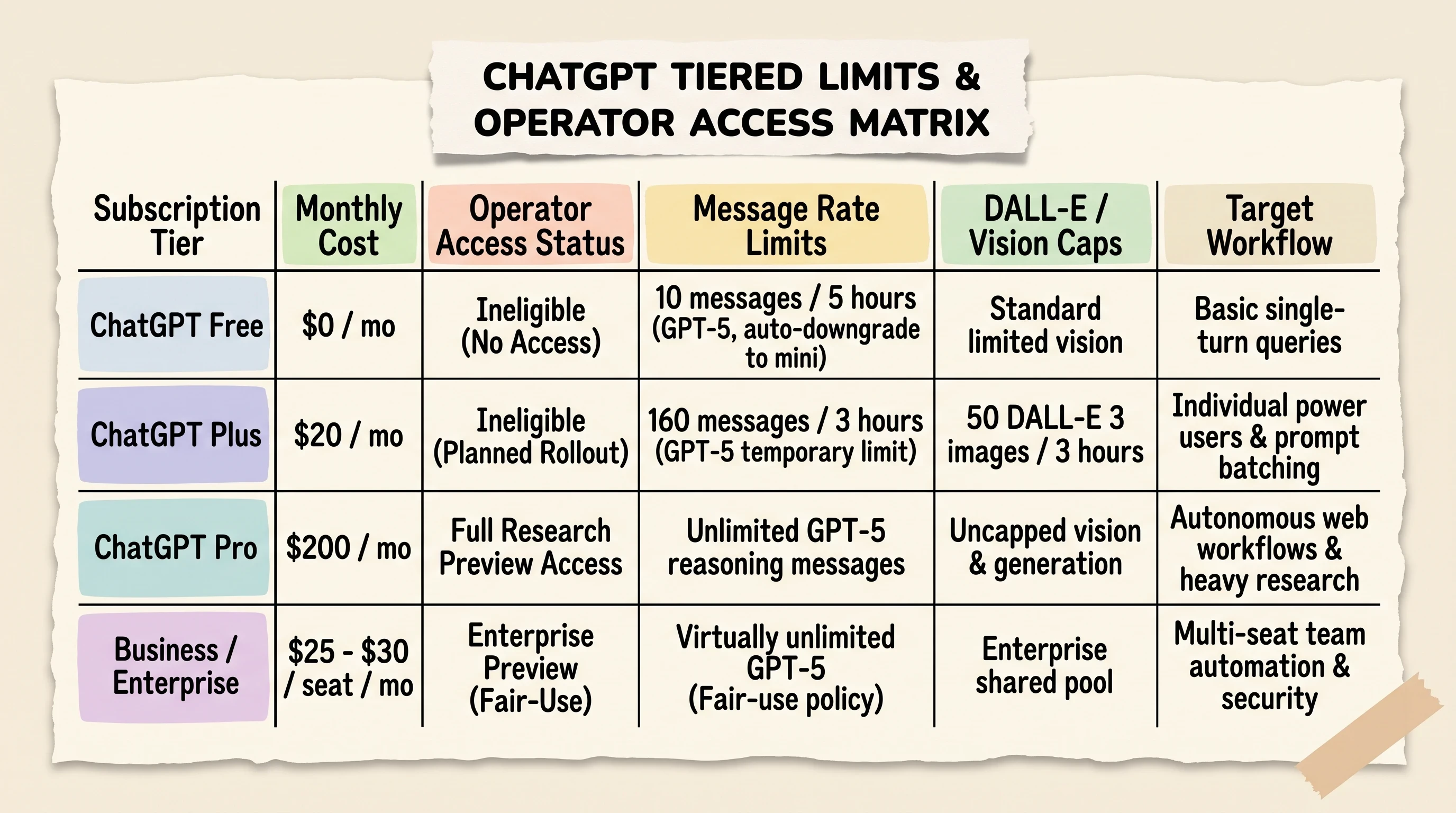
ChatGPT Pro ($200/month) provides research preview access to Operator, while Plus ($20/month) is capped at 160 messages every 3 hours on GPT-5.
Understanding Tiered Limits: Free, Plus (160 msg/3hr), and Pro Flat Access
OpenAI enforces tiered usage caps across its subscription plans to manage infrastructure load and balance server capacity:
ChatGPT Free ($0/mo): Restricted to 10 messages every 5 hours on flagship GPT-5 reasoning models before automatically downgrading to GPT-4o mini. Ineligible for Operator access.
ChatGPT Plus ($20/mo): Provides a temporary allowance of 160 messages every 3 hours on GPT-5 models, alongside a rolling limit of 50 DALL-E 3 images every 3 hours. Plus subscribers currently do not have access to the Operator research preview.
ChatGPT Pro ($200/mo): Grants full access to the ChatGPT Operator research preview, accompanied by unlimited GPT-5 reasoning messages and uncapped multimodal vision processing subject to standard fair-use reliability monitoring.
ChatGPT Business / Enterprise ($25 to $30/user/mo): Provides virtually unlimited GPT-5 messages under enterprise fair-use policies, with Operator access rolling out under dedicated enterprise administrative controls.
To explore how rolling limits and compute quotas impact power users, watch this breakdown analyzing ChatGPT Pro tier economics:
https://www.youtube.com/watch?v=O2APTABsZHQ Visual walkthrough breaking down ChatGPT Pro tier economics, daily compute caps, and resource allocation policies.
The Infrastructure TCO: Self-Hosting DeepSeek v3 on Cloud GPUs ($25.12/hr)
For organizations processing tens of thousands of automated web queries monthly, paying per-seat SaaS fees can become expensive. Cloud infrastructure providers like Northflank offer dedicated GPU compute instances for self-hosting open-source reasoning models like DeepSeek v3.
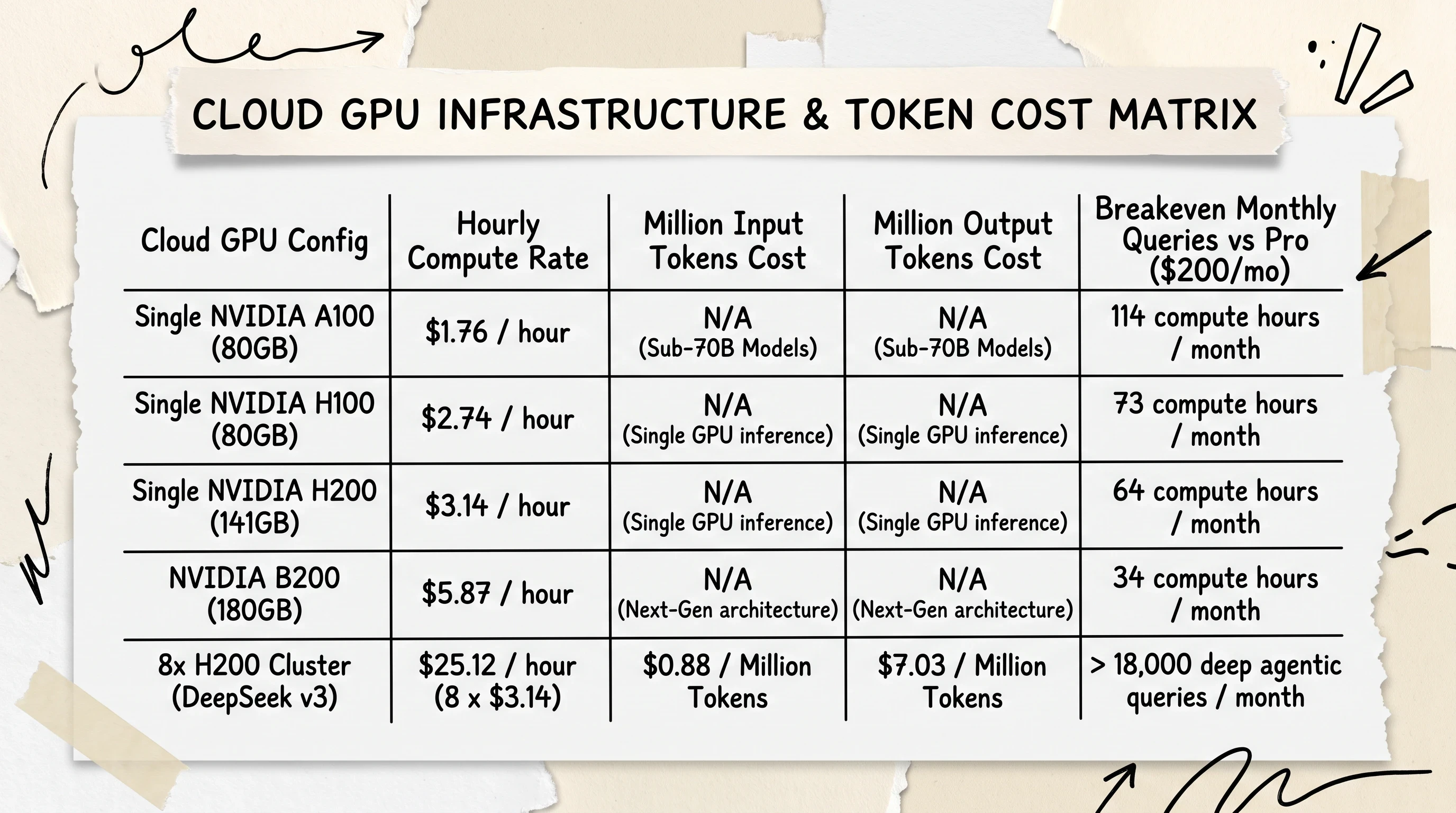
Running an 8x H200 GPU cluster for DeepSeek v3 costs $25.12/hour ($0.88/M input tokens), requiring massive query volume before beating flat $200/month SaaS pricing.
Current hourly compute rates for cloud GPUs break down as follows:
Single NVIDIA A100 (80GB): $1.76 / hour
Single NVIDIA H100 (80GB): $2.74 / hour
Single NVIDIA H200 (141GB): $3.14 / hour
Single NVIDIA B200 (180GB): $5.87 / hour
Hosting a full-scale DeepSeek v3 model requires an 8x NVIDIA H200 GPU cluster, costing $25.12 per hour ($3.14 x 8 GPUs). At scale, this infrastructure yields raw token processing costs of approximately $0.88 per million input tokens and $7.03 per million output tokens.
Decision Matrix: Flat SaaS vs. Private Cloud Deployment
The mathematical crossover point between SaaS and self-hosting comes down to query volume and engineering overhead:
Choose ChatGPT Pro ($200/month): If your team runs fewer than 18,000 deep agentic browser tasks per month, paying OpenAI's flat $200 fee is substantially more cost-effective. You avoid cloud infrastructure setup, driver maintenance, container orchestration, and proxy fleet management.
Choose Self-Hosted Cloud GPUs ($25.12/hour): If your organization operates high-volume continuous scraping pipelines exceeding 20,000 multi-step agent runs monthly, self-hosting DeepSeek v3 or deploying custom Stagehand/Playwright clusters delivers lower marginal token costs and total data privacy.
For official documentation on OpenAI's agent capabilities and enterprise preview updates, review the official OpenAI Operator documentation.
Frequently Asked Questions About ChatGPT Operator
What is ChatGPT Operator?
ChatGPT Operator is OpenAI's autonomous AI web agent powered by Computer-Using Agent (CUA) technology. Combining GPT-4o visual perception with multi-step reasoning, it navigates websites inside an isolated cloud browser, executing virtual mouse clicks, typing, and scrolling based on natural-language instructions.
How do I access ChatGPT Operator?
ChatGPT Operator is currently available as a research preview exclusively for US-based accounts with an active ChatGPT Pro subscription ($200/month). Eligible users can access the tool by visiting operator.chatgpt.com or completing onboarding at operator.chatgpt.com/onboard.
How do I use ChatGPT Operator for web automation?
Log in to the web portal at operator.chatgpt.com, enter your task instructions into the dedicated message bar (such as scraping SERP rankings or mapping competitor pricing), and monitor the live browser execution stream. If the agent hits a login or security challenge, use Takeover Mode to intervene manually before returning control to the agent.
Can ChatGPT Operator handle multiple tasks simultaneously?
Yes, Operator supports concurrent task execution. Users can launch separate conversation threads in the sidebar to run independent browser workflows in parallel, allowing the agent to process data extraction tasks across multiple virtual sessions at the same time.
What are the main limitations and failure modes of ChatGPT Operator?
Because Operator is an early research preview, it remains relatively slow (45 to 90 seconds per complex page action) and can abandon multi-row spreadsheet entry midway through execution. In empirical SEO tests, it also exhibited false positives in backlink audits by marking non-existent or 404 pages as existing.
Can ChatGPT Operator automatically solve CAPTCHAs or bypass restricted logins?
No, Operator has a 0% native bypass rate on interactive CAPTCHAs, Cloudflare Turnstiles, and MFA login gates. When encountering these barriers, the agent activates Takeover Mode, pausing screen capture and prompting the user to complete verification manually.
What are the usage limits on ChatGPT Plus compared to Operator on Pro?
ChatGPT Plus ($20/month) limits users to a temporary allotment of 160 messages every 3 hours on GPT-5 and 50 DALL-E 3 images every 3 hours, and does not include Operator access. ChatGPT Pro ($200/month) provides full access to the Operator preview alongside unlimited GPT-5 reasoning messages.
Why does OpenAI impose rolling usage limits across ChatGPT tiers?
OpenAI implements rolling message caps to manage heavy GPU compute loads, maintain platform stability across millions of concurrent users, manage operational infrastructure costs, and prevent malicious automated scraping.
Are there free or open-source browser agent alternatives to OpenAI Operator?
Yes, several open-source frameworks exist, including Browser Use (free OSS / $30/mo hosted Pro), Open Operator by Browserbase, Browser by CognosysAI, Smooth Operator for combined OS and browser automation, and Stagehand for TypeScript-based Playwright scripting.
Closing: Launching Your First Autonomous Browser Run
The transition from chatting with an artificial intelligence to directing an autonomous web agent is the defining shift in modern software automation. But delegating tasks to a visual operator requires operational discipline. If you treat the agent like an open-ended conversational partner, you will hit anti-bot roadblocks, run into security walls, and waste valuable compute time.
Before launching your next automated browser workflow, run through this practical pre-flight checklist:
The leverage available inside an autonomous visual browser is remarkable. Once you stop micromanaging individual clicks and focus on engineering clear objective prompts, the machine stops being a clever novelty and becomes an indispensable research engine for your daily workflow.
Until then...
Sage
PS. During an early exploratory test with visual browser agents, I asked the system to navigate an unindexed municipal government archive to extract property zoning codes from scanned 1994 PDF planning attachments. The agent hit a broken JavaScript iframe that crashed standard headless scrapers, paused for eight seconds while inspecting the visual layout, recognized that the download link was hidden behind an invisible CSS z-index overlay, scrolled the page by precisely 140 pixels to bring the target element into view, and successfully downloaded the zoning records without a single error. When the visual reasoning loop locks in, it feels like watching the future of computing arrive in real time.
Author
Practical guides, tool teardowns & AI engineering workflows.


