Claude Code
Claude Code vs. Claude Cowork: Architecture, Security Sandboxes, and Decision Guide

Sage Holloway
32 min read
Go back to blog
SHARE

You opened a clean workspace, gave an autonomous agent access to your files, and asked it to reconcile three months of operational data. Forty minutes later, your 5-hour usage allowance was completely depleted, the terminal had generated two hundred lines of raw shell logs, and you were still hunting through folders to find an actual formatted spreadsheet.
Claude Code and Claude Cowork share Anthropic models under one subscription ($20/month Pro, Max 5x/20x). Claude Code is a developer CLI/IDE tool with OS-level sandboxing (seatbelt/bubblewrap), full audit logging, and CLAUDE.md context control for codebase editing and git workflows. Claude Cowork is a desktop GUI for knowledge workers that runs tasks in an isolated VM to manage browser workflows, local files, and native Office deliverables (.xlsx, .pptx).
Last verified: September 1, 2026 (NotebookLM research sources, official Anthropic Help Center documentation, and verified community architecture reviews; no live CLI run on this pack).
When Anthropic released its agentic interfaces, most coverage reduced the distinction to a binary stereotype: engineers use the terminal, everyone else uses the desktop app. That framing is tidy, convenient, and fundamentally incomplete. Both products tap into the same Claude 3.7 Sonnet and Claude 3.5 Sonnet model backbones, yet they represent two completely divergent runtime philosophies. One operates as a bare-metal developer REPL (Read-Eval-Print Loop) embedded in your local development environment. The other functions as an autonomous cloud-sandboxed office assistant orchestrating multi-step knowledge work.
Understanding the real claude code vs cowork differences requires looking past the user interface and inspecting the underlying machinery. When you run an agent in production, its execution sandbox dictates your security blast radius, its context engineering model determines whether your project instructions compound or degrade, and its token consumption pattern dictates whether your monthly plan lasts thirty minutes or thirty days.
This technical guide delivers an authoritative architectural comparison between claude code vs cowork. We analyze how Claude Code enforces strict operating system primitives (seatbelt on macOS and bubblewrap on Linux) while Claude Cowork isolates tasks within cloud virtual machines. We examine the critical enterprise compliance gap that excludes Cowork from official Audit Logs and the Compliance API, break down the token economics separating vision loops from local scripts, map sequential multi-tool handoffs, and evaluate sovereign open-source alternatives like OpenClaw and OpenWork.
This guide focuses specifically on comparative architecture, runtime security, and tool selection. If you are looking for initial desktop installation and folder configuration, see our walkthrough on How to Use Claude Cowork. For commercial subscription tiers, 5-hour rolling limits, and API ROI benchmarks, visit Claude Cowork Pricing. If you need to troubleshoot missing interface buttons or virtual machine connection drops, read Claude Desktop Cowork Tab Missing. For corporate Data Processing Agreements (DPAs), HIPAA reviews, and regulatory risk controls, consult the Claude Cowork Legal and Compliance Guide.
On this page
The core mental model: Claude Chat vs. Claude Code vs. Claude Cowork
Side-by-side feature comparison: interface, execution, and deliverables
Security sandboxes and blast radius: OS primitives vs. isolated VMs
Enterprise compliance and governance: the audit log and policy gap
Context engineering architecture: CLAUDE.md hierarchy vs. project briefings
Token economics and execution loops: vision processing vs. free local scripts
Sequential multi-tool workflows: bridging research in Cowork with building in Code
Open-source and self-hosted alternatives: OpenClaw, Eigent, and OpenWork
Decision framework: which tool fits your workflow and role
Frequently Asked Questions
Putting it into practice: your side-by-side pilot test

Claude Code and Claude Cowork share Anthropic models under one subscription but target divergent execution runtimes and workflows.
The core mental model: Claude Chat vs. Claude Code vs. Claude Cowork
Consider a master craftsman operating a commercial fabrication facility. In the front reception room, a drafting table holds rolls of tracing paper, reference catalogs, and layout sketches where project concepts are conceptualized in conversation with clients. Down the hallway sits a heavy machine shop equipped with high-precision steel lathes, industrial CNC mills, and locked safety enclosures where technicians cut raw alloy according to rigid mechanical blueprints. Next door sits an executive administrative office where coordinators assemble financial ledger binders, compile quarterly presentation decks, and manage external supplier delivery schedules.
The facility runs under one company umbrella, but you would never attempt to mill a titanium cylinder on a drafting table, nor would you use an industrial lathe to staple together a client presentation folder.
That distinction mirrors the Anthropic ecosystem. When examining the difference between claude code and cowork, you are not looking at competing intelligence levels. You are looking at three distinct operational doorways engineered for three fundamentally different jobs.
One engine, three execution paradigms: Thinking (Chat) vs Building (Code) vs Doing (Cowork)
The Anthropic product line organizes around three execution paradigms:
Claude Chat (Thinking): Accessible via standard web browsers and mobile applications. It operates in an ephemeral conversational loop designed for single-turn ideation, architectural brainstorming, ad-hoc question answering, and drafting unstructured text. Its context lives exclusively in memory and vanishes when a thread ends.
Claude Code (Building): Accessible as a command-line interface (CLI) terminal package installed globally via
npm install -g @anthropic-ai/claude-codeor integrated into developer IDEs. It operates directly against local codebases, executing deep multi-file refactoring, writing unit tests, inspecting Git version history, and managing system shell processes.Claude Cowork (Doing): Accessible via the Claude Desktop application on macOS and Windows. It operates as an autonomous desktop knowledge-work agent. It takes outcome-oriented objectives, breaks them down into sub-agent task plans, reads local project directories, interacts with SaaS web apps via a headless browser, and produces polished, native Office deliverables.
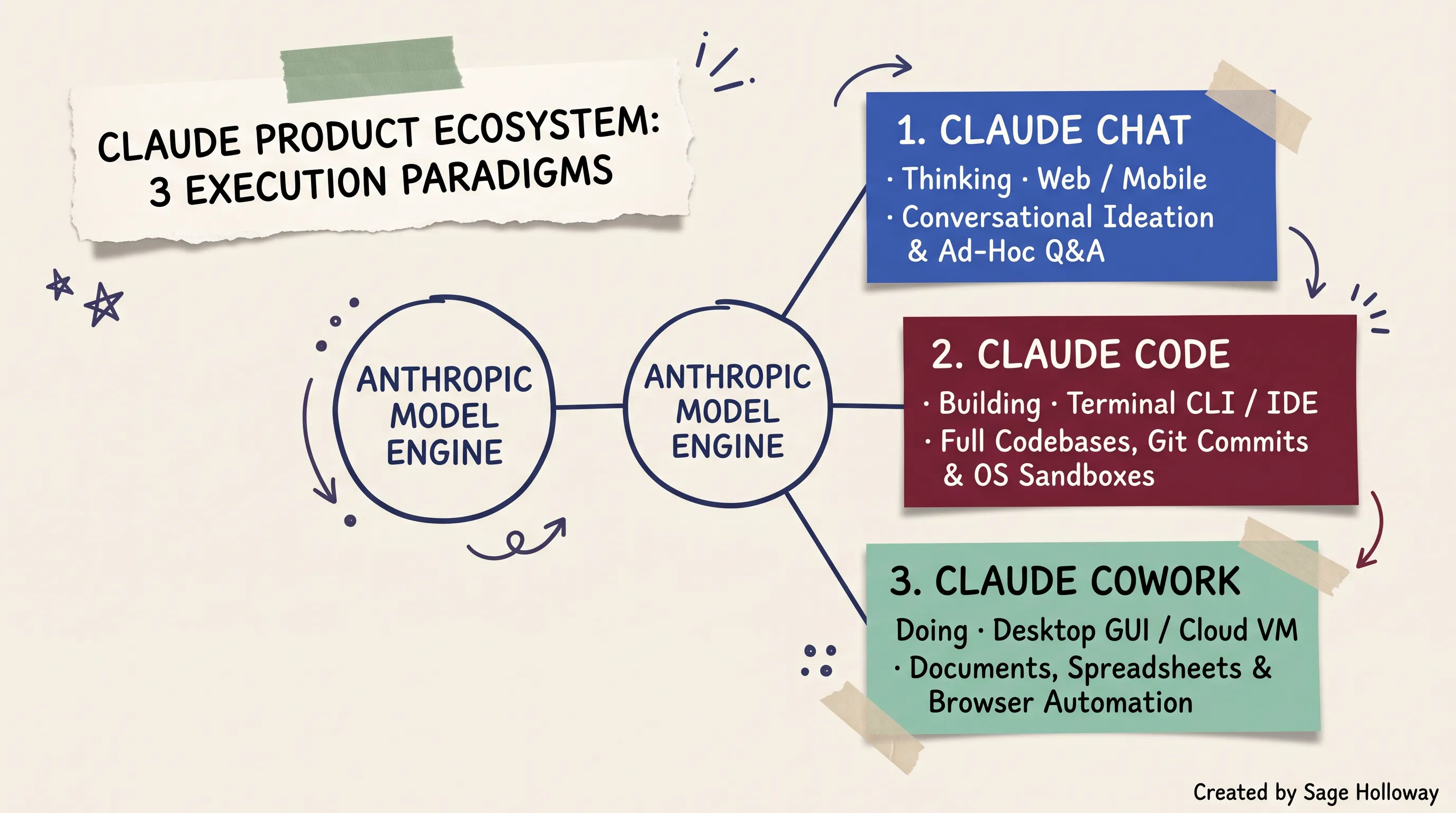
One engine, three execution doors: Chat handles conversational ideation, Code powers developer software engineering, and Cowork automates desktop knowledge work.
In developer forums and practitioner discussions, you will frequently see terms like cowork claude code, claude cowork claude code, and cowork: claude code tossed around interchangeably. This lexical soup causes widespread confusion. Some users assume Cowork is merely a graphical wrapper over Claude Code, while others assume Code is an obsolete precursor to Cowork.
The reality is that claude code and cowork serve complementary, non-overlapping functions. Claude Code is a system-building environment designed to alter how software operates. Claude Cowork is an operational automation environment designed to alter how knowledge work gets completed.
Terminal REPL vs desktop GUI workspace
The physical interface fundamentally shapes how you steer an agent.
Claude Code operates as an interactive REPL (Read-Eval-Print Loop). A REPL is a command-line environment that takes user inputs, evaluates them against the host operating system, prints the computed result, and waits for the next instruction. In Claude Code, you launch the agent directly within your repository directory by typing claude in your terminal shell. The agent inherits your active terminal environment variables, your local Git configuration, and your shell permissions. It outputs concise, line-by-line streaming terminal text, showing exact file diffs, bash tool executions, and file modifications in real time.
Claude Cowork operates as a rich desktop graphical workspace. Inside the Claude Desktop client, users navigate between three top-level mode tabs: Chat, Cowork, and Code. When Cowork mode is active, the interface centers around the Work in a Folder file boundary picker. Instead of watching raw terminal commands stream across a shell, the user interacts with an expandable sub-agent task plan, preview panels for generated documents, and interactive visual confirmation modals.
The intelligence was never the bottleneck; the runtime interface dictates what kinds of friction you encounter.
Tool invocation boundaries (local shell vs browser automation)
Where the tools diverge most aggressively is in how they interact with external systems.
Claude Code interacts with the world through your local shell. When it needs to gather data, it runs local commands: grep for string matches, git log for version history, pytest for unit testing, or custom Python scripts for data manipulation. It can be extended with Model Context Protocol (MCP) servers to talk to external databases or APIs, but its primary execution surface is your host command line.
Claude Cowork interacts with the world through a multi-tier tool hierarchy:
Tier 1 (Direct SaaS Connectors): Fast, deterministic API integrations via MCP connectors for Google Drive, Gmail, Slack, and GitHub.
Tier 2 (Built-in Headless Browser): A sandboxed cloud browser capable of opening URLs, parsing live documentation, extracting web table data, and navigating web forms without local browser extensions.
Tier 3 (Computer Use Screen Control): An optical perception engine that takes screenshots of your local desktop, calculates pixel coordinates, and clicks buttons or types keystrokes inside legacy desktop applications that lack APIs.
This tool boundary dictates output formats. Claude Code is built to manipulate text, source code files, configuration schemas, and compiled binaries. Claude Cowork is built to manipulate structured documents, browser sessions, and business file formats.
Side-by-side feature comparison: interface, execution, and deliverables
To evaluate claude code vs claude cowork (or the punctuated variant claude code vs. claude cowork), we need to compare their structural mechanics side by side.
Comprehensive 8-axis comparison matrix
The table below breaks down the technical differences between Claude Chat, Claude Code, and Claude Cowork across eight core architectural axes.
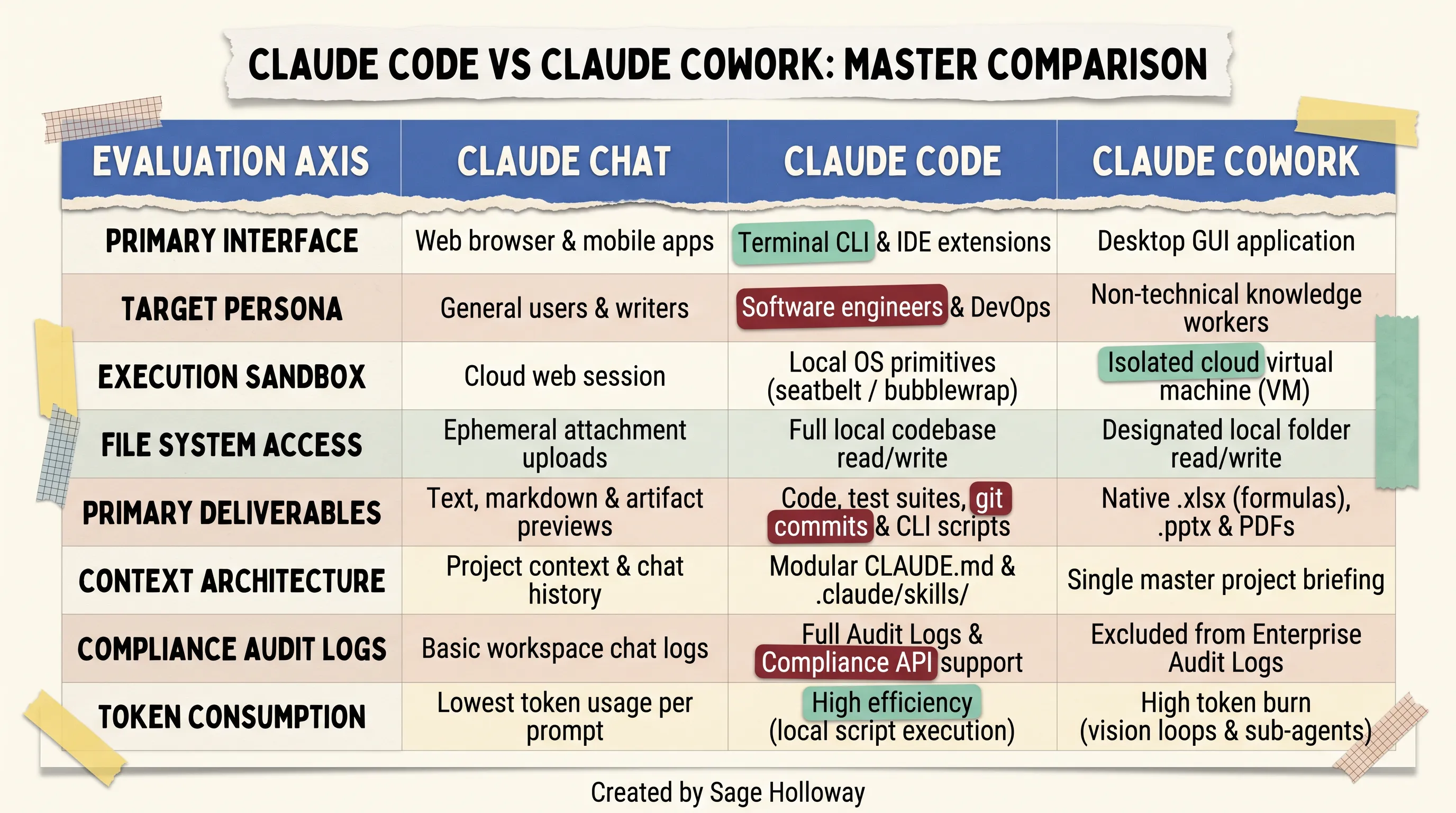
Master feature matrix: Side-by-side evaluation of Claude Chat, Claude Code, and Claude Cowork across eight core technical axes.
When analyzing claude cowork vs code, notice how each axis reflects deliberate trade-offs. Claude Code trades non-technical visual polish for direct bare-metal script execution and enterprise telemetry. Claude Cowork trades low-level system access for turnkey document authoring and multi-step browser delegation.
Native Office binary outputs (.xlsx formulas, .pptx decks) in Cowork vs source code, tests, and git commits in Code
The deliverable format is often the single fastest filter for deciding between cowork vs claude code.
If your objective requires creating a client-ready financial model with working Excel formulas, conditional formatting, and chart tabs, Claude Cowork handles this natively. Cowork runs specialized containerized document builders that write binary .xlsx spreadsheets, structured .pptx presentation decks, and formatted .docx and .pdf reports directly into your designated workspace folder. It does not output raw markdown tables and expect you to copy-paste them into desktop software. It writes the actual binary file to disk.

Developer CLI interface: Claude Code runs directly in the terminal, managing codebase refactoring, test suites, and git operations with session rewind controls.
In contrast, Claude Code is engineered to produce clean, reproducible engineering deliverables:
Formatted source code matching your repository's existing linting rules.
Comprehensive unit test suites executed and verified against your local test runner.
Atomic Git commits with standardized commit messages.
Lightweight, automated shell and Python scripts for continuous local execution.

Knowledge-worker desktop GUI: Claude Cowork executes multi-step tasks inside a sandboxed VM, generating formatted spreadsheets and slide decks from local folder context.
While a developer can technically instruct Claude Code to write a Python script utilizing openpyxl to build an Excel spreadsheet, doing so requires manual prompt overhead, script execution debugging, and environment setup. Cowork treats Office deliverables as a native, out-of-the-box primitive.
Session management and interactive steering (single Escape interrupt vs double Escape state rewind)
Steering an autonomous agent requires rapid, predictable control over its execution state.
In Claude Code, session navigation is optimized for keyboard-driven terminal workflows:
Single
Escape(Interrupt Response): PressingEscapeonce immediately halts Claude Code while it is streaming text or generating a tool call. The execution stops instantly, allowing you to redirect the prompt without losing prior conversational context.Double
Escape(Rewind Session State): PressingEscapetwice rapidly triggers a state rewind menu. This rolls back the conversational turn and any staging changes, letting you restore your repository state to the exact moment before the last prompt was executed./btwSide-Questions: Claude Code allows developers to ask quick ephemeral questions mid-task using the/btwcommand without polluting the main LLM context window with temporary troubleshooting queries.
In Claude Cowork, session management relies on visual interface controls. Users pause execution via a prominent graphical Stop button, inspect active sub-agent reasoning plans in an expandable sidebar, and review side-by-side visual diffs before approving file overwrites.
To see these interactive steering and file management mechanisms in action across both environments, watch this comprehensive walkthrough:
https://www.youtube.com/watch?v=k3Bj31-pXOc
This video tutorial walks through practical interface differences, demonstrating how terminal CLI execution in Claude Code contrasts with visual desktop file workflows in Claude Cowork.
Security sandboxes and blast radius: OS primitives vs. isolated VMs
Security architecture is the area where generic comparison blogs create the most dangerous misunderstandings. A common myth claims that "Cowork is perfectly safe because it runs in a virtual machine, while Code is dangerous because it touches your computer."
The technical reality is far more nuanced. Both tools implement rigorous security boundaries, but they operate at completely different layers of the infrastructure stack.

Security boundary comparison: Claude Code enforces strict OS filesystem boundaries, while Claude Cowork isolates code in a cloud VM but accesses desktop screens via Computer Use.
Claude Code OS sandboxing primitives: seatbelt on macOS and bubblewrap on Linux for filesystem write boundaries
Claude Code does not run arbitrary, unconstrained commands against your host system. It enforces strict operating system-level process sandboxing:
macOS (
seatbelt/sandbox-exec): On Apple silicon and Intel macOS systems, Claude Code wraps process execution inside Apple's nativeseatbeltkernel sandbox. This primitive limits filesystem write access strictly to the active repository directory. If a tool call attempts to write to/etc/,~/.ssh/, or outside the project root, the operating system kernel blocks the syscall immediately.Linux (
bubblewrap): On Linux systems, Claude Code leveragesbubblewrap(an unprivileged sandboxing utility utilizing Linux user namespaces). It constructs an isolated mount namespace, providing read-only access to necessary system libraries while restricting write operations strictly to the designated workspace path.
Network mediation is equally constrained. Outbound network requests executed by Claude Code sub-processes can be restricted or routed through corporate proxies, preventing unauthorized data exfiltration.
Claude Cowork VM architecture: cloud/local virtual machine isolation for code execution
Claude Cowork approaches containment from the virtualization layer. When Cowork executes computational tasks (such as parsing large CSVs, running data reconciliation scripts, or assembling document binaries), it runs those processes inside an isolated Virtual Machine (VM) container hosted on Anthropic's secure cloud infrastructure.
The virtual machine operates on an ephemeral virtual disk. Files from your designated local workspace folder are synchronized to the VM container via an encrypted Remote Procedure Call (RPC) bridge. When the task finishes, modified deliverables are synchronized back to your local folder, and the cloud VM container is decommissioned. At no point does the remote VM gain arbitrary shell execution access to your local operating system kernel.
The screen control exception: why Cowork Computer Use bypasses execution sandboxes for desktop elements
Here is the critical security nuance that security teams must understand: while Cowork's code execution is isolated within a VM, its Computer Use screen control feature operates outside that virtual boundary.
When Computer Use is toggled on, Claude Cowork takes visual screen captures of your physical desktop monitor and issues OS-level mouse clicks and keyboard keystrokes to interact with native desktop applications.
Anthropic explicitly documents that there is no execution-level sandbox between Claude and what is displayed on your monitor during Computer Use sessions. If an unverified web page or malicious document displays prompt injection text, an agent operating via visual screen control could theoretically be tricked into clicking interface buttons or typing inputs into other open, unprotected desktop windows.
Permission tier enforcement: Manual vs Auto vs Skip modes
To mitigate operational risk, Claude Cowork implements three permission approval tiers configured under Settings > Cowork > Permission Controls:
Manual(Maximum Security): Cowork pauses and presents an interactive confirmation modal before performing any file modification, file deletion, network request, or screen click. Recommended for sensitive directories and production files.Auto(Balanced Operations): Anthropic's background AI safety classifiers evaluate each planned action. Safe operations (reading documentation, creating new output files) proceed automatically, while high-risk actions (deleting files, overwriting source datasets, modifying system settings) trigger a manual confirmation prompt.Skip(Autonomous Execution): Bypasses all interactive confirmation prompts, executing tasks completely hands-off. Recommended only for isolated, scratch directories where unintended file overwrites carry zero operational cost.
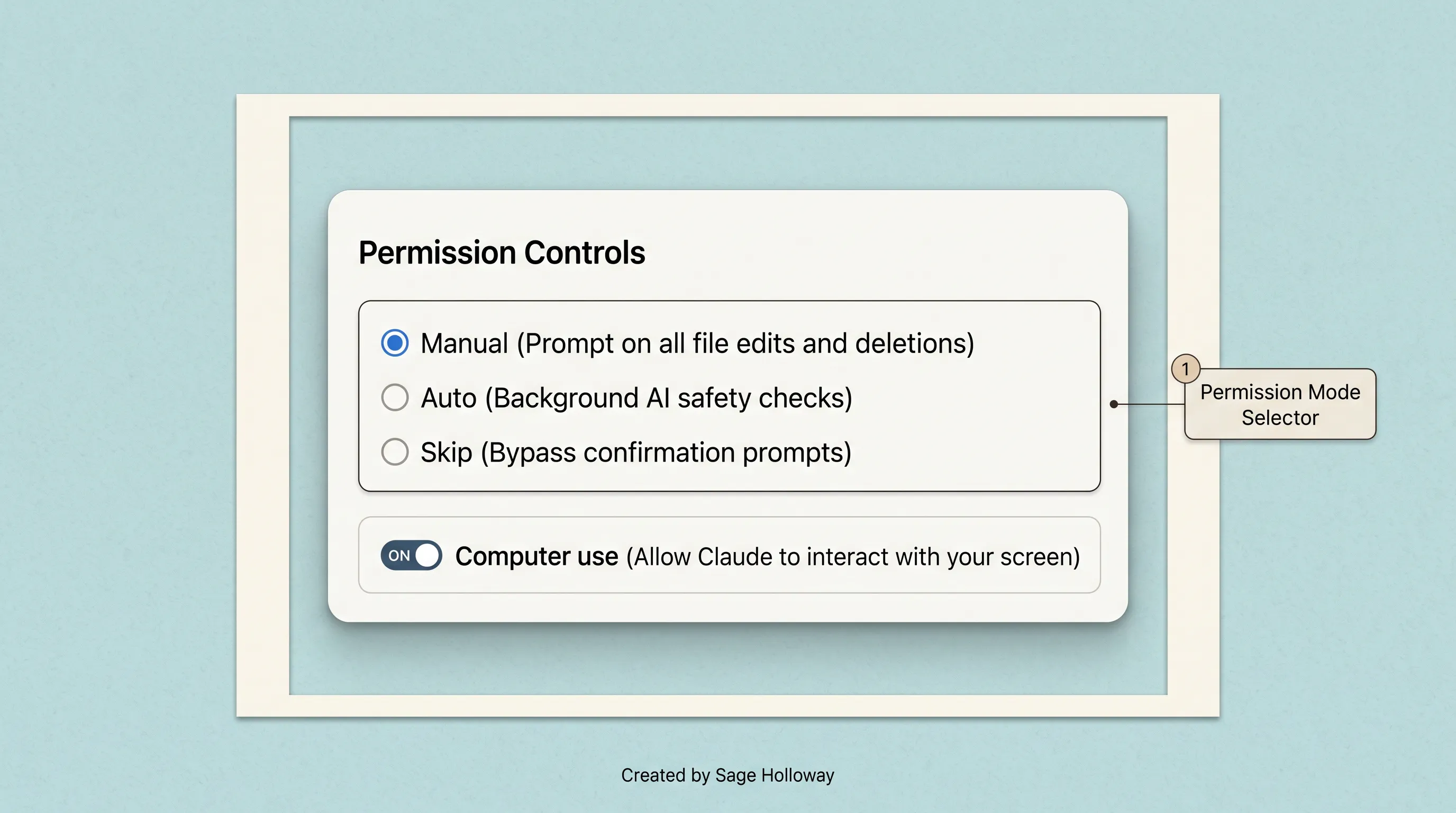
Permission control tiers: Configure Cowork to confirm every file modification (Manual), screen via background AI classifiers (Auto), or execute without gates (Skip).
In Claude Code, permission enforcement is handled at the command line. By default, every file edit, bash execution, and MCP tool call prompts the developer with a clear [y/n] terminal approval prompt. When running in continuous CI/CD pipelines, developers can pass the non-interactive -p flag to bypass trust prompts for automated testing.
Enterprise compliance and governance: the audit log and policy gap
For corporate IT administrators, security architects, and compliance officers, the choice between Claude Code and Claude Cowork often comes down to a single governing factor: auditability.

Enterprise compliance matrix: Claude Code provides comprehensive audit logging and policy controls, whereas Claude Cowork is excluded from official Compliance APIs.
The Cowork compliance barrier: exclusion from Enterprise Audit Logs, Data Exports, and the Compliance API
Here is the single most critical compliance distinction in the entire Anthropic product suite: Claude Cowork activity is explicitly excluded from Anthropic Enterprise Audit Logs, Workspace Data Exports, and the official Compliance API.
If your organization operates in a regulated industry subject to SOC 2 Type II, HIPAA, GLBA, or PCI-DSS compliance frameworks, deploying stock Claude Cowork creates an immediate compliance gap:
Workspace administrators cannot inspect historical Cowork chat prompts or sub-agent execution traces via the central Enterprise Admin Console.
Security Operations Center (SOC) teams cannot query the Anthropic Compliance API to audit which local files were accessed, modified, or synchronized to cloud VMs.
Legal discovery teams cannot export Cowork interaction logs during compliance audits.
Because of this limitation, regulated enterprises cannot deploy Claude Cowork out of the box without deploying an external, workstation-level OpenTelemetry proxy gateway to capture desktop network traffic.
Claude Code enterprise telemetry: OpenTelemetry event streaming and SIEM integration
Claude Code was architected from the ground up for enterprise governance. On Enterprise plans, Claude Code natively streams structured telemetry events directly to enterprise Security Information and Event Management (SIEM) platforms (such as Splunk, Datadog, or Sumo Logic) via standard OpenTelemetry protocols.
Every developer action generates an immutable audit record:
Exact CLI command strings and timestamps.
Filesystem paths read, created, or modified.
Full Git diffs and commit hashes generated by the agent.
Model Context Protocol (MCP) server invocations and network endpoints accessed.
Configuration changes and permission bypass flags.
This comprehensive audit pipeline allows enterprise security teams to monitor developer AI usage in real time, enforce compliance guardrails, and detect anomalous data access patterns automatically.
MCP policy control plane: configuring managed-mcp.json with allowedMcpServers and deniedMcpServers
Enterprise IT teams managing Claude Code deployments can centrally enforce strict tool access policies using a global managed-mcp.json configuration file deployed to developer machines via MDM (Mobile Device Management) systems like Jamf or InTune.
By defining explicit allowedMcpServers and deniedMcpServers lists, administrators prevent developers from connecting unverified third-party MCP servers or exposing proprietary codebases to unapproved external APIs.
Corporate proxy and TLS inspection setup: HTTP_PROXY, HTTPS_PROXY, and NODE_EXTRA_CA_CERTS
Enterprise developer environments frequently sit behind corporate forward proxies and SSL/TLS deep packet inspection appliances. Claude Code natively respects standard Node.js and POSIX environment variables, integrating seamlessly into corporate network stacks:
When configured, Claude Code routes all API calls to Anthropic through corporate inspection gateways, validating connections against your organization's custom internal Certificate Authority (CA) bundle without triggering SSL handshake errors.
Context engineering architecture: CLAUDE.md hierarchy vs. project briefings
An autonomous agent is only as reliable as its context. How an agent organizes, retrieves, and maintains instructions across multi-turn sessions dictates whether its accuracy compounds over time or collapses under context rot.

Context engineering architecture: Modular CLAUDE.md files load targeted rules on demand, preventing the context rot common in monolithic project briefings.
Modular context in Claude Code: hierarchical CLAUDE.md files, nested rules, and skill definitions
Claude Code implements a modular, hierarchical context engineering architecture centered on CLAUDE.md files.
Instead of dumping every project guideline, coding standard, and architectural diagram into a single massive system prompt, Claude Code reads context hierarchically:
Global User Rules (
~/.claude/CLAUDE.md): Universal developer preferences applied across all repositories on the machine (such as preferred formatting styles, git commit conventions, and default test flags).Root Project Rules (
./CLAUDE.md): Repository-level architecture overviews, standard build commands, test runner syntax, and operational constraints.Subdirectory Rules (
./src/api/CLAUDE.md): Specialized instructions scoped strictly to specific modules or microservices, loaded dynamically only when the agent edits files within that folder.On-Demand Skills (
.claude/skills/): Discrete, executable procedural workflows loaded into active memory exclusively when a specific task invocation requires them.
This hierarchical structure eliminates context bloat. Claude Code maintains a clean, lightweight context window, pulling in specialized guidelines only when relevant to the active sub-task.
Flat context in Claude Cowork: loading the full project briefing onto the desk and managing context rot
Claude Cowork structures context around a flat project briefing model. Inside a Cowork Project workspace, users define standing instructions and upload reference documentation into a central Project Briefing panel.
While this interface is intuitive for non-technical users, it introduces a structural challenge known as context rot.
In Cowork, the entire project briefing document, standing instructions, and uploaded reference files are loaded onto the "desk" (the active LLM context window) at the start of every single task turn. As users append more project requirements, background research, and brand guidelines, the briefing expands:
A 10,000-token project briefing consumes 10,000 input tokens on every sub-agent turn before the model even reads a file.
As the context window fills with non-essential background text, the model's attention degrades, leading to missed instructions and hallucinations.
Best Practice for Cowork Context: Keep Cowork standing instructions concise and modular. Cap your primary project briefing under 2,000 tokens, and store detailed reference materials in discrete subfolders (ABOUT ME/, TEMPLATES/, DATA/) where Cowork can inspect them on demand rather than loading them globally on every turn.
Compounding intelligence: building reusable system instructions across multi-turn sessions
The ultimate goal of context engineering is compounding leverage. When configured properly, both environments allow your instructions to compound across multi-turn sessions.
In Claude Code, intelligence compounds through version-controlled repository rules. When an engineer fixes an obscure bug or refactors an API endpoint, adding a 2-line rule to CLAUDE.md ensures that every future Claude Code session (and every developer on the team) permanently avoids that mistake.
In Claude Cowork, intelligence compounds through folder templates and Global Instructions. By saving standardized report outlines in a TEMPLATES/ folder and defining tone guidelines in Settings > Cowork > Global instructions, recurring weekly deliverables maintain consistent formatting without requiring prompt engineering from scratch.
Token economics and execution loops: vision processing vs. free local scripts
Understanding token economics is where the financial and operational reality of agentic workflows hits home. Both Claude Code and Claude Cowork share your monthly subscription plan allocations ($20/month Pro, $100/month Max 5x, $200/month Max 20x), but their execution loops consume tokens at radically different rates.

Token economics: Cowork burns tokens on repeated screenshots and sub-agent reasoning, whereas Claude Code writes local scripts that run for zero ongoing token cost.
Deconstructing the agentic token multiplier: why Cowork consumes 50x-100x more tokens via background screenshots and sub-agent loops
Why does Claude Cowork exhaust 5-hour rolling usage allowances so much faster than Claude Code or standard Claude Chat?
The answer lies in the agentic token multiplier:
Sub-Agent Fan-Out: When Cowork tackles a multi-step objective, it breaks the task into several concurrent sub-agents. Each sub-agent initializes its own context window, re-reading the project briefing, tool descriptions, and local file contents. A single user prompt can trigger five to ten sub-agent reasoning turns behind the scenes.
Vision Loop Processing: When Cowork operates via web browser automation or Computer Use, it takes frequent high-resolution desktop screenshots. Each image is encoded as a multi-thousand-token multimodal input. A task requiring fifteen browser navigation steps can consume over 100,000 tokens purely on visual perception.
Full File Re-Reads: When editing documents, Cowork frequently reads entire source files into memory to verify syntax, consuming thousands of input tokens per inspection.
A complex research and document synthesis task in Cowork can easily consume 150,000 to 250,000 tokens across a single 20-minute session.
Claude Code script generation efficiency: write once with LLM tokens, execute locally for zero token cost
Claude Code achieves extraordinary token efficiency by adhering to an engineering principle: use LLM tokens to generate deterministic code, then execute that code locally for zero token cost.
Consider a practical example: auditing 1,000 customer invoice CSV files to calculate regional revenue totals.
The Cowork Approach: Cowork initializes sub-agents, reads CSV files into context across multiple turns, analyzes values via LLM reasoning, and writes the output. Total token cost: 80,000 to 150,000 tokens.
The Claude Code Approach: Claude Code analyzes the structure of one CSV file, writes a 20-line local Python script utilizing
pandas, executes the script in your local terminal shell, and verifies the output. Total token cost: 4,000 tokens to generate the script. Subsequent executions across 10,000 files run on your local CPU for exactly zero additional tokens.
This fundamental difference makes Claude Code dramatically more scalable for repetitive, high-volume data operations.
Managing shared subscription limits ($20 Pro, Max 5x/20x) and 5-hour rolling windows
All Anthropic consumer and commercial plans enforce 5-hour rolling usage allocations:
Pro Plan ($20/month or $17/month billed annually): Baseline usage allocation. Suitable for moderate daily chat, light Claude Code refactoring, or one to two discrete Cowork tasks per 5-hour window.
Max Plan (5x Allocation / $100/month): Provides 5x the standard Pro usage capacity. The recommended entry point for power users running daily Claude Code sessions and multi-step Cowork workflows.
Max Plan (20x Allocation / $200/month): Provides 20x standard capacity. Designed for heavy daily usage, continuous background agent execution, and large codebase refactoring.
Team & Enterprise Plans ($20 to $125/seat/month): Shared organizational pooling with centralized administration and dedicated rate limit tiers.
To avoid hitting rate limit walls during critical workdays:
Reset Cowork threads every 15 to 20 turns to prevent massive context accumulation.
Offload repetitive data crunching to local scripts generated in Claude Code.
Utilize Claude Code's
/compactcommand to summarize active session history when long refactoring sessions approach memory thresholds.
Sequential multi-tool workflows: bridging research in Cowork with building in Code
The most productive teams do not treat Claude Code and Claude Cowork as an either/or ultimatum. They orchestrate sequential, multi-tool handoff workflows that leverage each tool at its point of maximum strength.

Multi-tool lifecycle: Transition initiatives seamlessly from ideation in Chat to market research in Cowork, code implementation in Code, and recurring automation.
The Think -> Research -> Build -> Operate lifecycle across products
A mature AI-assisted initiative moves through four distinct operational stages:
Stage 1: Think (Claude Chat): Brainstorming core product concepts, exploring theoretical architectures, evaluating trade-offs, and drafting high-level project charters.
Stage 2: Research & Synthesize (Claude Cowork): Scraping competitor web data via the built-in browser, parsing unstructured market research PDFs, reconciling financial metrics, and compiling client-ready Product Requirement Documents (PRDs) and slide decks.
Stage 3: Build & Refactor (Claude Code): Reading the PRD markdown file, scaffolding the application architecture, implementing backend logic, writing unit tests, and committing production code to Git.
Stage 4: Operate & Automate (Hybrid): Deploying recurring data jobs via Cowork
/schedulecloud tasks, while running headless Claude Code CLI scripts in CI/CD pipelines.
Practical handoff pattern: researching market data and drafting PRDs in Cowork, then implementing architecture and git refactors in Code
Here is a verified real-world handoff pattern for launching a new software integration:
Step 1 (Cowork): Open Claude Desktop in Cowork mode, point it to an empty
/Projects/Stripe-Integration/folder, and prompt: "Use the built-in browser to research Stripe's latest Webhook signature verification docs, extract payload schemas, and compile a technical PRD inspecs/prd.md."Step 2 (Cowork): Cowork navigates documentation, structures API endpoint requirements, and writes a clean, formatted specification to disk.
Step 3 (Code): Open your terminal, navigate to the repository root, and launch Claude Code:
Step 4 (Code): Claude Code implements the python logic, executes
pytestin your terminal shell, fixes edge cases automatically, and commits the clean code to a new Git branch.
This handoff eliminates manual copy-pasting and ensures that technical implementation matches market research with zero lost context.
Hybrid automation: pairing Cowork /schedule cloud tasks with headless CLI cron scripts
For ongoing operations, teams pair cloud-executed scheduled tasks with local terminal automation.

Scheduled task automation: Configure cloud-executed recurring jobs in Cowork using the /schedule command to generate recurring deliverables autonomously.
In Claude Cowork, users configure recurring cloud jobs using the /schedule slash command. These tasks execute on Anthropic's cloud servers on a daily or weekly cadence, pulling updated web data or synchronizing Google Drive documents even when your local laptop is asleep.
In Claude Code, developers embed headless CLI scripts into local cron jobs or GitHub Actions workflows, triggering automated codebase audits, dependency upgrades, and documentation generation on scheduled intervals.
Open-source and self-hosted alternatives: OpenClaw, Eigent, and OpenWork
While Anthropic's official ecosystem delivers seamless integration, many organizations require self-hosted, sovereign alternatives to avoid vendor lock-in, eliminate API token costs, or comply with strict data residency mandates.
Evaluating open source claude cowork options reveals a thriving ecosystem of community-built and third-party agent frameworks.

Open-source alternatives matrix: Evaluate self-hosted agents like OpenClaw and OpenWork for local LLM execution, zero data exfiltration, and custom channels.
The open-source desktop agent landscape: OpenClaw (MIT, local model support via Ollama, messaging app routing)
In direct evaluations of claude cowork vs openclaw, the core trade-off centers on turnkey convenience versus architectural sovereignty.
OpenClaw is an MIT-licensed, open-source agent framework. Unlike Claude Cowork, which is locked exclusively to Anthropic's cloud-hosted Claude models, OpenClaw is model-agnostic:
Local Private LLMs: Connects directly to local model runtimes like Ollama, vLLM, or LM Studio, allowing you to run models like Llama 3.3, DeepSeek-R1, or Mistral completely offline on local hardware with zero data exfiltration.
Multi-Provider API Routing: Allows routing lightweight tasks to fast, low-cost models while directing complex reasoning steps to frontier cloud APIs.
Messaging Channel Integrations: Operates natively across chat applications, letting users delegate desktop tasks via WhatsApp, Telegram, Slack, or Discord bots rather than requiring a dedicated desktop GUI client.
To set up OpenClaw locally with Ollama as a sovereign Cowork alternative, follow this verified tutorial:
This technical guide demonstrates how to install and configure OpenClaw locally with Ollama, enabling private, air-gapped desktop agent workflows.
Eigent and OpenWork: drop-in desktop clones, custom skills, and team automation
Other notable open-source desktop agents include:
OpenWork (by Different AI): An MIT-licensed open-source desktop GUI designed as a drop-in clone of Claude Cowork. It provides an intuitive folder-based workspace, supports custom skill creation, and integrates seamlessly with both local models and remote MCP servers.
Eigent: An open-core desktop automation platform focused on team skill sharing, structured workflow orchestration, and enterprise policy management.
Composio Open Claude Cowork: An Apache 2.0 open-source framework equipped with over 200 pre-built SaaS connectors, enabling rapid integration with enterprise tools like Salesforce, Jira, HubSpot, and Linear.
Registering open-source MCP servers in Claude Code (claude mcp add --transport http openwork ...)
One of the most powerful capabilities of Claude Code is its extensibility. Developers can register open-source agent capabilities directly into Claude Code via remote Model Context Protocol (MCP) transports.
Once registered, Claude Code gains the ability to trigger external OpenWork desktop skills and remote tool workflows directly from your terminal REPL prompt.
Decision matrix: proprietary Anthropic cloud vs sovereign local compute
When deciding between proprietary Anthropic tools and open-source alternatives:
Choose Anthropic Proprietary (Code / Cowork) when you prioritize state-of-the-art reasoning quality, native Microsoft Office document generation, turnkey setup, and seamless cloud synchronization.
Choose Open-Source Alternatives (OpenClaw / OpenWork) when you require air-gapped local execution, complete data sovereignty, custom messaging integrations (WhatsApp/Slack), or zero ongoing subscription costs.
Decision framework: which tool fits your workflow and role
Choosing the right tool across claude chat vs cowork vs code does not require guessing. It requires matching your specific job role, deliverable requirements, and governance constraints against each tool's architectural strengths.

Role-based decision matrix: Select the right tool based on technical role, deliverable format, audit compliance, and token budget.
Persona matching: Software Engineers vs Technical PMs vs Knowledge Workers vs Operations Teams
To determine the ideal fit for your daily routine:
Software Engineers & DevOps: Default to Claude Code. The terminal REPL, OS-level filesystem sandboxing (
seatbelt/bubblewrap), Git branch management, and automated test execution fit natively into developer workflows. Use Cowork only when you need to parse messy operational spreadsheets or draft executive presentations.Technical Product Managers: Adopt a Dual-Tool Workflow. Use Claude Cowork to analyze user feedback CSVs, research competitor documentation via the built-in browser, and draft PRDs. Then open Claude Code to inspect codebase architecture, verify API schemas, and scaffold initial endpoint prototypes.
Non-Technical Knowledge Workers, Marketers, & Analysts: Default to Claude Cowork. The visual desktop GUI, folder-based boundary scoping, and native generation of formatted
.xlsxspreadsheets and.pptxdecks provide immediate leverage without terminal friction.Enterprise Security & Compliance Teams: Default to Claude Code on Enterprise tiers for audited development work. If deploying Cowork, implement an external OpenTelemetry logging proxy to capture network telemetry for your SIEM.
To see a quick demonstration of Claude Cowork autonomously sorting messy desktop folders, watch this 30-second overview:
https://www.youtube.com/shorts/Q3JHk4tmf40
A concise 30-second demonstration showing Claude Cowork autonomously reading, categorizing, and organizing local desktop files.
The 4-question selection diagnostic: terminal comfort, deliverable format, compliance logging, token budget
When evaluating any upcoming project, run this 4-question diagnostic:
What is the required deliverable format? If you need formatted Microsoft Office binary files (
.xlsxwith active formulas,.pptxslide decks, or formatted PDFs), select Claude Cowork. If you need clean source code, Git commits, test suites, or bash scripts, select Claude Code.Where does execution need to occur? If execution requires navigating web pages via a browser or interacting with visual desktop software, select Claude Cowork. If execution requires running local compilers, unit test runners, or terminal shell commands, select Claude Code.
What are your compliance and audit requirements? If the workload involves regulated data (SOC 2, HIPAA) requiring immutable SIEM audit logs and Compliance API tracking, select Claude Code. Stock Cowork is excluded from official Audit Logs.
What is your token and operational cost budget? If you are running high-volume, repetitive data operations that must scale cost-effectively, select Claude Code to generate reusable local scripts. If you are running an ad-hoc, multi-step research synthesis task, select Claude Cowork.
Frequently Asked Questions
1. Do non-programmers need coding experience to use Claude Code?
Non-programmers do not need software engineering experience to use Claude Code. Because Claude Code accepts natural language instructions in plain English, non-technical users can leverage the CLI to batch-rename files, search through large document directories, convert file formats, and run automated data scripts. The primary prerequisite is basic comfort with opening a terminal window and navigating to a project folder.
2. Can Claude Cowork be used for software development and debugging?
While Claude Cowork can write simple standalone scripts as part of broader file management workflows, it is not architected for full software development. Cowork lacks native Git version control integration, interactive test runner execution, and codebase-wide refactoring primitives. Software engineers looking to debug multi-file applications, resolve merge conflicts, and commit production code should use Claude Code.
3. Do Claude Code and Claude Cowork require separate paid subscriptions?
No. Claude Code and Claude Cowork do not require separate paid subscriptions. A single Anthropic subscription covering Pro ($20/month or $17/month annual), Max ($100 to $200/month), Team, or Enterprise tiers grants access to Claude Chat, Claude Code, and Claude Cowork under a shared usage allocation. However, because agentic workflows in Code and Cowork coordinate multi-turn tool loops, they consume plan usage limits faster than standard chat.
4. Is Claude Cowork safe for regulated enterprise workloads (e.g., HIPAA, SOC 2)?
Out of the box, stock Claude Cowork is not recommended for regulated enterprise workloads requiring strict audit logging. Anthropic explicitly excludes Cowork activity from Enterprise Audit Logs, Workspace Data Exports, and the Compliance API. Organizations subject to SOC 2, HIPAA, or PCI-DSS compliance must use Claude Code on Enterprise plans or deploy an external workstation-level OpenTelemetry proxy gateway to capture audit telemetry. For full legal and compliance analysis, see the Claude Cowork Legal and Compliance Guide.
5. Why does Claude Cowork exhaust usage limits faster than Claude Code or Chat?
Claude Cowork consumes significantly more tokens because its autonomous execution loop relies on background sub-agents and visual screenshot processing. When Cowork automates browser workflows or uses Computer Use, it captures high-resolution screen images that consume thousands of multimodal input tokens per step. In contrast, Claude Code writes lightweight local scripts that execute directly on your local CPU for zero ongoing token cost.
6. How do the security sandboxes of Claude Code and Claude Cowork compare?
Claude Code enforces operating system-level process sandboxing using Apple seatbelt on macOS and bubblewrap on Linux, strictly restricting filesystem write access to your active working directory. Claude Cowork isolates computational code execution inside a cloud virtual machine (VM) container. However, when Cowork's Computer Use screen control feature is active, it interacts directly with your desktop interface without an execution-level VM sandbox.
7. What are the top open-source alternatives to Claude Cowork?
The leading open-source alternatives to Claude Cowork include OpenClaw (an MIT-licensed, model-agnostic agent framework supporting local LLMs via Ollama and messaging integrations like WhatsApp and Slack), OpenWork (an open-source desktop GUI clone), Eigent (an open-core platform for team skill orchestration), and Composio Open Claude Cowork (offering 200+ pre-built SaaS app connectors).
8. Can Claude Cowork execute tasks on a recurring schedule automatically?
Yes. Claude Cowork supports scheduled background automation configured via the /schedule slash command or the sidebar schedule panel. Scheduled tasks execute in the cloud on Anthropic servers on a daily or weekly cadence. Because execution occurs in cloud VM containers, scheduled jobs run reliably even if your physical computer is asleep or the desktop client is closed.
9. Can Claude Code create formatted Excel (.xlsx) and PowerPoint (.pptx) documents?
Claude Code produces raw source code, text files, markdown documents, and git commits by default. While a developer can instruct Claude Code to write and execute a custom Python script using libraries like openpyxl or python-pptx, it does not provide native, out-of-the-box Office file generation. In contrast, Claude Cowork natively builds formatted .xlsx spreadsheets with active formulas, styled .pptx presentation decks, and structured .pdf reports directly.
Putting it into practice: your side-by-side pilot test
If you are deciding how to integrate these tools into your daily workflow, do not try to overhaul your entire operating model overnight. Run a structured, 30-minute side-by-side pilot test on an actual business task.
Here is the exact 4-step sequence to evaluate both tools this week:
Pick a dual-deliverable task: Choose a real project that requires both data processing and document presentation (for example: auditing quarterly vendor expenses from twenty CSV invoices, reconciling totals, and creating an executive summary).
Execute the document path in Cowork: Create a
/Projects/Expense-Audit/folder, drop in your raw CSVs, open Claude Desktop in Cowork mode, and prompt: "Reconcile these vendor invoices, calculate quarterly category totals, and generate a formatted spreadsheet inOUTPUTS/summary.xlsxwith working formulas." Observe how it constructs the native Office binary.Execute the automation path in Code: Open your terminal, navigate to the same directory, launch Claude Code (
claude), and prompt: "Write a standalone Python scriptaudit.pythat parses these invoice CSVs, validates currency formats, and flags discrepancies greater than $500. Run the script and commit it to git." Observe how it writes reproducible local code that runs for zero ongoing token cost.Establish your team boundary: Document your findings. Assign Claude Cowork for ad-hoc document synthesis, browser research, and client-facing Office deliverables. Assign Claude Code for repository refactoring, data processing scripts, and audited developer workflows.
Understanding where an agent executes, how its sandbox protects your system, and how its context compounds is the entire difference between struggling with rate limits and building an indestructible daily workflow.
Until then...
Sage
PS. An intriguing quirk of context architecture: if you place a structured CLAUDE.md file inside a Claude Cowork working directory, Cowork will actually read and respect its rules during local file inspections, effectively allowing you to bridge developer configuration standards directly into non-technical desktop workspaces. Try adding a 5-line markdown rule capping CSV parsing rows to 500 lines in your Cowork folder and watch how cleanly it reins in background token burn.
Author
Practical guides, tool teardowns & AI engineering workflows.
Related Articles

Claude Code
React Artifact to Production App: Local Builds, Live State, and Deployment

Claude Code
Claude Code Notifications: Complete Guide to Desktop Alerts, Remote SSH Hooks & Audio Cues (2026)

Claude Code
Claude Code Permissions: Stop Approval Prompts Safely with Auto Mode, Rules & Docker Bypass (2026)