Claude Code
React Artifact to Production App: Local Builds, Live State, and Deployment

Sage Holloway
20 min read
Go back to blog
SHARE

The component looks finished. The buttons work, the chart moves, and the empty states have more personality than half the apps in your bookmarks. Then you download the file, run a production build, and discover that the polished little object has no idea where it is supposed to live.
A React artifact is a Claude-generated React component rendered as a separate, interactive workspace. To turn one into a standalone app, export the TSX, choose either a local artifact runner or Anthropic's web-artifacts-builder, resolve type-checking failures, build a single-file or multi-asset release, and deploy it to static hosting. Live Artifacts add storage and connectors, but their desktop, sharing, and data limits make them a different delivery choice.

The useful bridge is not browser to browser. It is prototype to an output you can build, inspect, and own.
The ten minutes inside Claude feel magical. The next hour can feel like opening a flat-pack box and finding one beautifully finished door, three mystery screws, and no walls. The door is not defective. It was simply never the house.
That is the job here: take the finished-looking component and give it a real build boundary. We will use only commands supported by the research pack, keep strict TypeScript failures visible, and decide whether local Live state or an externally hosted app matches the actual audience.
This guide will not cover basic artifact activation or prompt recipes. For that foundation, start with Claude artifacts explained. If your problem is cleanup rather than deployment, use the separate guide to deleting and unpublishing Claude artifacts.
On this page:
Understand the production job
Choose a supported build route
Move the TSX into a local app
Diagnose TypeScript build failures
Choose a production output
Decide whether Live Artifacts fit
Evaluate showcases carefully
Embed or self-host securely
Read the FAQ
React artifacts, code artifacts, and the job this guide solves
A React artifact is an interactive user interface that Claude writes as React code and renders in a separate workspace. React is a JavaScript library for building interfaces from reusable components. TSX is the file format that lets TypeScript code contain React's HTML-like markup. The artifact gives you a working preview of that component without asking you to assemble a normal web project first.
That preview is valuable, but it proves a narrow thing: the component can run inside the artifact environment. It does not prove that your local type checker accepts the code, that every dependency exists in your repository, that the production bundler can resolve the imports, or that an external host can serve the result.
Think about a model apartment in a new building. The lights turn on. The tap runs. The books have been arranged by someone with suspiciously good taste. You can walk through it and understand the experience, but you cannot move your payroll system into the kitchen cupboard or assume the plumbing reaches every future floor.
The React artifact is the model apartment. Production work begins when you inspect what sits behind the walls.
Static browser artifact versus Live Artifact
A static artifact packages interface behavior and client-side code for rendering or publication. A Live Artifact in Claude Cowork adds persistent storage and connectors, which let the artifact retain text data or load connected information. MCP, or Model Context Protocol, is a standard that lets Claude communicate with external tools and data sources through defined connectors.
Those are not two quality levels of the same delivery route. They are different operating boundaries. A static hosted app can target the web and other devices through an external host. An official Live Artifact currently lives on the desktop computer where it was created, does not follow you to another device, and has sharing restrictions when connected data is involved.

Static output optimizes portability. Live output optimizes local state and connected work inside Claude.
A brief code artifacts intent disambiguation
The phrase code artifacts can point to two unrelated products. In this guide, it means Claude-generated or Claude Code-published output. AWS CodeArtifact is a managed package repository for formats such as npm and Maven. If you came here to configure a package registry, this is the wrong branch of the search results.
Claude Code's official artifact documentation says it can publish .html, .htm, or .md files as artifacts, provided code execution and file creation capabilities are enabled where required. Its published pages must stay at or below 16 MiB. The Claude Code browser sandbox also restricts outbound JavaScript libraries to cdnjs.cloudflare.com, cdn.jsdelivr.net, cdn.tailwindcss.com, and code.jquery.com. These limits matter if the destination is Claude's own publication surface. They do not define what every external static host can serve.
Choose your route before touching the code
There are two sourced routes in this guide. Pick one based on the output you need, not which command looks shorter.
The local runner is built for taking an existing .tsx component and getting it into a runnable or buildable local environment quickly. Anthropic's official web-artifacts-builder skill is built around initializing a structured project and bundling it into a self-contained bundle.html file. Both can get you to a useful result. They begin from different assumptions.
Zero-config local runner
Use the community claude-artifact-runner when the artifact already exists and your immediate question is, "Can this component run outside Claude?" The simplest sourced command opens a local development route:
For a direct build, the ledger gives this exact form:
Strict type checking is disabled by default in this runner's build path. You can ask for it explicitly:
That default is convenient, but it is also the first complication. A successful non-strict bundle and a type-clean application are not the same result. We will separate them later instead of pretending the distinction disappeared.
Official web-artifacts-builder
Use Anthropic's official web artifacts builder skill when you want a repeatable project scaffold and a portable single HTML handoff. The official initialization command is:
After development, its bundling command is:
That script produces bundle.html, with the frontend resources inlined for a single-file result. It is a strong fit when the delivery unit itself matters, such as attaching one inspectable file to a conversation or passing a prototype to someone who should not need your local repository.
Route decision table

Choose the runner to test or evolve exported TSX. Choose the official builder when a structured scaffold and bundle.html are the intended handoff.
My rule is simple: decide what must survive the handoff. If it is one component and a fast feedback loop, start with the runner. If it is project structure plus one portable result, start with the builder. If it is a long-lived product repository with server logic, neither shortcut replaces the architecture work waiting after the prototype.
Move a React artifact into a working local app
The workflow has six checkpoints. Do them in order because each checkpoint answers a different question. A preview asks whether the interface behaves. A build asks whether the code can become release assets. A local server asks whether those assets work when served the way a browser expects.

Both routes meet at the same honest checkpoint: can the chosen production output be built and served?
1. Export and place the TSX
Download the React component from the artifact workspace and save it as a .tsx or .jsx file. If the component uses TypeScript types, preserve .tsx. Do not paste it into a random existing repository before you know which dependencies and conventions that repository enforces. Start in the environment supported by your chosen route.
Give the file a plain, unique name such as my-app.tsx. Read the import lines before running anything. An import tells the build system which external package or local module the component expects. The artifact preview may already provide libraries that your own project does not.
What you now have: source code, not a deployment.
2. Run the local-runner route
For the shortest local feedback loop, run:
The runner supplies a Vite-based workspace. Vite is the development server and build tool that turns source modules into browser-ready assets. Interact with the component locally. Exercise buttons, empty states, navigation, and any code path that changes state. A page loading once is not enough evidence.
If you want a permanent repository rather than a temporary run, the source also provides a template workflow:
For multiple components, place uniquely named files in src/artifacts/. The runner maps each component to a route based on its filename. A file named reports.tsx, for example, becomes a reports route in that runner's documented setup. This is useful for assembling a multi-page prototype, but filename routing is still a runner convention, not a universal React feature.
3. Run the official-builder route
With the official skill available in its expected environment, initialize a project:
Move the relevant component logic into the scaffold and develop there. The skill's structure is the contract. Do not copy one script into an unrelated project and assume its paths, dependencies, or bundler configuration came along with it.
When the artifact is ready, bundle it:
The sourced output is bundle.html. Open and test that file as the actual handoff, not merely the development version. A development server can conceal missing production assumptions because it resolves modules and serves assets for you.
4. Build the result you intend to ship
The local runner source offers a single-file build and a standard multi-file build:
Use the first when portability matters more than independently cached assets. Use the second when your project and host expect a normal set of optimized files. Do not rename or invent an output directory based on habit. Confirm the output generated by the route you actually ran.
5. Preview the production output
For a previously built single HTML artifact, the runner documents:
For a standard build in the runner's documented workflow, it also gives:
Now test the release asset. Refresh a nested route. Open the browser console. Trigger every stateful interaction. Verify that images, icons, and fonts load from the final paths. This is where a green terminal line stops being theatre and becomes evidence.
6. Deploy only after the local release behaves
The runner documentation names Vercel, Netlify, and Cloudflare Pages as deployment options and supplies CLI routes for them. Hosting changes external state, so choose the provider deliberately and follow its current account and project flow. The important sequence here is stable: build first, serve the built output locally, then publish that exact output.
If your wider project depends on reusable Claude Code workflows, Claude Code marketing skills shows the difference between portable skill instructions and workspace-specific setup. The same discipline applies here: a script is useful only when its surrounding contract travels with it.
For a visual companion to the local React workflow, this retained tutorial walks through moving artifacts into a Vite-oriented setup and toward deployment:
<iframe width="560" height="315" src="https://www.youtube.com/embed/YVB38tto9-0" title="React artifact local workflow and deployment tutorial" frameborder="0" allow="accelerometer; autoplay; clipboard-write; encrypted-media; gyroscope; picture-in-picture; web-share" allowfullscreen></iframe>
Source: Watch the React artifact workflow on YouTube.
Fix TypeScript build failures without hiding the problem
This is where polished prototypes develop a sudden interest in paperwork.
TypeScript checks whether values, component properties, and imported modules match declared types before release. A bundler resolves modules and converts source files into assets a browser can load. Many build scripts run both operations in sequence, which makes every red terminal output look like one generic "build failure."
It is not one failure.
Separate type-check failures from bundler failures
Start with the first meaningful error, then ask which layer produced it.
A type-check failure talks about incompatible types, missing properties, or values that do not satisfy a declared interface.
A bundler failure talks about unresolved imports, missing modules, invalid source transformation, or assets it cannot find.
A runtime failure happens after assets load, usually in the browser console or through broken behavior.
This distinction changes the fix. Editing type annotations will not install a missing package. Installing packages will not make an invalid property assignment correct. And a successful bundle does not prove the component behaves correctly once a user clicks through it.
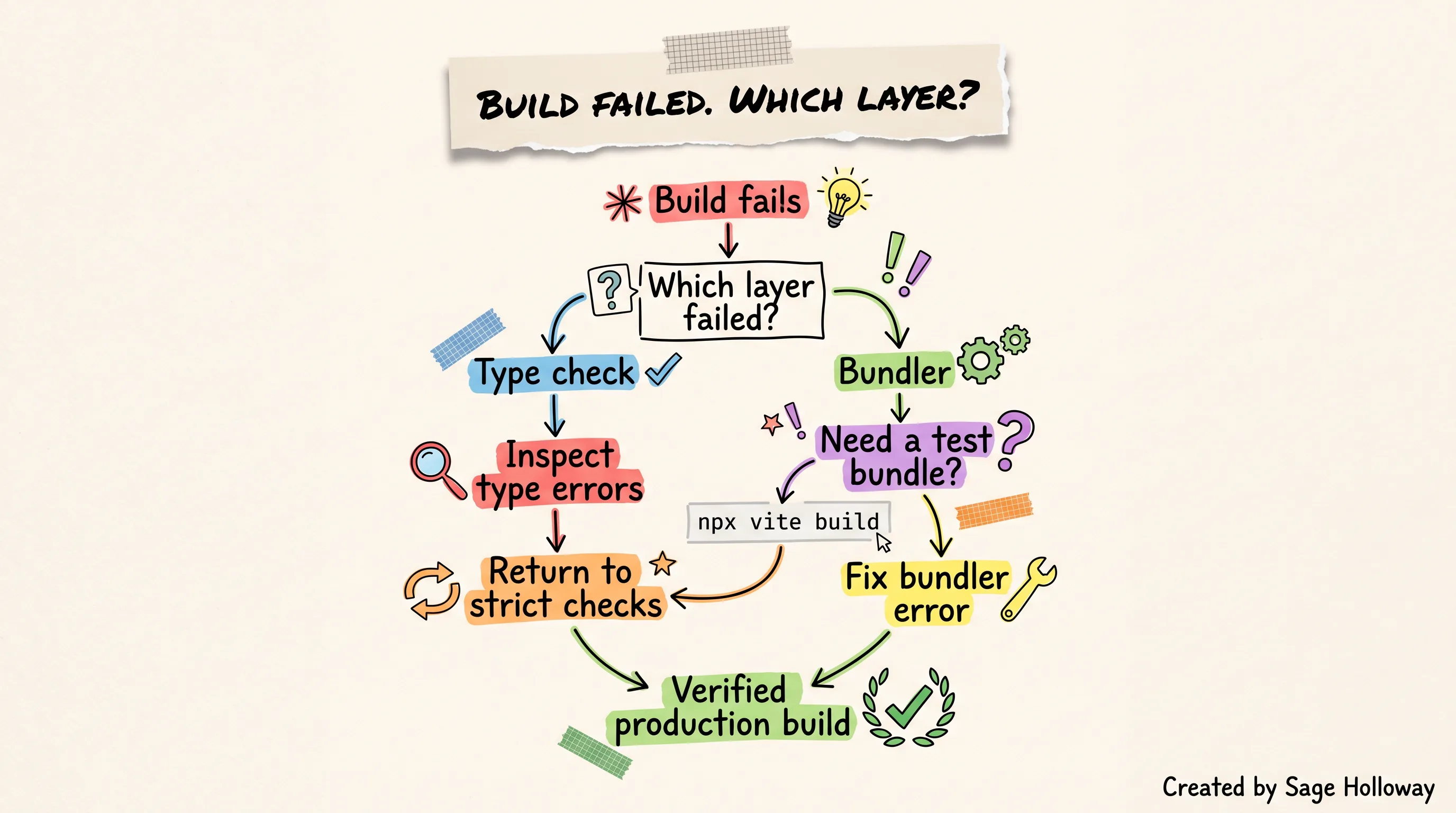
Use the bypass to isolate the failing layer, then loop back. Do not turn a diagnostic route into the release standard.
Use the sourced bypass route deliberately
The research pack documents this command as a way to build with Vite without the strict TypeScript check that blocked the surrounding build script:
Run it when you need to answer a narrow question: can the bundler produce browser assets from this source? If it succeeds while the strict build fails, you have isolated the problem to type checking. That is useful evidence.
I got this wrong the first time because the page loaded and I treated that as acquittal. It was only a witness statement.
The bypass does not repair an unsafe property assumption, prove that future refactors are sound, or make strict checks unnecessary. It tells you the bundling layer can proceed. Keep that result labeled honestly in your notes and issue tracker.
Re-enable strict checking when the types are ready
The local runner exposes a strict build directly:
Its project route also documents:
Return to one of those strict paths after resolving the reported type problems. Fix the first root error rather than silencing every downstream symptom. If a component property is wrong, correct its declared shape or its caller. If an imported package lacks what the component expects, verify the package and version instead of teaching TypeScript to look away.
This will not work if the artifact depends on modules, server functions, secrets, or platform globals that do not exist in the local environment. A type-clean client component cannot conjure a backend. It also cannot safely turn a private key into browser code.
The quiet engineering truth is that the bypass is valuable precisely because it refuses to answer the whole question. It isolates one layer. Your release process still has to answer the rest.
Pick the right production output and deployment boundary
Single-file and multi-asset builds solve different handoff problems. Neither is automatically more "production."
A single-file build inlines its JavaScript and CSS into one HTML document. That makes it portable and easy to attach, archive, or preview without reconstructing a directory. The official builder's sourced output is bundle.html. The local runner also documents a single-file build route.
A multi-asset build keeps the HTML, JavaScript, CSS, images, and other resources as separate files. It fits a conventional web project and can let a host cache assets independently. It also creates more path and hosting assumptions, which is why you should serve the built output locally before upload.

Choose the output around its destination. One file optimizes handoff; multiple assets optimize a conventional hosted project.
Size, file-type, and external-host constraints
If you publish through Claude Code's artifact surface, the output must be .html, .htm, or .md, and the rendered page must be no larger than 16 MiB. Large embedded images are a common reason a self-contained page crosses that ceiling. Claude Code artifact publication is documented for the Anthropic API provider, not Amazon Bedrock, Google Cloud's Agent Platform, or Microsoft Foundry.
Those rules are a Claude publication boundary. An external host has its own file, size, route, and header rules. Moving outside Claude gives you more control, but it also makes you responsible for the complete delivery system.
Here is the decision I would use:
Choose
bundle.htmlor another sourced single-file route when one portable frontend file is the product of the handoff.Choose a multi-asset build when the artifact is becoming part of a normal repository and deployment pipeline.
Choose neither as a shortcut for backend architecture. Client-side output should not contain secrets or pretend local state is a shared database.
Verify the exact release output in a served environment before calling it finished.
Decide whether Claude Live Artifacts fit the app
Claude Live Artifacts are compelling because they close a gap that static prototypes leave open: state. They can store information and use connectors inside the Claude Cowork environment. That makes them useful for personal dashboards, connected reports, and tools whose natural home is an ongoing Claude workflow.
But here is the thing. Persistence does not automatically create portability.
Storage and connectors
Anthropic's Live Artifacts help page gives each Live Artifact 20 MB of storage. That storage accepts text only, not images, files, or binary data. Treat it as a constrained local data store for artifact state, not as a drop-in replacement for object storage or a production database.
Connectors can pull live information through the viewer's own access where supported. Connected data changes the sharing model because another viewer may not have the same credentials or permission. Official rules should win over blog posts that imply every connected artifact can be published to anyone.
Some community sources describe a browser global named window.claude for model access without passing a personal API key into artifact code. That detail is community-sourced, not corroborated as an official public integration contract in this research pack. Do not design a production backend around it without current official documentation.
Desktop, device, and sharing boundaries
Live Artifacts are available in the desktop app. They do not appear in the Artifacts view on web or mobile. Their files live on the computer, so switching devices does not bring the Live Artifact with you.
Sharing also depends on what the artifact uses. Official guidance says Live Artifacts backed by active MCP connectors or direct live data cannot be shared publicly. Team and Enterprise environments can support organization-scoped sharing in allowed cases, while connected-data access still depends on the viewer's own permissions. Unpublishing has a hard consequence: it permanently deletes all associated storage data.

Choose Live for desktop-local connected work. Choose external hosting when reach across the web or other devices is part of the requirement.
Static-hosted transition decision
Ask where the app must run before asking which feature set sounds better.
If it must work on the public web, mobile browsers, another computer, or outside Claude, build a static hosted app and supply any real backend separately. If it is a personal or organization-bounded desktop tool that benefits from Claude storage and connectors, a Live Artifact may remove infrastructure you do not need.
If deletion durability matters, account for it now. A 20 MB text store can hold important work. The unpublish action can erase that storage permanently. Export or preserve essential data through a supported path before changing publication state.
For teams building broader agent workflows around connected information, context engineering best practices explains why source selection, permissions, and context boundaries matter as much as the visible interface.
Showcases are inspiration, not architecture
A Claude artifacts showcase can teach you what is possible visually. It cannot tell you which dependencies the creator used, whether strict checking passed, where state lives, what happens when the connector is unavailable, or whether the published demo shares its real production boundary.
Use galleries as a reference wall, not a blueprint. When an example catches your eye, evaluate it with five questions:
Is the interesting part visual, stateful, or connected to external data?
Does the demo expose source code and dependencies, or only a rendered result?
Does it work after a refresh and on a second device?
Is its data fake, local, connected, or externally hosted?
Can you identify the build and deployment output without guessing?
If those answers are missing, borrow the interaction idea and rebuild the engineering assumptions from evidence. A glossy task board with sample cards is not proof of persistence. A chart moving on click is not proof of a database. The showcase did its job when it gave you a possibility. Your build still has to earn reliability.
Embed or self-host the preview securely
Embedding a generated interface inside your own SaaS product introduces a new boundary: your host application loads code inside a preview frame. An iframe is an isolated browser document embedded inside another page. CSP, or Content Security Policy, is the browser rule set that controls which sources that document may load.
CSP and iframe boundary
LibreChat's generative UI documentation says the web server may need a frame-src policy that permits the preview origin. Its documented example allows the site's own origin and CodeSandbox frames:
Copying that line blindly is not a security review. It is evidence of the mechanism: the iframe source and CSP must agree. Set the narrowest origin that matches the preview infrastructure you actually operate, and test the browser's CSP reports.
Self-hosted Sandpack bundler
Sandpack is a browser-based code preview system. LibreChat documents an environment variable for pointing its setup at a self-hosted bundler:
This is LibreChat configuration, not an official Claude setting. It is useful when an isolated environment needs control over the preview bundler rather than relying on the public service. The placeholder URL is not a deployment recommendation. Replace it only with a validated origin from your own infrastructure.

The preview succeeds when the configured bundler location and allowed frame source describe the same deliberate boundary.
Community viewer option
The community shadcn.io artifact component offers a composable, artifact-style viewer for an existing app. Its sourced installer command is:
That installs a viewer component. It does not turn arbitrary generated code into trusted code, provide database isolation, or choose your CSP. Treat the renderer, execution frame, network permissions, and user data path as separate security decisions.
The difference between a clever embed and a responsible one lives in the boring seams: which origin runs the code, which network calls it can make, and which data crosses the frame. Nobody applauds those seams in a demo. They are still the whole release.
FAQ: React artifact questions
What is a React artifact in Claude?
A React artifact is a Claude-generated React component shown in a separate interactive workspace. It lets you preview and refine an interface beside the conversation. The preview is not automatically a standalone application, production build, backend, or public deployment.
How can I run a Claude React artifact on my local machine?
Download the component as TSX or JSX, then use the sourced local runner command npx run-claude-artifact my-app.tsx. For a durable project, use the runner's repository template or initialize Anthropic's official builder with bash scripts/init-artifact.sh <project-name>. Test the production output after the development preview.
Which build route should I use for a React artifact?
Use claude-artifact-runner when you already have a component and want a quick local run, build, or multi-page prototype. Use the official web-artifacts-builder when you want its structured scaffold and a self-contained bundle.html handoff. A full product repository may continue beyond either route.
Why does my downloaded React component fail TypeScript checks?
The artifact preview and your local strict compiler enforce different contracts. Generated TSX may contain incompatible property types, missing declarations, or imports that the preview environment supplied. Use npx vite build only to learn whether bundling works without the strict check, then return to a strict build and fix the type errors.
Can a React artifact connect to APIs or database tools?
Live Artifacts can use supported connectors and text-only persistent storage inside Claude's desktop environment. A static exported component needs a separately designed API or backend for production data. Do not place secrets in browser code. Community claims about window.claude should not replace an official integration contract.
What are the sharing limits for Claude Live Artifacts?
Live Artifacts are desktop-only and local to the computer, with no cross-device sync. Connected Live Artifacts cannot be shared publicly under the official rules in this research pack, and organization sharing depends on plan, permissions, and viewer access. Unpublishing permanently deletes the artifact's associated storage.
How do I build a multi-page app from multiple artifacts?
In the documented local runner, place uniquely named TSX components in src/artifacts/; the runner creates filename-based routes for them. Link those routes and test refresh behavior in the production build. This routing behavior belongs to that runner, so do not assume another scaffold implements it automatically.
Can I securely embed a React artifact in my SaaS product?
You can embed an artifact-style preview, including with the community shadcn.io component, but security depends on the execution boundary. Isolate the preview in an iframe, align CSP frame-src with the actual bundler origin, restrict network access, and keep secrets and privileged backend operations outside generated browser code.
Try the smallest production path first
Take one artifact that already works in Claude. Export it. Choose the local runner if you need to interrogate the existing TSX, or the official builder if bundle.html is the desired handoff. Then write down three results: whether the development preview works, whether the production bundle works, and whether the strict type check works.
Do not let one green result answer all three questions.
If Claude Code's publication behavior interrupts the workflow, CLAUDE_CODE_ARTIFACT_AUTO_OPEN=0 stops the automatic browser opening. CLAUDE_CODE_DISABLE_ARTIFACT=1 disables artifact generation locally. In project settings, "enableArtifact": false can disable it in .claude/settings.json or .claude/settings.local.json, with Claude Code v2.1.242 or later required by the sourced documentation. These are operational controls, not steps in the React build itself.
The next generation of artifact tooling will probably make the bridge shorter. It will not erase the need to know where code runs, where data lives, and which build actually passed. That knowledge is what turns a charming prototype into software another person can depend on.
Until then...
Sage
PS. Pick the smallest artifact in your folder and try the strict build before lunch. If it passes, you found a clean seed. If it fails, you found the exact edge your next hour should improve.
Author
Practical guides, tool teardowns & AI engineering workflows.
Related Articles

Claude Code
Claude Code Notifications: Complete Guide to Desktop Alerts, Remote SSH Hooks & Audio Cues (2026)

Claude Code
Claude Code Permissions: Stop Approval Prompts Safely with Auto Mode, Rules & Docker Bypass (2026)

Claude Code
Claude Code Dangerously: Run Bypass Permissions Safely with Docker, Guardrails & Auto Mode (2026)