Claude Code
Claude Cowork for Legal: Security Architecture, Heppner Privilege, and Enterprise Deployment

Sage Holloway
38 min read
Go back to blog
SHARE

You handed an incoming counterparty agreement to an autonomous desktop agent, expecting a structured redline against your internal playbook. Twenty minutes later, the contract was summarized, but the agent had quietly executed three shell commands, scanned adjacent directories, and left zero records in your enterprise audit log. You gained a draft, but you created an unmonitored evidentiary blind spot.
Claude Cowork and its Legal Plugin suite enable law firms and in-house counsel to automate contract review, NDA triage, and DSAR responses via desktop agents and customizable CLAUDE.md practice profiles. However, safe enterprise deployment requires operating on commercial Zero Data Retention (ZDR) API tiers to satisfy the United States v. Heppner attorney-client privilege test, alongside deploying MDM managed-settings.json policies and OpenTelemetry SIEM streams to mitigate indirect prompt injection exfiltration and resolve native audit logging gaps.
Last verified: September 1, 2026 (NotebookLM research sources, official Anthropic Help Center documentation, and verified community architecture reviews; no live CLI run on this pack).
When Anthropic announced its legal tool suite and desktop agent capabilities, the reaction across law firms and corporate legal departments split into two extremes. One camp viewed desktop agents as an immediate replacement for six-figure legal software contracts, imagining a world where associate attorneys never have to parse a standard non-disclosure agreement again. The other camp saw an uncontainable security nightmare: autonomous software scanning local disks, reading privileged client files, and interacting with external web servers without a human gatekeeper.
Both views miss the actual operational reality. Deploying claude cowork legal workflows is neither an off-the-shelf productivity shortcut nor an insurmountable compliance hazard. It is a systems engineering challenge that sits squarely at the intersection of enterprise endpoint security, network architecture, and federal evidentiary doctrine.
The core tension is straightforward: generative AI tools deliver immense leverage when analyzing, structuring, and redlining dense legal text, but autonomous desktop agents introduce an expanded execution blast radius that traditional cloud chat interfaces never had. If an associate pastes a privileged brief into a consumer chat window, the primary risk is data retention and model training. But when an agent reads a 90-page merger agreement directly from a local folder, parses embedded XML macros, runs headless browser searches, and writes output files to your filesystem, the threat model expands from simple data privacy to active remote execution and file exfiltration.
This guide provides a comprehensive technical and operational blueprint for deploying claude cowork legal environments. We unpack the architectural differences between Claude Chat, Claude Code, and Claude Cowork, evaluate the landmark evidentiary standards established in United States v. Heppner, break down the mechanics of indirect prompt injection attacks, address the critical native compliance audit gap, and provide complete MDM configuration schemas (managed-settings.json) and OpenTelemetry logging pipelines to ensure your firm maintains ironclad security and legally defensible attorney-client privilege.
For initial desktop installation, folder layout, and daily workflow mechanics, read our companion guide on How to Use Claude Cowork. For subscription costs, 5-hour rolling limits, and seat economics across Pro, Team, and Enterprise, consult Claude Cowork Pricing. If your team is experiencing missing interface buttons or socket connection errors, see Claude Desktop Cowork Tab Missing. To compare desktop GUI execution against terminal developer sandboxing, visit Claude Code vs. Claude Cowork.
On this page
Product architecture and execution boundaries: Cowork desktop GUI vs. Claude Code vs. Legal Plugin suite
Attorney-client privilege and the Heppner test: why consumer Claude waives confidentiality
Threat vectors and attack surfaces: indirect prompt injection, API allowlist exfiltration, and local file access
The compliance audit gap: why Cowork is invisible to native audit logs and data exports
Enterprise endpoint hardening: deploying MDM managed-settings.json, proxy headers, and MCP stance policies
Unified legal-security playbook: bridging OpenTelemetry SIEM audit trails with Heppner privilege compliance
The 12 practice plugins and workflow automation: contract redlining, NDA triage, and DSAR responses
Enterprise deployment postures and adoption roadmap: Lockdown vs. Controlled vs. Open
Frequently Asked Questions
Putting it into practice: your legal deployment roadmap
Deploying Claude Cowork for enterprise legal workflows requires bridging technical zero-trust endpoint security with defensible attorney-client privilege controls.
Product architecture and execution boundaries: Cowork desktop GUI vs. Claude Code vs. Legal Plugin suite
Imagine a secure corporate archive facility where three distinct professionals work under one roof. In the front consultation office, an advisor reviews printed memos, answers general questions, and discusses high-level strategy without touching the filing cabinets. In the basement maintenance workshop, a certified mechanical engineer disassembles server racks, runs system diagnostics, and repairs physical hardware using a strict set of locked hand tools. In the records room, an operations specialist systematically retrieves case binders from designated shelves, extracts contract terms, reconciles dates across documents, and packages clean summary dossiers for senior partners.
Each worker operates under the same firm umbrella, but their physical access, tooling, and operational boundaries could not be more different. You would never ask the front-desk advisor to rewrite server firmware, nor would you allow the records specialist to wander into the server vault without a security escort.
That operational division mirrors the Anthropic ecosystem. When evaluating claude cowork legal capabilities, general counsel and IT leaders often conflate three distinct products: Claude Chat, Claude Code, and Claude Cowork. Each product serves a completely different operational layer, with distinct trust boundaries and sandboxing models.
Deconstructing the Claude ecosystem: Chat vs Code vs Cowork
To understand where legal risk lives, we must first deconstruct the three runtime environments:
Claude Chat (claude.ai): The conversational interface. It runs entirely in the cloud via web browsers and mobile apps. It accepts text, attachments, and images, returning single-turn or multi-turn conversational responses. It has no access to your local filesystem, cannot execute shell commands, and retains session state only in server memory.
Claude Code (@anthropic-ai/claude-code): The developer command-line interface (CLI). Built for software engineers, it operates directly in terminal environments. It enforces operating-system-level process sandboxing via Apple
seatbelton macOS andbubblewrapon Linux. Claude Code is designed to inspect Git repositories, write source code, run unit test suites, and execute terminal commands under explicit developer approval.Claude Cowork (Desktop Agent): The autonomous knowledge-work agent embedded in the Claude Desktop application. Designed for non-technical professionals (lawyers, contract managers, compliance officers), Cowork executes multi-step objectives by reading local directories, orchestrating background subagents, navigating web pages via a built-in headless browser, and generating formatted Office files (.docx, .xlsx, .pptx).

Claude for Legal ecosystem: Enterprise ZDR API tiers power the Cowork desktop GUI, which coordinates 12 practice plugins, MCP connectors, and Microsoft 365 integrations.
The confusion compounds when discussing claude cowork legal because the public narrative frequently treats "Claude for Legal" as an independent SaaS product. It is not.
Anatomy of Claude for Legal: open-source practice profiles on GitHub (anthropics/claude-for-legal) vs standalone SaaS
Anthropic does not sell a proprietary, closed-source "Claude Legal Edition" binary. Instead, "Claude for Legal" is an open-source suite of 12 practice area plugins, system prompts, slash command definitions, and practice profiles hosted on GitHub under the repository anthropics/claude-for-legal.
When an organization deploys Claude for Legal, it is installing workflow definitions on top of the Claude runtime. These practice profiles reside locally in the user's configuration directory at:
This architecture means that Claude for Legal inherits the exact execution sandbox, security posture, and data retention rules of the underlying Claude client. If an attorney runs these plugins within a consumer Claude account, the deployment carries consumer-tier privacy risks. If the firm runs them on an Enterprise Zero Data Retention (ZDR) account backed by Mobile Device Management (MDM) security policies, the deployment achieves enterprise-grade isolation.

Claude Desktop Cowork workspace: Mode selector tabs, dedicated local folder boundary (/Legal/Active-Reviews/), and multi-step contract review task decomposition.
Desktop VM sandboxing vs unsandboxed Computer Use execution
Understanding the execution boundary requires examining how Claude Desktop runs code.
When Claude Cowork executes data analysis, file parsing, or Python scripts, it executes those tasks inside an isolated cloud virtual machine (VM) container. The VM is provisioned ephemerally for the session and communicates with the desktop client over secure WebSockets. When you assign Cowork a working directory using the Work in a Folder picker, the client synchronizes files into this VM environment, executes the requested analysis, and streams the resulting artifacts back to your local folder.
However, there is a critical architectural exception: Computer Use.
When Claude Cowork employs screen control to interact with legacy software (such as on-premise document management systems or proprietary desktop billing tools), it operates outside the cloud VM sandbox. Computer Use captures high-resolution screenshots of the attorney's actual physical desktop, processes pixel coordinates via vision models, and injects OS-level mouse clicks and keystrokes.
For legal teams, this distinction is vital. VM-sandboxed file reviews operate within controlled execution boundaries; unsandboxed Computer Use interacts directly with live endpoint interfaces. If an unvetted document contains instructions to click buttons or navigate open browser tabs, an unsandboxed desktop agent can theoretically interact with sensitive data outside the designated review folder.
To see how Anthropic demonstrates desktop workspace isolation and local folder scoping in practice, watch the official product walkthrough:
Video: Anthropic's official walkthrough illustrating how Claude Cowork organizes desktop environments and manages local file systems.
Headless managed agents and subagent depth limits
To scale beyond interactive desktop sessions, Anthropic provides a headless orchestration mechanism via the Managed Agents API. Using deployment scripts from the claude-for-legal repository:
These headless agents execute scheduled background tasks, such as monitoring regulatory docket feeds or auditing contract renewal dates, running independently on cloud infrastructure without requiring an open desktop window.
To prevent cascading execution loops, Anthropic enforces a strict architectural constraint: subagent delegation (callable_agents) is currently limited to a single delegation level (depth-1). A primary legal orchestrator can spawn a specialized research subagent to search SEC filings, but that subagent cannot recursively spawn additional autonomous agents. This depth-1 ceiling prevents uncontrolled token consumption and contains the agentic blast radius.
Attorney-client privilege and the Heppner test: why consumer Claude waives confidentiality
In corporate law and litigation, technological efficiency is meaningless if it compromises evidentiary privilege. If an in-house legal team uses an AI tool to summarize internal investigations, evaluate regulatory exposure, or redline commercial terms, and a federal court later rules that those communications are discoverable by opposing counsel, the resulting exposure can easily outweigh any operational savings.
For years, legal commentators debated whether uploading confidential materials to commercial AI systems waived attorney-client privilege and work-product protection. In 2025, that debate moved from academic theory to binding judicial precedent.
The landmark United States v. Heppner ruling and AI privilege boundaries
The Southern District of New York (SDNY) addressed this question directly in United States v. Heppner. In that proceeding, a corporate defendant sought to shield internal AI-generated summaries and prompts under the attorney-client privilege, arguing that interacting with an AI assistant was analogous to consulting an internal paralegal or expert consultant.
The court rejected the blanket privilege claim, establishing that standard interactions with commercial generative AI platforms do not automatically qualify for attorney-client protection. However, Judge Jed S. Rakoff outlined the specific legal mechanism through which AI interactions can maintain privilege under the doctrine established in United States v. Kovel (296 F.2d 918).
Under the Kovel doctrine, communications between an attorney and a third-party non-lawyer (such as an accountant or foreign-language translator) retain privilege if the third party's role is strictly necessary to assist the attorney in rendering legal advice, and if the communications are conducted under a reasonable expectation of confidentiality.
The 3-prong Heppner privilege test: non-attorney status, contractual confidentiality, and counsel direction
Drawing from Kovel, the court in Heppner established a clear three-prong test that organizations must satisfy to defend AI-assisted legal workflows against privilege waiver challenges:
Prong 1: Non-Attorney Agent Recognition: The organization must formally recognize that the AI tool is not an attorney and cannot independently provide legal advice. The AI functions solely as a technical instrument operating under the direct supervision of licensed counsel.
Prong 2: Contractual Guarantee of Confidentiality: The communications must occur on a platform governed by enforceable, non-disclosure terms that prohibit the vendor from using customer inputs or outputs for model training, employee review, or third-party disclosure.
Prong 3: Documented Counsel Direction and Active Supervision: The deployment and specific workflows must be directed, supervised, and verified by licensed counsel. The attorney must define the prompts, review the generated outputs, and maintain an audit trail demonstrating active human oversight.
The third prong is where most legal teams fail. Simply purchasing an enterprise license is insufficient; the firm must be able to prove in court that a specific AI session was initiated under counsel direction and subject to attorney verification.
Account tier privilege divide: Consumer Free/Pro training terms vs Team / Enterprise Zero Data Retention (ZDR)
The most dangerous mistake a law firm or legal department can make is allowing staff to use personal or consumer-tier Claude accounts for legal analysis.
Under Anthropic's consumer Terms of Service (Free and Pro tiers), user inputs and outputs may be retained and utilized for model training unless the user manually navigates to privacy settings and opts out. In a court of law, transmitting privileged client facts to a third-party server under terms that permit model training completely destroys the "reasonable expectation of confidentiality" required by Prong 2 of the Heppner test.

Account tier legal matrix: Only Commercial API and Enterprise Zero Data Retention (ZDR) tiers satisfy the United States v. Heppner confidentiality standard.
The table below outlines the legal privilege posture across Anthropic's subscription and API tiers under the Heppner privilege test:
Account Tier | Model Training Terms | Data Retention Policy | Heppner Privilege Status | Audit Logging Support |
|---|---|---|---|---|
Consumer Free / Pro | Opt-out required (trains by default) | 30-day session retention on Anthropic servers | Waives Privilege (fails confidentiality prong) | None (Personal account) |
Claude Team | Zero training on customer inputs/outputs | 30-day operational retention (encrypted) | Conditional (requires counsel-direction memo) | Workspace user logs only (Cowork excluded) |
Claude Enterprise (ZDR) | Zero training strictly enforced | Zero Data Retention (ephemeral processing) | Defensible (satisfies Heppner 3-part test) | OTel export to SIEM required for Cowork |
Commercial API (Bedrock / Vertex) | Zero training guaranteed by cloud SLA | Configurable retention / Zero storage | Defensible (enterprise BAA / DPA enforceable) | Full cloud provider audit trail integration |
To maintain a defensible legal posture, all claude cowork legal deployments must run on Claude Enterprise with Zero Data Retention (ZDR) enabled or via commercial cloud API endpoints (Amazon Bedrock or Google Cloud Vertex AI) governed by an executed Data Processing Agreement (DPA) or Business Associate Agreement (BAA).
Threat vectors and attack surfaces: indirect prompt injection, API allowlist exfiltration, and local file access
When evaluating claude cowork security and specific claude cowork security risks, security teams quickly realize that desktop agents introduce vulnerabilities fundamentally different from standard web applications. In a web chat interface, a malicious prompt can only manipulate the text in the browser tab. In Claude Cowork, an exploited prompt can direct the agent to read local files, execute shell scripts, or transmit data over the network.
Understanding these risks is essential for configuring effective endpoint defenses.
Indirect prompt injection via hidden white-on-white text in .docx and PDF contracts
The primary attack vector targeting legal AI workflows is indirect prompt injection.
In a direct prompt injection, a malicious user types adversarial instructions directly into the prompt bar. In an indirect prompt injection, the attacker embeds adversarial instructions inside an untrusted external document (such as a counterparty's draft agreement, an incoming vendor invoice, or a discovery PDF) that an unsuspecting attorney asks Claude Cowork to review.
Attackers frequently conceal these instructions using formatting tricks:
Micro-font text (0.5pt font size) placed inside headers, footers, or table cells.
White text on a white background positioned between boilerplate clauses.
Hidden XML comment tags inside Microsoft Word
.docxpackages.Metadata streams inside PDF attachments.
When an attorney opens Claude Cowork and executes /commercial-legal:review on an incoming agreement, the underlying multimodal model parses the entire raw document content, including the invisible text. If the hidden text contains instructions like:
An unhardened desktop agent may interpret those instructions as valid user commands.

Threat model attack chain: Hidden white-on-white text in contract files triggers cURL exfiltration via whitelisted Anthropic API endpoints unless blocked by MDM deny policies.
The Anthropic API allowlist exfiltration vector: cURLing local workspace files without triggering VM network blocks
The most sophisticated exploit demonstrated by security researchers involves exploiting network egress allowlists.
In standard enterprise environments, endpoint security tools and cloud virtual machines block outbound network connections to unknown IP addresses or unvetted web domains. However, to function properly, Claude Cowork must maintain a persistent, whitelisted outbound connection to Anthropic's official API endpoints (api.anthropic.com).
Researchers discovered that an indirect prompt injection could instruct Claude Cowork to execute a local shell utility (such as curl or wget) to upload sensitive local files directly to an attacker's Anthropic organization account using an embedded API key supplied in the malicious document:
Because the destination URL (api.anthropic.com) is a legitimate, whitelisted enterprise domain, standard network firewalls and VM egress filters allow the request to pass without raising an alert. The attacker simply logs into their own Anthropic dashboard and reads the exfiltrated client credentials from their API request logs.
This indirect prompt injection exfiltration technique bypasses traditional perimeter defenses entirely, reinforcing why network-level filtering alone is insufficient.
Desktop extension vulnerabilities (CVE-2025-59536, CVE-2026-21852, CVE-2026-22561, and calendar RCE)
Beyond prompt injection, desktop AI agents inherit the vulnerabilities of their underlying software packages and dependency supply chains. Several critical vulnerabilities highlight the necessity of strict endpoint management:
CVE-2025-59536 (CVSS 8.7): A remote code execution flaw in early Claude Code implementations where malicious repository configuration files (
.claude/settings.json) in cloned folders executed shell commands before displaying user trust confirmation dialogs.CVE-2026-21852 (CVSS 5.3): An API key exfiltration flaw where an adversarial workspace configuration could override the
ANTHROPIC_BASE_URLenvironment variable, silently redirecting all subsequent API requests and credentials to an attacker-controlled proxy server.CVE-2026-22561: A DLL Search Order Hijacking vulnerability identified in the Claude for Windows installer, allowing local privilege escalation if an attacker placed a malicious dynamic link library in the execution path.
Unsandboxed Desktop Extension RCE (CVSS 10.0): Demonstrated by security research teams, this vulnerability involved crafting malicious calendar invites with embedded executable payloads that triggered unsandboxed remote execution when parsed by desktop agent calendar connectors.
Model robustness limits: Opus 4.5 1% injection failure rate
Anthropic has invested heavily in frontier model alignment and prompt injection resistance. In Claude 3.7 Sonnet and Claude Opus 4.5, model-level safety mitigations have reduced the success rate of standard indirect prompt injections to approximately 1% in controlled adaptive evaluations.
While a 99% defense rate is an impressive engineering achievement, in enterprise legal operations, a 1% failure rate is unacceptable. If a legal department processes 1,000 external supplier agreements, NDAs, and discovery files per month, a 1% failure rate represents ten potential security breaches per month.
The legal risk was never the model's intelligence; the risk is the unmonitored execution boundary. Model-level safety must always be backed by non-overridable, operating-system-level controls.
The compliance audit gap: why Cowork is invisible to native audit logs and data exports
When CISOs, privacy officers, and general counsel evaluate claude cowork data privacy, their first requirement is auditability and sovereign data control. Under regulatory frameworks like SOC 2 Type II, HIPAA, GDPR (Article 30), and ISO/IEC 27001, organizations must maintain immutable, time-stamped logs of all user actions, data access events, and file modifications.
Here is the complication that shocks most enterprise buyers: Claude Cowork activity is omitted from native Anthropic enterprise compliance tools.
The enterprise compliance blind spot: Cowork exclusion from native Audit Logs, Compliance APIs, and Data Exports
Anthropic provides robust compliance tooling for standard Claude usage. Enterprise administrators can access native Audit Logs, query the Compliance API to inspect user messages, and generate automated Workspace Data Exports for eDiscovery and regulatory archiving.
However, as explicitly documented in official technical disclosures, these native compliance tools capture only standard Claude Chat activity.
Actions taken inside Claude Cowork:
Local files opened, read, or modified by the agent
Slash commands executed (
/commercial-legal:review,/privacy-legal:dsar-response)Shell scripts and data transformations executed inside the ephemeral VM
Headless browser URLs visited and external data extracted
Local files generated or deleted in the working folder
Are completely excluded from native Anthropic Audit Logs, Compliance APIs, and Workspace Data Exports across all subscription tiers, including Claude Enterprise.

Compliance remediation matrix: Bridging Cowork's omission from native audit logs, Compliance APIs, and data exports via OpenTelemetry and AI proxies.
Regulatory impacts under SOC 2, HIPAA, GDPR, and ISO 27001
This architectural exclusion creates immediate regulatory compliance blockers:
SOC 2 Type II (Trust Services Criteria CC6.1, CC6.8): Requires comprehensive monitoring of data transmission and unauthorized file access. Deploying unmonitored Cowork instances on corporate laptops can trigger audit exceptions during annual reviews.
HIPAA Security Rule (§ 164.312(b) Audit Controls): Mandates technical mechanisms to record and examine activity in systems containing or processing Protected Health Information (PHI). Because Cowork lacks native audit trails, deploying stock Cowork on endpoints touching PHI violates HIPAA requirements.
GDPR Article 15 (Right of Access) & Article 30 (Records of Processing): Requires organizations to identify all processing activities involving EU citizen data. If an agent processes personal data inside a local desktop session without centralized logging, the firm cannot produce comprehensive DSAR disclosure reports.
ISO/IEC 27001 (Control A.12.4 Logging and Monitoring): Requires event logs recording user activities, exceptions, and security events to be produced, kept, and regularly reviewed.
The table below outlines the compliance audit gap and the required technical remediations:
Compliance Capability | Native Cowork Status | Regulatory Impact | Technical Remediation |
|---|---|---|---|
Enterprise Audit Logs | Omitted across all tiers | SOC 2 / ISO 27001 control failure | Stream OpenTelemetry events to Splunk / Datadog |
Compliance API & eDiscovery | Omitted from native API | Blocked legal hold & discovery workflows | AI Proxy traffic archiving with retention policies |
Automated Data Exports | Excluded from workspace exports | GDPR Article 15 DSAR non-compliance | Local session directory ingestion scripts |
User Action Screening | Client-side confirmation only | Insufficient documentary proof of review | Mandatory attorney sign-off in verification logs |
Tenant Account Enforcement | Allowed personal sign-in | Shadow AI & privilege waiver risk | Deploy |
Local conversation data storage and session retention mechanics
Because Cowork operations are not archived centrally in Anthropic's compliance database, session data lives locally on the user's workstation.
On macOS and Windows endpoints, Claude Desktop stores local session transcripts, cached task plans, and temporary file artifacts inside the application support directory:
macOS:
~/Library/Application Support/Claude/Windows:
%APPDATA%\Claude\
If an endpoint is lost, wiped, or replaced, all historical records of Cowork agent executions on that machine are permanently destroyed unless enterprise backup agents or centralized telemetry collectors capture that directory.
To solve this compliance audit gap, enterprise IT teams must implement external logging controls before rolling out Cowork to legal staff.
Enterprise endpoint hardening: deploying MDM managed-settings.json, proxy headers, and MCP stance policies
To address claude cowork security concerns without crippling the productivity benefits of the tool, enterprise IT must enforce a zero-trust architecture. We do not rely on user discretion or prompt guidelines; we enforce non-overridable security policies at the operating system, proxy, and connector levels.
Non-overridable MDM enforcement via managed-settings.json (Jamf/Intune)
Anthropic supports centralized configuration management via Mobile Device Management (MDM) platforms such as Jamf Pro, Microsoft Intune, and Kandji.
By deploying a system-level managed-settings.json file to managed endpoints, administrators can lock down Claude Desktop settings, enforce security policies, and prevent end-users from disabling safety controls.
The configuration file must be placed in the designated system management path:
macOS:
/Library/Application Support/Claude/managed-settings.jsonWindows:
C:\ProgramData\Claude\managed-settings.json
Because these directories require administrative (root/SYSTEM) privileges to write, standard user accounts cannot alter or delete the configuration.

Enterprise control plane topology: MDM endpoints route Claude Desktop traffic through an enterprise AI proxy and MCP gateway while streaming audit telemetry to SIEM.
File-level deny rules: blocking .env, .ssh/, curl, and wget
To neutralize the indirect prompt injection attack chain described earlier, the MDM policy must enforce explicit filesystem and command execution deny rules.
Even if an incoming document tricks Claude into attempting to read private SSH keys or execute a network upload command, the desktop client's core runtime intercepts the call and blocks execution locally.
Here is a production-grade managed-settings.json configuration for enterprise legal deployments:
When an agent attempts to access any path in restricted_paths or invoke a blocked binary, Claude Cowork immediately halts execution and displays a system-level policy block modal.

MDM policy enforcement: Claude Cowork alerts the user when an action is blocked by centralized managed-settings.json rules.
Tenant isolation using enterprise proxy header anthropic-allowed-org-ids: <org-uuid>
To prevent employees from signing into personal Claude accounts on corporate devices (which violates the Heppner confidentiality prong and risks data leakage), network administrators must enforce tenant isolation at the corporate egress proxy or Secure Web Gateway (SWG).
By injecting the custom HTTP header on all outbound requests to Anthropic domains:
Anthropic's authentication servers will block any login attempt associated with personal consumer accounts or unapproved third-party workspaces, ensuring all traffic routes strictly through the firm's Enterprise ZDR organization.
MCP connector governance: configuring per-tool stances (Allow, Ask, Blocked) in managed-mcp.json
Model Context Protocol (MCP) servers allow Claude Cowork to connect to enterprise repositories like Box, Google Drive, Microsoft 365, and Thomson Reuters CoCounsel.
To prevent third-party MCP servers from exposing broad read/write capabilities without oversight, administrators must deploy a centralized managed-mcp.json configuration defining granular per-tool stances:
Allow(Deterministic Read): Low-risk read-only tools that execute automatically without user prompting (e.g., querying firm policy documents in Box).Ask(High-Impact Mutation): Actions that create, update, or send data, requiring explicit user approval before execution (e.g., updating a document management metadata tag).Blocked(Prohibited): High-risk tools that are completely disabled across the organization (e.g., deleting cloud records, sending external emails).
Here is a sample managed-mcp.json configuration:
Unified legal-security playbook: bridging OpenTelemetry SIEM audit trails with Heppner privilege compliance
The single greatest gap in current enterprise AI deployments is the organizational silo between the Chief Information Security Officer (CISO) and the General Counsel (GC).
The CISO is focused on technical risk: intercepting data exfiltration, stopping prompt injections, and capturing telemetry. The General Counsel is focused on evidentiary risk: protecting attorney-client privilege under United States v. Heppner, avoiding malpractice, and ensuring ethical compliance.
These two requirements are not separate challenges; they are the exact same system.
By configuring OpenTelemetry event streaming from Claude Desktop directly to your enterprise Security Information and Event Management (SIEM) platform (such as Splunk, Datadog, or Microsoft Sentinel), the organization simultaneously solves the technical audit gap AND creates the immutable evidentiary record required to prove counsel direction in court.

Unified privilege and telemetry architecture: Continuous OpenTelemetry logging to SIEM provides the documentary proof of counsel direction required under United States v. Heppner.
Bridging CISO telemetry with General Counsel privilege requirements
To satisfy the third prong of the Heppner privilege test (documented counsel direction and supervision), a law firm cannot simply rely on an attorney's verbal testimony months later. Opposing counsel will demand contemporaneous records proving:
Who initiated the AI session and what prompt instructions were provided.
What specific files and confidential facts were ingested.
What raw analysis the model generated.
What edits, corrections, and verifications the licensed attorney performed before the work-product was finalized.
By streaming Claude Cowork telemetry directly to your enterprise SIEM, every prompt, tool execution, redline suggestion, and user approval is cryptographically time-stamped and preserved in an immutable corporate record.
Configuring local OpenTelemetry event streaming (requires Claude Desktop v1.1.4173+)
Beginning with Claude Desktop client version 1.1.4173 or later, Anthropic introduced native support for local OpenTelemetry (OTel) instrumentation.
Administrators can enable OpenTelemetry streaming globally via MDM or by configuring local environment variables on attorney workstations:
A lightweight local OpenTelemetry Collector running on the endpoint (or a centralized internal gateway) receives these protobuf event spans and forwards them securely to the enterprise SIEM.
Routing OTel event streams to SIEM (Splunk/Datadog) as documentary proof of counsel-directed supervision
The OpenTelemetry event stream captures rich, structured JSON payloads documenting the lifecycle of every legal review task:
This structured telemetry stream delivers two massive operational wins:
For the CISO: Instant real-time alerts if an agent attempts unauthorized network egress, scans unapproved directories, or exhibits anomalous token consumption indicative of a prompt injection loop.
For the General Counsel: An immutable, searchable audit log that can be produced in court to conclusively prove that AI-generated work-product was executed under the active direction and supervision of licensed counsel, fully preserving attorney-client privilege.
Implementing OpenTelemetry OTel SIEM logging is the linchpin that transforms an unmonitored desktop productivity tool into an enterprise-defensible legal workstation.
Documenting counsel-directed AI usage policies to satisfy the Heppner third prong
Alongside technical telemetry, legal departments must establish a formal written policy governing AI usage. The policy must explicitly establish:
The Technical Instrument Clause: A statement affirming that generative AI tools operate solely as technical processing instruments under the direction of licensed attorneys, maintaining the legal relationship established under United States v. Kovel.
Mandatory Account Isolation: A strict prohibition against using personal, non-enterprise AI accounts for any firm-related or client-related matters.
Mandatory Human Verification: A binding rule requiring attorneys to independently verify all citations, statutory references, and contract redlines before incorporating them into client deliverables.
Matter-Level Logging: A requirement that all AI-assisted drafting sessions reference an active internal Matter ID to correlate SIEM telemetry with client case files.
The 12 practice plugins and workflow automation: contract redlining, NDA triage, and DSAR responses
With endpoint security hardened and privilege safeguards established, legal teams can deploy the full power of Anthropic's open-source legal tooling.
The anthropics/claude-for-legal repository organizes into 12 specialized practice area plugins spanning commercial transactions, privacy compliance, litigation, and corporate governance.

Slash command autocomplete: Typing /legal displays practice commands for contract review, NDA triage, and DSAR responses.
Installing plugins via Marketplace and CLI
Legal operations teams can install the legal plugin suite directly through the Claude Cowork marketplace interface or via the command line.
To install via CLI:
To see a complete step-by-step visual demonstration of browsing, installing, and configuring plugins inside the Claude Cowork marketplace, watch this walkthrough:
https://www.youtube.com/watch?v=7OcC1v_k2z8&vl=en-US
Video: Step-by-step walkthrough showing how to discover, install, and configure legal plugins in the Claude Cowork marketplace interface.
Transactional workflows: /commercial-legal:review clause redlining against playbook standards
The flagship transactional command is /commercial-legal:review.
When invoked on an active contract file, the plugin performs a clause-by-clause risk analysis, evaluating standard terms (indemnification, limitation of liability, intellectual property assignment, termination for convenience, governing law) against the firm's standard negotiating playbook.
The command outputs a structured, color-coded risk assessment card:
[RED - UNACCEPTABLE RISK]: Severe deviations from playbook standards (e.g., uncapped consequential damages, unilateral IP assignments) that require executive counsel escalation.[YELLOW - NEGOTIATE]: Moderate risk terms requiring compromise language (e.g., standard 1x contract value liability caps, 30-day notice periods).[GREEN - APPROVED]: Standard market boilerplate aligned with internal guidelines.

Contract review output: Color-coded clause assessment (GREEN / YELLOW / RED) with specific redline suggestions and risk justifications.
Crucially, Cowork does not merely generate text in a chat window. It generates native Microsoft Word .docx deliverables with formatted Track Changes redlines and inline marginal comments ready for attorney review and counterparty exchange.
Privacy and compliance: /privacy-legal:dsar-response automation
For privacy counsel managing high-volume Data Subject Access Requests (DSARs) under GDPR and CCPA/CPRA, the /privacy-legal:dsar-response command automates end-to-end triage:
Ingests the incoming consumer request and verifies identity requirements.
Cross-references internal data inventory mapping tables to determine applicable systems.
Generates a structured scope determination memo identifying covered vs. exempt records (e.g., litigation hold exemptions, trade secret protections).
Drafts a formal, jurisdiction-specific response letter for privacy officer review.
To explore how in-house legal teams at leading technology companies structure real-world contract redlines and automated compliance workflows, watch Anthropic's official legal team workshop:
https://anthropic.ondemand.goldcast.io/on-demand/b95a2b46-e771-49e8-937f-482a74f2e590
Workshop: Official Anthropic legal session showing practical in-house workflows for contract redlining and playbook integration.
Legal research: /cocounsel-legal:deep-research via Thomson Reuters CoCounsel MCP
For litigation and regulatory research, the /cocounsel-legal:deep-research command integrates Claude Cowork directly with Thomson Reuters CoCounsel and Westlaw databases via Model Context Protocol (MCP).
Instead of relying on public web searches (which risk hallucinated citations or outdated precedent), the plugin executes verified queries against primary legal databases, pulling binding case law, statutory annotations, and Shepard's/KeyCite citation validity flags directly into the workspace.
Tailoring firm playbooks: cold-start interviews and custom ~/.claude/plugins/config/claude-for-legal/<plugin>/CLAUDE.md
Every law firm and corporate legal department maintains unique risk tolerances and drafting preferences. An emerging startup might accept broad mutual indemnification to close enterprise sales quickly, whereas a financial institution will insist on rigid liability caps and specific choice-of-venue provisions.
To align Claude Cowork with your organization's specific negotiating positions, the plugin suite includes an interactive onboarding interview:
When triggered, Cowork initiates an interactive 15-minute diagnostic questionnaire, asking the supervising attorney about standard fallback positions, prohibited terms, signature escalation thresholds, and preferred clause templates.
At the conclusion of the interview, Cowork synthesizes those preferences into a persistent, custom practice profile saved at:
Here is an excerpt of a tailored CLAUDE.md configuration for commercial contract review:

Claude for Legal plugin index: Overview of the 12 vertical practice plugins, associated slash commands, MCP integrations, and deliverable formats.
The table below outlines the full index of the 12 vertical practice plugins available in the Claude for Legal suite:
Practice Category | Plugin Name | Key Slash Commands | Integrated MCP Connectors | Primary Deliverables |
|---|---|---|---|---|
Commercial & Transactional |
|
| Microsoft 365 Word, Box | Redlined |
Privacy & Compliance |
|
| OneTrust, Google Workspace | DSAR Response Drafts, Compliance Tables |
Litigation & Disputes |
|
| Relativity, Box | Privilege Logs, Deposition Outlines |
Legal Research |
|
| Thomson Reuters CoCounsel, LexisNexis | Cited Legal Memoranda, Case Summaries |
Employment & Labor |
|
| Workday, Google Docs | Policy Comparison Matrices, Separation Drafts |
Corporate Governance |
|
| Carta, Microsoft 365 | Board Resolutions, Filing Checklists |
Enterprise deployment postures and adoption roadmap: Lockdown vs. Controlled vs. Open
Enterprise adoption of agentic AI is not an all-or-nothing decision. Organizations must tailor their security posture to match their specific regulatory environment, data classification standards, and IT maturity.
Defining posture tiers: Lockdown vs Controlled vs Open
We recommend structuring legal deployments across three standardized posture tiers:
Tier 1: Lockdown (Isolated Review): Designed for highly regulated organizations (healthcare, defense, Tier 1 financial institutions) handling sensitive client secrets. In this posture, Cowork runs in an isolated sandbox with zero internet egress, read-only file mounting, and all external MCP connectors disabled.
Tier 2: Controlled (Managed Practice): The recommended standard for most corporate legal departments and law firms. Cowork operates within dedicated project folders (
/Legal/Active-Reviews/), routes traffic through an enterprise proxy with tenant restriction headers, streams OTel telemetry to SIEM, and connects to pre-approved internal MCP repositories underAskpermissions for write actions.Tier 3: Open (Full Automation): Designed for tech-forward legal operations teams automating high-volume public workflows. Agents have broad filesystem access, standard internet connectivity for regulatory research, and automated MCP execution.
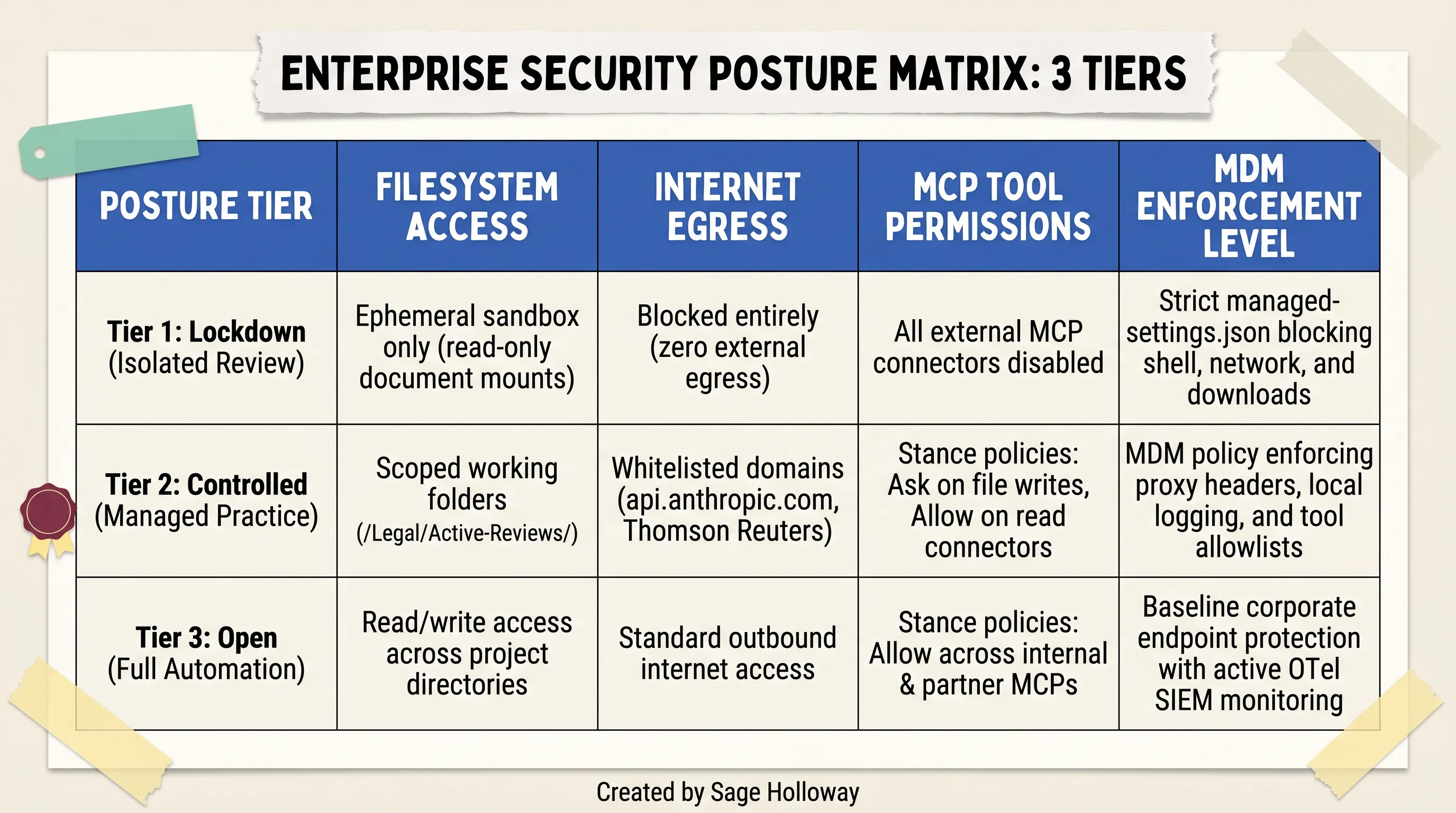
Three-tier posture matrix: Balancing organizational risk tolerance with workflow autonomy across Lockdown, Controlled, and Open tiers.
The table below contrasts the technical controls across the three security posture tiers:
Posture Tier | Filesystem Access | Internet Egress | MCP Tool Permissions | MDM Enforcement Level |
|---|---|---|---|---|
Tier 1: Lockdown (Isolated Review) | Ephemeral sandbox only (read-only document mounts) | Blocked entirely (zero external egress) | All external MCP connectors disabled | Strict |
Tier 2: Controlled (Managed Practice) | Scoped working folders ( | Whitelisted domains ( | Stance policies: | MDM policy enforcing proxy headers, local logging, and tool allowlists |
Tier 3: Open (Full Automation) | Read/write access across project directories | Standard outbound internet access | Stance policies: | Baseline corporate endpoint protection with active OTel SIEM monitoring |
Phased legal adoption roadmap: Foundation (MDM + OTel) -> Pilot (NDA/DSAR) -> Scale (practice-wide)
A successful enterprise rollout follows a disciplined three-phase roadmap:
Phase 1: Foundation (Weeks 1-3): IT and InfoSec establish the control plane. Deploy
managed-settings.jsonvia MDM, injectanthropic-allowed-org-idsat the proxy, configure OpenTelemetry streaming to the corporate SIEM, and execute Enterprise ZDR terms with Anthropic.Phase 2: Pilot (Weeks 4-6): Onboard a core pilot group of 5-10 transactional and privacy attorneys. Focus exclusively on bounded, high-volume workflows: NDA triage, standard vendor MSA redlines, and DSAR response drafting. Conduct cold-start interviews to calibrate
CLAUDE.mdpractice profiles.Phase 3: Scale (Weeks 7+): Expand deployment across litigation, employment, and corporate governance teams. Integrate enterprise MCP connectors (Box, Microsoft 365, CoCounsel) and establish recurring automated compliance audits.
Establishing the mandatory "Verification Tax" and attorney audit protocol
The most critical organizational discipline in AI-assisted legal operations is establishing what practitioners call the Verification Tax.
Generative AI accelerates drafting and redlining by 70% to 80%, but it is not infallible. Large language models can occasionally misinterpret nuanced definitions, overlook cross-reference dependencies across multi-document schedules, or generate convincing but inaccurate legal interpretations.
To maintain professional responsibility and ethical compliance under Model Rule 1.1 (Competence) and Model Rule 5.3 (Supervision of Non-Lawyer Assistance), law firms must establish a mandatory verification protocol:
No Unaudited Outbound Deliverables: No AI-generated redline, legal memorandum, or client disclosure may leave the firm without substantive line-by-line review and digital sign-off by a licensed attorney.
Audit Checklists: Attorneys must verify defined terms against core agreement bodies, confirm cross-references, and check statutory citations against primary sources.
Budgeting Verification Time: Legal operations leaders must train associates that AI is a first-draft acceleration engine, not a final-work product generator. Realizing efficiency gains requires budgeting 20% to 30% of total task time for rigorous human verification.

Legal AI platform comparison: Evaluating Claude Cowork, specialized legal AI SaaS (Harvey, GC AI), and research platforms on architecture, privilege, and cost.
The table below provides a comprehensive comparison between Claude Cowork with Legal Plugin, specialized legal AI SaaS platforms (GC AI, Harvey AI), and dedicated research platforms (Thomson Reuters CoCounsel):
Evaluation Criteria | Claude Cowork + Legal Plugin | GC AI | Harvey AI | Thomson Reuters CoCounsel |
|---|---|---|---|---|
Deployment Architecture | Desktop GUI / Cloud VM + GitHub Open-Source Plugin Suite | Specialized In-House Legal SaaS Web Application | Enterprise Legal AI Platform & Workflow Automation | Legal Research Platform (Westlaw Integration) |
Privilege & Heppner Posture | Defensible on Enterprise ZDR + Counsel Direction OTel SIEM | Purpose-built counsel-directed privilege workflows | Enterprise BAA & Zero-Retention Customer Agreements | Enterprise Research Agreements & Certified Citations |
Audit Log & SIEM Streaming | Excluded natively; Requires local OpenTelemetry SIEM export | Built-in enterprise audit trails & activity dashboards | Enterprise compliance logs and SSO integration | Native usage reporting and research tracking |
Customization & Playbooks | Fully customizable | Standardized contract review playbooks & firm guides | Custom fine-tuned firm playbooks & enterprise models | Structured legal search queries & verified databases |
Pricing & Licensing Model | Anthropic Enterprise Seat / API Consumption | Per-seat SaaS subscription for legal departments | Custom enterprise contract licensing (high minimum) | Per-user legal subscription or transactional search fees |
Frequently Asked Questions
1. Is Claude Cowork safe to use?
Claude Cowork provides stronger sandboxing and safety training than unvetted autonomous alternatives, but it is not entirely risk-free. Anthropic self-reports an indirect prompt injection attack success rate of approximately 1% in controlled testing, meaning concealed instructions in untrusted documents or web pages can theoretically hijack agent behavior. To ensure enterprise safety, organizations must deploy endpoint MDM configuration profiles (managed-settings.json) that restrict filesystem access, block unauthorized network binaries (curl, wget), and enforce mandatory human verification over all file write actions.
2. Does Anthropic train its AI models on data processed in Claude Cowork?
For Claude Team and Claude Enterprise accounts, Anthropic does not use customer inputs or outputs from Claude Cowork sessions to train its foundation models. On consumer Free and Pro plans, user data may be utilized for model training by default unless the user explicitly navigates to account privacy settings and opts out. Regardless of training settings, session data is processed temporarily in memory on Anthropic servers to execute tasks and enforce trust and safety policies.
3. Does using Claude AI for legal work waive attorney-client privilege?
In United States v. Heppner, the Southern District of New York held that standard client communications with AI systems fail attorney-client privilege because an AI is not an attorney and consumer terms of service undermine confidentiality. However, the court confirmed that privilege can be maintained under the Kovel doctrine if the deployment satisfies three prongs: formal recognition of the AI as a technical non-lawyer tool, contractual zero-training confidentiality guarantees (Enterprise ZDR tier), and documented proof of counsel direction and active attorney supervision.
4. Are Claude Cowork desktop actions captured in native enterprise audit logs?
No. Anthropic explicitly excludes Claude Cowork activity from native Enterprise Audit Logs, Compliance APIs, and Workspace Data Exports across all subscription tiers. This creates a compliance blind spot for organizations subject to SOC 2, HIPAA, and GDPR regulations. To establish a legally defensible audit trail, enterprise security teams must enable OpenTelemetry event streaming in Claude Desktop (version 1.1.4173 or later) and route agent telemetry directly to an enterprise SIEM like Splunk or Datadog.
5. What is the difference between Claude Cowork and Claude Code from a security perspective?
While both tools run agentic workflows with filesystem access and MCP connectivity, Claude Code is a terminal-based CLI tool engineered for software developers that enforces operating-system-level process sandboxing via Apple seatbelt on macOS and bubblewrap on Linux. In contrast, Claude Cowork is a desktop graphical interface designed for knowledge workers that isolates code execution in ephemeral cloud virtual machines. However, Cowork's Computer Use screen control feature interacts directly with the physical desktop without a VM sandbox, requiring additional endpoint MDM guardrails.
6. Can a prompt injection in a document cause Claude Cowork to exfiltrate local files?
Yes. Security researchers have demonstrated attack chains where concealed white-on-white text in incoming Word documents or PDFs instructed Claude Cowork to scan local directories for credentials (.env, .ssh/) and upload them to an attacker's Anthropic account via a curl command. Because Anthropic's official API domain is whitelisted for normal agent operations, standard network firewalls permit the outbound request. This vulnerability must be mitigated by deploying MDM deny rules that explicitly block shell execution tools.
7. How do I prevent Claude Cowork from accessing sensitive directories or executing shell commands?
Enterprise administrators can deploy a non-overridable managed-settings.json configuration profile via MDM (Jamf Pro, Microsoft Intune) to managed endpoints. This configuration enforces explicit deny rules that block access to sensitive filesystem paths (such as ~/.ssh/, ~/.aws/, and ~/.env) and prevents the agent from invoking shell binaries including curl, wget, bash, and powershell.exe.
8. Can Claude Cowork be used for HIPAA-regulated healthcare workloads?
Stock Claude Cowork is not recommended for regulated healthcare workloads processing Protected Health Information (PHI) because its desktop activity is excluded from native enterprise audit logging, preventing organizations from satisfying HIPAA audit control standards (§ 164.312(b)). Healthcare organizations can only deploy Cowork safely if they implement compensating controls, including local OpenTelemetry SIEM logging and an enterprise proxy gateway operating under a formal Business Associate Agreement (BAA) with Anthropic.
9. How does Claude Cowork handle file deletions during autonomous workflows?
Claude Cowork includes a built-in deletion safeguard that requires explicit user confirmation before permanently deleting any file on the local filesystem. Even when configured in autonomous execution modes, Cowork pauses and presents an interactive permission modal requiring the user to select "Allow" before file deletion can proceed. Organizations can further harden this by disabling file deletion capabilities entirely via MDM configuration policies.
Putting it into practice: your legal deployment roadmap
If your organization is planning to deploy claude cowork legal workflows, avoid the temptation to roll out access prematurely without security guardrails. A successful implementation requires a structured, multi-disciplinary rollout that aligns IT security, compliance officers, and practicing attorneys.
Here is the 5-step operational checklist to execute this week:
Verify Your Commercial Subscription Tier: Ensure all legal staff are provisioned under a Claude Enterprise subscription with Zero Data Retention (ZDR) strictly enabled, or access the model via commercial cloud API endpoints (Amazon Bedrock / Google Cloud Vertex AI) governed by an executed Data Processing Agreement. Immediately prohibit the use of consumer Free/Pro accounts for firm business.
Deploy MDM Hardening Policies: Package and push
managed-settings.jsonvia Jamf Pro or Microsoft Intune to all legal endpoints. Configure explicit filesystem deny rules for.env,.ssh/, and.aws/folders, block outbound shell tools (curl,wget), and inject theanthropic-allowed-org-idsproxy header at your corporate web gateway.Activate OpenTelemetry SIEM Telemetry: Verify that legal workstations are running Claude Desktop version
1.1.4173or later. Enable local OpenTelemetry streaming (CLAUDE_OTEL_ENABLED=true) and route event telemetry to your enterprise SIEM (Splunk, Datadog) to create an immutable evidentiary audit trail that satisfies Prong 3 of the Heppner privilege test.Install Practice Plugins and Run Cold-Start Interviews: Install the open-source legal plugin suite (
claude plugin install legal@knowledge-work-plugins). Have supervising practice group leaders execute/<plugin>:cold-start-interviewto ingest your standard negotiating guidelines and generate customCLAUDE.mdpractice profiles.Execute Your First Governed Contract Redline: Create a dedicated review folder (
/Legal/Active-Reviews/), place an incoming counterparty agreement inside, open Claude Desktop in Cowork mode, and execute/commercial-legal:review. Review the generated risk assessment card, verify the redlines against your playbook, export the tracked-changes.docxdeliverable, and confirm that the execution span was logged in your SIEM.
Balancing autonomous AI leverage with rigorous endpoint containment and evidentiary defensibility is not just good IT hygiene; it is the fundamental standard of care for modern legal practice.
Until then...
Sage
PS. An unexpected nuance of prompt injection defenses in legal documents: adversarial text hidden as zero-point white font inside Microsoft Word tables is often completely invisible in normal Print Layout view, but will immediately display if you switch Microsoft Word to Web Layout mode or inspect the raw document XML. Before feeding high-stakes counterparty agreements into any desktop agent, try running a 2-second terminal check (unzip -p contract.docx word/document.xml | grep -i "color=\"FFFFFF\"") to instantly flag hidden text payloads before your AI touches the file.
Author
Practical guides, tool teardowns & AI engineering workflows.
Related Articles

Claude Code
React Artifact to Production App: Local Builds, Live State, and Deployment

Claude Code
Claude Code Notifications: Complete Guide to Desktop Alerts, Remote SSH Hooks & Audio Cues (2026)

Claude Code
Claude Code Permissions: Stop Approval Prompts Safely with Auto Mode, Rules & Docker Bypass (2026)