Claude Code
Claude Cowork Pricing 2026: Pro vs. Max Plans, Token Burn Rates, and Break-Even ROI

Sage Holloway
26 min read
Go back to blog
SHARE

You subscribed to a monthly AI plan expecting unmetered desktop delegation, queued twelve research reports across your local folders before lunch, and ran headfirst into a lockout banner twenty minutes later. Nobody explained that autonomous file loops do not consume context the way chat does.
Claude Cowork has no separate subscription fee and is bundled into all paid Anthropic plans starting at $20/month for Pro ($17/month annual), $100/month for Max 5x, $200/month for Max 20x, and $20-$125/seat/month for Team plans. It is excluded from the Free tier, and usage draws from a shared pool governed by 5-hour rolling windows across desktop, web, and mobile surfaces.
Last verified: September 1, 2026 (NotebookLM sources, Anthropic Help Center documentation, and verified community implementations; no live CLI run on this pack).
Before this economic model clicked for me, I evaluated agentic tools through the lens of traditional SaaS. You pay a monthly fee, you get a seat, and you use the software until your workday ends. But autonomous desktop agents do not operate like text editors or spreadsheet software. An agent that reads fifty local files, runs background web searches, verifies calculations, and formats client reports is not a single conversational turn. It is an engine of compounding API calls.
This guide provides a definitive breakdown of claude cowork pricing 2026, analyzing the real cost of claude cowork across all user tiers. We examine the mechanics of claude cowork pricing anthropic 2026 tiers, unpack why multi-step tasks burn through claude cowork usage limits faster than expected, provide concrete mathematical formulas comparing subscription plans against raw API billing, and deliver operational tactics to stretch your daily allowance.
This URL focuses specifically on commercial pricing, token economics, plan selection frameworks, and break-even calculations. For a hands-on technical walkthrough of setting up local directory structures and permission controls, read our companion guide on How to Use Claude Cowork. If your desktop client is experiencing interface initialization errors, visit Claude Desktop Cowork Tab Missing. Software engineers comparing terminal tools against GUI workspaces should explore Claude Code vs Cowork, and enterprise compliance teams can reference Claude Cowork Legal & Compliance.
On this page
Core pricing model: what Claude Cowork costs and how bundling works
2026 plan tier breakdown: Free vs. Pro vs. Max 5x vs. Max 20x vs. Team
The token burn reality: how Cowork consumes shared 5-hour rolling quotas
Tool and product disambiguation: Claude Cowork vs. Claude Code vs. Claude Chat
Mathematical break-even analysis: subscription tiers vs. pay-as-you-go API rates
Practical quota optimization playbook: stretching 5-hour rolling limits
Vertical bundles and industry packs: legal, marketing ops, and finance
Open-source and free local alternatives: when to self-host
Frequently Asked Questions
Finding your baseline: a 3-step decision run

Claude Cowork has no standalone fee; it is bundled into $20/month Pro and $100-$200/month Max plans with shared 5-hour rolling quotas.
Core pricing model: what Claude Cowork costs and how bundling works
Think of a commercial water hookup in a manufacturing facility. You do not buy separate water lines for the breakroom sink, the cooling radiators, and the high-pressure wash bay. You pay for a single intake pipe with a fixed cubic-meter flow rate per hour. If you run the breakroom faucet, the water runs indefinitely. But if you fire up the industrial wash bay at full pressure, you drain the holding reservoir in thirty minutes. The water was never different; the velocity of consumption changed everything.
That is the unified architecture behind Anthropic's subscription tiers.
If you are researching claude cowork pricing or searching for the current claude cowork price, the most important concept to understand is that Anthropic does not sell Cowork as an isolated software product. There is no separate claude cowork subscription cost or line-item billing toggle inside your account settings. When analyzing calude cowork pricing structures, Cowork is a native execution mode bundled directly into Anthropic's overarching subscription tiers.
Zero standalone add-on fee: unified Claude subscription access
Many software buyers arrive assuming Cowork requires a dedicated $50 or $100 monthly seat license on top of their existing generative AI tools. That assumption is incorrect.
When you purchase a Claude Pro plan for $20 per month (or $17 per month billed annually at $204 per year), your subscription includes full access to three distinct surfaces: the standard conversational web interface at claude.ai, the developer terminal agent Claude Code, and the autonomous desktop file agent Claude Cowork.
Why does Anthropic bundle these tools into a single fee?
Because the underlying intelligence engine is identical. Whether you are prompting Claude 3.5 Sonnet to draft an email in your browser, refactoring a Python script in your terminal, or instructing Cowork to audit fifty invoices in a desktop folder, all three interfaces route requests to the same foundational model architecture. You are paying for access to Anthropic's compute infrastructure, not buying multiple disconnected software licenses.
Outdated info warning: debunking the "$100 Max-only" and "macOS-only" myths
If you read reviews published during early 2026, you likely encountered two pervasive claims: first, that Claude Cowork is an enterprise-only feature locked behind a $100/month Claude Max tier; and second, that Cowork is exclusively restricted to Apple Silicon macOS hardware.
Both claims are completely obsolete.
On January 16, 2026, Anthropic officially expanded Claude Cowork access to all standard $20/month Pro plan subscribers, eliminating the Max-only preview barrier. Shortly thereafter, on February 10, 2026, Anthropic released the native Windows desktop client with full feature parity for both x64 and ARM64 systems, followed by official General Availability (GA) on April 9, 2026.
https://x.com/claudeai/status/2010805682434666759
Official confirmation: Anthropic expanded Claude Cowork to all $20/month Pro subscribers on January 16, 2026.
If you encounter blog posts or discussion threads claiming that claude cowork cost requires a three-figure monthly commitment or an Apple laptop, check the publication timestamp. Today, any operator on Windows or Mac can access Cowork on the entry-level $20/month tier. Windows users setting up their desktop environment can reference our dedicated installation guide on Claude Cowork Windows Setup.
Shared quota architecture across Desktop, Web, and Mobile
While the bundled claude cowork subscription model simplifies billing, it introduces a critical operational constraint: shared quota pooling.
Your Claude subscription does not grant separate usage buckets for separate applications. When you run an autonomous data extraction job inside the Claude Desktop app, those background turns pull compute from the exact same 5-hour rolling usage pool that powers your web chat at claude.ai and your mobile app interactions on iOS and Android.

Unified quota architecture: Claude Web Chat, Desktop Cowork, and Terminal Code CLI all draw from the same 5-hour rolling session limit.
If you spend two hours running heavy Cowork tasks that reorganize spreadsheets and parse local PDF archives, returning to claude.ai to ask a routine question may trigger an unexpected rate limit warning. Understanding how this shared compute pool operates is essential before deciding whether the standard Pro plan satisfies your workload or if an upgrade to Max is warranted.
2026 plan tier breakdown: Free vs. Pro vs. Max 5x vs. Max 20x vs. Team
Choosing the right subscription level requires balancing monthly expenditures against daily compute demand. Anthropic structures its 2026 lineup across five primary tiers, each offering different session limits and agent capabilities.

2026 Claude plan matrix: Cowork is included on all paid tiers starting at $20/month Pro, with higher Max tiers providing 5x to 20x session capacity.
Claude Free ($0): why Cowork is excluded
The introductory Claude Free tier costs $0 and provides basic access to Claude 3.5 Sonnet on web and mobile with strict daily message limits.
However, claude cowork free access does not exist. Cowork mode is completely disabled on Free accounts.
Why is Cowork excluded from the free tier?
Autonomous desktop delegation requires substantial backend resources. When Cowork executes a task, Anthropic provisions a secure, cloud-hosted Linux virtual machine container to run tool calls, parse files, and isolate execution logic from your operating system. Maintaining dedicated virtual machine infrastructure and processing multi-step agent loops creates infrastructure costs that cannot be supported under an unmonetized free tier. To access the desktop Cowork tab, upgrading to a paid subscription is mandatory.
Claude Pro ($20/mo or $17/mo annual): the value entry point and daily baseline
The claude cowork pro plan represents the primary entry point for individual knowledge workers, consultants, and solo operators.
At $20 per month (or $17 per month billed annually), claude cowork pro includes:
Full access to Claude Desktop with Chat, Cowork, and Code modes on macOS and Windows.
Standard 5-hour rolling session capacity (approximately 44,000 tokens, or roughly 45 standard conversational messages).
Single sub-agent execution, allowing Claude to spawn focused worker threads for sequential research and file editing.
Access to flagship models with context windows up to 1 million tokens for extensive document parsing.
Priority bandwidth during peak hours compared to free users.
For operators running one or two focused desktop tasks per day, such as synthesizing a weekly status memo or formatting an expense spreadsheet, the Pro plan offers exceptional economic value. At $20 per month, delegating a single two-hour manual data entry chore yields immediate positive return on investment.
Claude Max 5x ($100/mo) and Max 20x ($200/mo): capacity multipliers for power users
When users push Cowork into intensive daily production, the standard Pro allocation can feel restrictive. To serve power users, Anthropic provides two high-capacity tiers: Claude Max 5x and Claude Max 20x.
Claude Max 5x ($100/month): Delivers 5 times the session capacity of the Pro tier within each 5-hour rolling window. This translates to roughly 220,000 tokens (approximately 225 standard messages) per session, enabling parallel sub-agent runs, continuous web browsing research, and extensive local directory refactoring without midday rate limit lockouts.
Claude Max 20x ($200/month): Delivers 20 times the baseline Pro capacity, providing approximately 880,000 tokens (up to 900+ messages) per 5-hour window. Max 20x is engineered for full-time quantitative analysts, legal researchers, and operations leads who run autonomous agent loops continuously throughout an eight-hour workday.
Both Max tiers include dedicated priority compute pipelines, ensuring sub-second tool execution response times even during periods of heavy global network demand.
Claude Team ($20-$125/seat/mo): Standard vs. Premium seat structures and 5-seat minimums
For businesses deploying autonomous agents across departments, Anthropic offers Claude Team plans with a 5-seat minimum.
In 2026, Team plan pricing incorporates flexible seat allocations to optimize corporate budgets:
Standard Seats ($20 to $25 per seat/month): Provides baseline Pro-equivalent capacity for general knowledge workers who use Cowork periodically for document drafting and meeting summaries.
Premium Seats ($100 to $125 per seat/month): Provides Max 5x-equivalent capacity for heavy power users, technical analysts, and project leads requiring high-frequency agent execution.
Administrative Governance: Centralized billing console, workspace domain provisioning, role-based folder access controls, and single sign-on (SSO) integration.
Enterprise Privacy Guarantee: Commercial terms of service ensure that organizational files, prompts, and Cowork deliverables are strictly excluded from Anthropic's foundational model training datasets.
Organizations can mix and match Standard and Premium seats within a single billing account, ensuring companies only pay top-tier rates for employees who actively exhaust standard quotas. For enterprise security frameworks and data compliance reviews, see Claude Cowork Legal & Compliance.
The token burn reality: how Cowork consumes shared 5-hour rolling quotas
Understanding claude cowork features pricing 2026 requires looking beyond monthly subscription stickers to analyze the underlying token economy.
In conversational computing, a token represents roughly four characters of text. When you evaluate claude cowork limits, the primary constraint is not the number of tasks you submit, but the cumulative token volume generated across each step of execution.
The 5-hour rolling session window and weekly safety caps
Anthropic manages infrastructure load through a dynamic 5-hour rolling window system per official usage documentation.
Unlike platforms that reset allowances at midnight or operate on rigid calendar days, Claude's metering is continuous. When you submit a prompt, the system calculates your total token consumption over the preceding 300 minutes. If your cumulative volume remains below your tier threshold (roughly 44,000 tokens on Pro, or 220,000 tokens on Max 5x), your task proceeds immediately.
As older queries pass the 5-hour mark, their token weight drops out of the calculation, restoring available capacity. In addition to the rolling 5-hour limit, Anthropic enforces soft weekly safety caps to detect automated scripting abuse and protect shared cluster availability.
The multi-step agent token multiplier: why Cowork burns quota 3x-7x faster than standard chat
Why do operators on the Pro plan hit rate limits after forty minutes of Cowork use, when they can chat on claude.ai all afternoon without interruption?
The answer lies in context accumulation.
In a standard web chat session, each conversational exchange is relatively isolated. You submit a 200-word question, Claude returns a 400-word response, and the system processes roughly 1,500 to 3,000 tokens.

Token burn dynamics: Multi-step agent execution re-reads accumulated workspace context every step, consuming 5-hour quotas 3x to 7x faster than standard chat.
In an autonomous Cowork workflow, execution is iterative and stateful. Consider what happens when you ask Claude to audit an expenses directory:
Step 1 (Scan & Plan): Claude reads your prompt, inspects directory metadata, and loads your workspace instructions (10,000 tokens).
Step 2 (File Inspection): Claude reads the first spreadsheet, parses 500 rows of data, and evaluates variances (15,000 tokens).
Step 3 (Cross-Reference): Claude reads the second spreadsheet, re-reading the entire conversation history, prior tool execution outputs, and the new file data (25,000 tokens).
Step 4 (Document Generation): Claude drafts the formatted summary memo, re-reading the full context of all previous steps (35,000 tokens).
In four operational steps, Cowork has processed over 85,000 cumulative tokens. Because the agent re-reads historical context on every turn to ensure continuity, multi-step agent tasks carry a 3x to 7x token burn multiplier compared to linear chat.
Sub-agent execution and local file I/O context inflation
This consumption curve steepens when Cowork initiates sub-agent execution.
To accelerate complex research tasks, Cowork can spawn parallel worker agents. For instance, if you provide five market research PDFs, Cowork creates three concurrent sub-agent threads to analyze different documents simultaneously.
While parallel execution slashes task completion time from twenty minutes to three minutes, each sub-agent maintains its own active context window. Three concurrent sub-agents reading 10-page documents can consume an entire Pro tier's 5-hour token allocation in a single automated run.
Understanding rate limit notifications and "Setting up Claude's workspace" status
When your session reaches its capacity ceiling, Claude Desktop displays a yellow-tinted notification banner across the top of the interface: "You have reached your 5-hour usage limit. Quota resets at 3:45 PM."

Workspace status and limit indicators: "Setting up Claude's workspace" confirms cloud VM provisioning, while rolling banners display exact reset times.
When this banner appears, existing file writes are safely committed to your local disk, but further autonomous tool calls pause until the timestamp expires.
Conversely, when starting a new task, you may see the status modal: "Setting up Claude's workspace...". This is not a rate limit indicator; it confirms that Anthropic is provisioning your cloud VM container and mounting your local folder bridge. Container provisioning typically completes in 5 to 15 seconds. If this handshake hangs indefinitely, consult our fix guide on Claude Desktop Cowork Tab Missing.
Tool and product disambiguation: Claude Cowork vs. Claude Code vs. Claude Chat
Anthropic offers three distinct interfaces across its ecosystem. Navigating these tools correctly prevents accidental billing surprises and operational friction.

Mode navigation: Claude Desktop features dedicated Chat, Cowork, and Code modes to separate conversational prompts from autonomous file workflows.
GUI desktop file agent (Cowork) vs. developer terminal CLI (Claude Code) vs. conversational web interface (Chat)
Each tool serves a specific persona and operating environment:
Claude Chat (
claude.ai& Mobile): Designed for conversational ideation, copywriting, brainstorming, and single-turn queries. File uploads are temporary, and Claude cannot read or write to your local file system.Claude Cowork (Desktop Application): Designed for knowledge workers, marketers, operations managers, and business analysts. It provides a visual graphical interface (GUI) with direct read and write access to designated local project folders, executing multi-step document generation and data synthesis.
Claude Code (Command-Line Interface): Engineered specifically for software developers. It installs via npm (
npm install -g @anthropic-ai/claude-code) and operates directly inside your terminal shell, executing Git commits, resolving code syntax errors, running test suites, and refactoring full repositories.
While Cowork and Code share underlying agentic principles, Cowork provides visual approval modals and sandboxed file isolation, whereas Code provides raw shell execution power. A detailed feature-by-feature evaluation is available on Claude Code vs Cowork.
The ANTHROPIC_API_KEY CLI trap: how environment variables inadvertently trigger pay-per-token billing
Here is one of the most expensive pitfalls in the Anthropic ecosystem: the environment variable trap.
Many technical operators experiment with developer API keys before using desktop subscription plans. If you previously exported an API key in your shell configuration file (~/.bashrc, ~/.zshrc, or Windows System Environment Variables):
When ANTHROPIC_API_KEY is present in your active environment, command-line developer tools (including Claude Code) automatically bypass your $20/month subscription quota pool. Instead of drawing from your prepaid monthly allowance, every terminal command bills directly to your Anthropic developer console at raw per-token API rates.
Users who run heavy terminal refactoring sessions while an API key is active often wake up to unexpected $50 to $150 credit card charges, assuming the usage was covered by their Pro subscription.
Reverting terminal tools to subscription pool using claude logout
To prevent unintended API billing and force your developer tools to utilize your prepaid subscription quota, clear your stored credentials:
After running claude logout, relaunch the CLI. It will prompt you to authenticate via your web browser, linking your terminal sessions directly to your unified $20/month Pro or $100/month Max subscription pool.
For visual learners wanting to understand how autonomous multi-step desktop tasks generate tangible operational value, watch this breakdown:
Watch the Real-World Claude Cowork Task ROI Breakdown on YouTube
This video demonstrates Claude Cowork autonomously parsing messy directories, reconciling invoice receipts, and generating formatted spreadsheets.
Mathematical break-even analysis: subscription tiers vs. pay-as-you-go API rates
You are not choosing between different software features. You are choosing control over convenience.
To determine whether staying on the $20/month Pro plan, upgrading to the $100/month Max 5x tier, or switching to raw pay-as-you-go API billing makes financial sense, we must quantify the cost of an individual agent execution run.
Quantifying the cost per agent run (input/output tokens + sub-agent loops)
A standard multi-step Cowork assignment (such as reviewing three 10-page market reports and drafting an executive brief) consumes approximately:
Input Tokens: 40,000 tokens (reading documents, system instructions, and historical context across 4 turns).
Output Tokens: 4,000 tokens (generating intermediate reasoning, tool parameters, and final deliverable text).
At current Claude 3.5 Sonnet API rates ($3.00 per million input tokens, $15.00 per million output tokens):
$$\text{Input Cost} = \frac{40{,}000}{1{,}000{,}000} \times \$3.00 = \$0.12$$ $$\text{Output Cost} = \frac{4{,}000}{1{,}000{,}000} \times \$15.00 = \$0.06$$ $$\text{Total Cost per Run} = \$0.12 + \$0.06 = \$0.18\text{ per task}$$
If a complex task spawns multiple sub-agents or re-reads large datasets across 10 turns, token volume expands to roughly 120,000 input tokens and 10,000 output tokens, costing approximately $0.51 per task.
Break-even formula: calculating daily task thresholds where Max 5x ($100/mo) beats pay-per-token API rates
When does paying $100/month for Max 5x beat pay-as-you-go API keys?

Plan decision framework: Evaluate daily task volume and rate limit frequency to select between Pro, Max 5x, or API pay-per-token billing.
Let $N$ equal the number of complex agent tasks executed per business day (22 working days per month), with an average API cost of $0.50 per complex run:
$$\text{Monthly API Spend} = N \times 22 \times \$0.50 = \$11.00 \times N$$
Setting monthly API spend equal to subscription plan costs establishes our break-even points:
Pro Plan Break-Even ($20/mo): $\frac{\$20}{\$11.00} \approx 1.8\text{ tasks/day}$. If you run more than 2 tasks daily, Pro is cheaper than API billing.
Max 5x Plan Break-Even ($100/mo): $\frac{\$100}{\$11.00} \approx 9.1\text{ tasks/day}$. If you run 10 or more complex tasks daily, Max 5x is cheaper than paying raw API rates.
The Pro vs. Max financial crossover point (when hitting limits twice daily justifies an upgrade)
The decision to upgrade from Pro ($20/mo) to Max 5x ($100/mo) is rarely just about token math. It is about workflow continuity and labor economics.

Break-even economics: Max 5x ($100/mo) delivers superior cost efficiency over pay-as-you-go API billing for users running more than 4 multi-step tasks daily.
Consider an analyst whose time is valued at $50 per hour. If hitting a 5-hour rate limit on the Pro plan interrupts a critical workflow twice a day, causing 30 minutes of lost productivity, that friction costs $25 per day ($550 per month in lost labor).
Spending an additional $80 per month to upgrade from Pro to Max 5x eliminates midday lockouts, yielding a massive net financial return.
Practical quota optimization playbook: stretching 5-hour rolling limits
If upgrading to Max 5x is outside your budget, you can dramatically expand your effective daily capacity on the $20/month Pro plan by applying strict context engineering hygiene.
Workspace folder boundary scoping: avoiding token-bloating root directory scans
The most common operational mistake is selecting a bloated parent folder (such as your entire Documents or Downloads directory) when initiating a Cowork session.
When Cowork starts, it scans directory structures to build a local file map. Pointing Claude at a directory containing 2,000 loose files injects tens of thousands of unnecessary metadata tokens into session memory before your prompt even executes.
Always create isolated, task-specific project folders (e.g., ~/Documents/Projects/Q3_Audit/) containing only the specific files required for the assignment. Restricting directory scope preserves up to 40% of your 5-hour token allowance.
Setting connector tool check modes: Manual vs Auto extra token costs vs Skip
Under Settings > Cowork, Claude Desktop provides three connector verification modes that dictate how tool calls are approved.

Connector check modes: Setting tool checks to Manual conserves 15% to 25% of token quota compared to automated background safety screening.
Manual Mode (Quota-Conserving Baseline): Claude pauses before every major file write, deletion, or external web search, displaying a confirmation prompt. Because no secondary safety classifiers are run in the background, Manual mode incurs 0% token overhead.
Auto Mode (Token-Heavy): Claude automatically approves routine actions. However, to maintain safety against prompt injection attacks, Anthropic routes tool calls through real-time background classification models. This background screening introduces a 15% to 25% token overhead per turn, accelerating rate limit exhaustion.
Skip Mode: Completely disables approval gates for throwaway testing in isolated sandbox folders.

Tool approval settings: Configure tool check modes under Cowork settings to balance execution autonomy against token consumption.
Setting your check mode to Manual is the single fastest way to reclaim 20% of your daily session quota.
Context engineering with lightweight CLAUDE.md files (capping profile instructions under 2,000 tokens)
Placing a CLAUDE.md navigation file in your workspace root provides persistent rules that steer agent behavior.
However, loading massive 20-page standard operating procedure manuals into your workspace directory acts as a permanent tax on every turn. Because Cowork re-reads profile files during startup, keep your CLAUDE.md concise and capped under 2,000 tokens (roughly 1,500 words).

Safety guardrails: Cowork enforces an explicit confirmation prompt before permanently modifying or deleting local files.
Using the /schedule command for off-peak background automation
Anthropic's 5-hour rolling limit resets continuously. If you run all your agent tasks between 9:00 AM and 11:00 AM, you concentrate token burn into a single bottleneck.
By using the /schedule slash command, you can distribute heavy data processing jobs into off-peak overnight hours per Anthropic Scheduled Tasks Documentation.

Off-peak automation: The /schedule command allows users to queue recurring agent tasks during off-peak hours to manage 5-hour rolling quotas.
Queuing routine aggregations at 2:00 AM ensures tasks execute when your 5-hour allowance is completely fresh, leaving your daytime quota fully available for active project work.
Vertical bundles and industry packs: legal, marketing ops, and finance
As Cowork matured through its 2026 General Availability rollout, Anthropic introduced specialized workflow bundles designed for specific business functions.
Anthropic vertical bundles: Legal, Marketing Ops, Financial Services, and SMB
These vertical configurations package tailored system prompts, document parsing schemas, and domain-specific validation logic:
Legal Bundle: Specialized in redlining commercial agreements, cross-referencing indemnity clauses, and indexing case filings against structured precedents.
Marketing Ops Bundle: Automates multi-channel campaign reporting, parses web analytics exports from CSVs, and formats polished PowerPoint decks.
Financial Services Bundle: Formatted for 10-K SEC filing extraction, balance sheet reconciliation, and variance tracking with strict currency formatting.
Small Business (SMB) Bundle: General operations automation covering customer inquiry categorization, invoice processing, and local inventory tracking.

Standing preferences: Configure persistent workflow instructions under Settings > Cowork > Global instructions to avoid re-prompting background context.
To configure persistent vertical rules across all desktop sessions, navigate to Settings > Cowork > Global instructions and paste your domain-specific formatting standards.
Native connector integrations: Slack, Google Drive, Gmail, and Microsoft 365
Cowork integrates with external SaaS applications through the Model Context Protocol (MCP).
Connecting tools like Google Drive, Gmail, Slack, and Microsoft 365 allows Claude to fetch cloud documents, read email threads, and post status updates directly from your desktop workflow.

Built-in browser: Cowork navigates web sources in an isolated side panel, extracting live data without exposing local session cookies or browser credentials.
When direct API connectors are unavailable, Cowork launches its sandboxed built-in browser side panel to extract public web information securely, without exposing your local browser session cookies or personal login tokens.
Are there extra fees for enterprise connectors and skills?
A common question among corporate buyers is whether Anthropic charges additional line-item licensing fees for connectors, MCP integrations, or vertical bundles.
The answer is no.
All standard connectors, skills, and industry bundles are included at no additional charge on paid plans (Pro, Max, and Team). You do not pay add-on fees per connector. However, data transferred through connectors and parsed by Claude counts toward your shared 5-hour rolling token quota.
Open-source and free local alternatives: when to self-host
For operators seeking to eliminate monthly subscription fees entirely or organizations with strict air-gapped data privacy requirements, several open-source desktop agent alternatives have gained significant traction.
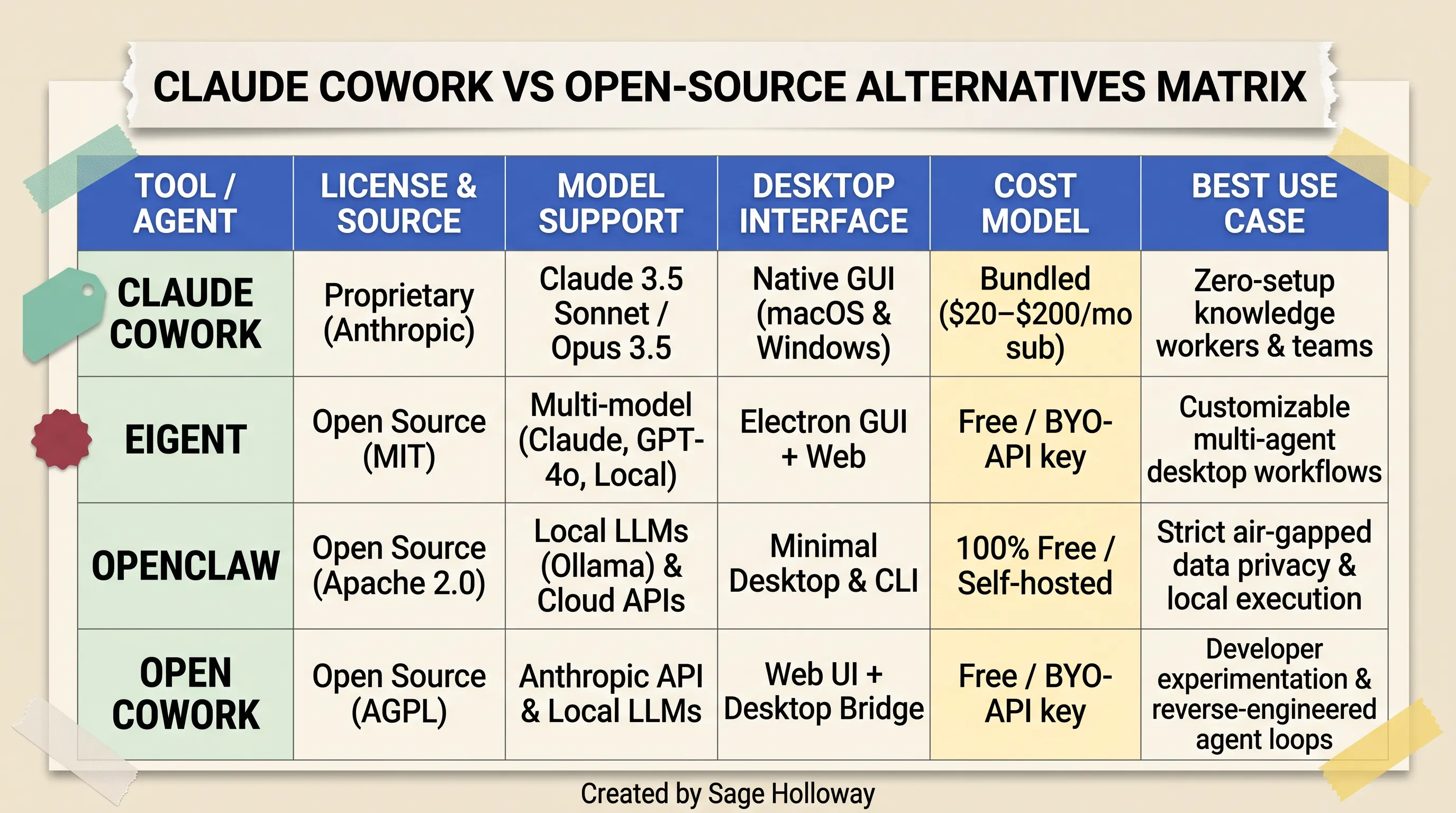
Open-source alternatives: Self-hosted desktop agents eliminate monthly subscriptions but require local hardware or pay-per-token API keys.
Benchmarking Claude Cowork against open-source desktop agents: Eigent, OpenClaw, and Open Cowork
Eigent: A popular open-source desktop agent featuring a dedicated Electron GUI. It supports local file management, web browsing, and multi-model routing across Anthropic, OpenAI, and local Ollama instances under an Apache 2.0 license.
OpenClaw: A lightweight, community-built local agent framework optimized for terminal and local file manipulation. It connects natively to local open-weight models, providing complete privacy with zero external network calls.
Open Cowork: A reverse-engineered community project mimicking Anthropic's Cowork desktop interface, allowing users to plug in custom API keys or local LLMs.
For a comprehensive architectural directory of local alternatives, review our dedicated benchmark on Open-Source Claude Cowork Alternatives.
Privacy, local LLM execution (Ollama), and zero-subscription API economics
Open-source alternatives offer two distinct economic models:
100% Free Local Execution (Ollama + Llama 3 / DeepSeek): If you possess a high-end workstation with an Apple M-series Max chip or an NVIDIA RTX 4090 GPU (minimum 32GB VRAM), you can run open-weight models locally via Ollama. This setup is 100% free with zero subscription costs and absolute data privacy.
Bring-Your-Own-Key (BYOK) Pay-Per-Token: If you run open-source GUIs powered by Claude 3.5 Sonnet or GPT-4o API keys, you pay strictly for the exact tokens you consume, eliminating fixed $20 or $100 monthly overheads for light, occasional users.
This video demonstrates configuring OpenClaw with local Ollama models for zero-subscription desktop file automation.
Decision matrix: when to pay $20-$100/mo for Anthropic cloud execution vs. self-hosting
Choose Claude Cowork ($20-$100/mo) if: You prioritize zero-configuration convenience, require Anthropic's state-of-the-art reasoning models, rely on seamless Microsoft 365 and Google Drive connectors, and want secure cloud virtual machine sandboxing without managing local Python dependencies.
Choose Open-Source Self-Hosting if: You process sensitive client data that cannot legally leave on-premise hardware, possess dedicated local GPU compute, or run infrequent tasks where a $20/month flat subscription exceeds your actual API consumption.
Frequently Asked Questions
1. Is Claude Cowork free?
No. Claude Cowork is not available on the free tier. Access requires an active paid Claude subscription starting at $20/month (or $17/month billed annually) for the Claude Pro plan. Free accounts are limited to standard conversational chat on claude.ai and mobile apps.
2. How much does Claude Cowork cost?
Claude Cowork has no standalone price tag because it is bundled into Anthropic's core subscription plans. Pricing is $20/month for Claude Pro ($17/month on annual billing), $100/month for Claude Max 5x, $200/month for Claude Max 20x, and $20 to $125 per seat/month for Claude Team plans (5-seat minimum).
3. Is Claude Cowork worth it?
For knowledge workers who spend hours manually organizing files, cross-referencing spreadsheets, extracting PDF data, or drafting repetitive reports, the $20/month Pro plan delivers massive return on investment. Delegating even one or two hours of administrative work per month easily justifies the subscription cost. Power users running continuous daily workflows can upgrade to the $100/month Max 5x tier to avoid rate limit interruptions.
4. Is Claude Cowork included in the $20/month Claude Pro plan?
Yes. Anthropic officially expanded Claude Cowork to all $20/month Pro subscribers on January 16, 2026. Pro users receive complete Cowork functionality, including folder delegation, sub-agent execution, and browser actions, though usage draws from the standard 5-hour rolling session limit.
5. Does Claude Cowork work on Windows and Linux, and is pricing the same across operating systems?
Pricing is identical across all operating systems. Claude Cowork officially launched on Windows Desktop on February 10, 2026, delivering complete feature parity with macOS on both x64 and ARM64 architectures. While there is no standalone native GUI installer for Linux, Linux users can execute Cowork tasks via web and mobile interfaces or run the desktop client through community virtualization packages.
6. Does Claude Cowork pricing include unlimited usage?
No. Claude Cowork does not offer unlimited usage on any plan. All tasks draw from a shared quota governed by rolling 5-hour session windows and weekly caps. Because autonomous agent execution coordinates multi-step sub-agents and re-reads workspace context, it consumes 5-hour allowances 3x to 7x faster than standard conversational chat.
7. How does Team plan pricing work for Claude Cowork?
On Claude Team plans (5-seat minimum), Cowork is available across both Standard seats ($20 to $25/seat/month) and Premium seats ($100 to $125/seat/month). Organizations can assign Standard seats to occasional users and Premium seats to heavy power users within the same billing account, providing administrative workspace controls and SOC 2 data privacy compliance.
8. What is the difference between Claude Cowork and Claude Code pricing?
Both tools draw from the exact same subscription quota pool on paid plans ($20/mo Pro or $100/mo Max). However, Claude Cowork is a visual desktop application built for non-coding knowledge workers, while Claude Code is a terminal CLI for software developers. If developers set an ANTHROPIC_API_KEY environment variable in their shell, Claude Code will bypass the subscription pool and bill pay-as-you-go API rates instead.
9. Are there hidden fees or extra costs for web browsing and file execution in Cowork?
No. There are no hidden line-item fees for launching cloud virtual machines, executing local file writes, running sandboxed web browsing, or using official SaaS connectors on subscription plans. All compute is bundled into your monthly fee and metered strictly against your 5-hour rolling token quota.
Finding your baseline: a 3-step decision run
If you are trying to decide which Claude tier fits your daily workflow, do not jump straight to an expensive Max subscription. Start at the baseline, measure your real-world consumption, and scale up only when compute constraints actively block your output.
Here is the exact 3-step sequence to determine your optimal plan:
Start on the $20/month Pro baseline: Subscribe to Claude Pro and test your primary file automation workflows. Create structured working folders, cap your
CLAUDE.mdcontext files under 2,000 tokens, and set connector check modes toManual.Track your 5-hour limit interruptions: Run your daily tasks for one full business week. If you complete your assignments without hitting the 5-hour rate limit banner, remain on Pro. The $20/month tier is your ideal economic sweet spot.
Upgrade to Max 5x only on recurring blocks: If you hit the 5-hour usage limit banner two or more times per day, interrupting active client deliverables, upgrade to Claude Max 5x ($100/month). The 5x capacity multiplier will eliminate workflow pauses and yield an immediate return on labor efficiency.
Whether you stay on the entry-level Pro tier or scale into high-volume Max compute, autonomous desktop agents represent a permanent shift in how knowledge work gets shipped. The intelligence is already built into the model. The only variable left to manage is how efficiently you run the engine.
Until then...
Sage
PS. A fascinating dynamic in agentic token economics: if you ask Cowork to organize 100 files by providing them all in a single prompt, it consumes roughly 80,000 tokens. But if you include a simple instruction telling Claude to process files in batches of 10 and clear intermediate tool logs from working memory, the exact same job completes in 32,000 tokens. Learning to write context-conscious instructions is the 2026 equivalent of learning keyboard shortcuts in 1995.
Author
Practical guides, tool teardowns & AI engineering workflows.
Related Articles

Claude Code
React Artifact to Production App: Local Builds, Live State, and Deployment

Claude Code
Claude Code Notifications: Complete Guide to Desktop Alerts, Remote SSH Hooks & Audio Cues (2026)

Claude Code
Claude Code Permissions: Stop Approval Prompts Safely with Auto Mode, Rules & Docker Bypass (2026)