Claude Code
Claude Imagine Explained: What It Was, What Claude Design Does Now, and the Image Generation Reality

Sage Holloway
22 min read
Go back to blog
SHARE

You ask for a tiny tool, watch a working interface appear, and feel the distance between an idea and software collapse. Then you return later and the door has moved. The name survived longer than the experiment, which is how a five-day preview became one of the most confusing corners of Claude.
Claude Imagine was Anthropic's five-day research preview for generating interactive interfaces in real time. It is not the same as Claude Design, the newer visual prototyping workspace. Claude's native visual output is interactive HTML and SVG rather than photorealistic raster images. Creating PNG-style artwork requires an external image tool connected through MCP.
Last verified: 1 September 2026
That distinction is the direct answer. It also explains why searching for Claude Imagine now produces a strange mixture of retired demo footage, current Claude Design instructions, and pages promising a Claude AI image generator. They are describing three different jobs.
This guide separates them, shows what the original experiment proved, explains how to work in Claude Design now, and draws the line between a convincing prototype and a production product.
In this guide
What Claude Imagine actually generated
The timeline that clears up the names
From prompt to editable prototype
What the tools can build
Code vs. pixels
Limits and workarounds
How Imagine worked under the hood
The production handoff
Who should use it
Frequently asked questions

Claude Imagine was a temporary generative UI experiment. Claude Design is the current workspace. Raster images still require an external tool.
What Claude Imagine actually generated
Imagine walking into a workshop where the benches, drawers, and jigs assemble themselves around the object in your hand. You pick up a longer plank, so the bench stretches. You reach for a clamp, and a rack appears beside your elbow. Nothing in the room is permanent, but everything arrives close to the moment you need it.
That was the compelling idea behind Claude Imagine. Anthropic's research preview explored generative UI, meaning an interface generated and revised in response to a person's request and behavior. Instead of opening a fixed application whose screens a product team had specified months earlier, the user described a job and the system built an interface for that job on demand.
Generative UI, not a finished app
The important output was not a picture of an app. It was an interactive interface you could use.
A static mockup can show a timer, a button, and a chart. A generative interface can make the timer run, let the button change state, and revise the chart when the user changes the request. That interaction is why historical demos looked closer to software than image generation, even when the screens were visually polished.
Imagine with Claude was still a research preview, not a full application factory. A useful prototype can simulate a workflow without owning the database, authentication, permissions, monitoring, or durable state that a real product needs. The interface may feel complete because the visible layer is complete. The invisible layers are where production work begins.
One reported agent prompt, associated with the historical Heli implementation, used fixed window widths of 320, 480, 640, 896, and 1152 pixels. It explicitly avoided responsive breakpoints, which are rules that rearrange a page as its available width changes. That detail tells us something about the experiment's priorities: create coherent interface windows quickly, within a controlled frame, rather than solve every device and layout condition.
The interaction model behind just-in-time interfaces
The loop was simple to understand:
Describe the tool or task.
Receive a generated interface.
Interact with it.
Ask for a revision based on what the interaction revealed.
The fourth step mattered most. Traditional mockups make you predict the right design before anyone uses it. A just-in-time interface lets use expose the next design decision. If a time tracker needs categories only after the first task is logged, the interface can evolve at that point instead of presenting twelve empty controls on the opening screen.

The historical Imagine loop was prompt, generated interface, interaction, then revision, not a one-shot raster image.
This sounds like a subtle distinction. It is the whole reason the experiment was interesting. Claude Imagine did not merely shorten the time needed to draw a screen. It tested whether the screen itself could become temporary, contextual, and negotiable.
Claude Imagine vs. Claude Design: the timeline that clears up the names
Here is where most explanations go sideways. They treat Claude Imagine, Claude Design, and image generation as a sequence of brand names for one feature. They are not.
The five-day Imagine research preview
Claude Imagine appeared as a limited five-day research preview in 2025. Contemporary tutorial coverage says access was limited to Max subscribers, while other reporting differs on the launch details and availability. The safe, supported conclusion is narrower: it was a short preview, it demonstrated on-demand interactive interfaces, and the original experience is no longer the current product surface.
Community reports said the demo had been removed after the preview. That matters because an old walkthrough may accurately document what someone used while still giving you an unusable access path today. Historical footage is evidence of the concept, not a current setup guide.
Some hands-on coverage also described a 100,000-token context window. A token is a small unit of text a model processes, and a context window is the amount it can keep available during a session. Treat that figure as a historical Imagine constraint from third-party testing, not as a current Claude Design entitlement.
Claude Design as the current visual workspace
Claude Design is Anthropic's current workspace for creating and refining visual prototypes. Anthropic says it is powered by Claude Opus 4.7 and supports a continuing workflow: start from an idea or source material, revise the result through conversation and direct editing, manage versions, then export or hand the work to Claude Code.
That makes Design more durable as a product than the Imagine preview, but it does not turn every prototype into a deployed application. Its job is visual exploration and handoff. The official Claude Design guide is the right source for current access, controls, exports, and known errors. Anthropic's Claude Design announcement supplies the product framing and model detail.
Enterprise access has one extra wrinkle. According to the official guide, Claude Design is off by default for Enterprise plans and an administrator must enable it in Organization settings. So a missing Design option may be an organization setting, not a missing subscription or browser problem.
Imagine, Design, and image tools compared
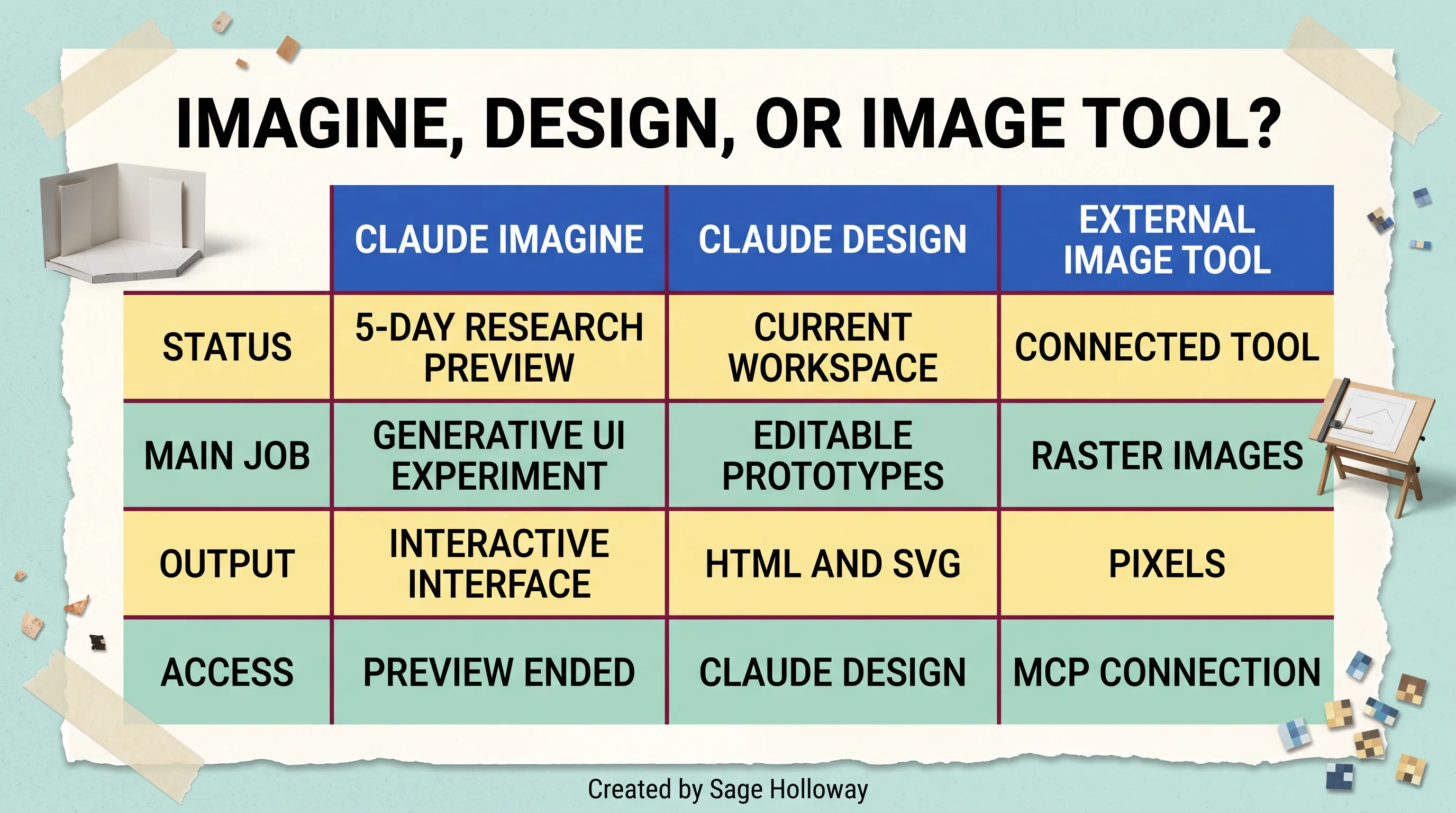
The three names describe different jobs, availability, and output types.
The clean mental model is this:
Claude Imagine was the ended research preview. Its main question was whether Claude could generate an interactive interface at the moment of need.
Claude Design is the current workspace. Its main job is producing and refining editable visual prototypes, with exports and a Claude Code handoff.
An external image tool produces raster artwork such as a photo or illustration. Claude reaches it through a connector rather than supplying that native pixel generator itself.
People sometimes use Claude designer as shorthand for the current product. That phrase is understandable, but it should point to Claude Design, not to a separate designer persona and not to the retired Imagine demo.
From prompt to editable prototype in Claude Design
The easiest way to misuse an AI design tool is to ask for a polished landing page before you have decided what the page needs to prove. You get a lovely answer to a blurry question. The result looks finished enough to discourage the harder conversation.
Start one level earlier.
Create from a goal and context
Give Claude Design a goal, an audience, and the constraints that affect the decision. A useful opening request might specify the workflow, the information a user must see, the action they must complete, and any existing source material. It does not need a hundred lines of art direction.
For example, do not begin with “make a modern analytics dashboard.” Begin with the operational need: “Create a weekly client-report prototype for a small agency. The account manager must see overdue work, current spend, and the next client decision without opening another screen.” The second request tells the workspace what the interface is for.
Ask the first version to expose structure. Check the hierarchy, the states, and the path through the task. Color and typography matter, but they cannot repair a missing decision.
Refine with chat, inline comments, and canvas controls
Claude Design documents three practical refinement paths:
Use Chat when feedback affects the whole design or needs explanation.
Use Inline comments when feedback belongs to a specific element.
Use Edit directly on the canvas when you know the exact visual change and do not need the model to interpret it.
The canvas is the visual working area. Inline comments attach feedback near the object it concerns. Chat carries broader instructions and context. Choosing the smallest suitable control keeps revisions legible. If you want one headline changed, direct editing is cleaner than asking the system to reinterpret the entire page.

Claude Design supports chat, inline comments, direct canvas editing, and version management.
If you want a deeper comparison of canvas-style workspaces, the separate Claude canvas guide owns that topic. Here, the point is narrower: Design gives you multiple ways to express feedback, and each one carries a different blast radius.
Manage revisions without losing the design intent
Use versions as decision points, not as a graveyard of every tiny change. Save a version before a structural experiment, such as replacing a dense dashboard with a guided sequence. Then compare the two approaches against the user job.
I learned this the annoying way: a prototype can improve screen by screen while the original decision quietly disappears. Version history protects the fork, but only a written design intent tells you which branch deserves to live.
Keep a short note beside major versions:
What changed?
Which user problem should improve?
What evidence would make us keep or reverse it?
This is also where plan limits matter. Claude Design activity now counts toward shared plan usage rather than using a separate weekly allowance, according to the official guide. Broad, repeated regenerations spend more of that allowance than targeted feedback. Precision is not merely tidy. It is operationally cheaper.
What the tools can build in practice
Historical Imagine demonstrations included a time tracker, news-feed patterns, a CV manager, and game-like interfaces. Those examples are useful because they test different forms of interaction rather than merely different visual styles.
Interface examples and what each test demonstrates
A time tracker tests state changes. A user starts a task, pauses it, and expects elapsed time and totals to update coherently. A news feed tests repeated data structures, filtering, and hierarchy. A CV manager tests forms, editing, and structured content. A game tests immediate feedback and rules.
The visual variety is less interesting than the behavioral variety.
The verified walkthrough below shows the historical Imagine build and debugging cycle in motion. Watch it as evidence of what the preview explored, not as a map of the current Claude Design interface.
https://www.youtube.com/watch?v=XYrLixbWtxo
Verified long-form walkthrough of an interactive Claude Imagine build and debugging cycle.
What should you look for in a demo? Notice when the generated screen stops being decoration and begins responding to state. Then notice the correction loop. A button that exists is not proof. A button that changes the right value, preserves the change, and survives a revision tells you more.
How to judge a prototype beyond the first render
Use five checks:
Task completion: Can a user complete the intended job without narration from the creator?
State: Do controls change and preserve the right information during the session?
Edge cases: What happens with empty, long, invalid, or repeated input?
Revision stability: Does one requested change break an unrelated part of the interface?
Handoff clarity: Can another person tell which behaviors are real, simulated, or still missing?
The first render is theater. The second and third interactions are evidence.
This will not work if you treat visual plausibility as product validation. A generated checkout can look excellent while lacking payment handling, inventory checks, tax rules, receipts, fraud controls, and failure recovery. Prototype the decision you need to make, then label the machinery that remains imaginary.
Code vs. pixels: can Claude generate images?
Yes, Claude can create visual output, but the type of output matters. Anthropic's official image capability explanation says Claude does not natively generate photos or illustrations. It can build diagrams, charts, and interactive visuals using HTML and SVG.
HTML supplies the structure of a web document. SVG, or Scalable Vector Graphics, describes shapes and lines as code, so they remain sharp when resized. A raster image stores a grid of pixels, as a typical photograph does. Both can look visual on screen. They are not interchangeable production formats.
Native interactive visuals and SVG output
Claude is useful when the visual needs structure or behavior. It can write an SVG diagram, create an HTML chart, or assemble an interactive interface. Because those outputs are code, you can inspect, revise, and connect them to a broader application.
That does not make Claude a native photorealistic image model. If your prompt asks for a cinematic product photo and the result comes from another service or connector, the image generation happened in that connected tool. Claude may have interpreted the request and orchestrated the call, but it did not suddenly acquire a built-in raster renderer.
The phrase Claude AI image generator often collapses that orchestration into one label. For a full treatment of providers, connectors, and image-specific workflows, see the planned Claude image generation guide. The honest answer in this article is simpler: native Claude handles code-based visuals; an external generator handles pixels.
External MCP tools for raster images
MCP means Model Context Protocol, a standard way for an AI application to connect to external tools and data sources. Think of it as a defined socket: Claude can request an operation, the connected server performs it, and the result returns to the conversation.

Claude can build interactive HTML and SVG visuals; raster photos and illustrations require a connected external image tool.
The research pack documents two examples. Hugging Face describes using this remote MCP URL for image-generation spaces:
Another third-party example, Amplifiers, documents this custom connector endpoint:
These endpoints are sourced configuration values, not a universal recommendation or a claim that Anthropic operates them. A connector can have its own authentication, pricing, privacy policy, model choices, and availability. Review those before sending private assets or client material.
The same distinction applies to the broader phrase Anthropic image generation. Anthropic supplies Claude and the connection framework. The raster-image service may belong to an entirely different provider.
Where Claude Imagine and Claude Design hit their limits
Every convincing prototype creates a dangerous emotional shortcut. Once the screen responds, the work feels 80 percent finished. In software, the visible screen is sometimes the easiest 20 percent.
Historical Imagine limits
The original Imagine experience was temporary. Its context was finite, its interfaces were experimental, and reported demos exposed bugs and broken interactions. None of that makes the preview a failure. Research previews exist to make the unresolved parts visible.
Its deeper limit was persistence. A session-generated interface is not automatically a durable product with a database, user accounts, access control, backups, analytics, and deployment. If you see historical coverage saying Imagine “built an app,” read app as an interactive prototype unless the author demonstrates those underlying systems.
The five-day access window also shaped the evidence. Testers were exploring a moving experiment under time pressure. Their examples can show possibility and failure modes, but they cannot establish the reliability of a mature service.
Current Claude Design limitations and official workarounds
Claude Design is current, but current does not mean frictionless. Anthropic documents two useful recovery paths:
If an inline comment does not appear on the page, paste the feedback directly into Chat.
If you encounter a
chat upstream error, start a new chat tab within the same project.
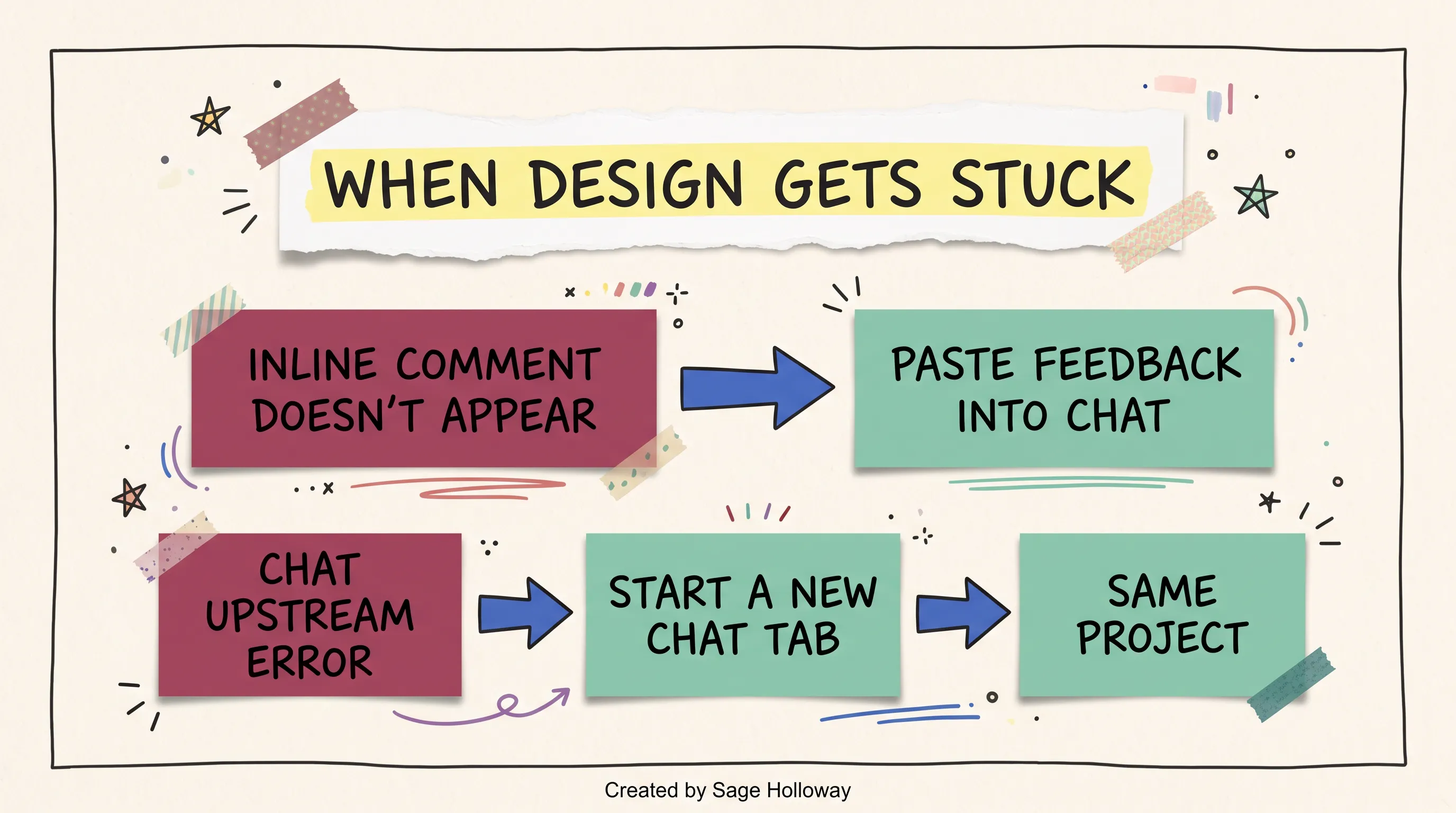
If an inline comment disappears, paste feedback into chat. For a chat upstream error, start a new chat tab in the same project.
These are small details until you are midway through a review. Then they are the difference between assuming the project is corrupted and taking a documented recovery step.
Concurrent editing is another boundary. The official guide says editing by two or more people at once remains basic and may not work reliably. For a team review, appoint one active editor and collect feedback through a controlled channel. That may feel less magical than everyone dragging objects simultaneously. It is also less likely to produce a proper mess.
Figma, collaboration, and persistence boundaries
Third-party testing reports no direct native Figma export. Figma is a collaborative interface-design tool whose files carry editable layers, components, constraints, and design-system relationships. A screenshot or flat export cannot preserve all of that structure.
Claude Design officially lists downloads and exports including .zip, PDF, PPTX, Canva, standalone HTML, and a Claude Code handoff. Choose among those based on the next job. PDF suits review. PPTX suits a presentation. Standalone HTML suits an interactive artifact. Claude Code suits engineering continuation.
Do not promise a Figma-native workflow unless your chosen third-party converter proves it on the exact design. Also do not confuse project persistence with application persistence. Saving a design project preserves your design work. It does not create the database and backend for the product represented by that design.
How real-time generative UI worked under the hood
The best available architectural evidence comes from reverse engineering of the historical Imagine client. It should not be projected onto current Claude Design as if Anthropic had published the same architecture for both products.
With that boundary in place, the mechanism is fascinating.
Browser message flow and permissions
The historical flow connected Claude to a browser-side MCP server through WebSocket RPC. A WebSocket is a persistent, two-way connection between a client and server. RPC, or remote procedure call, means one component asks another component to run a defined operation.
The browser MCP server exposed capabilities the generated interface could use. A permission manager formed a boundary around those capabilities. That boundary matters because a generated interface should not receive unlimited authority merely because it can draw a convincing button.
In plain language, Claude proposed interface changes, messages crossed a live connection, and the browser applied approved operations. The browser was not simply displaying a pre-rendered video. It was participating in the loop.
Sanitization and live DOM patching
Reverse engineering reported two client-side libraries in the historical rendering path: DOMPurify and morphdom. The DOM, or Document Object Model, is the browser's live tree of page elements. DOMPurify sanitizes generated HTML by removing unsafe constructs. morphdom compares the new element tree with the current one and patches the differences efficiently.

Historical Imagine implementation evidence: messages crossed a WebSocket, generated HTML was sanitized, then the live DOM was patched.
That sequence explains how the interface could change without treating every revision as a brand-new static page. Generated HTML arrived, passed through a safety filter, and updated the live interface. It also exposes the engineering tension: generative UI needs freedom to change the screen, while the host needs strict control over what generated code may execute.
Everyone notices the speed of the first screen. The harder achievement is preserving a trustworthy boundary while the screen keeps rewriting itself.
Moving a prototype into a production workflow
A prototype answers, “Should this experience exist, and how might it work?” Production answers a longer list: “Will it preserve data, protect users, survive failure, remain maintainable, and deploy repeatedly?” Moving between those questions requires an explicit handoff.
Export and handoff options
Choose the export according to the person receiving it:
Download a
.zipwhen someone needs the project bundle.Export PDF when stakeholders need a stable review artifact.
Export PPTX when the design belongs inside a presentation workflow.
Send to Canva when the next work happens there.
Export standalone HTML when the interaction itself needs to travel.
Hand off to Claude Code when an engineer or coding agent will continue implementation.
Claude Code is Anthropic's agentic coding environment, meaning it can inspect a codebase, edit files, and run development tasks with permission. If that workflow is new to you, the Claude Code guide covers the broader tool, while the CLAUDE.md guide explains how to give a repository durable project instructions.
An export is a transfer format, not a quality certificate. Before handoff, write down which flows have been tested, which data is fake, which controls are decorative, and which accessibility requirements remain open.
Connect Claude Design to Claude Code
The official Claude Design guide gives this command for adding its MCP server at user scope:
--scope user makes the server available in the user's Claude Code configuration. --transport http tells Claude Code to connect over HTTP. The final URL is Anthropic's documented Design MCP endpoint.
Then sign in from Claude Code:

The documented Claude Code handoff starts by adding the Claude Design MCP server, then running /design-login.
Those commands establish the connection. They do not implement the product. The engineering phase still needs a repository, application architecture, real data, tests, security decisions, and deployment.
Sync an existing design system
A design system is the shared set of components, tokens, and rules that keeps a product visually and behaviorally consistent. Buttons, form fields, spacing scales, colors, and interaction patterns belong there.
The official workflow documents this command:
It pulls design-system components into Claude Code so work in Claude Design can begin from existing components. This is more important than it sounds. A prototype built from your real button, card, and form primitives has a shorter path to production than one whose attractive components must all be translated later.
Still, inspect the result. Confirm component states, responsive behavior, keyboard navigation, contrast, and error handling. Sync reduces translation work. It does not remove review.
A sensible production checklist looks like this:
Define the validated user flow and unresolved assumptions.
Connect the Design handoff to the intended repository.
Sync existing design-system components where available.
Replace sample content and simulated state with real data contracts.
Add persistence, authentication, authorization, and error recovery as required.
Test behavior, accessibility, responsiveness, and security.
Deploy through the project's normal review and release process.
That is less cinematic than typing one prompt and watching a product appear. It is also how software earns the right to remain online.
Who should use it, and for which decision
Claude Imagine is now useful mainly as a historical idea and a body of demonstration evidence. Claude Design is useful as a current working tool.
Best-fit jobs
Use Claude Design when you need to:
Explore multiple interface directions before committing engineering time.
Turn a written product idea into something stakeholders can react to.
Test hierarchy, flow, and interaction with more fidelity than a static sketch.
Create presentation or HTML artifacts from a visual concept.
Hand a prototype toward Claude Code and an existing design system.
Product and UX teams can use it to make choices visible. Founders can test whether an idea has a coherent interaction before building infrastructure. Marketers can prototype calculators, reports, and campaign experiences when the interaction is part of the message.
When another tool is the better choice
Choose a raster image generator when the deliverable is a photo, illustration, texture, or composited campaign image. Choose Figma when native Figma collaboration, component structure, and established team review are non-negotiable. Choose direct production development when the interface is already understood and the risk lives in data, performance, security, or integration.
And choose a sketch when the decision is still cheap. Generating a beautiful screen can create attachment before the idea has earned it.
The right question is not “Which tool can make the most impressive first frame?” Ask which uncertainty you need to remove next. Then use the cheapest artifact that can remove it.
FAQ about Claude Imagine, Design, and images
Can Claude generate images?
Claude can generate code-based visuals such as diagrams, charts, and interactive interfaces using HTML and SVG. According to Anthropic's official support documentation, Claude does not natively generate photos or illustrations. Raster artwork requires a connected external image-generation tool.
How do you use Claude Design?
Open Claude Design, describe the goal and user context, then refine the prototype through Chat, inline comments, or direct canvas editing. Save meaningful versions before structural changes. When the concept is ready, export it as a supported format or hand it to Claude Code for implementation.
What is Claude Design?
Claude Design is Anthropic's current visual prototyping workspace, powered by Claude Opus 4.7 according to Anthropic's announcement. It creates editable visual work, supports conversational and direct refinement, manages revisions, and offers exports plus a Claude Code handoff. It is distinct from the ended Claude Imagine preview.
Does Claude generate images?
It depends on what you mean by images. Claude can natively create SVG and HTML visuals. It does not natively render photorealistic raster photos or illustrations. A connected service can perform that second job while Claude helps direct the request.
Does Claude do image generation?
Claude does visual generation natively when the result is code-based, such as an SVG diagram or interactive HTML chart. For pixel-based image generation, Claude needs an external tool connected through MCP or another supported integration. The provider of that tool performs the raster rendering.
Can Claude AI generate images?
Claude AI can create visual interfaces, charts, diagrams, and SVG graphics. It can also orchestrate an external image generator if one is connected. Do not assume a PNG or photo came from a native Anthropic image model merely because the request started inside Claude.
Can Claude make images?
Yes, if “image” includes SVG and browser-rendered visuals. No, if you specifically mean native photo or illustration generation without another tool. Name the output you need first: editable vector code, interactive HTML, or a raster image.
How do you access Claude Design?
Access Claude Design from its available Claude product surface. On Enterprise plans, the official guide says the capability is off by default, so an administrator must enable it in Organization settings. For a Claude Code handoff, add the documented Design MCP server and run /design-login.
Can Claude create images?
Claude can create SVG graphics and HTML-based visual experiences directly. To create raster images such as generated photos or illustrations, connect an external image tool and review that provider's privacy, authentication, and usage terms. Claude Imagine itself was an interface experiment, not a native raster-image generator.
Closing: choose the right next experiment
The useful legacy of Claude Imagine is not a feature you somehow failed to find. It is a better question about software: what if the interface could arrive when the need became clear?
Claude Design gives that question a current workspace and a practical handoff. External image tools solve a different problem. Once you stop asking one name to cover all three jobs, the workflow becomes almost boringly clear.
Try this with one small decision this week. Pick a workflow that currently lives in a spreadsheet, a note, or somebody's memory. Ask Claude Design for the narrowest interactive prototype that could expose the missing step. Test it with one person. If the interaction teaches you something, save the version and hand that evidence forward. If it only looks impressive, let it go.
The most interesting future here is not a world with endless generated screens. It is a world where fewer screens survive long enough to become permanent, because we can test the shape of an idea before pouring concrete around it.
Until then...
Sage
PS. Take a tool you use every morning and write down the first control you never touch. If the interface assembled itself today, would that control still earn its chair?
Author
Practical guides, tool teardowns & AI engineering workflows.
Related Articles

Claude Code
React Artifact to Production App: Local Builds, Live State, and Deployment

Claude Code
Claude Code Notifications: Complete Guide to Desktop Alerts, Remote SSH Hooks & Audio Cues (2026)

Claude Code
Claude Code Permissions: Stop Approval Prompts Safely with Auto Mode, Rules & Docker Bypass (2026)