AI Coding Tools
Codex Plugin for Claude Code: Choose, Install, and Run a Reliable Two-Agent Workflow

Sage Holloway
19 min read
Go back to blog
SHARE

You keep two terminals open and play courier between them. One agent plans. The other reviews. You are the clipboard. Every time you try to automate the conversation they start arguing about commas, and the session you meant to finish before lunch is still rewriting the same heading at 4pm.
Direct answer: The official Codex plugin for Claude Code (codex-plugin-cc) lets you call Codex reviews, task delegation, and session transfer from Claude Code. Install the Codex CLI, add OpenAI's plugin marketplace in Claude Code, install the plugin, reload plugins, and run setup. If you want Claude to run from Codex instead, use a clearly separated reverse plugin path. Share project instructions, then add bounded review and handoff rules before automating the loop.
Last month I watched myself paste a review comment from one window into another, then paste the reply back. I was not pairing. I was a USB cable with opinions. The next week the same repository had one host terminal, and the guest agent ran a review without me copying a single hunk. The work did not get smarter. The handoff got shorter.
Last verified: 2 September 2026 (research sources; no live CLI verify)
Table of contents
Choose the direction before you install anything
Install the official Codex plugin inside Claude Code
Configure Codex for the project, not just the machine
Give both agents one source of project truth
Run reviews, challenges, rescues, and background work
Transfer context and build a bounded handoff loop
Stop the infinite review loop: a conflict and budget protocol
Troubleshoot route, auth, trust, and stale-task failures
Frequently asked questions
Put the two-agent loop to work safely
One project, two agents, and a handoff you can control.
Choose the direction before you install anything
You get in the car. Two GPS units light up at the same time. One wants the highway. The other wants the side streets. Neither waits for you to pick a driver. If you pull out of the driveway without deciding who is allowed to call the next turn, you sit in the median while both screens talk over each other.
That is the host problem. A Codex plugin for Claude Code is a second navigator, not a second steering wheel. You still have to decide which terminal is driving before anyone types an install command.
Why does the host matter? Because the command vocabulary, the marketplace, and the review-gate trigger all change with the host. Mix them and you get a setup that looks installed and does nothing useful.
There are two real routes. Keep them in separate procedures. Never paste a $cc: command into a Claude Code session, and never paste a /plugin command into Codex and expect the same plugin to appear.
Official path: Codex inside Claude Code
This is the upstream product for Codex in Claude Code: OpenAI's 0. Claude Code stays the workspace. Codex comes in as a guest for reviews, adversarial challenges, implementation rescues, background jobs, and session transfer.
A plugin marketplace is the registry Claude Code uses to find installable plugins. You add OpenAI's marketplace, install the codex@openai-codex plugin, reload, then run /codex:setup. The plugin talks to your local Codex CLI and Codex app server, the same surface described in the OpenAI Codex docs. It does not spin up a second cloud runtime of its own.
Use this path when Claude Code is already where you plan, search, and steer. The OpenAI Developer Community announcement thread is useful color. The README is the authority when a blog and the repo disagree.
Reverse path: Claude inside Codex
Sendbird's 0 does the opposite job. Codex stays the host. Claude Code is invoked as a guest, typically as a fresh non-interactive claude -p subprocess per task.
Install from inside Codex:
The idempotent helper is npx cc-plugin-codex install. You can re-run it for updates. $cc:setup checks hooks, cache trust, and writable paths. Reverse hooks also need hooks = true under [features] in ~/.codex/config.toml.
There is a third, unofficial option: Yanchuk's community marketplace (yanchuk/claude-plugin-codex) with $claude setup. Treat it as community software. Do not confuse it with OpenAI's plugin.
If you wanted a winner-takes-all product pick instead of a host pick, that comparison lives on Claude Code vs OpenAI Codex. This page stays on wiring.

Choose the host first because it changes every command that follows.
One row on that matrix is the whole relationship of claude code and codex execution environments: who is host, who is guest, and which install entry you are allowed to type.
Install the official Codex plugin inside Claude Code
The rest of this guide follows the official Claude Code Codex plugin path unless a section is labeled reverse. Brand comparison, VS Code, and Cursor are different jobs. The CLI surface, including platform installers and first-run sandbox flags, belongs in the Codex CLI install guide.
This will not work if Node.js is older than 18.18, if Codex is not authenticated on the machine, or if you skip reload and then decide the plugin is broken.
Confirm the documented requirements
codex-plugin-cc requires Node.js 18.18 or later. Sendbird's reverse plugin is looser (Node.js 18+). If you are on the official path, meet the stricter number.
You also need a working local Codex CLI and a way to pay for it: a ChatGPT subscription (including Free, according to the upstream README) or an OpenAI API key. Claude Code itself still needs an Anthropic API key or a Claude Pro or Max subscription. Two products, two bills. The plugin does not merge them.
Install the CLI if it is missing:
Then authenticate from the documented Claude Code flow:
Skip SourceForge mirrors. The official package is the GitHub repo and the scoped npm CLI, not a third-party executable listing.
If your daily driver is an IDE sidebar rather than Claude Code, stop here and use the matching spoke: how to use Codex in VS Code or how to use the Codex plugin in Cursor. Those are different hosts.
Add the marketplace, install, reload, and set up
Confused? Fair enough. The official install is four slash commands, not a new product. A slash command is a /command you type in the Claude Code session, not a shell binary. Run them in this order.
/reload-plugins refreshes the active plugin list. If you skip it, the install can succeed and the commands still look missing. /codex:setup verifies Codex authentication and can offer to install the global @openai/codex CLI via npm if it is absent.

Run the official sequence inside Claude Code, then confirm setup.
That is the entire official install. Four lines. The rest of the article is what people skip, then blame on the plugin.
Configure Codex for the project, not just the machine
A global install gives you commands. It does not tell Codex how this repository wants to be treated. User defaults and project overrides are different files, and the project file only loads when the project is trusted.
I tried to set a project model by editing the user file and then wondered why a second repo inherited it. The inheritance was the point. I had configured the machine, not the tree.
Separate user settings from trusted-project overrides
User-level configuration lives in ~/.codex/config.toml. That is the home-directory file Codex reads for every project.
Trusted-project overrides live in .codex/config.toml at the repository root. Trusted here is Codex's project-trust flag: project overrides load only if the directory is marked trusted. An untrusted tree ignores the local file. That is a safety boundary, not a bug. But is the project file even loading? Check trust before you debug the TOML.
Keep secrets and default caution in the user file. Put repository-specific model and sandbox choices in the project file after you trust the tree.

User defaults live in ~/.codex/config.toml; trusted projects can override them in .codex/config.toml.
Set model and reasoning behavior
The keys that matter are model and model_reasoning_effort. The upstream README shows project overrides such as:
Treat those values as freshness-sensitive examples. Model tags move. Ken Imoto's August 2026 notes on ChatGPT-authenticated Codex sessions are a reminder that a string in a screenshot can be historical by the next week. Copy the keys. Recheck the values against current docs before you freeze them in a repo.
If you say spark in the plugin, it maps to gpt-5.3-codex-spark. That mapping is documented and also freshness-sensitive. If a later README drops spark, believe the README.
model_reasoning_effort = "high" is not a free quality slider. Higher effort burns more tokens per turn. Use it for a design challenge or a nasty test failure. Do not leave it on for a one-line rename.
Match approvals and sandboxing to the task
A third-party ShakaCode guide documents interactive UX overrides and environment keys that the official plugin README does not center. Label them as third-party guidance.
approval_policy controls when Codex asks you before acting. The cited values are untrusted and on-request. sandbox_mode controls what the process may touch. The cited values are read-only, workspace-write, and danger-full-access.
That pairing is the ordinary feature-coding profile in the cited guide: write inside the workspace, still treat the tree as untrusted enough to prompt. danger-full-access is for local test runners and build scripts you already trust, not for a first review of a stranger's repo.
On the CLI, codex --auto-edit still prompts for shell execution. codex --full-auto runs fully sandboxed with zero prompts. Those flags change prompting behavior. They are not synonyms. Do not type --full-auto because it sounds decisive.
Everyone installs a second plugin so they will not miss a feature. The missing feature was a host decision, and it has to happen before the first slash command.
Give both agents one source of project truth
Two agents on one tree without shared instructions will invent two house styles by Thursday. So what happens if they drift? You get two lint rules, two test commands, and a review that "fixes" a convention the other agent just restored. AGENTS.md is the Markdown file Codex reads for repository rules. CLAUDE.md is the matching file for Claude Code. You need a policy for how those two files relate, not a hope that they stay in sync by accident.
ShakaCode's 0 is the clearest sourced map. It is also dated on model names. Trust it for file strategy, not for default model tags.
Reference one instruction file
Put build commands, architecture, and conventions in AGENTS.md. Make CLAUDE.md a pointer:
Two files remain. Claude-specific notes can still live in CLAUDE.md under the pointer. The cost is maintenance: if you forget to update the pointer, Claude follows a stub.
You can also tell Codex to fall back when AGENTS.md is missing. In ~/.codex/config.toml:
That is a read path, not a merge. Codex will look for those filenames. It will not magically combine three files into one policy.
Symlink universal rules
The fast version:
One inode, two names. Universal rules stay identical. The tradeoff is real: you cannot keep tool-specific directives in separate files, because there are no longer two files. If Claude needs a hook that Codex should never see, the symlink will not let you say so.
Keep a shared core with tool-specific additions
Put rules that must be identical (test command, lint, "do not rewrite formatting") in AGENTS.md. Put Claude-only or Codex-only notes in CLAUDE.md. This is the adult option. It requires deliberate maintenance. People skip it, then blame the models for drifting.

Pick one source-of-truth pattern, then preserve tool-specific instructions where needed.
If both agents will edit at the same time, shared instructions are not enough. Isolate the working trees (git worktrees are the usual move) so they are not fighting over one index. Simultaneous writes on one checkout are how you get a merge conflict that neither agent caused on purpose.
Run reviews, challenges, rescues, and background work
Once the plugin is loaded, the temptation is to automate everything. Which command matches the job? Use the smallest one. Read-only review is not implementation. Implementation is not a design argument.

Use the smallest command that matches the job, then inspect background work explicitly.
Choose review or adversarial review
/codex:review starts a read-only correctness review of local uncommitted diffs or a specified base. It supports --base <ref>, --wait, and --background. It does not write files.
/codex:adversarial-review is a steerable design challenge. It questions decisions. You can pass free text after the flags.
On the reverse path the twins are $cc:review and $cc:adversarial-review. Same jobs, different host. Do not mix prefixes.
A review that only nits import order is not a review. Write the functional question in the command. If you cannot write the question, you are not ready to spend a reasoning turn.
Delegate an implementation rescue
/codex:rescue hands implementation to the plugin subagent codex:codex-rescue. This one changes files. Flags include --background, --wait, --resume, and --fresh.
The reverse twin is $cc:rescue. Scope the ask. "Make it better" is how you get a rewrite you did not want and a review loop you cannot stop.
Track and control background work
Background here means the plugin job continues while you keep using Claude Code. It is not a second checkout and it is not a guarantee the work is done.
/codex:status checks background task state. /codex:result displays background output. /codex:cancel stops it. Poll on purpose. Do not assume silence means success.
The reverse plugin documents the same trio as $cc:status, $cc:result, and $cc:cancel. Again: host decides the prefix.
Transfer context and build a bounded handoff loop
A review in Claude Code is not the same as a Codex session that can see the prior reasoning. If the debugging thread is already long, copy-paste is how you lose the plot. /codex:transfer is the sourced move for that job. It does not promise perfect state synchronization. It creates a persistent Codex thread and prints a resume command.
When you run claude code with codex on the same root, transfer is how the conversation crosses the gap without you becoming the USB cable again.
Transfer the session and resume it in Codex
What if the transcript is missing? /codex:transfer looks for the source transcript under ~/.claude/projects. If the JSONL is not there, transfer cannot invent it.
It prints something you then run in the Codex app or TUI:
Use the session id the command emits. Do not invent one. Do not paste a ChatGPT conversation URL and hope.

Transfer creates a persistent Codex thread and prints the resume command.
Plan, implement, review, and return control
The loop that actually works is boring.
Plan in Claude Code. Write the acceptance line first.
Implement, either in Claude Code or via
/codex:rescueif the patch is bounded.Review with
/codex:reviewor/codex:adversarial-review, not both at once.Return control. You apply, reject, or escalate.
The path has to end. A circle that always returns to "one more pass" is how the gate becomes a furnace.

Plan, implement, review, and return control, with an explicit stop condition.
A walkthrough is useful here because prose cannot show two agents on one project as quickly as a recording can. This is the verified Keep URL for that motion. Watch it as context, then come back to the sourced commands. Do not treat a creator's shortcuts as a second README.
https://www.youtube.com/watch?v=LHKYD0ufObI
Stop the infinite review loop: a conflict and budget protocol
But here is the thing.
The feature designed to raise quality can spend the budget on taste. /codex:setup --enable-review-gate installs a local Stop hook: a turn-end hook that fires when Claude tries to finish, then asks Codex to verify before the turn is allowed to complete. If Codex finds issues, Claude is blocked so it can address them. Left unattended, that circular loop can drain tokens quickly. The official README warns about the drain. It does not ship a budget protocol.
The three-iteration cap below is editorial guidance derived from that gap. It is not an official plugin feature. Do not look for a --max-iterations 3 flag. There is not one in the sourced pack.
Define functional acceptance before the first review
Write the blocker list before anyone reviews. Functional only.
Tests that must pass, named.
Behavior that must not regress, named.
Security or data issues that are automatic rejects.
Formatting, comment voice, and heading level are not blockers unless the repo's instruction file already forbids them. If you let style into the gate, two agents will spend three turns agreeing to disagree about an H2.
I enabled the review gate on a docs-only commit once. They debated whether a heading should be H2 or H3 until I killed the session. The page was already correct. The gate had no definition of done, so it invented one.
Put the checklist in AGENTS.md so both sides read the same law. A review command that repeats the same law in free text is fine. A review command that says "make it cleaner" is how you buy a rewrite.
Cap iterations and require human escalation
Run at most three review-and-fix cycles on one change.
Iteration 1: functional blockers only.
Iteration 2: remaining blockers, no new style nits.
Iteration 3: last pass. Then stop.
After three, a human decides. Merge, revert, or rewrite the spec. Do not let the agents vote again. Community threads on tmux wrappers and custom scripts are experimental evidence, not a second official path; the useful one for loop controls is this r/ClaudeCode writeup. Treat those scripts as someone else's workshop, not as commands from OpenAI.
Stop when the working tree has no net edits
Sendbird's reverse plugin fingerprints the working tree and skips turn-end review when the last Codex turn made no net edits. That circuit breaker is sourced for the reverse path. Upstream's gate does not advertise the same skip.
On the official path, you are the fingerprint. If git status is clean, do not run another review. If the last turn only changed comments, decide whether comments were in the acceptance list. If they were not, stop.

Treat three iterations as an editorial limit, then stop or escalate to a human.
Ready to automate the gate? Only after one manual review has already passed the checklist. Enable --enable-review-gate last, never first.
Troubleshoot route, auth, trust, and stale-task failures
Diagnose the route before you reinstall anything. Official upstream failures and reverse-plugin hook failures look similar in a frustrated Slack message and are not the same system.
First check or reinstall? First check, then the next check. Reinstall is almost never the first check.
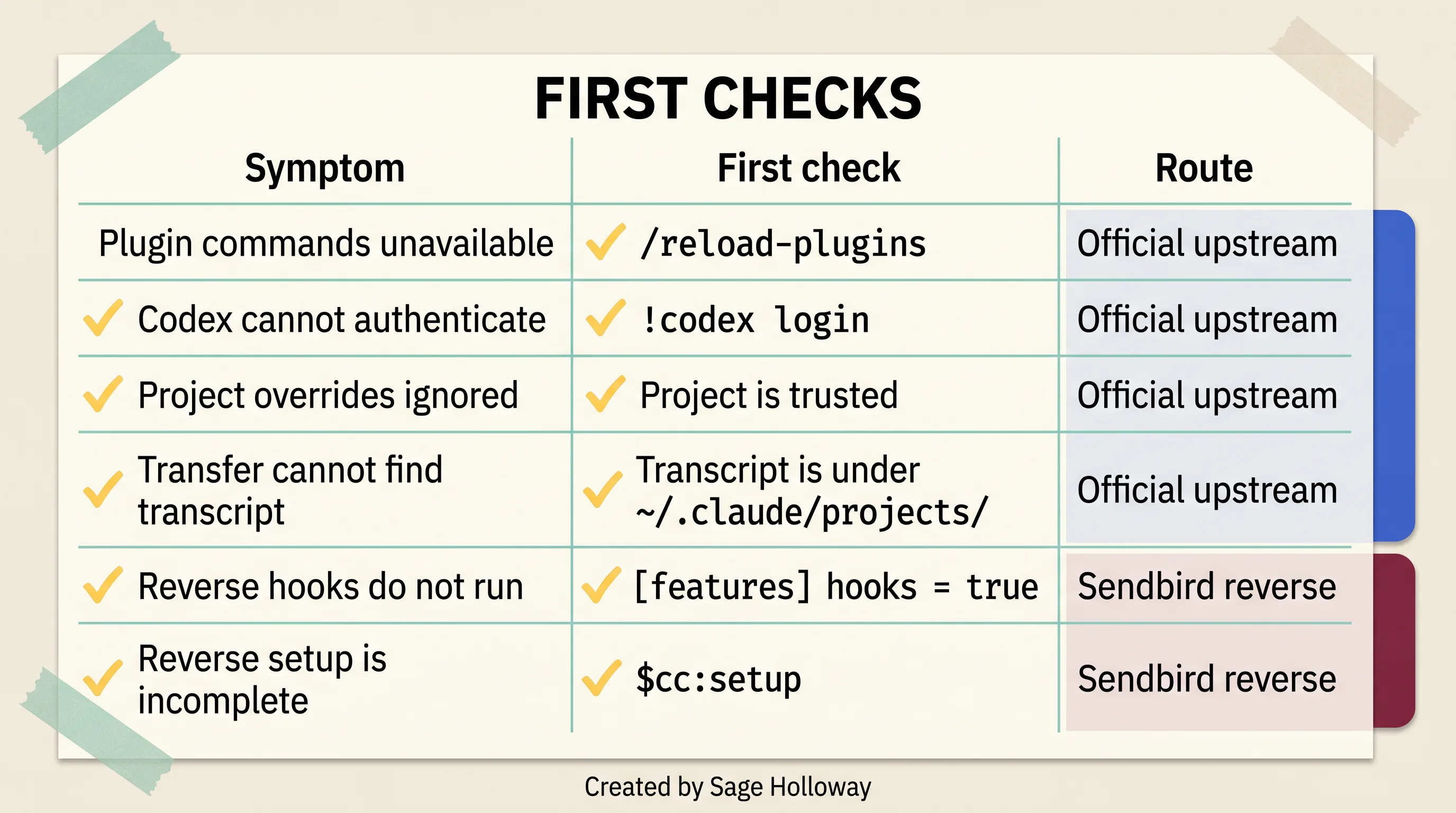
Diagnose the route first, then check authentication, project trust, transfer location, or reverse hooks.
Diagnose the official upstream path
Plugin commands unavailable: run /reload-plugins. If they are still missing, confirm /plugin install codex@openai-codex actually completed, then /codex:setup.
Codex cannot authenticate: run !codex login in the documented Claude Code flow. The plugin uses local auth state. A ChatGPT tab being logged in is not the same as the CLI being logged in.
Project overrides ignored: confirm the project is trusted. Then confirm you edited .codex/config.toml at the repo root, not only ~/.codex/config.toml.
Transfer cannot find the transcript: the JSONL has to live under ~/.claude/projects. A session that never wrote there cannot be transferred. Start a real Claude Code project session, then transfer.
Stale background work: /codex:status, then /codex:result or /codex:cancel. Do not start a second rescue because the first one went quiet.
Node version errors: codex-plugin-cc wants 18.18 or later. node -v before you open an issue.
Diagnose reverse-plugin hooks and cache trust
Reverse hooks do not run: set hooks = true under [features] in ~/.codex/config.toml.
Reverse setup incomplete: run $cc:setup. It is supposed to confirm hooks, trust caches, and writable paths.
If you installed the Yanchuk community plugin, $claude setup is that project's check. It is unofficial. Do not file those failures against openai/codex-plugin-cc.
Windows on the Sendbird path is labeled experimental in that repo. Prefer a WSL workspace if the reverse plugin is the job.
Frequently asked questions
How to use Codex and Claude Code together?
Pick a host. For Codex in Claude Code, install codex-plugin-cc, share instructions through AGENTS.md and CLAUDE.md, then run bounded reviews or rescues from slash commands. For Claude inside Codex, use Sendbird's reverse plugin and its $cc: commands. Do not run both plugins as one procedure, and do not let both agents write the same files at the same time.
How do I install the official Codex plugin for Claude Code?
In Claude Code, run /plugin marketplace add openai/codex-plugin-cc, then /plugin install codex@openai-codex, then /reload-plugins, then /codex:setup. Install @openai/codex globally first if the CLI is missing, and authenticate with !codex login. Setup can also offer to install the CLI if it is absent.
Does codex-plugin-cc require a separate Codex account or runtime?
No. The plugin does not spin up a separate Codex runtime. It delegates through your local Codex CLI and Codex app server, using the machine's existing authentication and a ChatGPT subscription or API key. You still need whatever Codex access that local CLI already required.
How do I share instructions between Claude Code and Codex?
Reference AGENTS.md from CLAUDE.md, symlink with ln -s AGENTS.md CLAUDE.md, or keep a shared core in AGENTS.md plus tool-specific notes in CLAUDE.md. Optionally set project_doc_fallback_filenames = ["CLAUDE.md", "COPILOT.md"] in ~/.codex/config.toml so Codex can read Claude's file when AGENTS.md is missing. The symlink is fastest and blocks tool-specific split files.
How do I set a model or reasoning effort for one project?
Create .codex/config.toml at the trusted project root and set model and model_reasoning_effort. Example values in current docs (such as gpt-5.4-mini and high) age quickly; copy the keys and recheck the strings. Untrusted projects ignore the local file and keep using user defaults in ~/.codex/config.toml.
How does the turn-end review gate work?
/codex:setup --enable-review-gate registers a local Stop hook. Codex reviews Claude's output before the turn finalizes. If the review finds problems, the turn is blocked so Claude can address them. The loop can drain tokens if you leave it unsupervised. Sendbird's reverse gate can skip a pass when a working-tree fingerprint shows no net edits; that skip is a reverse-plugin behavior, not an upstream guarantee.
How do I transfer a Claude Code session into Codex?
Run /codex:transfer in Claude Code. It builds a persistent thread from the transcript under ~/.claude/projects and prints codex resume <session-id>. Resume in the Codex app or TUI with that id. If the transcript is not in that directory, transfer has nothing to send.
How do I prevent Claude Code and Codex from wasting tokens in a review loop?
Write a functional-only acceptance list first. Cap review-and-fix cycles at three, then escalate to a human. Do not enable the review gate until a manual review has already passed. On the reverse path, rely on the no-net-edit fingerprint when it applies. On the official path, stop yourself when git status is clean or the last turn only changed style you never listed as a blocker.
Put the two-agent loop to work safely
Pick one repository you already understand. Pick one failing test or one small review. Commit or stash first.
Install only the official path. Run /codex:review on that change. Read the result. Apply or reject it yourself. Do not enable --enable-review-gate on the first afternoon.
If the review is useful, share AGENTS.md next, then try one /codex:transfer on a real debugging thread. That is the whole experiment. The models will keep renaming themselves. The host decision and the stop condition will not.
What remains unclear is how long teams will tolerate two bills and two instruction files before someone demands a single vendor again. Genuinely not sure yet. The useful version of this stack is still a doorbell with house rules, not a roommate with a key.
Until then...
— Sage 🍓
PS. I once pasted the guest setup command into the terminal that was supposed to be hosting the other tool. Nothing crashed. Nothing installed either. I spent twenty minutes debugging software that had never been in that room.
Related Reading
Claude Code vs OpenAI Codex: Workflow, dated pricing, and a tandem handoff that keeps both agents off the same file.
How to Use the Codex Plugin in Cursor: Official extension, project folder, and blank-panel recovery.
35 Claude Code Hacks (Beginner to Pro): Custom environments, parallel agents, and validation hooks for daily terminal work.
Author
Practical guides, tool teardowns & AI engineering workflows.
Related Articles

AI Coding Tools
Best GitHub Copilot Alternatives in 2026: Choose by Coding Surface, Not a Top-10 List

AI Coding Tools
GitHub Copilot Agent Mode in VS Code: How It Works, How It Differs From Ask and Edit, and How to Control It

AI Coding Tools
How to Cancel GitHub Copilot: The Irreversibility Trap, the Missing Button Fix, and Every Cancellation Path