AI Agents
Multi-Agent Research System in n8n: Architecture, Deep Research Demo, and Production Orchestration

Sage Holloway
28 min read
Go back to blog
SHARE

You configure a visual agent node, connect a search tool, and prompt it to conduct deep research across the web. Three minutes later, your client interface crashes with a gateway timeout while your coordinator model hallucinates citations across a saturated context window. Building a research system is not about chaining more models together. It is about enforcing the structural boundaries that prevent your agents from drowning in their own evidence.
To build an autonomous multi agent research system n8n demo, configure a Lead Orchestrator agent that decomposes user queries, stores its plan in external memory, and delegates tasks to specialized subagents. Rather than chaining large text blobs across the canvas, search workers write raw scraped data to external storage and return lightweight file identifiers. A downstream Citation Agent audits all claims against original source text before assembling the final cited report.
Last verified: 31 August 2026
That is the direct answer. But if you are building an autonomous research engine meant to deliver exhaustive, verified reports on complex technical topics, assembling an n8n multi agent workflow based on generic promotional tutorials will lead directly to production failure.
The developer community spent the early wave of generative AI building basic single-agent prompt chains. By 2026, the demand for autonomous deep research shifted engineering teams toward hierarchical multi agent workflows. Yet many builders still treat visual canvases as simple sequential pipes. When an agent attempts to crawl dozens of web pages, raw HTML dumps blow past context boundaries, LangChain loops execute sequentially over several painful minutes, and webhooks time out silently.

The multi-agent research architecture in n8n coordinates an orchestrator planner, parallel web search workers, and a downstream citation verifier.
This guide deconstructs the architecture, canvas wiring, and production engineering required to run an autonomous multi agent research system n8n demo. We will translate Anthropic's proven three-tier research blueprint into an importable n8n canvas pattern, compare native AI Agent Tool nodes against decoupled sub-workflows, implement lightweight artifact handovers that eliminate context bloat, configure asynchronous webhooks to defeat gateway timeouts, and connect inter-agent communication protocols like Agent2Agent (A2A) and Model Context Protocol (MCP).
What this guide covers
Single agents versus hierarchical multi-agent research systems: token economics, context saturation, and the 90.2% performance gain
The three-tier research mechanism: Lead Planner, parallel OODA worker subagents, and downstream citation verification
Canvas topology bake-off: native AI Agent Tool nodes versus decoupled sub-workflows as tools
Context isolation and lightweight artifact handovers: beating the telephone game with external storage keys
Prompt engineering for autonomous delegation: parallel tool call directives, effort scaling, and search heuristics
Step-by-step deep research demo in n8n: assembling the production canvas from webhook trigger to markdown compiler
Production engineering: defeating 504 gateway timeouts with asynchronous 202 responses and state polling
Inter-agent protocols: connecting n8n to Model Context Protocol (MCP) and Google Agent2Agent (A2A)
Nine verified developer FAQs covering memory sharing, execution latency, and citation drift
Production deep research checklist, implementation next steps, and P.S.
Deconstructing the Architecture: Single Agents vs. Hierarchical Multi-Agent Research Systems
To understand why a hierarchical multi agent workflow is necessary for deep research, consider how a forensic investigative newsroom operates during a complex corporate inquiry.
The lead editor never spends four hours in a basement archive reading public land deeds while simultaneously drafting the final front-page headline. Instead, the editor sits at the central planning board, breaks the investigation into distinct angles, and dispatches specialized beat reporters into the field. One reporter pulls financial filings, another interviews regulatory officials, and a third inspects municipal permits. A dedicated copy desk fact-checker then cross-examines every paragraph against the raw field notes before anything goes to print.
The editor provides high-level coordination and maintains the master timeline. The beat reporters handle domain-specific extraction. The fact-checker guarantees source truth.
That structural separation is the core design principle behind an anthropic multi agent research setup, documented in Anthropic's How we built our multi-agent research system. When you force a single language model to handle query decomposition, web crawling, document parsing, synthesis, and citation attribution within a single conversational prompt, the system collapses under its own context weight.
The 90.2% Performance Benchmark and the 15× Token Cost Reality
Why do engineering teams accept the complexity of orchestrating multiple agents?
In empirical evaluations conducted across complex research tasks, Anthropic demonstrated that a hierarchical multi-agent configuration (using Claude Opus 4 as the lead planner and Claude Sonnet 4 as worker subagents) outperformed a single-agent Claude Opus 4 baseline by 90.2% on breadth-first queries.
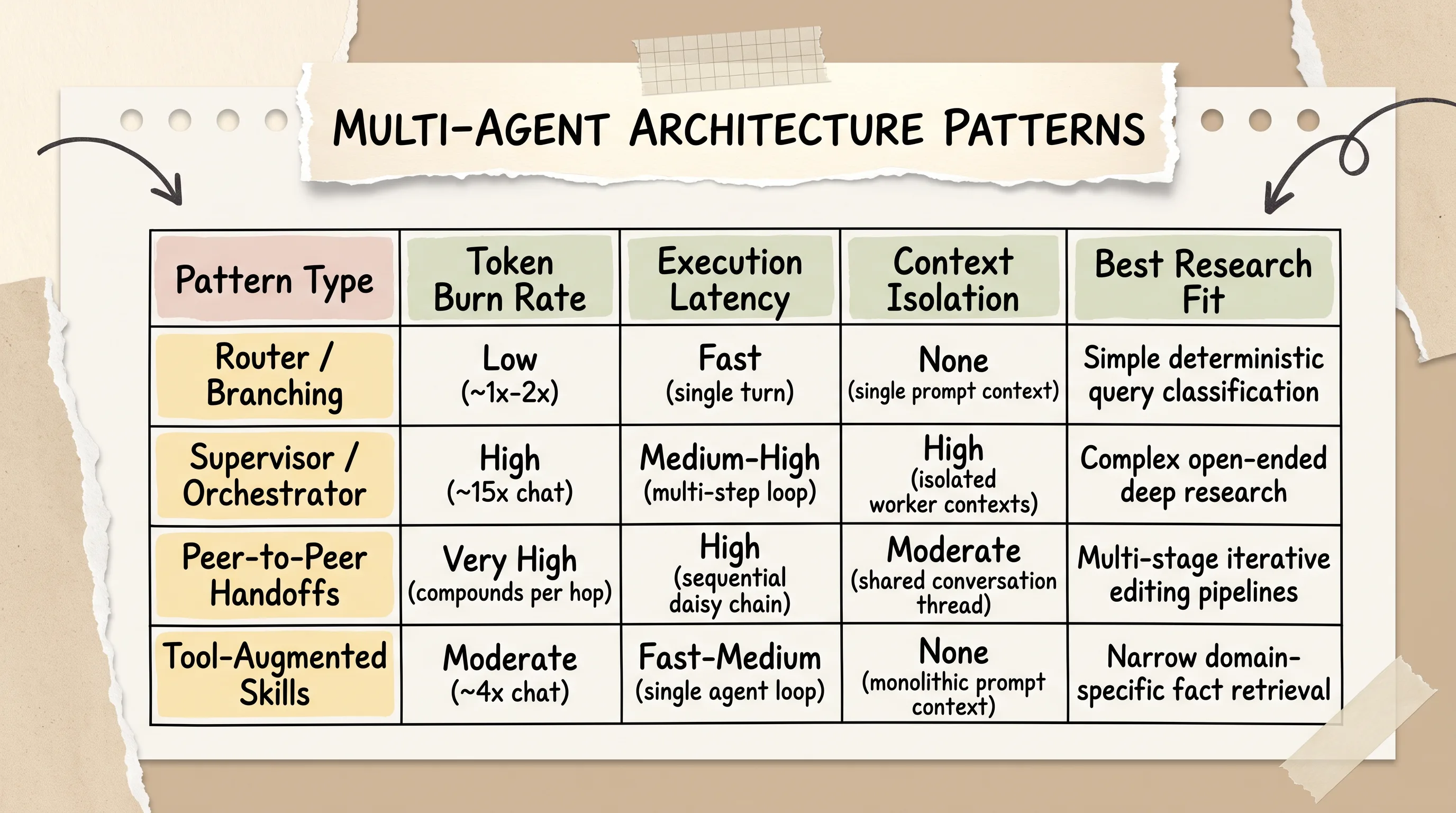
Multi-agent architectures trade approximately 15x token consumption for a 90.2% performance gain on open-ended, breadth-first research tasks.
However, that performance leap comes with a steep operational trade-off. Standard single-agent workflows consume roughly 4 times more tokens than basic chat interactions. A full anthropic multi-agent research engine consumes approximately 15 times more tokens than standard chat.
Analysis of the BrowseComp browsing benchmark reveals that token expenditure alone explains 80% of the performance variance between agent architectures. The remaining 20% is determined by tool design and the underlying model choice. If you are researching a simple deterministic fact, burning 15 times more tokens across a swarm of subagents is wasteful engineering. But when the task requires exploring open-ended multi-source domains, token burn correlates directly with research depth and synthesis quality.
Why Monolithic Single Agents Fail on Breadth-First Research
Single agents fail at deep research because of three fundamental physical constraints:
Context Window Saturation: A comprehensive research query requires scraping 10 to 30 web documents. If each document averages 5,000 words (roughly 7,000 tokens), dumping raw scraped text directly into a single prompt quickly exceeds 150,000 to 200,000 tokens. As the context fills, the model suffers from attention degradation (the "lost in the middle" phenomenon) and forgets earlier instructions.
Context Truncation Loss: When a single agent breaches its 200,000-token boundary, the host platform truncates earlier conversation turns. The agent loses its initial planning breakdown, misplaces user constraints, and begins repeating identical search queries.
Sequential Latency Walls: A single agent must execute tool calls one after another. If each search, crawl, and evaluation step takes 8 seconds, executing 20 investigative steps sequentially requires nearly three minutes of unbroken execution time.

Single agents suffer reasoning degradation as search logs saturate the 200,000-token window; hierarchical subagents isolate contexts and preserve coordinator reasoning.
A hierarchical architecture resolves these bottlenecks by isolating state. The n8n orchestration agent maintains a clean, lightweight master prompt containing only the research plan and high-level summaries. Worker agents execute in disposable, isolated context sandboxes, extract domain-specific evidence, and return concise findings without polluting the coordinator's reasoning loop.
The 3-Tier Research Mechanism: Lead Orchestrator, Worker Subagents, and Citation Verification
Building a production n8n deep research workflow requires structuring your canvas around three decoupled operational tiers. Official n8n guidance on multi-agent systems and the AI Agent node documentation are the wiring references for that canvas.

Anthropic's 3-tier research architecture decouples planning, concurrent web exploration, and fact-checking into dedicated stages.
The Lead Planner and the OODA Research Loop
Tier 1 is anchored by the Lead Orchestrator (the anthropic research agent coordinator). When a user submits an open-ended prompt, the Lead Planner does not immediately trigger web searches. Instead, it executes an OODA (Observe, Orient, Decide, Act) loop:
Observe: Inspect the user query, identify core domain entities, and establish clear boundary criteria for what constitutes a complete answer.
Orient: Check external memory to see what background information is already known, evaluate which search strategies will yield the highest signal, and structure an investigation outline.
Decide: Formulate discrete subtasks and determine which specialized worker subagents should be spawned in parallel.
Act: Emit parallel tool calls to dispatch subagents, logging the master plan to persistent external storage before subagent execution begins.

The Lead Researcher AI Agent node coordinates research delegation using Simple Memory and explicit loop iteration limits.
To prevent infinite execution loops on ambiguous queries, the Lead Orchestrator must enforce strict boundary limits. In enterprise configurations (such as Anthropic's Claude Managed Agents API, which uses the managed-agents-2026-04-01 beta header), platforms enforce a hard ceiling of 20 unique subagents in the multiagent.agents roster and a maximum of 25 concurrent execution threads. Furthermore, coordinator hierarchies must remain single-level. Referencing a subagent that contains its own nested roster fails validation with a 400 error. On the n8n canvas, you enforce equivalent discipline by capping the root AI Agent node at 10 to 15 loop iterations.
The Downstream Citation Agent: Eliminating Hallucinations
The single greatest failure mode of naive deep research bots is hallucinated attribution. When the same agent that drafts the final report is also responsible for citing sources, it frequently fabricates URLs, attributes real statistics to the wrong websites, or hallucinates quotes from memory.
Tier 3 solves this problem by inserting a decoupled Citation Verification Agent downstream from the research workers.
The Citation Agent operates with read-only access to the raw scraped document chunks stored in external memory. It receives the draft synthesis from the Lead Orchestrator, parses every factual assertion, and searches the stored source text for exact semantic matches:
If a claim is supported by the source text, the Citation Agent inserts an inline Markdown reference and appends the verified source URL to the reference ledger.
If a claim cannot be verified against the retrieved source chunks, the Citation Agent strips or rewrites the ungrounded assertion.
The final report is assembled only after the verification audit passes, ensuring that 100% of published citations map to real source URLs.
Canvas Architecture Bake-Off: Native AI Agent Tools vs. Decoupled Sub-Workflows as Tools
When implementing n8n multi agent systems, builders must choose between two distinct canvas topologies: nesting child agents directly on the main canvas via AI Agent Tool sub-nodes, or decoupling workers into standalone sub-workflows invoked via Execute sub-workflow nodes. For cluster-port wiring, Tools Agent unification, and $fromAI() parameters on a single node, start with the n8n AI Agent node guide. If you are still choosing a visual runtime rather than this research canvas, compare OpenAI AgentKit vs n8n and the broader no-code AI agent platforms landscape.

Native AI Agent Tool nodes provide quick visual prototyping, while decoupled sub-workflows unlock true parallelization and isolate scraping failures.
Single-Canvas AI Agent Tool Node Topology
In modern n8n (v1.82+), you can attach an AI Agent directly beneath another AI Agent by connecting it to an ai_tool socket port using the AI Agent Tool node.
This topology is intuitive for visual prototyping. The root coordinator node sees the child agent as a callable tool, provides a natural language description of its capability, and defines an input schema (such as research_topic: string). When the coordinator invokes the tool, n8n spins up the child agent, executes its attached chat model and tools, and returns the response to the parent node.
However, the single-canvas topology introduces significant production constraints:
Shared Canvas State: If a child agent encounters an unhandled runtime error inside a complex scraping script, the failure cascades upward and halts the entire master workflow.
Visual Editor Lag: As you attach three or four nested agents (each with its own language model, memory node, and tool sockets) to a single canvas, the n8n visual editor experiences noticeable rendering lag.
Sequential LangChain Execution: Because n8n AI Agent nodes are built on LangChain, the coordinator invokes attached tool nodes sequentially by default. True concurrent fan-out is impossible within a single agent cluster.
Decoupling Complex Scrapers into Reusable Sub-Workflows
To build a resilient n8n multi agent workflow, the superior architectural pattern is decoupling research workers into dedicated sub-workflows.

Configuring search workers as decoupled sub-workflows prevents canvas lag and isolates scraper timeouts from the main coordinator.
In this pattern, you build independent workflows for specialized tasks (for example, a Web_Scraper_Worker that integrates Bright Data, Puppeteer, or Tavily). On the master coordinator canvas, you attach an Execute Sub-workflow node as a tool.
This approach provides three critical operational benefits:
Failure Sandbox: If a specific website blocks a Puppeteer scraper or returns a 403 Forbidden error, the sub-workflow handles the retry logic locally and returns a structured error object (
{ "status": "failed", "reason": "rate_limited" }) without crashing the coordinator's reasoning loop.Modular Reusability: Once you build an optimized web scraper sub-workflow with rate limiting and HTML sanitization, you can attach it as a tool across dozens of different agent workflows without rebuilding the canvas nodes.
Dedicated Observability: Sub-workflows generate independent execution logs in n8n. When debugging a failed research run, you can inspect the exact input/output payloads of each scraper run in isolation without wading through thousands of lines of nested coordinator traces.
LangChain Sequential Execution vs. Parallel Fan-Out
Official n8n documentation explicitly acknowledges that native AI Agent nodes execute tools sequentially. If your Lead Planner decides to search three independent domains (academic papers, corporate news, and technical documentation), calling them as native AI Agent Tools requires three consecutive turns.

Decoupled sub-workflows enable concurrent execution and isolate heavy scraping tools, bypassing LangChain's default sequential execution bottleneck.
By wrapping worker tasks into sub-workflows, you can route tasks through a SplitInBatches node or an HTTP Request fan-out, allowing all three search workers to crawl the web simultaneously. This parallel execution cuts end-to-end research latency by approximately 65%, turning a five-minute synchronous crawl into a 45-second background operation.
Context Isolation and Lightweight Artifact Handover: Beating the "Telephone Game"
The most damaging architectural mistake in multi-agent engineering is passing raw, unformatted text blobs directly through node outputs into subsequent agent prompts.

Storing raw web scrapes in external databases and passing lightweight file IDs back to the coordinator prevents prompt bloat and context truncation.
The 200,000-Token Context Wall
When an agent crawls five detailed whitepapers, the raw Markdown payload easily exceeds 40,000 words (roughly 55,000 tokens). If Worker A passes that raw text back to the coordinator, and the coordinator passes it to Worker B for cross-referencing, the system encounters two destructive phenomena:
The Telephone Game: Each time a model summarizes and re-transmits large context blocks to another agent, nuanced technical facts degrade. Specific API flags, quantitative metrics, and architectural caveats are smoothed out by repeated LLM distillation.
Prompt Token Bloat: The coordinator's prompt size compounds exponentially on every iteration. By turn 4, the coordinator is burning 100,000 input tokens per reasoning step, driving API costs through the roof and pushing the conversation toward the 200,000-token truncation wall.
Passing File Identifiers and Database Keys (Supabase/Redis/S3) Instead of Raw Text Blobs
Anthropic's engineering guidelines and official n8n documentation recommend a unified solution: Lightweight Artifact Handover.

Sub-agent workflows write scraped document payloads to external databases, returning a structured file_id and metadata back to the coordinator.
When a worker subagent scrapes a webpage or downloads a technical PDF, it does not return the raw content to the Lead Orchestrator. Instead:
The worker writes the full HTML, Markdown, or binary payload directly into an external datastore (such as Supabase, Postgres, Redis, or an S3-compatible object bucket).
The datastore assigns a unique record identifier (for example,
art_9842).The worker returns only a lightweight structured JSON object back to the coordinator, containing the
artifact_id, the source URL, and a three-bullet executive summary (consuming fewer than 300 tokens).
The Lead Orchestrator uses these lightweight summaries to evaluate whether its research goals are met. When the final synthesis is ready, the coordinator passes the verified artifact_id keys to the Citation Agent, which queries the external datastore directly to audit claims against the original uncompressed source text.
The bottleneck in autonomous research was never model intelligence; it was context pollution. By keeping raw document bloat off the main canvas, your coordinator retains a clean 200,000-token reasoning runway across dozens of turns.
Prompt Engineering for Autonomous Delegation: Directives, Heuristics, and Effort Scaling
An orchestrator node cannot delegate effectively without explicit prompting heuristics. The anthropic how we built our multi agent research system write-up is the source for the parallel-tool and effort-scaling rules below. If you provide a generic system prompt like "You are a research agent, use your tools to find information," the language model will either execute shallow single-keyword searches or trigger runaway recursive loops.
The <use_parallel_tool_calls> Directive
Frontier models (such as Claude 3.5 Sonnet and Opus 4) support native parallel tool invocation, but coordinators frequently default to conservative sequential tool calling unless explicitly instructed otherwise.
To force your Lead Planner to dispatch multiple worker agents concurrently, include Anthropic's battle-tested <use_parallel_tool_calls> directive in your root agent's system prompt:
Scaling Query Effort: Fact-Checks (1 Agent) vs. Complex Research (10+ Workers)
Not every research question requires a multi-agent swarm. Your coordinator's system prompt should define dynamic effort scaling rules that allocate agent resources based on query complexity.

Scale multi-agent research effort dynamically: assign 1 agent to simple fact-checks, 2-4 subagents to comparisons, and 10+ subagents to complex multi-domain queries.
Anthropic's engineering benchmarks establish three distinct effort tiers:
Tier 1: Simple Fact-Check (1 Subagent, 3-10 tool calls): Single-entity verification (for example, "What is the minimum Node.js version required for n8n?"). The coordinator dispatches one worker to query official docs, verifies the answer, and compiles a one-paragraph response.
Tier 2: Multi-Entity Comparison (2-4 Subagents, 10-15 tool calls): Comparative evaluations (for example, "Compare n8n AI Agent Tool nodes against LangGraph multi-agent state graphs"). The coordinator spawns parallel workers dedicated to each platform, cross-references findings, and generates a structured comparison matrix.
Tier 3: Deep Multi-Domain Research (10+ Subagents across batched loops, 15-25 tool calls): Broad technical investigations (for example, "Architect an enterprise multi-agent research engine with citation verification and async webhook polling"). The coordinator decomposes the problem into architectural, security, and performance facets, managing multiple parallel subagent waves.
"Start Wide, Then Narrow Down" Search Heuristic
Worker agents frequently fall into rabbit holes by executing hyper-specific search queries on their very first step. If an agent immediately searches for an obscure configuration flag without understanding the surrounding framework, it often returns zero results and gives up.

The OODA research loop guides subagents to execute broad landscape queries before narrowing focus to extract specific factual claims.
To prevent search failure, instruct your worker subagents to follow a three-stage discovery heuristic:
Stage A: Broad Landscape Scan: Begin with broad, high-level search queries (for example,
"n8n multi-agent architecture overview") to identify core entities, official documentation URLs, and key technical terminology.Stage B: Filtered Scan: Use the vocabulary gathered in Stage A to execute targeted queries (for example,
"LangChain sequential execution limits n8n"), narrowing down to specific engineering discussions and repositories.Stage C: Deep Factual Extraction: Crawl specific documentation pages and code repositories to extract exact syntax, API headers, and quantitative benchmarks.
Step-by-Step Deep Research Demo in n8n: Assembling the Production Canvas
Now let us build the complete, production-grade n8n deep research workflow canvas.

Complete n8n deep research blueprint: webhook ingestion triggers an orchestrator planner that fans out to search sub-workflows before passing drafts to a citation agent.
If you are developing locally, verify that your environment meets the prerequisites. For a four-container local stack (n8n, Postgres, Qdrant, Ollama), use the n8n self-hosted AI starter kit. Otherwise install n8n globally using pnpm (requiring Node.js 18+ and Git):
Webhook Ingestion and Frontend Trigger (N8N_WEBHOOK_URL)
The workflow begins with an incoming Webhook trigger node configured to ingest research requests from a client interface (such as a custom Next.js frontend, a Slack command, or a Replit application).

The production deep research canvas wires the webhook trigger to the Lead Planner, parallel search worker sub-workflows, and the citation validator.
In the client application, store your n8n endpoint as a secret environment variable named N8N_WEBHOOK_URL. Configure the n8n Webhook node with:
HTTP Method:
POSTPath:
deep-research-engineAuthentication: Header Auth (enforcing a shared
X-API-KEYtoken)Respond:
Immediately(crucial for asynchronous execution)Response Code:
202 Accepted
Configuring the Lead Planner Node with Memory
Connect the Webhook trigger to a central AI Agent root node labeled Lead Planner Agent.
Configure the node properties:
Agent Type:
Tools AgentModel Socket: Attach an
Anthropic Chat Modelsub-node configured withclaude-3-5-sonnet-latestorclaude-opus-4(temperature:0.2).Memory Socket: Attach a
Window Buffer Memorysub-node mapped to the incoming session ID:{{ $json.body.session_id || $execution.id }}.Max Iterations:
15System Instructions: Embed the
<use_parallel_tool_calls>directive, the query effort scaling rules, and instructions to persist intermediate plans.
Wiring Parallel Worker Sub-Workflows with Web Scrapers (Bright Data / Search APIs)
Beneath the Lead Planner, attach three Execute Sub-workflow tool nodes mapped to specialized worker sub-workflows:
Tool 1 (
academic_search_worker): Invokes a sub-workflow that queries arXiv, Semantic Scholar, or Google Scholar APIs.Tool 2 (
web_crawler_worker): Invokes a sub-workflow integrating Bright Data or Puppeteer to render JavaScript-heavy web documentation and clean raw HTML into structured Markdown.Tool 3 (
api_doc_worker): Invokes a sub-workflow equipped with GitHub search tools and vector database retrievers (Qdrant or Pinecone).
Each sub-workflow connects to a Supabase or Redis node that stores the raw scraped payload and returns a lightweight artifact_id JSON reference back to the coordinator.
To see complete end-to-end execution of this deep research pipeline in action, watch this live build:
https://www.youtube.com/watch?v=o2Pubq36Pao
End-to-end video tutorial demonstrating the construction and execution of an autonomous Deep Research multi-agent pipeline in n8n.
For an official walkthrough from n8n's engineering team on configuring sub-agent nodes and tool attachments, reference this guide:
https://www.youtube.com/watch?v=0iUNOmeU7O4
Official n8n engineering walkthrough of multi-agent canvas assembly and sub-agent node configurations.
Connecting the Citation Agent for Structured Report Compilation
The output of the Lead Planner connects to an AI Agent node labeled Citation Verification Agent.

Every node in the deep research system serves a dedicated responsibility, separating planning, web scraping, and citation auditing.
The Citation Agent uses a read-only Supabase Tool to fetch raw text chunks by artifact_id. Its system prompt instructs it to parse every claim in the draft report, audit it against the stored source chunks, append markdown footnotes ([^1]), and output the final validated Markdown document to a downstream HTTP Request callback node.
Production Engineering: Asynchronous Webhooks, Queue Timeouts, and Error Recovery
A deep research workflow that crawls 15 web sources will routinely run for 90 to 240 seconds. If your client interface sends a standard synchronous HTTP POST request to an n8n webhook and waits for the final report in the response body, the connection will drop after 60 to 120 seconds with an HTTP 504 Gateway Timeout.

Long-horizon deep research queries prevent 504 gateway timeouts by returning an immediate 202 Accepted response and delivering final reports via callbacks.
Defeating 504 Gateway Timeouts with 202 Accepted Async Responses
Production multi-agent systems must decouple request ingestion from report delivery using an Asynchronous Webhook Handshake:

Configuring the incoming Webhook to respond immediately with status 202 and a Job ID allows multi-minute research tasks to run without client timeouts.
When the client POSTs a research prompt to n8n, the Webhook node responds immediately (within 150 milliseconds) with status
202 Acceptedand a unique Job ID.The n8n engine continues executing the Lead Planner and worker sub-workflows in the background.
The client receives the Job ID and can either poll a status endpoint or wait for an outbound callback webhook.
Redis/Postgres State Tracking and Callback Delivery
To support client polling, add a lightweight database logging step (using Redis or Postgres) after each major milestone in your canvas:
State:
queued(logged immediately after webhook ingestion)State:
planning(logged when Lead Orchestrator finishes query decomposition)State:
crawling(logged as worker subagents execute web scrapes)State:
auditing(logged when Citation Agent begins claim verification)State:
completed(logged when final Markdown is compiled)
If your client interface supports webhooks, the final node in your n8n workflow executes an HTTP Request node that POSTs the completed report directly to the client's callback URL.
Handling Subagent Failures and Tool Retries
Production research pipelines must survive third-party network failures. If an external website returns a 429 Rate Limit or 503 Service Unavailable, your workflow should not crash.

Troubleshoot production multi-agent breakdowns: resolve gateway timeouts with async responses, avoid token bloat with artifact passing, and audit citations.
In your worker sub-workflows:
Set
Retry on FailtoEnabled(3 retries with exponential backoff on HTTP nodes).Wrap scrapers in an
Error Triggernode that catches unhandled exceptions, writes an empty artifact record, and returns a graceful{ "status": "skipped", "reason": "unreachable" }payload to the coordinator.If a worker fails to return data within 30 seconds, configure the coordinator to abandon that specific search branch and synthesize findings from the remaining sources.
Inter-Agent Communication Protocols: Connecting n8n to MCP and Agent2Agent (A2A)
As multi-agent ecosystems mature, hardcoded API integrations are being replaced by open communication protocols that allow agents across different platforms to collaborate.

Model Context Protocol standardizes how agents connect to tools, while Agent2Agent (A2A) standardizes how autonomous agents discover and delegate tasks to each other.
Model Context Protocol (MCP) Tools vs. High-Level Agent2Agent (A2A)
Understanding where these protocols sit in your architecture prevents configuration confusion:
Model Context Protocol (MCP): Operates at the Tool and Resource Layer. MCP standardizes how a local or remote agent connects to databases, local filesystems, GitHub repositories, and browser automation servers (like Puppeteer). On the n8n canvas, MCP tools attach to the
ai_toolsocket port, giving agents standardized access to external utilities.Agent2Agent (A2A) Protocol: Operates at the Cross-Agent Application Layer (sitting above MCP). Created as an open standard for heterogeneous multi-agent collaboration, A2A allows an n8n orchestrator to discover remote agents running on other servers (such as CrewAI or AutoGen instances), negotiate capabilities via machine-readable Agent Cards, and delegate high-level multi-part tasks.
Installing n8n-nodes-agent2agent, Discovering /.well-known/agent.json Agent Cards, and Messaging Parts (TextPart, FilePart, DataPart)
You can connect n8n a2a workflows directly to the A2A protocol ecosystem using the community node package n8n-nodes-agent2agent (developed by pjawz for n8n version 1.x.x+).
Install the community node in your self-hosted n8n instance:
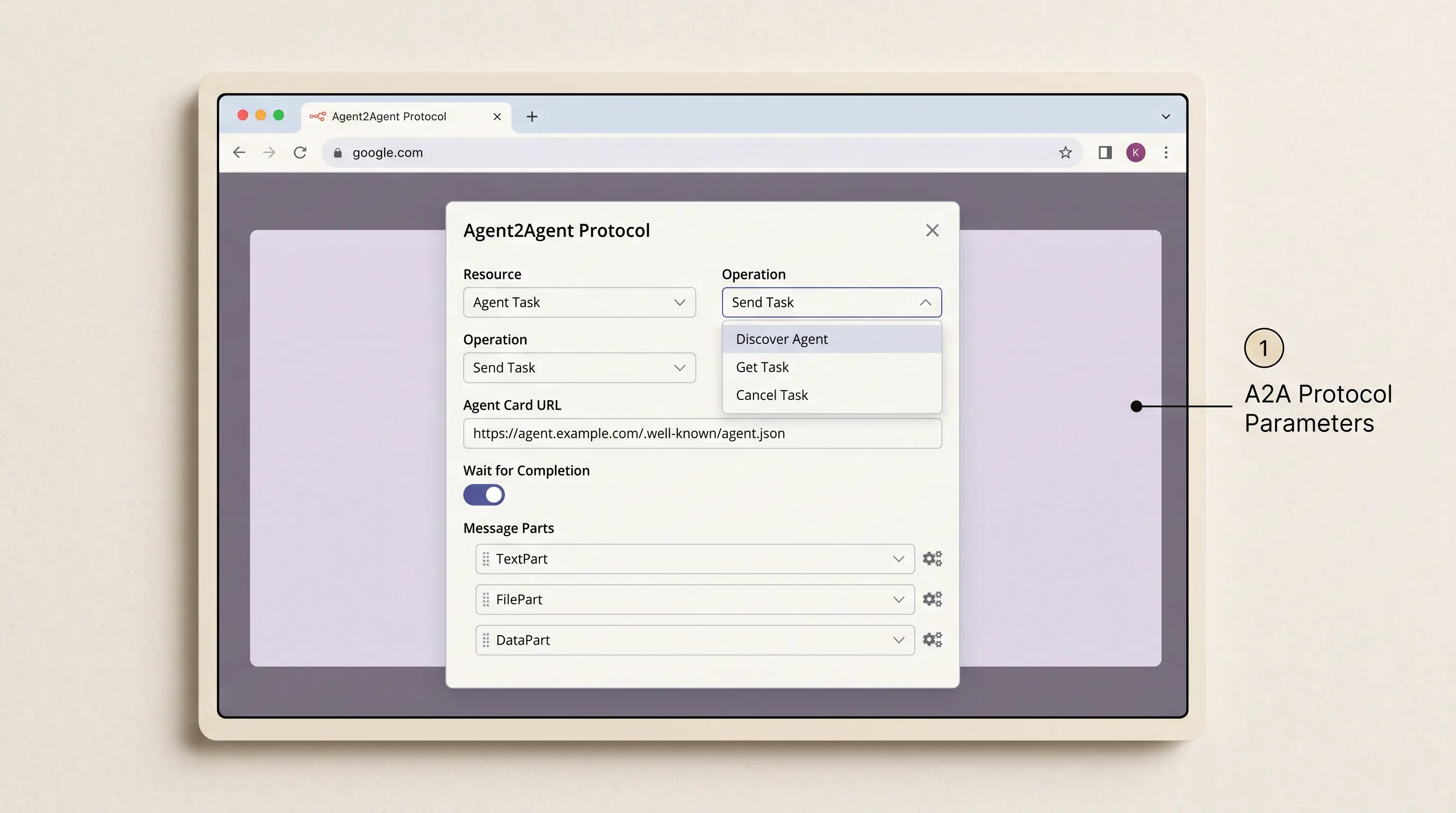
The community Agent2Agent node enables n8n workflows to discover remote agent cards and dispatch multi-part task messages across systems.
The A2A node exposes four distinct operations:
Discover Agent: Fetches and parses a remote agent's public Agent Card hosted at/.well-known/agent.json. The card advertises the agent's supported skills, authentication requirements, and endpoint schema.Send Task: Dispatches a structured task request to the remote agent. Payloads support three explicit part types:
TextPart: Natural language prompt instructions.FilePart: Binary or S3 references to context documents.DataPart: Structured JSON configuration parameters.
Get Task: Retrieves current execution status and intermediate artifacts from an active task.Cancel Task: Aborts a running remote task if the coordinator reaches its iteration limit.
Crucially, the A2A node includes a Wait for Completion configuration toggle. For fast lookups, keep it enabled. For long-horizon research operations, disable Wait for Completion to allow n8n to dispatch the task asynchronously and poll for completion via Get Task.
If you are evaluating dedicated visual platforms for multi-agent orchestration rather than building custom canvas logic in n8n, explore the sibling multi agent builder roundup.
Frequently Asked Questions
How was Anthropic’s multi-agent research system built?
Anthropic's public write-up on how we built our multi-agent research system describes a three-tier hierarchy comprising a Lead Researcher coordinator, parallel worker subagents, and a terminal Citation Agent. The Lead Researcher decomposes user queries, logs its execution plan to external memory to prevent context loss, and dispatches specialized subagents that execute concurrent web searches using an OODA loop. Once evidence gathering is complete, the findings pass to the Citation Agent, which audits all claims directly against retrieved source text before compiling the final deliverable.
What is the purpose of an orchestrator agent?
An orchestrator agent acts as the central decision-maker responsible for analyzing user intent, structuring a multi-step investigation plan, and routing targeted subtasks to specialized worker agents. In n8n, it connects to subagents via AI Agent Tool nodes or decoupled sub-workflows, treating child agents as callable tools. It monitors overall task progress, synthesizes findings returned by workers, and prevents the master context window from becoming saturated with raw unformatted data.
What is the purpose of a worker agent?
A worker agent operates within a narrow, specialized domain, such as querying a search API, scraping JavaScript-heavy documentation, or searching a vector database. Worker agents execute in isolated context windows, allowing them to explore broad investigative branches without polluting the coordinator's reasoning history. When finished, a worker condenses its findings and returns structured JSON or lightweight storage keys back to the orchestrator.
How to build multi agent systems in n8n?
To build a multi-agent system in n8n (including searches for how to build multiagent systems), configure a root AI Agent node as the central coordinator and attach a chat model and a persistent memory sub-node. Next, build specialized worker agents and attach them to the coordinator either as nested AI Agent Tool nodes or as modular sub-workflows invoked via Execute sub-workflow nodes. Finally, configure workers to store raw scraped data in an external database and pass lightweight file identifiers back to the coordinator, adding a downstream Citation Agent to audit claims before report delivery.
Is multi-agent AI in n8n actually autonomous, or is it just a sequential pipeline?
Out of the box, standard n8n nodes execute sequentially along hardcoded canvas lines without native, shared conversational memory across nodes. Simply chaining multiple AI nodes in a row creates a deterministic pipeline rather than an autonomous multi-agent team. True multi-agent autonomy is achieved when an orchestrator AI Agent node dynamically decides which child agents to invoke, evaluates intermediate outputs at runtime, and iterates based on observed evidence using an external state store like Redis or Supabase.
How do agents share memory or state across multiple nodes in n8n?
n8n nodes do not share global conversational memory by default, and default Simple Memory (Window Buffer) resets whenever the container restarts. To share state across multiple agents, connect nodes to an external database such as Postgres, Redis, or Supabase using a consistent Session ID key. Workers write heavy document scrapes to the database, allowing downstream agents to retrieve exact source chunks by ID without passing massive text blocks across canvas wires.
Why do multi-agent workflows in n8n run slowly, and how can they run in parallel?
Because n8n AI Agent nodes are built on LangChain, nested agent tool calls execute sequentially by default, causing multi-step research tasks to take several minutes. To achieve true parallel execution, decouple worker agents into standalone sub-workflows and fan them out using SplitInBatches nodes or concurrent HTTP requests. Running multiple search workers simultaneously allows broad web crawls to execute in parallel, reducing total latency by up to 65%.
How does a multi-agent system prevent hallucinated claims during deep research?
Multi-agent architectures prevent hallucinations by decoupling content drafting from fact-checking. Instead of allowing the research agent to generate citations from memory, the workflow routes the draft to a dedicated downstream Citation Agent. The Citation Agent inspects every factual statement against the raw source chunks stored in external memory, strips unsupported assertions, and appends verified reference links to ensure total attribution accuracy.
How should task handovers be structured between subagents to avoid context window overflow?
To prevent blowing past 200,000-token context boundaries and avoid the semantic degradation of the telephone game, subagents should never pass raw HTML or massive text dumps back to the coordinator. Instead, subagents should deposit raw content into an external datastore (such as Supabase or S3) and return only lightweight JSON references containing an artifact_id, the source URL, and a three-bullet summary.
Put this into practice: production deep research checklist and next steps
Take an honest look at the multi-agent workflows currently running on your n8n canvas.
If you are currently chaining three general-purpose AI Agent nodes together and hoping for emergent collaboration, schedule a refactor this week. Separate your system into a strict three-tier architecture: a Lead Planner with persistent memory, parallel worker subagents, and a downstream citation verifier.
Next, audit your data handovers. If your search workers pass raw scraped HTML directly back to the root coordinator, implement the lightweight artifact handover pattern. Instruct your subagents to write raw extracts into Redis, Supabase, or an S3 bucket, returning only lightweight artifact_id references to the coordinator. You will eliminate context truncation errors and slash input token costs.
Finally, check your webhook trigger settings. If your research workflow runs synchronously and frequently triggers 504 gateway timeouts on client frontends, convert the incoming webhook to return an immediate 202 Accepted response with a unique Job ID. Deliver completed research reports via outbound webhook callbacks or database status polling.
The landscape of visual AI orchestration will continue to introduce new models and protocols. But the systems that deliver durable, verified intelligence in production will always be the ones engineered with clean architectural separation, isolated context boundaries, and strict verification gates.
If you want the next production-research checklist in your inbox, subscribe to the newsletter.
Until then...
Sage
PS. If you want a quick stress test on your research system's resilience, prompt it to research a breaking technical topic that occurred within the last 48 hours. If your coordinator returns confident assertions citing documentation from two years ago, your search workers are failing to extract real-time web text and the agent is silently falling back to parametric memory. Add an explicit date-filtering heuristic to your search worker sub-workflow and test again. You will eliminate historical drift overnight.
Author
Practical guides, tool teardowns & AI engineering workflows.


