Claude Code
Claude Code for Marketing: When the CLI Beats Chat, CLAUDE.md, and Growth Workflows

Sage Holloway
23 min read
Go back to blog
SHARE

You briefed the campaign in one window. The ads needed a pile of variants. The landing page needed a small change. Engineering's next sprint is Thursday. Meanwhile the chat that wrote yesterday's copy has already forgotten the voice rules you pasted at 9am.
Claude Code for marketing is a local CLI or Desktop Code-tab agent that reads project files and runs repeatable workflows, unlike Claude Chat. Marketers use it to cut ad-variant production from 30 minutes to 30 seconds, pin voice in CLAUDE.md, and run SEO or ads scripts. A Pro plan is enough to start. You do not need to be a developer, but HTML/CSS basics and staging review keep you from shipping broken pages.
Last verified: 18 August 2026 (NotebookLM sources; no live CLI run on this pack).
Monday used to look like this for Claude Code for marketers. You opened Claude Chat, pasted the brand paragraph for the third time, exported a handful of headlines by hand, and filed a ticket for the page tweak. Friday looks different when the same job sits in a local folder: interviews, analytics exports, a voice file, and a slash that writes a CSV. The model did not get nicer. The files started living where the agent can actually read them.
This URL is the marketer hub: which Claude surface to use, how to start from the Desktop Code tab or the terminal, how to pin brand, and which growth workflows you can run this week. It is not how to install and author a SKILL.md. That job lives on Claude Code marketing skills. It is not SEO-ops in the terminal. Claude Code SEO owns plugin paths, GSC MCP, and local audits. What this will not cover: a 36-skill Marketing OS, a ChatGPT bake-off, or a cloud cron on Railway.
On this page
Which Claude surface a marketer should use
Two ways marketers start: Desktop Code tab vs terminal
Pin brand voice in CLAUDE.md
Growth marketing workflows you can run this week
Skills and slash commands, then stop
Connect live marketing data with MCP
Move context files across Chat, Cowork, and Code
Staging checklist before anything ships
FAQ
Claude Code for marketing is a local agent on the ops desk. Chat stays a sandbox.
Which Claude surface a marketer should use
You keep three cars in one driveway. The sedan's GPS still has last week's dentist appointment. The truck's GPS only knows the warehouse gate code. The van has a paper map in the glove box, coffee ring over the exit number. You assume they share destinations because they sit next to each other, and they do not. You copy the address by hand, or you drive to the wrong building.
That is the Claude family a marketer actually touches. Chat, Cowork, Code CLI, and the Desktop Code tab are four stations, not one brain. Animalz and MKT1 both spend time on this split because people search "Claude Code" and then paste copy into the browser. Do not call browser copywriting Claude Code. The CLI (command-line interface: the text window where you type commands) and the Desktop Code tab are the local agent. Chat is a different product.
So which surface do you actually need?
Chat vs Cowork vs Code vs Desktop Code tab
Claude Chat is the sandboxed web app. Good for a brainstorm. It does not read your campaign folder unless you upload something, and it will not keep a CLAUDE.md as project memory the way Code does.
Claude Cowork lives in the Desktop app. It can process files and run multi-step work, but only in folders you explicitly share. Think of it as a contractor who may enter the rooms you unlocked, not the whole house.
Claude Code is the local filesystem agent. Two doors into the same job: a terminal session, or the Desktop app's Code tab. Full local access is the point. Repeatable workflows, slash commands, and brand files live here.
The Desktop Code tab is not a fourth product. It is Code without forcing you through a terminal on day one. Gillespie and Animalz both describe it as "use Claude Code from the desktop app instead." If command lines make your shoulders rise, start there.
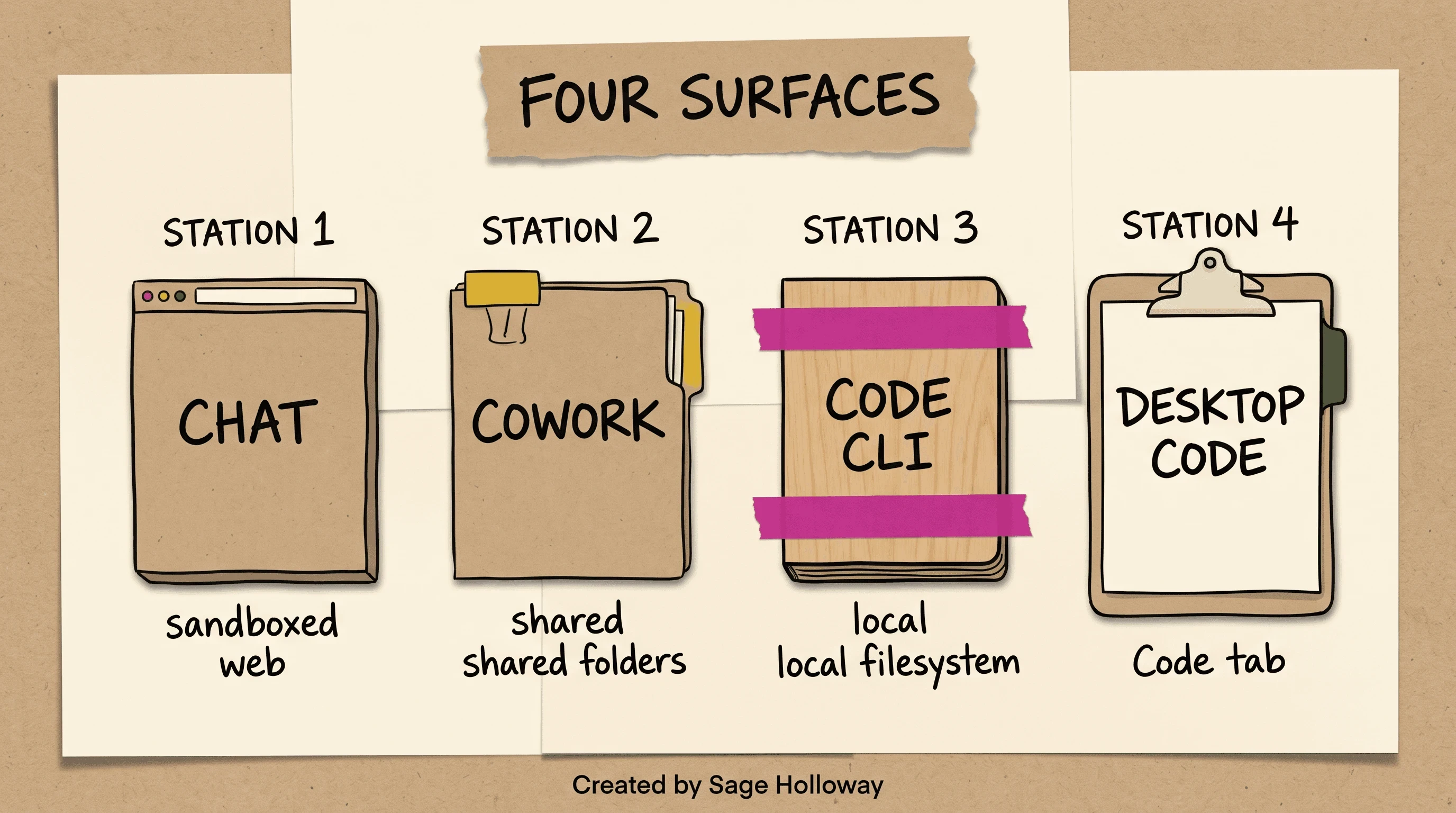
Chat is sandboxed web. Cowork shares folders. Code is local CLI or the Desktop Code tab.
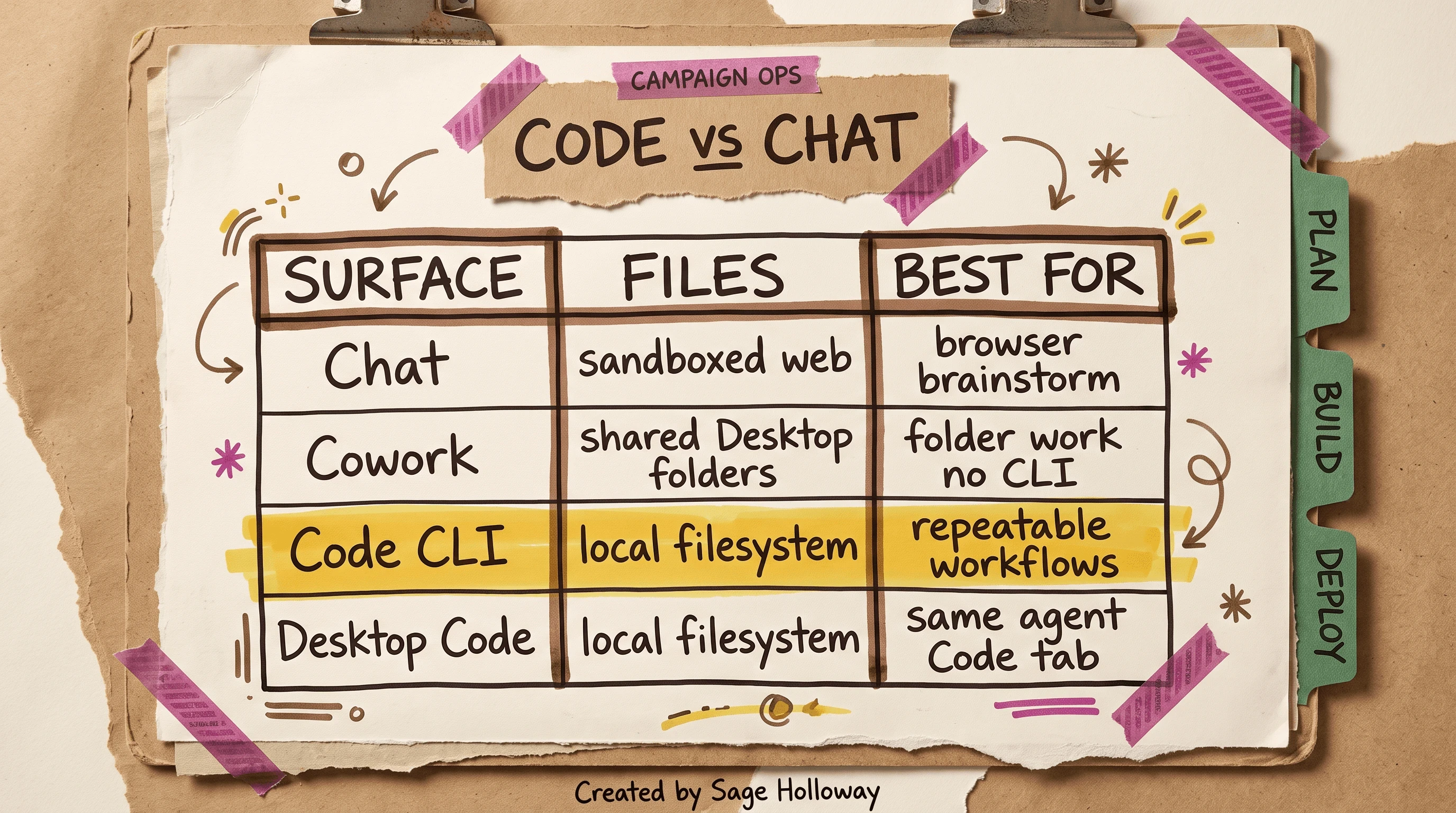
Do not call browser copywriting Claude Code. Code wins when you need the local filesystem.
Confused about Cowork? Fair. If the job is "read this shared folder and draft," Cowork can be enough. If the job is "run /rsa, keep brand_voice.md, open a marketing repo," you want Code. The r/ClaudeAI thread on how people use Claude Code for marketing is useful as a pain map (lazy public skills, missing write APIs) and useless as a product picker. Use the four-station split above.
Paid Pro vs Max as a limit row, not a pricing guide
Claude Code requires a paid plan. Animalz and Gillespie both treat Pro as the floor. Pro is $20 per month and is enough to start. Max is $100 or $200 per month for intensive daily use. That is a limit row, not a pricing essay. I am not inventing token math.
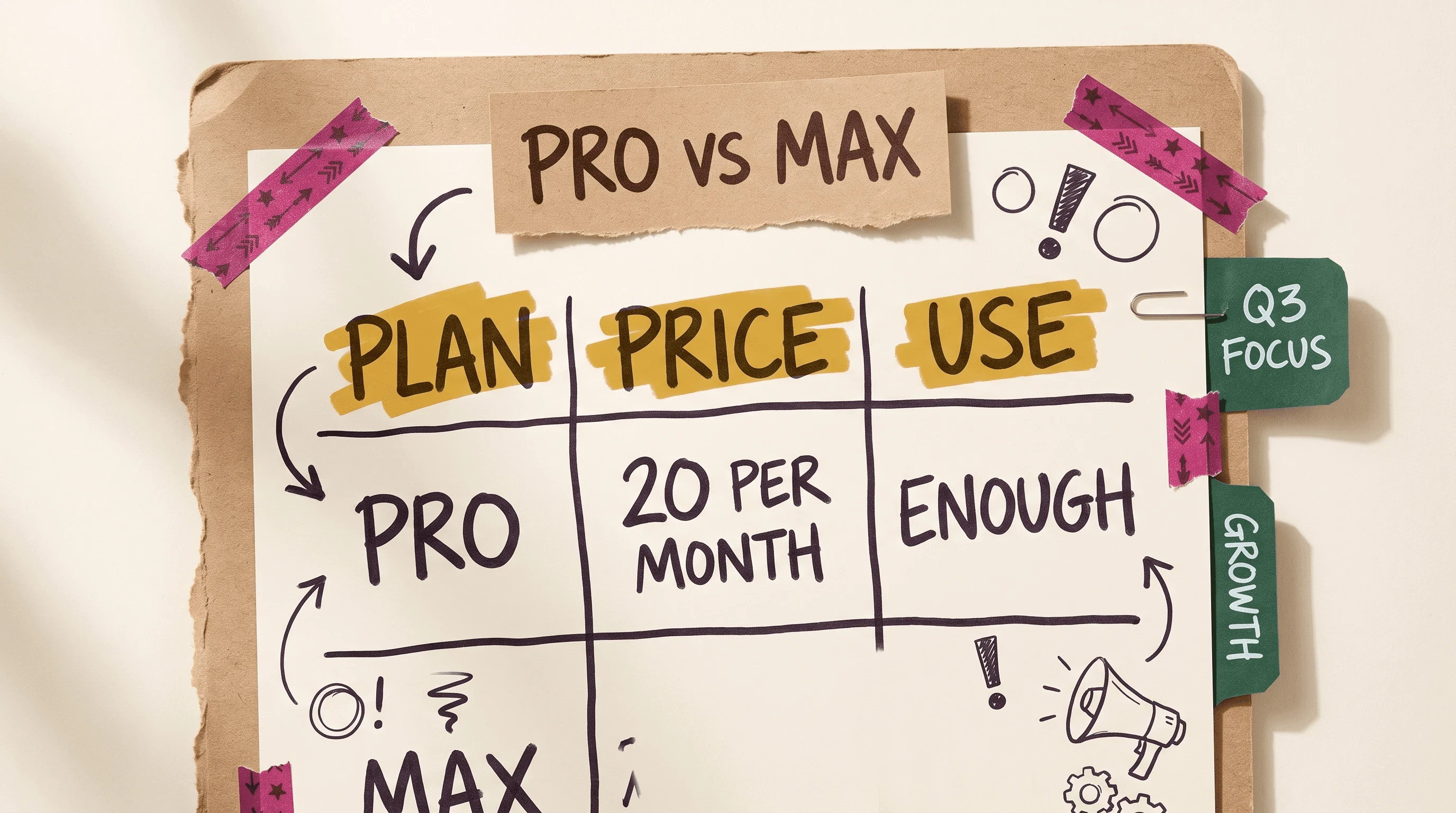
A Pro plan is enough to start. Max is for intensive daily use.
If you are testing one /write and a CLAUDE.md, stay on Pro. If you are running parallel agents all day against a messy analytics folder, Max is the sourced upgrade path. Do not treat either price as a traffic claim.
Two ways marketers start: Desktop Code tab vs terminal
The simple path lives here, not in the headline.
Blogs that only show a terminal are half the story. Newer write-ups (Gillespie, Firecrawl) keep repeating that you can stay in the Desktop app. Two paths. One paid plan. After the folder exists, you can switch on Plan mode. That toggle is not a third way in.
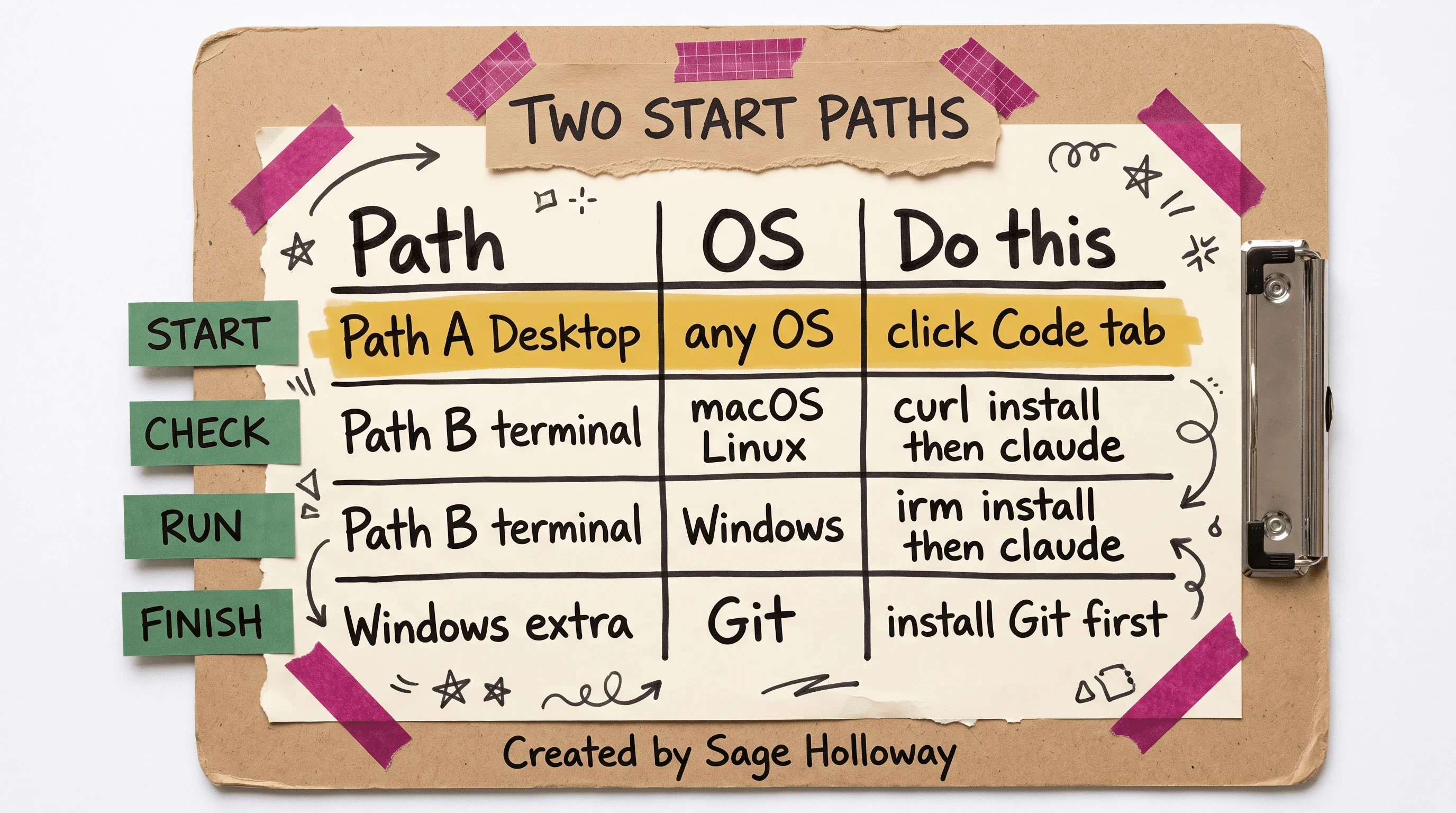
Path A needs no install script. Path B uses curl on macOS/Linux and irm on Windows.
Path A: Desktop Code tab
Subscribe to a paid Claude plan (Pro is enough to start).
Open the Claude Desktop app.
Click the
Codetab, or choose "use Claude Code from the desktop app instead."Point the session at a marketing folder on disk (create it first if you have to).
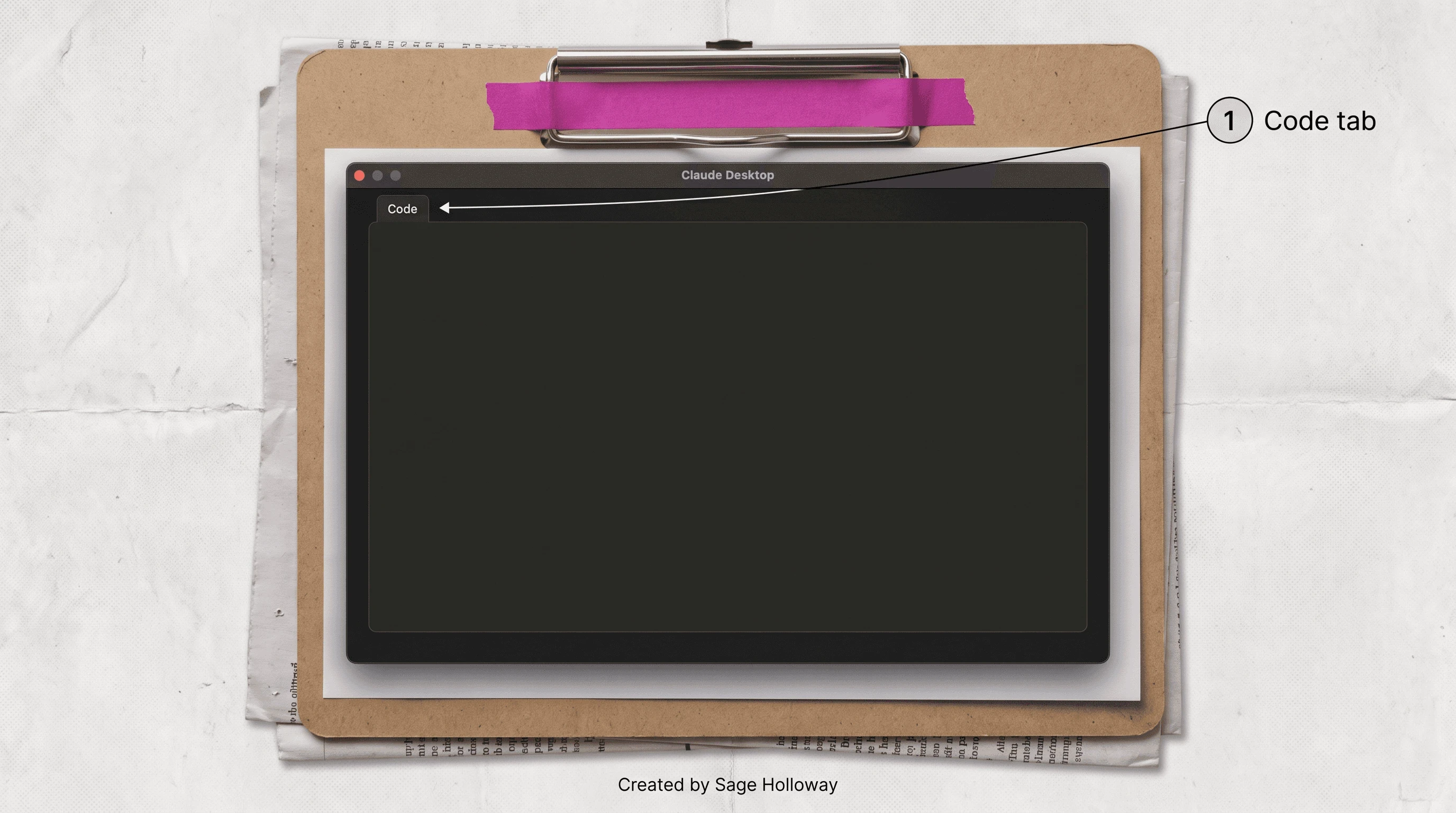
Path A is the Desktop Code tab. You do not have to start in the terminal.
I tried staying in Chat because it felt like "the marketing tool." The campaign files were never there. Then I used the Code tab and still forgot to make a folder, so the agent had nothing durable to index. The tab is the door. The folder is the room.
This will not work if you click Code and keep pasting brand rules into the prompt instead of putting them in files. The Desktop path is still Claude Code. Treat it that way.
Path B: Terminal on macOS, Linux, or Windows
Subscribe to a paid plan, same as Path A.
Install with the Animalz-quoted scripts. On macOS or Linux, paste the install line in Terminal and press Enter. On Windows, install Git first, then run the PowerShell line.
In Finder or File Explorer, create a marketing project folder. Useful subfolders from Animalz:
/interviews,/analytics,/blog-export,/feedback.Use "New Terminal at Folder" so the session opens in that path.
Type
claudeand authenticate in the browser when prompted.
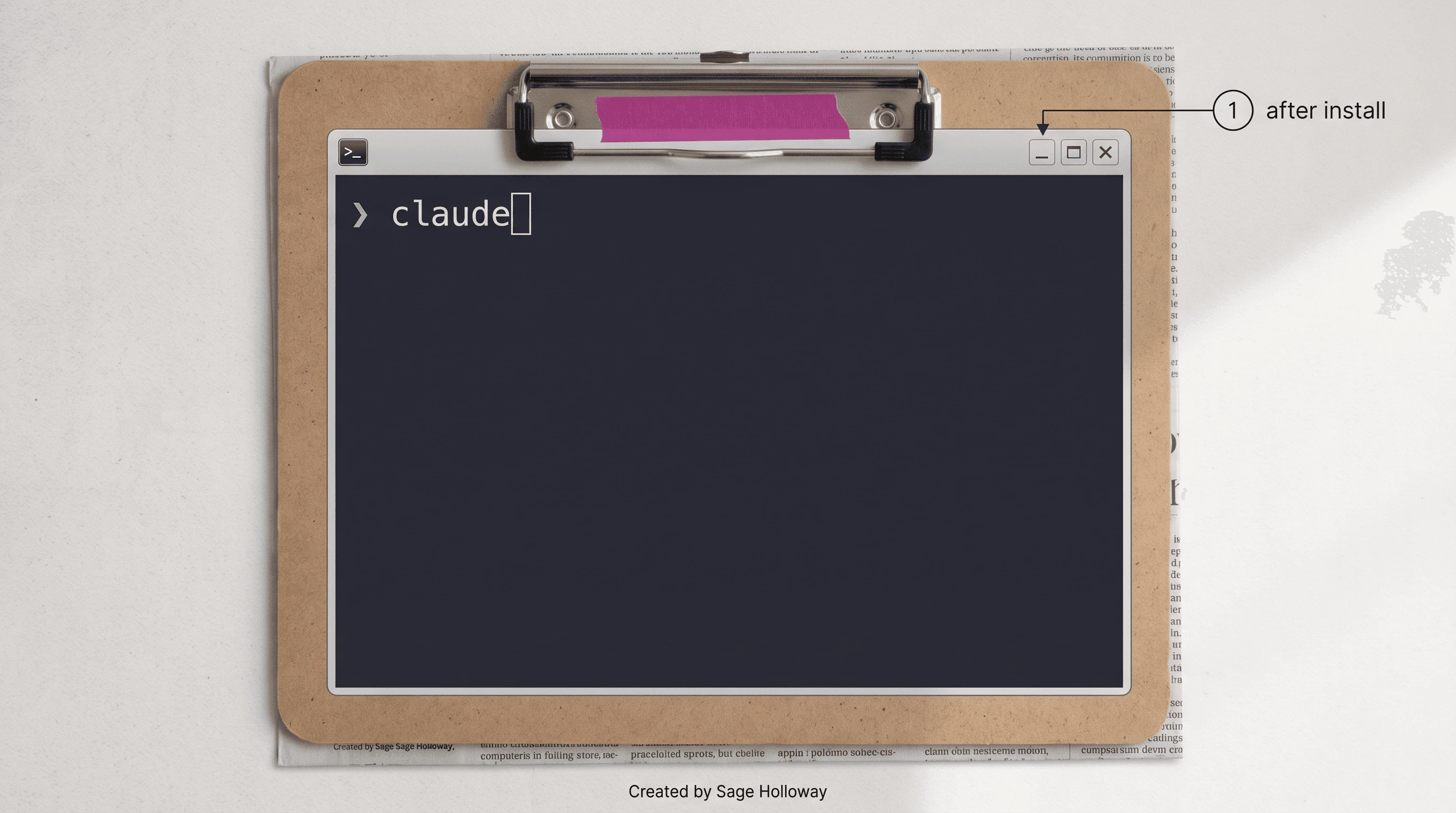
After the install script, type claude. Do not invent a version banner.
Do you have to live in a terminal? No. Path A exists. Path B is for people who want the same agent next to scripts, git, and a folder they already live in. Default examples Animalz uses: /Users/{your-username}/Developer on macOS, C:\Users\{your-username}\Documents on Windows. Use a marketing repo you actually own.
What you now have: a Code session and a folder. The install is the scripts above, then claude.
After the folder exists, switch to Plan mode (a mode that maps file structure and output before the agent writes) and then toggle Ask Permission or execute. MKT1 treats this as credit hygiene and a way to confirm the shape of the work. It is not a third start path. Cloud agents on Railway, the rare pattern in the MKT1 Kamil example, are not this URL.
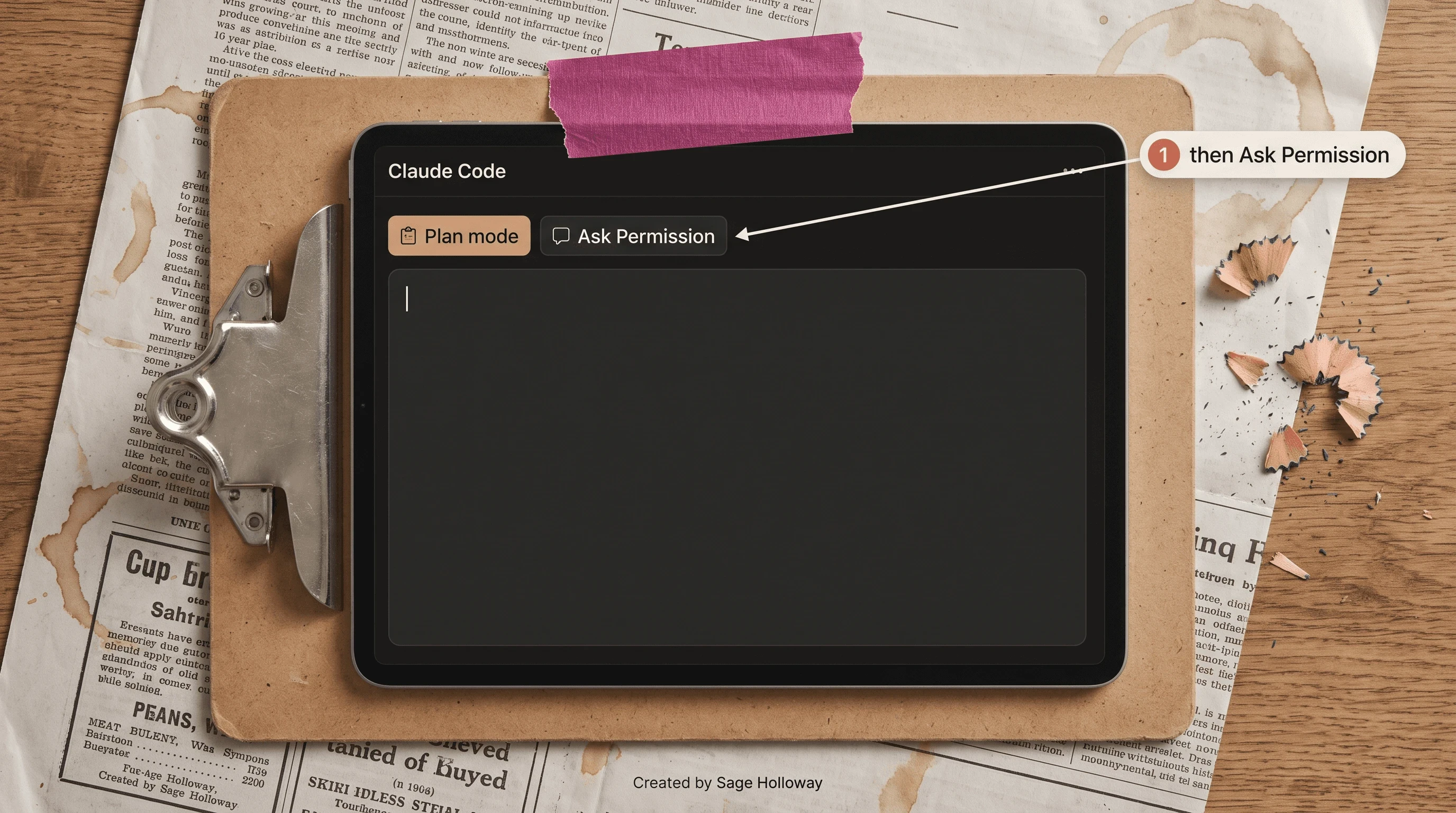
Map the output in Plan mode, then toggle Ask Permission. Not a third start path.
Pin brand voice in CLAUDE.md
Chat memory is a tab. File memory is a clipboard that still exists on Monday.
CLAUDE.md is a plain-text file at the root of the project that stores persistent instructions: personas, tone, formatting rules. You build a starter with /init, then you keep a separate brand_voice.md that the root file is required to read. Animalz, Brandon, and MKT1 all treat this file as the difference between "sounds like us" and "sounds like a model."
The dull folder is the only memory that survives a closed tab.
Run /init for a starter file
In the Code session, run /init. That command constructs a starter CLAUDE.md. You can also write the file by hand. The command is the sourced shortcut so you are not staring at a blank page.

/init builds a starter CLAUDE.md. Pin voice in the file, not in a leftover chat.
Then put this line in the root file, quoted from the MKT1 / Animalz cluster:
What goes in the file after that? The sourced examples, not a voice novel I invented.
What to put in CLAUDE.md and brand_voice.md
Keep campaign files in one local folder. Animalz's layout is enough: interviews, analytics, blog-export, feedback, plus the two brand files on top.
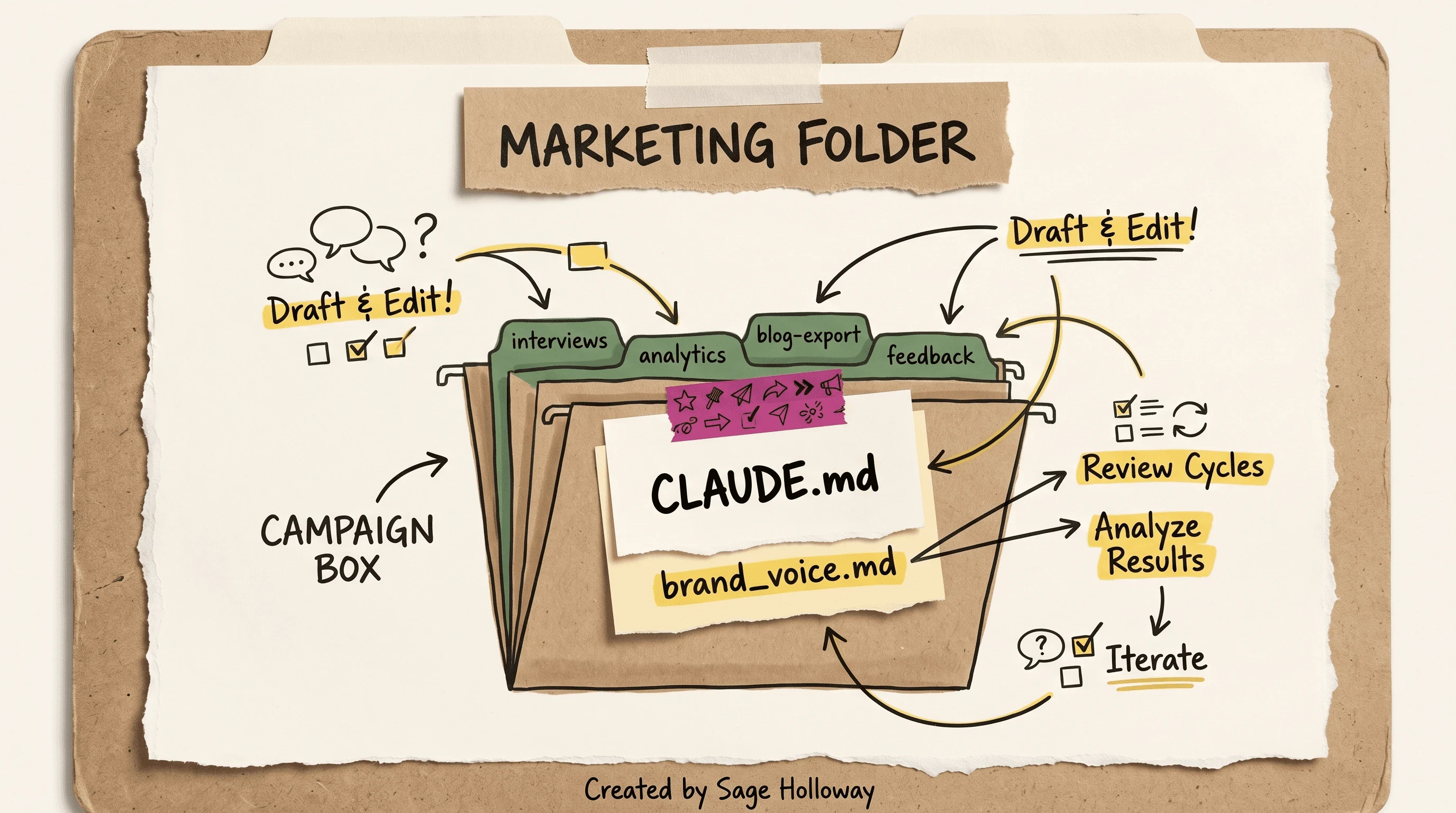
Keep campaign files in one local folder. Always read brand_voice.md before content.
In brand_voice.md and the root instructions, Animalz's examples are: never use passive voice; always use Oxford commas. Add target personas and style guidelines so you stop copy-pasting context every cycle. Do not invent extra brand rules on this page. If your legal team has a claims list, that belongs in the voice file as your list, not as a template I guessed.
This URL owns the marketing-repo CLAUDE.md. Pinning the same rules inside a SKILL.md is a different job. Do that on Claude Code marketing skills. The SEO-repo file on Claude Code SEO is a third file for a third URL. Do not merge them into one blob and then wonder why the agent ignores the middle.
I treated /init as decoration and kept pasting the paragraph into Chat. I had a file. I was not using it. Chat felt faster than opening a folder. That lasted longer than I want to admit.
Growth marketing workflows you can run this week
Ready to run something this week?
Claude Code for growth marketing is not a new product. It is Code pointed at ads, SEO-lite, and copy jobs you will actually finish. Anthropic's own marketing write-up is the authority on the ads side. The Gen Digital companion is where the 30 minutes to 30 seconds number lives. Prefer those two when a blog's Figma story drifts.
Ads: RSA CSV and Figma variant caps
RSA means Responsive Search Ads: Google's format that takes multiple headlines and descriptions and mixes them. Anthropic's growth workflow exports a CSV with campaign and ad group columns, ready to upload. The sourced caps: 15 headlines and 4 descriptions. The slash you will see in community kits is /rsa.
A Figma plugin (the one Austin Lau describes in the Anthropic piece) generates creative variants from headline copy. The sourced batch limit is 100 variants. I am not reconstructing plugin chrome here. I am not inventing ROAS.
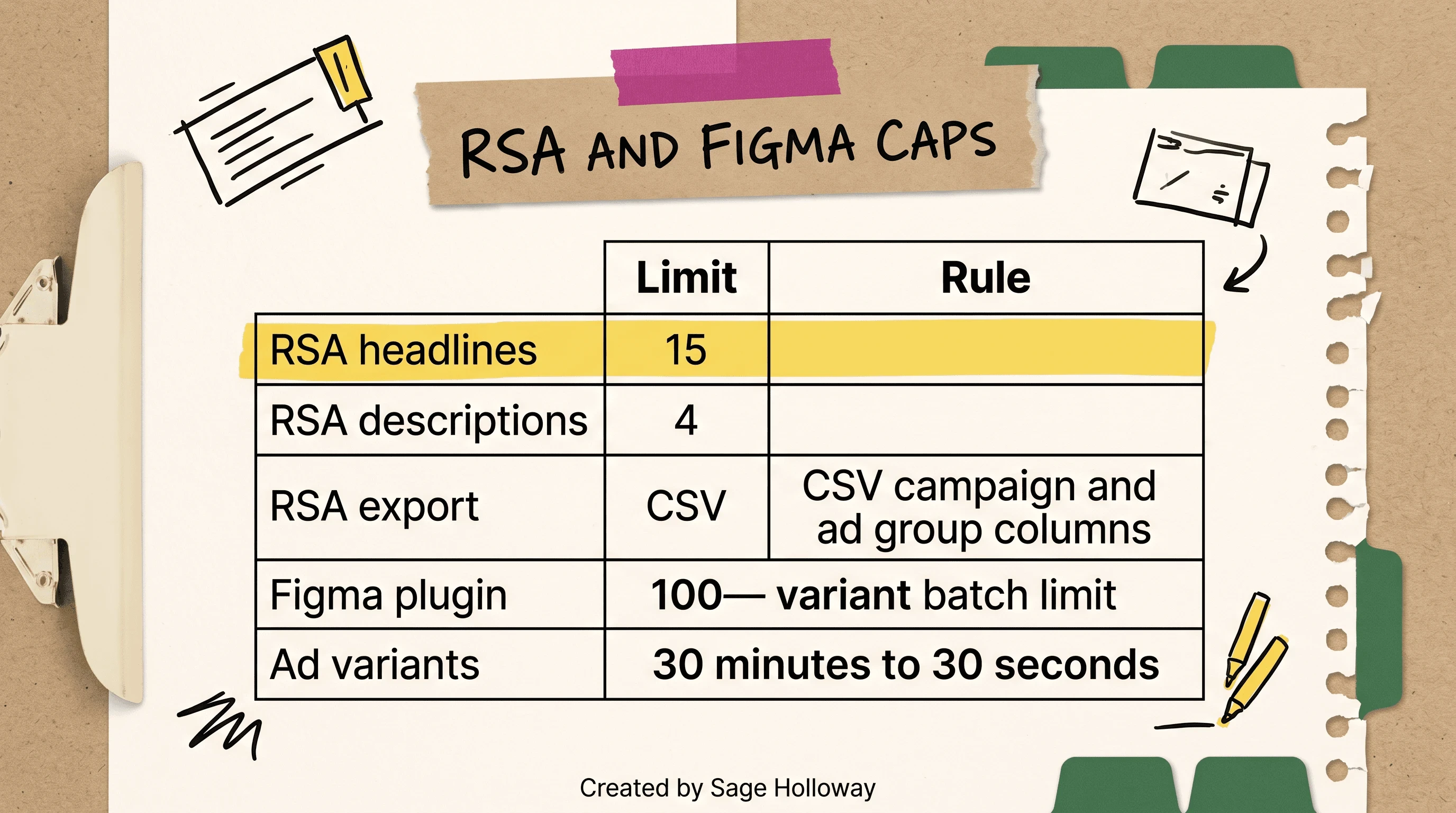
/rsa writes 15 headlines and 4 descriptions to a CSV. The Figma plugin stops at 100 variants.
Human review still sits on the copy. The CSV is a draft with columns. It is not a live write into Google Ads. The Reddit marketing thread flags the missing ad-platform write API. You copy, you upload, you stay in the loop.
HubSpot Marketing published a Claude-for-business overview that is worth a watch next to this table. Use the real title. It is not Austin Lau's Figma walkthrough, even though some research notes mapped it that way.
https://www.youtube.com/watch?v=OK2E3rpaun0&vl=en
SEO and copy tasks this hub can run
What about SEO?
On this hub, keep it to jobs a marketer can run without becoming an SEO-ops page. An internal linking agent (a workflow that proposes links between pages you already have) is a body-level task here: useful, then stop. The zubair-trabzada suite's /market audit <url> is a list item, not a heading. Deep GSC wiring, plugin install, and local-audit depth live on Claude Code SEO.
Copy on this hub is /write and /copywrite once you add a marketplace (next section). Do not turn this H2 into a 15-skill content team. Kieran Flanagan's 11-skill stack is a Gillespie example, not this URL's product.
Firecrawl's blog describes live crawls for competitor pricing, Reddit mentions, and SEO audits. Treat that as a vendor-shaped workflow, not a second product tour. If you need live web data, name the connector. If you only needed a paragraph rewritten, you did not need Code.
Skills and slash commands, then stop
A slash command is a typed shortcut that fires a packaged workflow. A skill is a reusable instruction pack (often a SKILL.md plus optional scripts). Animalz's marketplace and the zubair-trabzada AI marketing suite are examples. They are not this site's product.
How far do slash commands go before you need a skills guide? Far enough to run /write this week. Not far enough to dump a 36-skill Marketing OS on this page.
Marketplace add and first slash runs
From Animalz:
/plugin is the shorter cousin. Then run the first marketing slashes they actually name:
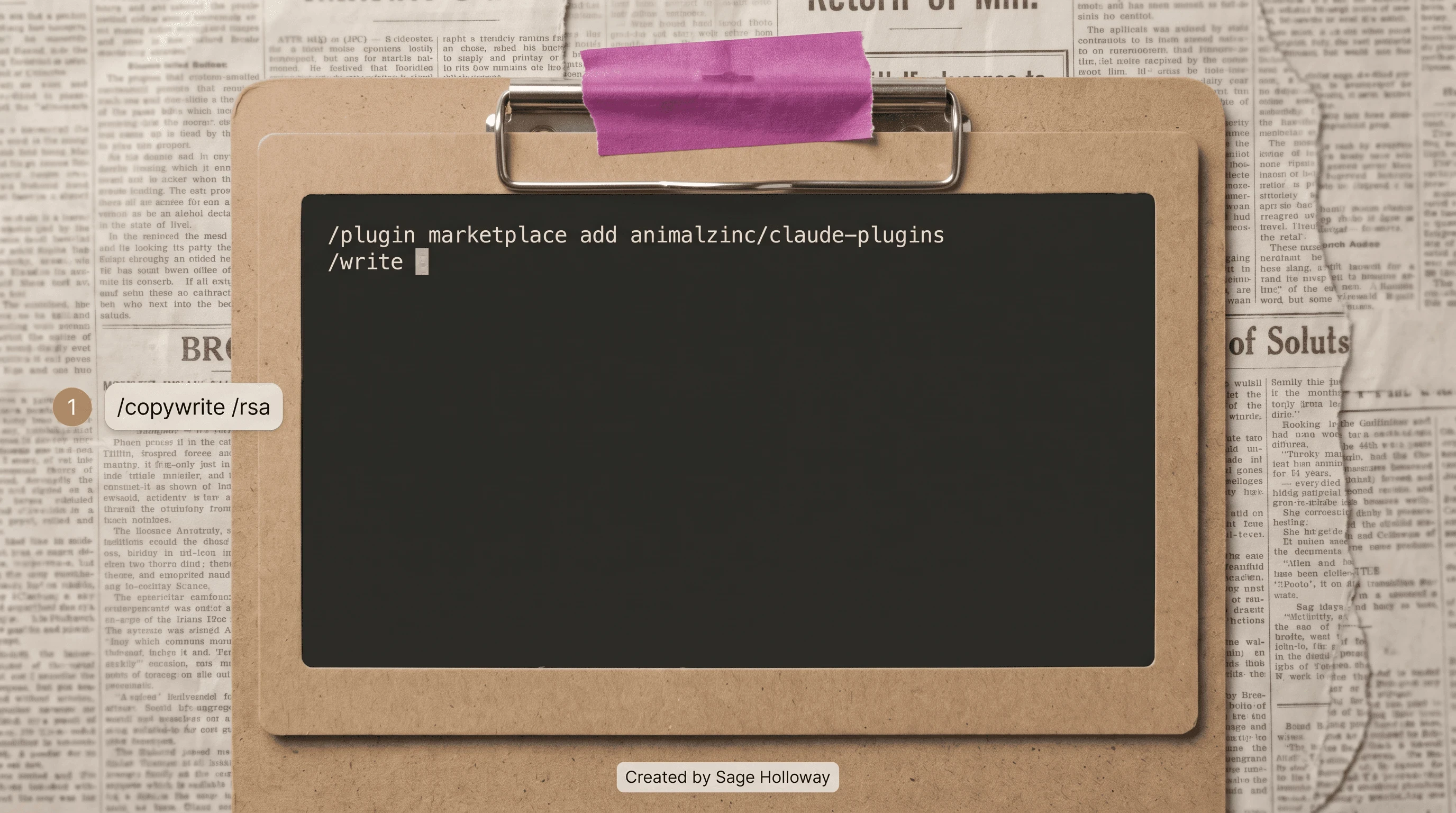
Marketplace add, then /write. /copywrite and /rsa are the next slashes, not a 36-skill map.
/save-session captures a resume prompt so the next sitting is not a blank stare. Use it. You will need it again when Chat, Cowork, and Code refuse to share a brain.
Agents in Claude Code are independent parallel sub-conversations. The main thread can spin them up to parse a dataset, scan interview quotes, or research a competitor at the same time. One paragraph is enough. They are not a second product, and they are not a reason to skip review.
The GitHub suite is a useful example and a fragile one. Files you will see named: market/SKILL.md, analyze_page.py, competitor_scanner.py. The scrapers break when a target site changes or blocks the request. Optional PDF rendering, if you want it: pip install reportlab. Skip it until you actually need a PDF.
Public-repo warning, then leave: Claude is lazy on first-order skills, and unvetted GitHub packs can carry prompt-injection risk. Audit before you install. The install-and-author job is Claude Code marketing skills.
When to leave this URL for the skills guide
Leave when you need -a claude-code, a hub file like product-marketing.md, or a forked SKILL.md. This page stops at marketplace add and the first slashes. Corey Haines' marketingskills library is the default on the skills guide, not a dump here.
Aditya Vempaty's credit workaround (test skills in a visual playground such as Antigravity, then port the .md into Code) is a list item for expensive Max users. This page does not teach that CLI.
Connect live marketing data with MCP
MCP (Model Context Protocol) is how Claude talks to live tools instead of guessing from training weights. Settings has a Connectors panel. MKT1 and the Firecrawl marketing guide both point marketers there. Live data or a CSV drop? Depends whether you have a connector and whether you trust the export.
Settings Connectors (Slack, Figma, HubSpot, GSC)
Enable official Connectors for Slack, Figma, HubSpot, and Google Search Console. Those four names are the sourced row. Do not invent a GA4 write API or an ads write API on this bitmap.
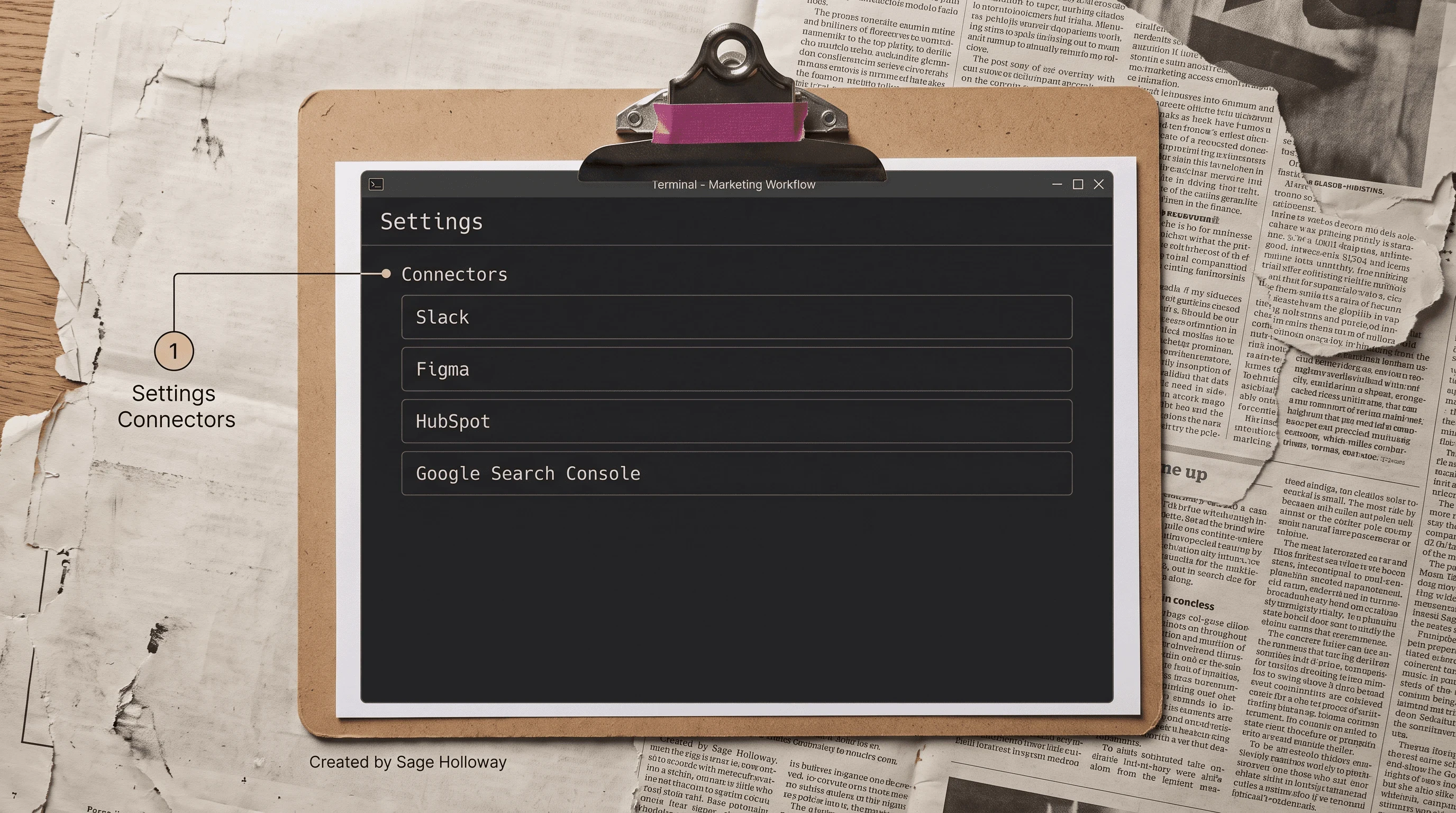
Enable Connectors for Slack, Figma, HubSpot, and Google Search Console. Do not invent a GA4 write API.
GSC depth (credentials, /seo google setup, what the skill actually queries) is Claude Code SEO. Hiba Fathima's extras, from the Firecrawl FAQ, stay a list: Ahrefs for content decay, Firecrawl for web data, Composio as a bridge. Source: Firecrawl's Claude Code for marketing guide. I am not adding those rows to the Settings reconstruction.
I am not inventing an MKT1 MCP Server URL. If you use MKT1's paid server, take the URL from MKT1, not from this paragraph.
CSV drops vs live connectors
Brandon's Desktop playbook is the honest fallback: export GA4 and HubSpot to CSV, drop the files in /analytics, and brief the agent on the folder. Messy CSVs can blow a context window. The model can transpose digits. Keep yourself in the loop.
A live connector wins when the job is "what did Search Console say this week" and you already authenticated. A CSV drop wins when there is no connector, or when you do not want the agent anywhere near production credentials. Reddit's "copy-paste because there is no write API" is the same pattern for ads.
Railway and other cloud cron agents remain a list item: not this URL. Local Code plus a folder is the hub job.
Move context files across Chat, Cowork, and Code
Why copy files by hand in 2026?
Because the products do not share memory. MKT1 is the source that says it plainly. Animalz and Firecrawl skip a heading for it. That gap is why this page exists.
Why the products do not share memory
Chat lives in a browser sandbox. Cowork sees the Desktop folders you shared. Code sees the local project you opened. There is no official sync toggle. There is no "make these three products one brain" setting in the pack. If a roundup talks about an integrated Claude ecosystem as if files teleport, it is selling a feeling.
But here is the thing. You will still use Chat for a fast argument, Cowork for a shared folder, and Code for the repo. The driveway still has three cars. The GPS units still do not talk.
/save-session helps inside Code. It does not push a resume prompt into Chat. Treat it as a note you copy, not as a sync feature.
A manual folder blueprint
Keep one canonical pair: CLAUDE.md and brand_voice.md. Copy those two files into each working directory you actually use. Three stacks, same cards.
Code repo root: the canonical copies.
/initlives here.Cowork shared folder: paste the same two files before you ask it for campaign work.
Chat: you cannot give it a project root the same way. Paste the voice rules or upload the files for that thread, then throw the thread away when the job is done. Do not pretend Chat stored them.
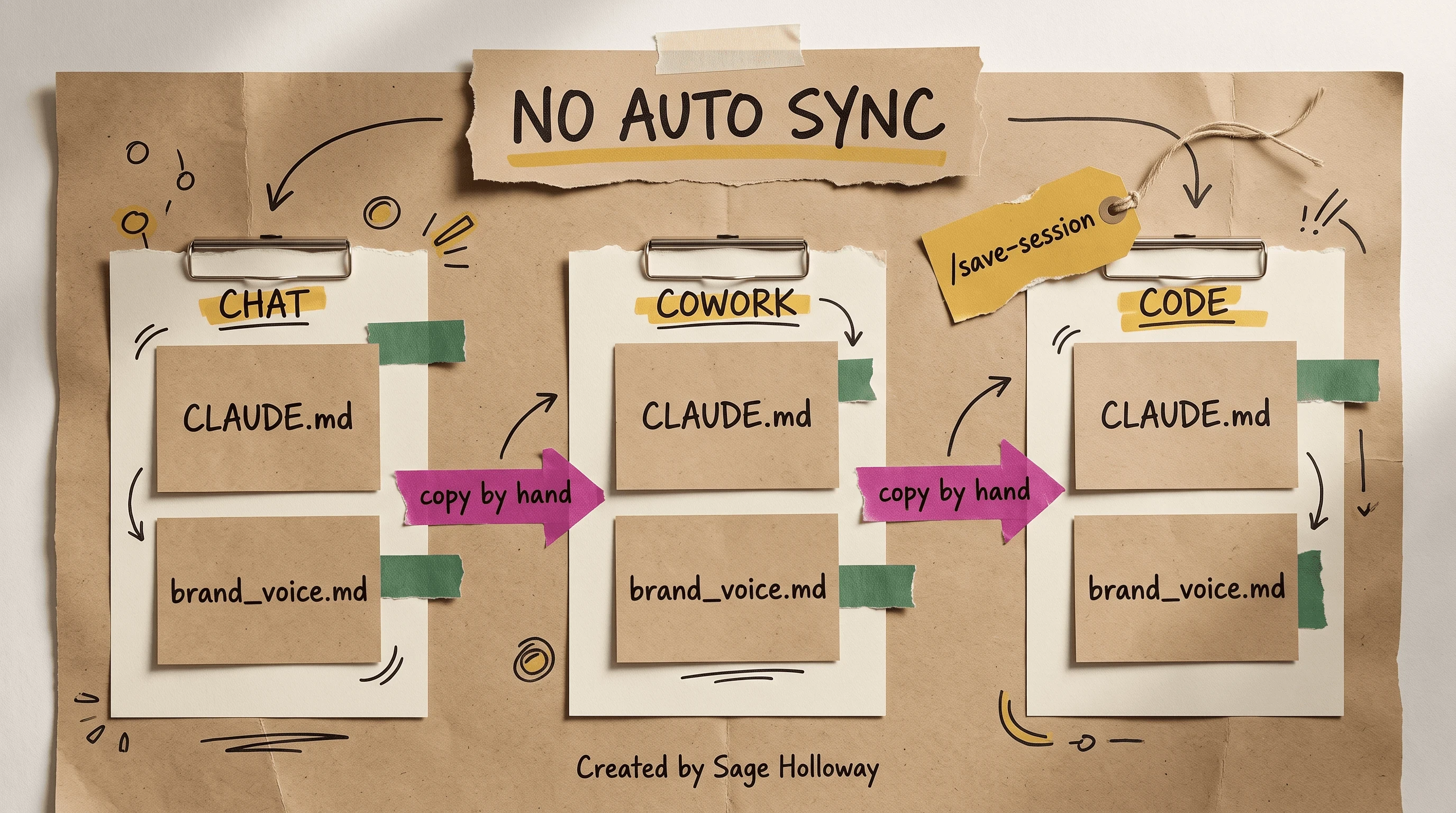
There is no automatic sync. Copy the brand files. Use /save-session for a resume prompt.
After a Code session, run /save-session and keep the resume prompt next to the brand files. Next sitting, open Code first if the job needs the filesystem. Do not claim Anthropic shipped a sync. They did not, in these sources.
This is not Gillespie's 36-skill OS diagram. It is stationery: three clipboards, two files, arrows labeled copy by hand. Boring. Durable.
Staging checklist before anything ships
Can you ship without an engineer?
You can draft without one. You should not push customer-facing pages without a sanity check. Anthropic's growth piece says no coding experience was required to build the ads workflows. Firecrawl's Hiba says claiming you need zero code is a lie if you are going to touch HTML, CSS, Next.js, and deploys. Both sentences can sit here. The ads CSV is one risk class; a landing page is another.
Human review for copy, engineer review for code
User-facing copy: a human reads it. Claims, trademarks, "we are the only," numbers that did not come from a dashboard you opened. Keep yourself in the loop. Anthropic's own best-practice section is not a license to auto-publish ads.
Pages, scripts, and layout: ping an engineer with "hey does this approach make sense?" before production. That line is sourced. Use it. Claude will pick a hacky path if a hacky path is shorter. You will not see the leak until mobile Safari shows it.
App-store screenshots, Remotion video, Nano Banana image APIs, Supademo tours: list-item limit. The r/ClaudeAI app-marketing thread is the field report that Code is a weak visual studio. Do not turn this checklist into a motion-graphics tutorial.
Staging before production
Generate on a branch or in a local folder, never straight onto the live site.
Open the page on a phone-width viewport. Look for layout shift, overlapping type, and nav that ate the hero.
Learn enough HTML and CSS to see what Claude wrote. Next.js basics if that is your stack. "Learn enough not to break things" is the Firecrawl line.
Staging URL. Click the paths a user would click.
Engineer ping on anything that touches routing, data, or build config.
Then production.
This will not work if you skip staging because the copy sounded done. It will not work if you treat a Desktop Code tab like Chat and paste a diff into production. It will not work if you clone a public marketing skill and let it write your homepage.
Agents running in parallel do not reduce the review load. They increase the number of files you have to read.
FAQ
What can Claude Code actually do for marketing work?
It reads a local marketing folder and runs repeatable workflows: RSA CSV drafts, Figma-adjacent variant jobs, /write and /copywrite, light SEO tasks, and connector-backed research. Anthropic's growth team used it to cut ad-variant production from 30 minutes to 30 seconds. It does not replace an engineer, a rank tracker, or a human who can see a bad claim.
Do I need to know how to code to use Claude Code as a marketer?
Plain-English prompts are enough to start, and Anthropic says no coding experience was required for the ads workflows. Practitioners still want HTML, CSS, and (if it is your stack) Next.js basics so you can evaluate what the agent wrote. Staging plus "hey does this approach make sense?" is the guardrail when the output is code, not copy.
Claude Code vs Claude.ai / ChatGPT for marketing: when does the CLI win?
The CLI (or the Desktop Code tab) wins when you need the local filesystem, CLAUDE.md, slash commands, and Connectors in one workspace. Claude Chat is sandboxed web, good for a brainstorm, not a campaign repo. Cowork only sees folders you share. This pack has no ChatGPT bake-off; do not treat a browser chat as Claude Code.
How do I use Claude Code for growth marketing (SEO, ads, analytics)?
Ads: /rsa for 15 headlines and 4 descriptions in a CSV, plus the Figma 100-variant cap on creative batches. SEO on this hub: internal linking as a body task and /market audit <url> as a list item; plugin and GSC depth are Claude Code SEO. Analytics: Connectors where they exist, otherwise Brandon-style GA4 and HubSpot CSV drops in /analytics.
What are Claude Code marketing skills: skill files vs marketer skills?
Skill files are SKILL.md packs; your job as a marketer is still judgment on the draft. Install and author them on Claude Code marketing skills.
How do I keep brand voice and claims accurate when the agent writes copy?
Put a root CLAUDE.md next to brand_voice.md, include "Always read brand_voice.md before generating any content for this company," and use sourced formatting examples (no passive voice, Oxford commas) plus your real personas. A human still reads user-facing copy. Chat paste is not a voice system.
Can Claude Code connect to GA4, HubSpot, or ad accounts?
Settings Connectors in the pack name Slack, Figma, HubSpot, and Google Search Console. HubSpot can be live that way. GA4 in the sources is a CSV export pattern, not a sourced GA4 MCP. Ad accounts have no write API in this pack; /rsa writes a CSV you upload. Hiba also lists Ahrefs, Firecrawl, and Composio on the Firecrawl guide.
What belongs in CLAUDE.md for a marketing repo?
Personas, voice, and a pointer to brand_voice.md. Run /init for a starter. Keep Animalz folders (interviews, analytics, blog-export, feedback) beside it. Do not dump the SEO procedure file or a skill YAML into this one.
Do I have to use Claude Code in the terminal?
No. Path A is the Desktop Code tab (or "use Claude Code from the desktop app instead"). Path B is curl or irm, then claude. Same agent. Pick the door you will actually walk through.
The Code tab will keep looking optional in tutorials that were written from a happy terminal. Chat will keep ranking because it is the thing people already have open. What I would watch next is not another marketplace grid. It is whether teams treat three products in one driveway as one GPS, then blame the model when the van still has last week's map.
Copy the address onto the clipboard this week. Path A if the terminal still feels like someone else's job: Desktop Code tab, /init a CLAUDE.md, one /rsa or /write draft, then send any code change to staging. If you are ready to pin the same rules inside a skill, go to Claude Code marketing skills. If the next job is a local audit with live GSC, go to Claude Code SEO.
Until then...
Sage
PS. The oldest USB stick in my drawer is labeled FINAL_USE_THIS. Two others say FINAL. I still open the drawer before I trust whatever is already mounted. Three labels, one driveway. You already know which copy I should have thrown out.
Author
Practical guides, tool teardowns & AI engineering workflows.