Claude Code
Claude Code SEO: Plugin Paths, Live MCP Data, and Local Audits

Sage Holloway
21 min read
Go back to blog
SHARE

You asked for an audit. You got a confident list. Rankings, citations, keyword volume: all of it sounded like it came from a dashboard. None of it had touched one. The next person who asked where those numbers lived got a shrug.
Claude Code SEO is a local terminal workflow: you install an SEO skill pack in Claude Code, then run slash commands that audit pages, schema, and AI-citability. Live search and Search Console data come from MCP servers, not from the model's memory. On Claude Code 1.0.33+, add the marketplace with /plugin marketplace add AgriciDaniel/claude-seo, install claude-seo@agricidaniel-claude-seo, then run /seo setup. Python 3.10+, Git, and the Claude Code CLI are required. Playwright is optional and used for SPA rendering.
Last verified: 17 August 2026 (NotebookLM sources; no live CLI run on this pack).
Last year that list lived in a chat thread and a spreadsheet named final_v7. This year a slash command can hit a URL you control before the coffee cools. The files are still yours. The live search data still has to be wired. The model never grew a Search Console tab on its own.
If you have ever watched a pretty meta description walk into a sprint while the crawl issues stayed in production, this is that wall, named.
This is SEO-ops in Claude Code, not Claude.ai chat SEO. The marketer CLI hub lives on Claude Code for marketing. This page does not become that hub, and it does not become a generic SKILL.md tutorial. What follows is what /seo actually runs, which install path to use, how live data gets in, and how to keep brand context out of the procedure file.
On this page
What Claude Code SEO actually runs
Three install paths: marketplace, git clone, and Cowork zip
Wire live SEO data with MCP
Keep Project context apart from Skill procedures
What the 0-100 SEO health score actually measures
Claude Code SEO vs Semrush, Screaming Frog, and Claude.ai
FAQ
Claude Code SEO is a local audit kit. Live data comes from MCP, not from memory.
What Claude Code SEO actually runs
There is a kitchen scale that lives under the spatulas. You need 120 grams of flour. You open the drawer, dig past the whisks, weigh the bag, and shove the scale back under a ladle. Next bake you skip the scale because finding it took longer than the recipe.
Hang the scale on a hook next to the mixer and weighing becomes the default, not a project. The cookbook stays on the shelf. You do not tape the recipe to the scale.
That is Claude Code SEO. A slash command is a typed shortcut that fires a packaged workflow. The AgriciDaniel/claude-seo pack (the open-source default on this page) hangs those workflows on the hook. The claude-seo.md landing page is the feature index, not a substitute for the repo. You still own the cookbook: brand, product, and the pages sitting in the repo.
What actually runs when you type /seo is not a 32-command dump. Four jobs, then a short loop.
Slash commands for audit, page, schema, and GEO
Start on a URL you control, then run the four jobs the README actually quotes:
/seo audit is the site pass: technical issues, content gaps, the scorecard the landing page likes to show. /seo page is the single-URL pass, including E-E-A-T style quality. /seo geo scores Generative Engine Optimization (GEO): how easy a passage is for an answer engine to lift. /seo schema is the structured-data pass.
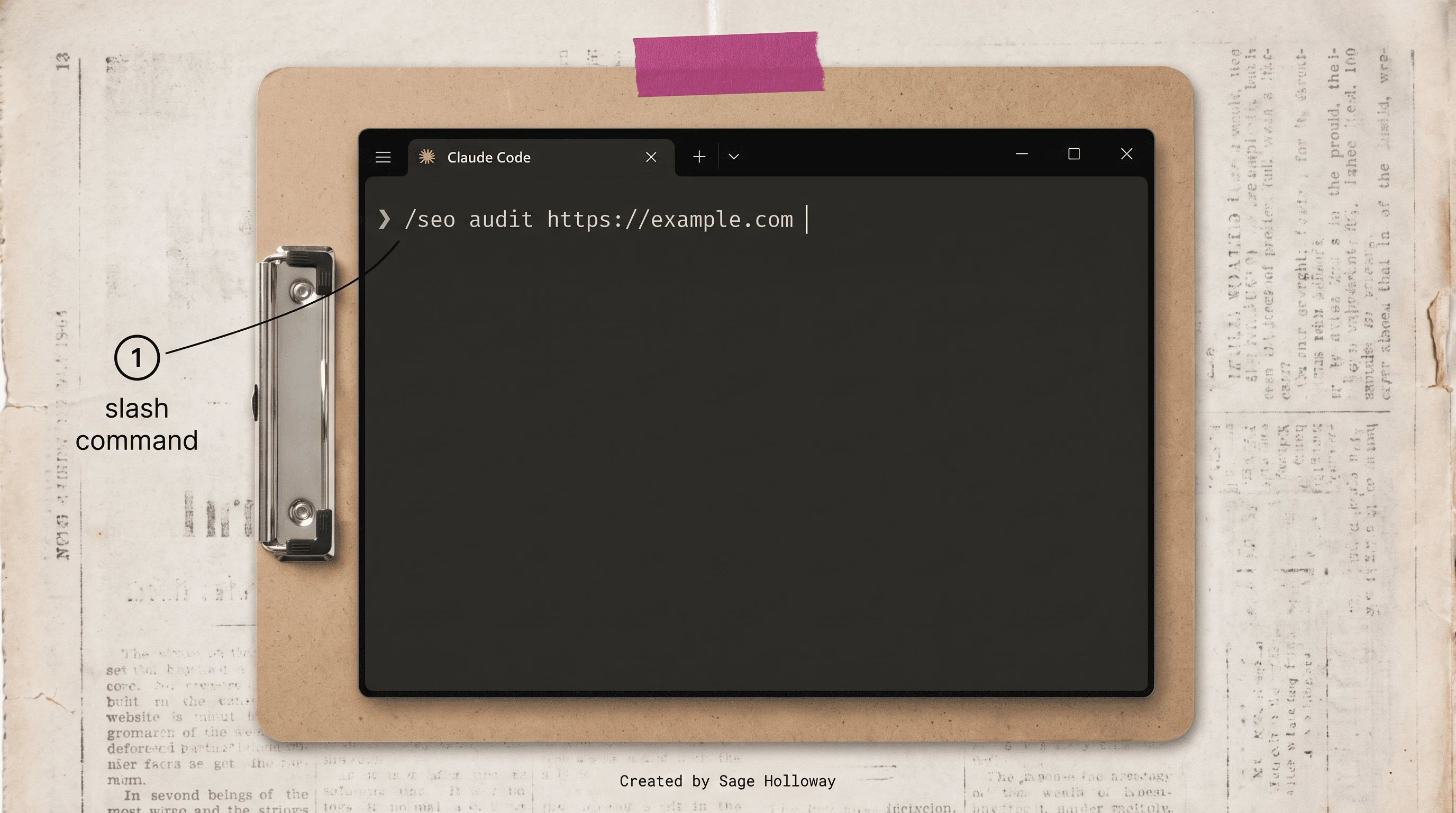
Start with /seo audit on a URL you control. Do not invent a health-score dashboard.
Do not invent /seo rewrite-title. Title and heading work starts as /seo content-brief <topic>. The companion write step in the same family is /blog write "target keyword", which belongs to the Claude blog engine, not this audit URL. Clustering is /seo cluster <keyword>.
Off-page is /seo backlinks https://example.com. Local code can flag anchor text and competitor gaps. Actual outreach is still human. That job sits on SaaS backlink strategy, not on a slash that sends email.
GEO on this pack is not a Princeton formula you re-derive in the terminal. The GitHub methodology scores passage citability and aims at 134-167 word self-contained answer blocks. Heading hierarchy, structured data, and brand presence on hubs such as Reddit, YouTube, and Wikipedia show up in that pass. llms.txt does not get treated as a citation lever. More on that myth when we talk about invented numbers.
The Who, How, Why heuristic sits under the page pass: who is this for, how does it work, why should anyone trust it. That is helpful-content logic, not a Google leak. Use it to catch a page that never answers the query in one block.
JSON-LD (a script of Schema.org facts machines can parse) is what the schema pass cares about. Live types the pack detects and generates:
Organization
Product
LocalBusiness
Video
FAQPage rich results retired on 2026-05-07. The markup can still exist. It is not a snippet lever. QAPage remains a type. HowTo rich results were already gone in 2023. SpecialAnnouncement followed in 2025.
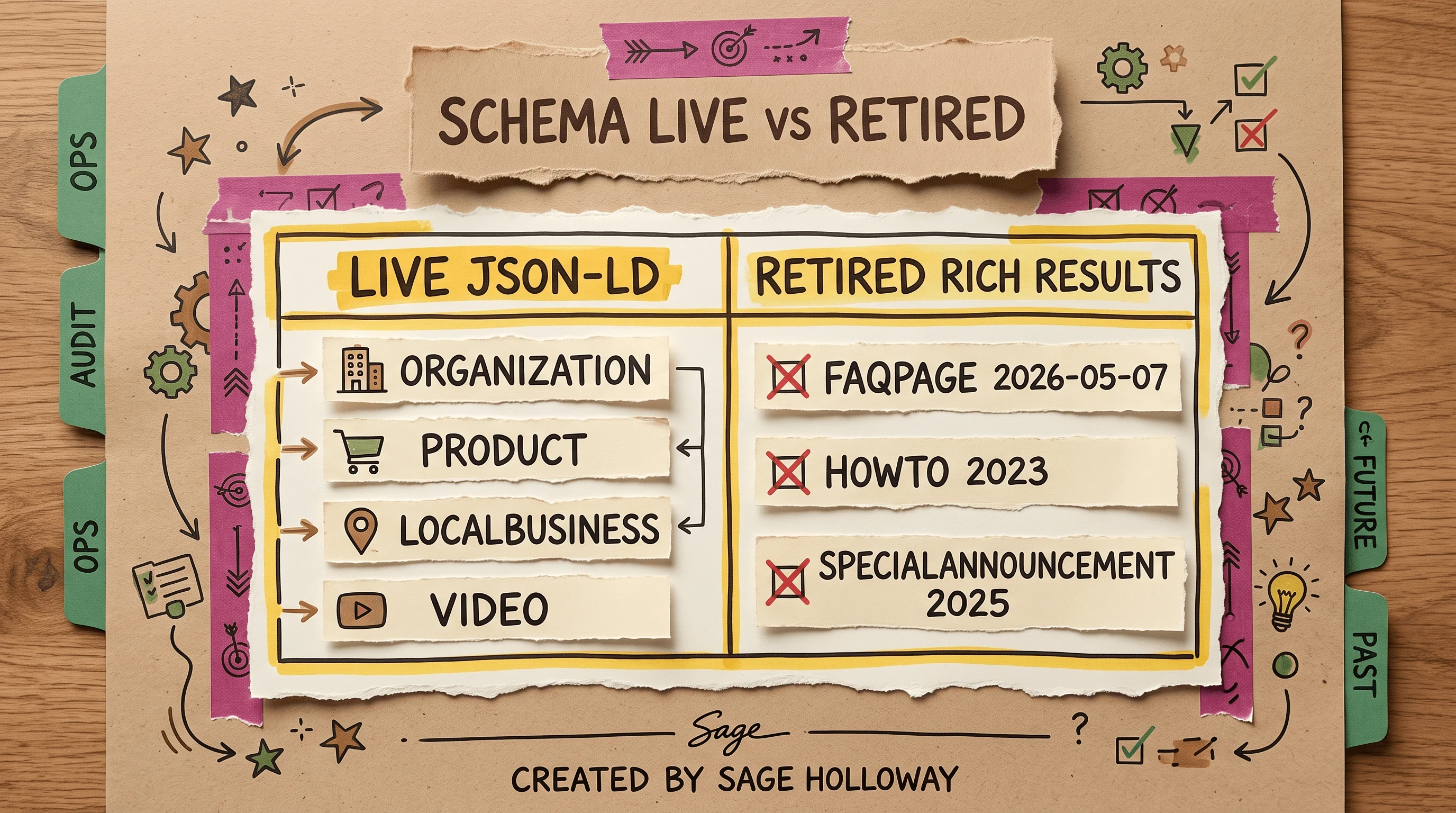
FAQPage rich results retired 2026-05-07. Markup can still exist. It is not a snippet lever.
SPA hydration and Playwright limits
This will not work if you audit a JavaScript shell and treat the empty HTML as the page.
A single-page app (SPA) is a site (React, Vue, Next.js) that ships a thin document and fills the content in the browser. Phase A of Claude SEO v2 added a shared headless renderer backed by Playwright Chromium, a headless browser that can execute that JavaScript before the audit reads the DOM. The tool auto-detects empty shells and switches to a rendered fetch.
Playwright is optional. Python 3.10+, Git, and the Claude Code CLI are not. You need Playwright for SPA rendering and for screenshots. You do not need it to run a page-level audit on a static HTML document.
Scroll-bound hydration still produces noisy findings: content that only appears after a scroll or a click. In those cases, run the seo-visual subagent and look at the page yourself. The renderer is a camera. It is not a user.
Core Web Vitals on this pack are Largest Contentful Paint (LCP), Interaction to Next Paint (INP), and Cumulative Layout Shift (CLS). First Input Delay (FID) is not a row. Google removed it from field tools in late 2024. Performance data comes from the Chrome User Experience Report (CrUX) when you have credentials, or falls back to Lighthouse lab estimates via PageSpeed Insights.
Local SEO multi-location audits enforce a 30-page warning and a 50-page hard stop. That is a doorway-page guard, not a crawl-budget flex. If you are generating a city page per suburb, the pack will stop you.
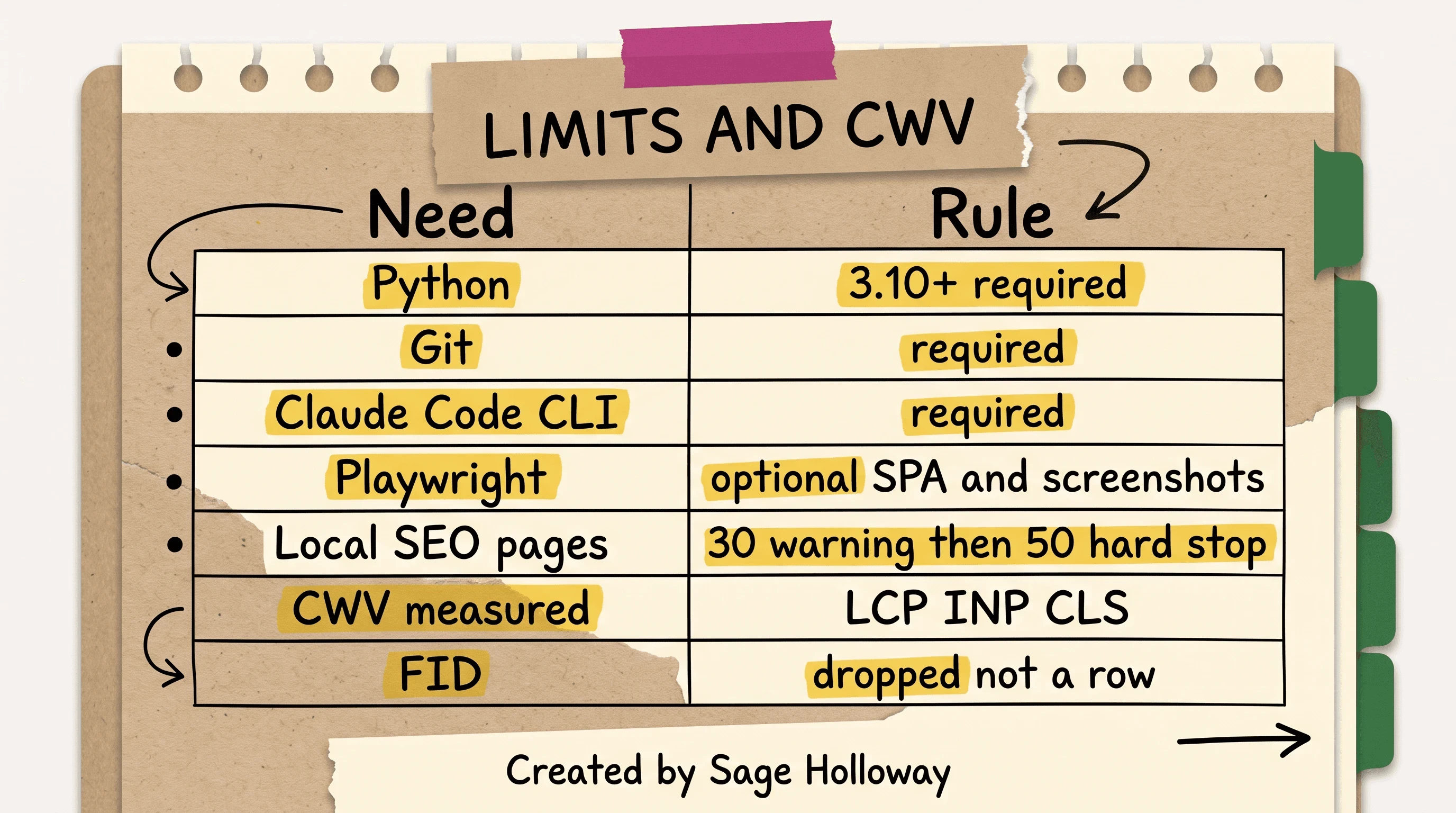
Python 3.10+, Git, and the CLI are required. Playwright is optional. FID is not a CWV row.
Architecture in one diagram, not a command dump
Three layers. Slash commands on top. Skill procedures in the middle. Live data underneath through MCP.
You type /seo audit. The skill runs the procedure. Playwright, SerpAPI, or Google Search Console only join if you wired them. The GitHub Commands list is the encyclopedia. This page is the map.
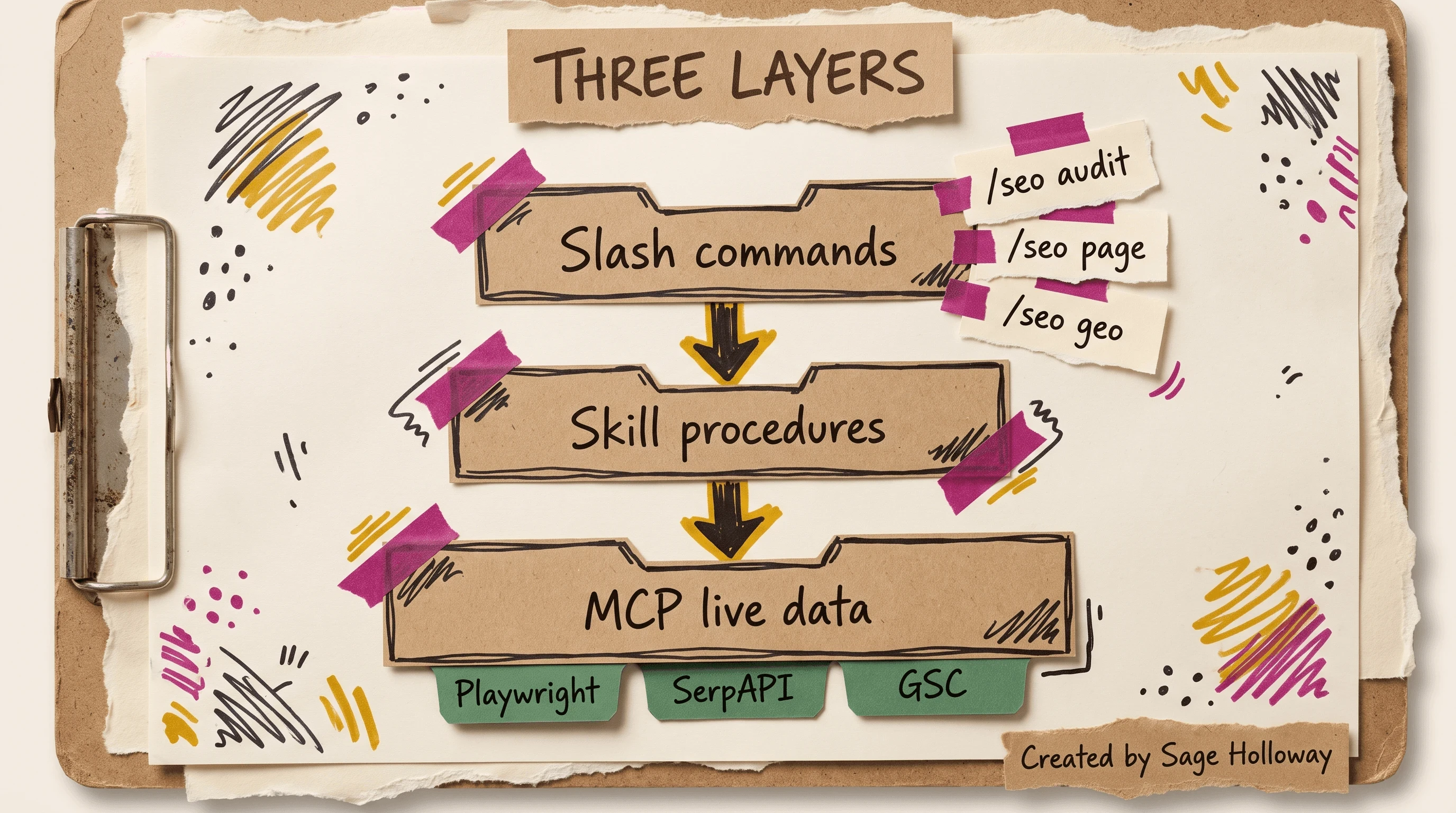
Architecture is three layers. It is not a dump of 32 commands.
The repo also ships demo GIFs (seo-command-demo.gif, seo-audit-demo.gif) on GitHub. They stay outbound. They are not a substitute for the labeled slash lines below.
Three install paths: marketplace, git clone, and Cowork zip
Three paths. Prefer Path A on Claude Code 1.0.33+. Treat zip tutorials as the Cowork edge case. The default pack is AgriciDaniel claude-seo. I am not recommending the Bhanunamikaze/Agentic-SEO-Skill fork as the default; community notes say it is missing the v2 SSRF patches in the mainline.
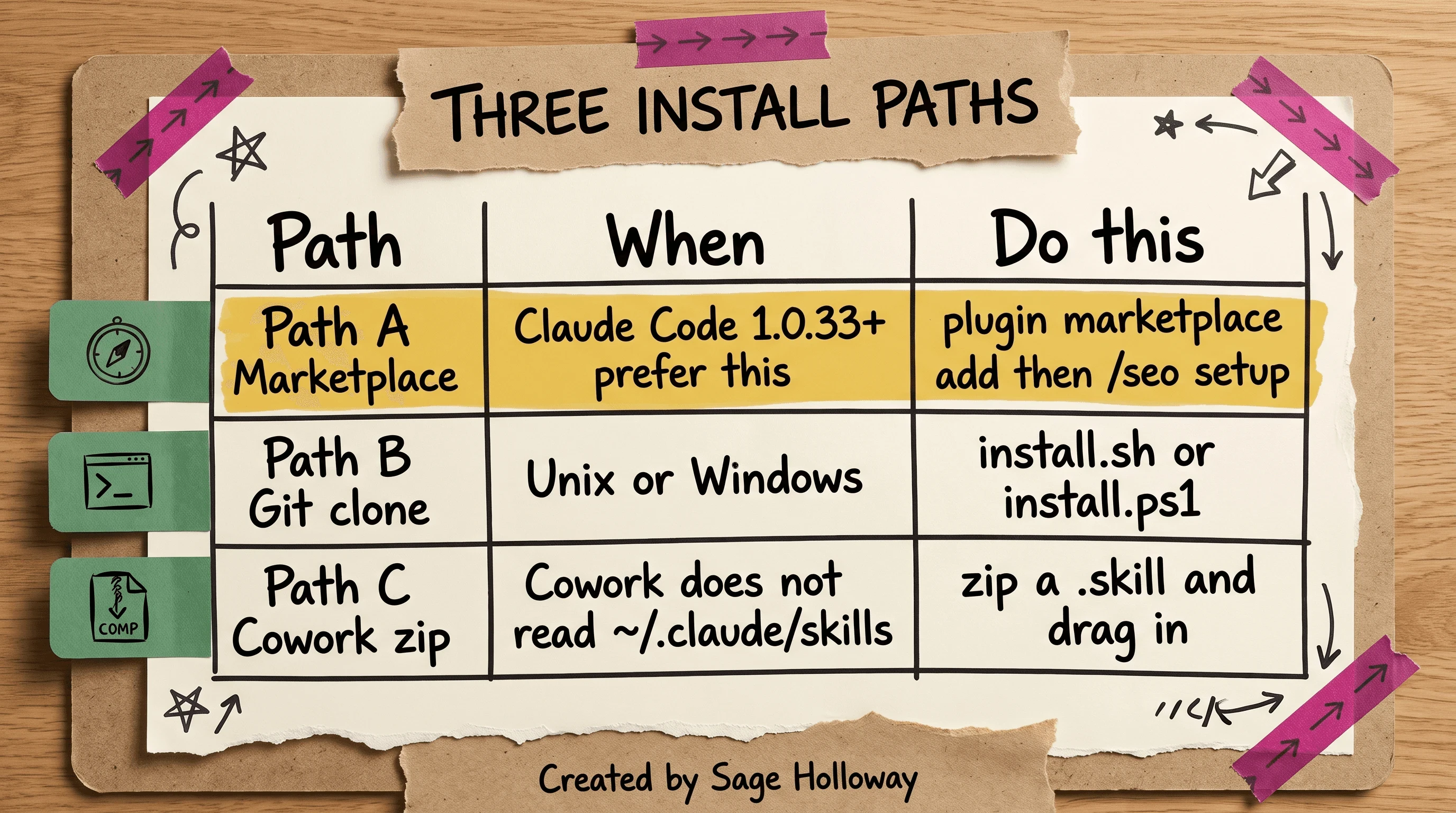
Prefer Path A on Claude Code 1.0.33+. Treat zip tutorials as the Cowork edge case.
Path A: native plugin marketplace (Claude Code 1.0.33+)
This is the modern pipeline. One-time marketplace add, then plugin install, then setup.
Add the marketplace:
/plugin marketplace add AgriciDaniel/claude-seoInstall the plugin:
/plugin install claude-seo@agricidaniel-claude-seoRun setup:
/seo setup
/seo setup configures the isolated Python environment and can download Playwright Chromium. Then run /seo doctor before you audit anything you care about. Doctor is the environment check, not a ranking call.
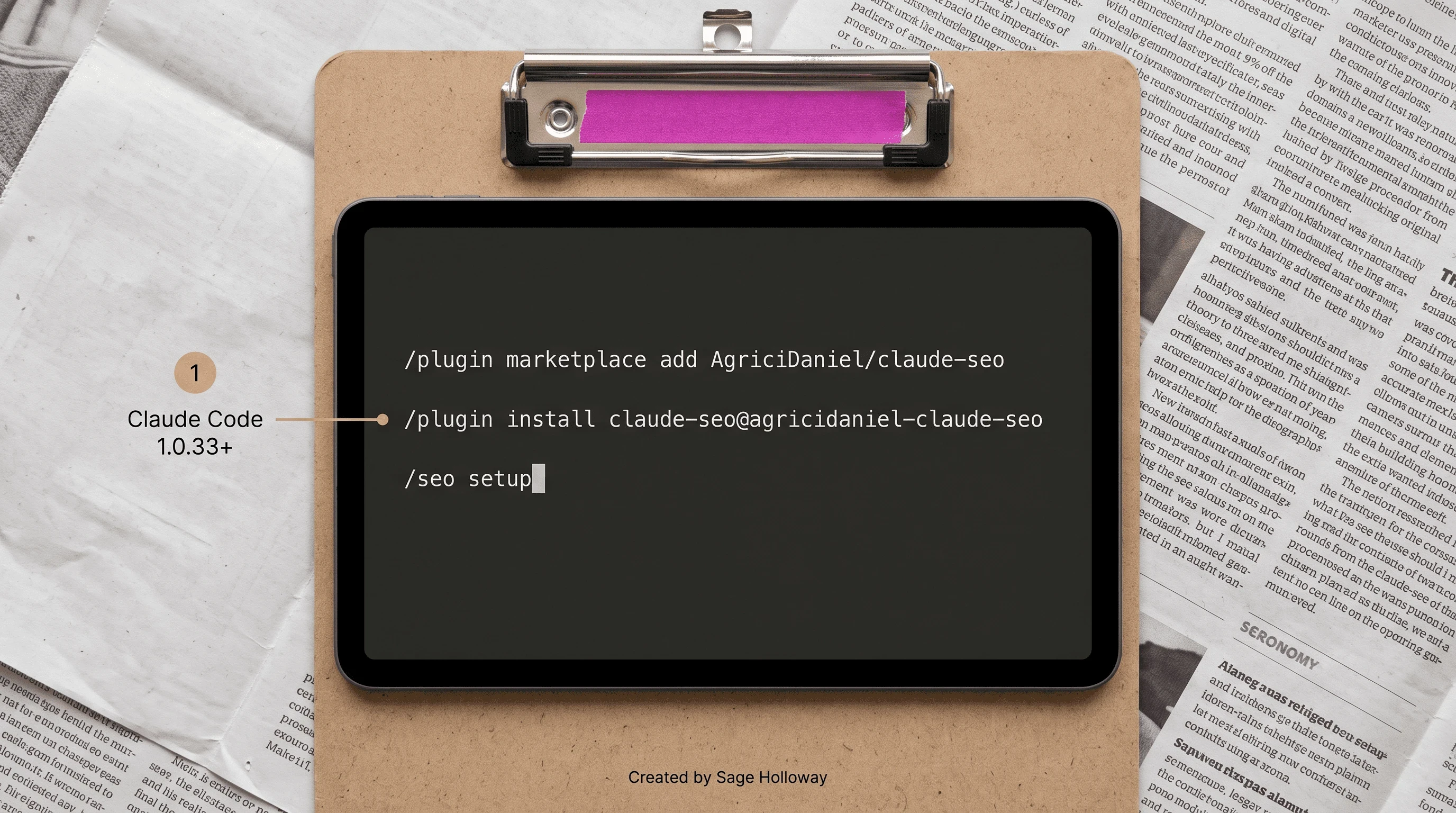
Path A is marketplace add, plugin install, then /seo setup.
This will not work if your Claude Code build is older than 1.0.33 and you insist on Path A anyway. Use Path B.
I tried the zip-and-upload path from a 2025 Desktop tutorial and it did not match the CLI I actually had open. The marketplace command was already in the README. I had been following a screenshot of a different surface.
Path B: git clone on Unix and Windows
Use Path B when you want the repo on disk, or when marketplace is not available.
Unix, macOS, Linux:
Windows PowerShell:
--depth 1 is a shallow clone: latest snapshot, not the full history. After install, you are back at /seo doctor, then a URL you control.
Path C: Cowork zip when ~/.claude/skills is not read
Cowork is an alternative Claude surface. It does not read ~/.claude/skills. Native Code does.
The r/ClaudeAI thread documents the workaround: clone, install dependencies, then zip a .skill file while excluding development metadata. Drag that zip into a Cowork chat and restart the session.
That zip recipe is medium-confidence community documentation. It conflicts with the native rule that non-marketplace skills move into ~/.claude/skills. Prefer Path A in Claude Code. Use Path C only when the surface cannot see that folder.
Nico / AI Ranking walks Claude Code SEO setup on video. Watch it next to Path A. Do not skip the labeled slash lines because a walkthrough exists.
https://www.youtube.com/watch?v=6REd0SJ8Q2A
Wire live SEO data with MCP
Model Context Protocol (MCP) is how Claude calls local tools and live APIs instead of guessing from training weights. Without it, a page-level audit can still run. Rankings, Search Console queries, and live SERP snapshots cannot.
Everyone keeps asking the model for rankings.
Rankings were never sitting in the weights.
That is the leak. Not the prompt. The missing token.
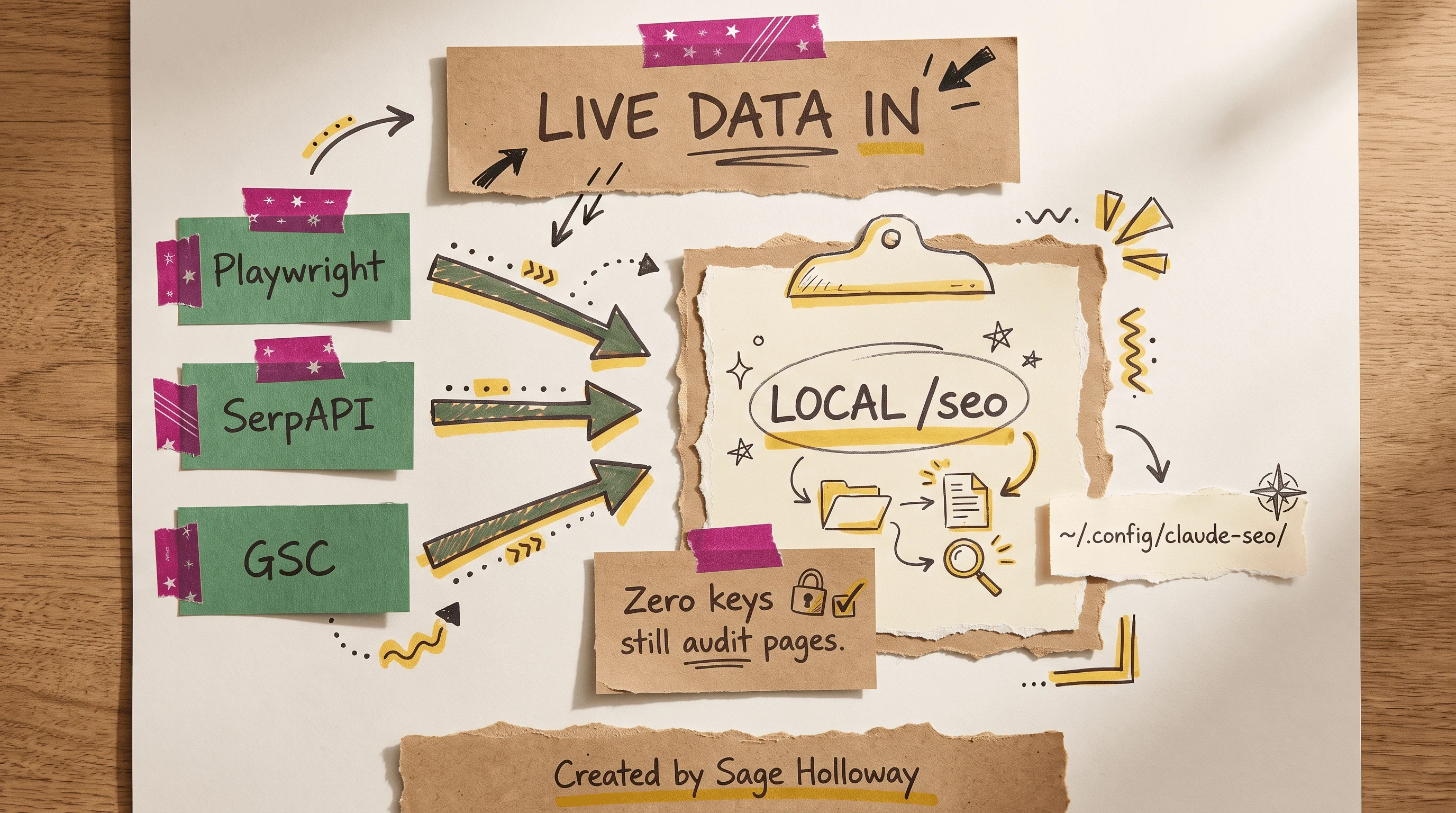
Playwright crawls. SerpAPI brings live SERP. GSC credentials live under ~/.config/claude-seo/. Zero keys still run page-level audits.
Zero API keys still run page-level audits. The GitHub README is explicit: the pack is functional without credentials. The 4-tier Google setup unlocks PageSpeed Insights, Search Console, CrUX, and Analytics. That is enrichment, not a gate.
Playwright and SerpAPI MCP
James Devonport's nocodesaas walkthrough wires two servers from the shell. These are claude mcp add lines, not slash commands.
Leave YOUR_API_KEY as a placeholder until you have a real SerpAPI key. SerpAPI is a live search-results API. Playwright is the crawler. Together they let Claude fetch pages and SERPs instead of inventing both.
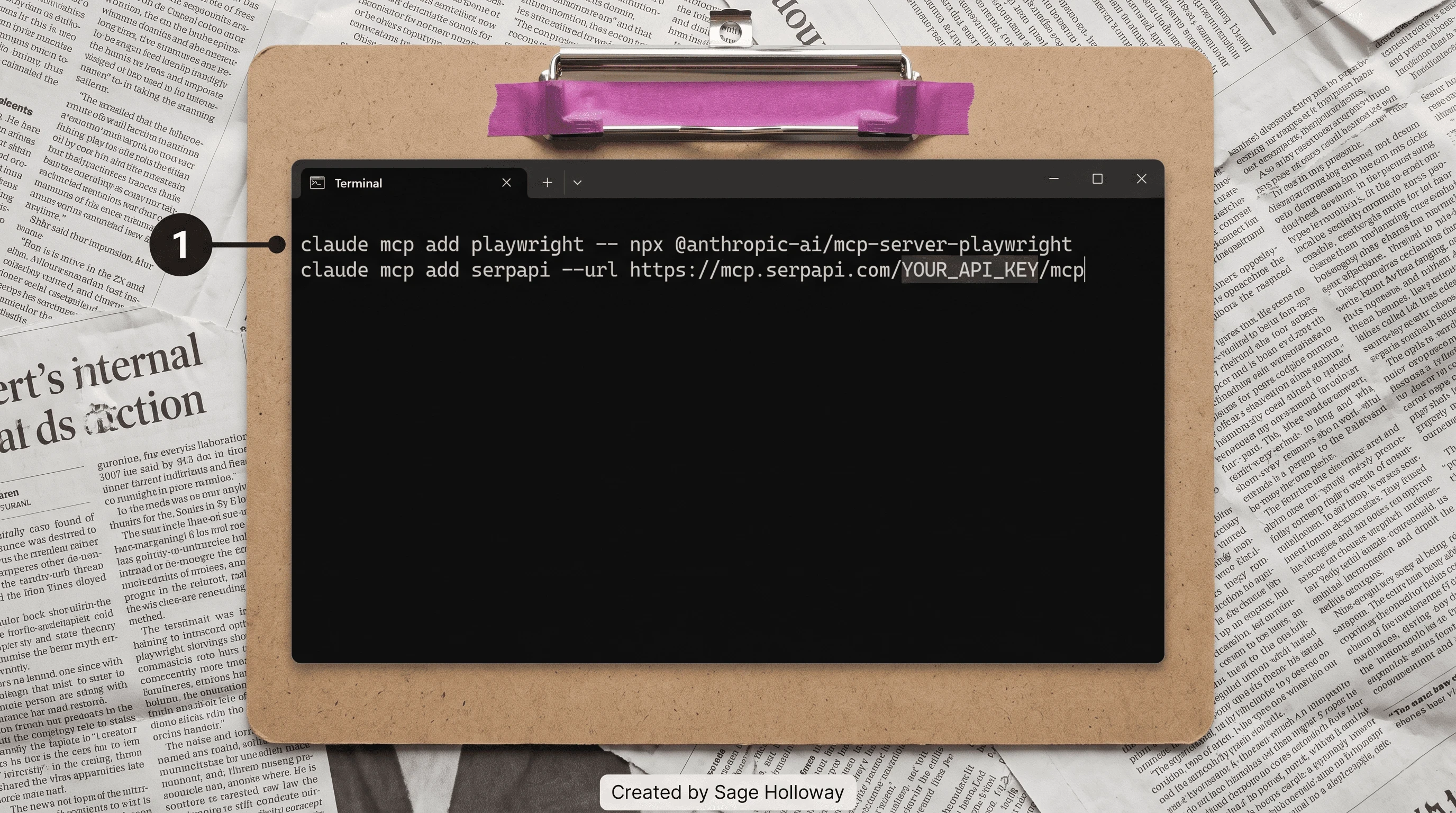
Wire Playwright and SerpAPI with claude mcp add. Do not paste a live API key.
I am not inventing DataForSEO steps. If the repo later documents that path, read it there. This page stays on the commands the notebook actually quoted.
Confused? Fair enough. Another way: Playwright is the pair of eyes. SerpAPI is the newspaper stand. Google Search Console is the mail from Google about your property. The model is none of those three.
Google APIs, GSC token, and the credentials directory
Prefer the GitHub wizard, /seo google setup, over a blog JSON file:
All local settings and Google API credentials live under ~/.config/claude-seo/ with 0o600 permissions. That octal mode means the file is readable and writable by you, and not by the rest of the machine. Treat it like a password file, because it is one.
Since version 2.2.0, Google API keys use the X-Goog-Api-Key header, not query parameters. If a blog post still shows ?key= on a PageSpeed URL, it is stale relative to this pack.
There is a second GSC recipe, from the ClaudeFast skills roundup, that runs Suganthan's GSC MCP as a Node process with GSC_REFRESH_TOKEN on ~/.mcp-servers/gsc-mcp/dist/index.js. When both exist, prefer /seo google setup from GitHub. The JSON below is blog-sourced (claim C8), not the README wizard.
Can Claude Code read a Google Search Console or crawler export without that JSON? Yes, as a file. A Screaming Frog CSV dropped into the workspace is a valid skill input. Live GSC queries need the token path above. Do not paste a CSV into Claude.ai and ask it to invent the missing columns.
But here is the thing. A zero-key audit looks complete. It will still rewrite a title, flag a missing H1, and score GEO blocks. It will not know your impressions, your queries, or who actually ranks for the term.
If you then ask the model for volume anyway, it will fill the blank. That is how the shrug in the preamble happens. Wire MCP before you brief a stakeholder with a number.
llms.txt is the other blank people like to fill. The pack can generate and audit the file. Google Search ignores it as a citation lever. Spend the words on a 134-167 word answer block instead.
Keep Project context apart from Skill procedures
This is the split ranking pages skip.
A Project is the workspace that holds persistent business context: brand voice, product facts, what you already shipped. A Skill is a portable procedure file Claude runs on demand. If you paste the audit recipe into the Project, every chat re-pays the token cost and the procedure drifts. If you paste last quarter's positioning into the Skill, every site you audit starts sounding like your homepage.
Hang the scale on the hook. Leave the cookbook on the shelf.
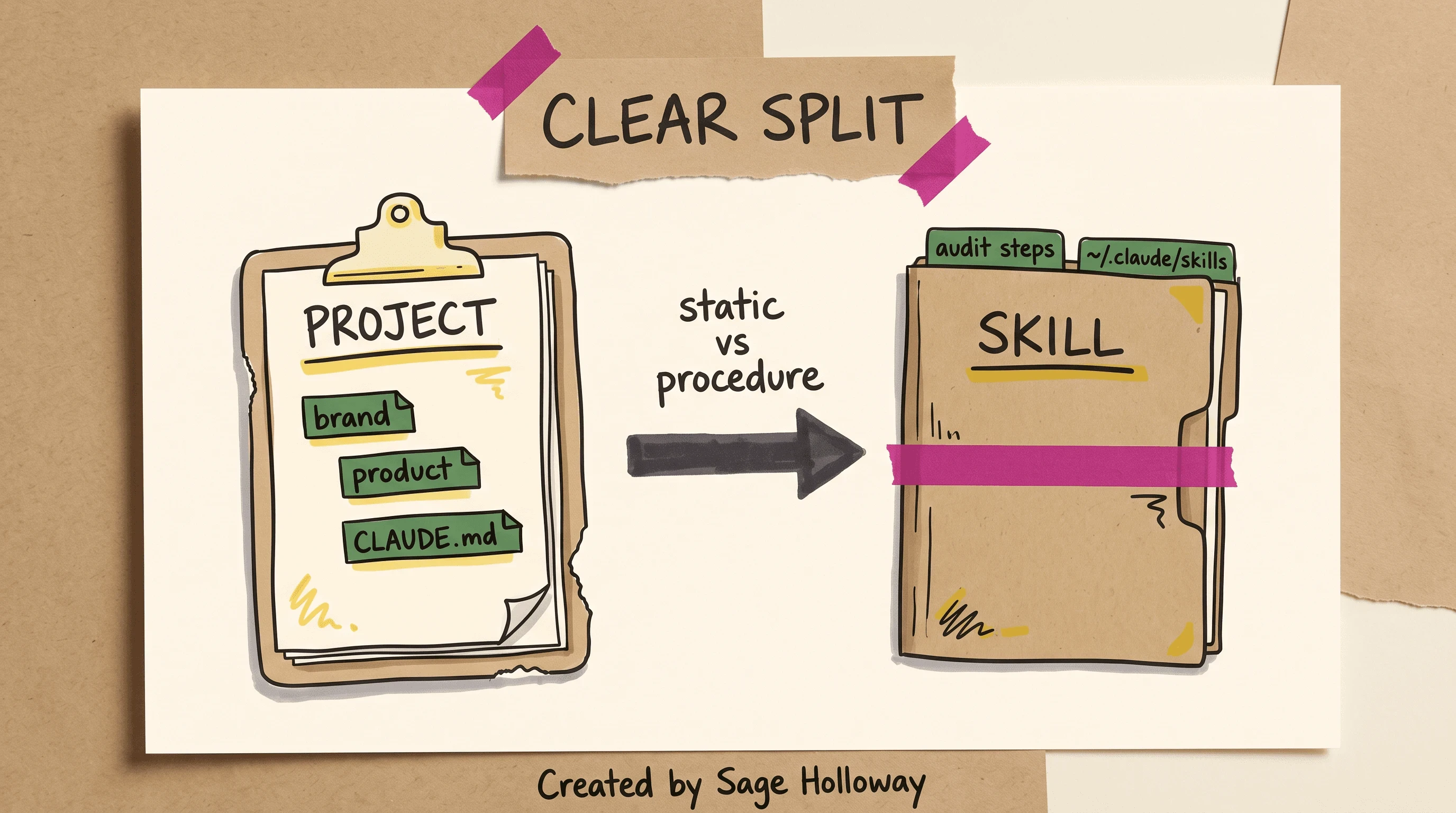
Projects hold brand and product context. Skills hold the audit procedure.
Prompts vs Skills vs Projects
A prompt is a one-off brief. You type it, you get an answer, you type it again tomorrow with a slightly different adjective. A Skill replaces that loop with a task-level module: steps, checks, tools. A Project is the room the work happens in, not the recipe.
Wyndo's Substack framing is the useful one: Skills are narrow specialists. Projects are the collaborative partner that remembers your preferences. Moving procedure into a Skill keeps the Project focused on evolving context. That is the opposite of a CLAUDE.md that tries to be both the brand book and the crawler.
An SEO Skill file can live in a marketing workflow. How you author and install marketing SKILL.md files is Claude Code marketing skills. This URL stays on the audit pack and the split.
What belongs in CLAUDE.md vs the skills folder
CLAUDE.md is a markdown file in the repo that tells Claude how this project works. For an SEO content repo, put static facts there:
Brand voice and claims you will actually stand behind
Product names, URLs, and what each page is for
Indexing constraints (staging vs production, noindex rules)
Which properties exist in Search Console
"Never invent rankings, citations, or keyword volume"
Put the audit procedure in the Skill. In native Claude Code, non-marketplace skills move into ~/.claude/skills. That is the InfraNodus install note, and it conflicts with the Cowork zip path above. If you are on Code, use the folder. If you are on Cowork, you already know you are on Path C.
Do not store API keys in CLAUDE.md. Keys live under ~/.config/claude-seo/ with 0o600. Do not store a 32-command cheat sheet in CLAUDE.md either. The plugin already has slash commands. The file should make the agent less creative about your business, not more creative about SEO theory.
What the 0-100 SEO health score actually measures
The claude-seo.md landing page publishes a weighted heuristic:
Content quality: 23%
Technical SEO: 22%
On-page: 20%
Schema: 10%
Performance: 10%
AI readiness: 10%
Those weights are not in the numbered GitHub claim ledger. They are a prioritization heuristic from the product page. Treat them as a queue, not as a Google metric or a rank forecast.
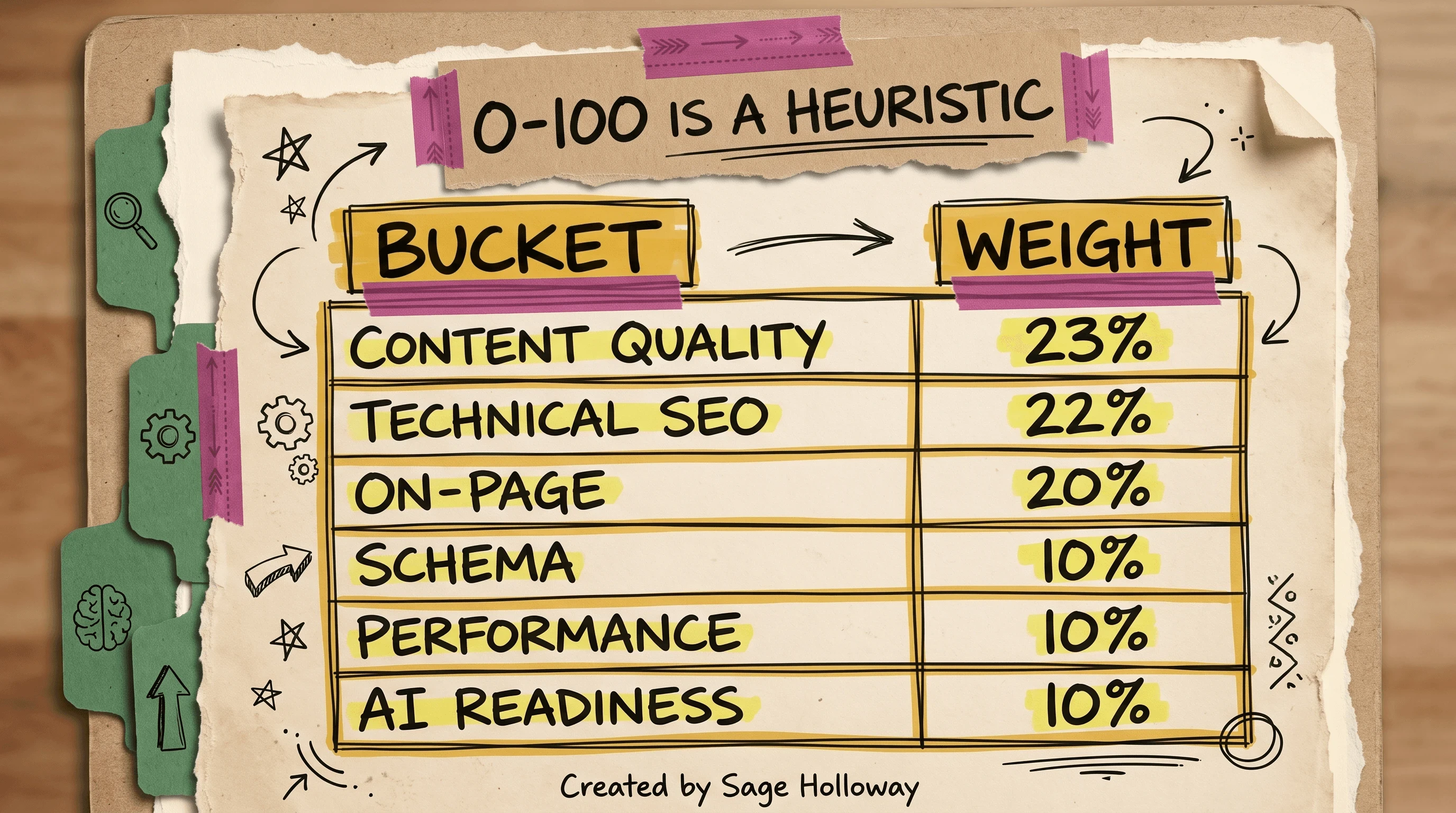
The 0-100 figure is a prioritization heuristic. It is not a rank predictor.
The supporting evidence and the action list are the useful output. The number is a sorting hat for your week. If two URLs come back far apart, start with the weaker one. Do not put the stronger score in a slide titled "Google health."
A rank tracker samples live SERPs over time. This pack can wire SerpAPI for a snapshot and GSC for your property. It does not become Semrush Position Tracking because you ran /seo audit twice. Keep the tracker if weekly movement is how you report. Use the heuristic to decide which URL the tracker should care about next.
I am not reconstructing PageSpeed dashboards or Search Console impression charts here. Those screenshots prove someone else's property on someone else's day. Your /seo doctor output plus a URL you control is the check that belongs on this page.
I am not copying the landing-page Lighthouse chart that put a site at 99 against Ahrefs at 26. That was lab, dated, and the wrong argument. Field CWV and a tracker you already pay for still win that fight.
Claude Code SEO vs Semrush, Screaming Frog, and Claude.ai
The CLI wins on repo-local audits and MCP. It does not replace a browser suite, a crawl you already trust, or a rank tracker.
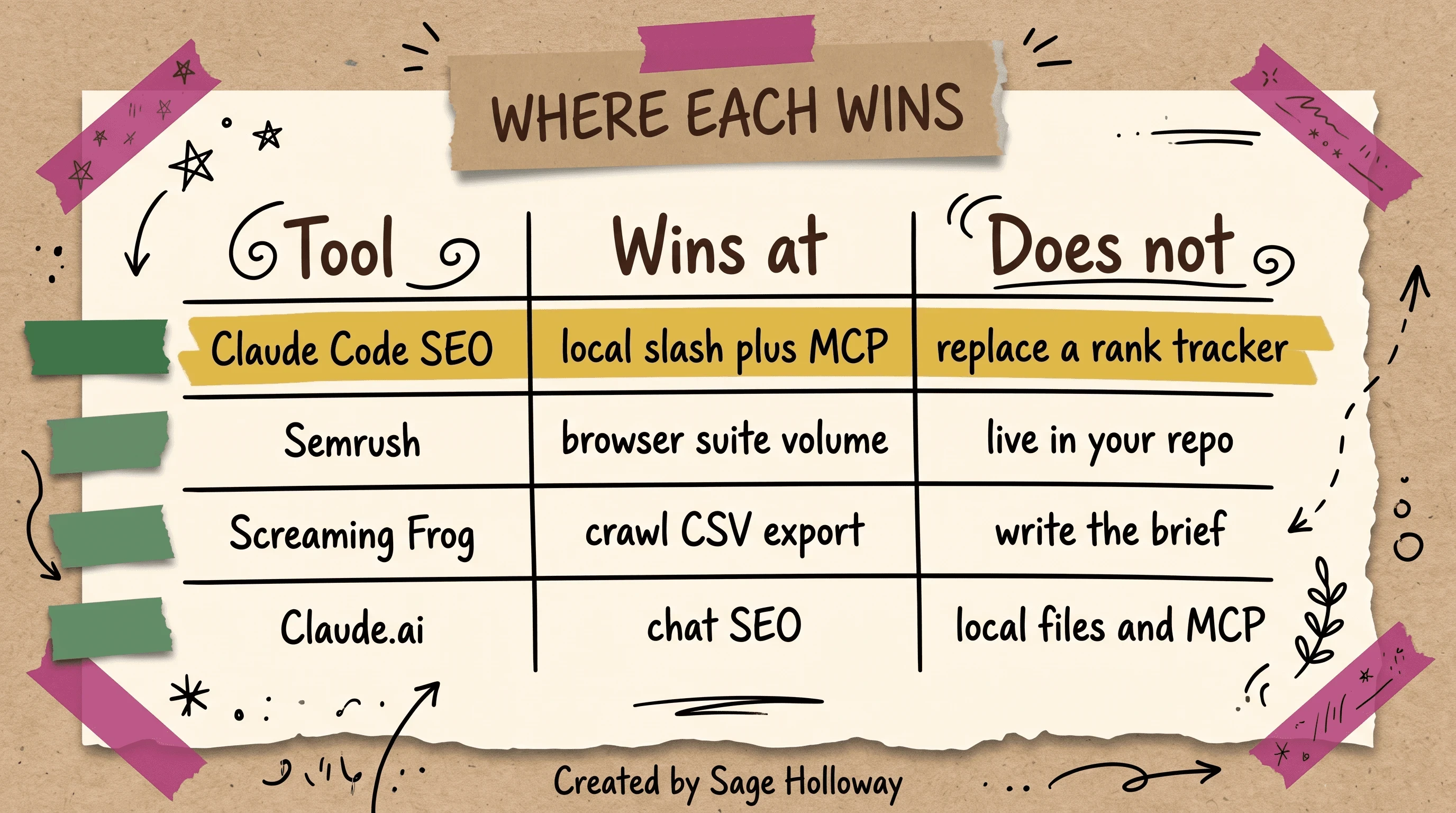
The CLI wins on repo-local audits and MCP. It does not replace a rank tracker.
Semrush (and Ahrefs, in the same chair) wins at browser-suite volume: keyword databases, tracking, and the reports your client already expects. It does not live in your repo. It does not read CLAUDE.md.
Screaming Frog wins at crawl CSV export. Pass that file to the skill. The frog does not write the brief. The skill should not pretend it crawled the whole site if you handed it a few hundred rows.
Claude.ai wins at chat SEO: paste a draft, argue about a title, no local files. The CLI wins when the page source, the skill, and the MCP pipes need to sit next to each other. If you only needed a paragraph rewritten, you did not need Path A.
SEO is a marketing channel. How a marketer uses Claude Code for campaigns and growth sits on Claude Code for marketing. Paid search beside organic is Claude ads. This page stays on the audit job.
Codex SEO, Buildprint, and OpenClaw are different products. Codex SEO is a Codex CLI port. Buildprint bridges Bubble. OpenClaw is a separate agent runtime. Do not treat them as synonyms for this pack.
ClaudeFast Growth Kit is a paid bundle with its own lettered workflows. Useful as a comparison post. Biased toward the sale. Filter those claims. The open-source default on this URL remains AgriciDaniel.
InfraNodus is a paid topical-graph MCP. Fine if you already bought it. This guide does not rebuild their chrome.
FAQ
How do I run an SEO audit in Claude Code?
Install the pack (Path A on Claude Code 1.0.33+), run /seo doctor, then /seo audit https://example.com on a URL you control. /seo page is the single-URL variant. Zero API keys still produce page-level findings; live rankings need MCP.
Can Claude Code rewrite titles, meta descriptions, and headings?
Not through an invented /seo rewrite-title flag. Use /seo content-brief <topic> for the brief, then the companion /blog write "target keyword" in the Claude Blog family when you are ready to draft. Keep title experiments in a branch, not on production, until a human accepts them.
How do I use Claude Code for technical SEO (crawl issues, schema, internal links)?
/seo audit and /seo schema cover crawl-style issues and JSON-LD. Live types include Organization, Product, LocalBusiness, and Video. FAQPage rich results retired 2026-05-07, so do not chase FAQ markup for snippets. Internal-link gaps show up in the audit action list; the pack does not replace a crawler's full graph.
Can Claude Code read a Google Search Console or crawler export?
Yes. Drop a Screaming Frog CSV into the workspace and point the skill at it. For live Search Console, run /seo google setup (preferred) or the blog-sourced GSC MCP JSON with GSC_REFRESH_TOKEN. Credentials belong under ~/.config/claude-seo/ with 0o600 permissions.
Claude Code vs Claude.ai for SEO: when does the CLI win?
The CLI wins when you need local files, slash commands, and MCP in the same workspace. Claude.ai wins for a fast title argument with no repo. If the job is "audit this property and do not invent volume," stay in Code.
How do I stop Claude Code from inventing rankings, citations, or keyword volume?
Wire MCP (SerpAPI, GSC) before you ask for those numbers, and put "never invent rankings, citations, or keyword volume" in CLAUDE.md. llms.txt is not a citation lever Google honors; do not treat a generated file as proof of AI visibility. A zero-key audit should stay on page-level signals.
What belongs in CLAUDE.md for an SEO content repo?
Static business context: brand, product, staging rules, Search Console properties, and the no-invention line. Procedural audit logic belongs in the Skill, which native Code loads from the plugin or from ~/.claude/skills. Do not put API keys in CLAUDE.md.
Can Claude Code replace a rank tracker, or do I still need one?
You still need one if rankings over time are the job. The 0-100 health score is a heuristic (content 23%, technical 22%, on-page 20%, schema / performance / AI readiness 10% each). SerpAPI can snapshot a SERP. GSC can show your property. Neither is Position Tracking.
Does Claude Code SEO work on React or Next.js single-page apps?
Yes, with Playwright Chromium. v2 auto-detects empty shells and switches to a rendered fetch. Scroll-bound hydration can still look noisy; cross-check with the seo-visual subagent. This will not work if you skip Playwright and then file bugs against a blank document.
The marketplace command will keep spreading. The zip tutorials will linger in search for another year anyway. What I would watch next is not another 32-command table. It is whether teams treat a 0-100 heuristic as a forecast because the prose sounded like Search Console. The camera is getting better. The mail from Google still has to be opened.
Hang the scale on the hook this week. Path A if you are on Claude Code 1.0.33+. Then /seo doctor, then /seo audit on a non-production URL with zero API keys. Read the findings out loud. Refuse any ranking, citation, or volume number that did not come through MCP. If a figure would embarrass you in Slack, it is not ready, no matter how fast the slash returned.
Until then...
Sage
PS. I still have a sticky note on the bezel that says "did this number leave the machine." It is ugly. It has survived three laptop upgrades. The day I throw it out is the day I start trusting a scorecard again.
Author
Practical guides, tool teardowns & AI engineering workflows.


