AI Watermarks
How to Detect AI Watermarks Without Fooling Yourself

Sage Holloway
24 min read
Go back to blog
SHARE

You paste one paragraph into three checkers and get three different answers. One finds an invisible space. One announces “AI” with alarming confidence. The third finds nothing. Somewhere between those results is evidence, but it is probably not the verdict the brightest button promised.
To detect AI watermarks, first identify the medium and signal type. In text, scan for invisible Unicode characters such as U+200B and U+202F, then treat statistical detection as a separate, probabilistic test. For images, audio, and video, check provenance metadata and provider-specific signals such as SynthID. A positive or negative checker result is not universal proof of authorship because each method detects only particular signals.
That is the direct answer. The useful answer takes a little more care, because “AI watermark” now describes at least four technically different things. This guide covers digital text, images, audio, and video. It does not cover the physical trays and fluids used to reveal watermarks in stamps or paper, even though those products sometimes appear for the same search.
AI watermarks live in different layers, so each one needs a matching test.
Here is the route through the guide:
Identify the kind of signal you might have.
Inspect text and document formatting without mistaking it for authorship proof.
Check media using provenance records and provider-specific detectors.
Build a reproducible developer workflow.
Interpret every result within its actual limits.
Start by identifying the watermark you are looking for
Imagine a suitcase arriving with no name tag. You could inspect the paper label, look for a mark stamped into the shell, weigh the contents, or ask the airline to search its private baggage system. Each check answers a different question. A missing label does not mean the suitcase has no owner, and a familiar weight does not identify the passenger. You need to know which trace you are testing before the result means anything.
AI watermark detection works the same way. A universal AI watermark detector sounds convenient, but the underlying evidence sits in different layers and demands different tests.
Invisible Unicode characters
Unicode is the standard that assigns a code point, or unique identifier, to characters used by computers. Some Unicode characters take no visible width. Others resemble a normal space while behaving differently around line breaks.
Examples include the zero-width space (U+200B), zero-width non-joiner (U+200C), and narrow no-break space (U+202F). A character viewer or exact code-point search can reveal them. That result establishes that the characters exist. It does not establish why they exist, who inserted them, or whether a language model wrote the surrounding words.
This distinction matters because online claims often call any unusual spacing character a ChatGPT watermark. Hidden characters can enter text through copying, publishing software, typography, document conversion, or model output. The presence is observable. The origin often is not.
If that narrow question is the one you are investigating, the companion guide on whether ChatGPT leaves a watermark follows the claim back to its evidence without broadening this workflow.
Statistical token patterns
A token is a small unit a language model processes, often a word or part of a word. A statistical watermark can subtly favor one permitted group of tokens over another while generating text. A verifier then checks whether the finished token sequence matches that scheme more strongly than chance would predict.
This is not a hidden character. You cannot reveal it by turning on formatting marks, pasting into Notepad, or searching for a code point. A genuine statistical test may require knowledge of the watermarking scheme, model behavior, or a private verification key. That is why a public GPT watermark checker and a provider-held verifier are not interchangeable.
Provenance metadata
Provenance metadata is information attached to a file about where it came from and what happened to it. C2PA, the Coalition for Content Provenance and Authenticity, defines a standard for cryptographically signed content credentials. IPTC is a long-standing family of metadata fields used in publishing and media workflows.
These records can provide strong evidence when they remain attached and validate correctly. But metadata may be absent, removed during export, or stripped by a social platform. No metadata is not the same as human-made.
Pixel and audio signals
Some systems embed patterns directly into image pixels, audio waveforms, or video frames. The changes are designed to remain imperceptible to a person while surviving at least some common transformations. Detection then requires a tool built for that signal.
Google DeepMind describes SynthID as a watermarking and identification system for AI-generated content across several media types. Its detector looks for SynthID signals in supported content. It is not a global search for every watermark from every generator.
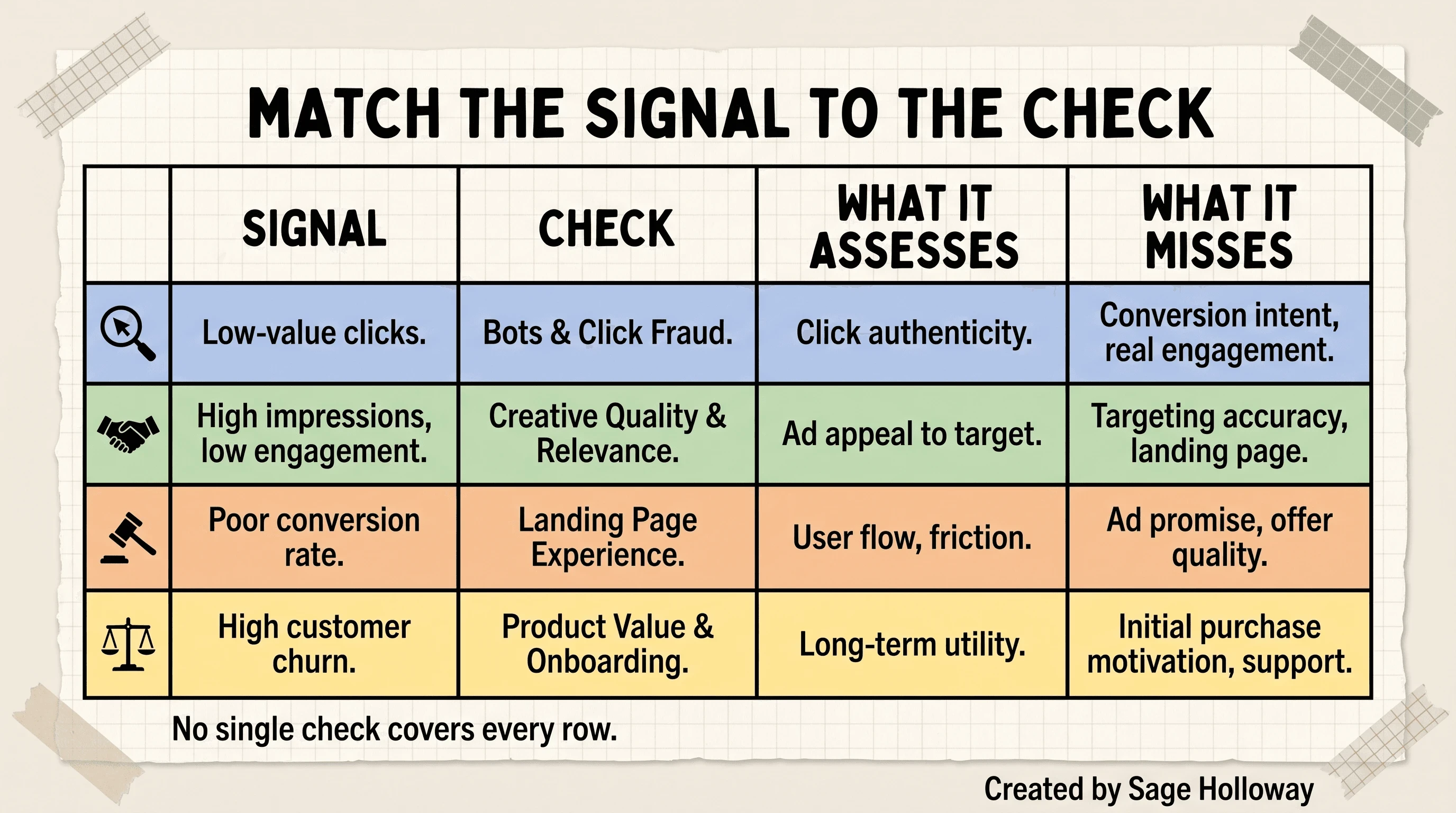
First identify the signal: Unicode, token statistics, provenance metadata, or media-level patterns. No single check covers every row.
So when a page calls itself a ChatGPT watermark detector, OpenAI watermark detector, or generic watermark detector, ask one question before uploading anything: what exact signal does it inspect? If the answer stays vague, the result will stay vague too.
Check AI text for invisible characters
The cleanest text check is also the narrowest. You are looking for specific characters, not trying to infer the writer’s identity from vibes.
Preserve the original text before you touch it. Save a copy in a plain UTF-8 file or duplicate the source document. UTF-8 is a common way of encoding Unicode characters as bytes. Preservation matters because cleaning the text destroys the very evidence you wanted to inspect.
Reveal hidden characters in a browser tool
For a quick watermark check:
Copy a representative passage from the original source.
Paste it into the SoSciSurvey character viewer, a source-backed utility that exposes each character and code point.
Look for unexpected entries such as
U+200B,U+200C, orU+202F.Record the code point, count, and location before changing anything.
Compare the suspicious character with ordinary spacing in the same document.
Do not paste confidential drafts, customer data, contracts, or unpublished research into an unknown web service. A browser tool may be convenient, but “runs in your browser” and “never transmits data” are separate claims. Verify the privacy policy and network behavior, or use a local editor for sensitive material.
Some commercial tools impose limits that affect the usefulness of a scan. One source-backed service offered 500 characters to free users, 1,500 to signed-in users, unlimited use on its premium tier, and a 60-second cooldown between free scans at the research date. Those are product limits, not scientific limits. They can also change.
Inspect and replace exact code points in an editor
A code editor is better when the text is long or you need a reproducible count. The sourced walkthrough below uses Sublime Text to find narrow no-break spaces and zero-width spaces. The same principle applies in any editor that can search exact Unicode characters or regular expressions.
<iframe width="560" height="315" src="https://www.youtube.com/embed/XLyuskV2FuY" title="Video walkthrough showing how to find U+202F and U+200B characters in Sublime Text" frameborder="0" allow="accelerometer; autoplay; clipboard-write; encrypted-media; gyroscope; picture-in-picture; web-share" allowfullscreen></iframe>
Verified walkthrough: reveal and batch-remove narrow no-break and zero-width spaces in Sublime Text.
The safe sequence is inspect, count, replace, compare. Do not begin with “replace all.” First confirm that the selected symbol really maps to the intended code point. Then decide whether it should become an ordinary space, an empty string, or something else. A narrow no-break space between a number and unit may have a legitimate typographic job. Deleting it can join words that should remain separate.
For a local scripted check, this short Python example identifies three code points without altering the file:
This code is an inspection example, not a universal cleaner. Languages that use joining behavior can rely on characters such as U+200C, so blind deletion can damage legitimate text.
Understand what cleaning changes
Removing a zero-width character changes the text’s code-point sequence and may fix CMS imports, odd wrapping, search mismatches, or database comparisons. It does not automatically change sentence structure, vocabulary distribution, or model perplexity. Perplexity is a statistical measure of how predictable a sequence appears to a language model.
I once treated a clean character scan as a clean bill of health. It was a tidy result and a useless conclusion, because I had tested the bytes while worrying about the writing pattern.
That is the trap. Unicode cleanup is formatting hygiene. Statistical detection is a different operation.
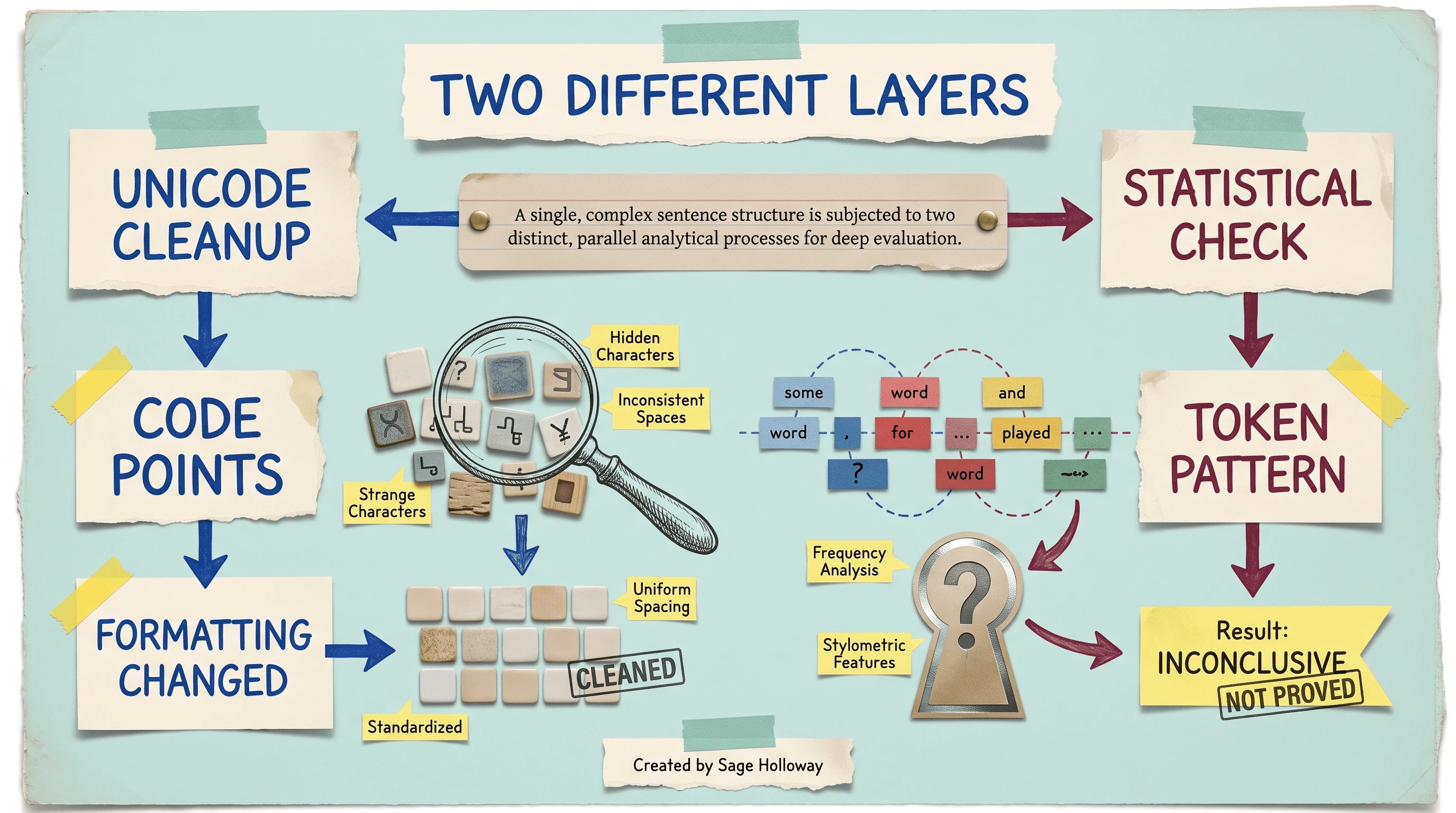
Unicode cleanup and statistical detection inspect different layers of text.
If your actual job is cleaning prose rather than verifying evidence, keep it separate. Our guide to removing Claude watermark artifacts covers that workflow, while the ChatGPT em dash remover guide deals with visible punctuation as style, not secret proof.
Inspect Word, Google Docs, and uploaded files
Documents add another layer because what you see on the page may differ from the underlying character sequence. Word can reveal layout marks, but its visible paragraph symbols do not automatically label every Unicode code point for you. Google Docs can preserve hidden characters without offering a forensic character panel.
Reveal formatting marks in Microsoft Word
In Word, duplicate the file first. Then enable Show/Hide formatting marks from the paragraph controls. This exposes spaces, paragraph breaks, tabs, and other layout boundaries, which can help you locate suspicious regions.
Use that view as orientation, not final identification. If a gap behaves strangely, copy a small surrounding sample into a character viewer or save a text copy for local code-point inspection. Search for the exact suspect only after confirming it.
A visible em dash (U+2014) deserves its own warning. It is punctuation, not an invisible watermark. Frequent use may look like a model’s stylistic habit, but a habit is not a cryptographic signal and one character cannot prove authorship.
Copy Google Docs text into a character viewer
For Google Docs, make a duplicate and copy a short passage into a trusted character viewer or local plain-text file. Compare three things:
The original passage in Docs.
The revealed code-point sequence.
The cleaned passage pasted back into a fresh test document.
This catches accidental word joining and spacing changes before they spread across the full document. If you are auditing evidence, record the document revision and keep the untouched copy. If you are merely fixing layout, visual inspection after replacement may be enough.
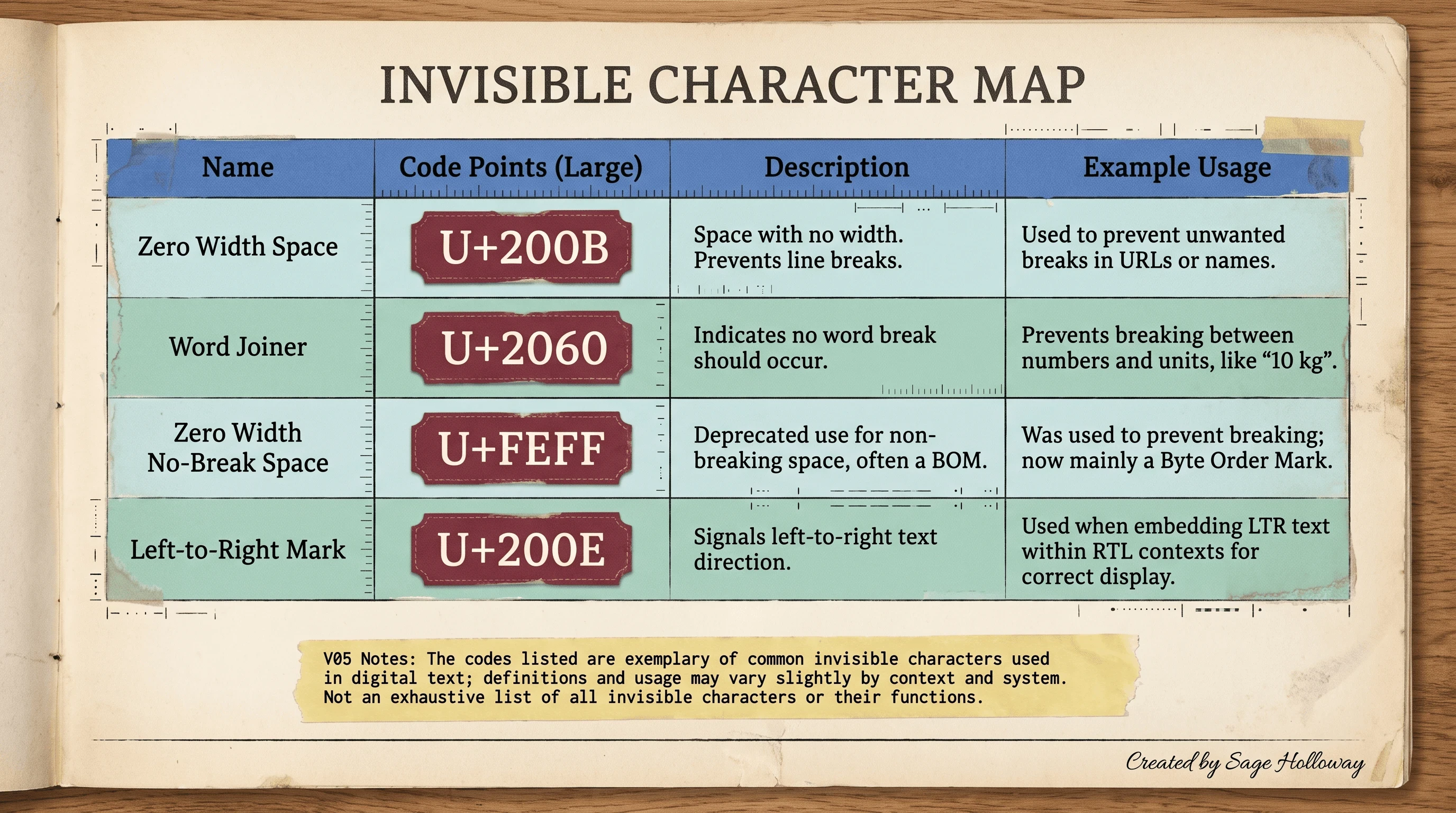
Exact code points help distinguish invisible characters from ordinary spaces and punctuation. Finding a character does not prove authorship.
Check supported files without losing sight of limits
Uploaded-file checkers vary by format and size. At the research date, one source-backed media checker accepted JPEG, PNG, WebP, HEIC, and HEIF files up to 8 MB. A separate document cleaning service accepted .docx and .pages files up to 50 MB.
Those limits tell you what a product accepts. They say nothing about which layer it checks or how reliable its conclusion is. Before uploading, confirm:
whether processing happens locally or on a remote server;
whether the service stores inputs or outputs;
whether it scans text characters, metadata, visual signals, or all three;
whether conversion strips evidence before the scan begins;
whether the returned result includes raw findings you can preserve.
This will not work if your workflow converts the source before preserving it. Exporting a document, taking a screenshot, or pasting through another application can remove metadata and normalize characters. Keep the original first. Test copies second.
Check images, audio, and video with the right evidence
Media verification usually has two evidence lanes: provenance records attached to the file, and signals embedded inside the content itself. Run them separately. Then compare what each lane actually says.
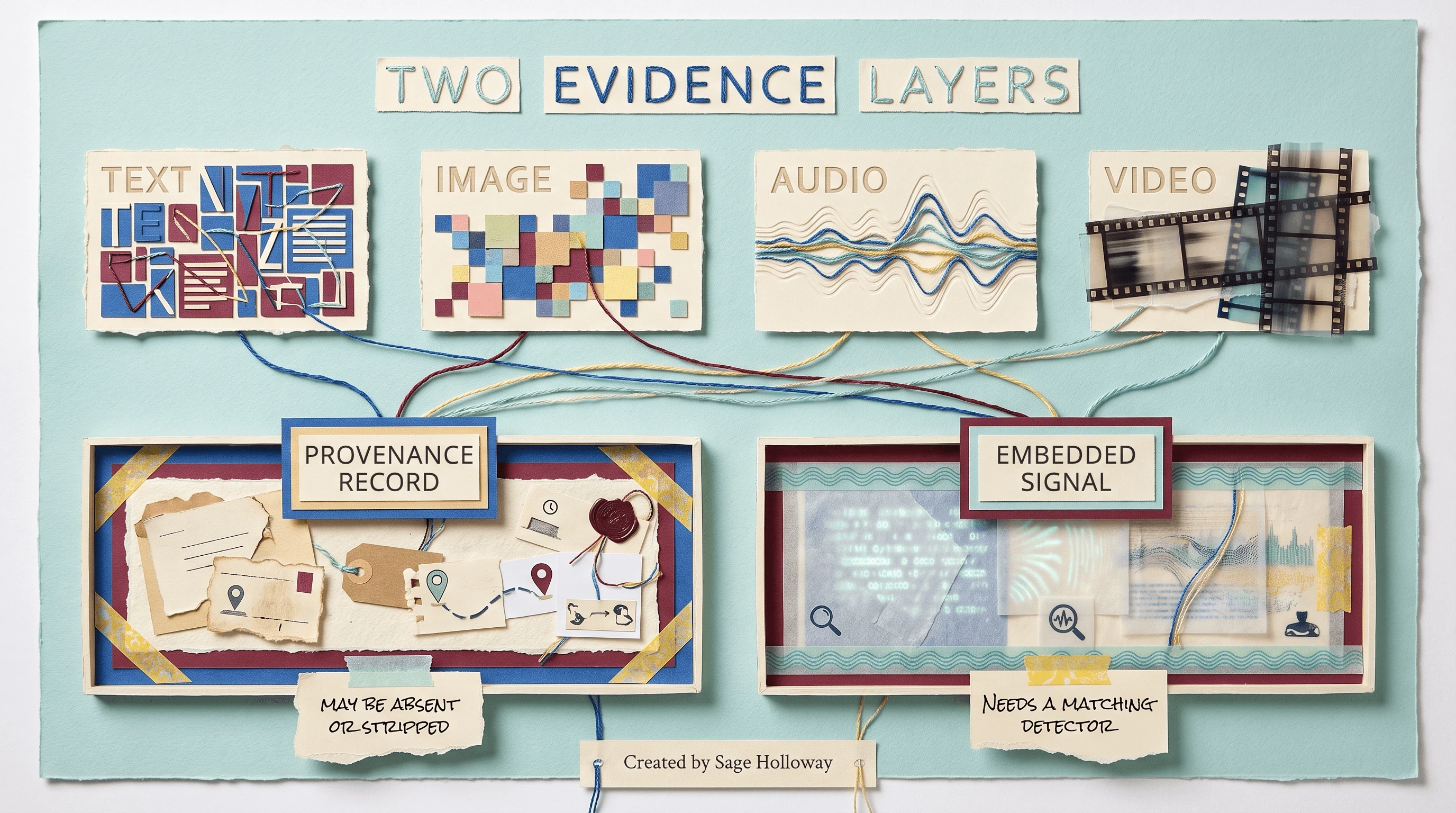
Metadata and embedded signals are separate evidence layers and may survive differently.
Look for provider-specific watermarks
Start with the provider if you know it. A SynthID check is appropriate for supported content created with Google tools that embed SynthID. DeepMind says its watermark is designed to survive common modifications while remaining imperceptible, and its detector can identify supported SynthID-marked content. Read the official SynthID overview before treating a result as broader than that ecosystem.
The practical workflow is simple:
Preserve the original file and calculate a cryptographic hash if the stakes justify it. A hash is a compact fingerprint of the file’s bytes that changes when the file changes.
Identify the claimed source or generator.
Use the matching official or provider-supported detector when available.
Save the raw result, time, tool version, and input hash.
State that the result applies to the supported signal, not all possible AI generation.
A negative provider result may mean the content lacks that signal, the signal was damaged, the file came from another generator, or the media falls outside supported conditions. Those possibilities are materially different.
Read provenance metadata separately
Next, inspect C2PA content credentials and IPTC metadata. A valid signed credential can record origin and edits in a tamper-evident chain. “Tamper-evident” means later changes can invalidate the signature or break the recorded chain. Ordinary IPTC fields can still be useful, but they may be editable and should not automatically receive the same evidentiary weight as a valid signature.
Metadata is fragile in everyday distribution. Screenshots, re-encoding, messaging apps, and publishing platforms may remove it. If a credential is present and valid, record what it asserts. If it is missing, record only that it is missing.
Treat classifiers as bounded evidence
A post-hoc classifier examines content after creation and estimates which class it resembles. It is different from a detector checking a known embedded watermark. Classifiers inherit the strengths and blind spots of their training datasets.
One open-source image watermark project reported validation accuracy of 93.44% for its ConvNeXt-Tiny weight, 84.42% for a larger ResNeXt101 variant, 77.86% for an ARKseal model, and 76.22% for a smaller ResNeXt50 variant. These figures come from that project’s validation data. They do not establish universal performance on your screenshots, crops, illustrations, or compression settings.
A separate JoyCaption community tool described OWLv2 classification at 95%, YOLO detection at 90%, and about 70% mAP50-95 for correctly sizing the bounding box. A bounding box is the rectangle drawn around a detected region. mAP50-95 is an object-detection metric evaluated across overlap thresholds. Classification and box sizing answer different questions, so the percentages should not be placed on one imaginary league table.
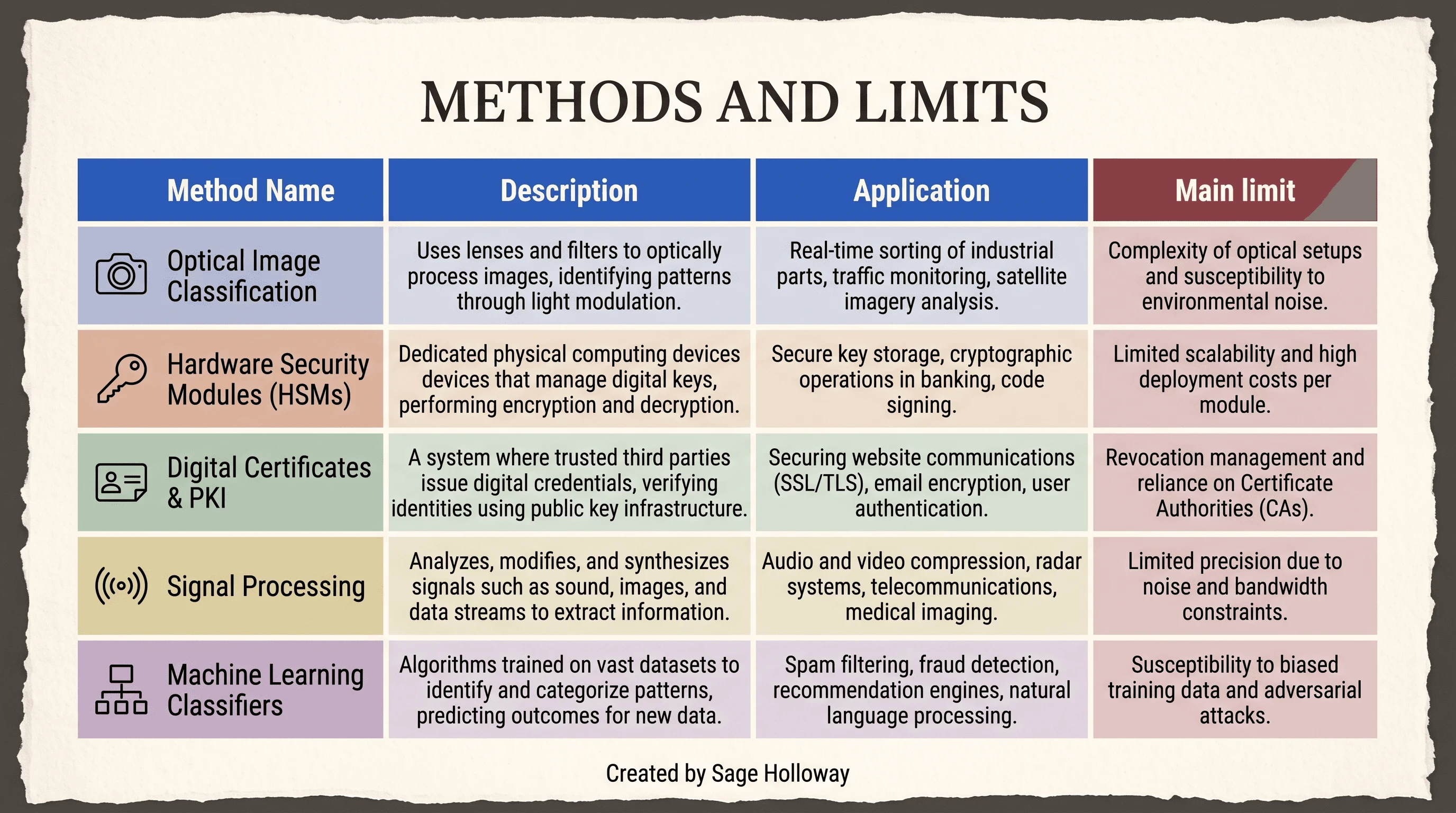
Every detection method is bounded by its signal, access, and failure modes.
Build a repeatable developer verification workflow
For a developer, the goal is not merely to get a label. It is to make the result reproducible by someone who did not watch you run the test.
Run a sourced local image-classification example
The boomb0om watermark-detection repository documents a PyTorch pipeline. PyTorch is a software framework for running machine-learning models. The source-backed setup commands are:
Its documented predictor example initializes a ConvNeXt-Tiny model, supplies a cache directory for weights, and runs on the first CUDA device. CUDA is Nvidia’s platform for GPU computing.
Here fp16=False disables half-precision arithmetic, num_workers=8 allows eight data-loading workers, and bs=8 sets a batch size of eight images. These are sourced examples, not tested recommendations for every machine. Record the repository revision, model weight, environment, and input set alongside your result.
Call and interpret a watermark API
An API, or application programming interface, lets software send a structured request to a remote service. The claim ledger includes this Nyckel request pattern:
The sourced response shape resembles:
Do not read 0.92 as a 92% chance that a human made the image. It is confidence in the service’s assigned class under that function’s model and label setup. To interpret it, you need the model definition, training classes, threshold policy, and validation context.
Remote APIs also create a privacy and chain-of-custody issue. A URL in the request must be accessible to the service. Do not expose confidential evidence on a public URL merely to make an example command work.
Record model and bounding-box limits
Use a five-stage evidence chain:
Preserve the original and record its hash.
Identify the suspected signal and medium.
Run only a matching check.
Save raw output, model identity, configuration, and time.
Document dataset, threshold, localization, and transformation limits.
Classification asks whether a class appears present. Localization asks where the detector believes it appears. A model can classify an image correctly while drawing a poor bounding box around the watermark. Keep those outputs separate in your notes.
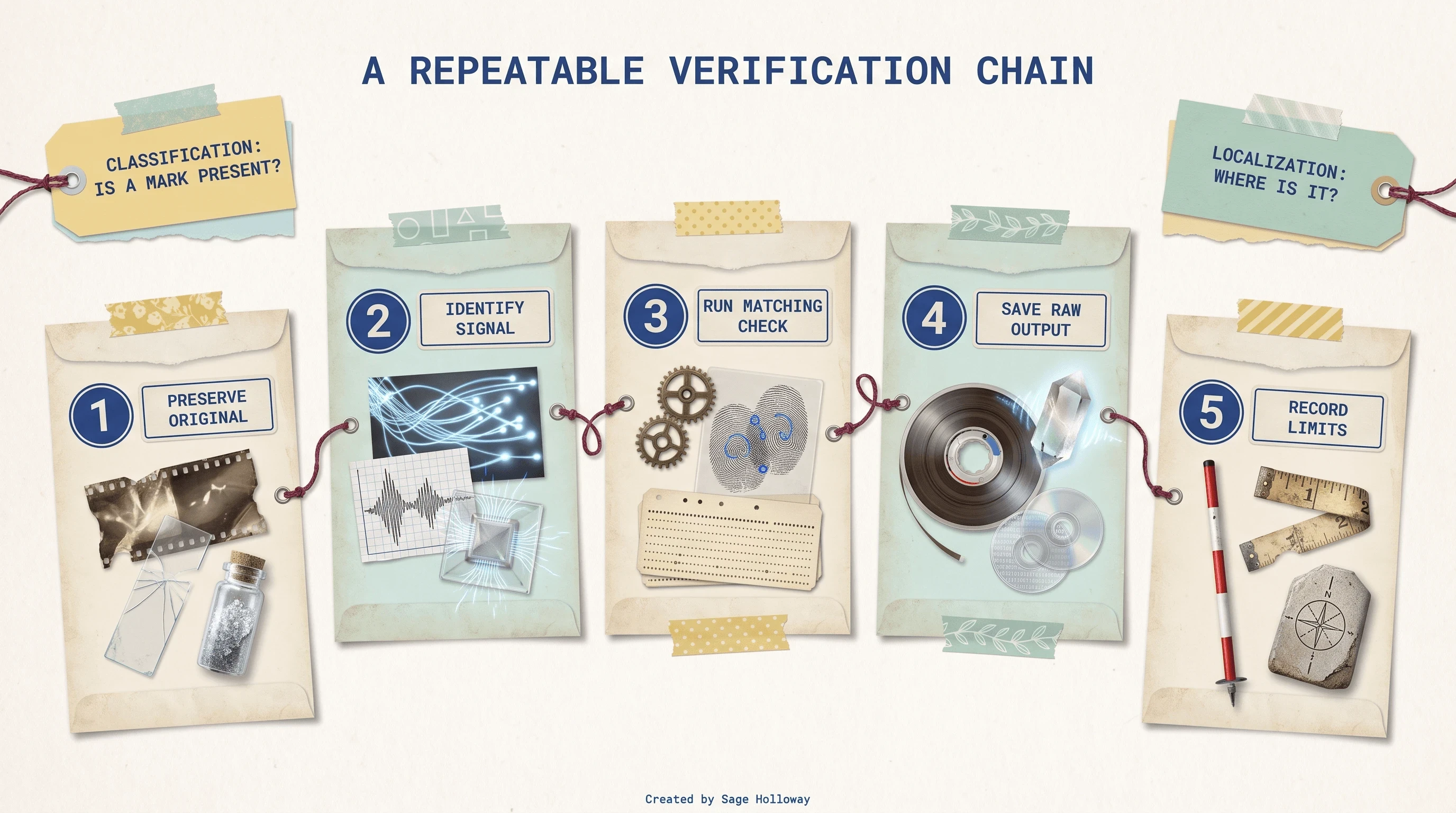
Preserve the input, run a matching test, save raw output, validate limits, and state a bounded conclusion.
What a watermark result proves, and what it cannot prove
This is where otherwise careful guides get reckless. They move from “the tool found a signal” to “we know who wrote it” without showing the bridge.
Unicode cleanup is formatting hygiene
An exact code-point scan can prove that a specific sequence contains U+200B or U+202F. It cannot, by itself, prove that ChatGPT inserted it intentionally, that OpenAI uses it as a cryptographic watermark, or that the surrounding prose came from any particular model.
Likewise, removing those characters proves that the cleaned version no longer contains them. It may solve line wrapping, CMS, indexing, or copy-paste problems. It does not prove that a general AI detector will change its score because general classifiers may examine syntax, predictability, and vocabulary instead.
This is why “check ChatGPT watermark” can describe two very different jobs. One person wants clean formatting. Another wants authorship evidence. A chat gpt watermark checker that silently treats those jobs as identical is giving one of them the wrong answer.
Statistical marks require private or model-specific verification
Statistical text watermarks are keyed schemes. The generator nudges token selection according to a hidden rule, and a matching verifier looks for that rule across enough text. Short samples, heavy editing, translation, and an unknown model can weaken the signal or make testing inappropriate.
The NotebookLM claim ledger is explicit about one current limitation: public tools cannot read Claude’s private text watermark and hand you an authoritative verdict. That is the reason our Claude AI text watermark explainer treats public checks as limited evidence rather than magic key readers.
An OpenAI watermark detector or GPT watermark detector faces the same basic burden. It must name the scheme it verifies and show that it has the access needed to verify it. A generic style classifier may still offer a probability score, but that is not the same as extracting a provider watermark.
The practical consequence is uncomfortable: sometimes the correct public result is “not verifiable with this tool.” People dislike that answer because it does not fit inside a green badge. It is still the honest answer.
Confidence scores are not authorship verdicts
A threshold converts a continuous score into a label. One sourced tool described scores above 60% as likely watermarked and 35% to 60% as inconclusive. Those boundaries belong to that tool’s heuristic, or rule-of-thumb, classification. They are not universal laws.
Before accepting a score, ask:
What population and dataset produced the threshold?
Does the test detect an embedded signal or classify appearance?
How long or large must the sample be?
Which transformations were tested?
What are the false-positive and false-negative rates?
Can an independent method corroborate the result?
The difference between a useful checker and a theatrical one is rarely the size of the confidence number. It is the amount of context the tool lets you keep.
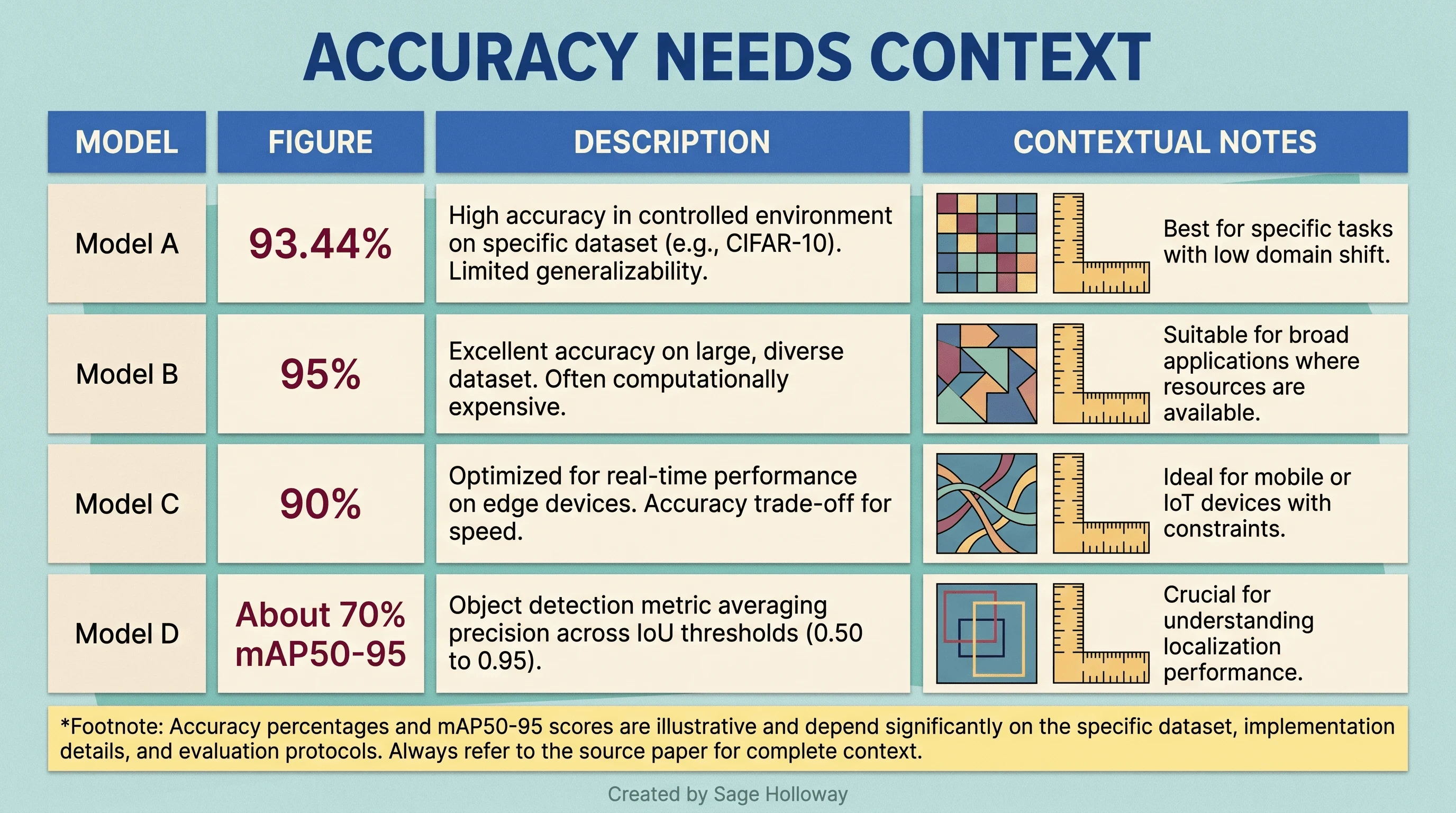
Classification accuracy and bounding-box accuracy answer different questions. Figures from different datasets are not directly comparable.
Choose a checker without overtrusting it
You do not need the checker with the grandest promise. You need the one whose mechanism matches your evidence.
Match the tool to the signal and medium
Use this decision sequence:
Name the medium: text, document, image, audio, or video.
Name the suspected signal: Unicode, statistical pattern, provenance record, visible mark, or embedded media signal.
Find a tool that explicitly supports that signal and claimed provider.
Check its sample requirements, file formats, size limits, and transformation tolerance.
Prefer raw findings over a single red or green verdict.
For text formatting, an exact character viewer beats a mysterious AI score. For a supported provider signal, an official detector beats a generic classifier. For provenance, a credential reader beats pixel guesswork. For visible logos, object detection may help, but it answers a different question from invisible AI watermark detection.
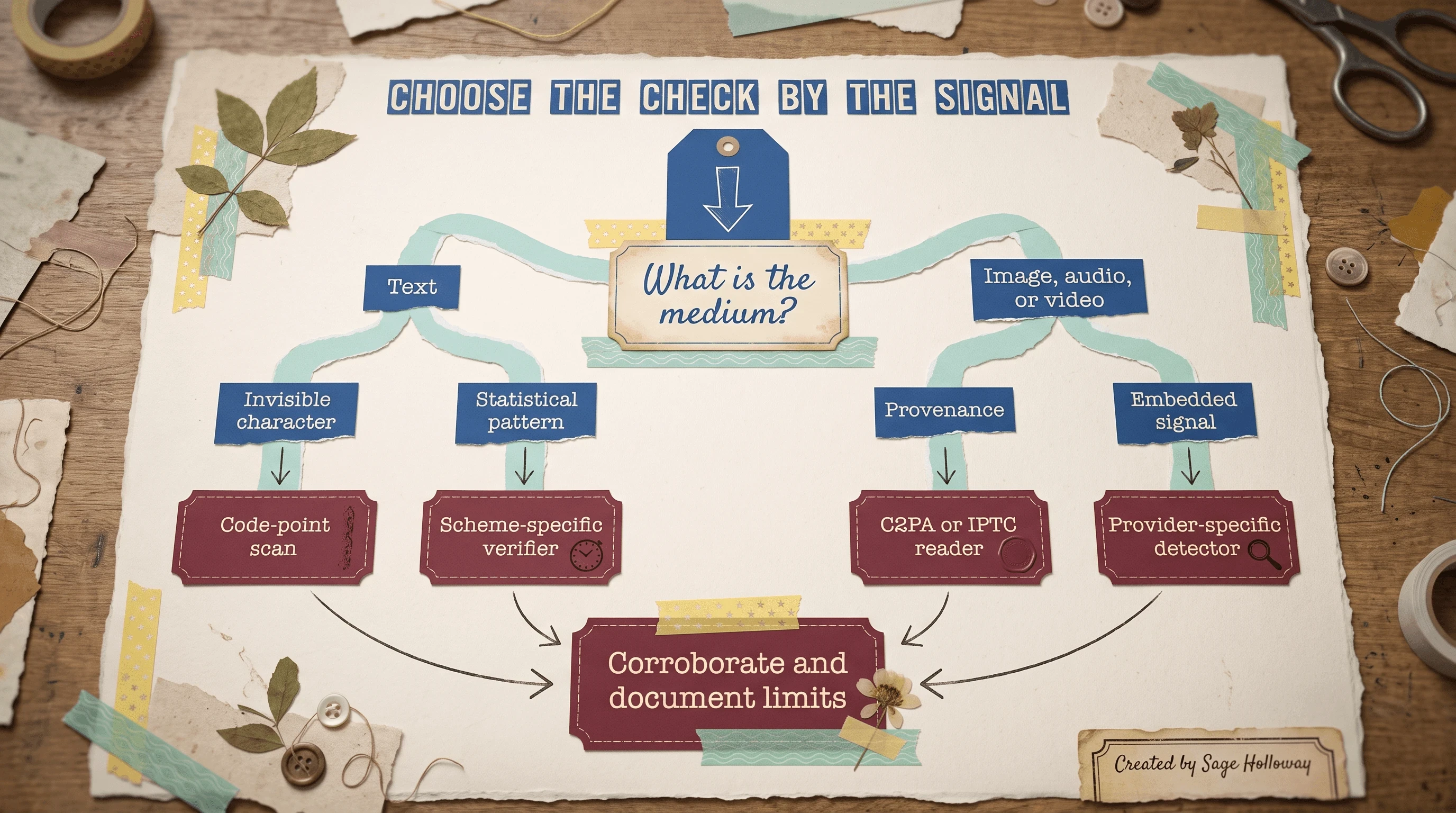
Choose a checker by medium and detectable signal, then corroborate the result.
Check privacy, limits, and corroborating evidence
Before you upload, read the privacy policy and retention terms. Check whether the page sends your content to a server. For client work, legal material, health data, source code, or unreleased media, prefer a local workflow or an approved enterprise service.
Then inspect the result format. Does it reveal code points, metadata fields, a signed credential, a detected region, a model label, or merely a sentence saying “watermark found”? Evidence you can inspect and save is more valuable than a conclusion you cannot audit.
Finally, corroborate. Pair a character scan with document history. Pair a provider-signal result with provenance records. Pair a classifier label with the original file, known source, and another independent method. Corroboration does not make weak evidence strong, but it prevents one tool from becoming judge, jury, and very enthusiastic marketing department.
Frequently asked questions about AI watermark detection
How do I find a ChatGPT watermark in text?
Start with an exact Unicode scan for hidden characters such as U+200B, U+200C, and U+202F. Preserve the original and use a character viewer or local script. Finding one proves the character is present, not that ChatGPT intentionally watermarked the text.
How do I see a ChatGPT watermark in text?
Invisible characters become visible when a character viewer lists their code points. Statistical patterns do not become visible this way. They require a verifier built for the particular watermarking scheme, so do not confuse a formatting view with a statistical test.
How do I check for a ChatGPT watermark?
First decide what “watermark” means in your case. Run a code-point scan for formatting artifacts. If you mean a statistical watermark, require the checker to identify the supported scheme and its access to a matching verifier.
How do I check a ChatGPT watermark with a checker?
Paste only non-sensitive sample text into a checker that states what it detects, then save the raw findings. Review privacy, length limits, cooldowns, and methodology. A ChatGPT watermark checker that returns only an AI percentage may be a style classifier rather than a watermark verifier.
Does a watermark checker detect AI authorship?
Not universally. A checker can detect the signal it was designed to inspect. Unicode presence, metadata, a provider watermark, and a post-hoc AI classification are different findings. None should be expanded beyond its documented scope.
How do I see a ChatGPT watermark in Word?
Duplicate the document, enable Word’s Show/Hide formatting marks, and inspect suspicious spacing. For exact identification, copy the surrounding passage into a code-point viewer or export a test copy for local inspection. Word’s formatting symbols alone do not prove AI authorship.
How do I check for watermarks in ChatGPT text?
Keep the original, inspect exact Unicode characters, and document their positions. If authorship matters, add source history and a scheme-specific statistical check where one is legitimately available. Do not infer intent from a narrow no-break space alone.
How do I check ChatGPT watermarks without a web tool?
Use a local editor capable of exact Unicode search or run the small Python inspection script in this guide against a UTF-8 text file. This keeps sensitive text on your machine and gives you counts and positions you can save.
How do I see a ChatGPT watermark in Google Docs?
Make a duplicate, copy a short sample into a trusted character viewer or local text file, and inspect the code points. Test any replacement on the duplicate before changing the original because normalization can alter legitimate spacing or joining characters.
A practical verification rule to keep
The next time a checker gives you a dramatic answer, pause before you share the screenshot. Write down four things: the medium, the suspected signal, the matching test, and the limit of the result. If you cannot fill all four, you do not have a conclusion yet. You have a lead.
Try this on one harmless sample today. Preserve it. Run an exact character scan. Inspect its metadata if it is a file.
Then write one sentence that begins, “This result establishes...” and another that begins, “This result does not establish...” That tiny discipline makes your verification more useful than most detector roundups on the first attempt.
The watermarking landscape will keep changing because generators, standards, and distribution platforms keep changing. The durable skill is not memorizing the current crop of checkers. It is learning to match a claim to the evidence layer that could actually support it.
Until then...
Sage
PS. Pick a paragraph you wrote entirely by hand, add one zero-width space, and scan it. The detector may find the character perfectly. You will also know, with unusual certainty, why that finding is not an authorship verdict.
Author
Practical guides, tool teardowns & AI engineering workflows.