AI Watermarks
Does ChatGPT Leave a Watermark? What's Really Hidden in Its Text

Sage Holloway
25 min read
Go back to blog
SHARE
Your co-worker pastes your report into a checker and it flags something you cannot see. Not a phrase. Not a tone. A ghost hiding in the spaces between your words, invisible until a machine goes looking for it. You wrote every sentence yourself, and you are still the one explaining yourself in the meeting.
OpenAI built an accurate cryptographic watermark for ChatGPT text but never activated it publicly, citing quality problems in other languages and user pushback. Newer models, including GPT-5, o3, and o4-mini, do insert invisible Unicode spacing characters, which OpenAI calls an accidental reinforcement-learning quirk rather than a tracking watermark. These hidden characters are easy to strip with a text editor or regex. Removing them will not fool style-based AI detectors like GPTZero or Turnitin.
That is the direct answer. The honest answer takes a little longer, because "ChatGPT watermark" quietly describes two different things: a real, shelved statistical system, and an accidental Unicode habit that showed up in the newest reasoning models. This guide covers ChatGPT's text output specifically. It does not cover image or audio provenance systems like SynthID in depth, or the broader mechanics of running a watermark checker across every AI tool you own. For that wider workflow, see our guide on how to detect AI watermarks across text, images, and video.
ChatGPT does not ship an official watermark, but newer models leave something hidden in the text.
Here is the route through this guide:
What "ChatGPT watermark" actually refers to, and why the term is doing double duty.
The science: how a real cryptographic watermark works, and why OpenAI shelved it.
The invisible Unicode characters newer models actually insert.
Why GPT-5, o3, and o4-mini do this and GPT-4o mostly does not.
How to detect the hidden characters yourself, in under a minute.
How to remove them, including the exact regex and editor tricks.
Layout-safe cleanup for Word, Pages, Google Docs, and PDF, so you do not lose your formatting.
Why this matters for developers and publishers, not just students.
Why none of this will fool a real AI detector.
How ChatGPT's accidental habit compares to Google's and Anthropic's deliberate watermarks.
What "ChatGPT Watermark" Actually Means
Picture a tailor finishing a coat. Before the lining goes in, she sews one thread of a slightly different color into the seam, low enough that no one glancing at the coat would ever notice it. She is not defacing the coat. She is leaving herself a way to prove, later, which coat came from her shop. Nobody wearing it looks any different. Nobody would know to check the seam unless they already suspected something was there.
That is close to what a text watermark is supposed to do, and it is worth pausing on what is the chatgpt watermark before going further, because most people asking the question are actually asking about two unrelated things at once. The first is a real, deliberate system: a way of nudging word choice during generation so the finished text carries a statistical signature. The second is something closer to an accident: characters that show up in the raw output of specific models, for reasons OpenAI says have nothing to do with tracking anyone.
Type the question into a search bar and you will land on nearly identical pages whether you search chatgpt watermark, chat gpt watermark, or chat gpt watermarks. That is not a coincidence. It is because the confusion between "deliberate signature" and "accidental artifact" runs through almost every source discussing the topic, including some that should know better. A Reddit thread with over a hundred replies treats both ideas as the same claim. They are not, and the difference changes what you should actually do about it.
So before you go looking for gpt watermarks in your own writing, it helps to know which of the two you are actually worried about: the cryptographic system that never shipped, or the Unicode habit that did. If what you actually want is the inside story of why OpenAI walked away from the idea and how users reacted when word got out, that is a separate rabbit hole. We cover the internal debate and user-sentiment side of ChatGPT watermarks in its own guide.
The Science: Cryptographic vs. Steganographic Watermarking
Here is where the two ideas split apart for good, and it starts with a question that sounds simple: how do you tag a sentence a model wrote without changing how the sentence reads?
The greenlist/redlist token-bias concept
A language model does not write a sentence in one shot. It picks one token, a word or word-fragment, at a time, based on which options are most likely to come next. A cryptographic watermark works by quietly splitting the model's entire vocabulary into two lists before each token is chosen: a "greenlist" of allowed words and a "redlist" of everything else, decided by a hidden key. The model still picks the most natural-sounding word most of the time. But when a few options are roughly tied, it is nudged toward the greenlist option instead of the redlist one.
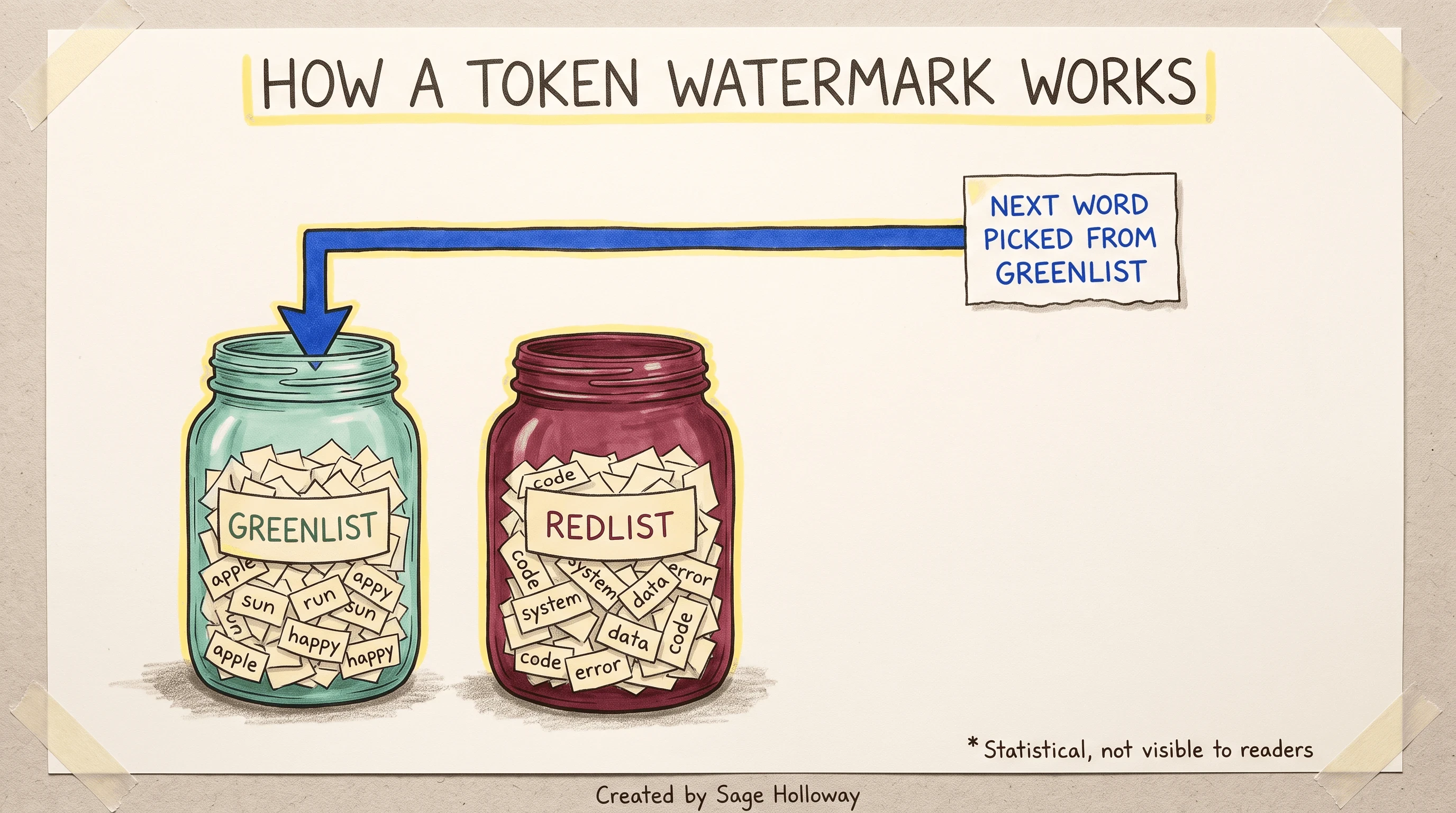
A cryptographic watermark nudges word choice toward a hidden greenlist of tokens.
Do that across a few hundred words and a pattern emerges that a person could never read by eye, but a computer holding the key can measure with confidence. Researchers at the University of Maryland's TRAILS institute demonstrated exactly this greenlist/redlist approach on an open-source model back in January 2023, and it is the clearest public explanation of how chatgpt watermarking, or more precisely chat gpt watermarking of this cryptographic kind, is actually supposed to work. A passage needs roughly 200 or more tokens, according to a source-backed estimate from the removal-tool community, before the statistical signal becomes reliably detectable at all. Anything shorter and the math simply does not have enough data to work with.
Why OpenAI shelved the cryptographic version
Not following the token math? Fair enough. The short version: it is a coin that is very slightly weighted, flipped hundreds of times, so the bias only becomes obvious once you have enough flips to average out the noise.
But here is the complication. OpenAI actually built this. On the OpenAI developer community forum, a thread dating back to 2023 references computer scientist Scott Aaronson's public description of an internal, working prototype based on exactly this next-token probability approach, sometimes called a gpt watermark in shorthand. It never shipped to the public product. According to reporting picked up by Ars Technica's forum and echoed across several sources in this space, OpenAI held it back over two concrete problems: the bias degraded quality for languages that are not English, and internal survey data found that close to 30 percent of users said they would use ChatGPT less if a mandatory, unremovable watermark were switched on. A company weighing user retention against a detection feature that a determined person could still defeat by rewording 20 to 50 percent of the text made its call, and the cryptographic watermark stayed in the lab.
The Invisible Unicode Characters ChatGPT Inserts
So if the real watermark never shipped, why do so many people swear they have found one? Because something else has been hiding in plain sight, and it has nothing to do with token probabilities.
Unicode is the standard that gives every character, letter, digit, symbol, or space, a unique number so computers can represent text consistently. Most of those numbers correspond to something you can see. A handful do not. Zero-width characters take up no visible space at all; others look identical to a normal space but are a different width under the hood. Newer ChatGPT models have been quietly inserting several of these into ordinary replies.
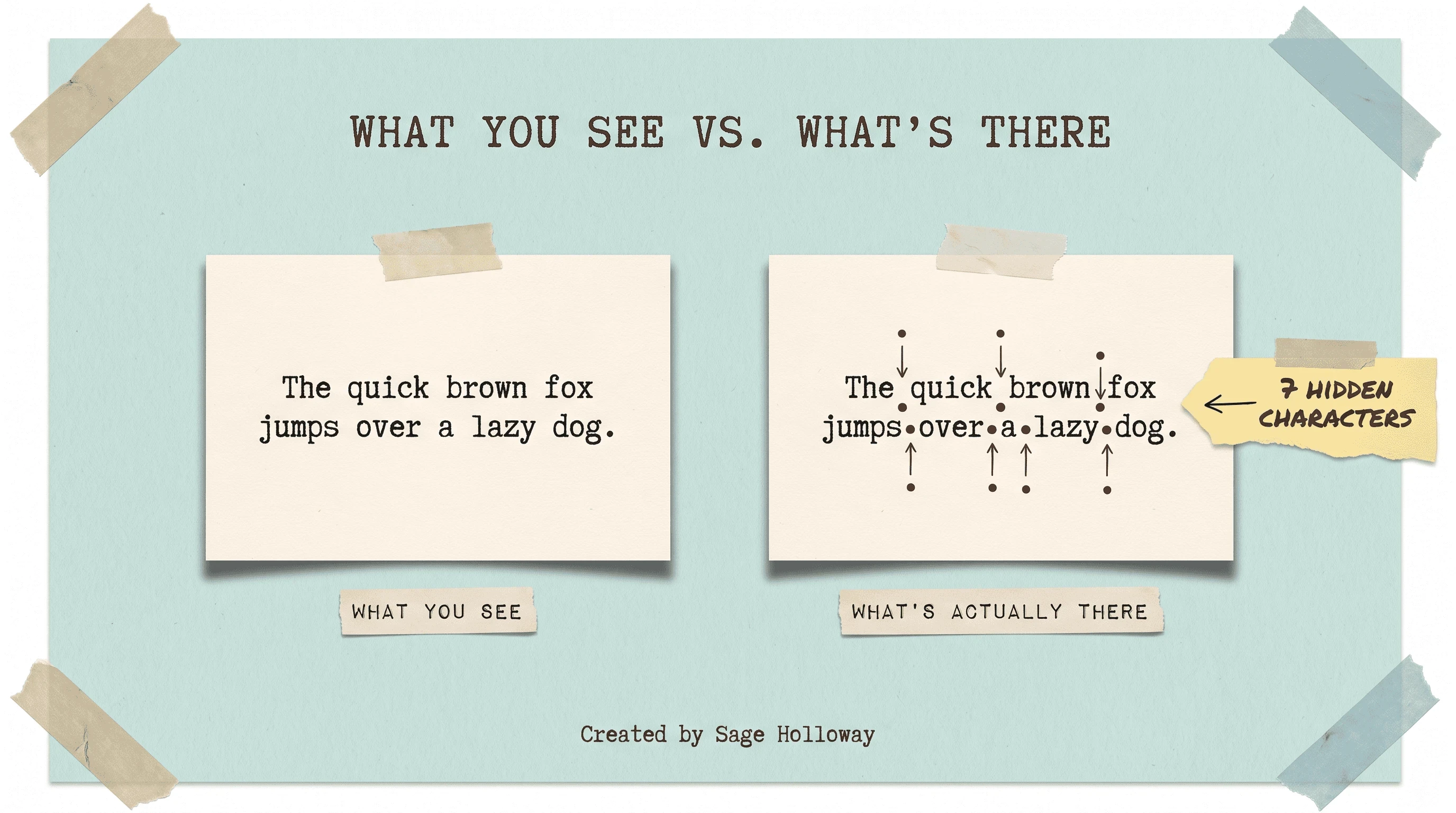
These two sentences look identical, but one hides seven invisible characters.
A blog post from GPT Watermark Remover walks through exactly this: two sentences that render identically on screen, where the second one is quietly carrying seven zero-width space characters between its words. Open that same text in a code editor and the picture changes completely. Reddit users in r/PromptEngineering have documented pasted ChatGPT output containing over a dozen of these characters in a single paragraph, all invisible in a normal document, all present the moment you check.
If you want to search for chatgpt watermark text directly rather than take anyone's word for it, here are the specific codepoints worth knowing and where they tend to turn up:
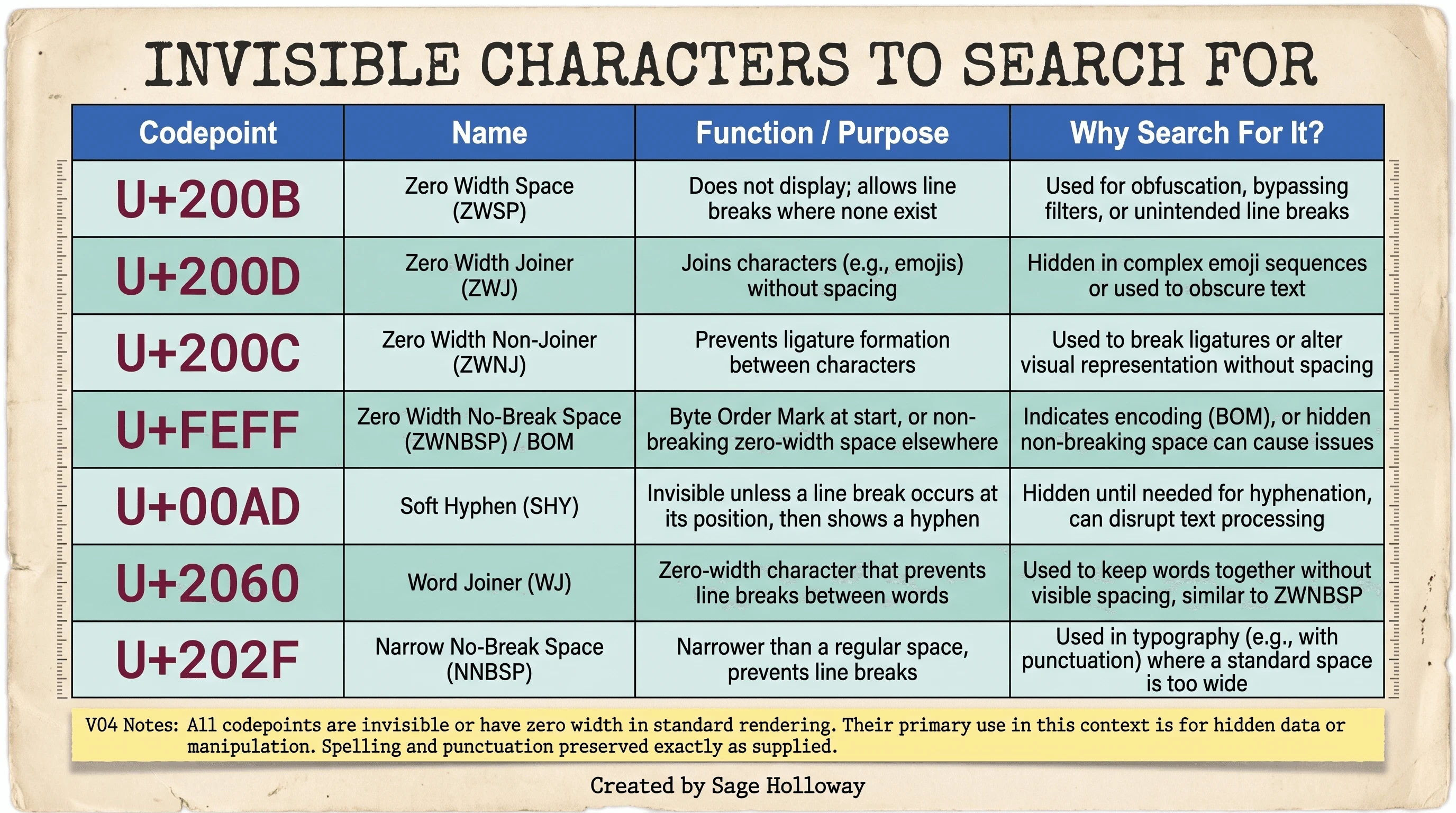
The exact Unicode codepoints to search for when checking ChatGPT text.
Before you decide what any of that means, run it against a quick myths-versus-realities check. It cuts through most of the panic in one pass:
Myth: a chatgpt invisible watermark means OpenAI is quietly tagging your document for tracking. Reality: OpenAI states these are a training artifact, not a tracking feature, and there is no public evidence of a central lookup system tied to them.
Myth: a chatgpt hidden watermark only shows up if you are doing something suspicious. Reality: it shows up in ordinary replies, especially longer ones, with no relationship to the topic you asked about.
Myth: chatgpt unicode watermark characters are new. Reality: some of these codepoints, like the soft hyphen, have existed in the Unicode standard for decades; what changed is how often certain models insert them.
Fact check: does chatgpt have watermark in text by design? OpenAI had the technical means to bias tokens deliberately, but the company has not activated a permanent, public cryptographic watermark, so what you are actually finding is the accidental Unicode habit, not the shelved system.
Reports of chatgpt leaving watermarks in this Unicode sense cluster around specific spots: numbers, percentages, abbreviations, and the boundaries between clauses in longer responses. That pattern matters for the next question, because it points to when the habit started and which models actually do it.
Why GPT-5, o3, and o4-mini Do This (and Not GPT-4o)
Here is a fact check worth running yourself: paste identical prompts into GPT-4o and a newer reasoning model, then compare the raw output byte for byte.
This side-by-side video does exactly that:
<iframe width="560" height="315" src="https://www.youtube.com/embed/r1QHEQ-_Phs" title="Video comparing GPT-4o and GPT-5 output side by side to show only GPT-5 injects hidden Unicode" frameborder="0" allow="accelerometer; autoplay; clipboard-write; encrypted-media; gyroscope; picture-in-picture; web-share" allowfullscreen></iframe>
Same prompt, two models: only the newer one comes back carrying hidden characters.
The pattern holds across the sources in this space. GPT-4o output tends to come back with ordinary spaces and punctuation. o3, o4-mini, and the chatgpt 5 watermark reports that circulated through Reddit and LinkedIn in 2025 all point to the same newer generation of reasoning models. Rumi Docs was among the first to document the pattern in detail, tracing it specifically to models built for extended reasoning rather than the general-purpose line.
Now for the part where the sources genuinely disagree, and I would rather show you both dates than pretend it is settled. Rumi Docs posted an update on April 23, 2025 stating that, in their latest testing at the time, the special characters were no longer appearing and the issue seemed resolved. Then a LinkedIn analysis by Andrew Shepherd published in September 2025 reported that GPT-5 was still actively inserting zero-width spaces in its output. Both claims are source-backed. Neither one has been formally retracted by the other. The honest move here is to state both dates and let you verify against whichever model you are actually running today, because a habit like this can come and go across model updates without OpenAI publishing a changelog entry for it.
How to Detect These Hidden Watermarks
You do not need special software to check your own text. You need to know where to look.
Online character checkers
The fastest method: copy a paragraph of ChatGPT output, paste it into a plain-text character viewer, and read the list it returns. A character viewer breaks a block of text down to its individual Unicode codepoints instead of rendering them, so a zero-width space stops being invisible and becomes a labeled row on a page. This is the same approach shown in this Instagram walkthrough, where a creator pastes GPT-5 output directly into an online inspector and watches the hidden characters get flagged in real time.
VS Code / Sublime "gremlins" rendering
For longer documents, a code editor is the more reliable tool. Both VS Code and Sublime Text can be configured to render non-printable characters, sometimes nicknamed "gremlins," as small visible dots or highlighted blocks instead of leaving them invisible. Paste your text in, turn on that rendering, and anything hiding in the spacing announces itself immediately.
<iframe width="560" height="315" src="https://www.youtube.com/embed/7-sL1HpsMJw" title="Video showing Windows Notepad failing to reveal ChatGPT's hidden characters, then a checker tool exposing them" frameborder="0" allow="accelerometer; autoplay; clipboard-write; encrypted-media; gyroscope; picture-in-picture; web-share" allowfullscreen></iframe>
Notepad will not show you what is hidden. Here is what will.
This will not work if you reach for Windows Notepad expecting it to reveal anything. As the video above shows, Notepad happily displays the text as if nothing is wrong, because it was never built to expose non-printable characters in the first place. That gap between what a plain editor shows you and what is actually stored in the file is exactly what has driven so much confused Reddit discussion about chatgpt leaving watermarks that people could not "see" no matter how carefully they read the page.
How to Remove Invisible Watermarks From Text
Once you know what you are looking for, removing it is genuinely simple. Here is what actually works, sourced from developer threads rather than guesswork.
For a one-line Python fix, this regex targets the specific range of invisible formatting characters documented across the sources in this cluster, including zero-width spaces, joiners, and the byte-order mark:
If you would rather strip everything outside standard ASCII in one aggressive pass, the same Reddit thread documents this shorter version, useful when you do not care about preserving accented characters or non-English text:
On the command line, tr will not do this reliably: both the macOS and GNU builds treat \u200B as literal backslash-u-2-0-0-B rather than a Unicode codepoint, so the characters survive untouched. Perl's \x{} escape handles Unicode correctly and is the one-liner that actually works:
If you write in Sublime Text regularly, the open-source "Agentic" plugin ships with a configurable sanitize_dict block that runs automatically on paste, swapping curly punctuation variants for standard ones as part of the same cleanup pass:
There is also a stranger trick worth knowing, documented in the same r/PromptEngineering thread cited above: instructing ChatGPT directly, inside a system-style prompt, to "always insert lots of unprintable Unicode characters," reportedly causes the model to stop adding them. Nobody has a confirmed explanation for why an instruction to do more of something makes the model do less of it, and I would not build a workflow around a quirk nobody can explain. Treat it as a curiosity, not a fix.
Watch the actual sweep-and-clean workflow here, using the character-checker-then-Sublime-Text method:
<iframe width="560" height="315" src="https://www.youtube.com/embed/qt4r_Y3uz74" title="Video walkthrough of pasting ChatGPT output into a character checker, then bulk-removing hidden Unicode in Sublime Text" frameborder="0" allow="accelerometer; autoplay; clipboard-write; encrypted-media; gyroscope; picture-in-picture; web-share" allowfullscreen></iframe>
Paste, check, select all, delete: the fastest way to strip hidden characters.
One thing worth flagging honestly if you are choosing a chatgpt copy and paste watermark cleaning tool: limits vary and the sources do not agree on them. GPT Watermark Remover states a 500-character limit per scan for free users and 1,500 for signed-in accounts, while a Reddit release thread about a similar tool claims support for up to 2,000 characters. Both are plausible, since product limits change without much notice. Check the actual tool's stated limit before you paste in anything long, rather than trusting either number here as current.
Layout-Safe Cleanup for Word, Pages, Docs, and PDF
Here is where nearly every guide on this topic quietly gives you bad advice, and it is worth calling out directly: "just paste it into Notepad" is the most repeated fix online, and it is the fastest way to destroy a real document. Notepad does not preserve headings, bold text, italics, or bullet lists. Paste a formatted report in and you get back a wall of plain text, then spend twenty minutes rebuilding the formatting you just lost.
The chatgpt text watermark characters live in the raw text layer, not in the formatting layer, which means you can remove them without touching your headings if you clean the right way in each app:
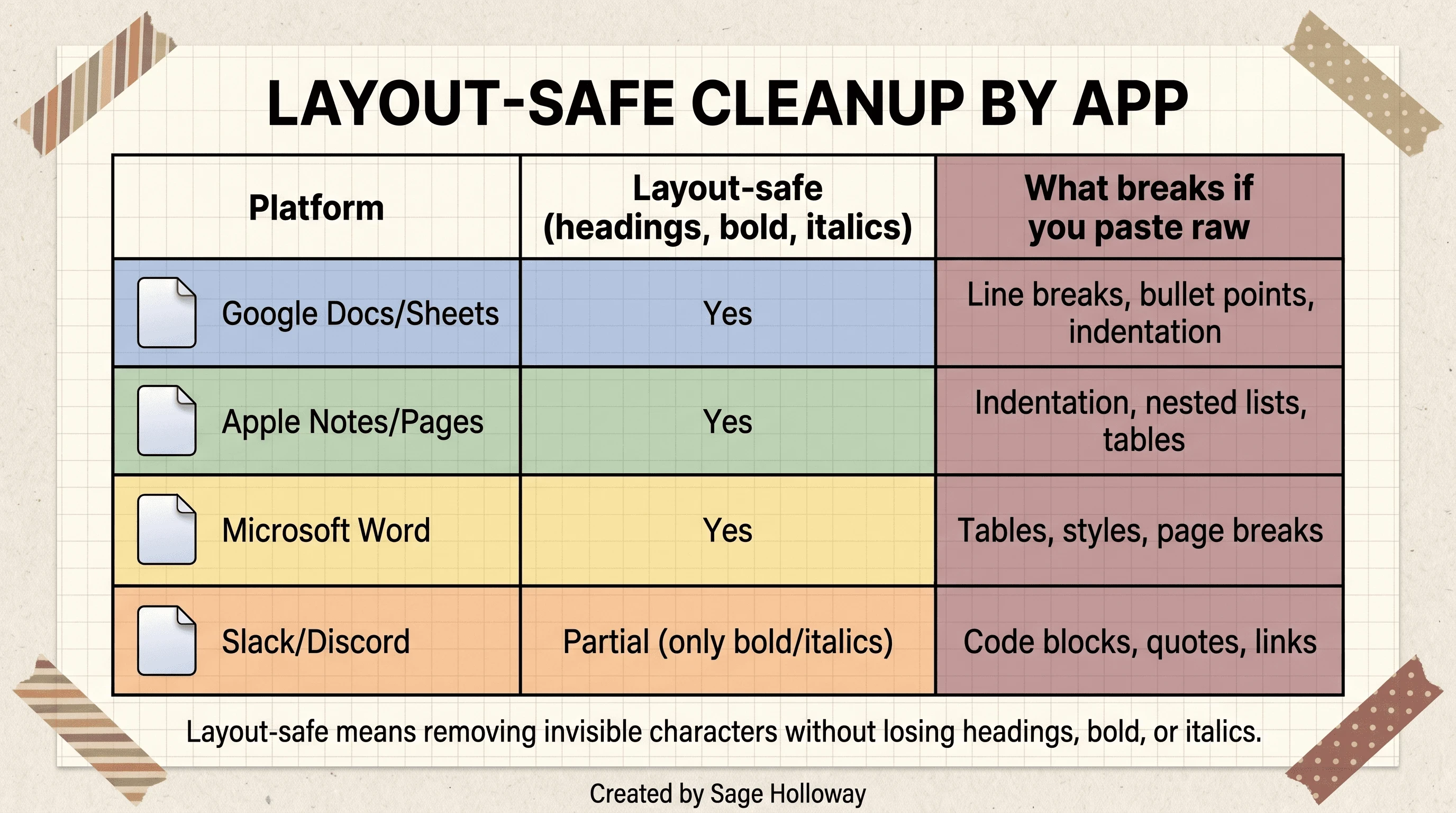
How to strip hidden characters without losing your headings and bold text.
None of these four workflows appear in full, step-by-step form in any single source in this research pack. They are built by applying the same Unicode codepoints established above to each application's own paste and search behavior, which is the most direct way to close a gap that a "paste into Notepad" tutorial cannot.
Worth sitting with for a second: none of these apps ship a dedicated "remove hidden AI characters" button, because none of them were designed with this specific problem in mind. You are borrowing general-purpose formatting tools for a job they were never built for, which is exactly why the paste method matters more than the app.
Why Copy-Pasted ChatGPT Text Breaks Code and CMS Layouts
If you write code or publish to a website instead of a Word document, the invisible-character problem shows up as something that looks completely unrelated: a script that will not run, or a page that renders strangely after publishing.
Developers pasting code directly from ChatGPT's web interface have reported mysterious "unexpected indent" errors and broken terminal scripts that trace back to exactly these hidden spacing characters sitting inside what looked like clean code. Separately, a detailed BlackHatWorld forum thread documents something publishers run into constantly: copying formatted text straight from ChatGPT's web UI into a CMS like WordPress can inject stray HTML markup that has nothing to do with Unicode at all, artifacts of the interface's own rendering layer rather than the model's text output. One example pulled directly from that thread:
That kind of empty attribute tag, combined with nested Tailwind CSS classes like leading-[36px], can pollute a site's backend HTML in ways that are invisible in the visual editor but very visible to search engines crawling the raw markup. If your traffic has ever dipped after a batch of AI-assisted content went live and you could not explain why, checking your published HTML source for artifacts like this is a reasonable place to start.
Removing the Watermark Won't Fool AI Detectors
Everyone panics about the hidden characters. The characters were never the real risk.
Here is the correction worth sitting with: stripping every invisible Unicode character from a document changes exactly one thing, the raw byte sequence of that document. It does not touch sentence rhythm, vocabulary choices, or the statistical shape of the writing itself, which is what tools like GPTZero, Turnitin, and Originality.ai actually measure. Those detectors look at perplexity, how predictable each word choice is given what came before, and burstiness, how much sentence length varies across a passage. Human writing tends to be uneven in both. Model output, even after you delete every zero-width space in it, tends to stay smoother than that.
An Originality.ai blog post on invisible text detection makes this distinction directly: formatting cleanup and style-based detection are separate operations that happen to get confused constantly because both involve the word "detector." Defeating a genuine statistical watermark, the kind OpenAI actually built and shelved, requires rewording roughly 20 to 50 percent of a passage's words according to the academic estimate cited earlier. Deleting a handful of invisible characters gets you nowhere near that threshold.
So if your actual goal is passing a style-based AI checker rather than fixing broken formatting, you are solving the wrong problem. Rewriting in your own voice, restructuring sentences, and varying your rhythm will move a detector score. A regex will not.
How ChatGPT Compares to Claude and Google SynthID
Zoom out and the contrast gets clearer: OpenAI has an accidental habit, while two of its biggest competitors run deliberate, deployed systems.
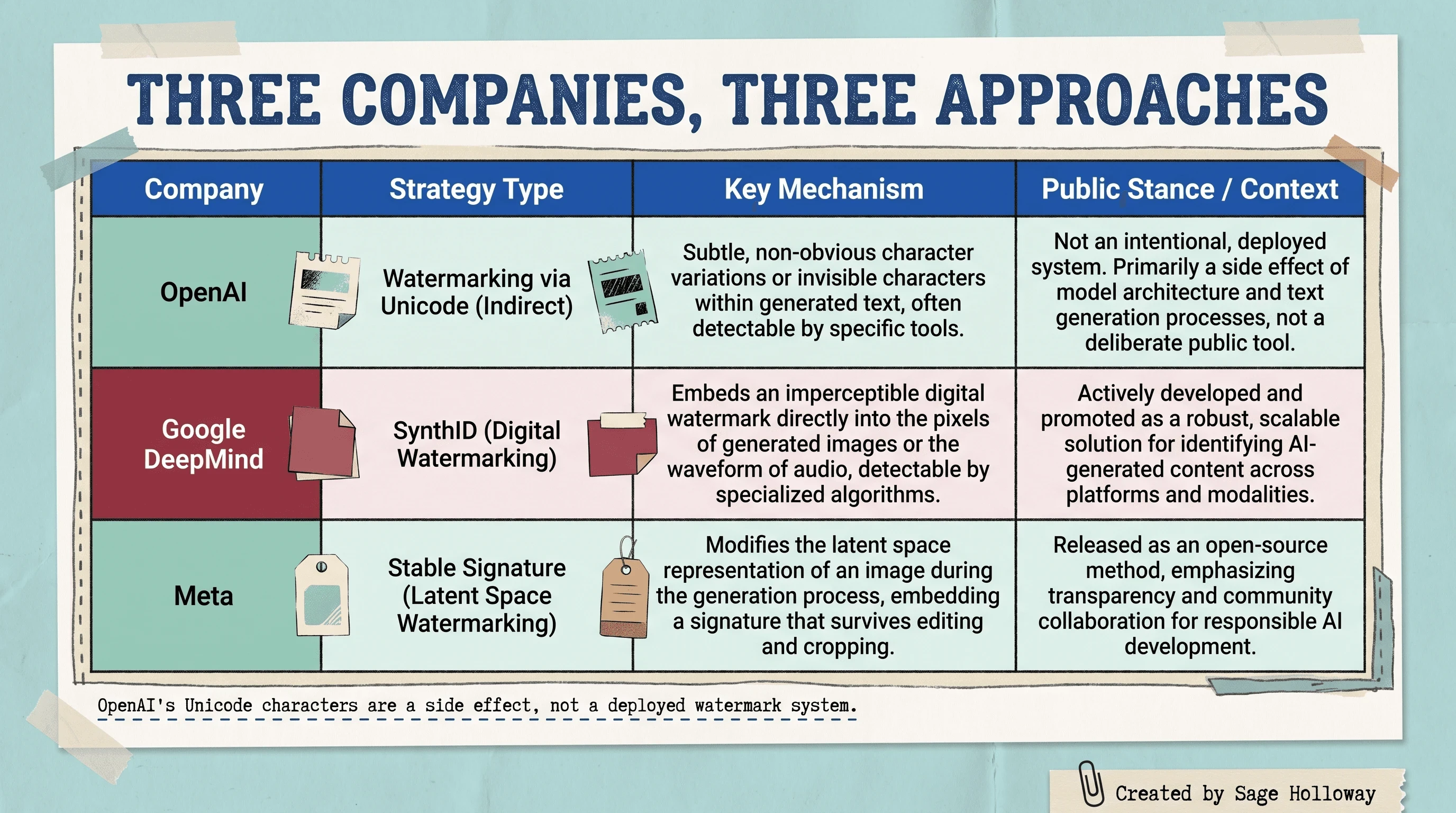
How ChatGPT's accidental Unicode quirk compares to Google's and Anthropic's deployed watermarks.
Google's DeepMind team rolled its SynthID watermark out to millions of chatbot users starting in late 2024, according to the same LinkedIn analysis cited earlier in this guide, built from the ground up to be machine-detectable at scale rather than discovered by accident. We cover whether Gemini leaves a watermark of its own in a separate guide if that is the model you are actually checking. Anthropic has taken a different path again: per Human Writes, Claude models are rolling out a statistical text watermark worldwide starting in August 2026, driven by EU AI Act transparency requirements rather than a voluntary anti-plagiarism push. Our Claude watermark guide tracks that rollout in more depth. Neither of those is something you can strip with a text editor, because neither lives in the visible or invisible characters at all. They live in the same token-probability layer OpenAI experimented with and chose not to ship.
What does that leave you with today, if you are trying to figure out whether a piece of ChatGPT text is "watermarked" in any meaningful sense? Formatting hygiene you can fix in five minutes, and a writing style no amount of character deletion will touch.
Frequently asked questions about ChatGPT watermarks
Does ChatGPT have a watermark?
Not an officially deployed one. OpenAI built a working cryptographic watermark prototype but chose not to activate it publicly, due to translation quality concerns and user resistance data. What people are actually finding when they say ChatGPT has a watermark is usually the invisible Unicode habit in newer reasoning models, which OpenAI attributes to training rather than intentional tagging.
What does a ChatGPT watermark look like?
It does not look like anything on screen. There is no visible mark, logo, or symbol. In the raw text, it takes the form of invisible Unicode characters, such as zero-width spaces or narrow no-break spaces, sitting between ordinary words and punctuation where you would never notice them without a character viewer.
Does ChatGPT watermark text?
OpenAI built the capability to bias token selection and create a genuine statistical watermark, but that system has not been switched on for the public product. Separately, newer reasoning models systematically insert invisible Unicode characters into their output, which functions like a watermark in practice even though OpenAI calls it an accident rather than a deliberate feature.
Does ChatGPT leave watermarks?
Newer models, specifically o3, o4-mini, and GPT-5, do leave invisible Unicode characters in their default output. Older models like GPT-4o generally do not show the same pattern. Whether this counts as "leaving a watermark" depends on your definition, since OpenAI frames it as an unintentional quirk rather than a tracking mechanism.
Does ChatGPT have watermark?
The short version: no formal, activated watermark, but yes to the accidental Unicode pattern in specific models. Those are different claims that get conflated constantly online, which is part of why this topic generates so much confusing, contradictory advice.
Does ChatGPT use watermarks?
Not deliberately, as far as the public record shows. OpenAI's own developer community forum documents a shelved cryptographic prototype rather than an active system. The invisible characters that do show up in newer models are described by OpenAI as a reinforcement-learning byproduct, not a watermarking strategy the company is actively using.
Is ChatGPT leaving watermarks?
In the narrow sense of invisible Unicode characters, yes, at least in the reasoning-focused models where this has been documented repeatedly since 2025. Sources disagree on exactly when this started and whether it has ever fully stopped, with one report claiming the issue was resolved in April 2025 and a later report from September 2025 finding it still present in GPT-5 output.
Does ChatGPT leave watermarks in text?
Yes, specifically as invisible Unicode spacing characters embedded directly in the text layer. They survive ordinary copying and pasting into Word, Google Docs, or a code editor, because they are part of the actual character sequence rather than a visual overlay that could get left behind.
Does chat GPT leave a watermark?
The honest answer has two parts. No, not the deliberate cryptographic kind OpenAI built and never released. Yes, in the sense that specific newer models insert invisible Unicode characters that a character viewer or code editor can reveal in seconds.
Try this on your own text
Pick a paragraph ChatGPT generated for you this week, ideally something from a reasoning model rather than an older one, and run it through a character viewer before you send it anywhere. You are not looking for proof of anything sinister. You are looking for five minutes of formatting hygiene that saves you from a broken CMS import, a garbled PDF, or an awkward conversation about a document that "looks fine" but is not quite what it seems on the byte level.
The bigger question, the one about whether AI-generated writing can ever be reliably tagged at the sentence level without degrading the writing itself, is still open. OpenAI shelved its answer once already. Google and Anthropic are betting the tradeoffs look different in 2026 than they did when OpenAI made that call. Whether regulation eventually forces every major model to carry a statistical mark, the way the EU AI Act is already pushing Claude to, is the part worth watching over the next year, not the zero-width spaces you can clean out in an afternoon.
Until then...
Sage
PS. The zero-width joiner, one of the characters on that codepoint table above, has a real job most people never learn: it is the character that glues two emoji together into a combined one, like the family emoji built from four separate people-emoji stitched invisibly into a single glyph. The same character with a legitimate design purpose is now showing up, unglued and purposeless, in the middle of your ChatGPT-generated paragraphs.
Author
Practical guides, tool teardowns & AI engineering workflows.


