AI Agents
How to Build a Production-Ready n8n AI Voice Agent

Sage Holloway
28 min read
Go back to blog
SHARE

You can wire a conversational speech model to a visual canvas in twenty minutes and convince yourself the job is done. Then real callers interrupt mid-sentence, two people request the same calendar slot simultaneously, and your telephony carrier drops the line because your workflow took three seconds to think. The voice interface was never the hard part. The transactional discipline underneath the audio is where production software actually lives.
An n8n AI voice agent works best when a conversational engine such as ElevenLabs or Retell handles real-time speech and interruptions, while n8n receives structured webhook calls and runs business logic, data lookups, and actions. Connect the voice tool to an n8n Webhook, map the payload into an AI Agent and backend tools, return the expected response, then add rapid acknowledgements, human handoff, and double verification before production transactions.
Last verified: 28 August 2026
That is the direct answer. If you are building an n8n ai voice agent for appointment booking, restaurant ordering, or customer support, the difference between a prototype and a production system comes down to how you handle the boundary between real-time audio and transactional state.
Every week, developers post about the same frustrating experience: their local demo sounded flawless, but the moment they routed real phone numbers into their workflow, calls dropped, webhooks fired in endless loops, and calendars double-booked.
Decouple the real-time voice loop from the transactional backend before you write a single node.
The problem is almost never the quality of the speech model. The problem is asking your workflow engine to do a job it was never designed to handle.
This guide walks through the end-to-end architecture for building an n8n voice agent that handles live phone traffic reliably. We will examine how to separate conversational audio from backend execution, configure ElevenLabs custom webhook tools, build resilient tool chains in n8n, prevent webhook trigger loops, and implement transactional double-verification safeguards.
What this guide covers
Core architecture: why you must decouple real-time voice from backend execution
Platform selection: ElevenLabs Conversational AI vs Retell AI vs direct Twilio WebSockets
Step-by-step connection: ElevenLabs agent setup and n8n Webhook mapping
Workflow build: configuring the AI Agent node, memory buffers, and business tools
Telephony routing: connecting phone numbers via Elastic SIP trunks without streaming raw audio
Knowledge grounding: per-turn RAG retrieval and session state isolation
Transactional safety: preventing double-bookings with millisecond pre-write verification
Latency engineering: instant 200 OK handshakes and asynchronous execution queues
Human escalation and testing: graceful fallback logic and unhappy-path verification
Nine developer FAQs covering community node installation, concurrency, and Twilio debugging
Choose the architecture before you build
Before opening a single canvas or registering an API key, you need to make a foundational architectural decision. How will audio travel from the caller's phone to your logic layer?
If you get this boundary wrong, every subsequent node in your workflow will fight against latency and concurrency bottlenecks.
Separate real-time conversation from backend logic
Think of an air traffic control tower. The controllers sitting in the glass cab focus entirely on immediate visual sightlines, live radio headsets, and split-second clearance commands. They manage voice readbacks, handle pilot interruptions instantly, and maintain spacing in the sky. They do not leave their consoles to inspect fuel pump pressure valves, check luggage conveyor belts, or recalculate gate maintenance schedules in the terminal basement. When a pilot requests runway clearance, the controller triggers a digital request to the airport ground operations system, receives a verified slot confirmation, and relays it over the radio.
That division of labor is the exact mental model required for an ai voice agent n8n deployment.
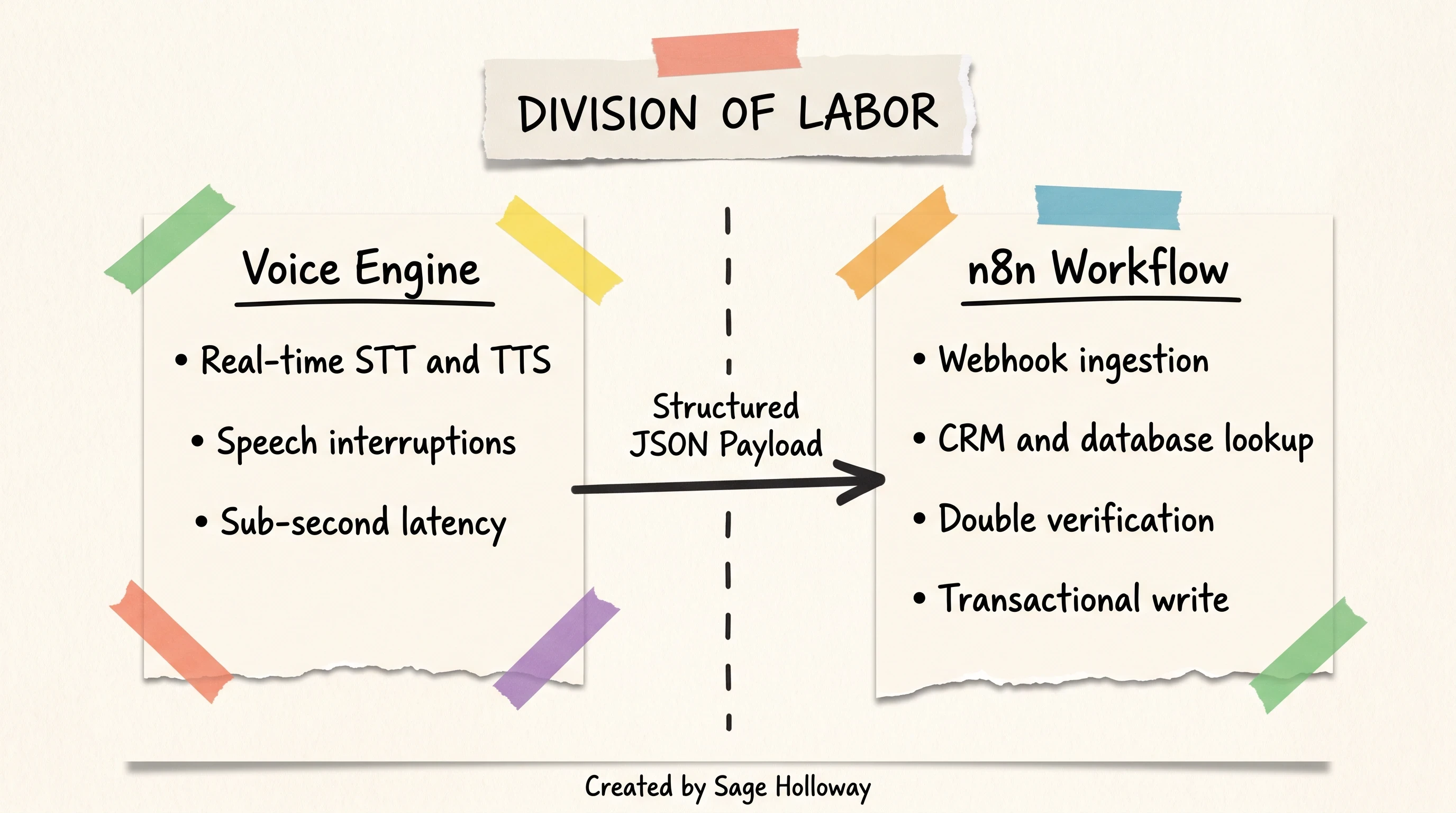
Let the voice platform handle audio streaming and interruptions; route business logic and state to n8n.
In a production voice architecture, two distinct layers must operate in harmony:
The Conversational Voice Engine: Platforms like ElevenLabs Conversational AI or Retell AI manage the continuous audio stream. They handle automatic speech recognition (ASR), large language model dialogue management, vocal inflection, low-latency text-to-speech (TTS), and real-time voice activity detection (VAD). When a user speaks over the agent, the voice engine cuts the outbound audio stream in under 200 milliseconds.
The n8n Orchestration Layer: n8n acts as the transactional nervous system. It does not stream raw audio chunks. Instead, it listens on an HTTP Webhook trigger node for structured JSON payloads dispatched by the voice engine. n8n queries customer relationship management (CRM) databases, validates calendar availability, executes authentication checks, and returns clean text data back to the voice engine to speak.
Why not build the entire voice loop directly inside n8n?
Because visual workflow engines process data as discrete discrete executions. If you attempt to ingest raw, chunked audio streams directly into an n8n webhook, every fraction of a second of speech triggers a new execution. Your server queue fills instantly, memory spikes, and latency climbs past four seconds. By letting a dedicated voice engine handle the speech loop, n8n executes only when a concrete business action or database lookup is required.
Choose ElevenLabs, Retell, or a direct Twilio path
When evaluating platforms for your voice stack, three primary architectural pathways exist across the ecosystem.
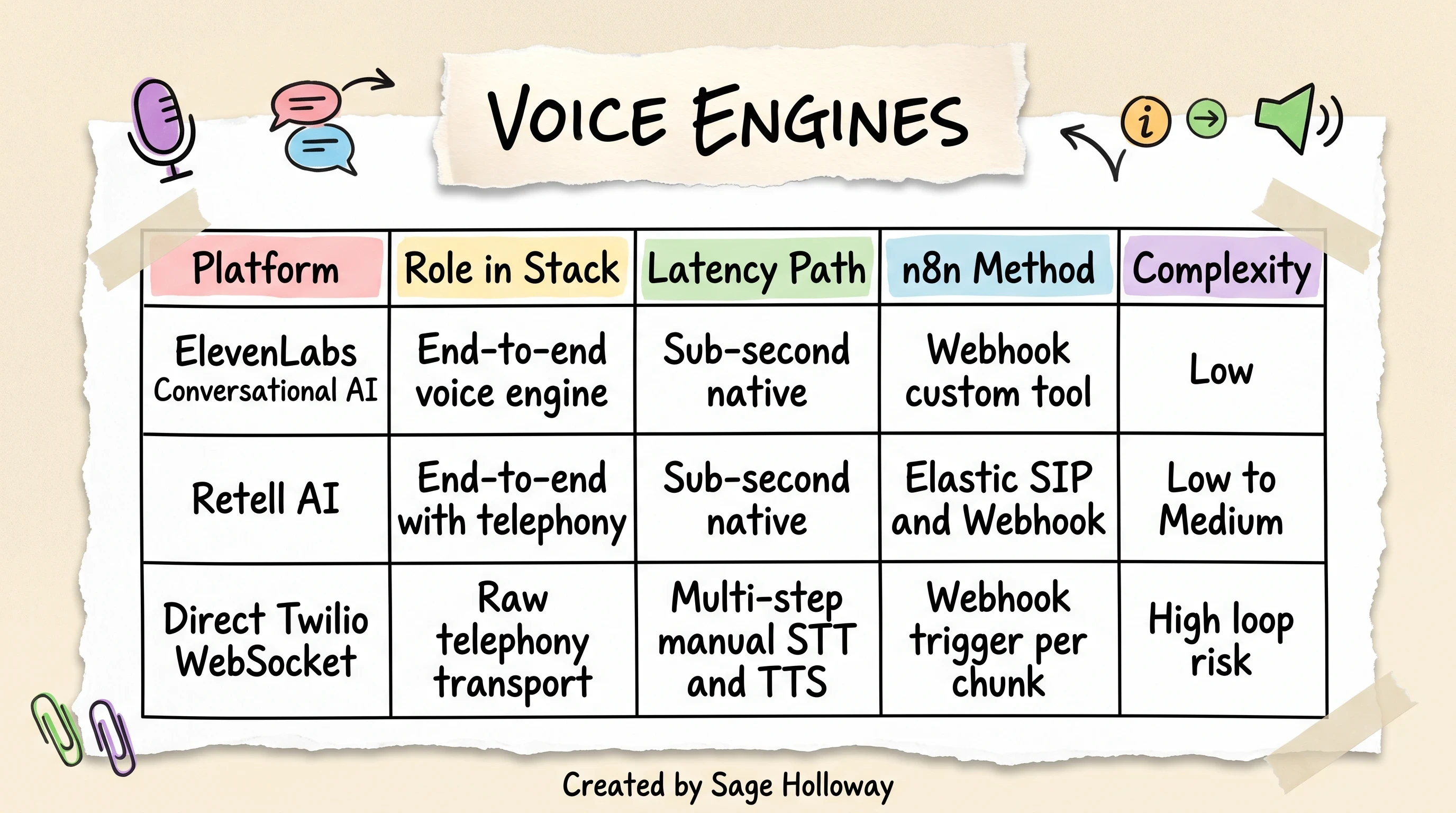
Dedicated conversational engines provide sub-second latency; direct raw audio streaming overtaxes webhook triggers.
Let us break down each approach and where it fits into your stack:
ElevenLabs Conversational AI: The premier choice for natural, human-like voice timbre, nuanced emotional inflection, and rapid conversational turn-taking. ElevenLabs provides a dedicated Conversational AI dashboard where you define system prompts, select voices, and attach custom webhook tools that point directly to your n8n endpoints. Official documentation is available at ElevenLabs Agent Integrations.
Retell AI: Engineered specifically for phone call automation and high-concurrency voice agents. Retell excels at native carrier integration, offering built-in Elastic SIP trunking, call recording, automated latency monitoring, and programmatic call transfer switches. You can review their official setup guide at Retell AI n8n Integration.
Direct Twilio WebSockets (Custom Pipeline): An experimental, low-level architecture where developers attempt to stream raw telephony audio over WebSockets from Twilio into a custom server, routing transcripts into n8n. While this avoids third-party platform subscription fees, it introduces massive engineering complexity, high transcription latency, and severe trigger loop risks.
For 95% of business applications, pairing ElevenLabs Conversational AI or Retell AI with an n8n backend delivers the highest reliability and lowest latency. If you are comparing broader workflow paradigms, check our guide on workflows vs ai agents vs multi agent systems to understand when to delegate autonomy versus enforcing deterministic paths.
Connect ElevenLabs and n8n through a webhook tool
Now that the architecture is established, let us build the primary communication bridge between ElevenLabs Conversational AI and your n8n instance.
This connection establishes an elevenlabs n8n bridge, creating an n8n elevenlabs integration where ElevenLabs treats your n8n workflow as an external function tool.
Configure the conversational agent and custom tool
Log in to your ElevenLabs dashboard and navigate to the Conversational AI section.
Click New Agent in the upper right corner, select Blank Agent, and give it a clear identifier such as
personal assistantorcustomer support agent.Configure the agent's First Message (for example: "Thanks for calling Meridian Support. How can I help you today?") and set the System Prompt to define its persona, operating boundaries, and tone.
Scroll down to the Tools section, click Add Tool, and select Webhook.
Set the HTTP Method to POST.
Paste your n8n Webhook URL into the endpoint field (we will configure this URL in the next step).
Set the Tool Name to
N8N application agent.Add a property identifier named
user requestwith the data type set tostring. In the property description, enter:this is the request from the user including the action they want to take on the app.In the main Tool Description field, enter:
Please summarize the user's main request.
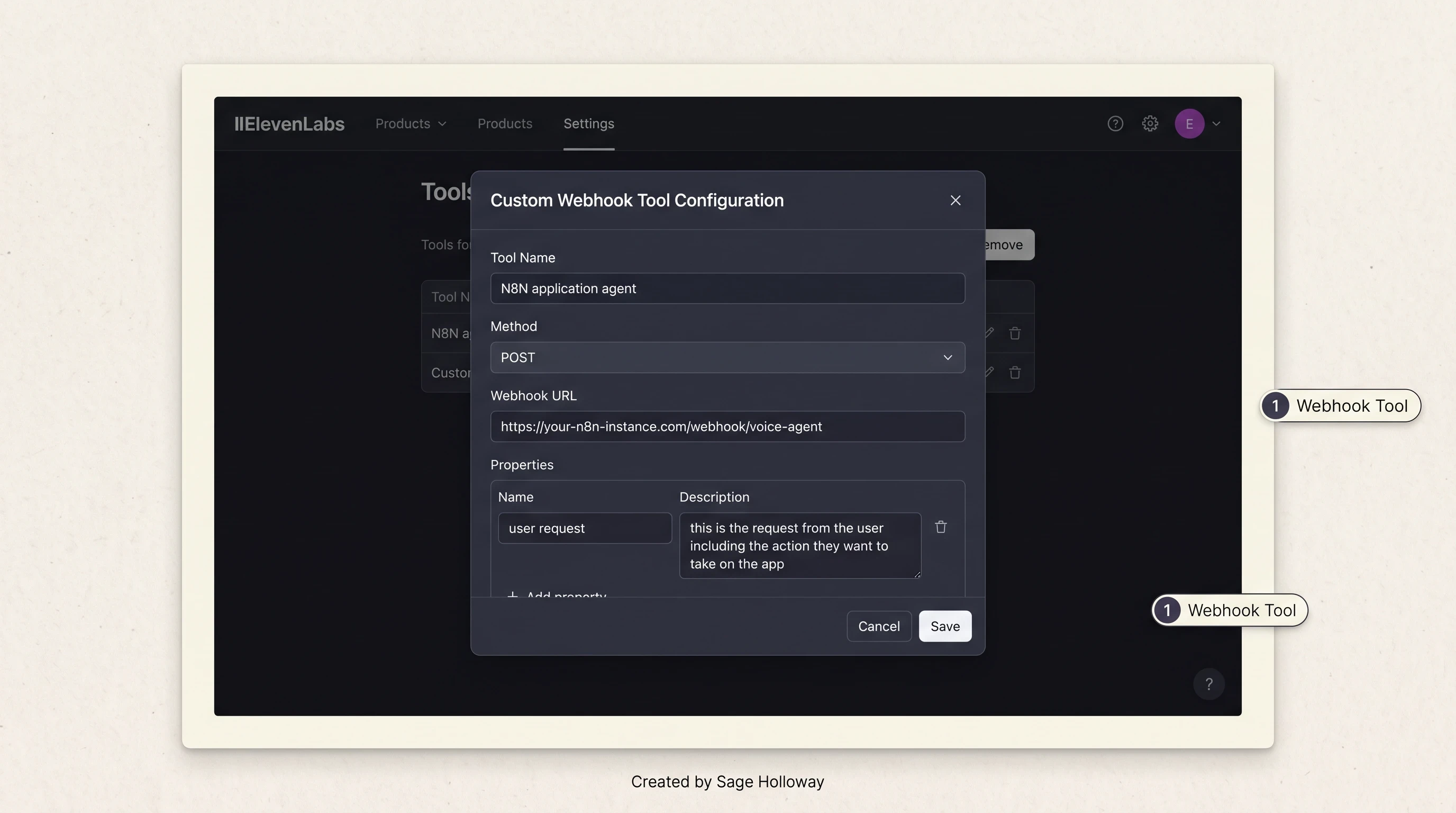
Map the custom webhook tool in ElevenLabs with a POST method and a user request parameter.
When a caller asks a question that requires external data (such as "What is the status of my order #8492?" or "Can I book a table for tomorrow at 7:00 PM?"), the ElevenLabs conversational brain recognizes that it lacks this information natively. It pauses vocal generation, extracts the parameters into the user request variable, and sends an HTTP POST request to your n8n endpoint.
Map the request in the n8n Webhook node
Now open your n8n canvas. Drag a Webhook node onto the workspace.
Set the HTTP Method to
POST.Set the Path to
voice-agent.Locate the Response Mode dropdown setting. By default, n8n sets this to
Respond Immediately. You must change this setting toUsing 'Respond to Webhook' Node.Copy the generated Webhook URL.
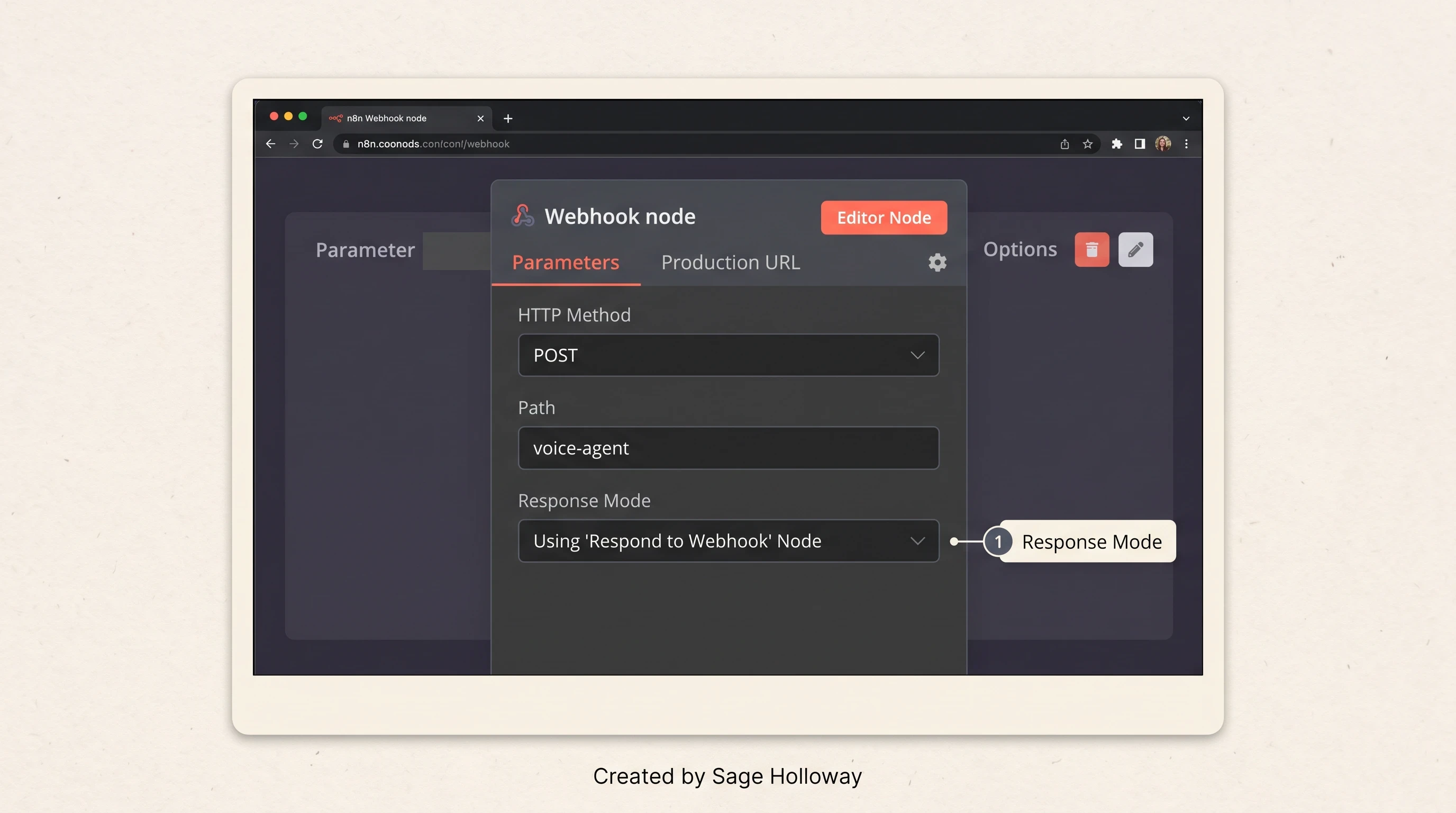
Change the Webhook response setting to using respond to web hook node so background tools can finish.
Why is changing the response mode critical?
If you leave the node on Respond Immediately, n8n will return an empty 200 OK JSON body to ElevenLabs the microsecond the payload hits the trigger. ElevenLabs will assume your tool returned no data and will tell the caller it could not complete the request.
By switching to Using 'Respond to Webhook' Node, n8n keeps the HTTP connection open while your downstream AI Agent, database lookups, and CRM tools execute. Once those nodes finish, the dedicated Respond to Webhook node packages the compiled result and sends it back to ElevenLabs in a single coherent payload.
Use the Cloud node or the self-hosted community node
Depending on where you run your automation infrastructure, integrating the n8n elevenlabs node follows two different paths.
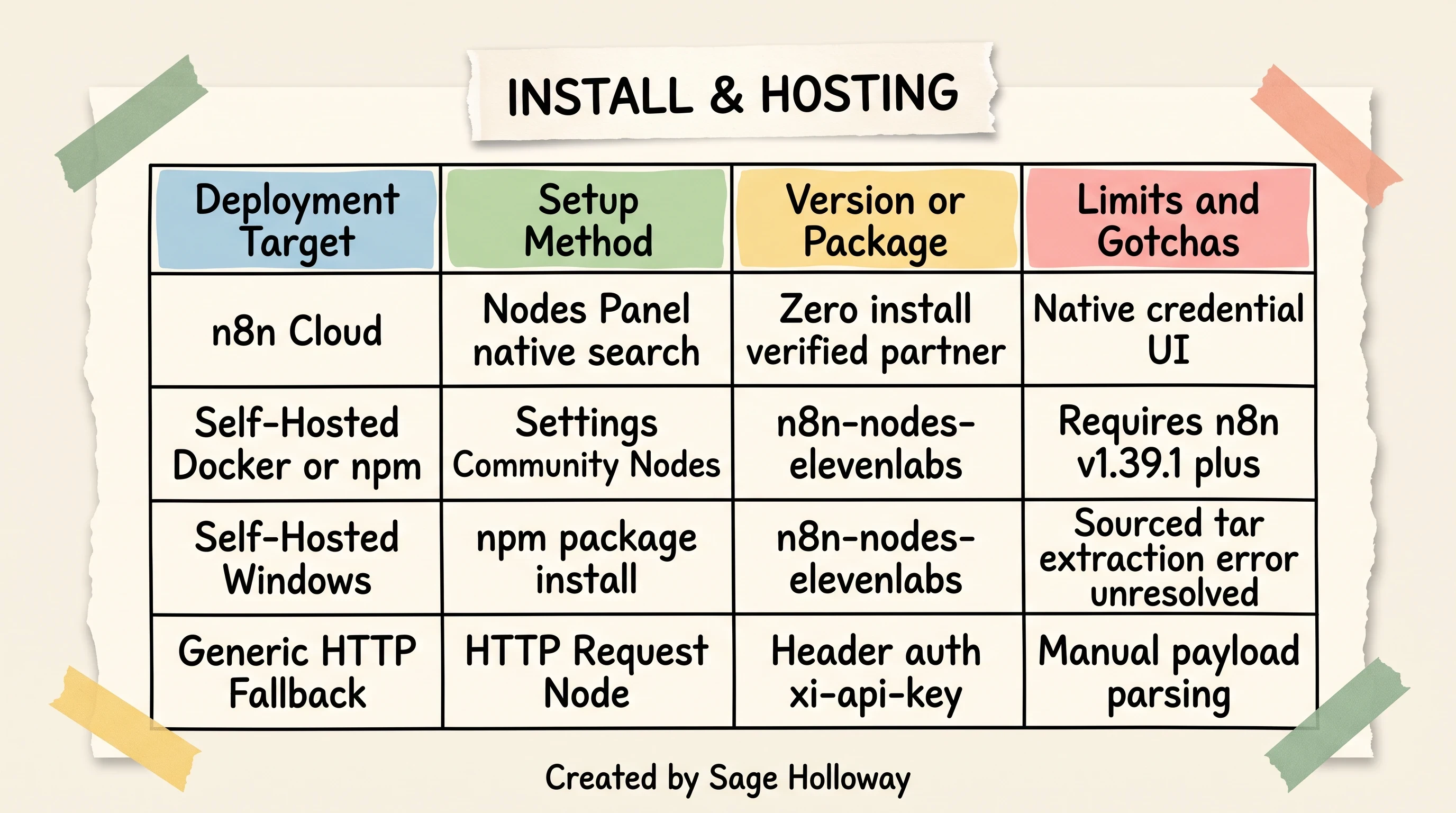
Cloud provides verified native nodes; self-hosted instances require v1.39.1+ for community packages.
Here is how to configure each environment:
n8n Cloud Deployment
If you use n8n Cloud, ElevenLabs is an officially verified launch partner. You do not need to install custom packages or manage terminal dependencies. Open the Nodes panel in your editor, search for ElevenLabs, and drag the node onto your canvas. Read the official announcement at ElevenLabs on n8n Cloud.
Self-Hosted Instance (Docker or npm)
If you self-host n8n on your own server or virtual private cloud, you can install the verified community package. If you are configuring your self-hosted server environment, our guide to the n8n self-hosted AI starter kit walks through Docker Compose configurations and environment variable management. Navigate to Settings → Community Nodes, click Install a community node, and enter the package name:
Your self-hosted instance must be running n8n version 1.39.1 or above to support community node installation.
Generic Header Authentication Fallback
If you prefer not to install third-party packages or are operating in a locked enterprise container, you can interact with ElevenLabs directly via the native HTTP Request node. Configure a Generic Credential Type with Header Auth using the following JSON header structure:
For an over-the-shoulder look at setting up ElevenLabs agent workspaces, configuring webhook parameters, and observing live tool execution, watch this detailed walkthrough by Brendan Jowett:
https://www.youtube.com/watch?v=-AJx_7CMZec
Brendan Jowett demonstrates end-to-end ElevenLabs webhook mapping and live n8n tool execution.
Build the n8n agent and backend tool chain
With the webhook receiver active, we can now construct the core reasoning engine on the n8n canvas. This engine parses incoming requests, coordinates business tools, and formats data for vocal output.
Parse intent and parameters
Drag an AI Agent node onto your canvas and connect the Webhook node's output port directly to the AI Agent's input port. Disconnect the default Chat Trigger node if one was pre-populated.
Inside the AI Agent node configuration:
Locate the User Message field. Map the incoming payload expression from the Webhook node:
In the System Message prompt, establish strict operational instructions for the model:
Connect a chat model sub-node to the AI Agent's model port. Attach an OpenAI Chat Model node configured with a fast, lightweight reasoning model like
gpt-4o-mini(orGPT 4.1 Minivia OpenRouter). Using heavy frontier models for routine tool dispatching adds 1.5 to 2.5 seconds of unnecessary latency.Attach a Window Buffer Memory node to the memory port to retain conversational context across sequential turns within the same call (see our foundational guide on building an n8n AI agent for deep-dive memory and sub-node wiring patterns).
Connect business tools and return the result
Now connect your backend operational tools directly to the AI Agent node's Tools port.
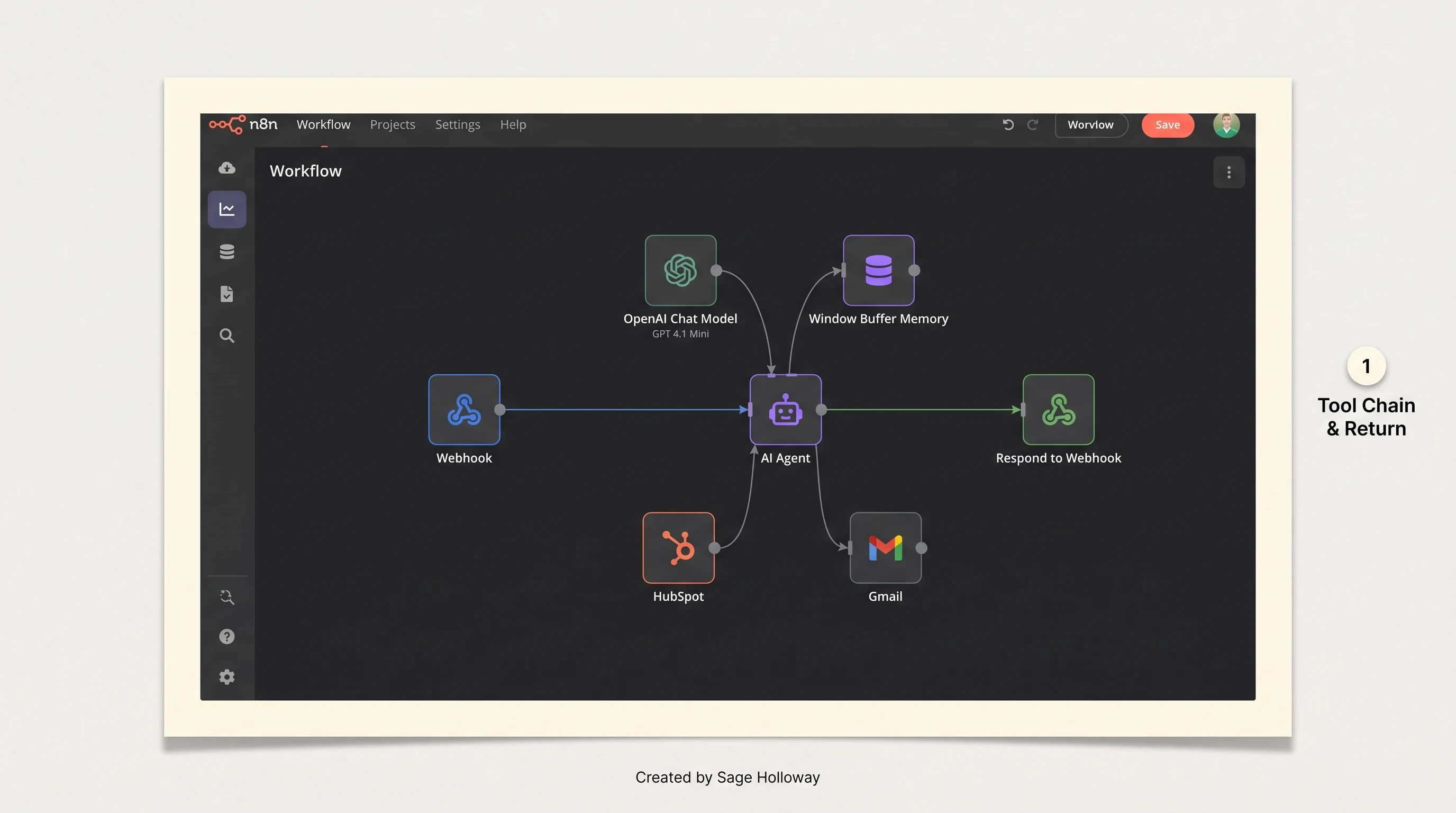
Connect the AI Agent to HubSpot and Gmail tools, terminating the flow with a Respond to Webhook node.
Depending on your use case, configure the following tool nodes:
HubSpot Tool (CRM Search): Add the HubSpot node, select the operation Search Contacts, set the limit to
1, and enable the toggle forLet the model define this parameterfor the search query. When a caller says "This is Sarah from Acme Corp," the model extracts the name and fetches the corresponding contact record.Gmail Tool (Email Dispatch): Add the Gmail node with the operation Send Email. Set the recipient, subject, and body parameters to
Let the model define this parameter. When the caller requests a confirmation, the model populates the email payload dynamically.Google Calendar / Database Tool: Connect your scheduling or inventory lookup nodes to verify availability in real time.
Finally, connect the output port of the AI Agent node to a Respond to Webhook node.
In the Respond to Webhook node, set the Response Data to First Entry JSON and map the AI Agent's text output:
When the AI Agent finishes executing its connected tools, it passes the synthesized response string to the Respond to Webhook node. n8n transmits this payload back over the open HTTP connection to ElevenLabs, which instantly converts the text to speech and streams the audio to the caller.
Add telephony without streaming raw audio into n8n
Connecting your agent to a web widget is simple. Connecting it to a real phone number that receives inbound carrier calls requires careful telephony routing.
If you are using Twilio for telephony, you might assume you should connect Twilio directly to n8n. Let us examine why that approach creates instability and how to route calls properly.
Route a carrier or SIP trunk through the voice engine
The most common mistake developers make when building a twilio n8n integration is attempting to stream raw call audio chunks over WebSockets directly into n8n webhook triggers.
When a phone call connects, carrier audio streams at 50 to 100 packets per second. If your webhook trigger listens directly on that raw stream, your n8n instance will receive thousands of executions during a single two-minute phone call. This "machine-gun" trigger loop exhausts server memory, hits execution concurrency ceilings, and crashes self-hosted instances.
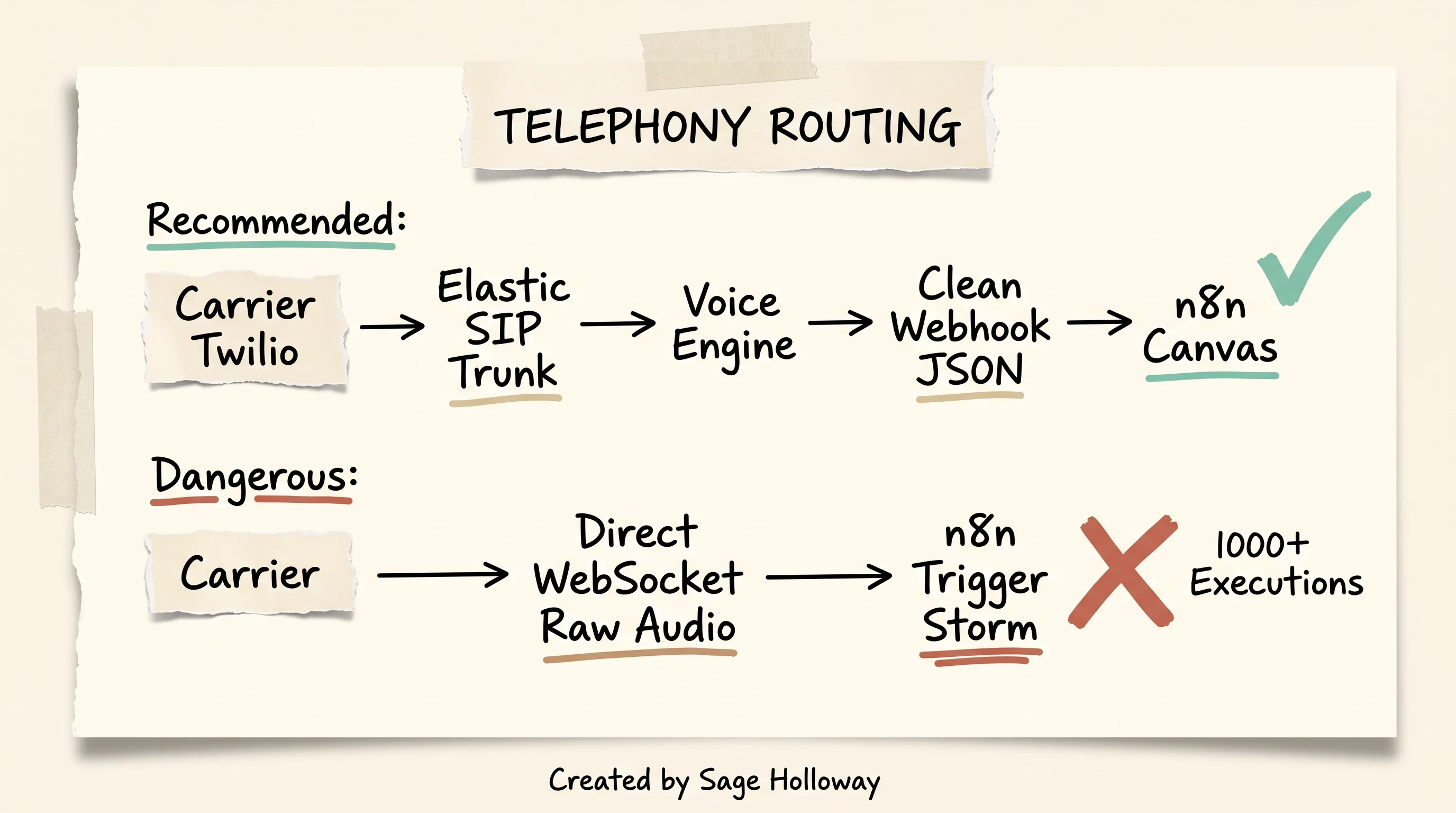
Route telephony through a dedicated voice engine via SIP; stream structured JSON to n8n rather than raw audio.
The production pattern routes carrier telephony through an Elastic SIP Trunk into your conversational engine:
Purchase a dedicated phone number from your telephony carrier (such as Twilio, Telnyx, or Plivo).
Configure an Elastic SIP Trunk inside your carrier console pointing its Fully Qualified Domain Name (FQDN) routing at your conversational engine (such as Retell AI or ElevenLabs).
The conversational engine answers the incoming SIP call, establishes the audio stream, and handles the live voice interaction.
When the caller triggers an action, the conversational engine sends a single, clean JSON payload to your n8n Webhook node.
Here is a compact 60-second demonstration of an AI voice agent managing appointment booking over a live phone connection:
https://www.youtube.com/shorts/JPNGNQvm66M
Compact demonstration of a voice agent answering calls and booking appointments via telephony routing.
Use the production webhook URL and acknowledge promptly
When moving your telephony workflow from testing to live deployment, two common configuration traps cause silent call failures:
Test URL vs Production URL: During workflow development, n8n provides a
Test URLthat only listens when you manually click Test step in the editor. Once your workflow is built, you must click the Activate toggle in the top right corner of the n8n canvas and update the webhook URL inside your voice platform to use the Production URL (https://your-n8n-instance.com/webhook/voice-agent). If you leave the test URL configured, live incoming calls will receive HTTP 404 errors.Telephony Carrier Timeouts: Telephony providers like Twilio enforce strict HTTP webhook response timeouts (typically 3,000 to 5,000 milliseconds). If your n8n workflow takes four seconds to query three APIs before returning data, Twilio will flag the webhook as failed and terminate the call. Ensure your n8n workflow executes lightweight queries and returns clean responses in under 1,500 milliseconds.
Ground answers with a knowledge base and conversation state
A voice agent that only runs hardcoded tools will feel rigid. To answer complex business questions accurately, your agent needs access to dynamic knowledge without introducing multi-second search delays.
Retrieve only the context needed for the turn
In standard text chatbots, Retrieval-Augmented Generation (RAG) pipelines often retrieve three to five massive document chunks (totaling 1,000 to 2,000 tokens) and inject them into the system prompt.
In a voice agent, injecting massive context blocks destroys conversational pacing. Large context windows increase language model Time-to-First-Token (TTFT) by several seconds, leaving awkward dead air on the phone line.
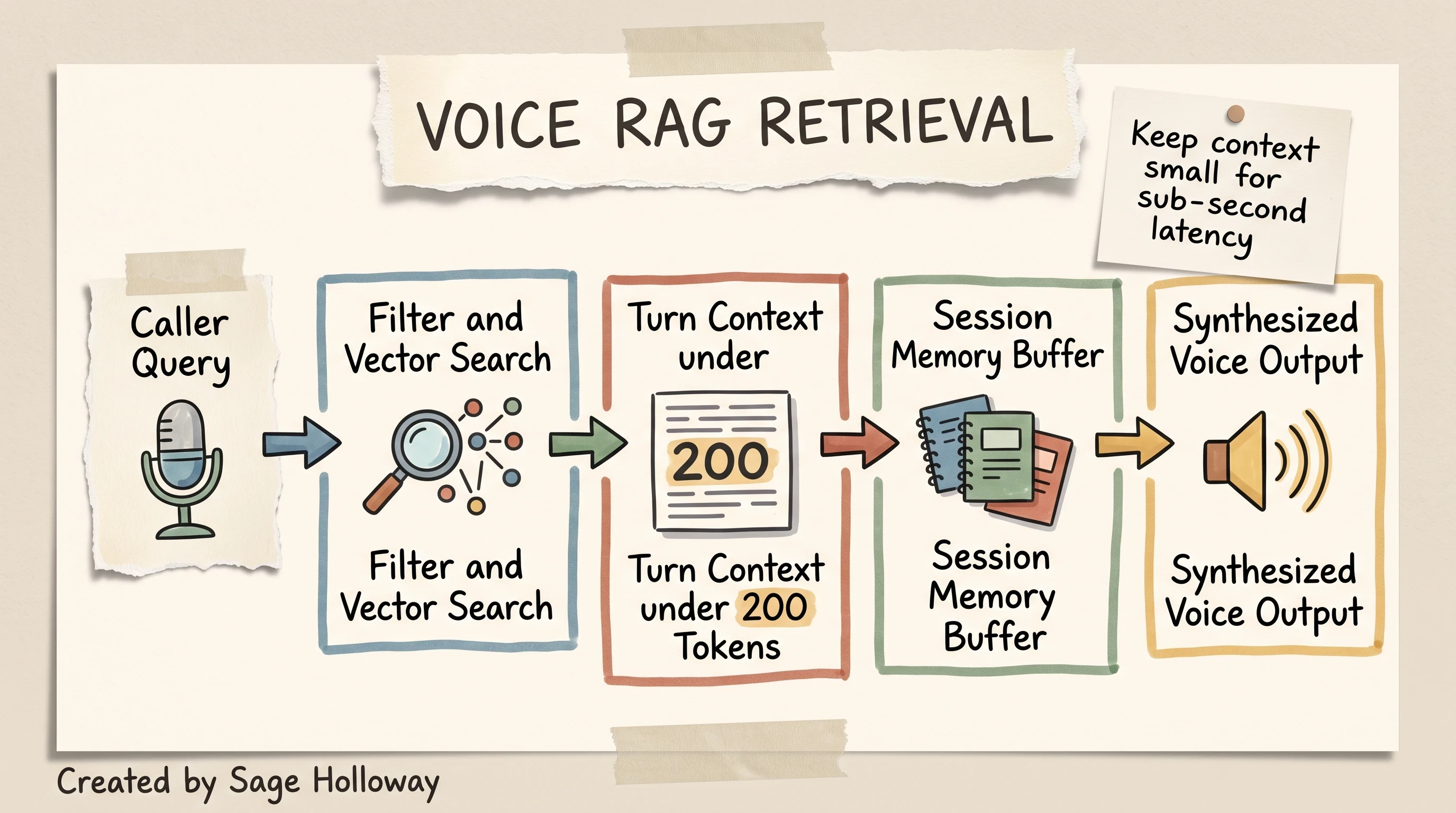
Fetch only the dynamic context required for the current conversational turn to preserve voice latency.
To maintain low latency during voice RAG interactions:
Pre-filter knowledge by category: Before querying a vector database like Qdrant or Pinecone, use metadata filtering based on the caller's intent (for example:
category: "refund_policy"ormenu_section: "dinner_specials").Enforce strict token limits: Restrict retrieved knowledge chunks to under 200 tokens total. Retrieve only the exact paragraph needed to answer the specific question.
Cache static FAQs in memory: For frequently asked questions (business hours, location, parking instructions), store key-value pairs in a lightweight table or Google Sheet so n8n can retrieve them in under 50 milliseconds without running semantic vector embeddings.
Keep call state isolated
When multiple callers interact with your voice agent simultaneously, preserving conversation state without cross-session contamination is essential.
Attach a Window Buffer Memory node to your AI Agent on the n8n canvas, and set the Session Key expression to the unique call identifier passed in the webhook payload:
This guarantees that caller A's booking details, contact name, and dietary preferences are stored in an isolated memory buffer and never bleed into caller B's parallel conversation.
Make actions safe with double verification and concurrency controls
This is the exact coordinate where most voice agent tutorials collapse.
Standard blueprints show a simple happy-path flow: the caller asks for a time slot, the AI checks the calendar once, and immediately commits the booking. In a production environment with real human callers and shared calendars, that fragile logic leads directly to double-bookings and race conditions.
Check availability before offering a commitment
Consider a standard scheduling scenario:
At 2:00 PM, caller A asks for a appointment tomorrow at 10:00 AM. The voice agent queries Google Calendar, sees that 10:00 AM is open, and says: "10:00 AM is available. Would you like me to book that for you?"
Caller A hesitates, asks two questions about pricing, checks their personal planner, and finally says "Yes, please book it" sixty seconds later.
During those sixty seconds, another customer booked that exact 10:00 AM slot through your online website form. If your voice agent commits the booking based solely on the availability check from a minute ago, you now have two confirmed clients arriving at the same time.
Verify again immediately before writing
To eliminate this vulnerability, your n8n workflow must implement a double-verification sequence.
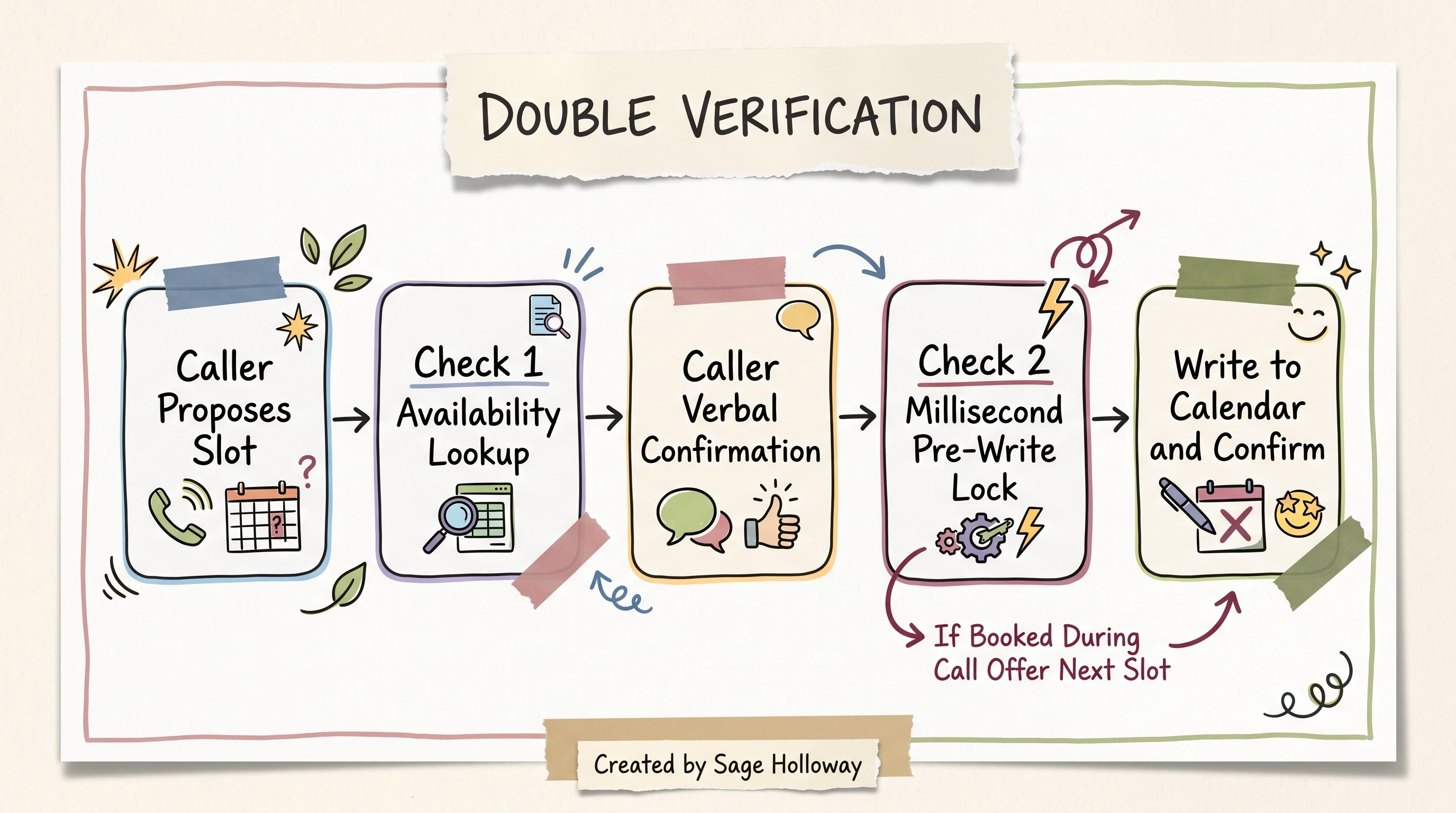
Verify availability when the slot is requested, and verify again at the exact moment of commitment.
The double-verification pattern operates in two distinct phases:
Phase 1 (Preliminary Availability Check): When the caller mentions a preferred date and time, n8n executes a read-only query against your calendar or database. If the slot is available, the agent presents it as an option.
Phase 2 (Millisecond Pre-Write Lock): When the caller gives verbal confirmation to commit the booking, n8n executes a dedicated Code node that performs an atomic re-verification check against the live calendar database milliseconds before triggering the write operation.
Here is the exact JavaScript logic to place inside your pre-write verification Code node:
If a conflict is detected at the millisecond of write, the workflow routes to an alternative branch. The voice agent gracefully informs the caller: "I apologize, but that 10:00 AM slot was just reserved. I have 11:30 AM or 2:00 PM open tomorrow. Would either of those work for you?"
Design for retries and concurrent calls
When engineering an n8n twilio integration for high-volume environments, you must design for idempotency.
If a network glitch causes the voice engine to retry a webhook request, your workflow must not create duplicate database records or charge a credit card twice.
To ensure idempotent execution:
Generate a unique transaction hash combining the
call_idand theaction_timestamp.Store processed transaction hashes in a fast key-value store (such as Redis or an n8n Data Table).
Before executing any state-changing write operation, verify that the transaction hash has not already been marked as completed.
The speech synthesis is rarely where a voice deployment breaks. The silent assumption that the world will wait for your backend to finish is what brings the system down.
Stop webhook loops and reduce call latency
Latency is the ultimate user experience metric in voice automation. Human conversation relies on rapid conversational turn-taking; when pauses exceed 1,500 milliseconds, callers assume the line disconnected and begin speaking again, triggering interruptions.
Diagnose repeated trigger execution
If your n8n execution log shows hundreds of rapid trigger events during a single test call, you are experiencing a webhook loop.
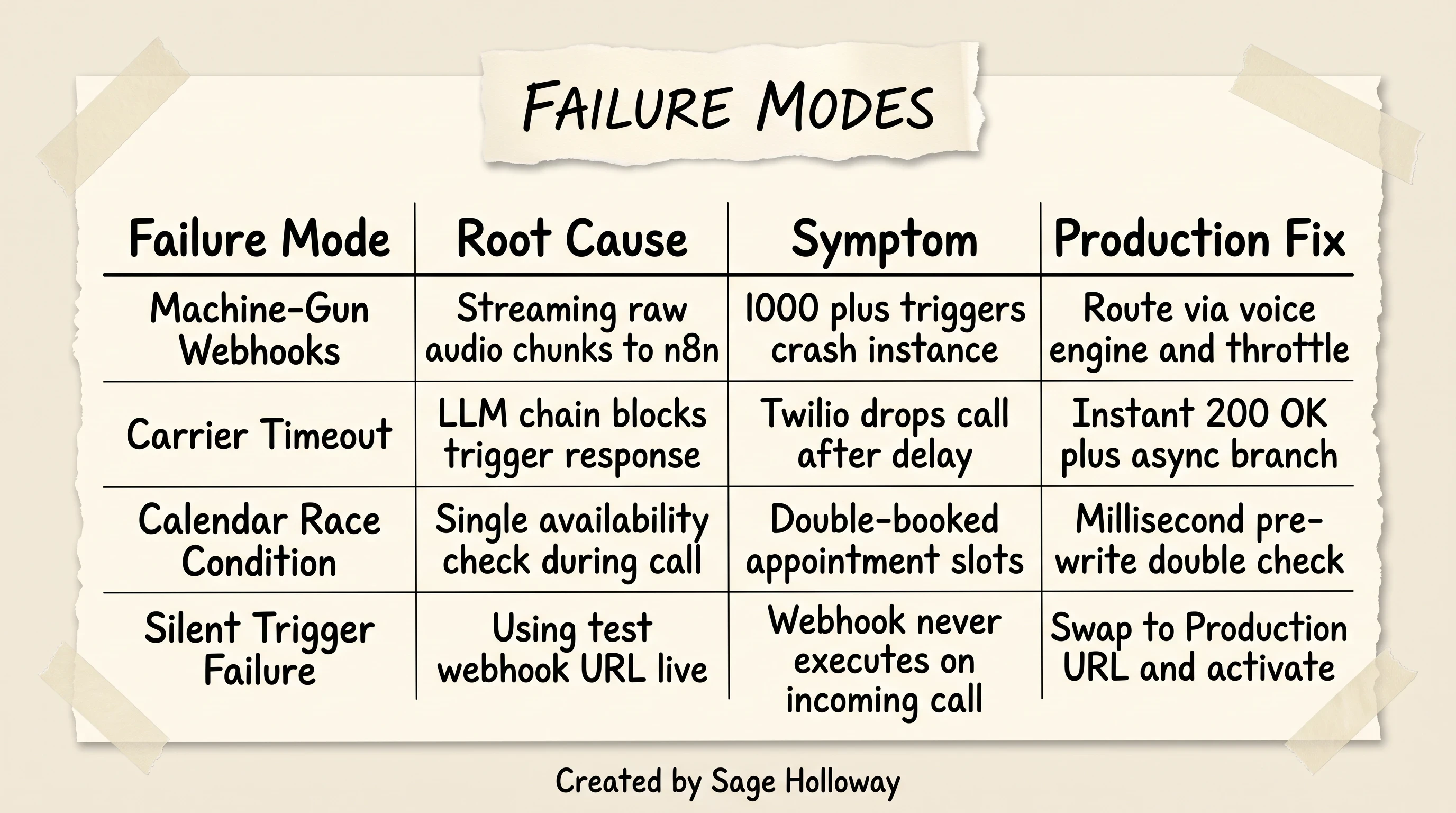
Prevent webhook loops with message throttling; eliminate call drops with immediate 200 OK acknowledgements.
The three root causes of trigger storms are:
Raw Audio Streaming: Streaming unparsed telephony media chunks directly to an n8n Webhook trigger instead of using a conversational voice engine.
Missing Webhook Acknowledgement: Failing to return an HTTP response before the telephony carrier's timeout window expires, causing the carrier to retry the webhook repeatedly.
Circular Event Triggers: Configuring an n8n node to write an update back to the same CRM or database that acts as a trigger listener for the workflow.
Throttle or queue latest-message events
If you are using a custom telephony setup that dispatches interim user transcripts during a call, you must implement a latest-message throttle.
Instead of allowing every intermediate transcript chunk to invoke a full AI Agent reasoning chain:
Route incoming webhook payloads into an in-memory queue keyed by the
call_id.Overwrite the pending payload with each new transcript update until the voice activity detector signals that the caller finished speaking.
Dispatch only the final, stabilized transcript to your n8n AI Agent node.
Separate the fast acknowledgement from slow tool work
When a voice agent needs to execute a heavy background task (such as generating a PDF invoice, syncing data across three CRMs, or running a web research query), running those operations synchronously while holding the phone line open will cause the call to drop.
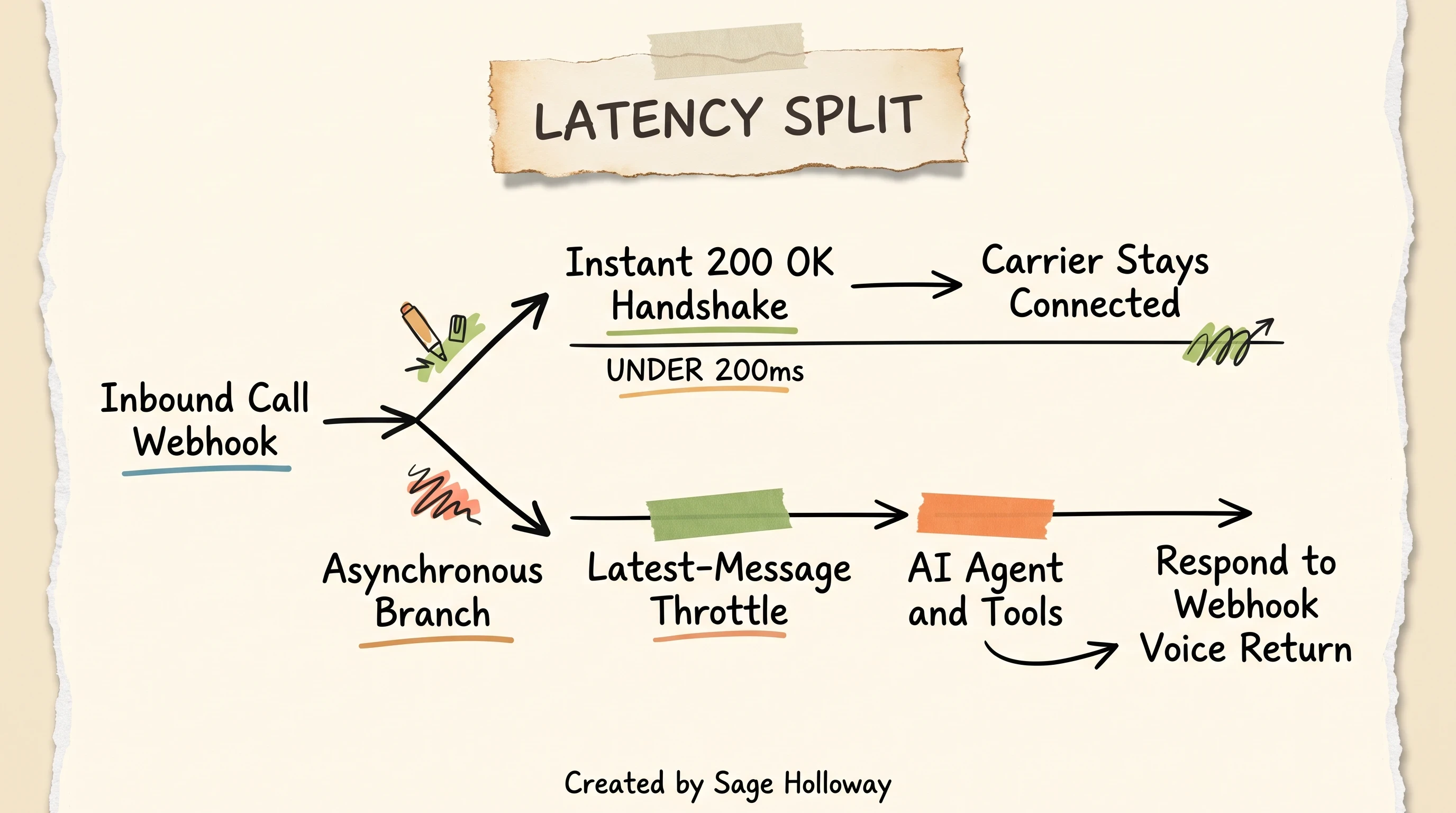
Return a rapid 200 OK handshake to the telephony carrier immediately to prevent dropped calls and timeouts.
To handle heavy background operations:
Split the workflow into two branches using an Execute Sub-Workflow node or a message queue.
Return a fast conversational confirmation back to the voice engine immediately: "I am compiling your comprehensive summary now and will email it to your inbox in two minutes."
Allow the background worker sub-workflow to execute the complex API tasks asynchronously without blocking the telephony stream.
If you are comparing orchestration backends, our analysis of OpenAI AgentKit vs n8n breaks down how visual workflow engines handle deterministic transaction plumbing compared to autonomous prompt chains.
Escalate to a human and test the complete call
No matter how advanced your prompt engineering and double-verification logic are, edge cases will occur. A production voice system must know its limits and provide an immediate escape hatch.
Define transfer and failure conditions
Establish clear programmatic criteria for human escalation:
Explicit Intent: The caller says "Let me talk to a real person" or "Representative".
Repeated Tool Failure: A backend database or CRM API returns an error status on two consecutive attempts.
Sentiment Threshold: The conversational engine detects severe caller agitation or frustration.
Unrecognized Intent Loop: The AI Agent fails to extract required parameters after two clarification attempts.
When an escalation condition is met, the voice engine executes a SIP transfer command, routing the active phone call to a live support desk or telephony queue (such as Zendesk Talk, Freshdesk, or an internal PBX extension). n8n concurrently dispatches the summarized conversation transcript to the support agent's dashboard so the human operator has full context.
Test the unhappy paths
Before pointing a production business phone number at your workflow, run your system through a structured failure injection audit.
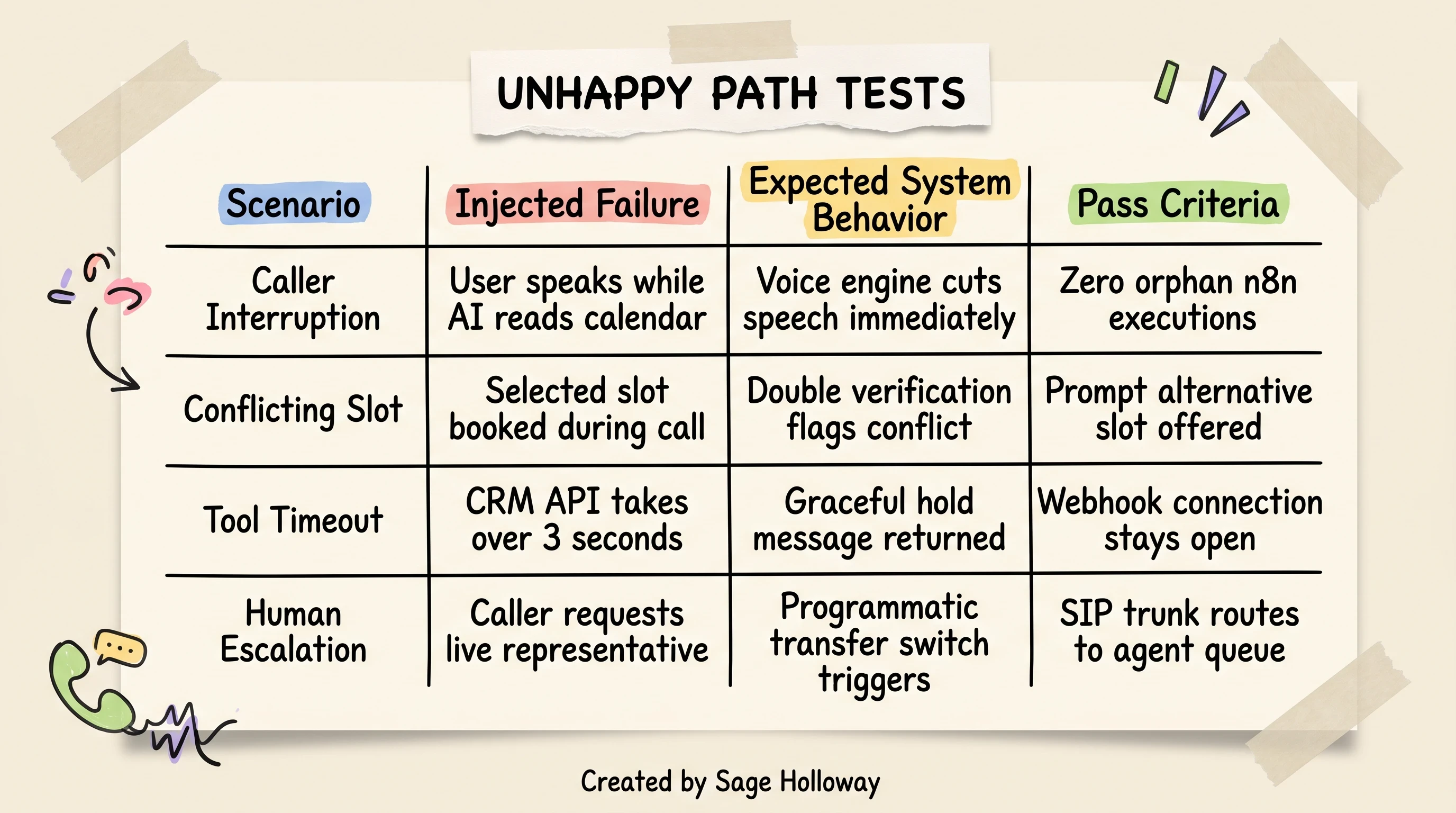
Test caller interruptions, conflicting calendar slots, and API timeouts before deploying to production.
Verify that your system passes all four critical failure scenarios:
The Interruption Test: Speak directly over the voice agent while it is reading a long paragraph. Verify that outbound audio stops immediately and that n8n does not fire orphan executions for truncated sentences.
The Race Condition Test: Open your Google Calendar in one browser window and initiate a test call in another. Manually create an event in the requested slot while the voice agent is speaking. Verify that the pre-write verification Code node flags the conflict and offers an alternative slot.
The API Timeout Test: Temporarily inject a four-second delay into your CRM lookup node. Verify that the workflow returns a graceful hold message rather than dropping the phone connection.
The Escalation Test: Demand a human representative at the start of the call. Verify that the SIP transfer triggers cleanly and logs the handoff event in your CRM.
If you are expanding your automation capabilities into multi-model routing, review our deep dive on Claude Code plan mode for structured engineering practices.
Frequently asked questions
How do I install the ElevenLabs community node on a self-hosted n8n instance?
To install the community node on a self-hosted n8n instance, log in to your n8n dashboard, navigate to Settings → Community Nodes, click Install a community node, and enter n8n-nodes-elevenlabs. Your self-hosted instance must be running n8n version 1.39.1 or above to support community package installations. Once installed, the ElevenLabs node will appear in your canvas node search.
Why does Windows show a command failed: tar -xzf error?
Users running self-hosted n8n locally on native Windows environments frequently encounter this package extraction error when attempting to install community npm packages. The underlying issue stems from how Windows handles tarball decompression and path resolution across local npm directories. A verified, reliable technical fix for this native Windows error is insufficient in sources; running n8n inside a standard Docker container or via Windows Subsystem for Linux (WSL2) bypasses the issue completely.
How does an n8n voice agent handle several concurrent calls?
When multiple callers dial into your voice platform at the same time, the conversational engine opens separate, isolated webhook sessions for each call. By configuring your n8n AI Agent with a Window Buffer Memory node keyed dynamically to the incoming call_id, conversation state remains strictly isolated per caller. While n8n processes concurrent webhook executions asynchronously, exact multi-session hardware scaling limits depend on your self-hosted server memory and queue configurations, which are insufficient in sources.
How do I configure ElevenLabs credentials without a native node?
If you prefer not to install third-party community packages, you can interact with ElevenLabs directly using n8n's native HTTP Request node. Create a new credential under Generic Credential Type → Header Auth. Set the header Name to xi-api-key and paste your secret API key into the Value field. You can then dispatch POST requests to ElevenLabs API endpoints with native authentication.
How do I prevent repeated Twilio webhook executions from exhausting n8n?
Repeated execution loops occur when developers attempt to stream raw telephony audio chunks directly to an n8n Webhook trigger, or when n8n fails to return an HTTP response before Twilio's timeout window expires. To prevent trigger exhaustion, route carrier telephony through an Elastic SIP trunk into a dedicated conversational engine (like ElevenLabs or Retell) and send only clean JSON payloads to n8n. If building a custom WebSocket receiver, implement latest-message queue throttling to drop interim audio chunks.
Can OpenAI Realtime reduce transcription lag in an n8n workflow?
Yes. Connecting OpenAI's Realtime voice API can reduce response latency by approximately two seconds by processing speech-to-speech tokens natively without intermediate text transcription steps. However, integrating the Realtime API directly into n8n requires custom WebSocket proxy servers and low-level audio streaming infrastructure, as out-of-the-box visual node templates for the Realtime API remain experimental in community sources.
Why does my connected Twilio number fail to trigger n8n?
The most common reason a connected Twilio number fails to trigger an n8n workflow is that Twilio's messaging or voice webhook URL is still configured with n8n's Test URL instead of the active Production URL. Ensure your n8n workflow is toggled to Active, and update Twilio's webhook endpoint setting to your live production address (https://your-domain.com/webhook/voice-agent). Additionally, verify that your firewall permits inbound HTTPS traffic on port 5678.
Can I use ElevenLabs directly in n8n Cloud without manual installation?
Yes. ElevenLabs is an officially verified launch partner in n8n Cloud. Cloud users can open the Nodes search panel in the workflow editor, search for ElevenLabs, and drag native nodes onto the canvas immediately without installing community packages, modifying environment files, or configuring custom npm directories.
How should the n8n Webhook wait for AI Agent tools to finish?
Inside your n8n Webhook trigger node settings, change the Response Mode dropdown from Respond Immediately to Using 'Respond to Webhook' Node. Then place a dedicated Respond to Webhook node immediately after your AI Agent node on the canvas. This holds the HTTP connection open while your background CRM, database, and search tools execute, returning the compiled response to the voice engine only after all operations finish.
Put this into practice: run one production-safety test
Take a critical look at your voice automation stack this week.
If your current voice workflow checks calendar availability once and immediately creates a booking without a pre-write verification step, pause your live traffic. Drag a JavaScript Code node onto your canvas immediately before your Google Calendar or database write node. Implement the double-verification logic detailed in this guide.
Inject an artificial conflict into your calendar during a test call. Verify that your agent gracefully detects the collision and offers an alternative time slot without throwing an unhandled exception or creating a double-booking.
Building an AI voice agent that speaks fluently is exciting. Building one that handles real-world business transactions with deterministic safety is what separates a weekend experiment from a production asset that compounds value.
Until then...
Sage
PS. If you want a quick diagnostic on your voice agent's latency budget, check your n8n execution logs and calculate the exact elapsed time between your Webhook trigger node receiving a payload and your Respond to Webhook node firing. If that round-trip execution exceeds 1,200 milliseconds, replace your heavy frontier chat model with a lightweight reasoning model like gpt-4o-mini and pre-filter your RAG database queries.
Author
Practical guides, tool teardowns & AI engineering workflows.


