Comparisons
Claude Code Vs Cursor

Sage Holloway
13 min read
Go back to blog
SHARE

Most comparisons between Claude Code and Cursor miss the fundamental distinction: you are not choosing between two competing AI code editors. You are choosing between a model-agnostic visual IDE and an autonomous terminal-native agent loop. The developers operating at peak velocity in 2026 do not choose one over the other; they run Claude Code directly inside Cursor's integrated terminal.
Cursor and Claude Code represent two fundamentally distinct AI development architectures. Cursor is a model-agnostic visual IDE engineered for inline editing, tab completion, and visual diff reviews. Claude Code is a terminal-native, autonomous agent designed for multi-file refactoring, test execution, and shell operations. Developers frequently combine both tools by running the Claude Code CLI inside Cursor's integrated terminal, balancing visual editor navigation with autonomous terminal execution.
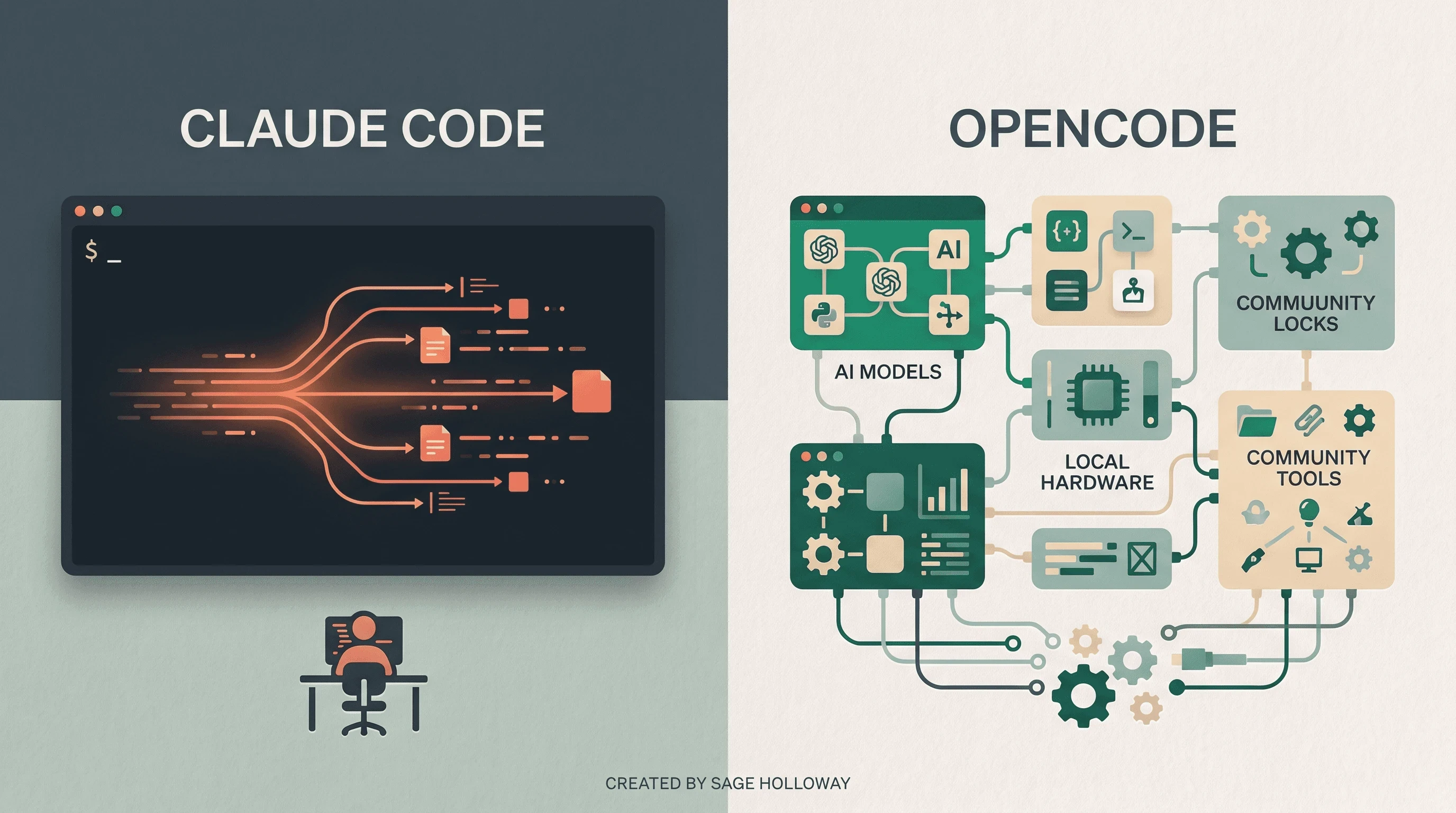
Figure 1: Visual comparison of Cursor's IDE environment and Claude Code's terminal agent interface.
Core Architectural Differences: Visual IDE vs Terminal Agent
To understand claude code vs. cursor, you must first understand how their underlying context mechanisms process your codebase.
Cursor operates as an AI-augmented visual IDE. It builds a persistent semantic index of your repository using vector embeddings. When you trigger an inline edit or ask a question in the chat panel, Cursor queries its vector index to retrieve relevant code snippets, injecting only the necessary chunks into the prompt context window. This RAG (Retrieval-Augmented Generation) approach makes Cursor exceptionally fast and token-efficient for targeted edits, tab autocompletions, and single-file file navigation.
Claude Code takes a completely different path. Rather than relying on static vector embeddings, Claude Code is an autonomous command-line agent that explores your repository dynamically. When tasked with a refactoring or debugging objective, it navigates your directory structure using shell-native tools (ls, grep, find, cat), following imports and tracebacks like an engineer investigating a codebase for the first time. Because it evaluates raw file contents directly during runtime, it catches subtle cross-file dependencies that vector searches often miss. However, this deep exploration means Claude Code reads larger portions of your files into context, resulting in higher token usage during extended agent loops.
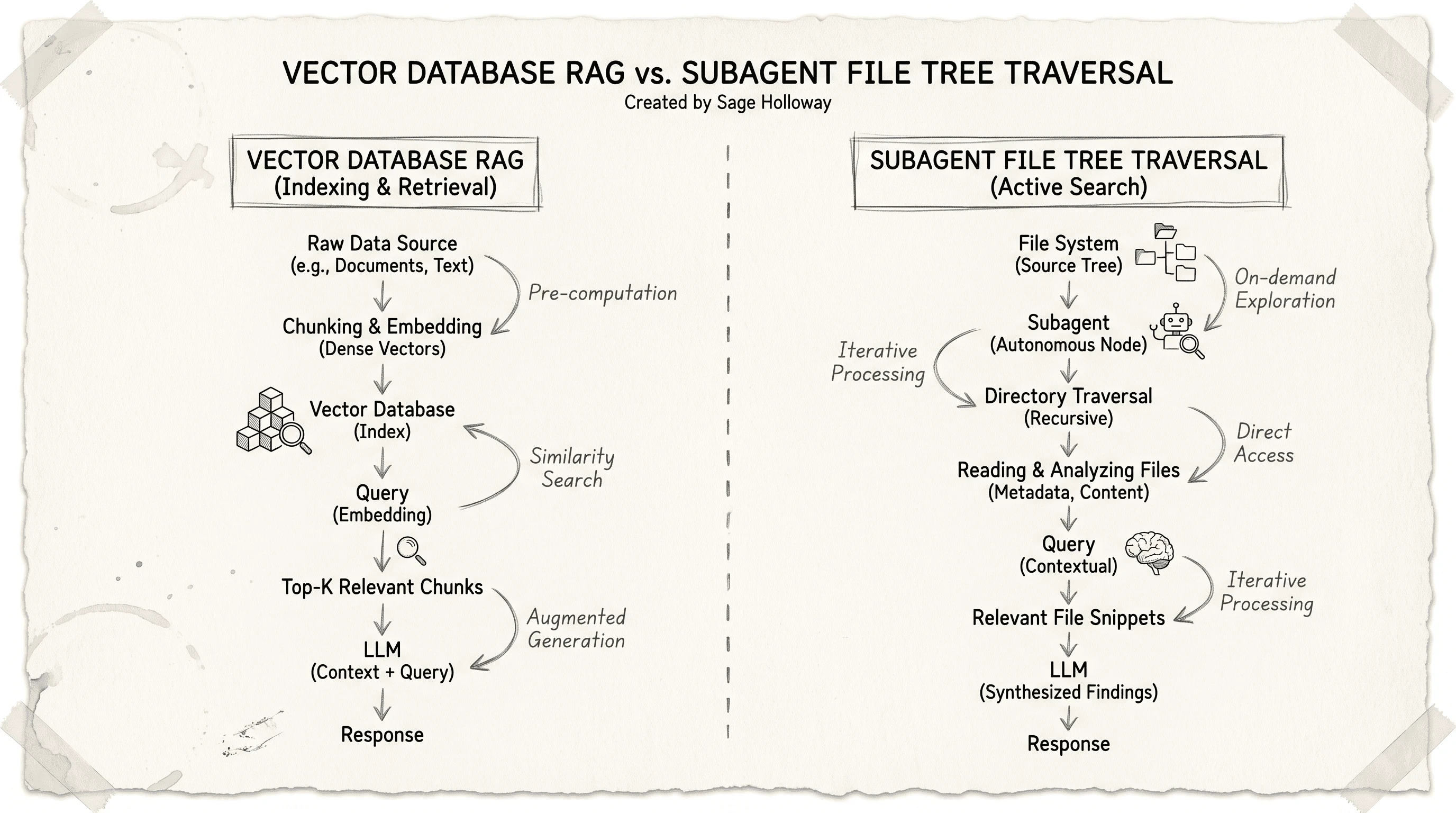
Figure 2: Vector RAG codebase indexing (Cursor) vs on-demand terminal file traversal (Claude Code).
https://www.youtube.com/watch?v=JMYspR42HFM In this video breakdown, Theo (t3.gg) analyzes the architectural trade-offs between visual IDE harnesses like Cursor and autonomous CLI agents like Claude Code.
Feature & Workflow Comparison: Where Each Tool Excels
When comparing cursor vs. claude code, neither tool is universally superior across every development task. Their strengths correspond directly to their user interface models.
Where Cursor Wins
Greenfield UI Development: Building frontend components, adjusting CSS layouts, and reviewing side-by-side visual diffs is significantly easier in a visual IDE. Cursor allows you to highlight specific code blocks, apply inline prompts, and accept or reject individual diff lines instantly.
Tab Autocomplete: Cursor's multi-line tab completion predicts your next edits in real-time as you type. Claude Code has no inline autocomplete capability since it runs inside a terminal or background process.
Model Selection Flexibility: Cursor allows you to switch seamlessly between Claude 3.7 Sonnet, OpenAI o3-mini, Gemini 2.5 Pro, and Cursor's proprietary Composer 2.5 model within the same editing session.
Where Claude Code Wins
Complex Multi-File Refactoring: When you need to rename an API contract across 40 files, update database schemas, and rewrite dependent test suites, Claude Code executes the entire loop autonomously. It inspects all dependent modules, proposes a complete edit plan, applies changes, runs your test runner (
pytest,npm test), and iteratively fixes failing assertions until the build passes.Terminal & Git Automation: Claude Code can run any command your terminal environment permits. It creates git branches, stages files, writes clean commit messages, pushes to remote repositories, and creates GitHub pull requests via
gh pr create.Headless & Remote Workflows: Because Claude Code is a CLI binary, you can run it over SSH on remote Linux servers, inside Docker containers, or in CI/CD automation pipelines where no GUI editor can exist.
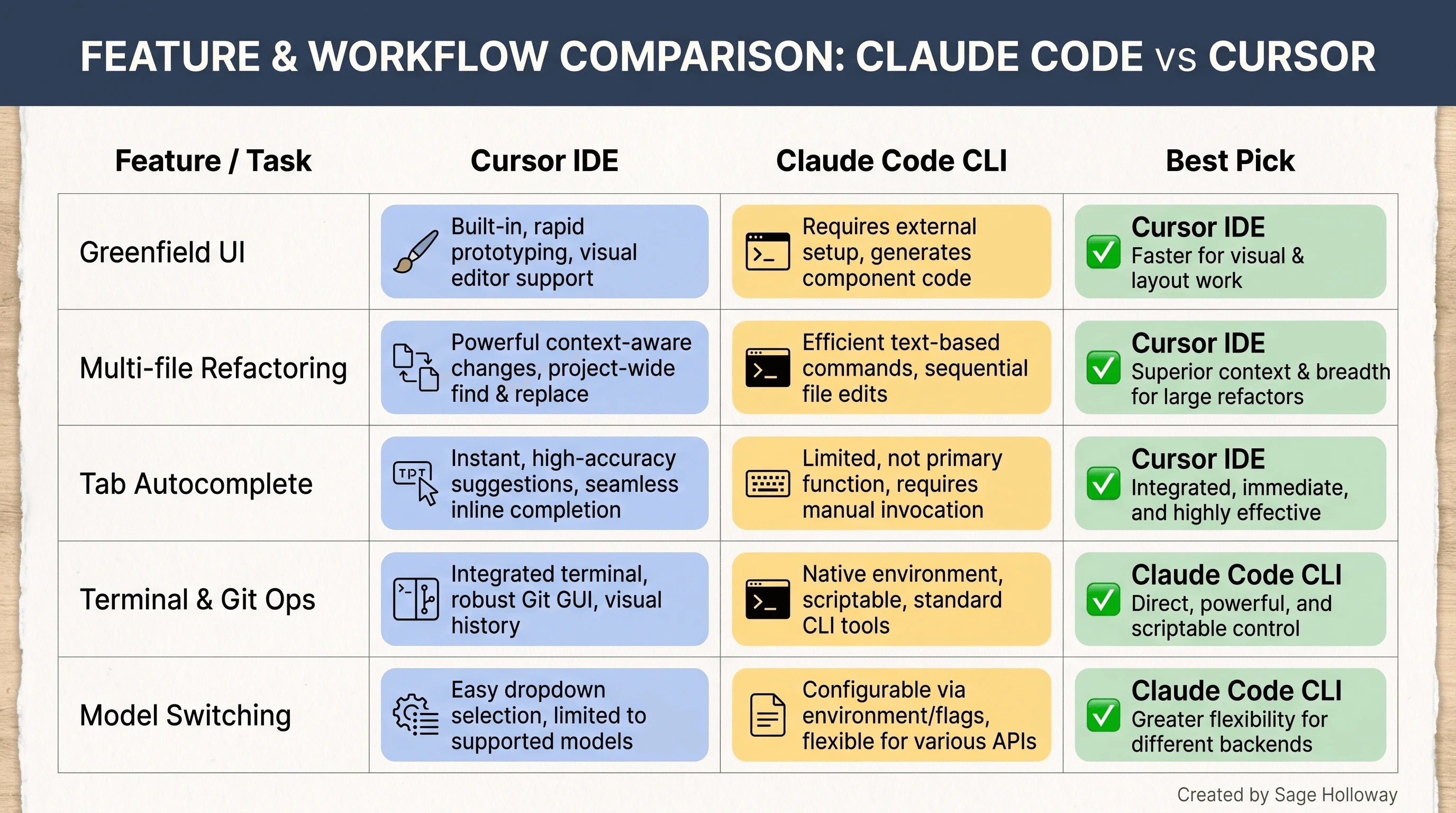
Figure 3: Feature breakdown comparing Cursor IDE and Claude Code CLI across key engineering tasks.
https://www.youtube.com/watch?v=OnCep-HlMzI Creator Jan Marshal benchmarks velocity by building the exact same application three times across Cursor, Claude Code, and Codex.
Pricing, Quotas & Token Economics
Understanding the cost structure of both tools is essential for engineering leads and individual developers evaluating monthly budgets.
Cursor operates primarily on a flat $20/month subscription model (Cursor Pro). This subscription includes a quota of fast requests per month across models like Sonnet and Composer 2.5. Because Cursor's RAG architecture sends only targeted code snippets to the model, users rarely incur extra pay-as-you-go costs under standard daily usage.
Claude Code offers two primary billing paths:
Claude Pro / Team / Max Subscriptions: Individual Claude Pro ($20/mo) or Team ($30/mo) subscribers receive access to Claude Code subject to Anthropic's 5-hour rolling usage windows. For heavy agentic workloads, Anthropic offers higher-tier plans like Claude Max.
Pay-as-You-Go Anthropic API: Developers using direct Anthropic API keys (
ANTHROPIC_API_KEY) pay per input and output token consumed. Because Claude Code's agentic loop frequently reads multi-file contexts and executes iterative subagent tasks, token consumption on large repositories can reach $5 to $15 per complex refactoring session if unmonitored.
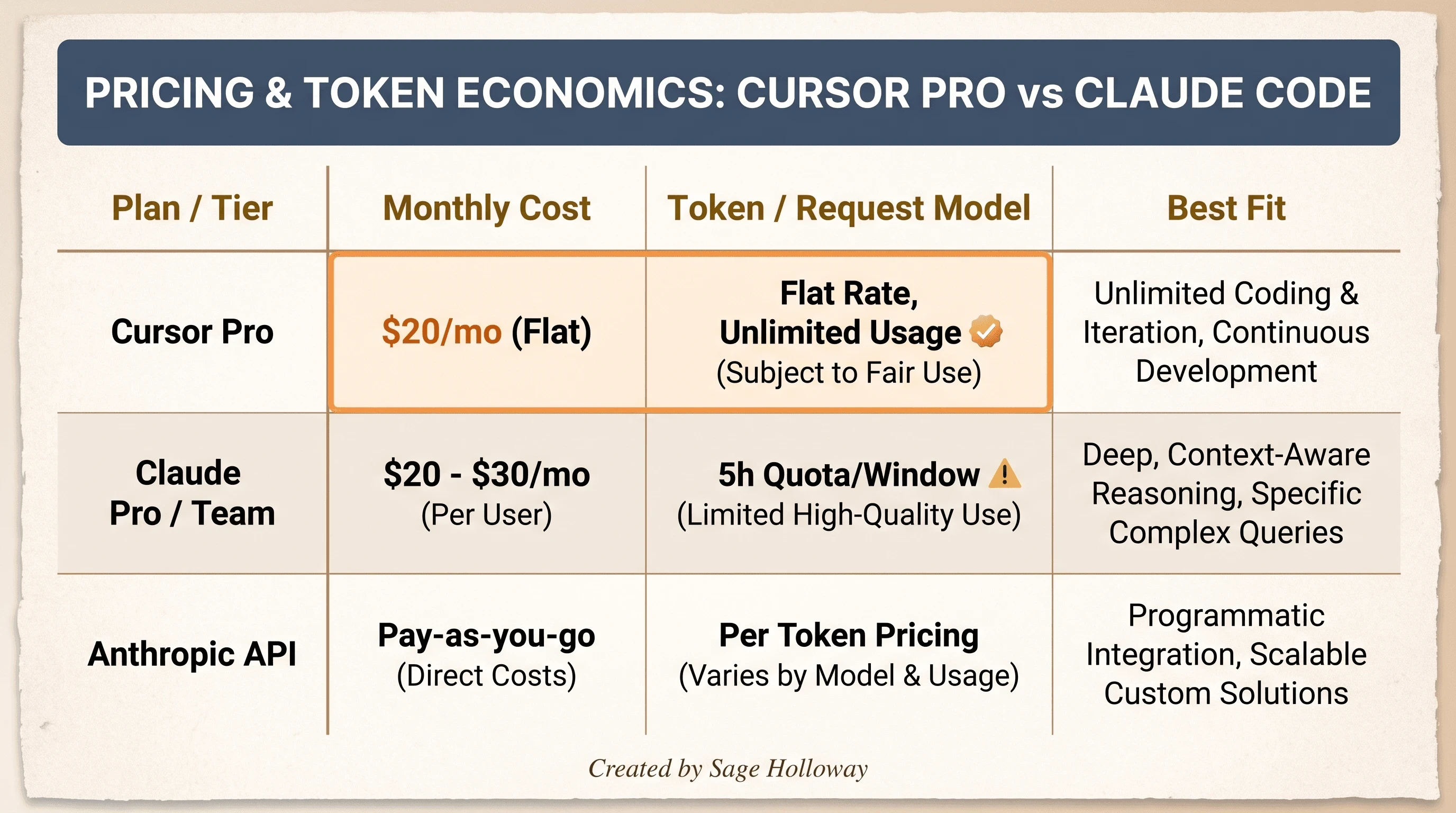
Figure 4: Detailed pricing structure comparing Cursor Pro subscriptions with Claude Code API token billing.
https://www.youtube.com/watch?v=aRNVncOYd5c Developer Philipp Lackner tests Claude Code and Cursor on identical codebases, highlighting real-world token usage and execution accuracy.
Permission Models & Safety Controls
Security and permission oversight determine how much autonomy you delegate to an AI tool when modifying production code bases.
Cursor uses a visual approval system. In standard chat and edit modes, Cursor displays diff previews before modifying any file on disk. In Cursor Agent mode, users can toggle between manual approval for commands or enable automated execution modes (such as Yolo mode) for rapid prototyping.
Claude Code implements a granular, terminal-native permission architecture:
defaultmode: Reads files freely across the project tree, but prompts for user confirmation before writing file edits or executing terminal commands.planmode: Analyzes the repository, drafts a detailed markdown execution plan, and halts until you explicitly approve the plan before taking any filesystem or terminal actions.acceptEditsmode: Automatically approves filesystem edits and routine read operations, but still prompts before running bash execution commands.automode: Uses internal safety rules to auto-approve routine shell commands while flagging destructive commands (such asrm -rfor database drops) for manual confirmation.bypassPermissionsmode: Disables all interactive prompts. Intended exclusively for isolated, non-networked container sandboxes.
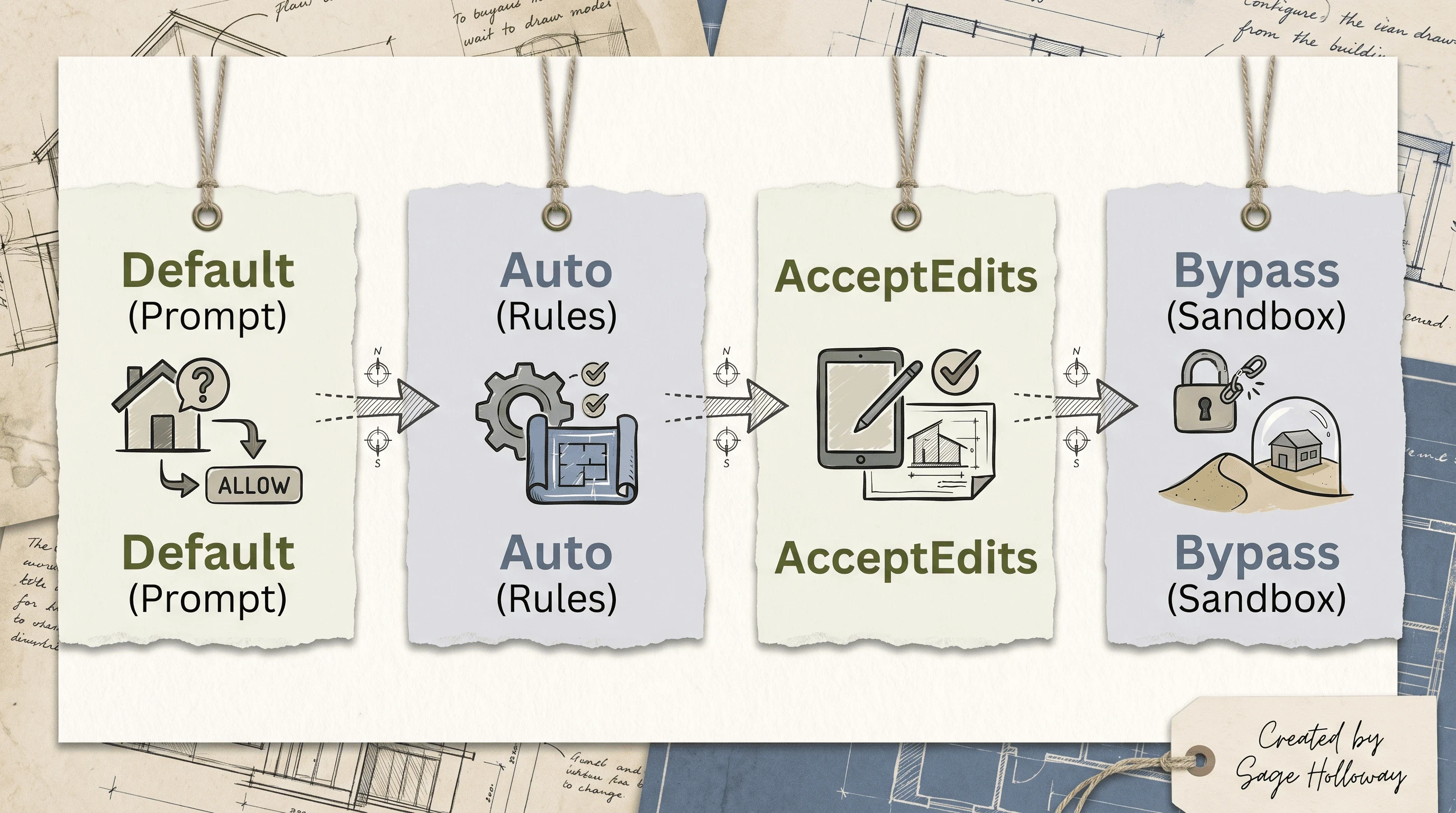
Figure 5: Permission safety progression from interactive prompting to autonomous terminal execution.
Running Claude Code Inside Cursor (Step-by-Step Setup)
You do not need to choose between Cursor and Claude Code. The single most productive setup is running claude code in cursor by launching the Claude Code CLI inside Cursor's integrated terminal.
Step 1: Install the Claude Code CLI
Open your terminal and install the global binary via npm or official curl script:
Verify installation and authenticate your Anthropic account:
Step 2: Open Your Project in Cursor
Launch Cursor and open your target repository folder. Open the integrated terminal inside Cursor using Control + \ or Cmd + \``.
Step 3: Launch Claude Code in the Cursor Terminal
In Cursor's integrated terminal, initialize Claude Code for your project:
If initializing a project for the first time, run /init to generate a starter configuration. Claude Code will scan your project structure and build a baseline CLAUDE.md file.
Step 4: Configure the Integrated IDE Link
To allow Claude Code to open files directly in Cursor's visual editor when running in the terminal, run:
Select Cursor as your target IDE. When Claude Code references a file during an edit or refactor, clicking the file link in the terminal will immediately open that exact line in Cursor's main editing canvas.
https://www.youtube.com/watch?v=RJZ5aTDpqKM Developer Kevin Kern demonstrates the exact workflow for integrating Claude Code CLI directly inside Cursor's integrated terminal.
Context Synchronization: CLAUDE.md vs .cursor/rules
When running claude code on cursor, you must manage how both tools read project instructions. Cursor and Claude Code maintain separate context files, and keeping them synchronized prevents conflicting AI behaviors.
Structuring CLAUDE.md for Claude Code
Place a CLAUDE.md file in your repository root. Claude Code reads this file at the start of every terminal session. Use it for build commands, test invocation syntax, linting rules, and architectural guidelines:
Structuring .cursor/rules/ for Cursor
Cursor reads instructions stored inside the .cursor/rules/ directory (or legacy .cursorrules file). Use this folder for editor-specific instructions, prompt presets, and visual coding preferences:
Dual-Maintenance Best Practice
To maintain consistency without duplicating documentation, use CLAUDE.md as the master source of truth for technical rules, commands, and architecture. Reference CLAUDE.md inside your .cursor/rules/ files so both AI agents adhere to the same project standards.
Claude Code vs Claude Cowork: Understanding the Anthropic Ecosystem
Searchers frequently confuse claude code vs cowork when navigating Anthropic's product matrix.
Claude Code is specifically engineered for software developers. It operates directly on your local file system, executes shell commands, runs test suites, manages git repositories, and integrates with developer tools via Model Context Protocol (MCP) servers.
Claude Cowork is designed for broader business and knowledge-worker workflows. It operates inside a desktop GUI application or web workspace, focusing on document synthesis, file organization, web research, and workflow automation. While Cowork can read documents and organize folders, it does not execute terminal code, run local compilers, or manage git branches.
If your daily work involves writing code, running build scripts, and managing git commits, Claude Code is the correct tool. If your work focuses on research reports, spreadsheets, and document editing, Claude Cowork is built for that job.
The Hybrid Strategy: Combining Cursor and Claude Code
The most efficient software development teams do not view claude code vs. cursor as an either-or decision. They implement a relay-race workflow that leverages the strengths of both platforms:
Scaffolding and Visual Assembly (Cursor): Use Cursor's visual editor, inline autocomplete, and side-by-side diff previews to draft new UI components, write initial function signatures, and navigate files visually.
Autonomous Refactoring and Testing (Claude Code): When a task requires modifying 15 files, updating API signatures, running test runners, or debugging complex stack traces, switch to Cursor's integrated terminal and hand the task to Claude Code in
planorautomode.Final Code Review (Cursor): Review Claude Code's git diffs in Cursor's visual git manager before committing changes to main branches.
Frequently Asked Questions
When should I use Claude Code vs Cursor?
Use Cursor when you want an interactive visual editor for building frontend components, writing single files, or using tab autocomplete. Use Claude Code when you need an autonomous agent to execute multi-file refactoring, run test suites, fix build errors, or manage git operations.
Can you run Claude Code inside Cursor?
Yes. You can install the claude-code CLI globally and execute claude directly inside Cursor's integrated terminal window. You can also install official Claude Code IDE extensions to connect terminal output directly with Cursor's editor tabs.
Do Claude Code and Cursor share context?
No. They operate on separate context mechanisms. Cursor reads .cursor/rules/ and relies on vector RAG embeddings. Claude Code reads CLAUDE.md and uses dynamic terminal file traversal. To keep them synchronized, reference your CLAUDE.md rules inside .cursor/rules/.
Which is cheaper: Cursor Pro or Claude Code API?
Cursor Pro offers a flat $20/month fee with predictable request quotas. Claude Code pay-as-you-go API costs vary based on usage; because Claude Code reads multi-file contexts into prompt memory, heavy usage on large projects can cost $5 to $15 per session unless covered by a Claude Pro/Team subscription.
What is the difference between Claude Code and Claude Cowork?
Claude Code is a developer CLI and extension for code generation, terminal execution, and git automation. Claude Cowork is a desktop environment for non-developer knowledge workers focused on document creation, research synthesis, and file management.
Does Cursor index codebases differently than Claude Code?
Yes. Cursor creates a vector embedding index of your repository for fast semantic retrieval. Claude Code uses on-demand file tree search and shell commands (grep, find, cat) to inspect raw source files dynamically during execution.
How do permission modes differ between Claude Code and Cursor?
Cursor relies on visual diff prompts and toggleable agent modes. Claude Code features five programmatic permission modes (default, plan, acceptEdits, auto, bypassPermissions) controlling exact filesystem and command execution permissions.
Can Cursor and Claude Code share CLAUDE.md and .cursor/rules?
Yes. Both files can coexist in your repository root. Claude Code will automatically read CLAUDE.md, while Cursor will read .cursor/rules/. Maintaining both ensures consistent AI behavior across terminal and editor interactions.
Related Guides
Claude Code Plan Mode Guide
How to Set Up Claude Code MCP Servers
Claude Code Alternatives: OpenCode, Antigravity, and Cline
Next Steps & Further Reading
Mastering modern AI development requires combining visual precision with terminal autonomy. Try installing Claude Code globally, opening Cursor's integrated terminal, and running /init to generate your first CLAUDE.md configuration.
Architecting agent workflows for modern engineering teams.
Sage
PS. If you want to test whether your codebase is ready for dual-agent development, start by auditing your root directory for duplicate instruction files.
Author
Practical guides, tool teardowns & AI engineering workflows.