Comparisons
Claude Code vs GitHub Copilot: Autopilot or Inline Flow?

Sage Holloway
25 min read
Go back to blog
SHARE

You did not lose a week because the models were dumb. You lost it because you asked one rhythm to do two jobs: keep your fingers flying, and hold the whole repo in its head. The tools were never the same instrument. The marketing made them sound interchangeable.
The choice between Claude Code and GitHub Copilot depends on whether your primary bottleneck is reasoning depth or mechanical typing speed. Claude Code is stronger for autonomous, multi-file delegation and codebase-wide refactors with large-context reasoning. GitHub Copilot remains the leader for frictionless inline autocomplete and developer flow with sub-second latency, and it can run Claude models such as Opus inside its IDE-native harness. Many teams use both: Copilot for day-to-day typing, Claude Code for delegated agent work.
Billing, model names, and editor surfaces move fast. Treat this guide as a decision map grounded in comparison sources through mid-August 2026 research, then confirm live numbers in the Claude Code overview and GitHub Copilot docs.
Autopilot for delegated depth, Copilot for typing flow: pick the bottleneck, or run both.
Claude Code vs GitHub Copilot at a glance
Before the essay, the scan.
If you are comparing claude code vs github copilot because a teammate waved a feature list at you, start here. The useful split is not “which brand is smarter.” It is which execution model matches the job in front of you.
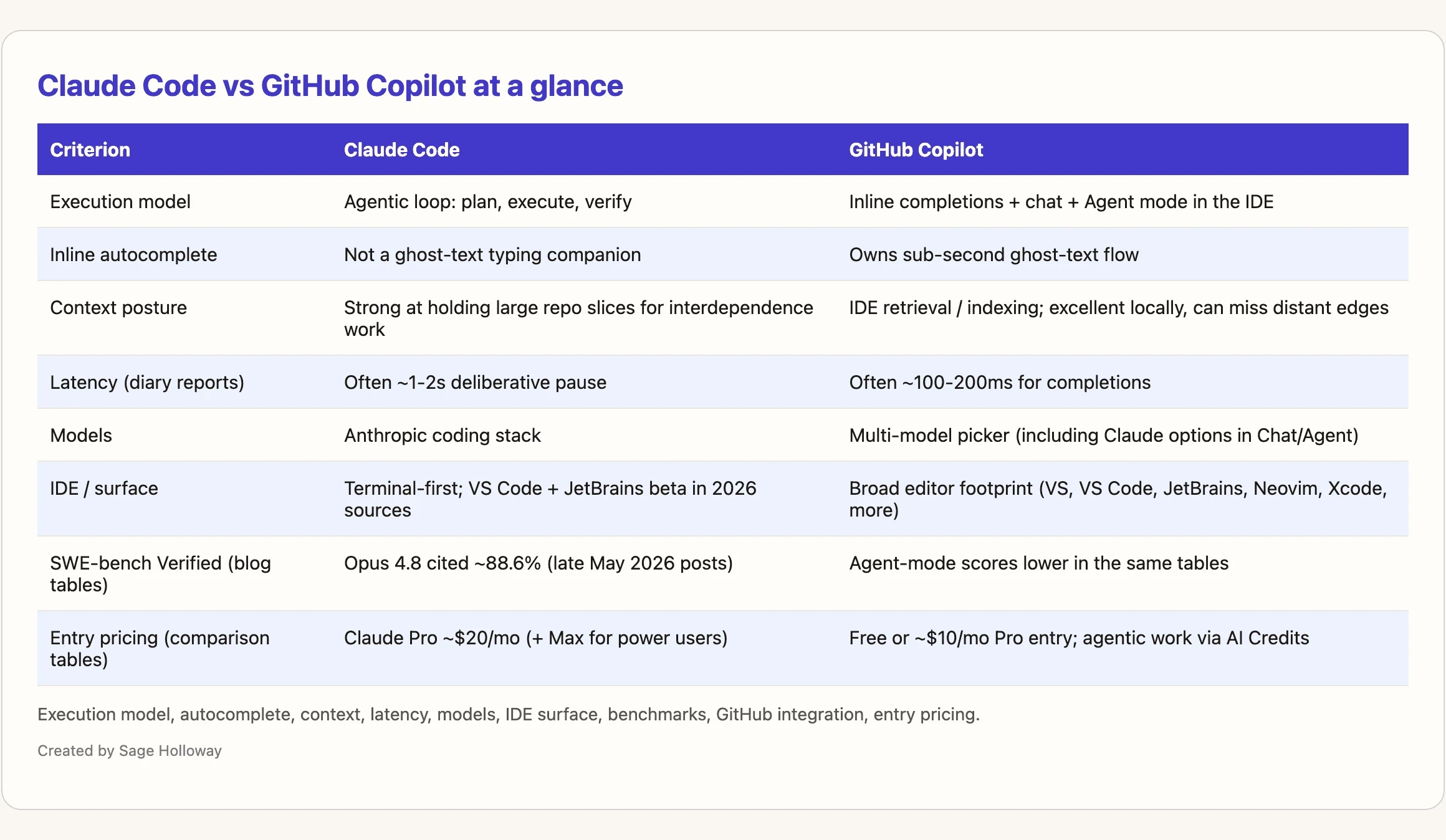
Execution model, autocomplete, context, latency, models, IDE surface, benchmarks, GitHub integration, entry pricing.
What the comparison sources largely agree on (Metacto, Cosmic, Codegen, DataCamp, and similar 2026 write-ups):
Execution model: Claude Code leans into an agentic loop (plan, execute, verify). Copilot spans inline completions, chat, and Agent mode inside the editor.
Inline autocomplete: Copilot owns ghost-text flow. Claude Code is not built as a typing companion.
Context: Both sides talk about up to roughly 1M tokens for certain models and plans. How each tool fills and manages that window is the real story.
Latency: Diary-level reports put Copilot in the 100-200ms zone for completions and Claude Code closer to a 1-2s deliberative pause. Treat those ranges as opinion-heavy developer experience claims, not lab benchmarks.
Models: Claude Code stays on Anthropic’s coding stack. Copilot is a multi-model picker (including Claude options in Chat and Agent mode by mid-2026 reports).
SWE-bench Verified: Sources cite Claude Opus 4.8 around 88.6% (dated around late May 2026 in those write-ups). Copilot agent-mode scores land lower in the same tables. Benchmarks are directional, not a purchase order.
Entry pricing: Copilot’s free or roughly $10/month Pro entry undercuts Claude Pro at roughly $20/month, before Max tiers and usage-based GitHub AI Credits change the math.
If your eyes glaze at matrices, hold one sentence: Copilot wins on flow; Claude Code wins on delegated depth; many strong teams refuse the false duel and run both.
Autopilot vs Copilot: the workflow that actually matters
Here is the before picture.
You try to replace every keystroke assistant with a heavy agent. Simple helpers become mini projects. You wait. You context-switch. You swear the model got “worse,” when what actually happened is you asked a chauffeur to narrate every turn signal.
Here is the after picture.
You keep a fast inline assistant for the boring mechanical layer. You open a terminal agent when the job is a migration, a thorny debug, or a multi-file redesign that needs a plan before a diff. Shipping velocity goes up because the tools stop fighting each other for the same second of attention.
That is the claude code vs copilot decision in practice.
You’re on a long highway at night. One setup keeps you in the driver’s seat while a passenger calls the next three exits in a calm voice, never taking the wheel. Another setup hands the keys to a professional driver who studies the full map, checks the bridges, runs the route, and only taps you when a toll booth or a closed ramp needs a human call. Same destination. Completely different jobs for your hands and your attention. That assist-versus-delegate split is the real claude code vs github copilot decision: GitHub Copilot stays in the passenger-narrator seat for typing flow; Claude Code takes the delegated driver seat for whole stretches of work.
Agentic loop (plan → execute → verify) vs multi-surface IDE assist
Claude Code’s default posture is agentic. It plans, edits across files, runs checks, and iterates toward a goal. That is why it feels like handing work to a senior contractor who expects a brief, not like accepting ghost text.
Copilot’s default posture is multi-surface assist: completions while you type, chat when you ask, Agent mode when you want more autonomy without leaving the editor. Agent mode narrows the gap on multi-step tasks. It still lives inside an IDE-native harness with different guardrails, session habits, and retrieval behavior than a terminal-first agent loop.
Confused about which “agent” people mean on Twitter? Fair. Ask one question: are you still the primary typist, or did you hand off a job?
What “Claude in Copilot” is not
This is the trap that wastes money and trust.
Yes, by mid-2026 comparison sources, GitHub Copilot can select Claude models such as Opus 4.8 and Sonnet 4.6 in Chat and Agent mode. That does not mean you are running Claude Code.
Claude Code is a model plus a tool-use harness trained and shaped around its own agent loop, hooks, and project conventions. Copilot is a generic multi-model harness. Same family of weights can still feel different when the surrounding tools, approvals, and memory habits change.
If you only remember one sentence from this section, make it this: picking Claude inside Copilot is not the same product as Claude Code.

Completions assist typing; agent mode stretches further; Claude Code leans into full task delegation.
For a practical side-by-side of terminal-first versus IDE-native taste (diffs, context, CLI habits), this walkthrough is worth watching once:
[EMBED: YouTube - https://www.youtube.com/watch?v=CiFNsF1iHa4 ] Caption: Watch a practical Claude Code vs Copilot comparison (CLI vs IDE taste, diffs, context).
Pricing and billing logic (2026)
Sticker prices are the easy argument in Slack. Total cost of ownership is the adult argument.
Copilot entry tiers vs usage-based AI Credits
Older posts still talk as if paid Copilot means unlimited agentic power. That framing aged badly.
Sources covering the June 1, 2026 shift describe GitHub moving agentic work onto token-based AI Credits instead of the older premium-request story. Completions can still feel “unlimited” on paid plans in those write-ups, while hard agent tasks burn credits. Blog ranges put a single complex agent task somewhere around $0.50 to $2.00 in credits. Treat those dollar figures as medium-confidence blog reporting until your org’s billing UI and GitHub’s current docs confirm the exact meter.
Entry is still the value story for individuals: free tier or roughly $10/month Pro in the comparison tables. The catch is that Agent mode is no longer a flat-rate buffet in the post-credits world.
Claude Pro rolling 5-hour window vs Max power-user cost
Claude Code on Claude Pro (about $20/month in the sources) is not “unlimited agent hours.” It rides a rolling five-hour usage window. Heavy agent sessions can burn that window faster than people expect. Reddit and diary threads treat the five-hour joke as a lifestyle, not a footnote.
Power users in those same sources often land on Max plans in the $100 to $200/month band to buy headroom (reports mention roughly up to 20x more usage on Max versus Pro, depending on the tier story at the time). That is the real “price of admission” if your job is mostly delegated agent work.
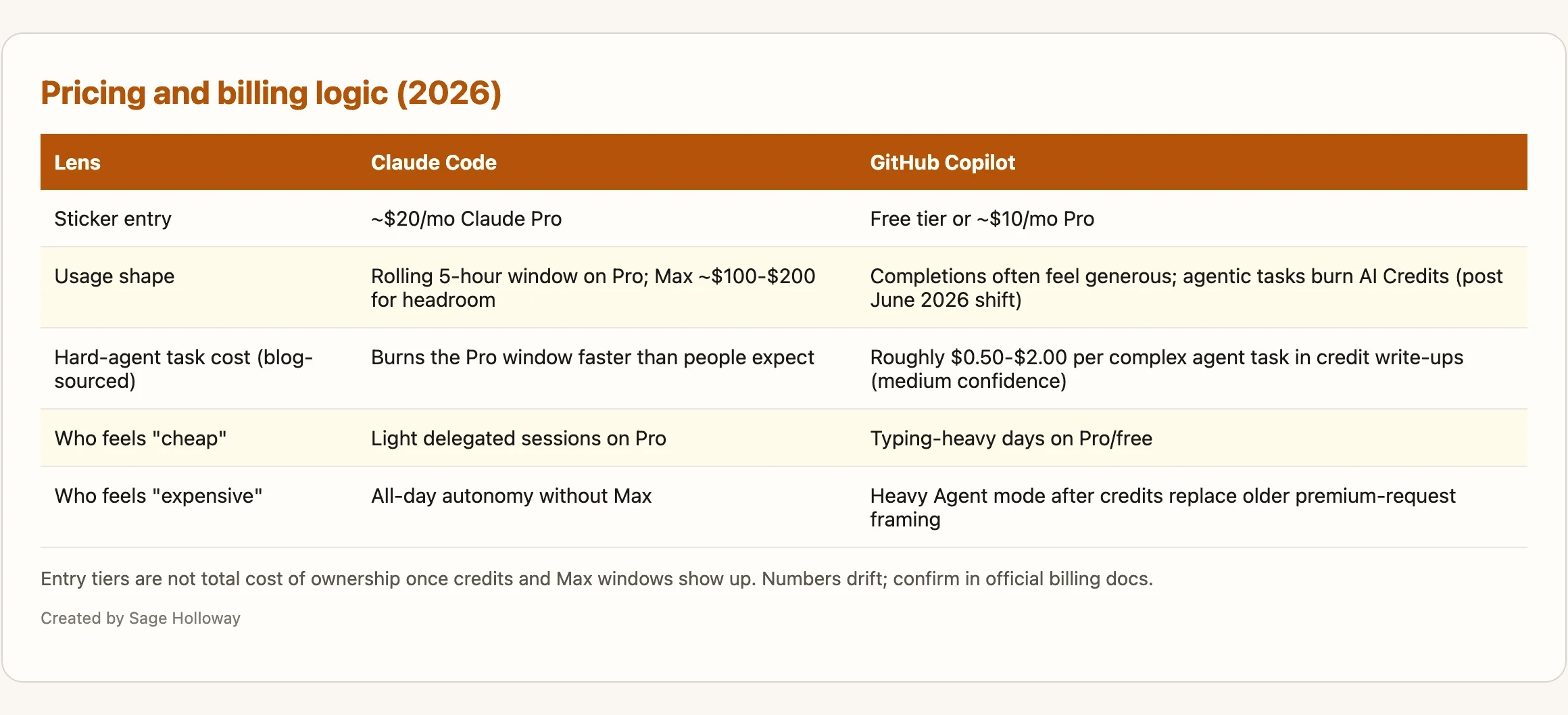
Entry tiers are not total cost of ownership once credits and Max windows show up. Numbers drift; confirm in official billing docs.
The contrast that matters: $10 versus $20 on the marketing page, versus $100 to $200 plus credit burn when you actually live in agent mode all day.
Everyone argues about which model is smarter on a slide. The bill that shows up is usually about how often you asked the tool to think for a whole task instead of for a line.
Context and repo awareness
Both tools advertise large windows. They fill them differently.
Claude Code is repeatedly described as strong at holding substantial portions of a repo in context for interdependence-heavy work: migrations, cross-cutting refactors, “why does this break three packages?” debugging. Copilot leans on IDE retrieval and indexing patterns that feel excellent for local tasks and can miss distant edges in huge trees when the job is truly repository-scale.
1M-token windows and how each tool fills them
A 1M-token ceiling is a capacity claim, not a quality guarantee. What you put in the window (files, diffs, logs, prior turns, tool output) decides whether the model stays sharp or gets cloudy. More on that in the next section.
CLAUDE.md vs copilot-instructions.md (and global Copilot agents path)
Persistent project rules are how you stop re-explaining the stack every morning.
For Claude Code, project conventions live in CLAUDE.md: naming, architecture, test commands, “never touch these directories.” Research sources describe an init-style flow that generates that file for a repo. Load it as the agent’s standing brief.
For Copilot, the parallel habit is copilot-instructions.md (and related instruction layers). Global custom agents, per sources, can live under paths like:
That is workspace-spanning agent configuration, not a substitute for repo-local instructions.
Hard versus soft enforcement is the quiet gap. Claude Code can pair instructions with hooks (for example PreToolUse style gates that can block a tool call via exit codes). Copilot instruction files are softer guidance: useful, and easier for a crowded context window to partially ignore. If your team needs “the agent physically cannot merge to main from this sandbox,” do not pretend markdown alone is a control plane.
Install and first-run notes from the claim ledger (verify against current docs; native installers may supersede older npm one-liners):
Useful session hygiene and depth controls cited in sources:
For environment-specific Auto Mode on Bedrock, Vertex, or Foundry, sources also mention:
If you are still installing Claude Code itself, use the dedicated install walkthrough rather than a comparison article: Install Claude Code. For planning-heavy agent work before writes, pair this page with Claude Code Plan Mode. For wiring external tools into the agent, see Claude Code MCP servers.
For 2026 assistant-choice cues plus usage and IDE context habits, this second walkthrough helps:
[EMBED: YouTube - https://www.youtube.com/watch?v=EmfoQWQ1DR8 ] Caption: See 2026 assistant choice plus usage and IDE context cues.
Context rot: why window size is not the win
Here is the gap most ranking pages skip.
A huge window can still get stupid.
Accuracy decay as sessions fill
Community and comparison write-ups describe context rot: reasoning quality degrades as the session packs toward the ceiling. One cited rule of thumb is about 2% accuracy loss per 100K tokens added. That number is blog-sourced, not a lab certificate, but the mechanism matches what people feel: early turns are crisp; late turns invent APIs that never existed and “forget” constraints you stated an hour ago.
A 1M window is not a win if the jar is cloudy.
/compact and session hygiene
Claude Code’s /compact command exists for this exact problem. It summarizes conversation history so you reclaim space without throwing away the entire thread. Pair it with boring hygiene: end sessions that already solved the job, start fresh for a new epic, keep CLAUDE.md short enough to matter, and do not paste five logs “just in case.”

A 1M window is not a win if the session goes cloudy: compact and reset before rot.
This will not work if you treat the context window like infinite RAM and never compact, never reset, and never prune the brief. Capacity without hygiene is how “smart” agents start sounding confident and wrong.
Benchmarks and reasoning depth
Benchmarks are useful when you know what they measure. They are harmful when you use them as identity.
SWE-bench Verified and what scores do (and do not) mean
SWE-bench Verified is a coding-agent style evaluation: can the system resolve real issues with tools, not just complete a line? Sources put Claude Opus 4.8 near 88.6% on that board (timestamped around May 28, 2026 in those posts). Copilot’s agent-mode figures in the same tables sit much lower (around the mid-50s in some write-ups).
What that usually means in practice: Claude Code is a stronger bet when the task looks like “fix this issue across a real repo.” What it does not mean: Claude Code is faster at filling the next five tokens while you type a React component.
When Copilot’s multi-model picker is the better harness
Sometimes the win is optionality. Copilot’s multi-model surface lets you try Claude, GPT, Gemini, and friends without leaving the editor. That can be the right harness when your team wants one seat, many brains, and strong GitHub-native PR and issue hooks.
The cost of that flexibility is decision fatigue. Model selection paralysis is real. Claude Code’s narrower model lane is a constraint that doubles as a default: fewer knobs, more time shipping.
If Cursor is the third product in your Slack thread, that is a different comparison. Link out rather than collapsing three products into one page: Claude Code vs Cursor.
Real-world experience: latency, flow, and muscle memory
Feature tables never capture the feeling in your hands.
Sub-second autocomplete vs 1-2s deliberative delay
freeCodeCamp-style replacement diaries keep returning to the same bruise: when suggestions arrive in roughly 100-200ms, typing stays musical. When the pause stretches to 1-2 seconds, the rhythm breaks. You glance at Slack. You lose the thread. You blame the model for a latency tax that is partly architectural: planning depth costs time.
Claude Code’s delay is not always a bug. It is often the price of deliberation. Using that tool as your primary autocomplete is like hiring a route planner to shout every street sign.
Diary patterns: when people switch back
Dextra-style 30-day comparisons and freeCodeCamp’s two-week swap share a pattern. People love Claude Code on legacy refactors, backend migrations, and collaborative debugging. They bounce back to Copilot when the day is mostly mechanical typing, UI iteration, or “keep me in flow for three hours of small edits.”
The honest admission: I have watched people declare a winner after one afternoon of the wrong job. A typing day will crown Copilot. A migration day will crown Claude Code. The tool did not flip. The bottleneck did.
Surfaces, CLI, and IDE coverage
Outdated takes still say Claude Code is “terminal only.” That was truer earlier. By 2026 comparison sources, Claude Code still feels terminal-first, with extensions into VS Code and a JetBrains beta, plus desktop surfaces in some write-ups. JetBrains beta notes include medium-confidence memory-leak reports (for example around a v0.1.14-beta mention). Flag it; do not treat one bug thread as destiny.
Copilot’s footprint is broader across editors (Visual Studio, VS Code, JetBrains, Neovim, Xcode, and more in the “12+ editors” style claims). If your day lives in Xcode or a less Claude-friendly IDE, Copilot’s surface area can be the deciding factor even before quality debates start.
Community notes also mention shell-environment gotchas with Claude Code extensions (for example mvn --version style “command not found” when version managers like nvm or pyenv never reach the extension’s environment). That is an environment inheritance problem, not a reason to pick a brand from a landing page.
CLI alternatives (OpenCode, Gemini CLI, and friends) show up in SERPs. They are different products. Mention them if a teammate asks; do not turn this URL into a CLI alternatives hub.
Security and compliance tradeoffs
Autonomy without oversight is not “power user mode.” It is blast radius.
Shell access and human-in-the-loop approvals
Claude Code’s agent loop can run shell commands, edit files, and touch git. Sources emphasize a human-in-the-loop approval model: you bless risky actions. That is a feature when you are awake. It is theater if you rubber-stamp every prompt.
Wiz-style security write-ups frame the split cleanly: code completion inside an IDE is a contained assist pattern; agentic execution with shell reach is a different risk class. Secrets detection, code-to-cloud tracing, and review bottlenecks matter more as autonomy rises. For the organizational version of that problem, keep Code Review Bottlenecks (planned) and AI SDLC Strategy (planned) on your reading list rather than stuffing them into this comparison.
IDE-contained assist vs agent permissions
Copilot Business and Enterprise stories in the sources highlight IP indemnity and policy controls that matter to legal and IT. Neither tool is a security oracle for the code it writes. Generated code can still leak secrets, invent unsafe defaults, or miss authorization checks. Humans remain the last merge gate.
About dangerously-skip-permissions: research sources document it as a CLI option that reduces approval prompts. Treat it as a risk flag for sandboxes you can burn, not as a productivity tip for production trees. If your “speed hack” disables the only adult in the room, you did not optimize. You removed the brakes.
Using Claude Code and GitHub Copilot together
Most high-signal sources land here eventually: complementary, not mortal enemies.
Day-to-day Copilot + delegated Claude Code
A simple stack that matches the diaries:
Copilot stays on for ghost-text and light chat while you write.
Claude Code takes the tickets that need a plan, a repo-wide edit set, or a long debug.
You keep instruction files honest in both worlds so neither tool invents a second architecture.
You refuse to run max autonomy on the same dirty branch you are casually typing into.
MCP support shows up as a list-item advantage for agent ecosystems: connecting databases, docs, and external systems. If your “together” strategy includes tools beyond the editor, wire them deliberately (again: MCP servers), not as fifteen random plugins.
Simple fit check (solo vs team)
Solo: buy the bottleneck. If your week is typing-heavy, Copilot-first is rational. If your week is migration-heavy, Claude Code-first is rational. Both is rational when your week is mixed and your budget can take it.
Team: admin controls, seat management, and shared conventions matter more than any founder tweet. Soft note only: pick a default per job type, write it down, and stop letting every engineer invent a private stack. Maturity models and orchestrator role shifts belong in their own guides (AEMI Maturity Index (planned), Engineer-as-Orchestrator (planned), Context Rich Environments (planned)).
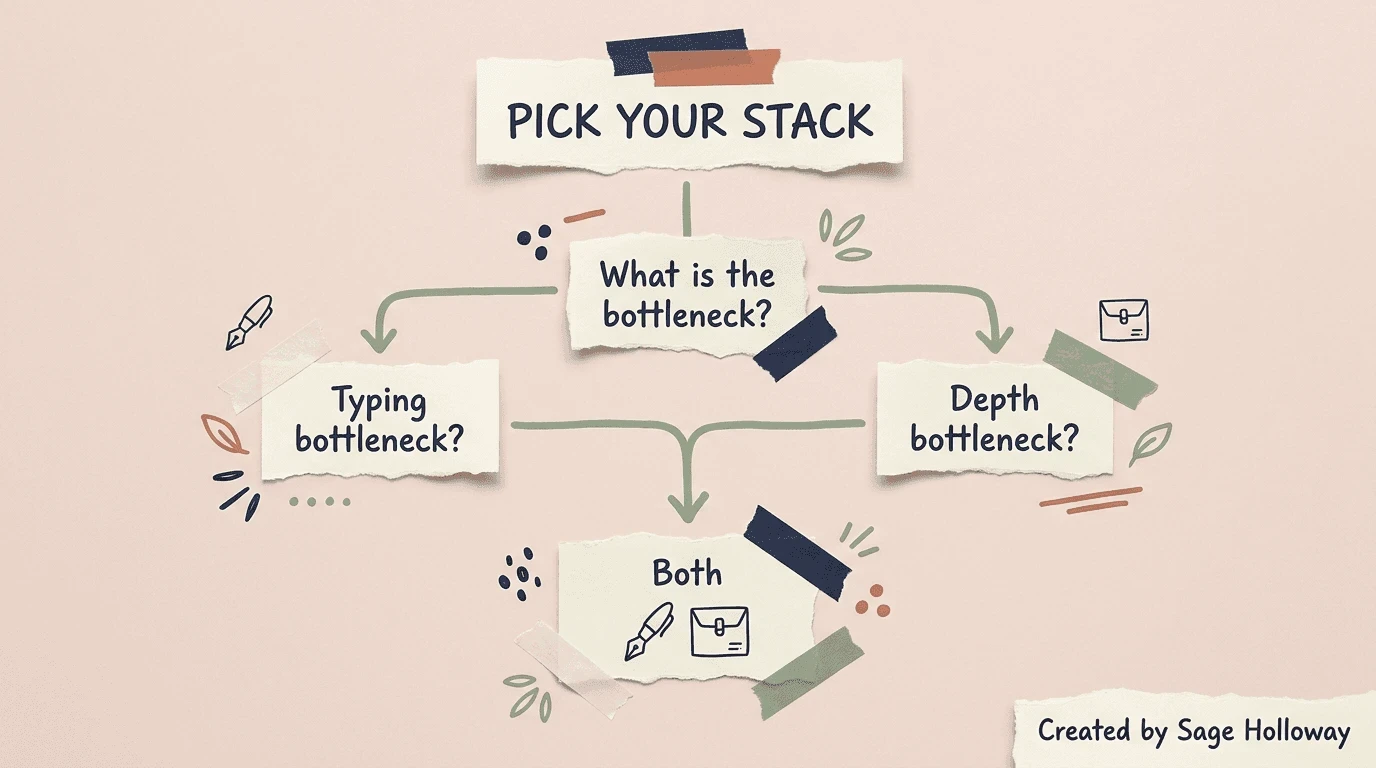
Bottleneck typing? Stay with Copilot. Bottleneck reasoning depth? Delegate to Claude Code. Both? Run both.
Which tool for which job
Keep this short enough to screenshot for Slack.
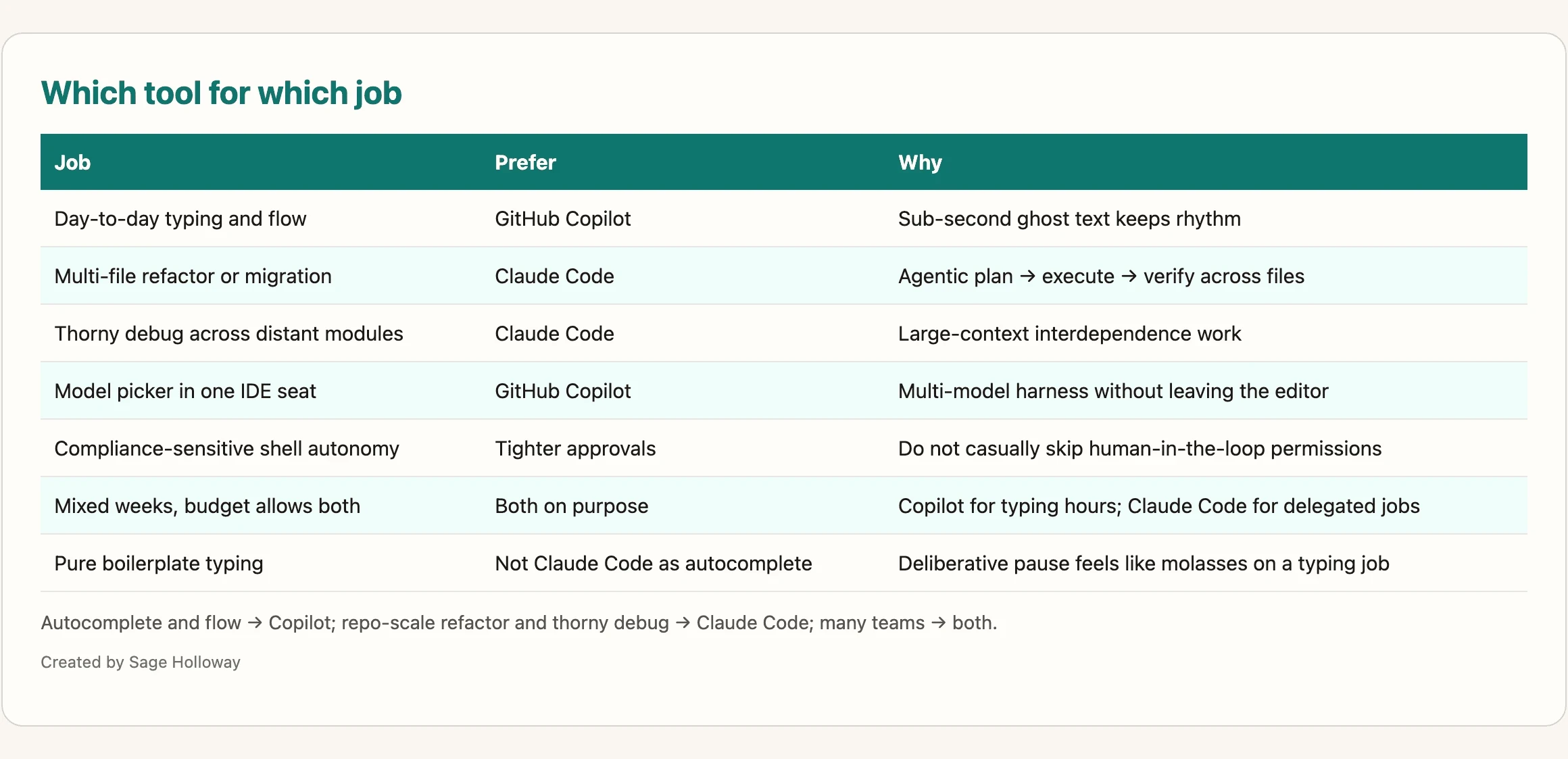
Autocomplete and flow → Copilot; repo-scale refactor and thorny debug → Claude Code; many teams → both.
Day-to-day typing and flow: prefer GitHub Copilot.
Multi-file refactor or migration: prefer Claude Code.
Thorny debug across distant modules: prefer Claude Code.
Model picker inside one IDE seat: prefer Copilot’s harness.
Compliance-sensitive shell autonomy: prefer tighter approvals; do not casually skip permissions.
Mixed weeks on a budget that allows it: use both on purpose.
When not to force Claude Code onto pure typing tasks: if the job is “keep my hands moving through boilerplate,” a deliberative agent will feel like molasses. That is not a quality failure. That is a misfit.
Whether the industry consolidates into one seat or stays a two-tool desk for years is still open. The teams that look calm in 2026 are usually the ones who stopped asking for a single champion and started assigning jobs.
FAQ
What is the main difference between Claude Code and GitHub Copilot?
GitHub Copilot is primarily an IDE-native assistant built around real-time inline completions, chat, and editor-centered agent features. Claude Code is an agentic, terminal-first system that plans, implements, and verifies complex tasks across a codebase. The useful frame is assist versus delegate, not “which logo is smarter.”
Does GitHub Copilot support Claude models?
Yes. Mid-2026 comparison sources report Claude options such as Opus 4.8 and Sonnet 4.6 inside Copilot Chat and Agent mode. Using Claude through Copilot is still Copilot’s harness, not Claude Code’s tool-trained agent loop, so the experience can differ even with a similar model name.
How do the pricing models compare?
Copilot often enters around free or about $10/month Pro, with completions framed as generous on paid plans and agentic work shifting toward AI Credits after the June 2026 billing change described in sources. Claude Code on Claude Pro is about $20/month with a rolling five-hour usage window; heavy users frequently move to Max plans in the $100 to $200/month range for headroom. Confirm live meters in official billing docs.
Which tool is better for refactoring large codebases?
Claude Code is the stronger default for repository-scale refactors because sources emphasize large-context, interdependence-aware agent work across many files. Copilot Agent mode handles targeted multi-file edits well, but retrieval-shaped context can miss distant dependencies in very large repos. Match the tool to the blast radius of the change.
Does Claude Code offer inline autocomplete like Copilot?
No. Claude Code is not a ghost-text autocomplete product. Developers who need immediate suggestions while typing generally stay with Copilot’s sub-second completion habit. Use Claude Code when you are ready to delegate a task, not when you want a keystroke companion.
How does the latency compare between the two tools?
Developer diaries commonly put Copilot completions around 100-200ms and Claude Code’s deliberative pauses closer to 1-2 seconds. Those ranges are experience reports more than formal benchmarks. The practical takeaway: Copilot protects typing flow; Claude Code trades speed for planning depth.
What is the purpose of CLAUDE.md and copilot-instructions.md?
Both are persistent instruction files for project conventions, architecture notes, and testing habits. CLAUDE.md loads as Claude Code’s standing project brief. Copilot uses instruction files such as copilot-instructions.md, plus optional global agent files under ~/.copilot/agents/. Claude Code can add harder hook-style enforcement; Copilot instructions remain softer guidance.
Are there usage limits on the Claude Pro plan?
Yes. Sources describe a rolling five-hour usage window on Claude Pro that heavy agent sessions can exhaust quickly. People who hit the wall often upgrade to Max for substantially more headroom. If your workflow is all-day autonomy, budget for that reality instead of pretending the $20 tier is infinite.
Can you use Claude Code and GitHub Copilot together? Which is safer for security-sensitive projects?
Yes, many teams run both: Copilot for day-to-day typing, Claude Code for delegated depth. On security, Claude Code’s human-in-the-loop approvals matter when shell and git actions are in play; Copilot Business/Enterprise stories emphasize policy controls and indemnity. Neither tool fully validates the security of generated code, and skipping approvals for speed increases blast radius.
Related guides
AI SDLC Strategy
Engineer-as-Orchestrator
Try this on your next mixed week: leave Copilot on for the typing hours, then give Claude Code exactly one delegated job with a written goal and a compactable session. If the delegated job was really a typing job, you will feel the molasses immediately. If it was a real migration, you will wonder why you ever asked ghost text to hold the whole map.
The next year of coding tools will keep renaming modes and remixing models. The teams that stay calm will keep assigning work by bottleneck, not by whichever launch video hit their feed first.
Until then, pick the rhythm that matches the hour, not the logo that won the last demo.
Sage
PS. Open one unfinished ticket tonight. Without opening either tool, write two timers on a sticky note: minutes you expect to spend typing, and minutes you expect to spend deciding structure. Whichever number is larger is the tool you should open first tomorrow. No purchase required for the experiment.
Author
Practical guides, tool teardowns & AI engineering workflows.