Claude Code
Curl Command to Install Claude Code (Mac, Linux, Windows)

Sage Holloway
17 min read
Go back to blog
SHARE

You did not ask for a Node version matrix. You asked for a command that puts Claude Code on your machine so you can work in the repo you already have open. Half the internet still hands you npm first. That is how afternoons disappear.
To install Claude Code on macOS, Linux, or WSL, run curl -fsSL https://claude.ai/install.sh | bash in your terminal. On native Windows PowerShell, run irm https://claude.ai/install.ps1 | iex. These native installers are the recommended path: they ship their own runtime, set up PATH, and support background updates. The old npm install -g @anthropic-ai/claude-code route is deprecated. Verify with claude --version and claude doctor, then log in and start a session in your project.
For flags, channels, and uninstall details that drift by release, cross-check the Claude Code setup docs and quickstart.
One command. Then prove it with claude doctor.
What you are installing
People searching install claude, claude code installation, or claude cli install usually want the same object: the Claude Code CLI in a terminal, pointed at a real project directory.
Think of it like getting a workbench delivered. The crate on the curb is not the workshop. The workshop starts when the bench is bolted down in the room where you actually cut wood. Claude Code is the same. A green install message means the binary landed. Useful work starts when the CLI can see your repo and your constraints.
Claude Code CLI vs Claude Desktop
Claude Desktop is a different product surface. It may bundle or sit beside CLI tools depending on the release, but searching install claude desktop is its own job. This guide is the terminal install: claude in bash, zsh, PowerShell, or CMD.
If you only want a chat window with file access and no terminal habit, stop here and follow Desktop docs instead. If you want agentic edits against a git tree, stay on the CLI path.
Prerequisites
OS, RAM, account
From the official setup material in the research pack, plan for roughly:
macOS 13.0+
Windows 10 (1809+) for native installers
Ubuntu 20.04+, Debian 10+, or Alpine 3.19+ on Linux
About 4 GB+ RAM
An Anthropic account you can authenticate with (subscription and/or API key flows exist; exact product tiers change)
You do not need a perfect machine. You need a supported OS and a shell that can download the installer.
Do you still need Node.js?
Search volume for node js for claude code is huge because older tutorials made Node the front door. Native installers change that story. The recommended curl / irm path bundles its own runtime. You should not start a Claude Code install by debugging nvm unless you have a separate Node reason.
Node still matters if:
You are cleaning up a legacy global npm install
Some other tool in your stack needs Node
An old guide told you
npm install -g @anthropic-ai/claude-codeand you followed it months ago
For claude code node version questions on the native path: treat Node as irrelevant to the happy path. If a page still leads with “install Node 22 first,” it is probably teaching the deprecated route.
Pick your install path
This is a path-based guide. Match your OS and shell, run one command, then verify. Do not mix three blog recipes in one terminal session.
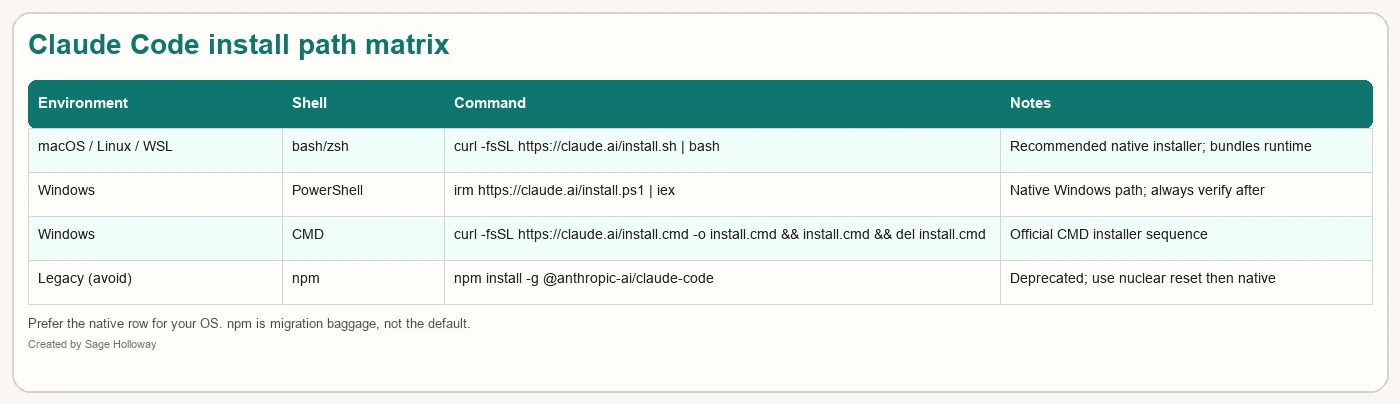
Pick the row that matches your shell. Prefer native. Treat npm as migration baggage.
Mac, Linux, or WSL: the curl command
This is the primary phrase people type: curl command to install claude code.
In Terminal (macOS), or your Linux shell, or inside WSL:
What that line is doing, in plain language:
curldownloads the install script from Anthropic’s host-fsSLfails loudly on HTTP errors, follows redirects, and stays quiet on progress noiseThe pipe sends the script to
bashfor execution
If your docs mention a stable-channel variant, you may see something like:
Only use channel flags that current docs still list. Prefer the default command if you are unsure.
After it finishes, do not celebrate yet. Jump to verification. Ubuntu users: if curl came from Snap, read the troubleshooting section before you assume the script is broken.
For install claude code mac, install claude code on mac, and Linux variants (install claude code ubuntu, claude code install linux), this is the same command. The OS difference is usually PATH and shell config, not a different URL.
Homebrew phrases (brew install claude code, claude code brew) show up in search. Treat brew as a secondary distribution question. If official docs still point at the native curl installer as recommended, do not let a brew one-liner override that without checking the setup page.
Windows PowerShell: irm install.ps1
For install claude code on windows and the PowerShell-shaped query around irm https://claude.ai/install.ps1, open PowerShell and run:
irm is Invoke-RestMethod. iex is Invoke-Expression. Same idea as curl-pipe-bash: download the installer, run it.
Important honesty from install reports in the pack: install.ps1 has been observed printing a success line even when a subprocess failed. That is why this guide refuses to treat a green banner as proof. Always run claude --version and claude doctor next.
Windows CMD: install.cmd
If you live in Command Prompt, the documented sequence looks like:
That downloads install.cmd, runs it, then deletes the local script copy. Same verification rules as PowerShell.
Native Windows vs WSL
Older posts insist Windows users must use WSL2 for stability. Official material in the pack now describes native Windows installers as supported. WSL remains useful when your whole toolchain is Linux already. It is not a mandatory tax for every Windows laptop.
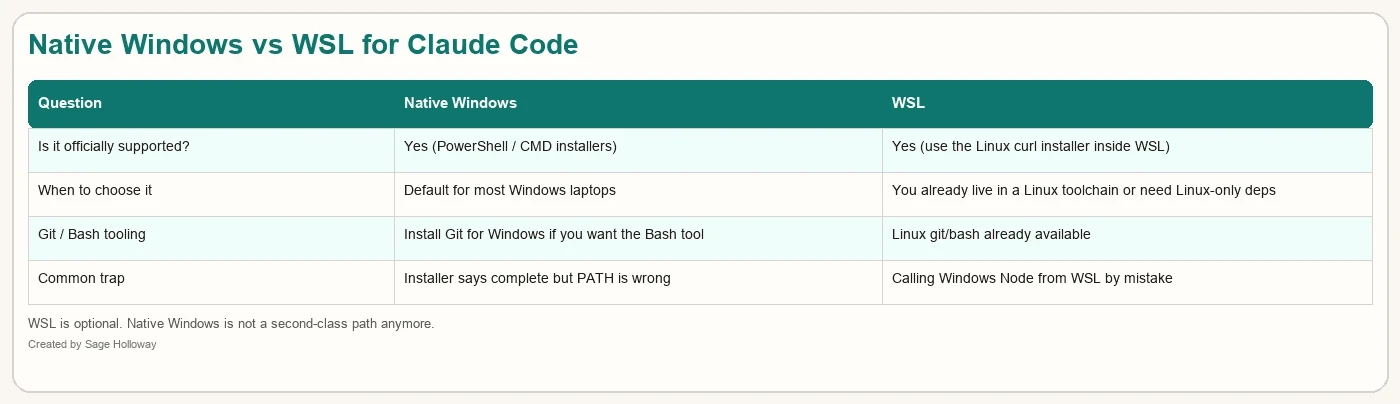
Native Windows is supported. WSL is a choice, not a punishment.
If you want Claude’s Bash tool behavior on native Windows, Git for Windows is the usual recommendation in the docs pack. Without it, expect more PowerShell-shaped tool behavior. That is a tooling preference, not proof that native install failed.
Nuclear reset: leave npm behind
Why npm install is deprecated
Plenty of ranking pages still teach:
Official docs in the pack mark installation via npm as deprecated in favor of native installers. If you follow npm first, you inherit global permission fights, Node version gates, and PATH collisions with the newer binary.
Phrases like npm install claude code, npm claude code, and claude code npm belong on this page as a warning label and a migration section, not as the default path.
Clean slate before native install
If you previously installed via npm, clear the global package before you trust the curl/irm result:
Some migration writeups also remove caches or config directories. Be careful with anything that deletes ~/.claude: that can wipe local settings you still want. If you need a full wipe, use a dedicated uninstall guide rather than improvising rm -rf from memory.
Order that usually hurts least:
Uninstall the global npm package
Close and reopen the terminal
Run the native installer for your OS
Verify with
claude doctor
If leftovers still fight you, that is an uninstall / PATH spoke, not a reason to invent a fourth installer.
Verify the install
claude --version and PATH
If the shell says the command is not found, the binary may exist while your PATH does not include the install location. On Unix-like systems that is often ~/.local/bin. On Windows, user PATH often needs %USERPROFILE%\.local\bin.
Deep PATH archaeology (zsh: command not found: claude) deserves its own page. Here, the rule is simpler: reopen the terminal after install, confirm the directory is on PATH, then continue. If it still fails, follow the command-not-found spoke instead of stacking random exports.
claude doctor as the real health check
Version strings prove a binary responds. claude doctor is the diagnostic pass for installation health, PATH, and common misconfigurations:
Use it even when --version looks fine. Especially use it after a Windows run that printed “Installation complete.”
If you want a quick visual of what a living terminal session feels like after install, this short is pack-verified:
[EMBED: YouTube - https://www.youtube.com/shorts/qFsvHdmlPIY ] Pack-verified short: terminal install / success cues. Use it as a vibe check, not as a substitute for claude doctor.
Log in and start a session
Auth options
After the binary works, authenticate. Depending on your account and current CLI prompts, that may be a browser login tied to your Claude subscription, or an API key export such as:
Do not paste real keys into chat logs, screenshots, or git. Prefer the CLI’s supported login flow when it is available. Exact prompts change; trust the CLI and setup docs over blog copy.
If the browser opens and the terminal sits on “Waiting…”, you are often on SSH, WSL, or a environment where the localhost callback cannot complete. Copy the auth code from the browser and paste it into the terminal when the CLI allows that path.
First claude in a real project directory
cd into the repo you care about. Then:
Or start with whatever first-run prompt your build shows. The point is environmental: plan and edits should happen against the project root, not against your home folder by accident.
For a longer beginner walkthrough of setup into a first build, this pack-verified video helps:
[EMBED: YouTube - https://www.youtube.com/watch?v=AKKx1PoNtnM ] Pack-verified: terminal setup into an early project loop. Skim for install→first run; ignore any npm detours if the video is older than the native installer.
Activate claude code in terminal searches usually mean this moment: binary on PATH, auth done, REPL or session alive inside a repo.
Day-1 setup that makes install worth it
Minimal CLAUDE.md
A bare install is a sharp tool with no labels. Create a short CLAUDE.md in the project root before you ask for a multi-file change. Minimum useful contents:
How to run tests, typecheck, or lint
Package manager and runtime
Folders that are off-limits
Libraries you will not replace on a whim
“Prefer smallest diff” if that is your team culture
You are not writing a novel. You are preventing the agent from inventing a second stack on top of yours. Setup phrases like claude-code-setup and setup claude code should land here: install got you the tool; CLAUDE.md makes the tool project-native.
If the repo already has contributing docs, do not duplicate them blindly. Point Claude at the canonical commands and add only the constraints humans keep forgetting in chat: generated folders, secret paths, “never touch payments,” the test command that actually runs in CI. Three honest bullets beat two pages of aspirational architecture.
Update command / channels
When you need a newer build:
If docs describe stable versus latest channels, pick stable for work machines unless you are deliberately testing installer changes. Auto-update behavior exists on native installs in the pack’s description of the native installer advantages; still run claude doctor after a weird upgrade.
Log out
When you need to clear the authenticated identity on a shared machine, use the CLI’s logout / login commands as shown in current help (claude --help and docs). Searching how to log out of claude code is valid; do not invent a flag name here if your build’s help text differs. The habit is: log out on shared CI jump boxes, do not leave personal OAuth on a teammate’s laptop.
Troubleshooting
Keep this section short. Several high-volume failures are spokes on purpose.
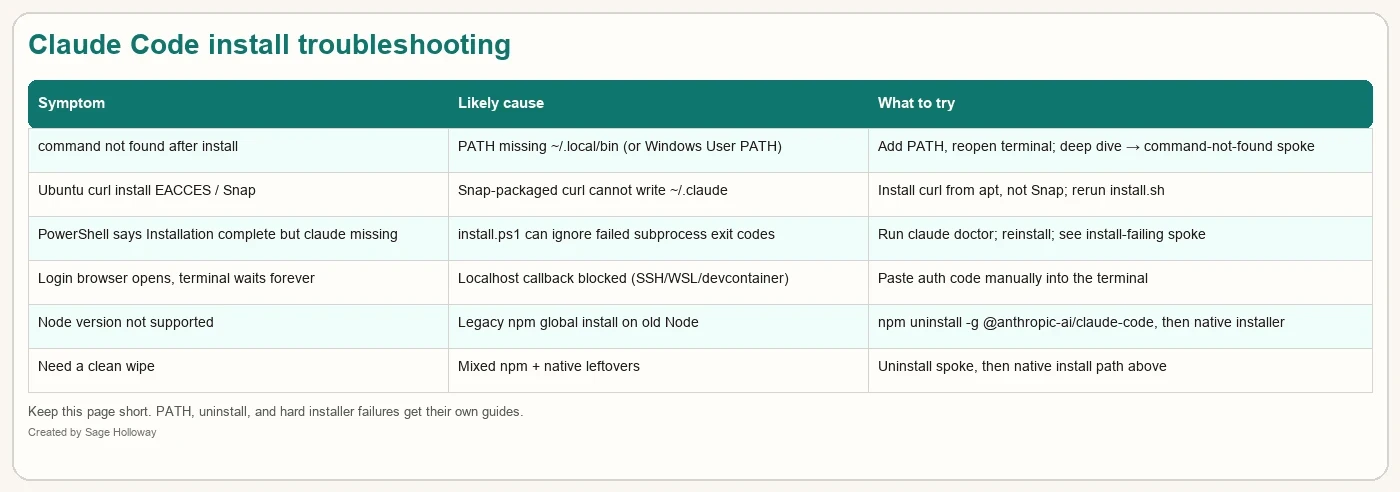
If the row points to a spoke, follow that guide instead of expanding this page into five articles.
Ubuntu Snap curl failures
If install.sh dies with permission errors around ~/.claude on Ubuntu, check whether curl is the Snap build. Snap confinement has been reported as unable to write the hidden directories the installer needs. Install a normal distro curl, then rerun the native script.
Windows false success
If PowerShell cheered and claude is still missing, believe claude doctor over the banner. Re-run the installer once, fix User PATH, open a new PowerShell window, and only then escalate to the install-failing spoke.
Login loops
Browser open + eternal waiting usually means callback problems. Paste the code. If login still fails, that becomes an auth troubleshooting spoke (can't login to claude), not another installer.
npm ghosts
EACCES on global npm, or “Node version not supported,” almost always means you are still on the deprecated path. Uninstall the global package, then native install. Do not keep upgrading Node to save a package manager workflow Anthropic has already moved off of.
When not to use this guide
You want Claude Desktop only
You already have a healthy native install and only need PATH repair
You need a full uninstall / remove ritual with every cache path listed
You are debugging a flaky corporate proxy beyond a simple retry
Those are nearby jobs. Linking beats stuffing.
FAQ
(FAQ targets: data-backed Semrush questions first, then same-job fillers. own_article phrases stay linked, not expanded.)
How to install Claude Code? [data]
Use the native installer for your OS: curl -fsSL https://claude.ai/install.sh | bash on macOS, Linux, or WSL; irm https://claude.ai/install.ps1 | iex on Windows PowerShell; or the install.cmd sequence on Windows CMD. Verify with claude --version and claude doctor, then authenticate and run claude inside your project.
How to update Claude Code? [data]
Run claude update on a native install, then sanity-check with claude doctor. Prefer documented release channels if you pin stable on work machines.
How can I run Claude Code locally without login? [data]
Fully local, no-auth use is not what the standard cloud-backed CLI assumes. Some workflows use API keys instead of browser login, but that is still authenticated access to Anthropic’s services. If you need air-gapped or offline operation, treat current public install docs as the authority and do not invent a fake offline mode from blog comments.
How to install Claude Code on Mac? [data]
Open Terminal and run curl -fsSL https://claude.ai/install.sh | bash, then verify with claude doctor. macOS 13+ is the floor called out in the setup material from the research pack.
How to install Claude Code on Windows? [data]
In PowerShell run irm https://claude.ai/install.ps1 | iex, or use the CMD install.cmd sequence. Native Windows is supported; WSL is optional. Always verify because success banners can lie.
How to log out of Claude Code? [data]
Use the CLI logout/login flow shown in your build’s help and the official setup docs. On shared machines, log out before you walk away.
Can’t login to Claude? [data]
Confirm the binary works first (claude doctor). If the browser opens but the terminal never finishes waiting, paste the auth code manually. Persistent auth failures belong in a login troubleshooting spoke after install health is clean.
Does Claude have a free version? [data]
Product packaging and free tiers change. Claude Code still needs a valid Anthropic auth path (subscription and/or API usage). Check Anthropic’s current pricing and plan pages rather than trusting a screenshot from a random install blog.
Why does claude doctor matter after install?
Because installers can report success while PATH, permissions, or partial extracts are wrong. Doctor is the read-only checklist that catches the boring failures before you blame the model.
Related guides
zsh: command not found: claude
Uninstall Claude Code
Claude install is failing
Install Claude Desktop
Try this once on a throwaway machine or VM if you can: uninstall any global npm Claude Code package, run the native command for your OS, then refuse to open a real repo until claude doctor is clean. The ten minutes you spend on verification are cheaper than a week of “maybe it’s the model” while PATH points at a ghost.
Installers will keep changing skins. The durable habit is narrower: one recommended native path, one diagnostic command, one project file that tells the agent how your repo actually works.
Until then, make the binary honest before you make the prompt ambitious.
Sage
PS. The first time I trusted a green “Installation complete” banner on Windows, I screenshotted the victory and still could not run claude. Doctor was unimpressed. Banners are not proof. Commands that respond are.
Author
Practical guides, tool teardowns & AI engineering workflows.


