AI for Finance
Claude Wealth Management Plugin: What It Drafts and What It Cannot Execute

Sage Holloway
21 min read
Go back to blog
SHARE

The packet looks finished. The columns line up. The talking points sound like last quarter's voice. Nobody in the room can tell whether the work stopped at the folder or kept walking toward the lockbox. That is the part of advisor automation that never makes the screenshot.
The Claude wealth management plugin is a markdown skill pack plus connectors that drafts client reviews, financial plans, rebalancing notes, and tax-loss harvesting screens. It is staging only: it cannot execute trades, post to a ledger, or replace fiduciary sign-off. Install it from Anthropic's financial-services marketplace in Claude Cowork or Claude Code, then keep custody and compliance on your existing platforms.
Last year the same meeting prep lived in three folders and a half-built spreadsheet. This year a /client-review can stack the packet in the time it takes to pour coffee. The client still signs nothing until you do. The custodian still moves the lots. The plugin never got the key.
If you have ever watched a pretty memo walk toward trading before anyone checked a wash-sale window, this is that wall, named.
This guide will not cover LSEG or Moody's product tours, an investment-banking pitch-agent walkthrough, the Excel add-in, or a month-end close for CPAs. Those jobs live on sibling pages. What follows is the plugin: what it ships, where it stops, how to install it on two surfaces, how to wire books the core connectors skip, and how to catch math that looks right until it is not.
On this page
What the plugin actually ships
Staging drafts vs custody execution
Two install surfaces: Cowork and Code
Wire QuickBooks or Xero as a local MCP
Pilot the plugin without letting skills drift
Catch math errors with a backpressure loop
FAQ
The plugin drafts the packet. Custody still owns the ledger.
What the plugin actually ships
You hire someone to sit at the dining table and sort the week's mail. They open envelopes, stack bills by due date, draft the replies in last quarter's voice, and leave a neat folder at your place setting. They never get the key to the fireproof box in the closet where the actual checks live. If they need a number from inside that box, they write a note and wait for you to open it.
That is Anthropic wealth management as it actually ships: a reference architecture of markdown skills, slash commands, and connectors, not a junior advisor with wire authority.
A skill here is a markdown file that teaches Claude how your firm runs a workflow: the steps, the tone, the folders it should look in. A slash command is a typed shortcut that fires one of those workflows on demand. The official wealth-management plugin page describes client reviews, retirement planning, investment proposals, and tax-loss harvesting screens.
The GitHub repository is the delivery mechanism. Everything is file-based. Markdown and JSON. No build step.
Claude Opus 4.7 leads Vals AI's Finance Agent benchmark at 64.37 percent, per Anthropic's finance-agents launch note. An older Anthropic post put Claude Sonnet 4.5 at 55.3 percent on the same style of bench. Those are leading scores. They are not exam-perfect, and they are not a substitute for a partner who will refuse a pretty number.
Advisor workflows it drafts
The wealth vertical in the official repo is the one advisors actually want. Confirmed against the GitHub README skill table, it includes:
/client-review [client]: meeting prep with performance and talking points/financial-plan: retirement, education, estate, and cash-flow projections as a plan narrative/rebalance: allocation drift analysis and tax-aware rebalancing notes/client-report: client-facing performance talking points/proposal: mix alternatives for a prospective-client packet/tlh: a tax-loss harvesting screen, including wash-sale awareness in the skill text
Tax-loss harvesting is the practice of selling a position at a loss to offset gains, then replacing exposure without violating wash-sale rules. The plugin drafts the screen. It does not harvest the lots.
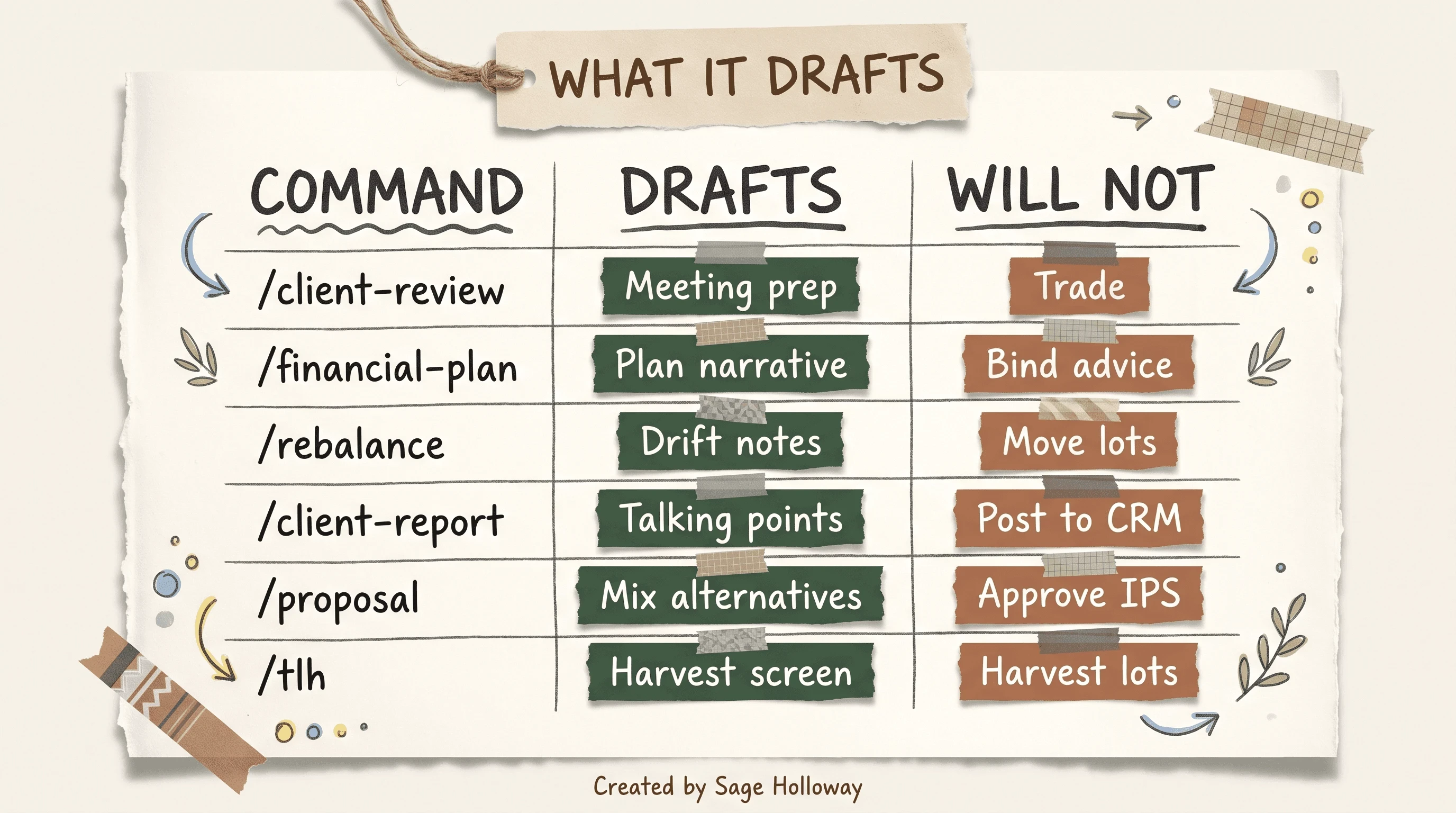
Six wealth commands draft work product. None of them trade, post, or bind advice.
Support's Cowork article also lists adjacent research commands that live in the core financial-analysis plugin, not as extra wealth headings: /comps [company], /dcf [company], /earnings [company] [quarter], /ic-memo [project name], /source [criteria]. Those are IB and PE adjacent. One row in your mental map is enough. Do not turn this page into a pitch-book tutorial.
Core plugin vs Claude for Financial Services
People search "Claude Finance" as if it were one product. It is shorthand. The installable core is financial-analysis. That plugin carries shared modeling skills and the packaged data connectors. The wealth-management vertical sits on top of it.
Claude for Financial Services is the broader industry platform: agents, Microsoft 365, managed-agent templates, partner feeds. We cover that offering as its own page at Anthropic financial services. Soft overlap only. This URL owns the plugin how-to.
Named agents in the same repo are adjacent verticals, not this job. claude plugin install pitch-agent@claude-for-financial-services (or gl-reconciler, market-researcher) and claude plugin install investment-banking@claude-for-financial-services (or equity-research) install IB and PE workflows. Leave them off a wealth pilot unless you actually run those desks.
The month-end closer is the same pattern in a different job. claude plugin install month-end-closer@claude-for-financial-services (or statement-auditor) plus /month-end-closer and /gl-reconciler belong with month-end closers for CPAs, not with a client-review packet.
What you now have: a skill pack that can draft the six advisor jobs above. Time to install: later in this page. Time to confuse it with a custodian: zero.
Staging drafts vs custody execution
The official README is not coy. Agents do not make investment recommendations, execute transactions, bind risk, post to a ledger, or approve onboarding. Every output is staged for human sign-off. You are responsible for verifying outputs and for the laws that apply to your firm.
That sentence is the product.
Betterment's advisor note, written by a CFP, splits the stack the way a compliance calendar actually works: interface, intelligence, execution. Claude sits in intelligence. It drafts. The custodian, the broker-dealer, and the fiduciary record still sit in execution. If your clients live at Betterment, Altruist, Schwab, or whoever holds the assets, that platform still books the trade.
Intelligence layer vs custodian and ledger
Think of four desks on one side of a strip of tape: Chat, Code, Cowork, and Managed Agents. All four can draft. None of them are the lockbox.
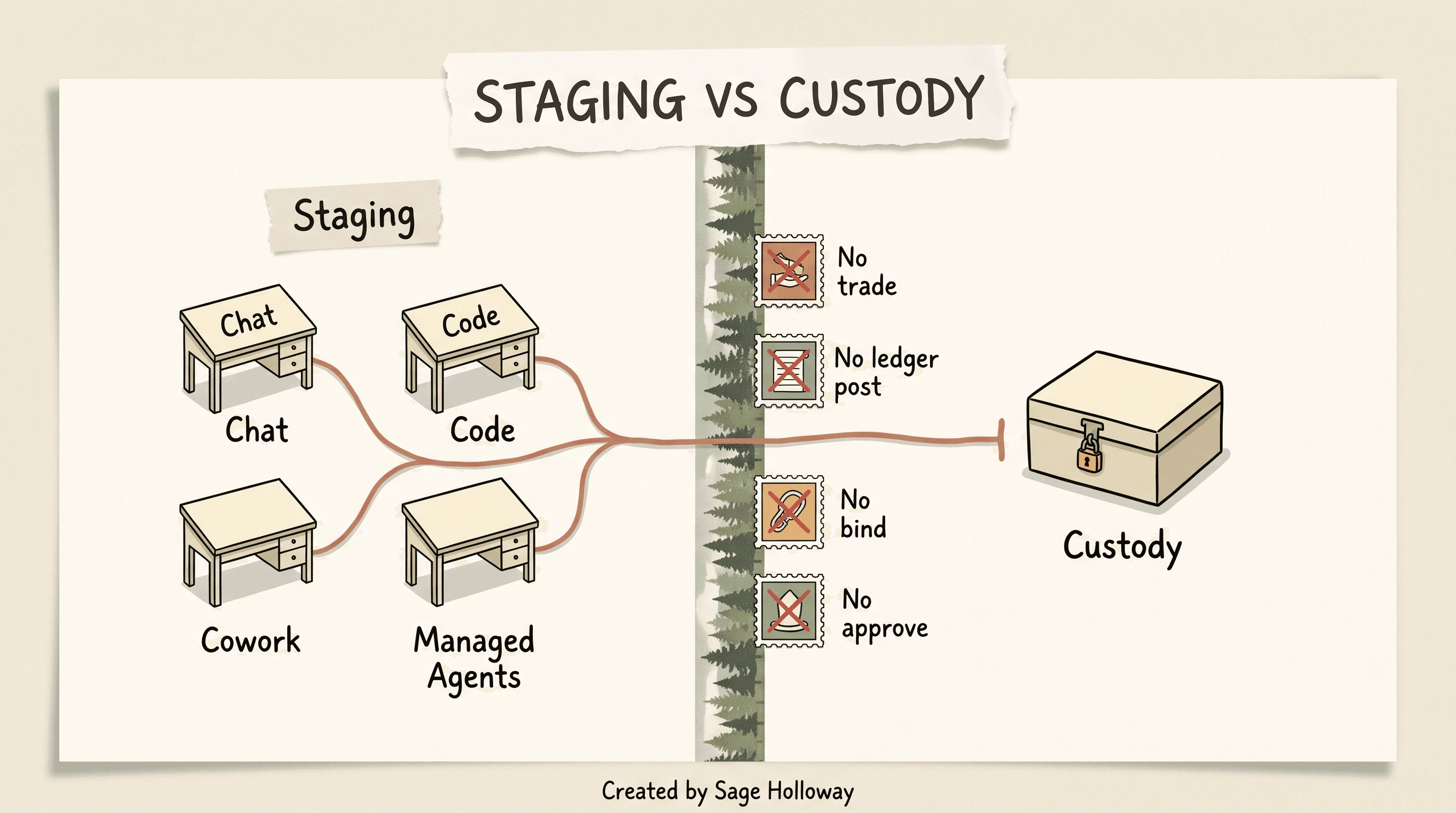
Chat, Code, Cowork, and Managed Agents draft. The custodian still executes.
What the plugin cannot do, in the repo's own language:
Recommend an investment as a binding call
Execute a trade
Bind risk
Post to a ledger
Approve onboarding
A custodian is the firm that actually holds client assets and keeps the official books of record. A fiduciary is the person who owes the client a duty of care that a markdown file cannot sign. Staging means the draft sits in a review tray until a human moves it. If you script around that limit, you are not "being efficient." You are changing your engagement-letter posture.
This will not work if you need the model to post a journal entry, fire an allocation, or bless an IPS. An IPS is an investment policy statement, the written rules for how a portfolio may be invested. The plugin can draft mix alternatives. It cannot approve the policy.
Want the compliance-agent depth, including what "regulator-ready" actually requires of humans? That is AI agents in financial services compliance. Do not promise this plugin is regulator-ready out of the box. It is not.
Firms keep adding connectors because it feels like progress, when the actual constraint is a partner who will refuse a pretty number.
Two install surfaces: Cowork and Code
A marketplace here is a GitHub-backed catalog of plugins your Claude workspace can install. There are two surfaces. Claude Cowork is the desktop app for operators running multi-step projects with a graphical marketplace. Claude Code is the terminal CLI that developers and quant-minded advisors use when they want the same files from a shell. The wealth plugin runs on both. The click path is not the command path.
What this will not work if: you are looking for a Claude.ai chat toggle. The sources document Cowork GUI and Code CLI. They do not document a consumer-chat plugin switch.
Prefer official GitHub and Support when commands conflict. FindSkill's solo-CPA walkthrough is useful for QuickBooks later. It is not the source of truth for the marketplace slug.
Claude Cowork GUI marketplace
Anthropic's Support article on installing financial services plugins is the GUI source of truth:
Open the Cowork tab.
Go to Customize, then Browse plugins.
Under Personal, click the plus control.
Choose Add marketplace from GitHub.
Enter
https://github.com/anthropics/financial-services-plugins.Install the plugins you need from the marketplace list. Start with the financial-analysis core, then wealth-management.
The GitHub README currently describes a shorter Cowork path: Settings, Plugins, Add plugin, then paste https://github.com/anthropics/financial-services (no -plugins suffix). If Support's URL 404s in your build, try the README repo URL. Do not invent a third GitHub path.
Once the marketplace is added, pick agents and verticals from the list. Skills fire when they are relevant. Slash commands show up in the session.
Claude Code CLI marketplace
In Claude Code, the official add is:
That second line is the claude finance plugin people mean when they search the generic name: the core financial-analysis package. Add wealth-management from the same marketplace after the core is in. Named agents are optional.
FindSkill documents a different marketplace slug, anthropics/claude-for-financial-services. Treat that as a conflict, not a second official command. Use the GitHub README slug first.
A community marketplace exists too. /plugin marketplace add JoelLewis/finance_skills adds Joel Lewis's finance skills catalog. One extra shelf. Not the Anthropic core.
If your firm runs Claude inside Excel, PowerPoint, Word, and Outlook, the repo's Microsoft 365 installer is a separate plugin: claude plugin install claude-for-msft-365-install@claude-for-financial-services, then /claude-for-msft-365-install:setup. That is an IT-admin on-ramp, not a wealth skill. The Excel sidebar job is adding Claude to Excel.
Managed Agents are the headless cousin. Same skills, deployed behind your own workflow engine:
Use a real key from your org. Never paste a live key into a doc. gl-reconciler is the example in the README; it is a fund-admin agent, not a client-review. For a wealth pilot, stay on Cowork or Code until you have a reason to go headless.
The claude financial services plugin, as searchers type it, is this marketplace plus the vertical you install from it. This page owns that how-to. The industry platform name stays on the sibling offering guide.
Watermelon Juan's small-firm walkthrough is the one video worth sitting with after the HowTo. It translates the launch news into a local GitHub clone and MCP setup for shops that do not buy Wall Street feeds. It does not replace the Support click path or the official CLI strings above.
https://www.youtube.com/watch?v=ARgdO56BsQI
Wire QuickBooks or Xero as a local MCP
Here is the gap ranking pages skip.
The eleven data connectors that ship inside the core are Wall Street feeds. FactSet, Morningstar, PitchBook, S&P Global, and their peers. None of them is QuickBooks Online, Xero, NetSuite, or Wave. If you already buy those feeds, use them. If you are a small RIA running books in QuickBooks, the official connector grid does not save you.
An MCP server is a small local program that speaks Model Context Protocol, an open way for Claude to call tools and data sources. stdio means the program talks to Claude over standard input and output on your machine, like a pipe on the desk, not a vault in someone else's cloud.
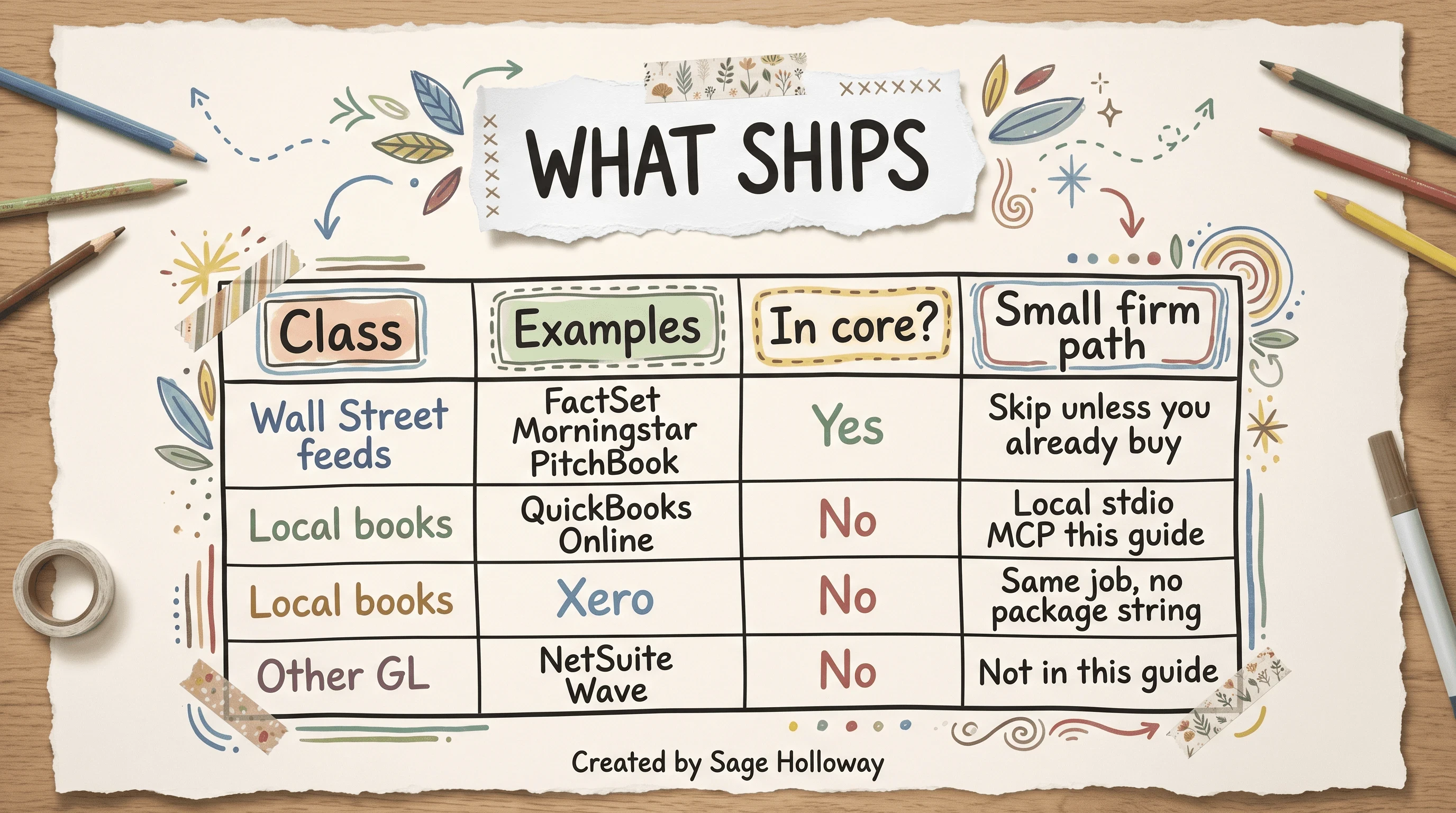
Core connectors are Wall Street feeds. QuickBooks, Xero, NetSuite, and Wave are not in that set.
Do not spend this page tutoring LSEG or Moody's. Those feeds are real. Small firms usually cannot buy them, and the product grid already lists them. The last mile is books.
Xero is the same job as QuickBooks: local books Claude cannot see until you wire a connector. Sources in this research pack do not publish a Xero npm package name. I will not invent one. If you run Xero, treat the QuickBooks path as the pattern (local process, browser login, data stays on the machine) and get the package string from Xero's own MCP docs when they publish it.
Local stdio MCP and browser OAuth
FindSkill's solo-CPA walkthrough is the source for the QuickBooks strings. Official GitHub does not ship a QBO connector in the core eleven.
npm is Node's package installer. You need Node.js on the machine that will run Claude Code. The first command installs Intuit's QuickBooks Online MCP server globally. The second registers it with Claude as a local stdio tool named quickbooks.
Then you authenticate in the browser. OAuth is the login handshake where QuickBooks asks you to grant this local app access to a company file without handing Claude your password. The MCP server runs locally. It does not pipe your books through Anthropic.
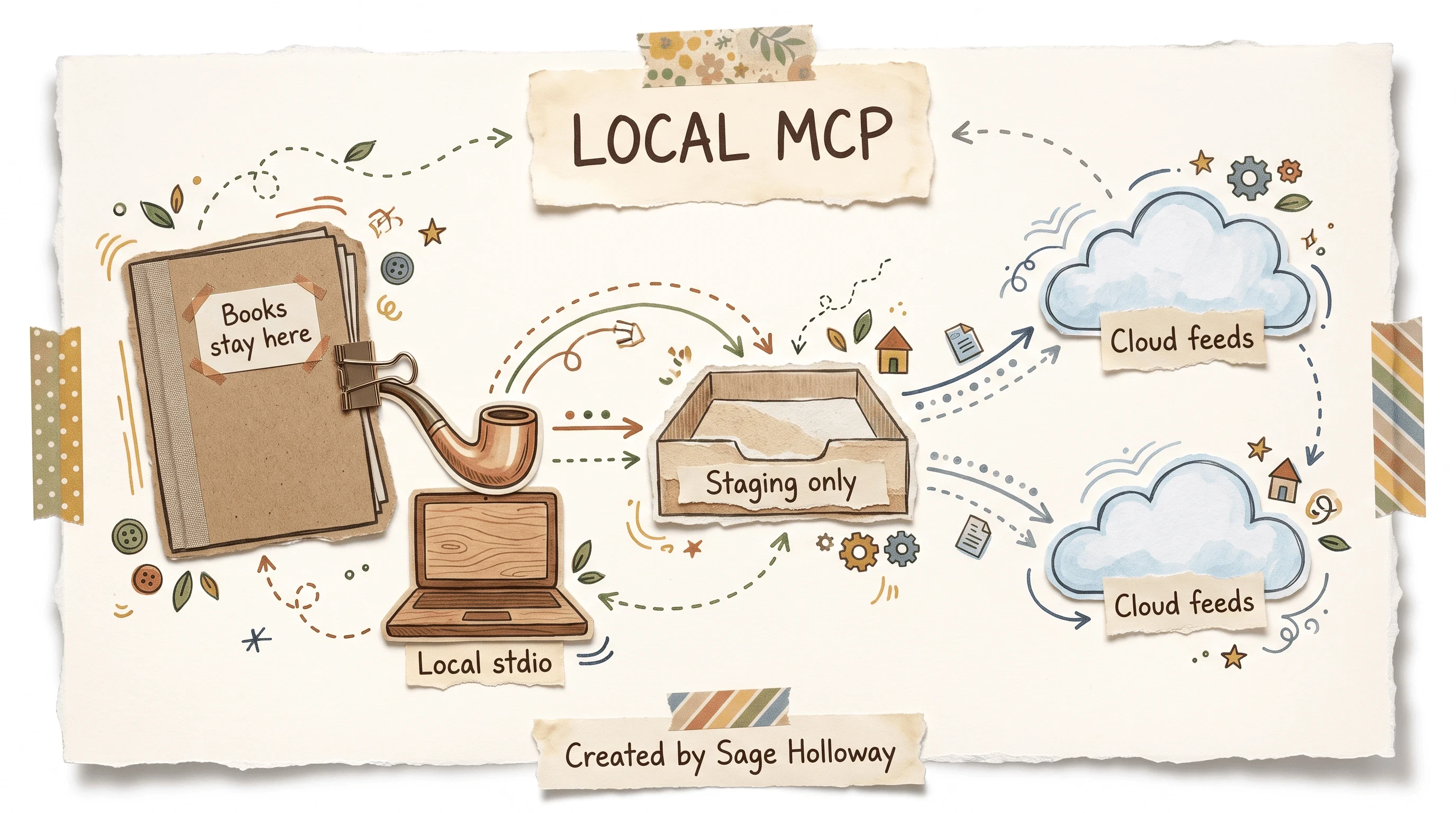
The QBO MCP runs locally over stdio. It does not pipe your books through Anthropic.
This will not work if Node is missing, if you skip the browser grant, or if you point the connector at a production company file on day one. Use a sample company. Read what the agent can query before you let it near live GL.
What you now have: core plugin, wealth commands, and a books pipe that never had to be FactSet. Time invested if you already have Node: the two commands above plus an OAuth click. Time invested if you do not: install Node first, then come back.
Filings and ratio work that is not this plugin lives at Claude financial analysis. Quant CLI and legacy trading refactors live at Claude Code for quants. Neither replaces a local books connector.
Pilot the plugin without letting skills drift
Anthropic's practical deployment PDF for the financial industry is not a go-live party. It is three phases: foundation, pilot, scale. Most firms skip foundation, call a sample /client-review a launch, then wonder why the markdown still talks like 2024 tax policy.
I tried treating the slash commands as the product. The first pretty /rebalance note still needed a human to check wash-sale windows. The install was never the hard part. Supervision was.
Foundation, pilot, and scale without a fake go-live
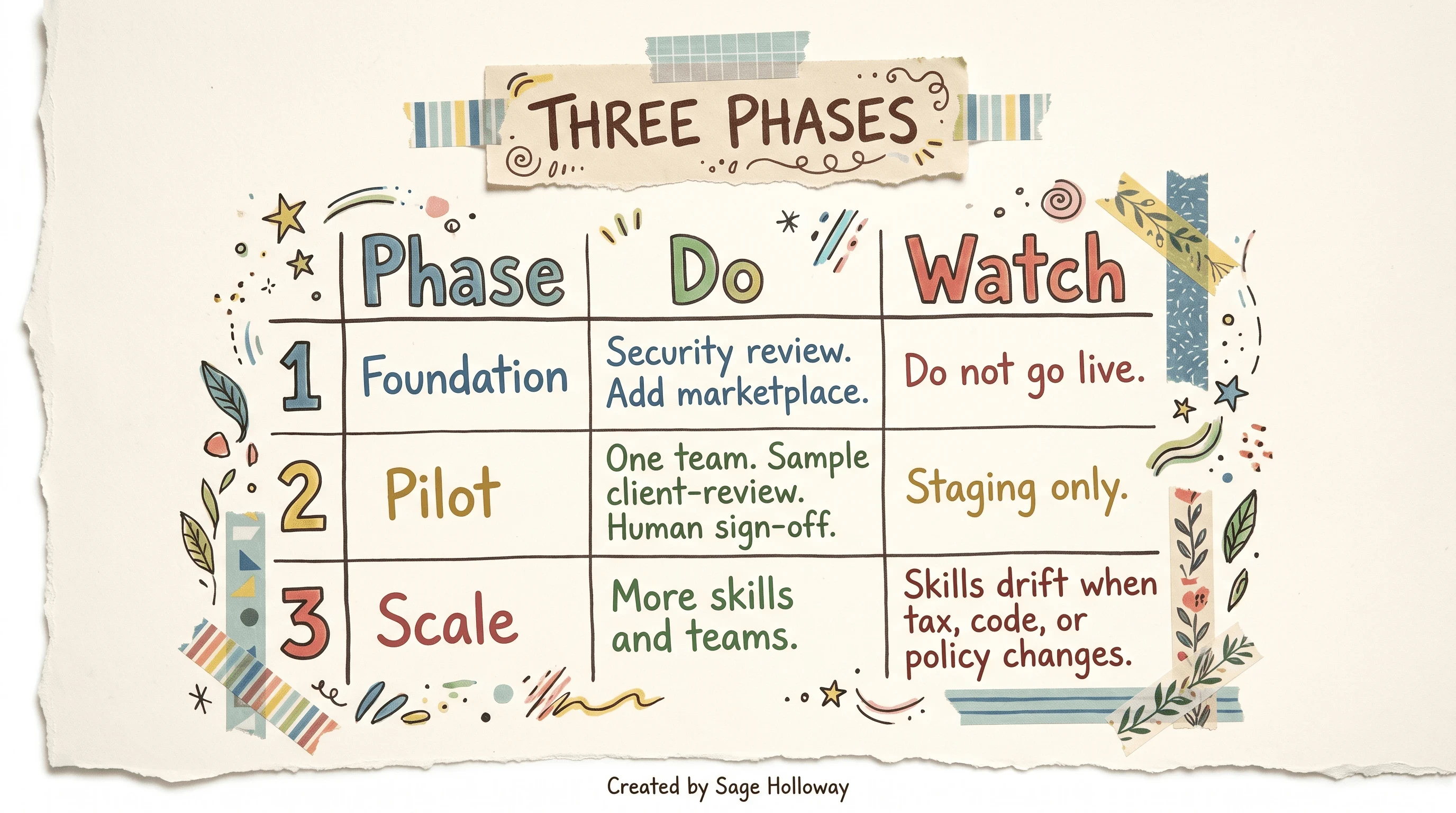
Phase 1 is foundation. Phase 2 is a sample pilot. Phase 3 scales only after sign-off, and Markdown skills still drift.
Phase 1, foundation. Run a security review. Decide where client files may live. Add the official marketplace. Do not go live. If your chief compliance officer cannot explain where a holdings file sits, you are not in Phase 2 yet.
Phase 2, pilot. One team. One non-production sample. Run /client-review on a fake household. Human sign-off on every draft.
Staging only. Measure whether the draft is kept, rewritten, or thrown out.
Time-saved is a real metric in the PDF. So is draft-retention. Vanity screenshots are not.
Phase 3, scale. More skills, more teams, only after the sample path holds. This is also where skill drift starts. A Markdown skill is just a file. Files age.
Tax code changes. Your IPS language changes. The model will keep using last year's phrasing until a human edits the skill. Apache 2.0 on the repo does not mean free forever. It means you own the upkeep.
Skill-drift checklist from the gap this page is supposed to own:
Date every custom skill file. If it has no date, it is already drifting.
Re-read wealth skills when tax, code, or policy changes.
/tlhand/financial-planare the first to rot.Run the repo's
python3 scripts/check.pybefore you ship a custom skill. It lints manifests and catches cross-file drift.Keep a human who will fail a draft. If nobody is paid to refuse output, you do not have a pilot. You have a printer.
Managed-agent deploy stays one paragraph on this URL. scripts/deploy-managed-agent.sh plus ANTHROPIC_API_KEY is how you put a template behind /v1/agents. It is not a Wall Street feed tour. If you need a local multi-agent workforce on your own hardware, that is self-hosting local agents with Eigent, a separate product on CAMEL-AI, not a Claude toggle.
Catch math errors with a backpressure loop
But here is the thing.
The templates are a starting point. Practitioners on r/private_equity say Opus 4.7 is prone to prompting errors and wants explicit instructions. The same thread calls out-of-the-box output messy: formatting slop, inconsistent numbers, some errors subtle and some egregious. That is medium-confidence forum evidence, not an Anthropic spec. Treat it as a warning light, not a benchmark.
A separate r/ClaudeAI thread, a personal build rather than a professional practice, cites Claude failing open-book tests about half the time. Do not hang a compliance program on that 50 percent figure. Do hang a review process on the official benches: 64.37 percent and 55.3 percent are the leading scores, and they still leave a lot of room for a wrong IRR.
So how do you catch the pretty wrong number before it becomes a client sentence?
Practitioners describe a backpressure loop: a Python test library the model is not allowed to edit, plus local Hooks that rerun those tests until assertions pass. A Hook, in Claude Code, is an automation that fires around a tool call or a prompt. I am not going to invent filenames or flags the ledger does not give.
The idea is the point. Draft goes in. Fixed tests run. Failures bounce back. Passes go to a human tray. The model never gets to rewrite the answer key.
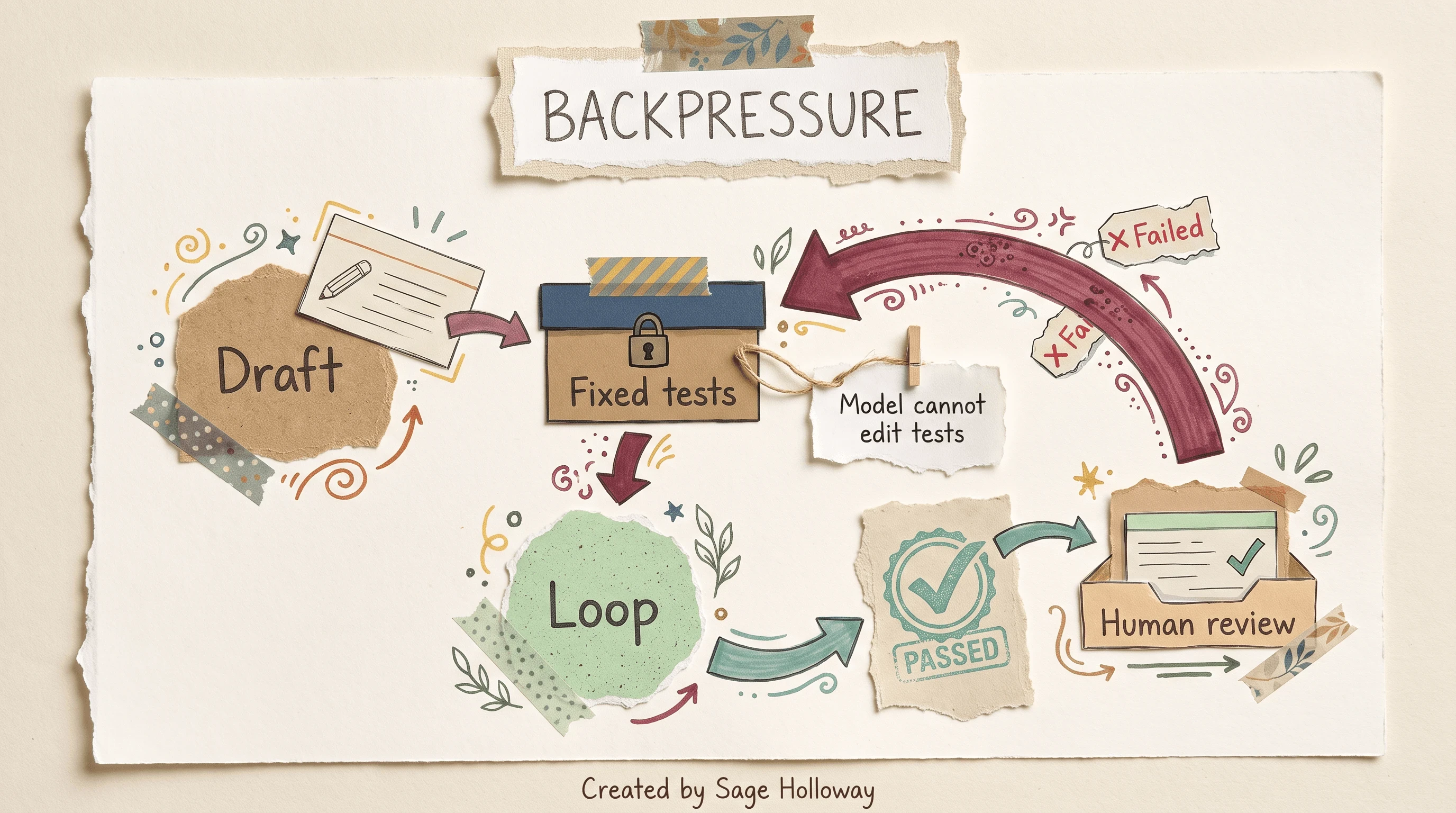
A fixed test library catches math slips. The model does not get to edit the tests.
Build tests for the numbers you would be embarrassed to read aloud: allocation percents that must sum to 100, gain/loss signs that must match the lot list, a wash-sale window that must not be empty when /tlh claims a harvest. Keep that library in a folder the agent can execute and cannot modify.
Confused? Fair enough. Another way: the plugin is a fast junior. The test file is the calculator taped to the desk. The partner is still the signature. If you skip the calculator, you are betting a client meeting on a 64.37 percent bench.
Whether this loop holds at scale for a 12-person RIA, genuinely not sure yet. The forum recipe is real. The sample size is not a peer-reviewed ops study. Start with three tests on one sample household. Expand only when a test has actually caught something.
FAQ
What is the Claude wealth management plugin?
It is Anthropic's wealth-management vertical: markdown skills, slash commands, and connectors that draft client reviews, plans, rebalancing notes, reports, proposals, and tax-loss harvesting screens. It ships from the financial-services GitHub repo and the product plugin page. It stages work product; it does not take custody of assets.
Is the Claude finance plugin the same product?
"Claude Finance" is shorthand. The installable core is financial-analysis, with wealth-management as a vertical on top of that core. Claude for Financial Services is the broader industry platform, covered separately, and Perplexity Finance is a competitor product rather than a Claude connector.
How do I install it in Claude Cowork vs Claude Code?
In Cowork, follow Support: Customize, Browse plugins, add a GitHub marketplace, paste https://github.com/anthropics/financial-services-plugins (or the README URL if that path fails). In Claude Code, run claude plugin marketplace add anthropics/financial-services, then claude plugin install financial-analysis@claude-for-financial-services. Prefer those official strings over FindSkill's claude-for-financial-services marketplace slug.
What accounts or portfolio data can it connect to?
The core ships Wall Street feeds such as FactSet, Morningstar, PitchBook, and S&P Global. It does not ship QuickBooks, Xero, NetSuite, or Wave. For QuickBooks Online, install @intuit/quickbooks-online-mcp-server, register it with claude mcp add --transport stdio quickbooks intuit-quickbooks-mcp, then complete browser OAuth; Xero is the same job, and I will not invent a package name the sources do not publish.
Is client or holdings data used to train Anthropic models?
Anthropic's Claude for Financial Services announcement states that, by default, your data is not used to train generative models. Local MCP for QuickBooks runs on your machine and does not pipe books through Anthropic. Confirm the current data-use terms for your contract tier before you put household files in a workspace.
Can Claude ensure compliance with financial regulations?
No. Claude cannot autonomously ensure compliance; sources treat it as decision-support and drafting, with final accountability on human review. Do not ship this plugin as regulator-ready out of the box; for agent-level compliance design, see AI agents in financial services compliance.
Does the plugin execute trades or post to a ledger?
No. The official repo says agents do not recommend, execute, bind risk, post to a ledger, or approve onboarding; every output is staged for human sign-off. Custody and the general ledger remain on your existing platforms.
How can advisors catch calculation errors in plugin drafts?
Keep a Python validation library the model cannot edit, and use local Hooks so drafts loop until tests pass before a human sees them. Forum threads flag prompting errors and formatting slop as practitioner warnings, not official fail rates; even a 64.37 percent bench score is a reason to review.
Which is better for a small wealth firm, Claude or Perplexity?
Vendor comparison copy (not docs) tends to give Perplexity the edge for small teams that want cited research out of the box, and Claude the edge for firms that can engineer custom integrations. That split is a starting heuristic, not a bake-off we ran. If you need a markdown plugin you can fork, you are on this page; if you need a search box with citations and no CLI, look at Perplexity on its own terms.
The packet will keep getting faster. The lock on the box will not get optional. What I would watch next is not another connector announcement. It is whether firms treat a staged /rebalance note as a booked trade because the prose sounded like the advisor. That failure mode is quieter than a headline, and it is already available to anyone who skips the stamp.
Install the official marketplace on one surface this week. Run /client-review on a non-production sample household. Read the draft out loud. Refuse anything that posts, trades, binds, or approves. If a number would embarrass you in a meeting, it is not ready, no matter how fast it arrived.
Until then...
Sage
PS. Open the last packet you almost sent. Circle every number you did not source-check. That count is your real review budget. Keep the page. Recheck it after the next sample /client-review.
Author
Practical guides, tool teardowns & AI engineering workflows.


