AI for Finance
AI Financial Modeling: Kickstart the Draft, Then Fix What Breaks

Sage Holloway
19 min read
Go back to blog
SHARE

The tabs look finished before lunch. Blue headers, tidy years, a balance sheet that almost closes. Then someone toggles a growth rate and a cell that used to be a formula becomes a quiet number. That is the moment the draft stops being clever and starts being expensive.
AI financial modeling automates spreadsheet setup to draft three-statement models in minutes rather than hours. Leading tools still hallucinate historical tabular data and fail circular cash and debt interest schedules, so they remain draft kickstarters. Analysts should upload reference files, isolate inputs from formula logic, and use Excel Formula View to catch plugs and hardcoding across multi-turn edits.
Before, you spent two to three hours laying out historicals, linking statements, and formatting so a managing director would not flinch at the first scroll. After, a sidebar or CLI can hand you a structured baseline in roughly fifteen minutes. The hours do not disappear. They move into audit, plugs, and the circular schedules the tools still refuse to own.
If you have ever opened an AI sheet that looked partner-ready and found a static plug where cash should talk to interest, this page is for that wall.
This guide will not cover deep filings ratio pedagogy, Marketplace install depth, wealth-plugin staging, or compliance-agent architecture. Those jobs live on sibling pages. What follows is AI for financial modeling as path choice, scaffold from uploaded actuals, Formula View audit, drift control, and the circularity lock you still build by hand.
On this page
What AI financial modeling can and cannot deliver
Choose your path: Excel-native, Claude Code, or SDK
Scaffold a Claude financial model from uploaded actuals
Audit AI sheets with Formula View and control checks
Stop multi-turn model drift and silent hardcoding
Fix circularity and debt-sweep plugs yourself
FAQ
AI kicks off the draft. You still own the last mile.
What AI financial modeling can and cannot deliver
You can renovate a kitchen in a weekend if you only touch what shows. New cabinet doors. Fresh paint. A faucet that photographs well. Guests walk in and assume the room is done. Behind the wall, a slow leak keeps soaking the subfloor. None of the visible work matters once the cabinets go soft. That is the trap with a polished draft that still hides broken plumbing.
Financial modeling ai systems shine at the visible layer: tabs, labels, and a first pass at three statements, a discounted cash flow (DCF, a valuation that discounts future cash flows), or a leveraged buyout (LBO, a model built around debt-funded acquisition economics). They are weak at the leak: circular interest schedules, true statement integration, and formulas that survive the next assumption tweak.
Wall Street Prep's 2026 ranking is blunt. Even the best tools underperform a low-tier human analyst. The honest framing is kickstarter, not replacement.
Kickstarter drafts vs finished investment-banking models
A kickstarter here means a 0 to 60% scaffold: structure, formatting, and a usable baseline in about fifteen minutes instead of two to three hours of blank-sheet work. Shortcut and Claude can produce a visually polished three-statement baseline from filings on that clock. They still break down on complex debt schedules, balance sheet flowthroughs, and circular cash-debt interest links.
Do not confuse a convincing subtotal with a correct history. Tools have hallucinated SEC line items that still sum to neat totals. That is why upload-first grounding matters later on this page.
If you need filings, ratios, and mock-data refusal as the primary job, that is Claude financial analysis. This URL owns model structure and the last mile.
Boutique add-ins vs generalist LLMs
Boutique add-ins are Excel-native tools built for finance layouts. Generalist large language models (LLMs, systems trained to predict and generate language) are chat surfaces that can write formulas but were not designed as banker workbooks.
In Wall Street Prep's test, Shortcut (the Excel add-in from Fundamental Research Labs, not the project-management app with the same name) ranked number one overall. Claude in Excel was a close second. Copilot produced simpler formulas. ChatGPT finished lowest in that test. All of them stayed kickstarters.
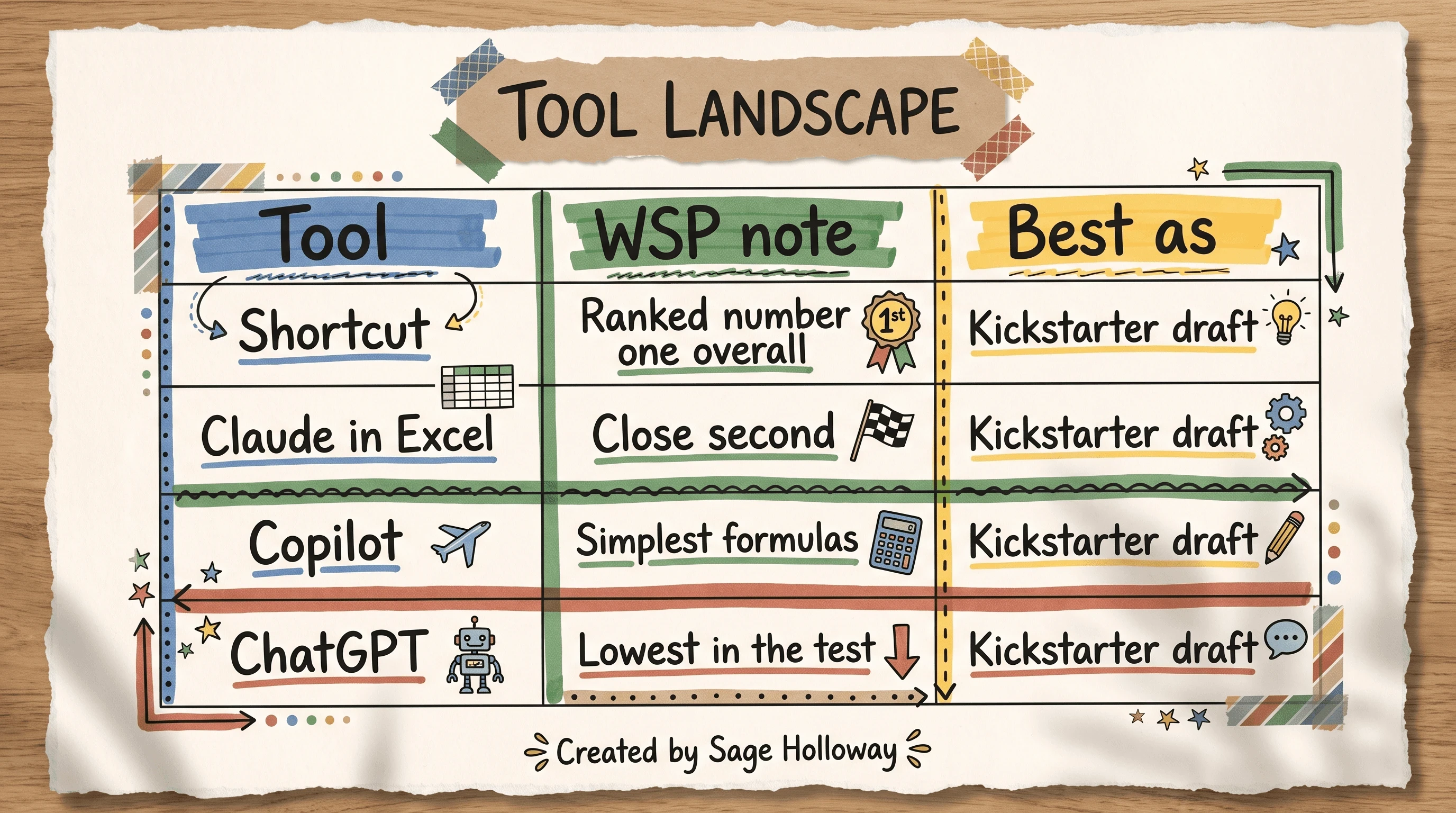
Shortcut led the WSP test. Claude was close. All stayed draft kickstarters.
Skip Taskade-style list boards if you need a downloadable .xlsx with living formulas. A nested workspace board is not a three-statement model.
For a live walkthrough of the same benchmark (Shortcut, Claude, Copilot, ChatGPT against the junior-analyst bar on an Apple three-statement), watch Wall Street Prep here:
https://www.youtube.com/watch?v=1fEVEeL4nIo
What you now have: a clear ceiling. Time invested: a few minutes of framing. Next: which door you open.
Choose your path: Excel-native, Claude Code, or SDK
Claude financial modeling is not one product. It is three workspaces that share a brand and split on access, chrome, and failure modes. Collapse them and you will install the wrong thing for an afternoon.
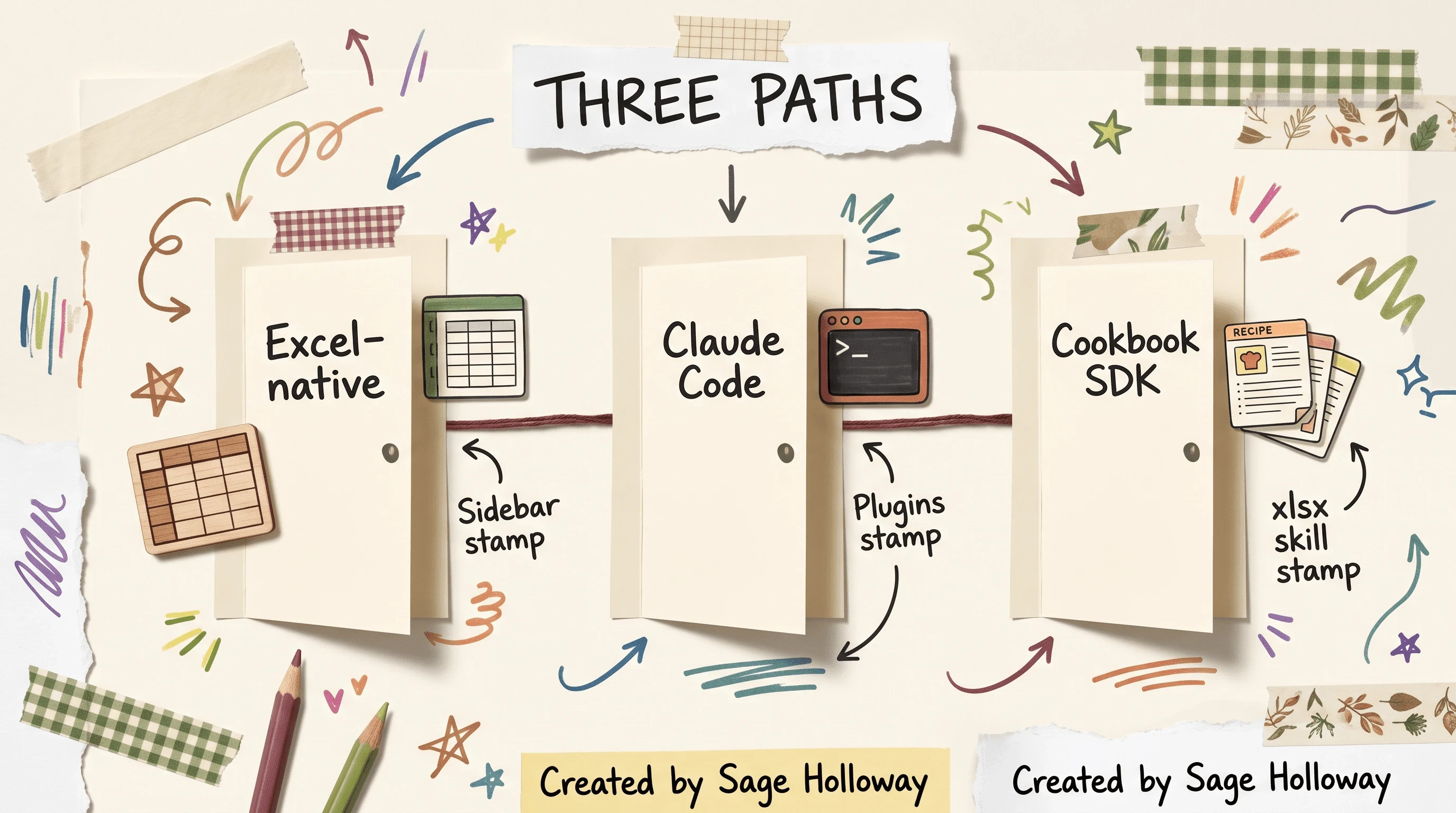
Pick one workspace. Excel-native, Claude Code, and the SDK are different doors.
Claude for Excel and Shortcut sidebar path
Claude for Excel is Anthropic's research-preview add-in that sits in a Microsoft Excel sidebar and can read, edit, and create sheet cells with cell-linked explanations. Access requires a Max, Enterprise, or Teams plan. Deep Marketplace install, Mac versus Windows ribbon quirks, and IT-locked Store bypass live on how to add Claude to Excel. This page only needs the path choice and the modeling job.
Shortcut (again: Fundamental Research Labs Excel add-in; Wall Street Prep tested v7.4) is the boutique sidebar alternative. It routes work through specialized agents for data, modeling, verification, and formatting. Vendor pages will sound louder than the WSP scorecard. Keep both in view.
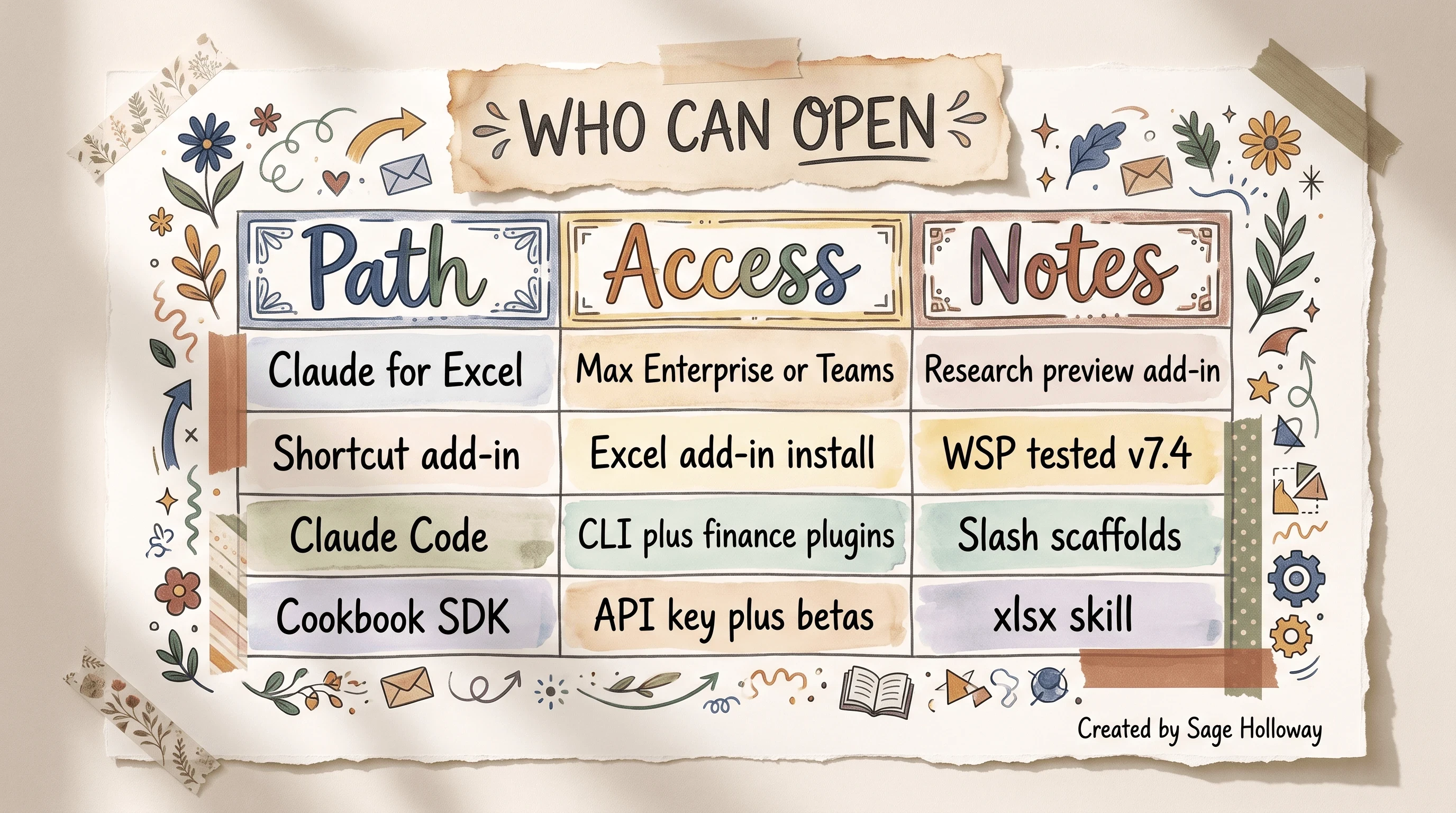
Claude for Excel needs Max, Enterprise, or Teams. Shortcut and CLI are alternate doors.
Anthropic's teaching scene for the sidebar is concrete: Claude analyzing an Acme Grille Inc. income statement inside Excel. That is the product shape you want when FP&A lives in the grid.
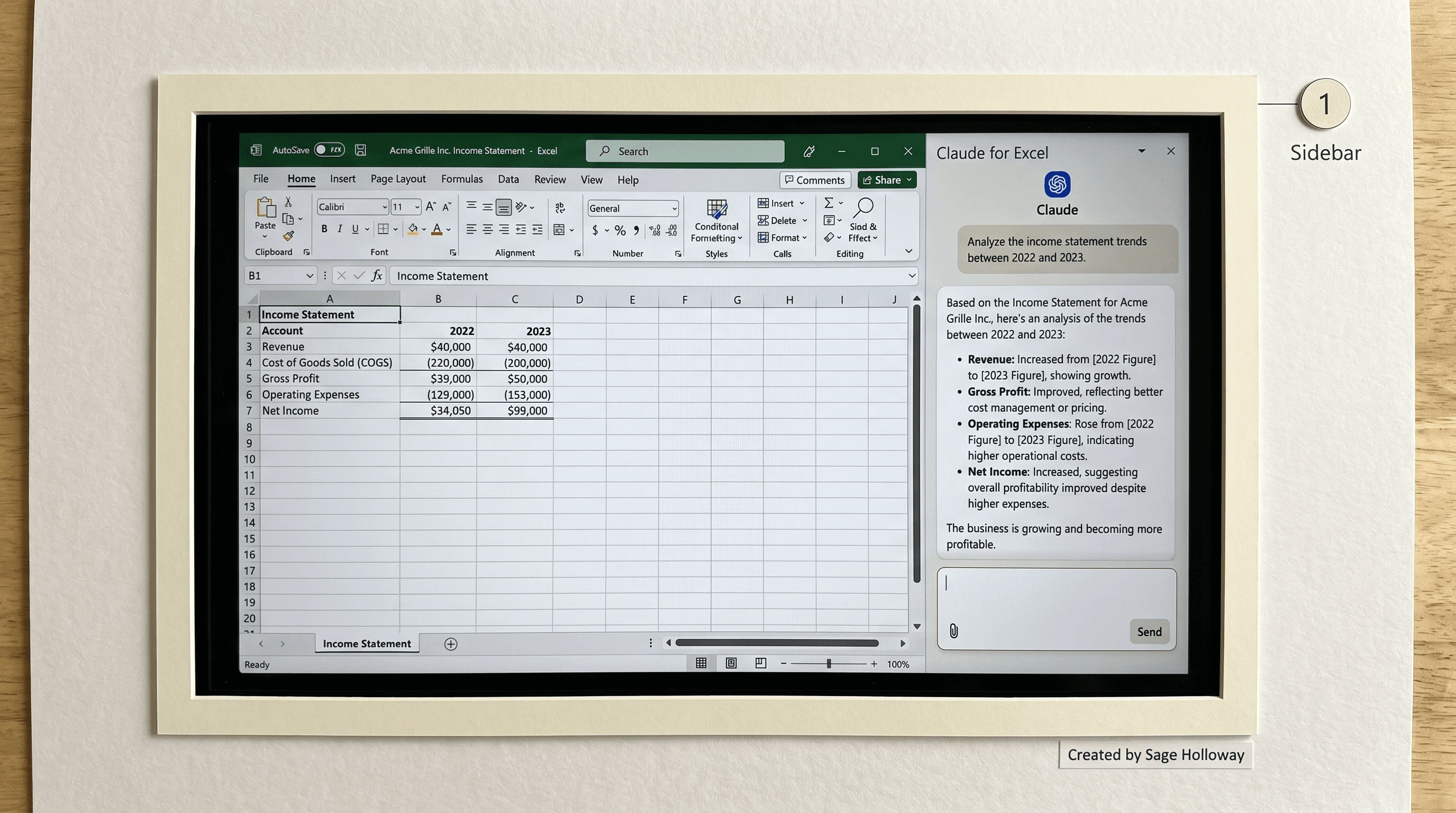
Claude for Excel sits in the sheet sidebar and reasons over the open income statement.
Official product context: Claude for Excel and the broader Claude for Financial Services note.
Claude Code with finance plugins
Claude Code is the command-line interface (CLI, a text terminal you type commands into) for local scaffolding. With financial analysis and investment banking plugins installed, analysts have used slash commands as list-item scaffolds:
/dcf drafts a discounted cash flow sheet. /one-pager drafts a company overview slide. Peer reports put those in the minutes-to-tens-of-minutes range. They are not IB-signoff artifacts. Terminal files still need the same Formula View discipline as sidebar drafts. For a deeper CLI and SDK pipeline spoke later, plan Claude Code finance SDK pipelines. For advisor staging plugins, see the Claude wealth management plugin.
Cookbook SDK pipeline
The Cookbook path is for people who want Python to produce Excel, then decks, then PDFs from the same data. Official notebook: Claude Skills for financial applications. Companion templates live in Anthropic financial-services. Industry hub context sits on Anthropic financial services.
Ground the environment the way the cookbook does. Put the key in .env, never in a pasted chat:
Cookbook notes call for Anthropic SDK 0.69.0 or newer from the published wheel. Pipeline naming in the notebook follows a chain such as pipeline_1_metrics_ (Excel), then summary and documentation stages into PowerPoint and PDF. That chain is automation, not a license to skip audit.
If you want a short motion proof that Excel Agent Mode can scaffold a multi-year model when you feed assumptions explicitly, keep this short:
https://www.youtube.com/shorts/ZuaaOuztcYw
Scaffold a Claude financial model from uploaded actuals
A claude financial model starts with files you trust, not with an open-web scrape of historical line items. Wall Street Prep saw tools invent SEC history that still summed to convincing subtotals. Upload first. Generate second.
Upload reference files; ban open-web line items
Grounding means attaching the latest 10-K, a Q4 press release, or a cleaned CSV of historical actuals before you ask for structure. In Excel-native flows, the step ledger looks like: New project, AI Project Studio, upload a CSV (or upload PDFs and spreadsheets). In the Cookbook path, load with pandas from a local path you control.
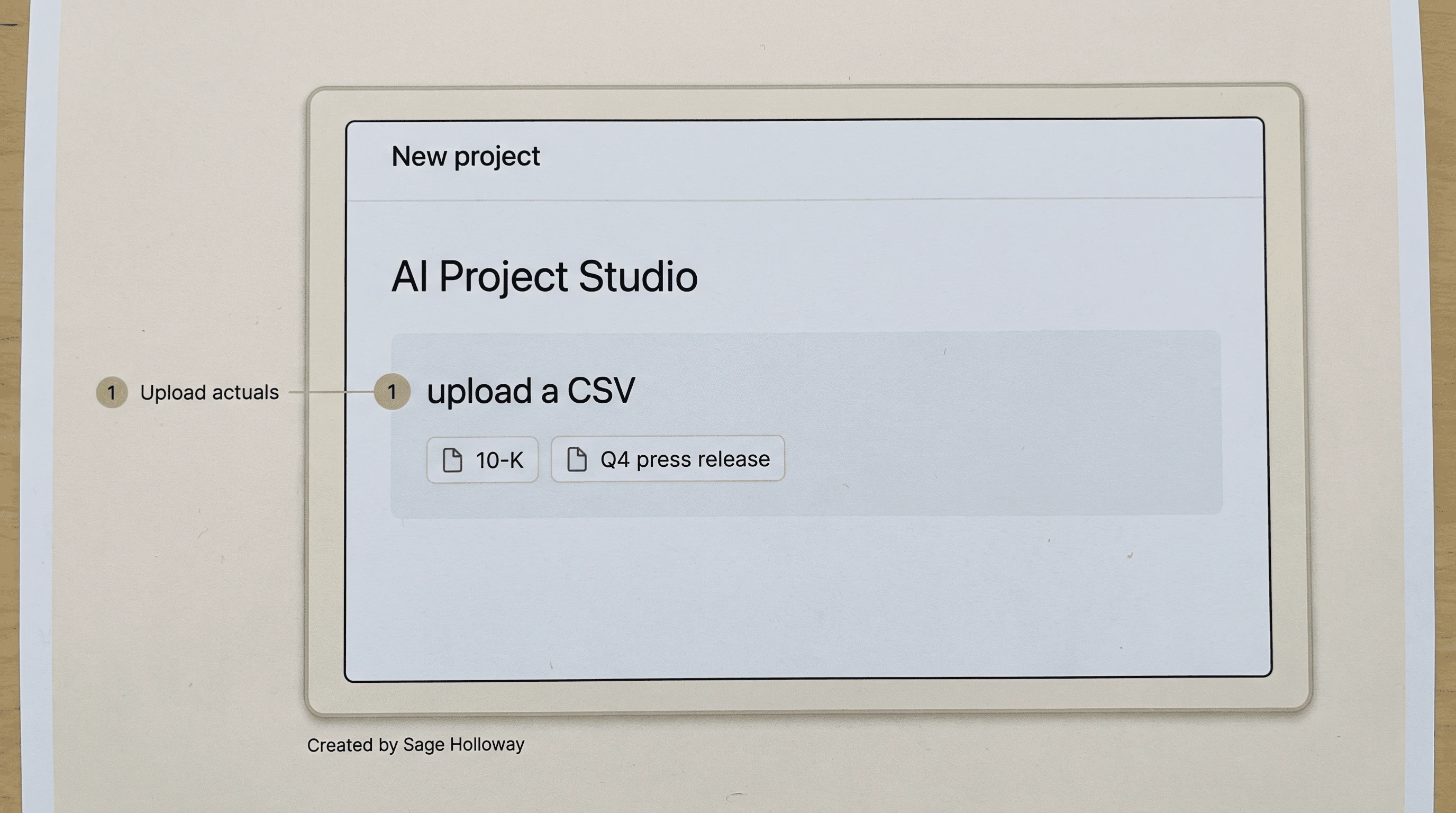
Upload the 10-K or CSV first. Do not let the model scrape historical line items.
Why? Because a hallucination here is not a creative metaphor. It is a wrong number that looks like a filing. Once it sits in Year 0, every forecast inherits the lie.
Use a non-production workbook for practice. Do not paste client secrets into a general chat if your firm forbids it. Compliance-agent depth lives on AI agents for financial services compliance.
Prompt parameters for 3-statement, DCF, and LBO baselines
Be specific. Weak prompts get weak sheets. Strong tools ask clarifying questions about forecast basis (consensus versus management guidance), revenue segmentation, share repurchases, layout, and schedule structure. Treat that questioning as a quality bar, not as friction.
Paraphrase the Wall Street Prep and Shortcut style of ask (do not invent metrics the sources do not use):
Integrated three-statement model with investment-banking formatting, three years of historicals and four years of forecasts, historicals from the uploaded 10-K and Q4 release, comments and source cites, assumptions and statements on one worksheet where that layout fits your template.
Ten-year DCF with explicit growth bands, EBITDA margin path, and WACC stated in the prompt, starting from the uploaded 10-K.
LBO or debt-structure variants only after the base statements exist and you are ready to own circularity yourself.
A financial model ai pass that finishes in ten minutes without a single clarifying question is not a flex. It skipped the decisions that keep the sheet usable next week.
Slash commands stay list items on the Claude Code path (/dcf, /one-pager). They do not replace uploaded actuals.
Audit AI sheets with Formula View and control checks
Trust the draft. Then distrust the cells.
Formula View is Excel's mode that shows formulas instead of calculated values. On Windows and most Excel builds, toggle it with Ctrl+`. Corporate Finance Institute teaches Formula View as the practical way to catch AI anomalies: hardcodes that look like math, plugs that force a balance, and links that never existed.
Formula View scan for hardcodes and plugs
A hardcode is a typed number where a formula should live. A plug is a static value inserted to force the balance sheet to balance when statement links are missing. Both photograph as competence. Both fail under a rate change.
Walk the sheet in Formula View. Look for islands of constants inside forecast columns. Look for balance-sheet balancing cells that do not point to cash, debt, or retained earnings logic. Ask the sidebar to explain a cell only after you can see the formula yourself.
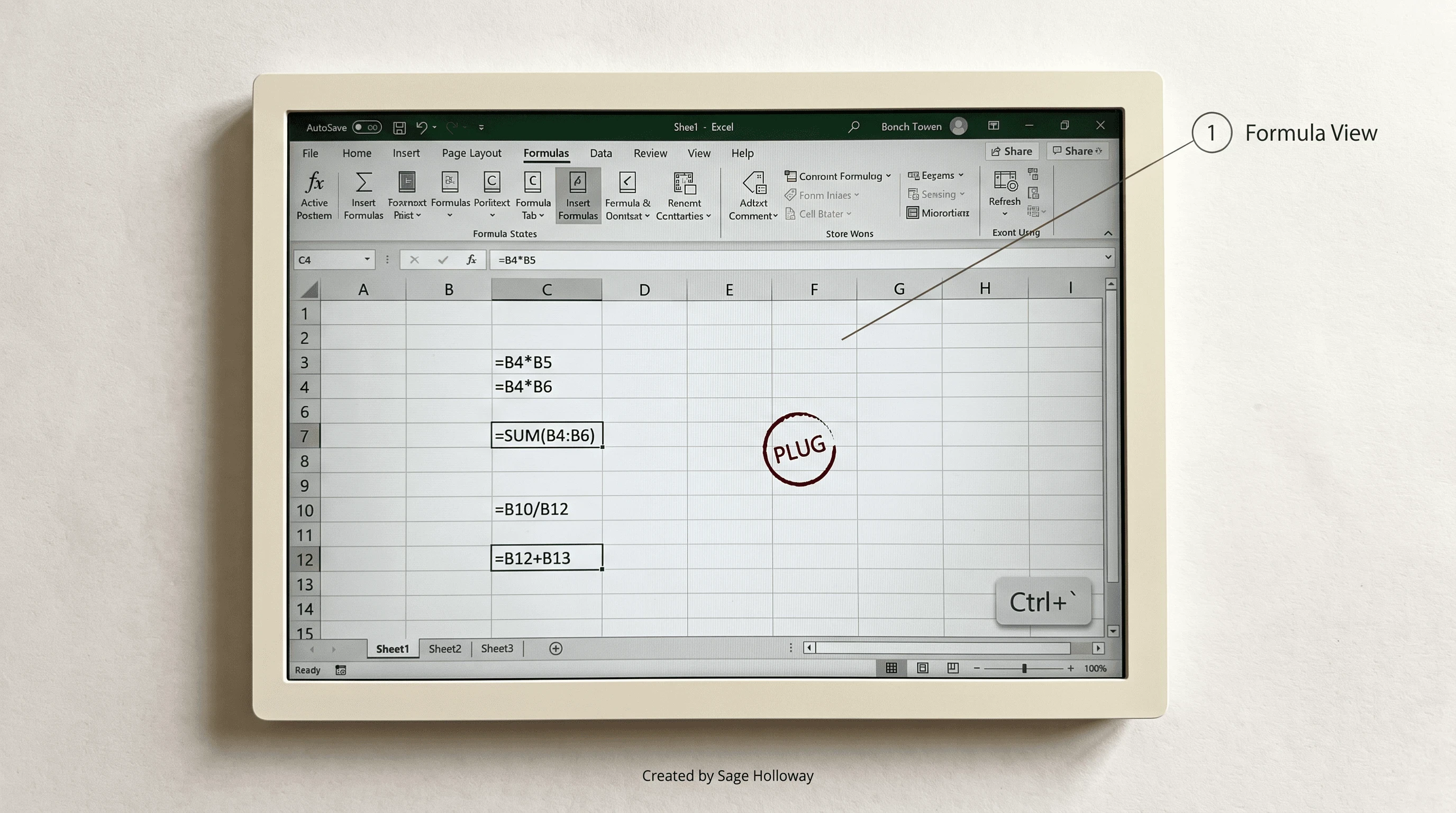
Switch to Formula View. Hardcodes and plugs stop looking like finished math.
For motion that shows an add-in parsing a 10-K, extracting statements, and flagging hardcoded cells, keep this short:
https://www.youtube.com/shorts/LCwxcUriuzE?vl=en
Broader error-tracing pedagogy can deepen later on AI spreadsheet error audit. Soft continuity with analysis audits still points to Claude financial analysis.
Spot-check checklist for WACC, terminal value, and balance sheet
WACC is the weighted average cost of capital, the blended required return used to discount free cash flows. Terminal value is the lump-sum value of cash flows beyond the explicit forecast. Spot-check both, then the mechanical ties.
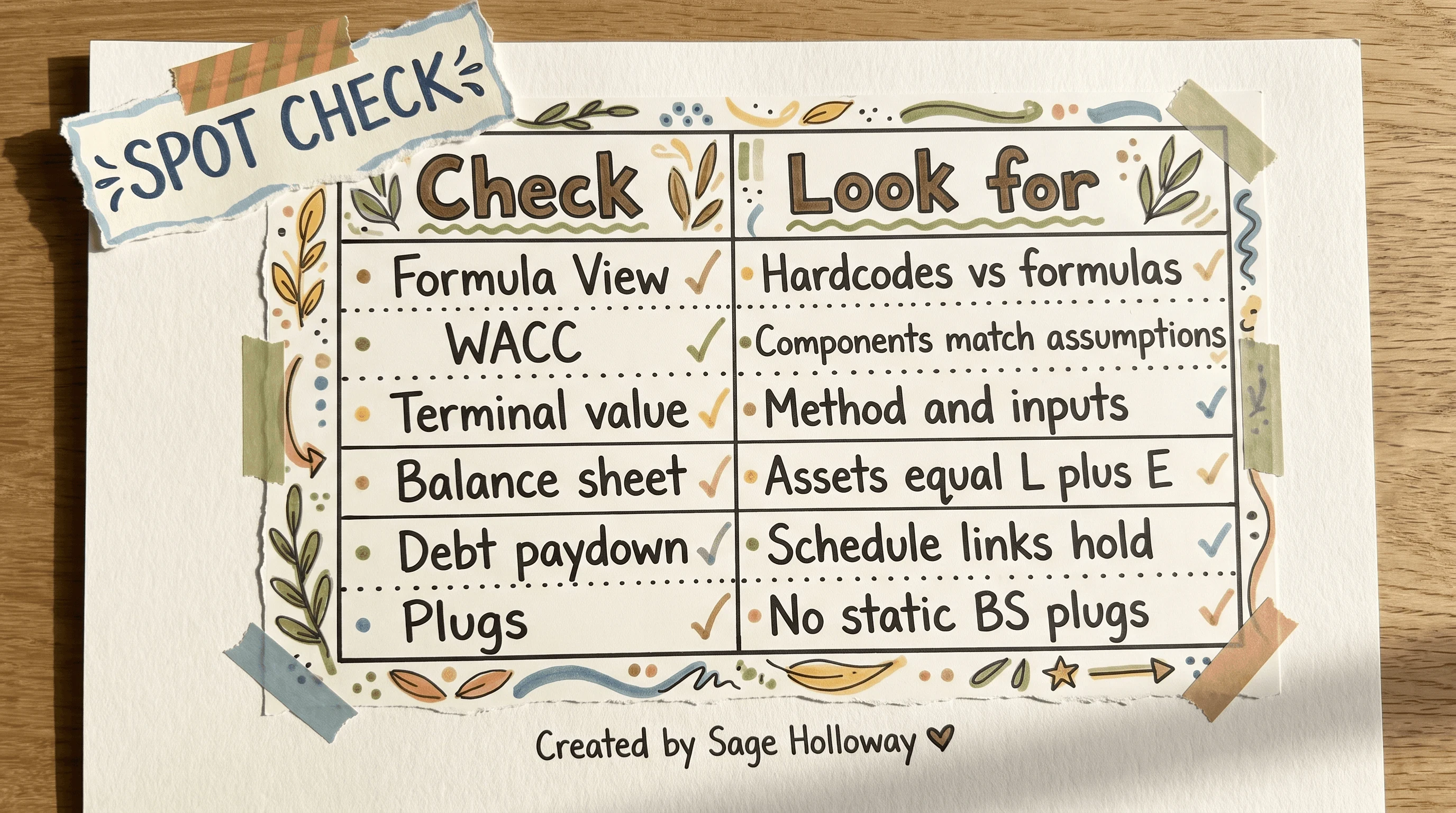
Run these six checks before you trust an AI draft.
Formula View: hardcodes versus formulas across the forecast block.
WACC: components match the assumptions tab you intended.
Terminal value: method and inputs match the prompt, not a silent swap.
Balance sheet: assets equal liabilities plus equity every year.
Debt paydown: schedule links still hold after the last edit.
Plugs: no static balance-sheet plugs pretending to be integration.
If any check fails, stop generating. Fix the structure. Then resume.
You are not buying a finished banker model. You are buying a timed layout pass and a longer audit shift.
Stop multi-turn model drift and silent hardcoding
But here is the thing.
The first draft is not where most AI sheets die. They die on turn four, when someone asks for a softer growth rate and the model quietly replaces a living formula with a constant. Reddit analysts call the pattern model drift: nothing durable persists across sessions the way a human workbook does, so the assistant improvises on the 20% that matters.
Separate inputs from formula logic
Keep three layers on separate, versioned sheets:
Inputs: growth, margins, WACC pieces, debt mix. Numbers you expect to change.
Formula logic: how statements link, how schedules roll, how checks fire.
Data: historical actuals you uploaded and refuse to let the model rewrite.
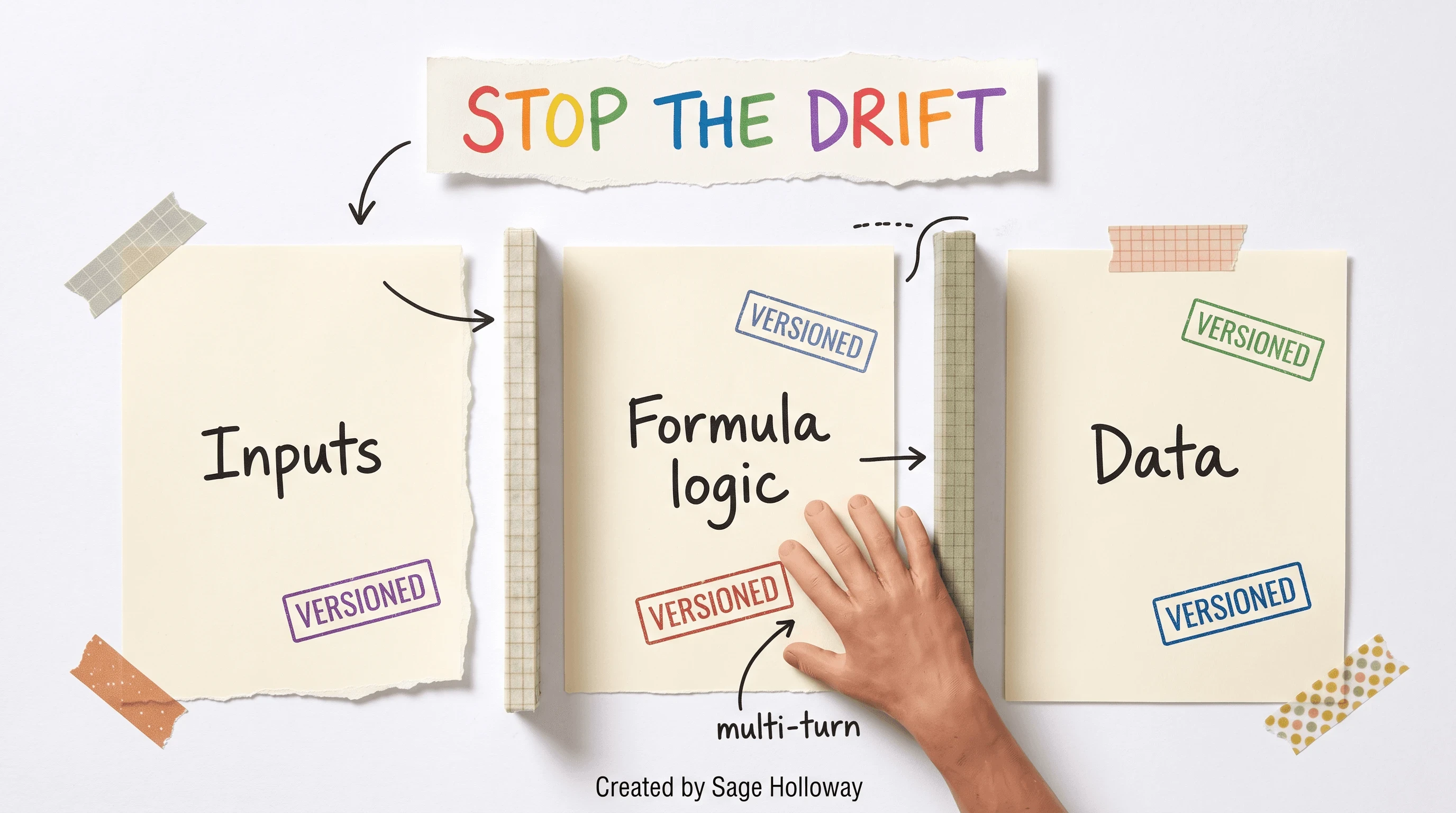
Keep inputs, logic, and data on separate versioned sheets.
When the linking structure stays stable and versioned, the assistant has fewer chances to "help" by hardcoding a former formula. Save a dated copy before every multi-turn scenario pass. If the sheet breaks, you roll back to structure, not to vibes.
Scenario tweaks without rewriting structure
After the skeleton is locked, prompt for scenarios that touch inputs only. Useful shapes from practice notes:
Add a sensitivity table for revenue growth versus WACC.
Change debt mix (for example, 40% term loan, 20% revolver) without rebuilding the entire three-statement layout.
Drive best, base, and worst cases from a dropdown that feeds IF logic on the inputs sheet.
Do not ask the model to "rebuild the model with these assumptions" if you already have working links. Ask it to edit the inputs tab and leave the logic sheet alone. That constraint is the whole game.
This will not work if you keep pasting the entire workbook into a fresh chat with no sheet map. Context without structure invites improvisation.
Fix circularity and debt-sweep plugs yourself
Here is the named gap most rankings mention and almost nobody operationalizes.
Circularity in a three-statement model means interest income and interest expense depend on cash and debt balances that themselves depend on interest. Excel can iterate that loop when you design it on purpose. In Wall Street Prep's 2026 test, every tool scored 0 out of 10 on circularity: Shortcut, Claude, Copilot, and ChatGPT. They did not "almost" solve it. They failed it.
Do not claim a newer tool solved circularity unless you have a fresher sourced scorecard than that ranking. For now, the analyst owns the loop.
Where plugs fake statement integration
When tools cannot build the loop, they insert plugs. The balance sheet closes. The story looks integrated. Cash, debt, and interest never actually talk.
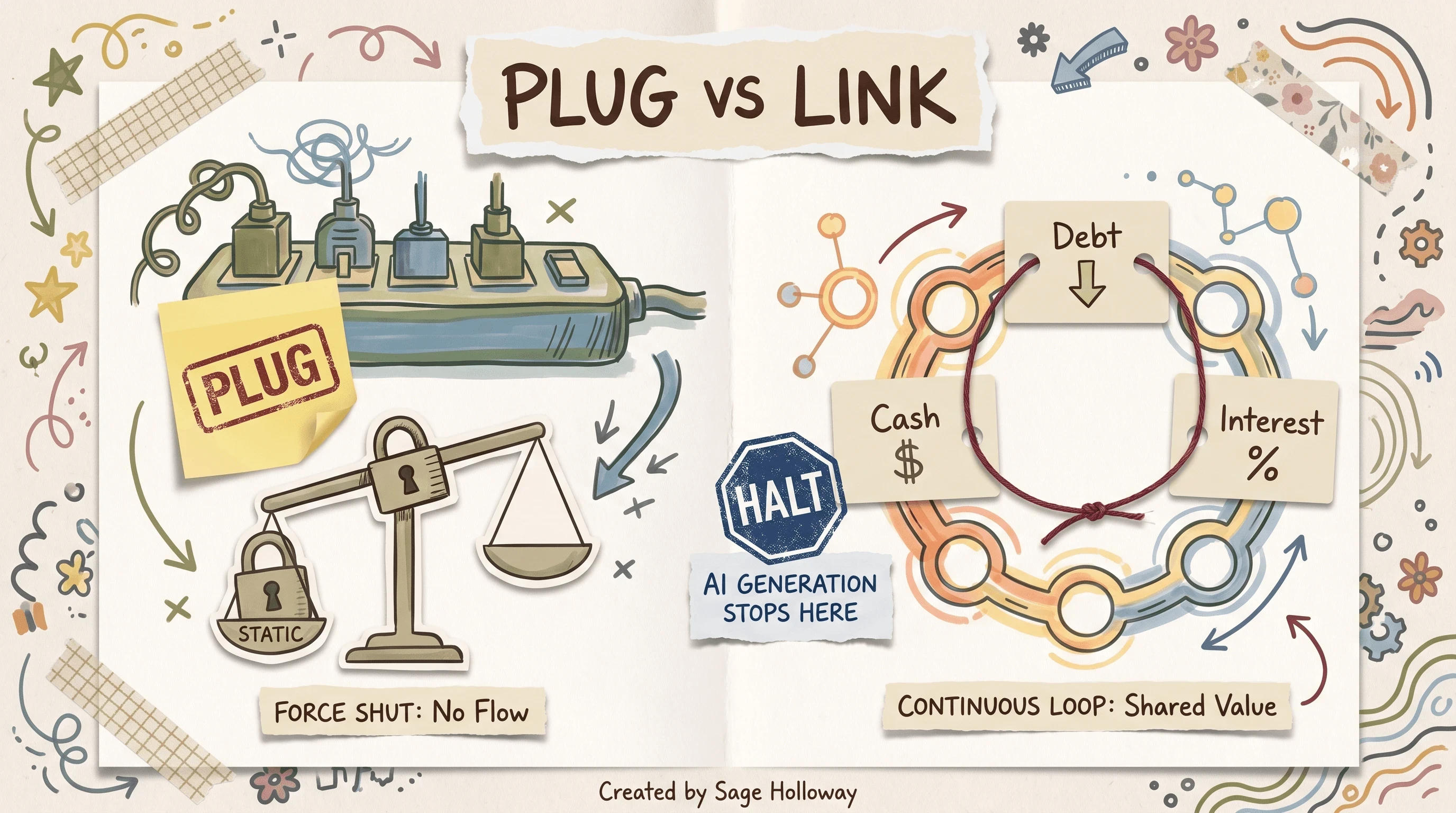
Plugs force a balance. A circular debt sweep links cash, debt, and interest.
Scan for plugs on the balance sheet and in cash interest lines. If interest is a typed constant while cash and debt move, you found the fake. If cash is a residual plug that absorbs every error, you found the other fake.
Manual circular debt-sweep lock pattern

Every tested tool scored 0/10 on circularity. You lock the debt sweep yourself.
Treat AI generation as halted before the circular schedule. Practical lock pattern:
Let the tool scaffold historicals, operating forecasts, and non-circular schedules from uploaded actuals.
Stop the assistant before it "fixes" interest with a plug.
Build the cash and debt interest links yourself (or from your firm's template) with Excel iteration enabled only for that intentional loop.
Add a control check that flags when Assets do not equal Liabilities plus Equity after iteration.
Freeze a versioned copy before any further AI edits. Tell the assistant the circular block is read-only.
A debt sweep is the schedule that uses excess cash to pay down debt (or draws a revolver when cash is short). It is exactly the kind of living link AI drafts flatten into plugs. You own that block.
Vendor claims that a tool "outperforms Goldman analysts" sit in conflict with a 0/10 circularity score and the underperform-junior-analyst finding. Prefer the scorecard over the carousel.
For a head-to-head add-in comparison spoke, plan Shortcut vs Claude for Excel. For the industry offering map, keep Anthropic financial services one click away.
FAQ
Which AI for financial modelling should I use?
Wall Street Prep's 2026 ranking puts Shortcut first overall and Claude in Excel a close second, ahead of Copilot and ChatGPT in that test. Boutique Excel add-ins tend to keep formatting and footnote extraction tighter than generalist chats. Even the leaders still underperform a low-tier human analyst, so pick a kickstarter you can audit, not a replacement you trust blind.
Can AI build an investment-banking-quality three-statement model from scratch?
It can draft a polished baseline in about fifteen minutes from filings, which is far faster than a two-to-three-hour human blank-sheet build. That draft is a 0 to 60% kickstarter. Complex integrations, debt schedules, and true statement links still break, and tools often plug the balance sheet instead of integrating it.
Can AI tools handle complex circularity and debt sweeps?
No. In the Wall Street Prep test, Shortcut, Claude, Copilot, and ChatGPT all scored 0 out of 10 on circularity for interest from cash and debt balances. They relied on static plugs. Analysts must halt AI generation at that schedule and lock the circular debt sweep by hand.
Why do AI-generated models break when assumptions change across turns?
Multi-turn edits trigger model drift: the assistant quietly hardcodes cells that used to be formulas, and session context does not persist like a human workbook. Keep linking structure separate from data, version the logic sheet, and change assumptions on an inputs tab instead of asking for a full rebuild.
How do you validate assumptions and catch hidden formula errors?
Switch Excel into Formula View (Ctrl+`) and scan for hardcodes and plugs. Spot-check WACC components, terminal value, balance sheet balance, and debt paydown links. Upload cleaned actuals instead of letting the model scrape historical tables from the open web.
Does Claude in Excel require a paid subscription for modeling workflows?
Yes. Claude for Excel research-preview workflows need a Max, Enterprise, or Teams subscription. Free tiers do not get the sidebar modeling path shown in professional courses and product pages.
Can Claude Code or CLI terminals be used for high-finance modeling?
Yes, with financial analysis and investment banking plugins. Slash scaffolds such as /dcf and /one-pager can draft sheets and slides in minutes. Treat those outputs as error-prone starters that still need Formula View and human validation.
How much does implementing AI financial modeling typically cost?
One mid-size implementation range cited in sources is about $30,000 to $100,000 for software, integration, and training. Treat that as a cited band, not a quote for your firm. Ongoing cost depends on seats, add-ins, and how much audit time you still staff.
Will AI for financial modeling kill entry-level IB and corporate finance jobs?
Sources argue the near-term shift is compression, not elimination: juniors move from pure build toward audit, edit, and debug because the tools still invent history and fail circularity. Spreadsheet automation historically changed the work mix more than it deleted headcount. The valuable skill is catching the plug, not pretending the draft was partner-ready.
The next useful fight is not another feature list. It is whether your firm will treat circularity and drift as analyst craft, or keep waiting for a vendor scorecard to flip from 0/10 without a protocol of its own. I am not sure which camp wins first. I am sure the sheets that survive review will look boring on purpose.
Pick one path this week. Upload a non-production 10-K or CSV. Scaffold a three-statement draft. Toggle Formula View. Refuse any plug that fakes circular cash and debt interest. Save a versioned copy before the next scenario turn. If you want the install door, use how to add Claude to Excel. If you want filings and mock-data refusal, use Claude financial analysis.
Until then...
Sage
PS. Excel's iteration setting is a deliberate door latch, not a bug. The first time I watched someone "fix" a circular sheet by deleting the interest link, the balance sheet looked calmer and the model got dumber in the same click. Leave the latch. Own the loop.
Author
Practical guides, tool teardowns & AI engineering workflows.


