AI for Finance
How to Add Claude to Excel: AppSource, IT Bypass, and Sidebar Controls

Sage Holloway
21 min read
Go back to blog
SHARE

<!-- SAGE_SENTENCE -->The workbook is already open. The ask is simple: put the assistant next to the grid. Then the Store is locked, the free login fails, and three tabs of Node tutorials appear in the search results. The tool was never the hard part. The path was.
To add Claude to Excel, install the official Claude by Anthropic for Excel add-in from Microsoft AppSource or search Claude under Add-ins on the Home tab. Sign in with a paid Claude Pro, Max, Team, or Enterprise account; free accounts fail authentication. Corporate admins can deploy tenant-wide or sideload the official manifest XML when the Office Store is locked.
Before, you pasted a sheet into a chat window, lost the formula tree, and hoped the reply matched the tabs you meant. After, Claude sits in the sidebar on the same workbook: audits, #REF! traces, and approved edits without forcing the file into a cloud vault first.
If you have ever stared at a grayed-out Get Add-ins button while a deadline moved closer, this page is for that wall.
This guide will not cover Google Sheets workarounds, deep Reddit sentiment roundups, or full financial-model pedagogy. Those jobs live on sibling pages. What follows is how to add Claude to Excel as the official Microsoft 365 sidebar, then control it.
On this page
Native add-in vs MCP: pick your path
Install on Mac, Windows, and Excel for the web
Sign in, paid plans, and supported Excel builds
Settings that matter after first launch
Sideload the XML manifest when IT locks AppSource
Audit formulas and trace errors in the sidebar
Build templates, clean data, and approve edits
Claude vs Copilot: local files without OneDrive auto-save
Limits, rate limits, and sidebar troubleshooting
FAQ
Add the official sidebar. Keep the workbook where it already lives.
Native add-in vs MCP: pick your path
Imagine you need a second set of hands at a crowded desk. One option is a person who walks in, sits in the empty chair beside you, and works on the same papers you already have open. Another option is a remote specialist who only answers after you ship a scanned packet through a custom courier route, with keys, passwords, and a waiting room on your machine. Both can help. They are not the same hire.
That is the fork for Claude and Excel. The official path is Claude by Anthropic for Excel: a Marketplace add-in that opens as a sidebar inside Microsoft Excel. The developer path is a community Model Context Protocol (MCP) server, which is a local bridge that lets Claude Desktop read and write spreadsheets through Node tooling. Search results blur them. Your install will fail emotionally long before it fails technically if you pick the wrong one.
This URL’s job is the Marketplace sidebar. MCP stays a contrast so you do not spend an afternoon editing claude_desktop_config.json when you only needed Get it now.
Zero-code Marketplace sidebar is this guide’s job. MCP stays a developer contrast.
Zero-code Marketplace sidebar
Claude for Excel (sometimes listed as Claude for Microsoft 365) is Anthropic’s official Office add-in. People call it a Claude Excel plugin or Claude Excel plug in in forums; Microsoft’s product language is add-in. It is generally available now. Older posts that call it a limited beta waitlist are outdated relative to current Support docs.
You install once, sign in with a paid Claude plan, and work inside the SharedRuntime host Excel already uses for modern add-ins. No Node. No JSON server block. No AppleScript live-edit path.
If you came here from wealth-plugin language, pause: the Claude wealth management plugin is a different product surface. This page is the Excel ribbon connector.
Developer MCP on Claude Desktop
MCP is useful when you deliberately want Claude Desktop to treat Excel as a tool, not a sidebar. It is not how to add Claude to Excel for a zero-code FP&A day.
Community servers such as @negokaz/excel-mcp-server expect Node.js 20.x or later, then a config entry in Claude Desktop. On macOS the file lives at ~/Library/Application Support/Claude/claude_desktop_config.json. On Windows it lives at %APPDATA%\Claude\claude_desktop_config.json. A common install line from the ledger is:
A minimal macOS-style server block looks like this (env key included as published in negokaz docs):
Smithery’s one-liner (npx -y @smithery/cli install @negokaz/excel-mcp-server --client claude) is the same family of path. Restart Claude Desktop after you edit the file. Then leave that track unless you are actually building developer automation. The rest of this article assumes the Marketplace add-in.
Install on Mac, Windows, and Excel for the web
Claude Excel install is three surfaces that look different and end in the same sidebar: AppSource in a browser, Add-ins inside Excel, or an admin assignment that appears for your tenant. The Claude AI Excel listing you want is Claude by Anthropic for Excel on Microsoft AppSource, not a third-party wrapper site and not an n8n recipe.
Official install detail lives in Anthropic’s Use Claude for Excel doc and on the AppSource listing. Cross-app behavior after install is covered in Work across Microsoft 365 apps.
Self-install via AppSource or Get Add-ins
Open Microsoft AppSource, find Claude by Anthropic for Excel, and choose Get it now. That is the cleanest Claude for Excel download path when your org allows the Office Store.
Inside Excel, use Insert → Get Add-ins (or Add-ins) and search Claude. Install the Anthropic listing. After it lands, open the sidebar and prepare to sign in with your Claude.ai Excel-linked account, meaning your normal Claude credentials for a paid plan.
On AppSource, open Claude by Anthropic for Excel and choose Get it now.
Windows Home Add-ins vs Mac Tools Add-ins
Ribbon language differs by platform even when the product is the same.
On Windows with Microsoft 365, open the Home tab and choose Add-ins, then search Claude. On Mac, open Tools → Add-ins, then search Claude. Same product. Different menu geography. If you only remember one rule: Windows lives on Home; Mac lives on Tools.
Windows: Home → Add-ins. Mac: Tools → Add-ins. Search Claude.
After install, the sidebar asks you to authenticate. That screen is where free-tier attempts die.
Sign in inside the sidebar with a paid Claude plan. Free accounts fail auth.
Admin deploy via Microsoft 365 Admin Center
If you are rolling Claude Excel add in (or the addin spelling people type in search) across a team, self-install is the wrong lever. An admin uses Microsoft 365 Admin Center, then Integrated apps / Add-ins, to assign Claude for the tenant. Some orgs also need Let users access the Office Store enabled under user-owned apps settings before individuals can self-serve.
Admin deploy is the path when you want one decision for fifty analysts. It is also the path that fails quietly when Privileged Identity Management (PIM) roles are temporary. We will cover that under the XML bypass section.
CJ Gustafson’s Claude in Excel: The 5-Minute Setup walks account, app, and Marketplace install, including the Mac Tools versus Windows Home difference. Watch it once after you know which path you are on; it does not replace the official docs.
https://www.youtube.com/watch?v=g0oV9aWYprk
Sign in, paid plans, and supported Excel builds
What is Claude in Excel at the account layer? A free Marketplace package that still requires a paid Claude subscription to authenticate. The Claude Excel add-in download is free. Active use is not.
Pro, Max, Team, and Enterprise only
Sign in with Claude Pro, Max, Team, or Enterprise. MindStudio and current Support guidance agree: the free tier does not work. If you authenticate with a free account, you hit an error.
Two conflicts show up in blogs. Excel University has suggested free-or-paid access; prefer the paid-only auth rule from official docs and MindStudio testing. Ruben Hassid has quoted Pro around $17/mo; treat that as a dated blog number and prefer Anthropic’s published Pro pricing (commonly cited near $20/mo in fresher walkthroughs). Do not invent a price in your own notes. Check the plan page the day you buy.
Supported Web, Windows, and Mac builds
Supported hosts from Anthropic’s Excel doc:
Excel on the web
Excel on Windows with Microsoft 365, build 16.0.13127.20296 or later
Excel on Mac, version 16.46 or later (build 21011600 or later)
Unsupported: Excel 2016 and 2019 perpetual licenses, Android, and iPad (no SharedRuntime support). Older Microsoft 365 builds below the SharedRuntime threshold also fail.
Web, Windows build, and Mac version gates. Free Claude auth fails.
This will not work if you are on a locked perpetual desktop build and expecting the sidebar to appear after a Store click. Upgrade the host first, or use Excel on the web where your tenant allows it.
Settings that matter after first launch
Install is the easy half. Claude Excel integration quality is mostly settings: cross-app context, edit confirmation, and how tightly you scope each prompt. Skip this section and you will swear the product is broken when it is only still on defaults.
Work across files
Work across files (also labeled Let Claude work across files) is the toggle that lets Claude share context across Excel, Word, and Outlook when those hosts are open. Official cross-app docs treat this as a first-class mode, not a marketing slogan.
Defaults matter. Pro and Max typically default this on. Team and Enterprise typically default it off. If Claude cannot see your open workbook from Word, check the toggle in each host before you file a ticket.
Turn on Work across files when you need Excel, Word, and Outlook context together.
Cross-app handoff has a mechanical rule people miss: both host applications must be open, and both Claude sidebars must be active. Word’s agent cannot invent Excel context from a closed book.
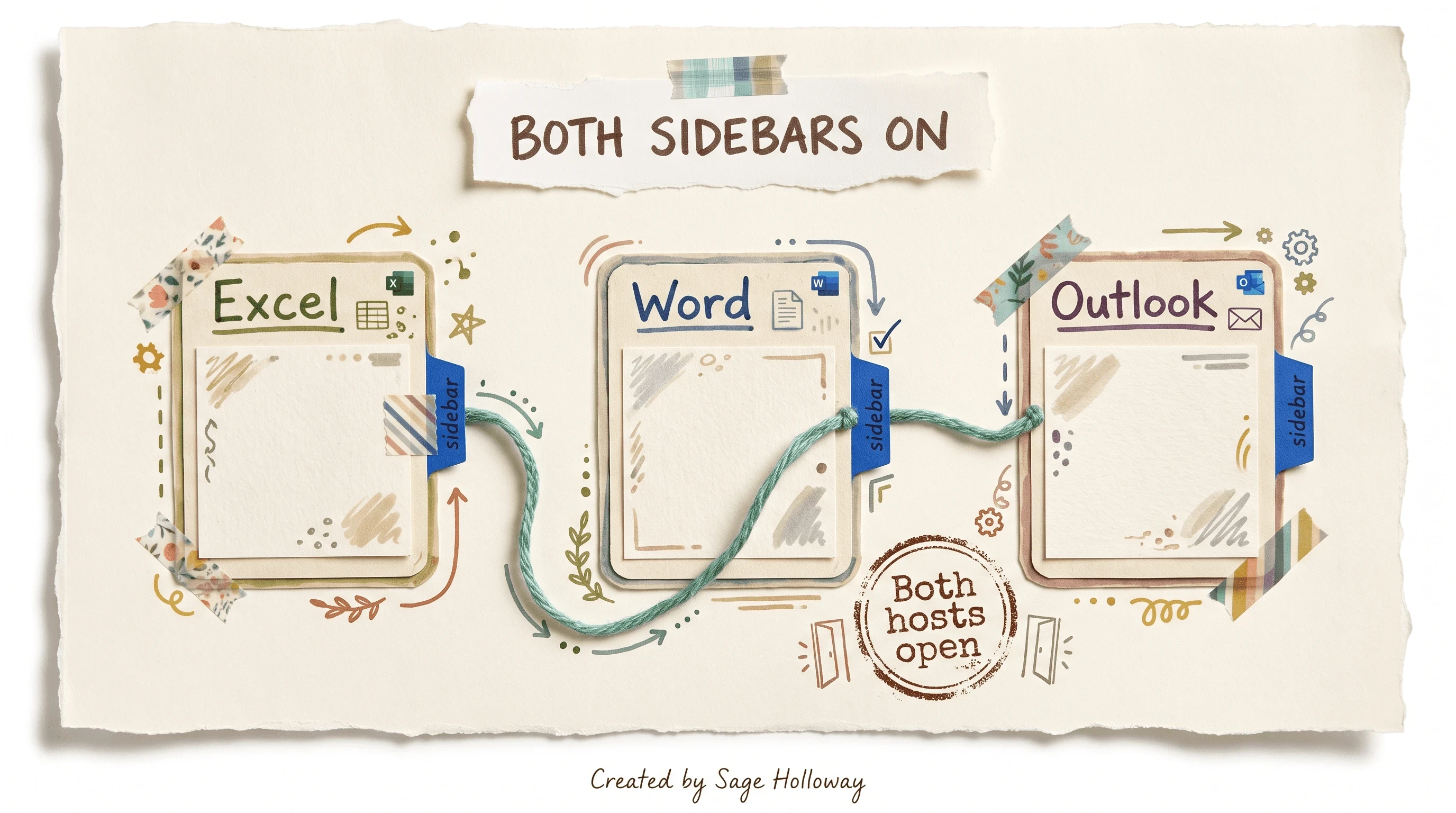
Cross-app needs both host apps open and both Claude sidebars active.
Ask before edits and overwrite protection
Ask before edits lists proposed changes for confirmation before cells rewrite. Overwrite protection can warn before existing values are replaced. Turn both on while you are learning the product. Turn them off only when you trust a narrow, repeated cleanup job.
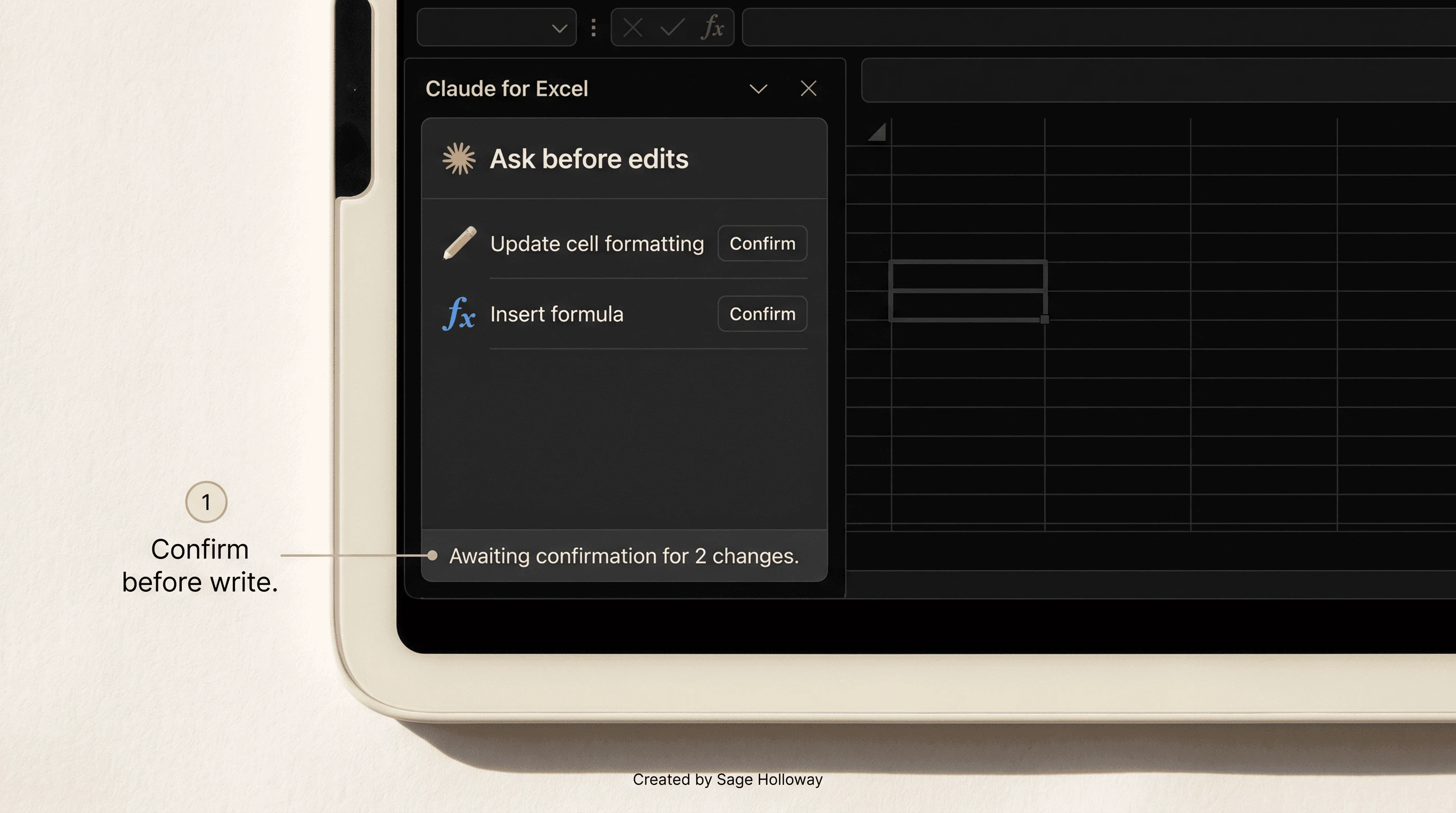
Ask before edits lists proposed changes for confirmation before cells change.
I tried a full-sheet “fix formatting” pass with confirmation off once. It did not work the way I expected. Borders drifted, a header row got “helpful,” and I spent longer undoing than I would have spent approving three small batches. The boring confirmation list is the whole game on dense templates.
Highlight targeting and keyboard shortcuts
Highlight a cell range, then prompt. Text-selection targeting scopes the request to that selection instead of inviting a whole-book rewrite. For data cleaning prompts (dates, currency, phone formats), select the messy block first. Pair that habit with a persistent Instructions field for rules such as thousand separators or bold headers so you do not retype house style every session.
Shortcuts from product writeups: Ctrl+Alt+C on Windows, Ctrl+Option+C on Mac, to toggle the sidebar.
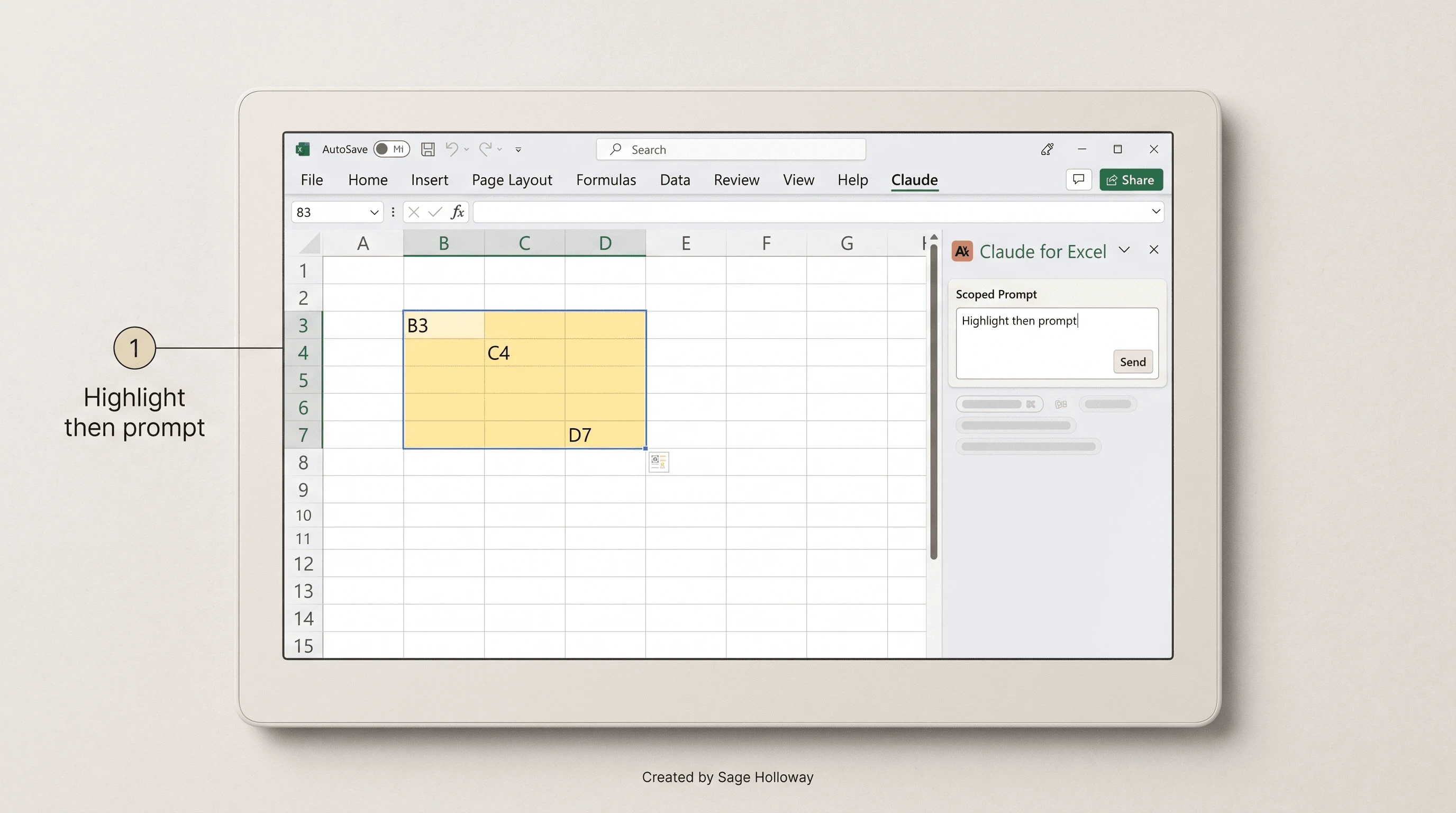
Highlight cells first so the prompt stays scoped to that selection. Shortcuts: Ctrl+Alt+C (Windows) / Ctrl+Option+C (Mac).
Sideload the XML manifest when IT locks AppSource
Corporate Store locks are common. Most install posts stop at Get it now. That is the gap this page owns.
When self-install is blocked, you still have two honest options: ask IT to deploy Claude through Integrated apps, or sideload Anthropic’s official custom manifest. The second path is not a pirate add-in. It is the documented Deploy with a custom manifest route using Anthropic’s published XML.
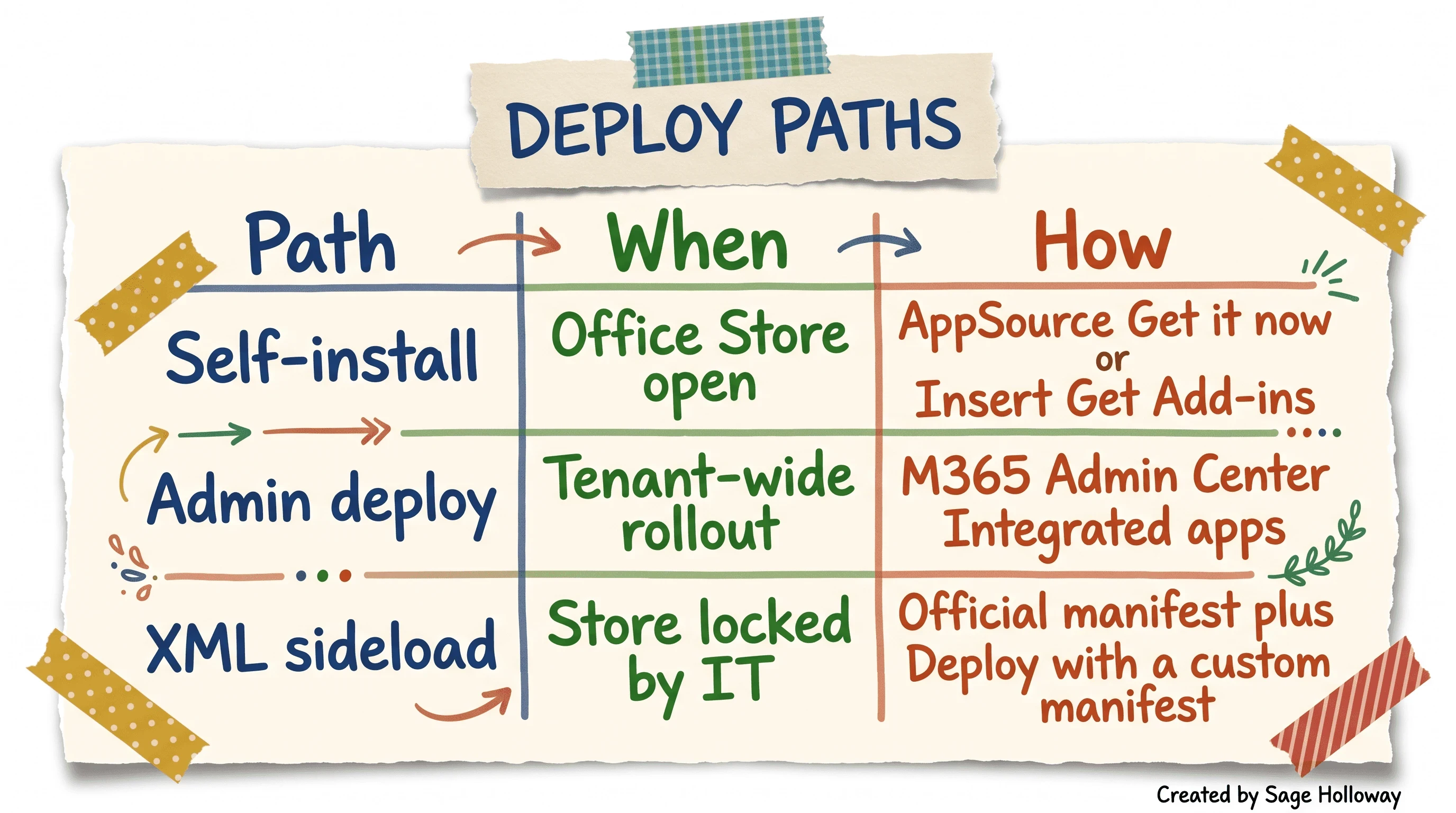
Store open: self or admin. Store locked: official manifest XML sideload.
Download the official manifest XML
Download the official file from this URL only:
Do not grab a random GitHub gist labeled “Claude Excel.” Manifest trust is the whole point of this bypass.
Custom manifest deploy when the Store is blocked
In the Microsoft 365 admin flow for custom add-ins, use Deploy with a custom manifest and point at the official XML (or upload the file your admin process requires). Assign users or groups the same way you would for a Store-sourced add-in.
If you are an individual stuck behind a lock without admin rights, you still need IT. Sideload is an admin-capable path, not a personal loophole that ignores tenant policy.
Copy-paste IT email template (edit names and ticket IDs):
Subject: Request to deploy Claude by Anthropic for Excel (official Anthropic add-in) Hi IT, Please deploy the official Claude by Anthropic for Excel add-in for [team / users]. Preferred path: Microsoft 365 Admin Center → Integrated apps / Add-ins. If Office Store access is locked for our tenant, please use Deploy with a custom manifest and the official Anthropic manifest at https://pivot.claude.ai/manifest-excel.xml. We need this for workbook audits and formula review inside Excel. Happy to join a short call if PIM or Store policy needs a named exception. Thanks, [Name]
PIM admin role vs Entra conflicts
Anthropic’s deploy notes call out Microsoft Entra Privileged Identity Management conflicts: temporary elevated roles can fail Admin Center add-in deployment. Use a permanently active admin role for the deploy step, or finish via the custom manifest path above.
This will not work if your only admin access is a two-hour PIM burst that expires mid-wizard. Stay elevated for the full deploy, or hand the XML to someone with a standing role.
Audit formulas and trace errors in the sidebar
Once the connector works, the first high-value job is audit, not “build me a model.” Claude’s strength in Excel is holistic workbook comprehension: multi-sheet dependency awareness, formula explanation, and cell-level citations you can click in the sidebar. For deeper analysis workflows after the connector is stable, use Claude financial analysis.
FP&A threads describe the real pain as inheriting a file from someone else: opaque formulas, mystery named ranges, and a partner ask due Friday. The sidebar is built for that inheritance problem. It is not a substitute for your sign-off.
Workbook structure audit
Prompt examples that stay grounded in what the product is for:
“Summarize how this workbook is structured across sheets and name the main calculation spine.”
“List circular references and unexplained hardcoded inputs on the active sheets.”
“Explain the formula in the selected cell and every precedent it depends on.”
Ask for citations. Click through them. If a citation cannot land on a real cell, treat the answer as incomplete.
Error tracing and dependency chains
Claude can help debug #REF!, #VALUE!, and related formula errors by walking dependency chains with you. Keep human review mandatory. Probabilistic models misread intent, invent “helpful” constants, and sometimes sound more confident than the sheet deserves.
Community sentiment on rate limits, compliance fear, and inherited-file war stories belongs on the Reddit spoke when it ships: Claude in Excel Reddit. This page stays on the connector and the first audit loop.
Build templates, clean data, and approve edits
After audit, the same sidebar can scaffold templates and clean messy ranges. Soft-link depth elsewhere: AI financial modeling for model pedagogy, Claude financial analysis for audit-first analysis habits. Here you stay on control mechanics.
Approve-before-write model builds
Conversational builds work best as propose → review → approve. Ask Claude to draft a template tab, then require Ask before edits so each write batch is visible. Example prompts:
“Create a blank monthly P&L template on a new sheet with clear headers only. Do not invent sample revenue.”
“Propose formulas for the highlighted block using inputs on the Assumptions sheet. List every change before writing.”
Refuse any pass that injects mock numbers to make the grid look finished. That failure mode is quieter than a crash.
Data cleanup and persistent Instructions
Messy data cleanup is a highlight job. Select the range, then ask for date standardization, currency cleanup, or phone formatting. Put house rules in the persistent Instructions field so Claude stops re-learning your style each chat.
For Google Sheets instead of Microsoft Excel, the official SharedRuntime add-in does not apply. That job belongs on Claude for Sheets when published.
Claude vs Copilot: local files without OneDrive auto-save
Anthropic Excel positioning against Microsoft Copilot is not “smarter vibes.” It is save-state control. XDA and related comparisons emphasize that Claude can work on a local offline workbook without forcing OneDrive Auto-Save the way Copilot Agent mode does for edits.
Local offline control vs Auto-Save
Claude for Excel can stay on a file that lives on disk. Copilot Agent editing pushes Auto-Save / OneDrive requirements. If your firm’s rule is “do not sync this scenario book to the company cloud until a partner signs,” that architectural difference is the reason to care about Anthropic Claude for Excel at all.
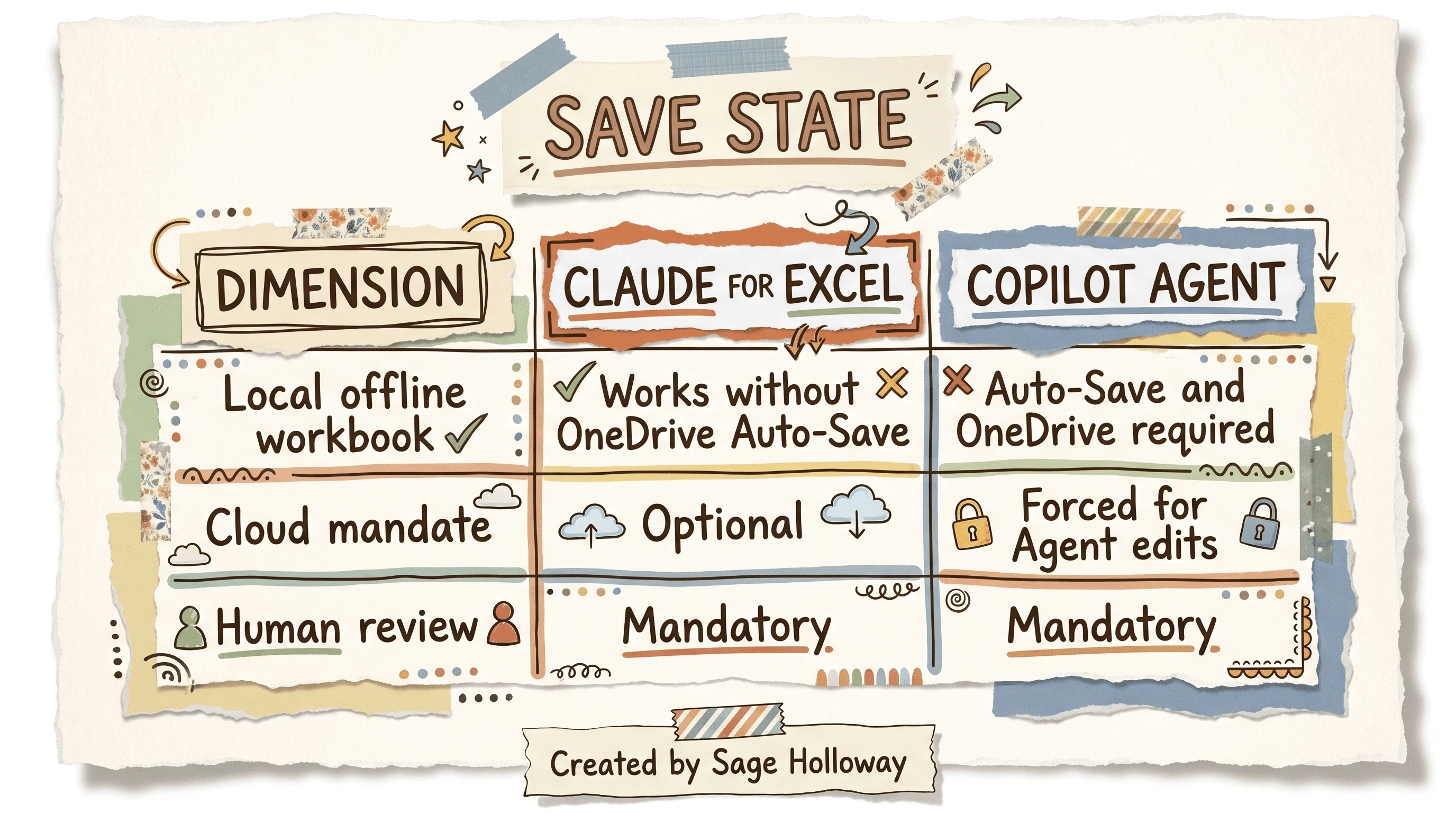
Claude can stay on a local workbook. Copilot Agent mode pushes Auto-Save / OneDrive.
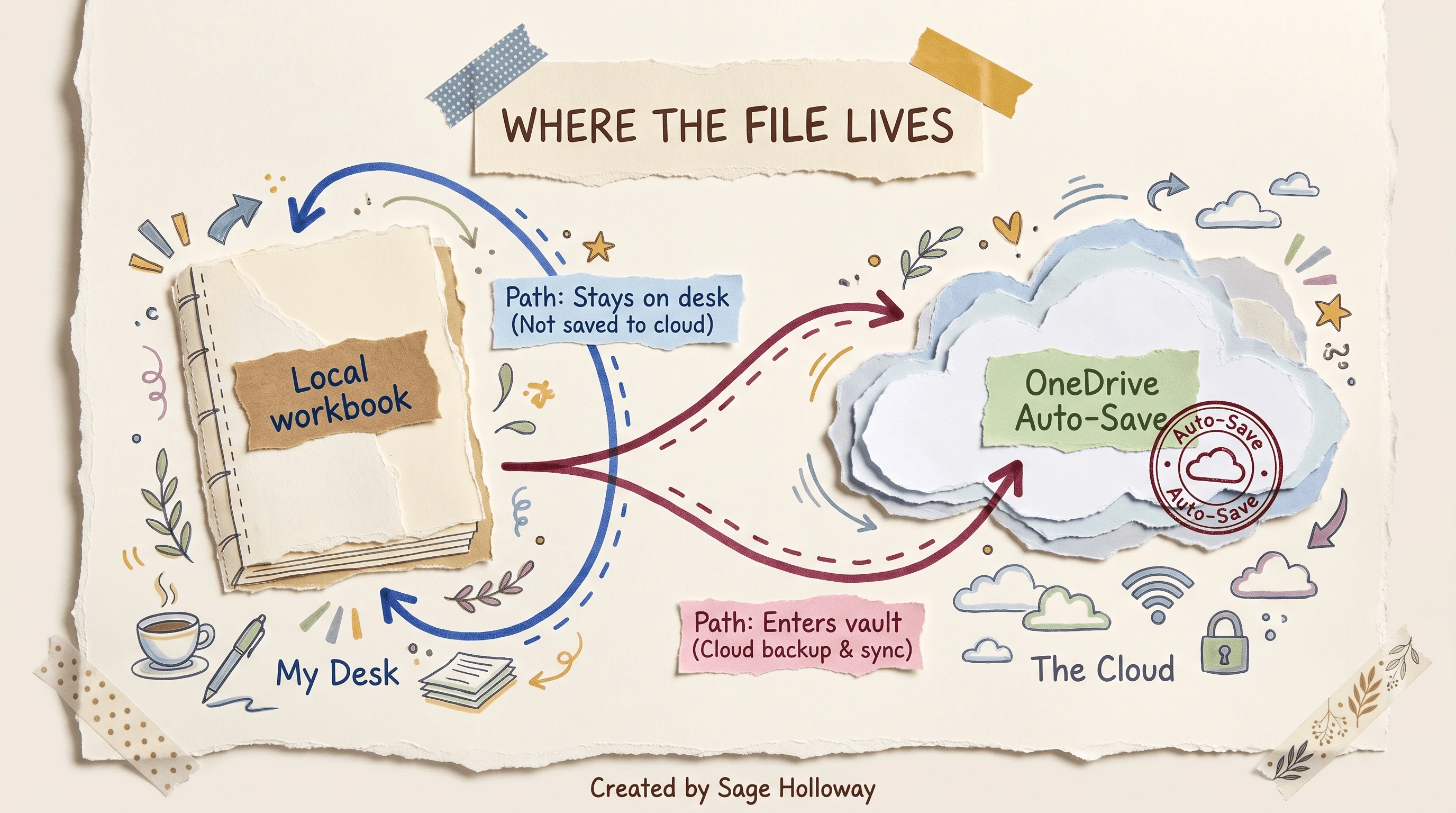
Local control is the Claude differentiator. Human review stays mandatory either way.
Human review remains mandatory
How good is Claude in Excel? Analysts and FP&A users often call the reasoning analyst-grade relative to Copilot for audits and model tracing. That praise does not retire review. Claude can hallucinate, miscalculate, or reshape a layout while “helping.” Local save freedom is not a license to skip the check.
Industry context for Anthropic’s wider finance push sits on Anthropic financial services when you need the offering map rather than the Excel ribbon.
Limits, rate limits, and sidebar troubleshooting
Marketing talks about longer sessions and auto-compaction. Forums talk about exceeded rate limit on a 25-tab book before lunch. Believe both, then budget.
Token budgeting on large workbooks
Heavy multi-tab workbooks burn tokens fast on standard plans. Isolate ranges with highlight targeting. Audit one sheet at a time. Escalate to Max, Team, or Enterprise when your real workload is tenant-scale. Do not start every prompt with “read the entire workbook and…” unless you enjoy watching the meter trip.
Blank sidebar refresh workaround
If the sidebar stays blank or spins forever, click a ribbon dropdown (Insert is a common example) and choose Refresh. MindStudio documents this as a webview render glitch, not a missing install.
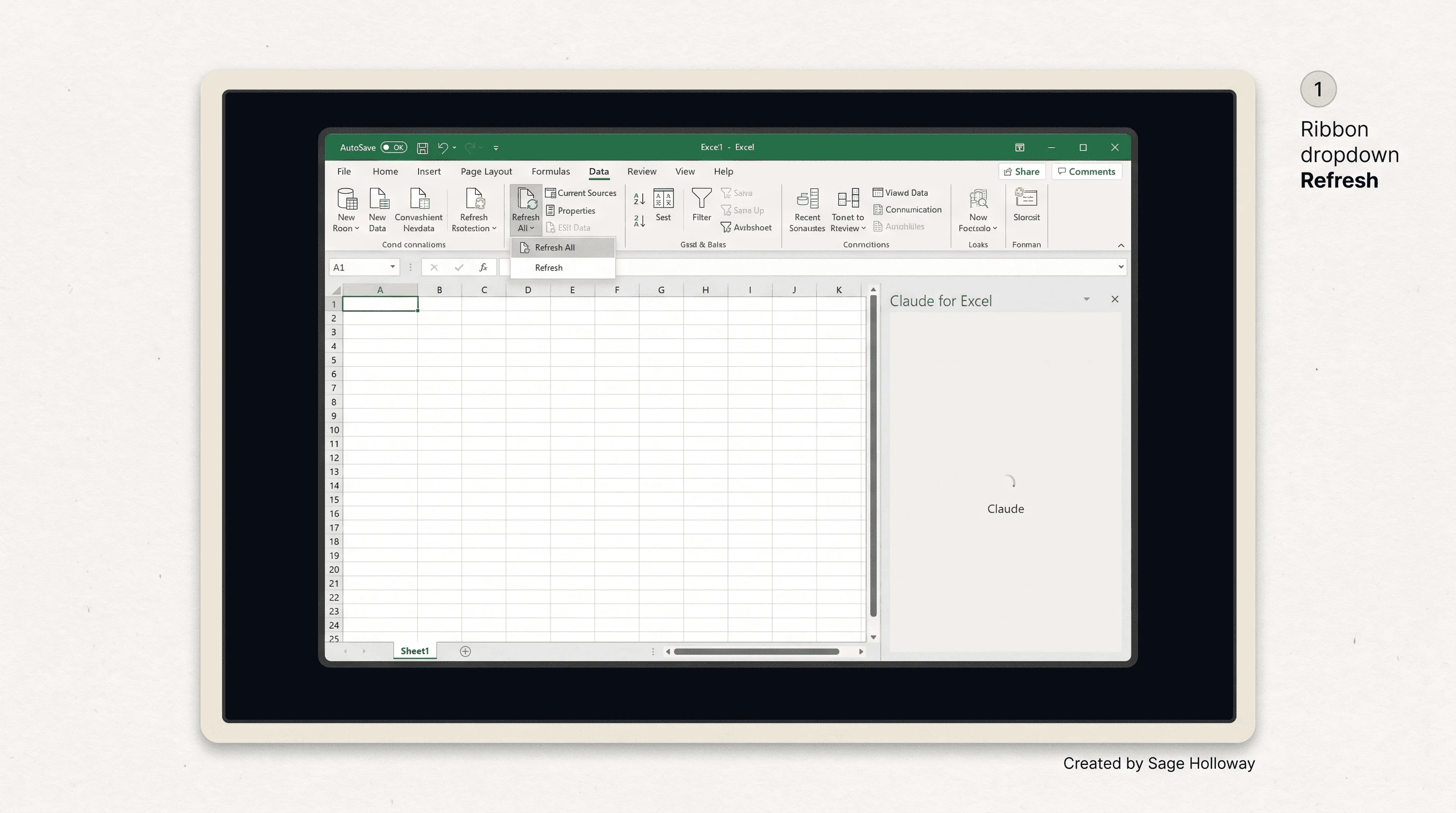
If the sidebar stays blank or spinning, open a ribbon dropdown and choose Refresh.
Known product ceilings
Current ceilings worth naming up front:
No direct VBA or Power Query execution inside the SharedRuntime sandbox. Ask Claude to draft VBA in the sidebar, then paste into the Visual Basic Editor yourself.
Dense visual templates can misalign borders and styling when Claude writes aggressively; keep aesthetic cleanup manual.
Some files auto-open the Claude sidebar on every launch because document properties remembered the last state; community posts still lack a clean native off-switch.
Compliance blocks on personal Pro logins inside regulated tenants are a policy problem, not an AppSource bug. Deepen that on the Reddit spoke and your firm’s IT policy, not in a Store click.
FAQ
How to get Claude in Excel?
Open Excel, go to Add-ins on the Home tab (Tools → Add-ins on Mac), search Claude, and install Claude by Anthropic for Excel. You can also use Microsoft AppSource Get it now, or ask IT to deploy it tenant-wide from Microsoft 365 Admin Center when the Store is locked.
How good is Claude in Excel?
Finance users often rate Claude as analyst-grade for audits and formula tracing, and stronger than Copilot on complex workbook comprehension. It can still hallucinate or miscalculate, so human verification stays mandatory on every material change.
How to use Claude in Excel?
Open the sidebar, highlight the range you care about, and prompt in natural language for audits, cleanups, or proposed formula changes. Keep Ask before edits on while you learn, and use Work across files when Word or Outlook needs the same context.
How to add Claude into Excel?
Install from AppSource or Insert → Get Add-ins, then sign in with a paid Claude plan. If IT blocks the Store, have an admin deploy via Integrated apps or Deploy with a custom manifest using https://pivot.claude.ai/manifest-excel.xml.
How to use Claude for Excel?
Treat it as a co-pilot with write permissions you approve: audit first, clean data on highlighted ranges, and confirm proposed edits before they land. Put recurring formatting rules in the persistent Instructions field so house style survives across sessions.
Is Claude for Excel free?
The add-in download from Microsoft’s store is free. Active use requires a paid Claude Pro, Max, Team, or Enterprise plan. Free Claude accounts fail authentication in the sidebar.
What is Claude in Excel?
Claude in Excel is Anthropic’s official Microsoft 365 sidebar add-in for workbook audits, formula help, template scaffolding, and controlled edits inside Excel. It is not a community MCP server and not a Google Sheets product.
How to download Claude for Excel?
Use the official Claude by Anthropic for Excel listing on Microsoft AppSource and choose Get it now, or install from Excel’s built-in Add-ins search. Avoid third-party wrapper download pages that are not Anthropic’s listing.
How to install Claude for Excel?
On Windows, use Home → Add-ins and search Claude. On Mac, use Tools → Add-ins. Sign in with a paid plan after install. Admins can assign the add-in in Microsoft 365 Admin Center, or sideload the official manifest when Store access is disabled.
The ribbon paths will keep getting slightly clearer. The Store locks will not disappear. What I would watch next is not another “AI in Excel” keynote minute. It is whether teams confuse a finished-looking sidebar pass with a reviewed workbook because the local file never auto-saved itself into a shared vault. That failure mode is quiet. It waits for the partner who asks which cell is real.
This week, pick one install path and finish it: AppSource, admin deploy, or the official XML if the Store is locked. Sign in on a paid plan only. Toggle Work across files if you need Word or Outlook in the loop. Highlight one real range, run one audit prompt with Ask before edits on, and refuse free-tier login experiments. If you need Sheets instead, go to Claude for Sheets. If you need forum-war stories and compliance fear maps, use Claude in Excel Reddit. For audit-first analysis after the connector works, use Claude financial analysis. For the wealth plugin (different product), start at Claude wealth management plugin. Official click paths remain Use Claude for Excel and Work across Microsoft 365 apps.
Until then...
Sage
PS. Open any workbook you did not build. Highlight one dependency chain you have never clicked through. Before you ask the sidebar anything, write the chain on paper in five cells or fewer. If you cannot, that is your first prompt.
Author
Practical guides, tool teardowns & AI engineering workflows.


