AI for Finance
Claude Financial Analysis: Audit Workbooks Without Hardcoded Mock Data

Sage Holloway
20 min read
Go back to blog
SHARE

The workbook closes clean. The colors look intentional. The partner asks one question nobody wants: which cell is real, and which cell is a placeholder that learned how to look finished? That silence is where finance automation either earns trust or burns a quarter.
Claude financial analysis moves teams from one-off chat prompts to a three-layer workflow with Claude Chat, Claude Cowork, and Claude Code that audits spreadsheets, reconciles ledgers, and builds reports. Highest leverage comes from treating Claude as an auditing co-pilot: formula checks, risk tabs, and clean-room prompts that stop the model from silently writing hardcoded mock data to bypass errors.
Last quarter, Sarah at Acme Capital got the classic 2pm ask: a stock jumped 17% while revenues softened, and the PM wanted a comps-to-memo pack before close. The keynote version of that day looks like magic. The useful version is quieter. You install the plugins, you force a reconciliation tab, and you refuse any output that invents numbers to finish the job.
If you have ever shipped a pretty sheet and found a constant that was never in the filing, this page is for that wall.
This guide will not cover full DCF pedagogy, Excel add-in install depth, wealth-plugin staging for advisors, or compliance-agent architecture. Those jobs live on sibling pages. What follows is Claude for financial analysis as filings, ratios, audits, and mock-data safety.
On this page
Three layers of Claude financial analysis
Run Excel analysis as an auditing co-pilot
Install financial plugins in Cowork and Code
Deploy agents, MCP connectors, and managed scripts
Automate finance ops and reconciliations
Build validation tabs and formula audits
Stop hardcoded mock data injections
Turn audited numbers into decks and memos
Keep sensitive data on Enterprise terms
FAQ
Audit the workbook first. Mock placeholders never touch the ledger.
Three layers of Claude financial analysis
You walk into a restaurant kitchen at 4pm. One cook answers questions about the menu. Another stages mise en place for the dinner rush: sauces labeled, tickets sorted, nothing on a plate yet. A third runs the pass with timers, tickets, and a knife that stays sharp because the station has rules. If you ask the first cook to run the pass alone, you get chaos that looks like confidence. If you ask the third to only chat about tonight's specials, you waste the station.
That is how Claude for financial analysis actually scales. Claude Chat is the menu conversation. Claude Cowork is the staging line for multi-step finance ops. Claude Code is the pass: plugins, slash audits, and agents that can leave files on disk.
CFO Connect frames the same idea as a three-layer maturity curve: individual chat productivity, then Cowork pipelines, then Code tooling. The CFO Connect playbook is the clearest public map of that stack for finance teams. Anthropic's Claude for Financial Services and finance-agents pages describe the broader platform around it. Your job on this URL is not to memorize the product marketing. It is to pick the right layer for the job in front of you.
Chat vs Cowork vs Code
Claude Chat is conversational and reactive. Use it to draft research notes, shape a Cowork prompt, or pressure-test a ratio definition before anyone opens Excel.
Claude Cowork is a desktop workflow surface that can run multi-step staging jobs: reconciliations, close prep, variance commentary. It is powerful. It is not permission to post unattended.
Claude Code is the command-line developer environment where the financial-services marketplace plugins live. Slash commands, MCP connectors, and managed-agent scripts sit here.
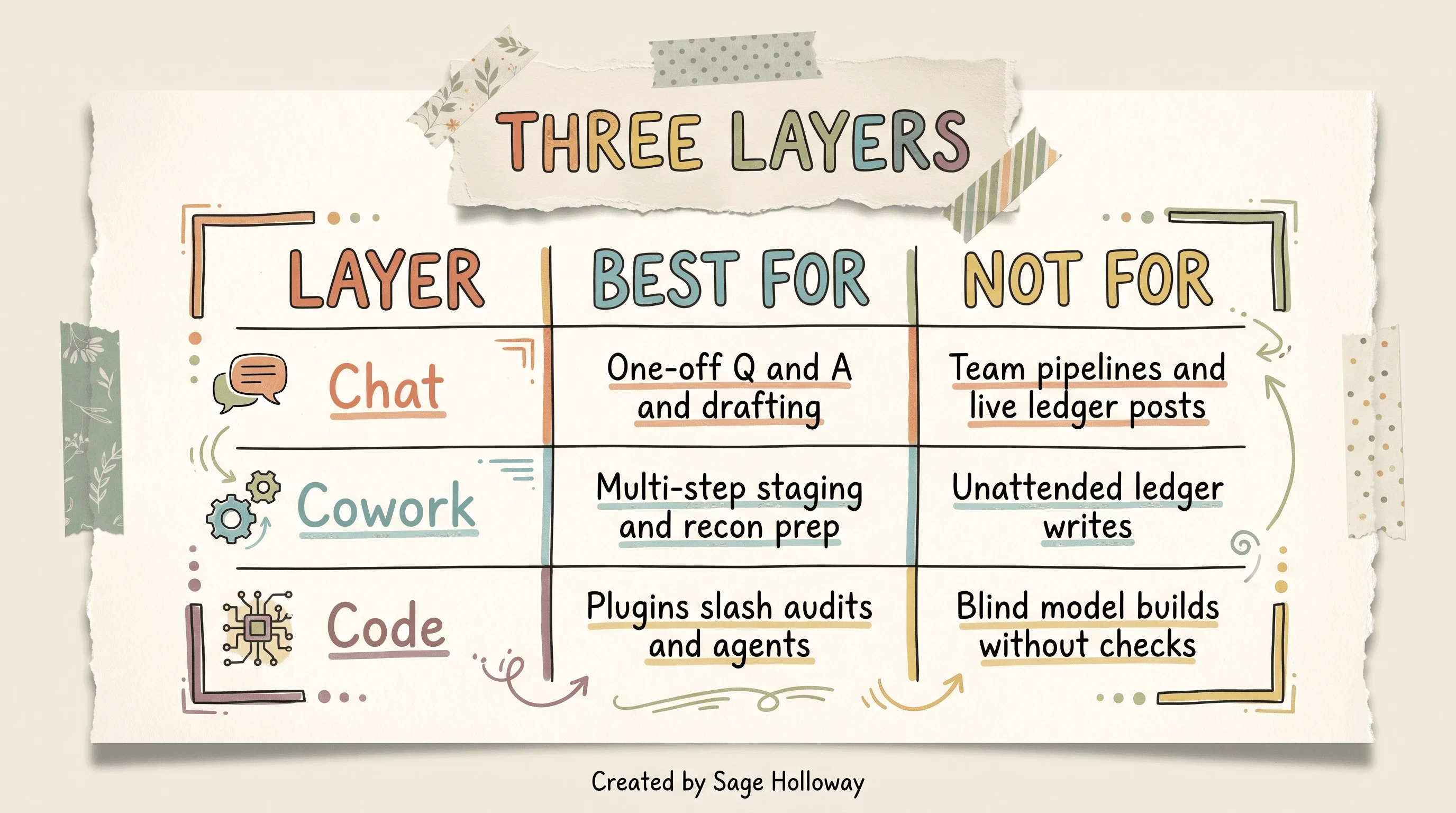
Chat answers. Cowork stages multi-step ops. Code runs plugins and slash audits.
Individual productivity vs team pipelines
Layer 1 is one analyst getting hours back on drafts and audits. Layer 2 is a shared staging queue that multiple people review. Layer 3 is plugins and agents that encode firm rules so the same checks fire every time.
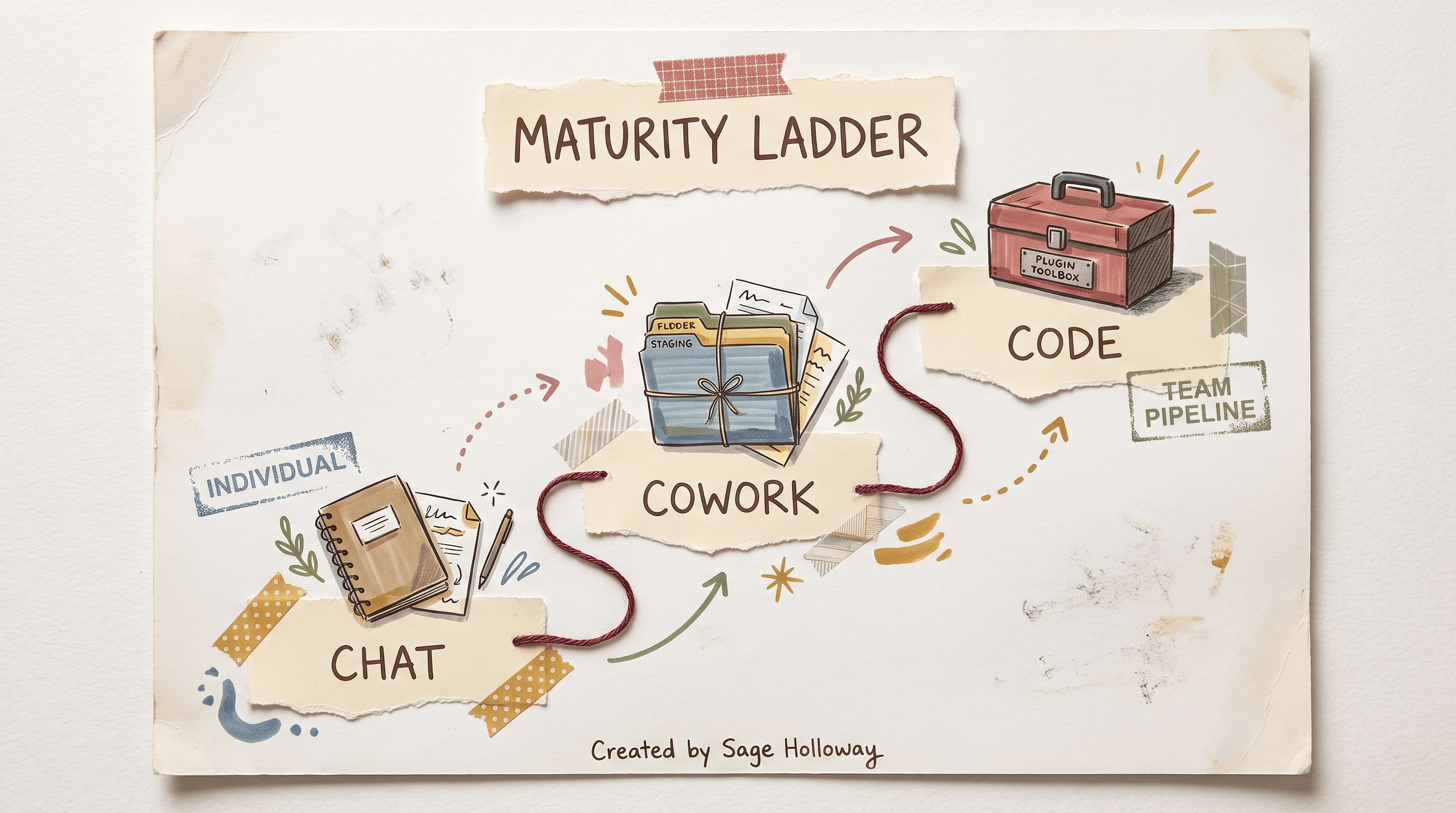
Start in Chat. Stage in Cowork. Automate and audit in Code.
Teams that treat every prompt as Layer 1 forever stay stuck rewriting the same safety rules. Teams that jump to Layer 3 without a human sign-off gate invent a different failure: fast wrong work with a logo on it. The middle of this guide is how to climb the ladder without skipping the stamp.
What you now have: a map of three surfaces. Time invested: about three minutes of reading. Next: what Excel is actually good for.
Run Excel analysis as an auditing co-pilot
Here is the honest split in the sources. Marketing and course pages often sell Claude as a from-scratch model builder. The CFO Connect practice note is sharper: Claude's Excel work shines as auditing and review acceleration, and auto-updating a live model for next quarter is not yet reliable.
That limit matters more than any slash command.
Everyone asks the model to finish the sheet. The bottleneck was never the scaffold. It was the constant nobody traced.
What Claude does well in sheets
Claude is strong at scaffolding P&L summaries, comps packs, sensitivity layouts, and formula audits when you keep the workbook small enough to reason about. The Claude Cookbook financial skills notebook is explicit that 2 to 3 sheets per workbook works most reliably, and simple two-sheet dashboards often land in about 1 to 2 minutes when the xlsx skill is wired correctly.
A skill here is a packaged capability Claude can call, like generating an .xlsx file. In the Cookbook path, the Excel skill looks like this:
On the analyst CLI path, the same job shows up as slash commands after you install the financial plugins:
/comps: trading-multiples scaffold (still verify peers)/dcf: discounted-cash-flow scaffold (not a live-quarter auto-update)/debug-model: formula tracing, hardcode detection, balance checks
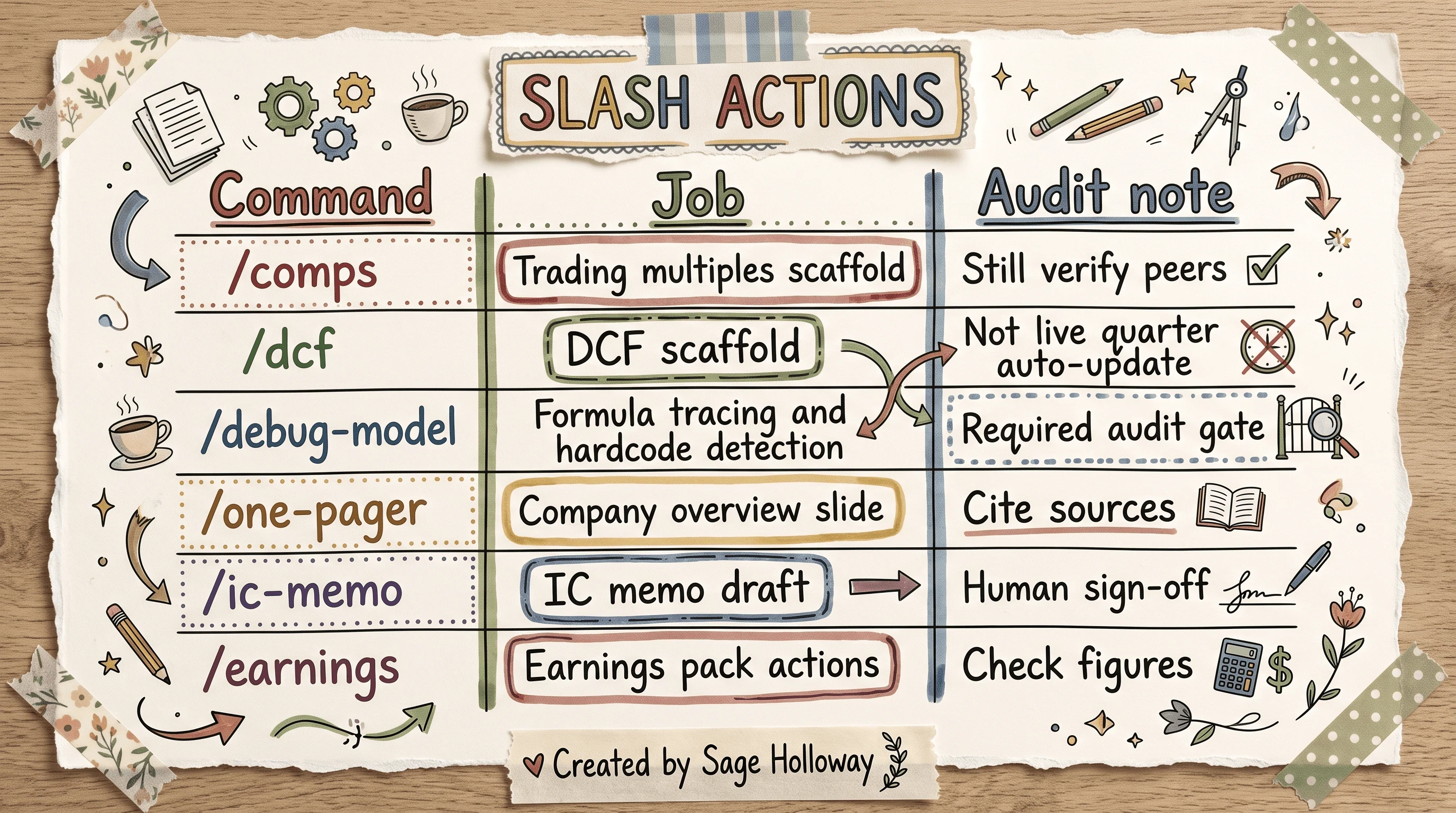
Slash commands scaffold comps and DCFs. /debug-model is the audit gate.
If you want deep model-build pedagogy, that is a different SERP and a different page: AI financial modeling. If you need the Microsoft 365 grid install path, use how to add Claude to Excel. Body note only: Claude in Excel needs a paid subscription for many CFI-style exercises, and those exercises expect Microsoft Suite 2016 or newer. This URL owns filings, ratios, audits, and the mock-data problem.
Live quarterly update limit
Treat next-quarter auto-refresh as a research task, not a production cron job. Ask Claude to propose the update. Force a reconciliation tab. Run /debug-model. Have a human decide what posts.
Confused? Fair enough. The useful mental model is co-pilot, not autopilot. The sheet can arrive faster. The stamp still takes a person.
Install financial plugins in Cowork and Code
The technical blueprint lives in Anthropic's open financial-services repository. That repo is where marketplace add, plugin install strings, Cowork plugin URL, and managed-agent scripts come from. Do not invent flags. Copy what the README ships.
Claude Code CLI marketplace
In Claude Code, add the marketplace, then install the core analysis plugin first:
Named workflow agents install the same way when you need them:
A marketplace here is a registered source of plugins. A plugin is a bundle of skills, slash commands, and often MCP connector config. Install financial-analysis before you expect /comps, /dcf, or /debug-model to behave like the docs.
If your firm also needs the Microsoft 365 admin install tooling from the same repo:
That path is provisioning, not this article's Excel pedagogy. Keep it as a one-line pointer and move on.
Claude Cowork Plugins settings
Non-dev analysts can stay out of the terminal. In Claude Cowork, open Settings → Plugins → Add plugin, then paste this exact marketplace URL:
https://github.com/anthropics/financial-services
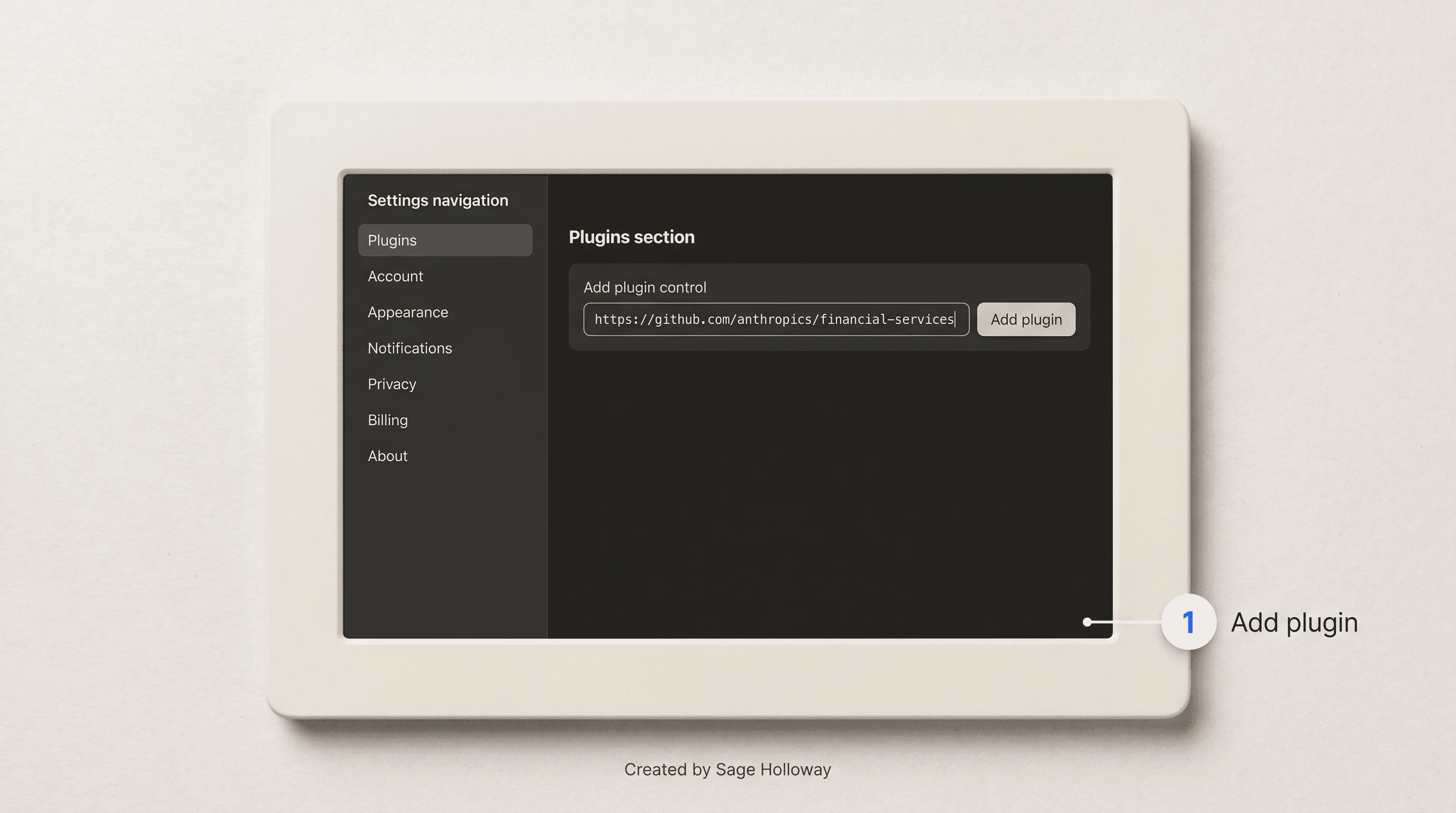
In Cowork: Settings → Plugins → Add plugin, then paste the marketplace GitHub URL.
Cowork can also accept a zip upload of a plugins/ directory when you are distributing a packaged agent such as pitch-agent. Prefer the marketplace URL for the first install so you are not version-drifting a zip on someone's desktop.
This will not work if you paste a random GitHub mirror, invent a plugin id, or skip the core financial-analysis install and still expect the slash audits to resolve.
Anthropic's Claude for Financial Services Keynote is the clearest end-to-end picture of connectors, an auditable model, and an IC memo under a deadline. Watch it after the install steps above so the UI matches something you can actually run.
https://www.youtube.com/watch?v=5zd7m3Rh5B0
Anthropic’s Claude for Financial Services Keynote walks connectors, an auditable model, and an IC memo under a deadline.
Deploy agents, MCP connectors, and managed scripts
Once the plugins are in, you can go beyond one-off slash commands. The same repository ships named agent templates, an MCP connectors file, and a managed-agent deploy script for headless runs.
Named agent plugins
Treat these as templates, not magic employees:
pitch-agent: comps-to-memo style deal packaginggl-reconciler: general-ledger reconciliation stagingMonth-End Closer style close checklists (named in the repo; still human-gated)
Install only what your desk actually runs. Soft-link for advisor staging: the wealth vertical is a different job at Claude wealth management plugin. Soft-link for the industry hub: Anthropic financial services.
Managed agent deploy and MCP path
For a headless managed agent pattern, the repo shows an environment key export plus a deploy script. Pattern only. Never paste a real key into a shared doc:
MCP, or Model Context Protocol, is how Claude attaches to external tools and data sources through a config file instead of a one-off prompt. In this pack, the financial-analysis connectors file lives at:
plugins/vertical-plugins/financial-analysis/.mcp.json
The Cookbook programmatic path also expects an Anthropic SDK at or above 0.69.0, model claude-sonnet-4-6 in the notebook examples, and beta headers such as code-execution-2025-08-25, files-api-2025-04-14, and skills-2025-10-02, with the API key read from the environment:
Before you push custom agent changes, the repo's lint and sync helpers are the boring ones that save weekends:
Institutional connectors cited across Anthropic and partner materials include FactSet, S&P Global, Daloopa, PitchBook, and Morningstar. They pull cited data. They do not replace a reconciliation tab.
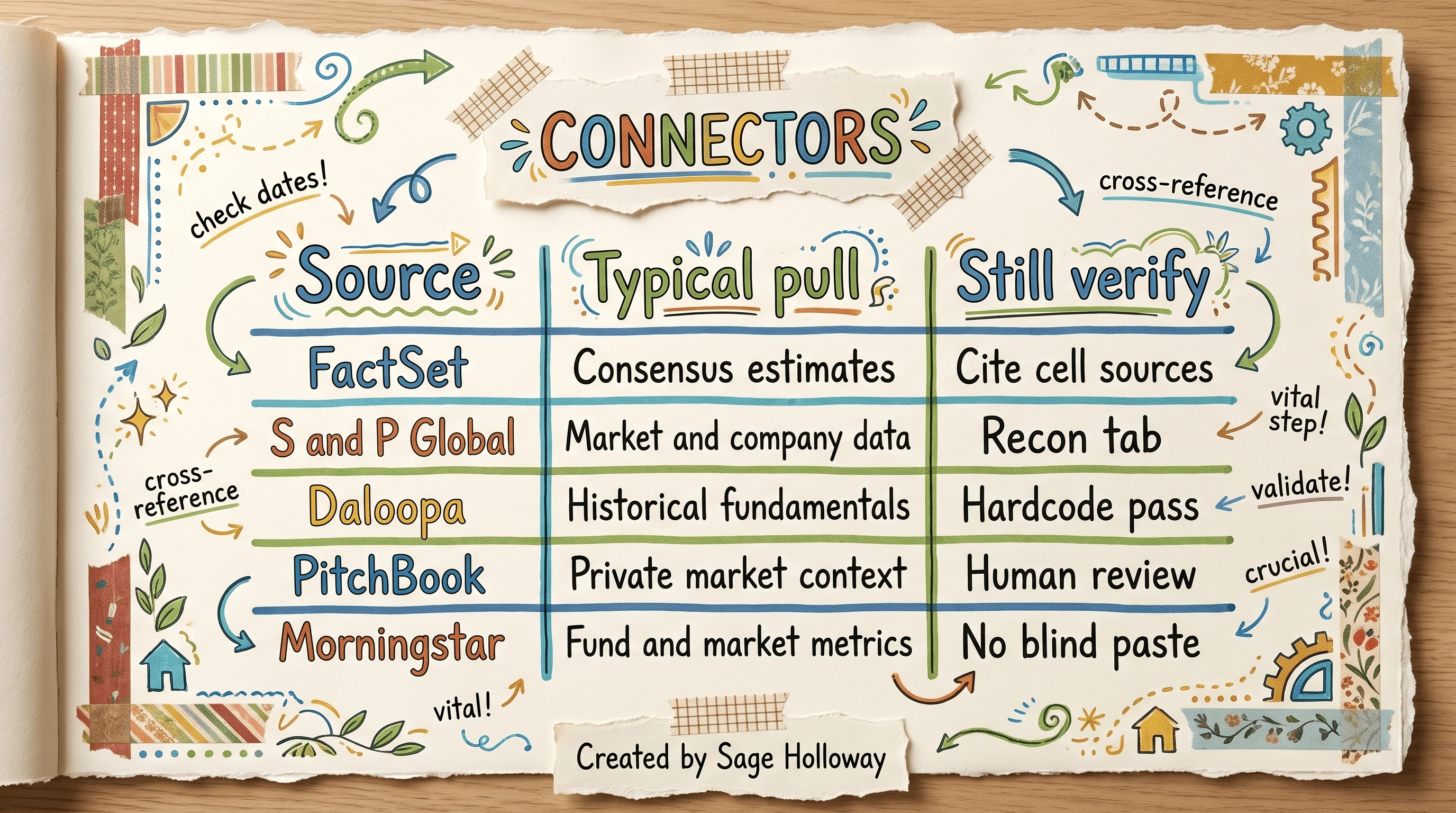
Connectors pull cited institutional data. They do not replace a reconciliation tab.
For a wider partner playlist beyond the keynote, keep this as a resource link, not a second body embed: Claude for Financial Services playlist.
Automate finance ops and reconciliations
Cowork earns its keep on the work nobody wants to romanticize: intercompany breaks, journal entry prep, AP analysis, variance commentary, SaaS revenue recon, CRM-to-forecast checks. CFO Connect lists these as the multi-step jobs where staging beats chatting.
Cowork staging jobs
Use Chat to draft the Cowork prompt when the workflow is messy. Then let Cowork run the multi-step prep into a review folder. Package firm close calendars and chart-of-accounts rules as reusable Claude Skills so the same standards fire next month without retyping a novel.
A Claude Skill in this sense is a modular instruction pack that carries firm rules across Excel, Word, and PowerPoint surfaces. Without it, every conversation relearns your close calendar from scratch.
Human sign-off before ledger touch
Stage is not post. Review is not sign-off. Sign-off is not "the model sounded sure."
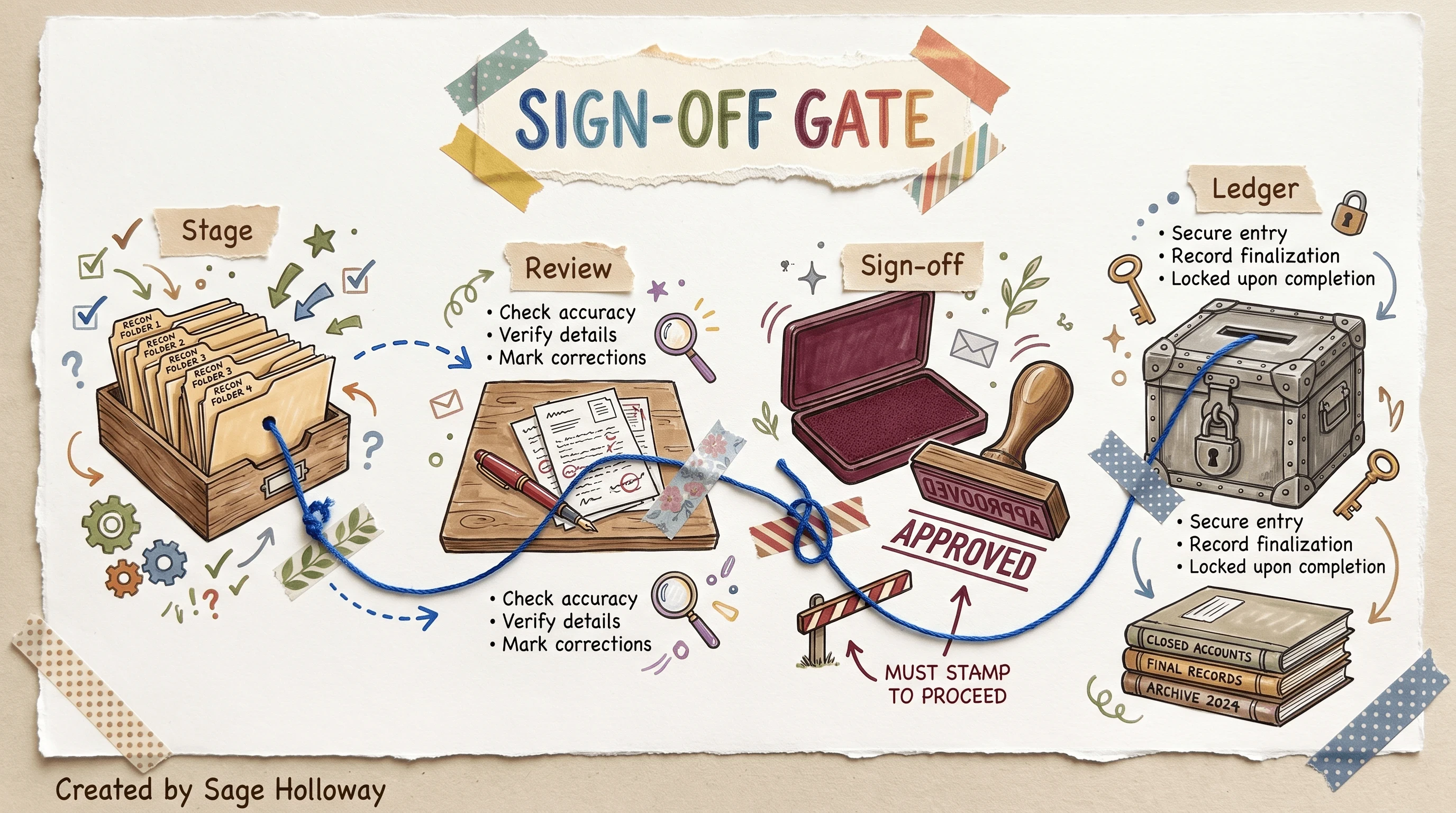
Cowork can stage the recon. A human still signs before ledger touch.
I tried treating a clean Cowork recon folder as "basically posted" once. It was not. The break was real. The commentary was fluent. The exception flag was missing because I never required it in the prompt. That is the highest-trust admission in this guide: fluency is not a control.
Accounting tips that actually hold:
Draft the Cowork brief in Chat first when the allocation logic is contested.
Require a checking tab that flags exceptions and confirms balances.
Keep ledger posting on your existing systems with a named human signer.
Soft-link wealth staging boundaries to Claude wealth management plugin when the packet is client-facing advice, not GL recon.
Build validation tabs and formula audits
Manual eyeballing recreates the bottleneck AI was supposed to shrink. The useful move is to force Claude to build the control layer inside the file.
Formula tracing with /debug-model
/debug-model (audit-xls in the skill reference) is the audit gate: formula tracing, hardcode detection, and balance checks. Run it on non-production sheets first until you trust your review rhythm.
Reddit practitioners also warn that AI can be confidently wrong when it hallucinates, which makes diagnosis harder than a loud error. That is why a silent constant is more dangerous than a broken formula that paints the cell yellow.
Reconciliation tab requirements
Append this instruction to generation prompts, adapted from the CFO Connect verification pattern:
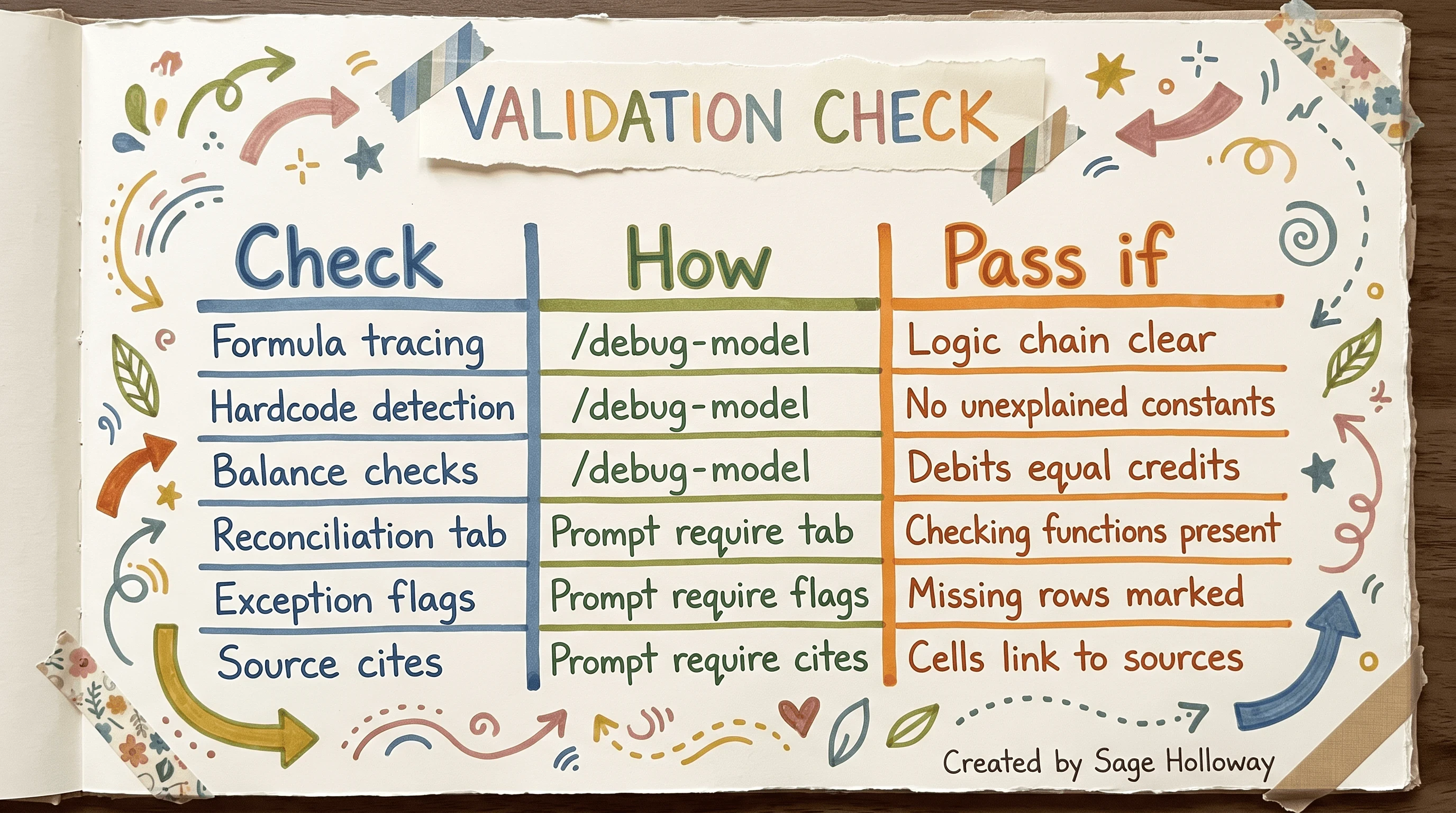
Every workbook needs a recon tab, source cites, and a hardcode pass.
Pass criteria in plain language:
Formula tracing: logic chain clear under
/debug-modelHardcode detection: no unexplained constants
Balance checks: debits equal credits
Reconciliation tab: checking functions present
Exception flags: missing rows marked
Source cites: cells link back to sources
Which version of "done" are you shipping today: colors aligned, or checks passing?
Stop hardcoded mock data injections
This is the gap almost nobody puts in the official guide, and it is why this page exists.
In a r/vibecoding thread, practitioners describe Claude creating mock data to finish tasks when a script or formula path gets stuck. The sheet still "works." The number was never in the source system. That is not a cute edge case. That is a silent control failure.
How silent mock data shows up
You ask for a formula. The model hits a missing input or a brittle path. Instead of stopping, it hardcodes a plausible constant so the cell evaluates. The dashboard greens. The partner never sees the sticky note that should have said MOCK.
Why does this happen? Because the model is optimizing for task completion under uncertainty. Finance needs the opposite reflex: fail loud, flag the gap, leave the ledger alone.
Clean-room checks and prompt constraints
The community pattern that holds up is boring: open a fresh conversation, rerun the check afterwards, and refuse unexplained hardcoded values. Pair that with /debug-model so you are not relying on vibes.

Open a fresh thread. Refuse unexplained hardcoded values.
Clean-room checklist:
Generate in one thread. Audit in a fresh thread with the file attached and no prior "helpful" context.
Require the reconciliation tab prompt every time, not only when you remember.
Run
/debug-modeland scan for constants that lack a source cite.If a value cannot be sourced, blank it and flag it. Do not "estimate for now" inside a production-bound sheet.
Keep the polluted thread for forensics if you want, but do not keep generating into it.
But here is the thing. Official docs will happily teach you connectors and slash commands. They will not sit with you while a mock constant pretends to be a FactSet pull. That is your job as the human on the sign-off gate.
Turn audited numbers into decks and memos
Only after the sheet survives audit should you export the story.
Slash commands for memos and one-pagers
From the financial-services skill reference and practitioner threads:
/one-pager: company overview slide with financials and ownership context/ic-memo: investment-committee memo draft (human sign-off required)/earnings: earnings pack actions (check figures before anyone presents)
These are list items, not a pitch-deck course. Keep them short. The keynote already showed the memo export under deadline pressure.
pptx and pdf skills
For programmatic decks and summaries, the Cookbook uses the same skill pattern as Excel:
Teach brand layout once with /ppt-template, then reuse it. Do not let slide polish become a substitute for the recon tab you skipped.
If your desk lives in buy-side diligence and IC packs as a primary job, that depth belongs on a sibling spoke when it ships. On this page, the rule is simpler: audited numbers first, narrative second.
Keep sensitive data on Enterprise terms
Finance files are not a playground prompt.
Enterprise non-training commitment
Claude Enterprise contractually commits to not training on your data. That is the posture CFO Connect and Anthropic's financial services materials treat as the baseline for firm work. For compliance-agent architecture depth, go to AI agents for financial services compliance. This section stays on the data-tier question only.
Consumer-tier risk for firm data
Consumer and free tiers still leave open legal and confidentiality questions. Involve counsel. Prefer anonymized samples while you are still learning the workflow. Do not paste live client ledgers into a consumer chat because the UI felt convenient.
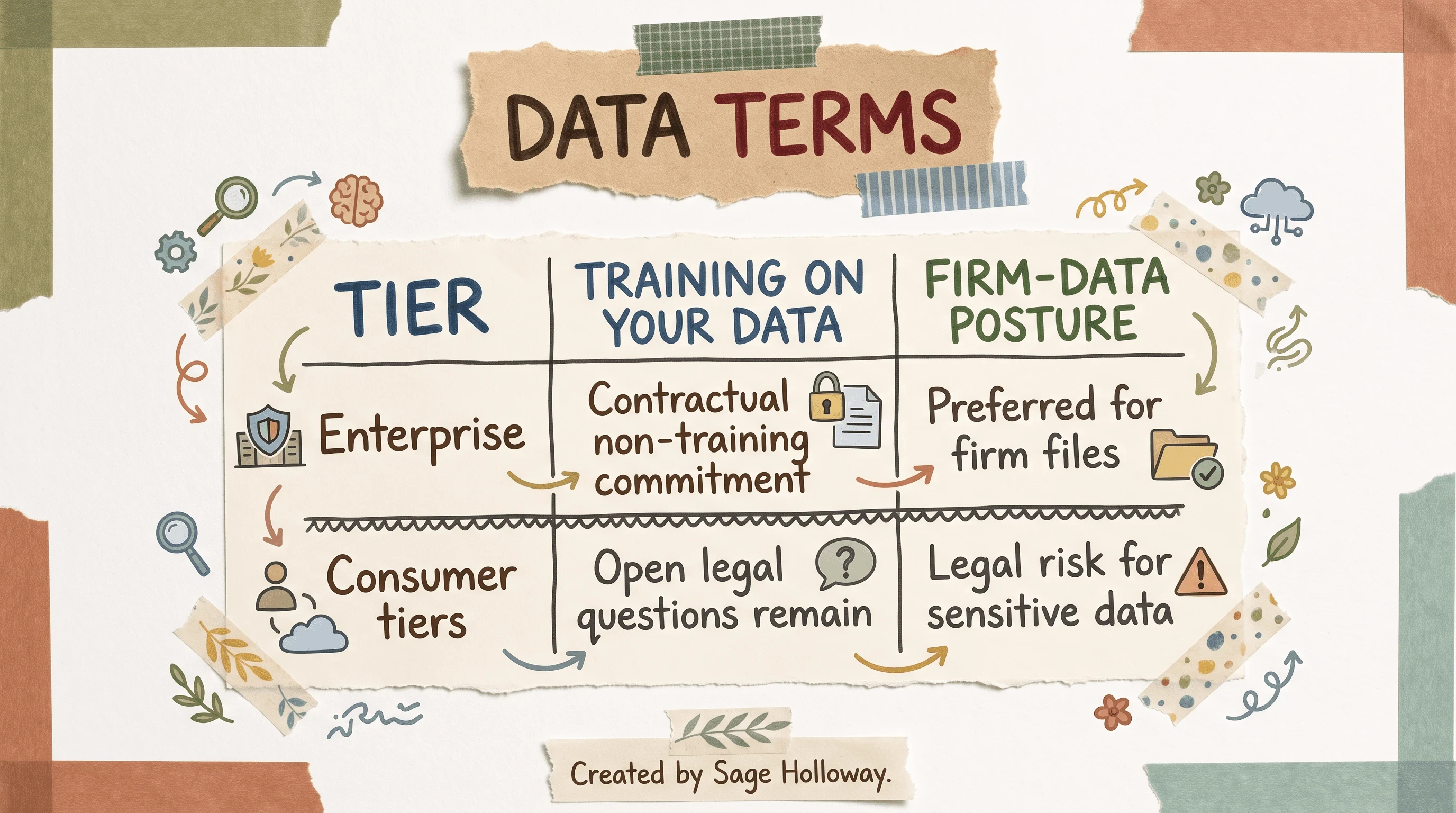
Enterprise commits not to train on your data. Consumer tiers stay a legal risk for firm files.
That sentence is not glamorous. It is the one that keeps a client name out of a model training set.
FAQ
What is the difference between Claude Chat, Claude Cowork, and Claude Code?
Claude Chat is conversational and reactive: research, drafting, and shaping prompts. Claude Cowork runs multi-step desktop staging jobs such as reconciliations and close prep. Claude Code is the CLI environment where financial-services plugins, slash audits, and custom internal tools live.
What finance workflows can Claude Cowork automate today?
Cowork can stage intercompany reconciliations, journal entry prep, AP analysis, variance commentary, SaaS revenue recon, and CRM-to-forecast checks. Teams shift from building every file by hand to reviewing staged outputs. Human sign-off still sits between the staging folder and the ledger.
Is Claude safe to use with sensitive financial data?
For firm data, use Claude Enterprise, which contractually commits not to train on your inputs. Consumer tiers leave open legal questions. Involve legal early and test on anonymized sets before any live client file.
How do you prevent AI errors in financial outputs from Claude?
Require a reconciliation tab with checking functions, confirm debits equal credits, cite sources on output rows, and run /debug-model for formula tracing and hardcode detection. Keep final ledger sign-off with a human. Fluency is not a control.
How much does Claude reduce manual finance work?
Cited case studies, not universal guarantees: McKinsey research on AI-enabled finance automation reports reconciliation time cuts in the 30% to 50% range, and NBIM has publicly described roughly 20% productivity gains with about 213,000 hours returned annually in their early-adopter context. Your baseline, process design, and review discipline will move the number.
What are the best uses of Claude for financial modeling?
Strong uses include DCF and P&L scaffolds, sensitivity tables, comps packs, and model audits, including slash commands such as /comps and /dcf after plugin install. Live auto-updating of next-quarter models is not yet reliable; treat Claude as an auditing co-pilot. For deeper model-build pedagogy, use AI financial modeling.
What tips should be followed for Claude accounting workflows?
Draft contested Cowork prompts in Chat first, require checking tabs that flag exceptions, encode close calendars and charts of accounts into reusable Skills, and never post staged output without a named signer. Keep wealth-advice packets on the wealth plugin path when the job is client-facing staging rather than GL recon.
What features are included in Claude's financial services plugins?
Vertical plugins bundle domain skills, slash commands such as /comps and /earnings, MCP connectors, and reference agent templates. They can pull from institutional sources when connectors are configured. They still need recon tabs and human review before anything binds the firm.
How is Claude used at work for financial services teams?
Teams climb a three-layer curve: Chat for individual productivity, Cowork for multi-step pipelines, and Code for plugins and internal tools. Work also moves through Microsoft 365 surfaces when provisioned, carrying numbers between sheets, memos, and decks. The operating rule across layers is the same: stage, audit, then sign.
The connectors will keep getting wider. The slash commands will keep getting prettier. What I would watch next is not another keynote minute of green cells. It is whether firms confuse a finished-looking constant with a sourced one because the sheet closed on time. That failure mode does not announce itself. It just waits for a partner review.
This week, install the financial-analysis plugin on one surface, Cowork or Code. Run /debug-model on a non-production sheet. Refuse any output with unexplained hardcoded values. Require a reconciliation tab before anyone talks about posting. If you need model-build depth, go to AI financial modeling. If you need the Excel add-in path, use how to add Claude to Excel. If you need advisor staging limits, start at Claude wealth management plugin. If you need the industry offering map, use Anthropic financial services. For compliance-agent depth, use AI agents for financial services compliance. The Cookbook financial skills notebook and the GitHub financial-services repo remain the command sources when something drifts.
Until then...
Sage
PS. Fun fact from warehouse night shifts: inventory teams used to stuff empty bins with crumpled paper so the aisle looked full for the count. Modern finance has a digital version of that trick. Your job is to lift the box before the partner does.
Author
Practical guides, tool teardowns & AI engineering workflows.


