AI Agents
n8n AI Agent Node: Architecture, Tools Agent Setup, and Decision Guide

Sage Holloway
33 min read
Go back to blog
SHARE

You can drop an autonomous reasoning node onto a visual canvas in two minutes and watch a toy demo return formatted text. Then you attempt to route live customer records through a third-party API, and the sub-node locks rigidly to your first data item while the language model hallucinates missing arguments across six silent iterations. The visual canvas was never the hard part. Understanding the cluster socket contracts, dynamic parameter bindings, and memory persistence underneath the canvas is what keeps your automations alive.
The n8n AI Agent node is a root cluster node that executes an autonomous LangChain reasoning loop across connected language models and external tools. It requires connecting an LLM Chat Model sub-node and at least one Tool sub-node (such as custom code, HTTP requests, or app integrations), with optional Memory sub-nodes. Since n8n version 1.82.0, legacy agent types are deprecated in favor of a unified Tools Agent architecture.
Last verified: 31 August 2026
That is the direct answer. But if you are building autonomous systems meant to run reliably without human supervision, wiring an n8n agent node based on high-level promotional tutorials will lead directly to production deadlocks.
The developer ecosystem spent the early days of generative automation building basic linear chains. By 2026, the shift toward agentic workflows made visual orchestration platforms essential. Yet many teams still treat the AI Agent node as a magic black box, struggling when sub-node expressions evaluate unexpectedly, memory resets on container reboots, or reasoning models enter infinite iteration loops.

The n8n AI Agent node coordinates an autonomous LangChain loop across connected model, tool, and memory sub-nodes.
This guide breaks down the underlying mechanics, configuration rules, and production decision boundaries of the n8n AI Agent node. We will examine how cluster sockets route execution data, why legacy agent modes were replaced by the unified Tools Agent, how to solve the sub-node item 0 evaluation trap using dynamic $fromAI() expressions, how to manage state with persistent databases, and when you should bypass the agent loop entirely in favor of deterministic API nodes.
What this guide covers
Anatomy of the n8n AI Agent node: cluster topology, socket ports, and the Tools Agent standard
Configuring tool sub-nodes: built-in actions, custom endpoints, and prompt engineering guardrails
Solving sub-node item resolution: fixing the item 0 evaluation trap with dynamic
{{ $fromAI() }}parametersMemory sub-nodes and state persistence: comparing volatile Window Buffer against Postgres and Redis stores
Decision matrix: AI Agent node versus OpenAI Responses API versus deterministic workflow logic
Multi-agent orchestration: coordinating supervisor-worker hierarchies using the AI Agent Tool
Troubleshooting production breakdowns: fixing reasoning collisions, runaway loops, and observability gaps
Nine verified developer FAQs covering credentials, deprecation timelines, and sub-node mechanics
Production agent audit checklist and implementation next steps
Anatomy of the n8n AI Agent Node: Cluster Architecture and Port Wiring
To understand how the n8n ai agent node executes tasks, consider how a physical locomotive maintenance depot operates.
The central dispatch desk in the depot holds no tools of its own. It contains only an incoming stack of repair work orders, a rotating set of telephone patch cables, and a row of heavy equipment lockers along the shop floor wall. When a repair ticket arrives, the dispatcher does not attempt to machine a steel axle by hand. The dispatcher reads the problem description, inspects the tool registry, and plugs a patch cable directly into the locker holding the specific hydraulic press needed for that exact axle.
The dispatcher provides coordination and routing. The specialized machinery performs the physical work.
That physical separation is precisely how n8n ai nodes function on the visual canvas. The AI Agent is not a standalone script or a simple text generator. It is a root cluster node that implements the LangChain JavaScript framework to coordinate language models, tool functions, and conversational memory.
Root Node vs Sub-Node Topology
In standard n8n workflows, nodes connect linearly from left to right through main execution ports. Data flows into the left port as an array of JSON objects, executes sequential transformations, and exits through the right port to the next step.
The n8n langchain node family introduces a different paradigm: Cluster Node Architecture.
A cluster node consists of two distinct components:
The Root Node: The anchor of the cluster (the
AI Agentnode). It connects to the upstream workflow via its main input port (such as a Chat Trigger, Webhook, or Schedule) and delivers final execution results through its main output port.Sub-Nodes: Modular capability providers that attach to specialized, non-main connection sockets located along the bottom and perimeter of the root node.

The AI Agent root node anchors workflow execution, requiring typed sub-node connections for chat models, tools, and memory.
Sub-nodes cannot exist independently on the canvas. They lack standard input/output execution ports and execute only when called by their parent root node. n8n enforces strict type safety across these connections using dedicated socket interfaces:
ai_languageModel: Connects chat model sub-nodes (OpenAI, Anthropic, Mistral, Ollama) that provide raw reasoning capabilities.ai_tool: Connects execution tools (Custom Code, HTTP Requests, App Nodes) that the agent invokes during reasoning cycles.ai_memory: Connects session context providers (Window Buffer, Postgres, Redis) to persist conversational state.ai_outputParser: Connects structured schema parsers to validate and enforce strict output formats.ai_retriever: Connects vector store retrievers for Retrieval-Augmented Generation (RAG) lookups.
Connecting an invalid node type to a cluster socket is impossible; the visual canvas refuses the link. Furthermore, official 0 establishes one non-negotiable structural constraint: you must connect at least one tool sub-node to an AI Agent root node. If your workflow requires only conversational reasoning without external tool execution, using the AI Agent node is an architectural error.

The AI Agent root node connects to an LLM Chat Model, external tools, and optional memory via dedicated non-main ports.
Looking for the n8n AI Workflow Generator? If you arrived here searching for features like
n8n workflow generator,n8n ai workflow builder beta,n8n ai builder, orn8n ai beta, keep in mind that n8n uses "AI" in two different contexts. The canvas workflow generator (n8n ai workflow generator) is a built-in assistant that creates workflow nodes from natural language prompts inside the editor. In contrast, theAI Agentexecution node discussed throughout this guide is a runtime node that runs autonomous multi-step reasoning in production deployments.
The Tools Agent Unification (v1.82+ and v1 Deprecation in v3.0)
If you read community blog posts or watch older video tutorials from 2024, you will frequently see authors instructing developers to choose between several distinct "Agent Types" in the node settings modal:
ReAct Agent: Reason-and-Act loop designed for step-by-step tool selection.
Plan and Execute Agent: Multi-step planner that creates a full task outline before executing actions.
Conversational Agent: Optimized for multi-turn dialogue with basic tool access.
OpenAI Functions Agent: Tailored specifically for OpenAI's legacy function-calling API.
SQL Agent: Specialized agent containing hardcoded database inspection logic.
In modern n8n, this selector is obsolete. Starting in n8n version 1.82.0, the agent type selector was officially deprecated. All AI Agent nodes now operate under a single, unified Tools Agent architecture.
Why did n8n eliminate these specialized agent types?
In the early evolution of LangChain, different agent types required bespoke prompt wrappers and distinct message-handling loops. As frontier foundation models (such as GPT-4o, Claude 3.5 Sonnet, and Gemini 1.5 Pro) developed native, highly reliable tool-calling capabilities at the API level, the need for brittle client-side reasoning wrappers vanished.
Under the Tools Agent standard, specialized behavior is determined entirely by the sub-nodes you attach. For example, instead of selecting a legacy SQL Agent, you simply drop a standard Tools Agent node and attach a Postgres or MySQL tool sub-node. The agent inspects the database schema via the tool's description and executes queries dynamically.

n8n wraps LangChain JavaScript primitives into visual root nodes and modular sub-node connection sockets.
Official 0 confirm that legacy v1 AI Agent nodes containing the agent type selector will be permanently removed in n8n 3.0. If you are maintaining workflows built on v1 nodes, upgrading to modern Tools Agent nodes is required to prevent breaking changes in future platform releases. This makes n8n one of the most flexible free agentic ai tools available for visual development, bridging the gap between no code ai agent builder accessibility and raw code control. A no code agent builder still has to honor those same typed sockets; the canvas does not waive the tool-connection rule.
For visual builders assembling an initial agent workflow from scratch, seeing the physical connection flow makes the cluster architecture immediately intuitive.
The video below demonstrates the visual assembly of a first AI agent workflow on a blank canvas, showing how the Chat Trigger, root agent node, chat model, and tool sub-nodes link together.
https://www.youtube.com/watch?v=EH5jx5qPabU
Configuring Tool Sub-Nodes: Built-in Actions, Custom Endpoints, and Guardrails
An autonomous agent without tools is merely a conversational chatbot. The power of agentic ai n8n implementations comes from giving the model safe, structured access to external systems.
When you attach a tool to the ai_tool socket port, you are registering an executable function inside the model's runtime context. During execution, the model evaluates incoming user intent, scans its registered tool catalog, selects the appropriate action, and emits a structured JSON payload containing arguments to execute that tool.
Connecting Built-in and Custom Tools
n8n organizes n8n ai agent tools into three primary implementation patterns:
Pre-Built App Tool Nodes: These wrap standard n8n integration nodes (such as Gmail, Slack, Jira, GitHub, or Airtable) into tool sub-nodes. When attached to an agent, the model can trigger actions like sending emails, searching records, or creating tickets.
Custom HTTP Request Tool Sub-Nodes: These allow you to expose any external REST or GraphQL API endpoint to the agent. You configure the authentication credentials, base URL, and HTTP method, while letting the model supply dynamic query parameters or request bodies.
Custom Code Tool Sub-Nodes: For operations requiring custom data formatting, mathematical computation, or local array parsing, you can write standalone JavaScript functions that execute directly inside the agent loop.
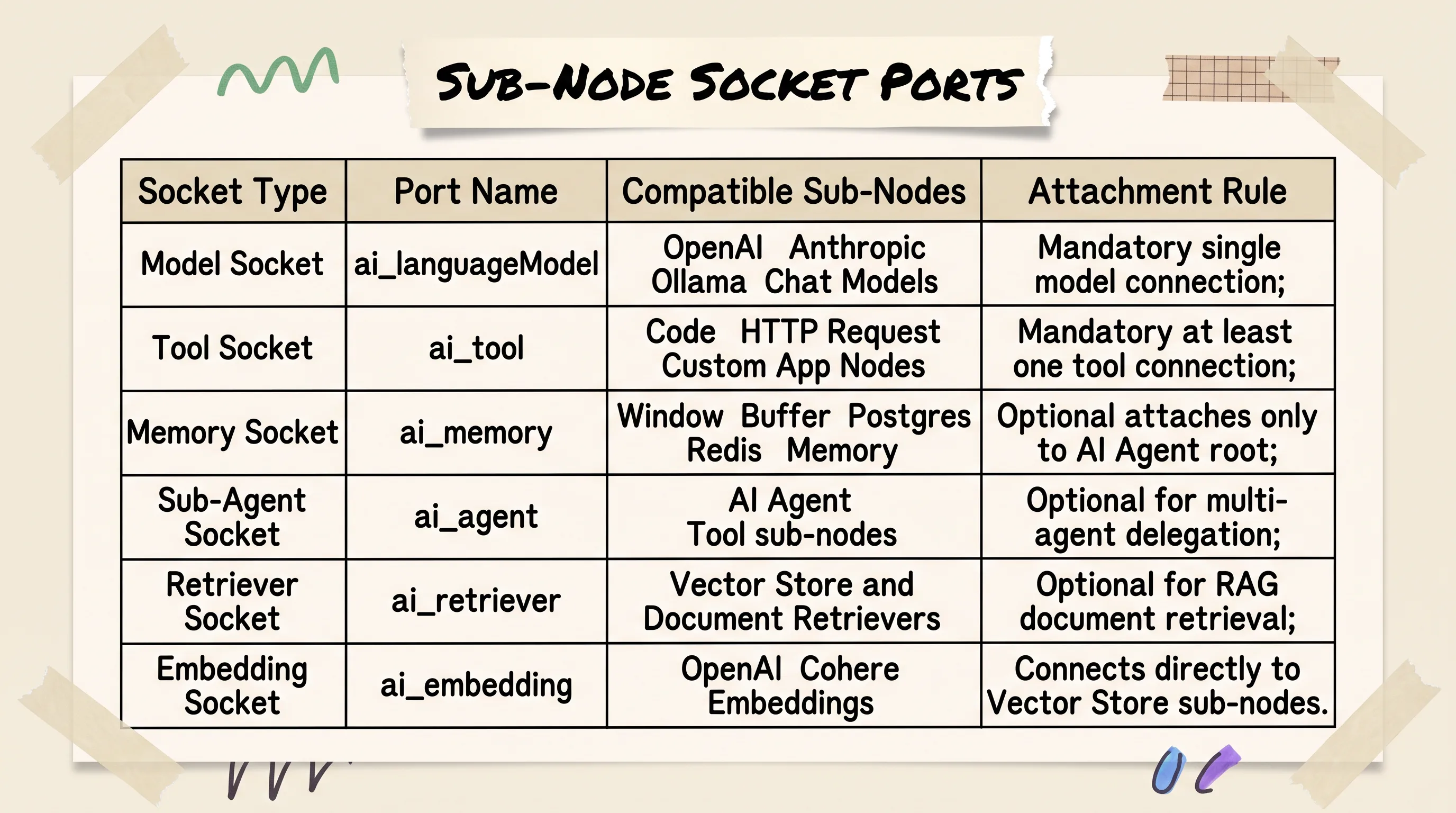
Non-main connection sockets enforce strict type matching between the AI Agent root and attached sub-nodes.
When evaluating your n8n ai agent tools list, be aware of an important security deprecation: the legacy LangChain Code node is deprecated as of n8n 2.35.0 due to critical sandbox execution vulnerabilities. It is hidden from the node selector in modern installations. For custom logic, use the standard Custom Code Tool sub-node or route complex data processing to dedicated downstream Code nodes.
Tool Description Engineering and Schema Rules
The most common failure mode in beginner agent workflows is poor tool description engineering.
Language models do not possess psychic insight into your internal APIs. They rely exclusively on two fields inside the tool configuration modal to decide whether, when, and how to invoke an action:
Tool Name: A clean, snake_case identifier (such as
customer_crm_lookupordispatch_slack_notification).Tool Description: A concise, natural language explanation defining what the tool does, when it should be used, and what inputs it expects.
If your tool description is vague (such as "Searches customer data"), the model will guess parameter formats, invoke the tool at inappropriate times, or fail to extract necessary search keys.

The AI Agent executes an iterative loop, evaluating tool descriptions to select and invoke appropriate actions.
A production-grade tool description must state the operational boundary explicitly:
"Query the internal CRM database to retrieve account details, subscription status, and recent support tickets for a user. Requires a valid customer email address string as the search query. Do not invoke this tool if the user prompt lacks an email address."

Tool descriptions serve as runtime prompt instructions for the LLM; precise descriptions ensure accurate tool routing.
When configuring custom HTTP or code tools, define the input schema rigorously. Explicitly marking parameters as required and providing descriptive type definitions (such as string, number, or boolean) prevents the model from passing malformed payloads that crash API endpoints.
To see how tool sub-nodes are linked and configured on an active canvas, watch this hands-on demonstration of attaching models and custom tools to cluster sockets.
The video below walks through the mechanics of dragging tool sub-nodes onto typed cluster ports, configuring connection properties, and validating execution parameters.
https://www.youtube.com/watch?v=lSwMtsm6oDU
Solving Sub-Node Item Resolution: Dynamic Parameters with $fromAI()
Here is the exact issue where dozens of intermediate developers get stuck when building no code ai agents.
You build an n8n workflow where an upstream node fetches a list of five customer records from a database. You connect that list to an AI Agent node, expecting the agent to process each customer in sequence. Inside your tool configuration, you write a standard n8n expression: {{ $json.customerEmail }}.
You run the workflow. The agent executes five times, but every single execution queries the exact same email address: the first record in the database.
Why did this happen?
The Sub-Node Item 0 Evaluation Gotcha
In standard linear n8n nodes, expressions evaluate iteratively against each incoming item in the data array. If ten items enter a node, the expression {{ $json.name }} resolves ten distinct times.
Sub-nodes do not follow this rule.
In n8n cluster architecture, sub-nodes evaluate expressions strictly against the first item in the incoming payload: item 0.

Standard n8n expressions in sub-nodes lock to item 0; dynamic $fromAI() placeholders let LLMs populate parameters per execution.
When you place a standard expression like {{ $json.fieldName }} inside a tool sub-node, n8n resolves that expression once when the cluster initializes. It binds the value of item 0 to that parameter statically. The attached language model never sees that field as a dynamic argument; it sees a hardcoded string.
If you need an agent to process an incoming array of items iteratively, you have two architectural choices:
Upstream Looping: Place a
Loop Over Itemsnode before the AI Agent cluster. This feeds items into the root node one at a time, ensuring item 0 always represents the active record.Dynamic LLM Parameter Injection: Use n8n's dynamic parameter function:
$fromAI().
Populating Tool Arguments at Runtime with {{ $fromAI() }}
The n8n fromai function is designed specifically to bridge the gap between static node configurations and dynamic language model reasoning.
Instead of writing a standard expression referencing previous node output, you insert the $fromAI() placeholder into the tool parameter field. This signals to n8n: "Do not resolve this field from incoming workflow data. Instead, expose this field as an argument in the tool's JSON schema so the LLM can populate it at runtime." The same pattern is documented on n8n's AI Agent Tool sub-node.

Setting $fromAI() expressions inside tool node parameters exposes arguments to the LLM's function calling schema.
The function accepts three arguments:
When the AI Agent compiles its tool catalog, it inspects every attached sub-node for $fromAI() expressions. It automatically extracts those keys and generates a valid JSON schema that it sends to the language model.
When the user asks, "Send a summary of ticket #402 to sarah@example.com," the model parses the prompt, identifies the tool, and supplies "sarah@example.com" directly into the recipient_email parameter.
Understanding this single distinction separates fragile prototypes from robust, dynamic agent workflows.
Memory Sub-Nodes and State Persistence: Buffer Memory vs Postgres/Redis
Language model APIs are fundamentally stateless. Every request sent to OpenAI, Anthropic, or a local Ollama instance starts from zero context unless previous conversation history is explicitly passed in the prompt payload.
In n8n, managing this multi-turn context (n8n ai agent memory) is handled by attaching a sub-node to the root node's ai_memory socket.
Memory Attachment Rules (Agent Only, Not Chains)
A critical architectural rule established in official 0 is that memory sub-nodes attach exclusively to the AI Agent root node.
Unlike raw Python LangChain scripts where you can bind conversation memory to arbitrary linear chains (such as LLMChain or RetrievalQA), n8n's chain nodes (like the Basic LLM Chain node) do not support memory sub-node connections. If your automation requires conversational multi-turn context where the model references earlier exchanges, you must use the AI Agent node.

Simple Memory resets when n8n restarts; Postgres and Redis memory sub-nodes persist multi-turn sessions across deployments.
When memory is attached, n8n automatically intercepts incoming chat messages, retrieves historical message exchanges matching the active Session ID, formats them into standard message blocks (HumanMessage and AIMessage), and prepends them to the prompt payload before invoking the model.
Persistent State with Postgres and Redis Chat Memory
The default memory sub-node provided in n8n is Simple Memory (also known as Window Buffer Memory).
Simple Memory is convenient for local testing because it requires zero external setup. You specify a context window limit (such as keeping the last 10 messages), and n8n manages history automatically.
However, Simple Memory has a severe production flaw: it stores conversation history entirely in local container RAM.
The moment your n8n Docker container restarts, updates to a new release, or scales across worker instances, all conversational history is permanently erased. A user chatting with your support bot will suddenly experience complete context amnesia mid-conversation.

Window Buffer provides quick prototyping; Postgres and Redis deliver production session persistence keyed by user ID.
For production deployments, you must replace Simple Memory with persistent external storage sub-nodes:
Postgres Chat Memory: Writes conversation history directly to a PostgreSQL database table. It persists indefinitely, survives container updates, supports enterprise audit logging, and allows you to inspect raw user interactions using standard SQL queries.
Redis Chat Memory: Stores conversation context in an in-memory Redis database with configurable Time-To-Live (TTL) expiration policies. This provides ultra-low latency memory retrieval while maintaining persistence across container recycles.
To configure persistent memory, map a unique identifier (such as {{ $json.chatId }}, {{ $json.userId }}, or {{ $json.sessionId }}) into the sub-node's Session Key parameter. Every incoming message sharing that session key will automatically load and append to the same historical context thread.
For an official walkthrough of how chat triggers interact with memory sockets and system prompts, review this technical session from the n8n engineering team.
The video below explains how to wire Chat Triggers, configure memory sub-nodes, and format system versus user prompts for conversational state management.
https://www.youtube.com/watch?v=yzvLfHb0nqE
Decision Matrix: AI Agent Node vs OpenAI Responses API vs Deterministic Nodes
A common trap in generative automation is the "Agent Hammer" anti-pattern: treating the AI Agent node as the default solution for every workflow that touches a language model.
In production engineering, autonomous agent loops carry substantial operational costs:
Higher Latency: An agent must execute sequential round-trips to the LLM (Prompt -> Tool Selection -> Tool Execution -> Final Generation). A workflow that takes 400ms with a deterministic node can take 6 to 12 seconds with an unconstrained agent loop.
Unpredictable Token Costs: A single runaway reasoning loop can consume tens of thousands of tokens attempting to resolve ambiguous tool outputs.
Non-Deterministic Failure Modes: Probabilistic models occasionally choose incorrect tools, hallucinate schema arguments, or stop executing mid-task.
When an Autonomous Agent Loop is Overkill
Before placing an AI Agent node on your canvas, evaluate your problem against three distinct execution tiers:
Deterministic Logic (If / Switch / Code Nodes): If your business rules are known in advance (such as "If lead score > 80, route to Salesforce, else send nurture email"), never delegate that routing to an LLM. Deterministic n8n nodes execute in sub-milliseconds with zero API cost and 100% reliability.
Direct Extraction & Generation (OpenAI Node V2 / Responses API): If you need an LLM to extract structured JSON from an email, summarize a PDF, or run a single-step completion using built-in web search, use the standalone
OpenAInode or OpenAI Chat Model configured with the Responses API.Autonomous Reasoning (AI Agent Node): Reserve the AI Agent node for problems where the execution path is genuinely open-ended: exploratory research, multi-step problem troubleshooting, or user-facing conversational assistants where the sequence of tool invocations cannot be predicted in advance.

Use AI Agent nodes for autonomous multi-step reasoning; use OpenAI Responses API or deterministic nodes for strict latency and cost control.
OpenAI Node V2 (Responses API) vs Basic LLM Chains
Starting in n8n version 1.117.0, n8n released the OpenAI Node V2, bringing native support for OpenAI's Responses API and formally retiring support for the legacy Assistants API (which n8n previously replaced in v1.29.0).
The Responses API represents a major architectural milestone for n8n openai node and n8n chatgpt integrations. It allows developers to invoke OpenAI models with built-in server-side tool calling (including OpenAI Web Search, File Search, and Code Interpreter) while tracking conversation state natively using a server-side Conversation ID. For a single-step n8n llm integration, this path is usually cheaper than an agent loop; the same job on a n8n llm chain node stays linear. The OpenAI node documents the V2 Responses API toggle and the retirement of Assistants API support.

Evaluate workflow branching: dynamic multi-tool reasoning requires AI Agent nodes, while fixed-schema tasks belong in Responses API or Code nodes.
By enabling the Responses API toggle inside the OpenAI node, you gain several advanced configuration parameters:
Conversation ID: Enables native server-side conversation threading without wiring external database memory sub-nodes.Prompt Cache Key: Enforces explicit prompt prefix caching to slash API costs by up to 50% on repetitive system prompts.Safety Identifier: Attaches end-user tracking IDs for enterprise compliance and rate-limiting.Service Tier: Allows routing enterprise traffic across OpenAI's priority latency infrastructure.

OpenAI Node V2 supports direct Responses API calls with built-in Conversation ID tracking, eliminating agent loop overhead for single-turn tasks.
If your application relies on OpenAI models and requires only structured data extraction or direct web search, using the OpenAI Node V2 with Responses API bypasses the overhead of the LangChain Agent loop entirely.
For developers comparing standalone visual builders or looking to benchmark against specialized frameworks, see our deep-dive analysis on OpenAI AgentKit vs n8n and our comprehensive landscape evaluation of no-code AI agent platforms. Similarly, if your stack connects external chain canvases, check our guide on n8n Flowise integration.
Multi-Agent Orchestration: Delegating Subtasks with the AI Agent Tool
As your automation requirements expand, you will inevitably hit the Single-Agent Complexity Wall.
When you attach eight or ten different tools to a single AI Agent root node, reasoning reliability degrades precipitously. The model's context window becomes cluttered with tool descriptions, tool selection accuracy drops, and the probability of hallucinating parameter arguments spikes.
The engineering solution to tool bloat is Multi-Agent Decomposition.
Supervisor-Worker Coordination Patterns
In an n8n multi-agent architecture, you establish a hierarchical supervisor-worker team:
The Supervisor (Coordinator) Agent: A high-level agent that receives the primary user prompt. It holds no direct API tools other than specialized sub-agent tools. Its sole responsibility is analyzing user intent, breaking complex requests into sub-tasks, delegating those tasks to worker agents, and synthesizing their outputs into a final answer.
Worker (Specialist) Agents: Independent AI Agent clusters engineered for specific functional domains (such as a Database Agent, a Web Research Agent, or a Communications Agent). Each worker agent holds strictly the 2 to 3 tools required for its domain.
To connect worker agents to your supervisor, n8n provides a dedicated sub-node: the AI Agent Tool (connecting to the ai_tool socket port).

A coordinator agent evaluates high-level intent and delegates subtasks to specialized worker agents, preventing single-agent tool bloat.
Configuring Sub-Agent Parameters and Fallbacks
The AI Agent Tool sub-node packages an entire child agent workflow as a standard callable tool.
When configuring an AI Agent Tool sub-node, configure four core properties:
Name: A clean functional identifier (such as
research_specialist_agentordatabase_query_agent).Description: Clear operational boundaries instructing the supervisor agent when to hand off control (for example: "Delegate market research, web searches, and competitive analysis questions to this specialist").
Prompt (User Message): Pass the dynamic task description from the supervisor into the worker agent using
{{ $fromAI('task_instructions') }}.Require Specific Output Format: Enforces structured JSON output parsing on the sub-agent's return value, ensuring data arrives in a clean schema the supervisor can parse.

The AI Agent Tool sub-node packages an independent agent workflow as an executable tool with dedicated fallback models and output formats.
Crucially, the AI Agent Tool supports an Enable Fallback Model option. If the primary language model attached to your worker agent experiences an API rate limit, context overflow, or timeout, the sub-node automatically fails over to a secondary model provider (such as failing over from GPT-4o to Claude 3.5 Sonnet) without failing the parent workflow.
For end-to-end ai agents templates and complex research setups, including an n8n orchestration agent pattern, explore our companion breakdown on building a multi-agent research system in n8n.
Troubleshooting Production Breakdowns: Reasoning Collisions, Looping Limits, and Execution Logging
When an agentic workflow crashes in development, diagnosing the underlying root cause requires looking past high-level canvas errors and inspecting intermediate reasoning steps.
Here are the three most frequent production breakdowns in modern n8n agent workflows and how to resolve them.
Anthropic Extended Thinking vs Think Tool Collision
In recent n8n runtime releases (including Agent Node v3.1), developers frequently encounter a baffling runtime error when executing complex agent chains:
This error is almost always caused by a Reasoning Stream Collision.
The n8n think tool (officially the Think Tool sub-node) was designed as an auxiliary tool that prompts standard language models to output an intermediate scratchpad thought before invoking external tools.

Pairing model-level extended thinking with n8n's Think Tool creates duplicate reasoning streams, triggering runtime execution errors.
However, modern frontier reasoning models (such as Anthropic Claude 3.7 with Extended Thinking enabled or OpenAI o-series models) generate native internal reasoning tokens at the API protocol level. When you attach n8n's Think Tool sub-node to a model that is already executing native extended thinking, the two reasoning streams collide inside the LangChain execution handler. The node fails to parse the duplicate thought blocks and crashes with an "undefined" item reference.
The Fix: Use only one reflection mechanism at a time:
If using an advanced reasoning model with native extended thinking enabled, do not attach the Think Tool sub-node.
If using a standard completion model (such as GPT-4o-mini or Mistral Large) that lacks native reasoning streams, attach the Think Tool sub-node to provide step-by-step reflection.
Preventing Runaway Loops and Inspecting Intermediate Steps
An unconstrained agent operating on ambiguous tool outputs can enter an infinite execution loop, repeatedly calling the same tool until platform memory exhausts or token limits are exceeded.
To safeguard your production instances, configure execution guardrails inside the AI Agent node settings:
Max Iterations: Always set a strict iteration cap (e.g.,
10or15iterations). If the agent fails to reach a conclusive answer within that boundary, n8n terminates the loop gracefully rather than running indefinitely.Return Intermediate Steps: Enable this option during testing to emit raw JSON payloads for every thought, tool invocation, and observation step.

Troubleshoot common production breakdowns: item 0 expression locks, thinking collisions, volatile memory resets, and runaway iteration loops.
By inspecting the Execution Inspector Console, you can view the exact chronological sequence of tool invocations, verify input arguments, and identify whether an agent is failing due to malformed tool schemas or invalid API credentials.

Inspecting intermediate execution steps in the n8n debug panel reveals raw tool inputs, model thoughts, and iteration boundaries.
If your application requires real-time conversational streaming with ultra-low latency audio processing, explore our specialized guide on building an n8n AI voice agent.
Frequently Asked Questions
What is n8n AI?
n8n AI is an integrated suite of over 70 visual workflow nodes that implement the LangChain JavaScript framework directly within n8n. It allows software engineers and automation builders to visually assemble generative AI pipelines by connecting modular cluster nodes, including language models, memory stores, external tools, vector retrievers, and output parsers, to over 400 pre-built SaaS and database integrations.
What is an n8n AI Agent?
An n8n AI Agent is a root cluster node that executes an autonomous reasoning loop across connected language models and external tool sub-nodes. Unlike static linear workflow chains that execute fixed step sequences, an AI Agent evaluates incoming user prompts, dynamically decides which connected tools to invoke, inspects the tool execution results, and iterates until it produces a verified final answer.
How to build an AI agent with n8n?
To build an AI agent in n8n, add a Chat Trigger or Webhook node connected to an AI Agent root node on the canvas. Next, attach an LLM Chat Model sub-node (such as OpenAI or Anthropic) to the model socket and connect at least one Tool sub-node (such as a Custom HTTP Request or App Tool) to the tool socket. Finally, configure your system instructions, attach a persistent Memory sub-node if multi-turn dialogue is required, and test execution using n8n's interactive chat console.
How to add an OpenAI API key to an n8n node?
Open the connected OpenAI Chat Model or standalone OpenAI node, click the Credential dropdown, and select Create New Credential (or navigate to Settings -> Credentials -> Add Credential -> OpenAI). Paste your secret API key into the API Key field, enter an optional custom gateway Base URL if routing through an enterprise proxy, and click Save. On hosted n8n Cloud instances, developers can alternatively toggle n8n Gateway credits to execute runs without managing personal provider API keys.
What happened to legacy agent types like ReAct, Plan & Execute, and SQL Agent in n8n?
Starting in n8n version 1.82.0, the legacy agent type selector was formally deprecated, consolidating all AI Agent nodes into a unified Tools Agent architecture. Specialized legacy functions, such as the SQL Agent, are now handled by attaching dedicated database tool sub-nodes to a standard Tools Agent node. The legacy v1 agent node architecture will be permanently removed in n8n 3.0, requiring all workflows to migrate to modern Tools Agent nodes.
When should you use the AI Agent node versus native OpenAI Responses API or deterministic nodes?
Use the AI Agent node when your workflow requires dynamic, multi-step tool execution where the sequence of operations cannot be determined in advance. For fixed single-turn operations, structured JSON data extraction, or basic web searches, use the OpenAI Node V2 with Responses API for faster latency and lower token consumption. For hardcoded business rules, use deterministic Switch and Code nodes to eliminate LLM variance entirely.
How do sub-nodes resolve incoming data expressions compared to regular n8n nodes?
Standard n8n nodes iterate over incoming JSON arrays, evaluating expressions like {{ $json.name }} for every item in sequence. Sub-nodes in cluster architecture evaluate expressions strictly against the first incoming item (item 0). When tool sub-nodes require dynamic runtime arguments derived by the language model rather than static upstream data, developers must use the dynamic {{ $fromAI('param_name') }} syntax.
Why does Agent Node v3.1 crash when combining Anthropic Extended Thinking with the Think Tool?
This runtime failure occurs due to a conflict between Anthropic's native model-level Extended Thinking stream and n8n's auxiliary Think Tool sub-node. When both reflection mechanisms operate simultaneously, the node receives competing reasoning blocks, causing it to fail with an "undefined or not sure what item to use" error. Disabling native Extended Thinking or disconnecting the Think Tool sub-node resolves the crash.
How does conversation memory persist across executions, and why does Simple Memory reset?
Memory sub-nodes attach to the root AI Agent node to maintain multi-turn chat history keyed by a unique Session ID. Default Simple Memory (Window Buffer) keeps state exclusively in local container RAM, meaning all historical context is wiped whenever the n8n container or instance restarts. For persistent enterprise production workflows, developers attach external Postgres Chat Memory or Redis Chat Memory sub-nodes.
Put this into practice: production agent checklist and next steps
Take a critical look at the agentic workflows currently running on your n8n canvas.
If you are currently running legacy v1 AI Agent nodes configured with deprecated ReAct or Plan & Execute selectors, schedule a refactor this week. Replace them with modern Tools Agent nodes and verify that specialized functions are modularized into dedicated tool sub-nodes before n8n 3.0 removes legacy node support.
Next, inspect your tool parameter configurations. If you find tool sub-nodes referencing upstream JSON expressions like {{ $json.param }}, check whether those tools are silently locking to item 0. Convert those parameters to dynamic {{ $fromAI('key', 'description') }} expressions so your attached language model can populate arguments at runtime based on actual conversation context.
Finally, review your storage topology. If your production customer chatbots still rely on default Simple Memory, migrate that state to Postgres Chat Memory or Redis Chat Memory with consistent session keying. Your users will never experience dropped context after an infrastructure reboot.
The landscape of visual AI orchestration will continue to add new nodes and frontier models. But the systems that remain durable in production will always be the ones engineered with clean cluster topology, explicit schema contracts, and strict decision boundaries.
If you want the next production-agent checklist in your inbox, subscribe to the newsletter.
Until then...
— Sage 🍓
PS. If you want a quick stress test on your agent's reasoning resilience, open your agent configuration and set Max Iterations to 3. If your agent consistently fails to produce an answer within three turns, your tool descriptions are too ambiguous. Rewrite the tool descriptions with explicit parameter constraints and test again. You will cut your execution latency in half.
Related Reading
OpenAI AgentKit vs n8n: Architecture, limits, and when a hybrid n8n plus AgentKit setup wins.
How to Build an n8n AI Voice Agent: Production voice loops, tools, and the failure modes that show up on calls.
n8n Self-Hosted AI Starter Kit: Docker profiles, Apple Silicon routing, and Caddy hardening after the node works.
Codex CLI Install Guide: Terminal agent install routes if you want a CLI next to the n8n canvas.
35 Claude Code Hacks (Beginner to Pro): Custom environments, parallel agents, and validation hooks for daily terminal work.
Author
Practical guides, tool teardowns & AI engineering workflows.


