Claude Code
Fix Claude Code OAuth Error: Timeout of 15000ms Exceeded

Sage Holloway
23 min read
Go back to blog
SHARE
The host texts that your table is ready. You are still circling for a parking space. By the time you reach the door, your name is gone from the list. The kitchen did not fail. The hold window did. You keep blaming the street.
The timeout of 15000ms exceeded error happens because Claude Code’s CLI hardcodes a 15-second OAuth window, which is often too short for browser redirects and email verification. Patch cli.js so that timeout becomes 45000ms or 60000ms, or skip the browser flow by setting ANTHROPIC_API_KEY. If the browser hangs after Authorize, cancel the Open Claude Desktop prompt and paste the login code instead of waiting on localhost.
You know the before picture. You click login. The browser opens. You approve. Maybe you wait on an email code. The terminal dies with OAuth error: timeout of 15000ms exceeded while the page is still thinking.
You reinstall. You toggle Wi-Fi. You run /login again and lose to the same clock.
The after picture is quieter, and slightly more annoying to set up. The 15,000ms string is gone, or you never needed the browser. You patched the handler, or you pasted a code, or an API key skipped the handshake. /status shows you are in. The next update may rewrite cli.js. You planned for that.
Commands and config in this guide come from NotebookLM research dated 15 August 2026 plus the Claude Code error reference and the Claude API errors page. No live CLI verify on this draft. When a blog disagrees with GitHub issue 33238 on the patch, use the issue. When it disagrees with official HTTP classes, use the docs.
This will not work if you lengthen API_TIMEOUT_MS and expect the OAuth handler to move. That env var defaults to 600,000ms and covers API requests, not the 15,000ms login clock. It will also not work if you treat a 529 overloaded string as this bug, or if you copy Desktop container-delete steps onto a CLI install.
This page will not cover curl install as a product, a full logout FAQ, process-exit crashes, or the rate-limit encyclopedia. Installing the CLI lives on Install Claude Code. Logout and re-auth depth lives there too. Crashes live on Claude Code process exited. Overloaded and 5-hour window depth lives on Claude Code rate limit error. Plan Mode and MCP are other jobs: Claude Code Plan Mode and Claude Code MCP servers.
Claude Desktop is a different product. Threads about it describe the same cancel-to-code fork. They also describe container deletes that are not the CLI fix. Stay on the terminal path unless you are actually in the app.
The CLI gives you 15 seconds. Browser authorize plus email verify often needs more.
Match the exact error string
The host hold is 15 minutes of clock time, not of your walking time. You are still on the stairs. The list already dropped you. The kitchen is fine. The reservation is real. The window was never sized for the walk from the car.
That walk, in this product, is OAuth: the browser login handshake where you authorize an app and the CLI waits for a callback. Claude Code, the terminal agent that edits files and runs shell, hardcodes that wait at 15,000 milliseconds. Fifteen seconds. Browser authorize plus email verify often needs more.
Read the terminal string before you touch cache. The same evening can throw a timeout, a 500, a 403, and a 529. They are not one bug. Official recovery verbs still matter: /login and /status from the error reference. /login can still lose to the 15-second window. That is the trap.
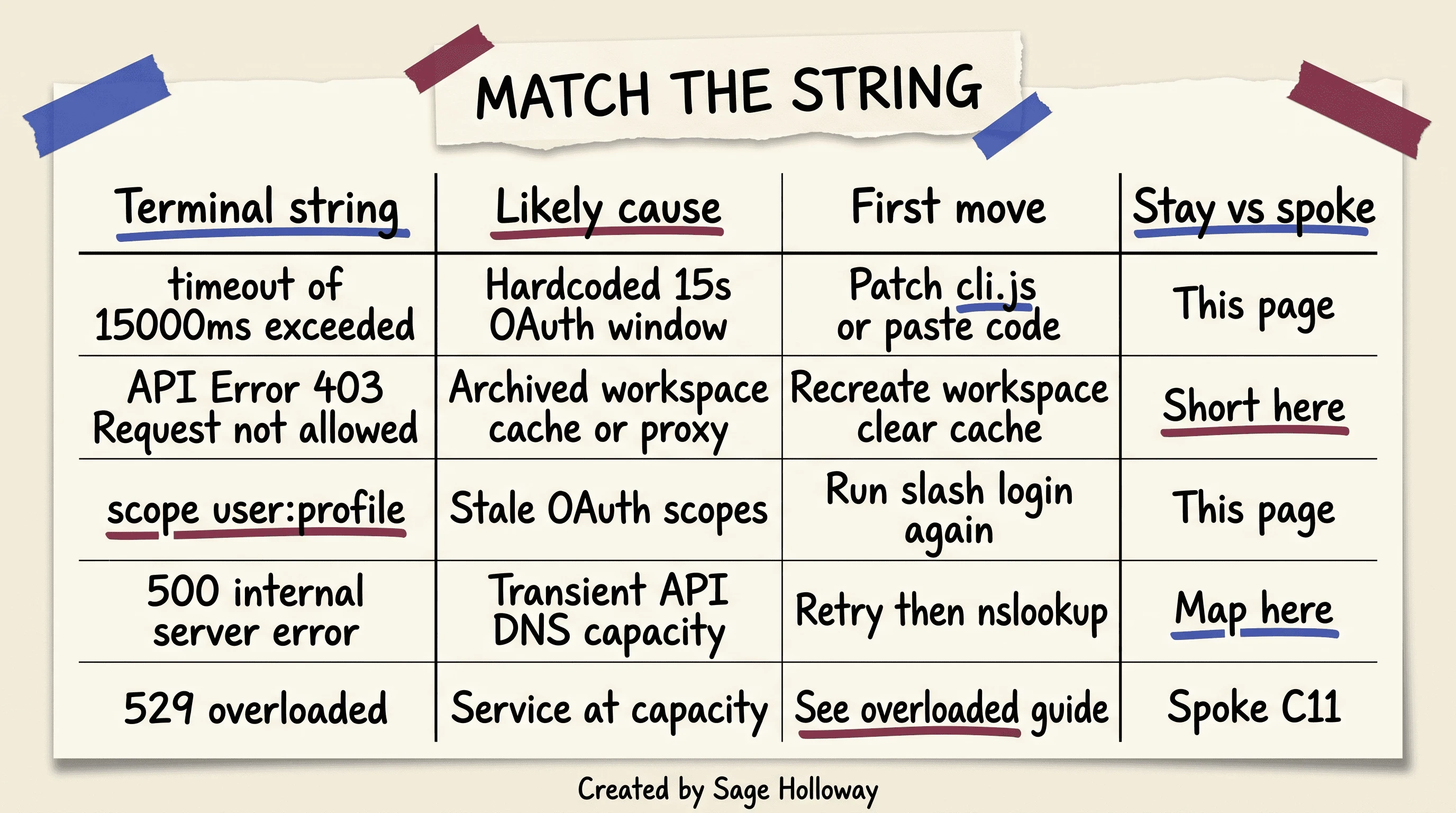
Match the terminal string first. Timeout stays on this page. 529 goes to the overloaded guide.
OAuth error: timeout of 15000ms exceeded is the primary. The reverse phrasing (oauth error: timeout of 15000ms exceeded claude code) is the same 15-second CLI bug. Patch or paste. Stay here.
API Error: 403 with Request not allowed is a different door. Archived workspace, stale cache, or a proxy fight. Short map on this URL. Depth in the 403 section below.
OAuth token does not meet scope requirement user:profile means the token is missing a permission newer CLI features want. Run /login again. GitHub issue 29666 tracks the scope mismatch, including user:mcp_servers.
A 500, including the community string claude code authorization failed internal server error, is an unexpected failure inside Anthropic systems. Platform docs say retry with exponential backoff. Map it here. Do not write an outage diary on this URL.
A 529 means the API is at capacity. That is not your 15-second handler. Send that string to the overloaded guide.
Timeout vs 403 vs 500 vs 529 in one pass
Two clocks sit in the same product. People mix them up because both say timeout.
The OAuth handler in cli.js defaults to 15,000ms. It covers browser login and the callback. Patching it is the fix for this page’s error.
API_TIMEOUT_MS defaults to 600,000ms. It covers API request timeout. It does not lengthen the OAuth handler. If you export a huge number and the login still dies at 15 seconds, you patched the wrong clock.
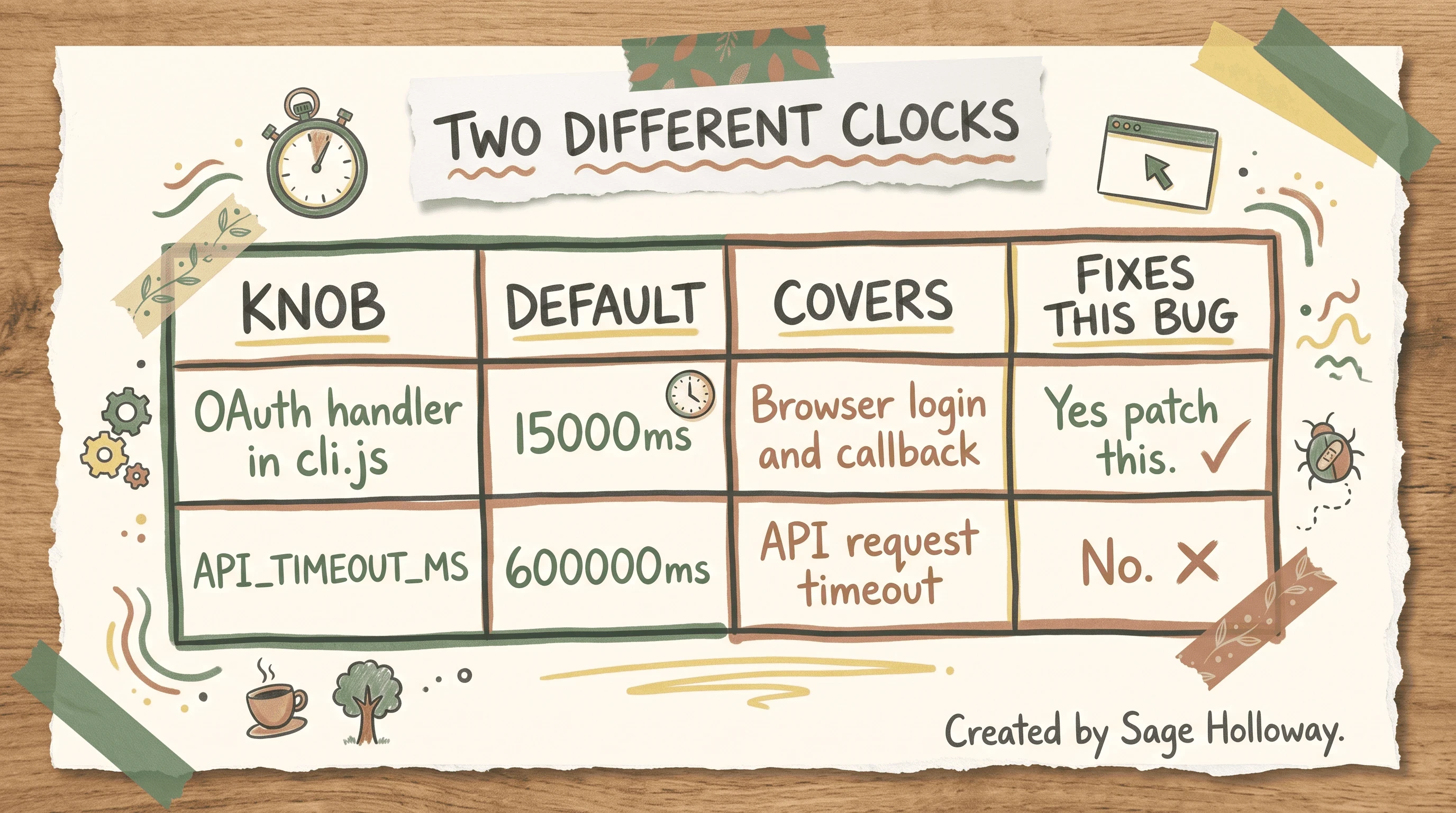
API_TIMEOUT_MS is request timeout. It does not lengthen the OAuth handler.
If the string is 529 or overloaded, stop. That spoke is Claude Code rate limit error. If a 500 overlaps a timeout attempt, retry, then check DNS. If the process vanished with an exit code and you never saw an OAuth string, that is process exited, not this handshake.
Platform HTTP classes live on Claude API errors. Use that page for 403, 500, and 529 types. Use this page for the hardcoded 15s CLI window.
Patch the hardcoded 15000ms timeout in cli.js
Here is the honest version. The 15,000ms limit is in the CLI. It is often too short for the multi-step browser redirect and email verification. Regional latency and peak US traffic make it worse. Clearing ~/.claude/cache does not change the number. Reinstalling does not change the number unless the new build shipped a longer window, which community threads say is not reliable.
The gold-standard workaround lives in GitHub issue 33238: find cli.js, replace timeout:15000 with a larger value. The issue’s patch lines use 45000. Forum writeups also use 60000. Those are the two community values. Do not invent a third.
A slow handshake on a long timer beats a perfect handshake on a 15-second clock. Every time.
Find the file first. Paths vary by install. Quote 33238. Do not invent a Homebrew cellar path.
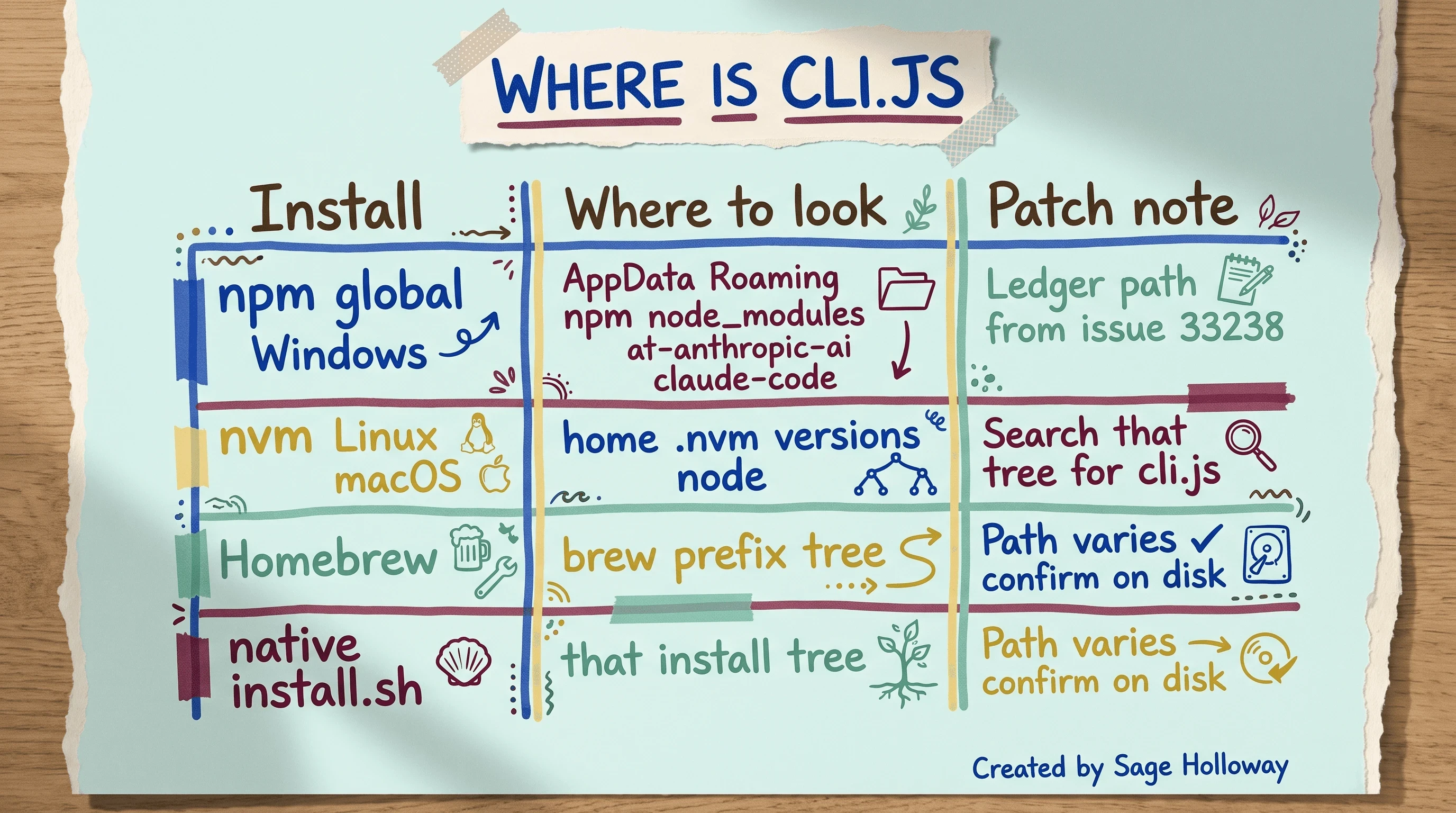
Paths vary. Quote GitHub 33238. Do not invent a brew cellar path.
Windows npm global, from that issue: %AppData%\Roaming\npm\node_modules\@anthropic-ai\claude-code\. Search that tree for cli.js.
Linux and macOS with nvm: start at ~/.nvm/versions/node/ and search that tree for cli.js.
Homebrew: look under the brew prefix tree. Confirm on disk. Native install.sh: look in that install tree. Confirm on disk. Both of those rows vary.
Install itself is two documented commands, and they conflict in comment threads. High-confidence ledger still has both: curl -fsSL https://claude.ai/install.sh | bash and npm install -g @anthropic-ai/claude-code. Some users claim npm is deprecated in favor of the shell script. That claim is low confidence and fights the npm install docs. Document both. Patch the cli.js you actually have.
Set $CLI to the full path of cli.js. Then patch.
Linux and macOS, from 33238:
Windows PowerShell, from the same issue:
If you prefer the other community value, replace 45000 with 60000. Same pattern. One minute instead of 45 seconds. Still a local edit, still wiped by some updates.
I tried this and it did not work the way I expected the first time, because I patched a leftover npm copy while the shell I launched was a different install. /status after login tells you which world you are in. Patch the binary that actually runs.
Updates can restore timeout:15000. If login dies again after an upgrade, search cli.js for the old number. The patch is a bandage, not a settings.json key.
A status megathread on Reddit (elevated errors) is useful for “is it just me.” The sed and PowerShell lines still live in 33238.
macOS codesign after a binary edit
On macOS, editing the installed binary can trip Gatekeeper. GitHub issue 20089 is the OAuth callback timeout thread that names the re-sign:
Run it after the patch, on the binary the sources in that issue are signing. Skip extra argv this research pack does not name. If codesign complains about a path you guessed, stop. Re-read 20089 for your install layout instead of inventing flags.
Linux does not need this step. Windows does not use codesign.
Version regressions (v2.1.72 and neighbors)
Medium confidence, community only: version 2.1.72 reintroduced OAuth timeouts that earlier notes treated as closed in v2.1.15. Workarounds in those threads: downgrade to v2.1.71 or v2.1.50, authenticate, then update.
Treat the version numbers as reports, not docs. GitHub “resolved” labels and later regressions can sit in the same product week. If your timeout fires in under 10 seconds despite a 15-second limit, you may be in a loop, not a slow handshake. Still patch. Still consider the paste-code fork. Version pin is a last resort, and old pins (one megathread mentioned v1.0.81) fight modern features.
When OAuth is the wrong tool: ANTHROPIC_API_KEY
OAuth is the interactive /login browser flow. An API key is a secret you export so the CLI does not need that flow.
Environment variables override interactive /login credentials. Set ANTHROPIC_API_KEY when you are on SSH, a headless box, or a peak-hour window that keeps eating the 15-second budget.
That is the on-page fallback. A full SSH and headless key-ops guide is a later spoke. Until that URL exists, this H3 is the whole key story here.
If you already have a key in the environment and /login still opens a browser, check which shell launched claude. A GUI-started terminal can miss an export you put in a file that never loaded.
Check DNS, VPN, and localhost before you reinstall
A 500 during auth is often host, capacity, or DNS, not a broken laptop. The community phrasing claude oauth error: request failed with status code 500 maps here as “can you even reach the auth host,” not as a novel on HTTP 500.
Run this first:
NXDOMAIN in Southeast Asia reports means the name does not resolve on that network. Hotspot, another DNS, or the API key fallback. Reinstall theater does not create a DNS record.
GitHub issue 33213 is the firewall story: the CLI waits on http://localhost:[port]/callback and the OS or VPN never lets the browser complete that hop. The 15-second timer is what you see. The block is local.
Proxies: set HTTP_PROXY and HTTPS_PROXY when you actually need them. Medium-confidence community note: unset ALL_PROXY to avoid SOCKS5 conflicts with tools like Clash or V2Ray. If you do not run a proxy, do not cargo-cult the unset.
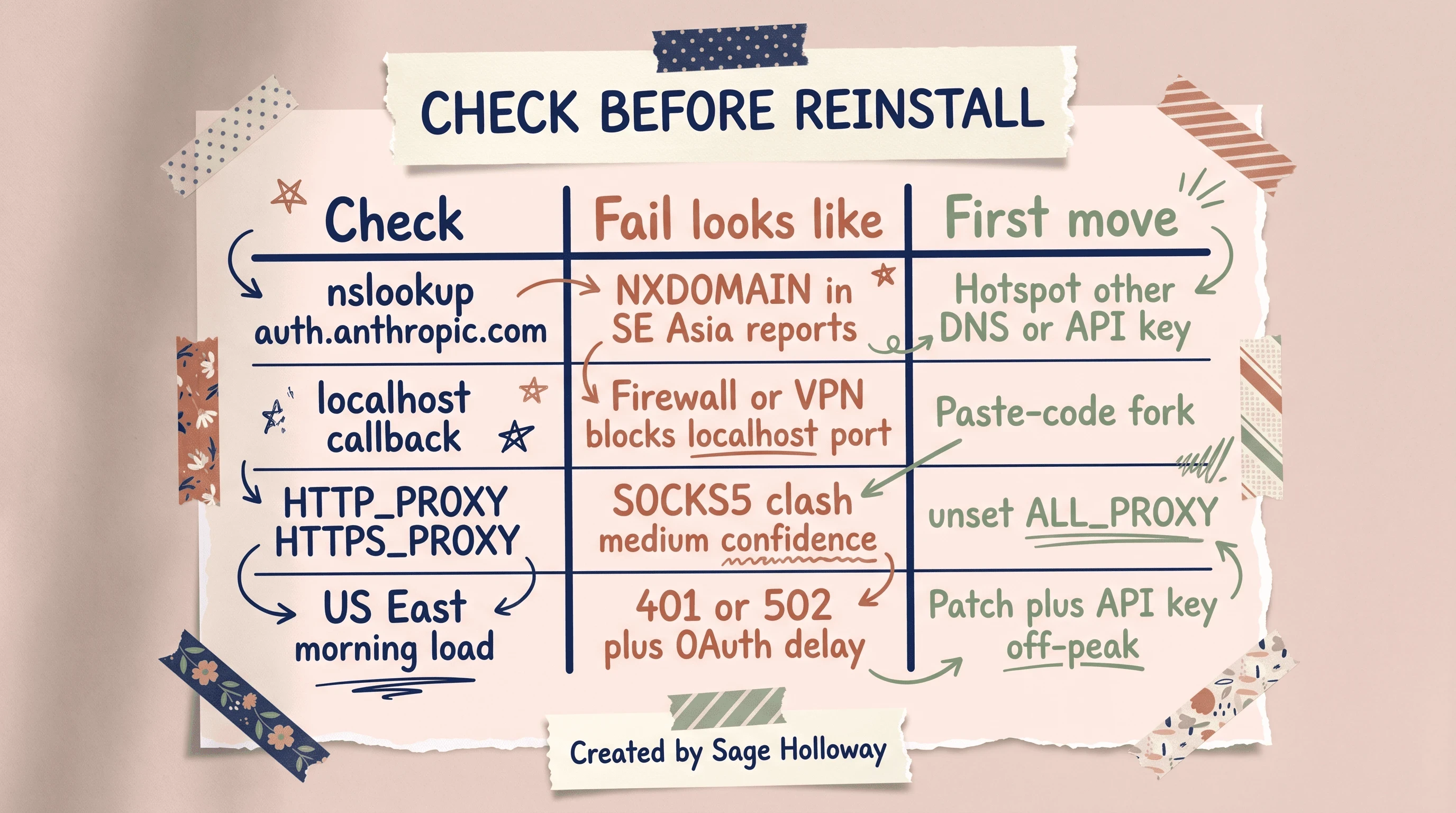
NXDOMAIN is regional DNS. A hung localhost callback is VPN or firewall. Unset ALL_PROXY if SOCKS5 fights you.
Check status as text. Do not embed a walkthrough video of a status page. If the platform is on fire, patching cli.js still helps the local clock, but a 500 from capacity will not vanish because you edited a number.
Confused? Fair enough. Reinstall feels like doing something. nslookup is doing something that matches the failure.
Log in using a pasteable code when localhost never returns
Sometimes the hold window is fine and the door is taped shut. The callback never lands. The timer still expires.
Reddit users documented a fork that does not require a binary edit. In Invalid authorization on Mac, canceling the browser’s “Open Claude Desktop” prompt forces a “Log in using code” UI. You paste that token into the CLI. The localhost callback server is no longer the bottleneck.
Desktop-app threads describe the same fork. CLI callback hangs use the same idea. Do not ship “delete the app container” as the CLI fix.
HowTo, numbered:
Start login from the CLI as you normally do, so the browser opens.
Complete Authorize if the page lets you. If it hangs after Authorize, do not sit on localhost until 15 seconds die.
Cancel the “Open Claude Desktop” prompt instead of allowing it.
Choose “Log in using code” when that UI appears.
Paste the code into the CLI in one shot.
Hidden spaces and line breaks wreck magic links. The OAuth error/bug thread is the source for that. Copy from the terminal into a plain editor if the URL looks wrapped. Strip breaks. Then open it once.
The same token opened in two tabs invalidates the one-time link. One session. One paste. If it says invalid or already used, it may be a wrap, or a second click, not a ban.
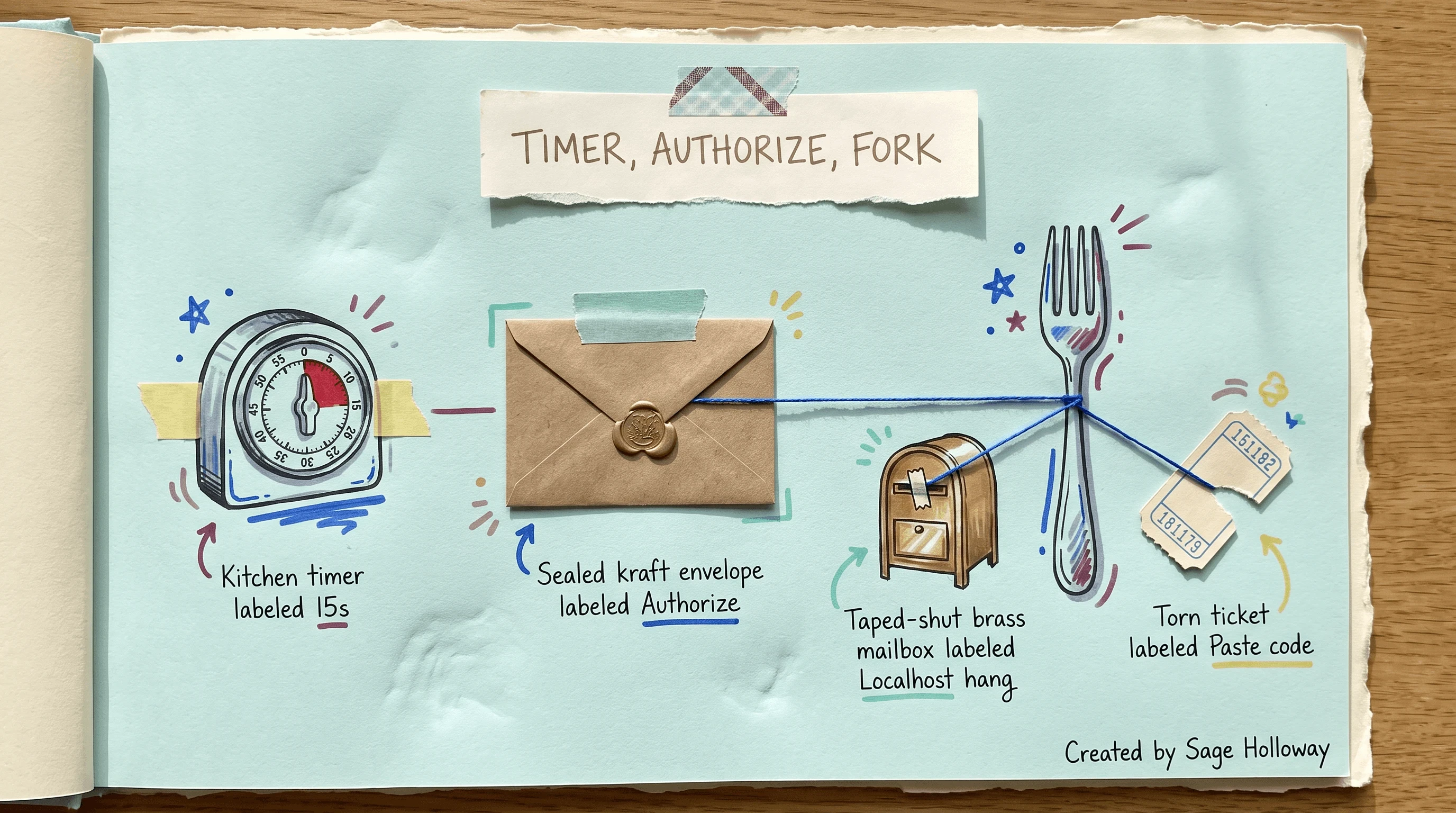
If Authorize hangs, cancel Open Claude Desktop, pick Log in using code, paste into the CLI.
Patch and paste are not rivals. Patch buys time for the happy path. Paste bypasses a blocked mailbox. Use both when the network is rude.
Clear cache and session files that keep a dead token
Purging is a must-have section in every thin guide, and it is the wrong first move for a hardcoded timer. Do it when the string is a loop, a 403 after a “successful” browser, or a token that will not refresh.
List, not a ritual:
Then consider ~/.claude.json (project state and login path) and ~/.claude/settings.json (global settings). Delete with intent. Those files are not only auth. You will rebuild preferences.
Official recovery is still /login and /status. If /login dies at 15 seconds, purge did not fail. The clock did. Patch or paste, then purge if a stale token remains.
Do not reinstall the OS. Do not “wait a few hours” as the fix for 15000ms. Those lines show up in generic posts. Users already reported they do not address the timeout length.
Full logout and re-auth FAQ belongs on the install article. One sentence here: if you need to log out on purpose, use Install Claude Code rather than duplicating that bank.
macOS Desktop container paths (~/Library/Containers/) show up in Desktop threads. They are not the CLI cache list above.
Time of day and region: why 15 seconds is not enough
The host hold assumes you are already in the lobby. US East Coast morning load is lunch rush in another timezone.
Reports from SAST (UTC+2) and Southeast Asia correlate auth pain (401, 502, OAuth delay) with US morning traffic. Medium confidence as a global pattern. High confidence as user reports. South Africa and Peru threads say the same shape: the walk from the car got longer, the hold did not.
Malaysia reports include NXDOMAIN for auth.anthropic.com. That is DNS, not “try again after coffee,” though coffee might coincide with a quieter US hour.
Three clocks, three moves:
DNS is nslookup, a hotspot, another resolver, or an API key. Local is a VPN or firewall blocking localhost, which is when you take the paste-code fork, and maybe unset ALL_PROXY. Peak hour is when you patch the 15s handler so a slow token exchange can finish, and keep ANTHROPIC_API_KEY for the hours the handshake is a lottery.
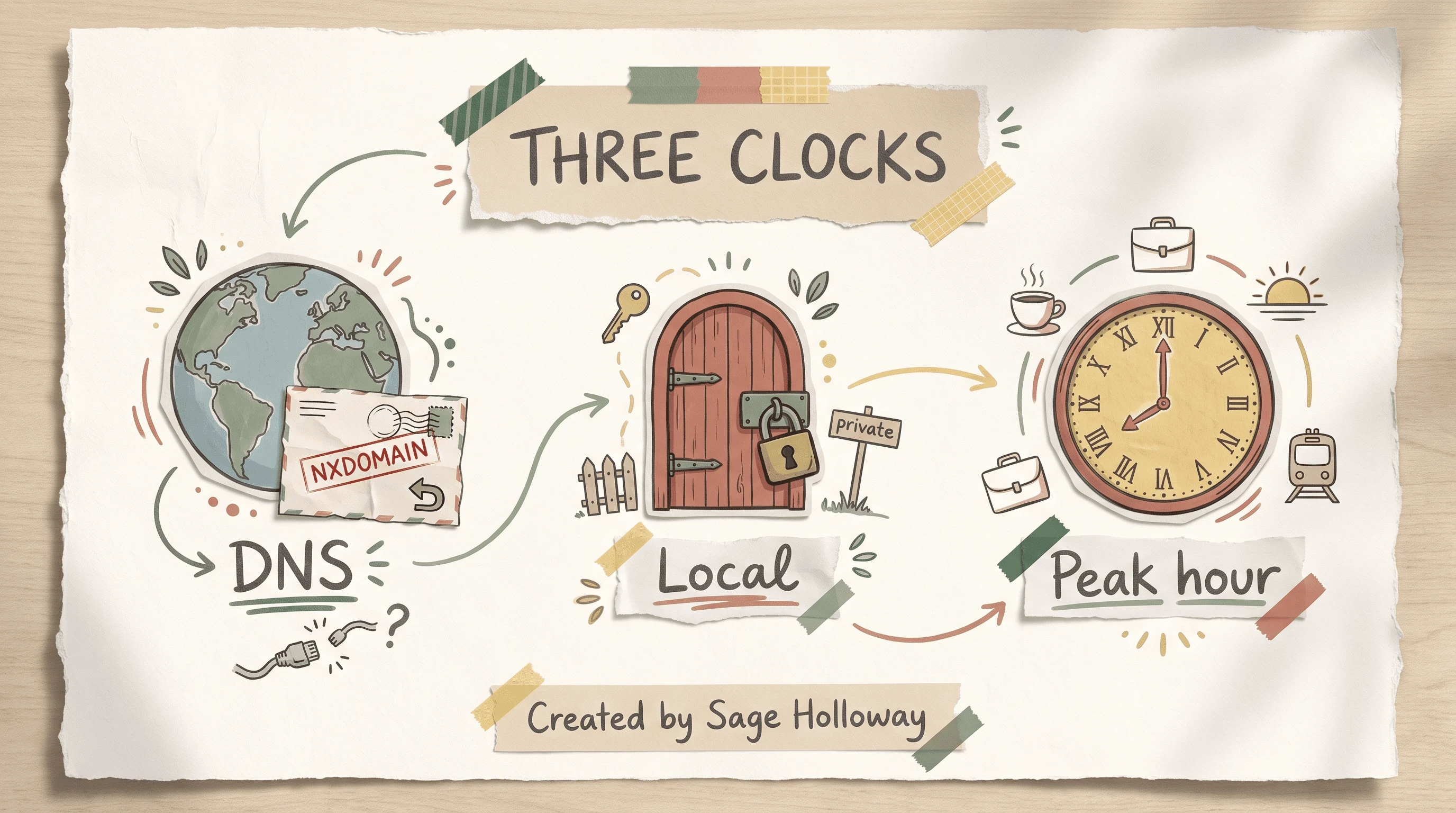
SE Asia NXDOMAIN, a blocked localhost port, and SAST morning load are three different clocks.
Whether Anthropic lengthens the shipped default is genuinely not sure yet. Community patches exist because the docs still do not document this knob. Watch issue 33238. Watch your own cli.js after updates.
Persistent 403 after the browser says success
The browser smiled. The CLI says no. That is not the 15-second string. It is the secondary claude code oauth error: request failed with status code 403, kept short on this URL.
GitHub issue 597 is the workspace archival trap. Archiving the default “Claude Code” workspace in the console causes later OAuth 403. Recreate the workspace or select a live one. Token exchange has nowhere to land.
If the string is scope user:profile (or user:mcp_servers), run /login again. Issue 29666. Not an archive problem.
Proxy leftovers can also 403. Clash, V2Ray, ALL_PROXY. Unset, retry. Medium confidence. Do not let proxy folklore hide an archived workspace.
This is not the 403 encyclopedia. If a later spoke exists, it can own REST 403 walkthroughs and PowerShell Invoke-RestMethod theater. Until then, archive plus scope plus cache is the on-page home.
FAQ
Why do I get a timeout of 15000ms exceeded error during login?
The CLI hardcodes a 15-second OAuth window. The browser-to-terminal redirect, plus email verification, often needs more. The error fires when the callback or server confirmation exceeds that window.
How can I manually increase the 15-second timeout limit?
Find cli.js in your install tree (npm, nvm, brew, or install.sh). Replace timeout:15000 with timeout:45000 or timeout:60000 using the sed or PowerShell lines in issue 33238. On macOS, re-sign with codesign --force --sign - after you edit.
What if I cannot complete the browser redirect to localhost?
If the page hangs after Authorize, cancel “Open Claude Desktop” and use “Log in using code.” Paste into the CLI. That bypasses http://localhost:[port]/callback, which firewalls and VPNs block. Details in the Mac invalid authorization thread.
Why does authentication fail in Southeast Asia or other high-latency regions?
nslookup auth.anthropic.com sometimes returns NXDOMAIN in Malaysia and nearby reports. High latency also burns the 15-second budget on email verify plus redirect. Patch the handler, try another DNS or hotspot, or set ANTHROPIC_API_KEY.
Can I bypass OAuth using an API key?
Yes. ANTHROPIC_API_KEY overrides interactive /login. Use it for SSH, headless hosts, or peak hours that keep tripping 15,000ms. Keep key-ops depth for a later guide.
Why do I get a 403 error even after a successful browser login?
The default “Claude Code” workspace may be archived (issue 597). Recreate or select a live workspace. Also check cache, ALL_PROXY, and stale scopes (user:profile). Purge ~/.claude/cache if the token is junk.
How do I clear my local Claude Code authentication cache?
Run rm -rf ~/.claude/cache. For a deeper reset, remove or rebuild ~/.claude.json and ~/.claude/settings.json. Then /login. If login still hits 15000ms, the cache was not the clock.
Is the error related to specific Claude Code versions?
Community reports say v2.1.72 reintroduced timeouts that v2.1.15 had closed. Some people authenticate on v2.1.71 or v2.1.50, then update. Medium confidence. Still patch cli.js on the build you run.
Why does my login link show as invalid or already used?
Terminal copy can inject spaces or line breaks (OAuth error/bug). Opening the same one-time link in two tabs burns it. Clean the URL. Use one tab.
The host will keep a short hold until the product ships a longer one. Maybe they will. Maybe they will not. Your job tonight is smaller: one cli.js that no longer dies at 15 seconds, or one paste that never needed localhost.
If you only do one thing, open issue 33238, find your cli.js, and run the sed or PowerShell replace. If the browser hangs, cancel Desktop and paste the code. If 529 is what you actually have, skip this page and use the overloaded guide. If you want the next install-shaped rabbit hole, the native installer walkthrough is waiting on the install article. Subscribe if you want the next guide in this series before it hits search.
Until then...
Sage
PS. Set a kitchen timer to 15 seconds. Unlock your phone, open email, find a six-digit code, and type it before the bell. If you miss, you just lived the CLI’s entire login budget, including the part where the message had not arrived yet.
Author
Practical guides, tool teardowns & AI engineering workflows.


