Claude Code
Fix Error: Claude Code Process Exited with Code 1

Sage Holloway
24 min read
Go back to blog
SHARE

The hallway box chirps one number and stops. You pull the batteries. You buy a new box. You never walk the rooms. Somewhere a drawer still holds the note that names the actual fault. You keep treating the chirp as the fire.
Error: Claude Code process exited with code 1 is a wrapper signal that the Claude binary crashed before handing control back to the IDE or SDK. It is a symptom, not a diagnosis. Typical causes are a stale ANTHROPIC_API_KEY fighting OAuth, VS Code debugger vars such as NODE_OPTIONS, missing Git on Windows, or an ARM64 binary mismatch. Compare a raw terminal launch to the failing path, then read cowork_vm_node.log before you reinstall.
You know the before picture. The extension dies. Desktop flashes and vanishes. The terminal prints Error: Claude Code process exited with code 1 and nothing else. You search. Every thread says clear cache. You wipe ~/.claude. You reinstall. The chirp comes back, now with fewer clues.
The after picture is slower on purpose. You launch the same binary from a raw system terminal. You open the hidden log. You change one branch: a leftover API key, an inherited debugger variable, a Git path, a permissions reset. The wrapper still says 1 when something else is wrong. You stop treating 1 as a personality.
Commands and paths in this guide come from NotebookLM research dated 15 August 2026 plus the Claude Code error reference. No live CLI verify on this draft. When a blog disagrees with that errors page, use the docs. When GitHub issue 61173 updates a Bitdefender title to an ARM64 mismatch, follow the update.
This will not work if you reinstall first and then try to reconstruct what cowork_vm_node.log said. It will also not work if you stretch API_TIMEOUT_MS hoping a local crash becomes a slower crash. That variable is a per-request deadline (default 10 minutes), not an exit-code decoder.
This page will not cover a Visual C++ / Bun encyclopedia, file-edit slash loops, or Bitdefender Advanced Threat Defense exceptions. Those jobs live on process exited with code 3, error editing file, and Claude Code triggers Bitdefender. Install depth lives on Install Claude Code. A 15-second OAuth clock is OAuth timeout 15000ms. HTTP 500, rate limit, and overloaded strings belong on rate limit and API 500.
Cursor’s Claude 3.5/4 “Writing Code…” loops are a different product. WhatsApp Desktop error threads are noise. Stay on Claude Code CLI, the VS Code extension subprocess, or Claude Desktop only if that is what actually died.
Code 1 is a symptom. The real text is usually in a hidden log.
What “process exited with code 1” actually means
You have a smoke alarm that only knows how to beep once. It does not name the kitchen. It does not name the battery. It does not name the toaster that smoked for four seconds and stopped. You stand in the hallway with a number and a pulse. That number is not a room.
That hallway box, here, is the wrapper: the VS Code extension, the SDK launcher, or the Desktop shell that started Claude Code and then lost the child process. Official docs file this under Wrapper and IDE errors. Claude Code process exited with code N means the underlying binary crashed before it handed control back. Code 1 is a generic shrug. It is not “Anthropic is down.”
An SDK is a software development kit: libraries and launchers other tools use to start Claude Code as a child process. If that child dies, the parent prints code 1 because that is all it got.
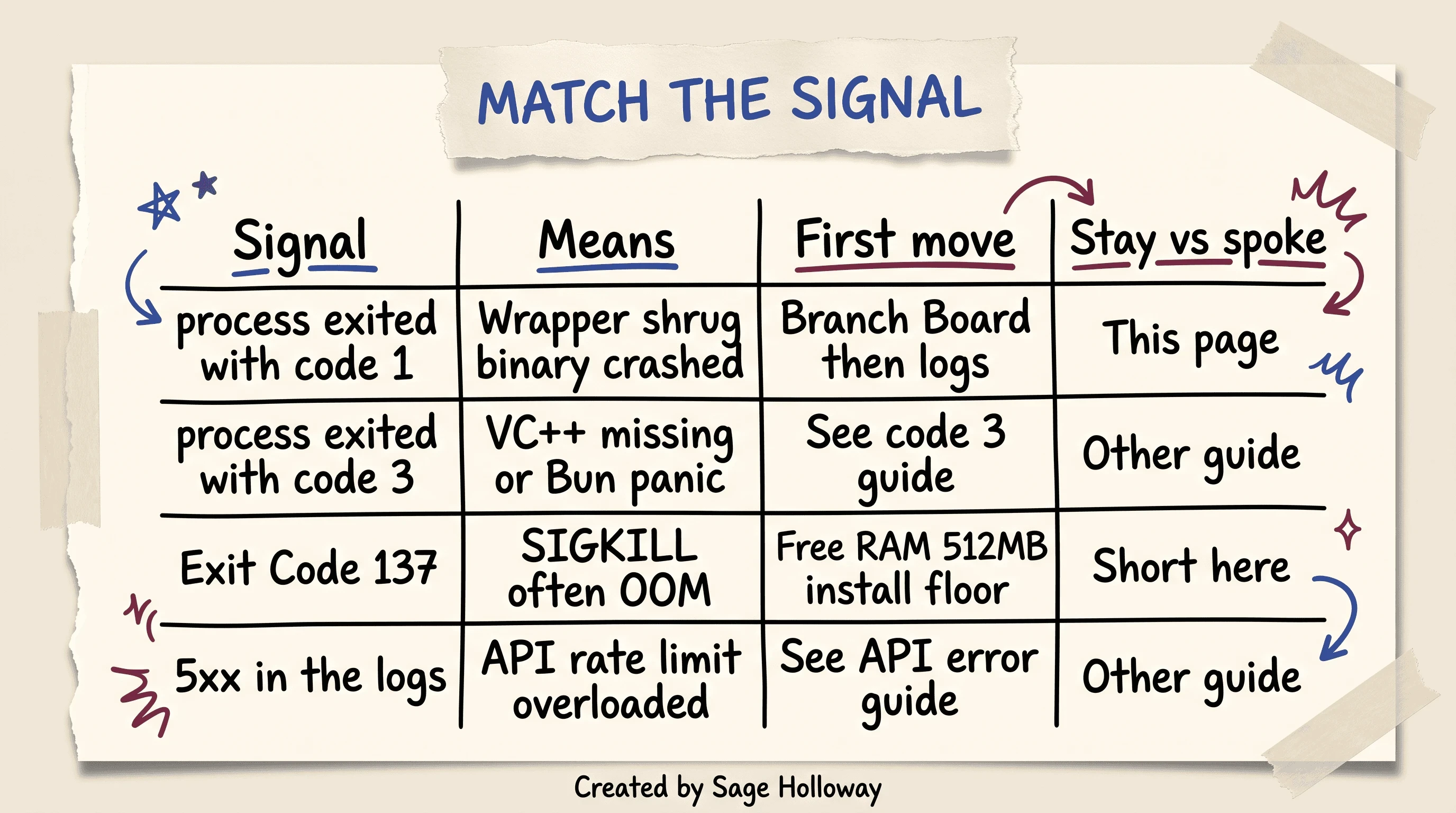
Code 1 stays on this page. Code 3 and API 5xx are other guides.
Code 3 is a different crash class, often a missing Visual C++ Redistributable or a Bun runtime panic on Windows. One row here. Depth on the code 3 guide.
Exit Code 137 means the process received SIGKILL, typically from a Linux out-of-memory killer. Free RAM. The install script wants a 512MB floor. Stay short here.
If cowork_vm_node.log or the terminal shows HTTP 5xx, rate limit, or overloaded, you left the local-crash job. Use the API error guide. Check a status page in one sentence, then come back to launch paths. Local variables are a separate branch from an incident.
Why do people still treat code 1 as an outage? Because the wrapper gives them nothing else to hold.
Start with the Branch Board (do not reinstall yet)
The house has four doors and one hallway alarm. You do not order a new roof because the toaster smoked. You open the cheapest door first. You change one room. You leave the locked toolbox in the garage until a door actually will not open.
That room list, for Claude Code, is LaoZhang’s Branch Board: raw system terminal, IDE subprocess, Desktop app, hooks. Reinstall is the locked toolbox.
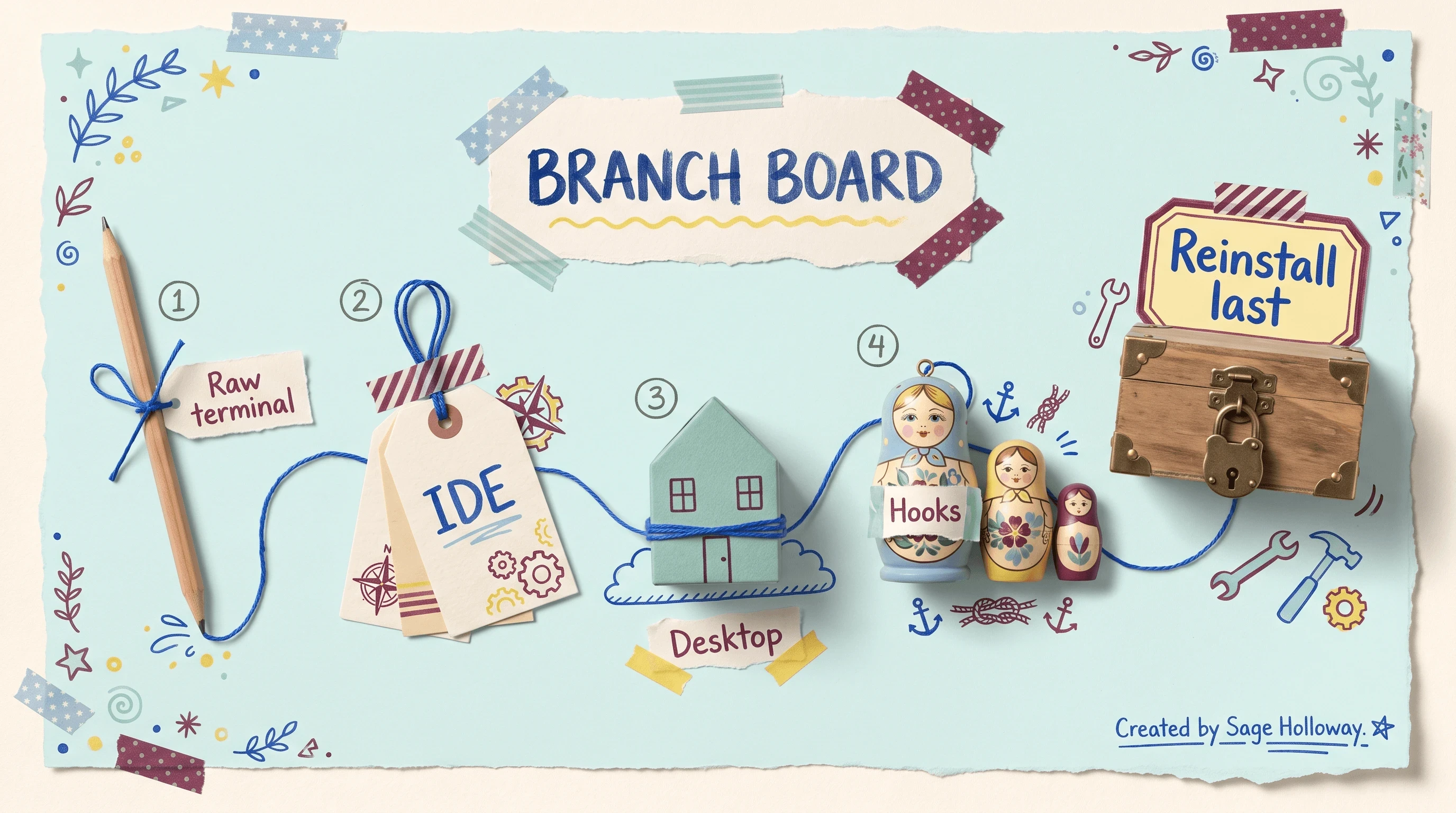
Compare paths first. Change one branch. Reinstall only after a broken binary or missing Git.
Launch Claude Code from a raw system terminal, not the IDE integrated terminal. Run
claude --version. If that fails, the install, auth, Git, or binary branch is live. If it works, the install is probably fine.Reproduce the crash on the failing surface only: IDE subprocess, Desktop app, or a hook-spawned child. Change one thing on that surface. Do not clear every cache because a thread said so. Clearing cache destroys evidence: session files, env clues, the log you needed.
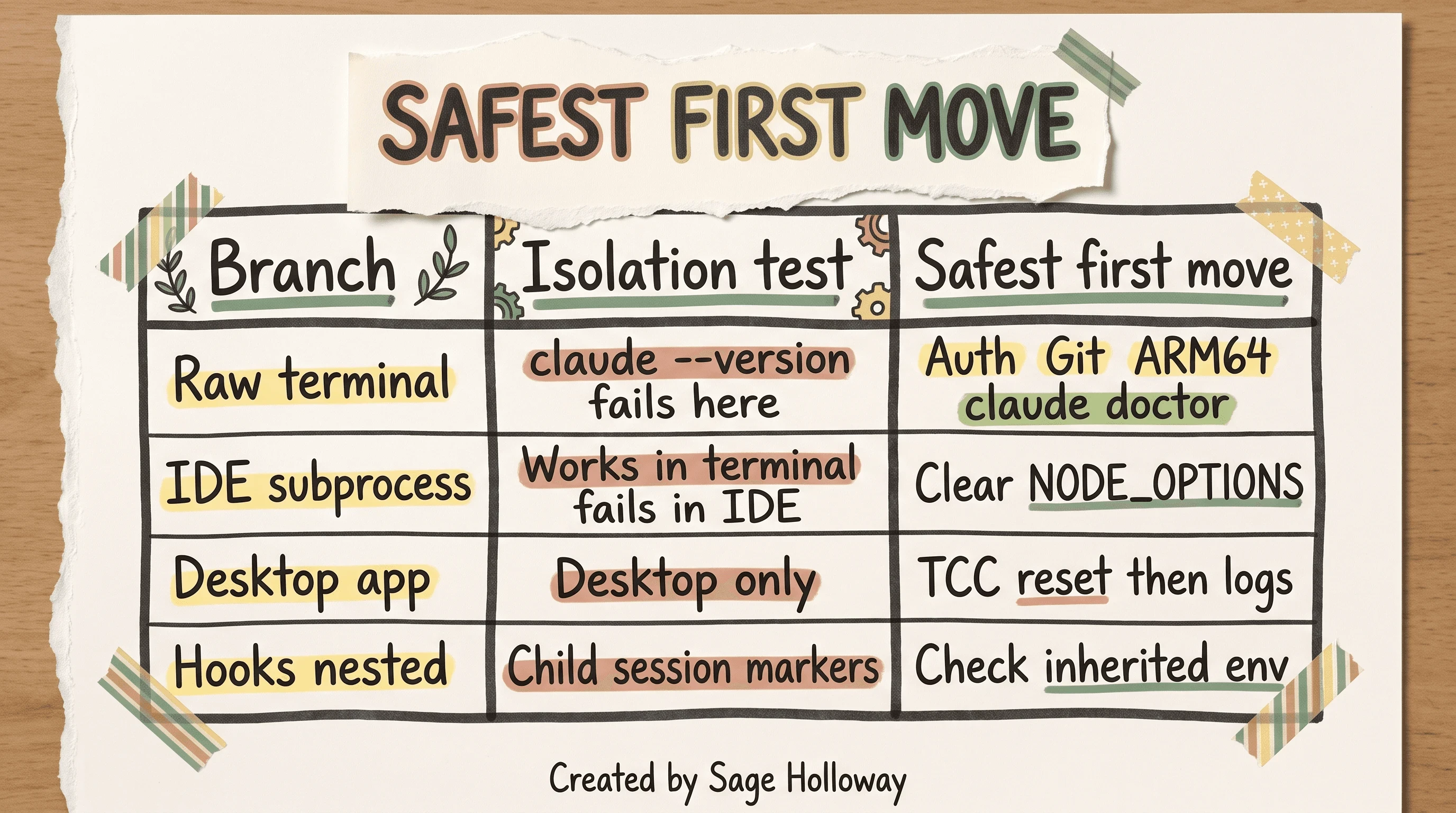
If the raw terminal works, the install is probably fine.
Raw terminal fail: auth, Git, ARM64, claude doctor. IDE-only fail: clear NODE_OPTIONS. Desktop-only: TCC, then logs. Hooks / nested: inherited env, including CLAUDE_CODE_CHILD_SESSION markers. I have not live-verified what those markers disable in every build. The ledger says inherited child-session markers may disable session saving in top-level terminals. Treat them as a smell, not as a spell.
Reinstall is last. Full answer sits in the verification section. If you already wiped everything, you are flying without the note in the drawer.
I tried the “just reinstall” path on a Windows machine that was missing bash.exe. The new install crashed the same way. The log still said it could not find Git. I had destroyed nothing useful and learned nothing new, which is the expensive kind of busy.
Find the real error in hidden logs
Code 1 hides the sentence. The sentence lives in files people do not open.
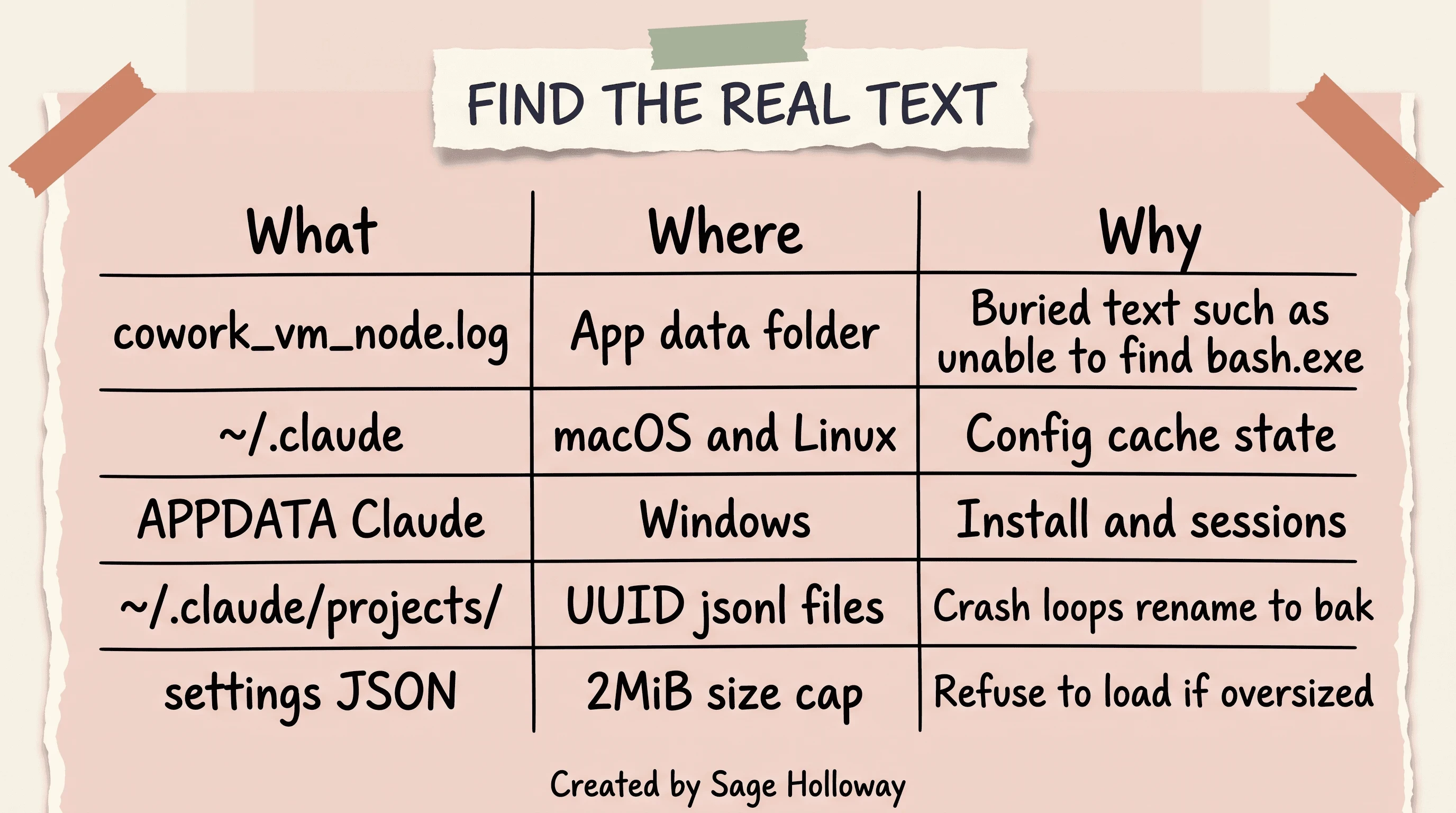
Exit code 1 hides the text. Start with cowork_vm_node.log.
cowork_vm_node.log sits in the application data folder. GitHub issue 46029 is why this path matters: the buried line can be as plain as unable to find bash.exe. Do not invent a macOS Library/Application Support path the ledger never gave.
~/.claude is the primary config, cache, and state directory on macOS and Linux. %APPDATA%\Claude is the Windows install and session tree. ~/.claude/projects/ holds session transcripts as .jsonl files named with UUIDs. JSONL means JSON Lines: one JSON object per line, used here as a running transcript.
Settings JSON has a 2MiB size cap. Oversized settings refuse to load at startup. That is a crash-loop cousin, not a “Claude is down” story.
Before you rename anything, run the non-destructive health check:
claude doctor checks installation integrity, environment variables, and configuration health. It is evidence. It is not a wipe.
Copy the last chunk of cowork_vm_node.log somewhere safe before you “clean.” The interesting evidence is the file you were about to delete to feel productive.
Auth and terms conflicts
Immediate crash after update or login is the high-frequency branch. Docs, blogs, and Reddit keep landing on the same fight: leftover keys versus a fresh browser login.
OAuth is the browser login where you authorize Claude Code and the CLI receives tokens. A leftover ANTHROPIC_API_KEY in your shell profile silently wins over that subscription OAuth session. The wrapper then dies with code 1 because the process cannot settle which credential is in charge.
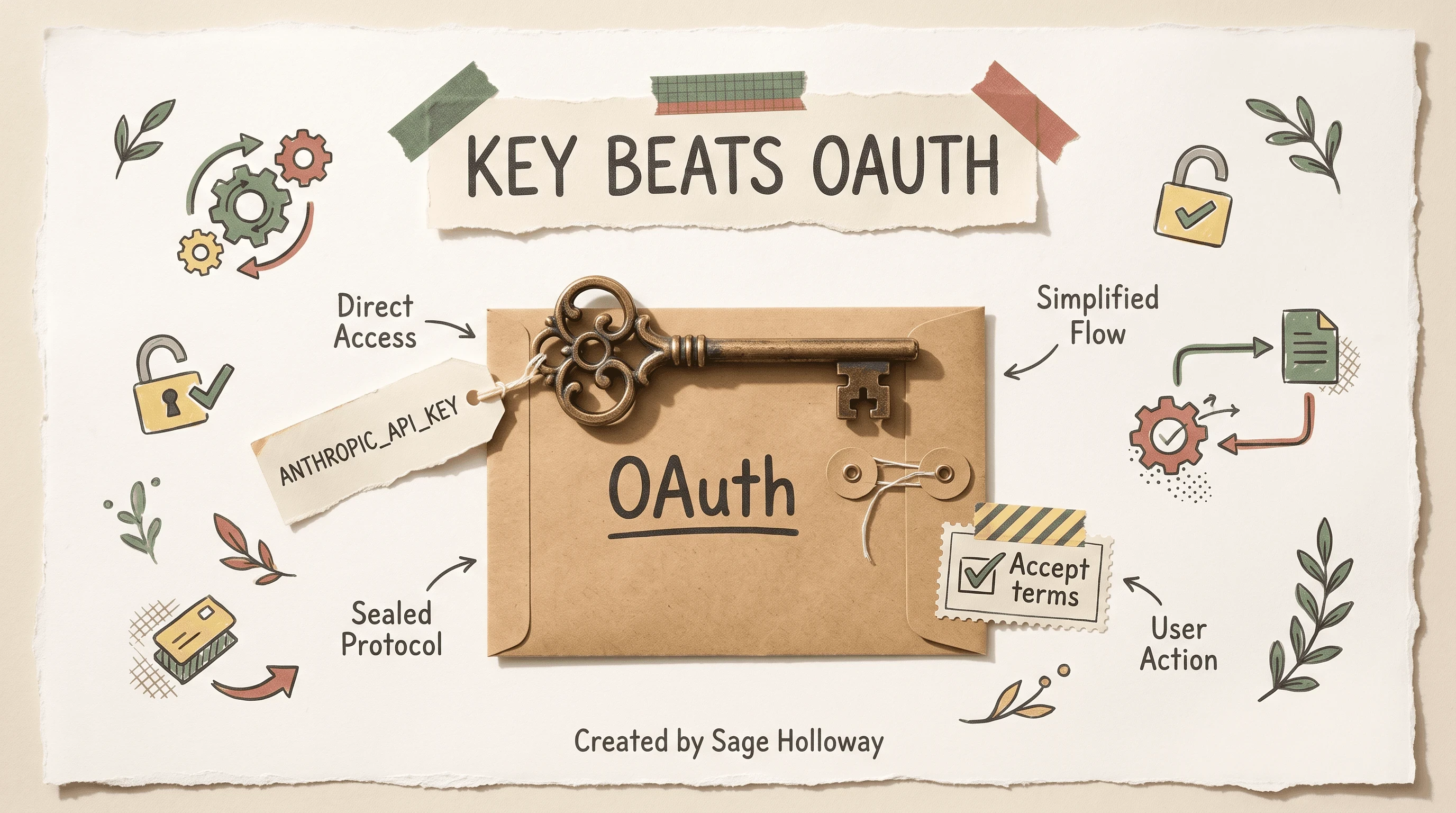
A leftover ANTHROPIC_API_KEY wins. Then accept updated terms on claude.ai.
Reset order from the claim ledger:
Then unset ANTHROPIC_API_KEY in the shell profile that actually launches the tool (.zshrc, .bashrc, Windows User env, the IDE’s env panel). Logout clears local tokens. Login starts the claude.ai OAuth flow in a system browser. If the leftover key is still exported, login was theatre.
If the terminal string is timeout of 15000ms exceeded, stop. That is a hardcoded CLI clock, not this crash. Use the OAuth timeout guide. Do not paste a cli.js 15-second patch onto a process-exit.
Sometimes the binary is fine and the website is waiting. r/ClaudeCode reports immediate exits that cleared after accepting updated terms on claude.ai. Log into the web UI. Dismiss the policy prompt. Come back. This only applies if terms are actually pending. It is not a universal spell.
Confused? Fair enough. Two different “login” failures share a vibe and almost no mechanism. One is a stale key sitting on top of OAuth. One is a web checkbox you never opened.
IDE and debugger interference
Here is the isolation test that saves weekends.
If claude --version works in a raw terminal and dies in VS Code, you do not have a broken install. You have inherited environment. VS Code is Microsoft’s editor. In debug mode it injects inspector variables into child processes. Those children include the Claude Code SDK subprocess.
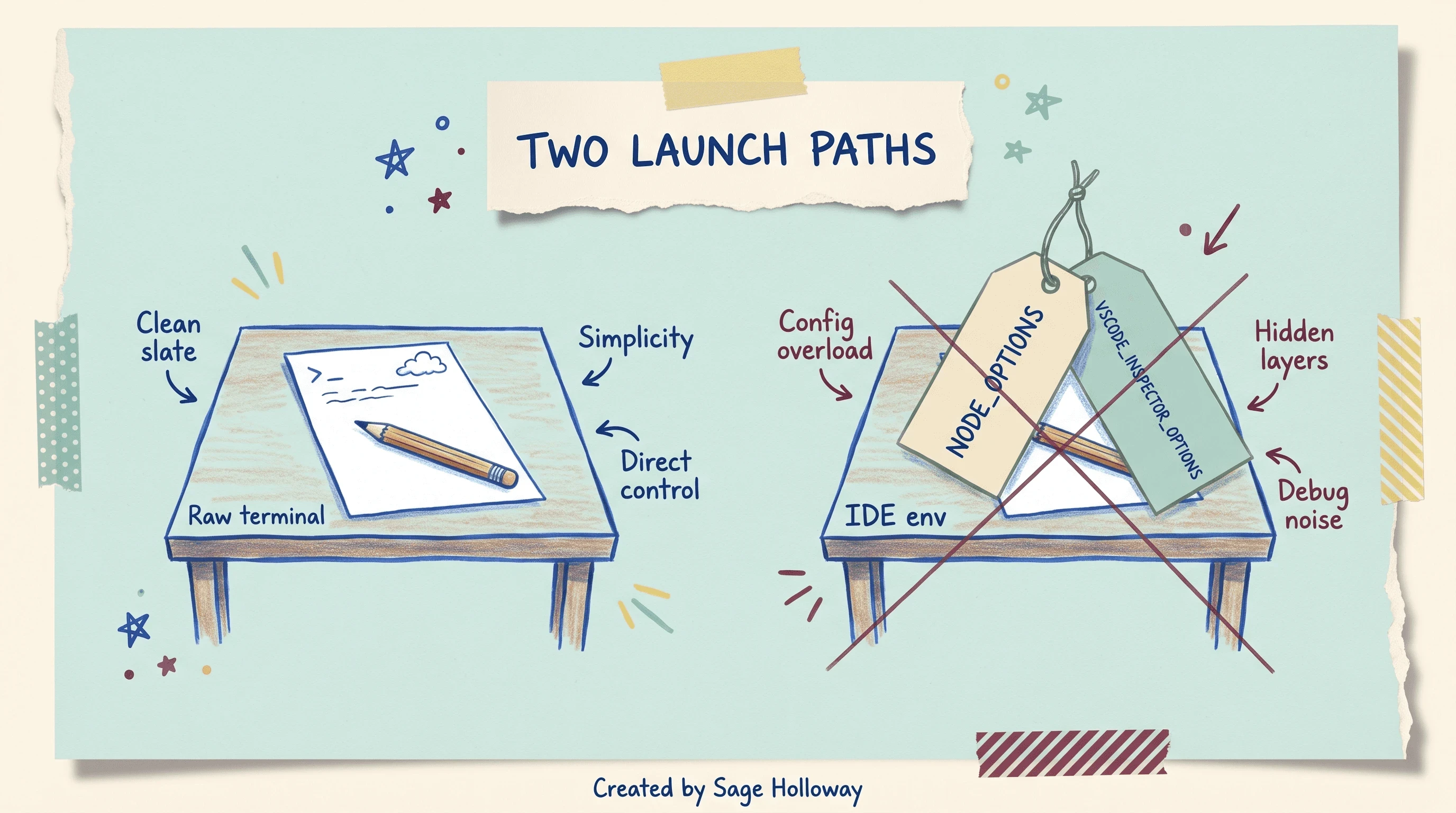
If claude --version works in a raw terminal, clear debugger env vars before you reinstall.
GitHub issue 4619 names the pair:
Clear them from the env that launches the extension or SDK script. NODE_OPTIONS is a Node.js runtime switch list. Auto-attach debuggers love stuffing inspect flags into it. The Claude subprocess did not ask to be inspected. It exits.
CLAUDE_CODE_CHILD_SESSION is a marker for nested sessions. If it is inherited into a top-level terminal, treat that as contamination from a hook or parent agent. Do not invent extra behavior beyond the ledger.
Extension setup (how to install Claude Code in VS Code, how to open the panel) lives on Claude Code in VS Code. This URL owns the debugger-env kill, not the onboarding screenshots.
But here is the thing.
The same machine can be healthy at 10am in iTerm and dead at 10:05 inside a debug configuration you forgot was enabled. You will blame Anthropic. The luggage tags on the pencil were yours.
Sessions, crash loops, and EEXIST
A crash loop looks like loading text, then death, then loading text. People call it “the extension is broken.” Often the extension is fine and a transcript file is not.
Session files live under ~/.claude/projects/ as UUID-named .jsonl documents. Corrupted or oversized files can throw the process into an automatic reload crash. Default local transcript retention in the ledger is 30 days, then cleanup. That cleanup does not help you tonight if the bad file is still in the folder.
Rename. Do not delete. Wait until you know which UUID is guilty.
Rename to .bak so the app can boot a fresh session. Product memory, /memory, and “how do I save a chat” belong on Claude Code sessions. This H2 is crash-loop only.
If the process fails during a file write or Update with slash-direction fights (\ vs /) or WSL path loops, that is error editing file. One sentence. Do not turn this page into a linter race guide.
On Windows Git Bash, startup can fail with EEXIST: file already exists when the binary tries to mkdir a config directory that already exists. GitHub obra/superpowers issue 619 works around it by pointing config at a subfolder:
Set CLAUDE_CONFIG_DIR to a specific subfolder instead of fighting the lock on the user root. This is a directory conflict, not general process wisdom.
If settings JSON crossed 2MiB, shrink or split it. The process will refuse to load an oversized file. That is a size cap, not a mystery.
Windows Git, PATH, and ARM64
Windows code 1 has three frequent mechanical stories. None of them is “Windows is cursed.”
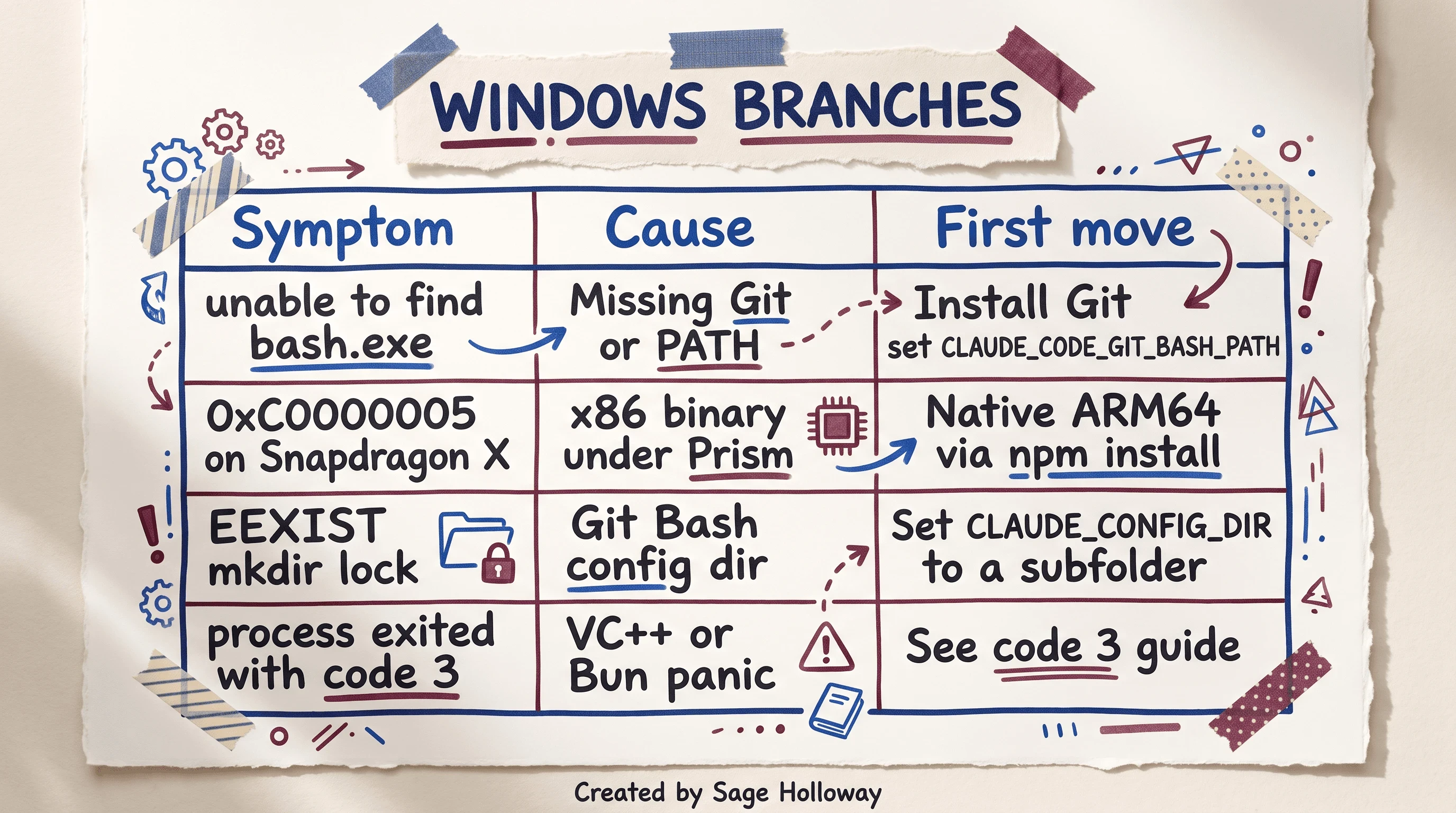
Missing bash.exe is Git. 0xC0000005 on Snapdragon X is the binary, not Bitdefender.
Missing Git. Certain builds crash silently if Git for Windows is absent or bash.exe is not on PATH. Issue 46029 again. Install Git, then tell Claude where bash lives:
That config key points the binary at bash.exe. Install how-tos, PATH, and native installer commands live on Install Claude Code. Come back here after Git exists.
Snapdragon X and other Windows-on-ARM boxes. Prism is Microsoft’s x86-64 emulator on ARM PCs. An x86-64 Claude binary running under Prism can throw 0xC0000005 (STATUS_ACCESS_VIOLATION) during TLS calls. GitHub issue 61173 titled Bitdefender first. The author later updated the root cause to an ARM64 versus x64 installer mismatch. Force a native ARM64 build, typically via npm install. Do not retitle this as antivirus.
Process exited with code 3 on that same table is a spoke row: Visual C++ Redistributable or Bun panic. Use the code 3 guide.
Which version of this future are you in: missing bash, wrong architecture, or a directory lock? The log usually tells you. The wrapper never will.
macOS TCC and sandbox
TCC is Transparency, Consent, and Control: macOS’s permission system for files, folders, and automation. If Claude Desktop or Claude Code cannot see the folders it needs, the wrapper can still print code 1.
r/ClaudeAI walks a Desktop crash that cleared after killing stale processes, resetting TCC, and clearing stale sockets under /tmp.
Prefer the bundle-id form from the claim ledger:
Reddit also shows tccutil reset All com.anthropic.claude. If you mistype All, you can reset permissions for unrelated apps. Use the bundle-id command unless you know why you need All. Then kill orphaned Claude processes and remove stale /tmp sockets the thread describes.
This is a permissions branch. It is not a reason to reinstall the CLI you just proved with claude --version.
Fake Claude Code ads vs a real antivirus kill
Two different scares share a search box. Separate them or you will add ATD exceptions to malware, or ignore a heuristic kill because an issue title once said Bitdefender.
Bitdefender Labs documents ClickFix-style campaigns: fake Google ads and lookalike docs that trick you into running a malicious terminal command. If you arrived here from a sketchy “fix Claude Code” page that wants you to paste a curl into root, stop. Use official docs. Do not follow lookalike Squarespace documentation.
A real antivirus kill of MCP binaries or skill ZIPs is a different job. MCP means Model Context Protocol: the plugin-style servers Claude Code talks to. Bitdefender’s JS.TeslaCrypt.4.Gen heuristic has flagged downloaded skill ZIP packages. Community ATD exception steps belong on Claude Code triggers Bitdefender, not as the first move on code 1.
If issue 61173 is why you are thinking antivirus, reread the ARM64 update. Hardware mismatch and heuristic kill are not interchangeable.
Same-path verification and when reinstall is allowed
LaoZhang’s last packet is boring, which is why it works. You verify on the same path that failed. Then you escalate.
Walk the board in this order if you skipped around:
Raw terminal versus IDE.
Hidden logs and
claude doctor.Auth and terms if the crash is immediate after login.
Clear
NODE_OPTIONS/VSCODE_INSPECTOR_OPTIONSif the IDE is the only corpse.Rename bad
.jsonltranscripts if you are looping.OS and hardware: Git path, ARM64, TCC.
Reinstall is allowed when the raw terminal proves a broken binary or missing Git, and doctor agrees the install is junk. Then use Install Claude Code. Reinstall is not allowed as step zero because you were scared.
If logs show 5xx, rate limit, or overloaded, leave this page. Use rate limit and API 500.
If the log actually names them, these limits are real: the install script wants 512MB free; the default per-request deadline is 10 minutes (API_TIMEOUT_MS adjusts it); the raw request body (images, attachments, text) has a 32MB hard limit. None of those turn a wrapper shrug into an HTTP encyclopedia. If the crash is a corporate TLS inspection, NODE_EXTRA_CA_CERTS points at a custom CA bundle. If the crash is a Snapdragon TLS fault, fix the ARM64 binary first.
Same-path means: if it died in VS Code, prove the fix in VS Code. A healthy iTerm window is not a fix.
FAQ
What does “Claude Code process exited with code 1” actually mean?
It is a generic failure signal from the launching wrapper or IDE: the underlying binary crashed before it could hand control back. Because code 1 is a symptom, the root cause is usually buried in hidden logs such as cowork_vm_node.log. See the error reference.
Does this error mean Claude is down?
Not necessarily. It usually represents a local environment failure rather than an API outage. Check a status page for incidents, then treat local variables and launch paths as separate diagnostic branches.
Should I reinstall Claude Code as a first step?
No. Reinstalling can destroy evidence and erase configuration clues you need for a permanent fix. Reinstall only if a raw terminal check confirms the installation is corrupted or a prerequisite such as Git is missing.
Why does the error occur immediately after I log in?
A legacy ANTHROPIC_API_KEY in your shell profile often clashes with the OAuth login flow. The process terminates because it cannot resolve which credential method wins. Unset the env var, then claude auth logout and claude auth login. Also accept updated terms on claude.ai if a prompt is waiting.
How do I fix the crash if it only happens in VS Code?
Stop the IDE from injecting debugger variables. Clear NODE_OPTIONS and VSCODE_INSPECTOR_OPTIONS from the environment. If the tool works in a raw system terminal and fails in the IDE, those inherited variables are likely killing the SDK subprocess (issue 4619).
What role do session files play in startup crashes?
Corrupted or oversized session files, stored as UUID .jsonl documents, can cause infinite crash loops during automatic reloads. Rename them to .bak under ~/.claude/projects/ so the app can boot a fresh session. Settings JSON above 2MiB can refuse to load as well.
How do I resolve this error on macOS?
Persistent startup crashes are frequently tied to TCC or sandbox locks, or stale sockets in /tmp. Run tccutil reset com.anthropic.claude, kill orphaned background processes, and be careful with the All form of tccutil (r/ClaudeAI thread).
What is the fix for Windows users missing Git?
Some builds crash silently if Git for Windows is not installed or bash.exe cannot be found on PATH. Install Git, then set CLAUDE_CODE_GIT_BASH_PATH. Full installer steps are on Install Claude Code. Check cowork_vm_node.log for unable to find bash.exe (issue 46029).
How do updated Terms of Service affect this error?
Immediate startup exits can occur if you have not accepted updated usage policies on claude.ai. Logging into the web interface to clear those prompts often resolves crashes that look purely technical (r/ClaudeCode).
Related internal links
Install Claude Code for Git, PATH, and reinstall after a failed raw-terminal check
OAuth timeout 15000ms for login hang versus process crash
Rate limit and API 500 if logs show HTTP or API errors
Claude Code in VS Code for extension setup; this page owns debugger env kills
Claude Code sessions for product memory; this page owns
.jsonlcrash loopsProcess exited with code 3
Error editing file
Claude Code triggers Bitdefender
The hallway alarm will keep chirping 1. Maybe a future build prints the buried line in the IDE. Maybe it will not. Your job tonight is smaller: one door opened, one note read, one room changed.
If you only do one thing, open a raw terminal, run claude --version and claude doctor, then open cowork_vm_node.log before you touch cache. If the terminal works and the IDE dies, clear NODE_OPTIONS. If login dies immediately, unset ANTHROPIC_API_KEY and accept terms on claude.ai. If Git is missing, install it and set CLAUDE_CODE_GIT_BASH_PATH. Subscribe if you want the next troubleshooting guide in this series before it hits search.
Until then...
Sage
PS. Before you delete anything under your home config folder, copy the newest log file to the desktop and read the last thirty lines out loud to someone in the other room. If they can repeat the actual sentence and you still want to reinstall, you are allowed. If neither of you can find a sentence, you are still guessing.
Author
Practical guides, tool teardowns & AI engineering workflows.


