Claude Code
Claude Code Sessions: Resume, Memory Limits, and Saved Chats

Sage Holloway
25 min read
Go back to blog
SHARE

<!-- X Hook: you can reopen last night in one flag. most people still re-explain the repo. the silent cost is a 200 line auto memory file that drops the bottom without telling you. here is resume vs continue plus the 1M window budget.
Substack Subject: 📌 Resume the thread. Stop paying the re-brief tax.
Medium Title: Claude Code Sessions: Resume, Memory Limits, and Saved Chats
Medium Subtitle: Last-session continue, older-session resume, MEMORY.md caps, Auto Dream gates, and how to export a transcript before the 30-day sweep.
SEO Title: Claude Code Sessions: Resume, Memory Limits, Saved Chats
SEO Description: Claude Code sessions: resume with --continue or --resume, keep CLAUDE.md apart from MEMORY.md 200-line caps, compact context, then export saved chats locally.
Topics: Artificial Intelligence Programming Software Development Technology Productivity
LinkedIn Post Opener: Claude Code already writes your chats to disk. The expensive habit is starting over anyway, then stuffing auto-memory until it truncates. Here is how --continue, --resume, CLAUDE.md, MEMORY.md, /compact, and /export actually fit together. -->
You closed the laptop at a decent stopping point. This morning the assistant is polite, blank, and hungry. It wants the architecture again. It wants the failed approach again. You are not starting a new task. You are paying a tax for having slept.
Claude Code sessions persist on disk as JSONL files under ~/.claude/projects/. Run claude --continue to reopen the last local chat, or claude --resume to pick an older one. Keep durable rules in CLAUDE.md, which has no length cap and is re-read from disk. Auto memory writes MEMORY.md and silently truncates past 200 lines or 25KB. Use /compact before the window fills, and /export to save a markdown transcript.
You know the before picture.
Monday you spend forty minutes teaching the repo: where the tests live, which folder is generated, why that one helper is cursed. Tuesday you type claude like a new hire just walked in. The model is still smart. The thread is gone. You pay the re-explaining tax in tokens, patience, and the particular boredom of repeating yourself to a machine.
The after picture is quieter.
The last local chat opens with claude --continue. An older one opens with claude --resume. Durable rules sit in CLAUDE.md. Learned notes sit in auto memory, which you treat as an index, not a novel. You compact before the window panics. You export a transcript when the work is worth keeping off the 30-day sweep.
This is a local terminal product. Claude Code writes append-only conversation and tool logs as JSONL (JSON Lines: one JSON object per line) under a hashed folder. That is not the same thing as a claude.ai web chat, and it is not the same thing as Claude’s cloud personalization memory. If you came here because you want a ZIP of browser chats, that is a different download. We will get there. First we keep the thread you already paid for.
Commands and limits in this guide come from NotebookLM research dated 16 August 2026 plus the official Manage sessions and How Claude remembers your project docs. No live CLI verify on this draft. If a Reddit thread or a vendor blog disagrees with those pages, trust the docs. Memory caps on MEMORY.md are documented in leak and vendor write-ups, not restated on the sessions page; I will say that when it matters.
This will not work if you expect one markdown file to be both law and diary. It will also not work if you wait for auto compact at 92% to 95% of the window while tool output is already filling the room.
This page will not cover curl install, Plan Mode as a product, the slash-command catalog, worktree how-to depth, SDK SessionStore adapters, or Pro versus API math.
Install lives on Install Claude Code. Plan Mode lives on Claude Code Plan Mode. Slash inventory and auto compact as a catalog item live on Claude Code slash commands. Worktree workflow lives on Claude Code worktree.
Programmatic session hosts live on Claude Code SDK. Seat cost lives on Claude Code Pro pricing. Cross-tool memory lives on Claude Code alternatives.
Claude Code sessions persist as local JSONL files. Resume the last chat with --continue, or pick an older one with --resume.
Resume and pick a session
You leave a novel on the kitchen counter with a ribbon in the page. Tomorrow the ribbon is still there. You do not re-read chapter one to remember where you stopped. Next to it someone keeps a grocery pad that looks useful until it fills, then the bottom lines get torn off and nobody announces the tear. On the fridge you taped a laminated card: no raw chicken on the cutting board. That card survives every grocery run.
The ribbon is resume. The grocery pad is auto memory. The laminated card is CLAUDE.md.
Claude Code already saved the novel. The habit that costs you is pretending it did not.
--continue versus --resume
claude --continue reopens the last local session in the directory you are standing in. Use it when you walked away an hour ago and you want that exact thread, not a museum of older chats.
claude --resume (short: claude -r) opens a picker so you can choose an older session. Use it when “last” is the wrong one: you shipped a hotfix in a different chat, you branched a thought, you want Tuesday’s debugging, not this morning’s typo pass.
The official sessions docs are the source for these flags. Community write-ups (including AIOps School’s continue-versus-resume guide) add a practical warning: in some non-interactive -p scripts, --continue can spin a fresh session instead of attaching to the last one. If you are automating, do not assume the interactive habit still holds.
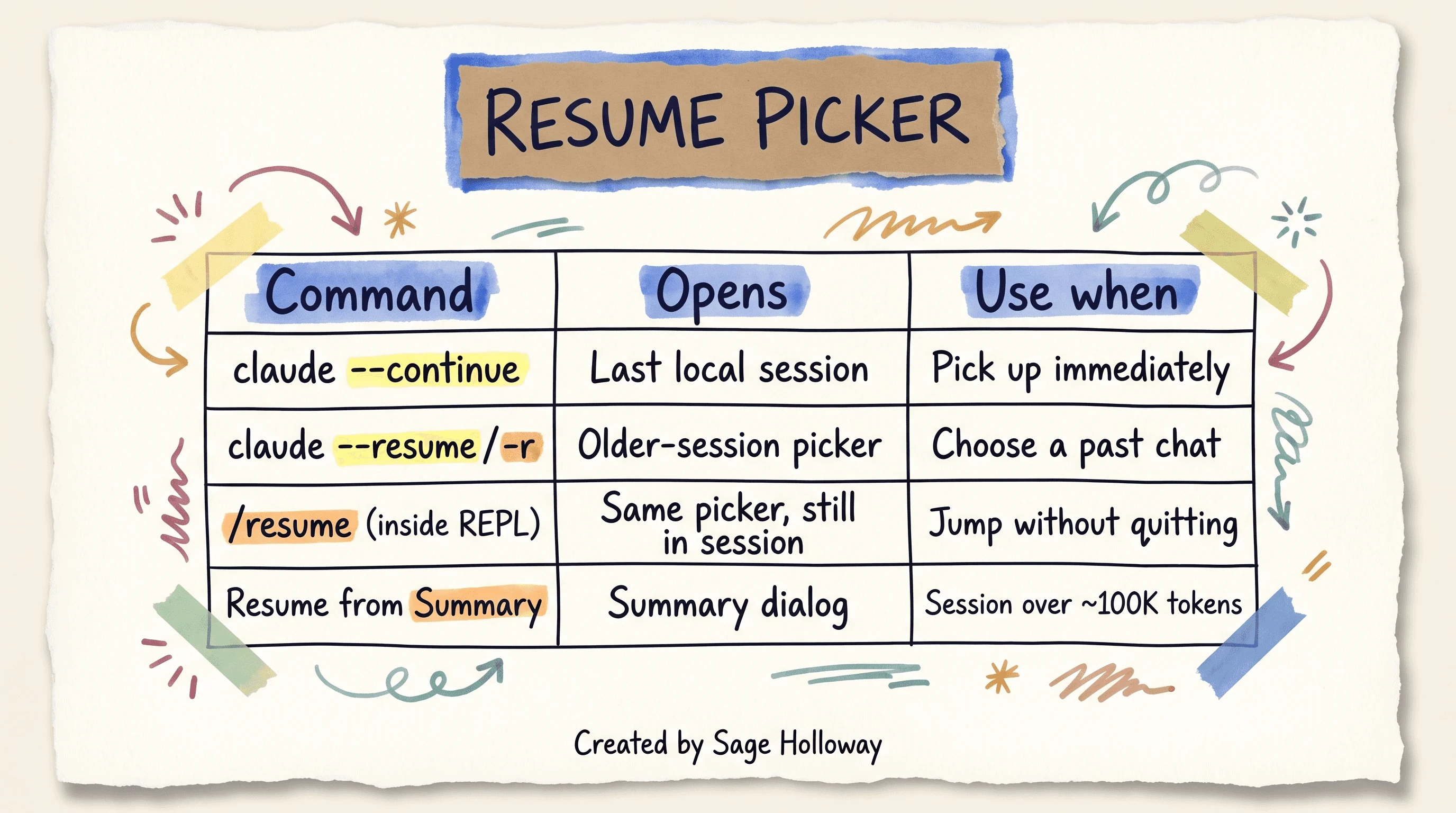
Use --continue for the last local chat. Use --resume or /resume to pick an older session. Sessions over about 100K tokens may offer Resume from Summary.
Session picker, /resume, and rewind keys
You do not have to quit to jump. Inside the REPL (the interactive loop: you type, Claude answers, tools run), /resume opens the same kind of picker without leaving the process. That is the move when you realized you are in the wrong thread and you still have coffee.
Long sessions can offer a Resume from Summary dialog once you are over about 100K tokens. That is a cache-and-summary path, not a magic rewind of every tool log. Treat it as “keep going from a compressed spine,” not “I still have the entire Monday dump in RAM.”
Keys matter more than people admit.
Single-tap Escape interrupts a mid-response. The context stays. You stopped the current generation.
Double-tap Escape opens the rewind menu. You can roll back messages and undo file changes from that session. That is the “I watched it walk into the wrong room” key, not the “stop talking” key.
HowTo, if you want the boring sequence that actually works:
cdinto the project you were in when the chat existed.Run
claude --continuefor the last local chat, orclaude --resumeto pick an older one.If you are already inside a session and need a different thread, run
/resume.If the model is mid-wrong, single-tap Escape to interrupt. If the last edits were the mistake, double-tap Escape and rewind.
When the thread is worth keeping as prose,
/exportit (we will do that in its own section).
Confused about which flag? Fair enough. Last session: continue. Any other session: resume. Already inside: /resume.
Where JSONL files live (~/.claude/projects/)
Claude Code maps your absolute working directory into a folder name by replacing slashes and other non-alphanumeric characters with hyphens. /Users/me/proj becomes something like -Users-me-proj. Transcripts live under ~/.claude/projects/<that-name>/ as <session-id>.jsonl.
That hashing is why copying a JSONL into a random folder and hoping resume finds it can fail. The lookup is path-shaped. Duplicate hand-copied transcripts can produce a hard not-found. Do not treat the home directory like a junk drawer of cloned chats.
Why does this matter on a second laptop? Because the drawer name is the path, not a friendly project nickname.
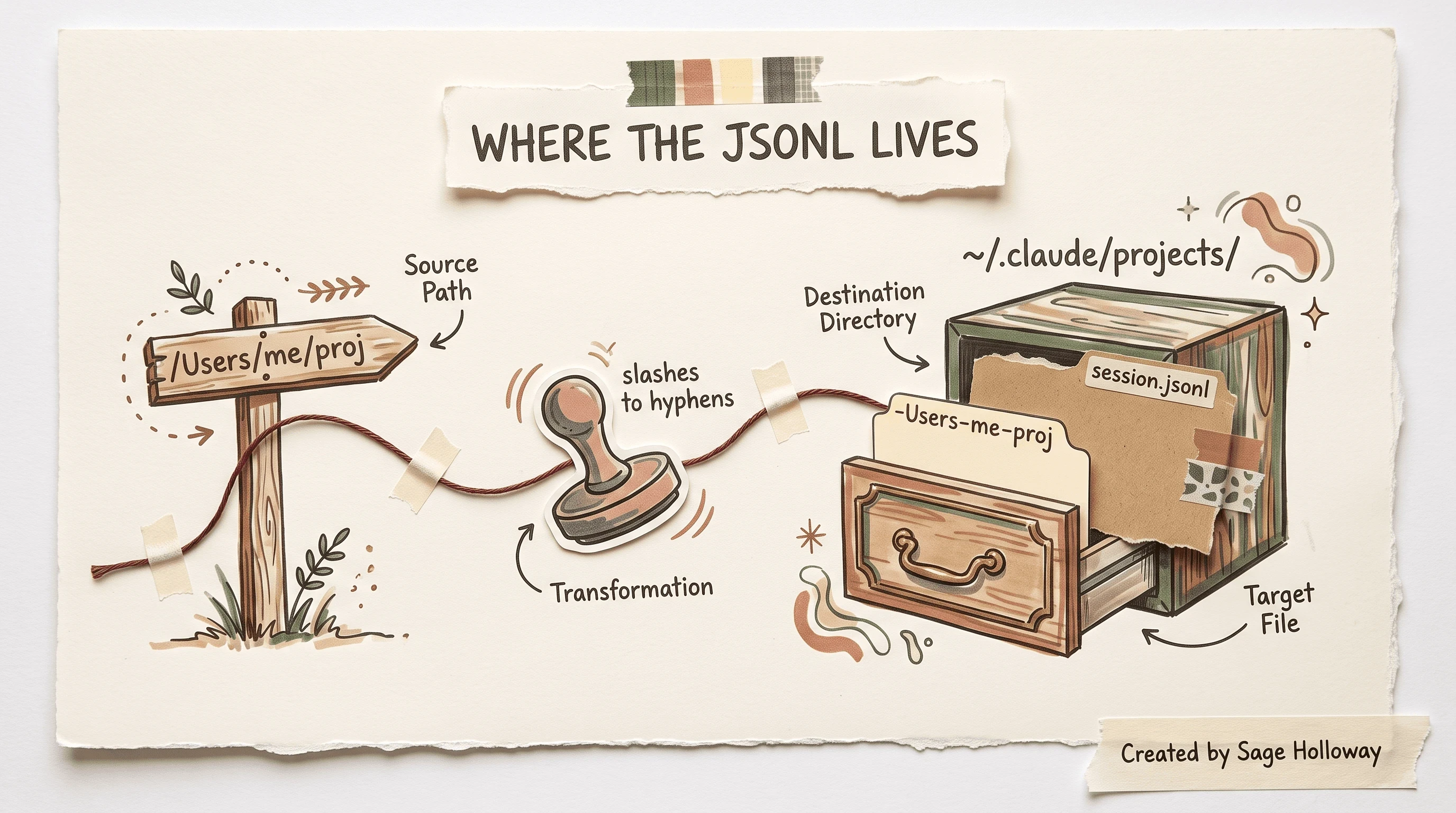
Claude Code stores JSONL transcripts under ~/.claude/projects/. The folder name is the absolute path with slashes replaced by hyphens.
Local files are not immortal. cleanupPeriodDays in ~/.claude/settings.json defaults to 30. That sweep prunes session transcripts, checkpoints, backups, and related local records. Resume cannot find what the sweeper already took.
If you need a human-readable copy, export. If you need longer local retention, raise the integer. Those are two different jobs.
Git worktrees share auto-memory hashing with the repo. Session JSONL still keys off path. If you need the worktree workflow itself, that depth lives on Claude Code worktree. Here we only need the sentence: same repo, shared auto-memory directory; different path, different session drawer.
CLAUDE.md as durable session rules
CLAUDE.md is the laminated fridge card. You write it. Claude re-reads it from disk. Official memory docs treat it as the place for build commands, style rules, and the facts you refuse to re-argue.
It has no length cap in the same sense as auto memory. Compaction can summarize chat history. It does not get to “forget the law” the way a truncated diary forgets a grocery line.
Put rules you would tattoo on the project here: how to run tests, which directories are generated, what “done” means. Do not dump a week of debugging narrative into it. Narrative belongs in the session, or in topical memory files, or in an export you actually read.
CLAUDE.local.md is the same idea with a gitignore. Local URLs, sandbox credentials, the weird printer on your desk. Keep secrets out of the committed file. Keep the committed file useful to the next clone.
Managed settings can inject org-wide instructions through the claudeMd key in managed-settings.json. That is how a company ships a floor of rules without hoping every laptop copied a wiki page.
One setting to stop using: includeCoAuthoredBy is deprecated. Attribution now lives under attribution.commit and attribution.pr. Old blog snippets that still toggle the first key are leftovers.
Path-scoped rules, excludes, and import depth
Monorepos need scoping. .claude/rules/ holds on-demand rules instead of one giant root essay. claudeMdExcludes keeps Claude from swallowing a nested CLAUDE.md you never meant as global law (a generated package, a vendor tree, a playground).
Imports are recursive up to 4 hops. Past that, the chain stops. Path patterns share one brace-expansion budget: 1,000 patterns and 4 MiB. If you blow the budget, literal braces get matched instead of expanded. That sentence sounds fussy until a glob silently stops meaning what you typed.
The honest admission: I have watched people “optimize” CLAUDE.md by deleting adjectives while the agent was still reading entire log files into the same window. The rules file was never the leak. We will get to the leak in the cost section.
Claude Code memory and /memory
Claude Code memory is the grocery pad: auto-written notes the product thinks will help later. It is not CLAUDE.md. Early Reddit threads (including r/ClaudeAI’s discovery post) treated the feature like a secret brain.
The useful version is more boring. There is a directory. There is an index file. There is a cap. There is a slash command.
The interactive command is /memory. It is the REPL surface for toggling and browsing auto-memory paths. Secondary search traffic that looks like claude code /memory is this command, not a second product.
Default storage is machine-local: ~/.claude/projects/<project>/memory/. All worktrees of the same Git repository share that directory because the hash comes from the common repo, not from each worktree path. That is convenient. It is also how a note you made on a spike branch shows up while you are on main.
Disable it if you do not want unsupervised notes:
Setting CLAUDE_CODE_DISABLE_AUTO_MEMORY=0 forces it on. autoMemoryDirectory in ~/.claude/settings.json or .claude/settings.local.json relocates the folder. The path must be absolute or start with ~/.
The # inline memory prefix is discontinued. Old comments still teach it. Do not.
Vendor blogs (Mem0, Milvus) are useful for the cap and for Auto Dream, and they are selling a vector plugin. Native markdown is the default. Third-party layers like memsearch or mem0 exist if you need a shared format across tools. They are not an H2 on this page.
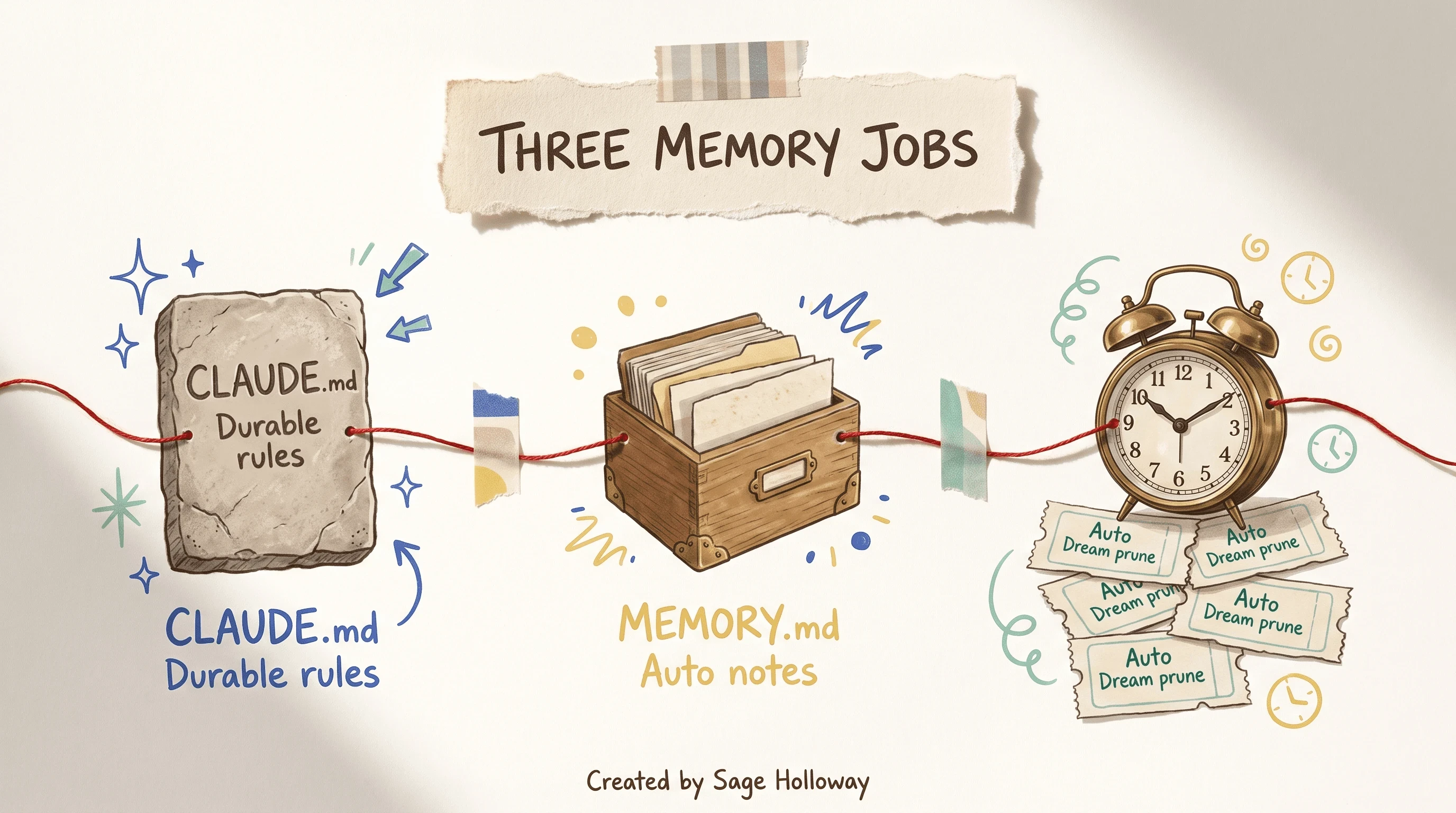
Keep durable rules in CLAUDE.md. Auto memory writes MEMORY.md. Auto Dream prunes only after both time and session gates fire.
The silent MEMORY.md truncation cliff
MEMORY.md is the index. Community and leak-class write-ups put a hard ceiling on it: 200 lines or 25KB. Past the cap, extra lines drop on load. No toast. No “we trimmed your diary.” The newest facts at the bottom can vanish while the stale facts at the top look official.
Treat MEMORY.md as pointers: user.md, feedback.md, project.md, a debugging file, a decision file. Claude can lazy-load topical files. It cannot recover lines the loader already threw away.
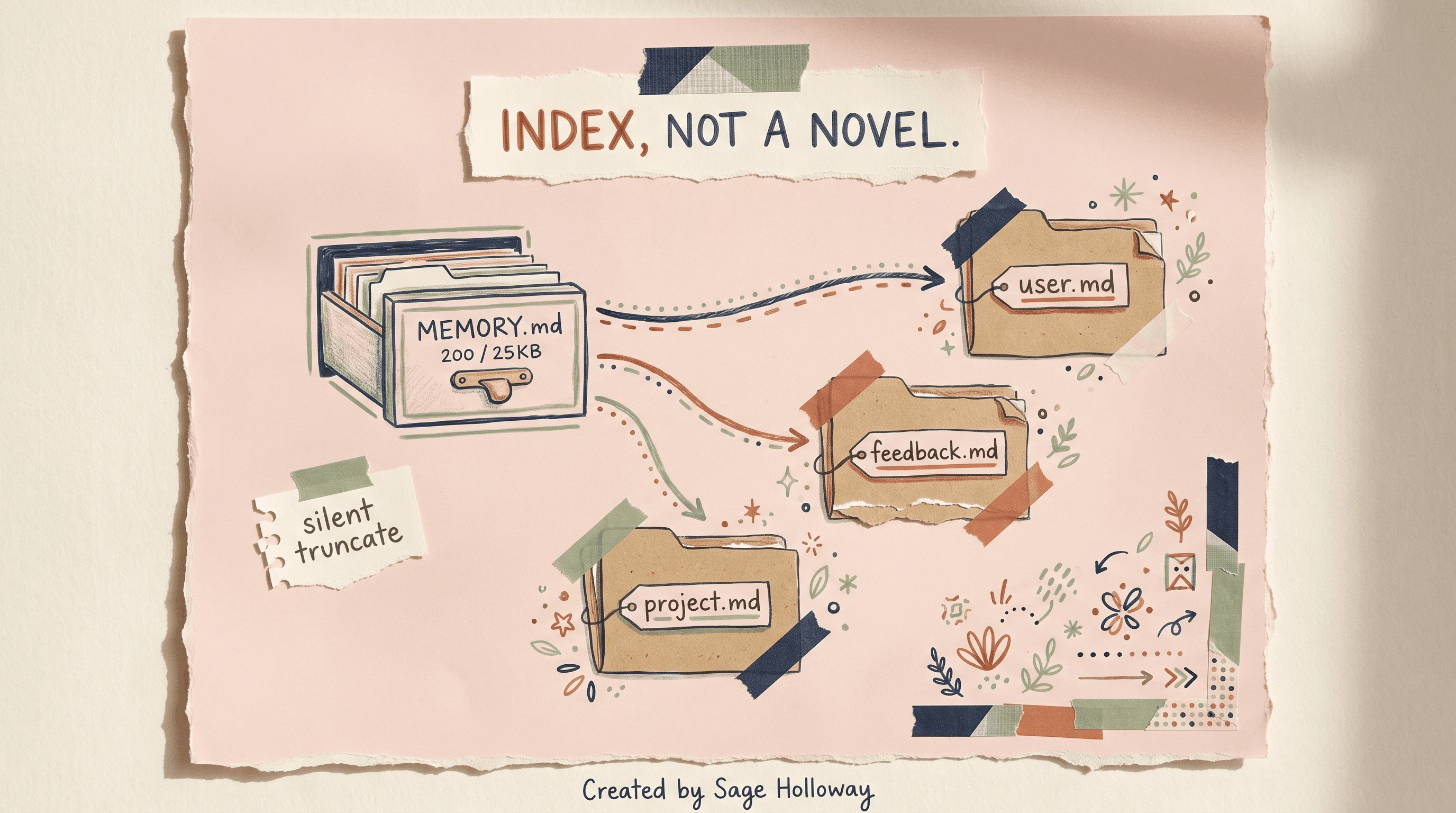
Treat MEMORY.md as a 200-line or 25KB index. Lines past the cap are silently dropped. Point it at topical files instead of stuffing the index.
The Sage observation sits here, not in the kitchen.
You were shaving adjectives off a rules file while auto-memory was quietly dropping the only sentence that would have saved Thursday.
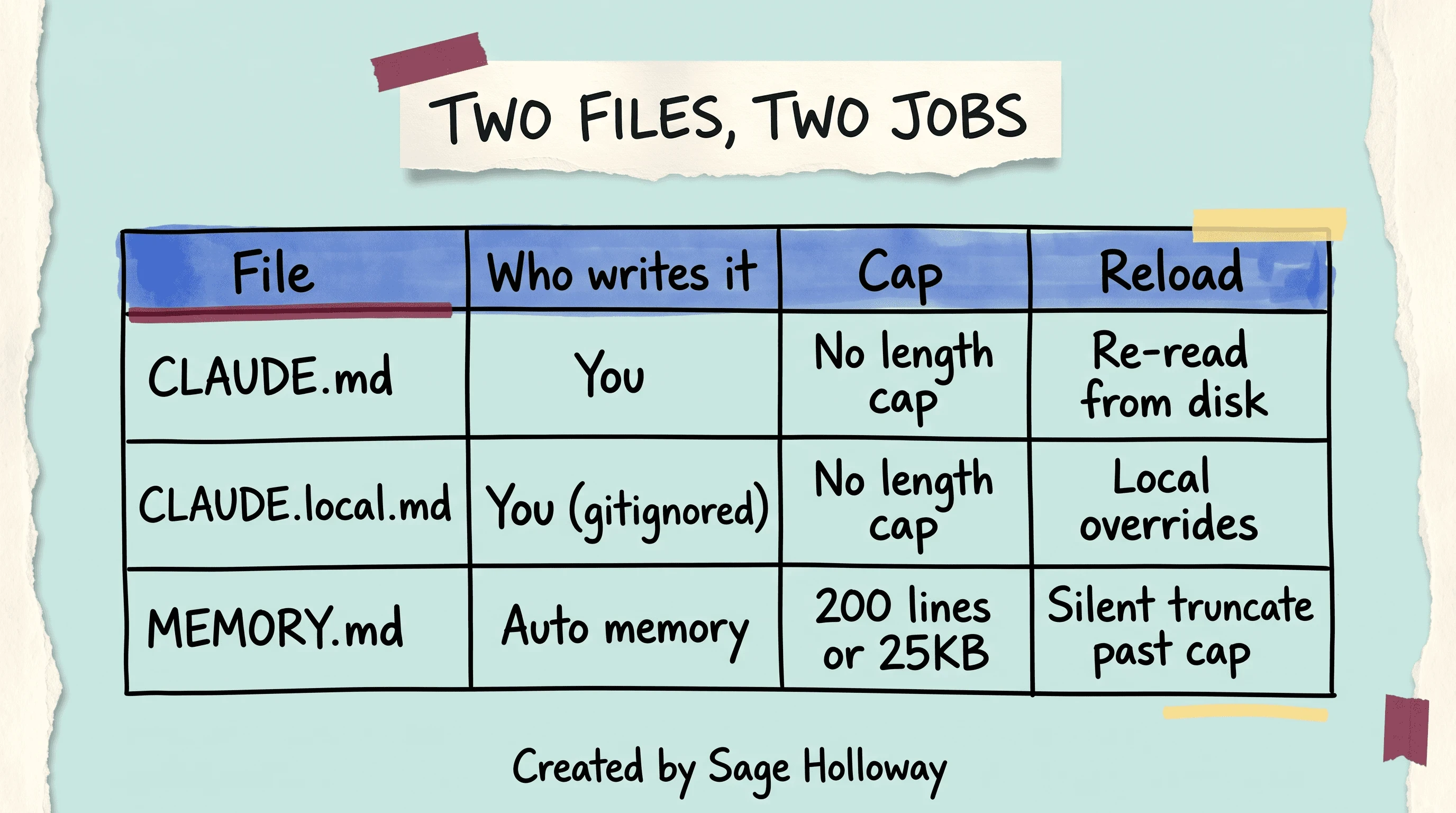
CLAUDE.md has no length cap and is re-read from disk. MEMORY.md is auto-written and silently truncates past 200 lines or 25KB.
If you have ever hit this wall, it felt like the model “forgot a preference.” Often it did not forget. The index overflowed and the preference was in the part that got cut.
Auto Dream consolidation
Auto Dream is the nightly tidy, with a catch. It is not “24 hours later, always.” It is not “five sessions, always.” Consolidation runs when more than 24 hours have passed since the last cleanup and at least five sessions have accumulated. One gate true is a miss. Both gates true is a prune of stale auto-memory.
That AND is why a busy afternoon does not trigger a dream, and why a quiet weekend with two chats also does not. People who want continuous cloud personalization from claude.ai are looking at a different 24-hour story on a different product.
Waiting on a dream to clean a stuffed index? You waited on the wrong broom.
cleanupPeriodDays is a different broom. Default 30 days. It deletes local JSONL and related files, not the same thing as Auto Dream rewriting memory notes.
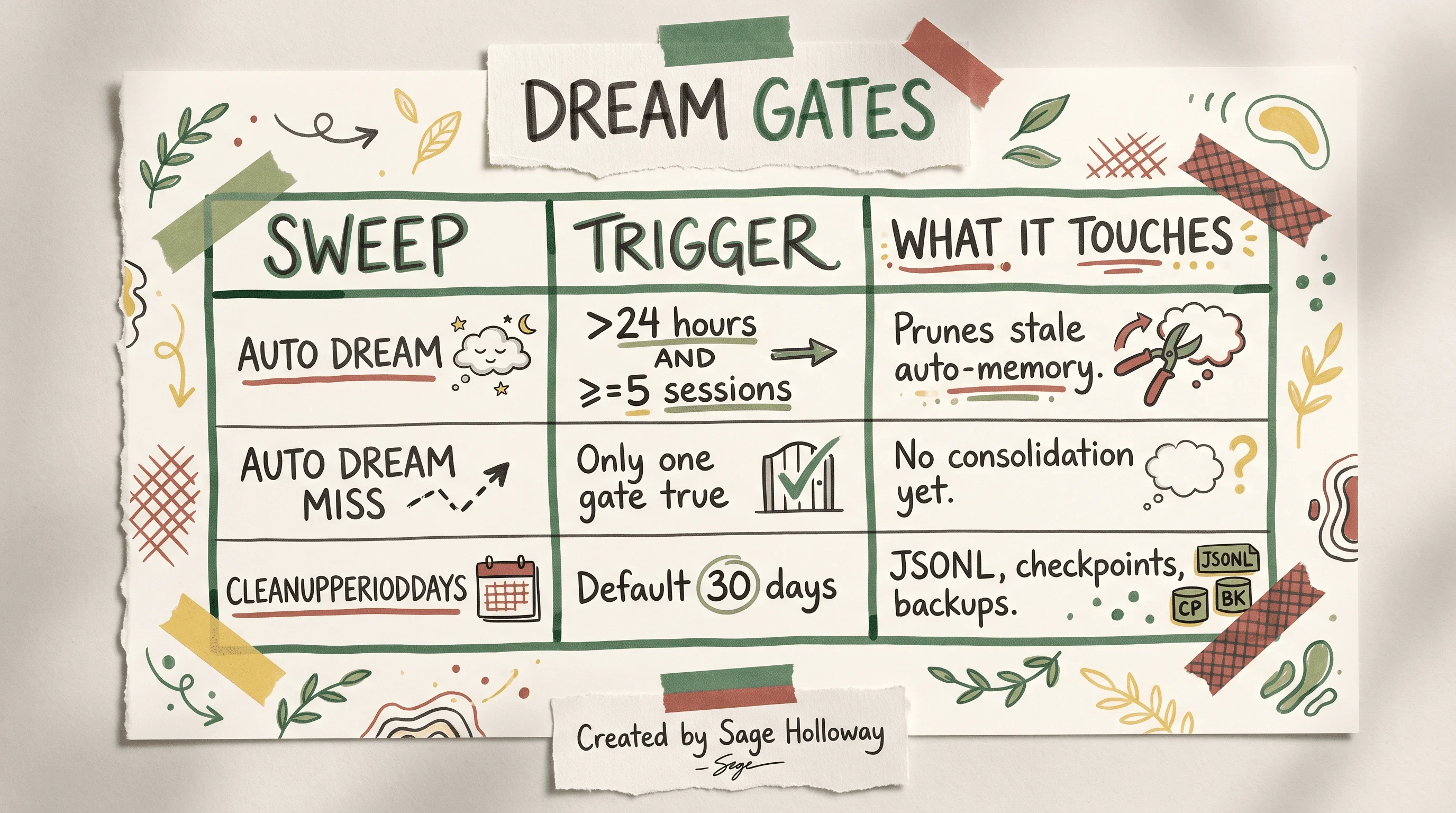
Auto Dream runs only when more than 24 hours have passed AND at least 5 sessions have accumulated. cleanupPeriodDays (default 30) prunes local JSONL files separately.
How forget/prune actually feels: stale notes get consolidated so the index does not grow forever. Useful facts can get summarized into something vaguer. If a fact must survive every dream, promote it into CLAUDE.md or a topical file you own. Do not trust a grocery pad to be a contract.
Practical cost engineering for long sessions
But here is the thing.
A 1M token window made the old religion look wise and then made it cheap. Older guides told you to micro-trim CLAUDE.md because a 200K window made every line feel like rent. Under a 1M window, system overhead in the neighborhood of 8,700 to 12,000 tokens is small. The crates that fill the room are tool results: whole-file reads, verbose test output, unbounded greps.
Mukesh’s anatomy of a session is the right kind of engineering here: tokens go to the loop, not to your adjectives.
So what do you actually do?
Compact on purpose. /compact summarizes history before the automatic tripwire. Auto compact fires at about 92% to 95% of the window. Waiting for that is waiting until the room is already a fire hazard.
Compact around 60% while you still know what the thread is about. Topic-focused compact is better than a vague “make it smaller.” The slash catalog for every compact flag lives on Claude Code slash commands. This page only owns the session-level habit: compact early, compact on purpose.
Throttle reads. Prefer --limit and targeted grep ranges over “read the whole module.” A 2,000-line file is not a vibe. It is a crate.
Offload exploration. Sub-agents nest up to 3 layers (CLAUDE_CODE_MAX_SUBAGENT_SPAWN_DEPTH overrides). Since v2.1.198 they run in the background by default. CLAUDE_CODE_DISABLE_BACKGROUND_TASKS turns that off if you need the old wait-and-see feeling. Older posts that treat sub-agents as a single blocking intern are dated.
Plan Mode is still the right posture when you should not be burning tool output yet. That product lives on Claude Code Plan Mode. Dollar math for seats versus API lives on Claude Code Pro pricing. Neither page replaces this one: this is how a long session goes broke even when the plan is “fine.”
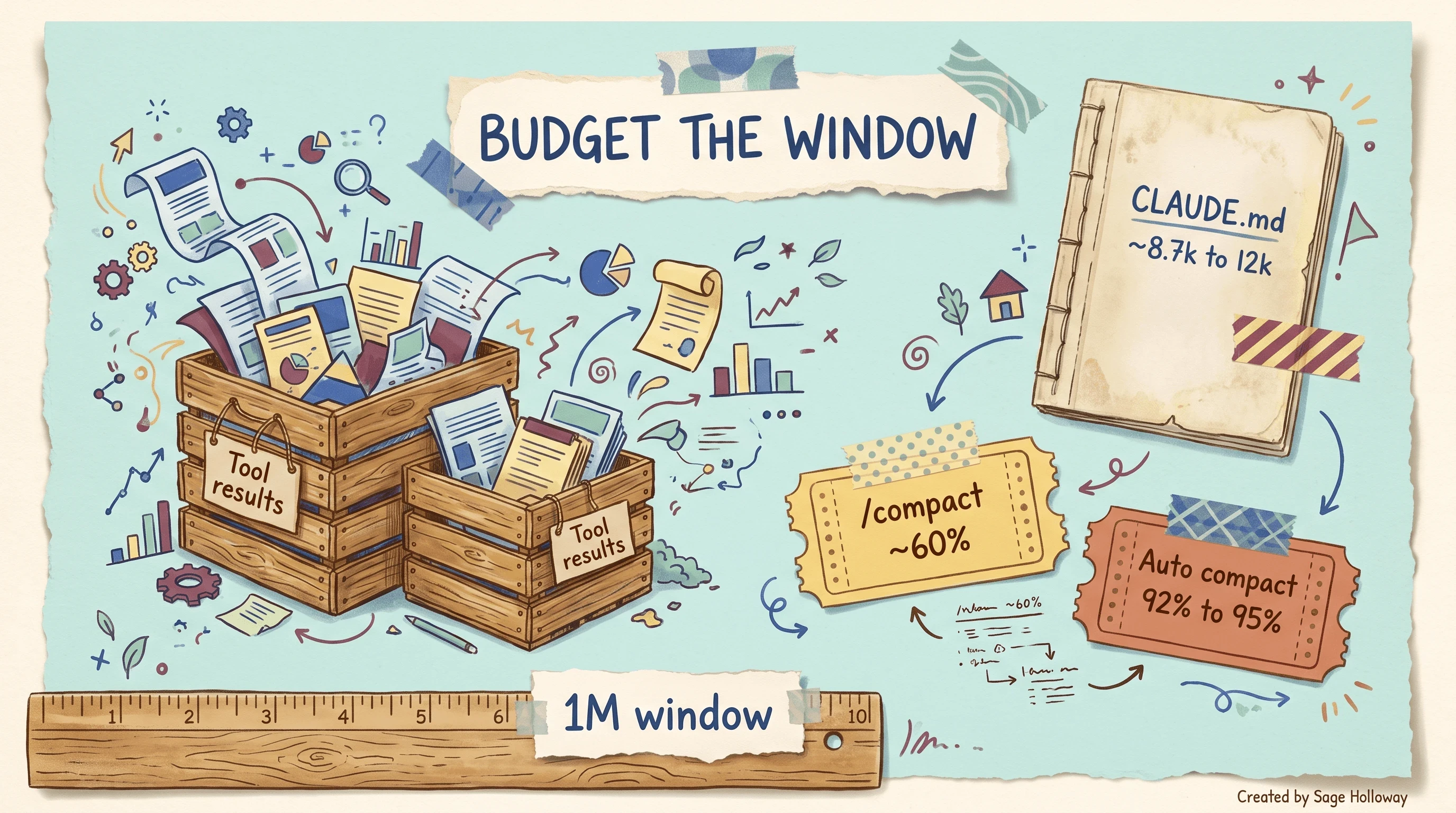
Under a 1M window, tool results exhaust context. Compact around 60 percent instead of waiting for auto compact at 92 to 95 percent.
The contrast is ugly and useful: a few thousand tokens of rules versus eight to fifteen thousand for one fat file read. Shave the file read.
Save, export, and download a conversation
claude code save conversation is usually this: you want a markdown file you can commit, paste, or archive. Inside the session, /export writes a plain-text transcript. /export filename.md skips the menu and names the file.
That is Claude Code. On disk. Yours.
Third-party names you will see in search (SpecStory, Marketplace session UIs, PromptLayer traces) are not native exporters. Mention them so you do not think they are missing buttons in the CLI. Do not wait on them.
JSONL under ~/.claude/projects/ is the raw log. Export is the readable copy. Retention is still cleanupPeriodDays. Export before day 30 if the default sweep is still in place and you care.
Claude Code /export versus claude.ai data download
Searchers type how to download a claude chat session and often mean the website. Anthropic’s account export is a ZIP/JSON dump of claude.ai (and related cloud) data. Official how-to: How can I export my Claude data. Cloud personalization memory on a 24-hour refresh is that product family. It is not MEMORY.md.
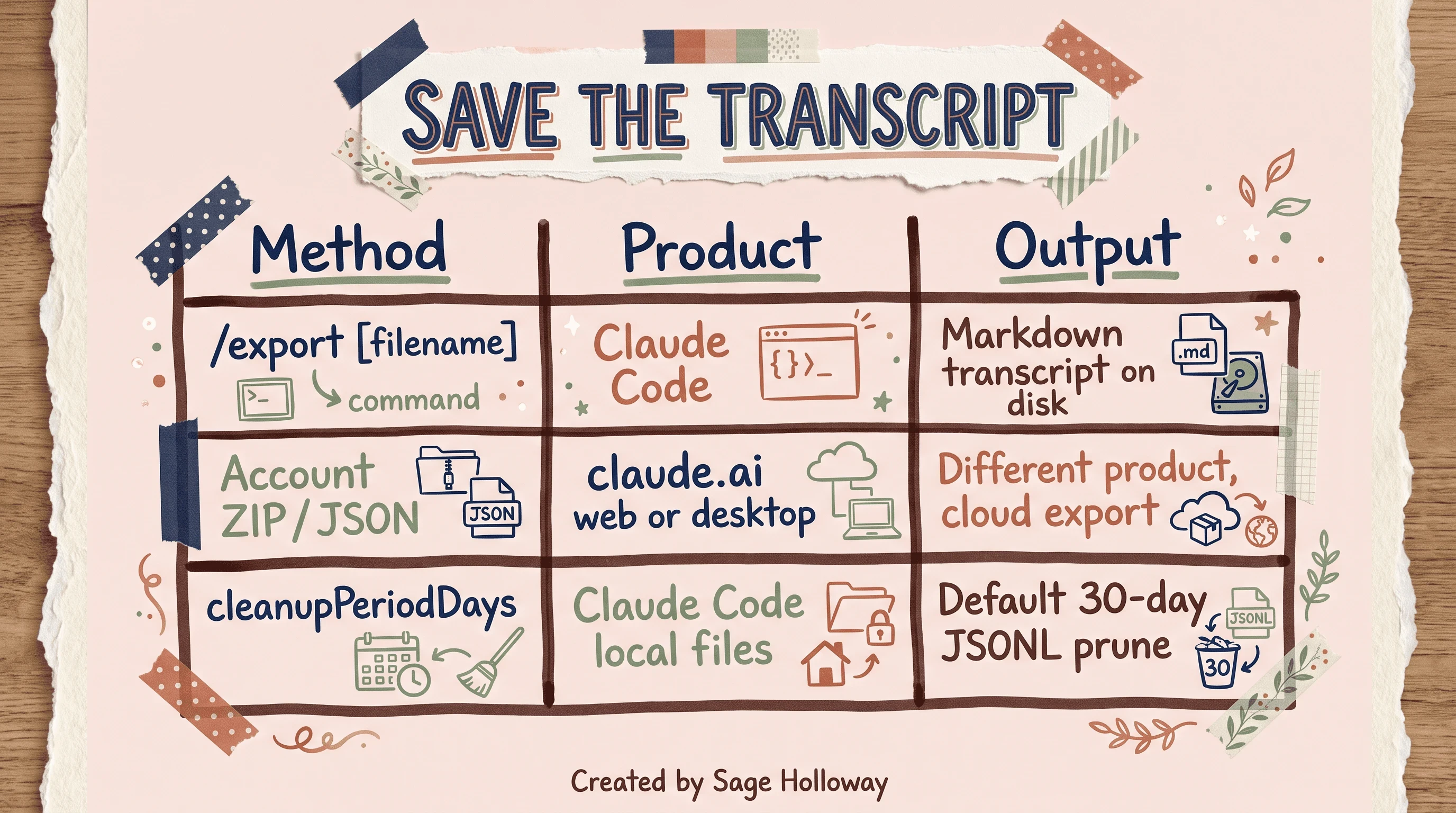
In Claude Code, /export writes a markdown transcript. The account ZIP is a different product. Local JSONL files prune after cleanupPeriodDays (default 30).
If you only remember one split: terminal transcript is /export. Browser history ZIP is account settings. Mixing them is how people open a support article and then grep their home folder in confusion.
Hooks that inject memory before tools
Hooks are shell (or script) gates on the agent loop. PreToolUse runs before a tool fires. You can inject a slice of project memory, a formatter, a “do not touch generated/” check.
Exit codes are the whole interface.
Exit 0: success, continue. Exit 2: block the tool. Any other code: ignored, non-blocking. That last line is the foot-gun. You thought exit 1 was a hard no. The loop treated it as a shrug.
acceptEdits and dontAsk are permission modes. They are not memory files. They decide how noisy the permission prompts are, not where MEMORY.md lives.
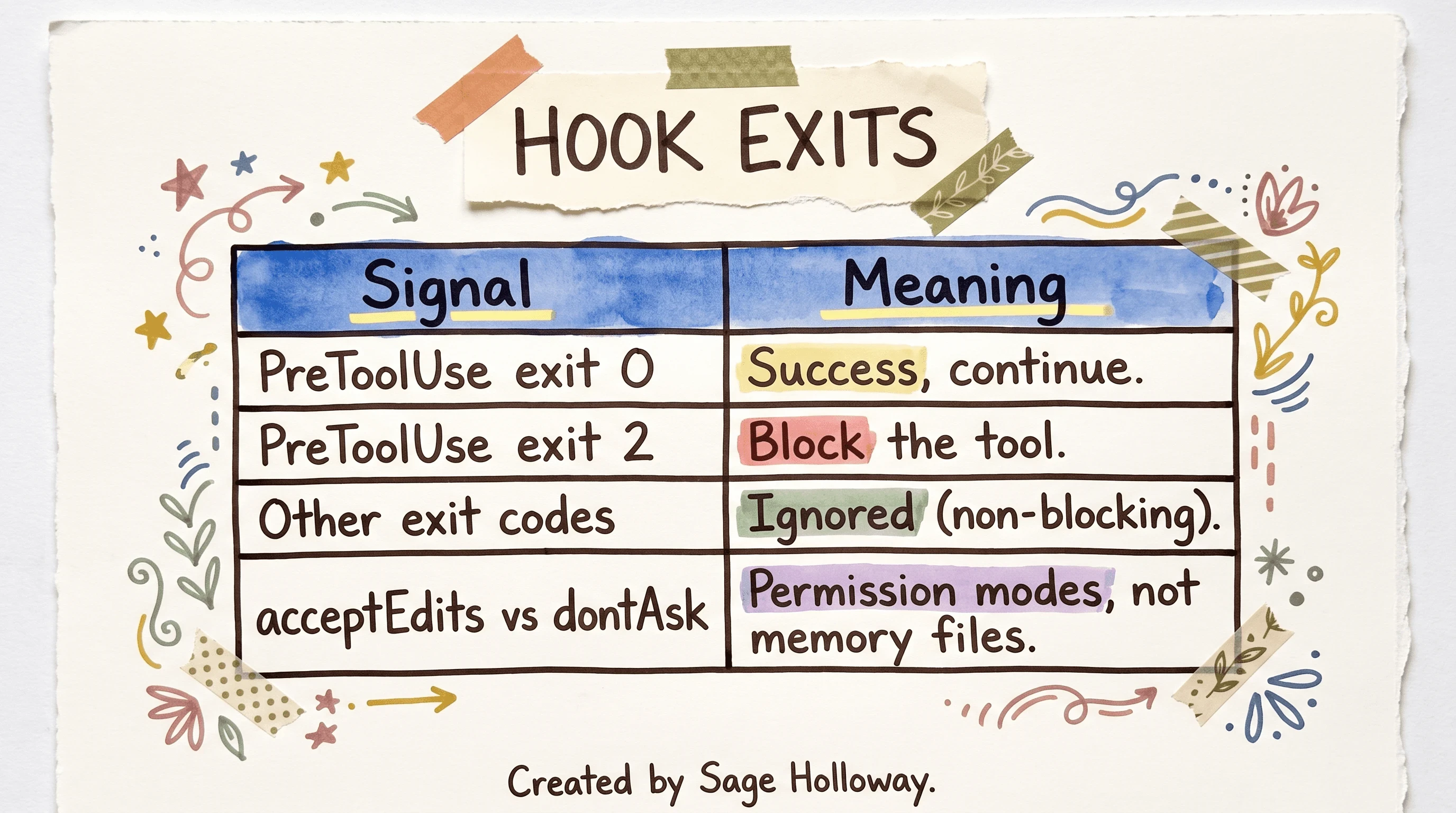
PreToolUse exit 0 succeeds and exit 2 blocks. Other exit codes are ignored. acceptEdits and dontAsk are permission values, not memory files.
Young Leaders in Tech’s memory write-up uses a PreToolUse script to inject the right notes. PPID (parent process id) tricks can break inside multiplexers. If your hook is clever about process trees, test it in the terminal you actually use.
Do not turn this section into a slash-command encyclopedia. That catalog is Claude Code slash commands.
Isolated sessions, worktrees, and bridges
Two terminals in two directories do not share chat context. They can share auto-memory if they are worktrees of the same Git repo. They can see extra trees if you pass --add-dir, and CLAUDE_CODE_ADDITIONAL_DIRECTORIES_CLAUDE_MD=1 lets additional directories contribute CLAUDE.md. That is still not “the two agents are talking.”
Want a library session to warn a consumer session about an API break? You need a mailbox, not hope.
Shreyas Patil’s session-bridge pattern is a local file mailbox (conceptually under ~/.claude/session-bridge/): one session writes a note, the other polls it. About 5 to 10 seconds of latency. One machine. Not a network protocol. Not CI.
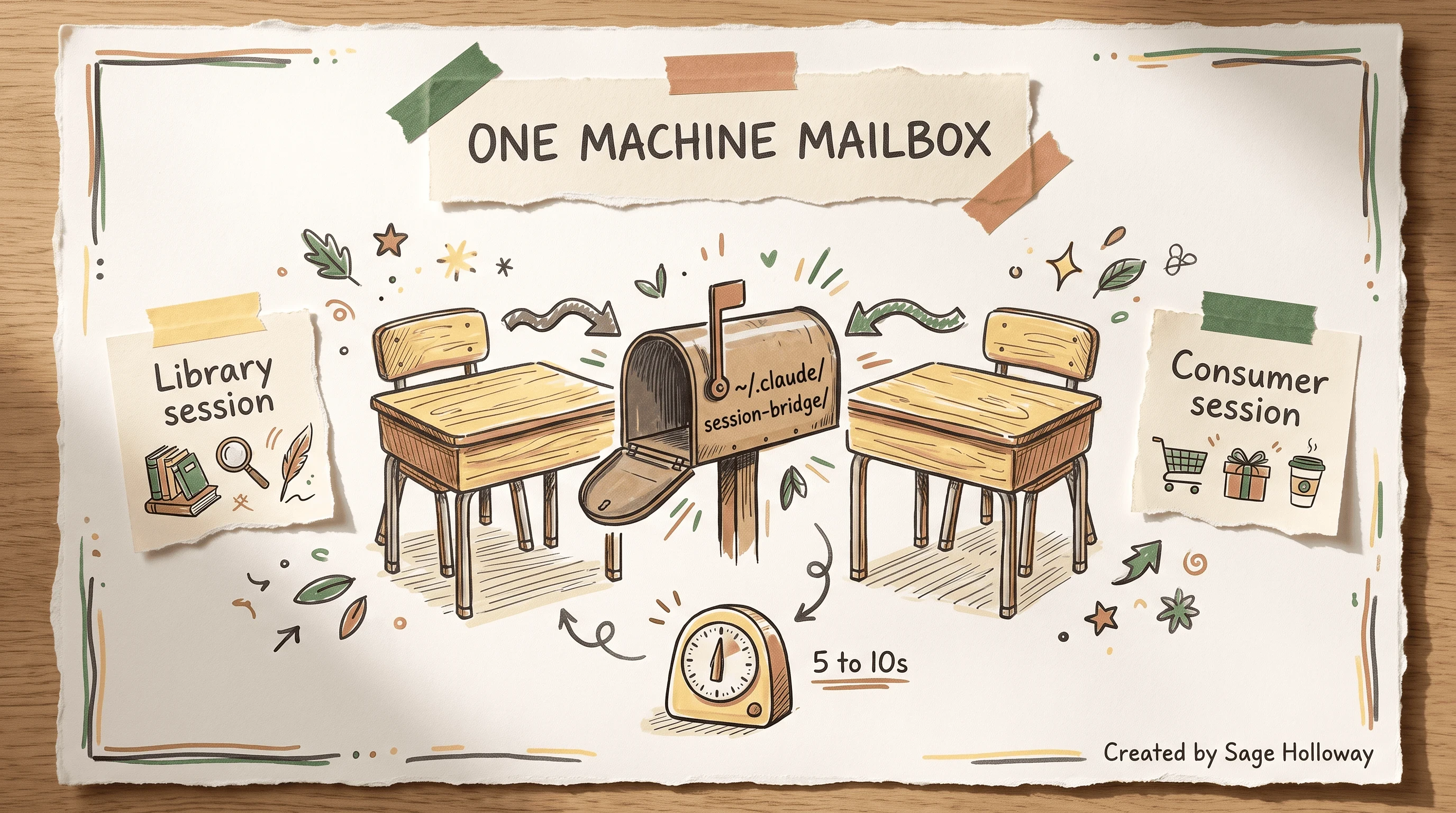
Isolated terminals do not share chat context. A local file mailbox (session-bridge style) can pass notes on one machine, with about 5 to 10 seconds of latency.
If you need sessions that survive containers and CI runners, that is the Agent SDK’s SessionStore story: JSONL is machine-local unless you adapt storage. Official page: Work with sessions (Agent SDK). Depth belongs on Claude Code SDK. Worktree mechanics belong on Claude Code worktree.
Native memory does not speak OpenCode’s format. If you need a shared brain across harnesses, you are in plugin territory (memsearch, mem0, and friends), which is why Claude Code alternatives exists.
FAQ
How to download a Claude chat session?
In Claude Code, run /export or /export filename.md to write a markdown transcript of the active conversation. That file is the download for a local CLI session. If you meant claude.ai in the browser, use Anthropic’s account data export (ZIP/JSON) from the official export article. Those are different products.
How can I save or export an active Claude Code conversation?
Stay in the session and run /export. Add a filename when you already know where it should land. The JSONL under ~/.claude/projects/ is the raw log; export is the readable copy you can archive before cleanupPeriodDays (default 30) prunes local files.
Where are Claude Code session transcripts stored on disk?
Under ~/.claude/projects/<hashed-project-path>/<session-id>.jsonl. The folder name is your absolute working directory with slashes and other non-alphanumeric characters turned into hyphens. Resume looks up that shape; random copies in random folders often miss.
How do I resume an older session?
Run claude --resume or claude -r from the project directory and pick the chat. claude --continue is only the last local session. If you are already inside the REPL, /resume opens the picker without quitting. Sessions over about 100K tokens may offer Resume from Summary.
Can I stop local session files from being removed after 30 days?
Yes. Set cleanupPeriodDays in ~/.claude/settings.json. The default 30-day sweep removes transcripts, checkpoints, backups, and related local records. Raising the integer keeps JSONL longer; it does not replace /export if you want a markdown file in git.
How do I change where auto-memory is stored?
Set autoMemoryDirectory in user settings (~/.claude/settings.json) or project-local settings (.claude/settings.local.json). Use an absolute path or a ~/ prefix. Default remains ~/.claude/projects/<project>/memory/ when you do not override it.
Does auto-memory work across Git worktrees?
Yes. Worktrees of the same repository share one auto-memory directory because the project hash comes from the common Git repo. They read and update the same MEMORY.md index. Session JSONL still follows path hashing, so chats stay per working directory.
What is the difference between CLAUDE.md and MEMORY.md?
CLAUDE.md is human-curated durable rules, no auto-memory line cap, re-read from disk, and it survives compaction as a file on disk. MEMORY.md is auto-written, treated as a 200-line or 25KB index in leak and vendor write-ups, and extra lines truncate silently. Put law in the first file. Put pointers in the second.
Can Claude Code share memory with other coding agents?
Not natively. Claude Code memory stays in its local directory without a cross-agent protocol. Plugins such as memsearch or mem0 try to standardize notes (often markdown plus a vector index) so more than one harness can read them. That is an extra layer, not a built-in bridge.
The ribbon only helps if you leave it in the book. The industry will keep shipping bigger windows. Bigger windows make it easier to pretend you do not need hygiene. I am not sure the 1M number stays the interesting number. I am sure tool output will keep arriving in crates.
If you try one thing this week, resume last night with claude --continue, open MEMORY.md and count the lines, then /export one transcript you would actually miss after 30 days. If install is still the blocker, start with Install Claude Code. If the session is long because you never planned, start with Claude Code Plan Mode. Subscribe if you want the next guide in this series before it hits search.
Until then...
Sage
PS. Tonight, open the auto-memory index and count out loud until you would need a 201st line. If you never get there, write one fake extra paragraph anyway, then delete it. The point is to feel the cliff with your mouth, not to discover it the week a preference disappears.
Author
Practical guides, tool teardowns & AI engineering workflows.


