Claude Code
Claude Code Worktree: Parallel Sessions Without File Conflicts

Sage Holloway
22 min read
Go back to blog
SHARE

You open a second terminal to ship a hotfix while the feature branch is still mid-edit. Two agents, one folder, one shared working copy. The first session rewrites a file the second just finished. You stash, you panic-clone, you lose an afternoon to cleanup. The models were fine. The workspace was the collision.
Claude Code's native worktree feature, invoked via the --worktree or -w flag, isolates parallel AI sessions in dedicated directories under .claude/worktrees/ on unique git branches. It enables concurrent tasks without cloning the repo, stashing changes, or risking file collisions, with automatic cleanup for clean unnamed worktrees and custom hooks for environment setup.
This guide is for people who already have Claude Code installed and want parallel sessions that do not trash each other. Commands and config keys come from NotebookLM research dated 16 August 2026 plus the official worktrees docs and common workflows. No live CLI verify on this draft. Prefer those docs when a blog disagrees. Native worktrees shipped in Claude Code v2.1.49 (February 2026) and kept growing through later releases.
This will not work if your repo has zero commits (HEAD cannot resolve), if .claude or .claude/worktrees is a symlink, or if you expect file isolation alone to fix shared ports and shared databases. Those last two need explicit runtime setup. We cover that in the gap section.
If you still need the host binary, start with Install Claude Code. This page assumes claude already runs.
Claude Code worktrees give each session its own working tree while sharing one git object store, so parallel work does not collide.
Shared Object Store vs Per-Worktree Working Trees
You know the before picture.
One checkout. One working tree. You ask Claude to finish auth while another session patches a production bug. Both write into the same files. Git refuses to check out the same branch twice for a reason. Manual stash and branch hopping eat the afternoon. Full clones fix the collision by burning disk and fetch time on every copy of history.
The after picture is quieter.
You keep one repository’s object store (the shared history, the packfiles, the refs that already exist). You attach extra working directories to that store. Each directory has its own branch tip, its own dirty files, its own node_modules or bin/obj if you install there. Sessions stop fighting over the same path.
Think of a restaurant with one walk-in cooler and three prep stations. The cooler holds inventory once. Each station has its own board, its own mise, its own ticket rail. When the lunch rush hits, the grill station does not knock pastry dough onto the floor. The stations share inventory. They do not share cutting boards.
That cooler-and-stations split is what git worktree Claude Code workflows are borrowing from plain Git. A worktree is an extra working directory tied to the same object store. Claude Code wraps that idea so you can launch parallel AI sessions without inventing folder layouts by hand.
Dan Does Code’s parallel vibe-coding write-up frames the expensive bad path clearly: cloning the whole repo for every parallel agent duplicates history for no gain. Worktrees keep one store and many trees. That is the mechanism under every claude code worktree search that is not just chasing a flag name.
What is shared vs isolated
Shared across worktrees of the same repository (from v2.1.63 onward in the changelog coverage sources use): project configs, custom agents, skills, and auto-memory. Your CLAUDE.md rules travel with the repo, not with one dirty folder. That is why settings feel consistent when you hop stations.
Isolated per worktree: the working directory itself, conversation history, installed dependencies, environment files, and build outputs. Session A’s chat does not bleed into session B. Session B’s .env copy is its own file unless you deliberately share it.
Claude Code also enforces isolation while a session is inside a worktree. It blocks Edit, Write, or NotebookEdit that target the main checkout. It blocks Bash or Monitor commands that redirect git into the main tree through git -C, --git-dir, GIT_DIR, or GIT_WORK_TREE. It refuses shell shapes it cannot statically verify, including brace expansion and heredocs with unquoted delimiters. Git itself still refuses to check out the same branch in two worktrees at once.
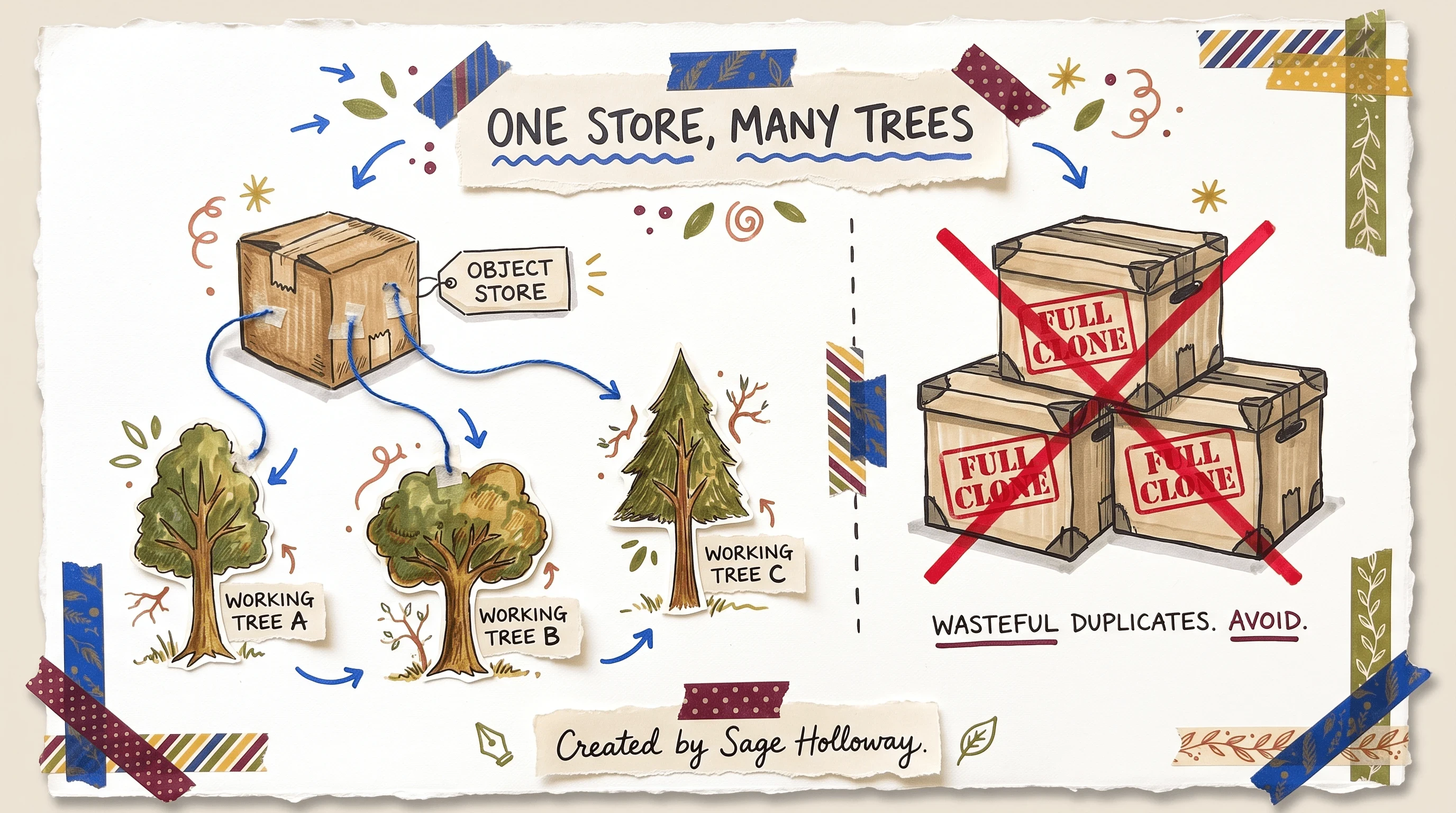
One object store, many working trees. Full clones duplicate history; worktrees do not.
Want the object-store idea with live terminals? Watch bri’s walkthrough, then come back for the native launch flags.
[EMBED: YouTube - https://www.youtube.com/watch?v=n35KalqEwJc ] Caption: Watch bri’s walkthrough of shared history versus isolated working trees, then keep reading for native --worktree launch.
Launching Sessions with --worktree and -w
Once the mechanism clicks, launching is the part people search as claude code worktrees or claude code git worktree. Official docs put the default under .claude/worktrees/<name>/ at the repository root, on a new branch named worktree-<name>. Add that path to .gitignore so temporary folders do not show up as untracked noise in the main tree.
Named launches look like this:
PR review checkouts take a pull request number with a # prefix, a GitHub PR URL, or a GitLab merge request URL:
Claude fetches the target branch and lands you under something like .claude/worktrees/pr-1234. You can run, test, and poke the change without parking your integration branch.
You can also ask Claude mid-session to work in a worktree, or use the EnterWorktree / ExitWorktree tools. From v2.1.157, EnterWorktree can switch between Claude-managed worktrees without exiting the product. That is the mid-session path when you started on main and only later realized the change needed isolation.
Native CLI vs plain git worktree add vs mid-session EnterWorktree
Three honest paths show up in the sources.
Native Claude CLI. Prefer this for day-to-day parallel sessions. Lifecycle prompts, default paths, and isolation rules come with the flag.
Plain
git worktree add. Useful when you want sibling directories outside.claude/worktrees/or you are protecting custom git aliases that wrappers break. Example pattern from tutorials:git worktree add ../project-feature-a -b feature-a, thencdinto that folder and runclaude.Mid-session EnterWorktree. Stay in one conversation, move the workspace under you. Good when the need for isolation appears after you already started talking.
Startup failure modes worth knowing before you blame the model:
Empty repo / no commits: creation fails with
Failed to resolve base branch "HEAD": git rev-parse failed. Commit once first.Workspace trust: interactive runs need trust, or
--worktreeexits with an error asking for it. Non-interactive-pskips the trust check.Symlinked paths: Claude Code refuses to create a worktree when
.claude,.claude/worktrees, or the worktree directory itself is a symlink.
Older team blogs (including incident.io’s June 2025 w bash helper) predates the native February 2026 flag. Treat those wrappers as optional convenience, not the canonical path. The creator announcement of built-in support is still useful context:
[EMBED: Threads - https://www.threads.com/@boris_cherny/post/DVAAnexgRUj/introducing-built-in-git-worktree-support-for-claude-code-now-agents-can-run-in ] Caption: Creator post announcing built-in git worktree support for Claude Code.
For deferred multi-file design before you isolate a branch, keep Plan Mode on its own spoke: Claude Code Plan Mode. Worktrees solve file collision. Plan Mode solves premature edits.
Lifecycle Cleanup and Housekeeping
Parallel sessions create folders. Folders become landfill if you never clean them.
Official behavior: if you exit a clean, unnamed worktree with no meaningful changes, Claude Code can remove the temporary directory and branch for you. If there are uncommitted changes, untracked files, or new commits, you get a Keep / Remove choice. Remove is destructive. It deletes the worktree directory along with uncommitted work, untracked files, and those commits.
WorktreeRemove hooks exist for teardown scripts (drop a temp database, prune a docker compose stack). They fire-and-forget. They cannot block removal. Design them as cleanup only.
When you need the manual git toolbox:
list shows what is attached. remove tears down a known path. prune cleans stale registrations. Unlock first if Git has locked a worktree you need to delete.
Windows note from the docs: removing a worktree does not delete files outside it. If a folder inside the worktree is really an NTFS junction or directory symlink, Claude Code deletes only the link and keeps the target. Do not assume junction targets vanish with the worktree.
Named worktrees you intend to resume later should be Kept on purpose. Resume with claude --continue for the most recent session, claude --resume to pick from a list, or cd into .claude/worktrees/<name> and launch claude there. Session hygiene details live on Claude Code Sessions when you need transcript paths and export habits.
Environment Setup: .worktreeinclude, WorktreeCreate Hooks, and the Silent Trap
A fresh worktree is a clean directory. Your gitignored .env did not come along for free. Neither did node_modules. That is why so many first launches crash before the agent writes a line of product code.
Four restore paths show up across docs, Mukesh’s .NET guide, Reddit CLAUDE.md scripts, and the cwt TUI:
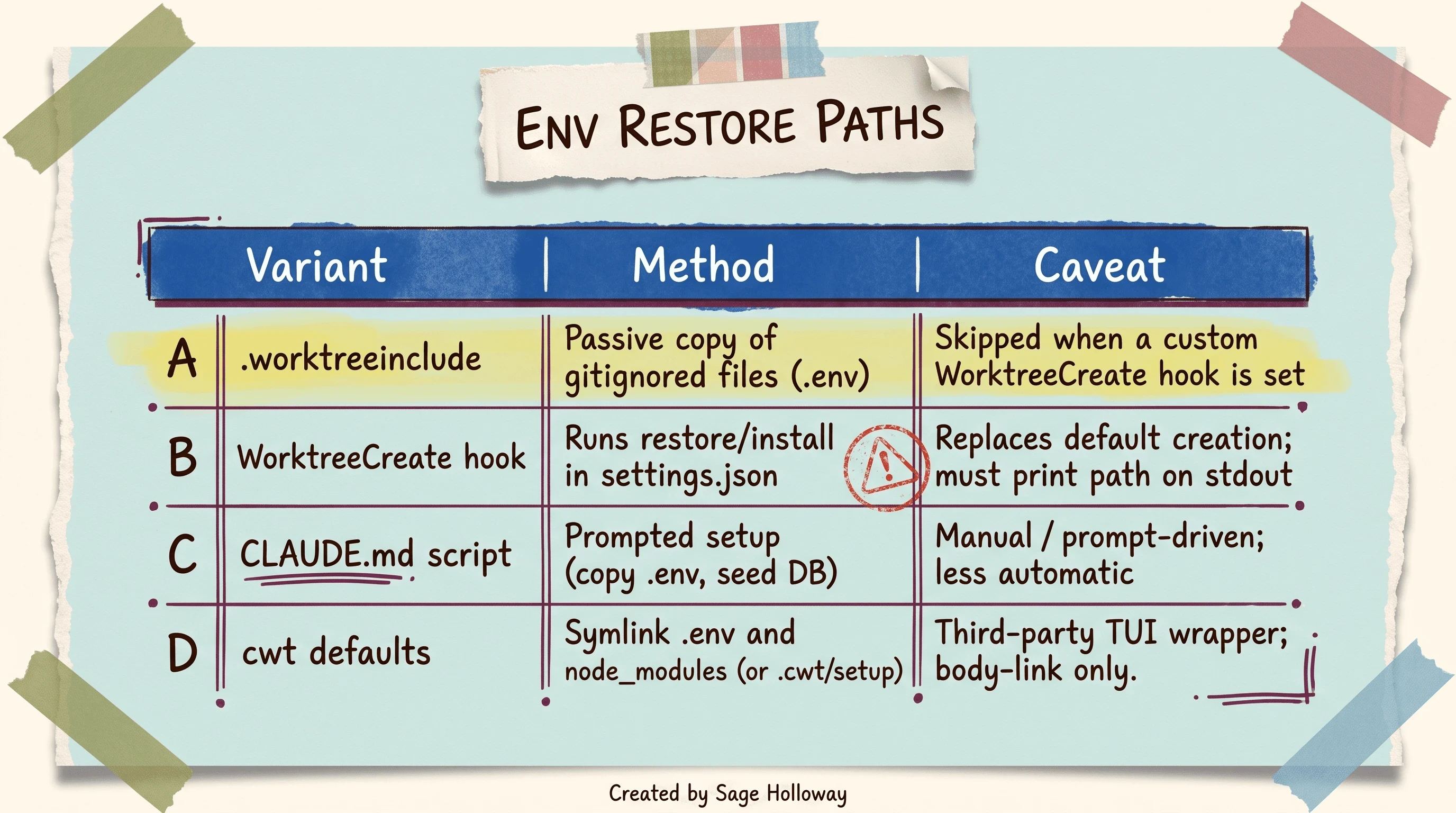
Prefer .worktreeinclude for passive copies. A custom WorktreeCreate hook replaces default creation and skips .worktreeinclude.
Why hooks bypass .worktreeinclude
Official docs are blunt: a custom WorktreeCreate hook replaces default git worktree creation. Because the hook replaces that default, .worktreeinclude is not processed when you use --worktree with that hook in place.
That is the silent trap. You add .worktreeinclude, you also add a restore hook for npm install or dotnet restore, and the .env never appears. The session boots broken. You blame Claude. The config ate your include file.
If you keep a custom hook, copy secrets inside the hook. Do not assume the include file still runs.
Passive include file at the repo root (.gitignore syntax; only matched and gitignored files copy):
Hook sketch from the high-confidence ledger (print absolute path on stdout; send install noise to stderr). Example for a .NET restore, adapted from CodeWithMukesh:
Swap dotnet restore for npm install or your package manager. Keep >&2 on the restore line so stdout stays the path only. Mukesh’s guide is the clearest write-up of that rule and of WorktreeRemove as fire-and-forget. For community scripts that copy .env and seed a docker database from CLAUDE.md prompts, the r/ClaudeCode TIL thread is the citation, not a second docs page.
The flag is the easy part. The missing .env after a clever hook is where the afternoon goes.
Subagent Isolation with isolation: worktree
Parallel parent sessions are one pattern. Parallel subagents inside a job are another. Official docs let you isolate those workers with worktrees so their edits do not smash into each other or into your main checkout.
Frontmatter vs prompt-only isolation
Prompt-only: tell Claude to use worktrees for agents on this refactor. It works when you remember to say it.
Frontmatter (auto-isolate every spawn of that agent):
That isolation: worktree line shipped with the v2.1.50 hook and agent work. Put it on agents that should always land in their own directory. Keep prompt-only for one-off experiments.
This page stops at isolation mechanics. Sequential thinking stacks, GSD phase workers, and when thought metadata is worth the token cost live on Sequential Thinking in Claude Code. Do not dump that catalog here.
Developers Digest’s short video is the live proof of .claude/worktrees/ fan-out without inventing Finder screenshots:
[EMBED: YouTube - https://www.youtube.com/watch?v=z_VI51k-tn0 ] Caption: See Developers Digest spawn parallel worktrees under .claude/worktrees/ without inventing Finder screenshots.
Terminal Workspace Layout: Panes, tmux, and Wrapper Tools
Isolation on disk does not help if you cannot see which session is which. Layout is the human half of the system.
Common patterns from tutorials and teams:
iTerm splits: horizontal and vertical splits, rename panes so FEATURE / HOTFIX / REVIEW stay obvious.
tmux: persistent sessions you can detach. Some sources launch with
claude --worktree feature-auth --tmuxwhen that flag is available in your build.cwt(Claude Worktree TUI): third-party Ruby TUI from bucket-robotics/claude-worktree. Defaults symlink.envandnode_modulesfrom root; keybindings includennew, Enter resume,dsafe delete,Dforce delete. OptionalCWT_START_POINTpins the branch base. Body-link only. No fake TUI screenshots in this article.Bash wrappers: incident.io’s
whelper automated checkouts under a projects folder before native--worktreeexisted. Keep it if your muscle memory depends on it. Do not treat it as required for Claude Code in 2026.
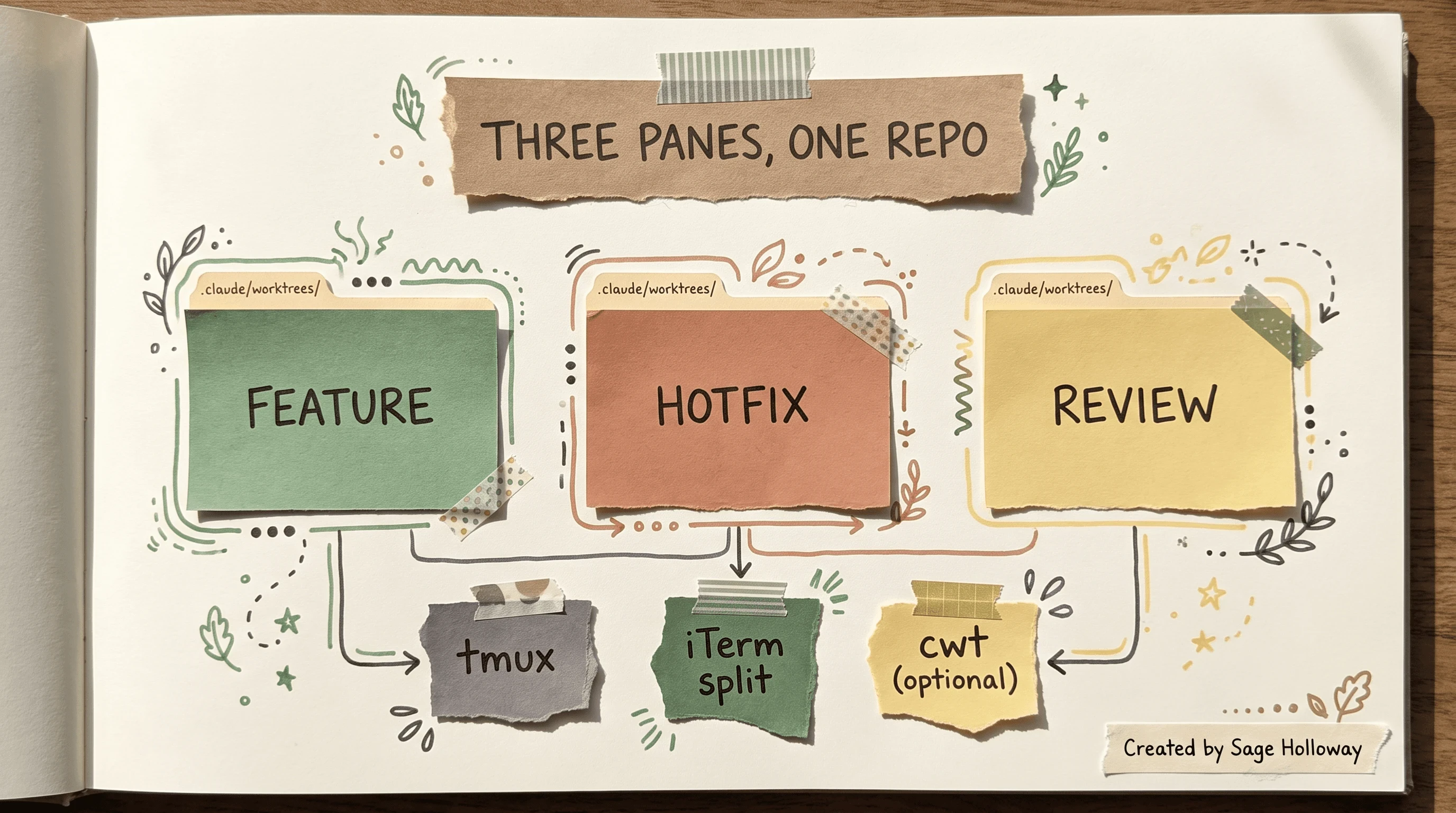
Split panes or tmux keep sessions visible. cwt and bash wrappers are optional helpers, not required for native --worktree.
Reddit threads like Git worktrees are a SuperPower map folders to ticket modules. Steal the naming discipline. Skip the thread format as your tutorial structure.
When to Use Worktrees vs Skip (Clones, Agent Teams, Overhead)
Worktrees are not free. Cold dependency installs, port setup, and monorepo build times are real taxes. Some Reddit voices still prefer full clones because worktrees break aliases or IDE assumptions. That is a preference, not a refutation of the docs.
Use this matrix when you are choosing a path:
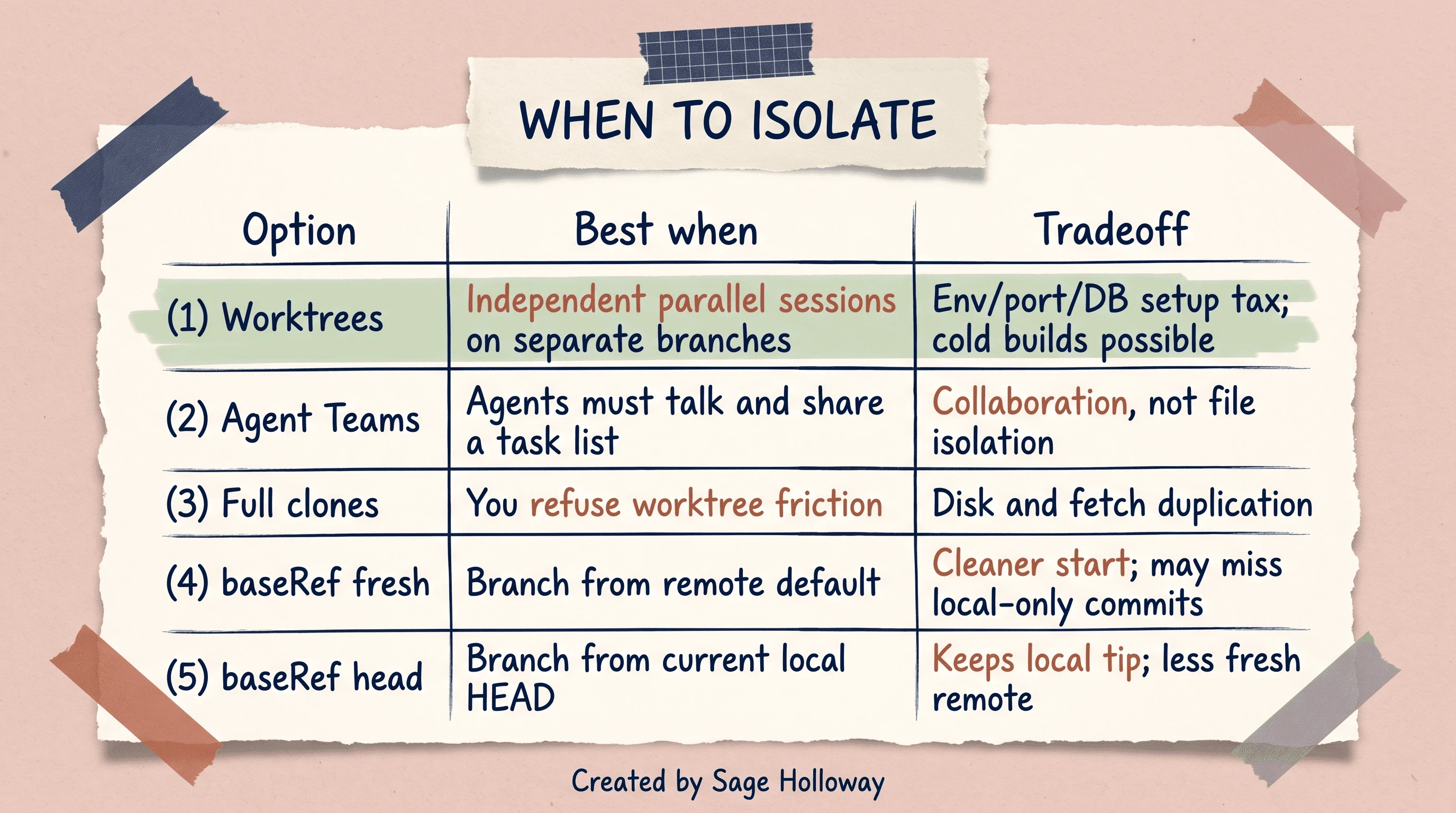
Use worktrees for independent parallel sessions. Use Agent Teams when agents must collaborate. Prefer clones only if worktree friction outweighs disk cost.
worktree.baseRef accepts fresh (branch from the remote default) or head (branch from current local HEAD). Fresh is cleaner when you want remote tip. Head keeps local-only commits you have not pushed. Pick deliberately.
When should you use worktrees versus Agent Teams? Use worktrees when independent sessions need separate branches and file isolation. Use Agent Teams when agents must talk, coordinate, and share a task list. Collaboration is not the same job as filesystem isolation.
When is a full clone still rational? When worktree friction (env restore, IDE plugins, broken aliases) costs more than disk, or when a teammate refuses the abstraction. Fetch once across worktrees is usually the efficiency win. Clones pay that fetch tax repeatedly.
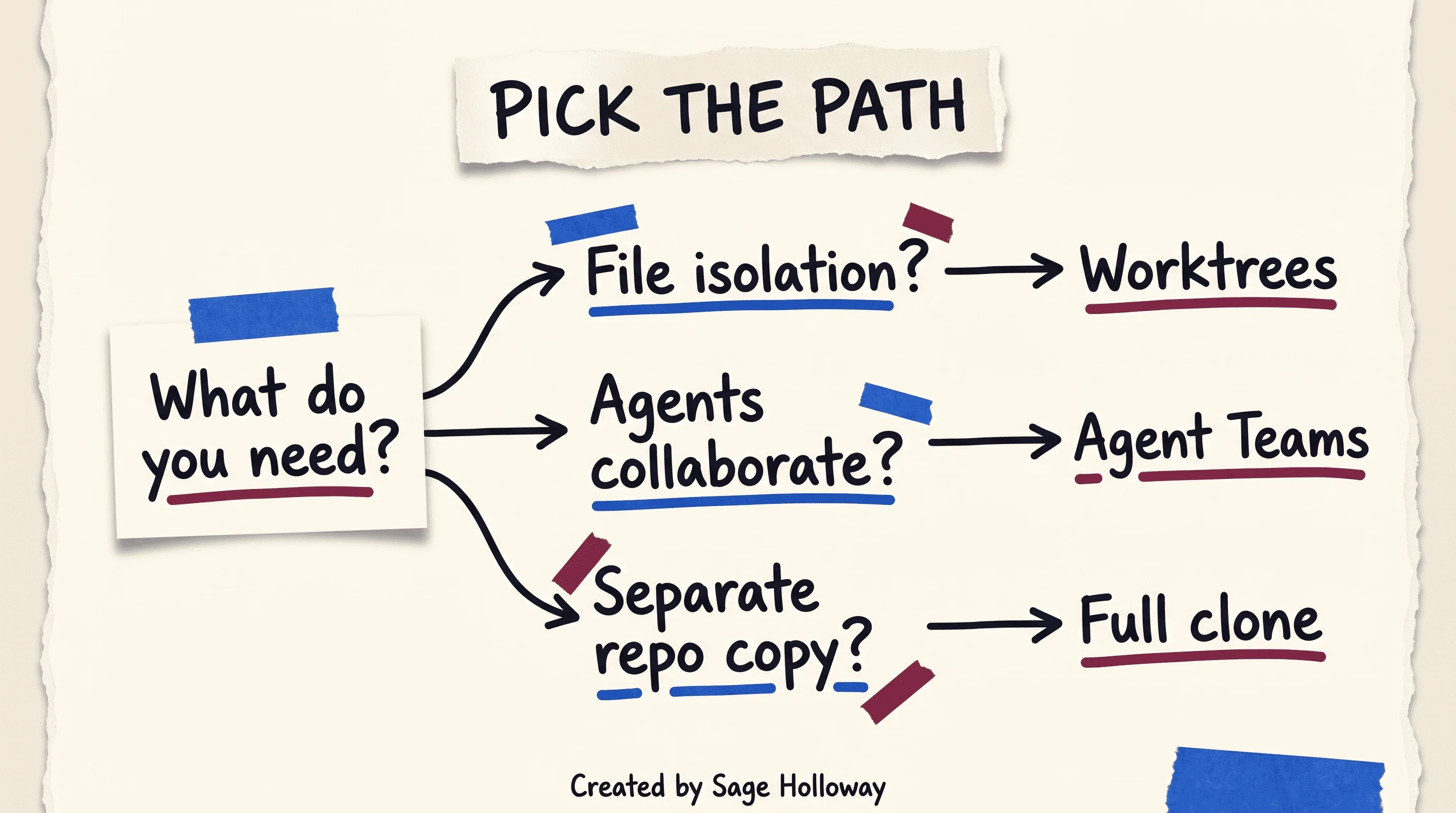
Ask whether you need file isolation, agent collaboration, or a fully separate clone before you pay the overhead tax.
Filesystem shape after a few named launches often looks like this teaching map (folder names are examples, not product UI):
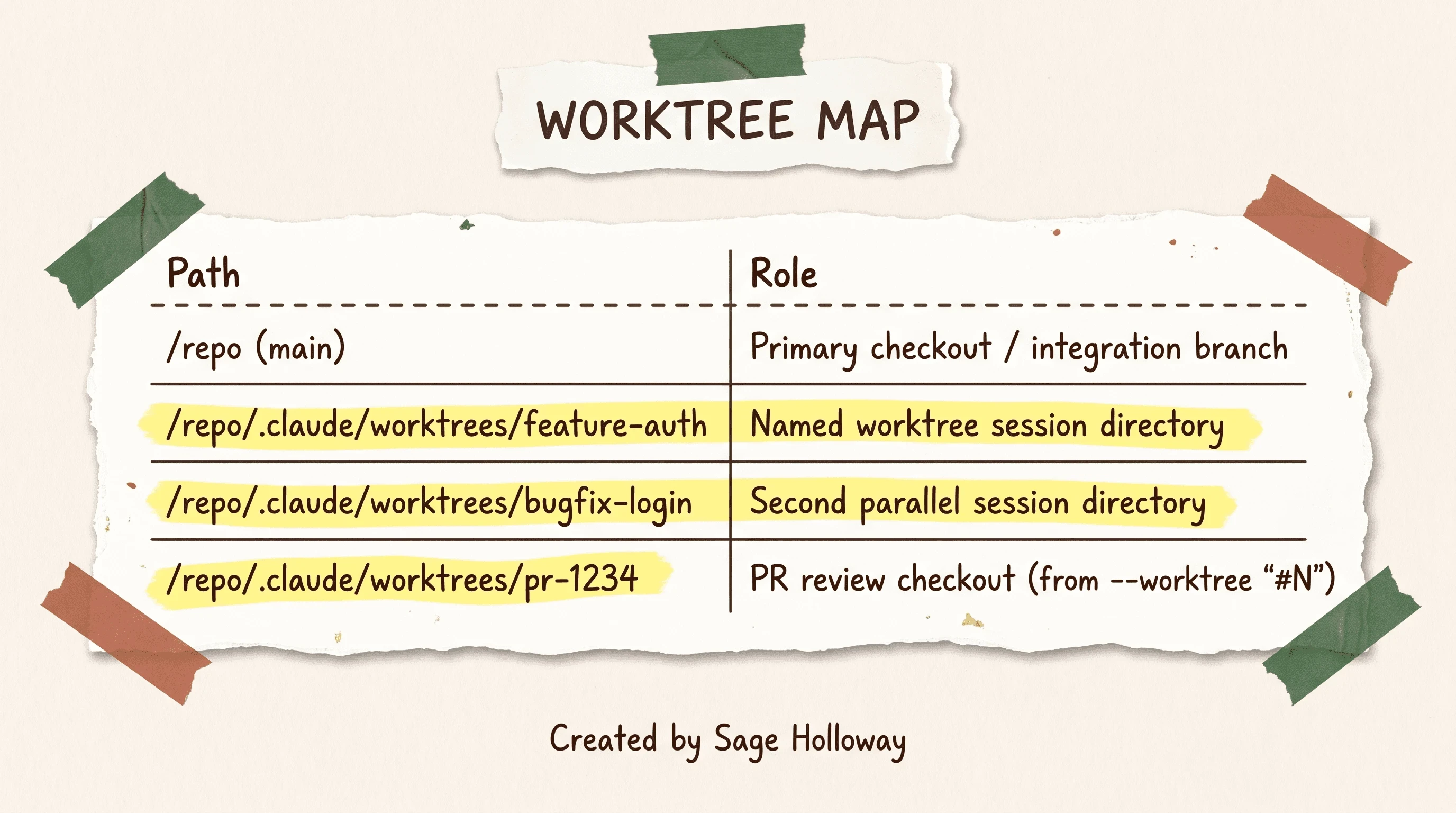
A parent checkout plus named worktree folders is the filesystem shape you should expect after parallel launches.
Product-boundary reminder: Claude Cowork, Codex/Codeex, Worktrunk, Remy, Pane, and recomposable are different products or tools. Do not conflate them with native Claude Code worktrees.
Port Conflicts, Database Branching, and Detached PR Review
Here is the complication the flag docs cannot finish for you.
Worktrees isolate files. They do not isolate localhost:3000. They do not isolate a shared Postgres schema. Two sessions can be perfectly clean on disk and still corrupt the same database with concurrent migrations, or refuse to boot because both claim the same port.
Community and specialized guides (Cole Medin, Reddit tip threads, Mukesh’s .NET gotchas) converge on the same remedies without agreeing on one shell script:
Ports: override defaults per worktree. Dynamic allocation from the worktree name, launch-settings overrides (including .NET
--urlspatterns), Docker Compose overrides, or gateway routing show up as real tactics. Exact wrapper scripts are under-specified across sources, so do not copy invented shell from this page. Steal the idea, then write the override your stack already understands.Databases: prefer isolated Neon branches, temporary SQLite files, or per-worktree docker databases over one shared migration target. Parallel migrations against one schema are how you invent ghost bugs.
.NET User Secrets:
dotnet user-secretslives under a global user profile keyed byUserSecretsId. Parallel worktrees share that file..worktreeincludecannot isolate it. ChangeUserSecretsIdwhen branches need different keys.Monorepo cold builds: fresh restores per worktree can mean multi-gigabyte
node_modulesand long cold builds. Symlinknode_modulesor build caches from root (includingcwtdefaults) is the community workaround. Measure before you romanticize clean installs.
[EMBED: YouTube - https://www.youtube.com/watch?v=rFGlJ4oIlhw ] Caption: Cole Medin’s parallel playbook covers port reassignment, Neon branching, and detached review after a clean context.
Detached adversarial review after /clear
File isolation still leaves conversational bias. If the same chat wrote the code and then “reviews” it, you are grading your own homework.
The pattern sources promote:
Commit on the worktree branch.
Run
/clear(or start a fresh session) so implementation chatter leaves the window.Review the PR from that clean context, optionally with a dedicated review agent or
claude --worktree "#N"checkout.
Detached review is discipline, not a new product. Pair it with the PR worktree launch when you want the reviewer standing in the PR directory instead of your feature mess.
Headless CI review via GitHub Actions and OIDC is a different SERP job. Cite the GitHub Actions docs when you need org secrets and /code-review automation. Keep local parallel sessions on this URL.
I tried stacking three worktrees on one shared SQLite file once because I was impatient. The migrations “succeeded.” The data did not. Isolation on disk had done its job. I had simply refused to isolate the thing that mattered.
FAQ
What are Git worktrees in Claude Code?
Git worktrees in Claude Code are a built-in way to run multiple parallel sessions on one repository without file conflicts. Each session gets an isolated working directory under .claude/worktrees/ and a dedicated branch, while sharing the same underlying Git history. Launch with --worktree or -w.
How do I create a worktree in Claude Code?
From a repo with at least one commit, run claude --worktree <name> or claude -w <name>. For a pull request, use claude --worktree "#1234" (or a PR/MR URL). You can also ask Claude mid-session to enter a worktree, or use EnterWorktree. Trust the workspace on interactive runs first.
Do worktrees share my CLAUDE.md and project settings?
Yes. Project configs, custom agents, skills, and auto-memory are shared across worktrees of the same repository. Conversation histories, installed dependencies, environment files, and build outputs stay isolated per worktree directory.
How does worktree cleanup work in Claude Code?
Clean unnamed worktrees can be removed automatically on exit. Dirty ones (uncommitted changes, untracked files, or new commits) prompt Keep or Remove. Remove deletes the directory and those changes. You can also run git worktree list, remove, and prune by hand. WorktreeRemove hooks cannot block deletion.
How do I copy my gitignored .env file into a Claude Code worktree?
Add a .worktreeinclude file at the repo root listing paths such as .env and .env.local using .gitignore syntax. Only matched gitignored files copy. If you define a custom WorktreeCreate hook, .worktreeinclude is skipped; copy secrets inside the hook instead.
How do I install dependencies automatically in new worktrees?
Configure a WorktreeCreate hook in .claude/settings.json to run npm install, dotnet restore, or your restore command. The hook receives JSON on stdin with a name field and must print the absolute worktree path on stdout. Redirect install logs with >&2 so they do not corrupt the path line.
How do I review a pull request in a Claude Code worktree?
Run claude --worktree "#1234" or pass a GitHub/GitLab PR URL. Claude fetches the branch into .claude/worktrees/pr-<number> so you can test without disturbing your integration checkout. For unbiased review, clear the writing context first, then review from a fresh session.
When should I use worktrees versus Agent Teams in Claude Code?
Use worktrees for independent parallel sessions that need separate branches and file isolation. Use Agent Teams when agents must communicate, coordinate, and share a centralized task list. Isolation and collaboration solve different jobs.
What is the benefit of worktrees over just checking out multiple instances of the repository?
Full clones duplicate Git history and waste disk. Worktrees share one object store and only materialize working files per directory. Local branches and fetches stay shared, so you fetch remote changes once for every attached worktree instead of once per clone.
Whether teams standardize on native --worktree, keep a wrapper TUI, or still clone for stubborn IDEs is still settling. The interesting question is not which flag wins the screenshot. It is whether your runtime (ports, databases, secrets) matches the isolation story you told yourself about the filesystem.
If you try one thing this week, create a named worktree for a real side task, add either a .worktreeinclude with your .env lines or a WorktreeCreate hook that copies secrets and restores deps, then deliberately break the silent trap once so you never forget it. Keep the main checkout as integration. Leave Plan Mode and install docs for the days those are the actual blockers. Subscribe if you want the next guide in this series before it hits search.
Until then...
Sage
PS. Next time two local servers fight for the same port, do not open a third terminal to “just kill whatever is on 3000.” Write the two worktree names on a sticky first. If you cannot tell which process belongs to which name, the layout failed before the kill command started.
Author
Practical guides, tool teardowns & AI engineering workflows.


