Claude Code
How to Change the Model in Claude Code

Sage Holloway
25 min read
Go back to blog
SHARE

The session felt expensive and the work felt slow, and you could not tell which one you had chosen. You thought you had already picked a cheaper track. Tomorrow morning the same default was sitting there again, chewing the same file reads, as if last night never happened.
To change the model in Claude Code mid-session, type /model to open the interactive picker, or press Alt+P (Option+P on macOS) while you are still typing. For one session, launch with claude --model <alias|name> or set ANTHROPIC_MODEL. For a lasting default, run claude config set model <name> or set the model field in ~/.claude/settings.json. Run /status if the active model is not the one you expected.
You know the before picture.
You leave the plan default running because switching feels like a power-user trick. Background chores inherit that same expensive tier. You type /model once, hit Enter because that is what you do in every other menu, and the next morning the “temporary” choice is now the house default. Or you never switched at all, and a 2025 video still has you rationing Opus like it costs five times Sonnet.
The after picture is quieter.
/status names the model you meant. A session flag stays a session flag. Workers do not bill like the main thread. You still hop families when the job class changes. You stop hopping because you are bored.
Commands and config in this guide come from NotebookLM research dated 15 August 2026 (ClaudeFast hub dated 14 August 2026; Help Center usage article April 2026; Zack Reed local-model write-up April 2026) plus the Claude Code model configuration docs and the Help Center model configuration article. No live CLI verify on this draft. If a blog or an old YouTube disagrees with those pages, trust the docs.
This will not work if your client is too old for the family you picked. Opus 5 needs Claude Code v2.1.219 or later, Sonnet 5 needs v2.1.197 or later, and Fable 5 needs v2.1.170 or later. Run claude update first. It will also not work if your org allowlist rejects the name, or if a higher-priority settings file is sitting on top of the export you copied from a tutorial.
This page will not cover curl install recipes, a Pro price FAQ, a slash-command catalog, OpenRouter wiring, Plan Mode as a product, or how to save and compact a session. Installing the CLI lives on Install Claude Code. Plan Mode depth lives on Claude Code Plan Mode. Usage resets live on Claude Code rate limits. Session save and /compact live on Claude Code sessions.
Seat cost lives on Claude Code Pro pricing. The slash catalog lives on Claude Code slash commands. Third-party model IDs live on Claude Code with OpenRouter. Subagent isolation depth lives on Sequential thinking in Claude Code.
If you searched claude model management and landed on a fashion or talent agency, that is a different product. This URL is CLI routing: aliases, defaults, and which model the workers use. TaskMaster is a third-party wrapper. Do not treat its GitHub threads as native Claude Code syntax.
Changing the model is a control hierarchy. Pick the track, then decide if it is this session or the default.
How to change the model mid-session (/model and shortcuts)
People searching how to change model in claude code, claude code change model, or claude code switch usually want the same job: pick a reasoning depth for this work, then make the choice stick at the right layer.
You are on a highway with three lanes. The leftmost one is fast and it costs attention. The middle is where most of the trip actually happens. The right is for the boring exits: gas, rest stop, the mechanical stuff.
You do not pick a lane once at the on-ramp and stay there until the city. You merge when the job changes. Your GPS still has a saved “home” route. That saved route is not the same as the lane you are in right now.
Claude Code works the same way. Opus, Sonnet, and Haiku are the lanes. /model is the merge. The default in settings is the saved route. Mixing those two layers is how people “switch” and then wake up on the wrong track.
Update first so the picker is not silently hiding families:
Then the mid-session path is a slash command. A slash command is a / instruction you type in the Claude Code prompt, not a shell binary.
That opens the interactive picker. Official docs describe it as choosing from a menu. I am not going to fake that menu in a generated screenshot. Watch a real CLI switch, then come back for Enter versus s and for permanent defaults.
[EMBED: YouTube - https://www.youtube.com/watch?v=OPwFUVFANVs ] Caption: Watch a CLI switch, then come back for Enter vs s and permanent defaults.
Enter vs s in the picker
As of Claude Code v2.1.153, hitting Enter in the /model picker saves the choice as your new default. Pressing s switches for the current session only.
That is the trap. Every other TUI taught you that Enter means “yes, this one.” Here Enter means “yes, this one, forever, until something higher in the stack overrides it.” If you only wanted this debugging hour on Opus, s is the key.
See a Sonnet to Opus change in a real terminal. Then remember which key you hit.
[EMBED: YouTube - https://www.youtube.com/shorts/NylncFN3sd0 ] Caption: See a Sonnet to Opus change in a real terminal. Enter saves a default; s is this session only.
Mid-prompt Alt+P / Option+P
You can also switch while you are still typing a prompt. On Windows and Linux the shortcut is Alt+P. On macOS it is Option+P. Docs and a r/ClaudeAI thread both describe that mid-prompt hop.
Community caveat, not a ledger command: some people report an accidental send while they are mashing the shortcut. If that happens to you, finish the prompt, then use /model instead of fighting the keybind.
Session launch: --model and ANTHROPIC_MODEL
For one work block, do not fight the picker. Launch already on the family you want.
An alias is a short name (sonnet, opus, opusplan, best) that resolves to a full model on your provider. You can also pass a quoted ID such as claude-sonnet-5 when you need the pin to be obvious.
The environment variable path is ANTHROPIC_MODEL. An environment variable is a name your shell exports so child processes inherit it.
That is a session override, not automatically a forever default. Forever lives in settings, and settings have a pecking order you will meet later.
If claude is not on your PATH yet, stop and use Install Claude Code. This H2 is not an install guide.
Which Claude model is best for coding (task, not a forever winner)
Which Claude model is best for coding is the wrong trophy question. The useful question is which family matches this job.
Match Opus 5 to hard architecture and debug. Match Sonnet 5 to high-volume implementation. Match Haiku 4.5 to cheap mechanical work.
Haiku 4.5 stays on a 200K context window. A context window is how much text the model can hold in one go. The 5 family is 1M native. Do not copy “everything is 200K” from older posts.
Older blogs that say Claude Code always defaults to Opus 4 are stale. Current docs in the research pack: Pro and Team Standard resolve default to Sonnet 5. Max and API resolve default to Opus 5. Flag the Opus 4 line. Do not copy it.
The Smart Model Strategy on the ClaudeFast hub (14 August 2026) is the other stale-price correction. The Opus versus Sonnet gap is described as roughly 1.67x, or $0 extra on Pro/Max seats depending how your plan meters. 2025 videos still chant a 5x premium. Treat that ratio as dated.
On Max, Fable 5 is included up to 50% of weekly limits. That is a cap, not a pricing explainer. Seat cost belongs on Claude Code Pro pricing.
Quoted IDs from the pack (prefer live model-config and choosing a model if they drift): claude-opus-5, claude-sonnet-5, haiku, fable.
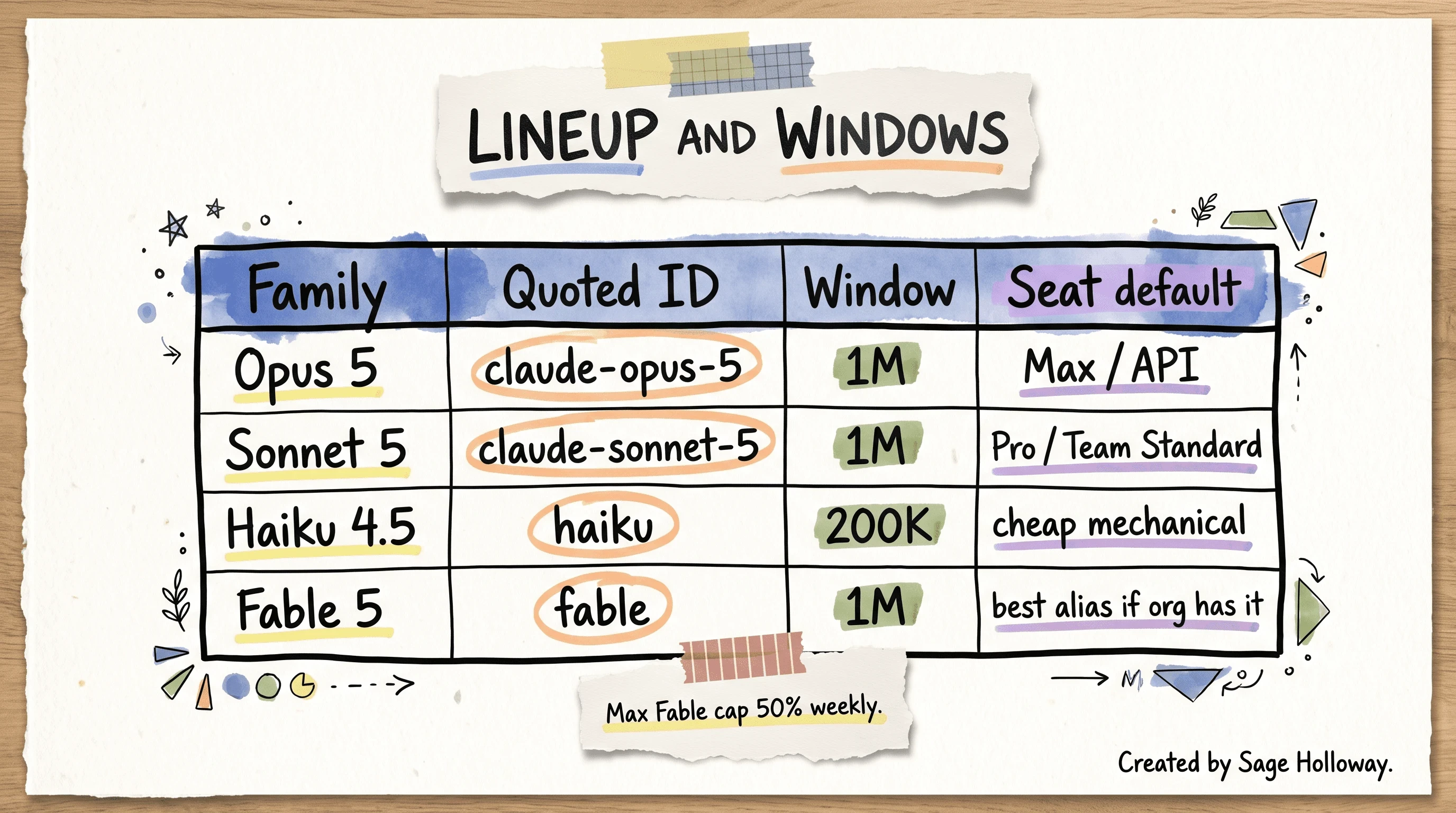
Haiku 4.5 stays on a 200K window. The 5 family is 1M native. Pro defaults to Sonnet 5; Max and API default to Opus 5.
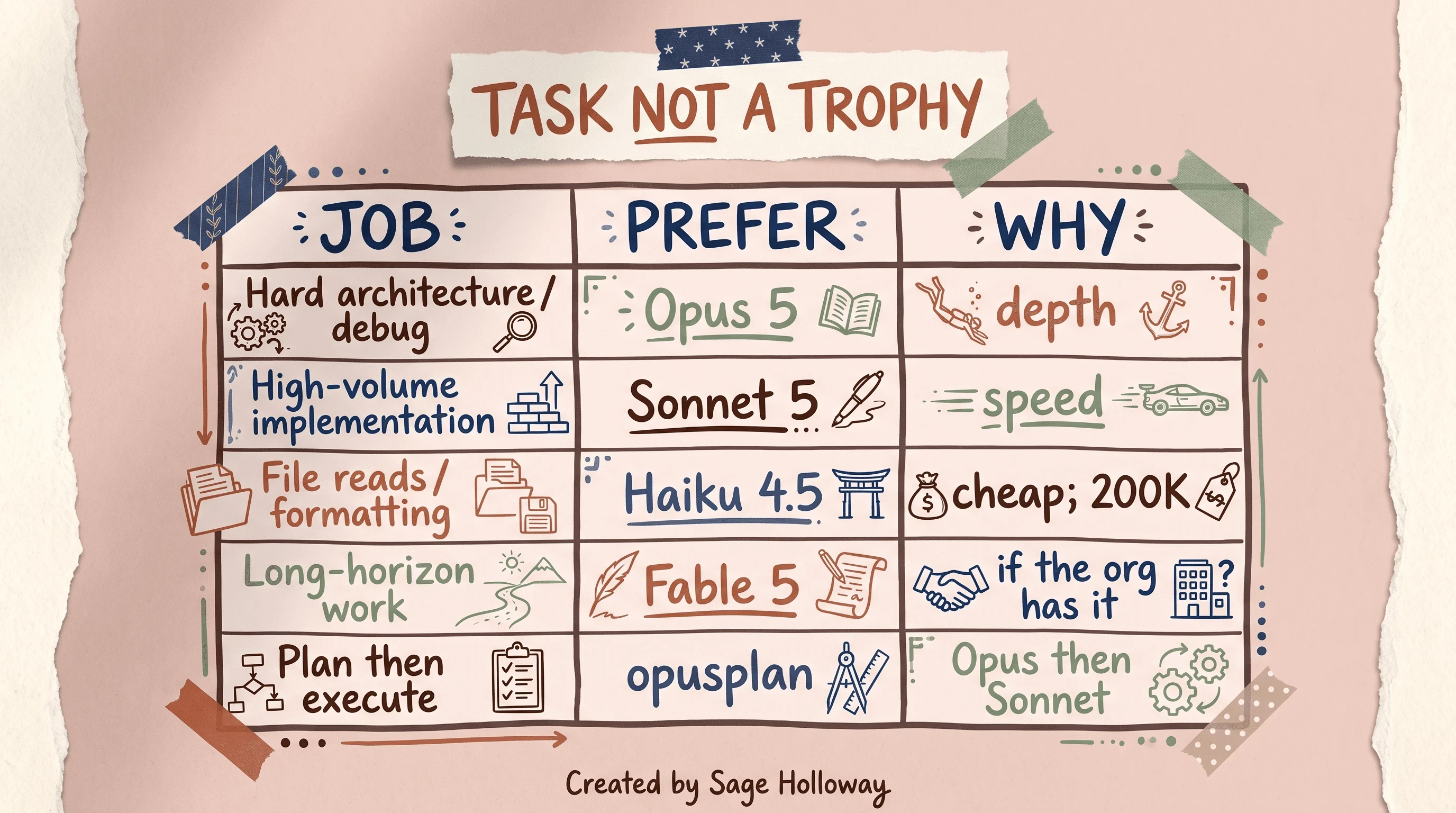
Match Opus 5 to hard architecture and debug. Use Sonnet 5 for high-volume implementation. Keep Haiku for cheap mechanical work.
Confused about Fable? Use it for long-horizon work when your org has it. If you do not, best falls back to latest Opus. That alias is the next section.
I tried the “always stay on Sonnet so I do not feel guilty” version for a stretch. The guilt was fake. The architecture mistakes were real. Progressive de-escalation (start capable, drop down for mechanical passes) only makes sense once you have actually seen the current gap, not the 2025 one.
Model aliases (sonnet, opus, opusplan, best)
Aliases exist so you are not typing a dated ID every morning. They also exist so Anthropic can move the landing under a stable name. That is convenient until the landing differs by cloud.
sonnet resolves to the latest Sonnet on that provider. opus does the same for Opus. opusplan uses Opus during Plan Mode, then switches to Sonnet for execution. best uses Fable 5 where the org has access, otherwise the latest Opus. default follows the plan rule above: Sonnet 5 on Pro and Team Standard, Opus 5 on Max and API.
opusplan is why this page mentions Plan Mode at all. The alias is a routing trick. The permission posture, Shift+Tab, and plan files live on Claude Code Plan Mode. Do not turn this H2 into a second Plan Mode guide.
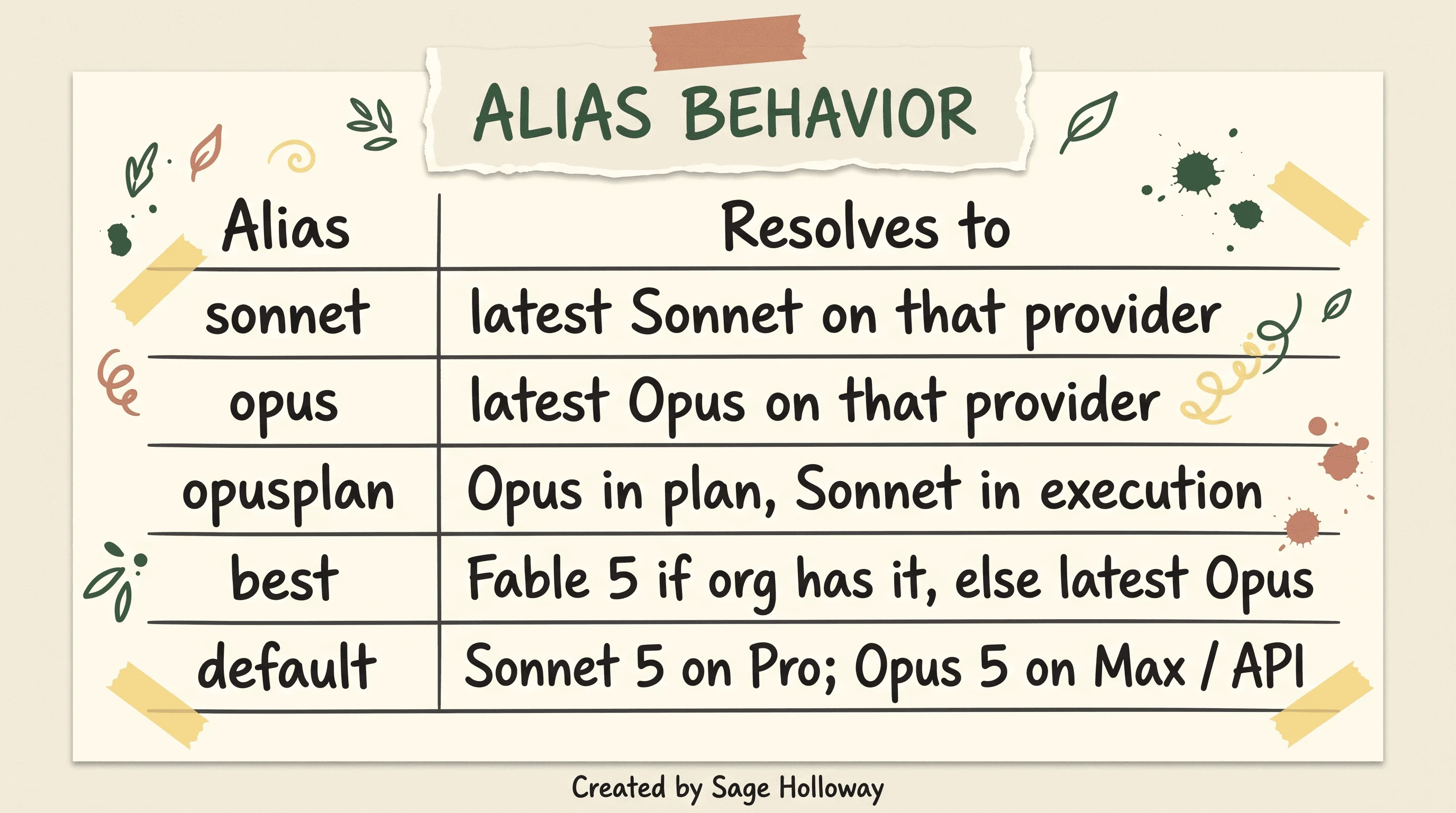
opusplan uses Opus in plan mode and Sonnet in execution. best is Fable 5 if the org has it, else latest Opus.
Provider resolution (Bedrock, Vertex, Foundry)
--model sonnet on the Anthropic API can mean current Sonnet 5. On Amazon Bedrock, Google Vertex, or Microsoft Foundry, the same alias can lag a generation. The notebook example is 4.5 versus 5. Check /status before you assume you got 5.
Do not invent a Bedrock ID string from memory. Pin with the ANTHROPIC_DEFAULT_*_MODEL family of overrides only as the live model-config page names them. One deprecation you can quote: ANTHROPIC_SMALL_FAST_MODEL was replaced by ANTHROPIC_DEFAULT_HAIKU_MODEL.
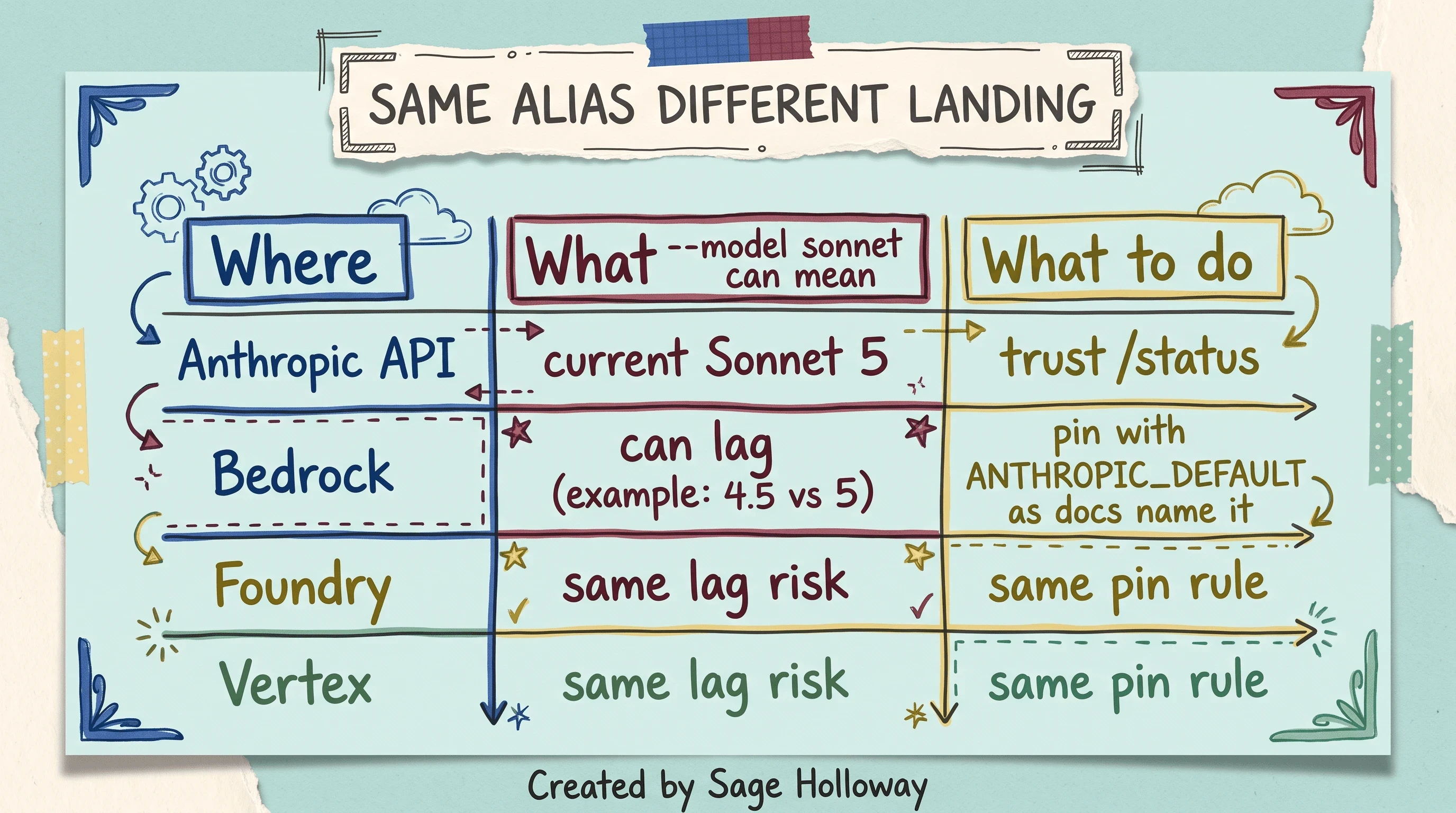
--model sonnet on Bedrock or Foundry can land a generation behind the Anthropic API. Check /status before you assume Sonnet 5.
How to set the Claude Code default model (and why it may not stick)
Claude code default model is the search for permanence. Permanence has five layers, and the Help Center export is not automatically the winner.
Variants from the claim ledger:
Or set the model field in user settings. On Unix and macOS that file lives at ~/.claude/settings.json. On Windows it lives under %USERPROFILE%\.claude.
Or export ANTHROPIC_MODEL in .zshrc or .bashrc so every new shell inherits it. Help Center tutorials love that path. It can still lose to a settings.json sitting higher in the stack.
Precedence, high to low: Managed, then CLI arguments, then Local, then Project, then User. Managed means org or MDM settings. MDM is mobile device management, the admin channel that can drop a file you did not write.
CLI arguments means --model and launch-time env. Local in current settings docs is .claude/settings.local.json. Project is .claude/settings.json in the repo. User is ~/.claude/settings.json.
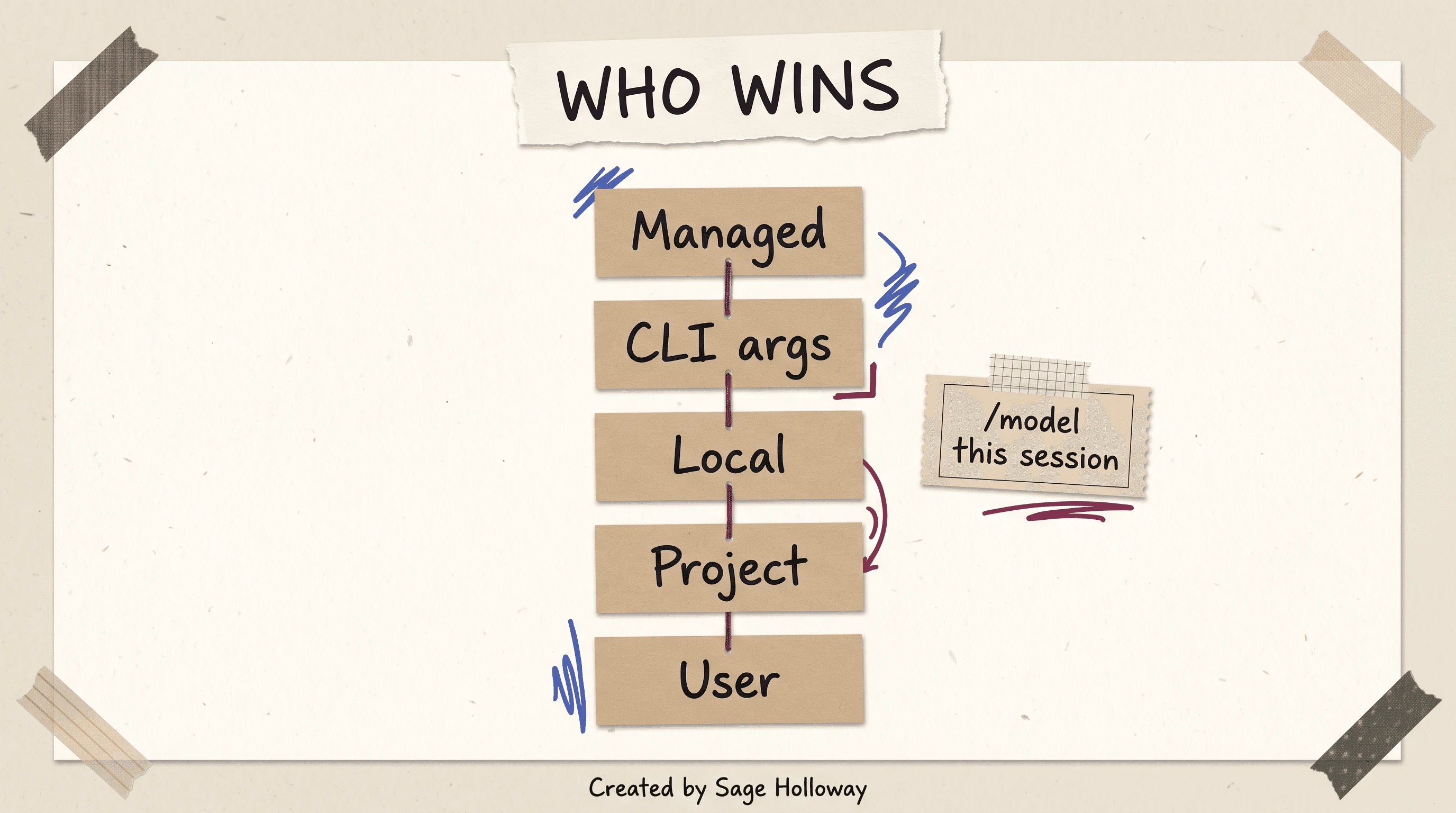
Managed settings beat CLI arguments, which beat local, project, then user files. A Help Center shell export can lose to settings.json.
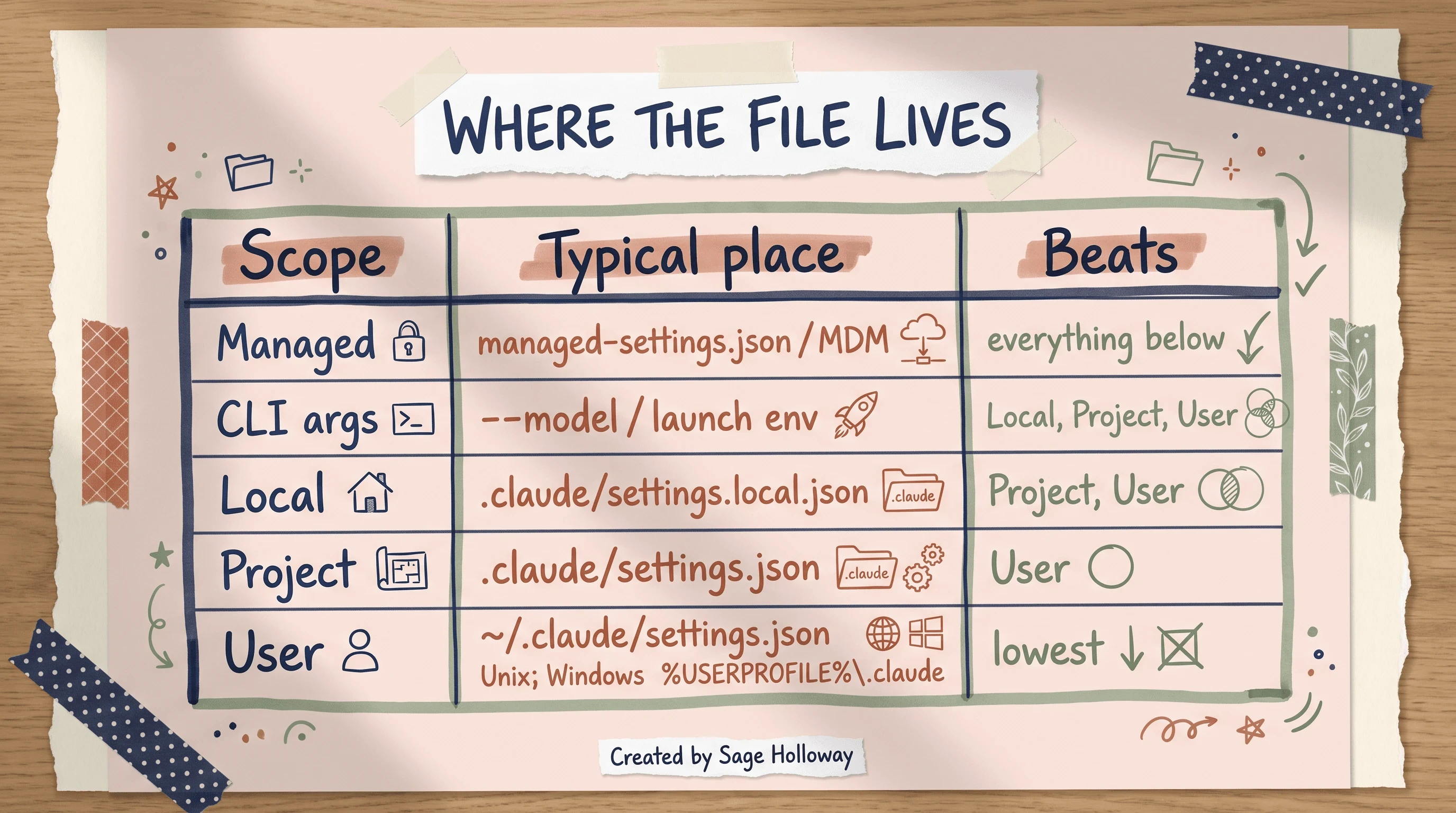
User defaults live in ~/.claude/settings.json on Unix. Windows uses %USERPROFILE%\.claude. Confirm the winner with /status.
Paths in that graphic follow Claude Code settings: managed managed-settings.json / MDM, local .claude/settings.local.json, project .claude/settings.json, user ~/.claude/settings.json. If the live page moved a filename, trust the live page.
Verify with /status. Look at the Setting sources line. That line is how you find out the export you pasted lost the fight.
Organization restrict
Admins can set availableModels in managed settings. They can set enforceAvailableModels: true so the Default option cannot wander off the allowlist.
If you type a name the client does not know, you get: Model '<name>' is not a recognized model id.
If the org blocked it, you get: Model '<name>' is restricted by your organization's settings.
If a restricted model is specified via startup flags or environment variables, Claude Code substitutes the allowed organization default at launch. The picker fight is loud. The substitution can be quiet. /status again.
Local endpoint (LM Studio)
Zack Reed’s April 2026 write-up points Claude Code at a local server:
Sources also mention ANTHROPIC_AUTH_TOKEN for that path. Launch with the exact identifier your local server shows. Tool-use reliability on local models is low. This is a one-paragraph escape hatch, not a second how-to. OpenRouter setup is Claude Code with OpenRouter, not a duplicate LM Studio chapter.
Tokens, context windows, and auto-compaction
Here is the part people skip because it sounds like accounting. A mid-session switch does not delete the chat. The next turn still re-reads history so the new model can rebuild state.
That re-read costs tokens. Tokens are the chunks of text the bill (or the seat window) counts. You kept the conversation. You paid to re-teach the new brain.
Haiku 4.5 is 200K. The 5 family is 1M native. Auto-compaction is the CLI shrinking context when the window fills. /compact as a craft is Claude Code sessions, not this page.
Greg’s default-model video still earns a watch for Ctrl+R cost logging: detailed logging that shows real-time API cost for actions. Treat the 5x Opus premium in that video as dated. The habit is not.
[EMBED: YouTube - https://www.youtube.com/watch?v=eP9fA5MHG20 ] Caption: Greg shows default-model waste and Ctrl+R cost logging. The 5x Opus premium in that video is dated.
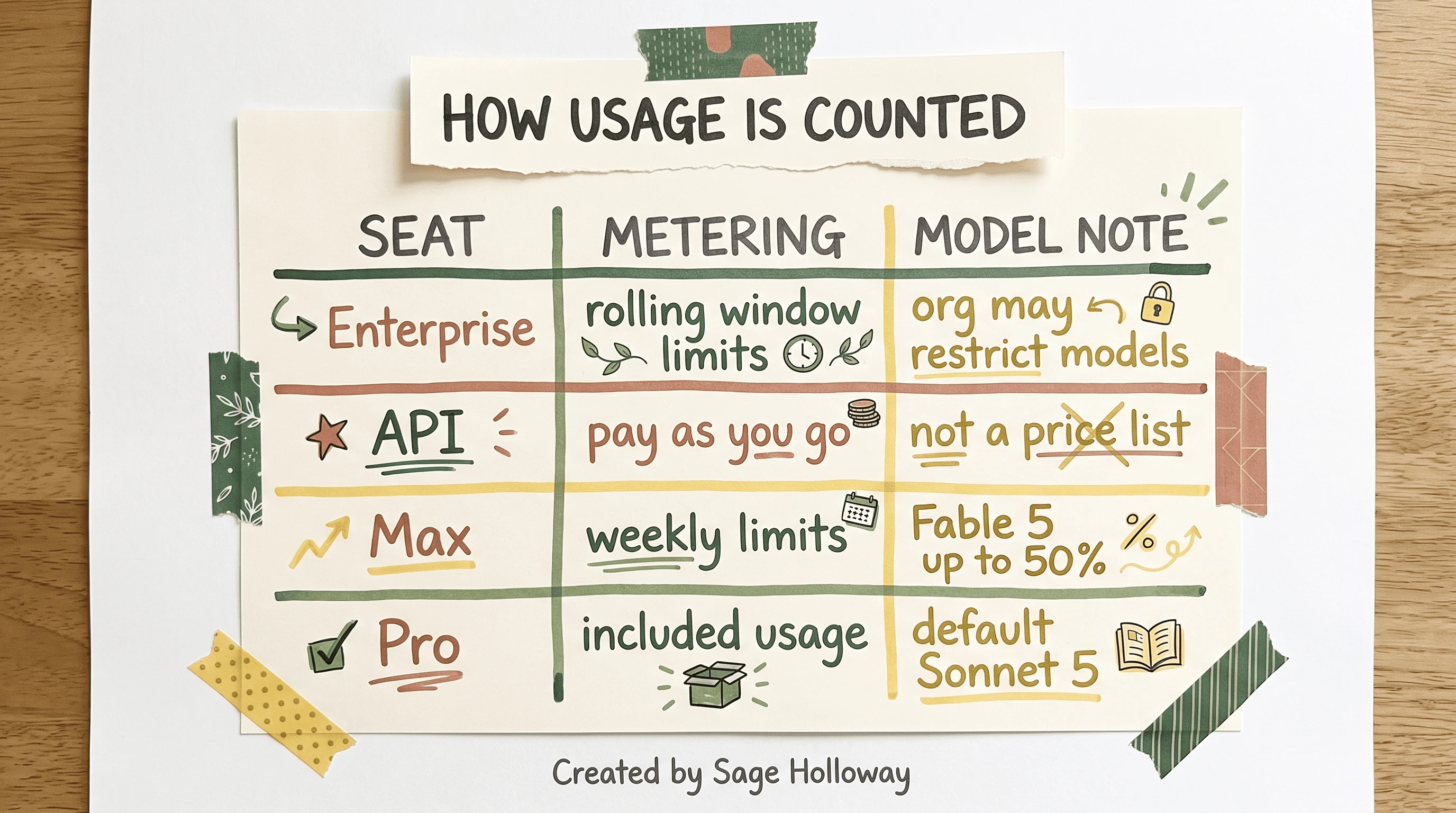
Enterprise seats use rolling windows. API is pay as you go. On Max, Fable 5 can take up to 50% of weekly limits.
Enterprise seats use rolling window limits. API is pay as you go. This is not a price list. When you hit a wall, Claude Code rate limits owns the reset question.
One more ledger number while we are in the weeds: Opus 5’s minimum cacheable prompt dropped to 512 tokens. Cache is reused prompt prefix. It is not a reason to pick Opus. It is a reason not to cargo-cult old cache advice.
Effort and thinking vs switching models
Sometimes the family is already right and you are still hopping because hopping feels like a decision. Effort is a reasoning-depth lever on a supported family: rungs from low through xhigh, with live model-config also listing max. You stay on Sonnet and ask it to think harder, instead of jumping to Opus because the last file felt scary.
ultracode is a session setting that plans a dynamic workflow with xhigh per-message reasoning. MAX_THINKING_TOKENS=0 disables thinking when you want less of it.
A full /effort guide is its own article. The slash catalog is Claude Code slash commands. This H2 exists so you do not treat every quality problem as a model-family problem.
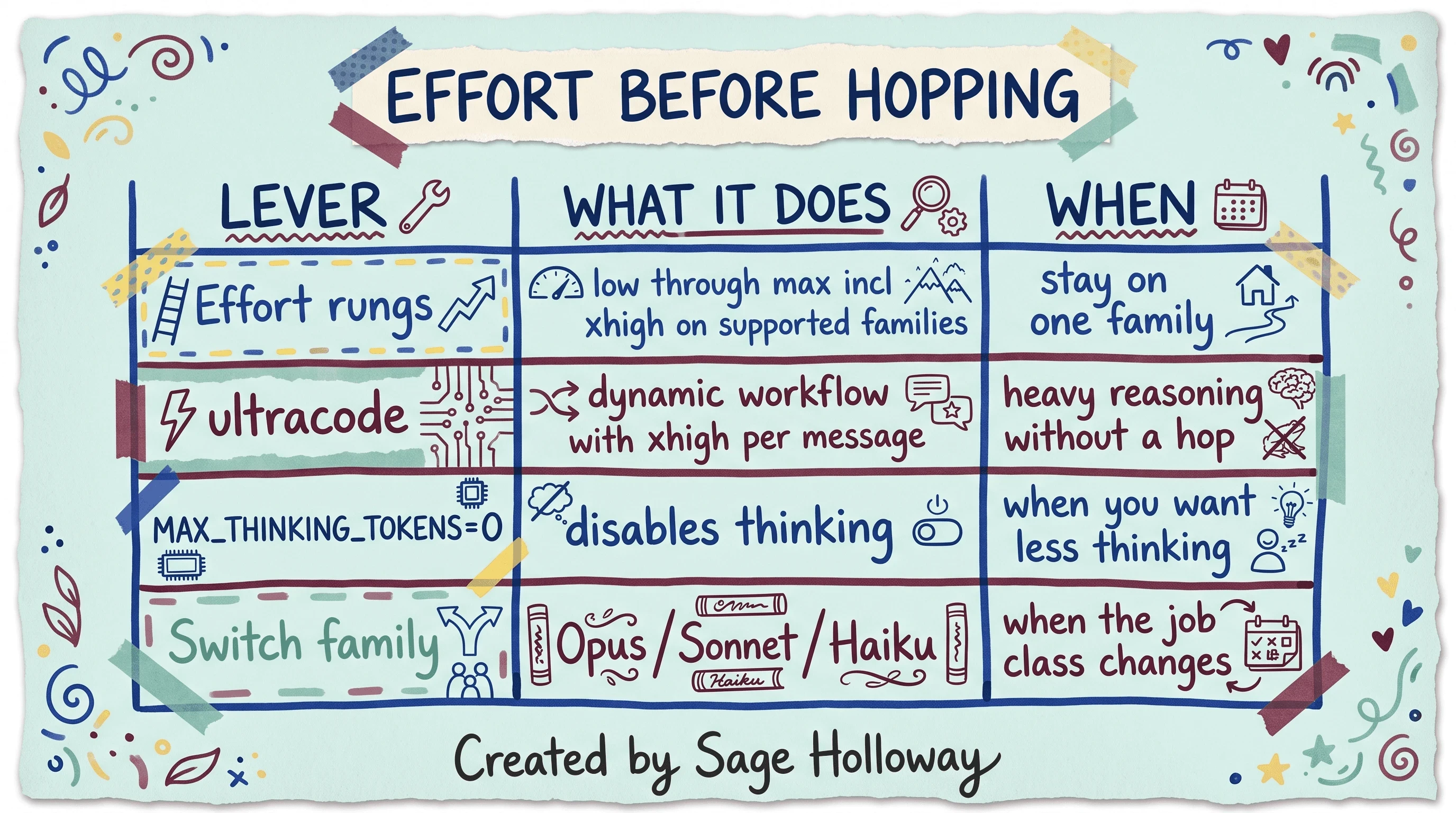
xhigh can be the better lever than changing families. ultracode plans a dynamic workflow with xhigh per-message reasoning.
Sub-agent routing (CLAUDE_CODE_SUBAGENT_MODEL)
This is the CLI sense of claude model management: who pays for the chores. A sub-agent is a worker Claude Code spins up for a delegated job (file reads, formatting, a bounded search). Workers often inherit the main-thread tier. If the main thread is Opus, the formatter can bill like an architect.
Set CLAUDE_CODE_SUBAGENT_MODEL so execution lands on Sonnet 5 or Haiku while the main thread plans.
The picker is the part you remember. The env var on the workers is the part that actually changes the bill.
Isolation, spawn limits, and sequential-thinking plugins live on Sequential thinking in Claude Code. This H2 is cost containment only.
When Claude Code switches the model without you
But here is the thing.
You can do every step above and still watch the active model move. That is not always a bug in your settings file.
Availability fallbacks walk a chain when the primary is overloaded or returns a non-retryable server error. Chains are capped at three models. Extra entries are ignored.
Content-based fallbacks are safety classifiers. Cybersecurity-flagged requests on Fable 5 re-run on Opus 4.8. Biology-flagged requests on Fable 5 re-run on Opus 5. Cybersecurity-flagged requests on Opus 5 re-run on Opus 4.8. Repository text in CLAUDE.md can trigger a downgrade at startup, before you send a prompt. CLAUDE.md is the project memory file sitting in the repo.
Diagnose with /status. The notebook also names --safe-mode for this audit. Cite model-config for the current flag text. Do not invent extra flags around it.
Reddit reports gradual rollouts of the default alias server-side. Medium confidence. If Pro suddenly looks like a different Sonnet than last Tuesday, check /status before you rewrite your entire settings.json in a panic. Thread for the “it switched on me” feeling: r/ClaudeCode.
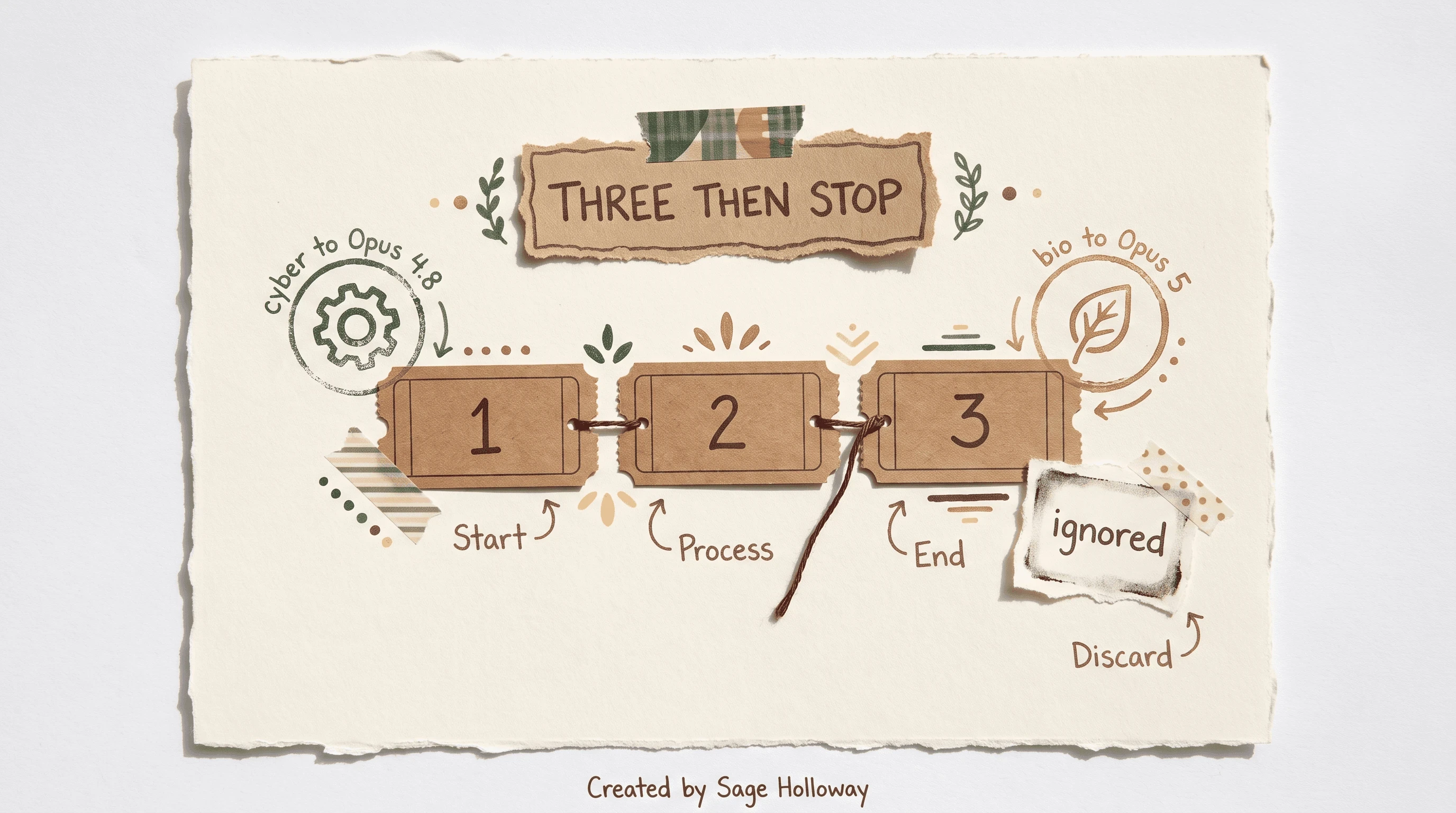
Chains walk at most three models. Extra entries are ignored. Cyber and bio classifiers can hop you to Opus 4.8 or Opus 5.
Keep project context when you change models
Mid-session switch does not wipe the conversation. The new model still rebuilds state from history. That is the good news. The next-turn token bump is the tax.
If the thread is already mush, the durable move is external memory: CLAUDE.md plus a docs-md folder of decisions, so the next family is not relying on a fragile chat. Community write-up of that pain: how do you change models while keeping context.
Summary only. Full context engineering is its own guide. Session save, resume, and /compact are Claude Code sessions. Do not turn this H2 into a second memory product page.
FAQ
Which Claude model is best for coding?
There is no forever winner. Opus 5 for hard architecture and debug. Sonnet 5 for high-volume implementation. Haiku 4.5 for cheap mechanical work on a 200K window. Fable 5 for long-horizon work when the org has it. Confirm current defaults on choosing a model.
How do I switch models mid-session?
Type /model and pick from the interactive menu, or press Alt+P (Option+P on macOS) while typing. In the picker, Enter saves a default (v2.1.153+). s is this session only.
How can I set a specific model as my permanent default?
Run claude config set model <name>, or set model in ~/.claude/settings.json (Windows: %USERPROFILE%\.claude). You can also export ANTHROPIC_MODEL in .zshrc or .bashrc. Confirm with /status, because a higher scope can ignore the export.
Does Claude Code automatically switch models for me?
Yes, in two families of cases. Availability chains walk up to three models if the primary is overloaded or errors. Content classifiers can hop Fable 5 or Opus 5 onto Opus 4.8 or Opus 5 for cyber and bio flags. CLAUDE.md can trigger a hop at startup.
Can I use a stronger model for planning and a cheaper one for execution?
Yes. The opusplan alias uses Opus in Plan Mode and Sonnet in execution. Pair that with Plan Mode itself on Claude Code Plan Mode if you need the permission posture, not just the alias.
How do I see which model is currently active?
Run /status. It shows the active model and the Setting sources line. A custom status line, if you configured one, may also show the name at the bottom of the terminal.
How can I prevent background sub-agents from consuming expensive tokens?
Set CLAUDE_CODE_SUBAGENT_MODEL to Sonnet 5 or Haiku so workers do not inherit the main-thread Opus tier. Subagent documentation depth is Sequential thinking in Claude Code.
Does changing models mid-session cause me to lose my chat history?
No. The conversation stays. The next turn re-reads history, which can increase tokens while the new model rebuilds state. For save, resume, and compact, use Claude Code sessions.
What happens if I try to use a model my organization has restricted?
The client rejects a picker choice with Model '<name>' is restricted by your organization's settings. Unrecognized IDs get Model '<name>' is not a recognized model id. Flags and env that name a blocked model get substituted to the org default at launch.
Related guides
Claude Code Plan Mode for why
opusplanexists as a permission workflowInstall Claude Code for
claude updateand version floorsClaude Code rate limits for when usage resets
Claude Code sessions for history,
/compact, and save conversationClaude Code Pro pricing for plan defaults and seat cost
Claude Code slash commands for the
/modelneighborhood in the catalogClaude Code with OpenRouter for third-party model IDs
Sequential thinking in Claude Code for subagent isolation, not just the env var
Context Engineering and Claude Code Effort Levels: separate guides (links when those URLs ship)
Whether aliases keep lagging on Bedrock while the Anthropic API ships 5 is still a moving target. I would not bet on one sonnet string meaning the same thing everywhere. I would bet on /status staying cheaper than a Slack thread titled “why is this dumb today.”
If you try one thing this week, update the client, switch with s once so you feel the difference from Enter, then export CLAUDE_CODE_SUBAGENT_MODEL so the workers stop mirroring the architect. If Plan Mode is the actual missing piece, start with Claude Code Plan Mode. If the models you want are not on Anthropic’s pipe, start with Claude Code with OpenRouter. Subscribe if you want the next guide in this series before it hits search.
Until then...
Sage
PS. Open a session, run /status, and write the model name on a sticky. Switch with s only, then /status again. If the sticky still matches after you quit and reopen, you hit Enter last time. The key is the whole lesson.
Author
Practical guides, tool teardowns & AI engineering workflows.


