Claude Code
Claude Code SDK: Agent SDK Architecture, Sessions, Subagents, and Safe Automation

Sage Holloway
24 min read
Go back to blog
SHARE

You wired a “Claude agent” into CI and assumed you had bought a thin HTTP client. The job finished. Then someone asked where the CLI binary lived on the runner, why Node mattered, and who owned the permission prompt that never appeared. The library was never the hard part. The runtime underneath was.
The Claude Code SDK is now the Claude Agent SDK: a TypeScript and Python library that runs the agent loop in-process by spawning the Claude Code CLI as a local subprocess. It handles tools, compaction, sessions, and subagents without Messages API boilerplate. Custom apps must use Console API keys; third-party claude.ai login is disallowed. The June 2026 Agent SDK credit split was postponed, so programmatic runs still draw from normal subscription limits.
The before picture is familiar. You paste a prompt into a chat, babysit tool calls, and copy the useful bits into a script. The after picture is quieter: a query loop in your process that keeps going while you make coffee. Same engine. Different control surface.
Commands and configs here come from NotebookLM research dated 16 August 2026 plus the Agent SDK overview, CLI/SDK catalog, settings docs, and setup docs. No live CLI verify on this draft. If a blog disagrees with those docs, trust the docs.
This will not work if you treat the Agent SDK like a pure Messages API client with no local Claude Code install on the host. It will also not work if you ship a third-party product that offers claude.ai login or subscription rate limits without Anthropic approval, or if you skip path denials and PreToolUse hooks and hope the model stays polite around .env.
This page will not re-teach host CLI curl or PowerShell install. That job lives on Install Claude Code. Interactive session files and resume UI depth live on Claude Code sessions. Stdio and SSE MCP server wiring live on Claude Code MCP servers. Slash-command catalogs live on Claude Code slash commands. Seat pricing lives on Claude Code Pro pricing.
The Claude Code SDK (Claude Agent SDK) runs the agent loop in your process by spawning the CLI as a subprocess, not as a thin Messages API client.
How the Claude Code SDK Actually Runs: Agent SDK, CLI Subprocess, and the Product Matrix
Picture a busy restaurant floor at dinner rush.
You hire a floor manager who never leaves the dining room. Tickets arrive. The manager sequences them, talks to the kitchen on a dedicated intercom, waits for plates, and brings results back to the table. Guests think the manager “cooked.” They did not. Every complex order still crossed into a real kitchen with fire, knives, and its own rules. If you expected a delivery app that fabricates meals in the cloud with no kitchen on site, you hired the wrong product.
That floor manager is the Claude Agent SDK (still searched as the Claude Code SDK). The kitchen is the Claude Code CLI running as a local subprocess. The Messages API is closer to ordering raw ingredients by courier and cooking the loop yourself.
Anthropic renamed the library to Claude Agent SDK in September 2025. Search still says Claude Code SDK. Both names point at the same TypeScript and Python packages: @anthropic-ai/claude-agent-sdk and claude-agent-sdk. The interactive terminal product remains Claude Code. Managed Agents are Anthropic-hosted runtimes. Claurst and similar clean-room projects are community reimplementations, not Anthropic products. Do not treat them as synonyms.
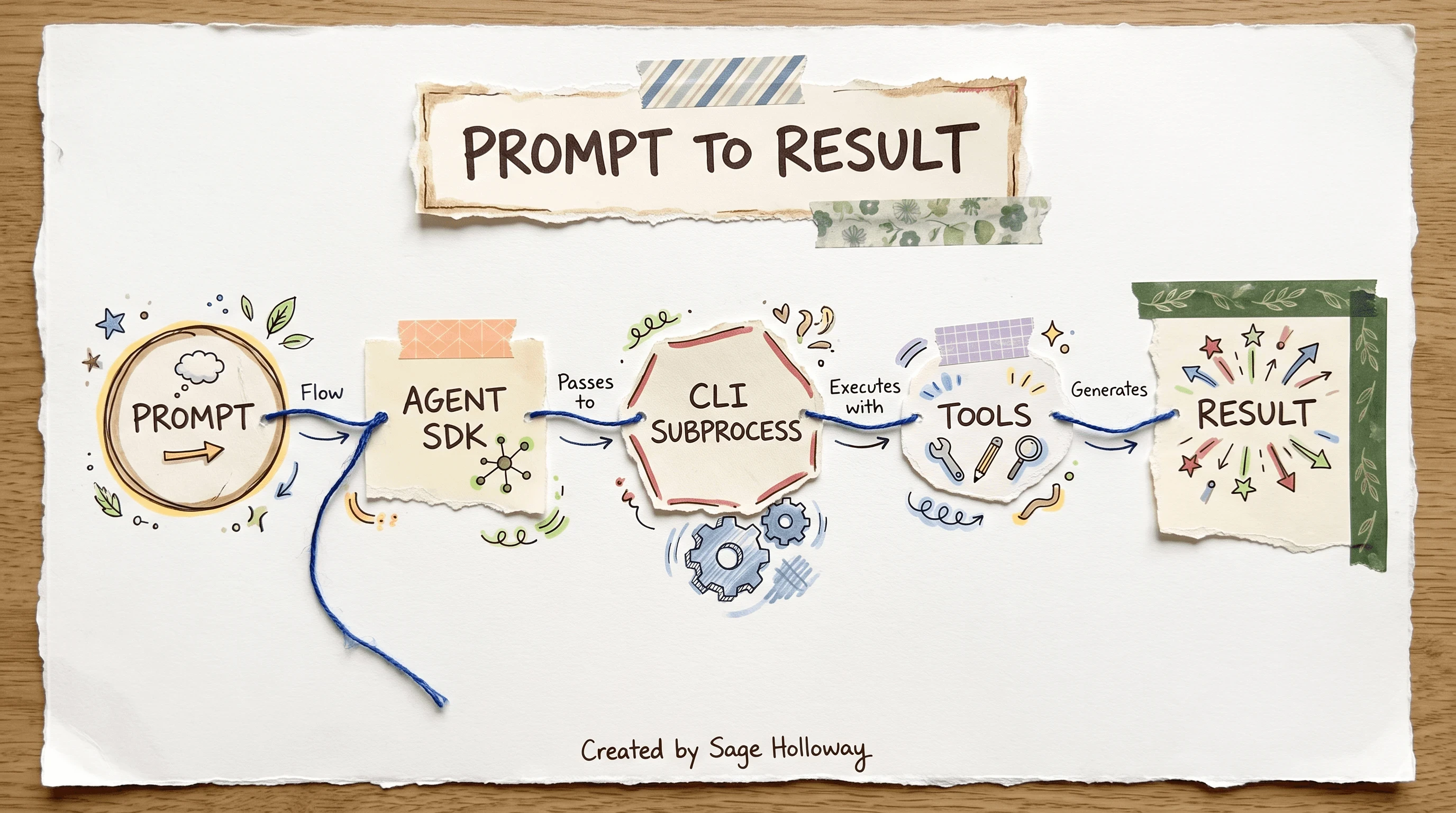
The Agent SDK is not a pure API wrapper: it spawns the Claude Code CLI as a local subprocess and returns structured results.
Why does the subprocess detail matter? Because your host still needs a working Claude Code environment. Because permissions, hooks, and settings files still apply. Because “it is just HTTP” is the wrong mental model when something fails on a CI runner.
Agent SDK vs Claude Code CLI vs Messages API vs Managed Agents
Use the matrix when someone asks “which Claude surface should we ship?”
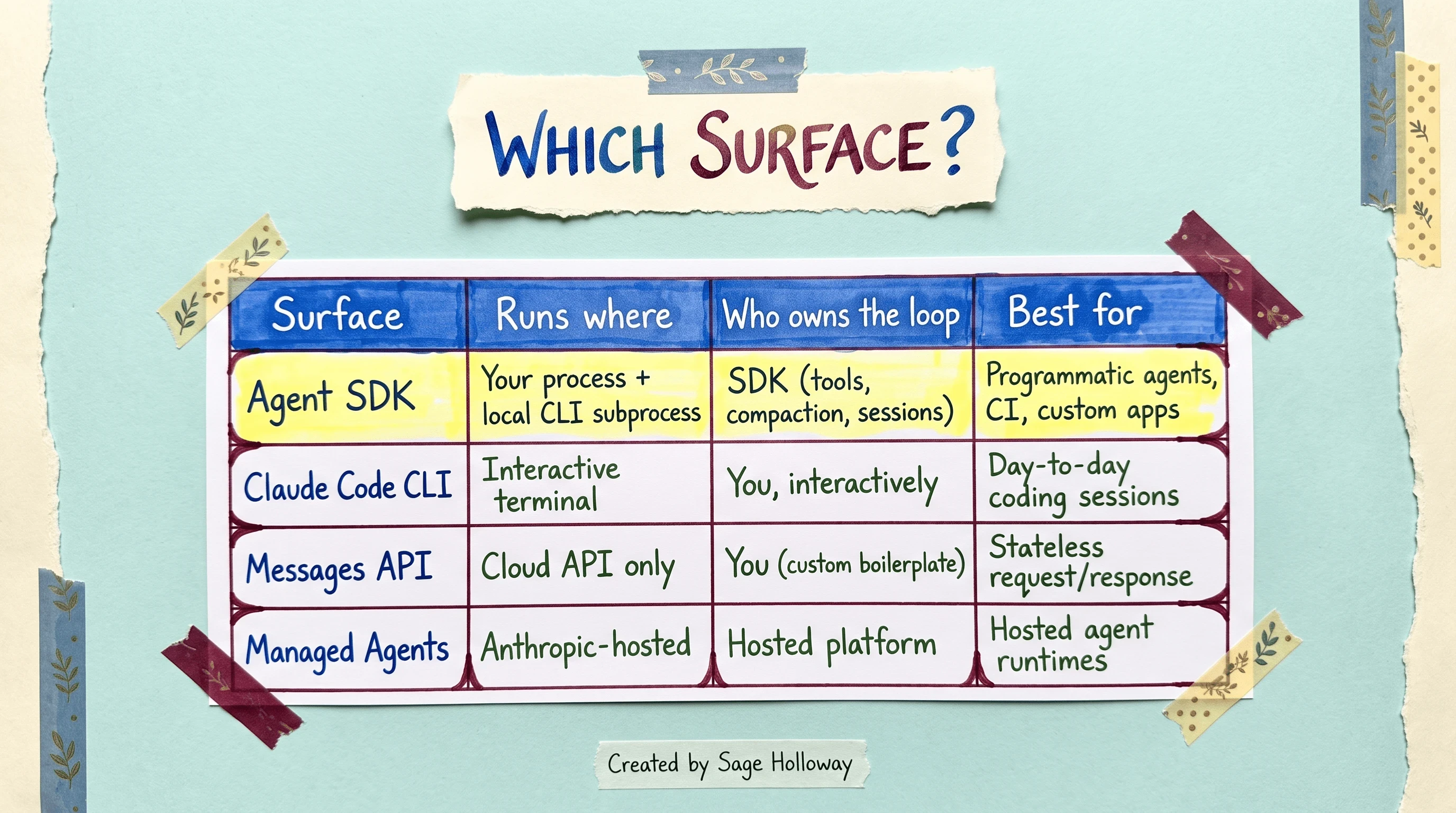
Use the Agent SDK for in-process loops, the CLI for interactive sessions, Messages API when you own the loop, and Managed Agents when Anthropic hosts the runtime.
Agent SDK: your process plus a local CLI subprocess. The SDK owns tools, compaction, and sessions. Best for programmatic agents, CI, and custom apps.
Claude Code CLI: interactive terminal. You own the session turn by turn. Best for day-to-day coding.
Messages API: cloud API only. You write the boilerplate loop. Best for stateless request and response.
Managed Agents: Anthropic-hosted. Best when you want a hosted agent runtime instead of self-hosting the kitchen.
Branding lock from the overview docs: unless Anthropic previously approved you, third-party developers cannot offer claude.ai login or subscription rate limits for products built on the Agent SDK. Use Console API keys. That is not a suggestion. It is the product boundary.
Billing confusion still shows up in Reddit threads claiming a June 15, 2026 “Agent SDK credit” cliff. Anthropic postponed that split. Programmatic runs still draw from normal subscription limits for now. Seat math and plan shopping belong on Claude Code Pro pricing. Here you only need the postponed-credit fact so you do not overreact to old forum posts.
Official architecture walkthroughs help more than another blog diagram. Anthropic’s workshop with Thariq Shihipar is the long form:
https://www.youtube.com/watch?v=TqC1qOfiVcQ
If you want a shorter orientation before you paste a loop, Piyush Garg’s series intro frames the same surface without pretending a screenshot is proof:
https://www.youtube.com/watch?v=1obzUD4aKok
First In-Process Query: TypeScript, Python, and the Node Host Floor
You do not start with a manifesto. You start with a package and a key.
Host CLI install (curl on macOS/Linux, irm on Windows PowerShell) is a different SERP job. Finish that on Install Claude Code if the binary is missing. This section assumes you can install the Agent SDK into a project and run an in-process query.
1. Install the SDK package
TypeScript:
Python:
2. Authenticate with an API key
Custom apps use API key auth. Do not invent a consumer login flow for your product unless Anthropic already approved it.
3. Run a minimal query loop
TypeScript:
Python:
The query helper is an async generator. Typed messages arrive as the agent works. You do not hand-roll tool execution or compaction for the basic loop.
4. Gate tools on the first safe run
Start read-only. Add Bash, Edit, and write tools only after path denials and hooks exist. permissionMode and maxTurns are the first budget knobs that keep a curious agent from wandering forever.
Node.js for Claude Code is a real floor, not folklore. As of v2.1.198, global npm installs of Claude Code require Node.js 22 or later. OS minima from setup docs sit around macOS 13+, Windows 10+, Ubuntu 20.04+, with 4 GB+ RAM as a typical floor. The Agent SDK packages install in-project with npm or pip; the host CLI install remains a spoke.
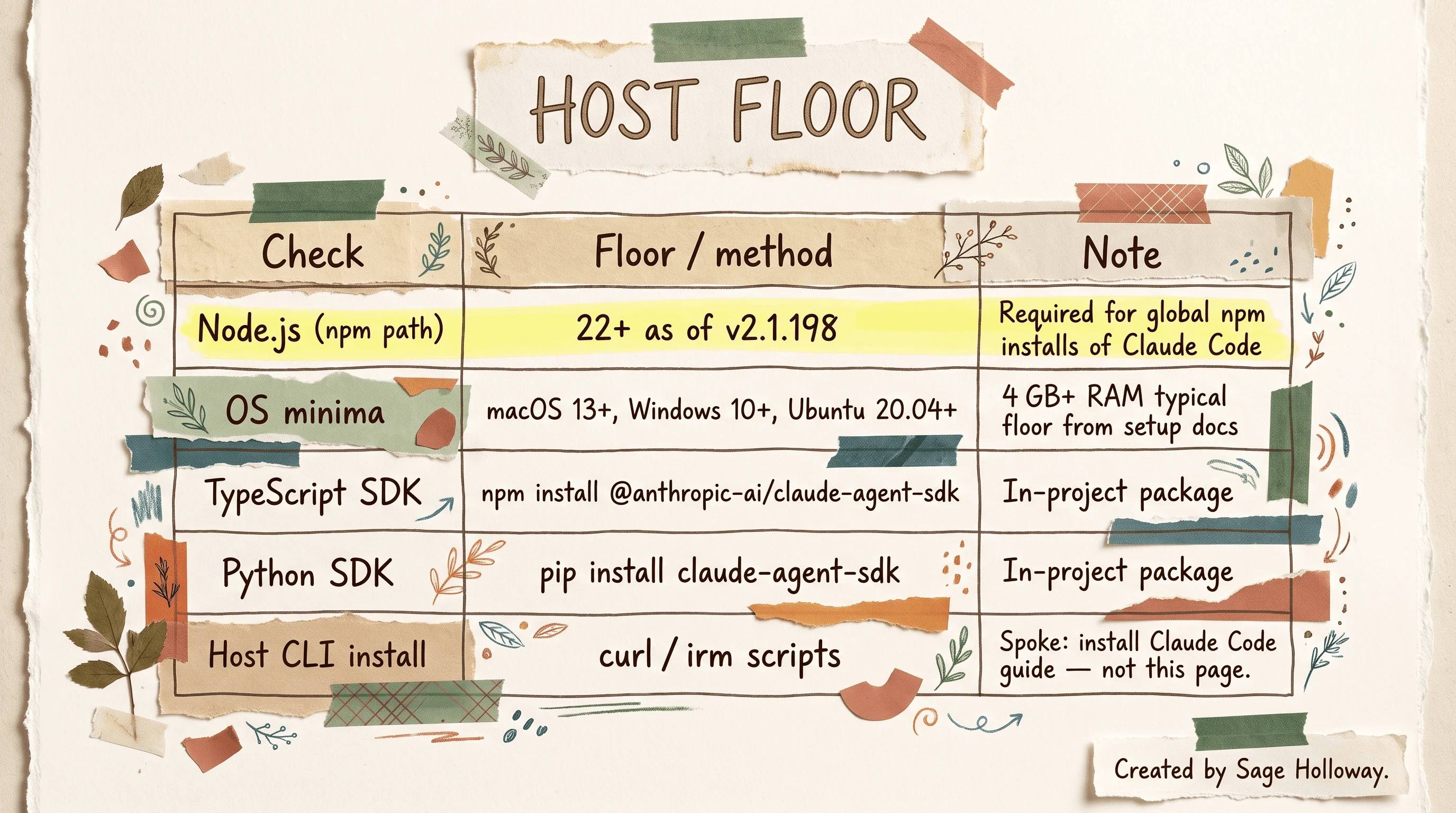
As of v2.1.198, global npm installs need Node.js 22+. Install the Agent SDK with npm or pip; host CLI install lives on the install spoke.
Does Claude Code execute Node.js at runtime for every tool call? Sources say the npm path installs the product, then a pre-compiled native binary does the work. Local Node version mismatches (including Vite tooling fights between Node 20.19+ and newer engines in editors) still break installs even when the agent itself is not “running on Node.” Fix the host floor before you debug the loop.
Harry Roper’s setup walkthrough is useful if you want to watch a first project come up before writing your own loop:
https://www.youtube.com/watch?v=dVfW6Xsx2H8
For the Node host floor on Windows and Mac, Atul at K21Academy covers install without a timestamp deep-link:
https://www.youtube.com/watch?v=i3nXj7ELGLQ
What you now have: packages, a key, a read-gated loop. Time invested: about the length of a coffee if the host CLI and Node floor were already honest.
Headless Bridges: CLI Flags That Matter When the SDK Spawns Claude
When the Agent SDK spawns Claude, you inherit headless CLI realities even if you never open an interactive REPL. You do not need the full Claude Code CLI docs encyclopedia on this page. You need the bridge flags that change automation.
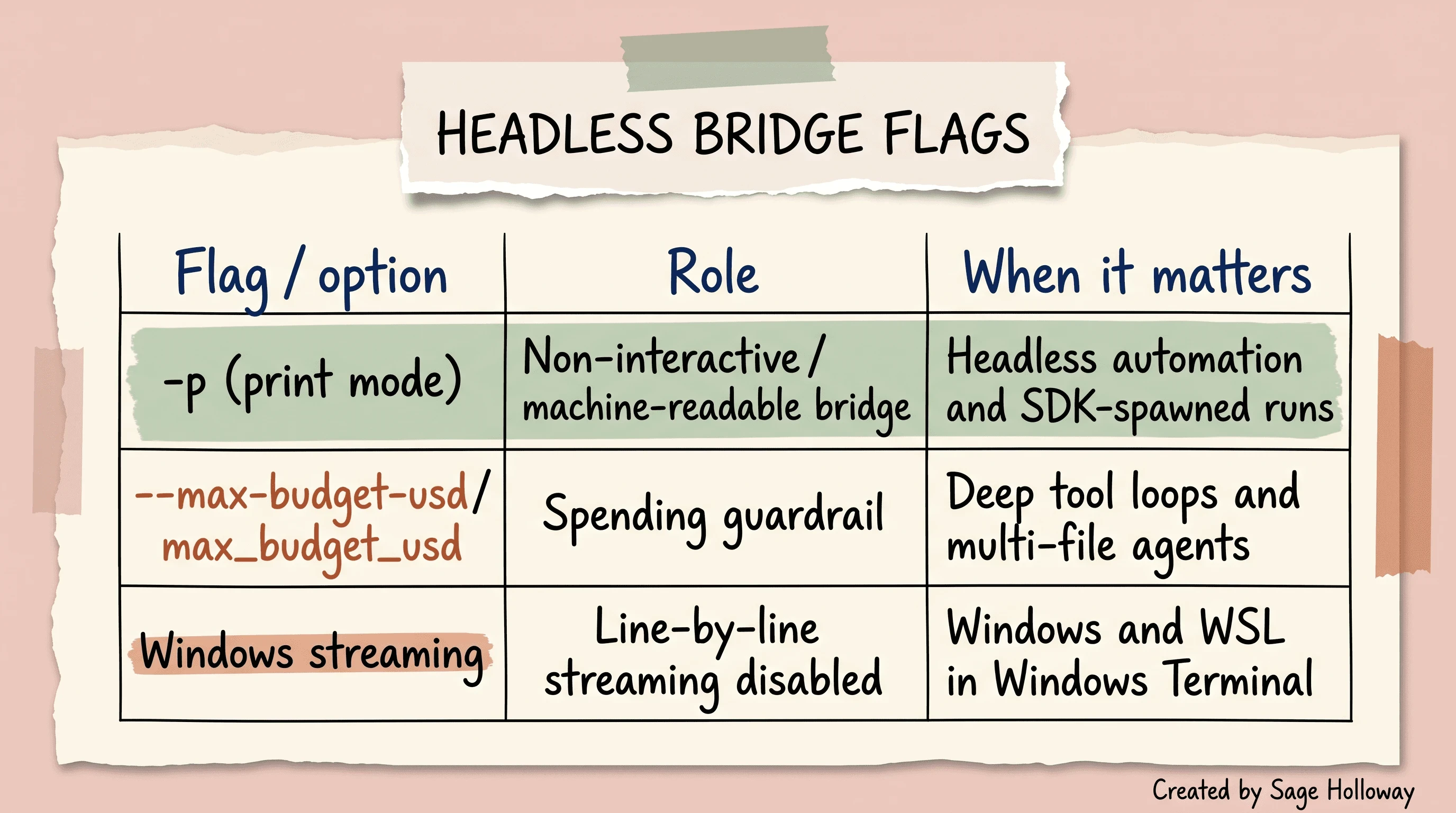
Headless -p print mode and max_budget_usd / --max-budget-usd are the bridge flags; Windows line-by-line streaming stays disabled.
-p (print mode) is the non-interactive, machine-readable bridge. It matters for headless automation and SDK-spawned runs.
--max-budget-usd / max_budget_usd is a spending guardrail. Deep tool loops and multi-file agents burn money quietly. Set a number before you set ambitions.
Windows (including WSL inside Windows Terminal) disables line-by-line response streaming because of rendering issues. If your dashboard expects tick-by-tick tokens on Windows, you will wait longer than a macOS laptop for the same mental model. That is a platform limit, not a bug in your for await syntax.
Enterprise teams who want governance around skip-permissions and identity brokering should read Gravitee’s CLI governance write-up as an edge-case lens, not as a substitute for Anthropic settings docs. The dangerous pattern is still the same: headless CI with permissions skipped and no hook floor.
Session Persistence for Programmatic Runs
Interactive Claude Code sessions feel continuous because the product keeps files and UI continuity for you. Programmatic runs are colder. You capture a sessionId from a run, then pass it back when you want the same thread to continue.
resume, fork, and what SessionStore does not buy you
Resume continues a thread. Fork (where your SDK version exposes it) branches a new line without overwriting the parent conversation you want to keep. SessionStore-style helpers help you persist ids in your own database. They do not buy you the interactive session-file browser people mean when they search “Claude Code sessions.”
That UI depth belongs on Claude Code sessions. This page owns the programmatic id only.
But here is the thing: a resumed session still inherits whatever tools and permissions you grant on the next call. Persistence is not a security control. It is a memory continuity control. If the first run was read-only and the resume suddenly allows Bash, you widened the blast radius on purpose.
I tried treating SessionStore like a free interactive workspace once. It stored the id perfectly. It did not store the judgment I thought I had left in the other window. The quiet truth is boring: the difference between a useful agent product and a dangerous one is who owns the permission gate between turns.
Subagent Orchestration: Task Tool and Context Isolation
Complex reviews want specialists. The Agent SDK’s answer is subagents: separate agents with their own prompts, models, and tool lists, spawned through the Task tool.
Context is isolated. A security-reviewer’s deep file reads do not automatically pollute a test-analyzer’s window. That is the point. You pay for isolation with orchestration discipline.
Parent gets Task; subagents never do
The parent must include Task in allowedTools. Subagents must not receive Task. Nested spawning is not the design. If you put Task on a child, you are inventing a tree the sources warn against.
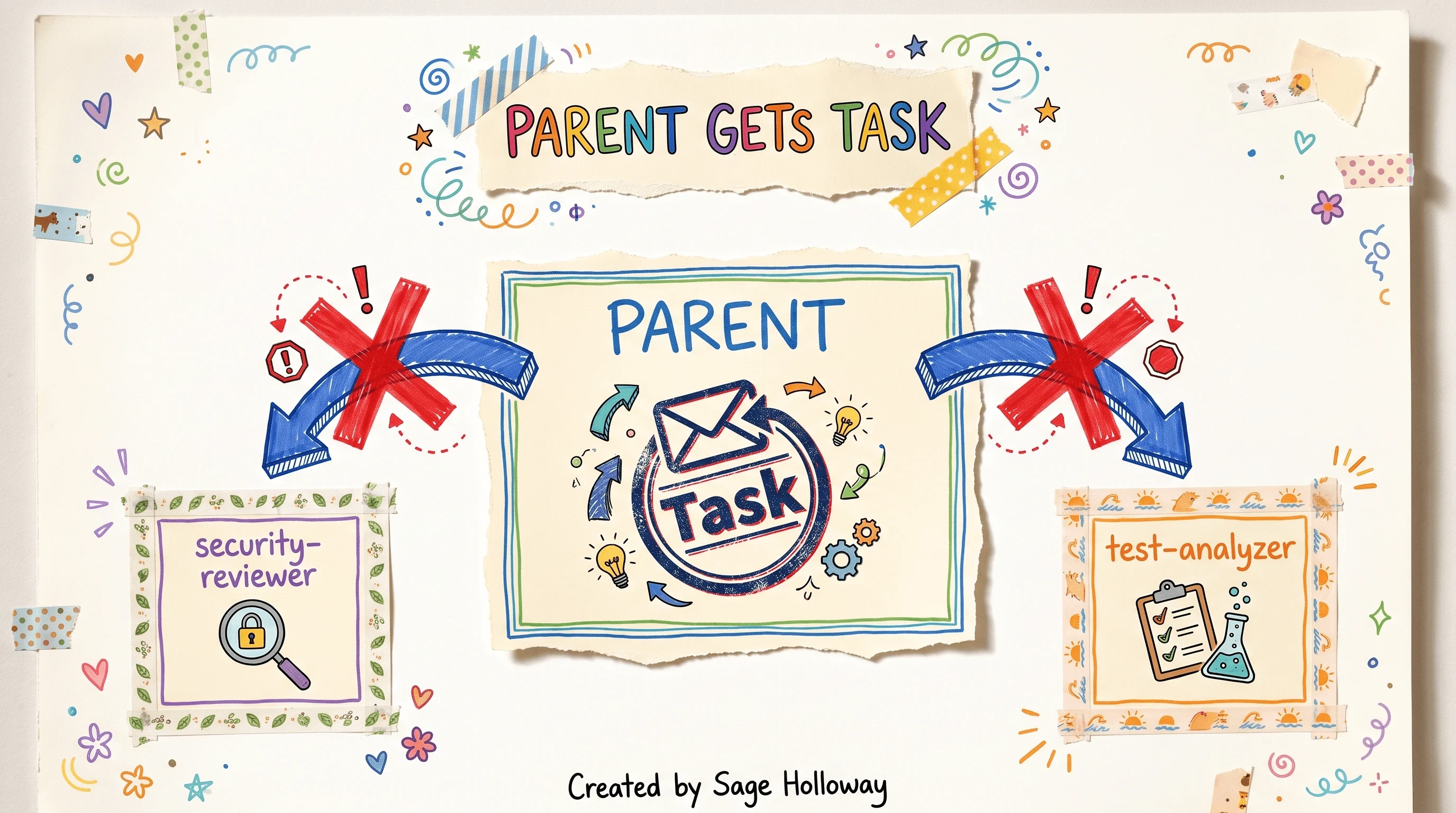
Parent gets Task. Each subagent gets its own context window. Subagents never receive Task.
Everyone ships the first query loop. The loop was never the hard part. The deny hook and the parent-only Task rule are.
Prefer Claude 5 family models (Opus 5, Sonnet 5) in new work when your account exposes them. Older tutorials still name retired 4.5-era labels. Check what your Console actually offers before you copy a model string from 2025.
In-Process MCP Servers (No Extra IPC Process)
Model Context Protocol (MCP) is how tools plug into an agent as servers. Most people start with a separate Node or Python process over stdio or SSE. That wiring is a full spoke on Claude Code MCP servers.
The Agent SDK also supports in-process MCP servers: custom tools registered inside your runtime with no extra IPC hop. That is the rare pattern worth owning here.
create_sdk_mcp_server keeps the tool in the same process. You still gate it with allowed_tools. You still decide whether the tool can touch networks or secrets. In-process does not mean unrestricted.
When do you still want a separate MCP process? When the tool must outlive the agent process, when another host needs the same server, or when isolation itself is the point. Then leave this page and configure stdio/SSE properly on the MCP spoke.
What the Source Leak Actually Exposed (and What It Did Not)
People searching claude code source code usually want one of two things: how the March 31, 2026 npm map leak happened, or which “hidden features” blogs claim the map revealed. Keep those jobs separate from drama embeds.
On March 31, 2026, Anthropic published @anthropic-ai/claude-code with a roughly 59.8MB production source map (cli.js.map) because of a missing .npmignore entry. That map exposed an unauthenticated R2 URL to unobfuscated TypeScript for the CLI scaffolding. It did not dump hosted model weights. Scaffolding is not the model.
Bun’s production build still emitted maps in ways that surprised packagers (tracked in community discussion around oven-sh/bun#28001). The lesson for your own shipping pipeline is dull and useful: production maps are a release artifact. Treat them like one.
Two names show up in leak write-ups as body facts, not as products you should enable tonight:
Undercover Mode: an automatic, non-configurable safety path described for Anthropic employees in public repos. The prompt steers commits to look human and avoid advertising Claude Code, AI authorship, or internal codenames.
KAIROS: an unreleased autonomous daemon concept for unattended webhook or cron-triggered work, including memory consolidation ideas and tools that were not a public product surface in the research pack.
Frustration-tracking regexes and apology penalties make for fun screenshots. They are not a substitute for permissions.deny on your machine. Do not ship a production policy based on a meme from a decompiled map.
Security Boundaries: permissions.deny, Masking, and Auto-Memory Controls
Settings cascade across managed, user, project, and local scopes. The settings docs are the schema authority: Claude Code settings.
To keep the agent away from credentials, use permissions.deny. It replaces the deprecated ignorePatterns key.
Exact path patterns should match your repo layout. The mechanism is the deny list, not a polite prompt.
Optional environment kill switch for automatic memory recording:
Windows admins: as of v2.1.75, the legacy managed-settings path C:\ProgramData\ClaudeCode\managed-settings.json is unsupported. Migrate to C:\Program Files\ClaudeCode\managed-settings.json.
Two settings, disableClaudeAiConnectors and isolatePeerMachines, can override a managed false when set to true in a lower scope. That exception matters in enterprise policy fights. Do not discover it during an audit.
Reddit threads about code egress are emotional for a reason. A long context session can touch a large file set. Path denials and network isolation are how you shrink that surface. Alarm without a deny list is theater.
Self-Hosted Sandboxing with PreToolUse Hooks
This is the gap most install tutorials skip.
Isolate the host first: containers, VMs, or locked-down runners so a runaway Bash cannot casually reach production secrets. Then intercept tool calls inside the agent loop with life-cycle hooks. PreToolUse runs before a tool executes. An ask decision floors auto mode; even eager auto cannot override it. A deny decision blocks the command before it runs.
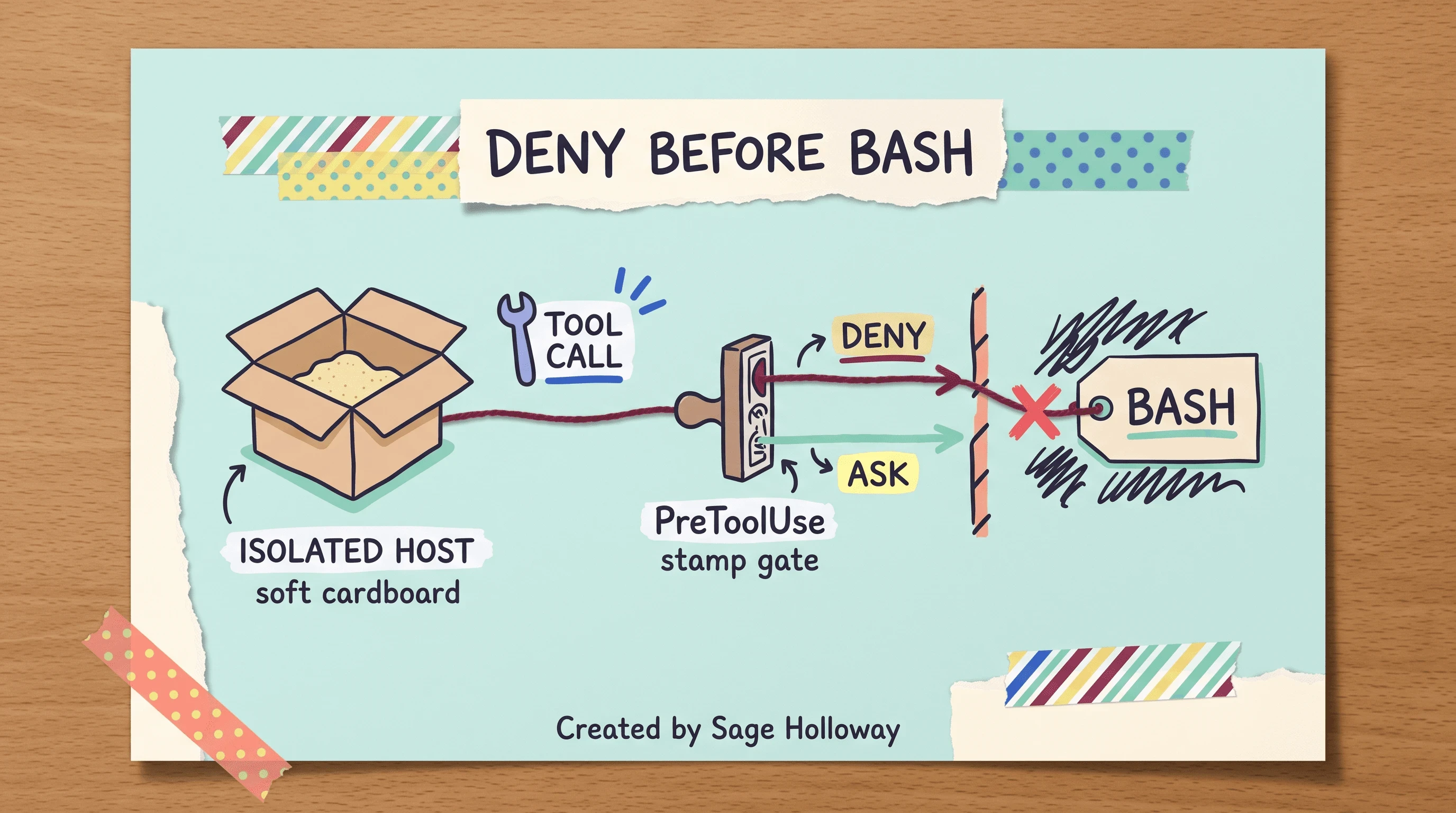
Sandbox the host, then intercept tool calls with PreToolUse. An ask decision floors auto mode; deny blocks the command before it runs.
Replace foo.sh with patterns that match your real risk (destructive git, curl-to-unknown, credential dumps). Keep the decision deterministic. Prompts are guidance. Hooks are gates.
Community guides sometimes invent theoretical “kernel architectures.” Skip those. The production story is simpler: isolate the machine, deny sensitive paths, intercept Bash and Edit with PreToolUse, set a budget, and only then widen allowedTools.
If you have ever watched an agent invent a “helpful” cleanup script against production data, you already know why the gate sits before Bash, not after the apology.
FAQ
Has the Claude Code SDK been renamed?
Yes. Anthropic renamed the library to the Claude Agent SDK in September 2025 to reflect general-purpose agent work. It ships as @anthropic-ai/claude-agent-sdk for TypeScript and claude-agent-sdk for Python. Search still uses Claude Code SDK; the packages above are the current names.
How does the Claude Agent SDK differ from the Claude Messages API?
The Messages API leaves tool loops, history, and compaction to you. The Agent SDK runs that loop in-process, spawns the Claude Code CLI as a subprocess, and handles tools, compaction, and session continuity without that boilerplate. Pick Messages API when you want a thin cloud call. Pick the Agent SDK when you want the agent product inside your process.
How are billing rates and limits managed under the Claude Agent SDK subscription?
Anthropic announced a separate Agent SDK credit system aimed at June 15, 2026, then postponed the transition. Programmatic SDK and headless runs still draw from normal subscription limits while that plan updates. Treat old “50x on June 15” speculation as outdated. For seat pricing, see Claude Code Pro pricing.
Does the Claude Agent SDK run as a pure API client or does it execute a subprocess?
It is not a pure API wrapper. It spawns a Claude Code CLI process as a local subprocess. That is why host install, Node floors, and local settings still matter for programmatic apps.
How can developers prevent the agent from accessing sensitive files like credentials or API keys?
Put blocked paths in permissions.deny inside .claude/settings.json. That setting replaces deprecated ignorePatterns and blocks discovery, search, and read or edit on matching paths. Pair denials with PreToolUse hooks for Bash and Edit.
Can a third-party developer build custom subscription-based rate limits on top of the Claude Agent SDK?
No, not without prior Anthropic approval. Overview docs disallow third-party claude.ai login and subscription rate limits on custom Agent SDK products. Use Console API key authentication instead.
Does the Claude Agent SDK support the Model Context Protocol (MCP)?
Yes. MCP tools plug into the agent loop through allowed-tool patterns. For in-process servers, use create_sdk_mcp_server. For separate stdio or SSE servers, use the MCP configuration guide.
How did the massive Claude Code source code leak occur?
On March 31, 2026, the @anthropic-ai/claude-code npm package shipped with a large production source map after a missing .npmignore entry. The map pointed at an unauthenticated R2 URL for unobfuscated TypeScript scaffolding. It exposed CLI/SDK orchestration code, not hosted model weights.
Does Claude Code execute Node.js at runtime?
Claude Code is commonly installed via npm, and as of v2.1.198 global npm installs require Node.js 22+. At runtime the product uses a pre-compiled native binary rather than interpreting your whole agent loop in local Node. Editor and Vite Node mismatches can still break the install path even when the binary is what executes.
The floor manager and the kitchen are not going to merge into one magical cloud button next quarter. More teams will put Agent SDK loops in CI, more will discover subprocess constraints the hard way, and more will learn that a deny hook is cheaper than an incident review. Whether Anthropic’s postponed credit split returns next release cycle is genuinely unclear from public notes today. Watch the overview docs, not the loudest Reddit thread.
Tonight, pick one repo you already trust. Install @anthropic-ai/claude-agent-sdk or claude-agent-sdk, export ANTHROPIC_API_KEY, run a read-only query with allowedTools: ["Read", "Glob", "Grep"], then add one PreToolUse Bash deny pattern for a command you never want in that folder. If that loop finishes without widening tools, you learned the real product. If you need the host CLI first, start at Install Claude Code.
Until then...
Sage
PS. Open a throwaway directory, start a one-line query that only lists filenames, and time how long it takes before you feel the urge to add Bash “just this once.” Write that number of minutes on a sticky. The sticky is your real permission policy for the week.
Author
Practical guides, tool teardowns & AI engineering workflows.


