Claude Code
Sequential Thinking in Claude Code: MCP, GSD, and When to Skip It

Sage Holloway
25 min read
Go back to blog
SHARE

The session started clean. By hour two the model was rushing, skipping files it had already opened, and sounding sure about a plan it could no longer hold. You did not change the prompt. The stove just got too crowded, and nobody wrote down which spice went in first.
Sequential thinking in Claude Code means making reasoning inspectable: either the Sequential Thinking MCP server (thought numbers, revisions, and branches) or a spec-driven stack such as GSD that runs specialized subagents in isolated windows. Both exist to fight context rot, the quality drop many sources place once a window is about 50 to 70 percent full. Use them for architecture and multi-step debug, not for every small tweak.
This page is a when-to-enable guide, not a marketplace ranking. Commands and config keys come from NotebookLM research dated 15 August 2026 plus the Sequential Thinking MCP README and Claude Code subagent docs. No live CLI verify on this draft. If a blog disagrees with those two, trust the official pages.
This will not work if you bolt the thinking server onto a reasoning model for a one-line CSS tweak, or if you spin up GSD for a twelve-line script. The overhead is the product. Skip it when the job is small.
Sequential thinking makes reasoning inspectable. Use it for architecture and debug, not every small tweak.
Why sequential thinking shows up: context rot and amnesia
You know the before picture.
You vibe-code a feature in one long session. The first hour feels like a senior pair. Then Claude starts skipping tests it already wrote, inventing a helper that already exists two folders down, and “finishing” by rushing the last three files. You did not get dumber. The window filled up.
The after picture is smaller, colder, and slightly annoying to set up.
You stop treating one chat as an infinite brain. You force a paper trail: numbered thoughts you can revise, or a fresh worker with a clean window for each phase. Architecture decisions stop living only in the model’s last paragraph. They live in metadata, a spec, or a planning file you can argue with tomorrow.
Picture a weeknight stew. You dump every leftover into one pot because you are tired and the pot is already on. First taste is fine. Midway you cannot remember whether you already salted it, so you salt again.
Then you add cumin because the color looks dull. By the end the stew is loud, brown, and somehow still underseasoned in the one place that mattered. Nobody can reconstruct the recipe. You only have the pot.
That crowded pot is context rot: quality dropping as the window fills, often framed in practitioner write-ups once usage sits around 50 to 70 percent. Attention dilutes. The model starts behaving like a cook who is bored and hungry, not like the person who started the mise en place.
GSD (Get Shit Done) exists as a named answer to that drop. Sequential Thinking MCP exists as a different answer: keep the same cook, but force them to write numbered tasting notes.
Rob Marshall calls the failure AI with amnesia. MindStudio talks about context pollution. The New Stack and the GSD lesson modules keep returning to the same job: stop asking one overflowing window to remember a whole product. If you want the science-of-attention version later, that is a sibling piece (The Science of Context Rot), not this URL.
People searching gsd claude code usually land here because they felt the stew go wrong, not because they wanted another MCP logo. The framework’s move is brutal and useful: spawn a fresh subagent for the next job so that worker starts with a clean context (GSD sources often describe that as a full 200,000-token window). Sequential thinking as a phrase is bigger than GSD. Isolation is one mechanism. Inspectable thought metadata is another. Native todos are a third, quieter one.
Want to see the planning files before you install anything? Watch this walkthrough of GSD’s linear flow and generated docs such as ROADMAP.md and STATE.md, then come back. The video sells the stack. This article decides when the stack is overkill.
[EMBED: YouTube - https://www.youtube.com/watch?v=2I5JuYjupbA ] Caption: Watch GSD’s planning files and linear flow, then come back for when that stack is overkill.
How sequential thinking works (branch, revise, thought counts)
MCP here means Model Context Protocol: a way for Claude Code to call an external tool server. The Sequential Thinking server exposes a sequential_thinking tool. Claude is supposed to call it as it reasons, not as a toy you mash by hand every turn.
The required fields are the proof the server is actually in the loop:
thought: the content of this stepthoughtNumber: which step this istotalThoughts: how many steps the model currently thinks it needsnextThoughtNeeded: whether another step should follow
The optional fields are how you leave a straight line:
isRevisionandrevisesThought: this step replaces an earlier onebranchFromThoughtandbranchId: this step forks an alternative path
That is the whole inspectable surface. No fake thought cards in this article. If you need to see numbers increment in a real session, the JeredBlu walkthrough below is the evidence, not a generated screenshot.
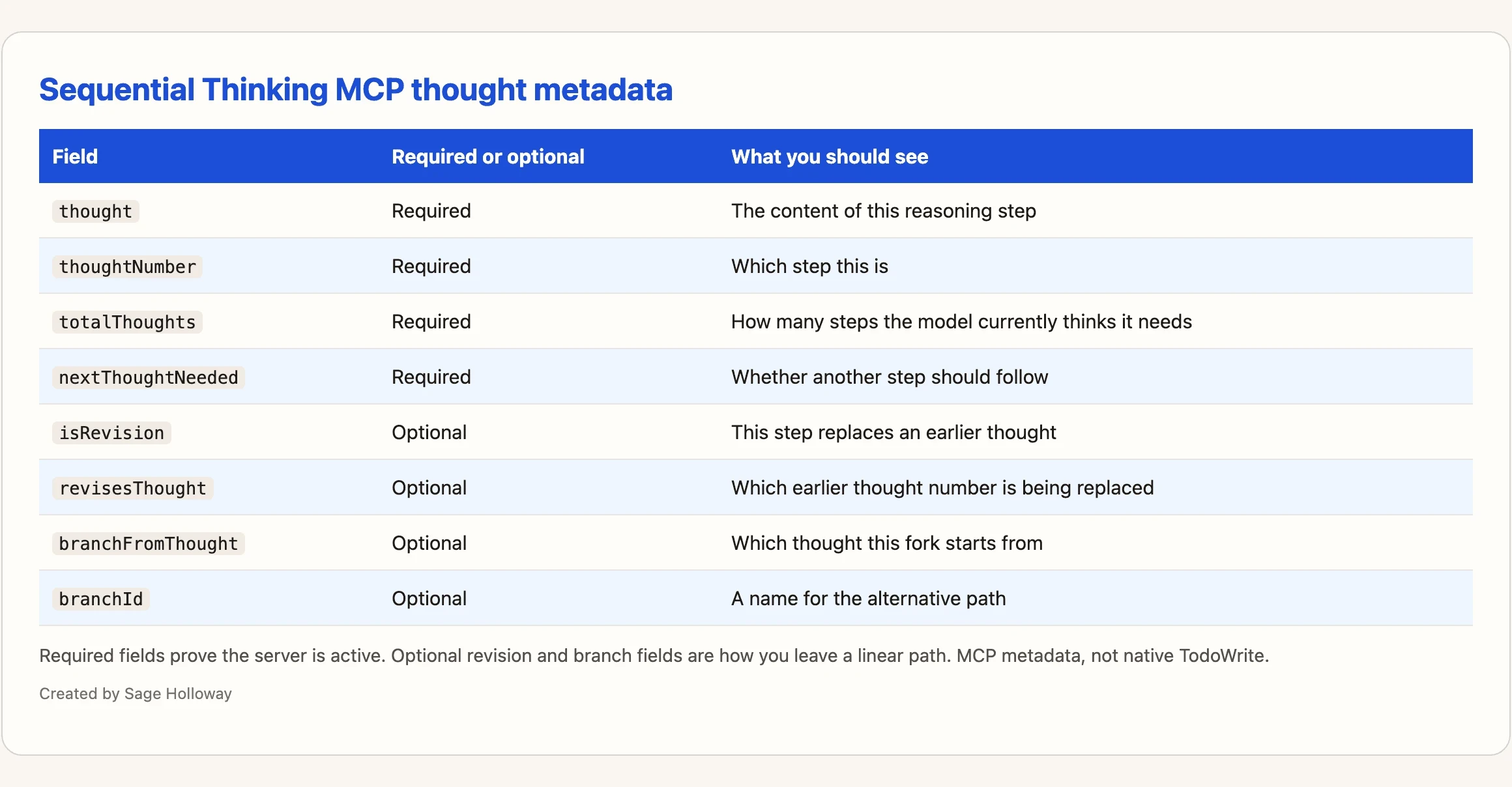
Required fields prove the server is active. Optional revision and branch fields are how you leave a linear path.
Why bother, if Claude can already “think”? Because native thinking is easy to lose. A paragraph of chain-of-thought in the transcript is not the same as a structured object you can branch.
When a linear GSD spec goes stale mid-project, isRevision and branchFromThought are the metadata you want, not a full restart of the waterfall. Sources flag stale specs as a real limitation. They do not ship a dedicated CLI for “un-stale this .planning/ folder.” Do not invent one. Use revision and branch fields, then rewrite the spec files yourself.
Claude Code also ships native TodoWrite and TodoRead tools: a checklist the model can keep inside the session. A Reddit thread where Claude assessed Sequential Thinking MCP as unnecessary is pointing at those tools. For a punch list (“fix the null check, add a test, open the PR”), todos are often enough. For an option tree (“event sourcing vs CRUD vs outbox, and why the first two die on our traffic shape”), you want branches you can name.
Do not confuse this with Plan Mode. Luis Gallardo’s writing mixes interactive planning language with sequential thinking. Plan Mode is a read-only permission posture. We cover that on its own page: Claude Code Plan Mode. This URL owns thought metadata and when the MCP is wasted overhead.
Everyone treats the thinking server as a personality upgrade. The personality was never missing. The paper trail was.
[EMBED: YouTube - https://www.youtube.com/watch?v=R-5ucM-5P5o ] Caption: See Sequential Thinking metadata expand in a real session (thought number, totals, next thought needed).
Install and configure Sequential Thinking MCP
If Claude Code is not on the machine yet, finish install first (Install Claude Code). Global install in the claim ledger is npm install -g @anthropic-ai/claude-code. Do not use sudo npm install -g.
For adding other MCP servers in general (scopes, .mcp.json, catalogs), use the MCP configuration guide (Claude Code MCP servers). This section is only Sequential Thinking.
Add the server in Claude Code (claude mcp add + local scope)
Prefer the official README-shaped add when blogs disagree. The high-confidence command in the research ledger is:
What you now have: a local-scope Sequential Thinking server launched through npx. Time invested: about a minute if Node is healthy.
Then start a session on a real architecture question and watch for thoughtNumber / nextThoughtNeeded in the tool payload. If those fields never appear, you added a status light, not a thinking loop.
Config extras: DISABLE_THOUGHT_LOGGING, desktop/mcp.json notes
To stop the server from logging thought information, set:
Desktop configs and a user-level mcp.json show up in install write-ups as compatibility paths. VS Code workspace .vscode/mcp.json is a row in the table below, not a VS Code tutorial. That job lives on Claude Code in VS Code.
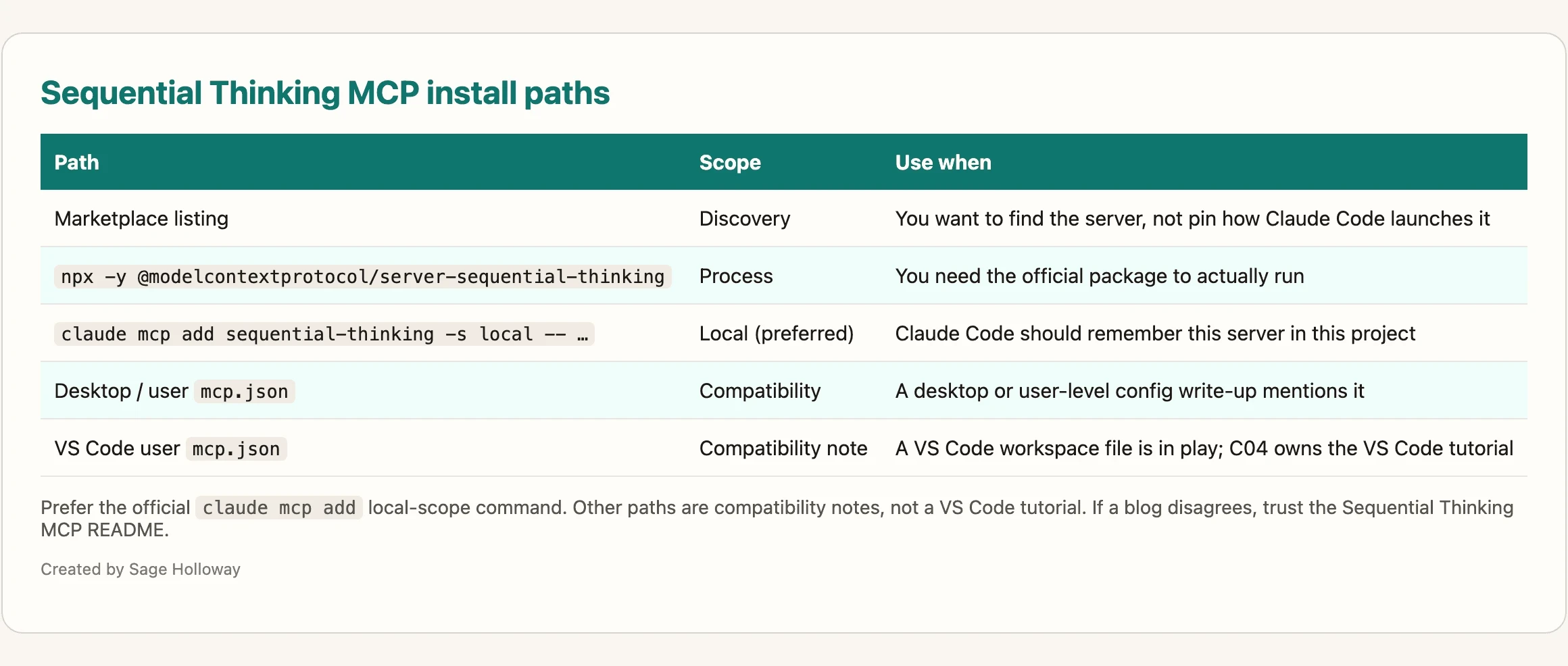
Prefer the official claude mcp add local-scope command. Other paths are compatibility notes, not a VS Code tutorial.
Marketplace listings are discovery. npx -y @modelcontextprotocol/server-sequential-thinking is the process. claude mcp add … -s local is how Claude Code should remember it. If a 2025 blog hard-codes a different wrapper, check the MCP servers tree before you copy the snippet.
When to turn it on (and the reasoning-twice cost)
Here is the honest constraint: this page does not ship a live token benchmark. Reddit and practitioner threads warn that a reasoning model plus Sequential Thinking metadata can mean the model reasons twice, once internally and once as MCP thoughts. That can be wasted overhead. Treat “bonfire of tokens” language as anecdotal until you meter your own usage.
Native todos are cheap structure. MCP thoughts are inspectable structure. GSD isolation is a new kitchen. Pick one default. Stacking all three is how a Tuesday becomes a billing event.
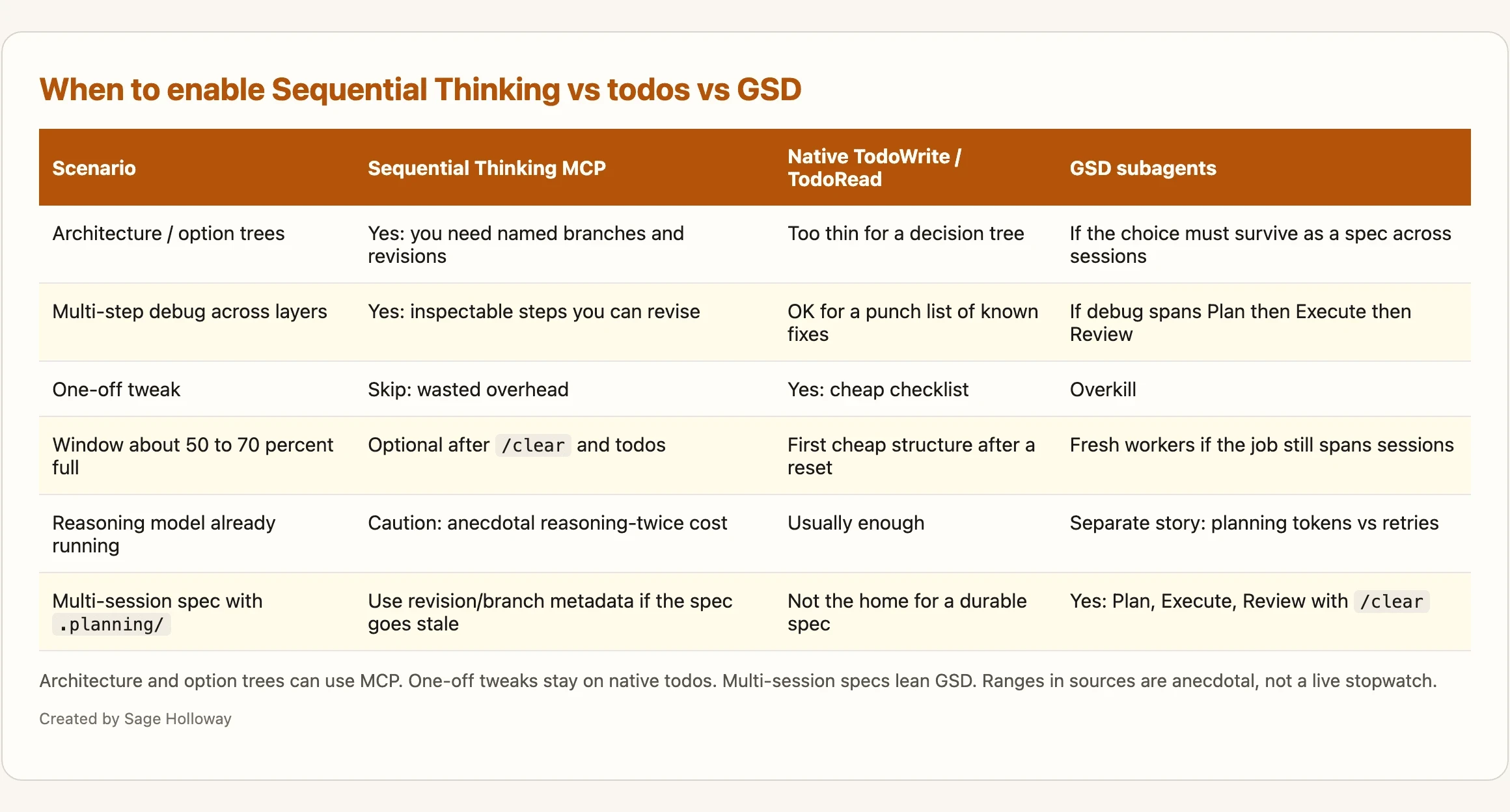
Architecture and option trees can use MCP. One-off tweaks stay on native todos. Multi-session specs lean GSD. Ranges in sources are anecdotal, not a live stopwatch.
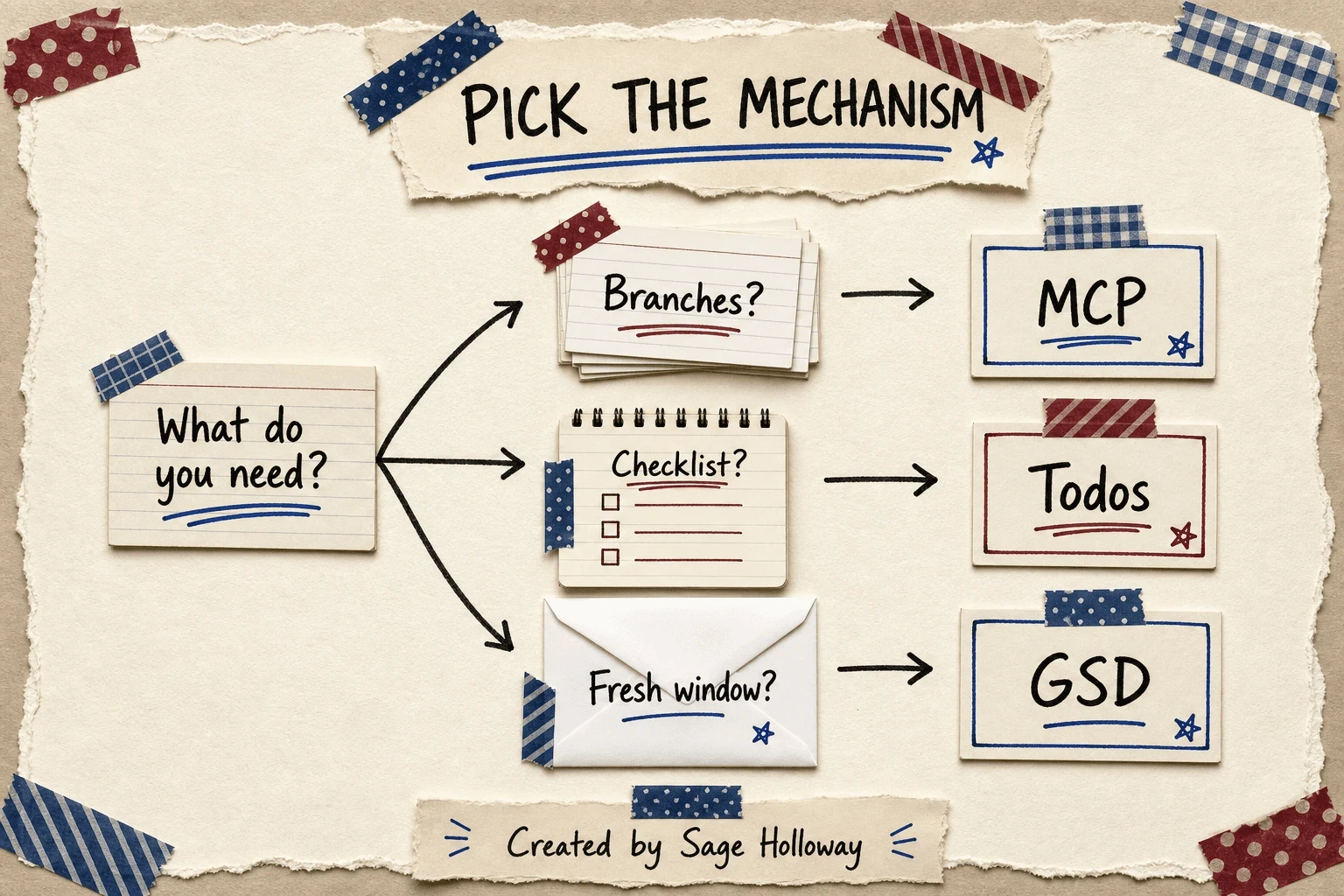
Need inspectable branches, a simple checklist, or a fresh window? Pick the mechanism, do not stack all three by default.
Trigger: architecture, option trees, multi-step debug vs one-off tweaks
Turn Sequential Thinking MCP on when you are comparing designs, walking a nasty bug across layers, or you need to show a teammate why the model abandoned path A. Leave it off for rename-a-variable work, copy tweaks, and “make the button 8px larger.”
GSD is for projects with real logic, multiple components, and multi-session coordination. Sources call it overkill for prototyping and one-off tweaks. They are right. You do not hire a film crew to season the stew.
The ~50% context trigger vs always-on MCP
A better default than “always on”: watch the window. When practitioner sources say quality falls around 50 to 70 percent full, that is your cue to stop vibe-coding in the same chat. Options, in order of cost:
/clearand a tighter prompt (cheapest)Native todos for the remaining punch list
Sequential Thinking MCP if you still need branches and revisions
GSD-style phases with fresh subagents if the work spans sessions
Rob Marshall’s August 2025 MCP-stack piece is useful for recipes and dated as a “you always need this” claim. Native reasoning got better. Always-on Sequential Thinking is a 2025 habit, not a 2026 law.
I tried leaving the server on for a week of mixed chores. It did not make the chores wiser. It made the receipts longer. That is the cost audit in one sitting, even without a published lab number.
Subagent roles and isolated context
Anthropic Claude Code subagents documentation is the source of truth for workers with their own context, tools, and files. Built-in subagents cover jobs Claude already knows how to delegate. Custom subagents are Markdown files with YAML frontmatter.
As of v2.1.198, /agents no longer opens an interactive creation wizard. You edit files or you ask Claude to write them. Paths:
~/.claude/agents/for user-wide agents.claude/agents/for project agents
The Task tool was renamed to Agent in v2.1.63. Task(...) remains a valid alias. From v2.1.212 onward, /subtask is the fork command (older builds used /fork).
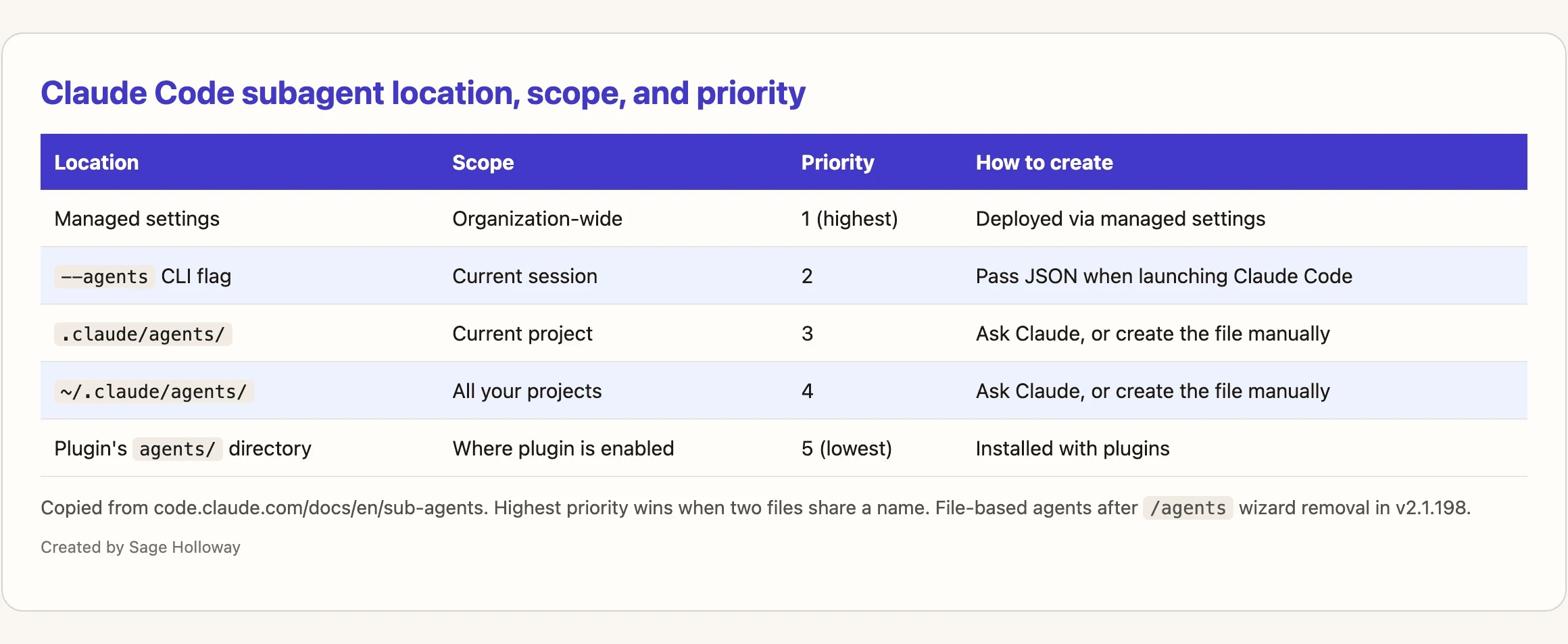
Copy rows from code.claude.com/docs/en/sub-agents. File-based agents after /agents wizard removal in v2.1.198.
Official location rows, highest priority first: managed settings (organization-wide), --agents CLI flag (current session), .claude/agents/ (project), ~/.claude/agents/ (all your projects), plugin agents/ (lowest). When two files share a name, higher priority wins.
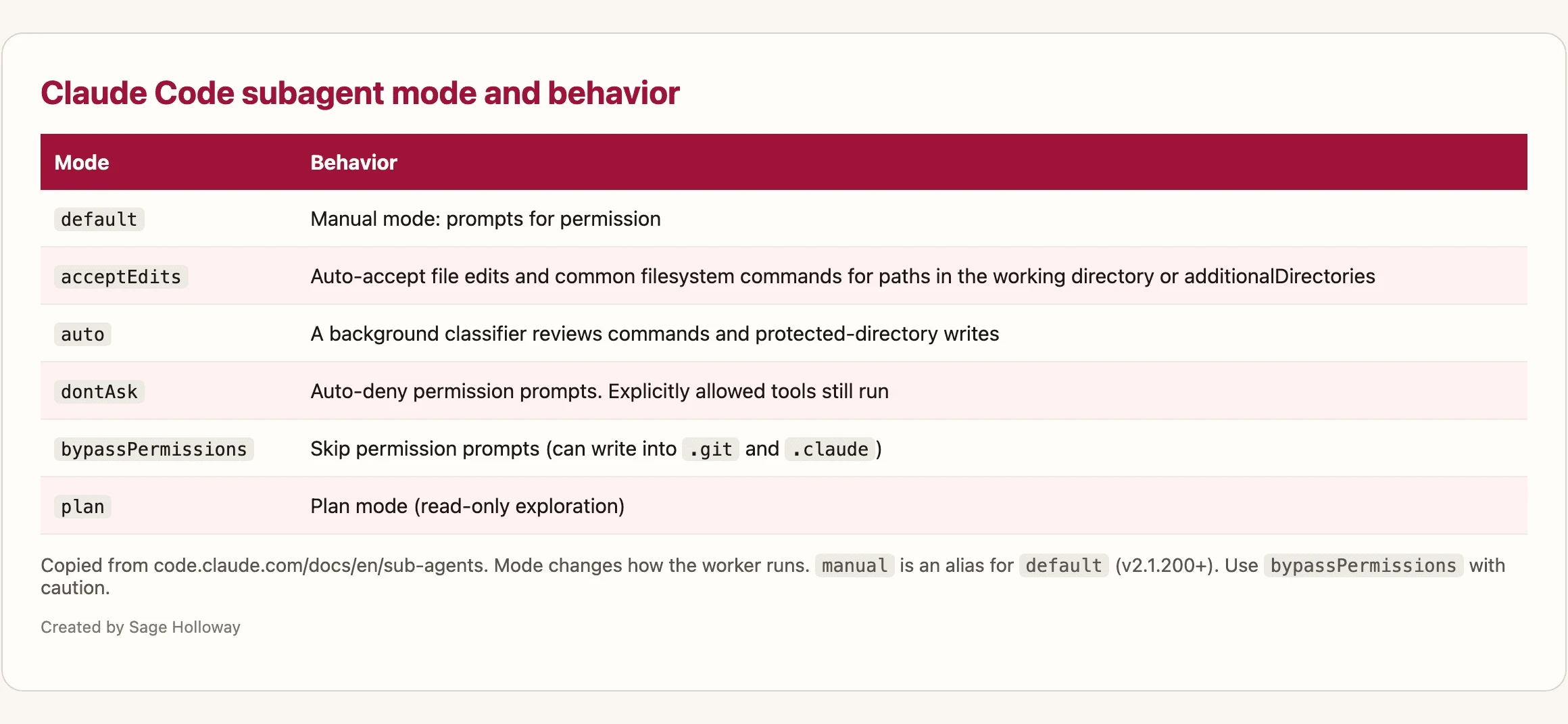
Mode changes how the worker runs. Behavior is what the reader should expect in the session.
Official permissionMode values, paraphrased from the same docs page: default prompts for permission. acceptEdits auto-accepts file edits and common filesystem commands in the working directory. auto uses a background classifier. dontAsk auto-denies permission prompts (explicitly allowed tools still run). bypassPermissions skips permission prompts. plan is read-only exploration.
Use bypassPermissions with caution. It can write into places you care about, including .git and .claude.
Need a picture of isolation before you write YAML? This short architecture walkthrough is the visual. Then come back for least privilege.
[EMBED: YouTube - https://www.youtube.com/watch?v=mEt-i8FunG8 ] Caption: Watch a short subagent architecture and isolation walkthrough, then read least-privilege tools and hooks.
Community personas live in lists such as Awesome Claude Code Subagents. Treat that as a catalog of jobs (reviewer, researcher, debugger), not as permission to skip tools filters.
Least privilege: tools filters and PreToolUse hooks
Restrict the tools field to what the worker needs. A reviewer that only reads files should not get write tools. That is least privilege, not vibes.
PreToolUse hooks are the deterministic backstop most Sequential Thinking tutorials skip. Pair a thinking step with a hook that blocks dangerous tool calls unless a safety thought was logged. The example class in the research pack is SQL DELETE or DROP: concept, not a product you install. The hook is the adult in the room when the “architect” persona gets creative.
Isolation and memory, as list items (worktree depth belongs on the worktree guide: Claude Code worktrees):
isolation: worktree: run the subagent in a temporary isolated git worktree so Bash does not wander into your main checkoutmemory: user: persist patterns across projects (docs locate this under~/.claude/agent-memory/)memory: project: shareable project memory in the repomemory: local: project memory that should not be committedSession memory habits in general: Claude Code sessions
Limits you will hit:
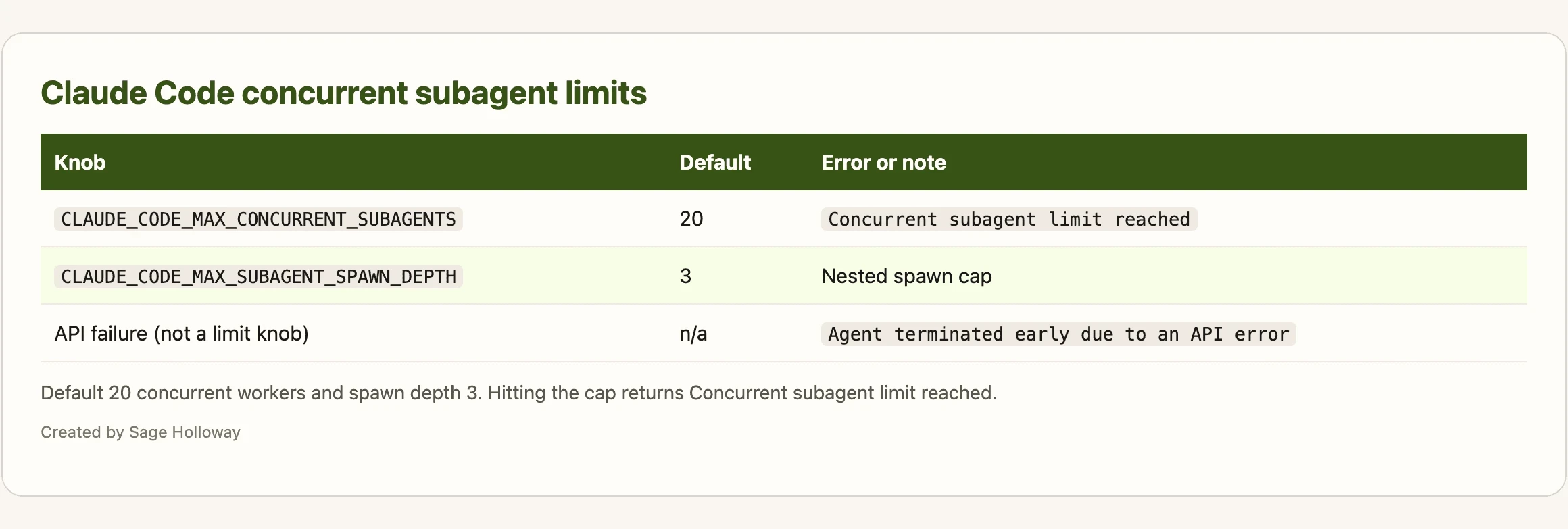
Default 20 concurrent workers and spawn depth 3. Hitting the cap returns Concurrent subagent limit reached.
Confused about why a worker “forgot” the main chat? That is the point of isolation. The forgetfulness is a feature until you needed a shared fact. Then you pass a brief, a spec file, or a memory scope. You do not dump the whole stew into the new pot.
GSD as a phase-based sequential workflow
GSD is spec-driven development for Claude Code: write the plan down, execute in a fresh window, review in another fresh window. It is sequential thinking as process, not as MCP metadata.
Pack GitHub only: gsd-build/get-shit-done. Codecentric notes governance and archive risk on the original gsd-build story. Later community forks exist in the wider internet. They are not in this cluster’s link pack, so they do not get a citation here. Confirm the repo you actually clone before you teach your team a command.
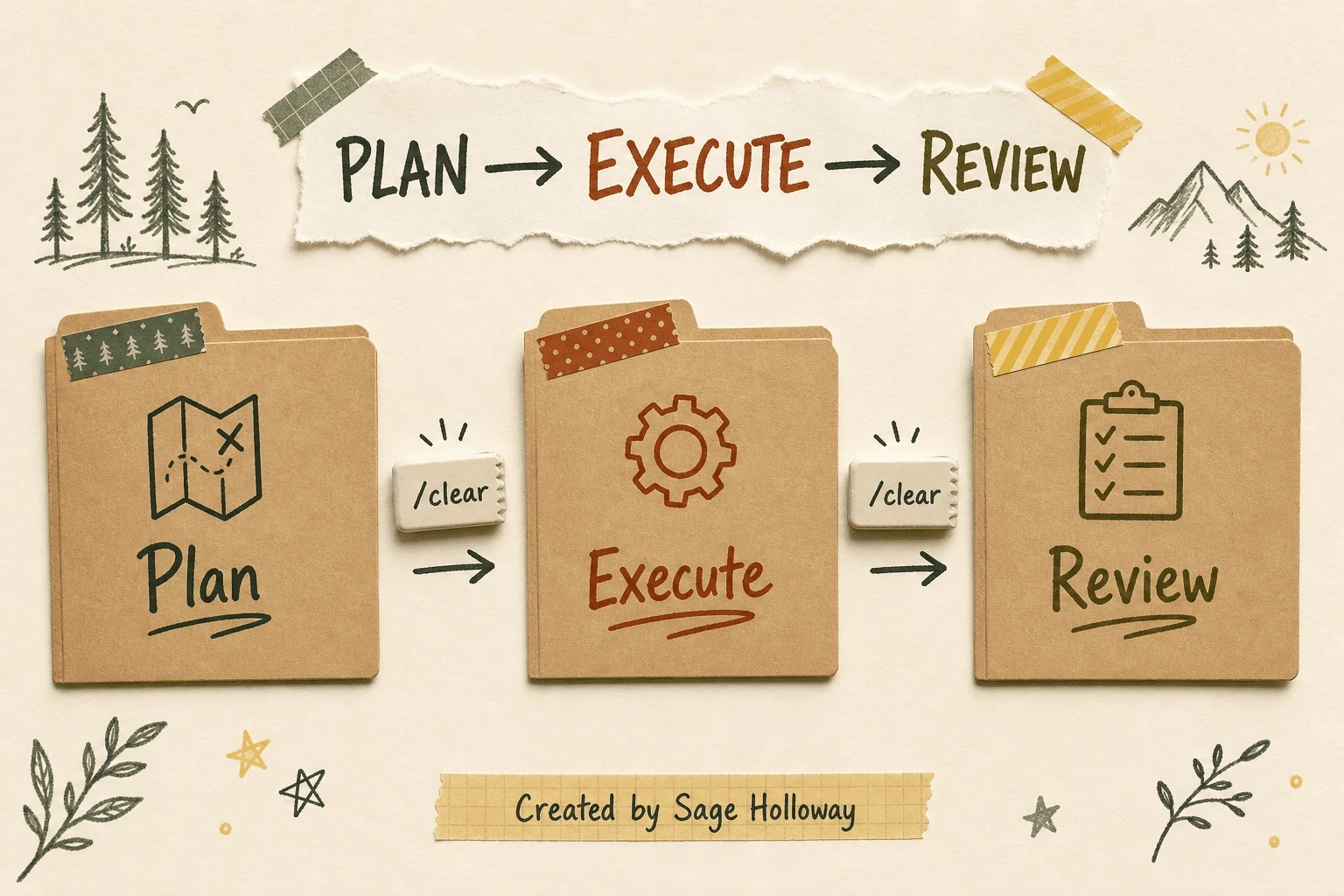
Fresh windows between phases beat one long vibe session. /clear is the reset, not a decoration.
Plan, Execute, Review (and /clear between phases)
Phase 1, Plan: research and spec. Do not implement yet. The deliverable is a document you can hate in daylight.
Phase 2, Execute: a new worker (or a cleared session) implements against that spec. The cook is not also writing the menu.
Phase 3, Review: a third pass checks the diff against the spec, not against the vibe of the original chat.
MindStudio’s useful move is /clear between phases so pollution from planning tokens does not ride into execution. That is the same stew lesson with a named command.
When a GSD spec goes stale because requirements moved, do not pretend the waterfall will notice. Use Sequential Thinking revision and branch metadata to reason about the change, then edit the planning files. Sources call the linear shape a limitation. They do not hand you a magic /gsd:unstale.
If you want Claude to read files itself instead of delegating explore/plan agents, the ledger includes:
Init with npx get-shit-done-cc and the .planning/ tree
That npx path is why GSD is not a one-line /plugin. Initialization writes local structure: a git repo if needed, a .planning/ tree, and Claude skills/agents under .claude/. A marketplace plugin cannot honestly own that much disk without lying about what “install” means.
The New Stack describes a network of documentation in .planning/. Art and Science of AI shows files such as ROADMAP.md and STATE.md. Exact filenames can drift by version. Treat the tree as “durable spec, not chat residue.”
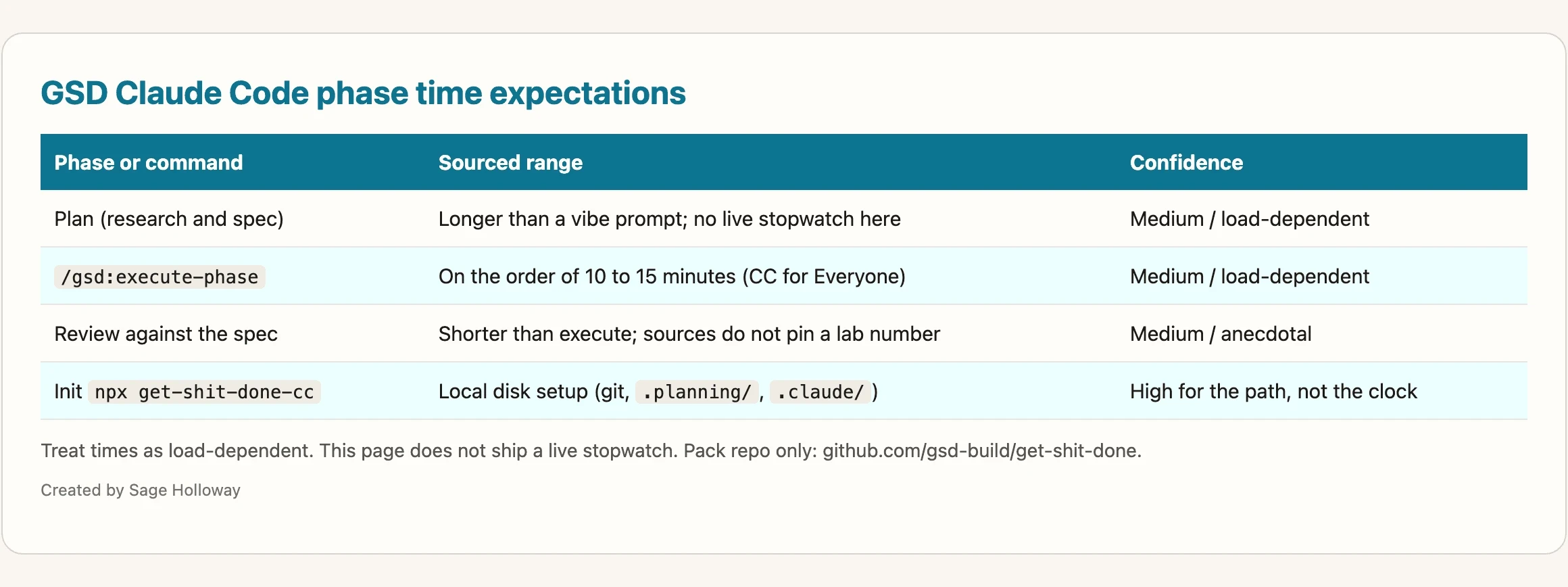
Treat times as load-dependent. This page does not ship a live stopwatch. Pack repo only: github.com/gsd-build/get-shit-done.
CC for Everyone publishes time expectations, including on the order of 10 to 15 minutes for /gsd:execute-phase. Confidence: medium. Model load and network latency move those numbers. Do not put them in a sprint commitment.
Some GSD users report that extra tokens in planning still beat a token bonfire of retry-the-broken-vibe-session. That is a different claim from Sequential Thinking MCP’s reasoning-twice warning. Planning spend can save rework. Metadata on top of an already-reasoning model can just double the thinking. Keep those two stories separate when you look at a bill.
Frontend-design plugin inside the same loop
High-reasoning work still ships ugly UI if you let the model pick “a clean SaaS landing page” with no constraints. The official frontend-design plugin is how you put aesthetics on the same sequential rails: commit to choices before you generate chrome.
Install from the official plugin marketplace:
Source: anthropics/claude-code plugins/frontend-design. Pair it with Anthropic’s frontend aesthetics cookbook.
The skill’s four-step frame:
Purpose: what the interface is for, in one sentence a stranger could use
Tone: the feeling (brutalist, luxury, editorial), named out loud
Constraints: type, color, spacing rules that survive a second prompt
Differentiation: the one choice that is not the default template
The cookbook forbids generic Inter and purple-gradient defaults. If your mock still looks like every other generated dashboard, you skipped step 4.
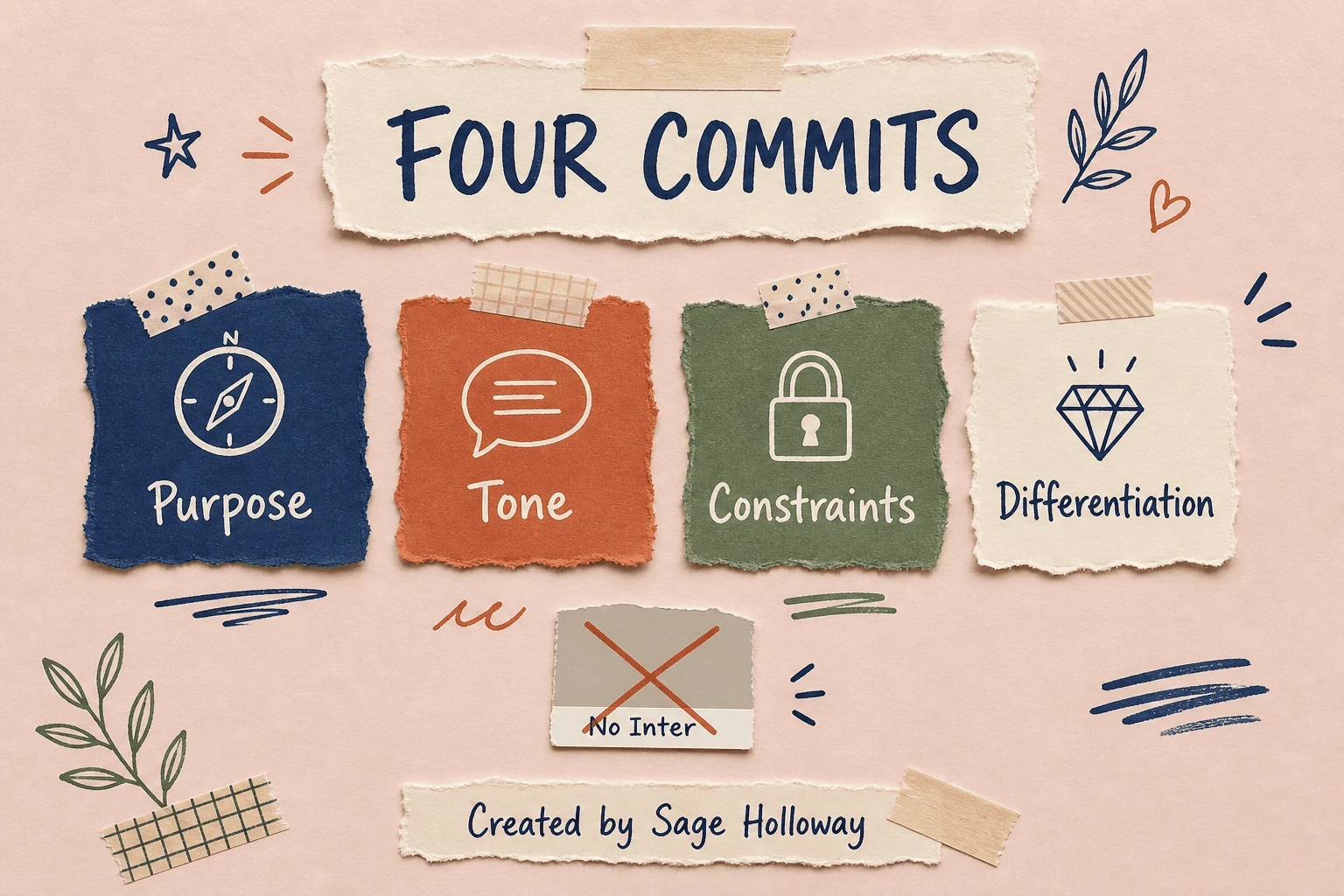
Purpose, Tone, Constraints, Differentiation. The cookbook forbids generic Inter and purple-gradient defaults.
How to use the Claude Code frontend-design plugin inside sequential thinking: run Purpose through Differentiation as explicit thoughts (or as a GSD plan section) before the execute phase writes CSS. Thomas Wiegold’s “stop AI slop” argument is the why. FindSkill’s worked aesthetics are extra examples. This page will not become a top-10 plugins list. That is a related article (Top 10 Frontend Design Skills), not a second H2 here.
No plugin YouTube on this URL. The sequential-thinking visual is thought metadata and isolation, not a Laravel homepage before/after.
Stacking Sequential Thinking with other tools (without a new catalog)
Marshall and Reddit both describe a compound pattern: Sequential Thinking plus a search MCP so the architect can look things up without stuffing the window with guesses. Serena is a third-party semantic code search server. Brave Search is web search. MindStudio is a separate commercial orchestration product (ignore Remy ads). Testbrite is a different testing agent.
One recipe, then stop: keep Sequential Thinking as the reasoning spine, add one retrieval server that matches the job (repo search or web search, not five directories), and refuse to turn this page into another “best MCP servers” ranking. Catalog depth lives on Claude Code MCP servers.
If you are choosing Claude Code versus Cursor for the planning surface itself, that comparison is Claude Code vs Cursor. Gallardo’s mid-2025 pricing notes are already stale. Use the comparison page, not a screenshot from last summer.
FAQ
What is sequential thinking in Claude Code?
It is inspectable reasoning, not a personality pack. Either the Sequential Thinking MCP server records numbered thoughts with optional revisions and branches, or a spec-driven stack such as GSD isolates work in fresh subagent windows. Native TodoWrite / TodoRead can cover simple punch lists without the MCP.
How do I install the Sequential Thinking MCP server in Claude Code?
Run claude mcp add sequential-thinking -s local -- npx -y @modelcontextprotocol/server-sequential-thinking. Broader setups also mention desktop config and VS Code mcp.json. Prefer the official README if a blog’s add command disagrees. Confirm the tool is live by watching thoughtNumber and nextThoughtNeeded.
What is context rot and how does GSD address it?
Context rot is the quality drop as the window fills (practitioner sources often point at about 50 to 70 percent). Models rush, hallucinate, or forget files they already touched. GSD addresses it by splitting Plan, Execute, and Review across fresh workers and /clear, so each phase does not inherit the previous phase’s leftovers.
Can I use GSD for small, quick coding tasks?
Sources treat it as overkill for prototyping and one-off tweaks. Use vibe coding or native todos when the change is small and local. Keep GSD for multi-component work that needs a spec you can reopen next week.
How do I use the frontend-design plugin to avoid generic UI?
Install with /plugin install frontend-design@claude-plugins-official, then force Purpose, Tone, Constraints, and Differentiation before you generate screens. Forbid Inter-and-purple-gradient defaults in the constraints. Iterate once to strip remaining AI tells. Pixel-perfect from a single prompt is a blog fantasy.
Does Sequential Thinking plus a reasoning model burn extra tokens?
It can. Community threads warn about reasoning twice: internal chain-of-thought plus MCP thought metadata. This guide has no live token table. Enable the server for option trees and multi-step debug; skip it when the model is already thinking hard about a tiny diff. GSD’s “planning tokens save retries” story is separate, and also anecdotal.
How do I keep a subagent from running dangerous commands or overwriting files?
Least privilege on tools (read-only reviewers stay read-only). Add PreToolUse hooks that block classes of actions such as SQL DELETE / DROP unless a safety thought was logged. Use isolation: worktree so shell commands stay off your main checkout. Skip bypassPermissions unless you know exactly what you are skipping.
Can subagents remember patterns across projects?
Yes, with memory: user, which official docs tie to a global agent-memory directory. Use memory: project for repo-shared notes, memory: local for notes you do not commit. If auto memory is disabled, those fields do nothing.
Why is GSD an npx setup instead of a one-line plugin?
Because init has to touch the disk: git, .planning/, and .claude/ skills and agents. A plugin install line cannot honestly replace that local orchestration. npx get-shit-done-cc is setup, not a vibe.
The inspectable trail will matter more as teams start treating agent sessions like production systems. Internal reasoning can get cheaper and quieter. Auditability does not. Whether your company will demand numbered thoughts or just better specs is still open. I would not bet the farm on always-on MCP. I would bet on being able to point at a step and say “this is where we branched.”
If you try one thing this week, pick a single architecture decision you have been vibe-coding in one chat. Add Sequential Thinking MCP for that session only, or split Plan and Execute with /clear. Do not install a twelve-server stack as a personality transplant. If you want the next layer, the MCP configuration guide is waiting when you actually need a second door into the repo.
Until then...
Sage
PS. Open last night’s longest session log and highlight every time you said “also just.” If you find more than three, the missing ingredient was a numbered card, not a smarter model.
Author
Practical guides, tool teardowns & AI engineering workflows.


