Claude Code
How to Use Claude Code for QA Automation (Skills, Playwright, and CI)

Sage Holloway
27 min read
Go back to blog
SHARE
You pasted the same checkout flow into a chat window for the third time this week. The script came back looking professional. The selector pointed at a class that existed for one sprint. Nobody reviewed the password sitting in plain text on line forty-seven. The chat called it done. Your next merge will not.
To use Claude Code for QA automation, run /init in the repo root so the agent can read the project, then connect a browser tool (Playwright MCP or Playwright CLI) and add skill.md files that encode how your team writes tests. Keep a human in the loop: generated selectors and credentials need review. For pull requests, anthropics/claude-code-action@v1 can run the same agent headless in GitHub Actions.
The afternoon after that paste job is quieter, and slightly more annoying to set up. You sit the agent in this folder. Or you sit it on a browser with no source at all. Either way, the context gap closes: generic models know how login tests usually look. They do not know your naming, your Page Objects, or which tool is allowed to click.
Commands and config in this guide come from NotebookLM research dated 15 August 2026 (TestCollab last reviewed 3 April 2026; Foxbox 8 December 2025; alexop through April 2026) plus the Claude Code overview and the MCP connector notes. No live CLI verify on this draft. If a blog disagrees with those docs, trust the docs.
This will not work if you treat a generated Playwright file as a merge. It will also not work if you paste proprietary source into a personal chat against company policy, or if you skip --headless in CI and hope a headed browser appears on the runner.
This page will not cover curl install recipes, a ranked MCP catalog, Plan Mode as a product, Cypress flags, or a $20 plan FAQ. Those jobs belong elsewhere. Adding Playwright as a server in general lives on Claude Code MCP servers. Installing the CLI lives on Install Claude Code.
Claude Code helps QA when it can see this repo and drive a browser. It does not replace the person who reviews selectors and credentials.
Who this is for: QA with and without code access
You know the before picture.
You are a manual tester with a spreadsheet of checkout paths. You describe the flow to a generic chat. It invents a data-testid your app never shipped. You spend the afternoon teaching the model your product through paste. Tomorrow the paste is gone.
The after picture is not magic. It is a terminal agent that can read files when you have them, drive a browser when you do not, and still fail loudly if you skip review.
Picture a driving test that never leaves the classroom.
The examiner has a laminated booklet of typical intersections. They ask you what a yellow light means. They have never sat in your car. They do not know the left blinker sticks, that the garage exit is blind, that the school zone starts one block earlier than the painted sign. They still stamp the paper. They sound sure.
That booklet is generic chat. The passenger-seat version is an agent that can open this project and, when you allow it, actually turn the wheel in a browser. Model Context Protocol (MCP) is the door to those tools: browsers, trackers, APIs. Skills are the marked-up procedures that tell the agent how your team tests, not how a tutorial tests.
If you have ever been told “just paste the requirements into ChatGPT,” you already know the booklet. The rest of this page is how to put someone in the car without handing them the keys to production.
TestCollab’s “who benefits” split is the honest one. QA with repo access can ask for blast-radius notes from a pull request diff. QA without source can still drive Playwright for exploratory testing and generate cases from stories or API docs. You lose codebase-aware planning. You do not lose a browser. The TestCollab QA guide is the hub that names those two jobs without pretending they are the same.
Reddit’s r/QualityAssurance thread and the r/ClaudeCode career thread argue the black-box versus white-box career question out loud. Some testers want the agent to explain implementation before they test. Others say that is how you start testing the code instead of the product. I am not going to moralize that. Company policy is the security section. Follow it.
Codex, Cursor, and Windsurf show up in sources as other agents that can speak a similar Skills idea. If you are choosing the IDE surface, that comparison is Claude Code vs Cursor, not a second product guide here. Kimi, Open Code, and KI Code show up as replicas with similar-looking commands. Different products. Different pricing. Do not copy a replica flag into this workflow and assume it landed.
Do you need to know how to code? Sources say no for natural-language exploration. They also say a little architecture literacy is how you catch a lie in the output. Both can be true.
Skills, MCP, and project rules (the context gap)
Claude Code is a terminal agent. It can read files, run commands, and call tools. It is not a chatbot you paste into. The context gap is the whole reason this job exists.
MCP is tool access. A Skill is a markdown file of procedures. A subagent is a fresh instance you send a job to so the main thread does not drown. People mash those three into one blob. Stop.
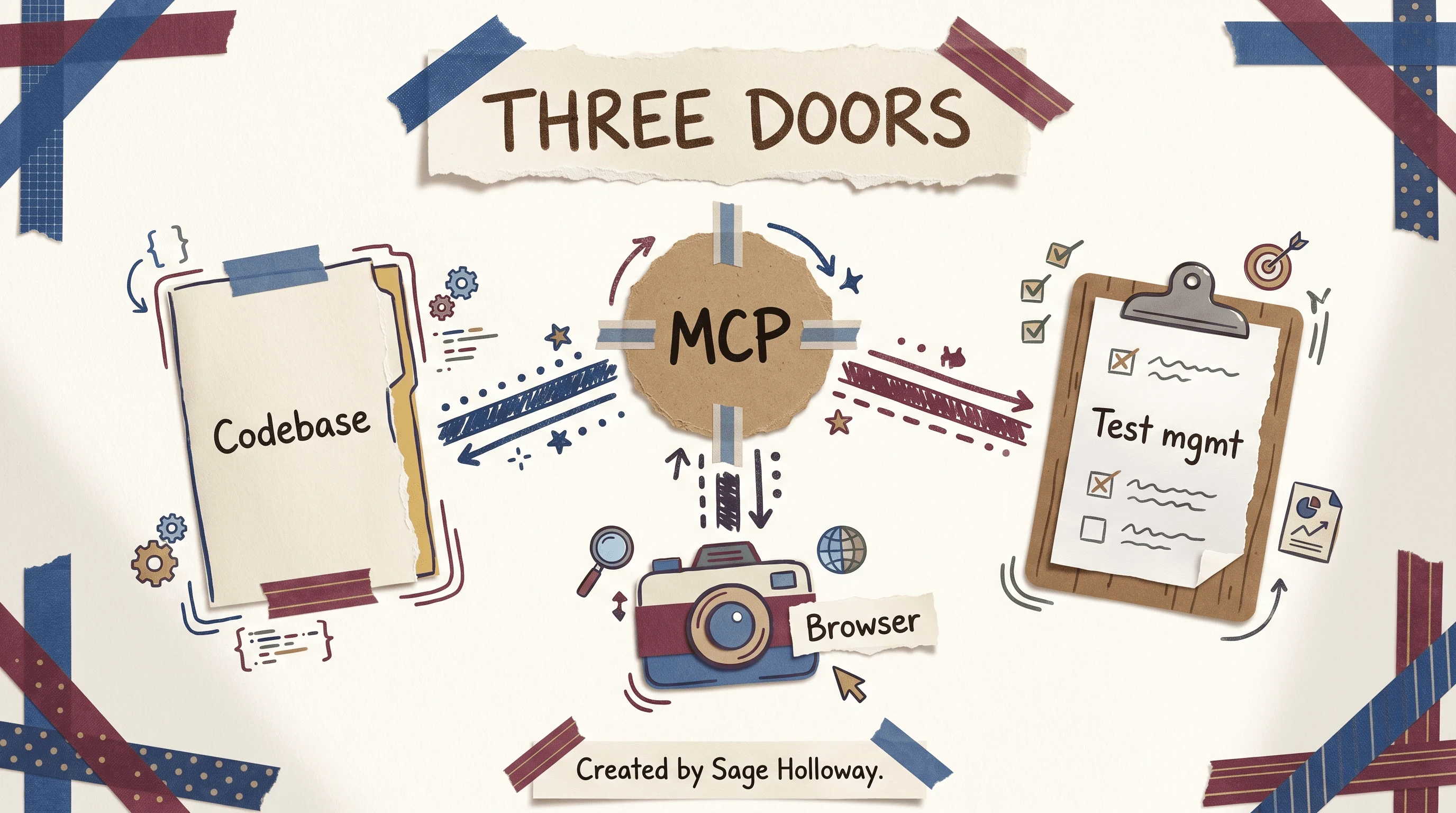
MCP is how the agent reaches tools outside the chat. Skills are how you tell it how your team tests.
TestCollab draws MCP as the hub between codebase, browser, and test management. That picture is the job. The catalog of which servers to add, and claude mcp add syntax, stays on the MCP configuration guide. Here we only care that Playwright (or another browser tool) is one of the doors.
Parallel agents are why some people prefer the CLI over a UI: you can send documentation, a fix, and a review in different directions at once. That is a sentence, not a tenth FAQ.
/init and CLAUDE.md (naming, reuse, how to map steps)
From the repo root, run /init. Sources describe it as the move that lets the agent see what is actually in the folder: structure, dependencies, the shape of the project. Skip it and you are back to describing the car from the parking lot.
Then write project rules in CLAUDE.md. That file is a markdown brief the agent reads as standing orders for this repo. Foxbox treats it as the place you pin naming conventions, method reuse, and how to map annotated steps onto your framework.
If your team always wraps locators in a Page Object (a class that owns the selectors for one screen), say so there. If a generated helper must call an existing loginAs(user) instead of inventing doLogin2, say so there.
The Foxbox automated testing write-up is the source for that rules-file job. I tried dumping every QA preference into one giant prompt for a week. It worked until Thursday. Friday the model invented a new helper because the prompt had scrolled out of the useful part of the window. The file on disk is boring. Boring is the point.
What you now have: a folder the agent has scanned, plus a rules file that survives the next session. Time invested: the length of /init plus however honest you are about naming.
skill.md metadata vs body (name about 64 characters, description about 1024)
A Skill is not a vibe. FicusRoot Lesson 01 (pack video below) treats skill.md as two parts: metadata and body. Metadata is the trigger. Body is the procedure.
Sources put a tight cap on the trigger: skill name around 64 characters, description around 1,024 characters. The body has no character cap in this research pack. Put the persona instructions in the body. Keep the name short enough that the agent can decide whether to load it.
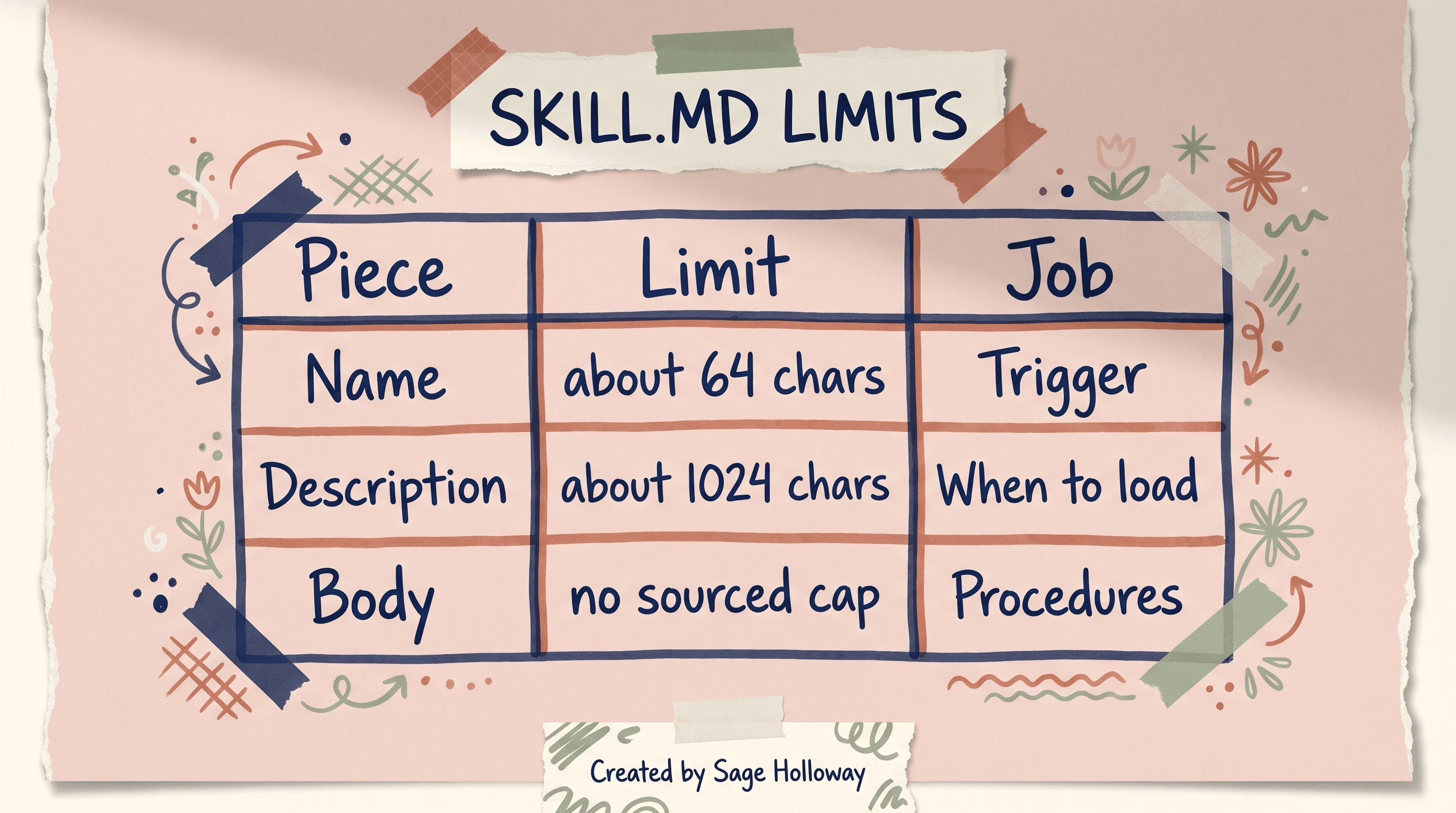
Keep the trigger short. Put the QA persona instructions in the body.
That Security Auditor recipe is a paragraph, not a course. Building Custom QA Skills is a separate guide. Do not turn this URL into a skill workshop.
Subagents as QA personas (fresh 200,000-token instances)
Subagents are how Claude Code delegates a job to a fresh specialized instance. Lesson 01 sources put a 200,000-token window on those instances. A token is a chunk of text the model counts toward its working memory. Use a subagent when compacting the current thread is not enough, or when you want a reviewer who never saw the generator’s rationalizations.
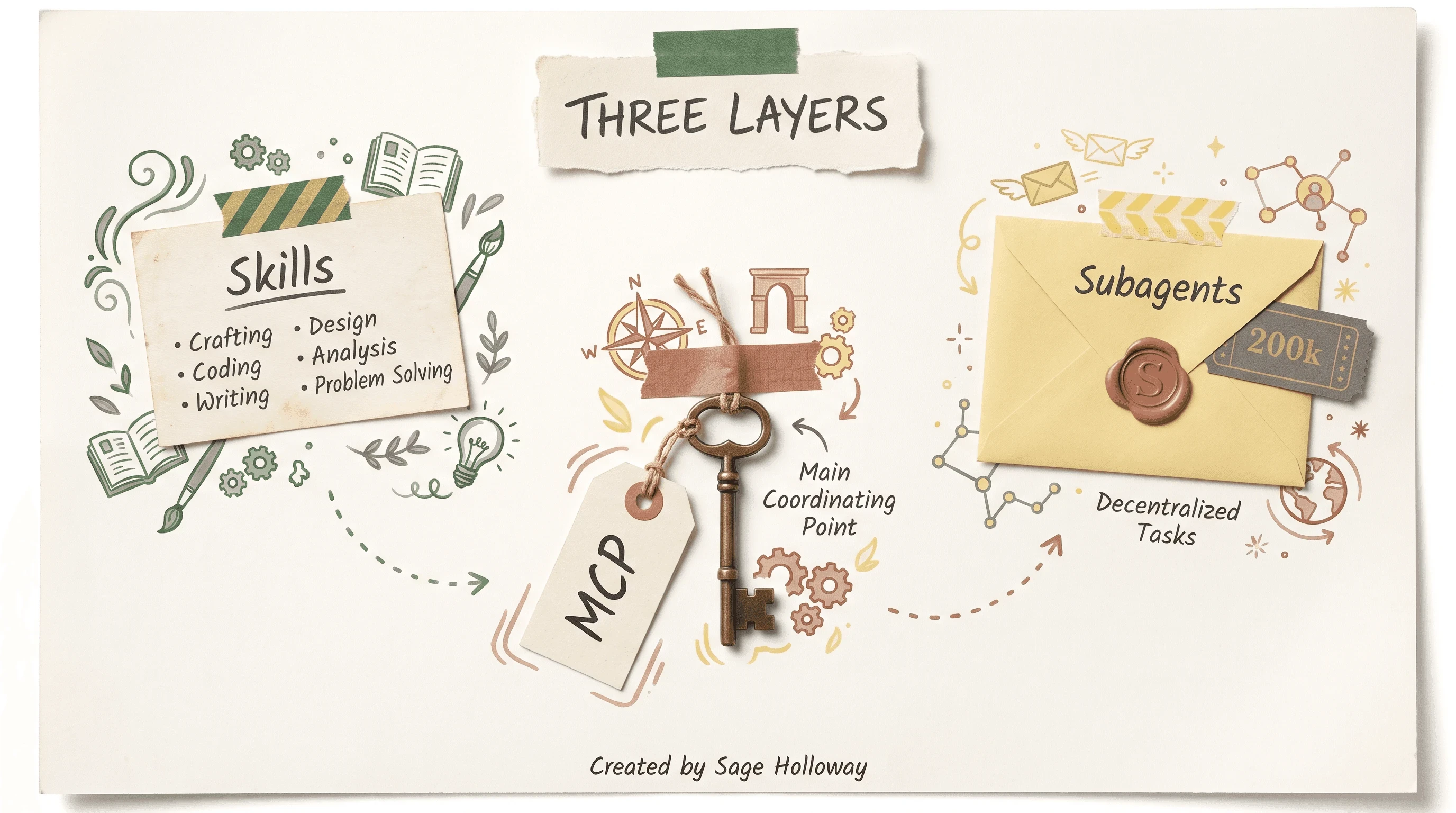
Skills are markdown procedures. MCP is tool access. Subagents are fresh 200,000-token instances.
Isolation, sequential thinking, and when to skip extra reasoning servers live on Sequential thinking in Claude Code. This page only needs the QA persona: Security Auditor, parallel review, a clean window. No Sequential Thinking H2 here.
Watch Ravikanth FicusRoot’s Lesson 01 for Skills, custom subagents, and ParaBank on a real screen, then come back for the files your team should actually commit.
[EMBED: YouTube - https://www.youtube.com/watch?v=pesfXsYuvto ] Caption: Watch Lesson 01 for Skills, subagents, and ParaBank, then come back for the QA rules files.
Manual-to-auto: record, annotate, generate, review
Foxbox’s photo-upload sample is the HowTo spine. LinkedIn’s conversion write-up rhymes with it. Neither one says “prompt once, merge.” The cheap step is generation. The job is the last station.
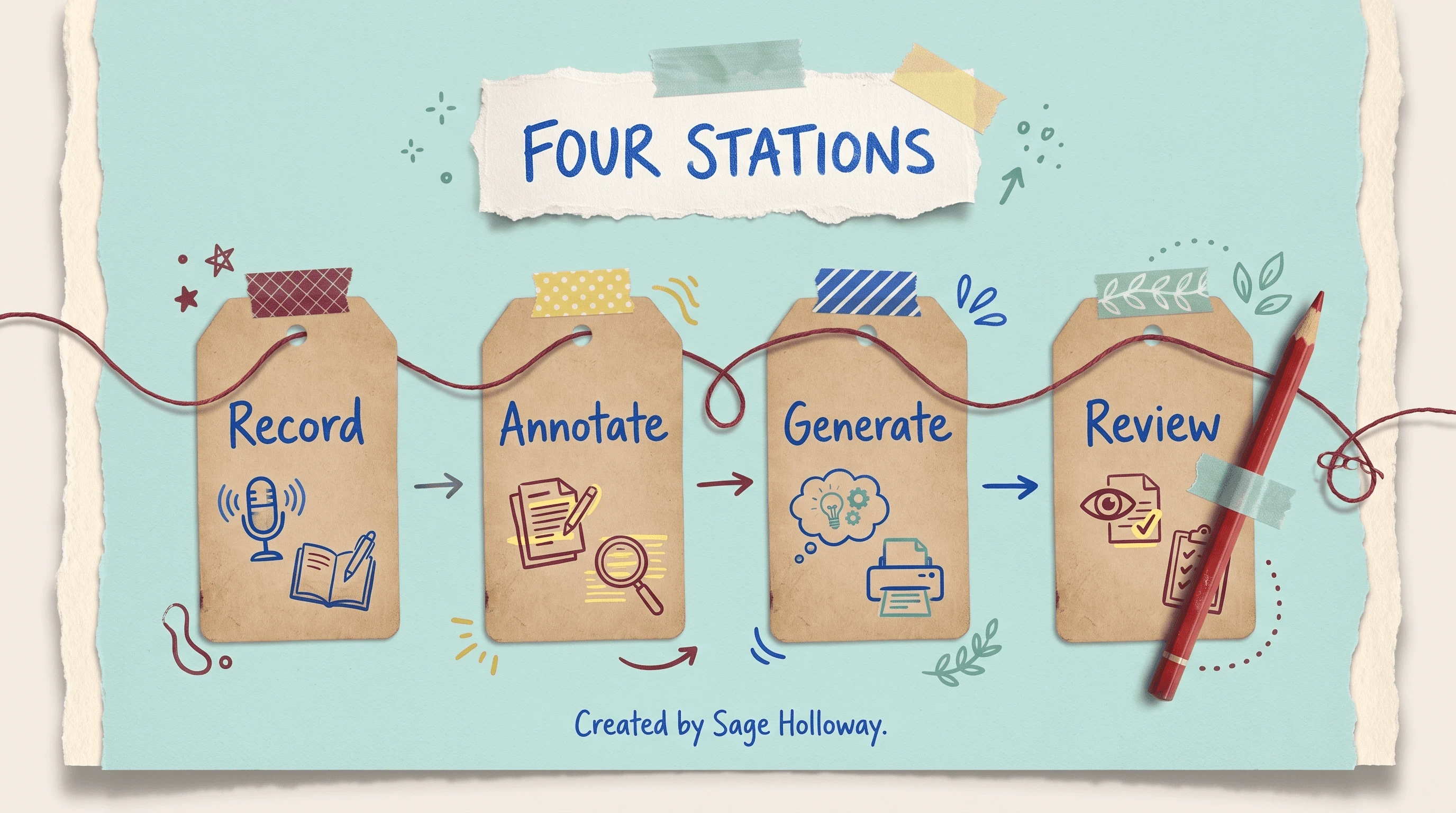
Record and annotate first. Generation is cheap. Review of selectors and hard-coded values is the job.
Record the flow and annotate steps
Do the path yourself first. Foxbox’s sample is a photo upload. Yours might be empty-password login, tax on checkout, or a role that should not see an admin menu. Capture the sequence as a human would: click, type, wait, assert.
Then annotate. Comments are how you teach mapping. “This wait is for the crop modal, not a sleep.” “This button is the primary CTA on the crop screen, not the first button in the DOM.” Feed those notes, not a silent recording dump.
Confused? Fair enough. The recording is evidence. The annotation is the brief. Skip the brief and you get a script that looks like your click trail and behaves like a coin flip after the next CSS refactor.
Let Claude generate Page Objects / scripts
Once the annotated flow exists, ask the agent to draft Page Objects and the test that uses them. LinkedIn’s conversion write-up treats this as the manual-effort cut: turning steps into code, scaffolding helpers, speeding the first debug pass. That is real. It is also the part everyone screenshots.
If you need a plan before edits, Shift + Tab toggles Plan and Edit in the CLI (Testing Academy). Plan Mode as a product lives on Claude Code Plan Mode. Here it is one list item: architect the test, then generate.
Record the flow on the real UI.
Annotate waits, roles, and mapping notes.
Toggle Plan with
Shift + Tabif the structure is still fuzzy.Generate Page Objects and scripts against
CLAUDE.md.Review selectors and values before anyone merges.
Human review: fragile selectors and hard-coded values
Foxbox is blunt: Claude sometimes proposes hard-coded values. Selectors come out fragile. Credentials wander into fixtures. The person who recorded the flow still owns merge.
I tried shipping a generated upload spec with “just a quick look.” The look found a class name from a design spike and a password in a string. The spike class died the next Tuesday. The password did not.
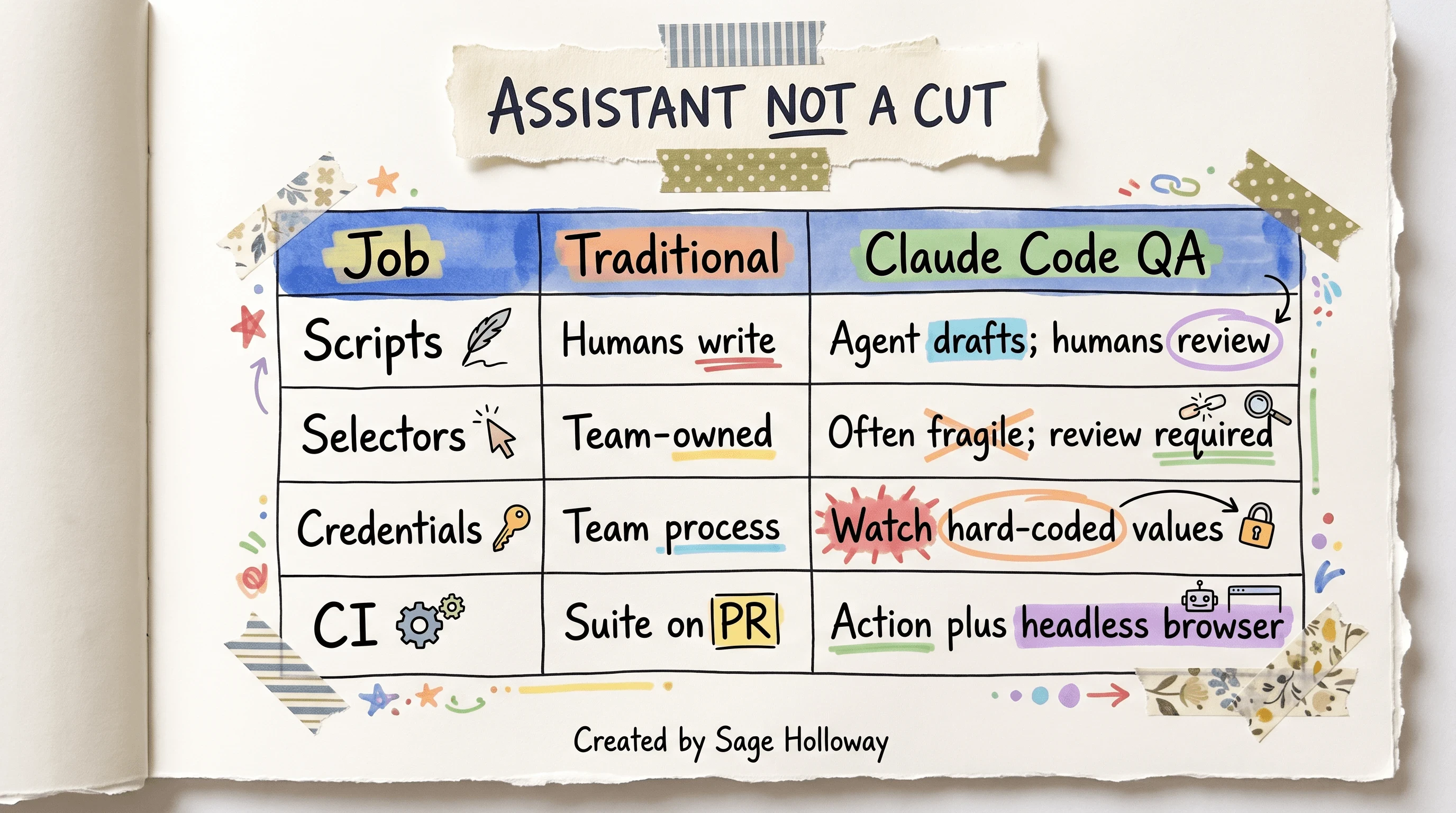
Treat this as an assistant plus CI review, not a headcount cut. Humans still own strategy and merge.
Traditional testing still has humans writing the suite. This workflow has the agent drafting and humans reviewing. CI still runs. The difference is who types the first version of the locator. Do not copy a “I replaced my QA team” headline. The research consensus is assistant plus oversight.
Watch the Testing Academy session for a manual-tester path into automation, including an Ollama mention. Local-model policy stays in the hardening section. This video is the career on-ramp, not the install recipe.
[EMBED: YouTube - https://www.youtube.com/watch?v=HyA5PhzEKGA ] Caption: Watch the Testing Academy session for a manual-tester path. Ollama policy stays in the hardening section.
Browser control: Playwright MCP vs Playwright CLI
Playwright is a browser automation library. In this cluster it shows up two ways: Playwright MCP (a tool server that feeds the agent screenshots and click tools) and Playwright CLI (structured text commands against the same engine). They are not the same interface.
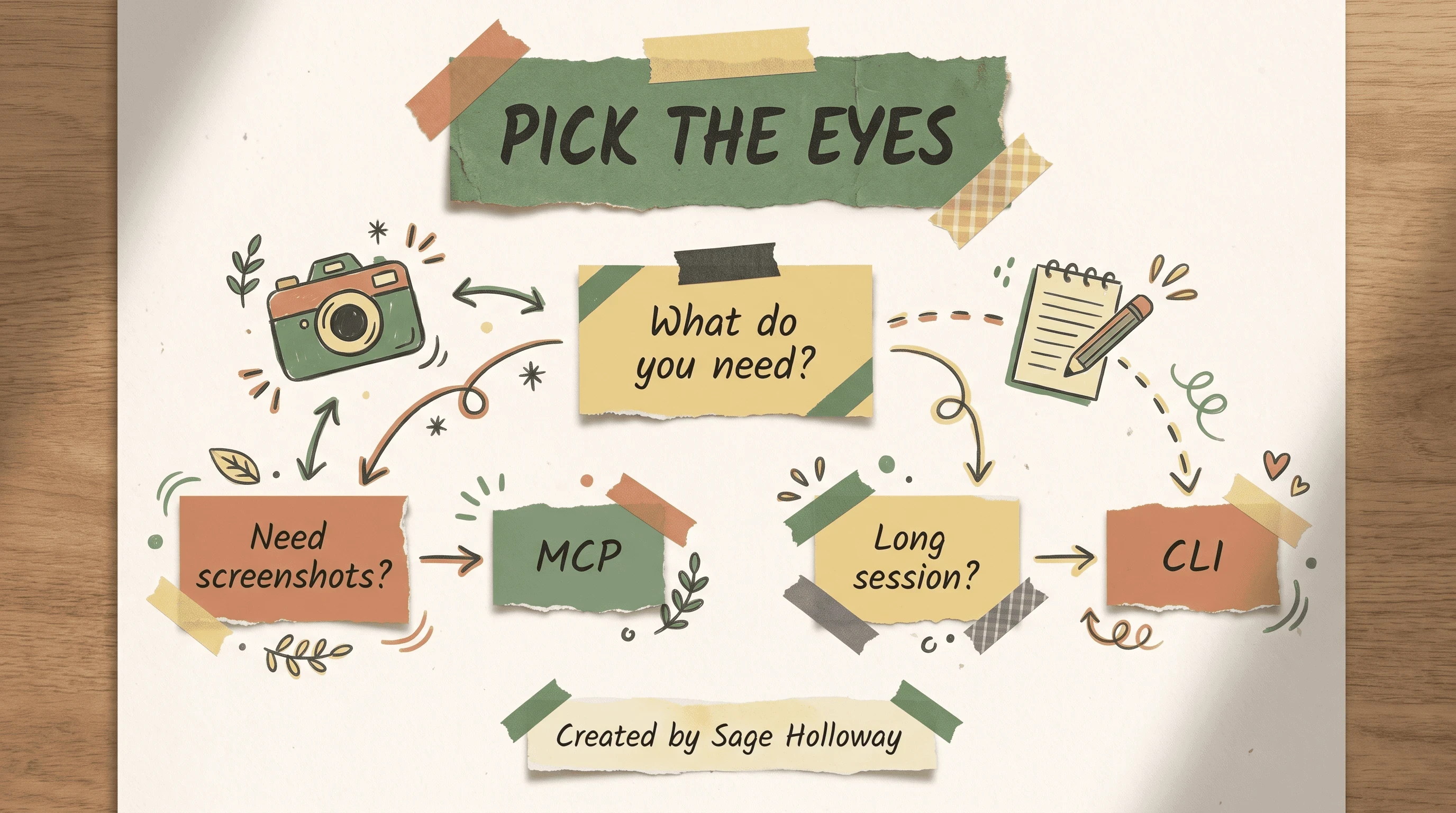
Pick MCP when you need screenshots. Pick CLI when a long exploratory session would drown in image tokens.
TestCollab argues Playwright CLI is more token-efficient on long exploratory sessions because it speaks structured text. Other write-ups and demos prefer Playwright MCP for visual feedback: you see the page the way a screenshot sees it. That is a sourced disagreement, not a stopwatch I ran. This page does not ship a token benchmark.
When would you pick the camera? When you are exploring a UI you cannot read in source, and you need to see error copy, layout, and whether a toast actually appeared. When would you pick the notepad? When the session is long, the evidence is repetitive, and image tokens would crowd out the findings.
A starting install line that shows up as a list item in the research pack:
How you register that server in Claude Code is MCP configuration again. Allowed-tool names you will see in the next section include mcp__playwright__browser_navigate and mcp__playwright__browser_click. Those are examples from alexop’s black-box set, not a complete catalog.
Exploratory testing without code access lives here on purpose. You can still say “walk the empty-password path” in natural language. You cannot honestly ask for blast-radius from a diff you are not allowed to open.
A full token-efficiency guide is a separate Playwright CLI vs MCP article. Keep this URL on the decision, then move.
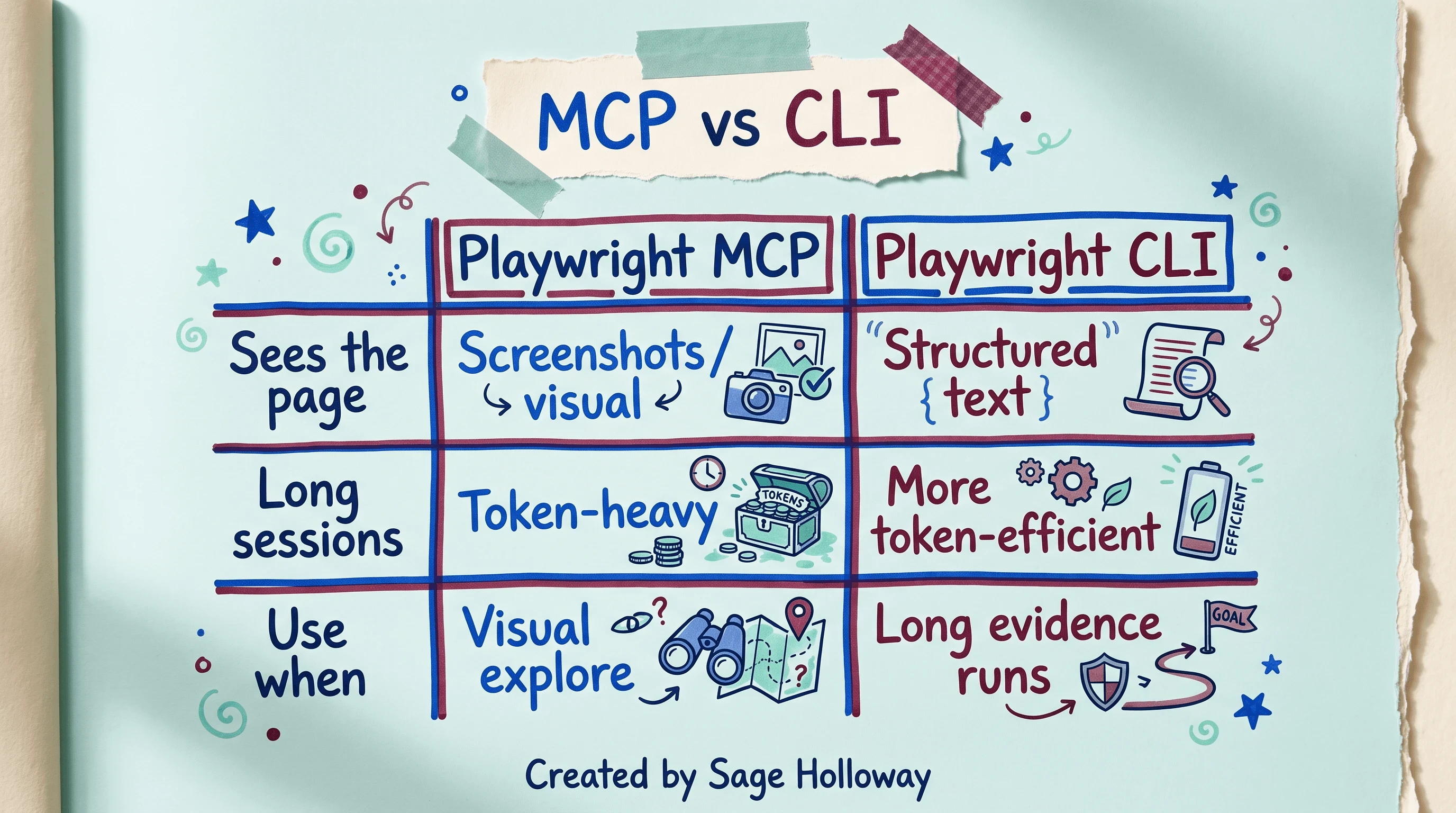
MCP is screenshot-heavy. CLI is structured text. This page does not ship a token stopwatch.
**
Security and review: policies, cheating, credentials
Here is the thing.
An agent that can read your implementation will often pick selectors from the source instead of from the UI. That looks like competence. It is cheating if your job was to test what a user sees. alexop’s “cheat-proof” move is to shrink the tool belt until the agent can only navigate, click, and screenshot.
--allowedTools is the allow-list for which MCP tools the agent may call. Keep the black-box set small. The names in the research ledger are browser navigate, browser click, and screenshot. Do not invent extra tool strings because they sound official.
Screenshot sits in that same allowed set in alexop’s write-up. If the agent can also Read every component file, it will. That is the complication, not a footnote.
The review stamp is boring. It is also the only part that survives a sprint.
Foxbox’s other warning is credentials. Generated tests like hard-coded values. Passwords in strings. Emails that belong to a real person. Treat those as merge blockers even when the script is green.
Manual testers asking the agent to explain proprietary source hit a different wall. The r/QualityAssurance thread is the place that argument already happened. Some people say reading code is career growth. Some say it is how QA stops being independent. Follow employer policy before you feed a repo into a personal tool. This page will not pick a camp for you.
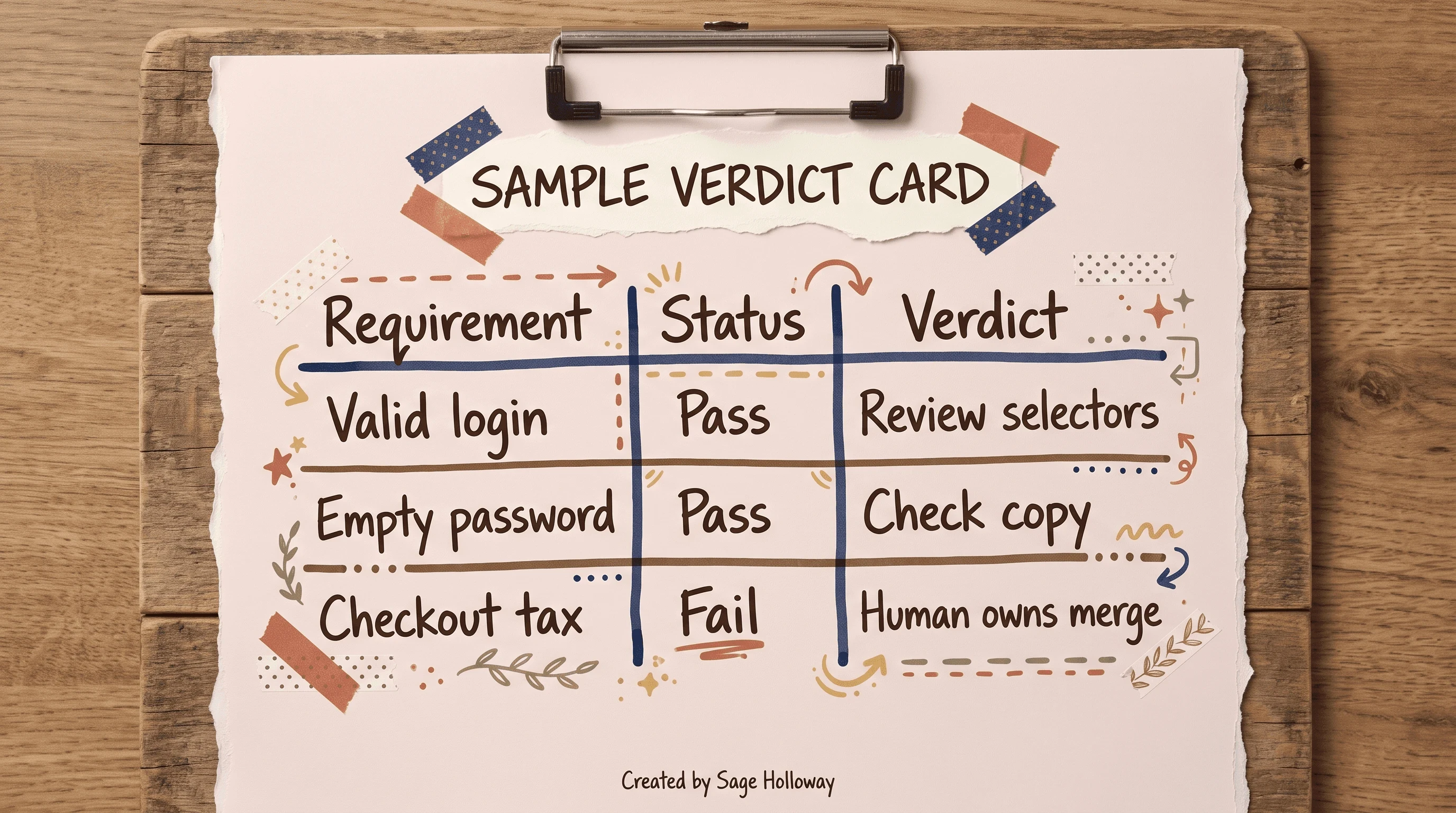
Sample shape only. Not a GitHub Actions screenshot. Restrict tools if you need cheat-proof black-box checks.
The verification card above is a shape, not a real pull request. Requirement, status, verdict. A pass still says “review selectors.” A fail still says a human owns merge. Do not paste a raw Actions log into a blog and call it evidence. The alexop CI write-up is the post to read, not a run URL.
CI/CD: GitHub Actions as the QA agent
The local session is how you teach the workflow. The pull request is how you keep it. alexop’s “secret sauce” is the same agent, without a window, on GitHub Actions.

The Action is the same agent without a window. --headless is required for CI.
Pin the Action from the ledger:
--headless runs the browser with no visible window. Sources call that required for CI. A headed browser on a GitHub runner is a wish, not a plan.
What does the agent actually do on a PR? In alexop’s post, a persona nicknamed Quinn reads the pull request description, drives the allowed browser tools, and writes a verification report. That persona is a blog configuration. It is not an official Anthropic product. Paraphrase the idea. Do not ship someone else’s character sheet as if it were a CLI flag.
PR-description-driven checks are the useful part. If the description says “empty password still shows an error,” the agent can attempt that path. If the description says nothing, you get a vague wander. Write the description like a test charter.
dangerously skip permission shows up in Testing Academy wording as a mode where Claude will not ask you for confirmation. That is a CI caution, not a default. Expand it in the next section. Do not paste it into a public workflow because a demo looked fast.
Official product shape still starts at the Claude Code overview. MCP wiring still starts at the MCP connector notes. Blog YAML is a recipe. Docs win a conflict.
Enterprise hardening and context limits
Locked-down repos do not want a demo flag that never asks. Testing Academy sources describe dangerously skip permission as a bypass of user confirmation. Use it only when a human has already decided the runner is disposable and the tools are already allow-listed. If the agent can still read secrets files, skip-permission is not hardening. It is speed with the airbags off.
Local models come up in the Testing Academy pack video via Ollama, a way to run models on your own machine. This page will not give you an Ollama install. Install depth is Install Claude Code. The QA point is narrower: some teams keep code off hosted models. If that is your policy, the video is a pointer, not a recipe.
Context is the other enterprise tax. A long exploratory session fills the window. /compact saves the conversation so you can free space. /resume restarts from the last saved state. clear forgets the project context and starts fresh. Those names are body here. Session product depth lives on Claude Code sessions. Slash-command catalog depth lives on Claude Code slash commands.
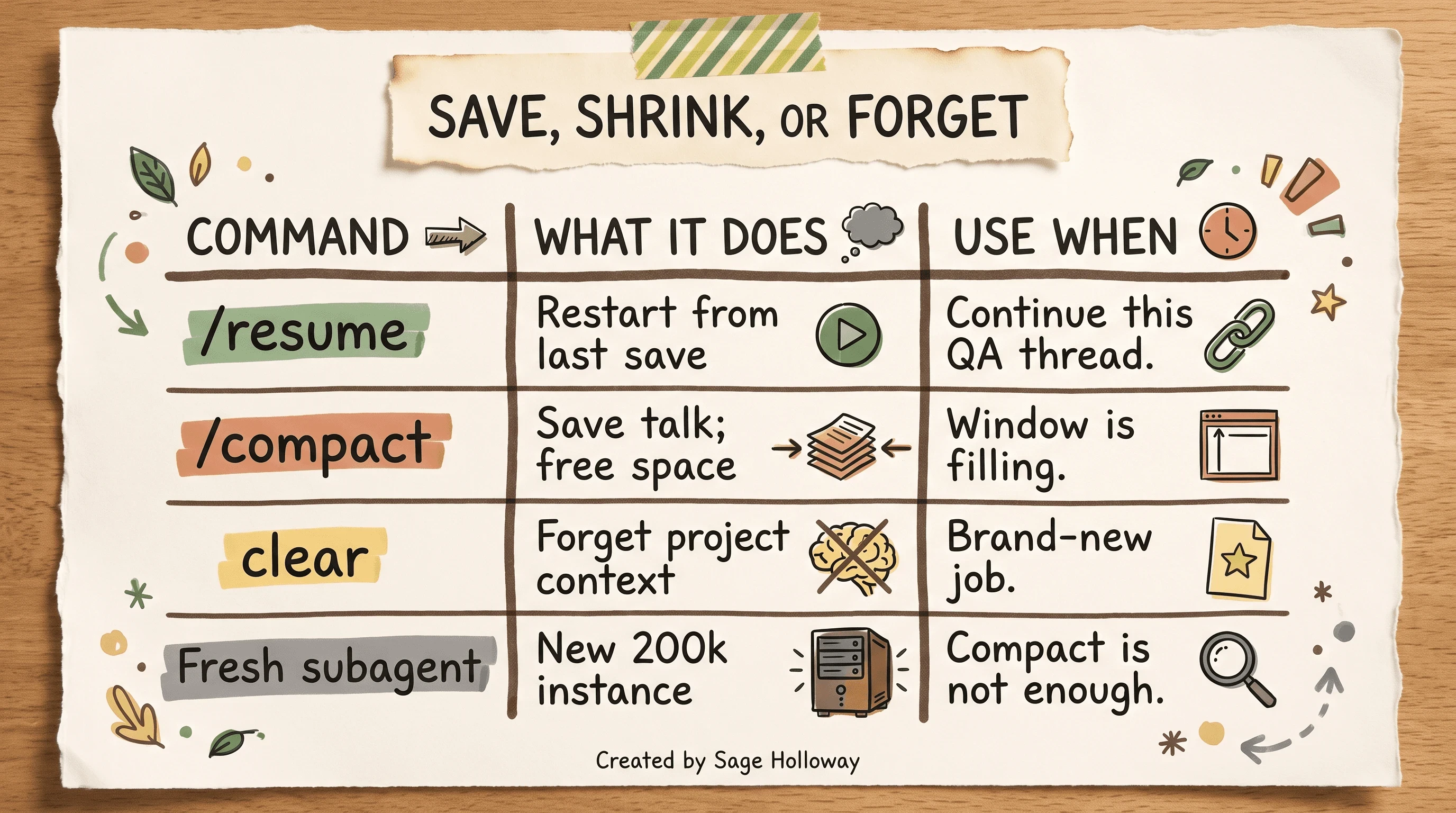
Compact saves this thread. Clear forgets the project. A fresh subagent is a new 200,000-token window.
When is compact not enough? When the thread is already arguing with itself, or when you need a reviewer who never saw the generator’s excuses. Spawn a subagent. Sources put a 200,000-token limit on that fresh instance. Compact shrinks this talk. A subagent is a new car, not a tidier glovebox.
I have been wrong about this before. I compacted a messy exploratory run and asked for a security pass in the same window. The “auditor” kept defending selectors it had invented ten minutes earlier. A fresh instance would have been cheaper than another compact.
Quality governance beyond script generation
Script generation is the demo. Governance is the week after.
TestCollab’s rarer themes are the ones that keep a suite honest: evidence tracking, risk and impact from a code change, test maintenance after the app moves, and a path from bug report to regression case. You can ask the agent to attach screenshots, notes, and a verdict to a case in your tracker if MCP can reach that tracker. You can point it at a pull request diff and ask what might break. That blast-radius question is real. The full impact-based method is a separate Impact-Based Risk Analysis guide. This URL only needs the passage: diffs have a radius; unreviewed generated tests do not measure it.
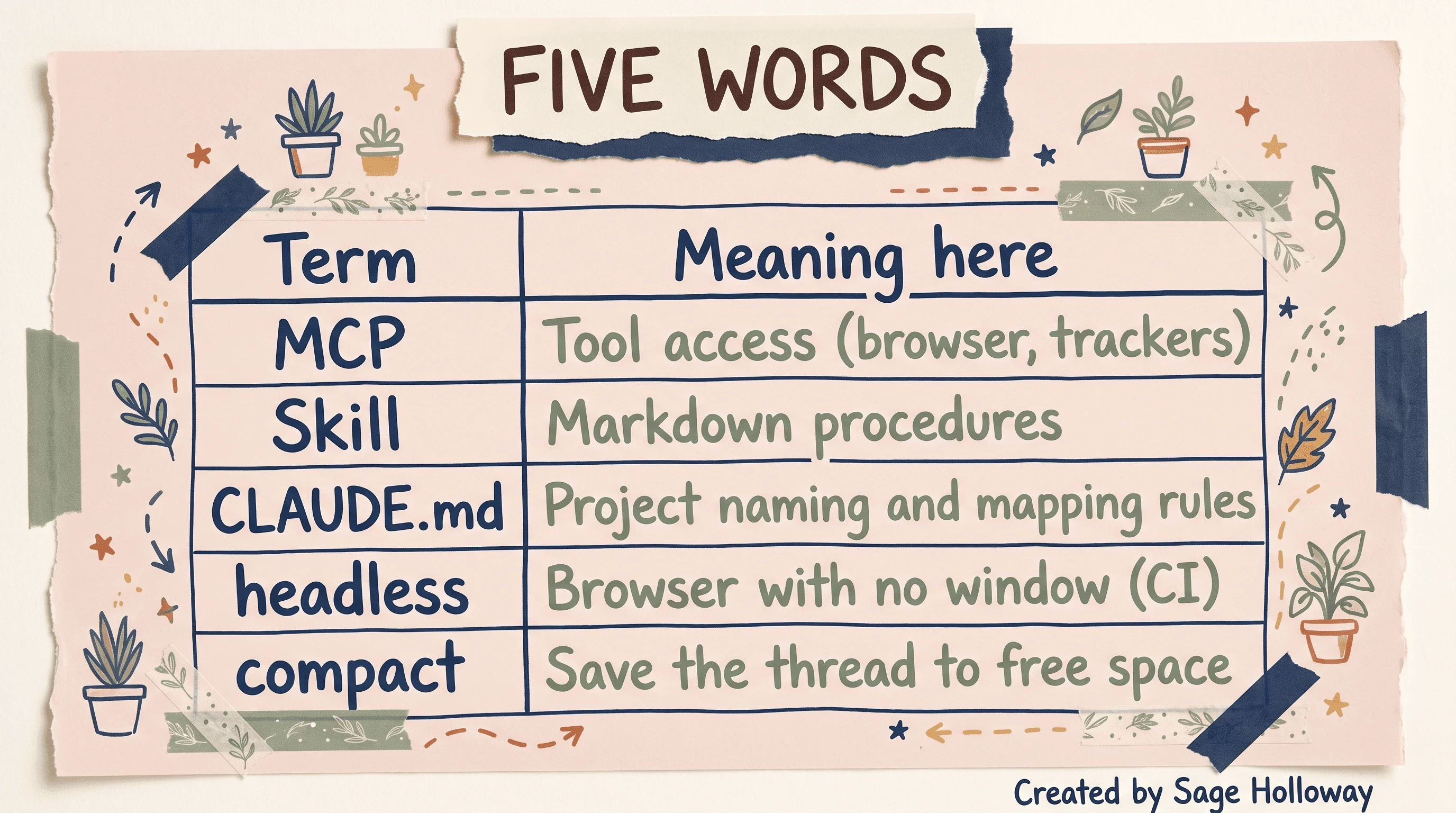
Short definitions only. Impact-based blast-radius method is a separate guide.
Keep the five words distinct. MCP is tool access. A Skill is markdown procedures. CLAUDE.md is project naming and mapping rules. Headless is a browser with no window, which CI needs. Compact saves the thread to free space. Mix them and you will “add a skill” when you needed a browser, or “compact” when you needed a new reviewer.
FAQ
What is Claude Code for QA engineers?
Claude Code is a terminal-based AI agent that can read a codebase, follow project structure, and connect to external tools through MCP. For QA it can draft cases from real code, drive a browser for exploratory testing, and help maintain tests as the app changes. It is an assistant in that loop, not a replacement for strategy.
Can Claude Code replace manual testers?
No. Sources treat it as an assistant for repetitive, context-heavy work such as drafting cases and updating steps. Humans still own test strategy, judgment about user behavior, and the release call. Do not copy a replace-the-team headline.
How does Claude Code differ from generic AI chat tools for testing?
Generic chat works from your description. Claude Code can read project files, follow calls, and act: create artifacts, run a browser session, write a report. The difference is the repo and the tools, not a prettier paragraph.
Do I need to know how to code to use Claude Code for QA?
No for natural-language exploration and case drafting. Yes, a little, if you want to catch bad output. Architecture literacy is how you notice a selector that cannot exist or a helper that duplicates one you already have.
What is the difference between an MCP and a Skill?
MCP gives the agent access to external tools such as browsers, databases, and APIs. Skills are markdown files of procedures that teach how to use those tools for your workflows, including test design or a security review. One is the door. The other is the briefing.
Is Playwright CLI the same as Playwright MCP?
No. Playwright MCP is screenshot-based and visual, which can be token-heavy on long sessions. Playwright CLI uses structured text and is described by TestCollab as more token-efficient for extended exploratory work or evidence capture. Pick with that trade-off in mind. This page did not measure tokens live.
Can I use Claude Code to understand source code if I am a manual tester?
Yes, you can ask it how a feature works before you test. Verify company security policy first. Feeding proprietary source into a personal tool is a policy question, not a productivity hack.
What if my QA team does not have access to the source code?
You can still run exploratory testing with Playwright and generate cases from requirements, stories, or API docs. You lose codebase-aware impact analysis. You can still manage evidence and artifacts if MCP reaches your tracker.
How can Claude Code help reduce manual effort in traditional test automation?
It can convert annotated manual steps into code, draft Page Object classes, help with framework utilities, and speed debugging by reading error output. Review still sits on the human who knows which values must never be hard-coded.
Related guides
Claude Code MCP servers for adding Playwright MCP
Claude Code Plan Mode for
Shift + TabplanningInstall Claude Code for getting the CLI on the machine
Claude Code vs Cursor if you are choosing an IDE surface
Claude Code sessions for
/resume,/compact, andclearClaude Code slash commands for the command catalog
Sequential thinking in Claude Code for subagent isolation depth
Playwright CLI vs MCP, Impact-Based Risk Analysis, and Building Custom QA Skills: separate guides (links when those URLs ship)
Whether teams will treat generated tests as draft artifacts or as merge-ready truth is still moving. I would not bet on the merge button disappearing. I would bet on more PRs arriving with a headless report attached, and on the teams that still read the selectors sleeping better than the teams that only read the green check.
If you try one thing this week, pick a single manual flow you already know. Record it, annotate three waits, generate against CLAUDE.md, and refuse to merge until you have hunted one fragile selector and one hard-coded value. If the browser door is still missing, start with Claude Code MCP servers. If the structure of the test is still mush, start with Claude Code Plan Mode. Subscribe if you want the next guide in this series before it hits search.
Until then...
Sage
PS. Pull last week’s generated spec and count how many locators are a raw class name with no Page Object. If you hit four before you hit a named helper, the recording was fine. The mapping rules never made it into the folder.
Author
Practical guides, tool teardowns & AI engineering workflows.


